warning lights AUDI A5 CABRIOLET 2011 Owner's Manual
[x] Cancel search | Manufacturer: AUDI, Model Year: 2011, Model line: A5 CABRIOLET, Model: AUDI A5 CABRIOLET 2011Pages: 364, PDF Size: 86.48 MB
Page 76 of 364
Clear vision Heated mi rrors
- Rotate the knob to position @ .
Depend ing on the outs ide temperature, the mirror surfaces are
heated until the igni tion is sw itched off -even if the knob is no longe r
in posit io n @ .
You are we ll-advised to fold the o utside mirrors in when maneuvering
in tight spaces or when leaving the ca r pa rked close to other vehicles .
Memory for exterior mirrors*
On vehicles with memo ry fo r the d rive r's seat, the current sett ing for
the exter ior mirrors is automatically stored a long w it h the seat posi
tion=>
page 80 .
Tilt function for the passenger's mirror* (only with
memory for exterior mirrors)
W hen the reverse gear is engaged, the mir ror surface tilts downward
sl ightly if the setti ng is for the passenger 's mirror (knob in pos ition
® => page 73, fig. 79) . T h is allows you to see the curb during paralle l
par king.
The mirror returns to its init ial position as soon as reverse gear is
disengaged and ve hicl e speed is a bove about 9 mph (15 km/h). The
m irror also returns to its in itia l pos ition if the switch is moved to the
dr iver's ou tside mir ror © or the igni tion is sw itched off .
If the posi tion of t he mir ro r surface is changed on a ti lted mi rror, this
new position will be automat ically assigned to the remote key when
t he vehicle is ta ken ou t of reverse gear.
0 Note
Curved mirr or s urfa ces (c onvex o r sp her ica l*) increase your fie ld of
view. Remember that vehicles or other objects will appear smaller
a nd f arth er aw ay than when see n in a fla t m irror. If you use this
m irror to est imate d istances of following vehicles when changing
lanes, you co uld es timate incorre ct ly and ca u se an acciden t.
W Tips
If t here should be a ma lfunction in the elect rical system, you can still
adjust the outside mir rors by pressing the edge of the mirror .•
A ppli es to vehicles: with automa ticall y a djust ing outsi de mi rrors
Automatic dimming for the outside
mirrors
The o utside mirrors dim at the same time as the ins ide mirror . When
the ignition is switched on, t he mi rrors a utomatically dim depend ing
on the a mount of light str ik ing t he m irrors (such as head lights
shining into the vehicle from the rear).
W hen the in ter io r li gh ting is switched on and whe n reverse gear is
engaged, the m irrors are switched back to their original brightness
(no t dimmed) .
& WARNING
Broken glass of automatic dimming mirror can cause electrolyte
fluid leakage. Electrolyte fluid can irritate skin, eyes , and resp ira
tory sy stem.
• Repeated or prolonged exposure to electrolyte can cause irrita
tion to the respiratory system, especially among people with
asthma o r other respiratory conditions . Get fresh air immediately
by leaving the vehicle or, if that is not po ssible, open window s and
doors all the way.
• If electrolyte gets into the eyes, flush them thoroughly with
large amounts of clean water fo r at least 15 minutes; medical
attention i s recommended.
• If elect rolyte contacts skin , flush affected area with clean
water for at lea st 15 minutes and then wash affected area with
soap and water; medical attention is recommended. Thoroughly
wash affected clothing and shoe s before r eu se. .,
Page 112 of 364
ffl..__O_ n_ t_h _e_ r_o _ a_ d _________________________________________________ _
0 Note
If the eng ine has been under heavy load for an extended period, heat
builds up in the engine compartment after the engine is switched off
- there is a risk of damaging the engine. Allow the engine to run at idle
for about 2 minutes before switching it off. •
Electromechanical parking brake
Operation
The electromechanical parking brake replaces the hand
brake.
Fig. 111 Center
consol e: Par king brake
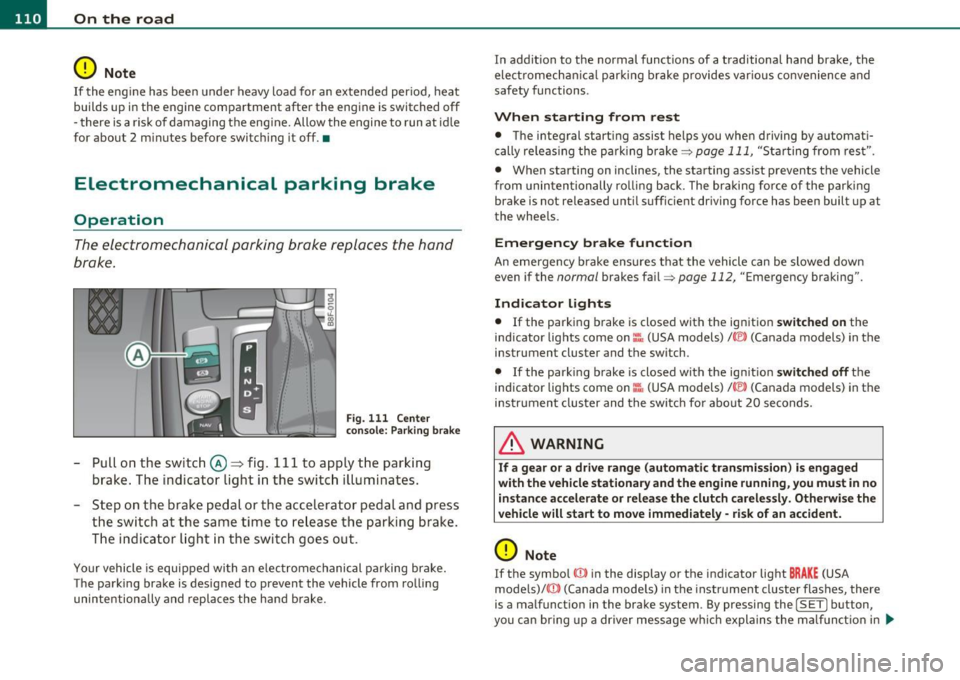
-Pull on the switch @~ fig. 111 to apply the parking
brake . The indicator light in the switch illuminates.
- Step on the brake pedal or the accelerator pedal and press
the switch at the same time to release the parking brake.
The indicator light in the switch goes out.
Your vehicle is equipped with an electromechanical parking brake.
The parking brake is designed to prevent the vehicle from rolling
unintentiona lly and replaces the hand brake. In addition to the normal functions of a traditional hand brake, the
electromecha
nical parking brake provides various convenience and
safety functions.
When starting from rest
• The integral starting assist helps you when driving by automati
cally releas ing the parking brake=>
page 111, "Starting from rest".
• When starting on inclines, the starting assist prevents the vehicle
from unintentionally ro ll ing back. The braking fo rce of the parking
brake is not released until suff icient driving force has been built up at
the whee ls.
Emergency brake function
An emergency brake ensures that the vehicle can be slowed down
even if the
normal brakes fail=> page 112, "Emergency braking" .
Indicator lights
• If the parking brake is closed with the ignition switched on the
ind icator lights come on:::, (USA models)/ ®) (Canada models) in the
instrument cluster and the switch.
• If the park ing brake is closed with the ign it ion
switched off the
indicator lights come on
::'l'n (USA models) I © (Canada models) in the
instrument cluster and the switch fo r about 20 seconds.
& WARNING
If a gear or a drive range (automati c transmission ) is engaged
with the vehicle stationary and the engine running , you must in no
instance accelerate or release the clutch carelessly. Otherwise the
vehicle will start to move immediately -risk of an accident.
0 Note
If the symbol ID in the display or the indicator light BRAKE (USA
mode ls)/ ((j)) (Canada models) in the instrument cluster flashes, there
is a malfunct ion in the brake system. By pressing the
! SET] button,
you can bring up a driver message which explains the ma lf u nction in .,
Page 116 of 364
IIIIL-_O.::...:. n.:....: t:.:.h.:.. e::....: r...: o:.. a .::..: d,;__ ________________________________________________ _
& WARNING (continued)
• Please note that unconsciously "resting" your foot on the
accelerator pedal causes cruise control not to brake. This is due to
the control system being overridden by the driver's acceleration.
• If a brake system malfunction such as overheating occurs when
the cruise control system is switched on, the braking function in
the system may be switched off. The other cruise control functions remain active as long as the indicator light
CRUISE (US model) / (;f
(Canadian model) is on.
(I) Tips
The brake lights illuminate as soon as the brakes apply
automatically. •
Applies to vehicles : w ith cr uise contro l
Changing speed
-Press the lever in the direction of the
0 => page 113,
fig . 112 or in the direction of the Oto increase or
decrease your speed.
- Let go of the lever to save that speed.
Change speed in increments of 1 mph (1 km/h) by lightly press ing the
lever . If you keep the lever pressed down, you will alter your speed in
5 mph (10 km/h) incremen ts.
You can also press the accelerator pedal down to increase your speed,
e .g . if you want to pass someone. The speed you saved earlier will
resume as soon as you let off of the accelerator pedal.
If, howeve r, you exceed your saved speed by 5 mph (10 km/h) for
longer than 5 minutes, the cruise control will be turned off tempo
rarily. The green symbol in the display turns white, the saved speed is
retai ned .•
A pp lies to veh ic les : wi th cru ise contro l
Pre-selecting speed
You can pre-select your desired speed while the vehicle is
not moving.
- Turn on the ignition.
- Pull lever into position 1
=> page 113, fig. 112.
- Press the lever in the
0 or O direction to increase or
decrease your speed.
- Let go of the lever to save that speed.
This function makes it possible, for example, to save the speed you
want before driving on the highway. Once on the highway, activate
the cruise control by pulling the lever toward
(D . •
App lies to veh icles : w ith c ruise contro l
Switching off
Temporary deactivation
-Step on the brake pedal, or
Press the lever into position @ (not clicked into place)
=> page 113, fig. 112, or
- Drive for longer than S minutes at more than S mph
(10 km/h) above the stored speed.
Switching off completely
-Press lever into position @ (clicked into place), or
- Switch the ignition off.
Page 124 of 364
-Adaptive cruise control .Ml..___,___ _____________ _
Driving pro
gram
Dis tance 1
Distance 2
Distance 3
& WARNING
dynamic
1
2
2
3
standard
2
3
3
4
comfort
3
4
4
5
-
When setting the distance, the dri ver is responsible for adhering
to the respect ive national and country -specific regulations .
• Following other vehicles too closely increase s the risk of colli
sions and serious personal injury.
• Setting short distance s to the traffic ahead reduce s the time
and d istanc e av ailable to bring your vehicle to a safe stop and
makes it even more neces sary to pay clo se attention to traffi c.
• Always use good judgment and select a safe following distance
for the traffic , road and weather condition s.
(I] Tips
The d istance setting is reset to the factory default DISTANCE 3 the
next time the ignition is t urned on .•
Driver information
Ap plies to veh icles: w it h ad aptiv e c ru is e co ntro l
Displays in the instrument cluster
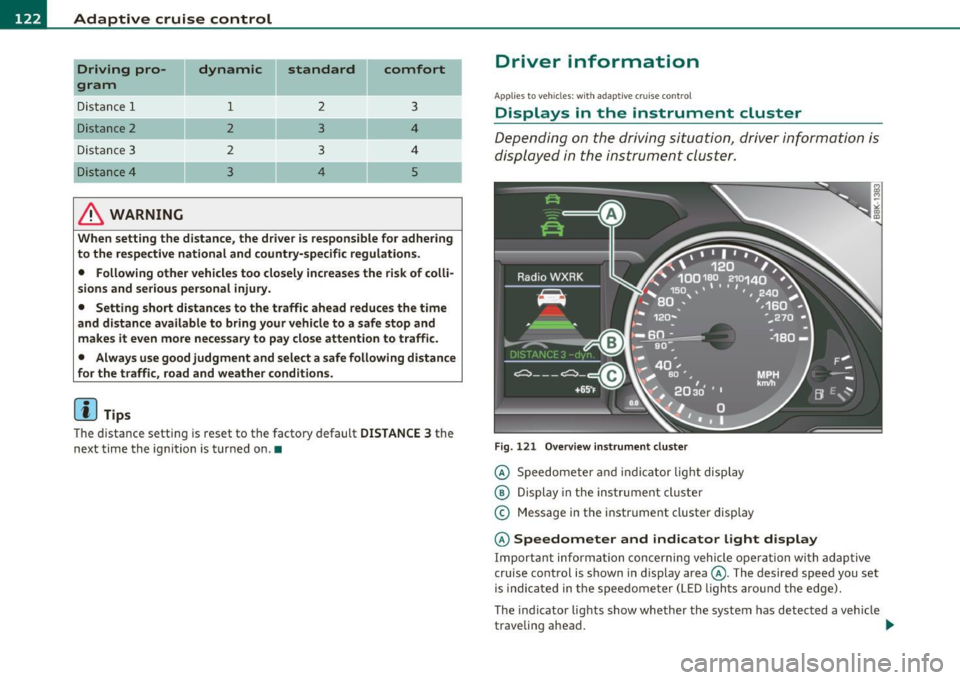
Depending on the driving situation, driver information is
displayed in the instrument cluster.
Fig. 1 21 O verv iew i nstrum ent clu ste r
© Speedomete r and indicator light disp lay
@ Display in the ins trument cluste r
© Message in the instr ument cluster disp lay
© Speedometer and indicator light d isplay
Important informa tion concerning vehicle ope ration wi th adap tive
cruise control is shown in display area@. The desired speed you set
is indica ted in the speedome ter (L ED ligh ts aro und the edge).
T he indicator lights show whether the system has detected a veh icle
traveling ahead . .,,.
Page 125 of 364
Adaptive cruise control -____________ __._ __ _
@ Display in the instrument cluster
In disp lay area @ information from the navi gation system * and the
tr ip computer is displayed in add it ion to informa tion about adaptive
c ruise contro l.
You can sele ct among the differe nt info rmatio n by repeated b rief
taps on the
I RESET! button on the winds hield w iper lever => page 23,
"Operat io n".
© Status indicator
Th e info rmation i n area © is no t disp layed per manently. Infor mat ion
is d isplayed o nly if yo u set or c hange the speed setting, change the
ti me in terva l, when messages a re displayed or if the ad apt ive cru ise
cont rol is turned off for safety reasons. •
Appli es to vehicles : w ith a daptive cruise c on tro l
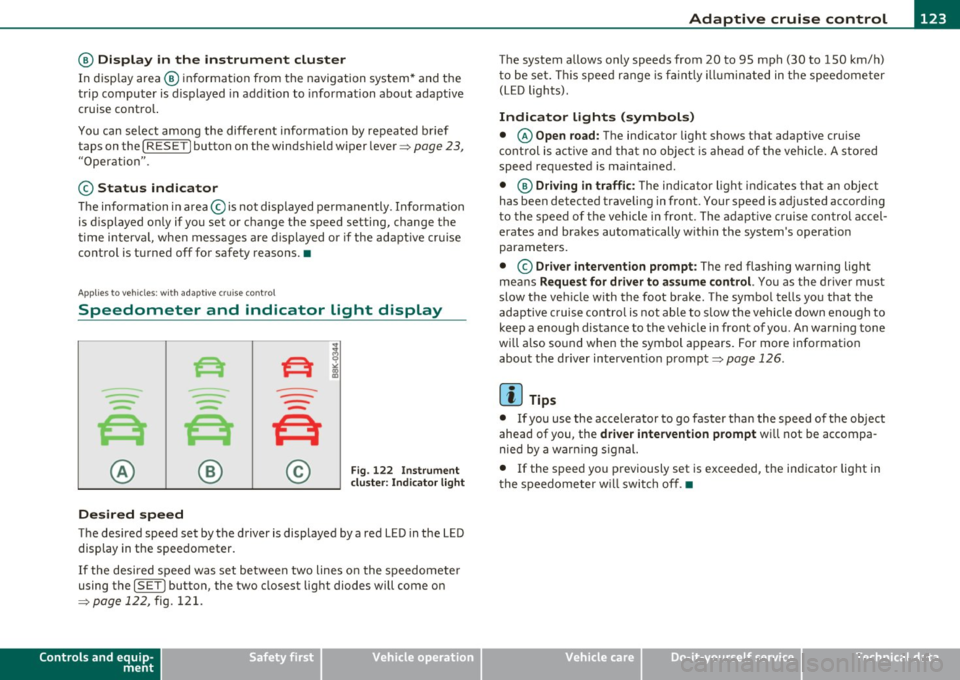
Speedometer and indicator light display
----
- -
- -
@ ®
Desired speed
- -
--
Fig . 122 I nstru ment
cl uste r: Indicator light
T he desired speed set by the driver is displayed by a red LED in the LED
disp lay in the spee dometer.
If the desi red s peed was set be twee n two lines o n the speedo mete r
using the
[ SET J button, the two closest light diodes will come on
=>
page 122, fig. 121.
Controls and equip
ment Safety first
T
he system allows only speeds from 20 to 95 mph (30 to 150 km/ h)
t o be se t. T his spee d range is f aint ly ill um inat ed in t he s pee dome ter
(LED lights) .
Indicator lights (symbols)
• © Open road: The indicator light shows t hat adaptive cruise
co ntrol is a ctive and t hat no objec t is ahe ad of the vehi cle. A sto red
speed req uested is maintained.
• @
Driving in traffic : The indicator l igh t ind icates th at an object
has been detected traveling in front . Your speed is ad justed according
t o the spee d of t he vehicle in front. The adaptive c ruise con trol accel
erates and bra kes au tomatically w it hin the system's operat io n
parame ters.
• ©
Driver intervention prompt : The red flashing warning light
me ans
Request for driver to as sume control. You as the drive r m ust
slow t he ve hicle w ith the foot brake . The symbo l tells yo u that the
adaptive cruise contro l is not able to s low the vehicle down enough to
keep a enough distance to the vehicle in front o f you. An war ning tone
wi ll also so und when the symbol ap pears. Fo r more informat ion
abou t the driver intervent ion prompt=>
page 126 .
W Tips
• If you use the ac cele rator to go fa ster than the speed of the object
ahead of you, the
driver intervention prompt will not be accompa
nied by a war ning signal.
• If the speed you p reviously set is exceeded, the ind icator light in
t he s peedometer w ill swit ch off .•
Vehicle care Technical data
Page 152 of 364
ffl..__T_ r_a _n_ s_ m_ is_ s_io _ n ___________________________________________________ _
R -Reverse
Th e transmission will automatically select the lowest gear ratio when
you shift into reverse.
Select
R only when the vehicle is at a full stop and the engine is
running at idle speed=>
& in "Driving the automatic transmission"
on
page 148 .
Before you move the selector lever to R, press both the button in the
handle of the selector lever
and the brake pedal at the same time.
When the ignition is on, the backup lights illum inate when the
selector lever is moved into
R.
N -Neutral
The transmission is in neutral in this position . Shift to this position
for standing with the brakes applied~
page 150.
When the vehicle is stationary or at speeds below 3 mph (5 km/h),
you must always apply the footbrake before and while moving the
lever out of
N.
D -Normal position for driving forward
Position Dis for normal city and highway driving. It ranges from zero
to top speed and all gears shift automatically, depending on engine
load, driving speed and automatically selected shift programs.
When the vehicle is stationary or at speeds below 3 mph (5 km/h),
you must always apply the foot brake before and while moving the
lever to
D out of N .
In certa in circumstances it may be advantageous to temporarily
switch to the manual shift program to manually select gear ratios to
match specific driving conditions~
page 152.
S -Sport position*
Select this position for sportier performance. In this position, the
transmission will not upshift as soon, allowing the vehicle to use the
increased power available at higher engine speeds to achieve livelier
acceleration . When the vehicle
is stationary or at speeds below 3 mph (5 km/h),
you must always apply the foot brake before and while moving the
lever to
S out of N.
& WARNING
Read and follow all WARNINGS=> & in "Driving the automatic
transmission" on
page 148 .
0 Note
Coasting downhill with the transmission in N and the engine not
running will result in damage to the automatic t ransmiss ion and
possibly the catalytic converter. •
Applies to vehicles: with automat ic transmissio n
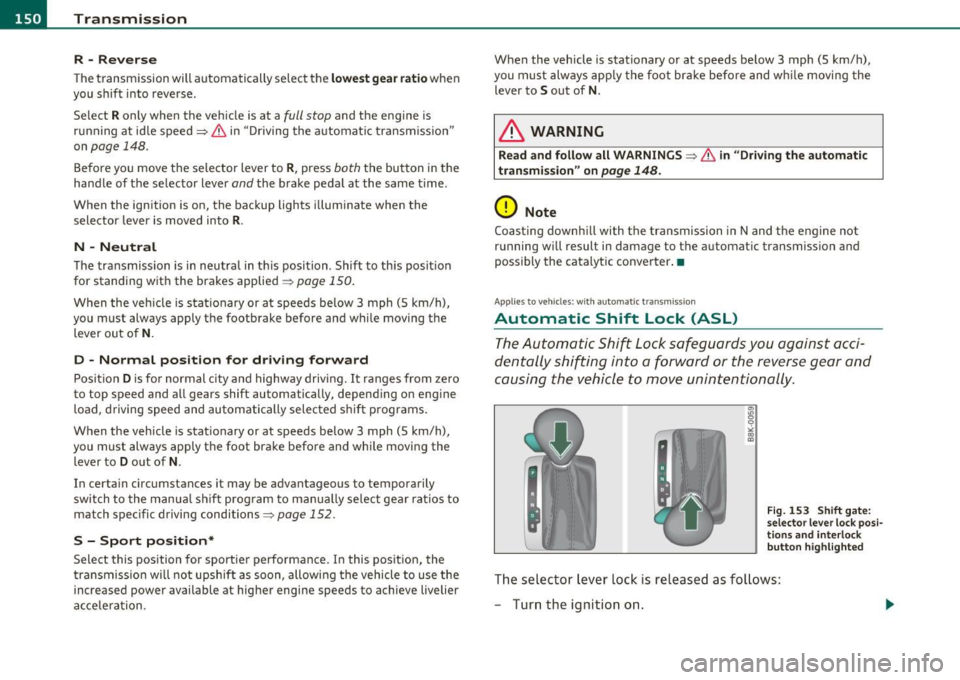
Automatic Shift Lock (ASL)
The Automatic Shift Lock safeguards you against acci
dentally shifting into a forward or the reverse gear and
causing the vehicle to move unintentionally.
Fig. 153 Shift gate:
selector lever lock posi
tions and interlock
button highlighted
Th e selector lever lock is released as follows:
- Turn the ignition on.
Page 159 of 364
____________________________________________________ T_r_a _ n_ s_m_ i_ s _s_ i_ o _ n __ ffllll
Before you move the selector lever to R, press both, the button in the
hand le of the se lec tor lever
and the brake peda l at the same t ime.
When the ignition is on, the backup lights illuminate when the
selector lever is moved into
R.
N -Neutral
Shift to this position for standing with brakes applied=> page 157.
When the vehicle is stat ionary o r at speeds below 3 mph (5 km/h),
you must always apply the footbrake before and while moving the
lever ou t of
N .
Do not use N for coasting downh ill.
D -Normal dri ving po sition for f orward
Depending on the load on the engine, veh icle speed and the dynamic
cont rol program, the t ransm ission wi ll se lect the
o ptimal gear ratio.
In certa in circumstances it may be advantageous to temporarily
switch to the manua l shift program to manually select gear ratios to
match specific driving conditions=>
page 159.
When the vehicle is stat ionary or at speeds below 3 mph (5 km/h),
you must always apply the footbrake before and wh ile moving the
lever to
D out of N .
S -Sport po sition
Select this position for sportier performance. In this position, the
transm ission will not upsh ift as soon, allowing the veh icle to use the
increased power available at higher engine speeds to achieve livelier
accelera tion.
When the vehicle is stat io nary or at speeds below 3 mph (5 km/h),
you must always app ly the foot brake before and while moving the
lever to
S out of N.
& WARNING
Read an d follo w all W ARNINGS => & in " Drivin g the mul ti
tronic ®" on
pag e 155.
Controls and equip
ment Safety first
0 Note
Coast
ing downh ill with the transmission in N and the engine not
operating will resu lt in damage to the automatic transmission and
poss ibly the cata lytic conve rter. •
App lies to veh icles: w ith mult itronic ® Continuously Va riab le T ransmiss ion (CVT)
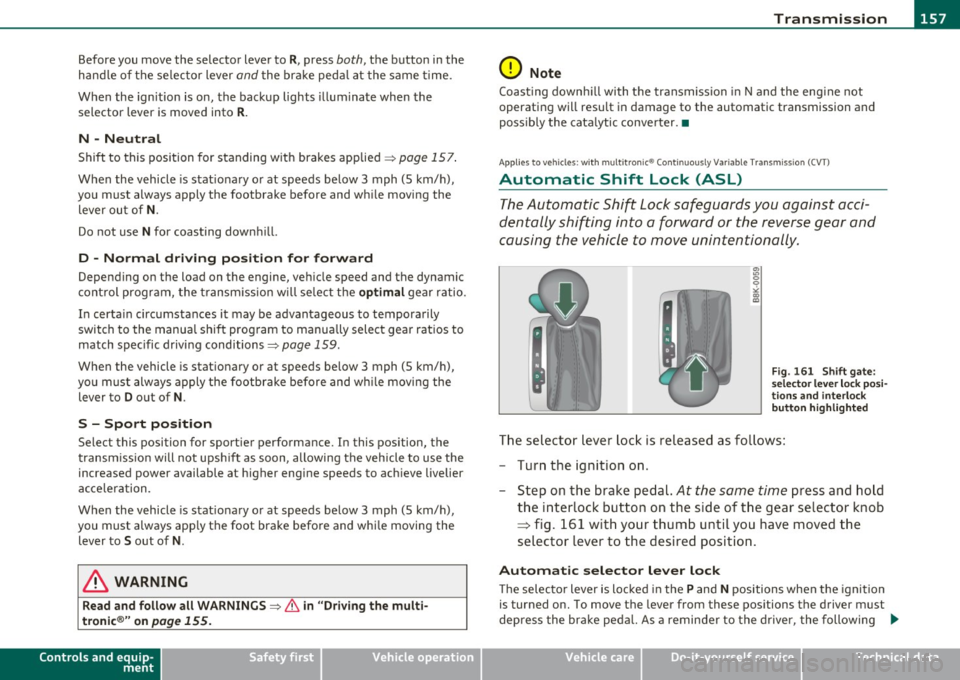
Automatic Shift Lock (ASL)
The Automatic Shift Lock safeguards you against acci
dentally shifting into a forward or the reverse gear and
causing the vehicle to move unintentionally.
"' "' 0 9
"' ::l
F ig. 16 1 Shi ft ga te:
s e lec tor lev er l ock pos i
t ions and i nterlo ck
b utton h ighlig hted
The selector lever lock is released as fo llows :
- Turn the ignit ion on.
- Step on the brake pedal.
At the some time press and hold
the interlock button on the side of the gear se lector knob
=> fig. 161 w ith your thumb until you have moved the
selector lever to the desired position .
Automatic selector le ver l ock
Th e selecto r lever is locked in th e P and N positions when the ignition
is turned on. To move the lever from these pos itions the driver must
depress the brake peda l. As a reminder to the drive r, the following .,_
Vehicle care Technical data
Page 179 of 364
Driving Safely ---------------------"~'----
Important things to do before driving
Safety is everybody's job! Vehicle and occupant safety
always depends on the informed and careful driver.
For your safety and the safety of your passengers, before
driving always:
- Make sure that all lights and signals are operating
correctly.
- Make sure that the tire pressure is correct.
- Make sure that all windows are clean and afford good visi-
bility to the outside.
- Secure all luggage and other items carefully::::>
page 87.
-Make sure that nothing can interfere with the pedals.
- Adjust front seat, head restraint and mirrors correctly for your height .
- Instruct passengers to adjust the head restraints according to their height.
- Make sure to use the right child restraint correctly to
protect children ::::,
page 221, "Child Safety".
- Sit properly in your seat and make sure that your passen gers do the same::::,
page 77, "General recommenda
tions".
- Fasten your safety belt and wear it properly. Also instruct
your passengers to fasten their safety belts properly
=:> page 189. •
Controls and equip
ment Safety first Vehicle operation
What impairs driving safety?
Safe driving is directly related to the condition of the
vehicle, the driver as well as the driver's ability to concen
trate on the road without being distracted .
The driver is responsible for the safety of the vehicle and all
of its occupants. If your ability to drive is impaired, safety
risks for everybody in the vehicle increase and you also
become a hazard to everyone else on the road::::,,& . There
fore:
Do not let yourself be distracted by passengers or by using
a cellular telephone.
NEVER drive when your driving ability is impaired (by
medications, alcohol, drugs, etc.).
- Observe all traffic laws, rules of the road and speed limits
and plain common sense .
- ALWAYS adjust your speed to road, traffic and weather
conditions.
- Take frequent breaks on long trips. Do not drive for more than two hours at a stretch.
- Do NOT drive when you are tired, under pressure or when
you are stressed .
& WARNING
Impaired driving safety increases the risk of serious personal
injury and death whenever a vehicle is being used.•
Vehicle care Do-it-yourself service Technical data
Page 192 of 364
___ S_a_ f_ e_ t-= y'-- b_e_ l_ t _s _____________________________________________ _
- Make sure that your passengers also buckle up a nd prop
erly wear their safety belts .
- Protect your children wi th a child restraint system appro-
p ria te for the siz e and age of th e ch ild ren.
The warn ing light ~ in the instrument cluster lights up when the igni
tion is sw itched on as a reminder to fasten the safety belts. In addi
tion, you w ill hear a warning tone for a certa in period of t ime ..
Fasten your safety belt now and m ake sure that your passengers
also properly put on their safety belt s.•
Why safety belts?
Frontal collisions and the Law of physics
Frontal crashes c reate very s trong f orces for people
riding in vehicles.
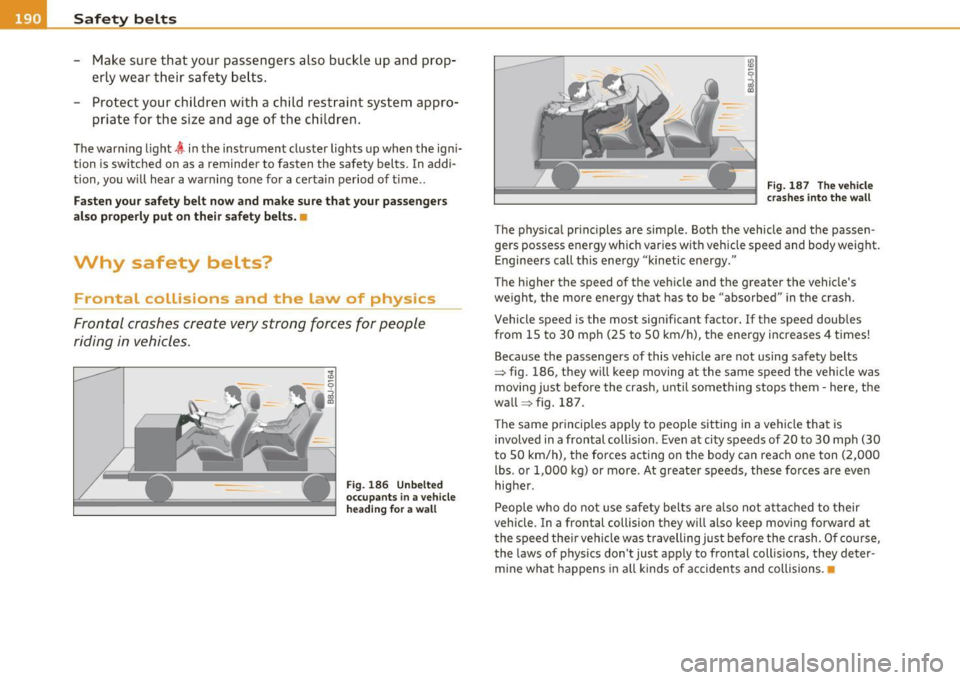
Fig . 18 6 Unbelted
occu pa nt s in a v ehi cle
h ea ding f or a w all Fig. 18
7 The veh icl e
c ra she s into the wall
The p hys ica l pr inc iples are simple. Both the vehicle and the passen
gers possess energy wh ich var ies wit h veh icle speed and body weight.
Enginee rs call th is ene rgy "kinetic energy."
The higher the speed of the veh icle and the greater the vehicle's
we igh t, the more e ne rgy tha t has to be "abso rbed" in t he crash.
Vehicle speed is the most sign ificant factor.
If the speed doubles
from 15 to 30 mph (25 to 50 km/h), the energy increases 4 t imes!
Because the passenge rs of this vehicle a re not using safety belts
=> fig. 186, they w ill keep moving at the same speed the vehicle was
moving j ust before the crash, unt il some thing stops them· here, the
wall => fig . 187 .
Th e same principles apply to people sitting in a vehi cle that is
involved in a frontal collision . Even at city speeds of 20 to 30 mph (30
to 50 km/h), the forces acting on the body ca n reach one ton (2,000
lbs . or 1,000 kg) or mo re . At greate r speeds, these forces are eve n
higher.
People who do not use safety bel ts are also not at ta ched to their
vehicle . In a frontal collision they will also keep moving forward at
t he speed the ir veh icle w as t ravelling just befo re the crash. O f course,
the laws of p hys ics don 't just apply to frontal collis ions, they deter
mine wha t happens in a ll kinds of accidents and collisions .•
Page 255 of 364
Driving and environm ent
------------------------------------------------'
[I) Tip s
The consumption estimates as published by ENV IRONMEN TA L
PROTECTION AGENCY (EPA) and Transport Canada may not corre
spond to your actual consumption on the road, wh ich w ill vary
depending upon vehicle load and speed, road and weather conditions ,
trip length, etc. •
Drive smoothly :1nd keep a Lookout ahead
Vehicles use the most fuel when they are accelerating .
-Avoid unnecessary accelerating and braking.
Vehicles use the most fuel when they a re accelerating. If you antici
pate what is going to happen next, you will need to brake less and,
thus, accelerate less. Let the vehicle coast whenever possible -for
example when you see that the next traffic l ight is red. •
Avoid full throttle
Driving at moderate speeds saves fuel and improves your
mileage.
- Try and keep well below your car's maximum speed .
Accelerating gently reduces fuel consumption, engine wear, and does
not disturb the environment .
Fuel consumption, exhaust emissions and engine noise increase
disproportionately at high speeds . If you drive at approx imately three
quarters of top speed, fuel consumption will be reduced by one half.
Never dr ive faster t han the posted speed limit and weather condi
tions permit. •
Controls and equip
ment Safety first Vehicle operation
Reducing unnecessary idling
Even when your car is just idling it burns up fuel.
-
Shut the engine off when you are not driving the vehicle .
- Do not warm up the veh icle by letting the engine run at
idle.
It makes sense to shut off the engine in traffic jams, when wa iting for
trains to pass at railroad crossings, or at traffic lights that have long
wa its on red . Turn ing the engine off for just 30-40 seco nds saves
mor e fuel than is burned starting the engine again .
It takes a long t ime for the engine to wa rm up fully when it is run ning
at idle. However, wear and noxious emissions are espec ia lly high
when the eng ine is wa rming up. So you should dr ive away as soon as
you start the engine and avoid running at hig h rpms while the engine
is still warm ing up.
0 Note
Do not leave engine idling unattended after starting . If warning
lights should come on to indicate improper operation, they would go
unheeded. Extended idling also produces heat, which could result in
overheat ing or other damage to the vehicle or othe r property.
Regular mai n _t_ e_ n_a_ n_ c_e ___________ _
A badly tuned engine unnecessarily wastes a lot of fuel.
-Have your vehicle serviced at regular intervals .
By having you r vehicle regularly serviced by an authorized Audi dealer
helps to ensure that it runs properly and economically . The condit ion
of your vehicle not only affects its safety and ability to ho ld its val ue,
it also affects
fu el con sumpt ion.
C hec k your oil ea ch tim e you fill you r ta nk .
"1>
Vehicle care Do-it-yourself service Technical data