ignition AUDI A5 CABRIOLET 2011 Workshop Manual
[x] Cancel search | Manufacturer: AUDI, Model Year: 2011, Model line: A5 CABRIOLET, Model: AUDI A5 CABRIOLET 2011Pages: 364, PDF Size: 86.48 MB
Page 112 of 364
ffl..__O_ n_ t_h _e_ r_o _ a_ d _________________________________________________ _
0 Note
If the eng ine has been under heavy load for an extended period, heat
builds up in the engine compartment after the engine is switched off
- there is a risk of damaging the engine. Allow the engine to run at idle
for about 2 minutes before switching it off. •
Electromechanical parking brake
Operation
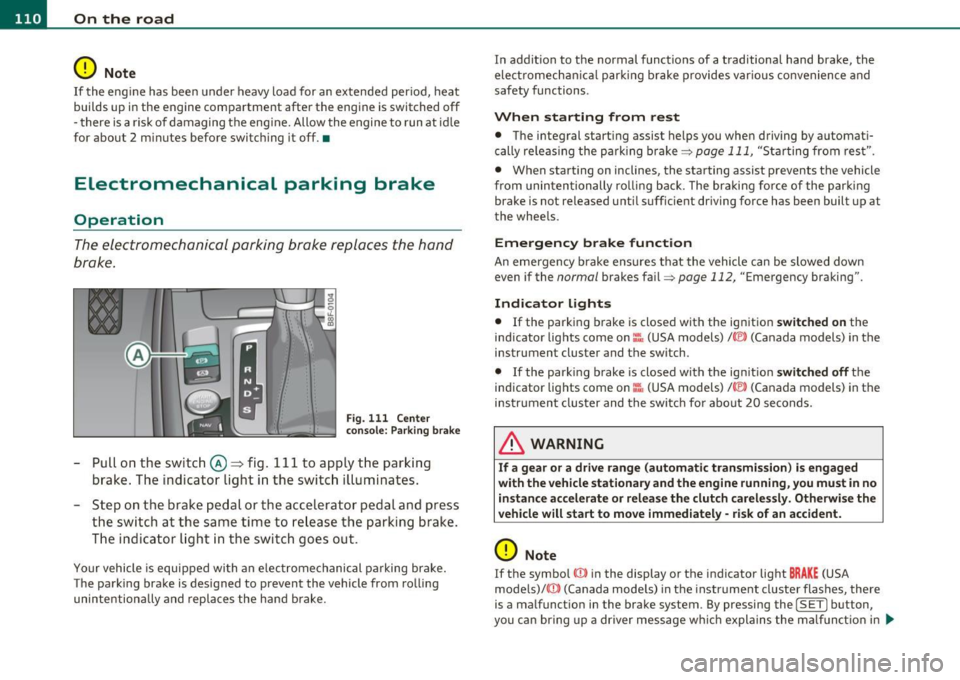
The electromechanical parking brake replaces the hand
brake.
Fig. 111 Center
consol e: Par king brake
-Pull on the switch @~ fig. 111 to apply the parking
brake . The indicator light in the switch illuminates.
- Step on the brake pedal or the accelerator pedal and press
the switch at the same time to release the parking brake.
The indicator light in the switch goes out.
Your vehicle is equipped with an electromechanical parking brake.
The parking brake is designed to prevent the vehicle from rolling
unintentiona lly and replaces the hand brake. In addition to the normal functions of a traditional hand brake, the
electromecha
nical parking brake provides various convenience and
safety functions.
When starting from rest
• The integral starting assist helps you when driving by automati
cally releas ing the parking brake=>
page 111, "Starting from rest".
• When starting on inclines, the starting assist prevents the vehicle
from unintentionally ro ll ing back. The braking fo rce of the parking
brake is not released until suff icient driving force has been built up at
the whee ls.
Emergency brake function
An emergency brake ensures that the vehicle can be slowed down
even if the
normal brakes fail=> page 112, "Emergency braking" .
Indicator lights
• If the parking brake is closed with the ignition switched on the
ind icator lights come on:::, (USA models)/ ®) (Canada models) in the
instrument cluster and the switch.
• If the park ing brake is closed with the ign it ion
switched off the
indicator lights come on
::'l'n (USA models) I © (Canada models) in the
instrument cluster and the switch fo r about 20 seconds.
& WARNING
If a gear or a drive range (automati c transmission ) is engaged
with the vehicle stationary and the engine running , you must in no
instance accelerate or release the clutch carelessly. Otherwise the
vehicle will start to move immediately -risk of an accident.
0 Note
If the symbol ID in the display or the indicator light BRAKE (USA
mode ls)/ ((j)) (Canada models) in the instrument cluster flashes, there
is a malfunct ion in the brake system. By pressing the
! SET] button,
you can bring up a driver message which explains the ma lf u nction in .,
Page 113 of 364
On the road -
----------------
more detail. If the driver message Parking brake! appears, there is an
operat ing malfunction in the parking brake which you should have
repaired immediately by an authorized Audi dealer or other qualified
workshop ~
page 30.
[I] Tips
• You can apply the parking brake at any time -even with the igni
tion turned off. The ig nition must be turned on in order to release the
parking brake.
• Occasional noises when the parking brake is applied and released
are normal and are not a cause for concern.
• When the vehicle is parked, the parking brake goes through a self
test cycle at regular intervals . Any associated noises are normal. •
Parking
Various rules apply to prevent the parked vehicle from
rolling away accidentally.
Parking
-Stop the vehicle with the foot brake.
- Pull the switch to apply t he parking brake.
- Move the selector lever to P.
- Turn the engine off::::>&.
In addition on inclines and grades
-Turn the steering wheel so that your vehicle will ro ll
against the curb in case it should start to move.
_& WARNING
• When you leave your vehicle -even if only briefly· always
remove the ignition key. This applies particularly when children
Controls and equip
ment Safety first
& WARNING
(continued )
remain in the vehicle. Otherwise the children could start the
engine, release the parking brake or operate electrical equipment
(e.g. power windows). There is the risk of an accident.
• When the vehicle is locked, no one -particularly not children
should remain in the vehicle. Locked doors make it more difficult
for emergency workers to get into the vehicle -putting lives at
risk. •
Starting from rest
The starting assist function ensures that the parking
brake is released automatically upon starting.
Stopping and applying parking brake
-Pull the switch to apply the parking brake.
Starting and automatically releasing the
parking brake
- When you start to drive as usual, the parking brake is auto -
matically released and your vehicle begins to move.
Whe n stopping at a tra ffic signal or stopping in city traffic on ve hicles
with an automatic transmission, the parking brake can be applied.
Th e vehicle does not have to be held with the footbrake. The parking
brake eliminates the tendency to creep with a drive range engaged.
As soon as you drive off as usual, the parking brake is released auto
matically and the vehicle starts to move.
Starting on slopes
When starting on inclines, the starting assist prevents the vehicle
from unintentionally rolling back. The braking force of the parking
brake is not released until sufficient driving force has been built up at
the whee ls. ..,
Vehicle care Technical data
Page 116 of 364
IIIIL-_O.::...:. n.:....: t:.:.h.:.. e::....: r...: o:.. a .::..: d,;__ ________________________________________________ _
& WARNING (continued)
• Please note that unconsciously "resting" your foot on the
accelerator pedal causes cruise control not to brake. This is due to
the control system being overridden by the driver's acceleration.
• If a brake system malfunction such as overheating occurs when
the cruise control system is switched on, the braking function in
the system may be switched off. The other cruise control functions remain active as long as the indicator light
CRUISE (US model) / (;f
(Canadian model) is on.
(I) Tips
The brake lights illuminate as soon as the brakes apply
automatically. •
Applies to vehicles : w ith cr uise contro l
Changing speed
-Press the lever in the direction of the
0 => page 113,
fig . 112 or in the direction of the Oto increase or
decrease your speed.
- Let go of the lever to save that speed.
Change speed in increments of 1 mph (1 km/h) by lightly press ing the
lever . If you keep the lever pressed down, you will alter your speed in
5 mph (10 km/h) incremen ts.
You can also press the accelerator pedal down to increase your speed,
e .g . if you want to pass someone. The speed you saved earlier will
resume as soon as you let off of the accelerator pedal.
If, howeve r, you exceed your saved speed by 5 mph (10 km/h) for
longer than 5 minutes, the cruise control will be turned off tempo
rarily. The green symbol in the display turns white, the saved speed is
retai ned .•
A pp lies to veh ic les : wi th cru ise contro l
Pre-selecting speed
You can pre-select your desired speed while the vehicle is
not moving.
- Turn on the ignition.
- Pull lever into position 1
=> page 113, fig. 112.
- Press the lever in the
0 or O direction to increase or
decrease your speed.
- Let go of the lever to save that speed.
This function makes it possible, for example, to save the speed you
want before driving on the highway. Once on the highway, activate
the cruise control by pulling the lever toward
(D . •
App lies to veh icles : w ith c ruise contro l
Switching off
Temporary deactivation
-Step on the brake pedal, or
Press the lever into position @ (not clicked into place)
=> page 113, fig. 112, or
- Drive for longer than S minutes at more than S mph
(10 km/h) above the stored speed.
Switching off completely
-Press lever into position @ (clicked into place), or
- Switch the ignition off.
Page 117 of 364
On the road Ill
----------------
The speed you saved will be retained if the cruise control has bee n
switc hed o ff tempo rar ily . To resume the saved speed , let up on the
bra ke or cl utch pedal and pull the leve r to position
(D .
The saved speed w ill be erased after turning the ignition off.
& WARNING
You s hould only resume the saved speed if it is not too high for
existing traffic conditions. Otherwis e you r isk an accident. •
Controls and equip
ment Safety first
Vehicle care Technical data
Page 119 of 364
____________________________________________ A_ d_ a.._p _t_ i_ v _e_ c_r_u _ i_ s _e_ c_o_ n_ t_r _o _l __ ffl'II
& WARNING (co ntinued )
• Always turn off adaptive crui se control when entering turn
lanes, highway ex it lanes and con struction zones or similar situa
tions because the vehicle will automatically accele rate to the
stored speed .
• Never rest your foot on the accelerator pedal, especially when
the adaptive cruise control is being u sed because doing so will
override the braking function and prevent the brakes from being
applied by the system when it detect s a situation when the brake s
must be applied.
• Alway s remember that the adaptive cruise control has limits -
it does not react when you drive towards an obstacle or something
else on or near the road that is not moving, such as vehicles
stopped in a traffic jam , a stalled or disabled vehicle .
• Always remember that the adaptive cruise control cannot
detect a veh icle th at i s driving towards you in your traffic lane and
that it cannot detect narrow vehicles such as motorcycles and bicy
cles .
[ i] Tips
• For safety reasons, the stored speed is deleted when the ignition
is turned off.
• The Electronic Stabilization Program (ESP) and the Ant i-Slip Regu
la tio n (A SR) c anno t be de activated when the adaptive cruise cont rol
is sw itched on .
If the ESP and the Anti -S lip Regulation (ASR) has been
de activ at ed an d yo u the n switch on the ad apt ive cruise cont rol, the
ESP fu nction w ill also be activated automatically.
• Dam age cau sed by accide nts (e.g. if the vehicle is dam age d whe n
park ing) can affect the rada r sensor settings. This can cause t he
sys tem to malfunc tion or switch off comple tely.
• The radar sensor cover is heated. In w inter conditions, you should
st ill ch eck befor e dr iv in g to make s ure i t is free of ice and s now. If
necessary, clean the area nea r the rada r sensor carefully=>
page 116,
fig. 114 .
Controls and equip
ment Safety first
•
To ensure that the radar sensor is not blocked , fore ign objects
(e .g. st ickers, add -on par ts) m ust no t cover the are a ne ar th e radar
sensor=>
page 116, fig . 114 . The area near t he radar sensor must not
be painted, either .
• For Declaration of Compliance to United States FCC and Industry
C an ada regula tions =>
page 34 6. •
App lies to ve hicle s: with adap tiv e crui se contro l
How does adaptive cruise control work?
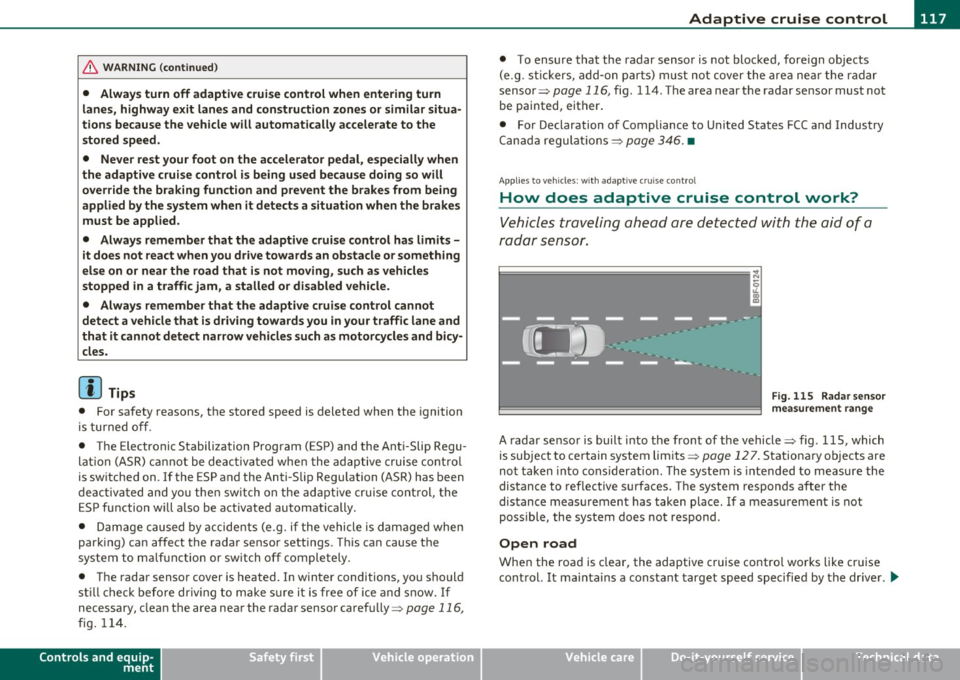
Vehicles traveling ahead are de tec ted w ith the aid of a
ra dar sens or.
I;= =;. =============== --~
~
l8
Fig. 115 Radar sen sor
mea sureme nt r an ge
A radar sensor is buil t into the front of the vehicle=> fig. 115, which
is subject to ce rtain system limits =>
page 12 7 . Stationary o bjects are
not taken into cons iderat ion. The system is intended to measure the
distance to reflective s urfaces. The system responds after the
dis tance measuremen t has taken place. If a meas urement is not
poss ible, the system does not respond.
Open road
When the road is clear, the adaptive c ruise contro l works like cr uise
cont rol. It ma inta ins a constant target speed specified by the drive r.
~
Vehicle care Technical data
Page 121 of 364
____________________________________________ A_ d_ a___,_ p_t_ i_v _e _ c_r _u _ i_ s _e _ c_o _ n_ t_r _o _l _ __.lft'I
App lies to veh icles : w ith a dapt ive cruise contro l
How is the speed stored?
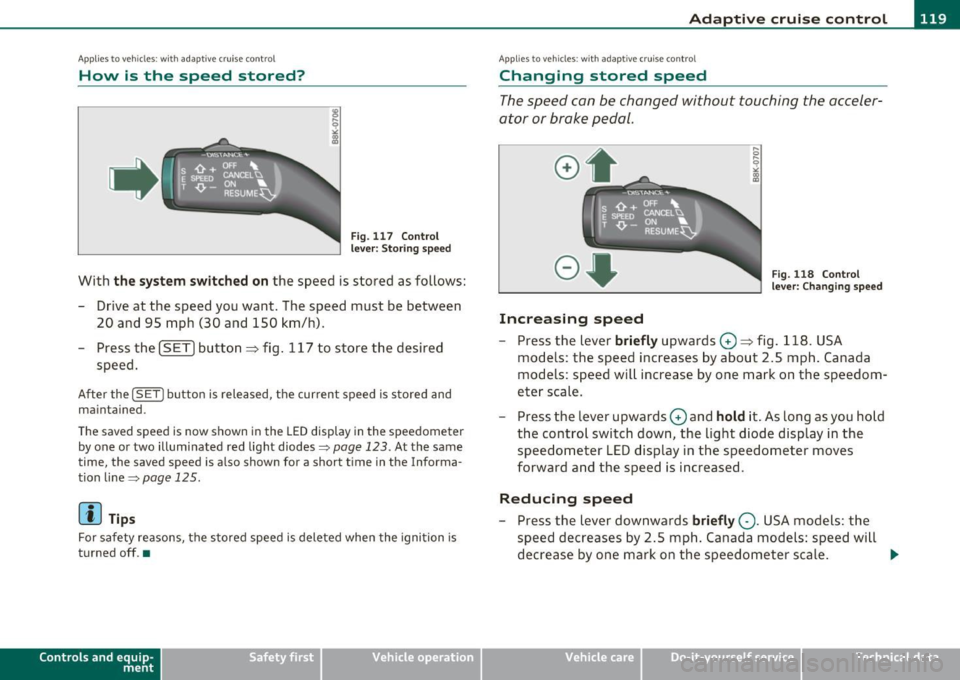
Fig. 1 17 Contro l
l eve r: S tori ng s pee d
With th e sys te m switched on the speed is stored as follows:
- Drive at the speed you want . The speed must be between
20 and 95 mph (30 and 150 km/h) .
- Press the
!SET I button ~ fig . 117 to store the desired
speed .
After the ( SETI button is released, the current speed is stored and
m ain tained .
The saved speed is now shown in th e LED d isplay in the speedom et e r
by one or two illuminated red light diodes=>
page 123. At the same
time, the saved speed is a lso shown fo r a short time in the Info rma
tion line~
page 125 .
(I) Tips
For safety reasons, the stored speed is deleted when the ignition is
turned off .•
Con tro ls a nd e quip
m en t Vehicle
OP-eration
Applies to vehicles : w ith ada ptive cru ise cont ro l
Changing stored speed
The speed can be changed without touching the acceler
ator or brake pedal.
Increasing speed
,... 0
~
ill
Fig . 1 18 Con trol
l e ver: Chan ging spee d
- Press the lever briefly upwards 0 ~ fig. 118 . USA
models : the speed increases by about 2.5 mph . Canada
models : speed will increase by one mark on the speedom
eter scale .
- Press the lever upwards
0 and hold it . As long as you hold
the control switch down, the light diode display in the
speedometer LED display in the speedometer moves
forward and the speed is increased .
Reducing speed
- Press the lever downwards briefly Q. USA models : the
speed decreases by 2 .5 mph . Canada models: speed will
decrease by one mark on the speedometer scale . _,.
Vehicle care Do-it-yourselt service iTechnical data
Page 124 of 364
-Adaptive cruise control .Ml..___,___ _____________ _
Driving pro
gram
Dis tance 1
Distance 2
Distance 3
& WARNING
dynamic
1
2
2
3
standard
2
3
3
4
comfort
3
4
4
5
-
When setting the distance, the dri ver is responsible for adhering
to the respect ive national and country -specific regulations .
• Following other vehicles too closely increase s the risk of colli
sions and serious personal injury.
• Setting short distance s to the traffic ahead reduce s the time
and d istanc e av ailable to bring your vehicle to a safe stop and
makes it even more neces sary to pay clo se attention to traffi c.
• Always use good judgment and select a safe following distance
for the traffic , road and weather condition s.
(I] Tips
The d istance setting is reset to the factory default DISTANCE 3 the
next time the ignition is t urned on .•
Driver information
Ap plies to veh icles: w it h ad aptiv e c ru is e co ntro l
Displays in the instrument cluster
Depending on the driving situation, driver information is
displayed in the instrument cluster.
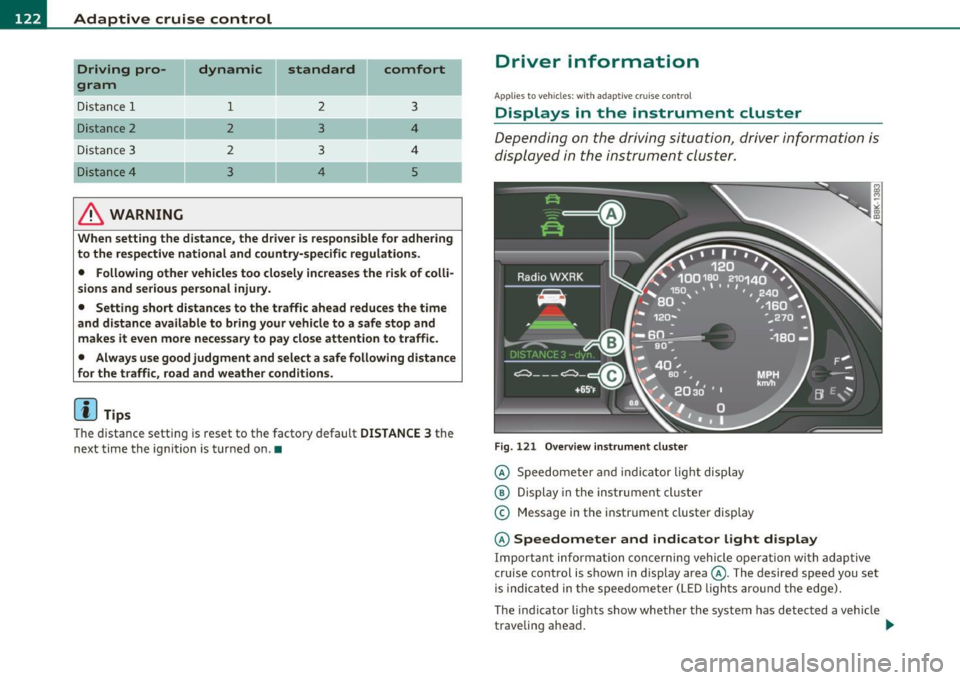
Fig. 1 21 O verv iew i nstrum ent clu ste r
© Speedomete r and indicator light disp lay
@ Display in the ins trument cluste r
© Message in the instr ument cluster disp lay
© Speedometer and indicator light d isplay
Important informa tion concerning vehicle ope ration wi th adap tive
cruise control is shown in display area@. The desired speed you set
is indica ted in the speedome ter (L ED ligh ts aro und the edge).
T he indicator lights show whether the system has detected a veh icle
traveling ahead . .,,.
Page 148 of 364
llffl..__A_ u_d_ i _d _r_ i_v _e _ s_e _ l_ e _ c_ t _______________________________________________ _
Applie s to veh icl es : w ith A udi d riv e se lect
Selecting the driving mode
You can choose between COMFORT, AUTO, DYNAMIC and
INDIVIDUAL* modes.
en • 2 ,;
~- =========::::: LP
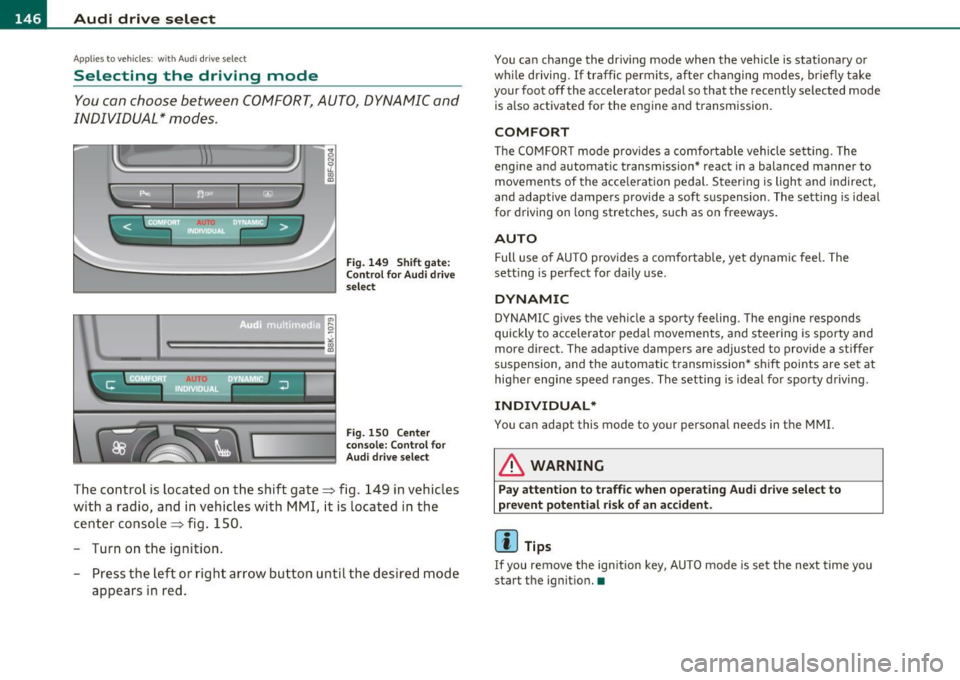
Fig. 149 Shift gate:
Control for Audi drive
select
Fig . 1S0 Ce nter
console: Control for
Audi drive select
The control is located on the shift gate~ fig. 149 in vehicles
with a radio, and in vehicles with MMI, it is located in the
center console~ fig. 150.
- Turn on the ignition .
- Press the left or right arrow button u ntil the desired mode
appears in red.
You can change the driving mode when the vehicle is stationary or
whil e driving. If traffic permits, after changing modes, briefly take
your foot off the accelerator pedal so that the recently selected mode
is also activated for the eng ine and transmission .
COMFORT
The COMFORT mode provides a comfo rtable vehicle se tting. The
engine and automatic t ransm ission* react in a balanced manner to
movements of the acce leration pedal. Steering is light and indirect,
and adaptive dampe rs provide a soft s uspension . The setting is ideal
for driving on long stretches, such as on freeways .
AUTO
Full use of AUTO provides a comfortable, yet dynamic feel. The
sett ing is perfect for daily use .
DYNAMIC
DYNAMIC gives the vehicle a sporty feeling. The eng ine responds
quickly to accelerator pedal movements, and steering is sporty and
more direct. The adaptive dampers are adjusted to provide a stiffer
suspension, and the automatic transmission* shift points are set at
higher engine speed ranges. The setting is ideal for sporty driving.
INDIVIDUAL*
You can adapt this mode to your personal needs in the MMI.
& WARNING
Pay attention to traffic when operating Audi drive select to
prevent potential risk of an accident .
(I] Tips
If you remove the ignition key, AUTO mode is set the next time you
start the ignition. •
Page 152 of 364
ffl..__T_ r_a _n_ s_ m_ is_ s_io _ n ___________________________________________________ _
R -Reverse
Th e transmission will automatically select the lowest gear ratio when
you shift into reverse.
Select
R only when the vehicle is at a full stop and the engine is
running at idle speed=>
& in "Driving the automatic transmission"
on
page 148 .
Before you move the selector lever to R, press both the button in the
handle of the selector lever
and the brake pedal at the same time.
When the ignition is on, the backup lights illum inate when the
selector lever is moved into
R.
N -Neutral
The transmission is in neutral in this position . Shift to this position
for standing with the brakes applied~
page 150.
When the vehicle is stationary or at speeds below 3 mph (5 km/h),
you must always apply the footbrake before and while moving the
lever out of
N.
D -Normal position for driving forward
Position Dis for normal city and highway driving. It ranges from zero
to top speed and all gears shift automatically, depending on engine
load, driving speed and automatically selected shift programs.
When the vehicle is stationary or at speeds below 3 mph (5 km/h),
you must always apply the foot brake before and while moving the
lever to
D out of N .
In certa in circumstances it may be advantageous to temporarily
switch to the manual shift program to manually select gear ratios to
match specific driving conditions~
page 152.
S -Sport position*
Select this position for sportier performance. In this position, the
transmission will not upshift as soon, allowing the vehicle to use the
increased power available at higher engine speeds to achieve livelier
acceleration . When the vehicle
is stationary or at speeds below 3 mph (5 km/h),
you must always apply the foot brake before and while moving the
lever to
S out of N.
& WARNING
Read and follow all WARNINGS=> & in "Driving the automatic
transmission" on
page 148 .
0 Note
Coasting downhill with the transmission in N and the engine not
running will result in damage to the automatic t ransmiss ion and
possibly the catalytic converter. •
Applies to vehicles: with automat ic transmissio n
Automatic Shift Lock (ASL)
The Automatic Shift Lock safeguards you against acci
dentally shifting into a forward or the reverse gear and
causing the vehicle to move unintentionally.
Fig. 153 Shift gate:
selector lever lock posi
tions and interlock
button highlighted
Th e selector lever lock is released as follows:
- Turn the ignition on.
Page 153 of 364
Transmission -
----------------
- Step on the brake peda l. At the same time press and hold
the interlock button on the s ide of the gear selector knob
=:> fi g. 153 wi th your thumb until you have moved the
selector lever to the des ired position .
Automatic selector lever lock
The se lector lever is locked in the P and N positions w hen the ignition
is turned on . To move the leve r from these pos it ions the driver must
dep ress the brake peda l. As a reminder to the d river, the following
warning appears in the instrument cluster display when the se lector
is in
P and N:
When stationary apply footbrake while selecting gear
A time delay e lement prevents t he selector leve r from lock ing when
it is moved throug h the
N posit ion (going from R to D ). The lock ing
element will lock the se lector lever if the lever is left in N (Neutra l) for
more tha n app rox imately 1 second, w ithout t he b rake pedal be ing
pressed.
A t speeds above about 3 mp h (5 km/h) the A utomat ic Shi ft Lock is
automatically deactivated in t he
N position .
Interlock button
The lock button on the selector lever prevents the lever from being
a cciden tally shifted in to cert ain posi tions . Pressing this b utton deac
tivates the selector lever lock. Depend ing on the direction of the
shift, the se lector leve r locks a t different positions. The pos itions are
highlighted in the illustrat io n =>
page 150, fig. 153 .
Igni tion key safety interlock
The key cannot be removed from the ignition unless the selector lever
is in the
P pa rk position. When the igni tion key is removed, the
selector lever will be locked in the
P position. •
Controls and equip
ment Safety first
Applies
to vehicles : with au toma tic transmiss ion
Kick-down
The kick -down feature allows the vehicle to generate
maximum acceleration .
When you press the accelerator peda l beyond the resis tance po int
that is reached at full throttle, the transmission will select a lower
gear rat io b ased on vehicle speed and e ngine RPM . The engine R PM
will be controlled to produce maximum vehicle acceleration as long
as you con tinue to press the acceler ator pedal beyond t his resistance
point .
& WARNING
Be careful when using the kick-down featu re on slippery roads.
Rapid a cceleration may cau se the vehicle to skid .•
App lies to veh icles: with automatic trans mission
Dynamic shift program (DSP)
The automati c transmi ssion is electronically controlled .
The transmiss ion is self adapting and will automatically select the
bes t sh ift p rogram su ited to the dr iv ing cond it io ns and dr iving style .
Th e transmission will select one of the
economy programs when you
drive at a steady speed or a gradually c hanging speed without heavy
acce le ration . This ac hieves optimum fuel efficiency, with early
upshifting and delayed downshifting.
Th e transm iss ion will au tomatically se lect the
s porty shift p rograms
when you dr ive at higher speeds, or w ith heavy acceleration and
frequently chang ing speeds . Upshifts a re de layed to make full use of
engine power . Downs hifting takes place at higher engine speeds than
in the economy programs . _.,
Vehicle care Technical data