ECO mode AUDI A5 CABRIOLET 2013 User Guide
[x] Cancel search | Manufacturer: AUDI, Model Year: 2013, Model line: A5 CABRIOLET, Model: AUDI A5 CABRIOLET 2013Pages: 290, PDF Size: 72.35 MB
Page 74 of 290
72 Warm and cold
switching rec irculat ion mode on when driving
throug h a t unnel or when sitting in traffic
c:::> &. .
The IAUTOI button or I@ FRONT I butt on
switches recircu lation mode off .
IAUTO I Switching automatic mode on
Automatic mode ma inta ins a constant tem
perature inside the vehicle. Air temperature,
airflow and air distribution are controlled au
tomatically.
Adjusting the temperature
Temperatures between 60 °F (+16 °C) and
84 °F (+28 °C) can be set . Outside of this
range,
LO or HI will appea r in the climate con
trol system disp lay. At both of these settings,
the climate control system runs continuously
at maximum cooling or heating power . There
is no temperature regu lation.
~ Adjusting the airflow
You can adjust the a irflow manually to su it
your needs . To have the airflow regulated au
tomatically, press the
!AUTO ! button.
~ Adjusting the air distribution
You can manually select the ve nts where the
a ir will flow. To have the air d istribution regu
la ted automatically, press the
IAUTOI button .
~ Adjusting seat heating*
Pressing the button switches the seat heat ing
on at the highest sett ing (level 3) . The LEDs
indicate the tempe rature leve l. To reduce the
temperature, press the button again. To
switch the seat heating off, press the button
repeatedly until the LED turns off.
After 10 minutes, the seat heating automati
cally switches from level 3 to leve l 2.
[ill Adjusting seat ventilation*
Pressing the button switches the seat ventila
tion on at the highest setting (level 3) . The
LE Ds indicate the ventilat ion level. To reduce
the ventilation leve l, press the button again.
To switch the seat ventilat ion off, p ress the
b utton repeatedly until the LED turns off.
I@ FRONT I Switch the defroster on /off
T he w indshield and side windows are defrost
ed or cleared of condensation as quickly as
possible . The maximum amount of air flows
mainly from the vents below the windshield.
Recircu lation mode switches off. The tempera
ture is controlled automatically.
The
i AUTO I button switches the defroster off.
lliil REARI Switching rear window heater
on/off
T he rear window heater only operates when
the engine is running. It switches off auto
matically after a few minutes, depending on
the outside temperature.
T o p revent the rear window heater from
switching off automatically, press and hold
the
l oo REARI button for more than 2 seconds.
This remains stored until the ignition is
switched off.
Air vents
You can open and close the center and rear air
vents using the thumbwheels. The levers ad
just the direction of the airflow from the
vents.
In veh icles with a 3-zone deluxe automatic cli
mate control system*, you can adjust the air
temperature in the rear by turning the thumb
whee l toward the red side to make it warmer
or toward the blue side to make it cooler.
A WARNING
-- Do not use the recirculation for extended
pe riods of time . The windows could fog
up since no fresh a ir can enter the vehi
cle. If the windows fog up, p ress the air
recirc ulation button again immediately
to switch off the air recirc ulation func
tion or se lect defrost .
- I ndividuals w ith reduced sensitivity to
pain or temperature could develop burns
when using the seat heating function. To reduce the risk of injury, these individu
als shou ld not use seat heating.
Page 82 of 290
80 On the road
This message appears if the master key is re
moved from the vehicle with the engine run
n ing.
If the master key is no longer in the ve
hicle, you cannot switch on the ignition after
stopping the engine and you also cannot start
the eng ine again . Moreover, you can not lock
the veh icle from the outside w ith the key.
Shift to P otherwise vehicle can roll away.
Doors do not lock if lever is not in
P.
This message appears for safety reasons
a long w ith a warning signa l. It appears if the
selector lever for the automat ic transm iss ion
is not in the P position when switch ing off the
ignition . Move the selector lever to the P pos i
tion, othe rwise the ve hicle is not secured
against rolling away . You also cannot lock the
vehi cle using the locking bu tton* on the door
han dle or using the remote key.
Convenience key defective! Use ignition lock
This message appears if the eng ine must be
started or stopped using the ignition key and
not the
I STAR T ENGIN E ST OP ! button .
Electromechanical
parking brake
Operation
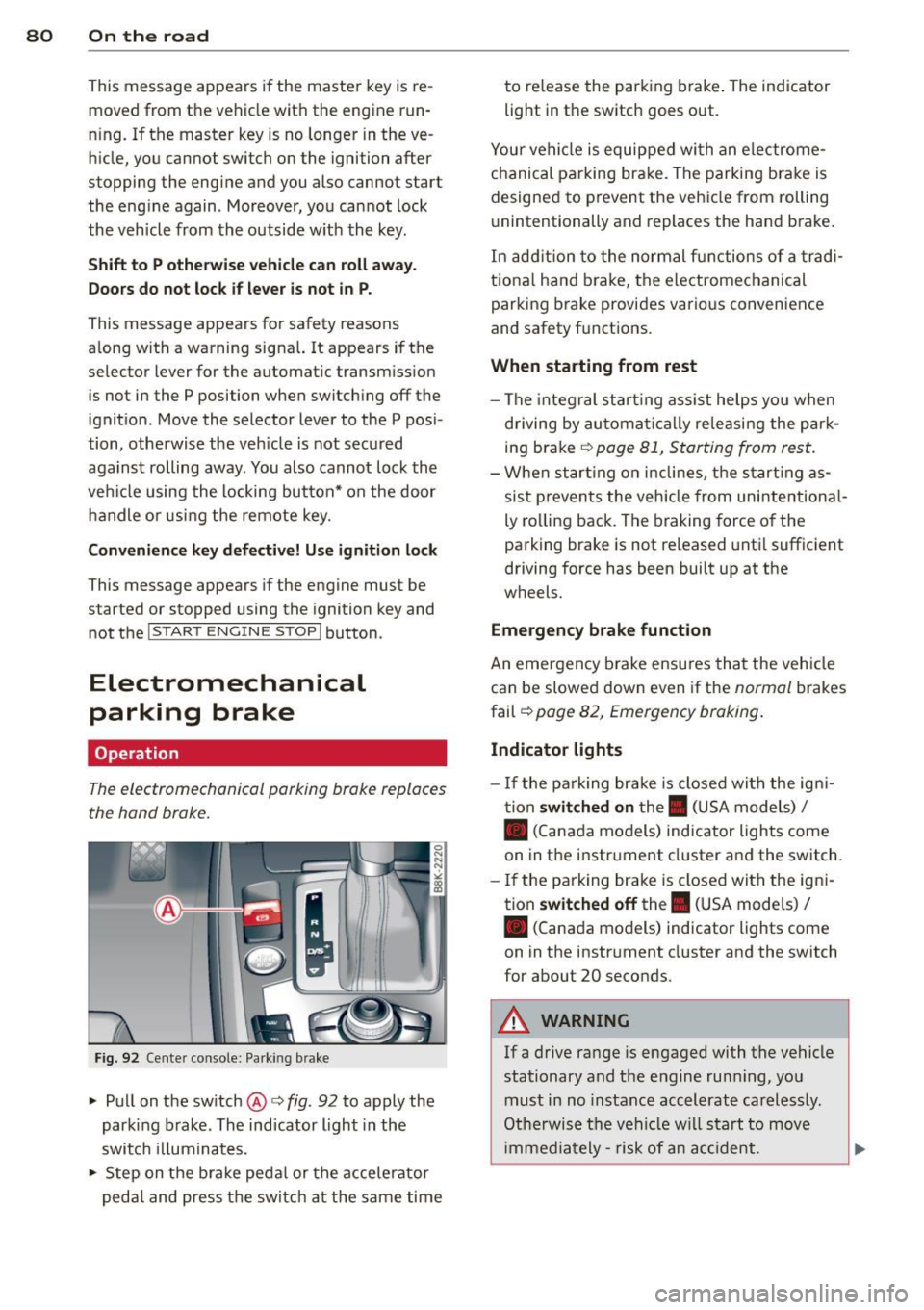
The electromechanicol parking brake replaces
the hand brake.
F ig. 92 Cente r console: Parking brake
.., Pull on the switch @c:> fig. 92 to apply the
parking brake. The indicator light in the
switch illum inates .
.., Step on the brake peda l or the accele rator
pedal and press the switch at the same time to re
lease the par king brake . The indicator
light in the switch goes out.
Your vehicle is equipped wi th an electrome
chanical parking brake . The parking brake is
designed to prevent the vehicle from rolling
u nintentionally and replaces the hand brake.
In addition to the normal fun ctions of a tradi
tiona l hand b rake, the electromechanical
parking brake provides various convenience
and safety f unctions .
When starting from rest
-The integral start ing assist helps you when
driving by automatica lly re leasing the par k
ing brake
c:> page 81, Starting from rest.
-When starting on inclines, the starting as
sist prevents the vehicle from unintentiona l
ly ro lling back. The braking force of the
parking brake is not released until sufficient
driving force has been built up at the
wheels.
Emergency brake function
An eme rgency b rake ensures that the vehicle
can be slowed down even if the
normal brakes
fail c:>
page 82, Emergency braking .
Indicator lights
- If the parking brake is closed with the igni
tion
switched on the. (USA models) I
• (Canada models) ind icator lights come
on in the instr ument cluster and the switch .
- If the parking brake is closed with the igni
tion
switched off the . (USA models) I
• (Canada models) indicator lights come
on in the instrument cluster and the switch
for about 20 seconds .
A WARNING
-
If a drive range is engaged with the vehicle
stationary and the engine runn ing , you
must in no instance accelerate carelessly.
Otherwise the vehicle will start to move
i mmed iately- risk of an acc ident.
Page 84 of 290
82 On the road
Starting off with a trailer
To prevent rolling back unintentionally on an
incline , do the following:
.,. Keep the switch@¢ fig. 92 pulled and de
press the accelerator . The parking brake
stays applied and prevents the vehicle from rolling backward .
.,. You can release the switch @once you are
sure that you a re develop ing enough dr iv ing
f orce at the wheels by dep ress ing the accel
erator.
Depending on the weight of the r ig (veh icle
and tra iler) and the seve rity of the in cli ne , you
may roll backwards as you start . You can pre
vent rolling backwards by holding the parking brake switch @ pulled out and accelerating -
just as you would when starting on a hill with
a conventional hand brake.
Emergency braking
In the event that the conventional brake system
foils or locks.
... In an emergency, pull the switch @
¢
fig. 92 and continue to pu ll it to slow your
vehicle down with the parking brake.
.,. As soon as you release the sw itch @ or ac-
celerate, the braking process stops.
If you pu ll the switch @and ho ld it above a
speed of about 5 mph (8 km/h), the emergen
cy braking function is in iti ated. The vehicle is
braked at al l four wheels by activating the hy
d raul ic brake system . T he brake performance
is simi lar to making an eme rgency stop¢.&. .
In order not to activate the emergency brak ing by mistake, an audible warning tone (buz
zer) sounds when the switc h@ is pulled . As
soon as the switch @is released, or the accel
e rator pedal is dep ressed , emergency b ra ki ng
stops.
.&_ WARNING
Emergency braking sho uld only be used in
an emergency, when the normal foot brake
has failed or the brake pedal is obstructed . Using the par
king brake to pe rform emer
gency braking will s low your veh icle down
as if you had made a full brake application.
The laws of p hysics cannot be suspended
even with ESC and i ts associated compo
nents (ABS, ASR, EDS). In corners and
when road o r weathe r cond itions are bad,
a full brake appl ication can ca use the vehi
cle to s kid or the rear end to break away -
risking an acciden t.
Speed warning system
Overview
The speed warning system helps you to keep
your driving speed below a set speed limit.
T he speed warning system warns if the driver
e xc eeds a previously stored max imum speed .
A warning tone w ill sound as soon as the vehi
cle speed exceeds the set speed by abou t
3 mph (3 km/h) . At the same t ime, a warning
symbol appears in the display . T he symbol's
appea rance might be different in some mod
els .
The speed warn ing system has two warning
t hr esholds that funct io n in dependent ly of
each other and that have somewhat diffe rent
purposes:
Speed wa rning 1
You can use speed warning 1 to se t the maxi
mum speed while you are driving . T his setting
will remai n in effect unt il you turn off the ig ni
t io n, assuming that you have not changed or
r ese t the sett ing.
The . (USA mode ls)
I. (Canada mode ls)
speed warning symbol in the warning 1 dis
play appears when you exceed the maximum
speed .
It goes ou t when the speed falls be low
the stored maximum speed .
T he speed warn ing symbol will also go out if
the speed
exceeds the stored maximum speed
by more than about 25 mph (40 km/h) for at
least 10 seconds. The sto red max imum speed
is de leted . .,..
Page 85 of 290
Speed warning 2
Storing w arning 2 is recomme nded if you al
ways want to be rem inded of a certa in speed ,
for example when yo u are traveling in a coun
try that has a general ma ximum speed limit,
or if you do not want to exceed a spec ified
speed for winter tires.
The . (U SA mode ls)
I. (Canada mode ls)
speed warn ing 2 symbo l appears in the dis
p lay when you exceed the stored speed lim it.
Unlike warning 1, it will not go out u ntil the
ve hicle speed drops below the stored speed
limit.
Sett ing speed warning 2 ¢page
83.
(D Tips
Even tho ugh you r vehicle is equip ped with
a speed wa rni ng system, you should st ill
watch the speedometer to make sure you are not d riving faster tha n the speed lim it.
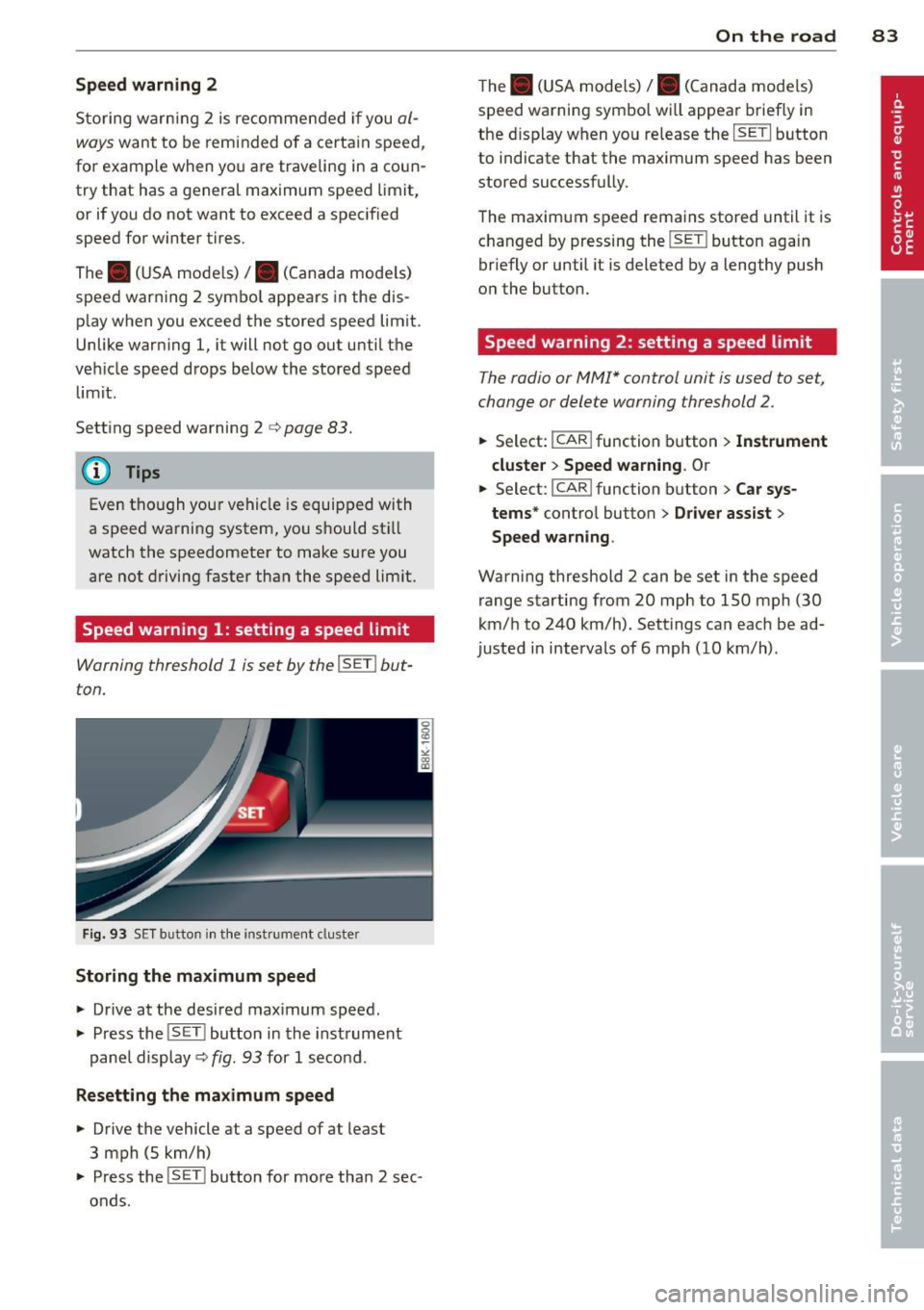
Speed warning 1: setting a speed limit
Warning threshold 1 is set by the !SET I but
ton.
F ig . 93 S ET button in the ins trument cluste r
Storing the maximum speed
.,. Drive at the desired max imum speed .
.,. Press the !SET I button in the instrument
pan el display ¢ fig . 9 3 for
1 secon d.
Resetting the maximum speed
.,. Driv e the vehicle at a speed of at least
3 mph (5 km/h)
.,. Press the !SET I bu tton for mo re tha n 2 sec
onds .
On the road 83
The . (U SA mode ls) /. (Canada mode ls)
s peed warning sym bo l wi ll appea r brief ly in
the d isplay when yo u re lease the
I SETI button
to indicate t hat the maximum speed has been
stored successfully.
The maxim um s peed rema in s stored until it is
c h anged by pressing the !SE TI button aga in
briefly or until it is deleted by a lengthy push
o n the button .
Speed warning 2: setting a speed limit
The radio or MMI* control unit is used to set ,
change or delete warning threshold
2.
.,. Se lect: !CAR ifunction b utton> Instrument
cluster > Speed warning .
Or
.,. Select: I CAR I function butt on > Car sys
tems *
contro l butto n > Driver assist >
Speed warning .
Warning threshold 2 can be set in the speed
range starting from 20 mph to 150 mph (30
km/ h to 240 km/h). Sett ings ca n eac h be ad
justed in interva ls of 6 mph ( 10 km/h) .
Page 88 of 290
86 Transmi ssion
Transmission
multitronic ®, S tronic ®,
tiptronic
Introduction
Appl ies to vehicles: with multitronic/5 tronic/tiptronic
The automatic transmission is controlled elec
tronically. The transmission ups hifts or down
shifts automatically depending on which drive program is se lected.
When a
moderate driving style is used, the
transmission se lects the most economical
driving mode. It wi ll then change up early and
de lay the downshifts to g ive better f uel econ
omy.
The transmission switches to a sporty mode after a k ick-down or when the dr iver uses a
sporty driv ing style characterized by qu ick ac
celerator peda l movements, heavy accelera
tion, frequent changes in speed and traveling
at the maximum speed .
If desired, the driver can a lso sel ect the gears
manually (tiptronic mode ) q page 86.
Various a utomatic transmissions may be in
stalled, depend ing on the mode l:
multitronic ® transmission
The mult it ron ic® transm ission is a co nti nuous
l y var iable transmission. Power is transferred
using a m ultidisk clutch. In contrast to con
ventiona l automatic transmissions using sh ift
ing operat ions, the transmission ratio in the
continuously variable transm ission is changed
continuously. This optimizes the comfort level
and conserves fuel.
S tronic ® transmission
The 5 tronic ® is a d ual-clutch transmission .
Power is transferred using two clutches that
work independently from one another. They
replace the to rque conve rter used in conven
tional automa tic transm iss ions and allow the
ve hicle to acc elerate without a noticeable in
ter ruption in traction.
tiptronic transmission
In the t ipt ro ni c transm iss ion, powe r is trans
f erred by a torque converter .
Selector lever positions
Applies to vehicles: with multitronic/5 tronic/tiptronic
i--...~~-----------..,.-~ -... N
N
N
" :ll
Fig. 96 Display in t he inst ru m ent cluster: selecto r lever
in pos ition P
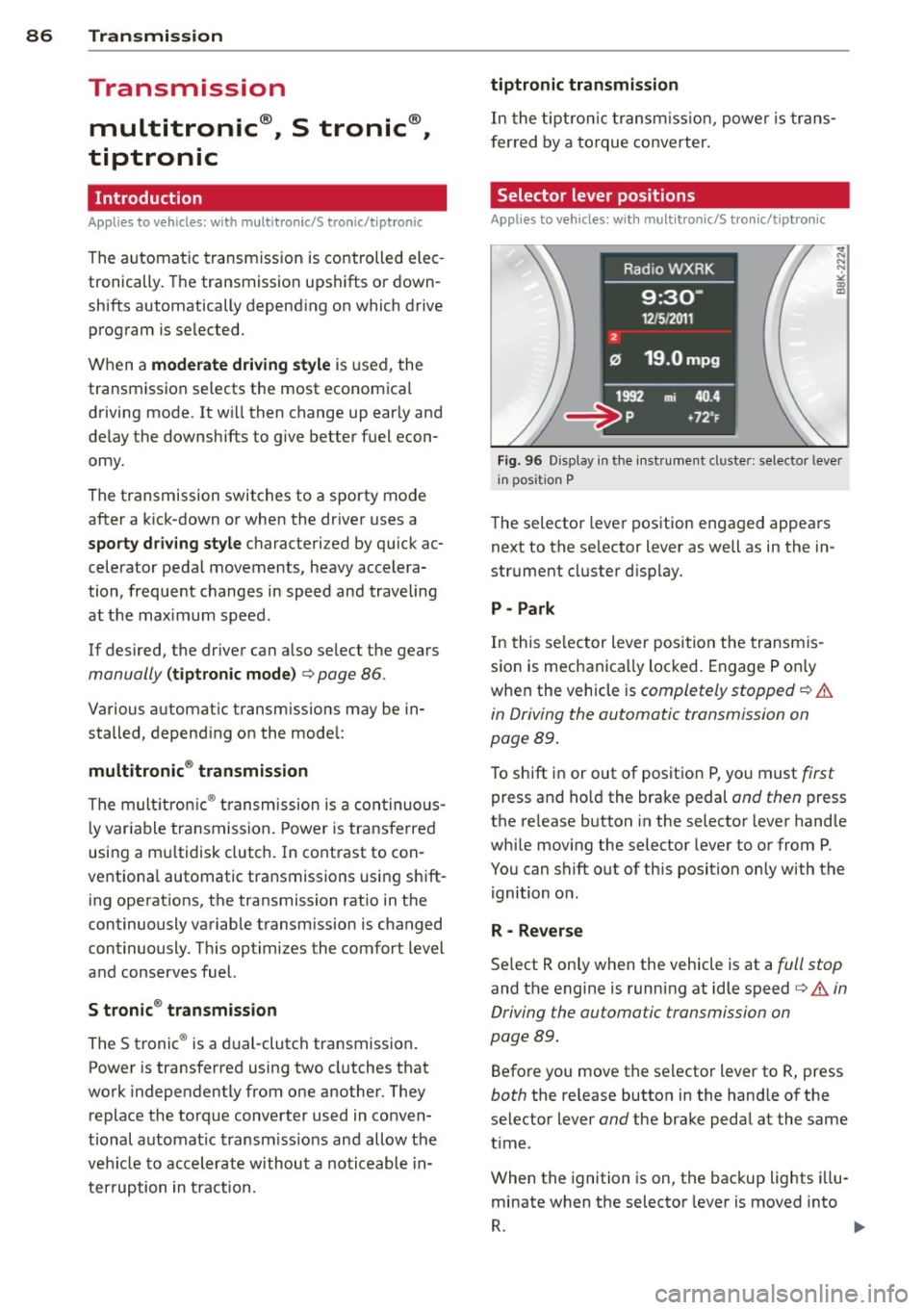
The selector leve r pos ition engaged appea rs
next to the se lector lever as well as in the in
strument cluster d isp lay.
P -Park
In this se lector lever posi tion the transmis
sio n is mechanica lly loc ked. Engage P o nly
whe n the vehicle is
completely stopped q .&.
in Driving the automatic transmission on
page
89.
To shift i n or out of posit ion P, yo u must first
press and ho ld the bra ke pedal and then press
the re lease b utton in the selector lever hand le
whi le movi ng the selector lever to or from P.
You can shift out of th is position only with the
ignition o n.
R - Reverse
Se lect R on ly when the vehicle is at a full stop
and the engine is running at idle speed q .&. in
Driving the automatic transmission on
page
89.
Befo re you move the se lector lever to R, press
both the release button in the hand le of the
select or lever
and the brake peda l at the same
t ime .
When the ignition is on, the bac kup lights illu
minate when t he selector lever is moved into
R. 1111-
Page 89 of 290
N -Neutral
The transmission is in neutra l in this position .
Shift to this posit ion for standing with the
brakes applied
~ &. in Driving the automatic
transmission on page 89.
When the veh icle is stationary or at speeds
below 1 mph (2 km/h) , you must always apply
the footbrake before and while moving the lever out of N.
DIS -Normal position for driving forward
In the D/S position, the transmission can be
operated e ither in the normal mode Dor in
the sport mode S . To select the sport mode S,
pu ll the se lector lever back briefly. Pulling the
lever back again will select the normal mode
D. The instrument cluster display shows the
selected driving mode .
In the
normal mode D, the transmission auto
matica lly selects the suitable gear ratio. It de
pends on engine load, vehicle speed and driv
ing style .
Select the
sport mode S for sporty driving .
The vehicle makes full use of the engine's
power . Shifting may become noticeable when
accelerating.
When the vehicle is stationary or at speeds be low 1 mph (2 km/h), you must always apply
the foot brake before and while moving the lever to D/S out of N .
A WARNING
Read and follow all WARNINGS 9 &. in
Driving the automatic transmission on
page 89.
(D Note
Coasting downhill with the transmission in
N and the engine not running will result in
damage to the automatic transmission
and possibly the catalytic converter .
(D Tips
-On vehicles with drive select*, you can
adjust the sporty shift characteristics in
the
Dynamic driving mode .Swill appear
Transmission 87
in the instrument cluster display instead
ofD.
- If you accidentally select N whi le driving,
take your foot
off the accelerator pedal
immediately and wait for the engine to
slow down to idle before selecting D/S.
- If there is a power failure, the selector
lever will not move out of the P position .
The emergency release can be used if
this happens
9 page 92.
Automatic Shift Lock (ASL)
Applies to vehicles: with multitro nic/S tronic/t iptronic
The Automatic Shift Lock safeguards you
against accidentally shifting into a forward or the reverse gear and causing the vehicle to
move unintentionally.
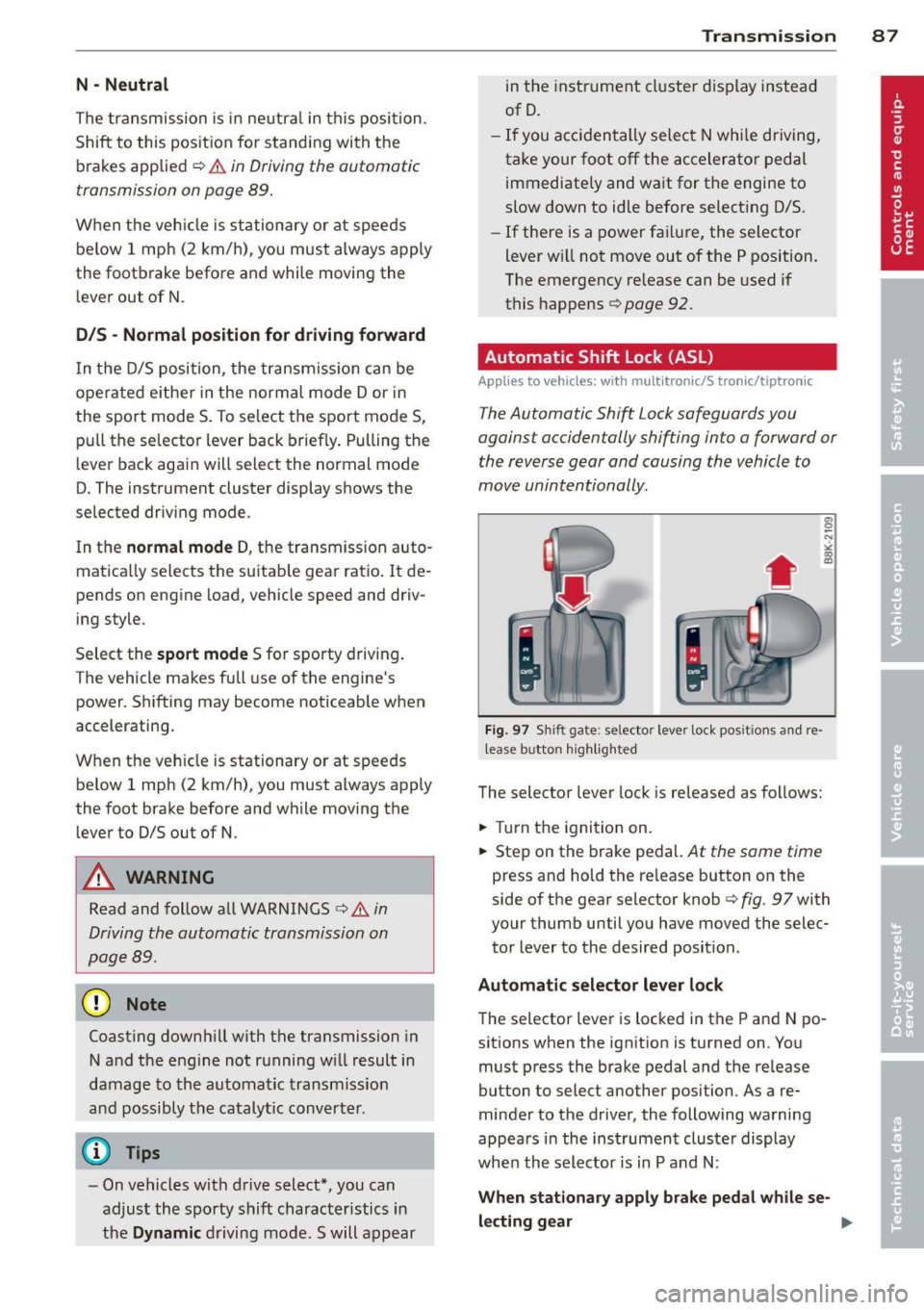
Fig. 97 Shift gate: selecto r lever lock posit ions and re
lease b utto n highlighted
The selector lever lock is released as follows:
.,. Turn the ignition on.
.,. Step on the brake pedal.
At the same time
press and hold the re lease button on the
side of the gear selector knob
9 fig . 97 with
your thumb until you have moved the selec
tor lever to the desired position .
Automatic selector lever lock
The selector lever is locked in the P and N po
sitions when the ignition is turned on. You
must press the brake pedal and the release
button to select another position . As a re
minder to the driver, the following warning
appears in the instrument cluster display
when the selector is in P and N:
When stationary apply brake pedal while se-
lecting gear .,,_
Page 91 of 290
temporarily to the manual shift program in or
der to adjust the gears to the driving condi
tions by hand
¢ page 90.
On slopes, activate the parking brake first and
then move the selector lever to the P position.
This prevents too much stress from being placed on the locking mechanism.
Vehicles with multitronic transmission : Your
vehicle is equipped with
hill hold assist allow
ing you to start while on an incline. The sys
tem is activated when the brake pedal is
pressed down and held
for a few seconds. The
brake p ressure will hold for a moment after
the brake pedal loosens to prevent the vehicle
from rolling backwards while starting up.
A WARNING
-The vehicle can also roll when the engine
is stopped.
- Unintended vehicle movement can cause
serious injury.
- Never leave your vehicle with the engine
running while in gear. If you must leave
your vehicle when the engine is running,
activate the parking brake and move the
selector lever to P.
- Power is still transmitted to the wheels
when the engine is running at idle. To
prevent the vehicle from "creeping", you
must keep your foot on the brake when
the engine is running and the selector
lever is in D/S or R or "tiptronic" mode is
selected.
- Do not press the accelerator pedal when
changing the selector lever position
while the vehicle is stationary and the
engine is running .
- Never shift into R or P while driving.
- Before driving down a steep slope, re-
duce your speed and shift into a lower
gear with "tiptronic".
- Do not ride the brakes or press the brake
pedal too often or too long when driving
down a hill. Constant braking causes the
brakes to overheat and substantially re
duces braking performance, increases
Transmission 89
braking distance or causes complete fail
ure of the brake system.
- To prevent the vehicle from rolling back
when stopping on inclines, always hold it
in place with the brake pedal or parking
brake.
- Never hold the vehicle on an incline with a slipping clutch. The clutch opens auto
matically when it becomes too hot from
the overload . An indicator lamo
[O] illu
minates and a driver message appears
¢ page 92 when the clutch is overload
ed.
- If the engine must remain running, never
have any driving position engaged when
checking under the hood . Make sure the
selector lever has securely engaged and
is locked in P with the parking brake set
¢ page 205, Engine compartment. Oth
erwise, any increase in engine speed may
set the vehicle in motion, even with the parking brake applied.
(D Note
- S tronic ®- and tiptronic transmission:
When stopping on an incline, do not try
to hold the vehicle in place by pressing
the accelerator pedal while a driving gear
is selected. This can cause the transmis
sion to overheat and can damage it. Acti
vate the parking brake or press the brake
pedal to prevent the vehicle from rolling .
- S tronic ®- and tiptronic transmission: Al
lowing the vehicle to roll when the en
gine is stopped and the selector lever is
in N will damage the transmission be
cause it is not lubricated under those cir
cumstances.
(D Tips
For safety reasons, the parking brake is re
leased automatically only when the driv
er's safety belt is engaged in the buckle.
Page 93 of 290
when there is no possibility of over-rev
ving the engine.
- When the kick-down comes on, the
transmission will shift down to a lower
gear, depending on vehicle and engine
speeds.
- Tiptronic is inoperative when the trans
mission is in the fail-safe mode.
Kick-down
App lies to vehicles: with multit ro ni c/S tronic/t ipt ronic
Kick-down enables maximum acceleration .
Applies to veh icle s with a multitronic ®
transmi ssion
When you dep ress the accelerato r pedal be
yond the resistance point, the transmission downshifts into a lower gear ratio depending
on the vehicle speed and engine speed. As
long as the accelerator peda l is depressed, the
engine speed is automat ically regulated for
maximum acceleration.
Appli es t o ve hicles with a S t ronic ®-/ ,
ti ptron ic transmi ssi on
When you depress the accelerator pedal be
yond the resistance po int, the automat ic
transmission downshifts into a lower gear, de pending on vehicle speed and engine speed .
The upshift into the next higher gea r takes
p lace once the maxim um spec ified eng ine
speed is reached .
A WARNING
Please note that the drive wheels can spin
if kick-down is used on a smooth slippery
road -there is a risk of skidding.
Launch Control Program
App lies to vehicles: with S tro nic
The Launch Control Program provides the
best acceleration possible when starting from
a stop.
Requirement: The engine must be at operat
ing temperature and the steering wheel must
not be turned.
Tran sm iss ion 9 1
"" Press the I~ OFF ! button ¢ page 181 while
the engine is running. The
fl indicator light
illum inates in the instrument cl uster and
Traction control (A SR): Off. Warning! Re
stricted stability appears in the driver infor
mation system display .
"" Move the selector lever to the D/S pos it io n
or select the dynamic driv ing mode in drive
select* ¢
page 108.
"" Press t he brake pedal s trongly wi th you r left
foot and ho ld it down for at leas t 1 second .
... At the same time, press the accelerator
peda l down comp lete ly with your right foot
until the eng ine reaches and maintains a
high RPM.
"" Remove your foot from the brake pedal
w ith in S seconds ¢.& .
A WARNING
-Always adapt your dr iving to the traffic
f low.
- Only use the Launch Cont ro l Program
when road and t raff ic conditions a llow it
a nd other drivers w ill not be endangered
or annoye d by your dr iving and the vehi
cle's acceleration.
- Ple ase no te th at the d riving wheels can
spin and the vehicle can break away
when ASR is switched off, especially
when the road is s lippery.
- Once you have accelerated, you sho uld
switch the ASR back on by pressing the
I ~ OFFI button.
(D Tips
- T he transmission temperature m ay in
crease s ignificantly after using the
La unch Control P rogram . If that hap
pens, the prog ram may not be availab le
for a few m inutes. It will be ava ilable
again after a cool-down per iod.
- When accelerating using the La unch
Contro l program, a ll vehicle parts are
subject to heavy loads. Th is can result in
increased wear .
Page 101 of 290
Audi adaptive cruise control and braking guard 99
~--- ~-Di stance 3: This setting corre
sponds to a distance of 164 feet/SO meters
when traveling at 62 mph (100 km/h), or a
time interva l of 1.8 seconds .
~---- ~ Distance 4: This setting corre
sponds to a distance of 210 feet/64 meters
when traveling at 62 mph (100 km/h), or a
time interva l of 2.3 seconds .
A WARNING
Following other vehicles too closely in
creases the risk of collisions and serious
personal injury.
- Setting short distances to the traffic
ahead reduces the time and distance
available to br ing your vehicle to a safe
stop and ma kes it
even more necessary
to pay close attention to traffic.
- Always obey applicable traffic laws, use
good judgment, and select a safe follow
ing distance for the traffic, road and
weather conditions .
¢j) Tips
- Distance 3
is set automatically each time
you switch the ignition on.
- Your standa rd settings are automatically
stored and assigned to the remote con
trol key being used.
Setting the driving program
Applies to vehicles: with Audi adaptive cruise control
Depending on the se lected driv ing program
and distance, driving behavior when accelerat
ing will
vary from dynamic to comfortab le .
Setting the driving program for vehicles
without Audi drive select*
~ In the rad io/MM I*, select: I CAR ! function
button
> Adaptive cruise control > Driving
prog .
> comfort, standard or dynamic. Or
~ Select : ICARI function button > Car sys
tems *
control button > Driver assist > Adap
tive cruise control
> Driving program * >
Comfort, Standard or Dynamic. Setting the driving mode for
vehicles with
Audi drive select*
Refer to ¢ page 108.
(D Tips
Your settings are automatica lly stored and
assigned to the remote control key being
used.
Request for driver intervention
Applies to vehicles : with Audi adaptive cruise contro l
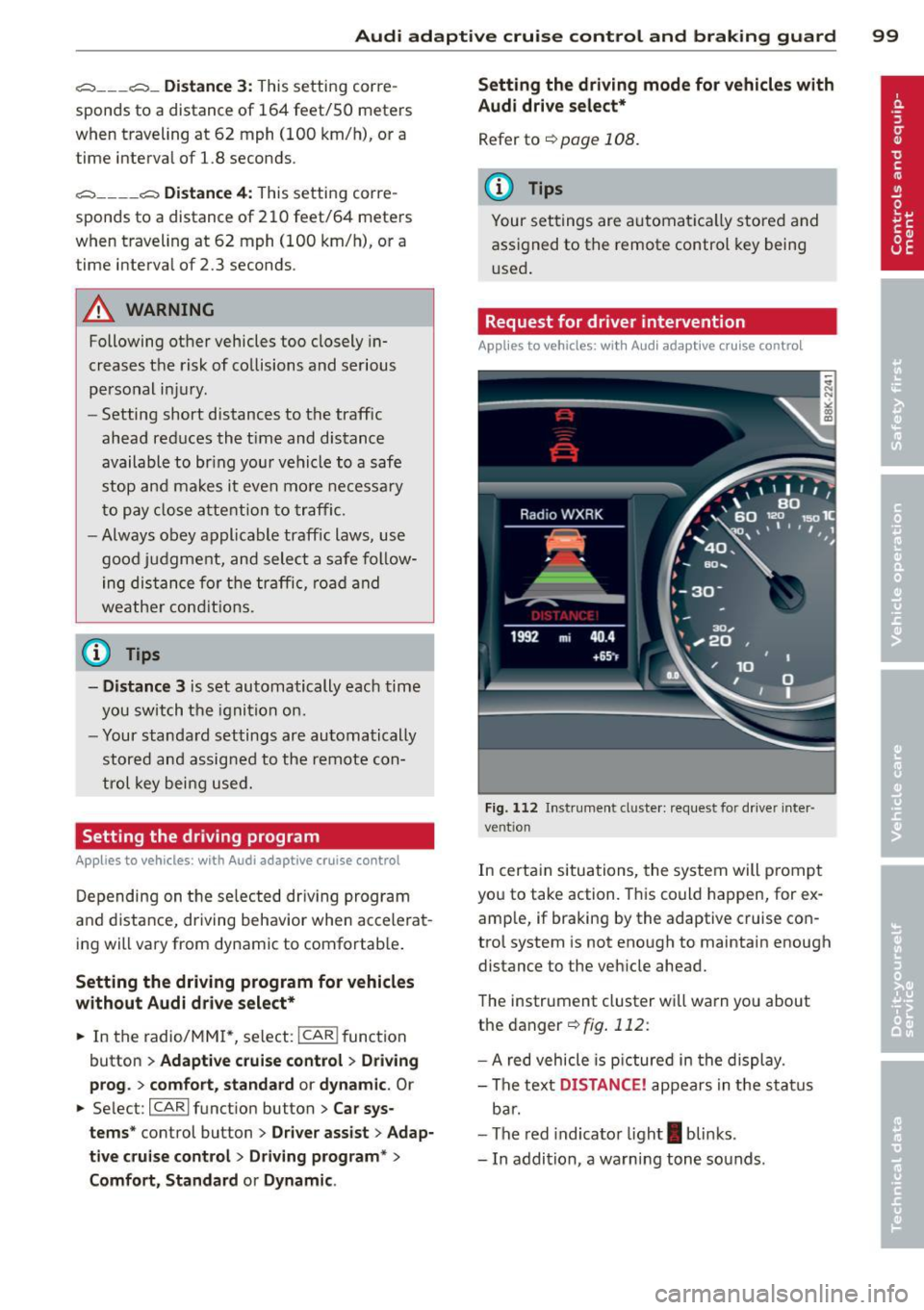
Fig. 112 Instrument d uste r: request for drive r inte r
ve ntion
In certain situations, the system will p rompt
you to take action. This could happen, for ex
amp le, if braking by the adaptive cruise con
trol system is not enough to maintain enough
distance to the vehicle ahead.
The instrument cluster will warn you about
the danger ¢
fig. 112:
-A red vehicle is pictured in the display.
- The text
DISTANCE! appears in the status
bar.
- The red indicator light
I blinks .
- In addition, a warning tone sounds .
Page 109 of 290
Audi drive select Driving settings
Introduction
Appl ies to vehicles: wit h Audi drive select
Dr ive select provides the possib ility to experi
ence different types of vehicle settings in one
veh icle. For instance, using the three
C o m
fort, Auto and Dynamic modes, the driver can
switch from a sporty to a comfortab le driving
mode with the press of a button.
Addit ionally, in vehicles with
MM I*, the vehi
cle setup for
Indi vidu al* mode can be cus
tomized by you. This makes it possib le to
combine settings such as a sporty engine tun
ing with comfortable steering.
A WARNING
Improper use of the Audi drive select can
cause collisions, other acc idents and seri
ous personal injury.
Description
App lies to vehicles: w it h Audi drive select
The vehicle setup in each mode depends on
the vehicle's features. However, the engine,
automatic t ransmission and steeri ng a re a l
ways involved.
-
Engine and automatic transmi ssion
Depending on the mode, the engine and the
automatic transmission respond quicker or in
a more ba lanced manner to acce lerator pedal
movements. In the sporty dynamic mode, the
automatic t ransmission shifts at h igher R PMs .
Steering
The steering adapts in terms of steering effort
and steering ratios. Indirect steer ing that
moves eas ily, like the stee ring in comfort
mode, is best su ited to long dr ives on a high
way. In contrast, dynam ic mode prov ides
sporty, di rect steering .
The follow ing applies to vehicles with dynam ic
steer ing*: the stee ring ratio changes based on
vehicle speed in order to maintain optimum
Aud i dri ve sel ect 107
steering effort for the drive r at all times . This
sets the steering to be less sensitive at higher
speeds in order to provide improved vehicle
control. At reduced speeds, however, steer ing
is more d irect in order to keep the steering ef
fort as minimal as poss ible when the driver is
maneuveri ng the veh icle . At low and average
speeds, dynamic steering addit iona lly pro
vides more responsive stee ring pe rformance.
Adapt ive damper s*
The adaptive dampers* use sensors to record
i nformation regard ing steering movements,
braking and acceleration ope rations by the
drive r, road surface, driving speed, and load.
T his makes it possible to adapt damp ing to
the d riving situation v irtu ally i n rea l time.
Drive select also makes it possib le to satisfy
the desire for spo rty suspension (Dynamic)
and comfortab le suspension (Comfort) with
out giving up ba lanced tuning (Auto) .
Sport differe ntial *
As a component of the all whee l dr ive sys tem
(quattro ®)
q page 184, the sport differential*
distributes the driving power to the rear ax le
depending on the sit uation . The distribution
of power var ies depending on the mode se
lected. The goal is a high level of agility and
ability to accelerate on curves . The ve hicle is
very respons ive to steering .
Audi adaptive cru ise control*
The behav ior when accelerating can be adjust
ed from comfortab le to sporty, depending on
the drive select mode. Adaptive cru ise control
also responds to the driv ing behavior of the
vehicle ahead in a mo re conservative or spo rty
manner .
Engine sound*
The sound of the eng ine is adapted to these
lected mode and ranges from subtle to sporty.
0) Tips
- In some models, the maximum vehicle
speed can only be reached in the
Auto
and D ynamic modes.