light AUDI A5 CABRIOLET 2013 Owner's Manual
[x] Cancel search | Manufacturer: AUDI, Model Year: 2013, Model line: A5 CABRIOLET, Model: AUDI A5 CABRIOLET 2013Pages: 290, PDF Size: 72.35 MB
Page 35 of 290

keys. Unguarded access to the keys pro
vides children the opportunity to start
the engine and/or activate veh icle sys
tems such as the power windows etc. Un supervised operation of any vehicle sys
tem by ch ildren can result in serious in
jury.
- Do not remove the key from the ignition
lock until the vehicle has come to a com
plete stop. Otherw ise the steering col
umn lock cou ld suddenly engage -caus
ing the risk of an accident.
(D Tips
- The operation of the remote contro l key
can be temporarily disrupted by interfer
ence from transmit ters in the vici nity of
the vehicle working in the same frequen
cy range (e .g . a ce ll phone, radio equip
ment).
- Fo r security reasons, replacement keys
are on ly available from Audi dea lers .
- For Decla rat ion of Compliance to United
States FCC and Industry Canada regula
tions
~page 272.
Removing the mechanical key
0 ....
9 r
. ~
•
Fi g. 18 Remote master key: remov ing the mechanical
key
.,. Press the release button@r=:>fig. 18.
.,. Pull the mechan ical key ® out of the mas
ter key.
Using the mechan ical key, you can:
- lock and unlock* the glove compartment on
t h e passenger's sider::;,
page 67.
Op enin g an d clos ing 33
- lock and unlock the vehicle manually
r::;, page 36 if this should not be possible
w ith the master key.
- use the ignition key emergency release
r::;, page 34.
Check light and battery in the master
key
Fig . 1 9 Remote master key: removing the battery hold
er
Check li ght in the mast er key
The check light @r=:>
fig. 19 in the master key
provides information about different condi
tions.
.,. The check light turns on briefly once when a
button is pressed, and during an "inquiry"
by the convenience key system.
.,. If the check light does not come on, the
battery is dead a nd has to be replaced. In
add it ion, when the battery is dead
the m
indicator light appea rs in the instrument
cluste r display as we ll as the message
Please cha nge key batte ry .
Ma ster key battery replacement
.,. Remove the mechanica l key
r::;, page 33 .
.,. Press the release button @ r::;, fig. 19on the
bat tery ho lder and a t the same time pull the
battery ho lder out of the master key in the
direction of the arrow .
.,. Insta ll the new battery CR 2032 with the
" + " sign facing down .
.,. Push the battery holder carefully into the
master key.
.,. Install the mechanical key .
Page 38 of 290
36 Opening and clo sing
- You cannot open the doors or the rear lid
from the
outside (increased security, for ex
amp le when you are stopped at a red light).
- The diodes in the power locking switch illu
minate when all the doors are closed and
locked .
- You can unlock and open the doors from the
inside by pulling on the door hand le .
- If you have a crash and the airbag is activat
ed, the doors automatically un lock .
.&_ WARNING
- The power locking switch works with the
ignition off and automatically locks the
entire vehicle when it is actuated .
- On a vehicle locked from the outs ide the
power locking system switch is inopera
t ive .
- locked doors make it more difficult for
emergency workers to get into the vehi
cle, which puts lives at risk . Do not leave
anyone beh ind in the veh icle, especially
children.
(D Tips
Your vehicle is locked automatically at a speed of
9 mph (15 km/h) (Auto lock)
~ page 31. You can unlock the veh icle
again using the opening f unction in th e
power locking sys tem switch
@I.
Setting power locking
In the radio/MM!*, you can set which doors
the central locking system will unlock.
• Select : I CARI function button > C e ntral lock
ing .
Or
• Se lect:
~IC_A_R~I funct ion button > Car s ys·
tem s*
control button > Vehicl e settings >
(Central lo cking )* .
Sing le door un locking /Unlock do ors* -
you
can specify which doors un lock when you open
the veh icle .
- Se lecting
off /All and pressing the I@ b utton
on the remote cont ro l key unlocks the entire
vehicle . -
Selecting
on/Dri ver and pressing the~ but
ton on the remote control key once un locks
only the driver 's door. In vehicles w ith a con
ven ience key*, only the door whose handle
you pull will unlock. If you press the
@J but
ton tw ice, the entire vehicle will un lock .
If
you p ress the I@ b utton, t he ent ire ve hicle
w ill always lock.
Luggage comp. lock /Lock e xterior trunk han
dle -
If you select On, you can no longer ope n
t h e luggage compartment usi ng the rea r lid
hand le ~
fig . 25 . In this case, the rear lid can
be opened with the
l=I button on the master
k ey~
fig . 20.
Ton e when locking -if you select On, a tone
will sound when yo u lock the vehicle .
Auto Lock/Lock when dri ving -if you select
On, the entire vehicle w ill lock automatica lly
when the speed reaches
9 mph ( 1 5 km/h) .
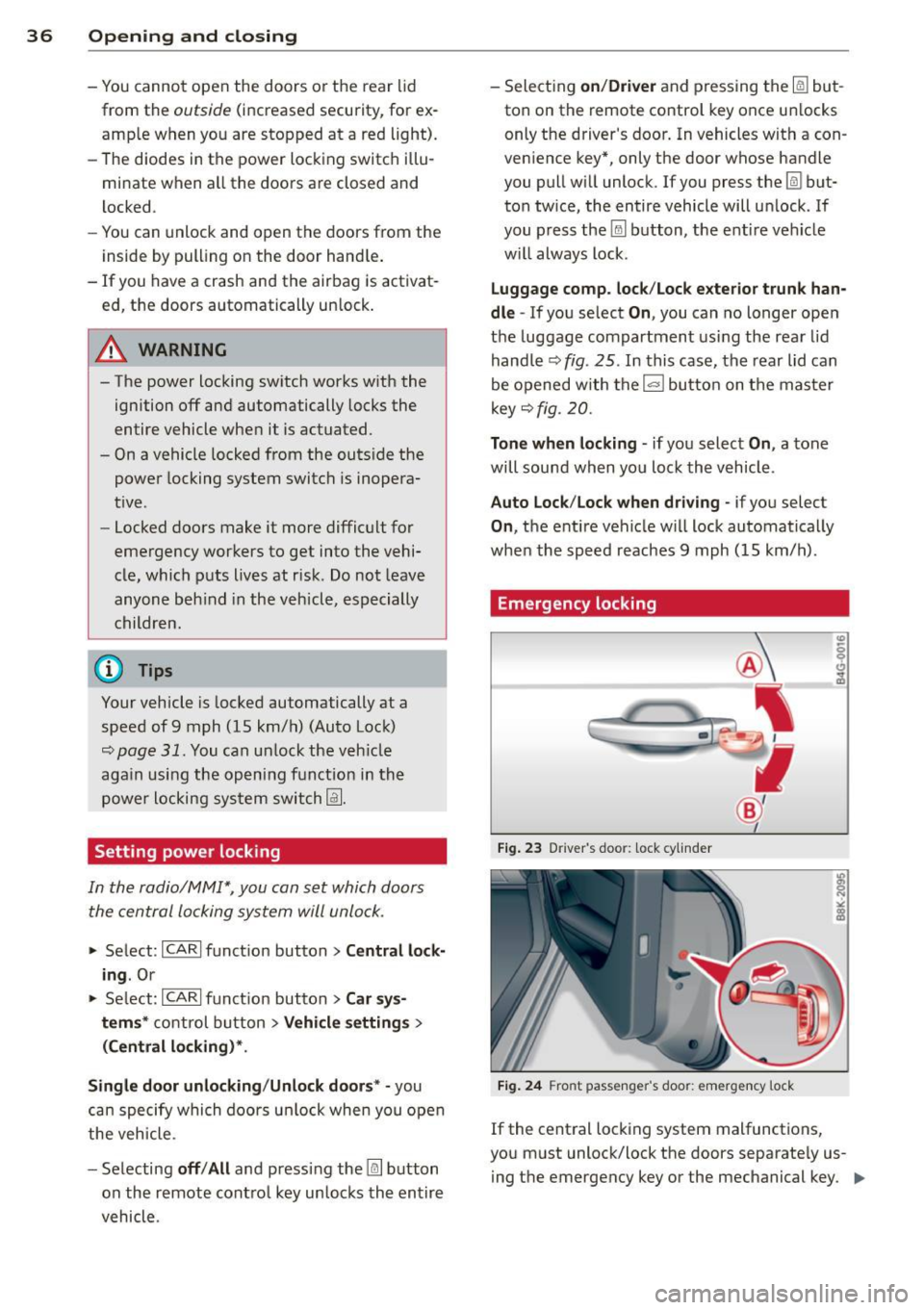
Emergency locking
Fig. 23 D river 's doo r: lock cy linder
Fig. 24 Fro nt passenger 's doo r: emergency lock
If the central locking system malfunctions,
you must unlock/lock the doors separate ly us
i ng the emergency key or the mechanical key. .,.
Page 40 of 290
38 Openin g and clo sing
Opening th e re ar lid
.,. Press the button cs on the remote cont ro l
master key for at least one second. The rear
lid unlocks and opens slightly . Or
.,. Press the handle on the rear lid
r=;,fig. 25.
Closing th e re ar lid
.,. Pu ll t he rear lid down at the grip on the in
side and allow it to drop gently to close it
¢ ,& .
~ WARNING
-After closing the rear lid, always pull up
on it to make sure that it is properly
closed. Otherwise it could open suddenly
when the vehicle is moving.
- To help prevent po isonous exhaust gas
from being drawn into the veh icle, al
ways keep the rear lid closed while driv
ing. Never transport objects larger than
those which fit comp letely into the lug
gage area, because then the rear lid can
no t be fu Uy closed .
- Never leave you r vehicle unattended es
pecially with the rea r lid left ope n. A
child could crawl into the car through the
l u ggage compartment and pull the lid
shut, becoming trapped and unab le to
get out. To reduce the risk of persona l in
jury, never let children play in or around your vehicle . A lways keep the rear lid as
well as the vehicle doors closed when not in use.
- Always ensure that no one is w ith in
range of the rear lid whe n it is mov ing, in
part icu lar close to the h inges - fingers or
hands can be pinched .
@ Tips
When the vehicle is locked , the rear lid can
be opened separately by pressing the but
ton
cs on the maste r key . When you close
the r ear lid agai n, it locks automatically .
Emergency unlocking of the luggage
compartment lid
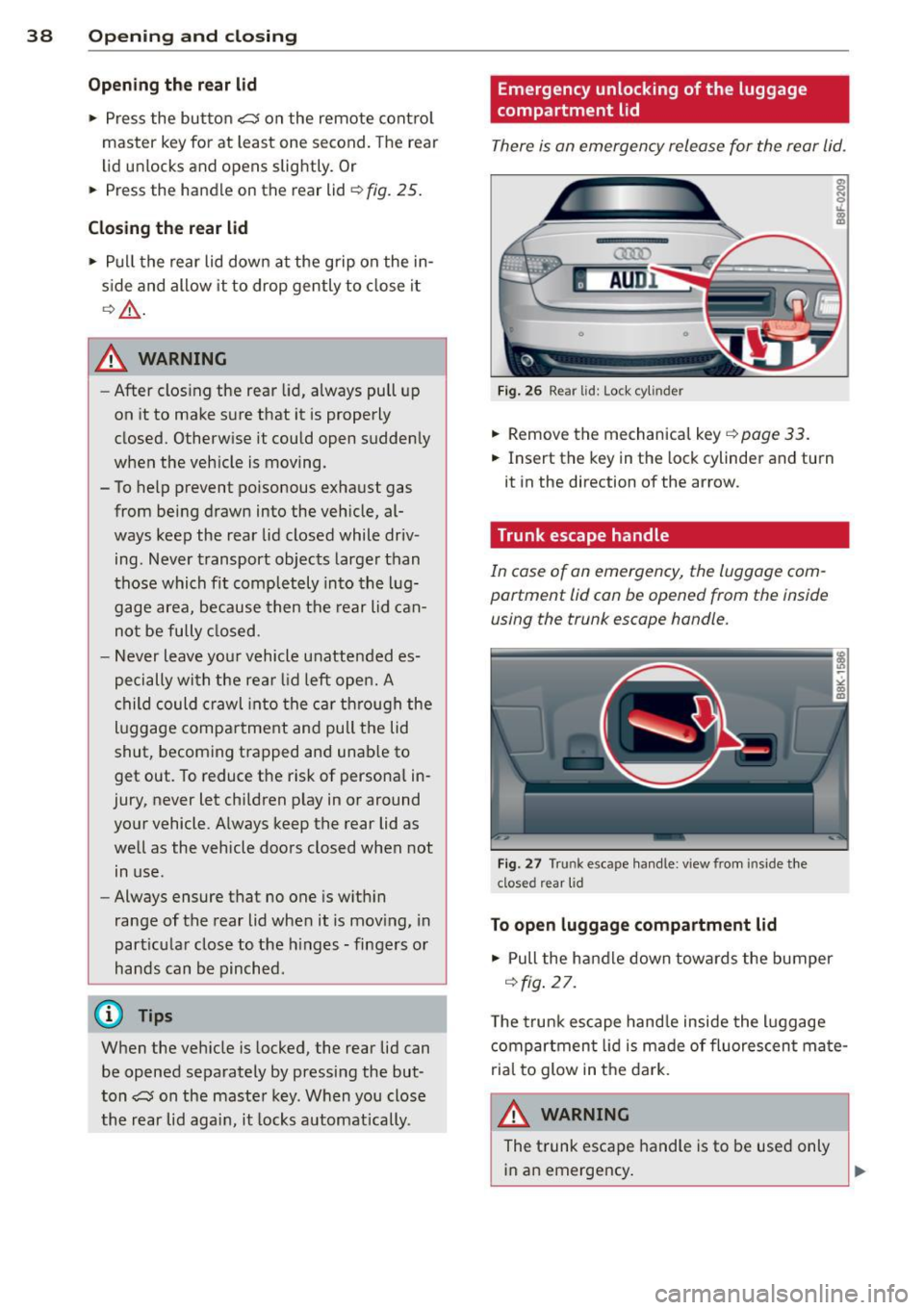
There is an emergency release for the rear lid .
AUDl
F ig . 26 Re ar lid: Lo ck cy linder
.,. Remove the mechanical key r::;, page 33.
.,. Insert the key in the lock cylinder and turn
it in the direction of the arrow.
· Trunk escape handle
In case of on emergency , the luggage com
portment lid can be opened from the inside using the trunk escape handle.
F ig . 27 Tru nk escape han dle: v iew from inside the
clos ed r ear lid
To open luggage compartment lid
.,. Pull the handle down towards the bumper
¢fig . 27 .
The trunk escape hand le inside the l uggage
compartment lid is made of fluorescen t mate
rial to glow in t he dark.
A WARNING
The t runk escape handle is to be used only
in an emergency .
Page 42 of 290
40 Opening and clo sing
Convenience opening/closing
The windows can be opened and closed with
the mechanical key or the emergency key.
@
' ~-~
® '
Fig . 30 Key turns for open ing a nd clos ing
Conv eni ence open ing fe ature
"' 0 0 0
" m
• Use the emergency key or pull the mechani
cal key out of the master key¢
page 33.
• Insert the key into the lock of the drive r's
door.
• Turn the key to position ¢
fig. 30@ until a ll
the windows have reached the desired posi
t ion.
Con venience clo sing f eature
• Use the eme rgency key or pull the mechani
cal key out of the master key¢
page 33 .
• Turn the key in the lock of the driver's door
to the lock position @ until the windows are
closed¢ &.
A WARNING
-Never close the windows inattentive ly
and w ithout checking -there is risk of in
jury.
- You must always watch when the win dows are being ra ised so that no one can
be t rapped. If you release the key, the
closing action is immed iate ly canceled.
- Always read and heed WARNING ¢
A in
General description on page
31 .
Correcting window regulator
malfunction
After disconnecting the vehicle battery, the
one-touch up and down feature must be activated again.
• Pull and ho ld the power window sw itch un
til the w indow is completely closed.
• Release the sw itch and pull the sw itch again
for one second.
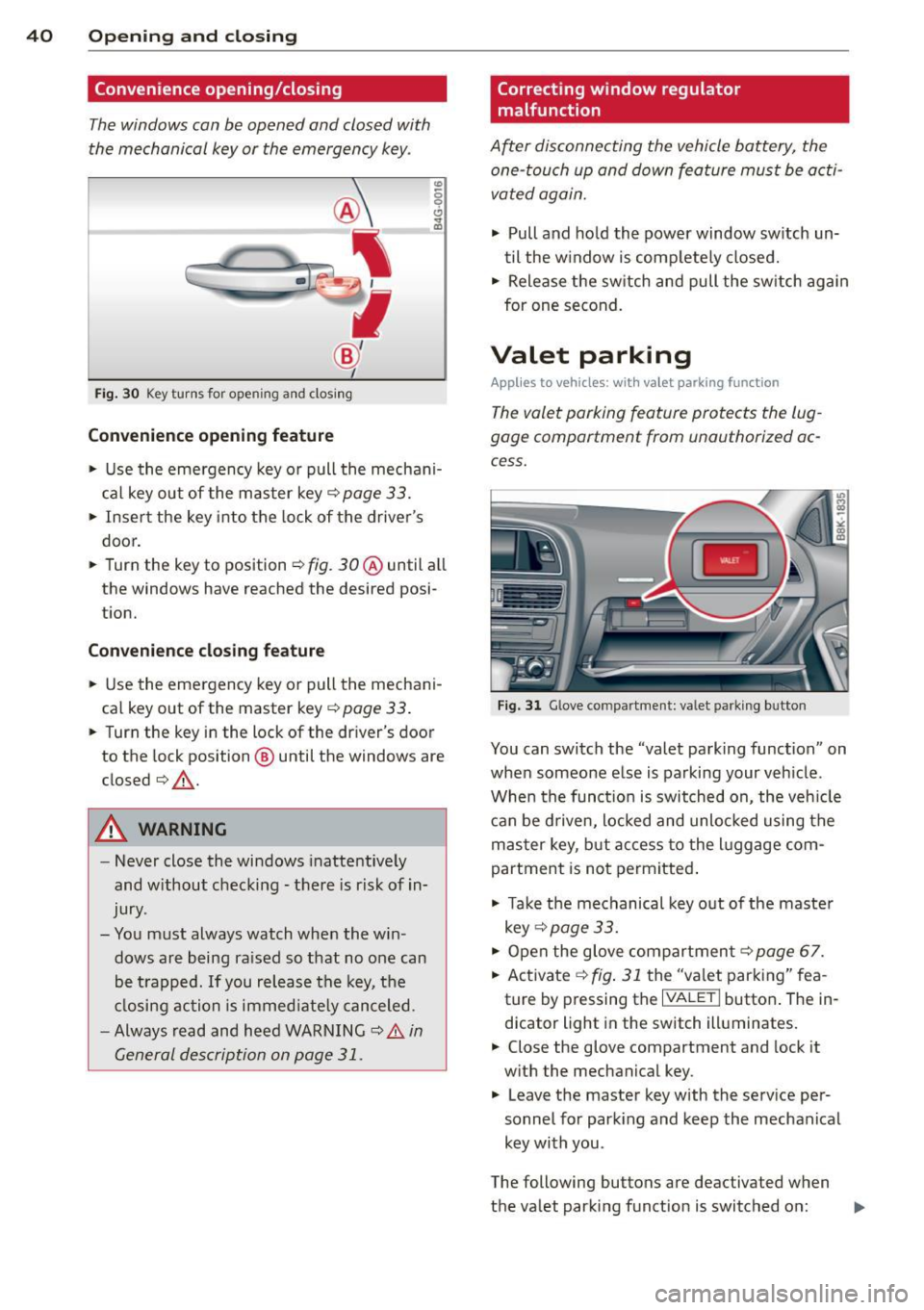
Valet parking
Applies to vehicles: with va let parking function
The valet parking feature protects the lug
gage compartment from unauthorized ac
cess.
Fi g. 31 Glove compartment: valet parking button
You can switch the "valet parking function" on
when someone else is parking your veh icle .
When the funct io n is switched on, the veh icle
can be d riven, Locked and unlocked using the
master key, but access to the l uggage com
partment is not permitted .
• Take the mechanical key out of the maste r
key ¢
page 33.
• Open the glove compartment¢ page 67.
• Activate ¢
fig. 31 the "valet parking" fea
ture by pressing the
I VALET I butto n. The in
dicator light in the switch illuminates.
• Close the glove compartment and lock it
with the mechanical key .
• Leave the master key with the service per
sonnel for park ing and keep the mechanical
key with you .
The following buttons are deactivated when
the valet parking function is switched on: ..,_
Page 45 of 290
correct the cause of the mal function as
soon as possible.
- If park ing the veh icle w ith the power top
open, remember that the ve hicle interior
will not be protected from the weather
or from unauthorized entry. Closing the
power top before leaving the vehicle is
r ecommended. If you leave items in the
vehicle, lock them in the trunk .
"' Power top operation
The indicator light monitors the power top.
The l'JI indicator light illuminates for approxi
mate ly 2 seconds when the ignit ion sw itches
on to check the function and then goes out
again . T he indicator light also:
- illuminates when the power top opens or
closes.
- blinks if the power top switch is operated
but the conditions for opening or closing the
power top are not met. A warning message
also appears in the instrument cluster dis
play
c::> page 43, Error message in the in
strument cluster display .
-if the power top d id not open or close com
pletely.
(D Tips
The indicator light stays on if the power
top was opened manually.
Error message in the instrument cluster
display
An error message appears if the power top
cannot open or close .
Several conditions must be met for the power
top to open or close automat ically .
An error message in the instrument cluster
d isp lay ind icates if one of the condit ions is not
met or there is a malfunct ion.
Power top: please close rear lid
The luggage compartment lid must be closed
when the power top is opening or closing . This
error message appears in the instrument cl us-
Power top 43
ter display if the luggage compa rtment lid is
not closed .
Storage bay not lowered. Please remove
obstruction
The power top sto rage bay must lower when
the power top is opening . This error message
appears in the instrument cluster display if
the storage bay is not lowered. If the storage
bay does not lower automat ically because of
objects in the luggage compartment, remove
the objects that are in the way from the stor
age bay area . Otherwise, you can operate the
power top storage bay manually
c::> page 45.
Power top : cannot be used
This error message appears if the convertible
cannot open or close automatically because of
safety reasons or if there is a malfunct ion . The
follow ing causes are possible:
- Vehicle speed too high: Power top opera
tion is deactivated and an error message ap
pears if the veh icle speed is too high. Re
duce the vehicle speed and ope rate the
sw itch again to open or close the powe r top.
- Battery voltage too low: The power top can
not be ope rated if the battery voltage is too
low. This ens ures the re will be enough bat
t ery vol tage le ft to sta rt the vehicle. The
power top can be operated again after the
eng ine is started .
-Rollover protection active: If the power top
is operated continuously for an extended pe
riod of time, rollover protection will activate
to prevent damage to the hydra ulic unit.
This protective funct ion prevents the power
top from opening or close for approx imately
15 to 30 minutes. It w ill function again af
ter that
c::> & .
-Malfunction: Failure of system components
is one possib le cause for malfunction . If this
happens, you can a lso ope rate the powe r
top by hand
c::> page 47.
Power top not secure
This message appears with a warning tone if
the power top is not
completely closed or
open and the vehicle speed is above 50 km/h.
ll-
Page 46 of 290
44 Power top
Reduce the vehicle speed below 50 km/h and
use the switch to open or close the powe r top
comp lete ly.
.&_ WARNING
Never drive when the powe r top is not
locked co rrectly. The w ind from dr iv ing
co uld cause t he power top to open. Th is
can r esult in injuries a nd damage to th e
veh icle .
Opening or closing the power top
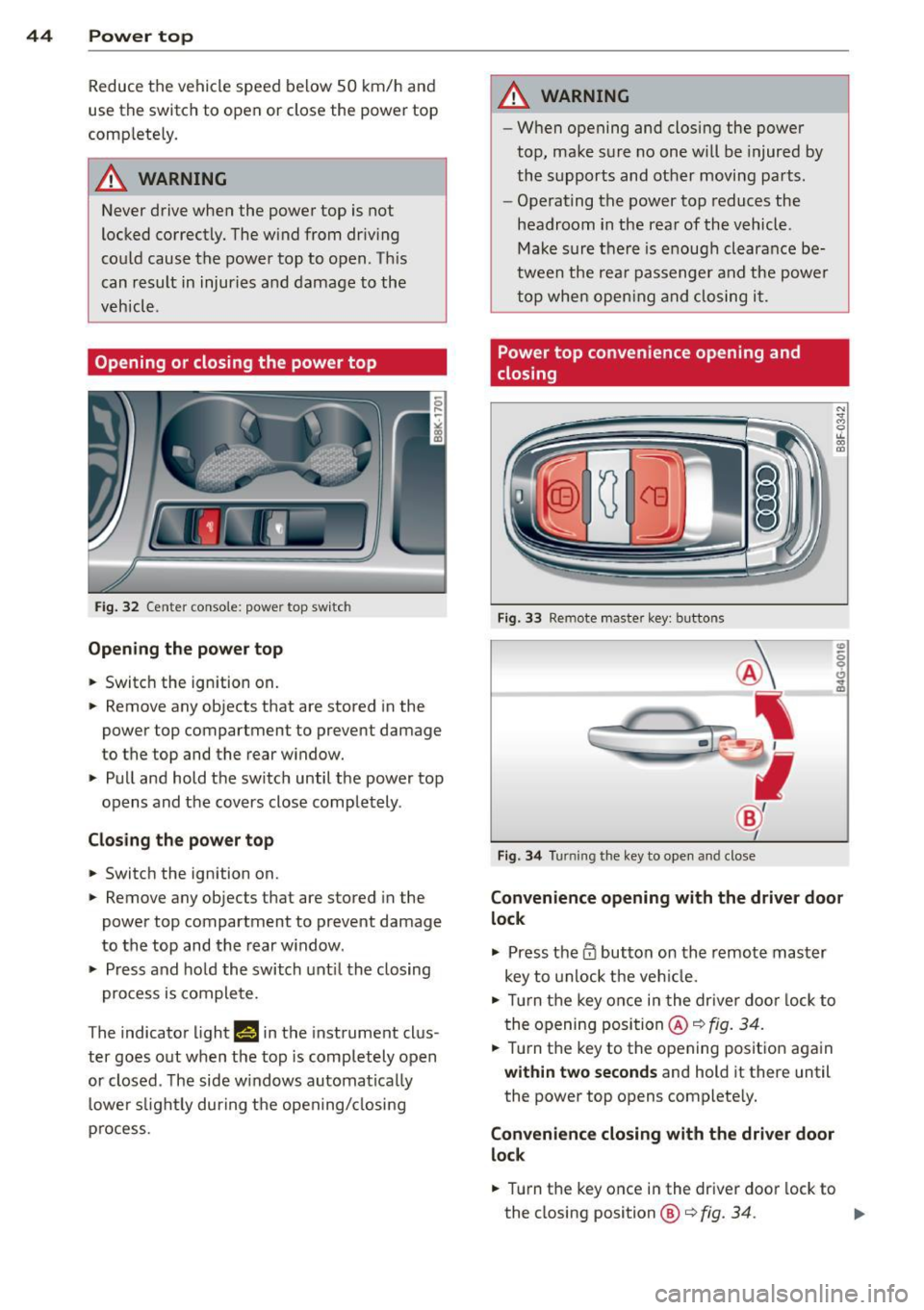
Fig. 32 Ce nte r conso le : powe r top sw itc h
Opening the power top
.. Switc h the ign ition on .
-
.. Remove any objects that are stored in the
power top compartment to preve nt damage
to the top and t he rear w indow .
.. Pull and hold t he swi tc h until t he power top
opens and the cov ers close compl ete ly .
Closing the power top
.. Switch the ignition on .
.. Remove any objects that are stored in the
power top compartment to prevent damage
to the top and the rear w indow .
.. Press and ho ld the swi tch unt il t he closing
pro cess is co m plete.
T he indicato r light
1#§ 111 the instrument clus
ter goes o ut w hen the top is compl etely open
or closed . T he side w indows automa tica lly
l owe r slig htl y during t he open ing/ closing
p rocess.
.&_ WARNING
-- Wh en opening and closing the powe r
top, ma ke s ure no on e w ill be injur ed by
the supp orts and ot her movi ng pa rts .
- Ope rat ing the power top reduces the
headroom in the rea r of the vehicl e.
M ake sur e th ere i s enoug h clear an ce be
twee n the rea r passenger an d the power
t o p whe n openin g an d clos ing i t.
Power top convenience opening and
closing
Fi g. 33 Remote maste r key : butto ns
Fig . 34 Turnin g the key to ope n an d close
Convenience opening with the driver door
lock
.,. Press them butto n on th e r emo te ma ster
key to unlock t he ve hicle.
.. Tu rn the key on ce i n t he drive r do or l ock to
t he openi ng posi tion @~
fig. 34 .
.. Tur n the key to t he opening posit io n aga in
within two seconds and hold it there until
the power top opens complete ly.
Convenience closing with the driver door
lock
.. Turn the key once in the driver door lock to
the closing position@¢
fig. 34. ..,.
Page 48 of 290
46 Power top
Wind deflector
Applies to vehicles: with wind deflector
The wind deflector decreases air movement
inside the vehicle and increases driving com
fort.
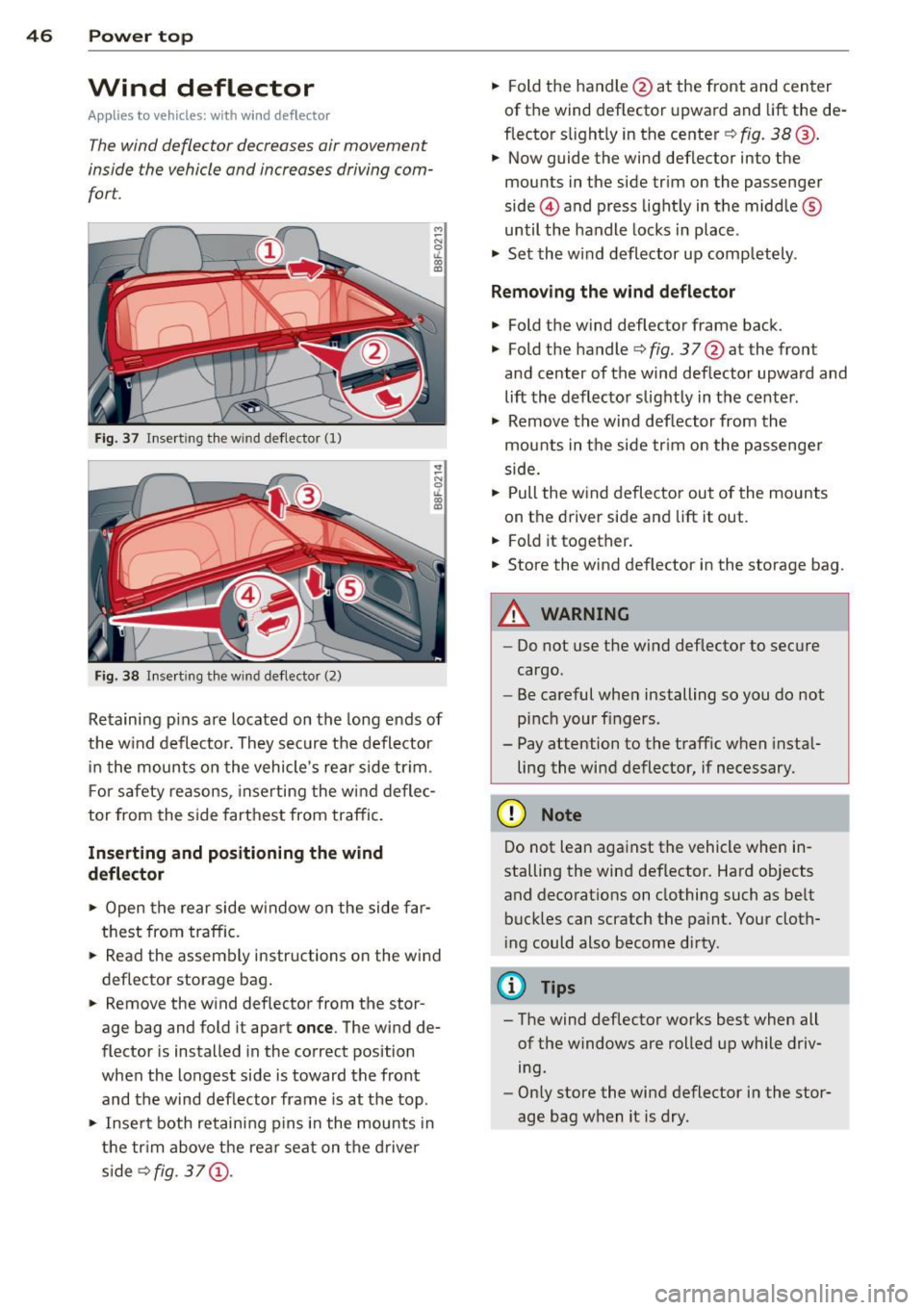
Fi g. 37 Insert ing the win d deflector (1)
Fig. 38 Inse rt in g the wind deflector (2)
Retaining pins are located on the long ends of
the w ind deflector. They sec ure the deflector
i n the mounts o n the vehicle's rear side tr im .
F or safety reasons, inserting the w ind deflec
tor from the side farthest from traffic.
Inserting and positioning the wind
d eflector
,.. Open the rear side w indow on the side far
thest from traffic.
,.. Read the assembly instructions on the wind
deflector storage bag .
,.. Remove the wind deflector from the stor
age bag and fold it apart
once . The wind de
flector is installed in the correct position
when the longest side is toward the front
and the wind deflector frame is at the top.
,.. Insert both retaining p ins i n the mounts in
the tr im above the rear seat on the driver
s ide
s>fig. 37 (!). ,..
Fold the handle @at the front and center
of the wind deflector upward and lift the de
flector s light ly in the center s>
fig. 38@.
,.. Now guide the wind deflector into the
mounts in the side trim on the passenger
side @and press light ly in the middle ®
until the handle locks in place .
,.. Set the wind deflector up comp letely .
Remo ving the wind deflector
,.. Fold the wind deflector frame back.
,.. Fold the handles>
fig. 3 7@ at the front
and center of the wind deflector upward and
lift the deflector slightly in the center .
,.. Remove the wind def lector from the
mounts in the side tr im on the passenge r
side.
,.. Pull the w ind deflecto r out of the mounts
on the driver side and lift it out .
,.. Fold it together.
,.. Store the wind deflector in the storage bag.
A WARNING
--Do not use the wind deflector to secure
cargo.
- Be careful when installing so you do not
pinch your f ingers .
- Pay attention to the traff ic when insta l
ling the wind deflector, if necessary.
(D Note
Do not lean aga inst the vehicle when in
stalling the wind deflector. Hard objects
and decorations on clothing such as be lt
buck les can scratch the pa int. Your cloth
i ng could also become dirty.
@ Tips
- The wind deflector works best when all
of the windows are rolled up while driv
ing.
- Only store the wind deflector in the stor
age bag when it is dry.
Page 54 of 290
52 Clear vis ion
Clear vision
Lights
Switching the lights on and off
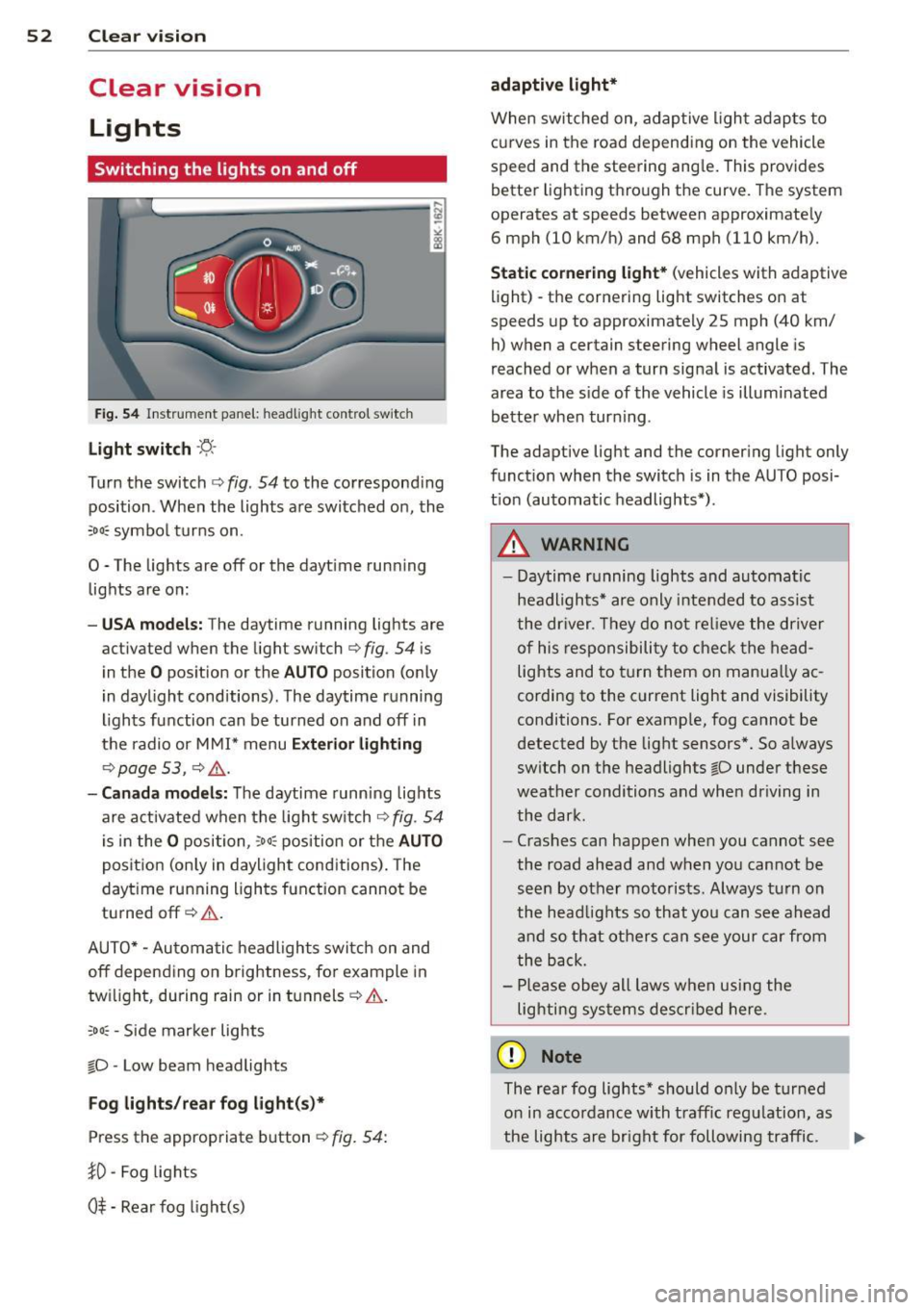
Fig . 54 Instr ument pane l: headlight con trol switch
Light switch -~ -
Turn the switch c:> fig . 54 to the correspond ing
position . When the lights are switched on, the
,o o~ symbo l tu rns on.
0 -The lights are off or the dayt ime run ning
lights are on:
- USA models: The daytime running lights are
activated when the light sw itch
c:> fig . 54 is
i n the
O position or the AUTO position (o nly
in dayl ight conditions) . The daytime running
lights function can be turned on and off in
the radio or M MI* menu
Exterior lighting
c:> page 53 , c:> ,&..
-Canada model s: The daytime runn ing lig hts
are activated when the light sw itch
c:> fig . 54
is in the
O p osition, :o o; position or the AUTO
pos it ion (on ly in daylight cond itions) . The
dayt ime running lights function cannot be
tu rned off
c:> &. .
AUTO* -Au toma tic h eadlights switch on and
off depending on b rightness, fo r example in
tw ilight, during rain or in t unnels
c:> &. .
:o o; -Side mar ker lights
io -Low beam headlights
Fog lights /rear fog light( s)*
Press the appropriate b utton c:> fig. 54:
}0 -Fog lights
0$ -Rear fog light(s)
adaptive light*
When switched on, adap tive ligh t ad apts to
curves in the road depending on the vehicle
speed and the steering ang le . This provides
b etter l ighting t hro ugh the curve . The system
operates at speeds between app roximate ly
6 mph (10 km/h) and 68 mph (110 km/h).
Static cor nering light* (vehicles with adaptive
light) - the cornering light switches on at
speeds up to approximately 25 mph (40 km/
h) when a certain steering wheel angle is
reached or when a turn sig na l is activated. The
area to the s ide of the vehicle is illumi nated
be tte r when tur ning .
The adaptive light and the co rnering light only
funct ion when the switch is in the AU TO posi
t ion (automatic headlights*) .
A WARNING
--
- Daytime r unning lights and automatic
headlights* are only inte nded to assist
the dr iver . Th ey do not re lieve the driver
o f his re sp onsibili ty to check t he head
lights and to t urn them on manua lly ac
cordin g to the c urrent light and visibility
conditions . For examp le, fog cannot be
detected by the light sensors *. So a lways
sw itch on t he headlights
io under these
wea ther conditions and when driving in
the dark.
- Cras hes can happen whe n you cannot see
the road ahead and when yo u cannot be
see n by other moto ris ts. Always tu rn on
the head lig hts so that yo u can se e ahead
and so th at others can see your car fr om
the b ack.
- Pl ease obey all laws w he n usi ng the
lighting sys tems descr ibed here.
(D Note
The rear fog lights * should o nly be tur ned
o n in acco rdanc e with t raff ic regu lation, as
the lights are bright for following traffic. ..,
Page 55 of 290
@ Tips
-The light sensor * for headl ight control is
l ocated in the rear view m irror mount.
You should therefore not apply any st ick
ers to the windsh ield in this area in order
to prevent malfunctions or failures .
- Some exterior lighting functions can be
ad justed
¢ page 53.
-When yo u remove you r key from the igni
tion w hile the vehicle's lights are turned
on, a buzzer sounds as long as the driv
er's door is open .
- In cool or damp weather, t he ins ide of
the headlights, turn signa ls and tail
li ghts can fog ove r due to the tem pera
ture diffe ren ce betwe en the inside and
outside. They will clear shor tly after
swi tching t hem on. This d oes not aff ect
the service life of the ligh ting.
- In the even t of a ligh t sensor malfunc
tion, the drive r is no tifie d in the inst ru
ment cluster disp lay ~
page 2 2.
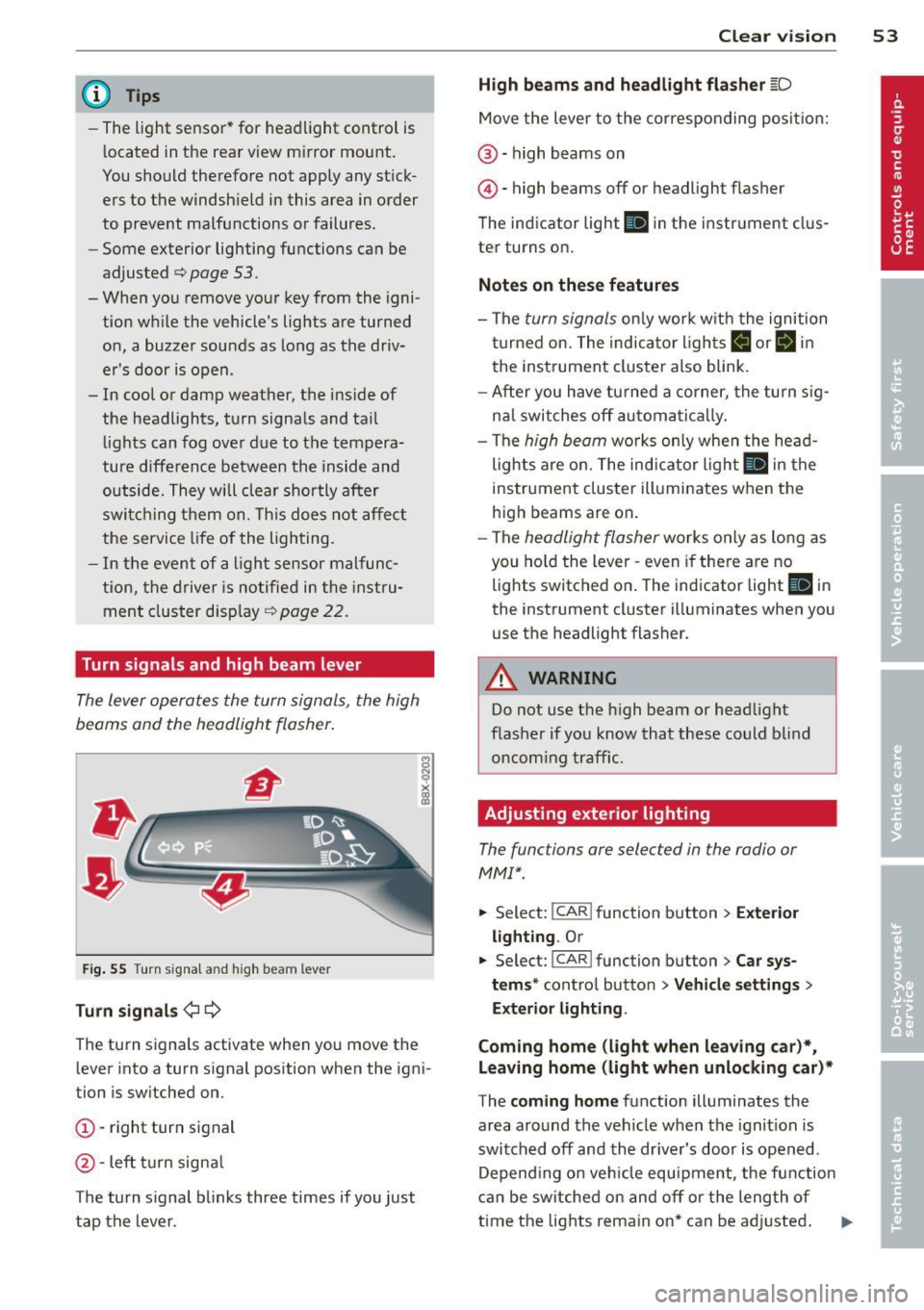
Turn signals and high beam lever
The lever operates the turn signal s, the high
b eams and th e headlight flash er.
F ig. 55 Turn sig na l an d high beam leve r
Turn signals ¢i ¢
Th e turn s ignals activate when you move the
l ever into a turn s ignal position when the ign i
tion i s sw itched on.
(D -right turn signal
@ -Left turn signa l
T he turn s ignal b links three times if you just
tap the lever .
Clear vision 5 3
High beams and headlight flasher @:D
Move the lever to the corresponding posit io n:
@ -high beams on
@-high beams off or headlight flasher
T he ind icator light
II in the instr ument clus
ter turns on .
Notes on these features
-The turn signals on ly wor k w it h t he ignition
t urned on. The indica tor l igh ts
11 or II in
the instrument cluste r also blink .
- Aft er you have tu rned a corner, the turn s ig
na l swi tches off au tom atically .
- The
high beam wo rks only when the head
lights a re on. The indicator Ligh t. in the
i nstrumen t clus ter illuminates when the
high beams are on .
- The
headligh t flasher works on ly as long as
you ho ld the lev er -even if the re are no
lights switched o n. The ind icator light
Ill i n
the inst rument cluster illuminates when you
use the headlight flasher .
&_ WARNING
Do not use the high beam or head light
flasher if you kn ow that these could b lind
oncom ing traffic.
Adjusting exterior lighting
The functions are selec ted in the radio or
MM!* .
.. Select : I CAR! function b utton > Exter io r
light ing . Or
.. Select: I CAR I func tion button > Car sys
tems *
control button > Vehicle settings >
Exterior Lighting .
Coming home (light when leaving car )*,
Leaving home (light when unlocking car)*
T he coming home function illumi nates the
area around the vehicle when the ignition is
switched off and the dr iver's door is open ed.
Depend ing o n ve hicl e equ ipment, t he function
can be switched on and off or the length of
time the lig hts remain on* can be ad justed . .._
Page 56 of 290
54 Clear vis ion
The lea ving home function i lluminates the
area around the vehicle when unlocking it.
This funct ion can be switched on and
off.
The co ming h ome and le av ing h ome func
tions on ly operate when it is dark and the
light switch is in the AUTO position
r=:> fig. 54.
Auto headlight s*
When the light switch is in the AUTO
r=:> page 52 position, the sw itch-on po int of the
lights can be changed in the automatic dr iv ing
light function.
Daytime running lights
US A mo del s: You can switch the dayt ime run
ni ng lights
on and off .
Ca nada mod els :
The function cannot be
turned
off . It is activated automat ically each
time the ignition is switched on.
Tra vel mode*
The headlight beam is asymmetrical. This pro
vides stronger illum ination on the side of the
road on wh ich you are driving . If you are driv
ing in a country that drives on the opposite
side of the road from your own country, t his
will cause glare for oncoming dr ivers. To pre
vent glare:
- Trave l mode must be selected in vehicles
with Xenon head lights *.
- In vehicles with halogen headlights, ce rtain
areas of the head light lenses must be cov
ered w ith waterproof adhesive covers that
prevent light from passing through . Fo r
more information, please see your author
ized Audi dea ler or authorized repair facility .
@ Tips
When travel mode is a ctiv ated, a displ ay in
the dr iver information system indi cates
this each time you switch t he ignition on.
Emergency flashers
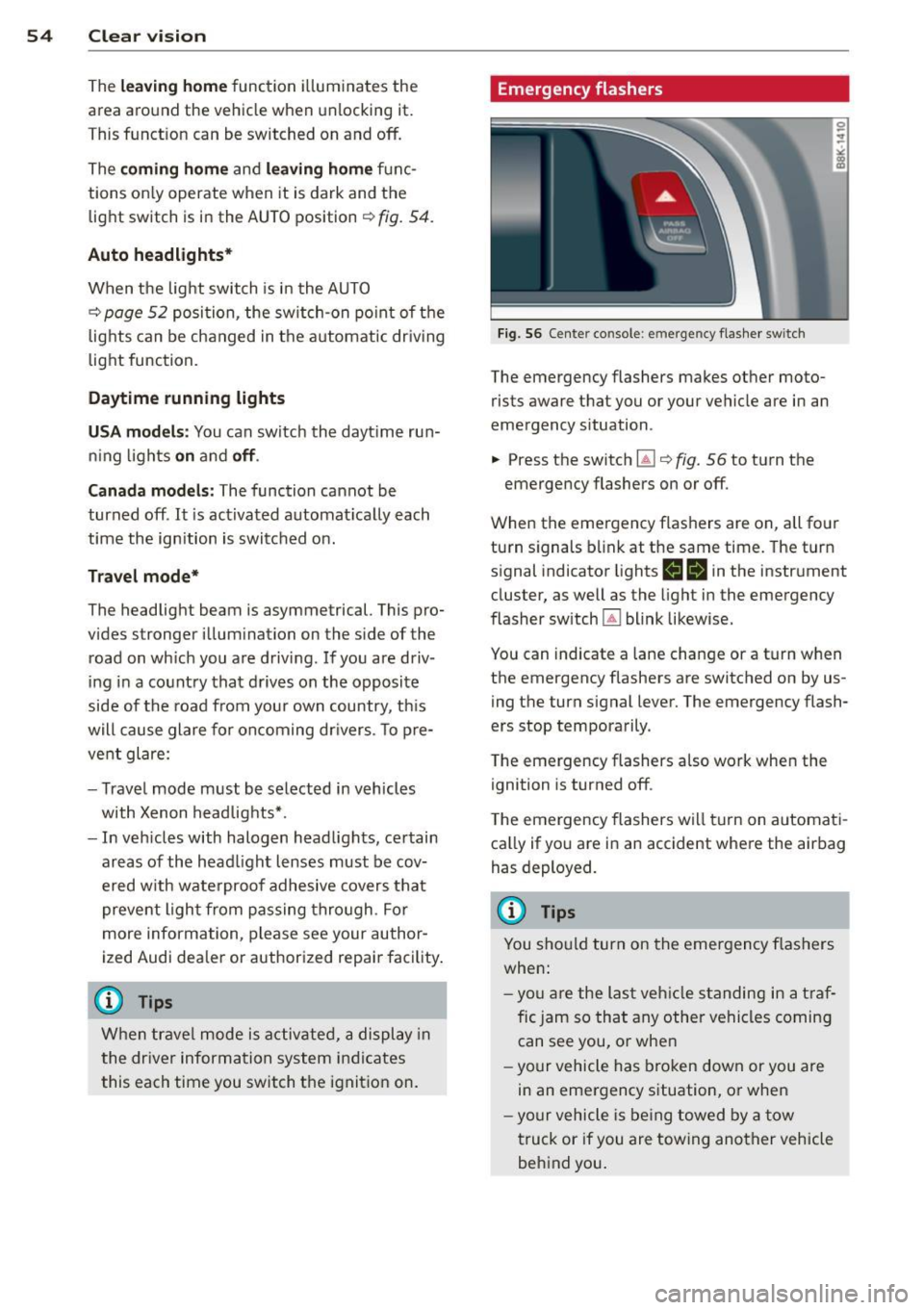
F ig. 56 Center console: em erge ncy flashe r switch
The emergency flashers makes other moto
rists aware that you or your vehicle are in an
emergency situation.
... Press the switch ~¢
fig. 56 to turn the
emergency flashers on or
off.
When the emergency flashers are on, all four
turn signals b link at the same time. The turn
s ignal indicator lights
H II in the instrument
cluster, as well as the light in the emergency
flasher switch ~ blink likewise.
You can indicate a lane change or a tu rn when
the emergency flashers are switched on by us
ing th e turn signal lever. The emergency flash
ers stop temporarily .
T he emergency flashers also work when the
ignition is turned
off .
The emergency flashers wi ll tu rn on automat i
ca lly if yo u are in an accident where the air bag
has deployed.
(D Tips
You sho uld turn on the emergency flashers
when:
- yo u are the last veh icle standing in a t ra f
fic jam so that any other vehicles coming can see you, or whe n
- yo ur vehicle has bro ken down or you are
in an emergency situation, or when
- yo ur vehicle is be ing towed by a tow
truck or if you are towing ano ther vehicle
behind you .