light AUDI A5 CABRIOLET 2013 Service Manual
[x] Cancel search | Manufacturer: AUDI, Model Year: 2013, Model line: A5 CABRIOLET, Model: AUDI A5 CABRIOLET 2013Pages: 290, PDF Size: 72.35 MB
Page 81 of 290

note that electrica l equipment such as
exterior lights wi ll switch off as well
when that happens.
Switching engine off
App lies to vehicles: with conve nien ce key
.,. Bring your vehicle to a complete stop.
.,. Move the selector lever to the P or N posi
t ion.
... Press the
!START E NGIN E STOPI button
~fig. 91.
St eering lock
The steering locks when you turn the engine
off us ing the
I STAR T ENGINE STOP I button
and open the dr iver's door . The locked steer
ing he lps prevent vehicle theft.
E mergenc y off
If necessary, the eng ine can be sw itched off
with the selector lever in the R or D/S pos i
tions. To do so, step on the brake peda l and
press and hold the
I STAR T ENGINE STOP I but
ton vehicle speed must be less than 6 mph
(10 km/h).
.&, WARNING
-Never t urn off the eng ine be fore the ve
hicle has come to a complete stop . The
f ull function of the brake booster and the
power steering is not guaranteed . You
must use more force to turn or brake if
necessary. Because you cannot steer and
brake as you usua lly would, this could
lead to c rashes and serious injur ies.
- For safety reasons, you should always
park your vehicle with the se lector lever
in P . Otherwise, the veh icle could i nad
vertent ly roll away .
- The rad iator fan can continue to run for
up to 10 minutes eve n after you have
tu rned off the eng ine and removed the
ignition key. The radiator fan can also
turn on again i f the engine coolant hea ts
up because of intense sunlight or hea t
build -up in the engine compartment.
On th e ro ad 79
-Always take the key w ith you whenever
you leave your ve hicle. Otherw ise, the
e ngine could be started or electrical
equipment such as the power windows
could be operated. This can lead to seri
ous injury.
(D Note
If the engine has been under heavy load
for an extended period, heat bu ilds up in
the eng ine compartment after the eng ine
i s sw itched off - there is a r is k of damag ing
the e ngine. A llow the eng ine to run at id le
for abo ut two minutes before switching it
off.
Driver messages
I g nition i s on
This message appears and a warning tone
sounds if you open the d river's door when the
ignition is sw itched on .
No key ident ified
This message appears when the
I S TART ENGINE STOP I button is pressed if
there is no master key ins ide the ve hicle or if
the system does not recognize it . For exam
ple, the master key cannot be recognized if it
i s covered by an object (e .g . aluminum brief
case) which
screens the radio s ignal. Electron
ic dev ices such as cell p ho nes can also inte r
f ere with the radio s ignal.
Pr ess brake p edal to start engine
This message appears if you do not press the
brake pedal to start the eng ine .
Shift to N or P to start engine
T h is message appears w hen a ttempt ing to
star t the eng ine if the selecto r lever for the
automatic transmiss ion is not in the P or N
pos ition . The engine can only be started with
the se lector in these positions.
Is the ke y in the vehicle ?
Page 82 of 290
80 On the road
This message appears if the master key is re
moved from the vehicle with the engine run
n ing.
If the master key is no longer in the ve
hicle, you cannot switch on the ignition after
stopping the engine and you also cannot start
the eng ine again . Moreover, you can not lock
the veh icle from the outside w ith the key.
Shift to P otherwise vehicle can roll away.
Doors do not lock if lever is not in
P.
This message appears for safety reasons
a long w ith a warning signa l. It appears if the
selector lever for the automat ic transm iss ion
is not in the P position when switch ing off the
ignition . Move the selector lever to the P pos i
tion, othe rwise the ve hicle is not secured
against rolling away . You also cannot lock the
vehi cle using the locking bu tton* on the door
han dle or using the remote key.
Convenience key defective! Use ignition lock
This message appears if the eng ine must be
started or stopped using the ignition key and
not the
I STAR T ENGIN E ST OP ! button .
Electromechanical
parking brake
Operation
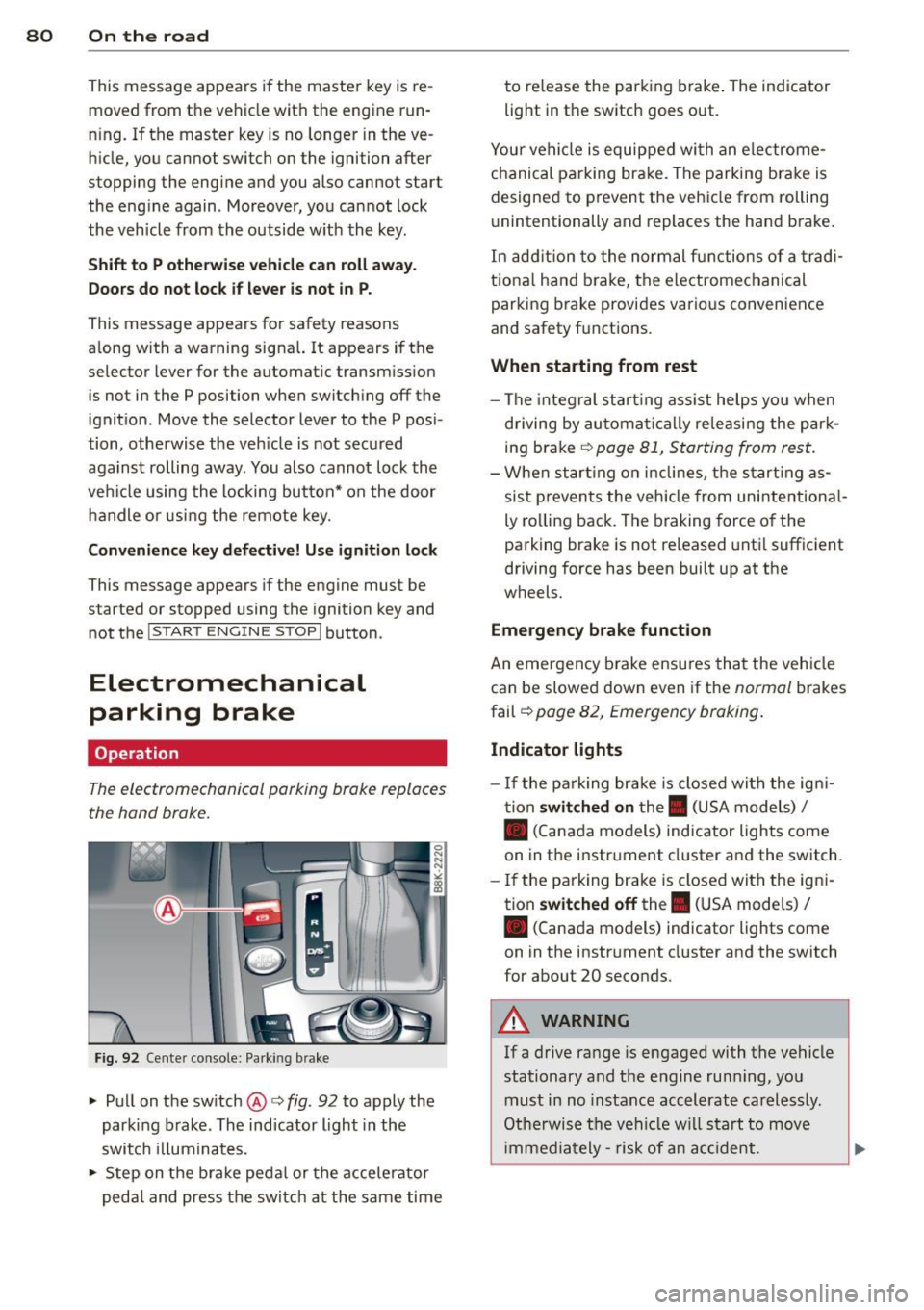
The electromechanicol parking brake replaces
the hand brake.
F ig. 92 Cente r console: Parking brake
.., Pull on the switch @c:> fig. 92 to apply the
parking brake. The indicator light in the
switch illum inates .
.., Step on the brake peda l or the accele rator
pedal and press the switch at the same time to re
lease the par king brake . The indicator
light in the switch goes out.
Your vehicle is equipped wi th an electrome
chanical parking brake . The parking brake is
designed to prevent the vehicle from rolling
u nintentionally and replaces the hand brake.
In addition to the normal fun ctions of a tradi
tiona l hand b rake, the electromechanical
parking brake provides various convenience
and safety f unctions .
When starting from rest
-The integral start ing assist helps you when
driving by automatica lly re leasing the par k
ing brake
c:> page 81, Starting from rest.
-When starting on inclines, the starting as
sist prevents the vehicle from unintentiona l
ly ro lling back. The braking force of the
parking brake is not released until sufficient
driving force has been built up at the
wheels.
Emergency brake function
An eme rgency b rake ensures that the vehicle
can be slowed down even if the
normal brakes
fail c:>
page 82, Emergency braking .
Indicator lights
- If the parking brake is closed with the igni
tion
switched on the. (USA models) I
• (Canada models) ind icator lights come
on in the instr ument cluster and the switch .
- If the parking brake is closed with the igni
tion
switched off the . (USA models) I
• (Canada models) indicator lights come
on in the instrument cluster and the switch
for about 20 seconds .
A WARNING
-
If a drive range is engaged with the vehicle
stationary and the engine runn ing , you
must in no instance accelerate carelessly.
Otherwise the vehicle will start to move
i mmed iately- risk of an acc ident.
Page 86 of 290
84 On the road
Cruise control
Switching on
The cruise control system makes it possible to
drive at a constant speed starting at 20 mph
(30 km/h).
0
f
®t
0
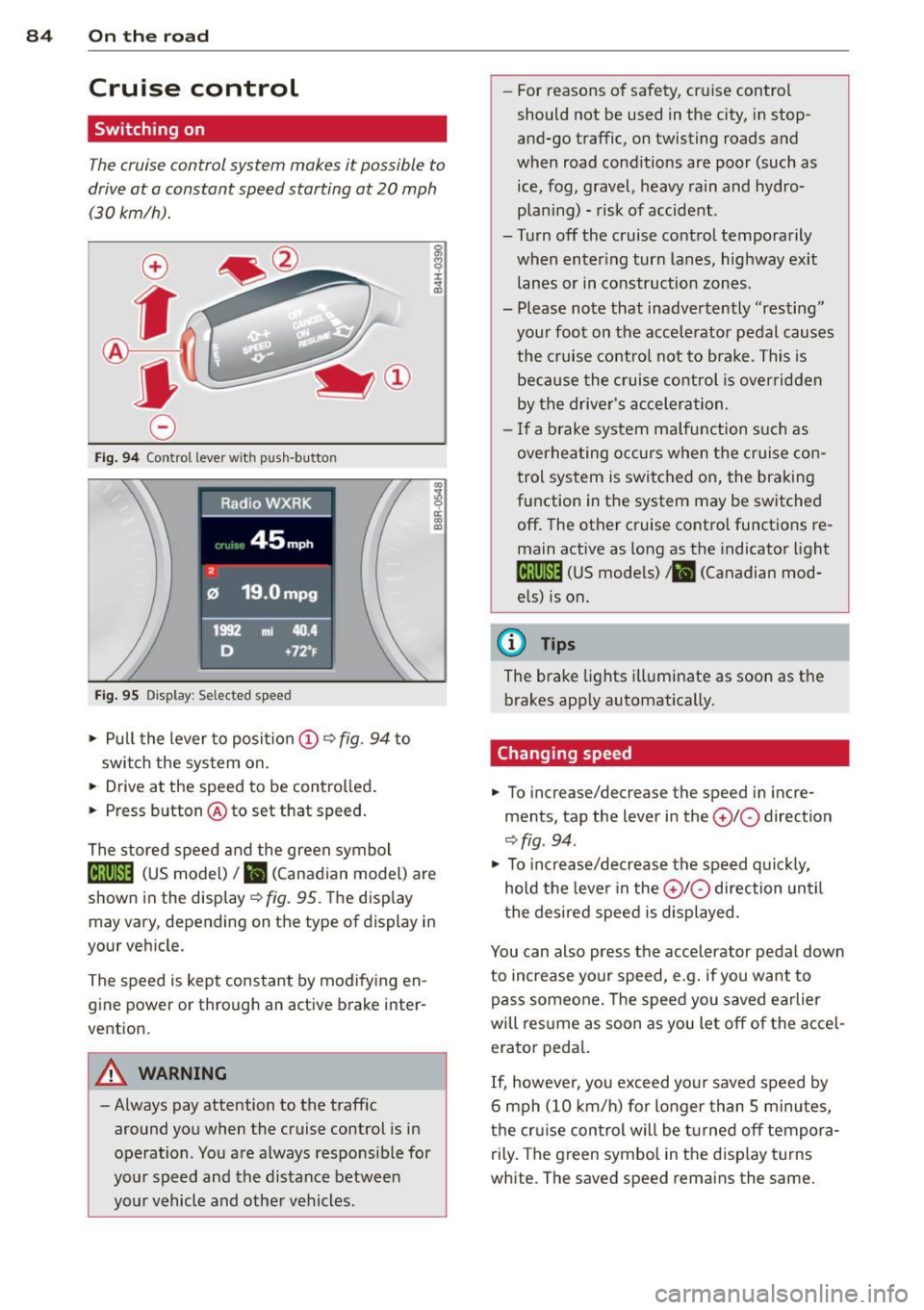
Fig. 94 Control lever w it h push-button
Fig. 95 Dis pl ay: Selected speed
"' Pull the lever to position (D 9 fig . 94 to
switch the system on.
"' Drive at the speed to be controlled .
"' Press button @ to set that speed.
I :i:. ... a,
The stored speed and the green symbol
lij;(l)~i4 (US model) 1B (Canadian model) are
shown in the display
r:::;, fig. 95. The display
may vary, depending on the type of display in
your veh icle.
The speed is kept constant by modifying en
gine power or through an active brake inter
vention.
A WARNING
- Always pay attention to the traffic
around you when the cruise control is in
operation. You are always responsible for
your speed and the distance between
your vehicle and other vehicles. -
For reasons of safety , cruise control
should not be used in the city, in stop
and-go traffic, on twisting roads and
when road conditions are poor (such as ice, fog, gravel, heavy rain and hydro
plan ing) - risk of accident.
- Turn off the cruise control temporarily
when enter ing turn lanes, highway exit
lanes or in constr uction zones .
- Please note that inadve rtently "resting"
your foot on the accelerator pedal causes
the cruise control not to brake. This is
because the cruise control is overridden
by the drive r's acceleration.
- If a brake system malfunction such as
overheating occurs when the cruise con
trol system is switched on, the braking
function in the system may be switched
off . The other cruise control functions re
main active as long as the indicator light
[ff;(l)~i4 (US models) ;B (Canadian mod
els) is on.
(D Tips
The brake lights illuminate as soon as th e
brakes app ly automatically.
Changing speed
"' To incre ase/decrease the speed in incre
ments, tap the lever in the
010 direction
r:::;, fig . 94 .
"' To increase/decrease the speed quic kly,
hold the lever in the
010 direction until
the desired speed is displayed.
You can also press the accelerator pedal down
to increase your speed, e .g. if you want to
pass someone. The speed you saved earlier
will res ume as soon as you let off of the acce l
erator pedal.
If, however, you exceed your saved speed by
6 mph (10 km/h) for longer than 5 minutes,
the cruise control wil l be turned off tempora
rily. The green symbol in the disp lay turns
white. The saved speed remains the same.
Page 88 of 290
86 Transmi ssion
Transmission
multitronic ®, S tronic ®,
tiptronic
Introduction
Appl ies to vehicles: with multitronic/5 tronic/tiptronic
The automatic transmission is controlled elec
tronically. The transmission ups hifts or down
shifts automatically depending on which drive program is se lected.
When a
moderate driving style is used, the
transmission se lects the most economical
driving mode. It wi ll then change up early and
de lay the downshifts to g ive better f uel econ
omy.
The transmission switches to a sporty mode after a k ick-down or when the dr iver uses a
sporty driv ing style characterized by qu ick ac
celerator peda l movements, heavy accelera
tion, frequent changes in speed and traveling
at the maximum speed .
If desired, the driver can a lso sel ect the gears
manually (tiptronic mode ) q page 86.
Various a utomatic transmissions may be in
stalled, depend ing on the mode l:
multitronic ® transmission
The mult it ron ic® transm ission is a co nti nuous
l y var iable transmission. Power is transferred
using a m ultidisk clutch. In contrast to con
ventiona l automatic transmissions using sh ift
ing operat ions, the transmission ratio in the
continuously variable transm ission is changed
continuously. This optimizes the comfort level
and conserves fuel.
S tronic ® transmission
The 5 tronic ® is a d ual-clutch transmission .
Power is transferred using two clutches that
work independently from one another. They
replace the to rque conve rter used in conven
tional automa tic transm iss ions and allow the
ve hicle to acc elerate without a noticeable in
ter ruption in traction.
tiptronic transmission
In the t ipt ro ni c transm iss ion, powe r is trans
f erred by a torque converter .
Selector lever positions
Applies to vehicles: with multitronic/5 tronic/tiptronic
i--...~~-----------..,.-~ -... N
N
N
" :ll
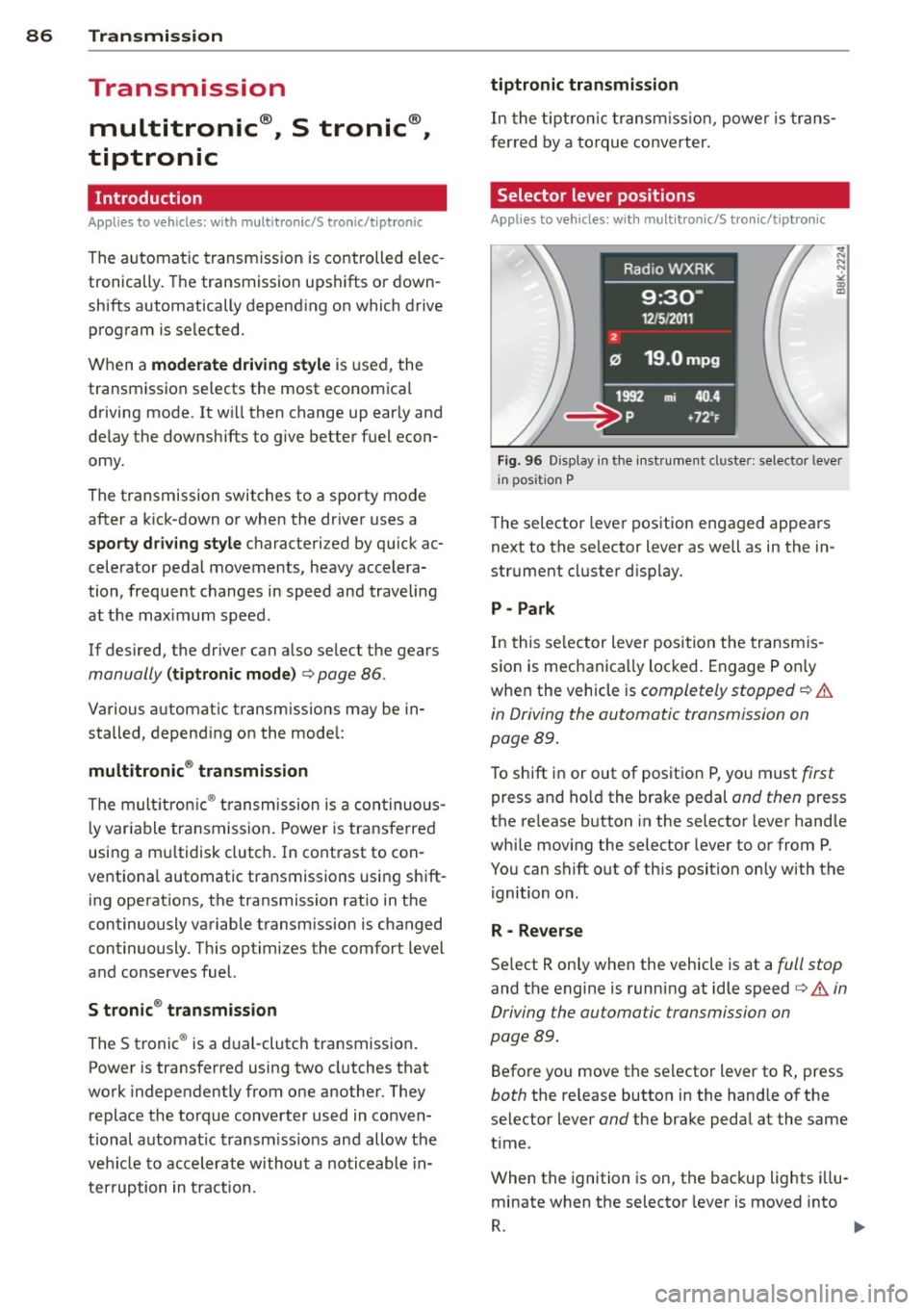
Fig. 96 Display in t he inst ru m ent cluster: selecto r lever
in pos ition P
The selector leve r pos ition engaged appea rs
next to the se lector lever as well as in the in
strument cluster d isp lay.
P -Park
In this se lector lever posi tion the transmis
sio n is mechanica lly loc ked. Engage P o nly
whe n the vehicle is
completely stopped q .&.
in Driving the automatic transmission on
page
89.
To shift i n or out of posit ion P, yo u must first
press and ho ld the bra ke pedal and then press
the re lease b utton in the selector lever hand le
whi le movi ng the selector lever to or from P.
You can shift out of th is position only with the
ignition o n.
R - Reverse
Se lect R on ly when the vehicle is at a full stop
and the engine is running at idle speed q .&. in
Driving the automatic transmission on
page
89.
Befo re you move the se lector lever to R, press
both the release button in the hand le of the
select or lever
and the brake peda l at the same
t ime .
When the ignition is on, the bac kup lights illu
minate when t he selector lever is moved into
R. 1111-
Page 89 of 290
N -Neutral
The transmission is in neutra l in this position .
Shift to this posit ion for standing with the
brakes applied
~ &. in Driving the automatic
transmission on page 89.
When the veh icle is stationary or at speeds
below 1 mph (2 km/h) , you must always apply
the footbrake before and while moving the lever out of N.
DIS -Normal position for driving forward
In the D/S position, the transmission can be
operated e ither in the normal mode Dor in
the sport mode S . To select the sport mode S,
pu ll the se lector lever back briefly. Pulling the
lever back again will select the normal mode
D. The instrument cluster display shows the
selected driving mode .
In the
normal mode D, the transmission auto
matica lly selects the suitable gear ratio. It de
pends on engine load, vehicle speed and driv
ing style .
Select the
sport mode S for sporty driving .
The vehicle makes full use of the engine's
power . Shifting may become noticeable when
accelerating.
When the vehicle is stationary or at speeds be low 1 mph (2 km/h), you must always apply
the foot brake before and while moving the lever to D/S out of N .
A WARNING
Read and follow all WARNINGS 9 &. in
Driving the automatic transmission on
page 89.
(D Note
Coasting downhill with the transmission in
N and the engine not running will result in
damage to the automatic transmission
and possibly the catalytic converter .
(D Tips
-On vehicles with drive select*, you can
adjust the sporty shift characteristics in
the
Dynamic driving mode .Swill appear
Transmission 87
in the instrument cluster display instead
ofD.
- If you accidentally select N whi le driving,
take your foot
off the accelerator pedal
immediately and wait for the engine to
slow down to idle before selecting D/S.
- If there is a power failure, the selector
lever will not move out of the P position .
The emergency release can be used if
this happens
9 page 92.
Automatic Shift Lock (ASL)
Applies to vehicles: with multitro nic/S tronic/t iptronic
The Automatic Shift Lock safeguards you
against accidentally shifting into a forward or the reverse gear and causing the vehicle to
move unintentionally.
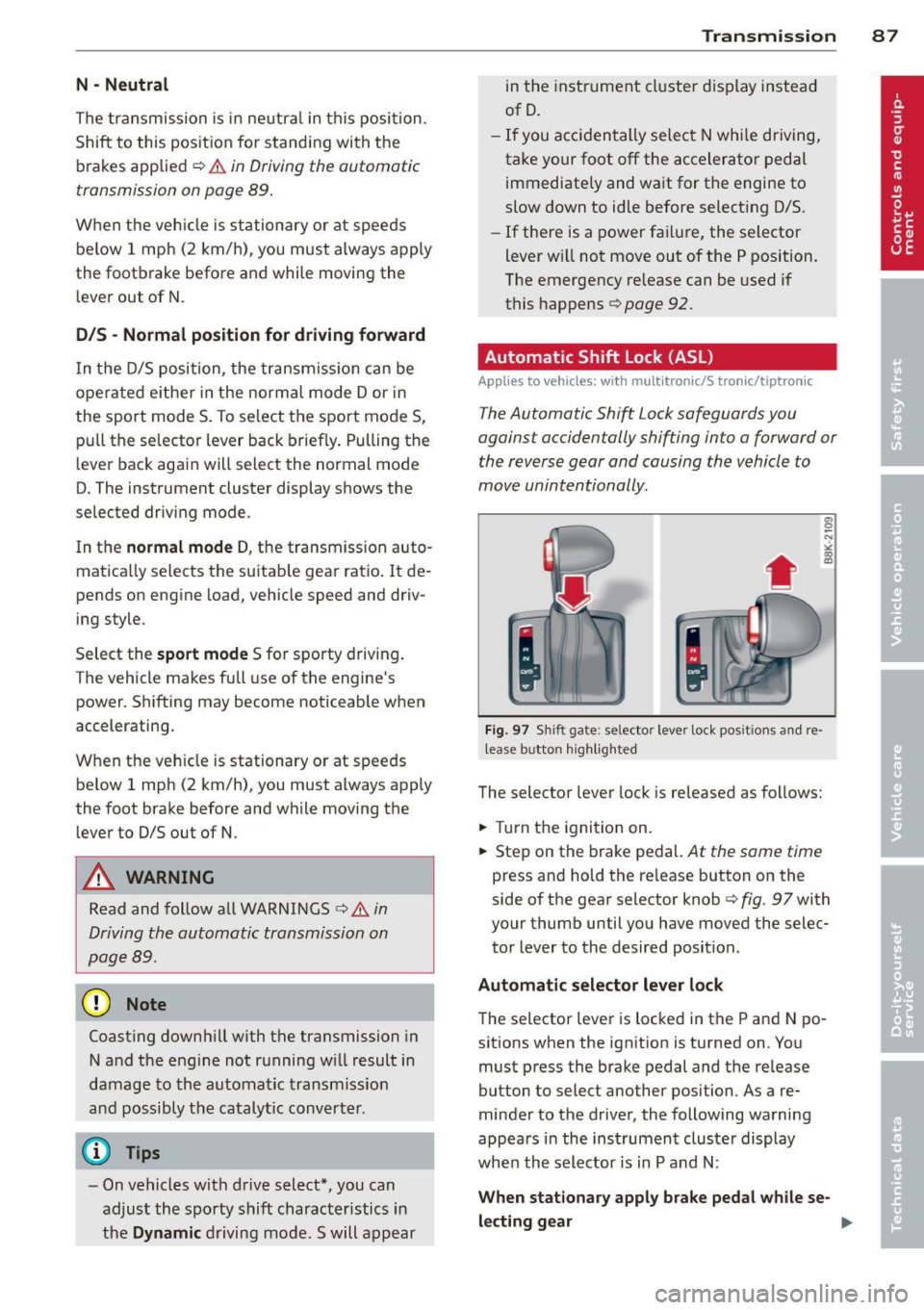
Fig. 97 Shift gate: selecto r lever lock posit ions and re
lease b utto n highlighted
The selector lever lock is released as follows:
.,. Turn the ignition on.
.,. Step on the brake pedal.
At the same time
press and hold the re lease button on the
side of the gear selector knob
9 fig . 97 with
your thumb until you have moved the selec
tor lever to the desired position .
Automatic selector lever lock
The selector lever is locked in the P and N po
sitions when the ignition is turned on. You
must press the brake pedal and the release
button to select another position . As a re
minder to the driver, the following warning
appears in the instrument cluster display
when the selector is in P and N:
When stationary apply brake pedal while se-
lecting gear .,,_
Page 90 of 290
88 Transmi ssion
The Automatic Shift Lock only functions when
the vehicle is stationary or at speeds below
1 mph (2 km/h).
A t speeds above about 1 mph (2 km/h) the
Automatic Shift Lock is automatically deacti
vated in the N position .
A time delay element prevents the se lector
l ever from locking when it is moved through
the N position (going from R to D/S). The lock
ing e lement will lock the selector lever if the
l ever is left in N (Neutral) for more than ap
prox imately 2 seconds, w ithout the brake ped
a l being pressed.
Relea se button
The release button on the selector lever pre
vents the lever from being accidenta lly shifted
into certain positions. Depending on the direc
tion of the shift, the selector lever locks at d if
ferent positions. The positions are h ighlighted
i n the illustration
c> fig. 97.
Ignition key safety int erlock
The key cannot be removed from the ignition
un less the se lector lever is in the P park posi
tion. When the ign ition key is removed, the
selector lever will be locked in the P pos ition.
Driving the automatic transmission
App lies to vehicles: with m ultitron ic/S tronic/t iptronic
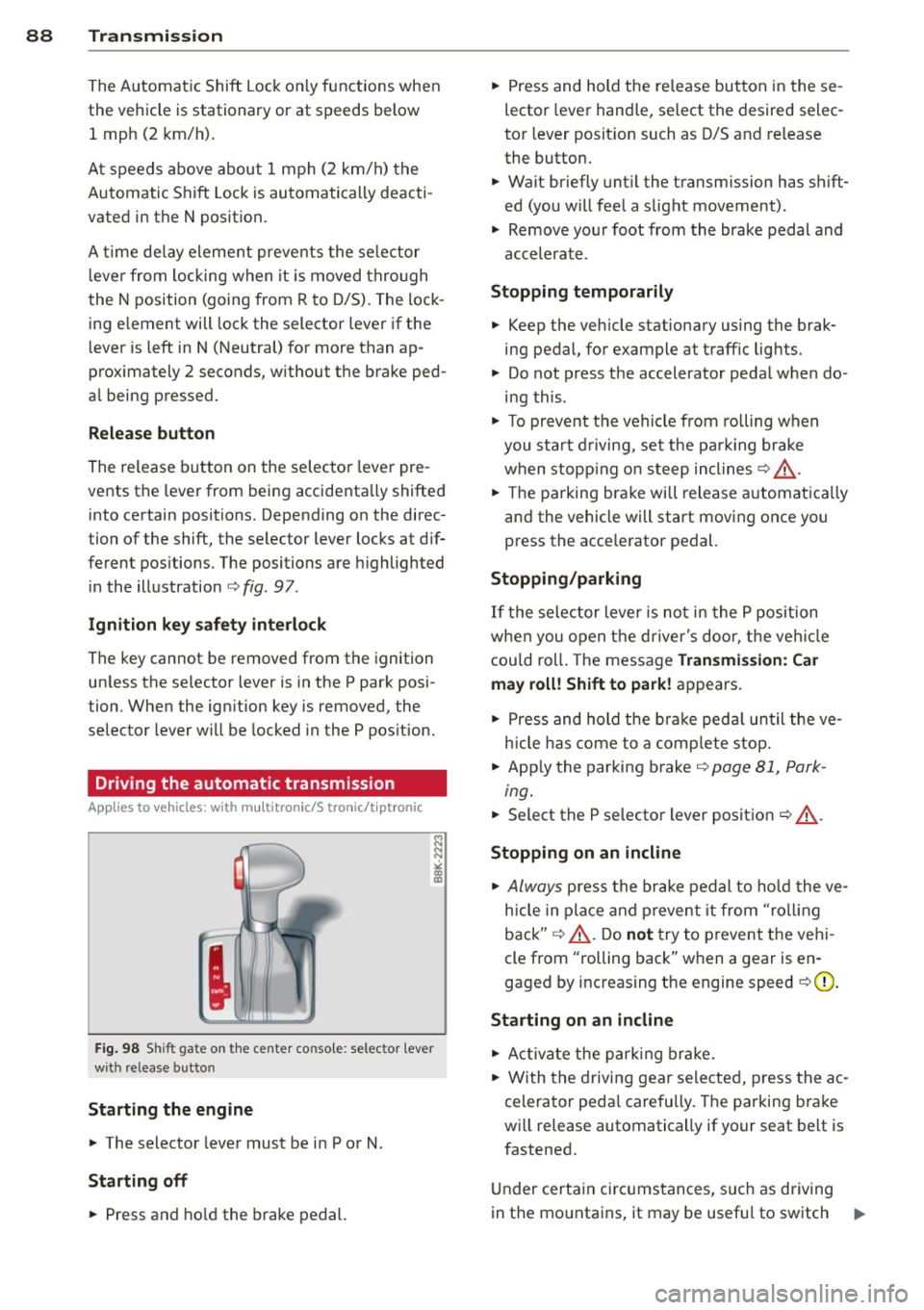
Fig. 98 Shift gate on the center conso le: selector lever
with release button
Starting the engine
,. The selector lever must be in P or N.
St arting off
,. Press and ho ld the brake pedal. ,.
Press and hold the re lease button in these
lector lever hand le, select the desired selec
tor lever posit ion such as D/S and release
the button.
,. Wait briefly unt il the transmission has shift
ed (you w ill fee l a slight movement).
,. Remove your foot from the brake pedal and
accelerate .
Stopping temporarily
,. Keep the veh icle stationary using the brak
ing pedal, for example at traffic lights.
,. Do not press the accelerator peda l when do
ing this .
,. To prevent the veh icle from rolling when
you sta rt d riving, se t the park ing brake
when stopp ing on s teep inclines
c> ,&. .
,. The parking bra ke will release a utomat ica lly
and the vehicle will start moving once you press the acce lerator pedal.
Stopping /parking
If the selector lever is not in the P position
whe n you open t he d river's door, t he veh icle
cou ld roll . The message
Transmis sion: Car
may roll! Shift to park !
appears.
,. Press and hold the bra ke peda l un til the ve
h icle has come to a comp lete stop.
,. App ly the parking brake
c> page 81, Park -
ing.
,. Select the P se lector lever position c> ,&. .
Stopping on an incline
,. Always press the brake pedal to ho ld the ve
hicle in place and p reven t it from "ro lling
back"
c> ,&. . Do not try to p revent the veh i
cle from "rolling back" when a gear is en
gaged by increasing t he engine speed
c> (D .
Starting on an incline
,. Ac tiva te the park ing brake.
,. With the driving gear selected, press the ac
celerator peda l carefully. The parking bra ke
will release automatically if your seat belt is
fastened.
U nder certa in circ umstances, such as driving
in the mo unta ins, it may be usef ul to sw itch ..,.
Page 93 of 290
when there is no possibility of over-rev
ving the engine.
- When the kick-down comes on, the
transmission will shift down to a lower
gear, depending on vehicle and engine
speeds.
- Tiptronic is inoperative when the trans
mission is in the fail-safe mode.
Kick-down
App lies to vehicles: with multit ro ni c/S tronic/t ipt ronic
Kick-down enables maximum acceleration .
Applies to veh icle s with a multitronic ®
transmi ssion
When you dep ress the accelerato r pedal be
yond the resistance point, the transmission downshifts into a lower gear ratio depending
on the vehicle speed and engine speed. As
long as the accelerator peda l is depressed, the
engine speed is automat ically regulated for
maximum acceleration.
Appli es t o ve hicles with a S t ronic ®-/ ,
ti ptron ic transmi ssi on
When you depress the accelerator pedal be
yond the resistance po int, the automat ic
transmission downshifts into a lower gear, de pending on vehicle speed and engine speed .
The upshift into the next higher gea r takes
p lace once the maxim um spec ified eng ine
speed is reached .
A WARNING
Please note that the drive wheels can spin
if kick-down is used on a smooth slippery
road -there is a risk of skidding.
Launch Control Program
App lies to vehicles: with S tro nic
The Launch Control Program provides the
best acceleration possible when starting from
a stop.
Requirement: The engine must be at operat
ing temperature and the steering wheel must
not be turned.
Tran sm iss ion 9 1
"" Press the I~ OFF ! button ¢ page 181 while
the engine is running. The
fl indicator light
illum inates in the instrument cl uster and
Traction control (A SR): Off. Warning! Re
stricted stability appears in the driver infor
mation system display .
"" Move the selector lever to the D/S pos it io n
or select the dynamic driv ing mode in drive
select* ¢
page 108.
"" Press t he brake pedal s trongly wi th you r left
foot and ho ld it down for at leas t 1 second .
... At the same time, press the accelerator
peda l down comp lete ly with your right foot
until the eng ine reaches and maintains a
high RPM.
"" Remove your foot from the brake pedal
w ith in S seconds ¢.& .
A WARNING
-Always adapt your dr iving to the traffic
f low.
- Only use the Launch Cont ro l Program
when road and t raff ic conditions a llow it
a nd other drivers w ill not be endangered
or annoye d by your dr iving and the vehi
cle's acceleration.
- Ple ase no te th at the d riving wheels can
spin and the vehicle can break away
when ASR is switched off, especially
when the road is s lippery.
- Once you have accelerated, you sho uld
switch the ASR back on by pressing the
I ~ OFFI button.
(D Tips
- T he transmission temperature m ay in
crease s ignificantly after using the
La unch Control P rogram . If that hap
pens, the prog ram may not be availab le
for a few m inutes. It will be ava ilable
again after a cool-down per iod.
- When accelerating using the La unch
Contro l program, a ll vehicle parts are
subject to heavy loads. Th is can result in
increased wear .
Page 94 of 290
![AUDI A5 CABRIOLET 2013 Service Manual 92 Transmission Transmission malfunction
Applies to vehicles: with multitron ic/5 tronic/t iptronic
[O] Transmission: Press brake pedal and se
lect gear again .
Press the brake pedal a](/img/6/57568/w960_57568-93.png "AUDI A5 CABRIOLET 2013 Service Manual 92 Transmission Transmission malfunction
Applies to vehicles: with multitron ic/5 tronic/t iptronic
[O] Transmission: Press brake pedal and se
lect gear again .
Press the brake pedal a")
92 Transmission Transmission malfunction
Applies to vehicles: with multitron ic/5 tronic/t iptronic
[O] Transmission: Press brake pedal and se
lect gear again .
Press the brake pedal and se lect the des ired
se lecto r lever posit io n again. Yo u can t hen
con tinue dr iv ing.
[O] Transmission overheating: Please drive
conservatively .
The transmission temperature has increased
significantly d ue to the sporty driving manner.
Drive in a less spo rty manne r until the tem
pera ture ret ur ns to the no rma l range and the
indicator light switches of.
[O] Transmission malfunction: You can con
tinue driving
There is a system ma lf u nction in t he transmis
sion. You may continue driving. Dr ive to your
author ized Audi dealer or qualified repair fa
cility soon to hav e the mal function cor rected.
[O] Transmission malfunction : Limited driv
ing functionality
T here is a system ma lf u nction in the tra nsmis
sion. The transmissi on is sw itchi ng to emer
gency mode . Th is mode only s hifts into cer
tain gears or will no lo nger shift at a ll. The en
g ine may stall. Drive to your authorized A udi
dea le r or qualified repair facility immediate ly
to have the ma lf u nct ion co rrected .
[O] lij Transmission malfunction: No reverse
You can continue dr iving
S tron ic ® transmission : There is a system ma l
f u nction in the transmission. The transmis
sion is switc hing to emergency mode. T his
mode on ly shifts into certain gears or w ill no
l onge r shi ft at all. T he e ngine may sta ll. You
can not engage the reverse gear . Drive to your
author iz e d Audi d eal er or qua lified repai r fa
cili ty im m ed ia tely to have the m alfu nctio n
cor re cte d.
[O] Transmission malfunction : Stop vehicle
and shift to park .
Do not con tinue dr iving. Se lect the P sele ctor
l ever positio n and see your authorized A udi
dealer or qualified repair fac ility fo r assis
tance.
(D Note
If t h e trans mission swit ches to emergency
mode, yo u should ta ke the ve hicl e to an
a uthorized Audi dea lership as soon as pos
s ib le to have th e co nditio n co rrected .
Selector lever emergency release
Applies to vehicles: wit h multitronic/5 tro ni c/tiptro nic
If the vehicle's power supply fails , the selec
tor lever can be released in an emergency.
Fig . 101 Fr on t center co nsole: Remov in g t he as htray
in sert
Fig. 102 Selector lever eme rgency release
.. To access the emergency re lease mecha
nism, rem ove the ashtray insert ® using t he
re lease sw itch @¢
fig. 101.
• Loosen and remove the cap in t he ashtray
mou nt.
"' Yo u now have access to a p in. Using a screw
d river or sim ila r ob ject, press t he p in down
an d ho ld it i n that p osition
~ fig . 102 .
"' No w pre ss the release bu tton and move the
s elec tor l ever to the N po siti on. ..,.
Page 99 of 290
Audi adaptive cruise control and braking guard 97
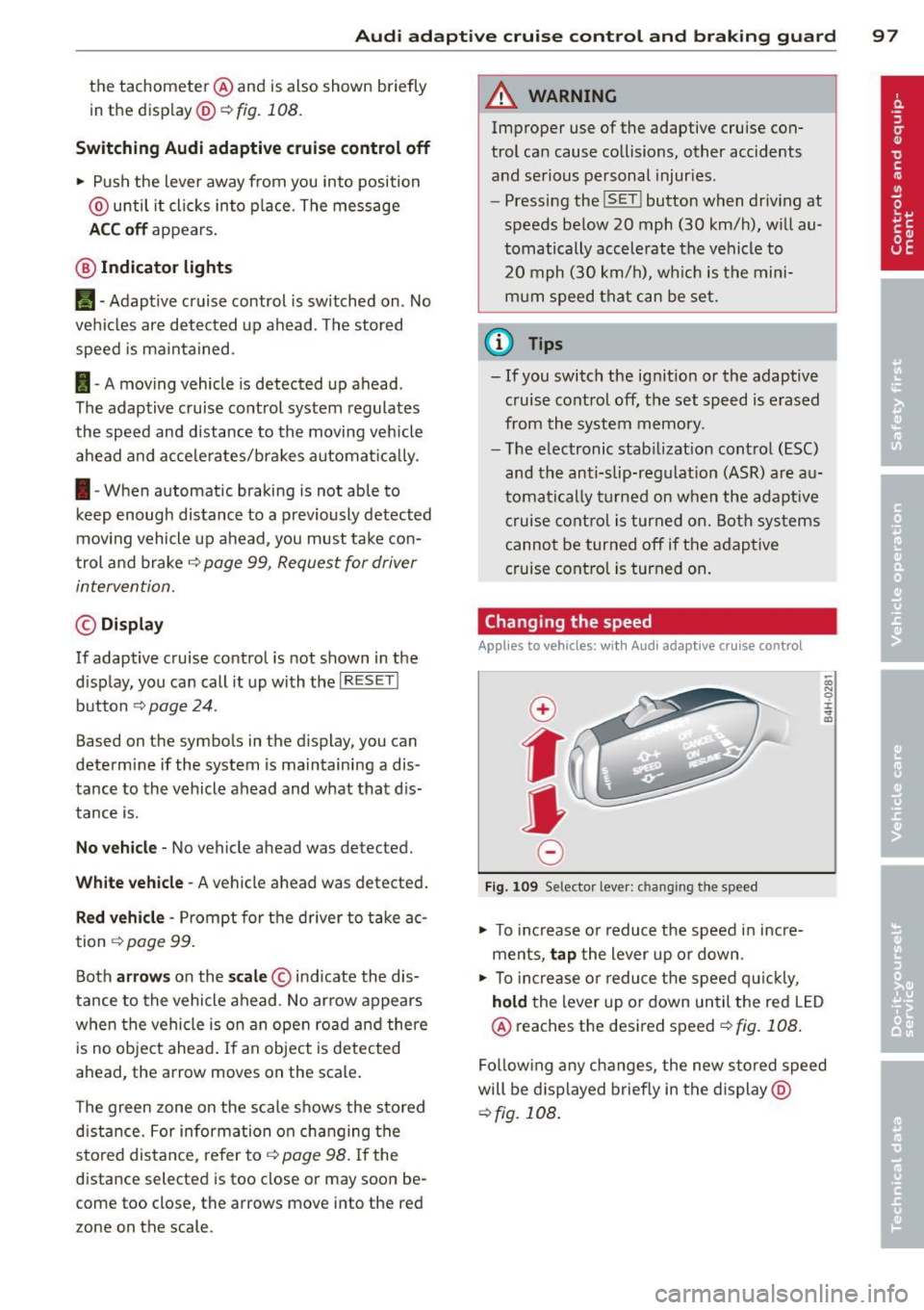
the tachometer @and is also shown briefly
in the display @<:::>
fig. 108.
Switching Audi adaptive cruise control off
~ Push the lever away from you into position
@ until it clicks into place. The message
ACC off appears.
@ Indicator lights
II-Adaptive cruise control is switched on. No
vehicles are detected up ahead. The stored
speed is ma intained.
I-A moving vehicle is detected up ahead .
The adaptive cruise control system regulates
the speed and distance to the moving vehicle
ahead and acce lerates/brakes automatica lly.
I -When automatic braking is not able to
keep enough distance to a previously detected
mov ing vehicle up ahead, you must take con
trol and brake
c:> page 99, Request for driver
intervention.
© Display
If adaptive cruise control is not shown in the
d isplay, you can call it up with the
I RES ET I
button c:> page 24.
Based on the symbols in the d isplay, you can
determine if the system is maintaining a dis
tance to the vehicle ahead and what that dis
tance is.
No vehicle -No vehicle ahead was detected.
White vehicle -A vehicle ahead was detected .
Red vehicle -Prompt for the driver to take ac
tion
c:> page 99.
Both arrows on the scale © indicate the dis
tance to the vehicle ahead . No ar row appears
when the vehicle is on an open road and there
is no object ahead . If an object is detected
ahead, the arrow moves on the scale.
The green zone on the scale shows the stored
distance. For information on changing the
stored distance, refer to
c:> page 98. If the
distance selected is too close or may soon be
come too close, the arrows move into the red
zone on the scale.
A WARNING
Improper use of the adaptive cruise con
trol can cause collisions, other accidents
and serious personal injuries.
- Pressing the
!SET ! button when driv ing at
speeds below 20 mph (30 km/h), w ill au
tomatically accelerate the vehicle to
20 mph (30 km/h), which is the mini
mum speed that can be set.
@ Tips
-If you switch the ignit ion or the adaptive
cruise control off, the set speed is erased
from the system memory.
- The electronic stab ilizat ion control
(ESC)
and the anti-slip-regulat ion (ASR) are au
tom atica lly turned on when the adaptive
cruise control is turned on. Both systems
cannot be turned off if the adaptive
cruise control is turned on .
Changing the speed
Applies to vehicles: with Aud i adapt ive c ruise control
0
f
jJ
0
Fig. 109 Selector lever: ch anging the speed
~ To increase o r reduce the speed in incre
ments,
tap the lever up or down.
-0:, N 0 ± ... a)
~ To incr ease o r reduce the speed quickly,
hold the lever up or down until the red LED
@ reaches the desired speed
c:>fig . 108 .
Following any changes, the new stored speed
will be displayed briefly in the display @
c:>fig. 108 .
Page 101 of 290
Audi adaptive cruise control and braking guard 99
~--- ~-Di stance 3: This setting corre
sponds to a distance of 164 feet/SO meters
when traveling at 62 mph (100 km/h), or a
time interva l of 1.8 seconds .
~---- ~ Distance 4: This setting corre
sponds to a distance of 210 feet/64 meters
when traveling at 62 mph (100 km/h), or a
time interva l of 2.3 seconds .
A WARNING
Following other vehicles too closely in
creases the risk of collisions and serious
personal injury.
- Setting short distances to the traffic
ahead reduces the time and distance
available to br ing your vehicle to a safe
stop and ma kes it
even more necessary
to pay close attention to traffic.
- Always obey applicable traffic laws, use
good judgment, and select a safe follow
ing distance for the traffic, road and
weather conditions .
¢j) Tips
- Distance 3
is set automatically each time
you switch the ignition on.
- Your standa rd settings are automatically
stored and assigned to the remote con
trol key being used.
Setting the driving program
Applies to vehicles: with Audi adaptive cruise control
Depending on the se lected driv ing program
and distance, driving behavior when accelerat
ing will
vary from dynamic to comfortab le .
Setting the driving program for vehicles
without Audi drive select*
~ In the rad io/MM I*, select: I CAR ! function
button
> Adaptive cruise control > Driving
prog .
> comfort, standard or dynamic. Or
~ Select : ICARI function button > Car sys
tems *
control button > Driver assist > Adap
tive cruise control
> Driving program * >
Comfort, Standard or Dynamic. Setting the driving mode for
vehicles with
Audi drive select*
Refer to ¢ page 108.
(D Tips
Your settings are automatica lly stored and
assigned to the remote control key being
used.
Request for driver intervention
Applies to vehicles : with Audi adaptive cruise contro l
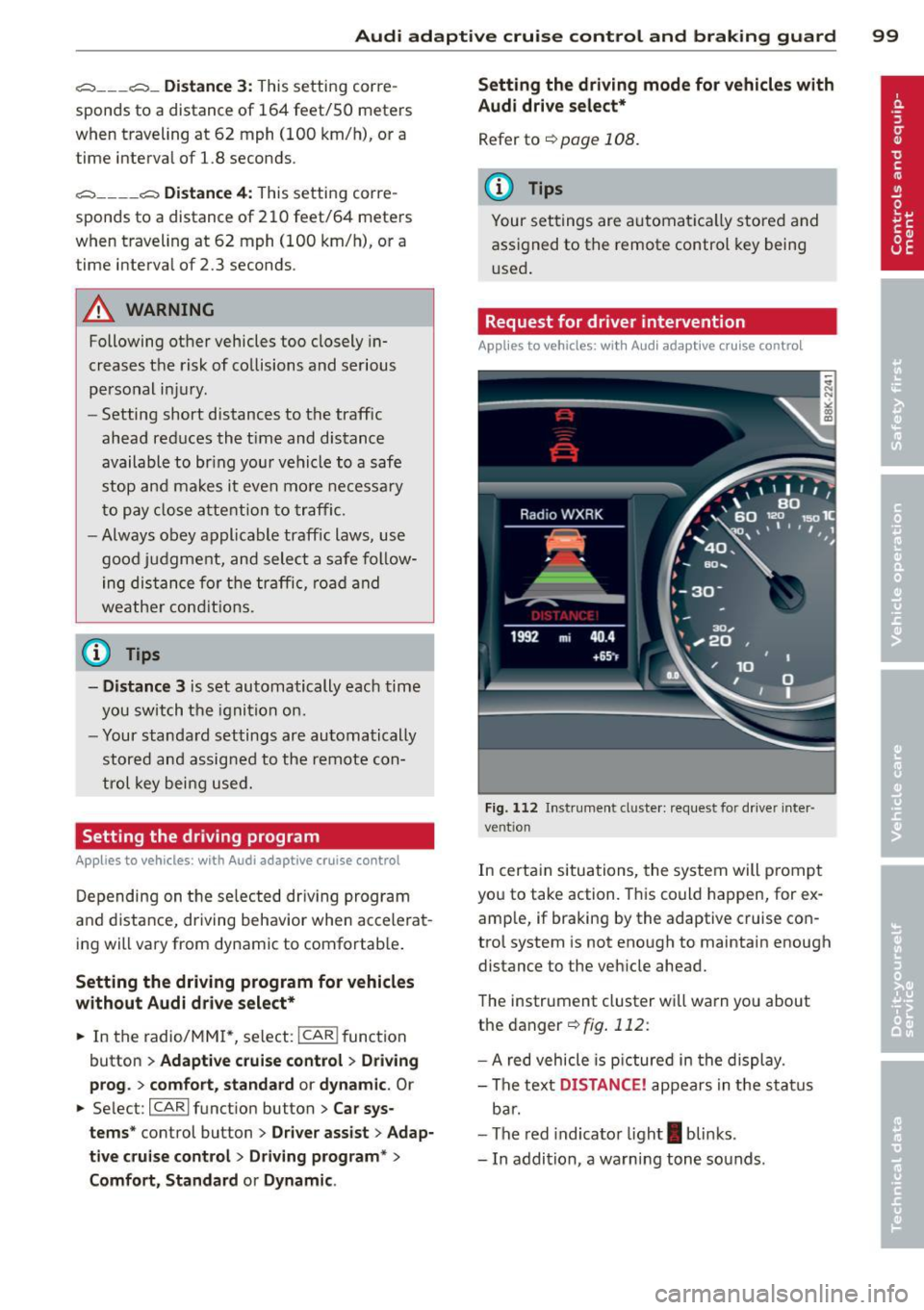
Fig. 112 Instrument d uste r: request for drive r inte r
ve ntion
In certain situations, the system will p rompt
you to take action. This could happen, for ex
amp le, if braking by the adaptive cruise con
trol system is not enough to maintain enough
distance to the vehicle ahead.
The instrument cluster will warn you about
the danger ¢
fig. 112:
-A red vehicle is pictured in the display.
- The text
DISTANCE! appears in the status
bar.
- The red indicator light
I blinks .
- In addition, a warning tone sounds .