towing AUDI A5 CABRIOLET 2013 Owners Manual
[x] Cancel search | Manufacturer: AUDI, Model Year: 2013, Model line: A5 CABRIOLET, Model: AUDI A5 CABRIOLET 2013Pages: 290, PDF Size: 72.35 MB
Page 5 of 290
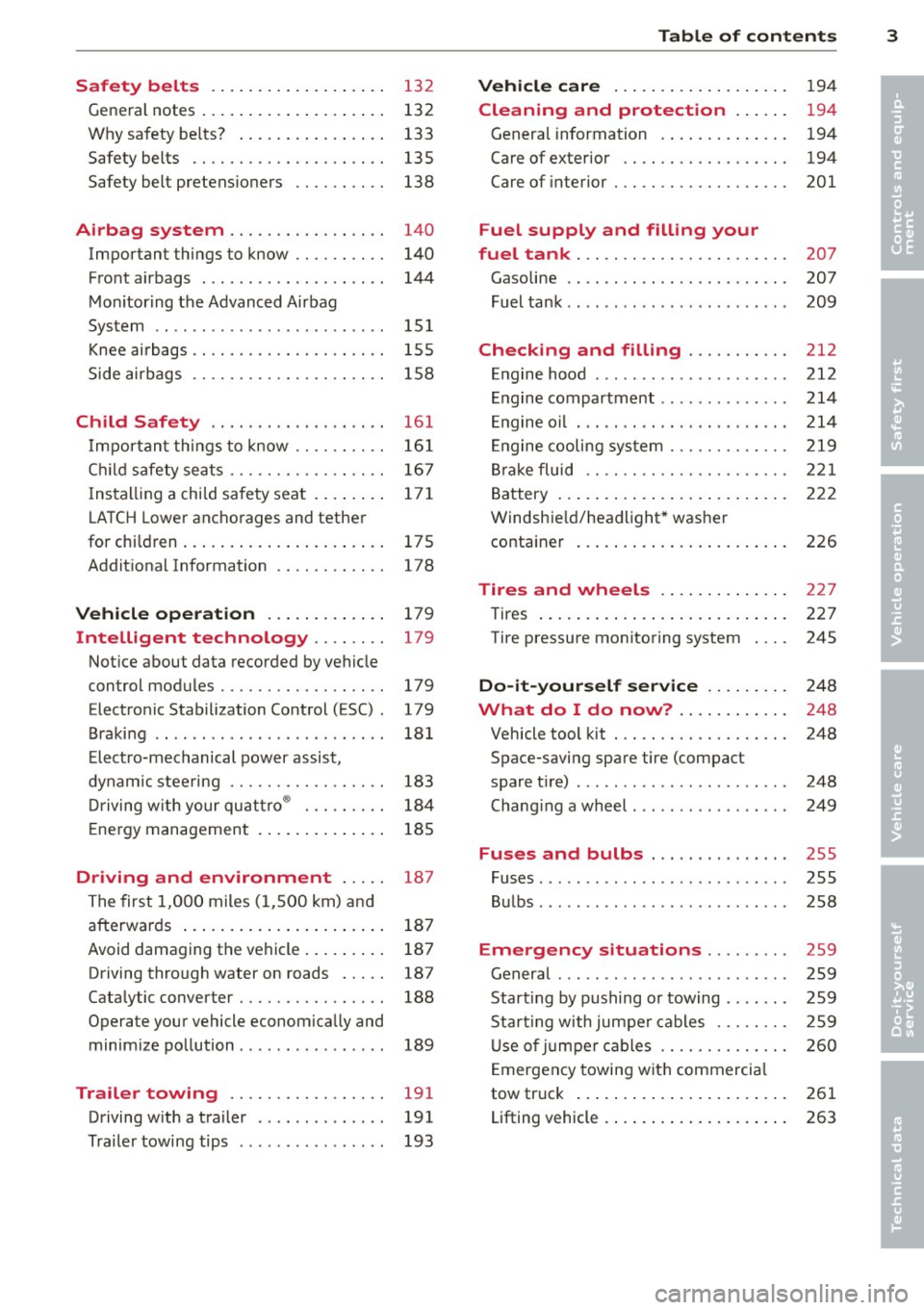
Safety belts . . . . . . . . . . . . . . . . . . . 13 2
General notes . . . . . . . . . . . . . . . . . . . . 132
Why safety be lts? . . . . . . . . . . . . . . . . 133
Safety belts . . . . . . . . . . . . . . . . . . . . . 135
Safety belt pretens ioners . . . . . . . . . . 138
Airbag system . . . . . . . . . . . . . . . . . 140
Important things to know . . . . . . . . . . 140
Front airbags . . . . . . . . . . . . . . . . . . . . 144
Mon itor ing the Advanced Airbag
System . . . . . . . . . . . . . . . . . . . . . . . . . 151
Knee ai rbags . . . . . . . . . . . . . . . . . . . . . 1 55
Side airbags . . . . . . . . . . . . . . . . . . . . . 158
Child Safety . . . . . . . . . . . . . . . . . . . 16 1
I mpor tant th ings to know . . . . . . . . . . 16 1
C hi ld safety sea ts . . . . . . . . . . . . . . . . . 16 7
I ns tall ing a chi ld safety seat . . . . . . . . 171
L A T CH Lower anchorages and tether
for children ... .... .... ... .. .. .. .. 175
Addit ional Information
178
Vehicle operat ion . . . . . . . . . . . . . 179
Intelligent technology . . . . . . . . 179
Not ice about data recorded by vehicle
control modules.......... .... .. .. 179
Electronic Stabilization Control (ESC) . 179
Braking . . . . . . . . . . . . . . . . . . . . . . . . . 181
E lect ro-mechanical power assist ,
dynamic stee ring . . . . . . . . . . . . . . . . . 183
Driving w ith your qu attro ® . . . . . . . . . 184
E nergy management . . . . . . . . . . . . . . 185
Driving and environment . . . . . 18 7
The first 1,000 miles (1,500 km) and
afterwards . . . . . . . . . . . . . . . . . . . . . . 187
Avoid damaging the vehicle . . . . . . . . . 187
Driving through water on roads . . . . . 187
Catalytic converter . . . . . . . . . . . . . . . . 188
Operate your vehicle econom ically and
minim ize pollution . . . . . . . . . . . . . . . . 189
Trailer towing . . . . . . . . . . . . . . . . . 191
Driving w ith a trailer . . . . . . . . . . . . . . 191
Trailer towing tips . . . . . . . . . . . . . . . . 193
Table of contents 3
Vehicle care . . . . . . . . . . . . . . . . . . .
194
Cleaning and protection . . . . . . 194
Genera l information . . . . . . . . . . . . . . 194
Care of exterior . . . . . . . . . . . . . . . . . . 194
Care of interior . . . . . . . . . . . . . . . . . . . 201
Fuel supply and filling your
fuel tank . . . . . . . . . . . . . . . . . . . . . . .
207
Gasoline . . . . . . . . . . . . . . . . . . . . . . . . 207
Fuel tank . . . . . . . . . . . . . . . . . . . . . . . . 209
Checking and filling . . . . . . . . . . . 212
Engine hood . . . . . . . . . . . . . . . . . . . . . 212
Engine compartment .............. 214
E ngine oil . . . . . . . . . . . . . . . . . . . . . . . 214
En gine cooling system . . . . . . . . . . . . . 219
Br ake fluid . . . . . . . . . . . . . . . . . . . . . . 221
Battery . . . . . . . . . . . . . . . . . . . . . . . . . 222
Windshie ld/headlight* washer
container . . . . . . . . . . . . . . . . . . . . . . . 226
Tires and wheels . . . . . . . . . . . . . . 227
Tires . . . . . . . . . . . . . . . . . . . . . . . . . . . 227
Tire pressure monitoring system 245
Do-it-yourself service . . . . . . . . . 248
What do I do now? . . . . . . . . . . . . 24 8
Vehicle tool kit . . . . . . . . . . . . . . . . . . . 248
Space-saving spare tire (compact
spare tir e) . . . . . . . . . . . . . . . . . . . . . . . 248
Changi ng a wheel . . . . . . . . . . . . . . . . . 249
Fuses and bulbs . . . . . . . . . . . . . . . 2SS
Fuses ... .. .. .. .. .. . .. .... ...... . 255
Bulbs . . . . . . . . . . . . . . . . . . . . . . . . . . . 258
Emergency situations . . . . . . . . . 259
General . . . . . . . . . . . . . . . . . . . . . . . . . 259
Starting by pushing or towing . . . . . . . 259
Star ting with jumpe r cables . . . . . . . . 259
U se of jumpe r cables . . . . . . . . . . . . . . 260
E mergency towing with commercia l
tow truck . . . . . . . . . . . . . . . . . . . . . . . 261
Lifting vehicle . . . . . . . . . . . . . . . . . . . . 263
•
•
Page 44 of 290
42 Power top
Power top
Automatic power top
General information
The sophisticated design of the fabric power
top allows you to operate it easily and quickly.
You can open and close the power top while
driving as long as the vehicle is traveling be
low 30 mph. When open, the power top is
stored in a special compartment which is
equipped with a cover.
Under normal conditions, the power top is
wind- and waterproof . In rare cases, small
droplets of water may form under extreme
weather conditions such as torrential or pro longed rain. That is normal and no cause for
concern.
F ollow the maintenance instructions to main
tain the attractive appearance of the converti ble and to ensure that it does not leak
<=> page 19 7, Power top care. Also observe
the following:
- Only open and close the power top when it is
clean. Sharp-edged particles of dirt can
scratch the rear window when the power top
is folded and can cause abrasion that result
in damage to the power top over time. You
should also remove ice and snow before
opening the power top.
- Never remove snow and ice with sharp
edged objects. You can remove ice from the
rear window w ith a standard ice scraper .
- You should on ly open the power top when it
is completely dry. Opening the power top
and stowing it in the compartment when it
is wet can cause marks on the top that de
tract from its appearance. Mildew can also
form if the power top is stowed for an ex
tended period of time when it is wet.
- Do not leave the power top open for several
weeks at a time. Always close it between
uses to prevent discoloration and creases
from forming. This is especially important if
it was not completely dry when stowed.
- Opening or closing the power top in temper
atures below 32 °F
(0 °() is not recommend- ed because the flexibility of the fabric
de
creases is sub-zero temperatures .
A WARNING
--When operating the power top, make
sure the function is not affected by wind
or other factors and that it does not in
terfere w ith other dr ivers.
- Never drive when the power top is not
locked correctly. The wind from driving
could cause the power top to open . This
can result in injuries and damage to the
veh icle.
- When opening and closing the power
top, make sure no one will be injured by
the supports and other moving parts.
- Operating the power top reduces the
headroom in the rear of the vehicle.
Make sure there is enough clearance be
tween the rear passenger and the power
top when opening and closing it.
-
-When operat ing the power top, visibility
to the rear is limited . Avo id operat ing the
top while driving in reverse.
(D Note
-Always make sure there is enough clear
ance above the vehicle so the power top
is not damaged when opening and clos
ing it.
- Do not store any objects in the power top
compartment to avoid damage when
opening the top.
@ Tips
- To prevent the battery from discharg ing,
do not open or close the power top re
peated ly when the engine is switched
off.
-A message in the instrument cluster dis
play will a lert you if a protection function
was activated or if there is a malfunction
<=>page 43.
-The power top can also be operated
manually if there is a malfunction
<=> page 47, Power top emergency op
eration.
Have you authorized Audi dealer .,..
Page 56 of 290
54 Clear vis ion
The lea ving home function i lluminates the
area around the vehicle when unlocking it.
This funct ion can be switched on and
off.
The co ming h ome and le av ing h ome func
tions on ly operate when it is dark and the
light switch is in the AUTO position
r=:> fig. 54.
Auto headlight s*
When the light switch is in the AUTO
r=:> page 52 position, the sw itch-on po int of the
lights can be changed in the automatic dr iv ing
light function.
Daytime running lights
US A mo del s: You can switch the dayt ime run
ni ng lights
on and off .
Ca nada mod els :
The function cannot be
turned
off . It is activated automat ically each
time the ignition is switched on.
Tra vel mode*
The headlight beam is asymmetrical. This pro
vides stronger illum ination on the side of the
road on wh ich you are driving . If you are driv
ing in a country that drives on the opposite
side of the road from your own country, t his
will cause glare for oncoming dr ivers. To pre
vent glare:
- Trave l mode must be selected in vehicles
with Xenon head lights *.
- In vehicles with halogen headlights, ce rtain
areas of the head light lenses must be cov
ered w ith waterproof adhesive covers that
prevent light from passing through . Fo r
more information, please see your author
ized Audi dea ler or authorized repair facility .
@ Tips
When travel mode is a ctiv ated, a displ ay in
the dr iver information system indi cates
this each time you switch t he ignition on.
Emergency flashers
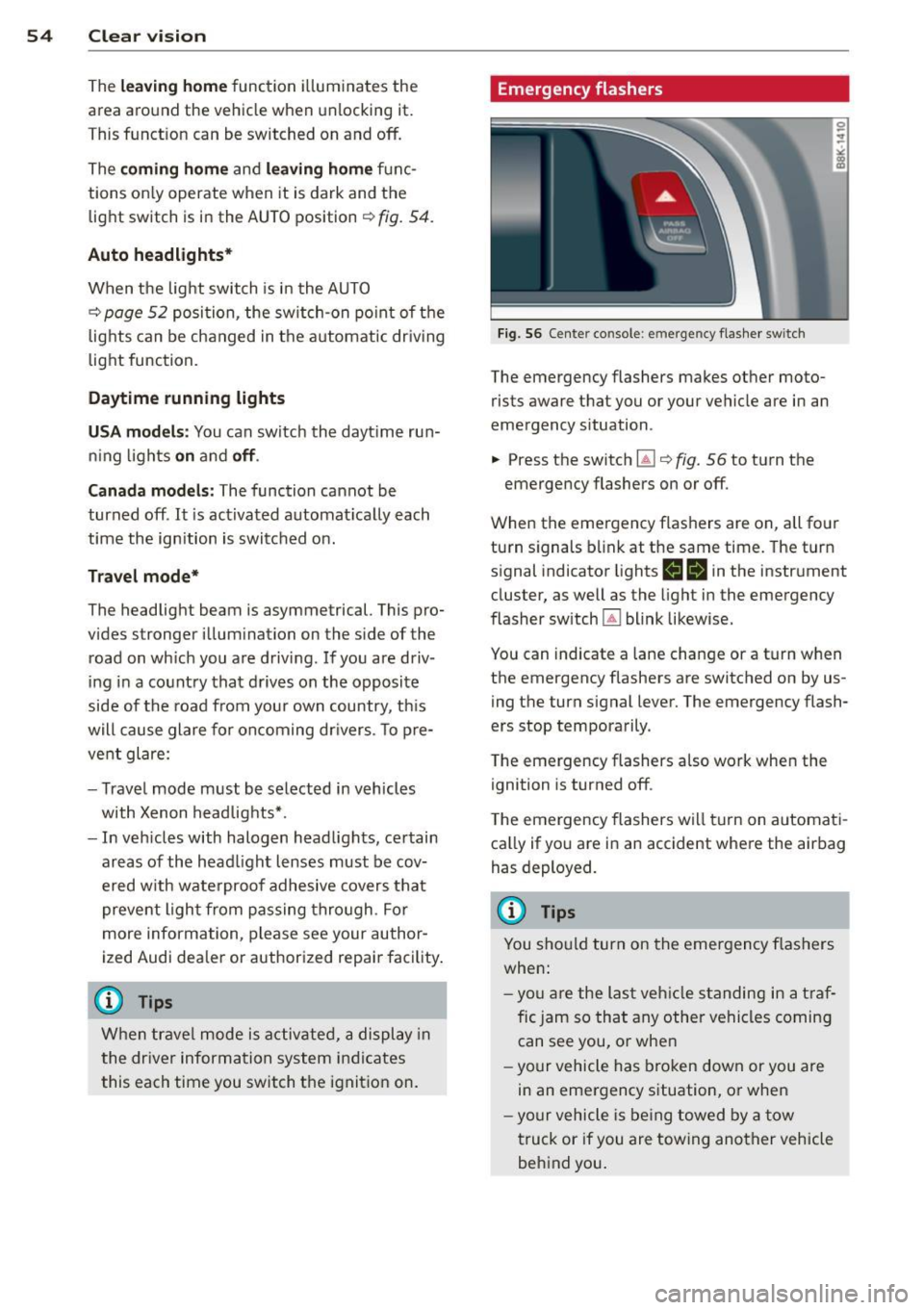
F ig. 56 Center console: em erge ncy flashe r switch
The emergency flashers makes other moto
rists aware that you or your vehicle are in an
emergency situation.
... Press the switch ~¢
fig. 56 to turn the
emergency flashers on or
off.
When the emergency flashers are on, all four
turn signals b link at the same time. The turn
s ignal indicator lights
H II in the instrument
cluster, as well as the light in the emergency
flasher switch ~ blink likewise.
You can indicate a lane change or a tu rn when
the emergency flashers are switched on by us
ing th e turn signal lever. The emergency flash
ers stop temporarily .
T he emergency flashers also work when the
ignition is turned
off .
The emergency flashers wi ll tu rn on automat i
ca lly if yo u are in an accident where the air bag
has deployed.
(D Tips
You sho uld turn on the emergency flashers
when:
- yo u are the last veh icle standing in a t ra f
fic jam so that any other vehicles coming can see you, or whe n
- yo ur vehicle has bro ken down or you are
in an emergency situation, or when
- yo ur vehicle is be ing towed by a tow
truck or if you are towing ano ther vehicle
behind you .
Page 70 of 290
68 Seats and storage
Luggage compartment
General information
A WARNING
Read and follow the important safety pre
cautions on
¢ page 12 7, Stowing lug
gage.
Enlarging the luggage compartment
The backrests can be folded forward either
separately or together.
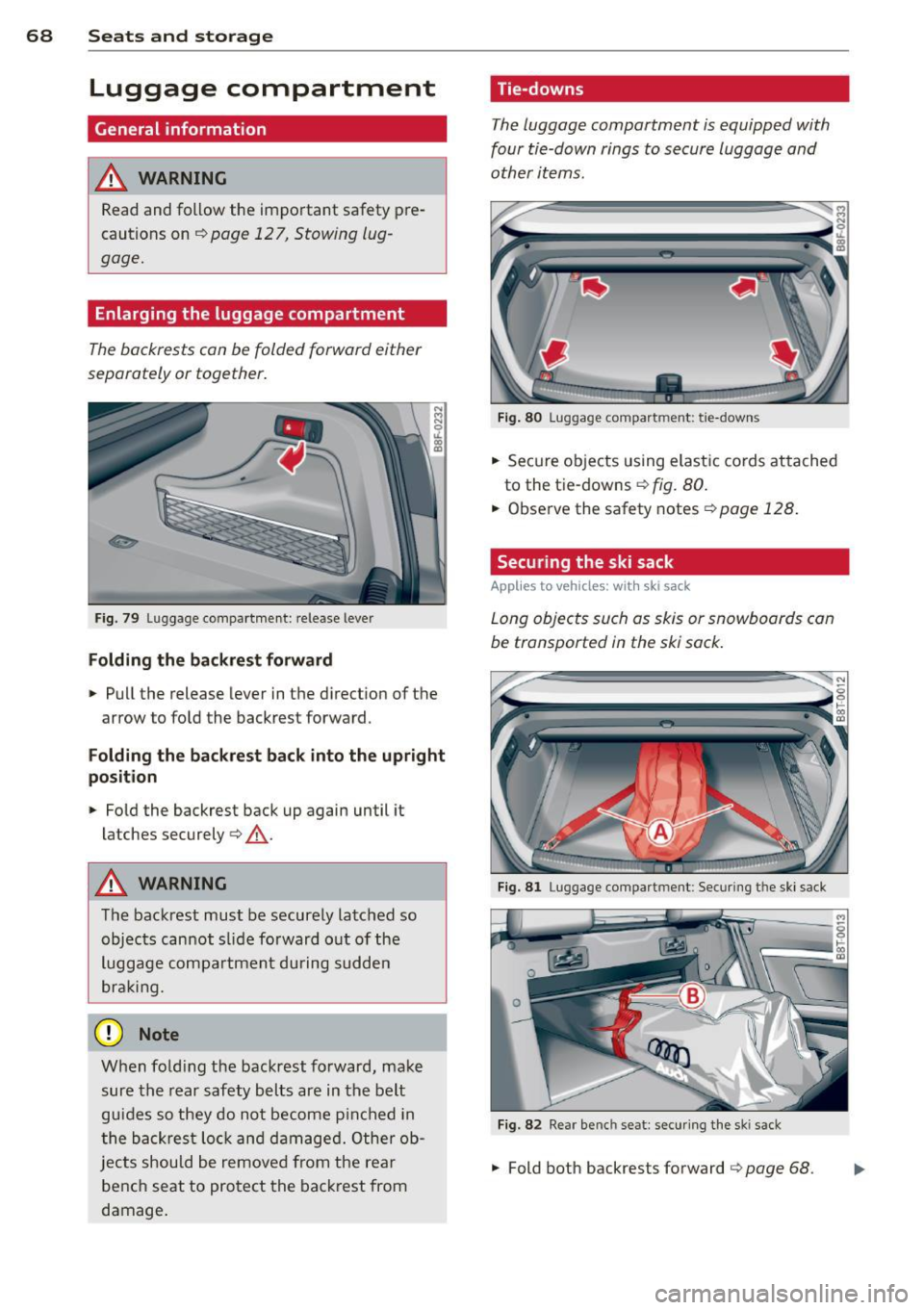
Fig. 79 Luggage compartment: release lever
Folding the backr est forwa rd
• Pull the release lever in the direction of the
arrow to fold the backrest forward.
F olding th e backre st back into the u pright
position
• Fold the backrest back up again until it
latches securely¢ &_.
A WARNING
The backrest must be securely latched so
objects cannot slide forward o ut of the
luggage compartment du ring sudden
bra king.
(CT;) Note
When fo ld ing the backrest forward, make
sure the rear safety belts are in the belt
guides so they do not become p inched in
the backrest lo ck and damaged. Other ob
jects should be removed from the rea r
bench seat to pro tect the backrest from
damage.
Tie-downs
The luggage compartment is equipped with
four tie-down rings to secure luggage and
other items.
F ig . 80 Luggage compartment: tie -downs
• Secure objects using elastic cords atta ched
to the tie-downs
¢ fig. 80.
• Observe the safety notes ¢page 128.
Securing the ski sack
Applies to veh icles: w it h sk i sack
Long objects such as skis or snowboards can
be transported in the ski sack.
Fig. 8 1 Luggage compartment: Sec uring the ski sack
Fig. 82 Rear bench seat: secur ing the ski sack
• Fold both backrests forward ¢ page 68.
Page 71 of 290
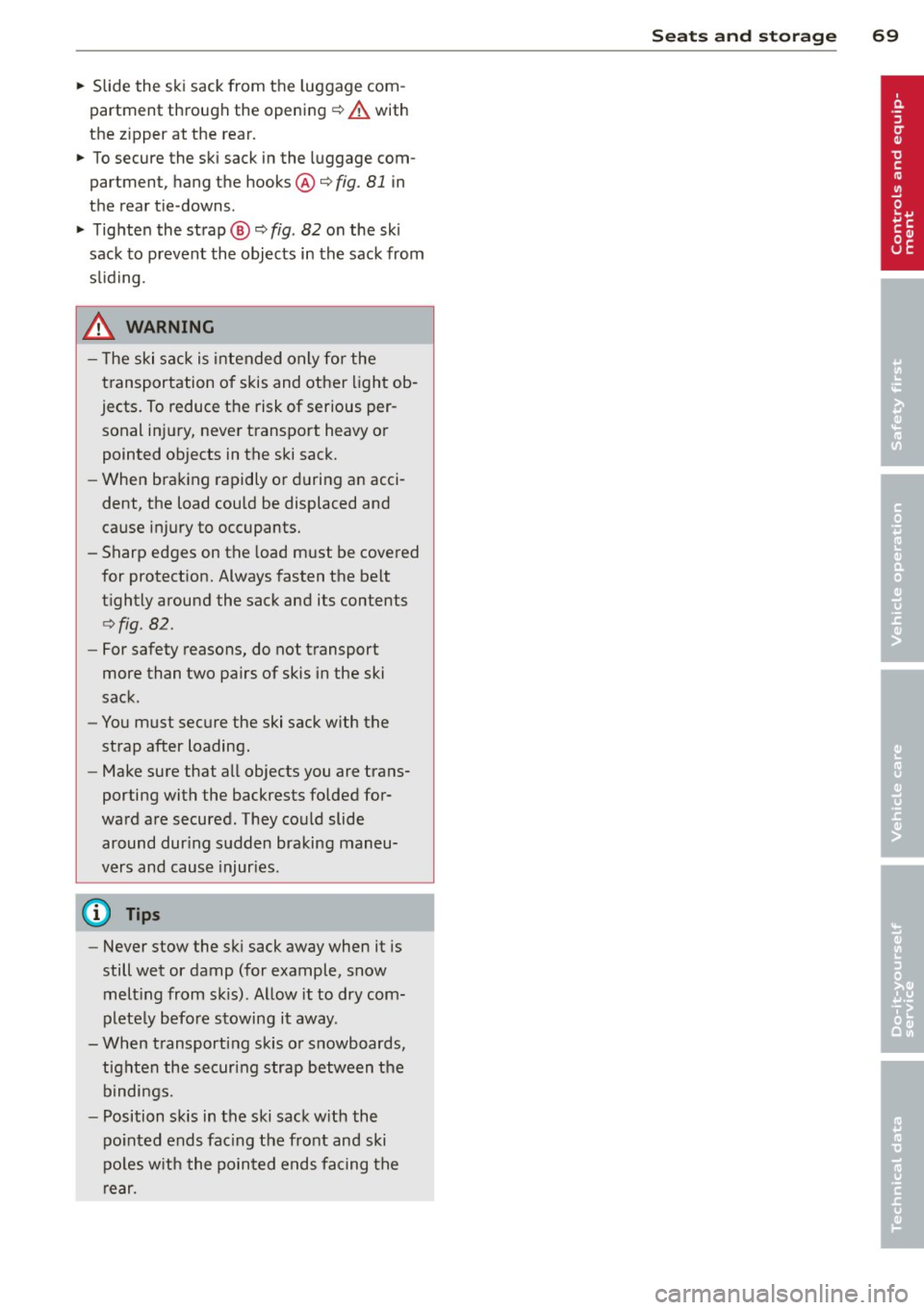
~ Slide the ski sack from the luggage com
partment through the opening¢
A with
the z ipper at the rear.
~ To secure the ski sack in the luggage com
partment, hang the hooks@¢
fig. 81 in
the rear tie -downs.
~ Tig hten the strap@¢ fig. 82 on the sk i
sack to prevent the objects in the sack from
s li ding.
& WARNING
-
- T he ski sack is intended only for the
transportation of skis and other light ob
jects. To reduce the risk of serious per
sonal inj ury, never transport heavy or
pointed objects in the ski sack.
- When braking rapidly or during an acci
dent, the load could be displaced and
cause injury to occupants.
- Sharp edges on the load must be covered
for protect ion. Always fasten the belt
t ightly around the sack and its contents
¢ fig . 82 .
-For safety reasons, do not transport
more than two pairs of skis in the ski
sack.
- You must secure the ski sack with the
strap after loading.
- Make sure that all objects you are trans
porting with the backrests folded for
ward are secured . They could slide
around dur ing sudden braking maneu
vers and cause injur ies .
(D Tips
-Never stow the sk i sack away when it is
still wet or damp (for example, snow melt ing from skis) . Allow it to dry com
plete ly before stowing it away .
- When transporting skis or snowboards, tighten the securing strap between the
bindings.
- Position skis in the ski sack w ith the
po inted ends fac ing the front and ski
po les w ith the pointed ends facing the
rear.
S eat s an d sto rage 69
Page 106 of 290
104 Audi side assist
General information
App lies to vehicles: with Audi side assist
®
©
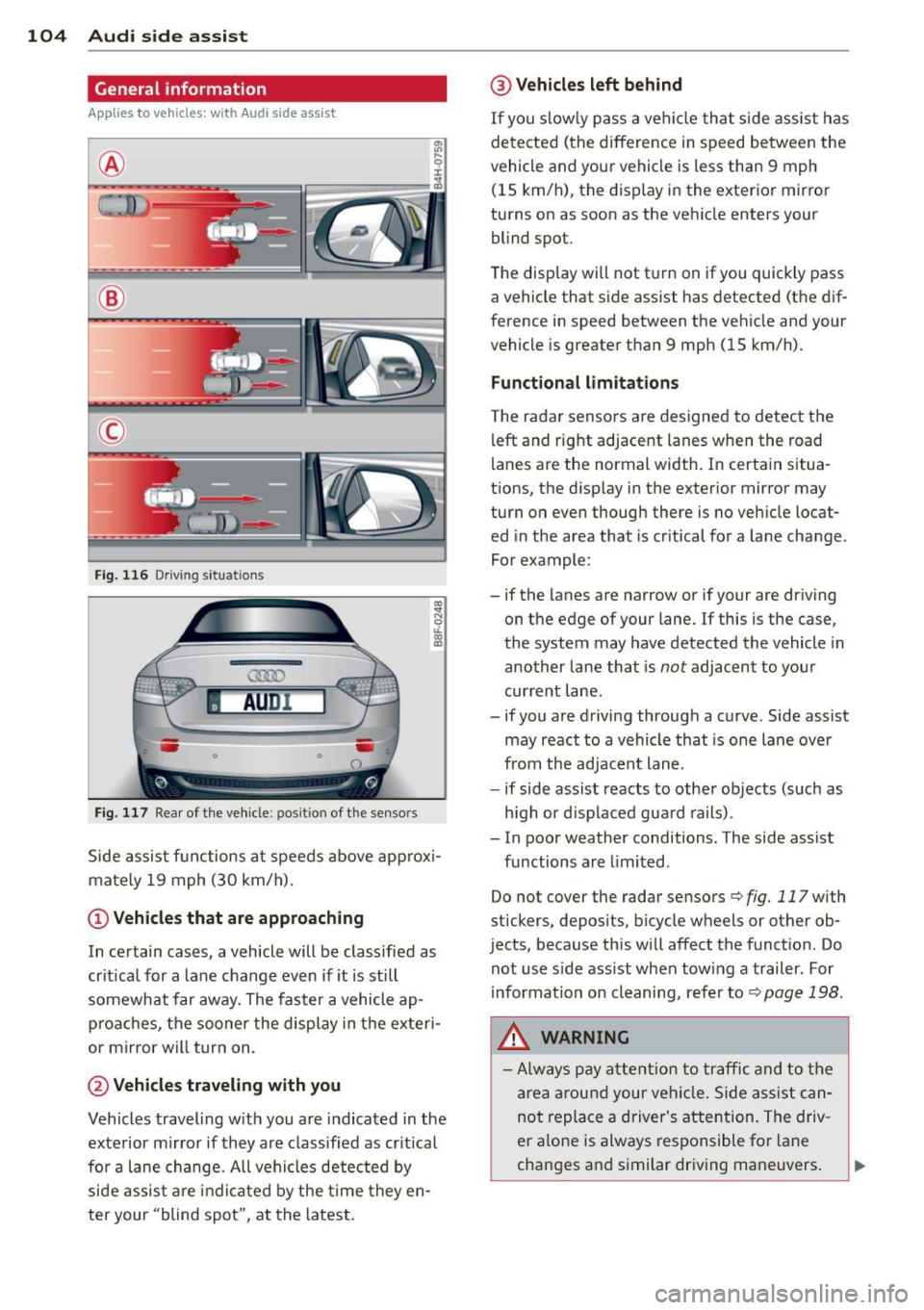
Fig. 116 Driving sit u at ions
F ig . 11 7 Rea r of th e ve hicle: positio n of t he se nso rs
Side assis t fu nctions at speeds above app rox i
ma tely 19 mph (30 km/h).
(D V ehicles that are approaching
In certain cases, a vehicle will be classified as
cr itical for a lane change
even if it is still
somewhat far away. The fas ter a vehicle ap
p ro aches, the sooner the disp lay in the exteri
or m irror will t urn on.
@ Vehicles traveling with you
Vehicles traveling w ith you are indicated in the
exterior m irror if they are classified as cr it ical
for a lane change. All vehicles detec ted by
side assis t are in dicated by the time they en
ter your "blind spot", at the latest.
@ Vehicles left behind
If you s low ly pass a ve hicl e tha t sid e ass ist has
dete cted (t he difference in s peed between the
vehicle and you r vehicle is less than 9 mph
(15 km/h), the display in the exter ior mirror
turns on as soon as the vehicle enters your
blind spot.
The display wi ll not t urn on if you quickly pass
a vehicle that s ide assist has detected (the dif
ference in speed between the ve hicle and your
vehicle is greater than 9 mph (15 km/h).
Functional lim itations
T he radar senso rs are designed to detect the
left and right adjacent lanes whe n the road
l anes a re the normal width. In certain situa
t ions, the d isp lay in the exterior mirror may
turn on
even though there is no ve hicle locat
ed in the area that is cr itical for a la ne cha nge.
Fo r example:
- if the lanes are narrow or if your are driving
on th e edge of your lane. If this is the case,
the system may have detected the vehicle in
another la ne that is
not adjacent to you r
cur rent lane .
- if you a re driving throug h a c urve . Side assist
may react to a vehicle that is one lane ove r
from the ad jacent lane .
- if side assist reacts to other objects (such as
high or d isp laced gua rd rails) .
- In poor weather conditions. The side assist
fu nctions are limited .
Do not
cover the radar sensors c::> fig. 117 with
stickers, depos its, bicycle wheels or other ob
jects, because this will affect the funct ion. Do
not use s ide ass ist when towing a trailer . For
i nforma tion on cleaning, refe r to
c::> page 198 .
&_ WARNING
-Always pay a ttention t o traffic and to th e
ar ea arou nd your vehi cle. Side a ssist c an
no t repl ace a driver 's atte ntion. The driv
er a lone is always res ponsible fo r lane
cha nges a nd similar driving maneuvers.
Page 108 of 290
106 Audi side assist
- Side assist is not active wh ile you are
making the adjus tment.
- Your settings are automatica lly sto red
and ass igned to the remote control key
being used.
Driver messages
App lies to vehicles: with Audi side assist
If s ide ass ist switches off by itse lf, t he LED in
the butto n tur ns off a nd a message will ap
pear in t he instr ume nt cl uster d is p lay:
Audi side assist unavailable : Sensors blocked
T he radar sensors' vision is a ffected. Do not
cover the area in front of the senso rs with bike
wheels, stickers, dirt or other objects . Clean
the area in front of the sensors, if necessary
¢fig. 117.
Audi side assist : Currently unavailable
Side assist can not be swi tched on tempora ril y
bec ause there is a mal func tio n (for ex am ple,
the ba ttery cha rge leve l may be too low) .
Audi side assist : System fault!
The system ca nnot guara ntee that it w ill de
tec t ve hicles co rrec tly and it is sw itched off .
Th e senso rs have been displaced o r are faulty .
H ave the sys tem che cked by an au thor ized
Au di d eale r or auth oriz e d Au di S ervice Fa cility
soon .
Audi side assist : Unavailable when towing
Side assist sw itches off automatically when a
factory- insta lled trailer hitch is connected to
the elec trical connector on the trailer . There is
no guarantee the system will switc h off when
usi ng a retrofitted t railer hi tch . Do not use
si de assis t when towing a tra iler .
Page 129 of 290
the pedals or the ability to control the
vehicle.
- Never place or install floor mats or other
floor coverings on top of already insta l
led floor mats . Additional floor mats and
other coverings will reduce the size of
the pedal area and interfere with the
pedals.
- Always property reinstall and secure floor
mats that have been taken out for clean
ing .
- Always make sure that objects cannot fall into the driver footwell wh ile the ve
hicle is moving. Objects can become
t rapped under t he brake pedal and accel
erator peda l causing a loss of veh icle
control.
Stowing Luggage
Loading the luggage compartment
All luggage and other objects must be prop
erly stowed and secured in the luggage com
portment.
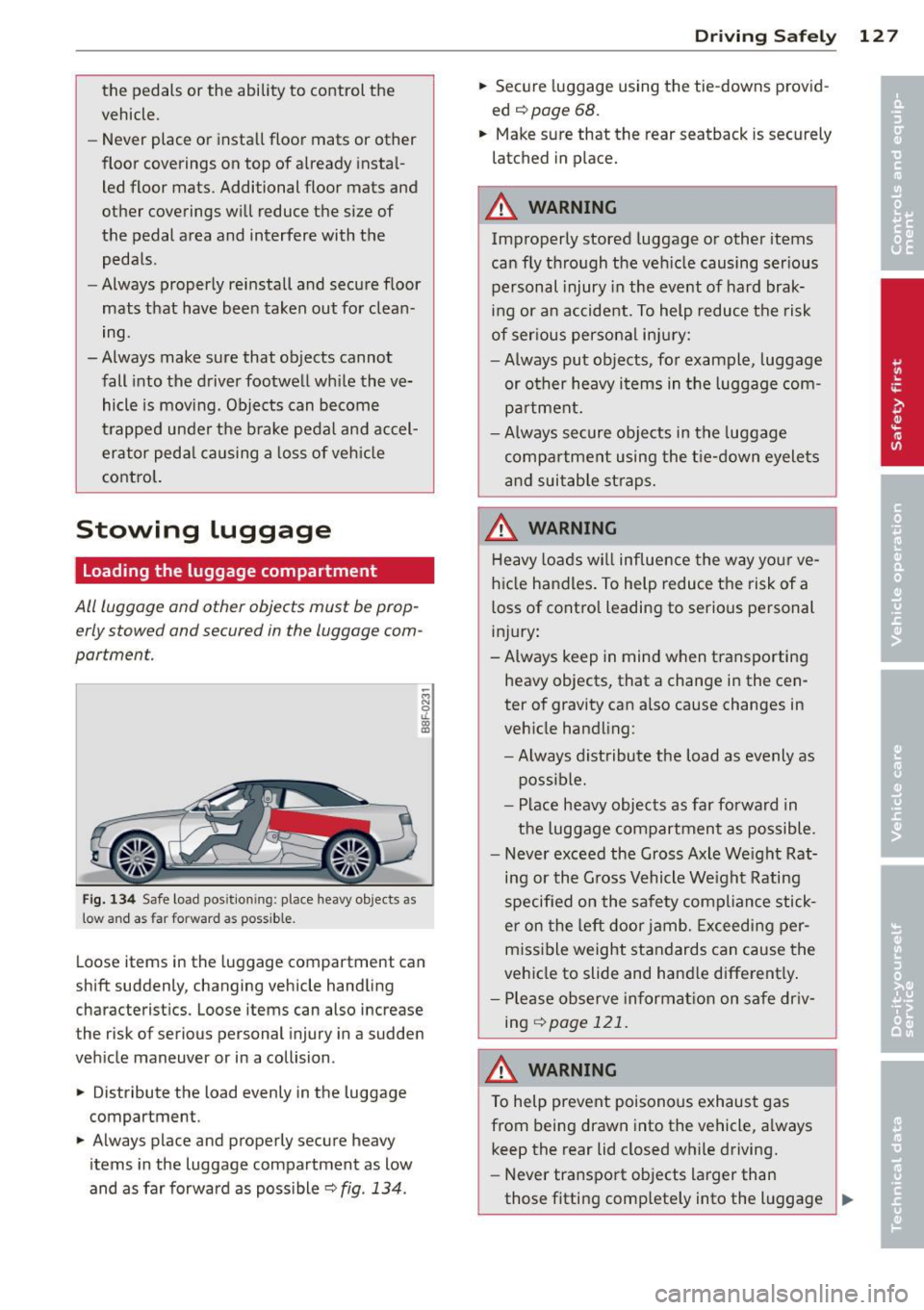
F ig. 134 Safe load pos ition ing: place heavy objects as
low a nd as fa r forwa rd as possible .
-M N 0 u.
ill
Loose items in the luggage compartment can
shift suddenly, changing vehicle handling
characterist ics. Loose items can also increase
the risk of serious personal injury in a sudden
veh icle maneuver or in a collision .
.. Distribute the load evenly in the luggage
compartment.
.. Always place and properly secure heavy
items in the luggage compartment as low
and as far forward as poss ible
c::> fig . 134 .
Drivin g Sa fely 12 7
.. Secure luggage using the tie-downs provid
ed
c::> page 68.
.. Make sure that the rear seatback is securely
latched in place.
A WARNING
Improperly stored luggage or other items
can fly through the ve hicle causing ser ious
pe rsonal injury in the event of hard brak
ing or an accident . To help reduce the risk
of ser ious persona l injury:
- Always put objects, for example, luggage
or other heavy i tems in the luggage com
pa rtment.
- Always secure objects in the luggage
compa rtment using the t ie-down eyelets
a nd suitab le st raps.
A WARNING
Heavy loads w ill influence the way yo ur ve
hicle handles. To help reduce the risk of a
loss of contro l leading to serious personal
i nj ury :
-Always keep in mind w hen transporting
heavy objects, that a change in the cen
ter of gravity can a lso cause changes in
veh icle handling:
- Always distribute t he load as evenly as
possible.
- Place heavy objects as far forward in
the luggage compartment as possible .
- Never exceed the Gross Axle We ight Rat
ing or the G ross Vehicle We ight Rating
specified on the safety compliance stick
e r on the left door jamb. Exceeding per
miss ible weight standards can cause the
vehicle to slide and hand le different ly .
- Ple ase observe in format ion on sa fe dr iv
ing
<::> page 121.
A WARNING
To help prevent poisonous exhaus t gas
from being drawn into the vehicle, a lways
keep the rear lid closed while driving.
- Never transport objects larger than
those fitting comp letely into the l uggage _..
Page 181 of 290
Intelligent technology Notice about data
recorded by vehicle
control modules
Your vehicle is not equipped with an Event Da
ta Recorder (EDR), installed by some manu
facturers for the express purpose of capturing
data for retrieval after an accident or crash
event. EDR's are sometimes called "crash re
corders".
Some state laws restrict the retr ieval or down
loading of data stored by EDR's that were in
stalled in a vehicle for the express purpose of
retrieving data after an accident or crash
event without the owner's consent.
Although your vehicle is not equipped with an
EDR, it is equipped with a number of electron
ic control modules for various vehicle systems
such as, for examp le, engine function, emis
sion control, as well as for the airbags and
safety belts.
These electronic control modules also record
vehicle-related data during norma l vehicle op
eration for diagnostic and repair purposes.
The recording capacity of the electronic con
trol modules is limited to data (no sound is re
corded) and only a small amount of data is ac
tually recorded over a very limited period of
time and stored when a system fault or other
condition is sensed by a control unit. Some of
the data then stored may relate to vehicle
speed, direction, braking as we ll as restraint
system use and performance in the event of a
crash or other condition. Stored data can only be read and downloaded with special equip
ment.
Electronic Stabilization
Control (ESC)
Description
ESC helps to improve road holding and vehicle
dynamics to help reduce the probability of
skidding and loss of veh icle control. It works
only when the engine is running. ESC detects
Intelligent technology 179
certain difficult driving situations, including
when the vehicle is beginning to spin (yaw)
out of control and helps you to get the veh icle
back under control by se lectively braking the
wheels, and/or reducing engine power and
providing steering ass istance to help hold the
vehicle on the driver's intended course. The in
dicator light
JjJ in the instrument cluster
blinks when ESC is taking action to help you
control the vehicle.
ESC has limitations .
It is important to remem
ber that ESC cannot overcome the laws of
physics.
It will not always be able to help out
under all conditions you may come up against.
For example, ESC may not always be able to
help you master situations where there is a
sudden change in the coefficient of friction of
the road surface. When there is a section of dry road that is suddenly covered with water,
slush or snow, ESC cannot perform the same
way it would on the dry surface. If the vehicle
hydroplanes (rides on a cushion of water in
stead of the road surface), ESC will not be
able to help you steer the vehicle because con
tact with the pavement has been interrupted
and the vehicle cannot be braked or steered .
During fast cornering, particularly on winding
roads, ESC cannot always deal as effectively
with difficult driving situations than at lower
speeds. When towing a trailer, ESC is not able
to help you regain control as it would if you
were not tow ing a trailer.
A lways adjust your speed and driving style to
road, traffic and weather conditions. ESC can
not override the vehicle's physical limits, in
crease the available traction, or keep a vehicle
on the road if road departure is a result of
driver inattention. Instead, ESC improves the
poss ibility of keeping the vehicle under con
trol and on the road dur ing extreme maneu
vers by using the driver's steering inputs to
help keep the vehicle going in the intended di
rection. If you are traveling at a speed that
causes you to run off the road before ESC can
provide any assistance, you may not experi
ence the benefits of ESC.
•
•
Page 185 of 290
-You should perform braking maneuvers
for the purpose of clean ing the brake
system only if road condit ions permit.
Other road users must not be put at r isk -
you may cause an acc ident!
- Before descending a steep grade, reduce
speed and shift transmiss ion into a lower
gear or lower d riving range . Do not ride
the brakes or hold the pedal down too
long or too often. This cou ld cause the
brakes to get hot and dimin ish braking
effi ciency.
- Do not "r ide the b rakes" by resting your
foot on the pedal when yo u do not intend
to brake. This may cause the b rakes to
overheat, premat ure wear and increased
stopp ing distance .
- Under certain climatic and operating
conditions such as passing through wa
ter, driving in heavy rain or after wash ing
the vehicle, the effect iveness of the
brakes can be reduced. In winter, ice can
accumulate on the brake pads, linings,
discs and d rums . Carefully apply brakes
for a test. Brakes will dry and ice coat ings will be cleaned off afte r a few ca re
f ul brake appl ications.
- Driv ing fo r an ex tended pe riod of time on
salt-covered ro ads w ithout using yo ur
brakes can also affect braking efficiency.
Clean off accumu lated salt coating from
brake discs and pads with a few caref ul
brake applicat ions.
- If you damage the front spoiler, or if you
install a different spoiler, be sure the air
flow to the front brakes is not obstruct
ed. Otherwise the brake system co uld
overheat reducing the effectiveness of
the ent ire brake system.
- Failure of one brake c ircuit will impair
the braking capability resulting in an in
creased stopp ing distance. Avoid driv ing
the vehicle and have it towed to the near
est author ized Audi dealer or qualified
wor kshop.
- Never let the v ehicle roll to a stop w ith
t he engine shu t off.
Int ellig ent technolog y 183
-If the brake booster is not working, for
examp le when towing your vehicle, or
because the brake booster has somehow
been damaged, the brake pedal must be
pressed conside rably harder to make up
for the lack of booster assistance .
Electro-mechanical
power assist, dynamic
steering
The electro-mechanical power assist helps
the driver when steering .
Power steer ing adapts electronically based on
the vehicle speed.
Indicator lights and messages
• Steering defecti ve! Do not d rive vehicle!
If this indicator light turns on and stays on
and t his message appears, the power steer ing
may have failed .
Do
not con tinue dr iv ing . See your author ized
Audi dealer or other qualified repair facility
fo r ass istance.
f-r,ij Dynamic st eering: System fault! You can
continue driving
If the indicator light turns on and the mes
sage appears, the steering may be more diffi
cu lt to move or more sensit ive tha n usual. The
stee ring wheel may a lso be at an angle when
driv ing straight .
Drive slowly to your a uthorized Audi dea ler or
qualified workshop to have the ma lfunction
correc ted .
fifl Dynamic steer ing: in itializing
If this drive r message appea rs and the indica
tor light is flash ing on the instrument panel,
dynamic steer ing * is being rein itia lized. Once
you start the engine after th is is finished, the
steering wheel will be easy to move. Re- init i
al ization might be necessa ry if the steering
wheel was moved ha rd to the left a nd right
wh ile the vehicle was not moving. The display
goes ou t as soon as initialization is comp lete. .,.
•
•