instrument cluster AUDI A5 CABRIOLET 2014 User Guide
[x] Cancel search | Manufacturer: AUDI, Model Year: 2014, Model line: A5 CABRIOLET, Model: AUDI A5 CABRIOLET 2014Pages: 286, PDF Size: 70.4 MB
Page 29 of 286
In addition , you can determine what informa
tion from the trip computer should be shown in the instrument cluster display. If one of the
pieces of driver information is turned
O ff , that
driver information will not be shown in the
d isp lay. The information will continue to be
calculated by the trip computer and can be
turned back
On at any time .
(D Tips
-This function is not availab le on all
vehicles .
- The driving information in the efficiency
program is also reset to zero with t he
s ingle-trip memo ry.
Efficiency program
Description
Applies to vehicles: with trip computer w it h eff ic iency
program
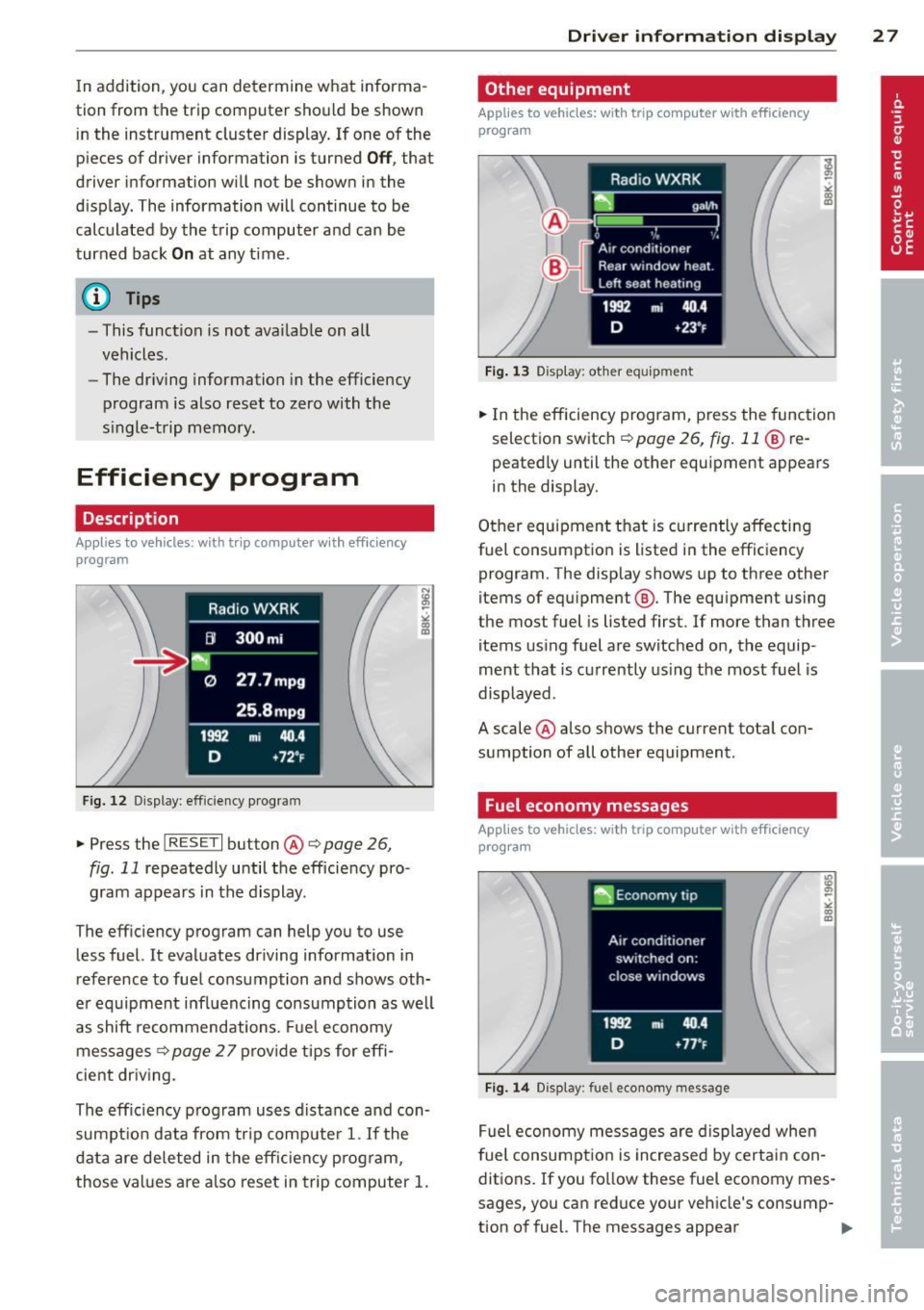
F ig. 12 Disp lay : efficiency p rogram
.,. Press the I RES ET I but ton @ ¢ page 26,
fig. 11 repeatedly until the efficiency pro
gram appears in the display.
The efficiency program can help you to use less fuel. It evaluates driving information in
reference to fuel consumption and shows oth
e r equipment influencing consumption as wel l
as shift recommendations. Fue l economy
messages ¢
page 2 7 prov ide tips for effi
cient driv ing.
The eff ic iency p rogram uses distance and con
sumpt ion data from tr ip compute r
1. If the
data are deleted in the eff iciency p rog ram,
those values are a lso reset in trip computer
1.
Dri ver inform ation di spl ay 2 7
Othe r equipment
Applies to vehicles: wit h trip computer with efficiency
program
Fig . 1 3 D isplay: other equ ipmen t
.,. In the efficiency program, p ress the function
selection switch ¢
page 26, fig. 11 @ re
peated ly until the other equipment appears
in the display .
Other equipment t hat is currently affecting
fuel consumptio n is listed i n the effic iency
program. The display shows up to three othe r
items of equ ipment @. The equ ipment using
the mos t fuel is listed firs t. If more than three
items us ing fuel are switched on, the equip
ment that is currently us ing the most fuel is
displayed .
A scale @also shows the current total con
sumption of all other equipment.
Fuel economy messages
App lies to vehicles: with trip computer with efficiency
program
F ig . 14 Display: fuel e cono my message
Fuel economy messages are d isplayed when
fuel consumpt ion is increased by certai n con
ditions. If you follow these fuel economy mes
sages, you can reduce your vehicle's consump-
tion of fuel. The messages appear .,..
Page 31 of 286

-The information in the Service Reminder
remains stored even when the vehicle
battery is disconnected .
On-Board Diagnostic
system (OBD)
Malfunction Indicator Lamp (MIL)
The Malfunction Indicator Lamp (MIL) ¢4 in
the instrument cluster is part of the On-Board Diagnostic (080 II) system.
The warning/indicator light illuminates when
the ignition is switched on and goes out after
the engine starts and the idle has stabilized.
This indicates that the MIL is working proper
ly.
If the light does not go out after the engine
is started, or illuminates whi le you are driv
ing, a malfunction may exist in the engine sys
tem.
If the light illuminates, the catalytic con
verter could be damaged.
Continue driving
with reduced power (avoid
ing sustained high speeds and/or rapid accel
erations) and have the condition corrected.
Contact your authorized Audi dealer .
If the light illuminates, the electronic speed
limiter may also be malfunctioning. For more
information ¢ page 29, Electronic speed
limiter .
An improperly closed fuel filler cap may also
cause the MIL light to illuminate
¢page 204.
On-Board Diagnostics
Fig . 16 Locat ion of Data Link Connector (DLC)
Driver information display 29
On-Board Diagnostics monitors the compo
nents of your emission contro l system . Each
monitored component in your engine system
has been assigned a code. In case of a mal
function, the component will be identified
and the fault stored as a code in the control
module memory .
The MIL light may also illuminate if there is a leak in the on-board fuel vapor recovery sys
tem . If the light illuminates after a refueling,
stop the vehicle and make sure the fuel filler
cap is properly closed
~ page 204.
In order to make an accurate diagnosis, the
stored data can on ly be displayed using spe
c ial diagnostic equipment (generic scan tool
for 080).
In order to connect the special diagnostic
equipment, push the plug into the Data Link
Co nnector (DLC) . The DLC is located to the
right of the hood release ¢ fig . 16 .
Your authorized Audi dealer or qualified work
shop can interpret the code and perform the necessary repair.
A WARNING u:;
Do not use the diagnostic connector for
personal use. Incorrect usage can cause
malfunctions, which can increase the risk
of a collision!
Electronic speed limiter
-
Your vehicle may be factory equipped with
tires that are rated for a maximum speed of
130 mph (210 km/h). This is may be less than
the maximum speed of your vehicle. To reduce
the risk of sudden tire failure and loss of con
trol if the vehicle is operated at excessive
speeds, your vehicle has an electron ic speed
limiter . The electronic speed limiter prevents
your vehicle from go ing faster than the tire
speed rating. For more information
¢page 233.
If the engine control unit receives faulty veh i
cl e roadspeed signals, the Malfunction Ind ica-
tor Light (MIU
¢4 will illuminate. If this Iii>
Page 35 of 286
keys. Unguarded access to the keys pro
vides children the opportunity to start
the engine and/or activate veh icle sys
tems such as the power windows etc. Un supervised operation of any vehicle sys
tem by ch ildren can result in serious in
jury.
- Do not remove the key from the ignition
lock until the vehicle has come to a com
plete stop. Otherw ise the steering col
umn lock cou ld suddenly engage -caus
ing the risk of an accident.
(D Tips
- The operation of the remote contro l key
can be temporarily disrupted by interfer
ence from transmit ters in the vici nity of
the vehicle working in the same frequen
cy range (e .g . a ce ll phone, radio equip
ment).
- Fo r security reasons, replacement keys
are on ly available from authorized A udi
dealer.
- For Declaration of Compliance to United
States FCC and Industry Canada regula
tions¢
page 267.
Removing the mechanical key
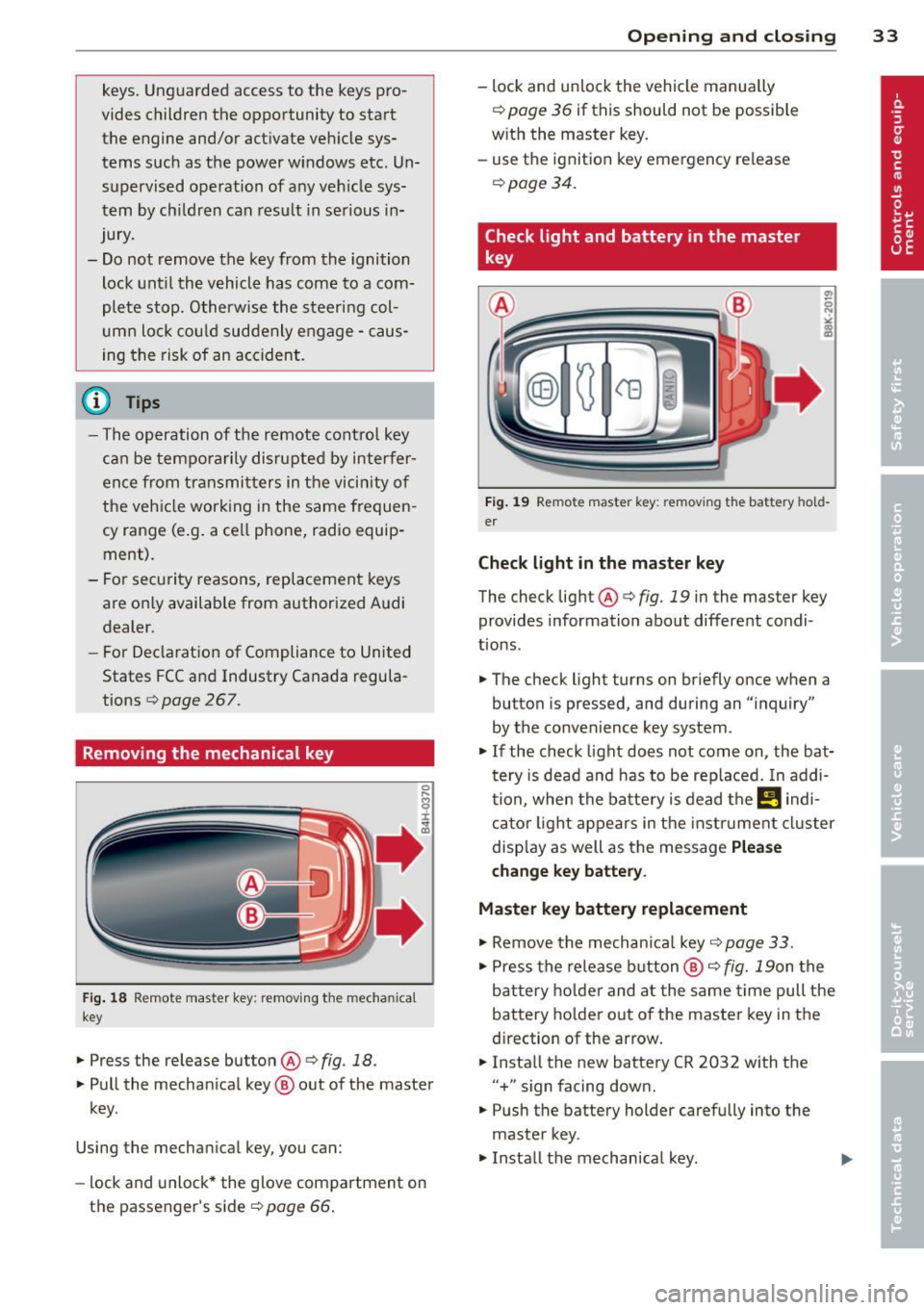
Fi g. 18 Remote master key: removing the mechanical
key
... Press the release button@¢ fig. 18.
... Pull the mechan ical key @ out of the master
key.
Using the mechanical key, you can:
- lock and unlock* the glove compartment on
the passenger's side
9 page 66 .
Op enin g an d clos ing 33
- lock and unlock the vehicle manually
¢ page 36 if this should not be possible
w ith the master key.
- use the ignition key emergency release
¢page 34.
Check light and battery in the master
key
F ig . 1 9 Remote master key: removing the battery hold
er
Check li ght in the mast er key
The check light@¢ fig. 19 in the master key
provides information about different condi
tions.
... The check light turns on br iefly once when a
button is pressed, and during an "inquiry"
by the convenience key system .
... If the check light does not come on, the bat
tery is dead and has to be rep laced. In addi
tion, when the batte ry is dead the
!I indi
ca tor light appears in the instrument cluster
disp lay as well as the message
Pl ease
change ke y battery .
Master key battery replacement
.,. Remove the mechan ica l key ¢page 33 .
... Press the release b utton @¢ fig. 19on the
bat tery ho lder and at the same time pull the
battery ho lder out of the master key in the
direction of the arrow .
... Insta ll the new battery CR 2032 with the
"+ " sign facing down.
... Push the battery holder carefully into the
master key.
.,. Install the mechanical key.
Page 44 of 286
42 Power top
Power top
Automatic power top
General information
The sophisticated design of the fabric power
top allows you to operate it easily and quickly.
You can open and close the power top while
driving as long as the vehicle is traveling be
low 30 mph. When open, the power top is
stored in a special compartment which is
equipped with a cover.
Under normal conditions, the power top is
wind- and waterproof . In rare cases, small
droplets of water may form under extreme
weather conditions such as torrential or pro longed rain. That is normal and no cause for
concern.
F ollow the maintenance instructions to main
tain the attractive appearance of the converti ble and to ensure that it does not leak
¢ page 195. Also observe the following:
- Only open and close the power top when it is
clean. Sharp-edged particles of dirt can
scratch the rear window when the power top is folded and can cause abrasion that result
in damage to the power top over time. You
should also remove ice and snow before
opening the power top.
- Never remove snow and ice with sharp
edged objects. You can remove ice from the
rear window w ith a standard ice scraper.
- You should only open the power top when it
is completely dry. Opening the power top
and stowing it in the compartment when it
is wet can cause marks on the top that de
tract from its appearance. Mi ldew can also
form if the power top is stowed for an ex
tended period of time when it is wet.
- Do not leave the power top open for several
weeks at a time. Always close it between uses to prevent discoloration and creases
from forming. This is especially important if
it was not completely dry when stowed.
- Opening or closing the power top in temper
atures below 32 °F (0 °C) is not recommend- ed because the flexibility of the fabric
de
creases is sub-zero temperatures .
A WARNING ,-
-When operating the power top, make
sure the function is not affected by wind
or other factors and that it does not in
terfere w ith other dr ivers.
- Never drive when the power top is not
locked correctly. The wind from driving
could cause the power top to open . This
can result in injuries and damage to the
veh icle.
- When opening and closing the power
top, make sure no one will be injured by
the supports and other moving parts.
- Operating the power top reduces the
headroom in the rear of the vehicle.
Make sure there is enough clearance be
tween the rear passenger and the power
top when opening and closing it.
-
- When operating the power top, visibility
to the rear is limited . Avo id operat ing the
top while driving in reverse.
(D Note
-Always make sure there is enough clear
ance above the vehicle so the power top
is not damaged when opening and clos
ing it.
- Do not store any objects in the power top
compartment to avoid damage when
opening the top.
@ Tips
- To prevent the battery from discharg ing,
do not open or close the power top re
peated ly when the engine is switched
off.
-A message in the instrument cluster dis
play will a lert you if a protection function
was activated or if there is a malfunction
¢page 43.
-The power top can also be operated
manually if there is a malfunction .,..
Page 45 of 286

¢ page 46, Power top emergency op
eration.
Have you authorized Audi dealer
correct the cause of the malfunction as
soon as possible.
- If parking the vehicle with the power top
open, remember that the vehicle interior
will not be protected from the weather
or from unauthorized entry. Closing the
power top before leaving the vehicle is
recommended . If you leave items in the
vehicle, lock them in the trunk.
=-· Power top operation
The indicator light monitors the power top .
The I!!! indicator light illuminates for approxi
mately 2 seconds when the ignition switches
on to check the function and then goes out
again . The indicator light also:
- illuminates when the power top opens or
closes.
- blinks if the power top switch is operated
but the conditions for opening or closing the
power top are not met . A warning message
also appears in the instrument cluster dis
play ¢
page 43, Error message in the in
strument cluster display.
-if the power top did not open or close com
pletely.
0) Tips
The indicator light stays on if the power
top was opened manually.
Error message in the instrument cluster
di splay
An error message appears if the power top
cannot open or close.
Several conditions must be met for the power
top to open or close automatically.
An error message in the instrument cluster
d isplay indicates if one of the conditions is not
met or there is a malfunction.
Power top 43
Power top: please close rear lid
The luggage compartment lid must be closed
when the power top is opening or closing. This
error message appears in the instrument clus
ter display if the luggage compartment lid is
not closed.
Storage bay not lowered. Please remove
obstruction
The power top storage bay must lower when
the power top is opening. This error message
appears in the instrument cluster display if
the storage bay is not lowered. If the storage
bay does not lower automatically because of
objects in the luggage compartment, remove
the objects that are in the way from the stor
age bay area . Otherwise, you can operate the
power top storage bay manually
c::> page 45.
Power top: cannot be used
This error message appears if the convertible
cannot open or close automatically because of safety reasons or if there is a malfunction. The
following causes are possible :
-Vehicle speed too high: Power top opera
tion is deactivated and an error message ap
pears if the vehicle speed is too high. Re
duce the vehicle speed and operate the
sw itch again to open or close the power top.
-Battery voltage too low: The power top can
not be operated if the battery voltage is too
low. This ensures there will be enough bat
tery voltage left to start the vehicle. The
power top can be operated again after the
engine is started.
- Rollover protection active: If the power top
is operated continuously for an extended pe
riod of ti me, rollover protection will activate
to prevent damage to the hydraulic unit .
This protective function prevents the power top from opening or close for approximately
15 to 30 minutes .
It will function again af
ter that
c::> ,& .
-Malfunction: Failure of system components
is one possible cause for malfunction. If this
happens, you can also operate the power
top by hand¢
page 46.
Page 54 of 286

52 Clear vis ion
@ Tips
- The light sensor* for headlight control is
located in the rear view m irror mount.
You should therefore not apply any st ick
ers to the windsh ield in this area in order
to prevent malfunctions or failures.
- Some exterior lighting functions can be
adjusted
¢page 52.
- When you remove your key from the igni
tion while the vehicle's lights are turned
on, a buzzer sounds as long as the driv
er's door is open .
- In cool or damp weather, the ins ide of
the headlights, turn signals and tail lights can fog over due to the tempera
ture difference between the inside and
outside. They will clea r shor tly after
switching them on. This does not affect
the service life of the lighting.
- In the even t of a light sensor malfunc
tion, the driver is no tified in the instru
ment cluster disp lay¢
page 22.
Turn signals and high beam lever
The lever operates the turn signals, the high
beams and the headlight flasher .
Fig. 55 Tu rn s ig na l and hig h beam lever
Turn sign als ¢i ¢
The turn signals activate when you move the
l ever into a turn s ignal pos ition when the ign i
tion is switched on.
(D -right turn signal
@-left tur n signa l
The turn s ignal blinks three times if you just
tap the lever .
High be ams and headlight flasher [D
Move the lever to the correspon ding posit io n:
@ -high beams on
@ -high beams off or headlight flasher
The indicator light
ii in the instrument cl us
te r turns on .
Notes on thes e features
-The turn signals on ly wor k w ith the ignition
t ur ned on. The indicator ligh ts
Ct or a in
the instrument cluster also blink.
- After you have turned a co rner, the turn s ig
na l switches off au toma tically .
- The
high beam works on ly w hen the head
lights a re on. The ind icator ligh t
II in the
instrument cluster illuminates when the
high beams are on .
- The
headlight flasher works o nly as long as
you ho ld the lever -even if there a re no
lights switched on . The indicator light
II in
the instrument cluster illuminates when you
use the headlight flasher.
A WARNING
--
Do not use the h igh beam or headlight
flasher if you know that these could blind
oncom ing traffic.
Adjusting exterior lighting
The functions ore selected in the radio or
MMI" .
.,. Select: !CARI function button> Exte rior
light ing .
Or
.,. Select: !CARI function button > Car systems *
control button > Vehicle s etting s> Exterior
lighting .
Coming home (light when leav ing car }*,
Leav ing home (light when unlocking car )*
The coming home function illuminates the
area around the vehicle when the ignition is
switched off and th e dr ive r's door is open ed.
Depend ing on veh icle equ ipment, the function
can be switched on and off or the length of
time the lig hts remain on* can be ad justed . ..,.
Page 81 of 286

This message appears if the master key is re
moved from the vehicle with the engine run
n ing.
If the master key is no longer in the ve
hicle, you cannot switch on the ignition after
stopping the engine and you also cannot start
the engine again . Moreover, you cannot lock
the vehicle from the outside w ith the key.
Shift to P otherwise vehicle can roll away.
Doors do not lock if lever is not in P.
This message appears for safety reasons
along w ith a warning signa l. It appears if the
selector lever for the automat ic transm ission
is not in the P position when switch ing off the
ignition. Move the selector lever to the P posi
tion, otherw ise the veh icle is not secured
against rolling away . You also cannot lock the
veh icle using the locking button* on the door
handle or using the remote key.
Convenience key defective! Use ignition lock
This message appears if the engine must be
started or stopped using the ignition key and
not the
I STAR T ENGIN E STOP ! button .
Electromechanical
parking brake
Operation
The electromechanical parking brake replaces
the hand brake.
F ig. 92 Cen ter console: Pa rk ing brake
.. Pull on the switch @c> fig . 92 to apply the
parking brake. The indicator light in the
switch illum inates .
.. Step on the brake pedal or the acce le rator
pedal and press the switch at the same time
On the road 79
to release the parking brake. The indicator
light in the switch goes out .
Your vehicle is equipped wi th an electrome
chanical parking brake. The parking brake is
designed to prevent the vehicle from rolling
unintentionally and replaces the hand brake.
In addition to the normal functions of a tradi
tiona l hand brake, the electromec hanical
parking brake provides various convenience
and safety funct ions .
When starting from rest
-The integral start ing ass ist helps you when
driving by automatically releasi ng the park
ing brake
¢ page 80, Starting from rest.
-When starting on inclines, the starting as
sist prevents the vehicle from unintentiona l
ly rolling back. The braking force of the
parking brake is not re leased until sufficient
driving force has been bui lt up at the
wheels.
Emergency brake function
An emergency brake ensures that the veh icle
can be slowed down even if the
normal brakes
fail
c> page Bl, Emergency braking.
Indicator lights
- If the parking brake is closed with the ign i
t ion
switched on the . (USA models) /
• (Canada models) indicator lights come
on in the instrument cluster and the switch.
- If the parking brake is closed with the igni
tion
switched off the. (USA models) /
• (Canada models) indicator lights come
on in the instrument cluster and the switch
for about 20 seconds.
A WARNING
If a drive range is engaged with the vehicle
stationary and the engine runn ing, you
must in no instance accelerate carelessly .
Othe rwis e the vehicle w ill start to move
imm ediately- risk of an accident.
Page 84 of 286

82 On the road
Speed warning 2
Storing warning 2 is recommended if you al
ways want to be reminded of a certain speed,
for example when yo u are traveling in a coun
try that has a general maximum speed limit,
or if you do not want to exceed a specified
speed for winter tires.
The . (USA models)
I. (Canada models)
speed warning 2 symbol appears in the dis play when you exceed the stored speed limit.
Unlike warning 1, it will not go out until the
vehicle speed drops below the stored speed limit.
Setting speed warning 2 ¢page
82.
(D Tips
Even though your vehicle is equipped with
a speed warning system, you should still
watch the speedometer to make sure you
are not driving faster than the speed lim it.
Speed warning 1: setting a speed limit
Warning threshold 1 is set by the I SET ! but
ton.
Fig. 93 SET button in the instrument clus ter
Storing the maximum speed
.,. Drive at the desired maximum speed .
.,. Press the
!SET I button in the instrument
panel display
9 fig . 93 for 1 second .
Resetting the maximum speed
.,. Drive the vehicle at a speed of at least
3 mph (5 km/h)
.,. Press the
!SET I butto n for more than 2 sec
onds . T
he . (USA models)/ . (Canada models)
speed warning symbo l wi ll appear briefly in
the d isp lay when you release the
!SET! button
to indicate that the maximum speed has been
stored successfully.
T he maximum speed remains stored until it is
changed by pressing the
! SET ! button again
briefly or until it is deleted by a lengthy push
on the button.
Speed warning 2: setting a speed limit
The radio or fv1fv1I* control unit is used to set,
change or delete warning threshold
2.
.,. Select: !CARI function button > Instrument
cluster> Speed warning. Or
.,. Select: !CARI function button> Car systems *
control button > Driver assist > Speed warn
ing.
Warning threshold 2 can be set in the speed
range starting from 20 mph to 150 mph (30
km/h to 240 km/h). Sett ings can each be ad
justed in intervals of 6 mph (10 km/h) .
Page 88 of 286

86 Transmission
N - N eutral
The transmission is in ne utr al in this position .
Shift to this posit ion for stand ing wi th the
brakes applied
q .&. in Driving the automatic
transmission on page 88 .
When the vehicle is stationary o r at speeds
be low 1 mph (2 km/h), you must always apply
the footbrake befo re and while moving the
l ever out of N .
DIS -Normal position for driving forward
In the D/S position, the transmiss io n can be
ope rated e ither in the normal mode Dor i n
the sport mode S. To select the spor t mode S,
pu ll the se lector lever back briefly . Pulling the
lever back aga in will select the normal mode
D. The instrument cluster display shows the
selected driv ing mode.
In the
normal mode D, the transmission auto
mat ica lly s elects the suitab le gea r ratio.
It de
pends on engine load, veh icle speed and driv
ing style.
Select the
s po rt mode S fo r sp orty driv ing.
The vehicle makes fu ll u se of the engine's
power. S hifting may become noticeable when
accelerating.
When the ve hicle is stationary o r at speeds
be low 1 mph ( 2 km/h), you must always apply
the foot brake before and while moving the lever to D/S out of N .
A WARNING
Read and follow all WARNINGS q .&. in
Driving th e automatic transmission on
page 88 .
(D Note
-
Coasting downh ill with the transmission in
N and the e ngine not r unning w ill result in
damage to the automa tic transm iss io n
a nd pos sib ly t he cataly tic converte r.
@ Tips
- On vehicles with drive select *, you can
adjust the spo rty shift charac teristics in
t h e
Dynamic d riving mo de. Swill appear in
the instrument cl uster disp lay instead
of D .
-If you a cc iden tally selec t N whi le driving,
take your foot off the accelerato r peda l
immediately and wa it for the engine to
slow down to idle before select ing D/S.
- If there is a power fai lure, the selector
lever w ill not move out of the P position.
The emergency release can be used if
this happens
c:> page 91.
Automatic Shift Lock (ASL)
Applies to vehicles: with multitronic/5 tronic/tiptron ic
T he Automatic Shift Lock safeguards you
against occiden tally shifting into a forward or
the reverse gear and causing the vehicle to
move unintentionally.
Fig . 9 7 Shi ft ga te: se lecto r lever lock pos itio ns and re ·
l ease b utt on high lig ht ed
The selector lever lock is re leased as follows:
.,. Tur n the ignition on .
.,. Step on the brake pedal.
At the some time
press and hold the re lease button on the
side of the gear selector knob
c::> fig . 97with
your thumb until you have moved the selec
to r lever to the desired position .
Automatic selector lever lock
The selector lever is locked in the P and N po
s itions w hen the ign it ion is turned on . Yo u
must press the brake pedal and the re lease
button to select another position . As a re
minder to the drive r, the following warni ng
appea rs i n the ins trument clus ter display
whe n the selector is in P and N:
When stationary apply brake pedal while se-
lecting gear ..,.
Page 91 of 286

Hill descent control
Applies to vehicles: with multitronic/S tronic/tiptronic
The hill descent control system assists the
driver when driving down declines.
Hill descent control is activated when these
lector lever is in D/S and you press the brake
pedal. The transmission automatically selects
a gear that is suitable for the incline . Hill de
scent control tries to maintain the speed ach
ieved at the time of braking, within physical
and techn ica l limitations. It may still be nec
essary to adjust the speed with the brakes.
H ill descent control switches
off once the de
cline levels out or you press the accelerator
pedal.
On vehicles w ith the cruise control system*
¢ page 83, hill descent control is also activat
ed when the speed is set.
.&, WARNING
Hill descent control cannot overcome
physical limitations, so it may not be able
to maintain a constant speed under all
conditions. Always be ready to app ly the
brakes.
Manual shift program
App lies to vehicles: with multitronic/S tronic/tiptronic
Using the manual shift program you can
manually select gears.
F ig. 99 Center console: shifting t he gea rs manually
Transmission 89
Fig . 100 Stee ring whee l: Shift buttons*
Gear selection with selector lever
The tiptronic mode can be selected either with
the vehicle stat ionary or on the move .
.,. Push the se lector lever to the right from D/
5. An M appears in the instrument cluster
display as soon as the transmission has
shifted .
.,. To upshift, push the selector lever forward
to the plus position
0 ¢ fig. 99 .
.,. To downshift, push the lever to the minus
position
0 .
Gear selection with paddle levers*
The shift buttons are activated when these
l ector lever is in D/S or the tiptronic manual
shift program.
.,. To upshift, touch the button on the right
0
¢ fig. 100 .
.,. To downshift, touch the button on the left
0 .
.,. If you do not press a sh ift button within a
short time while in the D/S posit ion, the
transmission will return to automatic mode.
To keep shifting using the shift buttons,
move the selector lever to the right out of
the D/S position.
The transm ission automatically shifts up or
down before critical engine speed is reached .
The transmission only allows manual sh ifting
when the engine speed is within the permit
ted range.
(D Tips
-When you shift into the next lower gear,
the transmission will downshift only