ECU AUDI A5 CABRIOLET 2015 User Guide
[x] Cancel search | Manufacturer: AUDI, Model Year: 2015, Model line: A5 CABRIOLET, Model: AUDI A5 CABRIOLET 2015Pages: 268, PDF Size: 66.88 MB
Page 69 of 268
M N
ci LL co
rl I.O
"' N
"' rl
Securing the ski sack
Applies to vehicles: with sk i sack
Long objects such as skis or snowboards can be
transported in the ski sack.
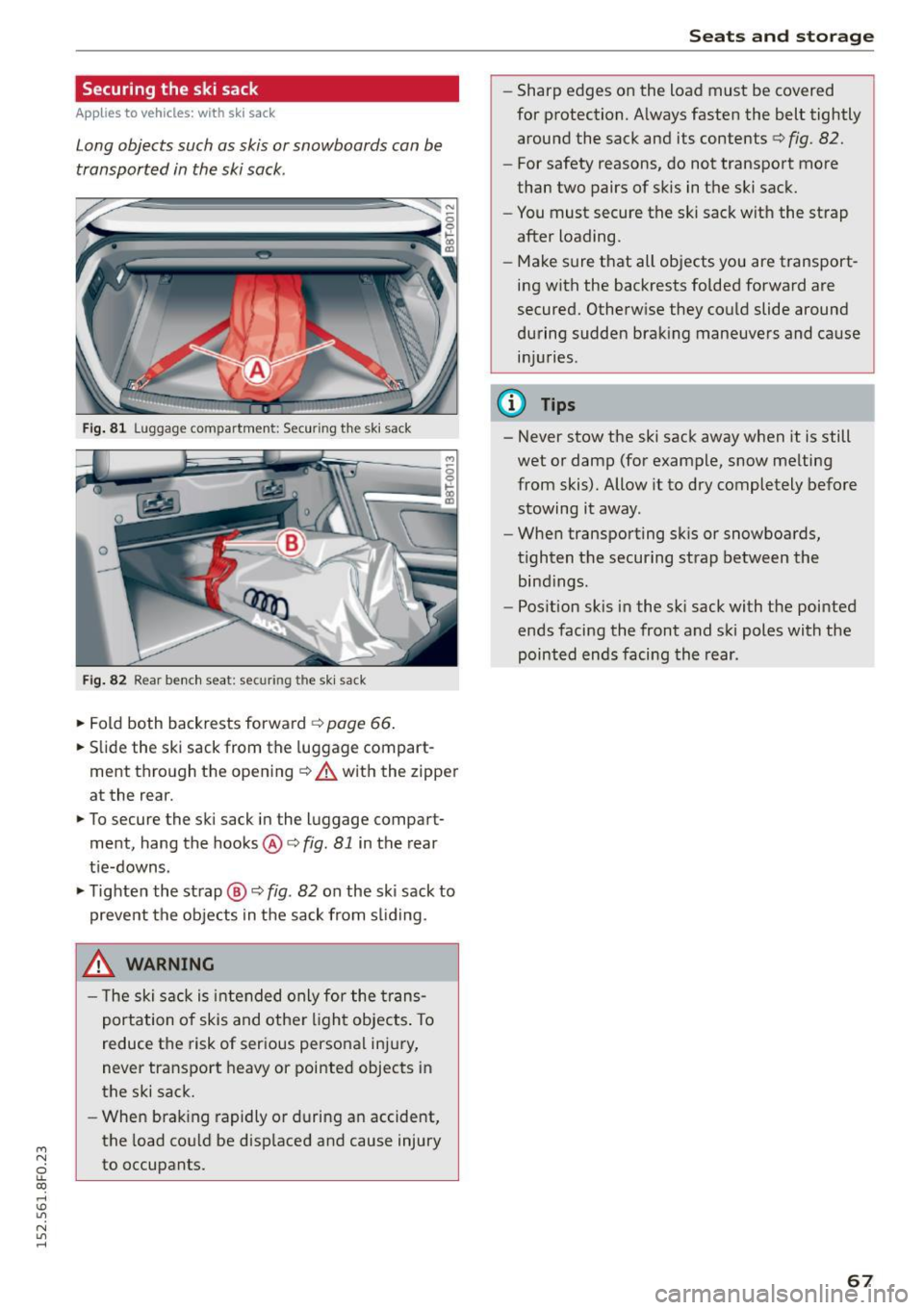
Fig. 81 L uggage compartment: Securing th e sk i sack
Fig. 82 Rear bench seat: securi ng the ski sac k
~ Fold both backrests forward c> page 66.
~ Slide the ski sack from the luggage compart
ment through the opening
¢ A with the zipper
at the rear.
~ To secure the ski sack in the l uggage compart
ment, hang the hooks@c>
fig. 81 in the rear
tie-downs.
~ Tighten the strap @ c> fig. 82 on the ski sack to
prevent the objects in the sack from sliding .
_& WARNING
- The ski sack is intended only for the trans
portation of skis and other light objects. To
reduce the risk of serious personal injury,
never transport heavy or pointed objects in
the ski sack.
- When braking rapidly or during an accident,
the load could be displaced and cause injury
to occupants.
Seats and storage
- Sharp edges on the load must be covered
for protection. Always fasten the belt tightly
around the sack and its contents c>
fig. 82.
-For safety reasons, do not transport more
than two pairs of skis in the ski sack.
- You must secure the ski sack with the strap
after loading.
- Make sure that all objects you are transport
ing with the backrests folded forward are
secured. Otherwise they could slide around
during sudden braking maneuvers and cause injuries .
@ Tips
-Never stow the ski sack away when it is still
wet or damp (for example, snow melting
from skis). Allow it to dry completely before
stowing it away.
- When transporting sk is or snowboards,
tighten the securing strap between the bindings.
- Position skis in the ski sack with the pointed
ends facing the front and ski poles with the
pointed ends facing the rear .
67
Page 79 of 268

M N
ci LL co
rl I.O
"' N
"' rl
-For safety reasons, you should always park
your vehicle with the selector lever in P. Oth
erwise, the vehicle could inadvertently roll
away .
- The rad iator fan can continue to run for up
to 10 m inutes even after you have turned
off the engine and removed the ignition key .
The rad iator fan can also turn on aga in if the
engine coolant heats up be cause of intense
s u nlight or heat bui ld-up in the engine com
partment.
- Always ta ke t he key with you wheneve r you
leave your vehicle. Otherwise, the eng ine
cou ld be started or electrical eq uipment
s u ch as the power windows cou ld be operat
ed. This can lead to serious injury.
(D Note
If the e ng ine has been under heavy load for
an extended per iod, heat builds up in the en
gine compartment after the engine is swi tch
ed off -there is a risk of damag ing the engine.
Allow the engine to run at idle for about two
m inutes before switch ing it off.
Driver messages
Ignitio n is on
This message appears and a war ning tone sounds
if you open the driver's door when the ignition is
switched on.
No ke y ide ntifi ed
This message appears when the
I STAR T ENGIN E STOP I button is pressed if t here
i s no master key inside the vehicle o r if the sys
tem does not recogni ze it. For example, the mas
ter key ca nnot be recognized if it is covered by an
object (e .g . alum inum br ie f case) which
screens
the radio signal. Electronic devices such as cell
phones can also interfere w ith the rad io signa l.
Press br ake pedal to sta rt engine
This message appears if you do not press the
b rake peda l to s tart the engine.
Shift to N or P to start engine
Dr ivi ng
This message appears when attempt ing to start
t h e engine if the se lector lever for the automatic
transmission is not in the P or N position. The en
gine can on ly be started w ith the selector in
these positions.
El I s the key in the vehicle?
T his mess age appears if the mas ter key is re
moved from the vehicle wi th the e ngine runn ing .
If the master key is no longer in the ve hicle, you
cannot switch on the ignition after stopping the
engine and you also cannot start the engine
again . Moreover, you cannot lock the vehicle from
t h e outside with the key.
Shift to P otherwise vehicle can roll away . Door s
do not lo ck
if le ve r is not in P.
This message appears for safety reasons along
with a warning signal. It appea rs if the selector
lever for the automatic transmission is not in the
P position when switch ing off the ignition. Move
the selector lever to the P position, otherwise the
vehicle is not secured against rolling away. You
also cannot lock the vehicle us ing the locking
button* on the door handle o r us ing t he remote
key .
Convenience key defe cti ve! Use ign ition lock
This message appears if the engine must be
started or stopped using the ign ition key and not
the
I STAR T ENGINE ST OP ! button.
Electromechanical
parking brake
Operation
The electromechanical parking broke replaces
the hand broke.
Fig . 92 Center co nso le: Pa rk in g b ra ke
77
Page 88 of 268
Automatic transmission
This prevents too much stress from being placed
on the locking mechanism.
Vehicles with multitronic transmission: Your vehi
cle is equipped with
hill hold assist allowing you
to start while on an incline. The system is activat
ed when the brake pedal is pressed down and
held
for a few seconds. The brake pressure will
hold for
a momen t after the brake pedal loosens
t o preven t the vehicle from rolling backwards
while starting up .
A WARNING
- The vehicle can also roll when the engine is
stopped .
- Unintended vehicle movement can cause se rious injury .
- Never leave your vehicle with the engine
running while in gear.
If you must leave your
vehicle when the engine is running, activate
the parking brake and move the selector lev
er to
P.
-Power is still transmitted to the wheels
when the engine is running at idle. To pre
vent the vehicle from "creeping", you must
keep your foot on the brake when the engine
is running and the selector lever is in 0/5 or
R or "tiptronic" mode is selected.
- Do not press the accelerator pedal when changing the selector lever position while
the vehicle is stationary and the engine is
running .
- Never shift into R or P while driving.
- Before driving down a steep slope, reduce
your speed and shift into a lower gear with
"tiptronic".
- Do not ride the brakes or press the brake
pedal too often or too long when driving
down a hill. Constant braking causes the
brakes to overheat and substantially re
duces braking performance, increases brak
ing distance or causes complete failure of
the brake system .
- To prevent the vehicle from rolling back
when stopping on inclines, always hold it in
place with the brake pedal or parking brake.
- Never hold the vehicle on an incline with a
slipping clutch. The clutch opens automati-
86
cally when it becomes too hot from the
overload. An indicator lamo
[ O ] illuminates
and a driver message appears
¢ page 88
when the clutch is overloaded.
- If the engine must remain running, never
have any driving position engaged when
checking under the hood . Make sure these
lector lever has securely engaged and is
locked in P with the parking brake set
¢ page 195. Otherwise, any increase in en
gine speed may set the vehicle in motion,
even with the parking brake applied.
(D Note
- 5 tronic- and tiptronic transmission: When
stopping on an incline, do not try to hold
the vehicle in place by pressing the accelera
tor pedal while a driving gear is selected.
This can cause the transmission to overheat
and can damage it. Activate the parking
brake or press the brake pedal to prevent
the vehicle from rolling.
- 5 tronic- and tiptronic transmission: Allow
ing the vehicle to roll when the engine is
stopped and the selector lever is in N will
damage the transmission because it is not
lubricated under those circumstances .
(D Tips
For safety reasons, the parking brake is re
leased automatically only when the driver's
safety belt is engaged in the buckle .
· Hill descent control
App lies to vehicles: wit h mult itronic/S tronic/tiptronic
The hill descent control system assists the driver
when driving down declines.
Hill descent control is activated when the selec
tor lever is in 0/5 and you press the brake pedal.
The transmission automatically selects a gear
that is suitable for the incline. Hill descent con
trol tries to maintain the speed achieved at the
time of braking, within physical and technical
limitations.
It may still be necessary to adjust the
speed with the brakes. .,.
Page 99 of 268

M N
ci u.. co ,...., \!) 1.1"1
N 1.1"1 ,....,
Audi adaptive cruise control and braking guard
promptly detected or may not be detected
at all.
- Reflective surfaces including crash barriers
or tunnel entrances may impair the function
of the radar sensor.
(D Tips
- You can cancel the braking that is initiated by the system by braking yourself, by accel
erating noticeably or by swerving.
- Braking guard error messages
Q page 97.
- Keep in mind that braking guard can brake
unexpectedly. Always secure any cargo or
objects that you are transporting to reduce
the risk of damage or injury.
Settings in the radio /MMI
App lies to vehicles: with Audi adaptive cruise co ntrol
... Select : I CARI function button > Car systems*
control button > Driver assist> Audi braking
guard .
Or
... Select :
~I C-A-R~I function button > Audi braking
guard.
System -
Switch Audi braking guard On and Off.
When you switch the ignition on, the message
Audi braking guard off appears if the system is
switched off.
Early warning -The distance and approach warn
ings in the display can be switched
On/Off.
(D Tips
-Your settings are automatically stored and
assigned to the remote control key being
used at the times the settings are made.
- If you restrict or switch off the ESC, the
braking guard also switches itself off
¢ page 171.
- Switch braking guard off when you are load
ing the vehicle onto a vehicle carrier, train,
ship or other type of transportation . This
can prevent undesired warnings from the
braking guard system.
Messages
Applies to vehicles: wi th Aud i adap tive c ruise control
Braking guard: Off
This driver message appears if the system is
turned off via the radio/MMI*. Otherwise, if the
system is turned off, the information appears ev
ery time shortly after the start of the trip.
The driver message also appears if the system is
not available due to a malfunction or if the ESC is
not switched on
¢ page 171. If this is the case,
the system will not provide warnings about a possible collision.
Braking guard: Activated
This driver message appears if sharp brake pres
sure was applied due to an acute warning .
•••
Three white dots appear if a setting cannot be se
lected with the operating lever. For example, this
happens if you want to raise/lower the speed
even though there was no previously saved
speed .
ACC: Sensor blocked
This message appears if the sensor view is ob
structed, for example by leaves, snow, heavy
spray or dirt. Clean the sensor~
page 90,
fig. 103.
ACC: not available
The driver message appears if there is a malfunc
tion. The adaptive cruise control turns off. A
chime sounds as a reminder. Have the system
checked by an authorized Audi dealer or author
ized Audi Service Facility.
ACC: unavailable
The driver message appears if, for example, the
brake temperature is too high. The adaptive
cruise control is temporarily unavailable . A chime
sounds as a reminder.
Shift lever position!
The driver message appears if the selector lever
is shifted to the N position. The adaptive cruise
control is not available while in this position. .,..
97
Page 118 of 268
Driving safet y
-Each passenger must always sit on a seat of
their own and properly fasten and wear the
safety belt belonging to that seat.
- Before driving, a lways adjust the front pas
senger seat and head restraint properly.
- Always keep your feet on the floor in front
of the seat. Never rest them on the seat, in
strument pane l, out of the window, etc . The
airbag system and safety belt will not be
able to protect you properly and can even in
c reas e the risk of injury in a crash.
- Never dr ive with the backrest recl ined or
t ilted far back! The farther the backrests are
t il te d back, the greater the r isk of injury due
to incorrect pos itioni ng of the safety bel t
and improper se ating posi tion.
- Children m ust always ride i n child safety
seats ¢
page 152. Special preca utions ap
ply when installing a ch ild safety sea t on the
front passenger seat ¢
page 132.
Proper seating positions for passengers in
rear seats
Rear seat passengers must sit upright with both
feet on the floor consistent with their physical
size and b e properly r estrained wh enever the ve
hicle i s in use.
To reduce the risk of injury caused by an incorrect
seating position in the event of a sudden braking maneuver or an accident, your passengers on the
rear bench seat must always observe the follow
ing:
"' Make sure that the seatback is securely latched
in the upright pos ition
¢ page 66 .
"' Keep both feet flat in the footwell in front of
the rear seat.
"' Faste n and wear safety belts prope rly
¢ page 127.
"' Make sure that ch ildren are always properly re
stra ined in a chi ld restraint that is appropria te
f o r their size and age ¢
page 15 2.
A WARNING
Passengers who a re improperly seated on the
rear se-at can be se riously i njured in a crash .
116
-Each passenger must always sit on a seat o f
their own and proper ly fasten and wea r the
safety belt belong ing to that seat.
- Safety belts only offer maximum protection
when the seatback is securely latched in the
upright pos ition and the safety belts are
properly positioned on the body. By not sit
ting upr ight , a rear seat passenger increases
the risk of pe rsonal injury from imprope rly
posi tioned safety belts!
Proper adjustment of head restraints
Applies to vehicles: with adjustable head restraints
Correctly adjusted head restraints are an impor
tant part of your vehicle's occupant restraint sys
tem and can help to redu ce the risk of injuries in
accident si tua tions.
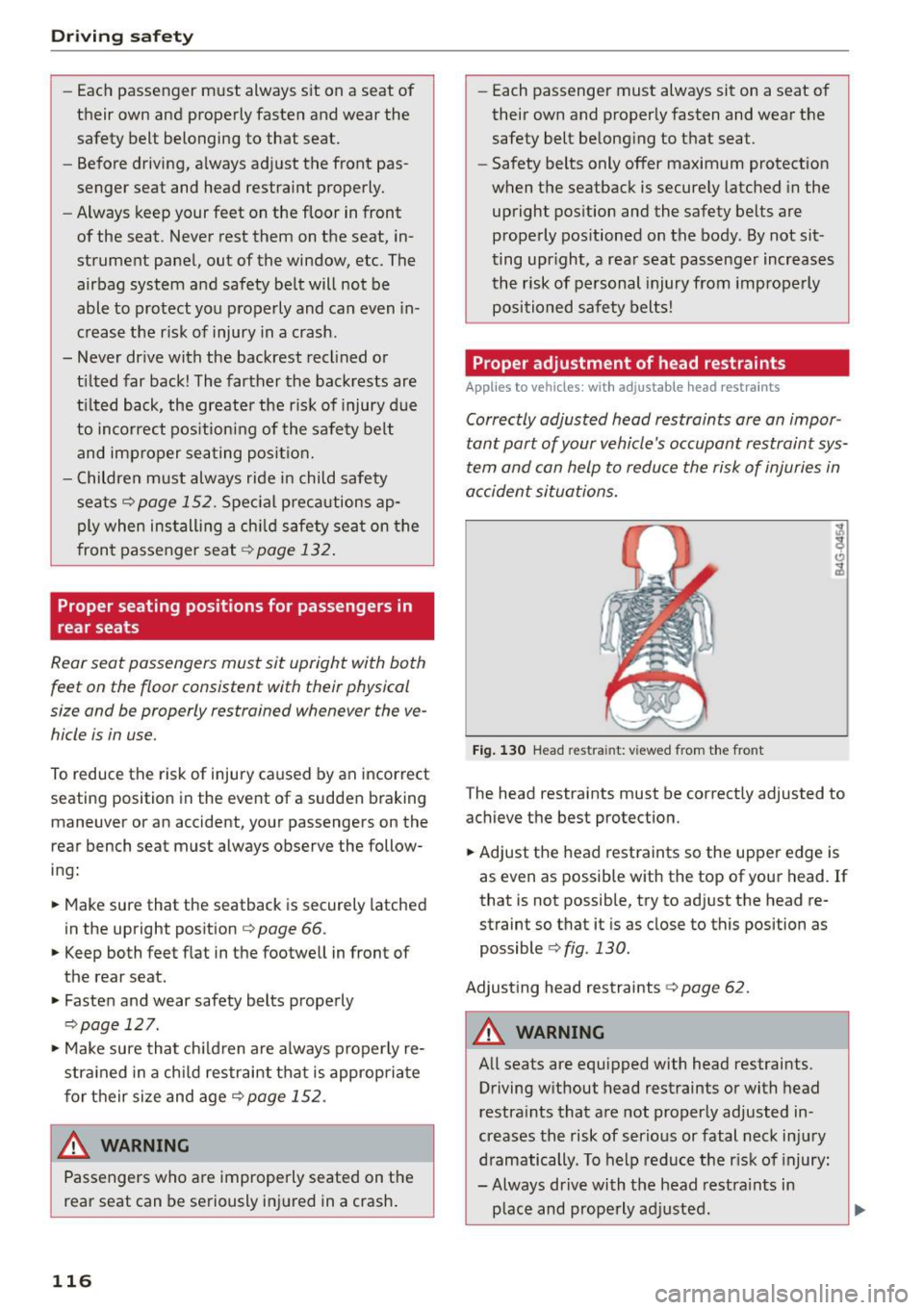
F ig . 1 30 Head res tra in t: v iewed from th e fro nt
T he head restraints must be correctly adjusted to
achieve t he best protection.
"' Adjust the head restraints so the upper edge is
as even as possib le with the top of your head. If
that is not poss ible, try to ad just the head re
straint so that i t is as close to this position as
possible
c> fig . 130.
Adjust ing head restraints c> page 62.
A WARNING
All seats are equipped with head restraints.
Driving w ithout head rest raints or with head
restra ints that a re not properly adjusted in
creases the risk of serio us or fatal nec k inju ry
d ramatically. To help reduce the r isk of injury:
- Always drive with the head restra ints in
place and properly a djusted.
-
Page 120 of 268
Driving safety
the airbag deploys and injure you or your passengers.
Pedal area
Pedals
The pedals must always be free to move and
must never be interfered with by a floor mat or
any other object.
Make sure that all pedals move freely without in
terference and that nothing prevents them from returning to their original positions .
Only use floor mats that leave the pedal area free
a nd can be secured with floor mat fasteners .
If a brake circuit fails, increased brake pedal trav
el is required to bring the vehicle to a full stop.
_&. WARNING
Pedals that cannot move freely can cause loss
of vehicle control and increase the risk of seri
ous injury.
- Never place any objects in the driver's foot
well. An object could get into the pedal area and interfere with pedal function . In case of
sudden braking or an accident, you would not be able to brake or accelerate!
- Always make sure that nothing can fa ll or
move into the dr iver's footwell.
Floor mats on the driver side
Always use floor mats that can be securely at
tached to the floor mat fasteners and do not in
terfere with the free movement of the pedals .
.,. Make sure that the floor mats are properly se-
cured and cannot move and interfere with the
pedals ~.&_ .
Use only floor mats that leave the pedal area un
obstructed and that are firmly secured so that
they cannot slip out of position. You can obtain
suitable floor mats from your authorized Audi
dealer.
Floor mat fasteners are installed in your Audi .
118
Floor mats used in your vehicle must be attached
to these fasteners. Properly securing the floor
mats will prevent them from sliding into posi
tions that could interfere with the pedals or im
pair safe operation of your vehicle in other ways.
_&. WARNING
Pedals that cannot move freely can result in a
loss of vehicle control and increase the risk of
serious personal injury.
- Always make sure that floor mats are prop
erly secured.
- Never place or install floor mats or other
floor coverings in the vehicle that cannot be
properly secured in place to prevent them
from slipping and interfering with the ped
als or the ability to control the vehicle.
- Never place or install floor mats or other
floor coverings on top of already installed
floor mats. Addit ional floor mats and other
coverings will reduce the size of the pedal
area and interfere with the pedals.
- Always properly reinstall and secure floor
mats that have been taken out for cleaning.
- Always make sure that objects cannot fall
into the driver footwell while the vehicle is moving. Objects can become trapped under
the brake pedal and acce lerator pedal caus
ing a loss of vehicle control.
Storing cargo correctly
Loading the luggage compartment
Al/ luggage and other objects must be properly stowed and secured in the luggage compart
ment .
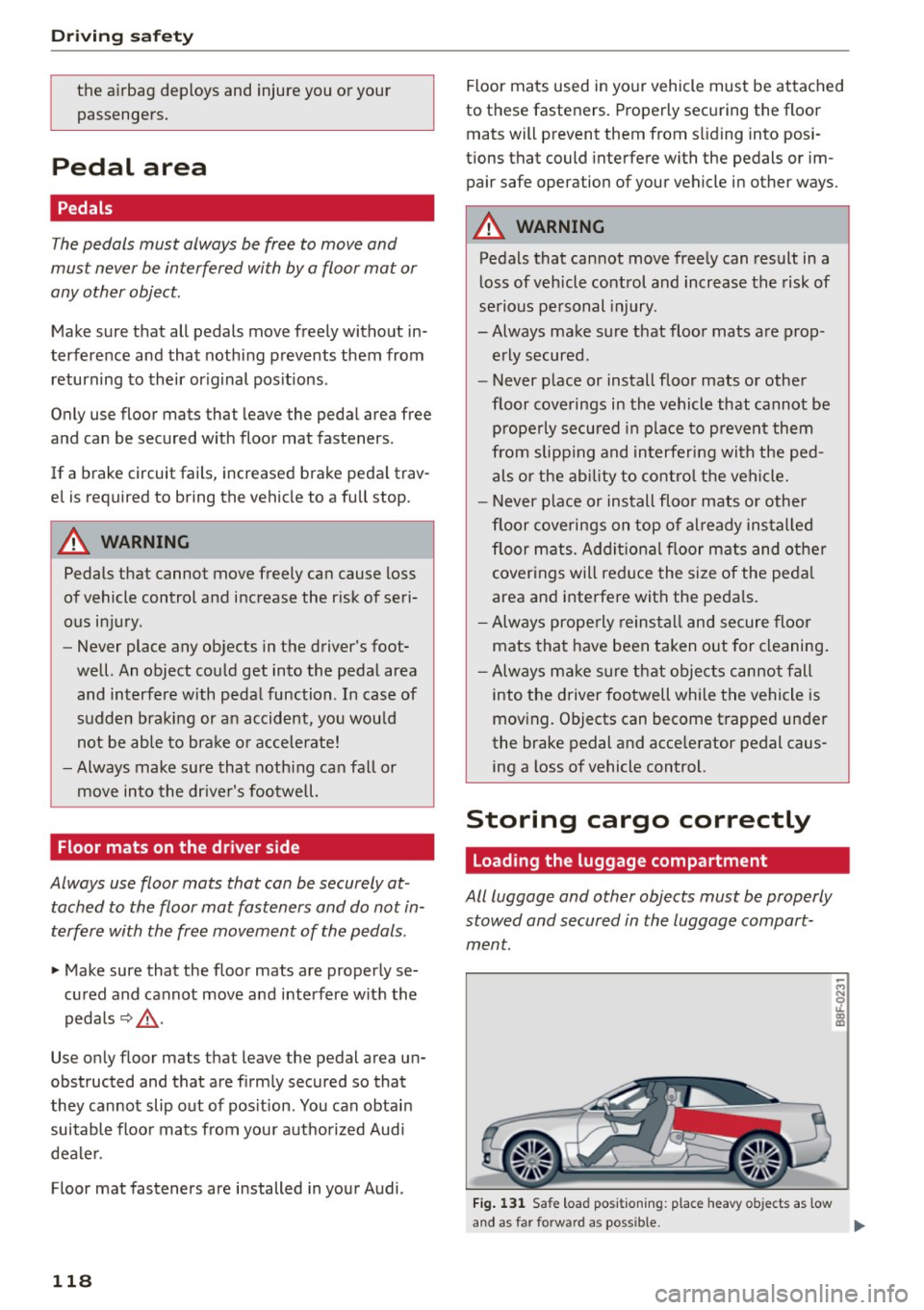
Fig. 131 Safe load positioning: place heavy ob jects as low
-M N 0 oL CD m
and as far fo rward as possible. ...
Page 121 of 268
M N
ci u.. co ,...., \!) 1.1'1
N 1.1'1 ,....,
Loose items in the luggage compartment can
shift suddenly , changing vehicle handling charac
ter istics . Loose items can also increase the risk of
serious personal injury in a sudden veh icle ma
neuver or in a collis ion.
~ Distribute the load evenly in the luggage com
partment.
~ Always place and properly secure heavy items in
the luggage compartment as low and as far for
ward as poss ible
c:> fig . 131 .
~ Secure luggage us ing the tie-downs provided
<=:> page 66 .
~ Make sure that the rea r seatback is secu rely
latched in p lace.
A WARNING ,~ -
Improperly stored luggage or other items can
fly through the vehicle causing serious per
sonal injury in the event of hard braking or an
accident . To help reduce the risk of serious
personal injury:
- Always put objects, for examp le, luggage or
other heavy items in the luggage compart
ment.
-Always secure objects in the luggage com
partment us ing the tie-down eye lets and
suitable straps .
A WARNING
Heavy loads will influence the way your vehi
cle handles. To he lp reduce the risk of a loss
of control leading to ser ious persona l inju ry:
- Always keep in m ind when transporting
heavy objects, t hat a change in the ce nter of
gravity ca n also cause changes in vehicle
hand ling:
- Always distribute the load as even ly as
possible.
- Place heavy objects as far forward in the
luggage compartment as possible .
- Never exceed the Gross Ax le Weight Rating
o r the Gross Vehicle Weight Rating specified
on the safety compliance sticker on the left
door jamb. Exceeding permissible weight
standards can cause the vehicle to slide and hand le different ly .
Dr ivin g s afet y
-Please observe information on safe driving
c:> page 113.
A WARNING
-To help prevent poisonous exhaust gas from
being drawn into the vehicle, always keep the
rear lid closed wh ile driving .
- Never transport objects larger than those
fitting completely into the luggage area be
cause the rear lid cannot be fully closed .
- If you absolutely must dr ive with the rear lid
open, observe the following notes to reduce
the risk of poisoning:
- Close all windows,
- Close the power top,
- Open all a ir outlets in the instrument pan-
el ,
- Switch off the air rec irculat ion,
- Set the fresh air fan to the highest speed .
A WARNING ~
Always make sure that the doo rs, all windows,
the power top and the rear lid are securely
closed and locked to reduce the risk of injury
when the vehicle is not being used.
- Afte r closing the rear lid, always make sure
that it is properly closed and locked.
- Never leave your vehicle unattended espe cially with the rea r lid left open. A child
could cr awl into the ve hicle through the lug
g age compartmen t and close the re ar lid be
coming trapped and unable to get out . Be
ing trapped in a veh icle can lead to serious
pe rsonal injury .
- Never let c hildren play in or around the vehi
cle.
- Never let passengers ride in the luggage
compa rtment . Vehicle occupants must al
ways be properly restrained in one of the ve
h icle's seating posit ions.
(D Tips
- Air circu lation helps to reduce win dow fog
ging . Stale air escapes to the outs ide
through vents i n the t rim panel. Be sure to
keep these slots free and open .
119
Page 122 of 268
Driving safet y
- The tire pressure must cor respond to the
l oad . The tire press ure is shown on the tire
pressure label. The tire pressure labe l is lo
cated on the driver's s ide B-pillar. The tire
pressure label lists the recommended cold
tire inflation pressures for the vehicle at its max imum capacity weight and the t ires that
were on you r vehicle at the time it was man
ufa ctu red. For re comme nded ti re p ress ures
fo r normal load cond itions, please see chap
ter
<=> page 219 .
Tie-downs
Applies to vehicles: with tie-downs
The Luggage compartment is equipped with four
tie-downs to secure Luggage and other i tems.
Use the tie-downs to secure your cargo properly
<=> page 118, Loading the luggage compartment.
In a coll is io n, the laws of phys ics mean that even
smaller items that are loose in the vehicle w ill
become heavy m iss iles that can cause serious in
jury. Items i n the vehicle possess energy which
vary w ith vehicle speed and the weight of the
item . Vehicle speed is the most significant factor .
For examp le, in a frontal coll is ion at a speed of
30 mph (48 km/h), the fo rces acting on a 10-lb
( 4 .5 kg) obje ct are abou t 20 times the normal
weight of the item. This means that the we ight
of the item would suddenly be abo ut
200 lbs . (90 kg). Yo u can imagine the injuries
that a 200 lbs. (90 kg) item flying free ly through
t he passenger compartmen t could cause in a co l
lision like this.
A WARNING
Weak, damaged or improper straps used to
secure items to t ie-downs ca n fa il during hard
braking or in a collision and ca use serious pe r
sonal i njury.
- Always use suitable mounting straps and
properly secure items to the tie-downs i n
t h e luggage compartment to help prevent
items from shifting or f ly ing fo rward as dan
gerous missiles .
- When the re ar seat bac krest is folded down,
always use suitable mounting s traps and
120
-
properly secure items to the t ie-downs in
the l uggage compartment to help prevent
items from flying forward as dangerous mis
siles into the passenger compartment .
- Never attach a child safety seat tether strap
to a tie-down.
Reporting Safety Defects
Applicable to U.S.A.
If you believe that your vehicle
has a d efect which could cause a
crash or could cause injury or
death, you should immediatel y in
form the Nat ional High way Traffic
S afet y Administration (NH TSA ) in
addition t o notify ing Audi of
America, Inc.
If NHTSA re cei ves similar com
pl aint s, it ma y open an in ves tiga
tion , and if it find s that a safety
defe cts exists in a group of
v ehi cles, it ma y order a recall and
remed y campaign . Howe ver ,
NHTSA cannot become in vol ve d in
indi vidu al pr oblem s betw een you ,
your deal er, o r A udi of Am eri ca ,
In c.
To contact the NHTSA, you ma y
eith er call:
T el.: 1-888-327-4236 (TTY :
1 -800-424 -915 3) or
1 -800-424-9 393
or you may write to :
Page 124 of 268

Driving safet y
-the safety belts wit h be lt te nsioners
- the wind shie ld frame
- the rollover sensors
The active rollover protection system provides
addit ional safety in the event of a rollover. W ith in
m ill iseconds, sensors deploy two rollbars located
behind the headrests in the rear seats ¢
fig. 133.
The rollbars, reinforced windshield frame and
belt tens ioners help protect front and rear pas
sengers in the event of a rollover .
The rollover protection system functions when
the power top is both open and closed.
A WARNING
-
Do not use the area beh ind the rear seat
headrests
9fig . 132 as a storage a rea . Th is is
t he a rea whe re the rollbars dep loy. If the ro ll
over pro tect ion system is triggered, objects
placed there can be pro pelled th roug h the
ve
hicle and make it more difficult for the roll
bars to deploy . This increases the risk for seri
ous or life-threaten ing injur ies.
When is rollover protection deployed?
Rollover protection deploys in a collision or roll
over.
Depending on the coll is ion, sensors throughou t
the vehicle and the control mod ule tr igger the
rollover system to deploy.
For safety reasons, ro llover protect ion a lso de
p loys during front, side and rear coll is ions above
a certa in leve l of severi ty .
Retracting rollover protection
F ig . 13 4 Dep loyed roltba r wit h re lease loop .
122
Fig . 13 5 Deployed rollbar w it h power top frame facing up
ward.
If the rollover p rotection has tr iggered but the
vehicle was not involved in an accident, you can
retract the rollover protection yourself in an
emergency. Drive to your authorized Audi dealer
or qualified repair facility immed iate ly to have
the malfunct ion corrected.
With the power top open
.. Pull the loop upward in the direction of the ar
row and hold it in place
9 fig. 134.
.. Slide the rollbar down .
.,.. Release the loop just before the ro llbar reaches
its end position by approximately 1-2 in . (3-5
cm).
.,.. Press t he rollbar down unt il i t stops.
.. Ma ke s ure the rollbar is secure be fore releasing
it .
.. Close the cover @¢
fig. 135.
.. Repeat t he proced ure on the other ro llbar.
With the power top closed
.,.. Sw itch the ignit io n on.
.. Press the conver tible switch to adjus t the co n
ver tible frame until it is vertical ¢
fig. 135 .
.. Pull the loop upward in the direction of the ar
row and hold it in place
9 fig. 134.
.,. Slide the rollbar down .
.. Release the loop ju st before the rollbar reaches
its end position (3-5 cm) .
.,.. Press the rollbar down unt il it stops .
.. Ma ke su re the rollbar is secu re before releasing
i t .
.,.. Clo se the cover @¢
fig. 135 .
.. Repeat the procedure on the other ro llba r .
.. Yo u can now close the power top again .
Page 125 of 268
M N
ci u.. co ,...., \!) 1.1'1
N 1.1'1 ,....,
& WARNING
-Make sure your head or other pa rts of your
body are not located in the area above the
rollbar when press ing the rollbar down. If
the rollbar is not secured correctly, it cou ld
deploy again as soon as you release it and
cause injuries .
- Have the rollover protection system checked
by your authorized Aud i dealer if it is faulty.
Otherw ise, the system may not deploy cor
rectly in a collision.
- Modifying the rollover protect ion system or
indiv idual components is not permitted .
- Work on the rollover protect ion system
should only be performed by your author
ized Audi deale r or qual ified wor kshop . Oth
erwise the system may not funct ion correct
ly in a collision o r it could deploy unexpect
edly .
- Have the system inspected at service inte r
vals. This ensures the system will always be ready for use. Have your au thorized Audi
dealer check the rollover protect ion system
every two years at the latest.
Dr ivin g s afet y
123