ignition AUDI A5 CABRIOLET 2015 User Guide
[x] Cancel search | Manufacturer: AUDI, Model Year: 2015, Model line: A5 CABRIOLET, Model: AUDI A5 CABRIOLET 2015Pages: 268, PDF Size: 66.88 MB
Page 29 of 268
M N
ci u.. co ,...., \!) 1.1'1
N 1.1'1 ,....,
messages appear automatically and are only dis
p layed in the efficiency program . The fuel econo
my messages turn
off automatically after acer
tain period of time.
.. To turn a fuel economy message
off immed iate
l y after it appears, press the I RESET
I b utton
¢ page 25, fig. 11 @ , or
.. Press the function selection switch¢
page 25,
fig. 11
@ .
(D Tips
-Once you have t urned a fuel economy mes
sage
off, i t will only appear aga in after you
turn the ignit ion on again.
- The fuel economy messages are not dis
played in every instance, but rather in inter
vals over a per iod of t ime .
Service interval display
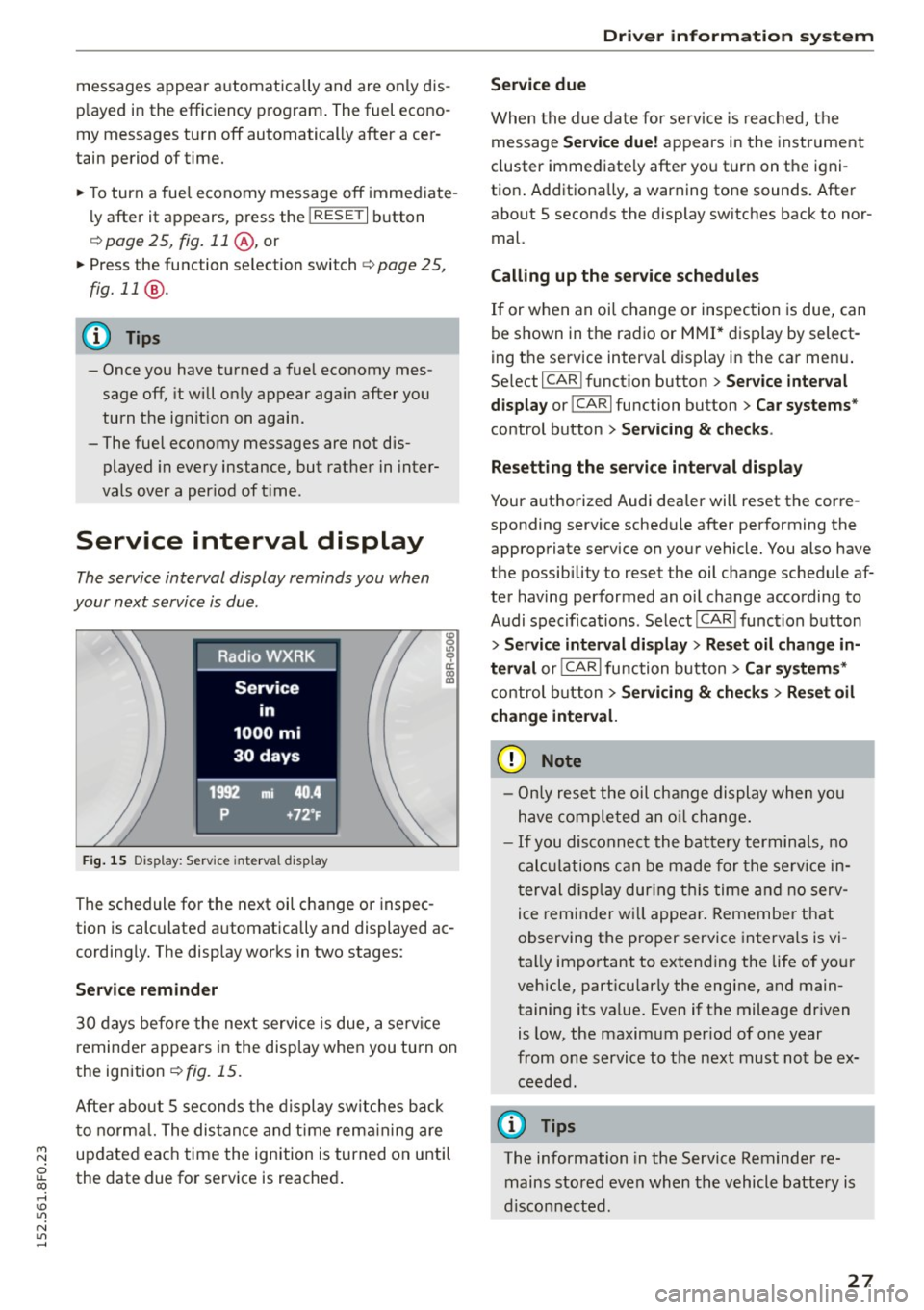
The service interval display reminds you when
your next service is due .
Fig. 1 5 Dis p lay: Service interval d isp lay
~ 0 ci:
"' a,
The sc hed ule for the next oil c hange or inspec
tion is calculated a utomatically and displayed ac
cordingly. The display works in two stages :
Service reminder
30 days before the nex t servi ce is due, a serv ice
reminde r appea rs in the disp lay when you tu rn on
the ignition
¢ fig. 15.
Afte r about 5 seconds the display sw itches back
t o no rma l. The dis tan ce and t ime rem aining are
updated eac h time the ignition is turned on unti l
the date due for service is reached .
Driver information s ystem
Service due
When the d ue date for se rvice is reached, t he
message
Service due! appears in the inst rument
cluster immediate ly afte r yo u turn on the igni
tion . Additiona lly, a warning tone sounds. Afte r
about 5 seconds the display switches back to nor
mal.
Calling up the service schedules
If or when an oi l change or inspection is due, can
be shown in t he radio or
M MI* dis play by select
ing the service interval display in the ca r men u.
Se lect I CAR I funct ion button >
Service interval
display
or ICARI function button > Car systems *
control button > Servicing & checks .
Resett ing the service interval display
Your a uthorized Audi dea ler will reset the corre
sponding service schedule after performing the appropriate service on your vehicle. You also have
the possibility to reset the oil change schedule af
ter having performed an oi l change according to
Audi specifica tions . Select I CAR ! funct ion button
> Service interval display > Res et oil change in
terval
o r! CARlfunction button> Car systems*
control b utton > Servicing & check s > Reset oil
change inter val.
(D Note
- Only re se t the oil change display when yo u
h ave comple ted an o il change.
- If you disconnect the batte ry termina ls, no
c al cul ations can be made for the se rv ice in
t erval disp lay during t his time and n o serv
ice reminder w ill appea r. R emembe r that
observing the p ro p er service interva ls is vi
tally impo rtant to exten ding the life of yo ur
vehicle, part icular ly the eng ine, and main
taining its va lue. Even if the mileage dr iven
is low, the maxim um per iod of one year
from one service to t he nex t must not be ex
ceeded.
(D Tips
The information in the Service Reminder re
mains stored even when th e vehicle battery is
disco nnecte d.
27
Page 30 of 268
Driver information system
On Board Diagnostic
System (OBD)
Malfunction Indicator Lamp (MIL)
The Malfunction Indicator Lamp (MIL) ¢• in the
instrument cluster is part of the On-Board Diag
nostic (OBD II) system.
The warning/indicator light i lluminates when the
ignition is switched on and goes out after the en
gine starts and the idle has stabilized. This indi
cates that the MIL is working properly.
If the light does not go out after the engine is
started, or illuminates while you are driving, a malfunction may exist in the engine system. If
the light illuminates, the catalytic converter
could be damaged.
Continue driving
with reduced power (avoiding
sustained high speeds and/or rapid acce lerations)
and have the condition corrected. Contact your
authorized Audi dealer.
I f the light illuminates, the electronic speed lim
iter may also be malfunctioning. For more infor
mation
c::> page 28, Electronic speed limiter.
An improperly closed fuel filler cap may also
cause the MIL light to illuminate
c::> page 192.
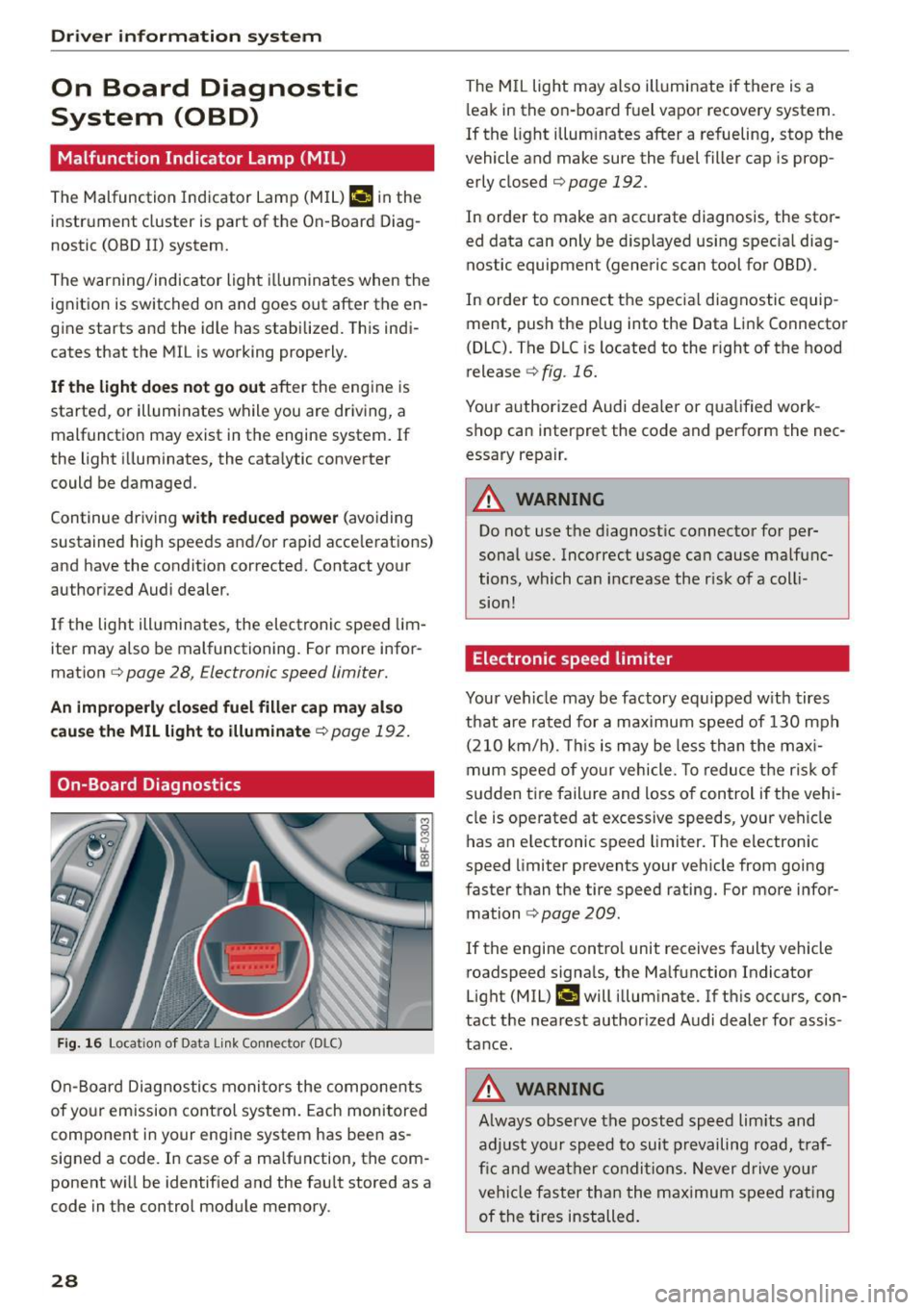
On-Board Diagnostics
Fig. 16 Loca tion of Data Link Connec tor (DLC)
On-Board Diagnostics monito rs the components
of your emission control system. Each monitored
component in your engine system has been as
signed a code. In case of a malfunction, the com
ponent will be identified and the fault stored as a
code in the control module memory .
28
The MIL light may also illuminate if there is a
l eak in the on-board fuel vapor recovery system.
If the light illuminates after a refueling, stop the
vehicle and make sure the fuel filler cap is prop
erly closed
c::> page 192.
In order to make an accurate diagnosis, the stor
ed data can only be displayed using spec ia l diag
nostic equipment (generic scan tool for 080).
In order to connect the specia l diagnostic equip
ment, push the plug into the Data Link Connector
(DLC). The DLC is located to the r ight of the hood
release
c::> fig. 16.
Your authorized Audi dealer or qualified work
shop can interpret the code and perform the nec
essary repair.
A WARNING
Do not use the diagnostic connector for per
sonal use. Incorrect usage can cause malfunc
tions, which can increase the risk of a colli
sion!
Electronic speed limiter
Your vehicle may be factory equ ipped with tires
that are rated for a maximum speed of 130 mph
(210 km/h) . This is may be less than the maxi
mum speed of your vehicle. To reduce the risk of
sudden tire failure and loss of control if the vehi
cle is operated at excessive speeds, your vehicle
has an e lectronic speed limiter. The electronic
speed limiter prevents your vehicle from going
faster than the tire speed rating. For more infor
mation
c::> page 209.
-
If the engine contro l unit receives faulty vehicle
roadspeed signals, the Malfunction Indicator
Light (MIL)
II will illuminate. If this occurs, con
tact the nearest author ized Audi dealer for assis
tance.
A WARNING
Always observe the posted speed lim its and
adjust your speed to suit prevailing road, traf
fic and weather conditions. Never drive your
vehicle faster than the maximum speed rating
of the tires installed.
-
Page 31 of 268
M N
ci u.. co ,...., \!) 1.1'1
N 1.1'1 ,....,
Opening and closing
Central locking
General description
The power locking system locks or unlocks all
doors and the rear lid simultaneously.
You can lock and unlock the vehicle centrally. You
have the following choices:
- Remote master key
c:::> page 32,
-Door handles with convenience key*
c:::> page 32,
-Lock cylinder at the dr iver's door c:::> page 34,
or
- Power locking switch inside
c:::> page 33.
Au tomatic locking
The automat ic locking feature locks all the veh i
cle doors and the rear l id when you drive faster
than 9 mph ( 15 km/h).
The car is unlocked again once the ignition key is
removed . In add ition, the vehicle can be unlocked
if the opening function in the power locking sys
tem sw itch or at one of the door levers is actuat
ed. The Auto Lock function can be turned on and
off in the rad io or MMI*
c:::> page 34.
Additionally, in the event of a crash with a irbag
deployment the doors are automatically un locked to allow access to the vehicle .
Selective unlo cking
When you lock the vehicle, the power locking sys
tem w ill lock the doors and the rear lid. When un
lock ing, you can set in the radio or MMI* whether
only the drive r's door o r the ent ire vehicle should
be un locked
c:::> page 34.
Anti- theft alarm w arning sy stem
If the anti-theft alarm warning system detects a
break-in into the vehicle, acoustic and v isual
warn ing s ignals are tr iggered .
The anti-theft warning system is activated auto
mat ically when you lock the vehicle. It is deact i
vated when unlocking using the remote key, w ith
the mechanical key, and when you switch on the
i gnit ion.
Op ening and cl osing
The alarm also turns off when the a larm cycle has
expired.
Turn signals
When you unlock the veh icle, the turn s ignals
flash twice, when you lock it once. If they do not
flash , one of the doors, the luggage compart
ment lid or the hood is not locked or the ignition
is still switched on.
Unint entionally l ocking your self out
In the follow ing cases there safeguards to pre
vent you locking your remote master key in the
vehicle:
- The vehicle does not lock w ith the power lock
ing sw itch
c:::> page 33 if the driver's door is
open.
- On veh icles with co nvenience key*, if the most
recently used master key is in the luggage com
par tment, the rear lid is automatically unlocked
again after it is closed .
Do not lock your veh icle w ith the remote master
key or co nvenience key* unt il all doors and the
rear lid are closed. In this way you avoid locking
yourself out accidentally .
A WARNING ,-c=-
-When you leave the vehicle, always remove
the ignition key and take it with you. This
will prevent passengers (children, for exam
ple) from accidentally being locked in the
veh icle should they accidentally press the
power locking sw itch in the front doors .
- Do not leave children inside the vehicle un
supervised . In an emergency it would be im
possible to open the doors from the outs ide
without the key.
(D Tips
- In the event of a crash with airbag deploy
ment all locked doors w ill be automatically
unlocked to give access to the veh icle occu
pants from the outside.
- If the power locking system should mal
function, you can lock the driver's door us ing the mecha nical key
c:::> page 34.
29
Page 32 of 268

Opening and closing
-If the power locking system should fail, you
can still open the fuel tank flap in an emer
gency ~
page 194.
-You are well advised not to keep valuables
inside an unattended vehicle, visible or not.
Even a properly locked vehicle cannot pro
vide the security of a safe.
- If the LED in the upper edge of the driver's
door panel comes on for about 30 seconds
after the vehicle is locked, there is a mal
function in the power locking or the anti
theft warning system. Have the malfunction
corrected by an authorized Audi dealership
or qualified repair facility.
Key set
Fig . 17 Key set
m 0 ±
~
@ Remote control key with mechanical key
You can centrally lock and unlock your vehicle and
start the engine with the master key with remote
control. A mechanical key is integrated in the
master key
~page 31 .
@ Emergency key
The emergency key is not intended for constant
use . It should only be used in an emergency, for
example, in place of the ignition key
~ page 7 4 . Keep it in a safe place and do not
carry it on your key ring.
Key replacement
If you lose a key, contact your authorized Audi
dealer immediately to have the
lost key disabled.
Be sure to bring all your keys with you .
30
Number of keys
You can check the number of assigned keys to
your vehicle
¢ page 11. This allows you to make
sure you have received all of the keys when you purchase a used vehicle.
Data in the master key
During driving, service and maintenance-relevant
data is continuously stored on your master key .
Your Audi service adviser can read out this data
and tell you about the work your vehicle needs.
This applies also to vehicles with convenience
key*.
Personal comfort settings
If two people use one vehicle, it is recommended
that each person always uses "their own" master key. When the ignition is turned off or when the
vehicle is locked, personal convenience settings
for the following systems are stored and as
signed to the remote master key.
- Climate control
- Power locking system
- Seat memory*
- Parking system*
- Adaptive cruise control* - Side assist*
- Drive select*
The stored settings are automatically recalled
when you unlock the vehicle, when you open the
doors or when you turn on the ignition.
A WARNING
-Do not leave your vehicle unattended with
the key in the ignition lock. Entry by unau
thorized persons could endanger you or re
sult in theft or damage the vehicle.
- Do not leave children unattended in the ve
hicle, especially with access to vehicle keys.
Unguarded access to the keys provides chil
dren the opportunity to start the engine
and/or activate vehicle systems such as the
power windows etc. Unsupervised operation
of any vehicle system by children can result
in serious injury.
.
Page 33 of 268
M N
ci LL co
rl I.O
"' N
"' rl
-Do not remove the key from the ignition lock
until the vehicle has come to a complete
stop. Otherwise the steering column lock
could suddenly engage -causing the risk of
an acc ident.
(D Tips
- The operation of the remote control key can
be temporar ily disrupted by interference
from transmitters in the vicinity of the vehi
cle work ing in the same frequency range
(e .g. a cell phone, rad io equipment) .
- For security reasons, replacement keys are only available from author ized Audi dealer.
- For Declarat ion of Compliance to United
States FCC and Industry Canada regulations
<::;>page 251.
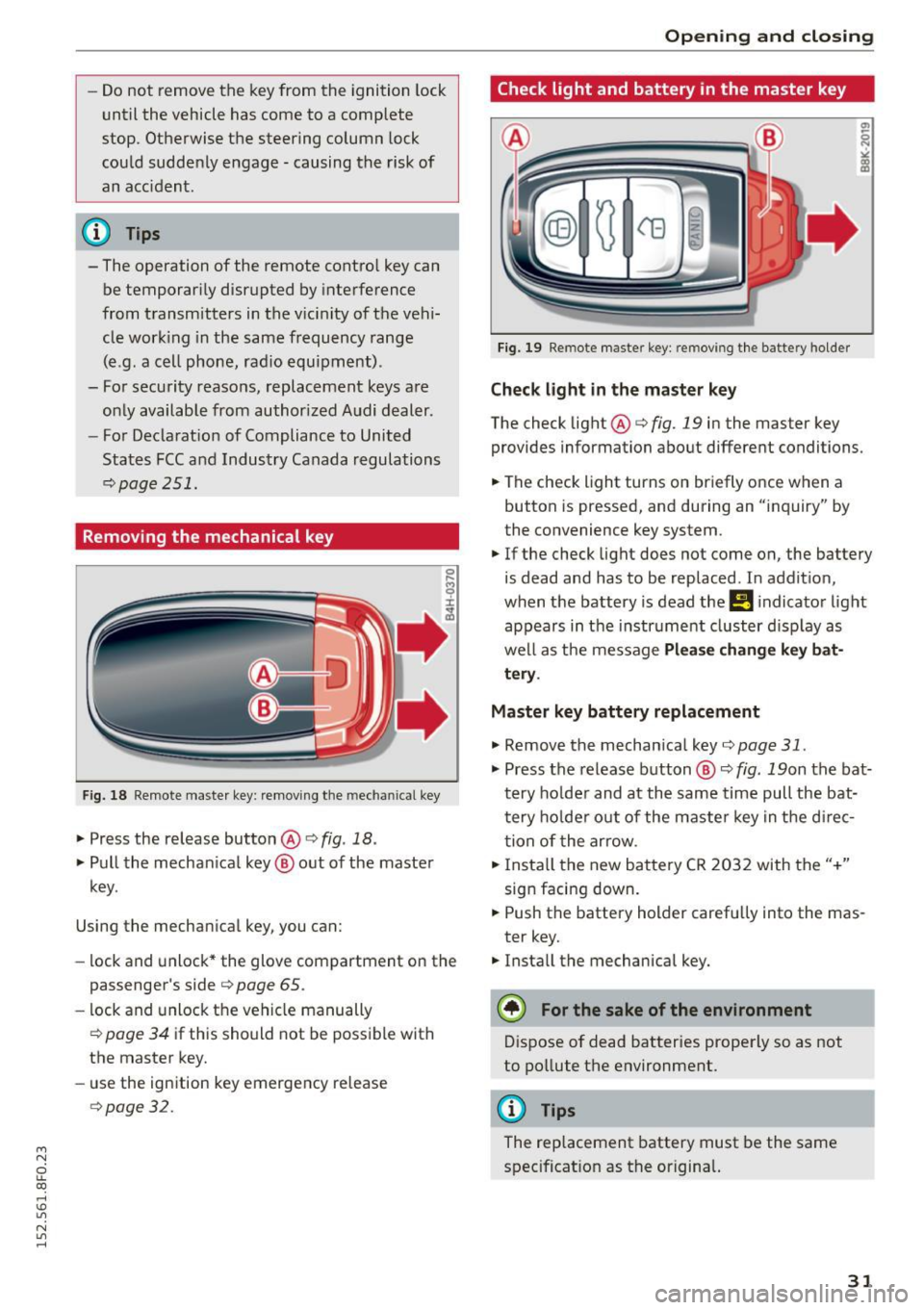
Removing the mechanical key
F ig. 18 Remote maste r key: remov ing the mechanical key
.,. Press the release button @ i:> fig. 18 .
.,. Pull the mechan ical key @ out of the master
key .
Using the mechan ical key, you can:
- lock and unlock* the glove compartment on the
passenger's side
i:> page 65 .
-lock and unlock the vehicle manually
i=> page 34 if this should not be possible w ith
the master key.
- use the ignition key emergency release
i=>page 32.
Open ing and clo sing
Check light and battery in the master key
Fig. 19 Remote master key: removing th e battery holder
Check light in the master key
The check light @i=> fig. 19 in the master key
provides information about different conditions.
.,. The check light turns on briefly once when a
button is pressed, and during an "inquiry" by
the convenience key system.
.,. If the check light does not come on, the battery
is dead and has to be replaced. In addit ion,
when the battery is dead the
!I i ndicator light
appears in the instrument cluster d isp lay as
well as the message
Pl ea se change k ey bat
tery .
Master key battery replacement
.,. Remove the mechan ical key i:> page 31 .
.,. Press the release button@~ fig. 19on the bat·
tery ho lder and at the same time pull the bat
tery ho lder out of the maste r key in the d irec
tion of the arrow .
.,. Insta ll the new battery CR 2032 with the"+"
sign facing down .
.,. Push the battery holder carefu lly into the mas·
ter key.
.,. Insta ll the mechanical key.
@) For the sake of the env ironment
Dispose of dead batteries properly so as not
to pollute the environment.
@ Tips
The replacement battery must be the same
spec ificat ion as the origina l.
31
Page 34 of 268

Opening and closing
Emergency unlocking of the ignition key
In the event of malfunctions in the electrical sys
tem, it may happen that you cannot remove the
ignition key.
.,. Remove the mechanical key <=>page 31.
.,. Lock the vehicle using the mechanical key
<=>page 34.
.,. Have the electrical system inspected by an au
thorized Audi dealership.
Locking and unlocking the vehicle with the
remote control
Fig. 20 Remote master key: function bu tt ons
:8
"' 0 ±
"' OJ
.,. Press button ill to unlock the vehicle <=> fig. 20.
... Press button m to lock the vehicle ¢ A in Gen
eral description on page
29 .
.,. Press button c::5 briefly to unlock the rear lid .
.,. Press the button
c::5 for at least one second to
open the rear lid .
.,. Push the red
!PANIC I button to activate the
panic function. The horn sounds and the turn
signals flash . Push the red
I PANIC! button again
to deactivate the panic function .
If the vehicle is unlocked and no door, the rear lid
or the hood is opened within 60 seconds, the ve
hicle locks itself again automatically . This feature
prevents the vehicle from being accidentally left
unlocked over a long period of time .
It depends on the settings in the radio or
MM!*
whether the entire vehicle is unlocked or only cer
tain doors
<=> page 34 .
On vehicles with automatic transmission, these
lector lever must be in the P position, otherwise
the vehicle cannot be locked .
32
A WARNING
Read and follow all WARNINGS
<=> .&. in Gener
al description on page
29 .
(D Tips
-In order to make sure the locking function is
working, you should always keep your eye
on the vehicle to make sure it is properly
locked .
- Do not use the remote control if you are in
side the car, otherwise you may unintention
ally lock the vehicle, and then you would set
off the anti-theft alarm when you try to
start the engine or open a door. In case this
happens anyhow, push the unlock button@.
- Use the panic function only if you are in an
emergency situation.
- Additional remote control key functions
¢page 37.
Locking and unlocking with convenience
key
Applies to vehicles: wit h co nvenience key
The doors and the rear lid can be unlocked and
locked without operating the master key .
Fig. 21 Door handle : lock ing t he vehicle
Unlocking vehicle
.,. Ta ke hold of the door handle. The door is un-
locked automatically.
.,. Pull the handle to open the door .
Locking vehicle
.,. Move the selector lever to the P position, other
wise the vehicle cannot be locked.
.,. To lock the vehicle, close the door and touch
the sensor in the door handle
once <=> fig. 21
Page 37 of 268

M N
ci LL co
rl I.O
"' N
"' rl
Once the front passenger's door has been closed,
you cannot open it again from the outside. The
doo r can be opened from the inside by pulling
t he door hand le.
A WARNING
Read and follow all WARNINGS q .&. in Gener
al description on page 29 .
@ Tips
After the ignition is switched on, the power
locking system sw itch is enabled.
Electronic immobilizer
The immobilizer prevents your vehicl e from b eing
started by unauthor ized persons .
Inside the key there is a computer chip . This chip
automatically activates/deactivates the electron ic immobilizer .
Applies to vehicl es with ignition lock :
The electron ic immobilizer deactivates automati
cally when you insert the remote control key into
the ignition lock . It activates again automatically
when you remove the remote control key from
the ignition lock .
Applies to vehicl es with conveni ence k ey :
If the remote control key is located inside the ve
h icle and you press the
! S TAR T ENGINE STOPI
button , the electronic immobilizer deactivates
automatically. If yo u switch the ignit ion off and
remove the remote control key from the vehicle,
the elec tronic immobili zer ac tivates again au to
mat ically .
A WARNING
Always take the key with you when you leave
the vehicle . The key can disa rm the electron ic
engine immob ilizer and permit an unau thor
i z ed person to start the eng ine and enable op
eration of the veh icle systems such as power
w indow o r powe r su nroof leading to serious
personal inj ury .
Open ing and clo sing
(D Tips
- The vehicle cannot be started if an unau
thorized key is used . The vehicle may not
start if another radio device such as a key
for another veh icle or a transponder is locat
ed on the key ring.
- For Declaration of Comp liance to United
States FCC and Industry Canada regulations
¢ page 251.
Luggage compartment
Lid
Opening /closing rear lid
Fi g. 25 Rea r l id: han d le
Opening the r ear lid
.. Press the button cs on the remote control
master key for at least one second. The rear lid
unlocks and opens slightly . Or
.. Press the handle on the rear lid
¢ fig. 25.
Clo sing the rear lid
.,. Pull the rear lid down at the grip on the ins ide
and allow it to drop gent ly to close it¢
A .
A WARNING
-After closing the rear lid, always p ull up on
it to make sure that it is proper ly closed.
Otherwise it could open suddenly when t he
veh icle is moving.
- To help prevent poisono us exhaust gas from
be ing drawn into the veh icle, always keep
the rear lid closed while driving. Neve r
transport objects la rger than those which fit
comp letely into the l uggage area, because
then the rear lid canno t be fu lly closed.
~
35
Page 39 of 268

Power Windows
Controls
The driver can control all power windows.
Fig . 28 Section of the driver 's door: Controls
l
l
f
I
I !
I
Fig. 29 Center console: centra l power window sw itch
All power window switches¢ fig. 28 are provided
with a
tw o-pos ition functi on:
Opening th e window s
"' Press the sw itch to the first stop and hold it un
ti l the window reaches the desi red position .
"' Press the sw itch briefly to the
sec ond stop to
automatical ly open the window.
Cl os ing th e window s
"' Pull the switch to the fir st sto p and hold it until
the window reaches the desired position .
"' Pull the switch briefly to the
seco nd stop to au-
tomat ica lly close the window .
Power window switche s
@ Driver's door
@ Passenger's door
~ © Left rear window
ci
~ @ Right rear window
rl 1.0
"' N
"' rl
Open ing and clo sing
You can open or close a ll the windows with the
switch ¢
fig. 29.
.&_ WARNING
-
-When you leave your vehicle -even if only
briefly -always
remove the ignition key. This
applies particularly when children remain in
the vehicle . Otherwise the ch ildren could
start the engine or operate electrical equip
ment (e.g. power windows) . The power win
dows are functiona l until the dr iver's door or
p a ssenger's door has been opened.
- Pay close attention when closing the win
dows to prevent p inching of hands or limbs.
- When locking the vehicle from outside, the
veh icle must be unoccup ied since the win
dows can no longe r be opened in an emer
gency .
(D Tips
-When you open the doors, the windows au
tomatically lower about 10 mm.
- After the ign ition has been switched off, the
w indows can still be opened or closed fo r
about 10 minutes. The w indow regulators
are no t sw itched until the driver 's or pas
senge r's door is opened.
Convenience opening /closing
The windows can be opened and closed with the
mechanical key or the emergency key.
Fig. 30 Key turns for opening and closing
Conven ience op ening feature
"' Use the emergency key or pull the mechanical
key out of the master key
c> page 31.
.,. Insert the key into the lock of the driver's door. IJI,-
37
Page 42 of 268
Opening and closing
- Depending on the model of the system, you
may need to release the button on the re
mote contro l during pr ogramm ing and
press it again. Hold each pos it ion you try for
at l east 15 seconds before trying another
position . Keep the t urn signals o n your veh i
cle in view when do ing t his.
- After programmi ng the garage door ope ner,
i t may be necessary to synchronize the mo
tor w ith the system . Refe r to the manufac
ture r's instructions .
Programming the buttons (version B )
Applies to vehicles : with garage door opener (Homelink)
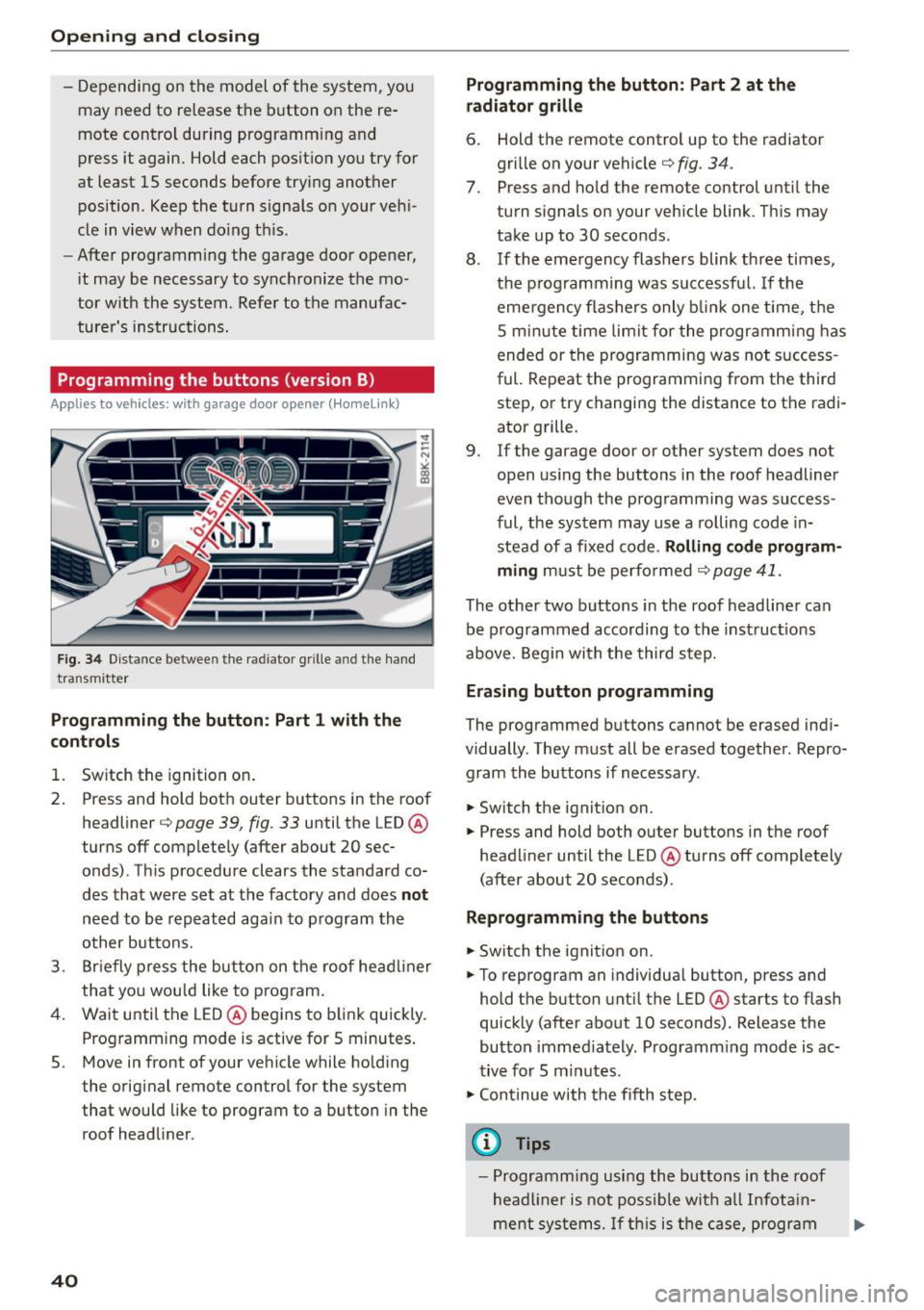
F ig . 3 4 Distance betwee n th e ra di ato r grille a nd the ha nd
tra nsm itt er
Programming the button : Part 1 with the
c ontr ols
1. Sw itch the ignition on .
2. Press and hold bot h outer buttons in the roof
headliner ¢
page 39, fig. 33 until the LED @
turns off complete ly (after about 20 sec
onds) . Th is p rocedure clears the sta ndard co
des that w ere se t at the factory and does
not
need to be repeated aga in to p rog ram th e
o ther bu ttons.
3. Brie fly press the bu tto n on the roof he adliner
that yo u wou ld like to program.
4. Wai t unti l the LED @ begins to b link quickly.
Prog ramming mode is active for 5 minutes .
5 . Move in front of your ve hicle while ho lding
the original remote contro l for the system
that would like to program to a button in the
roof headli ner .
40
Programming the button: Part 2 at the
radiator grille
6. Hold the remote control up to the radiator
gri lle on your vehicle¢
fig. 34.
7. Press and ho ld the remote control unt il the
tu rn s ignals on your vehicle blink. This may
take up to 30 seconds.
8 . If the eme rgency flashers blink th ree times,
the p rogramming was su ccessf ul. If the
eme rgency flas hers only b link one t ime, t he
5 m in ute time limit for the pr ogr amming has
ende d or the progr amming was not s uccess
ful. Repeat the programmi ng from the third
step, or try changing the distance to the radi
ator grille .
9. If the garage door or other system does not
open us ing the buttons in the roof headliner
even though the prog ramming was success
ful , the system may use a rolling code i n
ste ad of a fixed code .
Rolling code program
ming
m ust be perfo rmed ¢ page 41.
The other two b uttons in the roof headliner can
be p rogrammed acco rding to th e inst ruct ions
above . Beg in with the thir d step.
Erasing button programming
The programmed b uttons cannot be erased ind i
vidually . They m ust all be erased together . Repro
gram the buttons if necessary .
.. Switch the ignit ion on.
.. Press and hold both outer buttons in the roof
head liner until the LED @ turns off completely
(after about 20 seconds) .
Reprogramming the button s
.. Switch the ignition on .
.. To reprogram an individua l butto n, press and
hold the button unt il the LED @ starts to flash
quickly (after about 10 seconds) . Release the
button immed ia tely . Programm ing mode is ac
t iv e fo r 5 m inutes.
.,. Cont inue with t he fifth ste p.
@ Tips
- Programming using the buttons in th e r oof
hea dliner is no t poss ible wit h all In fotain
m ent s yst ems. If this is th e ca se, pr ogr am
Page 44 of 268
Power top
Power top
Automatic power top
General information
The power top opens and closes automatically.
The entire power top is stored in the power top
compartmen t. The powe r top may be opened or
closed at speeds up to 30 mph
(SO km/h).
Under normal conditions, the power top is wind
and waterp roof. In rare cases, smal l droplets of
water may form under extreme weather cond i
tions such as torrential or pro longed rain. That is
norma l and no cause for concern .
Follow the care instructions to keep the roof from
leaking and to maintain its appearance over time
¢ page 184, Care and cleaning . Also observe the
following:
- Only open and store the power top when it is
clean and dry. Sharp d irt part icles can cause
damage to the rear window and the power top .
If the power top is stored when damp, dents
can form. If left stored for a long period of
time, mildew and other damage can develop.
- Do not leave the power top open for several
weeks or the creases in it may become discol
ored .
- Remove ice and snow before opening the power
top. Do not use any sharp edged objects to re move ice and snow or the power top could be
scratched or damaged. The rear window may be cleared with a standard ice scraper .
- Do not open the power top when temperatures
are below 32 °F
(0 °() . The fabric used in the
power top loses its elastic ity when tempera
tures are be low freezing.
42
Opening /closing the power top
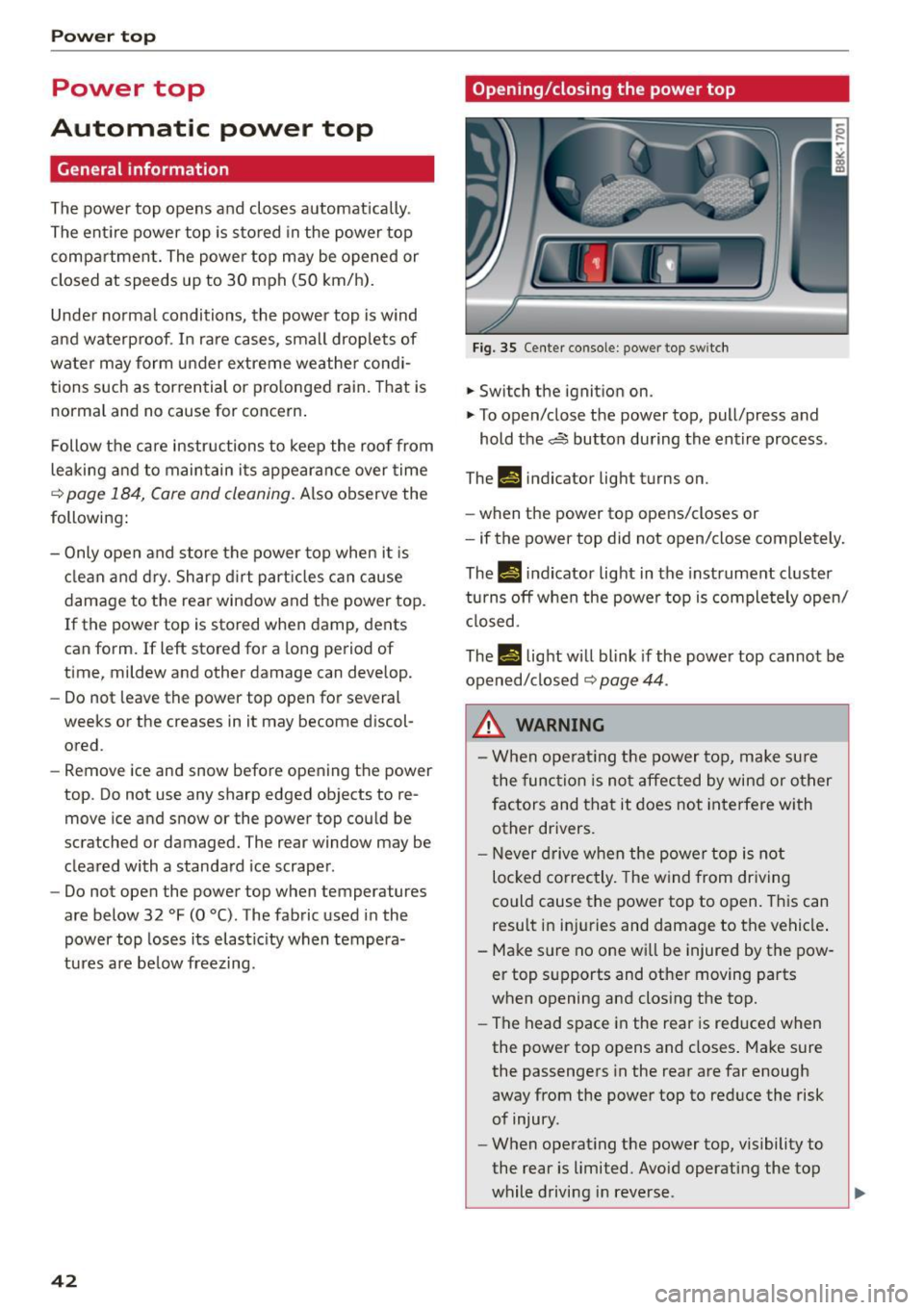
Fig. 35 Center co nsole : power top sw itch
.. Switch the ignition on .
.. To open/close the power top, pull/press and
hold the~ button during the entire process .
Th-f!.-) indicator light turns on.
- when the power top opens/closes or
- if the power top did not open/close completely.
Th.,
14 indicator light in the instrument cluster
turns off when the power top is completely open/
closed.
The
II light will blink if the power top cannot be
opened/closed
¢ page 44 .
.&_ WARNING
- When operating the power top, make sure
the function is not affected by wind or other
factors and that it does not interfere with
other drivers .
- N ever drive when the powe r top is not
locked co rrectly. The wind from driving
could cause the power top to open. This can
result in inj uries and damage to the vehicle .
- Make sure no one wi ll be injured by the pow
er top supports and othe r moving parts
when opening and closing the top.
- The head space in the rear is reduced when
the power top opens and closes . Make sure
the passengers in the rear are far enough
away from the power top to reduce the risk
of injury.
- When operat ing the power top, visibility to
the rear is limited. Avoid operating the top
while driving in reverse .