reset AUDI A5 CABRIOLET 2015 Owners Manual
[x] Cancel search | Manufacturer: AUDI, Model Year: 2015, Model line: A5 CABRIOLET, Model: AUDI A5 CABRIOLET 2015Pages: 268, PDF Size: 66.88 MB
Page 11 of 268
M N
ci u.. co ,...., \!) ..,.,
N ..,., ,....,
CD
@
®
©
®
®
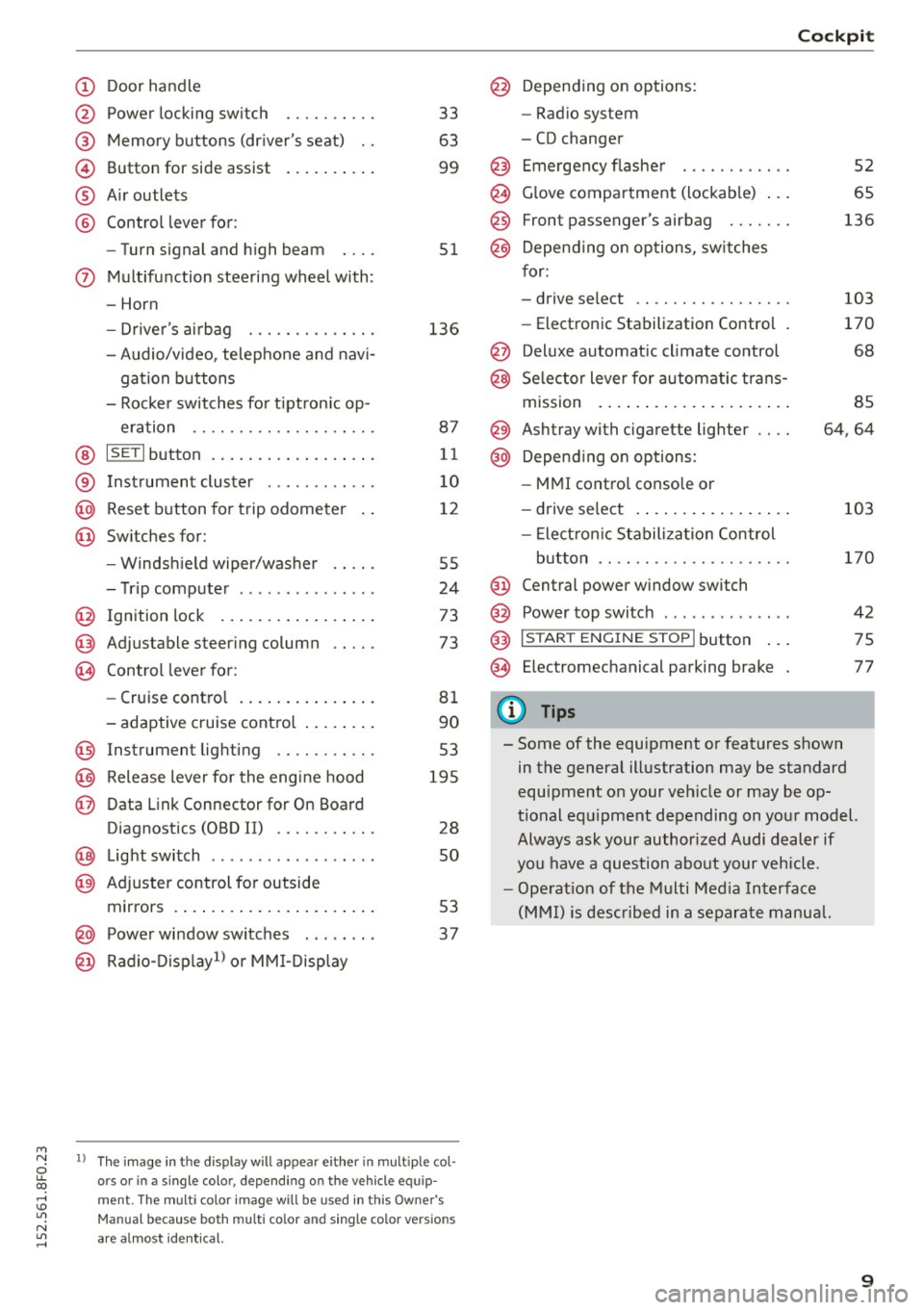
Door handle
Power locking switch
Memory buttons (driver's seat) . .
Button for side assist
A ir outlets
Control lever for :
- Turn signal and high beam
0 Multifunction steering wheel with :
- Horn
- Driver's airbag ....... .... .. .
- Audio/video, telephone and navi-
gation buttons
- Rocker switches for tiptronic op-
eration ................... .
@ ISETI button ................. .
® Instrument cluster ..... .. .. .. .
@
@ Reset button for trip odometer
Switches for:
- Windsh ield wiper/washer
- Trip computer . ....... .. .. .. .
I gnition lock ................ .
Adjustable steering column
Control lever for:
- Cruise control .............. .
- adaptive cruise control ....... .
@ Instrument lighting ........ .. .
@ Release lever for the engine hood
@ Data Link Connector for On Board
Diagnostics (OBD II) ........ .. .
@ Light switch ........ ... .. .. .. .
@ Adjuste r control for outside
mirrors . ... .............. ... .
@ Power window switches ... .... .
@ Radio-Disp lay1l or MMI-Display
33
63
99
51
136
87
11
10
12
55
24
73
73
81
90
53
195
28
so
53
37
l ) The image in t he d is pl ay w ill appear e ither in multiple col
o rs or in a single colo r, depending on the vehicle e quip
ment. The mult i color image will be u sed in this Owner 's
Manual because both multi co lo r an d single colo r ve rs io n s
are a lmost identical.
@
@
@
Depending on options:
- Radio system
- CD changer
Emergency flasher
Glove compartment (lockable) .. .
Front passenger's airbag ...... .
Depend ing on options, switches
for:
- drive select .. .............. .
- Electronic Stabilization Control .
Deluxe automatic climate control
Selector lever for automatic trans-
mission . ..... .............. .
@) Ashtray with cigarette lighter
@ Depending on options:
- MMI control console or
- drive select . ............... .
- Electron ic Stabilization Control
button ...... ... .......... . .
@ Central power window switch
@ Power top switch . ... ..... ... . .
@ I START ENGINE STOPI button .. .
@ Electromechanical parking brake
0) Tips
Cockpit
52
65
136
103
170
68
85
64,64
103
170
42
75
77
- Some of the equipment or features shown in the general illustration may be standard
equipment on your vehicle or may be op
tional equipment depending on your model.
Always ask your authorized Audi dealer if
you have a question about your vehicle.
- Operation of the Multi Media Interface
(MMI) is described in a separate manua l.
9
Page 12 of 268
Instruments and indicator Lights
Instruments and indicator Lights
Instruments
Instrument cluster and controls
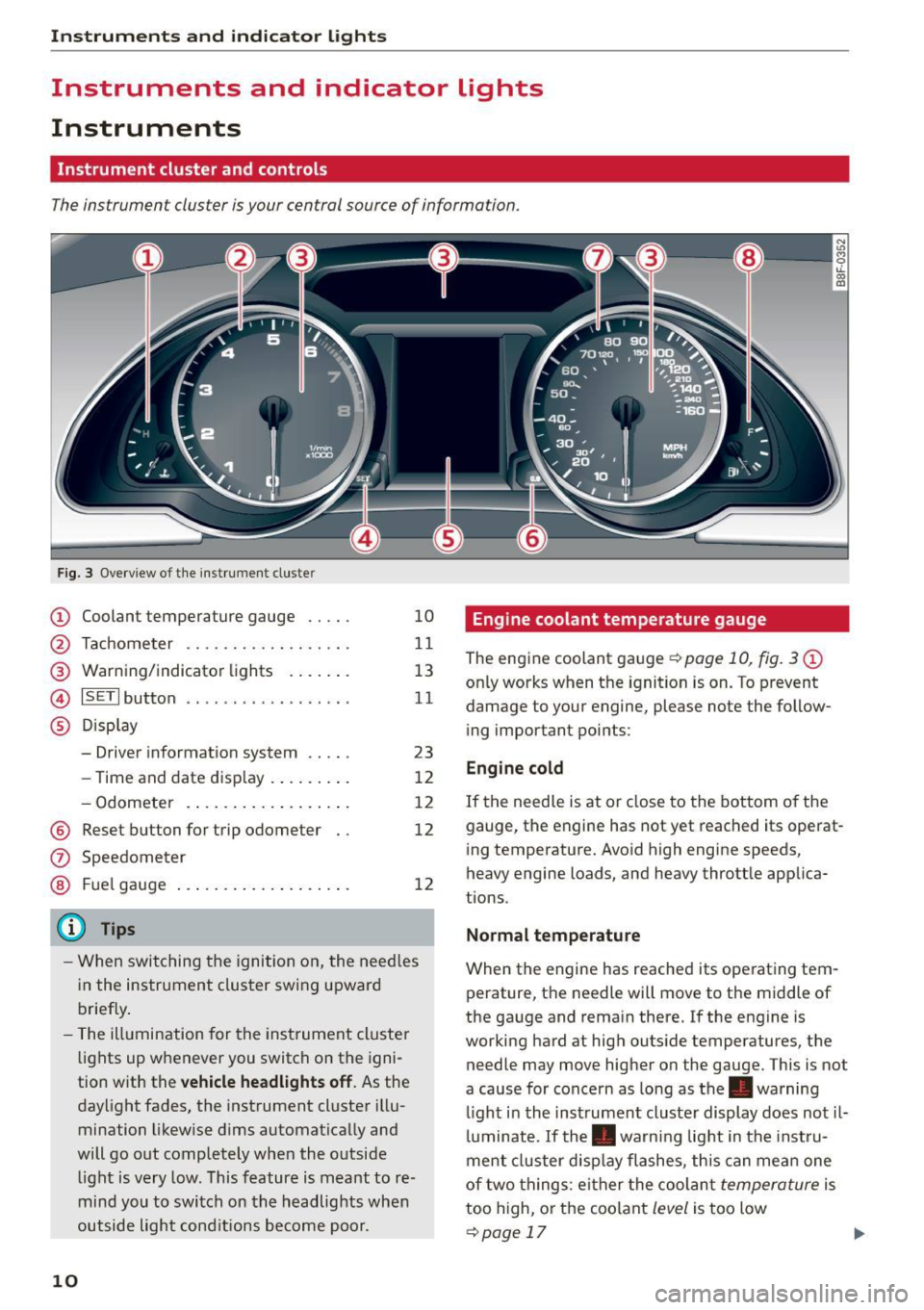
The instrument cluster is your central source of information.
Fig. 3 Overv iew of t he inst rument cluste r
CD Coolant temperature gauge .. .. .
@ Tachome ter .... .. .. ..... .... .
@ War ning/ indicator lights . .. ... .
@ ISETI button .............. ... ·
® D isp lay
- Driver informat io n system .... .
- Time and date d isp lay . .. .. ... .
- Odometer .... .. .... ... . ... .
@ Reset b utton for trip odometer
10
11
1 3
11
23
12
1 2
12
1 2
- When swit ching the ignition o n, the need les
i n the instrument clus ter swi ng upward
b rief ly .
- The ill umination for the inst rument cluste r
li ghts up whenever you switch on the igni
tion with the
vehicle headlights off . As the
day light fades, the instrument cluster illu
mination likewise d ims automatically and
will go out completely whe n the o utside
li ght is very low. This feature is meant to re
mind you to swi tch on the headlights when
outside light con ditions become poor.
10
Engine coolant temperature gauge
The engine coolant gauge ¢ page 10, fig. 3 CD
only works when t he ignition is on. To prevent
damage to your engine, please note the follow
ing important points :
Engine cold
If the needle is at or close to the bottom o f the
gauge, the engine has not yet reached its operat
i ng temperature. Avo id h igh engine speeds,
heavy engine loads, and heavy thrott le applica
tions .
Normal temperature
When the engine has reached its operating tem
perature, the needle will move to the middle of
the ga uge and rema in there. I f the engine is
working hard at hig h outs ide temperatures, t he
needle may move higher on the gauge. This is not
a cause for concern as long as the. warning
li ght i n the inst rumen t cluste r display does no t il
l u m inat e. If the . warning lig ht in the inst ru
ment cluster d isp lay flashes, th is can me an one
of two th ings : ei th er the coolan t
temperature is
too h igh, or t he coo lant
level is too low
¢ page 17 .,._
Page 14 of 268
Instruments and indicator Lights
the I SET! button, you delete the warning thresh
old.
Digital clock with date display and
Odometer
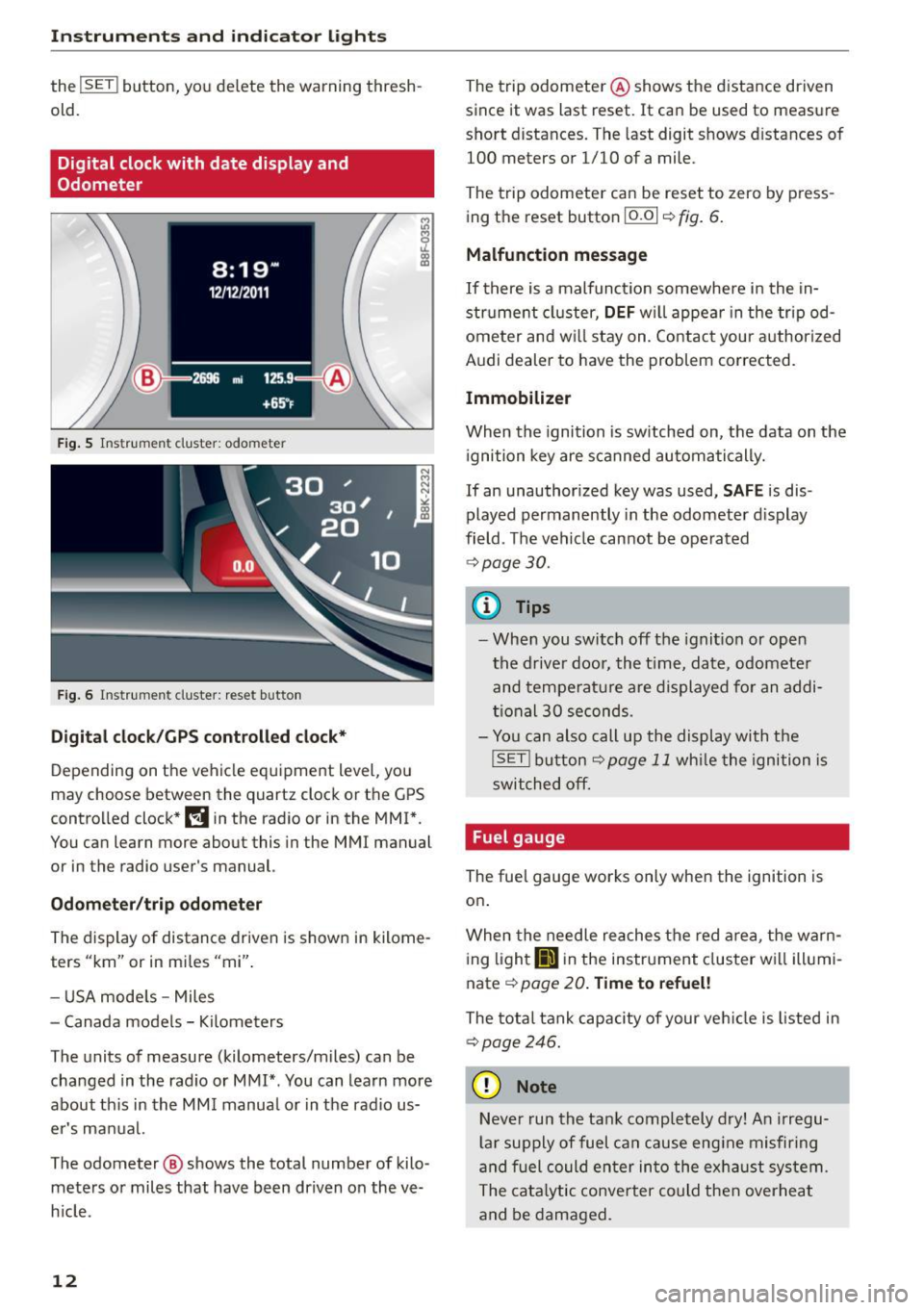
Fig. 5 Instrument cluster: odometer
Fig. 6 Instrument cluster: reset button
Digital clock/GPS controlled clock*
Depending on the vehicle equipment level, you
may choose between the quartz clock or the GPS
controlled clock*~ in the radio or in the MMI*.
You can learn more about this in the MMI manual
or in the radio user's manual.
Odometer/trip odometer
The display of distance driven is shown in kilome
ters "km" or in miles "mi".
- USA models -Miles
- Canada models - Kilometers
The units of measure (kilometers/miles) can be changed in the radio or MMI* . You can learn more
about this in the MMI manual or in the radio us
er's manual.
The odometer @ shows the total number of kilo
meters or miles that have been driven on the ve
hicle .
12
The trip odometer @ shows the distance driven
since it was last reset.
It can be used to measure
short distances. The last digit shows distances of
100 meters or 1/10 of a mile .
The trip odometer can be reset to zero by press
ing the reset button
!O.OI ~ fig. 6.
Malfunction message
If there is a malfunction somewhere in the in
strument cluster,
DEF will appear in the tripod
ometer and will stay on. Contact your authorized
Audi dealer to have the problem corrected.
Immobilizer
When the ignition is switched on, the data on the
ignition key are scanned automatically.
If an unauthorized key was used,
SAFE is dis
played permanently in the odometer display
field . The vehicle cannot be operated
¢page 30.
{i) Tips
-When you switch off the ignition or open
the driver door, the time, date, odometer
and temperature are displayed for an addi
tional
30 seconds.
- You can also call up the display with the
!SET ! button¢ page 11 while the ignition is
switched off.
Fuel gauge
The fuel gauge works only when the ignition is on.
When the needle reaches the red area, the warn
ing
lightliD in the instrument cluster will illumi
nate¢
page 20. Time to refuel!
The total tank capacity of your vehicle is listed in
¢page 246.
(D Note
Never run the tank completely dry! An irregu
lar supply of fuel can cause engine misfiring
and fuel could enter into the exhaust system.
The catalytic converter could then overheat
and be damaged.
Page 25 of 268
M N
ci LL co
rl I.O
"' N
"' rl
Driver information
system
Introduction
The Driver information display inside the instru
ment cluster provides you, the driver, with im
portant information.
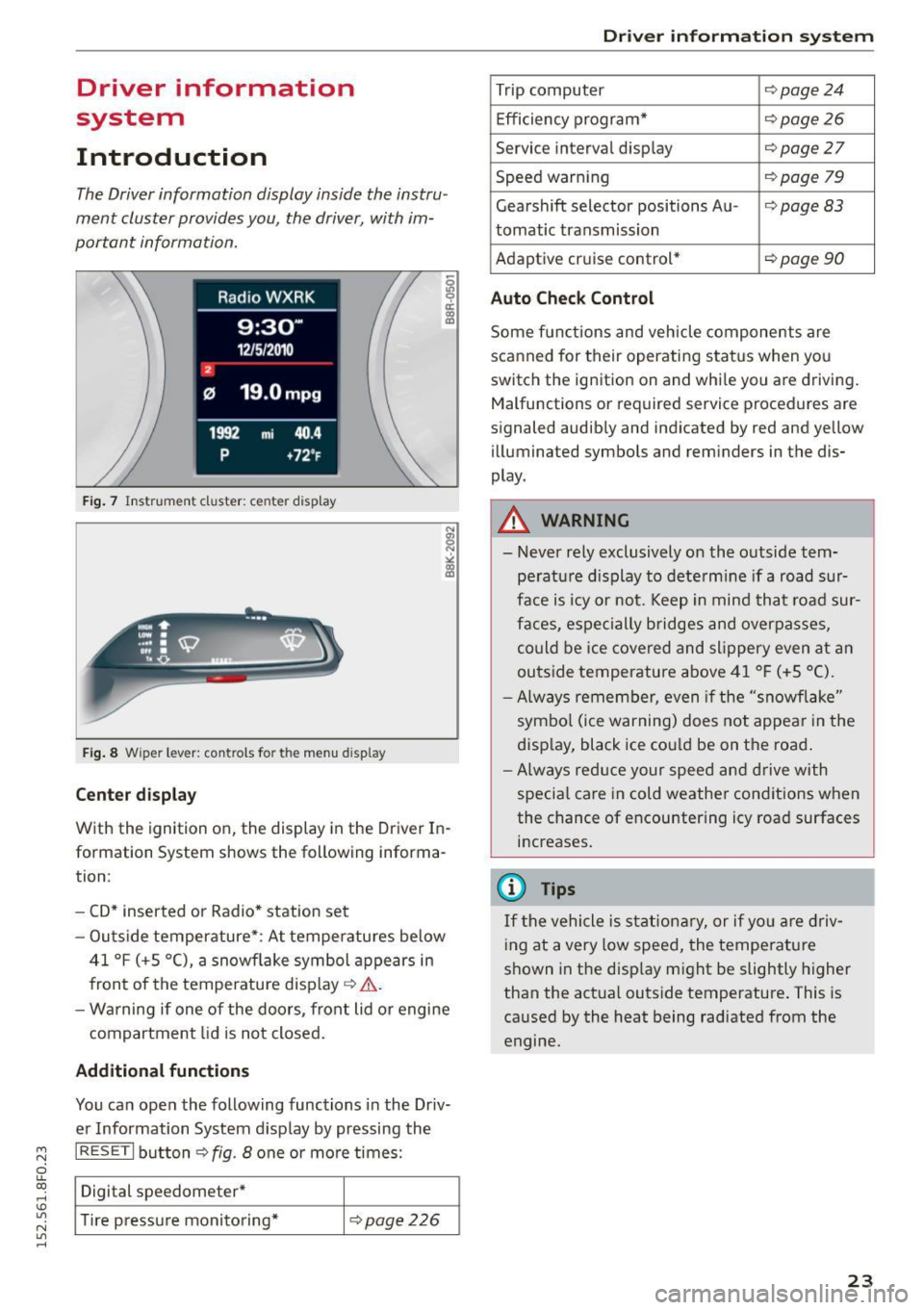
Fig. 7 Instrument cluster: ce nter display
Fig . 8 Wipe r lever: controls fo r the men u display
Cent er dis play
With the ignition on, the display in the Driver In
formation System shows the following informa
tion :
- CD* inserted or Radio * station set
- Outs ide temperature* : At temperatures below
41 °f (+S
0
(), a snowf lake symbol appears in
front of the temperature display¢&. .
- Wa rning if one of the doors, front lid o r engine
compartment lid is not closed.
Additional function s
You can open the following functions in the Driv
er Information System display by pressing the
I RESET I button ¢ fig. 8 one or more times:
Digital speedometer*
T ire pressure monitoring*
¢page226
Dr iver inform atio n sy stem
Trip computer Q page24
Efficiency program* ¢page26
Service interval display Qpage27
Speed warning ¢page 79
Gearshift selector positions Au -i=>page83
tomatic transmission
Adaptive cr uise control*
¢ page 90
Auto Chec k Control
Some functions and vehicle components are
scanned for their operating status when yo u
switch the ignition on and whi le you are driving.
Malfunctions or required service procedures are
signaled audibly and indicated by red and yellow
illuminated symbols and reminders in the dis
play.
A WARNING
--- Never rely exclusively on the outside tem pe ratu re d isplay to dete rm ine if a road sur
face is icy or not. Keep in mind that road sur
faces, espe cially bridges and overpasses,
could be ice covered and slippery even at an
outside temperature above 41 °f (+S °C).
- Always remember, even if the "snowflake"
symbo l (ice warning) does not appear in the
display, black ice cou ld be on the road .
-Always red uce your speed and d rive with
specia l care in cold weather conditions when
the chance of encountering icy road surfaces
increases.
(j) Tips
If the vehicle is stationary, or if yo u are driv
ing at a very low speed, the temperature
shown in the disp lay might be slightly higher
than the actual outside temperature . This is
caused by the heat being radiated from the
engine.
23
Page 26 of 268

Driver information system
Trip computer
Introduction
The trip computer gives you information on cur
rent and average fuel mileage , average speed ,
fuel range and driving time .
Fig. 9 Trip computer d isplay: Ave rage fuel m ileage
~ 9 a: CX) m
The fo llow ing information is contin uously evalu
ated by the trip computer and can be d isplayed
sequent ia lly in the instrument cluster display:
Fuel range
The estima ted c ruising range i n miles (km) ap
pea rs in the disp lay . This te lls you how fa r your
ve hicle w ill be able to trave l on t he current ta nk
of fuel and with the same driv ing style. The d is
p lay changes in increments of 5 miles (10 km) .
The cruising range is calcu lated based on t he f ue l
consumption for the last 18 m iles (30 km). If yo u
drive conse rvative ly, the cruising range will in
crease.
Average fuel mileage
The average fuel e co nomy in MPG (l/ 100 k m)
since yo u last cleared the memory appears in this
d is pl ay. You can use this display to ad just your
driving technique to achieve a desired mileage.
Current fuel mileage
The inst antaneo us f ue l cons umption in miles per
ga llon (l/100 km) is shown in this display. Yo u
can use t his disp lay to adjust your driving techni
que to achieve a des ired mileage .
F ue l cons umption is rec alcul ated at intervals of
33 y ards (30 me ters). Th is disp lay swit ches to
ga llons/hou r (li ters/hour) when the vehicle is not
mov ing.
24
Average speed
The aver age spee d in mph (km/ h) sin ce you last
rese t the memory appears in the display .
Elapsed time
The length of time that yo u have been d riving
s ince you last reset the memory appears in this
display .
Distance
The distance that has been covered since the last
time the memory was cleared appears i n the dis
play .
0) Tips
-Fuel consumptions (average and current),
range and speed a re displayed in me tric
units on Canad ian mode ls .
- All stored val ues will be lost if the vehicle
bat tery is disconnected .
Memories
The trip computer is equipped with two fully au
tomatic memories as well as an efficiency pro
gram* .
Fig. 10 Tri p comput er di sp la y: me mory leve l 1
You can switch between the trip computer 1 and
2 and the efficiency program* by p ressing t he
I RESET I button @<=> page 25, fig. 11 .
You can tell wh ic h memory leve l is currently ac
tive by the number o r the sig n in the display
Q fig. 10. The data from the single-t rip memory
(memo ry leve l 1) is being d isplayed if a
D ap
pears in the display. If a
fJ is shown, t hen the da-
ta from the total-t rip memory is being d isp layed .,,_
Page 27 of 268
M N
ci u.. co ,...., \!) 1.1'1
N 1.1'1 ,....,
(memory level 2). The fuel pump nozz le iii
indicates the efficiency program*¢ page 26.
Single-t rip memory (Trip computer 1 )
The single -t rip memo ry s to res the trip informa
tion from the t ime the ig nit ion is tu rned on unt il
it is turned
off. If the t rip is con tinued within 2
hour s
from the time the ignition was turned off,
the new data wi ll be included in the calculation of
the current trip information .
If the trip is inter
rupted for
more than 2 hours the memory is re
set automat ica lly.
Total -trip memo ry (Trip computer 2 )
Unlike the single-trip memory , the tota l-trip
memory is not reset automatically. This permits
you to evaluate your driving data for the entire
period between manual resets.
Efficiency program*
The eff ic iency p rog ram can help you to use less
fuel ¢
page 26.
Operation
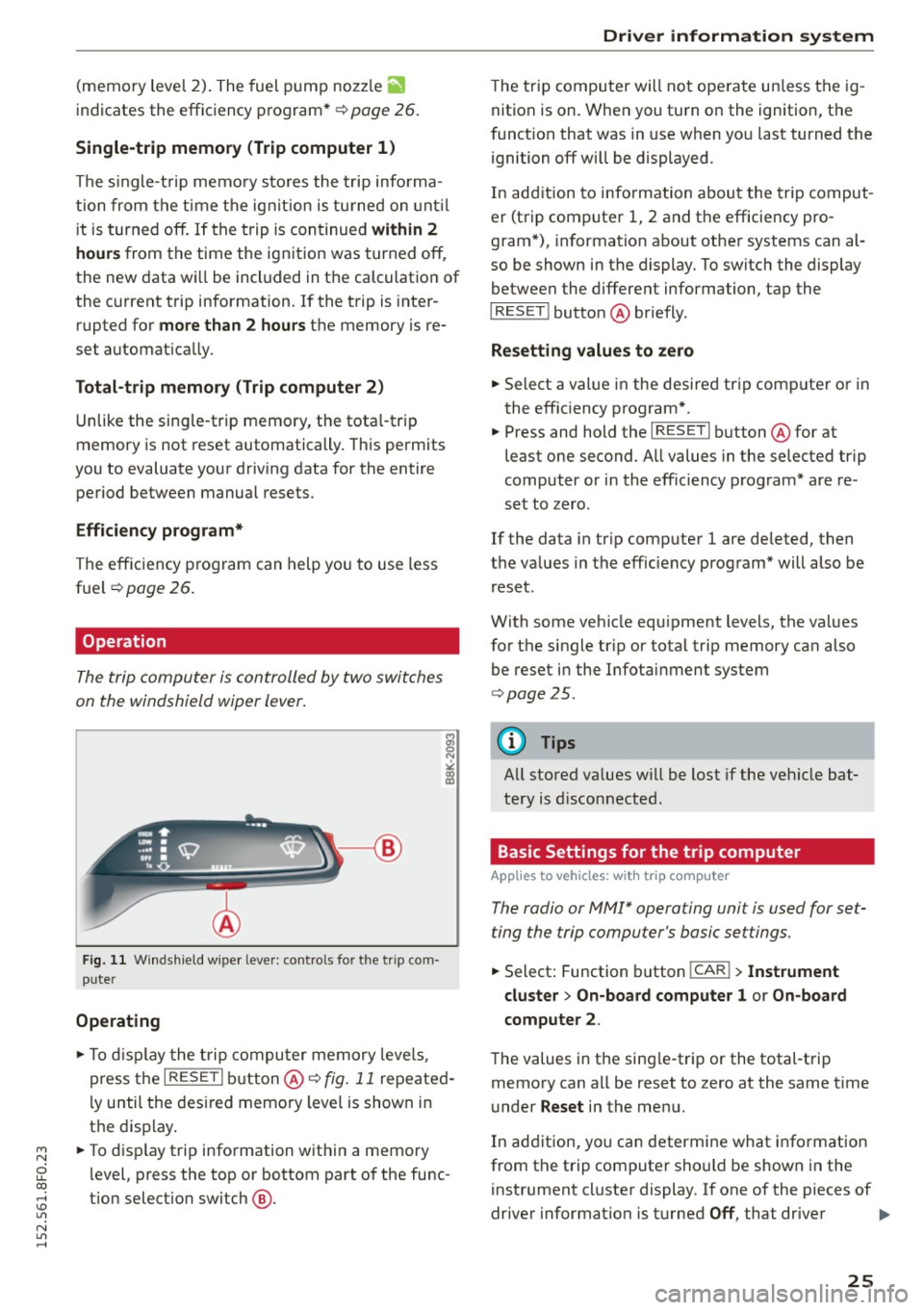
The trip computer is controlled by two switches
on the windshield wiper lever .
Fig . 11 W inds hield w ipe r leve r: co ntro ls fo r th e trip co m
p u ter
Operating
"'T o disp lay the t rip compu ter memory leve ls ,
press t he
I RESE T I but ton @¢ fig. 11 repeated
l y until the des ired memo ry level is shown in
t h e display .
"' To disp lay t rip information within a memory
l evel, press the top or bottom part of the func
t ion select io n switch @.
Dri ver information s ystem
The trip computer will not ope rate un less the ig
nition is on. When you turn o n the ignition, the
f unct ion that was in use when yo u last turned the
ignition
off wi ll be displayed.
In add ition to info rmation about the trip comput
er (trip computer 1, 2 and the efficiency pro
gram *), information about othe r systems can al
so be shown in the display. To switch the display betwee n the diffe rent information, tap the
I RESET ! button@ briefly .
Resetting values to zero
"' Select a value in the desired trip compute r or in
the effic iency program *.
"' Press and hold the
I RESE T I button @for at
least one second . All values in the selected trip
computer or in the eff ic iency program* a re re
set to zero .
If the data in tr ip computer 1 are deleted, then
t h e va lues in the eff iciency program* will also be
r eset.
With some vehicle equ ipment levels, the va lues
for the single tr ip or total trip memory can also
be reset i n the Infotai nment system
¢ page 25.
(D Tips
All stored va lues w ill be lost if the veh icle bat
tery is d isconnected .
Basic Settings for the trip computer
Applies to vehicles: with trip computer
The radio or MM!* operating unit is used for set
ting the trip computer 's basic settings.
"' Select: Function button I CAR!> Instrument
cluster > On -board computer 1 or On-board
computer 2 .
The values in the sing le-tr ip or the total-t rip
memory can all be reset to zero at the same t ime
u nder
Reset in the menu.
In addition, yo u can determi ne what info rmation
from t he trip computer sho uld be shown in the
instrument cluster display. If one of the pieces of
driver information is turned
Off , that driver .,.
25
Page 28 of 268

Driver information system
information will not be shown in the display. The
information will continue to be calculated by the
tr ip computer and can be turned back
On at any
time.
(D Tips
- This function is not available on all vehicles.
- The driving information in the efficiency
program is also reset to zero with the sin
gle-trip memory.
Efficiency program
Description
App lies to vehicles: with trip computer with efficiency pro
gram
Fig. 12 Display: efficie nc y program
.. Press the I RESET I button @¢ page 2 5, fig. 11
repeatedly until the efficiency program appears
in the disp lay.
The efficiency program can help you to use less
fue l.
It evaluates driving information in reference
to fuel consumption and shows other equipment
influencing consumption as well as shift recom
mendations. Fuel economy messages
¢
page 26 provide tips for efficient driving.
The eff ic iency program uses distance and con
sumption data from trip computer
l. If the data
are de leted in the efficiency program, those val
ues are also reset in trip computer
l.
26
Other equipment
Applies to vehicles: with trip computer with efficiency pro
gram
Fig. 13 Display: other equipment
.. In the efficiency program, press the function
selection switch ¢
page 2 5, fig. 11 ® repeat
edly until the other equipment appears in the
disp lay .
Other equipment that is currently affecting fuel
consumption is listed in the efficiency program.
The display shows up to three other items of
equipment @. The equipment using the most
fuel is listed first. If more than three items us ing
fuel are switched on, the equipment that is cur
rently using the most fuel is displayed.
A scale @also shows the current total consump
t ion of all other equ ipment .
Fuel economy messages
Applies to vehicles: with trip computer with efficiency pro
gram
Fig. 14 Display: fuel economy message
"'
Fuel economy messages are displayed when fuel
consumption is increased by certa in conditions. If
you follow these fuel economy messages, you can
reduce your vehicle's consumption of fuel. The ..,.
Page 29 of 268
M N
ci u.. co ,...., \!) 1.1'1
N 1.1'1 ,....,
messages appear automatically and are only dis
p layed in the efficiency program . The fuel econo
my messages turn
off automatically after acer
tain period of time.
.. To turn a fuel economy message
off immed iate
l y after it appears, press the I RESET
I b utton
¢ page 25, fig. 11 @ , or
.. Press the function selection switch¢
page 25,
fig. 11
@ .
(D Tips
-Once you have t urned a fuel economy mes
sage
off, i t will only appear aga in after you
turn the ignit ion on again.
- The fuel economy messages are not dis
played in every instance, but rather in inter
vals over a per iod of t ime .
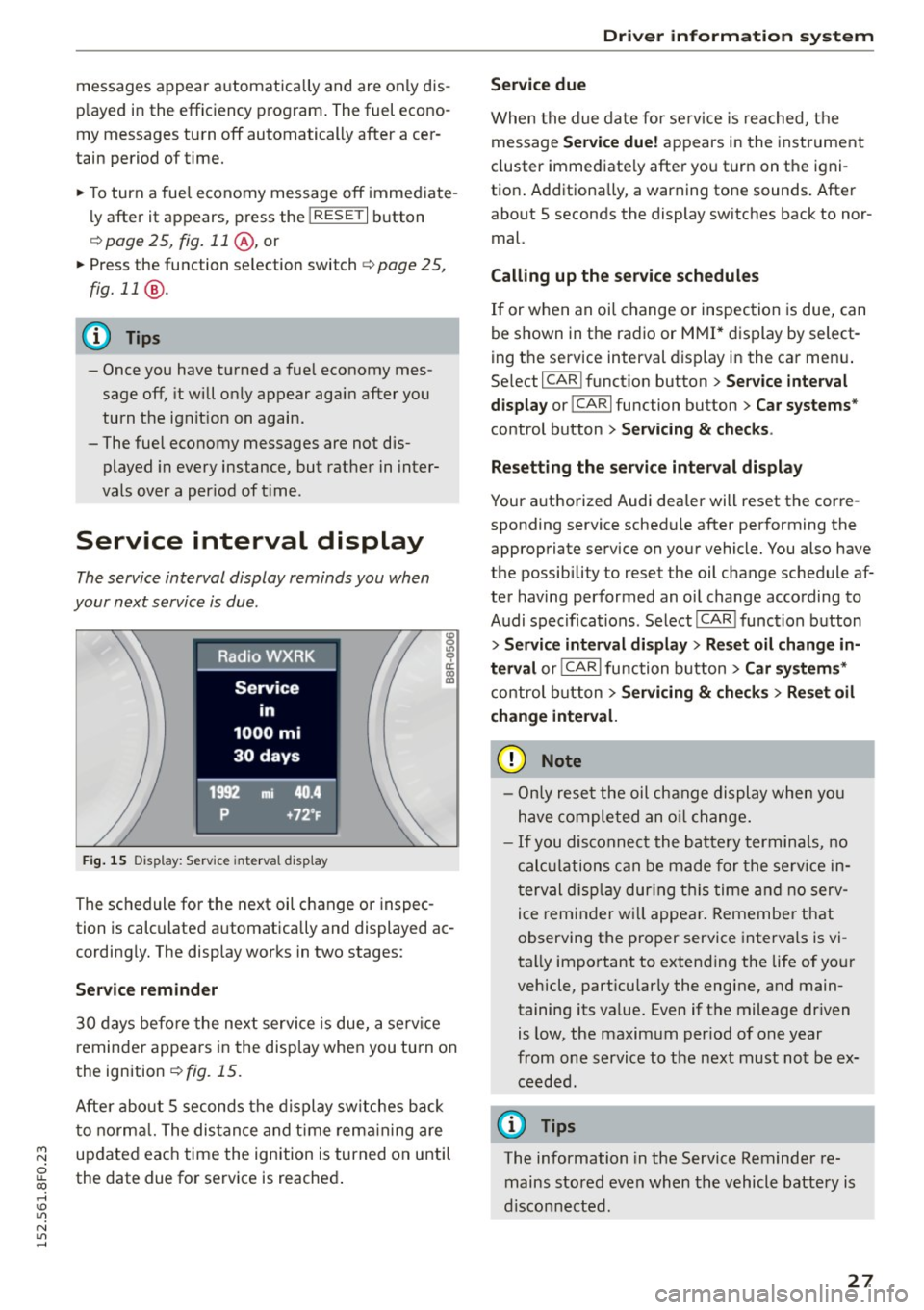
Service interval display
The service interval display reminds you when
your next service is due .
Fig. 1 5 Dis p lay: Service interval d isp lay
~ 0 ci:
"' a,
The sc hed ule for the next oil c hange or inspec
tion is calculated a utomatically and displayed ac
cordingly. The display works in two stages :
Service reminder
30 days before the nex t servi ce is due, a serv ice
reminde r appea rs in the disp lay when you tu rn on
the ignition
¢ fig. 15.
Afte r about 5 seconds the display sw itches back
t o no rma l. The dis tan ce and t ime rem aining are
updated eac h time the ignition is turned on unti l
the date due for service is reached .
Driver information s ystem
Service due
When the d ue date for se rvice is reached, t he
message
Service due! appears in the inst rument
cluster immediate ly afte r yo u turn on the igni
tion . Additiona lly, a warning tone sounds. Afte r
about 5 seconds the display switches back to nor
mal.
Calling up the service schedules
If or when an oi l change or inspection is due, can
be shown in t he radio or
M MI* dis play by select
ing the service interval display in the ca r men u.
Se lect I CAR I funct ion button >
Service interval
display
or ICARI function button > Car systems *
control button > Servicing & checks .
Resett ing the service interval display
Your a uthorized Audi dea ler will reset the corre
sponding service schedule after performing the appropriate service on your vehicle. You also have
the possibility to reset the oil change schedule af
ter having performed an oi l change according to
Audi specifica tions . Select I CAR ! funct ion button
> Service interval display > Res et oil change in
terval
o r! CARlfunction button> Car systems*
control b utton > Servicing & check s > Reset oil
change inter val.
(D Note
- Only re se t the oil change display when yo u
h ave comple ted an o il change.
- If you disconnect the batte ry termina ls, no
c al cul ations can be made for the se rv ice in
t erval disp lay during t his time and n o serv
ice reminder w ill appea r. R emembe r that
observing the p ro p er service interva ls is vi
tally impo rtant to exten ding the life of yo ur
vehicle, part icular ly the eng ine, and main
taining its va lue. Even if the mileage dr iven
is low, the maxim um per iod of one year
from one service to t he nex t must not be ex
ceeded.
(D Tips
The information in the Service Reminder re
mains stored even when th e vehicle battery is
disco nnecte d.
27
Page 82 of 268
Driving
appears in the display . The symbol's appearance
m ight be diff erent in some models.
The speed warning system has two warn ing
thresholds that function independently of each
other and that have somewhat different purpos
es:
Speed warning 1
You ca n use speed wa rning 1 to set the maximum
speed while yo u are driving. This setting w ill re
main in effect unt il you tu rn
off the ignition , as
suming that you have not c hanged or reset the
setting .
The . (USA models) /. (Can ada mode ls)
speed war ning symbol in the wa rni ng
1 display
appears when you exceed the maximum speed.
It
goes o ut when the speed fa lls below the stored
maximum speed.
The speed wa rning symbo l w ill also go out if the
speed
exceeds t he stored maximum speed by
mo re tha n about 25 mp h
(40 km/h) for at least
10 seconds. The stored maximum speed is de let
ed.
Speed warn ing 2
S toring wa rn ing 2 is recommended if you always
want to be reminded of a certain speed, for ex
ample when you are trave ling in a co unt ry that
has a genera l maxim um speed limit, or if you do
not want to exceed a specified speed for w inter
tires .
The . (USA models)
I. (Canada mode ls)
speed warn ing 2 symbo l appears in the disp lay
when yo u exceed the stored speed limit. Unlike
warn ing 1, it will not go out until the veh icle
speed d rops be low the stored speed limit .
Sett ing speed warning 2
c::> page 80.
(D) Tips
Even tho ugh your vehicle is equip ped with a
spee d war ning system, you s ho ul d still watch
the speedometer to make sure you are not
driving faster than t he speed limit.
80
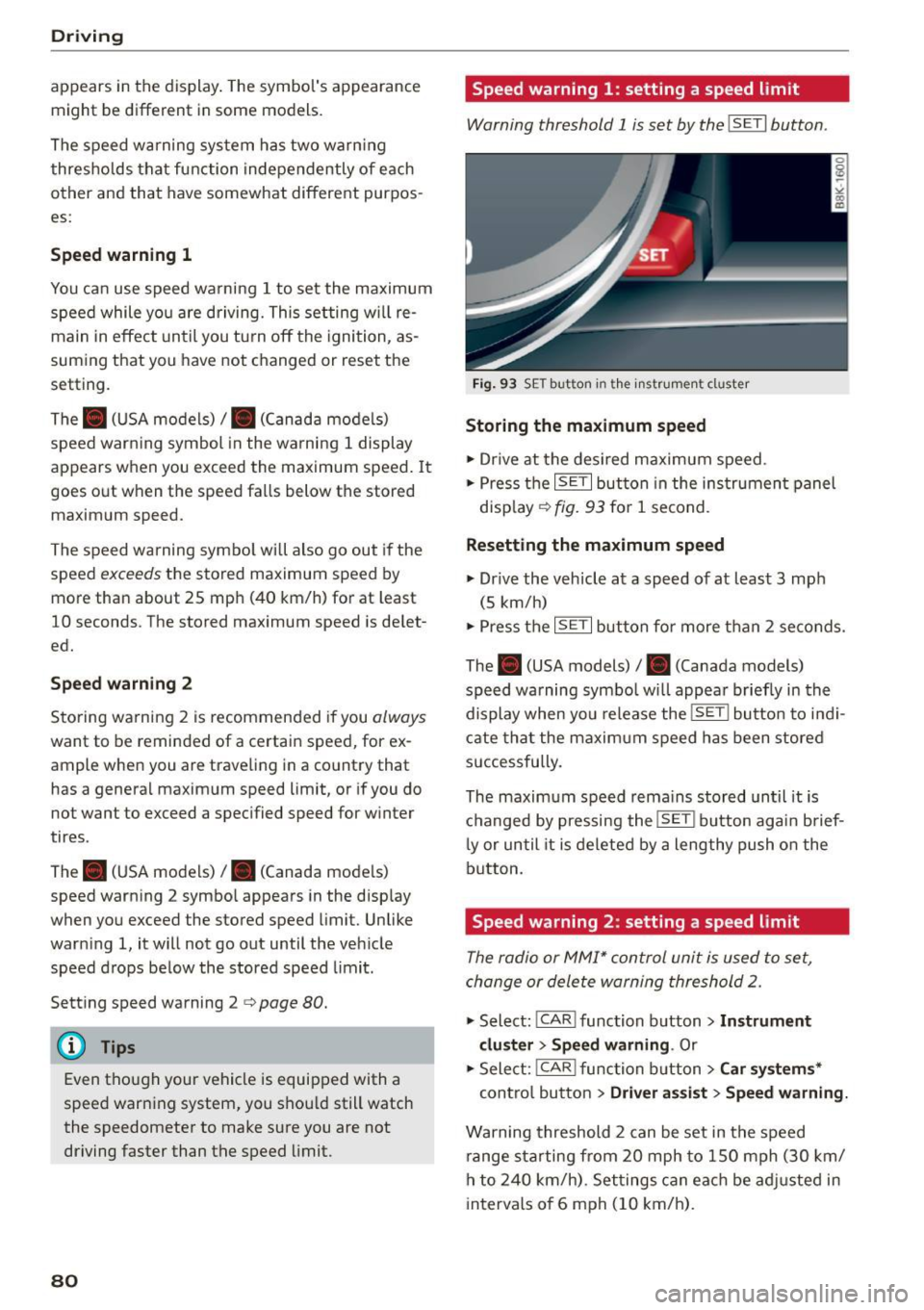
Speed warning 1: setting a speed limit
Warning threshold 1 is set by the ISETI button .
Fig. 9 3 SE T button in the instru men t cl uster
Storing the maximum speed
.,. Dr ive at the desi red maximum s peed .
.,. Press t he
ISE TI but ton in the ins trumen t panel
disp lay ¢
fig. 93 for 1 second .
Resetting the maximum speed
.,. Dr ive the veh icle at a speed of at leas t 3 mph
(5 km/h)
.,. Press the
~ 1s =ET= I button fo r more t han 2 seconds.
The . (USA models)/ . (Canada models)
speed warning symbo l wi ll appea r briefly in the
display when you release the
ISE T! bu tton to i ndi
cate tha t the m axim um speed has been stored
successfully.
The maxim um speed r ema ins stored until it is
c h anged by pressing the
ISE TI b ut ton aga in brief
l y or until it is deleted by a lengthy push o n the
bu tton.
Speed warning 2: setting a speed limit
The radio or MMI* control unit is used to set,
change or dele te warning threshold
2.
.,. Select : ICAR ! function b utton> Instrument
cluster > Speed warning .
Or
.,. Select: I CAR I func tion button > Car sy stem s*
contro l bu tton > Dri ver a ssist> Speed warning.
Warning threshold 2 can be set in the speed
r ange starting from 20 mph to 150 mph (30 km/
h to
2 4 0 km/h) . Se ttings can eac h be ad justed in
intervals o f 6 mph (10 km/h) .
Page 84 of 268
Driving
Presetting your speed
You can preset your desired speed while the vehi
cle is not moving .
.,. Switch on the ignition .
.,. Pull lever in to pos ition
(D c> page 81, fig . 94 .
.,. Press the lever in the 0 or O direction to in -
crease or decrease your speed .
.,. Re lease the lever to save that speed.
This function makes it possible, for example, to
save the speed you want before driving on the
h ighway . Once on the highway, act ivate the cruise
con trol by pulling the leve r toward
(D .
Switching off
Temporar y deactivation
.,. Press the bra ke peda l, or
.,. Press the lever i nto pos ition @ (not clicke d into
place)
c> page 81, fig. 94, o r
.,. Drive for longer than S minutes at more than
6 mph (10 km/h) above the stored speed.
Switching off completely
.,. Press leve r into posi tion @(clic ked into p lace),
o r
.,. Switc h the ignition off.
The speed you saved w ill be retained if the c ruise
con trol has been sw itched off temporar ily. To re
sume the saved speed, let up on the brake and pu ll the lever to position
(D.
Sw itchi ng the ign ition off e rases the saved speed .
_& WARNING
You should only return to the saved speed if it
is not too fas t for the current traffic cond i
tions -risk of an accident!
82