ESP AUDI A5 CABRIOLET 2015 Owner's Manual
[x] Cancel search | Manufacturer: AUDI, Model Year: 2015, Model line: A5 CABRIOLET, Model: AUDI A5 CABRIOLET 2015Pages: 268, PDF Size: 66.88 MB
Page 93 of 268
Audi adapt ive crui se cont rol and bra king gu ard
- For safety reasons, do not use adaptive
cruise control when driving on roads with
many curves, when the road surface is in
poor condit ion and/or in bad weather (such
as ice, fog, gravel, heavy rain and hydroplan
ing) . Us ing the system under these condi
tions co uld resu lt in a collision.
- Switch adaptive cruise control off tempora
rily when driving in turning lanes, on ex
pressway exits or in construction zones. This
prevents the vehicle from acce lerating to
the set speed when in these situations.
- T he adapt ive cruise con trol system w ill not
brake by itself if you put your foot on the ac
celerator pedal. Do ing so can override the
speed and distance regulation.
- When approaching stationary objects such
as stopped traffic, adaptive cruise control
will not respond and braking guard will have
limited function .
- The adaptive cruise control system and brak
ing guard do not react to people, anima ls,
objects cross ing the road or oncoming ob
jects.
- The function of the radar sensor can be af
fected by reflective objects such as guard
rails, the entrance to a tunnel, heavy rain or
ice.
- Never follow a ve hicle so closely that you
cannot stop your vehicle safely. The adap
t ive cr uise control cannot s low or brake the
vehicle safely when you fo llow another veh i
cl e too close ly. Always remembe r that the
au tom atic b ra ki ng function cannot bring the
vehicle to a su dden or emergency stop un
der these conditions.
- T o prevent unin tended operation, always
swit ch ACC
off when i t is not be ing used .
(D Note
The sensor can be disp laced by impacts o r
damage to the bumper, whee l housing and
underbody. That could affect the adaptive
cru ise cont ro l system and braking guard. Have
M
6 your authorized A udi dealer or authorized
~ Aud i Service Faci lity check their function.
rl I.O
"' N
"' rl
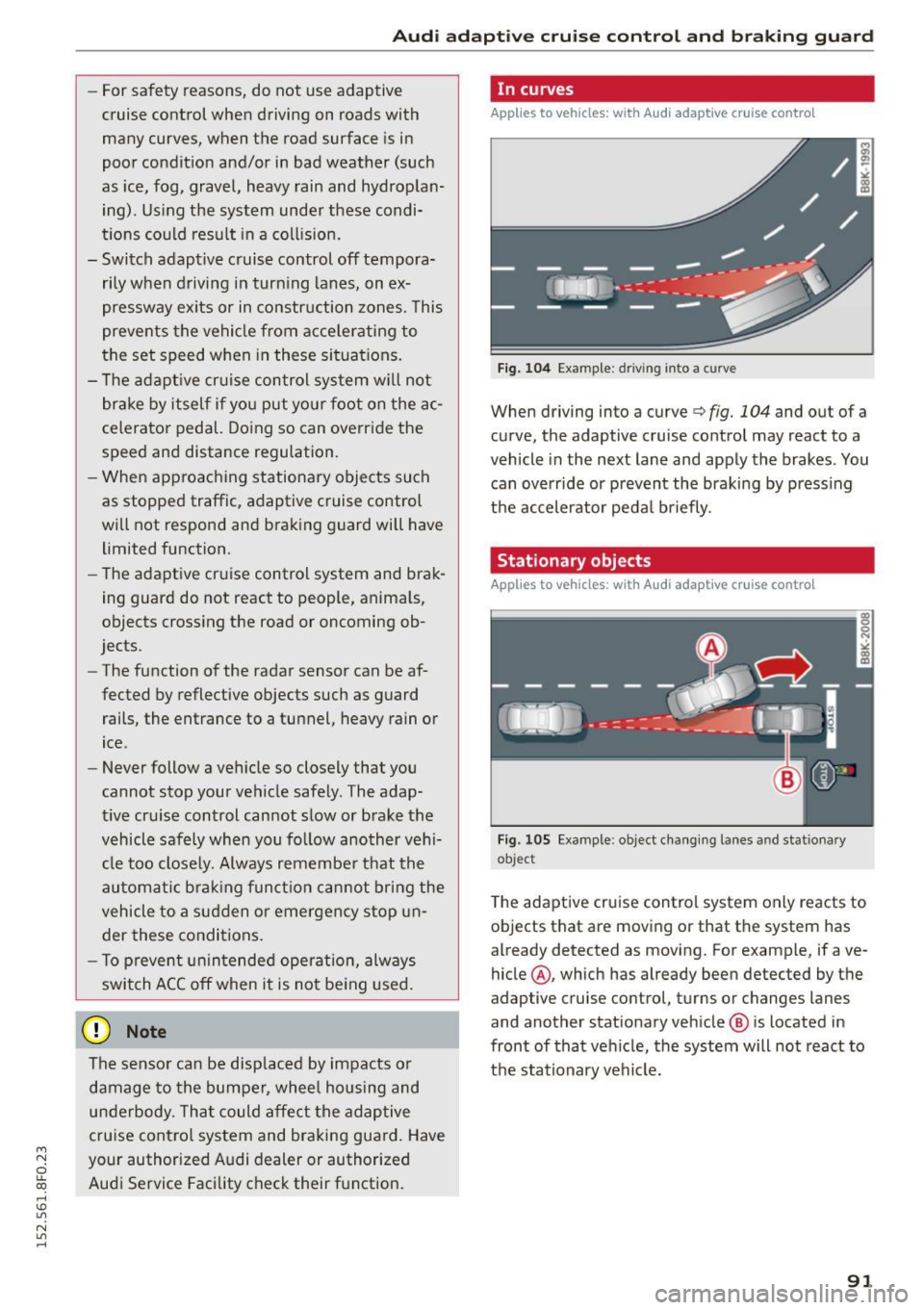
In curves
Applies to vehicles: wit h Audi adapt ive cr uise contro l
Fig. 104 Example : driv ing into a curve
When driving into a curve c:> fig. 104 and out of a
curve, the adaptive cruise control may react to a
vehicle in the next lane and apply the brakes. You
can override or prevent the braking by press ing
t h e accelerator peda l briefly .
Stationary objects
Applies to vehicles: wit h Audi adaptive cruise control
Fig . 105 Example: object changing lanes and stationary
object
T he adaptive cruise control system only reacts to
objects that are moving or that the system has
already detected as moving. For example, if a ve
hicle @, which has already been detected by the
adaptive cruise control, turns or changes lanes
and another stationary veh icle @ is located in
front of that ve hicle, the system will not react to
t h e stat ionary vehicle.
91
Page 96 of 268

Audi adaptive cruise control and braking guard
Interrupting cruise control
Applies to veh icles: w ith Audi adaptive cruise co ntrol
Fig. 110 Selector leve r
Requirement : adaptive cruise control must be
switched on
¢ fig . llO (i).
Overriding cruise control
• To accelerate manually, press the acce lerator
pedal. The message
ACC override appears .
• To resume adaptive cruise control, remove your
foot from the gas pedal. The system returns
again to the speed that was saved before.
• You can save a new speed at any time by press·
ing the
ISETI button r:::;, page 11, fig. 4.
Canceling cruise control while driving
• Move the lever into position @. The message
ACC standby appears . Or
• press the brake pedal.
• To resume the stored speed, move the lever in
to position
@ .
,& WARNING
Never resume the stored speed if the speed is
too high for prevailing road, traffic or weather
conditions.
94
Setting the distance
App lies to vehicles: wit h Audi adapt ive cru ise contro l
Fig. 111 Selector lever: setting the d istance
• Tap the switch to display the current set dis
tance
¢ fig . 111 .
• To increase or reduce the distance by incre·
ments, tap the switch again to the left or right.
The distance between the two veh icles will
change in the instrument cluster display .
When approach ing a mov ing vehicle up ahead,
the adapt ive cruise control system brakes to
match that object's speed and then mainta ins
the stored distance. If the vehicle ahead acceler
ates, adaptive cruise contro l will also accelerate
up to the stored speed.
The higher the speed, the greater the distance in
yards (meters)
r:::;, A . The Distance 3 setting is
recommended.
The distances prov ided are specified va lues . De
pending on the driving situation and the how the
vehicle ahead is driving, the actua l dis tance may
be more or less than these target distances.
The var ious symbols for the time increments ap
pear briefly in the information line@r:::;,
page 92,
fig. 108 when you change the settings .
o;:'.'.:>_o;:'.'.:> ___ Distance 1: This setting corresponds
to a distance of 92 feet/28 meters when travel·
i ng at 62 mph (100 km/h), or a time i nterva l of 1
second.
o;:'.'.:> __ o;:'.'.:> __ Distance 2: This setting corresponds
to a distance of 118 feet/36 meters when travel
i ng at 62 mph (100 km/h), or a time i nterva l of
1.3 seconds.
Page 97 of 268
M N
ci LL co
rl I.O
"' N
"' rl
Audi adapt ive crui se cont rol and bra king gu ard
~ -- -~ -Di sta nce 3: This setting corresponds
to a distance of 164 feet/SO meters when trave l
ing at 62 mph (100 km/h), or a t ime interval of
1.8 seconds.
~ -- --~ Dista nc e 4: This setting corresponds
to a distance of 210 feet/64 meters when trave l
ing at 62 mph (100 km/h), or a t ime interval of
2 .3 seconds.
A WARNING
Following other vehicles too closely increases
the risk of collisions and ser ious personal in
jury.
- Setting short distances to the traffic ahead
reduces the time and distance available to
br ing your vehicle to a safe stop and makes
it even mo re necessary to pay close atten
tion to traffic.
- Always obey applicable traffic laws, use
good judgment, and select a safe following
distance for the traffic, road and weather
condit ions.
¢j) Tips
- Di stance
3 is set automatically each time
you switch t he ignition on.
- Your standa rd settings are automatically
stored and assigned to the remote contro l
k ey being used.
Setting the driving program
Applies to vehicles: with Audi adaptive cruise control
D epending on the se lected dr iv ing program and
distance, driving behavior when accelerating will
vary from dynamic to comfortab le .
Setting th e driving program for v ehicl es
without Audi d rive s elect*
~ In the radio/MMI*, select: !CAR !function but
ton >
Adapti ve c ru is e control > D riv ing prog. >
comfo rt, stand ard or d y namic . Or
~ Select : !CAR I function button> Ca r sy ste m s*
co ntrol button > D river ass ist > Adap tive cru ise
cont ro l
> Dr iving progr am * > Comfort, Stand
ard
or D ynamic . Setting the driving mode for vehicles w
ith
Audi dri ve select*
Refer to ¢ page 104.
(D Tips
Your settings are automatical ly stored and as
signed to the remote control key being used.
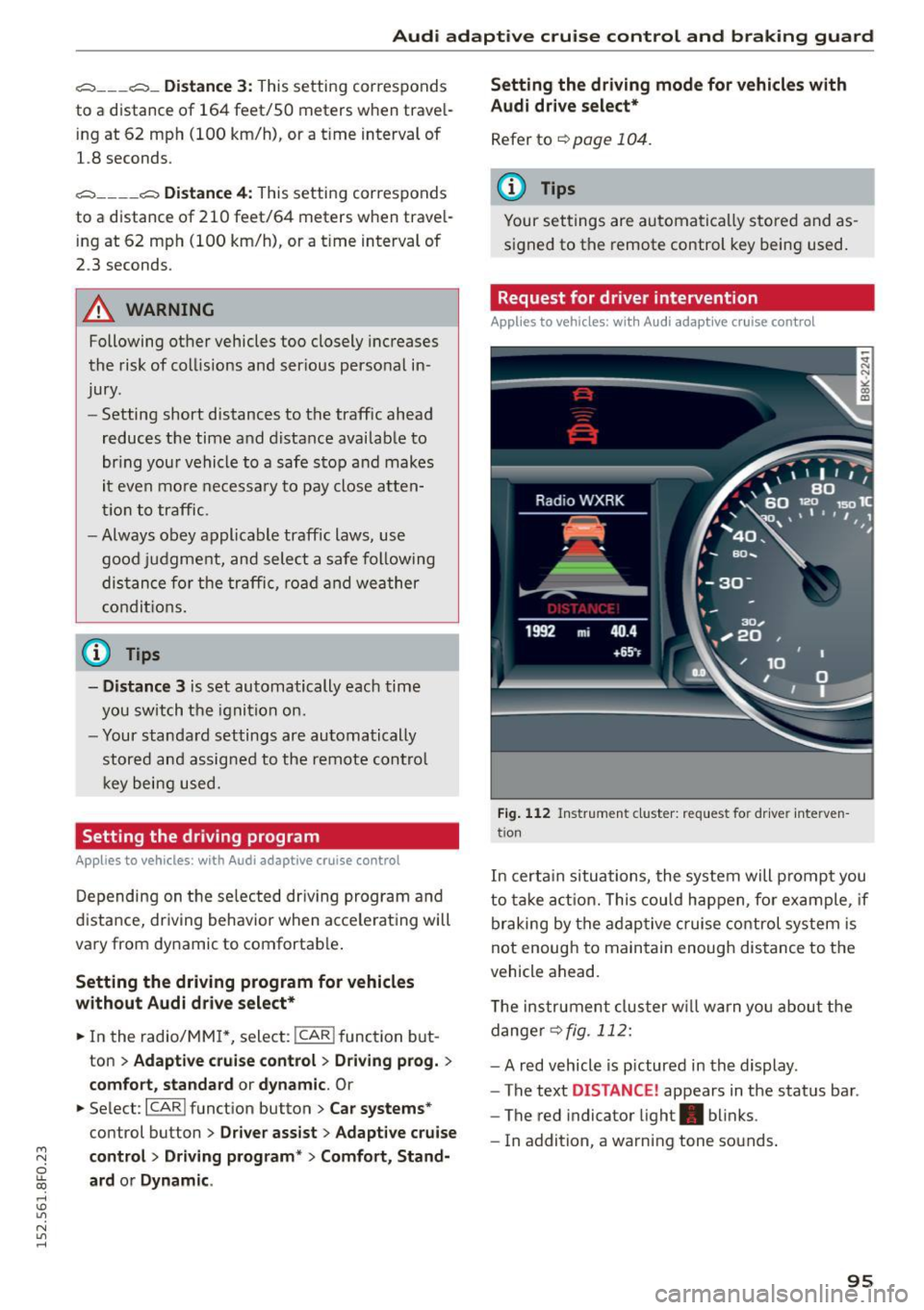
Request for driver intervention
Applies to vehicles: with Audi adaptive cruise control
Fig . 1 12 Instr ume nt cluster: reques t fo r dr ive r inte rven
t ion
In certa in situations, the system will prompt you
to ta ke act ion. This cou ld happen, fo r example , if
braking by the adaptive c ruise control system is
not enough to maintain enough distance to the
vehicle ahead.
T he instrument cluster w ill warn you abou t the
dange r
~fig. 112:
-A red vehicle is p ictured in the display .
- The text
DISTANCE! appears in the status bar .
- The red indicator light . blinks .
- In addition, a warning tone sounds .
95
Page 98 of 268

Audi adaptive cruise control and braking guard
Audi braking guard
Description
Applies to veh icles: w ith Audi adaptive cruise co ntrol
Fig. 113 Instrument cluster : approach warn ing
Braking guard uses a radar sensor. It also func
tions within the limits of the system when adap
tive cruise control is switched off.
What can Audi braking guard do?
When detected in time, the system can assess
situations when a vehicle ahead brakes suddenly
or if your own vehicle is traveling at a high speed
and approaching a vehicle up ahead that is mov
ing more slowly . Braking guard does not react if it
cannot detect the situation .
The system advises you of various situations:
- The
distance warning is given if you are too
close to the vehicle ahead for a long time. If the
vehicle ahead brakes sharply, you will not be
able to avoid a collision. The indicator light.
in the display comes on .
- The
approach warning is given when a detected
vehicle up ahead in your lane is moving much
more slowly than you are or if it brakes sharply .
When this warning is given, it may only be pos
s ib le to avoid a collision by swerving or braking
sharply. The indicator light . and indicato r in
the display will wa rn you about the danger
¢ fig. 113 . You will also hear an acoustic signa l.
If you do not react fast enough or do not react at
all to the situation, Braking guard will intervene
by braking and the message
braking guard inter
vention
will appear.
ll Thi s is not available in so me c oun tries.
96
- If a co llision is imminent, the system wi ll first
provide an
acute warning by br iefly and sharply
app ly in g the brakes.
- If you do not react to the acute warning, brak
ing guard can brake within the limits of the sys
tem. This reduces the vehicle speed in the event
of a collision.
- At speeds under 20 mph (30 km/h), the system
can initiate a complete deceleration shortly be
fore a collisionl l_
-If the braking guard senses that you are not
braking hard enough when a collision is immi
nent, it can increase the braking force.
Which functions can be controlled?
You can switch braking guard and the distance/
approach warning on or off in the radio or MMI
¢page
97, Settings in the radio/MM!.
A WARNING
Lack of attent ion can cause collisions, other
accidents and ser ious personal injuries. The
braking guard is an assist system and cannot
prevent a coll is ion by itself. The dr iver must
always intervene. The driver is always respon
sib le for braking at the correct time.
- Always pay close attent ion to traffic, even
when the braking guard is switched on. Be
ready to intervene and be ready to take com
plete control whenever necessary. Always
keep the safe and legal distance between
your vehicle and vehicles up ahead.
- Braking guard works within limits and will
not respond outside the system limits, for
examp le when approaching a stopped vehi
cle or stationary obstacle (end of a traffic
jam or vehicle that has broken down in traf
fic).
- Always remember that the radar sensor for
the braking guard works only w ith in defined
detection and range limits that may prevent
the proper detection of other vehicles.
- The radar sensor's function and range can
be reduced by rain, snow and heavy spray.
Moving vehicles up ahead may not be
-
Page 101 of 268

M N
ci LL co
rl I.O
"' N
"' rl
Audi side assist Side assist
Description
Applies to vehicles: with Audi side assist
Fig. 114 Se nsor detection range
Fig. 1 15 Display o n the exterio r m irro r
Side assist helps you monitor your blind spot and
traffic behind your veh icle . With in the limits of
the system, it wa rns you about vehicles that are
coming closer or that are traveling w ith you with
i n sensor range
(D c::, fig. 114 : if a lane change is
classified as crit ical , the disp lay @ in the exter io r
mirror ¢
fig. 115 turns on.
The display i n the left exterior mirror provides as
sistance when making a lane cha nge to the left,
while the d isp lay in the right exterio r mir ror pro
vides assistance whe n mak ing a lane change to
the r ight .
Information stag e
As long as you do not activate the turn signal,
side assist
informs you about ve hicl es that a re
detected and class ified as crit ica l. The display in
the respective mirror tu rns on, but is dim.
Aud i side assist
The display remains d im intentionally in the in
formation stage so that your view toward the
front is not d isturbed .
Warning sta ge
If you activ ate the turn s ignal, s ide ass ist warns
you about vehicles that are detected a nd classi
fied as critica l. The d isplay in the respective mir
ror blinks brightly . If this happens, check traffic
by g lancing in the rearview mirror and over your
shoulder
c::, .&. in General information on
page 100.
{!) Tips
- Yo u can adjust the brightness of the display
@ c:;, page 101.
-Please refer to the instructions for towing a
trailer located in
c::, page 100 .
99
Page 102 of 268

Audi side assist
General information
App lies to vehicles: with Aud i side ass ist
®
@
©
F ig. 116 Driving situations
I AU DI
0 0
Fig. 117 Rear of the ve hicle: pos itio n of t he sensors
Side assist functions at speeds above approx i
mately 19 mph (30 km/h).
@ Vehicles that are approaching
In certain cases, a vehicle will be classified as
critical for a lane change even if it is still some
what far away. The faste r a vehicle approaches,
the soo ner t he d isplay in the exter io r mirro r will
turn on.
@ Vehicles traveling with you
Vehicles traveling w ith you are indicated in the
exterior mirror if they are classified as critical for
a lane change. All vehicles detected by side assist
100
are indicated by the time they enter your "blind
spot", at the latest.
© Vehicles left behind
If you slowly pass a veh icle that side assist has
detected (the difference in speed between the ve
hicle and your vehicle is less than 9 mph (1 S km/
h)), the display in the exterior mirror turns on as
soon as the vehicle enters your blind spot.
T he display will not turn on if you quickly pass a
vehicle that side ass ist has detected (the differ
ence in speed between the vehicle and your vehi
cle is greater than 9 mph (15 km/h)).
Functional limitations
The radar senso rs are designed to detect the left
and right adjacent lanes when the road lanes are
the normal width. In certain situations , the dis
play in the exterior mirror may turn on even
though there is no vehicle located in the area that
i s cr itical for a lane change. For example:
- if the lanes are narrow or if your are dr iving on
the edge of your lane. If thi s is the case, the
system may have detected the vehicle in anoth
er lane that is
not adjacent to your current lane.
- if yo u are driving through a c urve . Side assist
may react to a vehicle that is one lane over from
the adjacent lane.
- if side assist reacts to other objects (such as
high or disp laced guard rails).
- In poor weather conditions . The side assist
functions are limited.
Do not cover the radar senso rs
q fig. 117 with
stickers, deposits, bicycle wheels or other ob
jects, because this will affect the function . Do not
use side assist when towing a trailer. For infor
mation on cleaning, refer to
q page 184.
A WARNING
- Always pay attention to traffic and to the
area around your veh icle. S ide ass ist cannot
replace a dr iver's attention. The driver alone
is always responsible for lane changes and
sim ila r driv ing maneuvers.
Page 105 of 268
M N
ci u.. co ,...., \!) ..,.,
N ..,., ,....,
Audi drive select Driving settings
Introduction
App lies to vehicles: with Audi drive select
Drive select provides the possibi lity to experience
d ifferent types of vehicle settings in one vehicle.
F or instance, using the three
Comfort, Auto and
Dynamic modes, the driver can switch from a
sporty to a comfortable driving mode with the
press of a button.
Addit ionally, in vehicles with
MM I*, the vehicle
setup for
Individual* mode can be customized by
you. This makes it possib le to combine settings
such as a sporty engine tuning with comfortab le
steering .
A WARNING
-
Improper use of the Audi drive select can
cause collisions, other acc idents and serious
personal injury.
Description
App lies to vehicles: with Audi drive select
The vehicle setup in each mode depends on the
veh icle's featu res . However, the engine, automat
ic transmission and steering are always involved.
Engine and automatic transmission
Depending on the mode, the engine and the au
tomatic transmission respond quicker or in a
more balanced manner to accelerator pedal
movements. In the sporty dynamic mode, the au
tomatic transmission shifts at higher RPMs .
Steering
The steering adapts in terms of steering effort
and steering ratios. Ind irect steer ing that moves
eas ily, like the steering in comfort mode, is best
suited to long drives on a highway. In contrast,
dynamic mode provides sporty, direct stee ring.
The follow ing applies to vehicles with dynam ic
steer ing*: the steering ratio changes based on ve
hicle speed in order to maintain optimum steer
ing effort for the dr iver at all times. This sets the
steer ing to be less sensitive at higher speeds in
Audi drive select
order to provide improved vehicle control. At re
duced speeds, however, steering is more direct in
order to keep the steering effort as m inima l as
possib le when the driver is maneuvering the vehi
cle. At low and average speeds, dynamic steering
additionally provides more responsive steering performance.
Adaptive dampers*
The adaptive dampers* use sensors to record in
formation regarding steering movements, braking and acceleration operations by the driver,
road surface, driving speed, and load. This makes
i t possible to adapt damping to the driving situa
t ion virtually in real t ime . Drive select also makes
it possible to sat isfy the desire for sporty suspen
s ion (Dynamic) and comfortab le suspension
(Comfort) without giving up ba lanced tuning (Au
to) .
Sport differential*
As a component of the all whee l dr ive system
(quattro)
~ page 174, the sport differential* dis
tributes the driving power to the rear axle de
pending on the situation. The dist ribution of
power varies depending on the mode selected.
The goal is a high level of agility and ability to ac
ce lerate on curves. The vehicle is very responsive
to steering.
Audi adaptive cruise control*
T he behavior when accelerating can be adjusted
from comfortable to sporty, depending on the
drive select mode. Adaptive cruise control also
responds to the driving behavior of the vehicle
ahead in a more conservative or sporty manner.
Engine sound*
The sound of the engine is adapted to the select
ed mode and ranges from subtle to sporty.
(D Tips
- In some models, the maximum vehicle
speed can only be reached in the
Auto and
Dynamic modes.
- For vehicles with an automatic transmis-
sion, selecting the
Dynamic mode results in ..,.
103
Page 109 of 268

M N
ci LL co
rl I.O
"' N
"' rl
,&_ WARNING
-Sensors have dead spaces in which objects
cannot be detected . Be especially alert for
small chi ldren and animals, since they are
not always detected by the sensors .
- The acoustic parking system is not a substi
tute for the dr iver's own caution and alert
ness. Ultimate responsibility always remains
with the driver during parking and sim ilar
maneuvers . A lways watch where you are
dr iv ing .
- You should always adjust the volume and
frequency of the warning tones so that you
can eas ily hear the acoustic distance warn
ing
even if the radio is playing, the air-cond i
tioner blower is on High or there is a high
level of outs ide no ise.
- Check the settings whenever anyone else
has driven the vehicle be fore you.
(D Note
- Remember that low obstacles for whic h a
warning has already been issued may "dive"
below the system 's sensing zone if the vehi
cle is being backed up closer . In this case,
the warn ing sound shutting off does
not in
dicate that you have cleared the obstacle.
Instead, impact is imm inent.
- Objects such as trailer h itches, cha ins, nar
row posts or fences covered by a thin layer
of pa int may not a lways be detected by the
system. They can still damage your vehicle
wi thou t warn ing.
{O) Tips
Keep the sensors in the rear bumper clean
and free of snow and ice so that the acoust ic
parking assist system can f unction properly.
Adjusting the warning tones
Applies to vehicles: with parking system (rear)
The warning tones can be adjusted in the MMI*.
• Select : ICARI function button > Parking system.
Or
• Se lect :
I C ARI funct ion button > Car syste m s*
control button> Dr iver a ssist> Parking aid .
Parking Sy stem
- Rear volum e -rear sensor vo lume
- Rea r fre quenc y -rear sensor frequency
- Mu sic vo lume while parking -when the park-
ing system is switched on, the vo lume of the
active audio source is lowered.
The newly adjusted value is briefly hea rd from
the signal generator . T he settings are automat i
ca lly stored and assigned to the master key w ith
remote control.
Rear parking system
with rearview camera
Introduction
Applies to vehicles: with parking system (rear, with rear view
camera)
F ig . 1 21 Park ing mode 1: reve rse pa rking
Fig . 1 22 Park ing mode 2: parallel parking
Vehicles with the parking system are equipped
with a
rear vi ew ca mera in addi tion to the acous
t ic pa rking system.
You can choose between two modes to ass ist you
with pa rking. For example, you can use "parking
mode l" when park ing in a parking sp ace or ga
rage ¢
fig. 121. When you wan t to park parallel
to the edge of the street, select "park ing mode
2" ¢ fig. 122 . 11>
107
Page 110 of 268

Parking System
The rear acoustic park assist system is integrated
in the rear of the vehicle and the rear view cam
era is integrated in the rear lid
c::> page 109.
A WARNING
-
- The rear view camera has blind spots, in
which objects cannot be detected. Be espe
cially careful to check for small children and
animals before backing up. Small children and animals will not always be detected by
the sensors.
General Information
Applies to vehicles: with parking system (rear, with rear view
camera)
Fig. 123 Covered ar ea (D and uncovered area @ of the rea r
view came ra
Fig. 124 T runk lid: Location of the rear v iew camera
Sensors in the bumper
Sensors are located in the rear bumpers . If these
detect an obstacle, audible signals warn you . The
range at which the sensors begin to measure is
approximately:
To the side 2 ft (0.60 m)
Center rear 5.2 ft (1.60 m)
Distance warning when reversing starts when an
obstacle is detected in the range of the parking
108
assist system. As the distance decreases, the
time interval between the audible tones becomes
shorter.
When the distance is less than 1ft (0.30 m), the
tone becomes continuous. At this point you
should stop backing up.
If the distance to an obstacle stays the same, the
volume of the distance signal chime is gradually
reduced after about 4 seconds (does not affect
the continuous signal tone). Approaching anoth
er obstacle will cause the distance signal to
sound again at the normal volume.
Rear view camera coverage area
The MMI display shows the area covered by the
rear v iew camera
c::> fig. 123 @. Objects that are
not in the area covered @are not shown on the
MMI display.
We recommend that you practice parking with
the rear view camera in a traffic-free location or
parking lot to become familiar with the system,
the orientation lines, and their function. When
doing this, there should be good light and weath
er conditions.
In the MMI display, objects or vehicles appear
closer or further away if:
-you are driving in reverse gear from a level sur
face onto an incline, or a downward slope,
- you are driving in reverse gear toward protrud
ing objects,
- the vehicle is carrying too much load in the
rear.
The accuracy of the orientation lines and blue
surfaces diminishes if:
- the rear view camera does not provide a reliable
image, for example, in poor visibility conditions
or if the lens is dirty,
- the image on the screen is not visible due to sun glare and reflection .
Caring for the rear view camera lens
The rear view camera is located above the rear li
cense plate bracket. For the parking assist to op-
erate, the lens
c::> fig . 124 must be kept clean : .,._
Page 111 of 268

M N
ci u.. co ...... \!) 1.1'1
N 1.1'1 ......
-Dampen the lens with a househo ld alcoho l
based glass cleaner, and clean the lens with a
dry cloth
¢ 0 .
- Remove snow with a hand brush and ice pref
erably with a de-icing spray
¢0 .
A WARNING
- The parking aid cannot replace the driver's
attent ion. The driver alone is responsible for
park ing and s imilar driving maneuvers .
-Always keep your eyes on the veh icle's sur
roundings, using the rear view m irror as
well.
- Do not allow yourself to be distracted from
traffic by the rear view camera pictures.
- If the posit ion and the installation ang le of
the camera has c hanged, for example, after
a rear end collision, do not continue to use
the system for safety reasons. Have it
checked by a qualified deale rship .
@ Note
-Low obstacles already signaled by a warning
can d isappear from the system's detection
range as they are approached and will not
continue to be signa led. Objects such as
barrier chains, tra ile r draw bars, thin paint
ed vertical po les or fences may not be de
tec ted by the sys tem, posing r isk of dam
age.
- Never use warm or hot w ater to remove
snow or ice from the rear view camera lens -
danger of crack formation on the lens!
- When cleaning the lens, never use products
that are abrasive .
Switching on/off
Applies to vehicles: with parking system (rear, with rear view
camera)
The rear view camera switches on automatically
together with the acoustic park assist when you
put the vehicle in reverse.
Sw itching on
.,. Put the vehicle in reverse gear, the acoustic
parking system w ith rear view camera is act ivat
ed automat ica lly. Act ivat ion of the acoust ic
Parking Syste m
pa rking system is confirmed by a brief acknow l
edgement so und.
Switching off
.,. Dr ive faste r than 9 mph (15 km/h) , or
.,. take the vehicle out o f reverse gea r. The aco us
tic parking sys tem is immed iate ly deactivated,
and the rear view camera picture is deactivated
automatically after a period of about 15 sec
onds, or
.,. sw itch
off the ignition.
The de lay in deact ivating the camera provides an
u ninterrupted view be hind the vehicle especia lly
when maneuvering in t ight parking spaces and
prevents the p icture from turning
off the every
time you shift out of reverse.
If the warning message appears in the display
but not the rear view camera p icture, read and
confirm the warning message . The acoustic d is
tance signal is always active .
If you press a function button on the MMI contro l
console, the rear view camera picture disappears.
The rear v iew camera p icture reappears the next
time you park .
Furthe r information on the warning message and
the MMI contro l conso le can be found in the MMI
instruct ion booklet.
A WARNING
--
- On ly use the rearview camera to assist you if
it shows a good, clea r picture . For example,
the image may be affected by the su n shi n
ing into the le ns, dirt on the lens o r if the re
is a defec t.
- Use the rea rv iew camera only with the rear
lid comple tely closed . Make sure any objects
you m ay have moun ted on the rea r lid do
not block the rearv iew camera .
(D Tips
-The rear view camera picture is available as
soo n as the MMI Di splay o r th e MMI is
switched on, or the s tart- up pha se is com
ple ted.
- The sensors m ust be ke pt clean and free of
snow and ice fo r the park ass ist to opera te.
109