key AUDI A5 CABRIOLET 2015 Owner's Manual
[x] Cancel search | Manufacturer: AUDI, Model Year: 2015, Model line: A5 CABRIOLET, Model: AUDI A5 CABRIOLET 2015Pages: 268, PDF Size: 66.88 MB
Page 53 of 268
M N
ci LL co
rl I.O
"' N
"' rl
the windshield in this a rea in order to
prevent malfunctions or failures .
- Some exterior lighting functions can be ad
ju ste d~
pa ge 51 .
-When yo u remove your key from the igni tion
while the vehi cle's ligh ts are turned o n, a
buzzer sounds as long as t he driver 's door is
open.
- In coo l o r dam p weather, t he inside of the
h eadlights, turn sig nals and tail lights can
fog over d ue to the temperature difference
between the inside and outs ide. They will
clea r shortly after switching them on. T his
does not affect t he service li fe of the light
i ng.
- In the event of a light sensor malfunction,
the driver is not ified in the instr ume nt clus
te r display~
page 21.
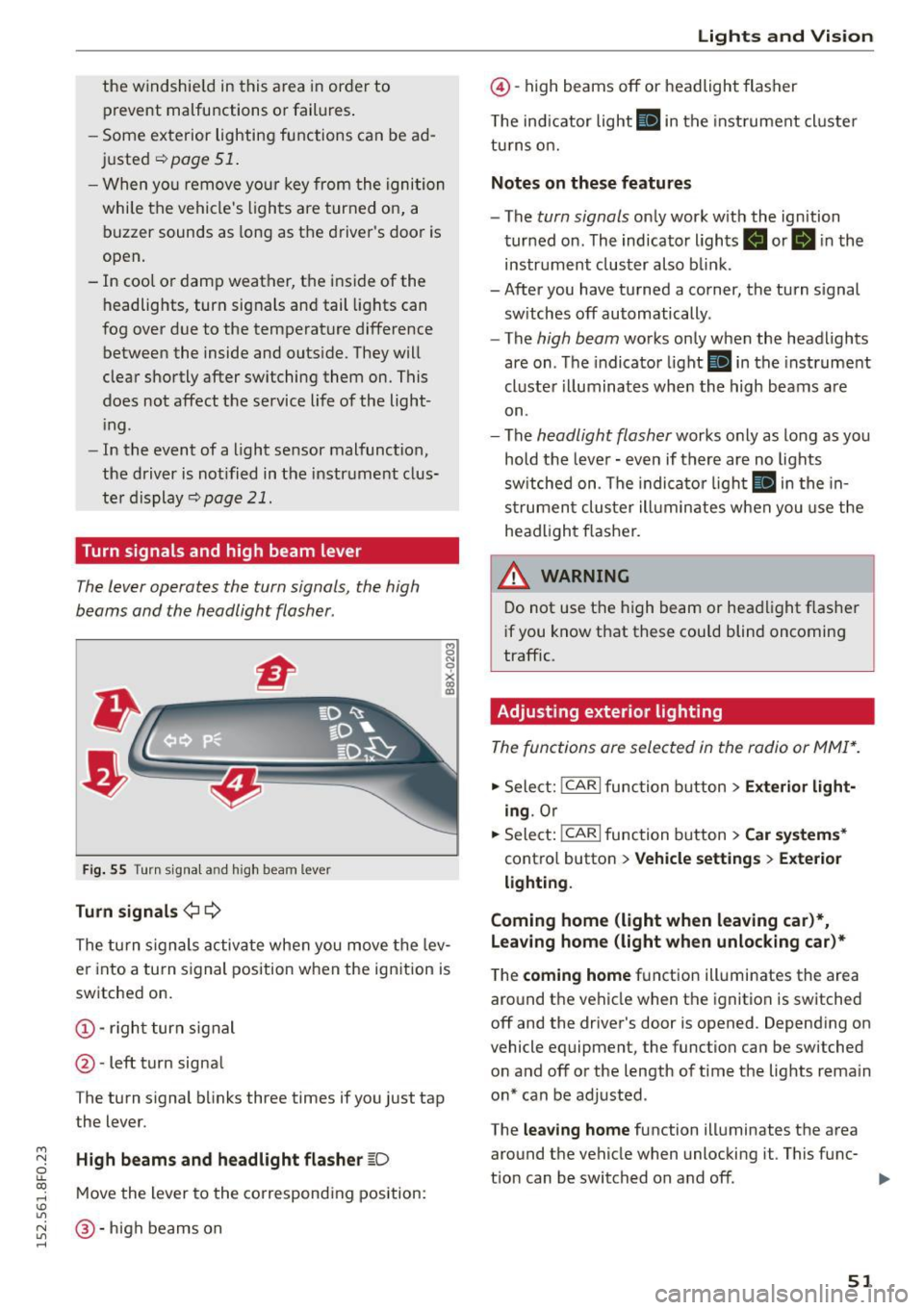
Turn signals and high beam lever
The lever operates the turn signals, the high
b eams and the headlight flasher.
Fi g. 55 Tu rn signa l and high beam lever
Turn signals ¢ Q
g N
0
~ CD
The turn signals activate when you move the lev
er into a turn s ignal position when the ignition is
switched on.
@ -righ t tur n signal
@ -left turn signa l
The turn s ignal b links three times if you just tap
the lever.
High beams and headlight flasher
[0
M ove the lever to the corresponding position:
@ -high beams o n
Lights and Vis ion
@ -high beams off or headlight flasher
T he ind icator light
II in t he inst rument cl uste r
tu rns on.
Notes on these features
- The
turn signals on ly wor k w ith the ign ition
tur ned on. The indicator ligh ts . or
II in the
instr um ent clus ter also b link.
-After you have tu rned a corner, the turn s ignal
sw itches off automatically.
- The
high beam works on ly when the headlights
are on . T he indicator light
II in the instrument
cluste r illuminates whe n the high beams a re
on.
- The
headlight flash er works o nly as long as yo u
hold the leve r - even if there are no lights
sw itched on . The indica to r li ght
II in the in
s trumen t cluste r ill umin ates when you use t he
head light flasher.
,&. WARNING
D o not use t he h igh beam or hea dlight flashe r
i f you know that these could blind oncoming
traffic.
Adjusting exterior lighting
The func tions are selected in the radio or MMI* .
.,. Select: !CAR I func tion b utton > Exterior light
ing .
Or
.,. Sele ct: !~C_A _R~ I function b utton > Car systems *
contro l butto n > Vehicle settings > Exterior
lighting .
Coming home (light when leaving car )*,
Leaving home (light when unlocking car)*
The
coming home f u nction illuminates the area
aro und t he vehicle when the ignition is switched
off and the driver's door is opened. Depend ing on
vehicle equipment, the function can be switched o n and off o r the length of t ime t he lig hts rema in
on* can be adjusted .
The
leaving home function illuminates t he area
around th e vehicle when unloc kin g it. This func-
t ion can be switched on and off. ""
51
Page 56 of 268
Lights and Vision
Q/P -Adjusting the left/right exterior mirror .
Move the knob in the des ired direction.
4ill -Heat ing the m irror g lass depending on the
outside temperature*.
.9 -Folding exterior mirrors* . In the Infotain
ment system, you can select if the mirrors fold in
automatically when you lock the vehicle
¢ page 34.
Front passenger's exterior mirror tilt
function*
To help you see the curb when backing into a
parking space, the surface of the mirror t ilts
slightly . Fo r this to happen, the knob must be in
the position for the front passenger 's outside
mirror.
You can adjust the tilted mirror su rface by turn
ing the knob in the des ired direction . When you
move out of reverse and into another gear, the
new mirror position is stored and assigned to the
key you are using.
The mirror goes back into its origina l position
once you drive forward faster than 9 mph (15 km/h) or turn the ignition off.
A WARNING
Curved mirror surfaces (convex or spherical*)
increase your field of view. Remember that
vehicles or other objects will appear smaller
and farther away than when seen in a flat mir
ror. If you use this mirror to estimate distan
ces of following vehicles when changing
lanes, you cou ld estimate incorrectly and
cause an accident.
(D Note
-If the mirror hous ing was moved by force
(for example, by running into an object
when maneuvering the vehi cle), the mirror
must be folded all the way in using the pow
er folding function. The mirror housing
must not be moved back into place by hand
because this would impair the function of
the mirror mechanism.
- If you wash the vehicle in an automatic car
wash, you must fold the exterior mirrors in
54 to reduce
the risk of damage to the mirrors.
Never fold power folding exterior mirrors*
by hand. Only fold them in and out using
the power controls.
(D Tips
-If the power adjusting function malfunc
tions, the g lass in both mirrors can be ad
justed by pressing on the edge of it by hand.
- The exterior mirror settings are stored with
the memory function* ¢
page 63.
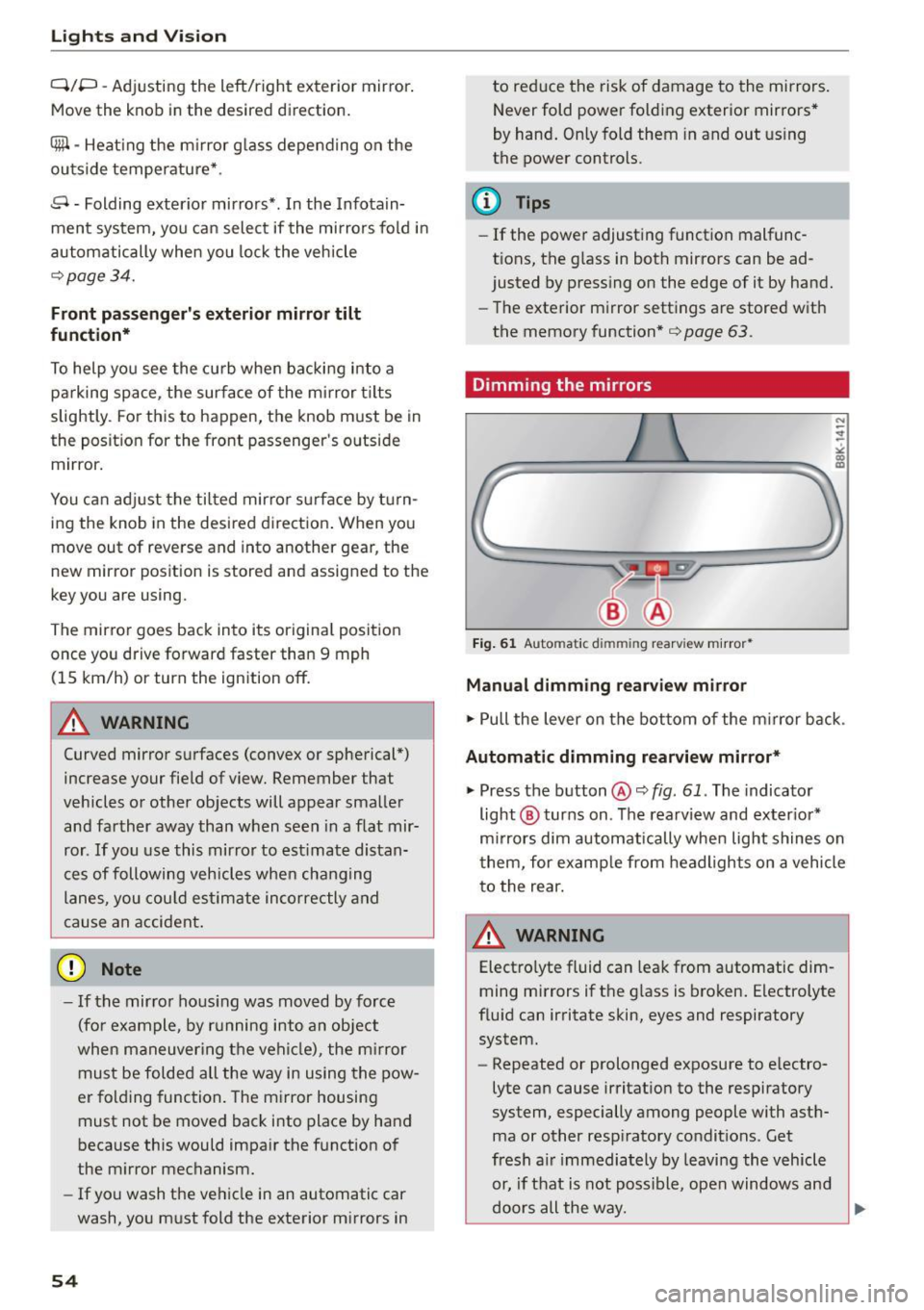
Dimming the mirrors
Fig. 61 Auto mat ic dimmin g rearv iew mirro r•
Manual dimming rearview mirror
.,. Pull the lever on the bottom of the m irror back .
Automat ic dimming rearview mirror*
.,. Press the button@¢ fig. 61. The indicator
light @ turns on . The rearview and exter ior*
mirrors dim automatically when light shines on
them, for example from headlights on a vehicle
to the rear.
~ WARNING
Electro lyte fluid can leak from automatic dim
ming mirrors if the glass is broken. Electrolyte
fluid can irritate skin, eyes and respiratory system.
- Repeated or prolonged exposure to e lectro
lyte can cause irritation to the respiratory
system, especially among people with asth
ma or other resp iratory conditions . Get
fresh a ir immediately by leaving the vehicle
or, if that is not possible, open windows and
doors all the way.
~
Page 62 of 268
Seats and storag e
sudden braking or an accident, yo u wo uld not
be able to brake or accelerate.
Front passenger's seat
Always move the front passenger seat into the rearmost position.
To avo id contact w it h the airbag wh ile i t is de
p loying, do not sit any closer to the inst rument
panel than necessary and always wear the three
point safety belt provided adjusted correctly. We
recommend that you adjust the passenger's seat in the following manner:
.,. Bring the backrest up to an (a lmost) upright
position .
Do not ride with the seat reclined .
.,. Applies to vehicles with adjustable head re
straints: Adjust the head restra int so the upper
edge is as even as poss ible with the top of your
head. If that is not possib le, try to adjust the
head restraint so that it is as close to this posi
tion as poss ible
¢ page 62.
.,. Place your feet on the floor in fron t of the pas
senger's seat.
Front seats
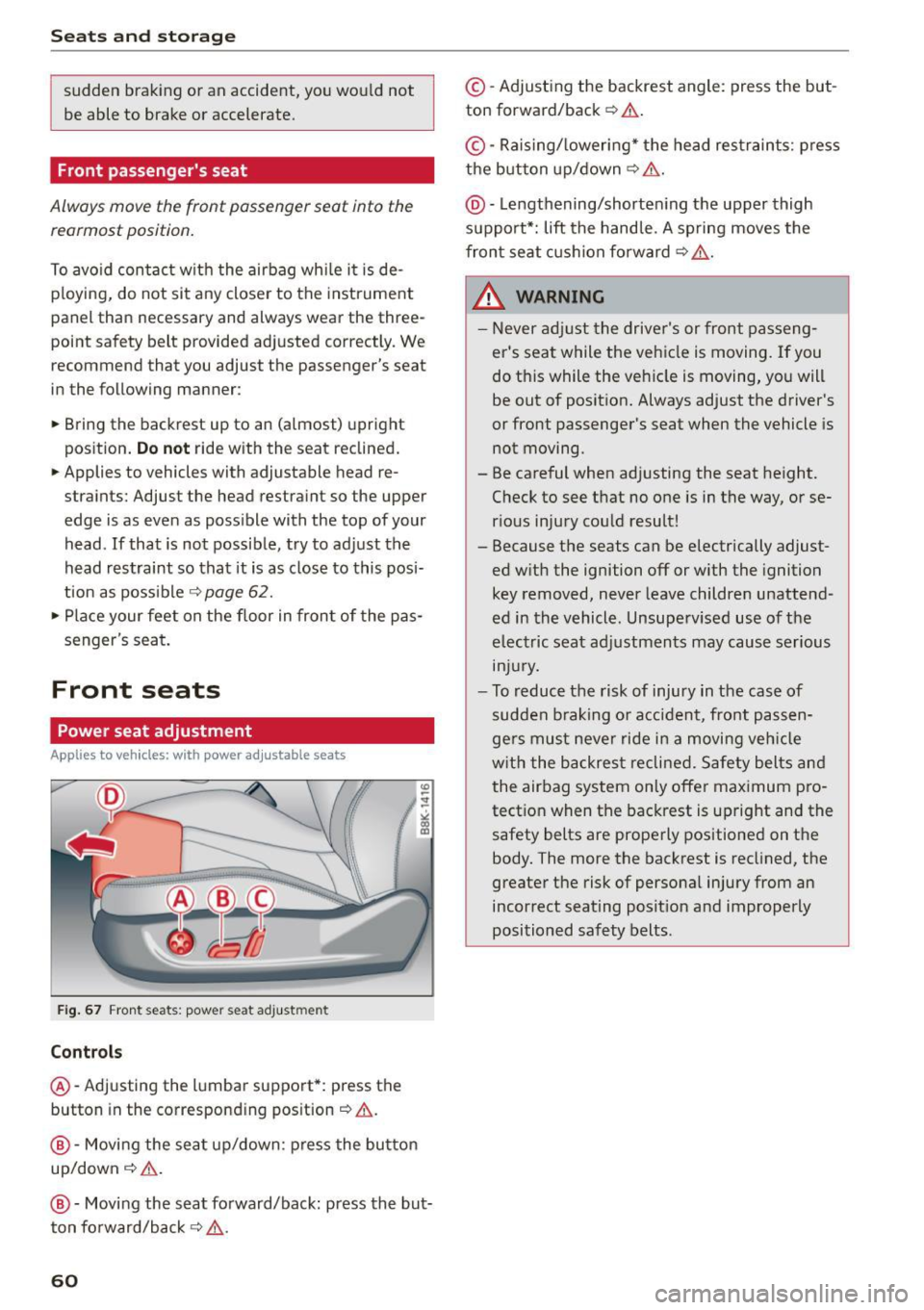
Power seat adjustment
Applies to veh icles: w ith power adj ustable seats
F ig . 67 Front seats : power seat adju stment
Controls
@-Adjusting the l umbar support*: press the
button in the correspond ing pos ition¢ .&.
@-Movi ng the seat up/down: press the button
up/down~ &.
@ -Moving the seat forward/back: press the but
ton fo rward/back
~ 11:-:,. .
60
©-Adjusting the backrest angle: press the but
ton forward/back ¢.& .
©-Raising/ lowering* the head res traints: p ress
the button up/down~ &.
@ -Lengthening/shorte ning the upper thigh
support*: lift the hand le. A sp ring moves the
fron t seat c ushion fo rward ¢
,&..
& WARNING -
-Never ad just the driver's or front passeng
er's seat while the vehicle is moving. If you
do this while the veh icle is moving , yo u will
be out of posit ion. Always adjust the driver 's
or front passenger's seat when the vehicle is
not moving .
- Be careful when adjusting the seat height. Check to see that no one is in the way, or se
r ious injury cou ld result!
- Because the seats can be electrically adjust
ed w ith the ignition off or with the ignition
key removed, never leave childre n unattend
ed in the vehicle. Unsuperv ise d use of the
electric seat adj ustments may cause serious
m Ju ry.
- To reduce the risk of injury in the case of
sudden b raking or accident, fro nt passen
ge rs must neve r ride in a moving veh icle
w it h the backres t reclined. Safety bel ts an d
the air bag system on ly offer ma ximum pro
tect io n when the backrest is upright and the
safety belts are properly positioned on t he
body. The more the backrest is recl ined, the
greater the risk of persona l injury from an
incorrect seating posit ion and improperly
positioned safety belts.
Page 65 of 268
M N
ci LL co
rl I.O
"' N
"' rl
Memory function
Description
Applies to vehicles: with memory function
The memory function allows you to quick ly and
eas ily store and recall personal seating profiles
for the driver. The memo ry function is operated
through the master key and the memory buttons
in the driver's door.
The driver's seating profile is stored and assigned
to the master key each time the veh icle is locked.
When you open the door, the seat profile is auto
matically recalled. If two people use one vehicle,
it is recommended that each person always uses
"their own" master key.
Up to 2 seat profiles can be stored in the memory
buttons in the driver's door. Once they are stored,
these seat profiles can be selected at any time .
I n addition to the driver's seat settings, you can
also store and access the exterior mirror adjust ment settings* using the remote control key or
memory button.
Remote control key
Applies to vehicles: with seat memory
To assign the driver's seat settings to the remote
control key when locking the vehicle, the function
must be activated in the radio or
MM!*
• Select: I CARI function button > Seat adjust·
ment > Driver's seat > Remote control key
>
on .Or
• Select: ~IC _A _ R~I function button> Car systems*
control button > Vehicle settings > Seats >
Driver's seat> Remote control key> On .
(D Tips
If you do not want another driver's settings to
be assigned to the remote key, switch off the
memory function using the radio or
MMI* or
the
I ON/OFF I button ~ page 63.
Seats and storage
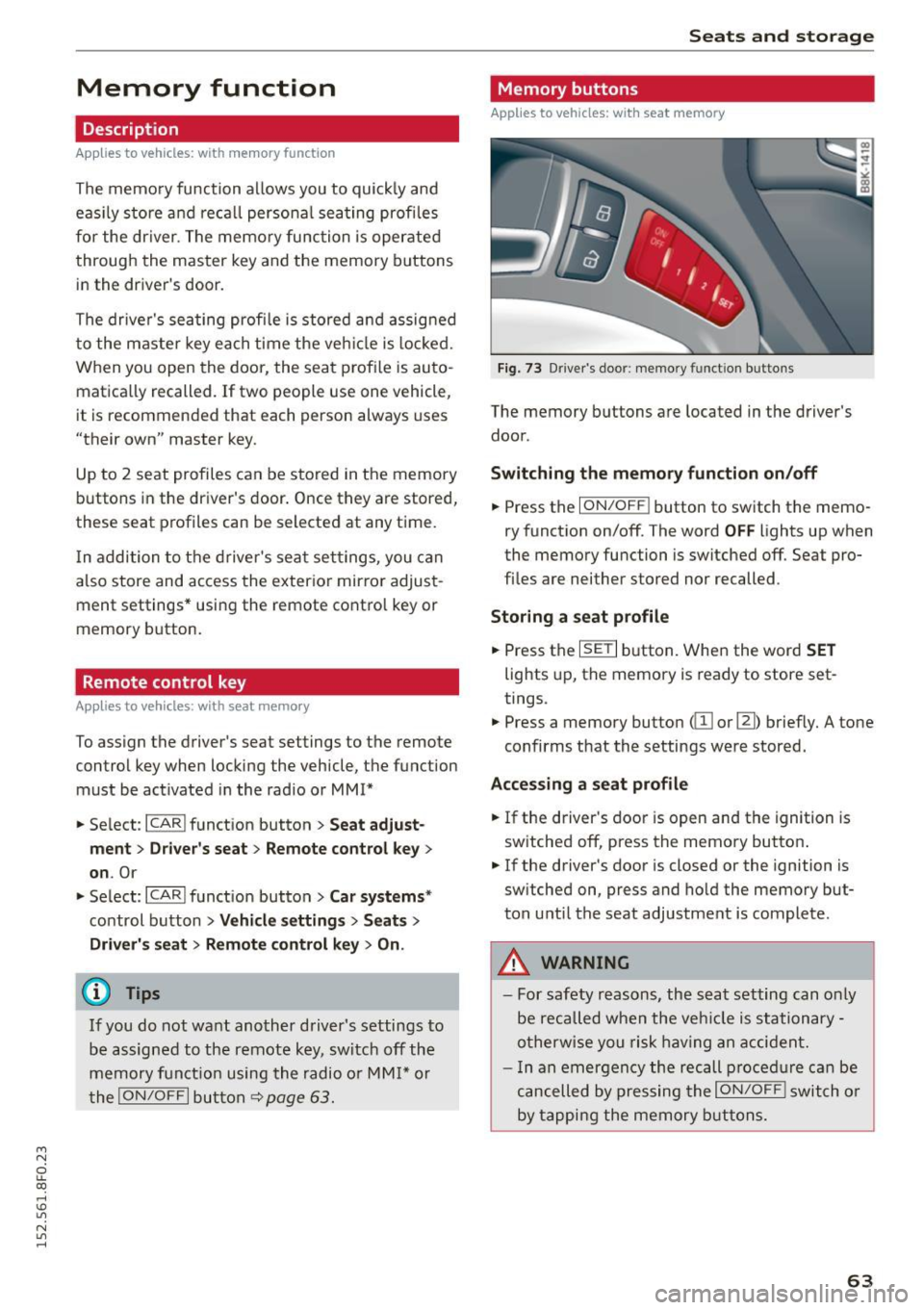
Memory buttons
Applies to vehicles: with seat memory
Fig. 73 Driver's door: memory func tion buttons
The memory buttons are located in the driver's
door.
Switching the memory function on/off
.,. Press the ION/OFF ! button to switch the memo
ry function on/off. The word
OFF lights up when
the memory function is switched off. Seat pro
files are neither stored nor recalled .
Storing a seat profile
.,. Press the ISETI button. When the word SET
lights up, the memory is ready to store set
tings.
• Press a memory button
(ill or [II) briefly. A tone
confirms that the settings were stored.
Accessing a seat profile
.,. If the driver's door is open and the ignition is
switched off, press the memory button .
.,. If the driver's door is closed or the ignition is
switched on, press and hold the memory but
ton until the seat adjustment is complete.
.8, WARNING
- For safety reasons, the seat setting can only
be recalled when the vehicle is stationary -
otherwise you risk having an accident.
- In an emergency the recall procedure can be
cancelled by pressing the
ION/OFF I switch or
by tapping the memory buttons.
63
Page 67 of 268
M N
ci LL co
rl I.O
"' N
"' rl
(upholder
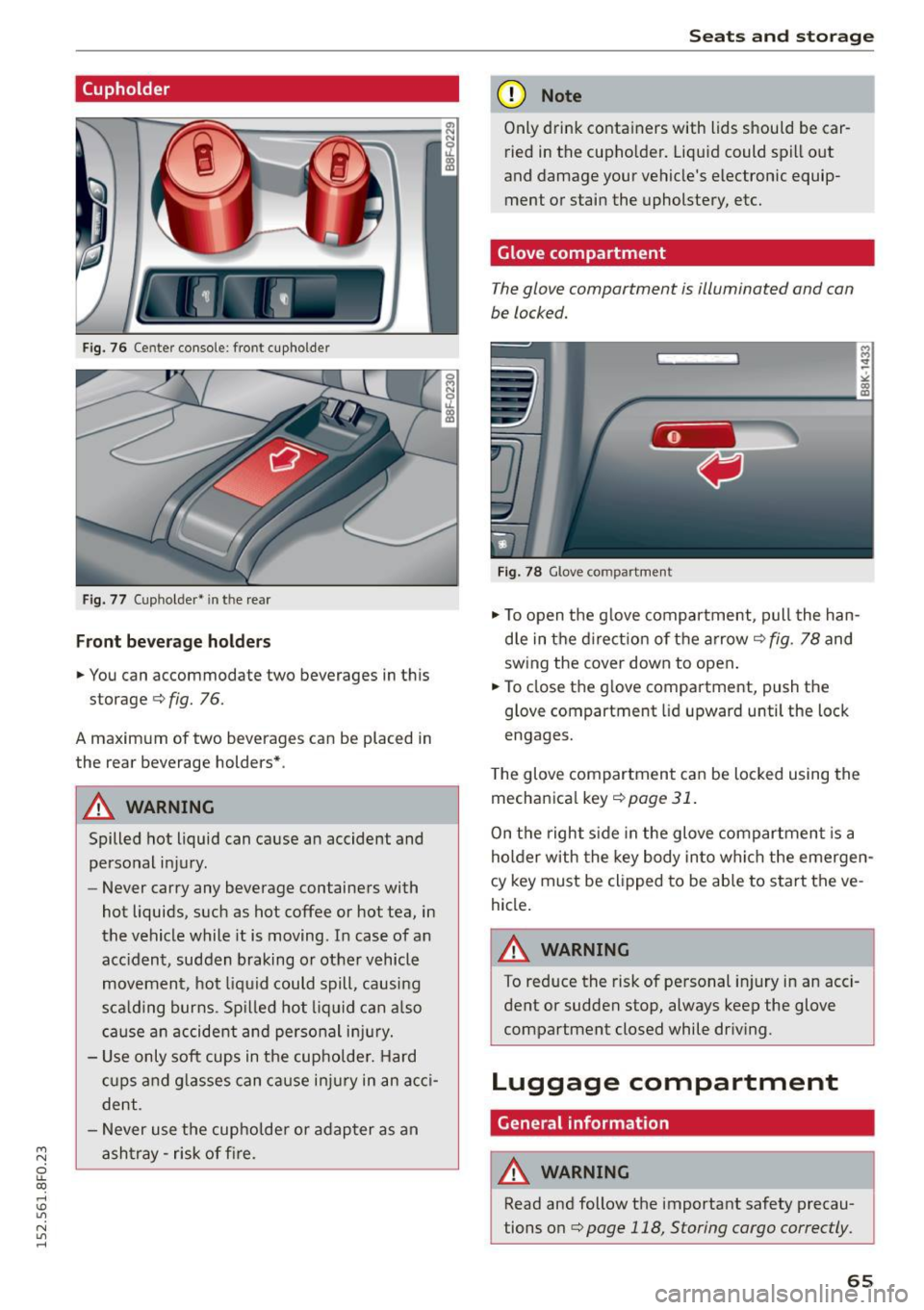
Fig. 76 Center console: front cupholder
Fig. 77 (upholder• in the rear
Front beverage holders
.. You can accommodate two beverages in thi s
storage ¢
fig. 76.
A maximum of two beverages can be placed in
the rear beverage holders* .
A WARNING
Spilled hot liquid can cause an accident and
personal injury.
- Never carry any beverage containers with
hot liquids, such as hot coffee or hot tea, in
the vehicle while it is moving. In case of an
accident, sudden braking or other vehicle
movement, hot liquid could spill, causing
scalding burns. Spilled hot liquid can also
cause an accident and personal injury.
- Use only soft cups in the cupholder. Hard
cups and glasses can cause injury in an acci
dent.
- Never use the cupholder or adapter as an
ashtray -risk of fire.
Seats and storage
(D Note
Only drink containers with lids should be car
ried in the cupholder. Liquid could spill out
and damage your vehicle's electronic equip
ment or stain the upholstery, etc.
Glove compartment
The glove compartment is illuminated and can
be locked.
Fig. 78 Glove compart ment
.. To open the glove compartment, pull the han
dle in the direction of the arrow ¢
fig. 78 and
sw ing the cover down to open .
.. To close the glove compartment, push the
glove compartment lid upward until the lock
engages.
The glove compartment can be locked using the
mechanical key¢
page 31.
On the right side in the glove compartment is a
holder with the key body into which the emergen
cy key must be clipped to be able to start the ve
hicle.
A WARNING
To reduce the risk of personal injury in an acci
dent or sudden stop, always keep the glove
compartment closed while driving.
Luggage compartment
General information
A WARNING
-
Read and follow the important safety precau
tions on ¢
page 118, Storing cargo correctly.
65
Page 70 of 268

Warm and cold
Warm and cold Climate control system
Description
The climate control system warms, cools and
adds humidity to the air in the vehicle interior. It
is the most effective when the windows and pow
er top are closed.
If there is a build-up of heat in
side the vehicle , ventilation can help to speed up
the cooling process.
In all heating mode functions except
defrost, the
blower only switches to a higher speed once the
engine coolant has reached a certain tempera
ture.
Condensation from the cooling system can drip
and form a puddle of water under the vehicle.
This is normal and does not mean there is a leak.
Pollutant filter
The pollutant filter removes pollutants such as
dust and pollen from the air.
The air pollutants filter must be changed at the
intervals specified in your Warranty & Mainte
nance booklet, so that the air conditioner can
properly work.
If you drive your vehicle in an area with high air pollution , the filter may need to be changed
more frequently than specified in your Audi War
ranty
& Maintenance booklet. If in doubt, ask
your authorized Audi Service Advisor for advice.
Key coded settings
The climate control settings are automatically
stored and assigned to the remote control key
that is in use . These settings are different when
the power top is open or closed.
_& WARNING
Reduced visibility is dangerous and can cause
accidents.
68
- For safe driving it is very important that all
windows be free of ice, snow and condensa
tion.
- Completely familiarize yourself with the
proper use and function of the heating and
ventilation system and especially how to de
fog and defrost the windows .
- Never use the windshield wiper/washer sys
tem in freezing weather until you have
warmed the windshield first, using the heat
ing and ventilation system . The washer solu
tion may freeze on the windshield and re
duce visibility .
(U;) Note
- If you suspect that the air conditioner has
been damaged, switch the system off to
avoid further damage and have it inspected
by a qualified dealership.
- Repairs to the Audi air conditioner require
special technical knowledge and special
tools. Contact an authorized Audi dealer for
assistance.
@ For the sake of the environment
By reducing the amount of fuel you use, you
also reduce the amount of pollutants emitted
into the air.
(D Tips
- Keep the air intake slots (in front of the
windshield) free from ice, snow and debris in order to maintain the proper function of
the climate control system.
- The energy management system may switch
the seat heating* or rear window defroster
off temporarily. These systems are available
again as soon as the energy balance has
been restored.
- Air escapes through vents under the rear
window. When placing items of clothing on
the luggage compartment cover, ensure
that the openings are not covered.
Page 75 of 268
M N
ci LL co
rl I.O
"' N
"' rl
Driving
Steering
Manually adjustable steering wheel
The steering wheel position is fully adjus table up
and down and forward and back .
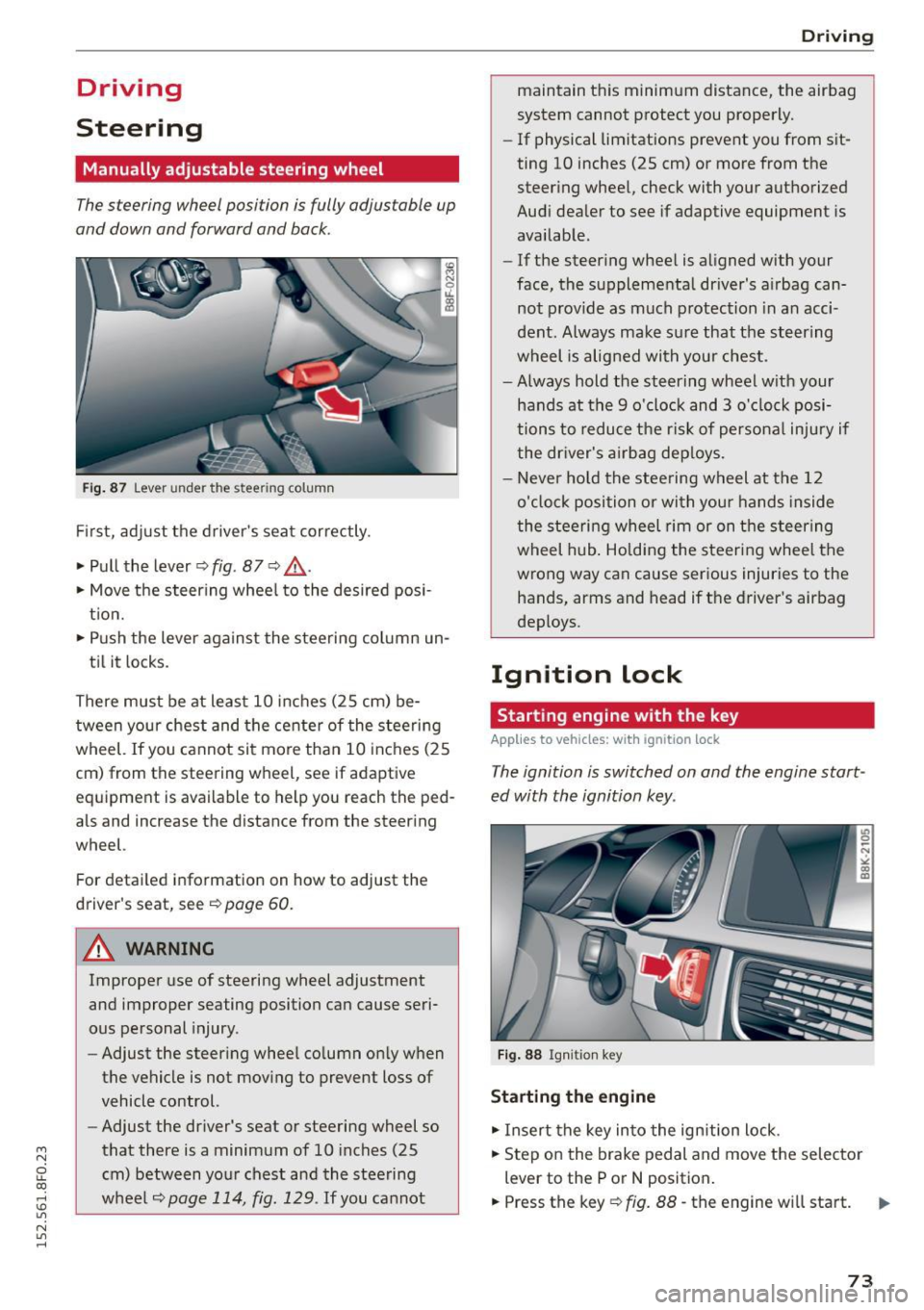
Fig. 87 Lever under the st eering column
First, adjust the driver's seat correctly.
• Pull the lever~
fig. 87 <=? .&, .
• Move the steering wheel to the desired posi
tion.
• Push the lever against the steering column un-
til it locks.
There must be at least 10 inches (25 cm) be tween your chest and the center of the steering
wheel. If you cannot sit more than 10 inches (25
cm) from the steering wheel, see if adaptive
eq uipm ent is available to help you reach the ped
als and increase the distance from the steering
wheel.
Fo r detailed information on how to adjust the
driver's seat, see
~page 60 .
.&_ WARNING
Improper use of steering wheel adjustment
and improper seating position can cause seri
ous personal injury.
- Adjust the steering wheel column only when
the vehicle is not moving to prevent loss of
vehicle control.
- Adjust the driver's seat or steering wheel so
that there is a minimum of 10 inches (25
cm) between your chest and the steering
wheel
~page 114, fig. 129 . If you cannot
-
Driving
maintain this minimum distance, the airbag
system cannot protect you properly.
-If phys ical limitations prevent you from sit
ting 10 inches (25 cm) or more from the
steering wheel, check with your authorized
Audi dealer to see if adaptive equipment is
available.
- If the steering wheel is aligned with your
face, the supplemental driver's airbag can
not provide as much protection in an acci
dent. Always make sure that the steering
wheel is aligned with your chest.
- Always hold the steering wheel with your
hands at the 9 o'clock and 3 o'clock posi
tions to reduce the risk of personal injury if
the driver's airbag deploys.
- Never hold the steering wheel at the 12
o'clock position or with your hands inside
the steering wheel rim or on the steering
wheel hub. Holding the steering wheel the
wrong way can cause serious injuries to the
hands, arms and head if the driver's airbag
deploys .
Ignition lock
Starting engine with the key
Applies to vehicles: with ignition lock
The ignition is switched on and the engine start
ed with the ignition key .
Fig. 88 Ignition key
Starting the engine
• Insert the key into the ignition lock .
• Step on the brake pedal and move the selector
lever to the P or
N position.
• Press the key~
fig. 88 -the engine will start.
73
Page 76 of 268

Driving
Sw itching the ignition on /off
If you would like to switch the ignition o n wit h
out starting the engine, fo llow these steps:
• Inse rt the key into the ignition lock.
• Press the key brief ly
wi thout p ress ing the b rake
pedal.
• To sw itch the ignition off , press the key again.
When starting the engine, major e lectr ica l loads
are sw itched off temporar ily.
You ca n only remove the key with the ignition
sw itched off .
If the engine should not start immedia tely , the
starti ng process is automatically stopped after a
short time . Repeat sta rting procedure .
A WARNING
-Never allow the engine to run in confined
spaces - dange r of asp hyxiation.
- Never remove the ignition key from the ign i
t ion loo k while the vehicle is moving . Other
wise, the steering lock cou ld sudden ly en
gage and you would not be able to steer the
vehicle.
- Always ta ke the key with yo u wheneve r you
leave your vehi cle. Otherwise, the engine
could be started or electrical eq uipment
s uch as the power windows cou ld be operat
ed . T his can lead to ser ious injury.
- Never leave ch ildren or persons requiring as
sistance unattended in the vehicle. The
doors can be locked using the remote trans
mitter, preventing peop le from escap ing
from the vehicle on their own in the event of an emergency . Depending on the time of
year, people inside the vehicle can be ex posed to very high o r very low tempe ra
t ur es.
([) Note
Avoid high engine rpm, full throttle and heavy
eng ine loads until the eng ine has reached op
erati ng temperature - otherwise you risk en
gine dam age.
74
-
@) For the sake of the env ironment
Do not let the engine run while pa rked to
warm up. Begin dr iv ing immediately. Th is re
d uces unnecessary em iss ions .
@ Tips
-If the key cannot be removed from the igni
t ion lock, you have to pu ll the mechan ica l
key out of the master key in order to be able
to lock the vehicle
c::, page 32.
- After starting a co ld engine, there may be a
br ief per iod of increased noise because the
oil pressure must first build up in the hy
draulic valve adjusters. This is norma l and
not a cause fo r concern .
- If you leave the veh icle with the ignition
switched on, the ig nition w ill switch off af
ter a ce rtain period of t ime . Pleas e note tha t
ele ct rical eq uipme nt such as e xterior lights
w ill switch off a s well when that hap pens.
Starting the vehicle with the emergency
key
Applies to vehicles: with ignition lock
You can use the emergen cy key as an igni tion key
in an emergency.
F ig. 89 G love co mp art men t: Adapte r fo r em erge ncy key
Fi g. 9 0 Insert e merg ency key into t he ad ap ter
Page 77 of 268

M N
ci LL co
rl I.O
"' N
"' rl
.. Tak e the adapter for the emergency key out of
the glove compartment
r=:> fig. 89.
.. Push the emergency key r=:> fig. 90 fully into the
adapter. Make sure that the Audi rings are fac
ing up.
.. Press the emergency key in the adapter down
until it latches audibly.
.. Insert the adapter with the emergency key for
ward into the ignition switch . The engine can
now be started as usual.
Stopping the engine
Applies to vehicles: with ig ni tion lock
.. Bring the vehicle to a full stop.
.. Automatic transmission: Move the selector lev
er to the P or N position.
.. Press on the ignition key. The engine is turned
off .
.. You can now remove the key.
Steering lock
The steering locks when you remove the ignition
k ey. The locked steering helps prevent vehicle
theft.
Emergency off
If it is necessary in unusual circumstances, the
engine can be switched off while the vehicle is
moving. The engine will be switched off if you
press on the key for an extended period.
A WARNING
- Never turn off the engine before the vehicle
has come to a complete stop. The full func
tion of the brake booster and the power
steering is not guaranteed . You must use
more force to turn or brake if necessary. Be
cause you cannot steer and brake as you
usually would, this could lead to crashes
and serious injuries.
- For safety reasons, you should always park
your vehicle with the selector lever in P. Oth
erwise, the vehicle could inadvertently roll
away.
- The radiator fan can continue to run for up
to 10 minutes even after you have turned
off the engine and removed the ignition key.
Driving
The radiator fan can also turn on again if the
engine coolant heats up because of intense
sunlight or heat build-up in the engine com
partment.
- Always take the key with you whenever you
leave your vehicle. Otherwise, the engine
could be started or electrical equipment
such as the power windows could be operat
ed. This can lead to serious injury.
- Never leave children or persons requiring as
sistance unattended in the vehicle. The
doors can be locked using the remote trans
mitter, preventing people from escaping
from the veh icle on their own in the event of
an emergency. Depending on the time of
year, people inside the vehicle can be ex
posed to very high or very low tempera
tures.
(D Note
If the engine has been under heavy load for
an extended period, heat builds up in the en
gine compartment after the engine is switch
ed off -there is a risk of damaging the engine.
Allow the engine to run at idle for about two minutes before switching it off.
Convenience key
Starting the engine
Applies to vehicles: wi th convenience key
The !START E NGIN E STOPI button switches the
ignition on and starts the engine.
Fig. 91 Center console : START ENGINE STOP button
Starting the engine
.. Step on the brake pedal and move the selector
lever to P or N
¢ &_ . .,.
75
Page 78 of 268

Driving
"'Press on the I START ENGINE STOPI button
¢fig. 91 -the engine wi ll start.
Switching the ignition on /off
If you would like to sw itch the ignition on with
out start ing the e ng ine, fo llow these steps:
"' Press the
!START ENGINE STOPI button with -
out pressing the brake pedal.
"'T o sw itch the ignition off, press the but to n
again.
If the engine sho uld not start immed iately, the
starting p rocess is a utomat ically stopped after a
short time. Repeat sta rting procedure.
When starting the engine, major e lectr ica l loads
are sw itched off temporar ily .
After a cold engine is started, there may be a brief period of increased noise because oil pres
sure must first build up in the hydraulic valve ad
justers. This is normal and not a cause for con
cern.
_& WARNING
- Never allow t he engine to ru n in co nfine d
spaces -dange r of asp hyxiation.
- Never turn off the engine unti l the vehicle
h as come to a comp lete stop.
- Always ta ke t he key with yo u w heneve r you
leave your vehi cle. Otherw ise, the eng ine
c ou ld be started or ele ct rical eq uipment
s u ch as the power w indows co uld be operat
ed. This can lead to serious injury.
- Never leave ch ild ren o r persons requ iring as
sistance unattended in the vehicle. The doo rs can be locked using the remote trans
mitter, preventing peop le from escap ing
from the vehicle on their own in the event of
an emergency. Depending on the time of
year, people inside the vehicle can be ex
posed to very high o r ve ry low tempe ra-
tu res.
(D Note
- Avoid high eng ine rpm, fu ll throttle and
heavy engine loads until the engine has
r eached operating tempe rat ure - otherwise
you r isk eng ine damage.
76
-
@ For the sake of the environment
Do not let the engine run while pa rked to
warm up. Begin dr iv ing immediately. Th is re
d uces unnecessary em issions.
(!} Tips
- After starting a col d en gine, t here may be a
br ie f per iod of increased noise because the
oil pressure must first bui ld up in the hy
draulic valve adjusters. This is norma l and
not a cause for concern.
- If you leave the veh icle with the ignition
switched on, the ig nition w ill switch off af
ter a ce rtain period of time. Please note that
e lect rical equipment such as exte rior lights
wi ll switch off as well when that happens.
Switching engine off
App lies to vehicles: wi th convenience key
"' Br ing your vehi cle to a comple te stop.
"' Move the se lector lever to the P o r N pos ition.
"' Press the
I START ENGINE STOP ! button
r=>poge 75, fig. 91.
Steering lock
The steer ing lo cks w hen yo u tur n the eng ine off
u sing the
I START ENGINE STOP I button a nd open
the d river's doo r. The loc ked steering helps pre
vent ve hicle theft .
Emergency off
If necessary, the e ngine can be switched off with
the se lec to r lever in the R or D/S posi tions. The
engine s tops if you press a nd ho ld the
I START ENGI NE STOP I button at speeds below
6 mph (10 km/ h) and press the brake peda l.
_& WARNING
-Never turn off the engine before the vehicle
has come to a complete stop. The full func
tion of the brake booster and the power
steer ing is not guaranteed. You must use
more force to turn or b rake if necessary. Be
caus e you cannot stee r and brake as you
usually wo uld, this cou ld lead to crashes
a nd se rio us in juries.
~