key AUDI A5 CABRIOLET 2015 User Guide
[x] Cancel search | Manufacturer: AUDI, Model Year: 2015, Model line: A5 CABRIOLET, Model: AUDI A5 CABRIOLET 2015Pages: 268, PDF Size: 66.88 MB
Page 36 of 268
Opening and closing
opening f unct ion in the power lock ing system
switch
l:@J .
Setting power locking
In th e radio/MM!*, you can set which doors the
central locking system will unlock .
.,. Se lect : ICA RI funct ion button > Central locking .
Or
.,. Se lect : IC AR I functio n button> Car sy stem s*
control button > Vehicle settings > (Central
loc king )*.
Single door unlocking /Unl ock door s* -
you can
specify which doo rs unlock whe n you open the ve
hicle.
- Se lecting
off / All and pressing the~ button o n
the remote con tro l key unlocks the entire veh i
cle .
- Se lecting
on/ Driver and pressing the~ button
on the remote control key once unlocks on ly the
driver 's door. In vehicles with a conve nience
key*, only the door whose handle you pull will
u nlock . If you press the[@] button twice , the en
tire vehicle w ill unlock. If you press the [@) but
ton, the ent ire vehicle will always lock .
Luggage comp. lock/Lock ex terior trunk handle
-If you se lect On , you can no longe r open the
luggage compartment using the rear lid handle
c::> page 35, fig. 25 . In this case, the rear lid can
be opened wi th the ~ button on the master key
c::> page 32, fig . 20 .
Tone when locking -if you select On , a tone w ill
sound w hen you Lock the vehicle.
Auto Loc k/Lock when driving -if you select On,
the entire vehicle will lock automatically when
the speed reaches 9 mph ( 15 km/h).
34
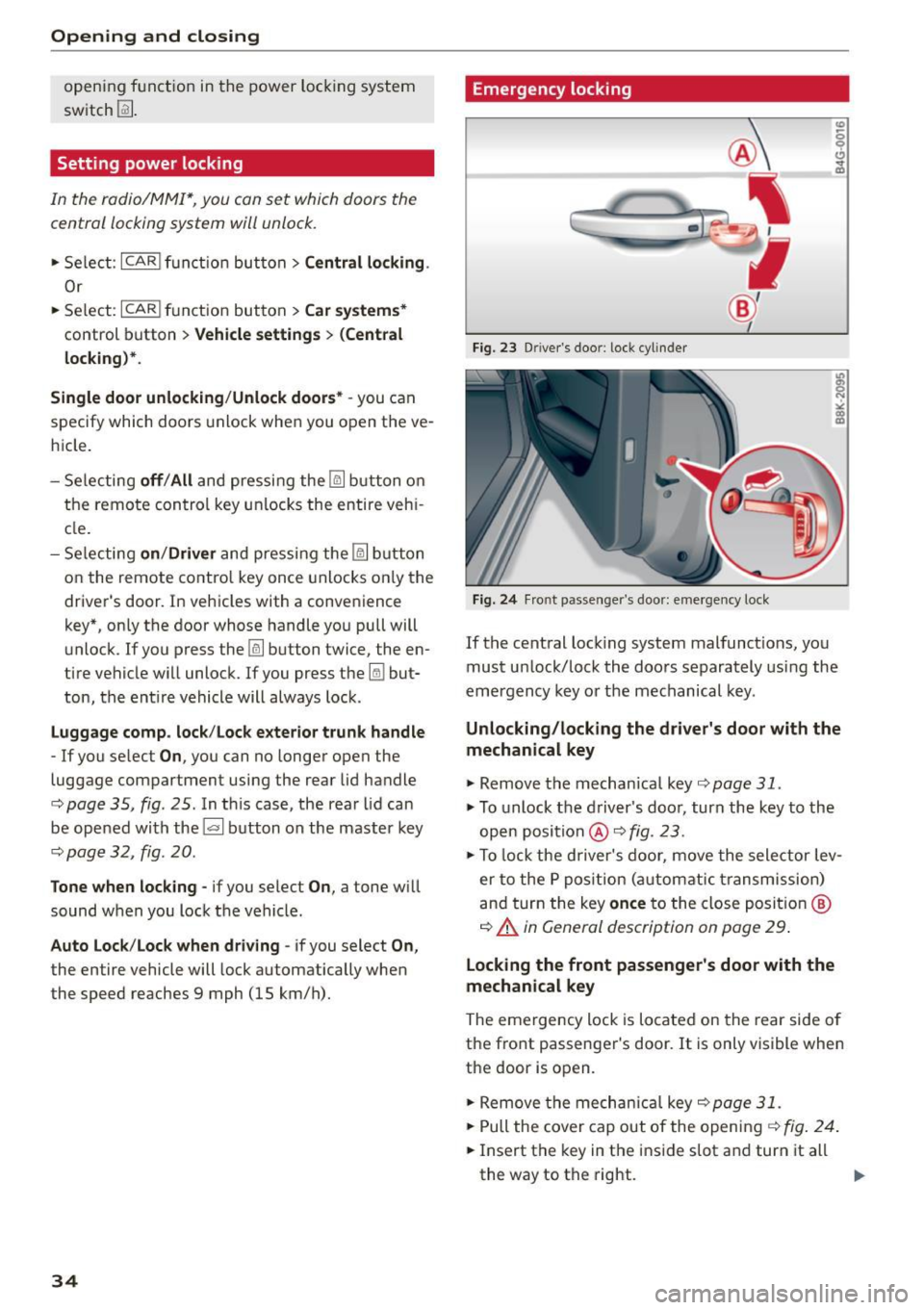
Emergency locking
Fi g. 23 Drive r's doo r: lock cylind er
Fig. 2 4 Fro nt p assenge r's doo r: e merge ncy lock
If the cent ral lock ing system malfunct ions, you
must un lock/Lock the doo rs separately using the
emergency key o r the mechanical key .
Unlocking/locking the driver' s door with the
mechanical key
.,. Remove the mechanical key c::> page 31 .
.,. To unlock the driver's doo r, turn the key to the
open position @
c::> fig. 23 .
.,. To lock the driver's door, move the selector lev
er to the P pos ition (automatic transmission)
an d tur n the key
once to the close posit io n @
c::> A in General description on page 29 .
Locking the front passenger's door with the
mechanical key
The emergency lock is located on the rear side o f
the fro nt passenger 's door. It is only visible when
the door is open .
.,. Remove the mechanica l key
c::> page 31 .
.,. Pull the cover cap out of the open in g c::> fig . 24 .
.,. Insert the key in the i nside s lot a nd turn it all
the way to th e right. ..,.
Page 37 of 268

M N
ci LL co
rl I.O
"' N
"' rl
Once the front passenger's door has been closed,
you cannot open it again from the outside. The
doo r can be opened from the inside by pulling
t he door hand le.
A WARNING
Read and follow all WARNINGS q .&. in Gener
al description on page 29 .
@ Tips
After the ignition is switched on, the power
locking system sw itch is enabled.
Electronic immobilizer
The immobilizer prevents your vehicl e from b eing
started by unauthor ized persons .
Inside the key there is a computer chip . This chip
automatically activates/deactivates the electron ic immobilizer .
Applies to vehicl es with ignition lock :
The electron ic immobilizer deactivates automati
cally when you insert the remote control key into
the ignition lock . It activates again automatically
when you remove the remote control key from
the ignition lock .
Applies to vehicl es with conveni ence k ey :
If the remote control key is located inside the ve
h icle and you press the
! S TAR T ENGINE STOPI
button , the electronic immobilizer deactivates
automatically. If yo u switch the ignit ion off and
remove the remote control key from the vehicle,
the elec tronic immobili zer ac tivates again au to
mat ically .
A WARNING
Always take the key with you when you leave
the vehicle . The key can disa rm the electron ic
engine immob ilizer and permit an unau thor
i z ed person to start the eng ine and enable op
eration of the veh icle systems such as power
w indow o r powe r su nroof leading to serious
personal inj ury .
Open ing and clo sing
(D Tips
- The vehicle cannot be started if an unau
thorized key is used . The vehicle may not
start if another radio device such as a key
for another veh icle or a transponder is locat
ed on the key ring.
- For Declaration of Comp liance to United
States FCC and Industry Canada regulations
¢ page 251.
Luggage compartment
Lid
Opening /closing rear lid
Fi g. 25 Rea r l id: han d le
Opening the r ear lid
.. Press the button cs on the remote control
master key for at least one second. The rear lid
unlocks and opens slightly . Or
.. Press the handle on the rear lid
¢ fig. 25.
Clo sing the rear lid
.,. Pull the rear lid down at the grip on the ins ide
and allow it to drop gent ly to close it¢
A .
A WARNING
-After closing the rear lid, always p ull up on
it to make sure that it is proper ly closed.
Otherwise it could open suddenly when t he
veh icle is moving.
- To help prevent poisono us exhaust gas from
be ing drawn into the veh icle, always keep
the rear lid closed while driving. Neve r
transport objects la rger than those which fit
comp letely into the l uggage area, because
then the rear lid canno t be fu lly closed.
~
35
Page 38 of 268
Opening and closing
-Never leave your vehicle unattended espe
cially with the rear lid left open. A child
could crawl into the car through the luggage
compartment and pull the lid shut, becom
ing trapped and unable to get out. To reduce
the risk of personal injury, never let children
play in or around your vehicle. Always keep
the rear lid as well as the vehicle doors
closed when not in use.
- Always ensure that no one is within range of
the rear lid when it is moving, in particular
close to the hinges -fingers or hands can be
pinched.
© Tips
When the vehicle is locked, the rear lid can be
opened separately by pressing the button~
on the master key. When you close the rear lid
again, it locks automatically.
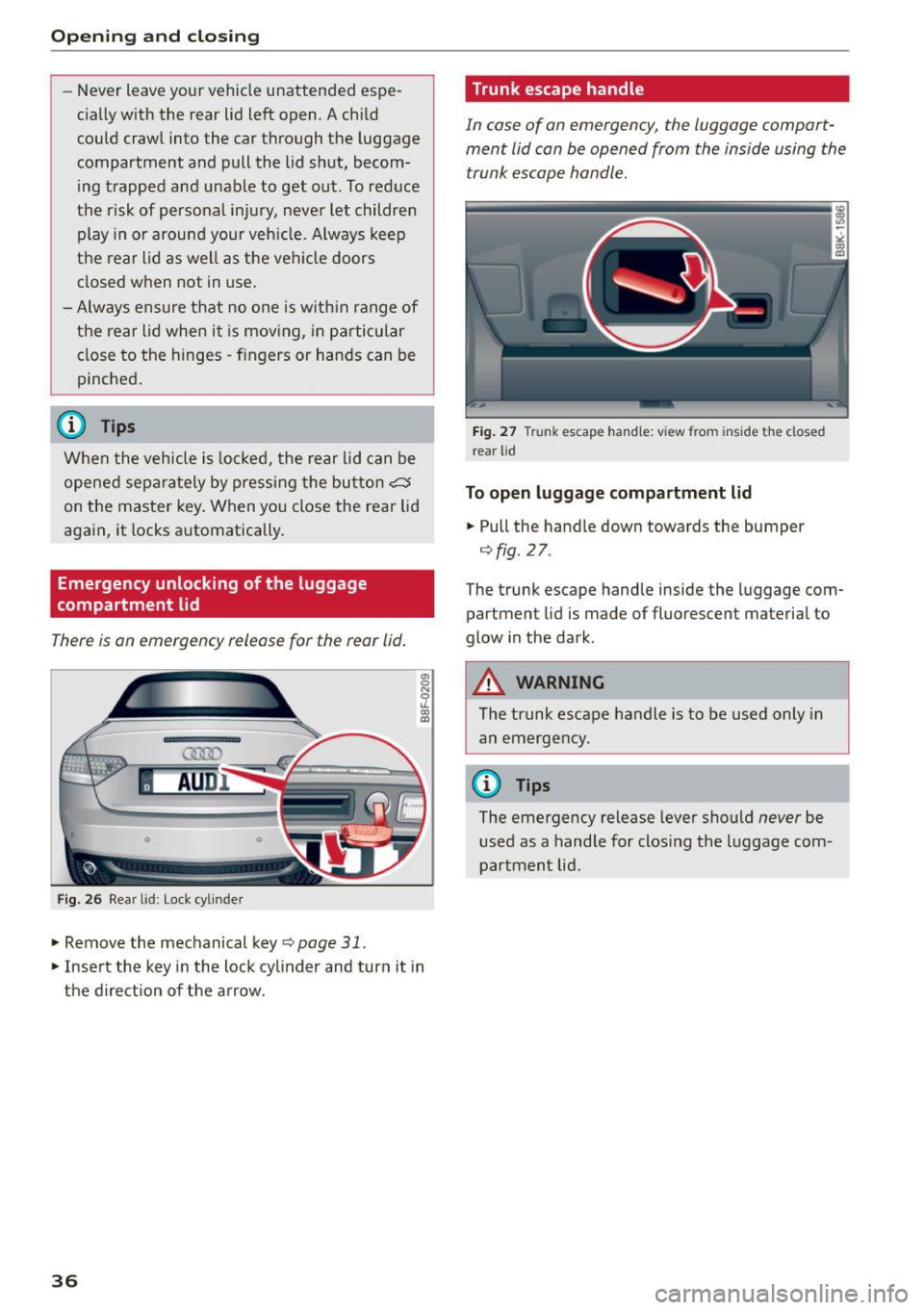
Emergency unlocking of the luggage
compartment lid
There is an emergency release for the rear lid.
Fig. 26 Rear lid: Lock cyli nder
.,. Remove the mechanical key c;, page 31 .
.. Insert the key in the lock cylinder and turn it in
the direction of the arrow.
36
Trunk escape handle
In case of an emergency, the luggage compart
ment lid can be opened from the inside using the
trunk escape handle.
Fig. 27 Trunk escape handle: view from inside the closed
rear lid
To open luggage compartment lid
.. Pull the handle down towards the bumper
¢fig . 27.
The trunk escape handle inside the lugg age com
partment lid is made of fluorescent material to
glow in the dark.
&_ WARNING
The trunk escape handle is to be used only in
an emergency.
(D Tips
The emergency release lever should never be
used as a handle for closing the luggage com
partment lid.
Page 39 of 268

Power Windows
Controls
The driver can control all power windows.
Fig . 28 Section of the driver 's door: Controls
l
l
f
I
I !
I
Fig. 29 Center console: centra l power window sw itch
All power window switches¢ fig. 28 are provided
with a
tw o-pos ition functi on:
Opening th e window s
"' Press the sw itch to the first stop and hold it un
ti l the window reaches the desi red position .
"' Press the sw itch briefly to the
sec ond stop to
automatical ly open the window.
Cl os ing th e window s
"' Pull the switch to the fir st sto p and hold it until
the window reaches the desired position .
"' Pull the switch briefly to the
seco nd stop to au-
tomat ica lly close the window .
Power window switche s
@ Driver's door
@ Passenger's door
~ © Left rear window
ci
~ @ Right rear window
rl 1.0
"' N
"' rl
Open ing and clo sing
You can open or close a ll the windows with the
switch ¢
fig. 29.
.&_ WARNING
-
-When you leave your vehicle -even if only
briefly -always
remove the ignition key. This
applies particularly when children remain in
the vehicle . Otherwise the ch ildren could
start the engine or operate electrical equip
ment (e.g. power windows) . The power win
dows are functiona l until the dr iver's door or
p a ssenger's door has been opened.
- Pay close attention when closing the win
dows to prevent p inching of hands or limbs.
- When locking the vehicle from outside, the
veh icle must be unoccup ied since the win
dows can no longe r be opened in an emer
gency .
(D Tips
-When you open the doors, the windows au
tomatically lower about 10 mm.
- After the ign ition has been switched off, the
w indows can still be opened or closed fo r
about 10 minutes. The w indow regulators
are no t sw itched until the driver 's or pas
senge r's door is opened.
Convenience opening /closing
The windows can be opened and closed with the
mechanical key or the emergency key.
Fig. 30 Key turns for opening and closing
Conven ience op ening feature
"' Use the emergency key or pull the mechanical
key out of the master key
c> page 31.
.,. Insert the key into the lock of the driver's door. IJI,-
37
Page 40 of 268

Opening and closing
• Turn the key to position ¢ fig . 30 @ until all
the windows have reached the des ired position.
Convenience closing feature
• Use the emergency key or pull the mechanical
key out of the master key
¢ page 31.
• Turn the key in the lock of the dr iver's door to
the lock pos ition @ unt il the windows are
closed
¢ _A .
.&_ WARNING
- Never close the windows inattentive ly and
without checking -there is r isk of injury.
- You must always watch when the windows
are being ra ised so that no one can be trap
ped.
If you release the key, the closing ac
tion is immediately canceled.
- Always read and heed WARNING ¢
& in
General description on page
29 .
Correcting window regulator malfunction
-
After disconnect ing the vehicle battery, the one
t ouch up and down feature mus t be activated
again.
• Pull and hold the power window switch until
the window is complete ly closed.
• Release the switch and pull the switch again for
one second .
Valet parking
Applies to vehicles: with valet parking functio n
The valet parking feature protects the luggage
compartment from unauthorized access .
-
Fig. 31 Glove compar tment: valet parking bu tton
38
You can switch the "valet parking function" on
when someone else is park ing your vehicle. When
the function is switched on, the vehicle can be
driven , locked and unlocked using the master key,
but access to the luggage compartment is not
permitted.
• Take the mechanical key out of the master key
¢page 31 .
• Open the glove compartment¢ page 65.
• Activate ¢ fig. 31 the "valet parking" feature by
press ing the
!VA LET I button . The indicator light
in the switch illuminates.
• Close the glove compartment and lock it w ith
the mechan ical key.
• Leave the master key with the service personnel
for parking and keep the mechanical key with
you.
The following buttons are deactivated when the
valet parking function is switched on :
-
~ button on the master key
- Handle in the rear lid
When the valet parking feature is activated, the message
Valet parking activated appears in the
instrument cluster display when you switch the
i gnition on.
Garage door opener
(Homelink)
Description
App lies to vehicles: with garage door opener (Homelink)
Fig. 32 Garage door ope ne r: examples o f us ing w ith d iffer
ent systems
You can activate various systems such as garage
doo rs, security systems and home lighting from
i nside your vehicle using the garage door opener .,.
Page 45 of 268
M N
ci LL co
rl I.O
"' N
"' rl
(D Note
-To prevent damage to the power top:
- do not store any objects in the powe r top
compartment.
- make sure the re is enough space above
the vehicle when open ing or closing the
power top.
- To reduce the risk of damage, make su re
there are no fragile objects within the stor
age bay's range of motion.
(D Tips
- To prevent the battery from draining, do not
open or close the power top repeatedly
when the engine is switched off.
- A message will appear in the instrument cluster display if there is a power top ma l
funct ion
~ page 44.
- The power top can also be operated manual
l y if there is a malfunct ion ¢
page 46,
Power top emergency operation. The cause
of the malfunction should be corrected by
an a uthorized Audi dea ler or authorized re
pair facility as soon as possible.
- The vehicle is not protected from the weath
er or from unauthorized entry if the vehicle
is left parked with the power top open. Lock
any objects you are leaving in the vehicle in
the luggage compartment. Close the power
top before leaving the vehicle.
- The side windows lower slightly automati
cally when opening/closing the power top.
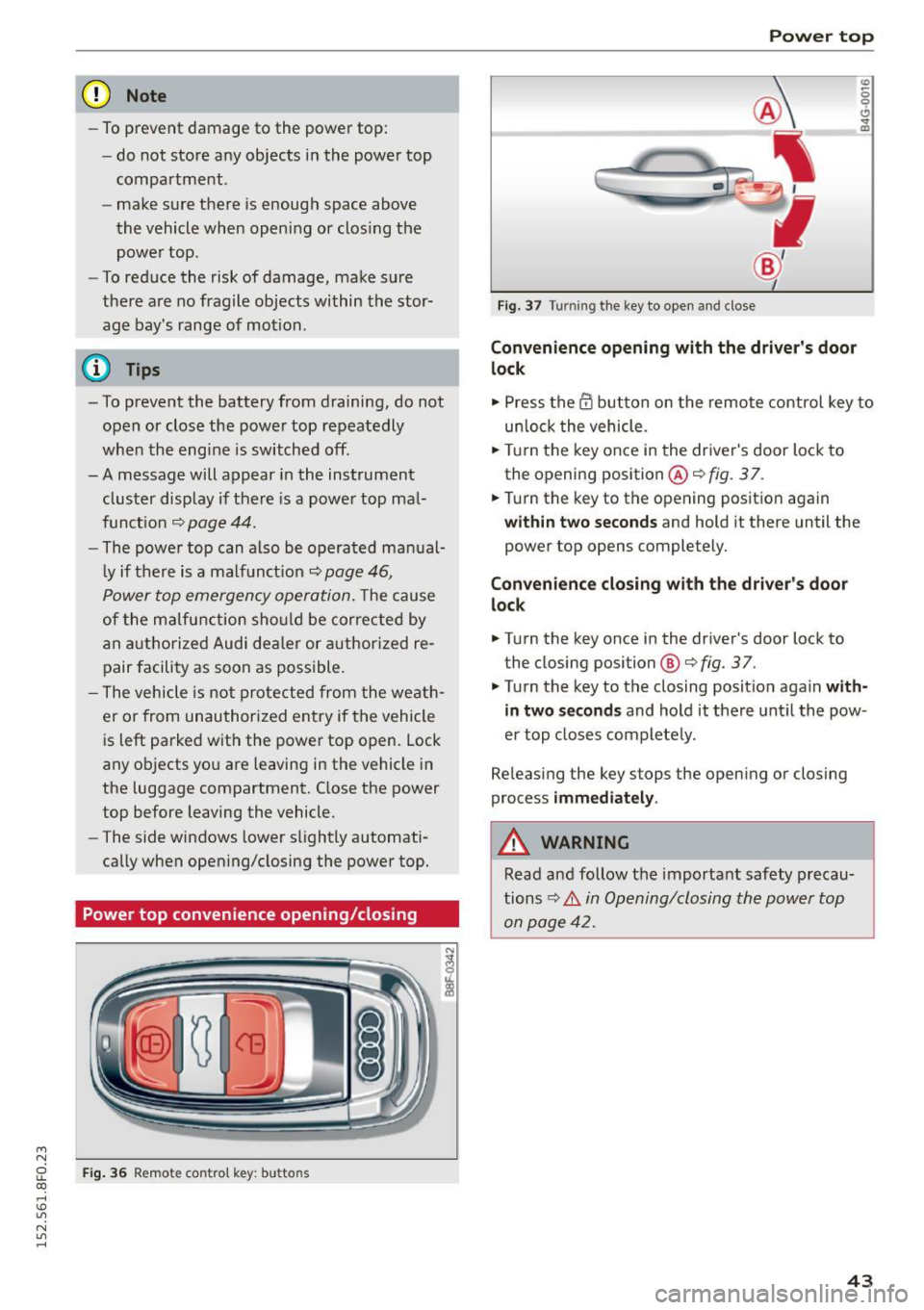
Power top convenience opening/closing
F ig . 36 Remote control key: buttons
Power top
Fig. 37 Turning the key to open and close
Convenience opening with the driver 's door
lock
0
0 ... m
"" Press the@ button on the remote control key to
un loc k the vehicle .
.,. Turn the key once in the driver's door lock to
the opening position @¢
fig. 3 7.
.,. Turn the key to the opening position again
wi thin two seco nds and hold it there until the
power top opens completely.
Conv enience closing with th e dri ver's door
lo ck
.,. Turn the key once in the driver's door lock to
the closing position@¢
fig. 37.
.,. Turn the key to the closing position aga in with
in t wo se cond s
and hold it there unt il the pow
er top closes completely.
Releasing the key stops the opening or closing
process
i mm ed ia te ly .
A WARNING
Read and follow the important safety precau
tions
c:> .&. in Opening/closing the power top
on page 42.
4 3
Page 48 of 268
Power top
Power top emergency
operation
General information
The power top can be closed manually if there is
a malfunction .
• Set the parking brake .
• Open the windows.
• Switch the ignition off.
• To reduce pressu re in the power top hydrau lics,
pull the~ button for approximately 10 to 15
seconds
¢ page 42, fig. 35 .
Only close the power top manual ly in an emer
gency . Have a second person help yo u. Drive to an
authorized Audi dealer or author ized repair facili
ty immediately to have the malf unction correct
ed.
A WARNING
- There is a risk of pinching your hands or in
juring other people during all steps in the power top emergency operation process.
- Make sure all w indows are open during
emergency operation.
- Do not hold the power top supports or
other moving parts.
- Never dr ive when the power top is not
locked correct ly. The wind from driv ing
could cause the power top to open . This can
result in injuries and damage to the vehicle.
(1) T ips
The vehicle headliner is not clipped in and the
power top compa rtment cover is not locked
after using the power top emergency opera
tion procedure. Drive to an authorized Audi
dea ler or authorized repa ir facility immed iate
ly to have the malfunction corrected.
46
.
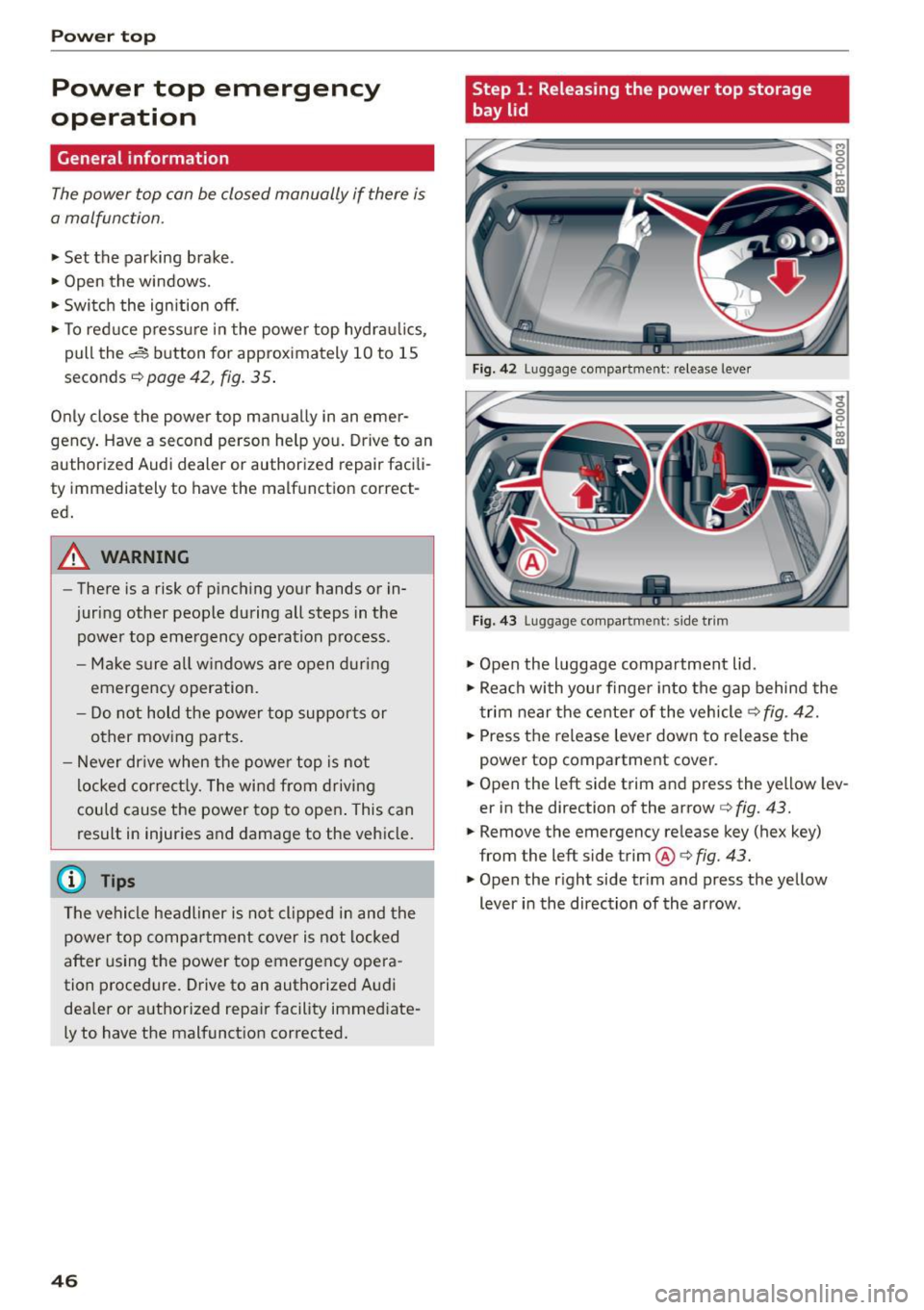
Step 1 : Releasing the power top storage
bay lid
Fig. 42 Luggage compartme nt: release lever
Fig. 43 Luggage compartme nt: side tr im
• Open the luggage compartment lid.
• Reach with you r finger into the gap behind the
t rim near the center of the vehicle¢
fig. 42.
• Press the release lever down to release the
power top compartment cover.
• Open the left side trim and press the yellow lev
er in the direction of the arrow ¢
fig. 43.
• Remove the emergency release key (hex key)
from the left side trim®¢
fig. 43.
• Open the right side tr im and press the yellow
lever in the direction of the arrow .
Page 49 of 268
M N
ci LL co
rl I.O
"' N
"' rl
Step 2: Lifting the power top compartment
cover out
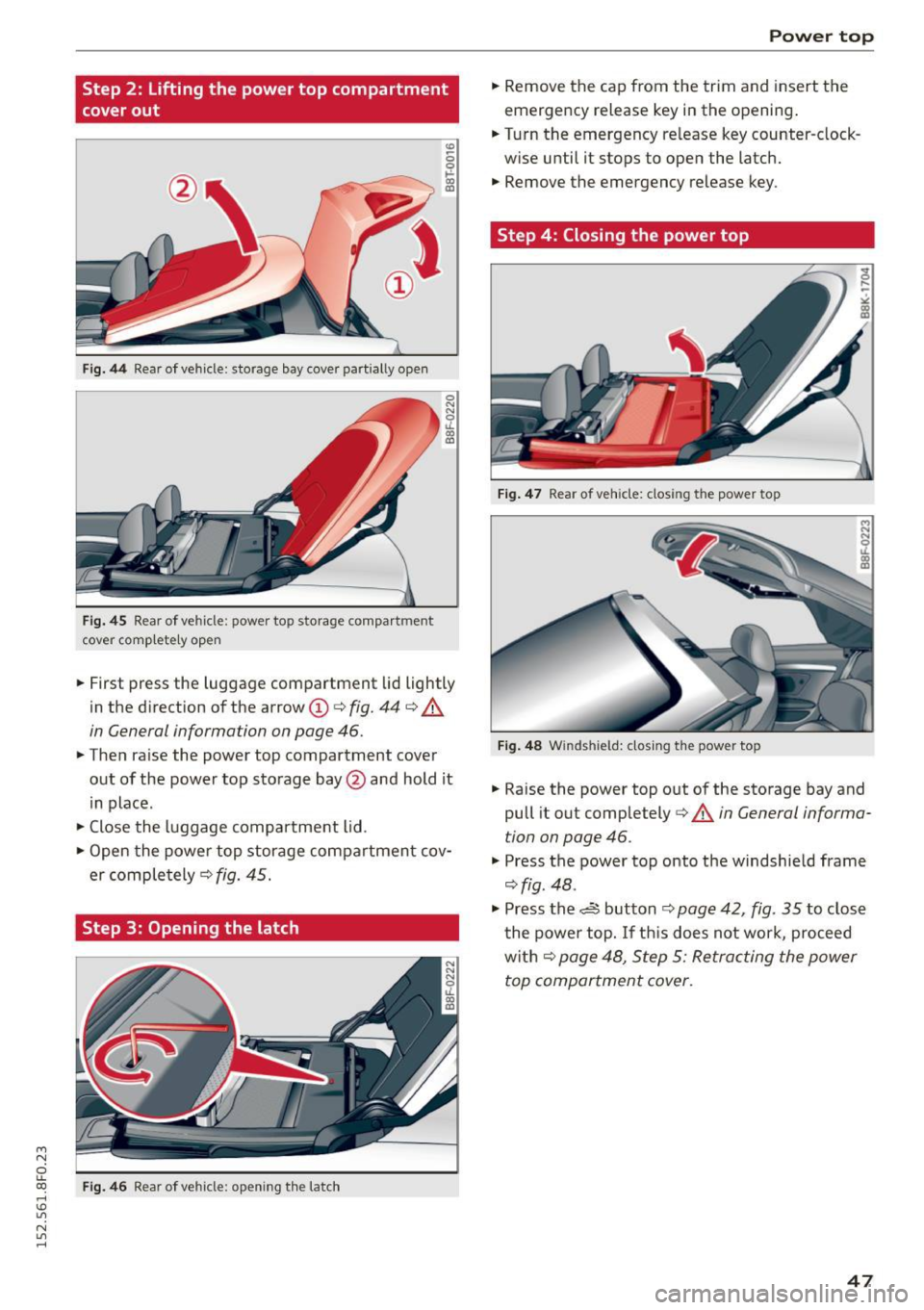
Fig. 44 Rear of vehicle: storage bay cover part ially open
Fig. 45 Rear of vehicle: power top storage compartment
cover complete ly open
0
"'
"' 0 ,1. co a,
.. First press the luggage compartment lid lightly
in the direction of the arrow @c>
fig. 44 r=> .&.
in General information on page 46.
.. Then ra ise the power top compartment cover
out of the power top storage bay @and hold it
in place.
.. Close the luggage compartment lid .
.. Open the power top storage compartment cov
er comple tely~
fig. 45.
Step 3: Opening the latch
Fig. 46 Rear of vehicle: opening t he latch
Power top
.. Remove the cap from the trim and insert the
emergency release key in the opening .
.. Turn the emergency release key counter-clock
w ise until it stops to open the latch .
.. Remove the emergency release key.
Step 4: Closing the power top
Fig . 47 Rear of vehicle: closing the power top
Fig . 48 W indshie ld: closing the power top
.. Raise the power top out of the storage bay and
pull it out completely c>
.&. in General informa
tion on page 46 .
.,. Press the power top onto the windshie ld frame
r=>fig. 48 .
.,. Press the d:, button ¢ page 42, fig. 35 to clos e
the power top. If th is does not work, proceed
w ith
¢ page 48, Step 5: Retracting the power
top compartment cover.
47
Page 50 of 268
Power top
Step S: Retracting the power top
compartment cover
"' 0 ,.... ~
" "' U)
Step 7: Loosening the headliner
Fig. 51 Rear w indow: loosening the right side of the head-
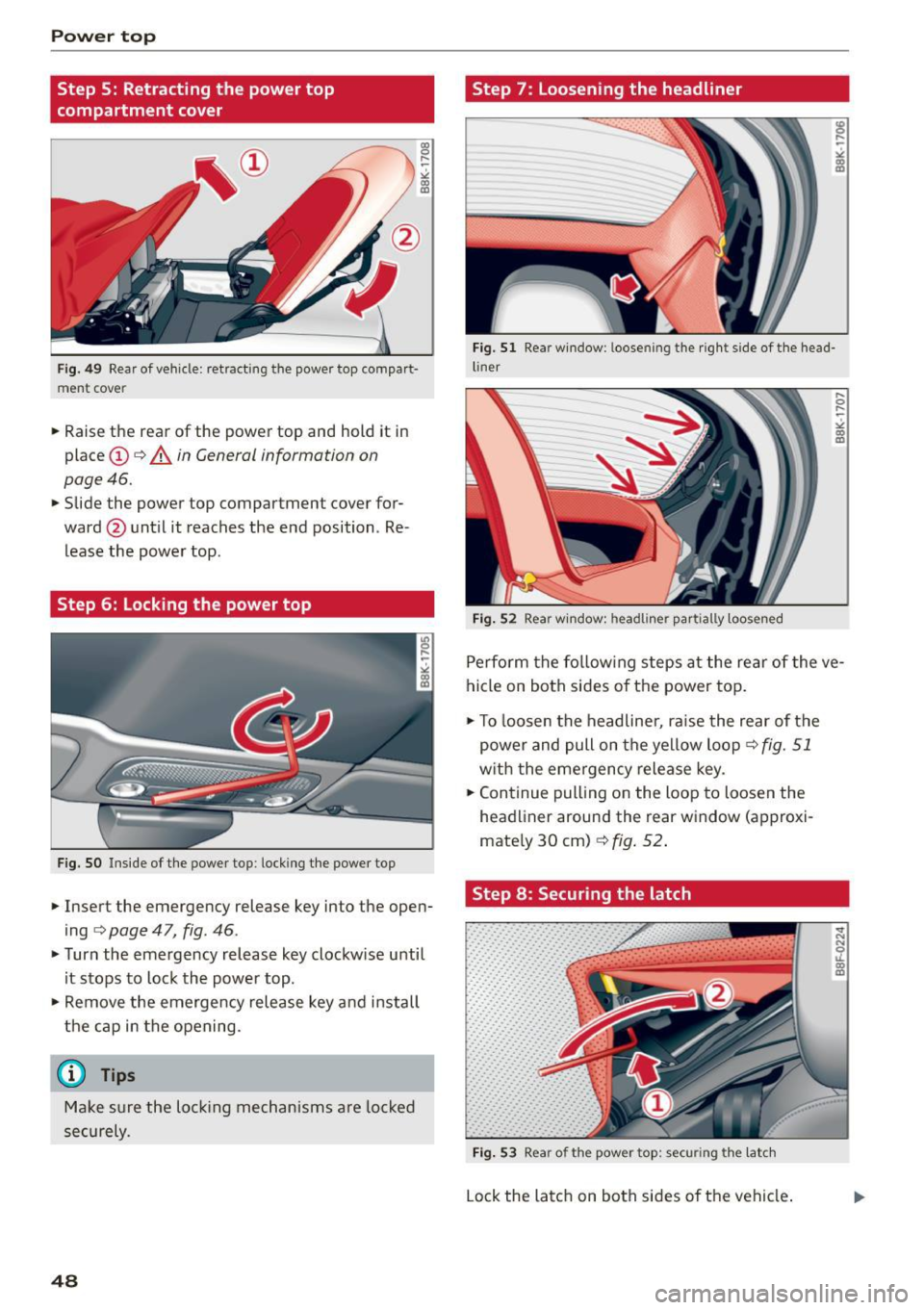
Fig. 49 Rear of vehicle: retracting the power top com part· liner
ment cover
.. Raise the rear of the power top and hold it in
place @
¢ A in General information on
page 46 .
.. Slide the power top compartment cover for
ward @until it reaches the end position . Re
lease the powe r top .
Step 6: Locking the power top
Fig. SO Inside of the power top: locking the power top
.. Insert the emergency release key into the open
ing
¢ page 47, fig. 46 .
.. Turn the emergency release key clockw ise until
it stops to lock the power top .
.. Remove the emergency release key and in stall
the cap in the opening.
(D Tips
Make sure the lockin g mechanisms are lock ed
securely.
48
Fig. 52 Rear window: headliner partially loosened
Perform the follow ing steps at the rear of the ve
hicle on both sides of the power top .
.. To loosen the headliner , ra ise the rear of the
power and pull on the yellow loop
¢ fig. 51
with t he eme rgency release key .
.. Continue pulling on the loop to loosen the
headl iner around the rear window (approxi
mate ly 30 cm)
¢ fig . 52 .
Step 8: Securing the latch
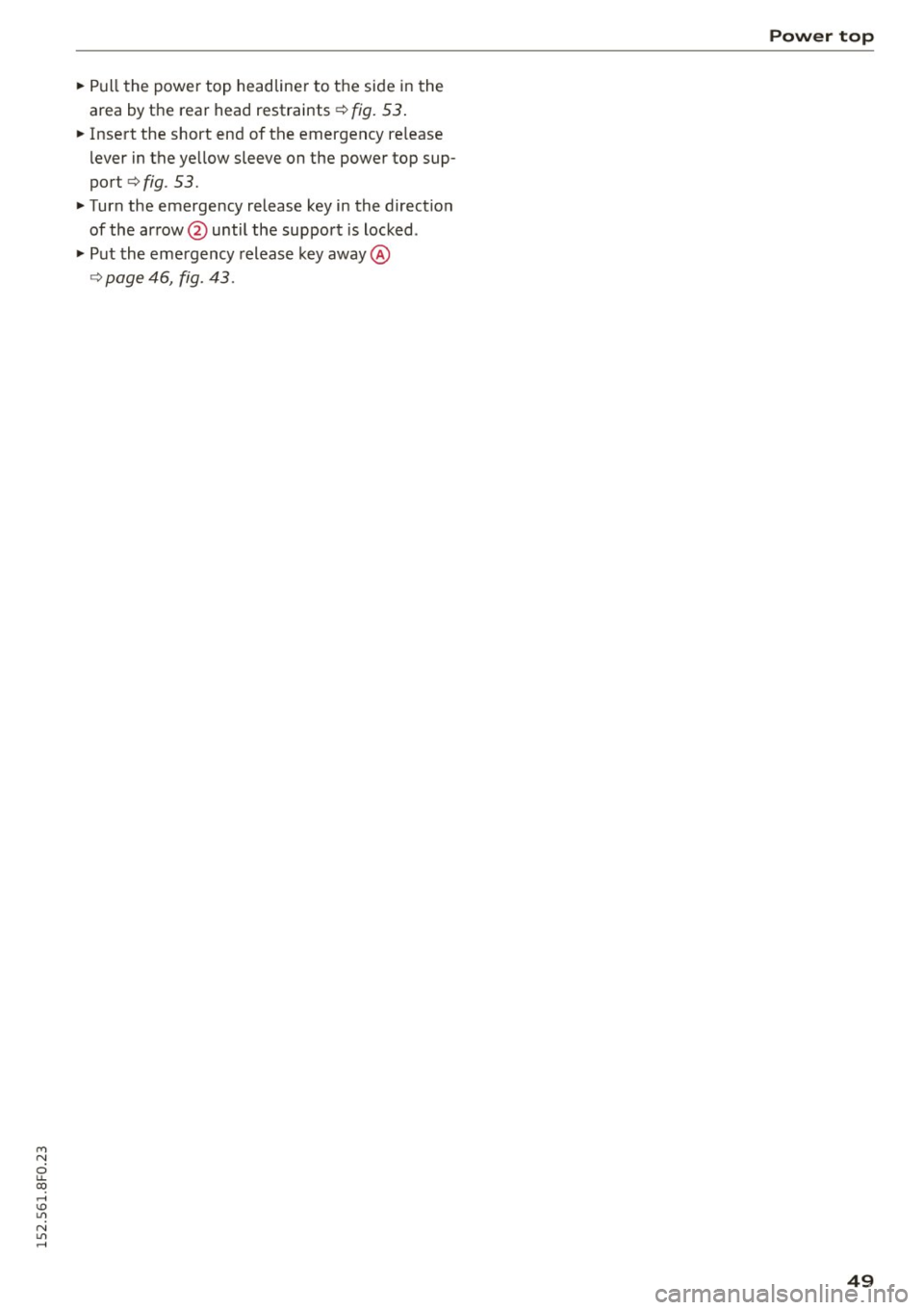
Fig. 53 Rear of the power top: securing the latc h
Lock the latch on both sides of the vehicle .
... N N
:r (0 U)
Page 51 of 268
M N
ci u.. co ,...., \!) 1.1'1
N 1.1'1 ,....,
~ Pull the power top headliner to the side in the
area by the rear head restraints¢
fig. 53.
~ Insert the short end of the emergency re lease
lever in the ye llow sleeve on the power top sup
port
¢ fig . 53.
~ Turn the emergency release key in the direction
of the arrow @until the support is locked .
~ Put the emergency release key away @
¢ page 46, fig. 43.
Power top
49