light AUDI A5 CABRIOLET 2015 Owner's Guide
[x] Cancel search | Manufacturer: AUDI, Model Year: 2015, Model line: A5 CABRIOLET, Model: AUDI A5 CABRIOLET 2015Pages: 268, PDF Size: 66.88 MB
Page 55 of 268
M N
ci LL co
rl I.O
"' N
"' rl
Interior lighting
Front/rear interior lights
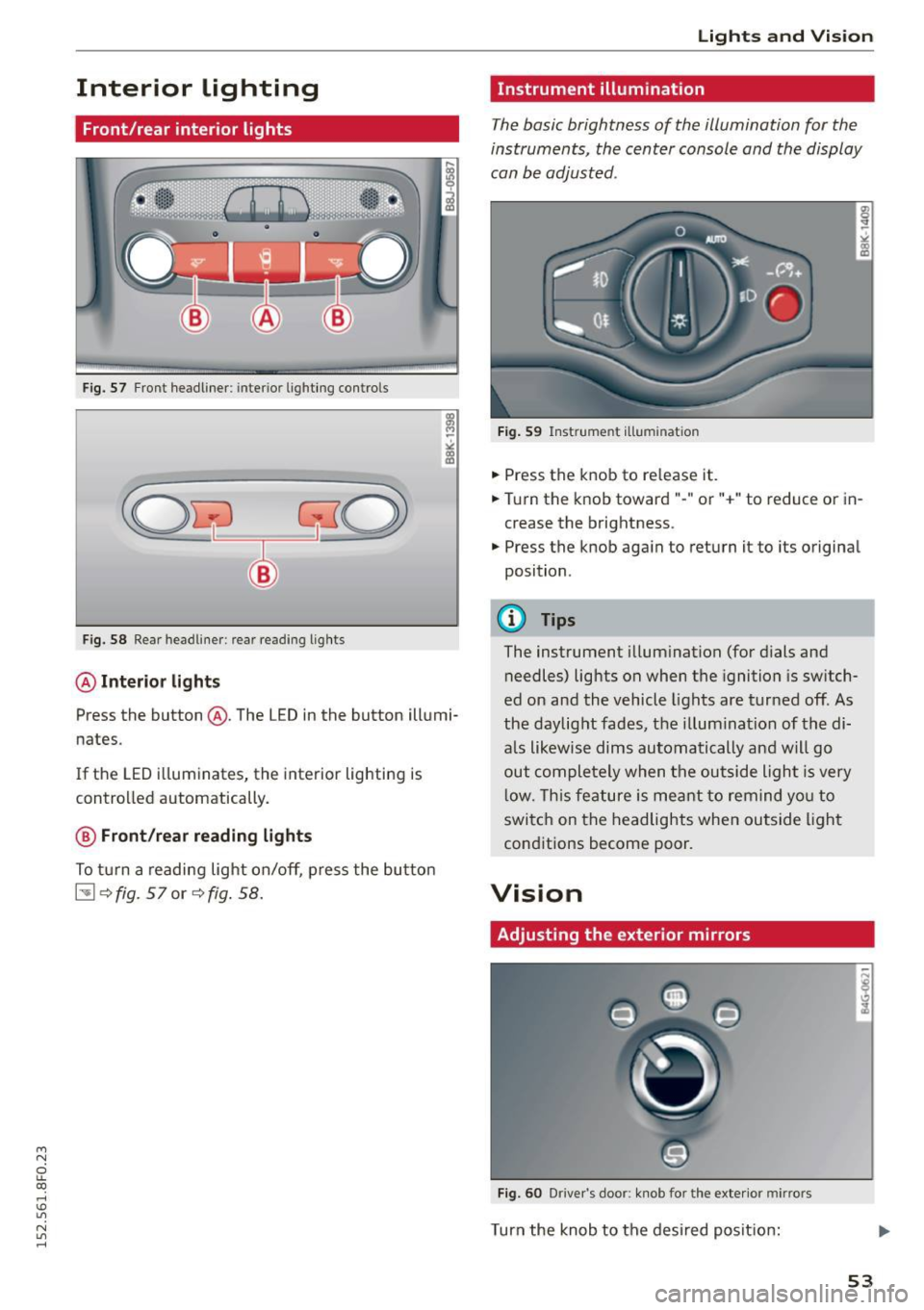
Fig. 57 Fr ont headliner : interio r ligh ting contro ls
F ig. 58 Rear headliner: rea r reading lig hts
@ Interior lights
Press the button @. The LED in the button illumi
nates.
If the LED i lluminates, the interior lighting is
controlled automatically.
@ Front/rear reading lights
To tu rn a reading light on/off, p ress the bu tton
[!] ~fig. Sl or~fig . 58.
Lights and Vis ion
Instrument illumination
The basic brightness of the illumination for the
instruments, the center console and the display
can be adjusted .
Fig . 59 Inst rume nt illumination
• Press the knob to re lease it .
.. Tu rn the knob toward"-" or "+" to reduce or in
crease the brightness.
• Press the knob again to return it to its original
position .
@ Tips
The instrument illum ination (for d ials and
needles) lights on when the ignition is sw itch
ed on and the vehicle lights are tur ned off. As
the daylig ht fades, the illum ination of the di
a ls likewise dims automatically and will go
out comple tely when the out side ligh t is very
l ow. Th is fe ature is meant to remind yo u to
swi tch on the headlights when ou tside light
cond itions become poor.
Vision
Adjusting the exterior mirrors
Fi g. 60 Drive r's door : knob for the exte rio r mirrors
Turn the knob to the desired posit ion:
53
Page 56 of 268
Lights and Vision
Q/P -Adjusting the left/right exterior mirror .
Move the knob in the des ired direction.
4ill -Heat ing the m irror g lass depending on the
outside temperature*.
.9 -Folding exterior mirrors* . In the Infotain
ment system, you can select if the mirrors fold in
automatically when you lock the vehicle
¢ page 34.
Front passenger's exterior mirror tilt
function*
To help you see the curb when backing into a
parking space, the surface of the mirror t ilts
slightly . Fo r this to happen, the knob must be in
the position for the front passenger 's outside
mirror.
You can adjust the tilted mirror su rface by turn
ing the knob in the des ired direction . When you
move out of reverse and into another gear, the
new mirror position is stored and assigned to the
key you are using.
The mirror goes back into its origina l position
once you drive forward faster than 9 mph (15 km/h) or turn the ignition off.
A WARNING
Curved mirror surfaces (convex or spherical*)
increase your field of view. Remember that
vehicles or other objects will appear smaller
and farther away than when seen in a flat mir
ror. If you use this mirror to estimate distan
ces of following vehicles when changing
lanes, you cou ld estimate incorrectly and
cause an accident.
(D Note
-If the mirror hous ing was moved by force
(for example, by running into an object
when maneuvering the vehi cle), the mirror
must be folded all the way in using the pow
er folding function. The mirror housing
must not be moved back into place by hand
because this would impair the function of
the mirror mechanism.
- If you wash the vehicle in an automatic car
wash, you must fold the exterior mirrors in
54 to reduce
the risk of damage to the mirrors.
Never fold power folding exterior mirrors*
by hand. Only fold them in and out using
the power controls.
(D Tips
-If the power adjusting function malfunc
tions, the g lass in both mirrors can be ad
justed by pressing on the edge of it by hand.
- The exterior mirror settings are stored with
the memory function* ¢
page 63.
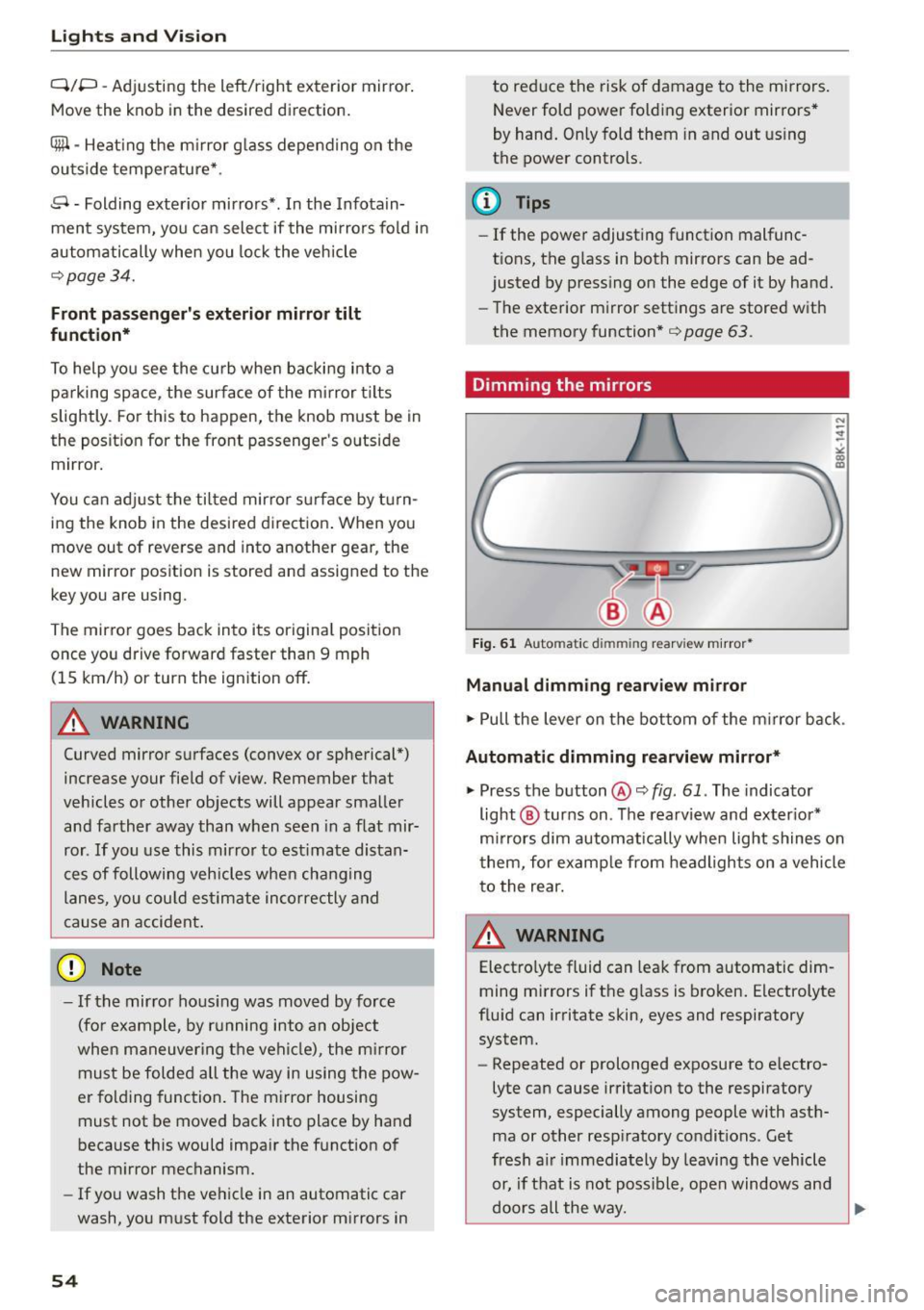
Dimming the mirrors
Fig. 61 Auto mat ic dimmin g rearv iew mirro r•
Manual dimming rearview mirror
.,. Pull the lever on the bottom of the m irror back .
Automat ic dimming rearview mirror*
.,. Press the button@¢ fig. 61. The indicator
light @ turns on . The rearview and exter ior*
mirrors dim automatically when light shines on
them, for example from headlights on a vehicle
to the rear.
~ WARNING
Electro lyte fluid can leak from automatic dim
ming mirrors if the glass is broken. Electrolyte
fluid can irritate skin, eyes and respiratory system.
- Repeated or prolonged exposure to e lectro
lyte can cause irritation to the respiratory
system, especially among people with asth
ma or other resp iratory conditions . Get
fresh a ir immediately by leaving the vehicle
or, if that is not possible, open windows and
doors all the way.
~
Page 57 of 268
M N
ci LL co
rl I.O
"' N
"' rl
-If electrolyte gets into the eyes, flush them
thoroughly with large amounts of clean wa
ter for at least 15 minutes; medical atten
tion is recommended .
- If electrolyte contacts skin, flush affected
area with clean water for at least 15 mi nutes and then wash affected area with
soap and water; medical attention is recom
mended. Thoroughly wash affected clothing
and shoes before reuse.
-If swallowed and person is conscious, r inse
mouth with water for at least 15 minutes.
Do not induce vomit ing unless instructed to
do so by medical professional. Get medical
attention immediate ly .
(D Note
Liquid electrolyte leaking from broken mirror
glass will damage any plastic surfaces it
comes in contact with. Clean up spilled elec
trolyte immediate ly with clean water and a
sponge .
@ Tips
-Switch ing off the dimming function of the
i nside rear view mirror also deactivates the
automatic dimming function of the exterior
mirrors .
- Automatic dimming for the mirror only op
erates properly if the light striking the in
side mirror is not h indered by other objects.
- The automatic dimming mirrors do not dim
when the interior lighting is turned on or
the reverse gear is selected.
Sun visors
T.__~l
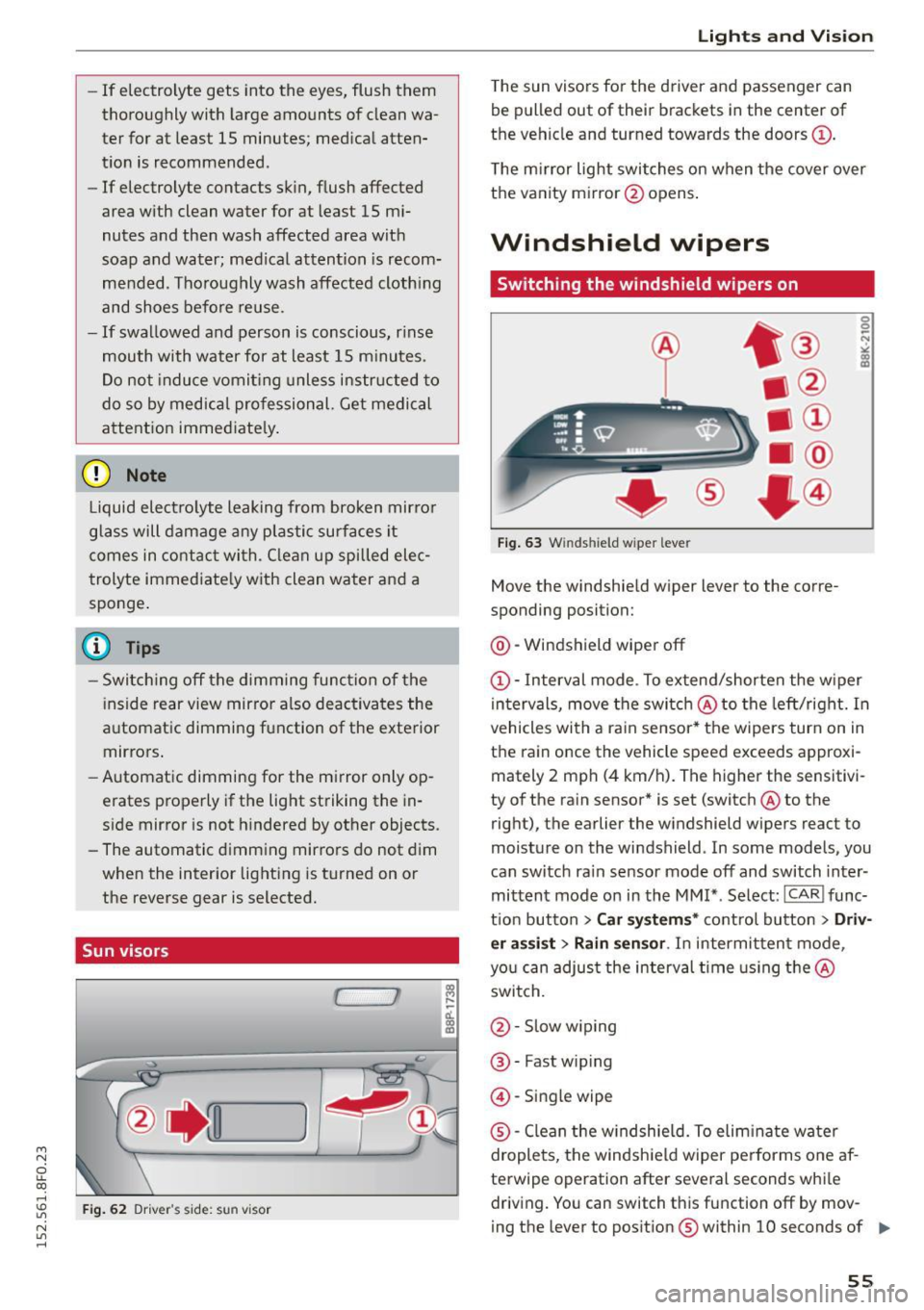
Fig. 62 Dr ive r"s side: su n visor
Lights and Vision
The sun visors for the driver and passenger can
be pulled out of their brackets in the center of
the vehicle and turned towards the doors@.
The mirror light switches on when the cover over
the vanity mirror @opens .
Windshield wipers
Switching the windshield wipers on
®
Fig. 63 Winds hield w iper leve r
Move the windshield wiper lever to the corre
sponding position:
@ -Windshield wiper off
(D-Interval mode . To extend/shorten the wiper
intervals, move the switch @to the left/right. In
vehicles with a ra in sensor* the wipers turn on in
the rain once the vehicle speed exceeds approxi mately 2 mph (4 km/h). The higher the sensitivi
ty of the rain sensor* is set (switch @to the
right), the earlier the windshield wipers react to
moisture on the windshield . In some models, you
can switch ra in sensor mode off and switch inter
mittent mode on in the MMI* . Select :
ICARI func
t ion button
> Car systems* control button > Driv
er assist> Rain sensor .
In intermittent mode,
you can adjust the interval time using the@
switch.
@ -Slow w iping
@ -Fast wip ing
@ -Single wipe
® -Clean the w indshield. To elim inate water
droplets, the windsh ield wiper performs one af
terwipe operation after several seconds while driving. You can switch this function off by mov -
ing the lever to posit ion ® within 10 seconds of ..,.
55
Page 58 of 268
Ligh ts a nd Vi sion
th e afterwipe operation. The afterwipe function
is reactivated the next time the ignition is switch
ed on.
Clean ing the headlights*. The headlight washer
system* operates only when the headlights are
on.
If you move the lever to pos ition @ , the
headlights are washed in intervals.
A WARNING
- The rain sensor is only intended to assist the
driver . T he driver is still responsible for
manually switching the wipers on according
to the v is ibility conditions .
- The w indshield may not be treated w ith wa
ter -repelling windsh ield coating agents . Un
favorable condit ions, such as wetness, dark
ness, low sun, can result in increased g lare.
Wiper b lade chatter is also possible.
- Properly functioning w indshield w iper
blades are required for a clear view and safe
dr iv ing ¢
page 56, Replacing windshield
wiper blades .
(D Note
-In the case of frost, check whether the
windsh ield wiper b lades are frozen to the
windsh ield. Sw itching on the windsh ield
wipers can damage the wiper blades!
- Prior to using a car wash, the winds hield
wiper system m ust be switched off (lever in
position @). T his helps to prevent uninten
tiona l switching on and damage to the
windshield wiper system .
@ Tips
-The windshield wipe rs are switched off
when the ignition is turned off. Activate the
windshield wipers after the ignition is
switched back on by moving the windsh ield
wiper lever to any pos it ion.
- Worn or dirty windshie ld w iper blades result
i n streaking. This can affect the rain sensor*
funct ion. Check your windshield wiper
blades regularly .
- The washer fluid nozzles of the windshield
washer system are heated at low tempera
tures when the ignit ion is on.
56
- W hen stopping temporarily, (e .g. at a traffic
light) the set speed of the windshield wipers
is automat ica lly reduced by one speed.
Cleaning windshield wiper blades
Clean the windshie ld w iper blades when they be
gin to leave streaks . Use a soft cloth and glass
cleaner to clean the windshield w iper blades .
.. Place the windshie ld wiper a rms in the service
position. Refer to ¢
page 56.
.. Lift the wiper arm away from the front window .
A WARNING
Dirty windshield wiper b lades can impair your
view. This can lead to accidents.
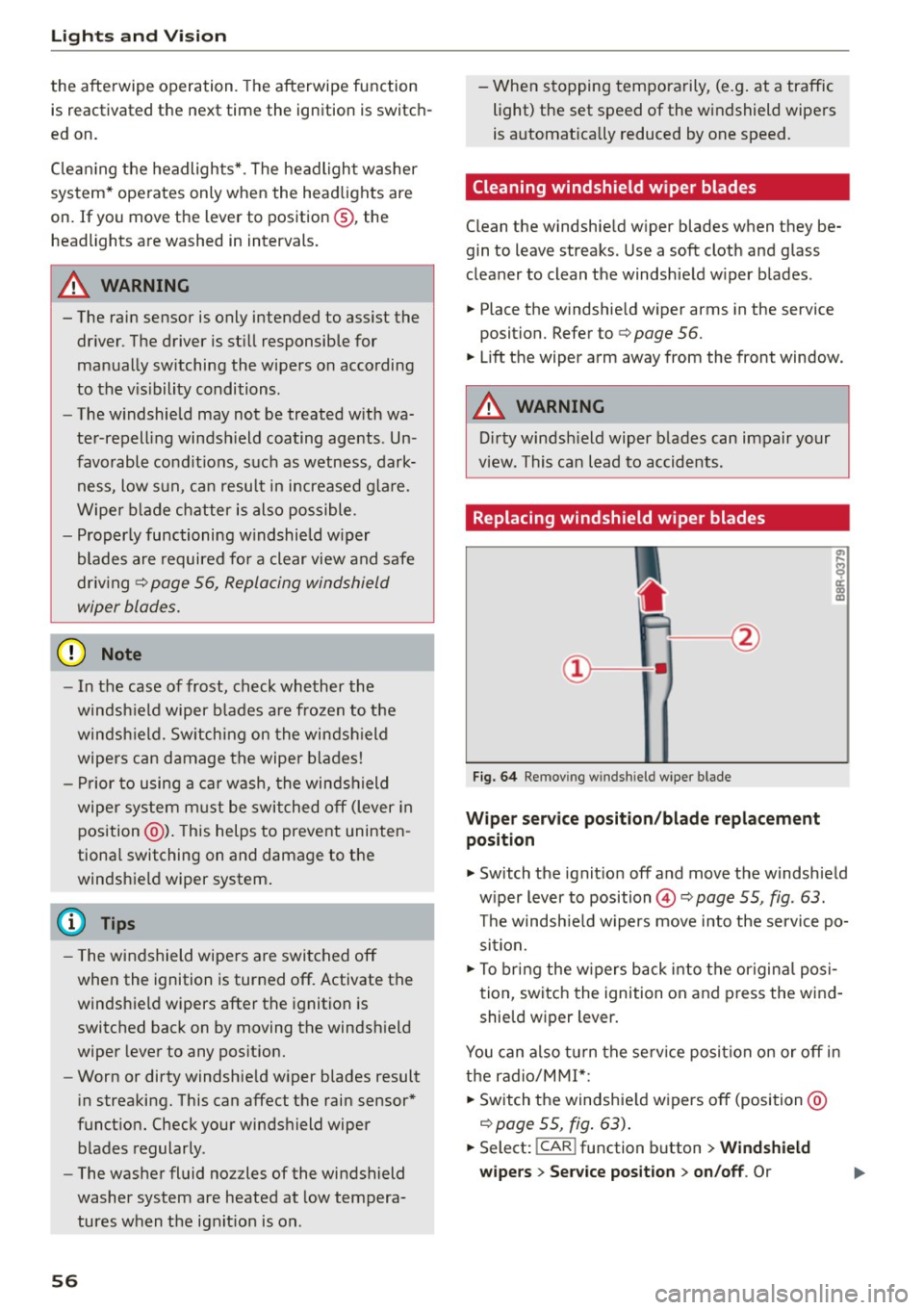
· Replacing windshield wiper blades
Fig. 64 Re mov ing w in d shi eld w iper blade
Wi per s ervice position /bla de replacement
posit ion
.. Switch the ignit ion off and move the windshield
w iper lever to position @¢
page 55, fig . 63.
T he windsh ie ld w ipers move into the service po
sition.
.. To bring the w ipers back into the origina l posi
tion, switch the ignition on and press the wind
shield w iper lever.
You can also tu rn the se rv ice position on or off in
t h e radio/M M!*:
.. Switch the windshie ld wipers off (position @
¢page 55, fig . 63) .
.. Select: !CAR ! function button > Windshield
wiper s
> Ser vice po sition > on /off . Or
Page 59 of 268
M N
ci LL co
rl I.O
"' N
"' rl
.. Select: ICARI function button> Car systems*
control button > Servicing & checks > Wiper
service position
> On/Off .
Removing the wiper blade
.. Lift the windshie ld wiper arm up from the wind
shield.
.. Press the locking knob
@¢fig . 64 on the wiper
blade. Hold the wiper b lade firm ly.
.. Remove the wiper blade in the direction of the
arrow .
Attaching the wiper blade
.. Install the new wiper blade in the retainer on
the wiper arm@ unti l you hear it click into
place on the wiper arm .
.. Place the wiper arm back on the windshie ld.
.. Turn the service pos ition off.
A WARNING
For your safety, you should replace the wiper
blades once or twice a year. See your author
ized Aud i dea ler for replacement blades.
(D Note
-The windshield wiper blades must only be
replaced when in the service position! Oth
erwise, you r isk damaging the paint on the
hood or the windshield wiper motor.
- You should not move your vehicle or press
the windshie ld w iper lever when the wiper
arms are folded away from the windshield .
The windshield wipers would move back in
to their original position and could damage
the hood and windshield.
- To he lp prevent damage to the wiper sys
tem, always loosen blades which are frozen
to the windshie ld before operating wipers .
- To he lp prevent damage to w iper blades, do
not use gasoline, kerosene, paint thinner, or
other solvents on or near the wiper blades.
- To he lp prevent damage to the wiper arms
or other components, do not attempt to
move the wipers by hand .
Lights and Vision
(D Tips
-Commercial hot waxes applied by automatic
car washes affect the how easily the glass
surface can be cleaned.
- You can also use the service position, for ex
ample, if you want to protect the windshield
from icing by using a cover .
Digital compass
Switching the compass on and off
Appl ies to veh icles : w ith dig it a l co mp ass
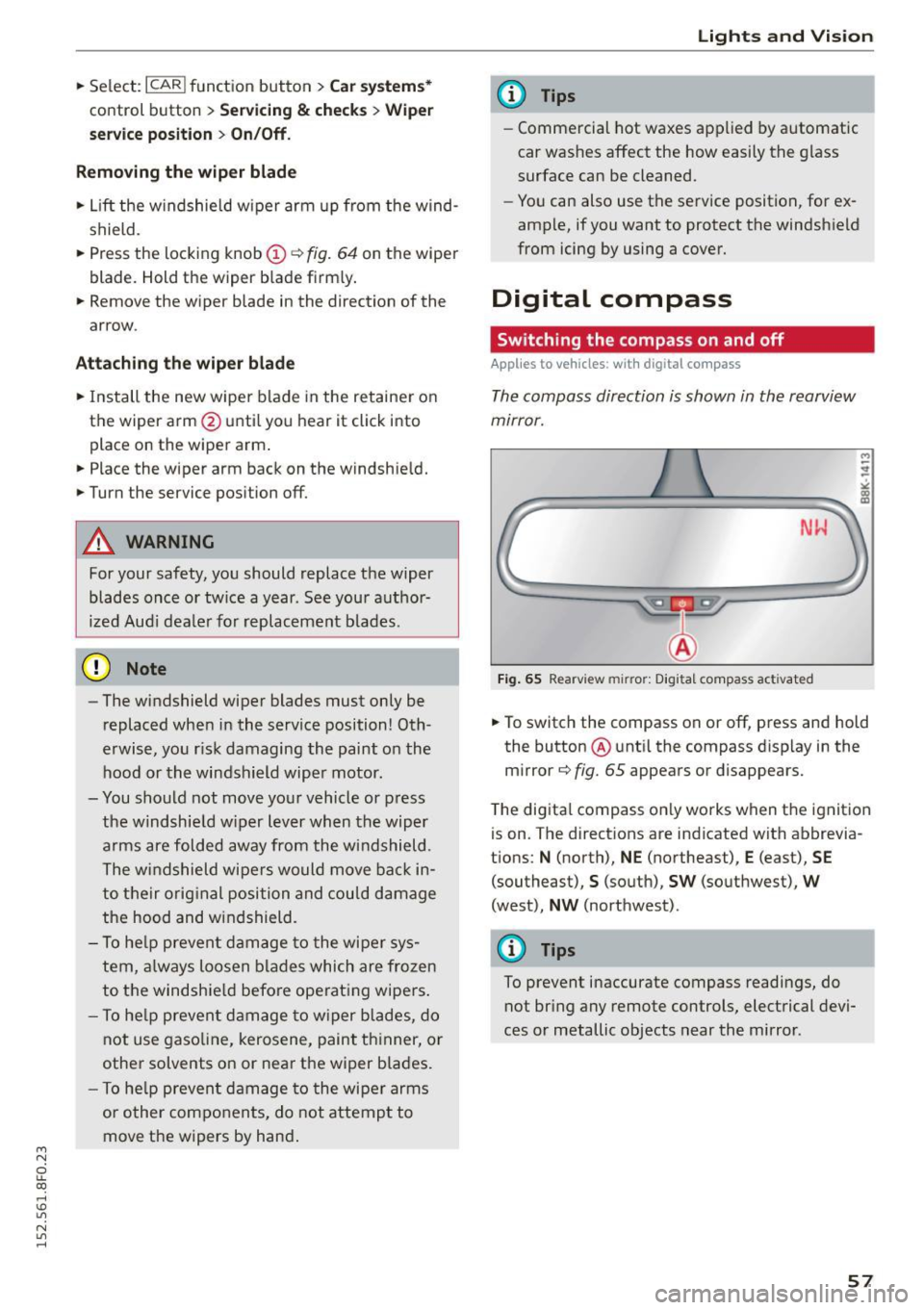
The compass direction is shown in the rearview
mirror.
Fig. 65 Rearv iew mirr or: Digita l compass act ivated
M
-
.. To switch the compass on or off, press and hold
the button @ unti l the compass d isplay in the
mirror¢
fig. 65 appears or disappears.
The digita l compass only works when the ignition
is on. The directions are indicated with abbrevia
tions: N (north), NE (northeast), E (east), SE
(southeast),
S (south), SW (southwest), W
(west), NW (northwest) .
@ Tips
To prevent inaccurate compass readings, do
not bring any remote controls, electrical devi
ces or metallic objects near the mirror .
57
Page 60 of 268
Lights and Vi sion
Adjusting the magnetic zone
Applies to vehicles: with digital compass
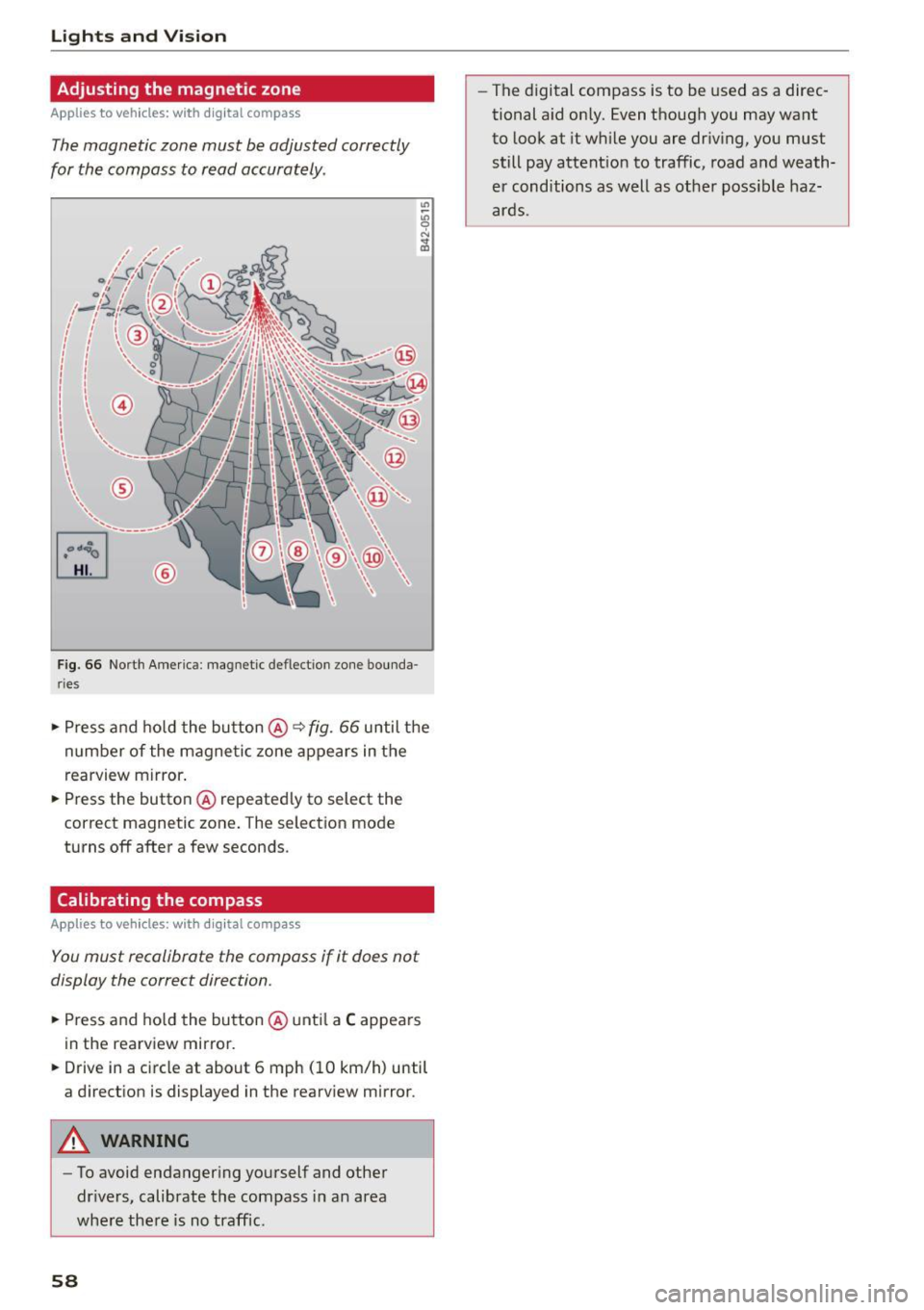
The magnetic zone must be adjusted correctly
for the compass to read accurately .
~
LIU ®
Fig . 6 6 No rth A meri ca: magnet ic deflection zo ne bo unda
ri es
"' Press a nd ho ld the button @~ fig. 66 until the
number of the magne tic zone ap pears in the
rearview mirror .
"' Press the butto n @ repeated ly to select the
correct magnetic zone . The selection mode
turns off after a few seconds.
Calibrating the compass
Applies to vehicles: w ith d ig ital compass
You must recalibrate the compass if it does not
display the correct direction.
"'Press and ho ld the bu tton @unt il a C appea rs
in the rearview mirror.
"' Drive in a circle at about 6 mph (10 km/h) until
a direct ion is displayed in the rearv iew m irror .
A WARNING
-To avoid endanger ing yo urself and othe r
dr ivers, calibrate the compass i n an area
whe re the re is no traffic.
58
- The digital compass is to be used as a direc
tional a id on ly. Even though you may want
to look at it wh ile you are dr iv ing, you must
still pay attent io n to traffic, road a nd weath
er cond itions as well as other poss ible haz
ar ds.
Page 61 of 268
M N
ci u.. co ,...., \!) 1.1'1
N 1.1'1 ,....,
Seats and storage
General information
Why is your seat adjustment so important?
The safety belts and the airbag system can only
provide maximum protection if the front seats are correctly adjusted.
There are various ways of adjusting the front
seats to provide safe and comfortable support
for the driver and the front passenger. Adjust
your seat properly so that:
- you can easily and quickly reach all the switches
and controls in the instrument panel
- your body is properly supported thus reducing
physical stress and fatigue
- the safety belts and a irbag system can offer
maximum protection
¢ page 132.
In the following sections, you will see exactly
how you can best adjust your seats.
There are special regulations and instructions for installing a child safety seat on the front pas
senger's seat. Always follow the information re
garding child safety provided in¢
page 152,
Child safety.
A WARNING -
Refer to¢ page 113, Driving safety for im
portant information, t ips, suggestions and
warnings that you should read and follow for
your own safety and the safety of your pas senge rs.
A WARNING
Incorrect seating position of the dr iver and all
other passengers can resu lt in serious person
al injury.
- Always keep your feet on the floor when the
vehicle is in motion -never put your feet on
top of the instrument pane l, out of the win
dow or on top of the seat cushion. This ap
plies especially to the passengers . If your
seating pos it ion is incorrect, you increase
the risk of injury in the case of sudden brak
ing or an accident. If the airbag inflates and
Seat s and stor age
the seating position is incorrect, this cou ld
result in personal injury or even death.
- It is important for both the driver and front
passenger to keep a distance of at least
10 inches (25 cm) between themselves and
the steering wheel and/or instrument panel.
If you're sitting any closer than this, the air
bag system cannot protect you properly. In
addition, the front seats and head restraints must be adjusted to your body height so
that they can give you max imum protect ion.
- Always try to keep as much distance as pos
sible between yourself and the steer ing
wheel or instrument pane l.
- Do not adjust the driver's o r front passeng
er 's seat while the veh icle is moving. Your
seat may move unexpectedly, causing sud
den loss of vehicle control and persona l in
jury.
If you adjust your seat whi le the vehicle
is moving, you are out of position.
Driver's seat
The correct seat position is important for safe
and relaxed driving.
We recommend that you adjust the dr iver's seat
in the following manner:
"' Adjust the seat in fore and aft direction so that
you can eas ily push the pedals to the floor
while keeping your knees slightly bent¢.&,
in
Why is your seat adjustment so important? on
page 59.
"' Adjust the seatback so that when you sit with
your back against the seatback, you can still
grasp the top of the steering wheel.
"' App lies to veh icles w ith adjustable head re
straints: Adjust the head restraint so the upper
edge is as even as possible with the top of your
head.
If that is not possible, try to adjust the
head restra int so that it is as close to th is posi
t ion as possible ¢
page 62.
A WARNING
Never place any objects in the driver's foot
well. An object could get into the pedal area
and interfere with pedal funct ion. In case of
-
59
Page 65 of 268
M N
ci LL co
rl I.O
"' N
"' rl
Memory function
Description
Applies to vehicles: with memory function
The memory function allows you to quick ly and
eas ily store and recall personal seating profiles
for the driver. The memo ry function is operated
through the master key and the memory buttons
in the driver's door.
The driver's seating profile is stored and assigned
to the master key each time the veh icle is locked.
When you open the door, the seat profile is auto
matically recalled. If two people use one vehicle,
it is recommended that each person always uses
"their own" master key.
Up to 2 seat profiles can be stored in the memory
buttons in the driver's door. Once they are stored,
these seat profiles can be selected at any time .
I n addition to the driver's seat settings, you can
also store and access the exterior mirror adjust ment settings* using the remote control key or
memory button.
Remote control key
Applies to vehicles: with seat memory
To assign the driver's seat settings to the remote
control key when locking the vehicle, the function
must be activated in the radio or
MM!*
• Select: I CARI function button > Seat adjust·
ment > Driver's seat > Remote control key
>
on .Or
• Select: ~IC _A _ R~I function button> Car systems*
control button > Vehicle settings > Seats >
Driver's seat> Remote control key> On .
(D Tips
If you do not want another driver's settings to
be assigned to the remote key, switch off the
memory function using the radio or
MMI* or
the
I ON/OFF I button ~ page 63.
Seats and storage
Memory buttons
Applies to vehicles: with seat memory
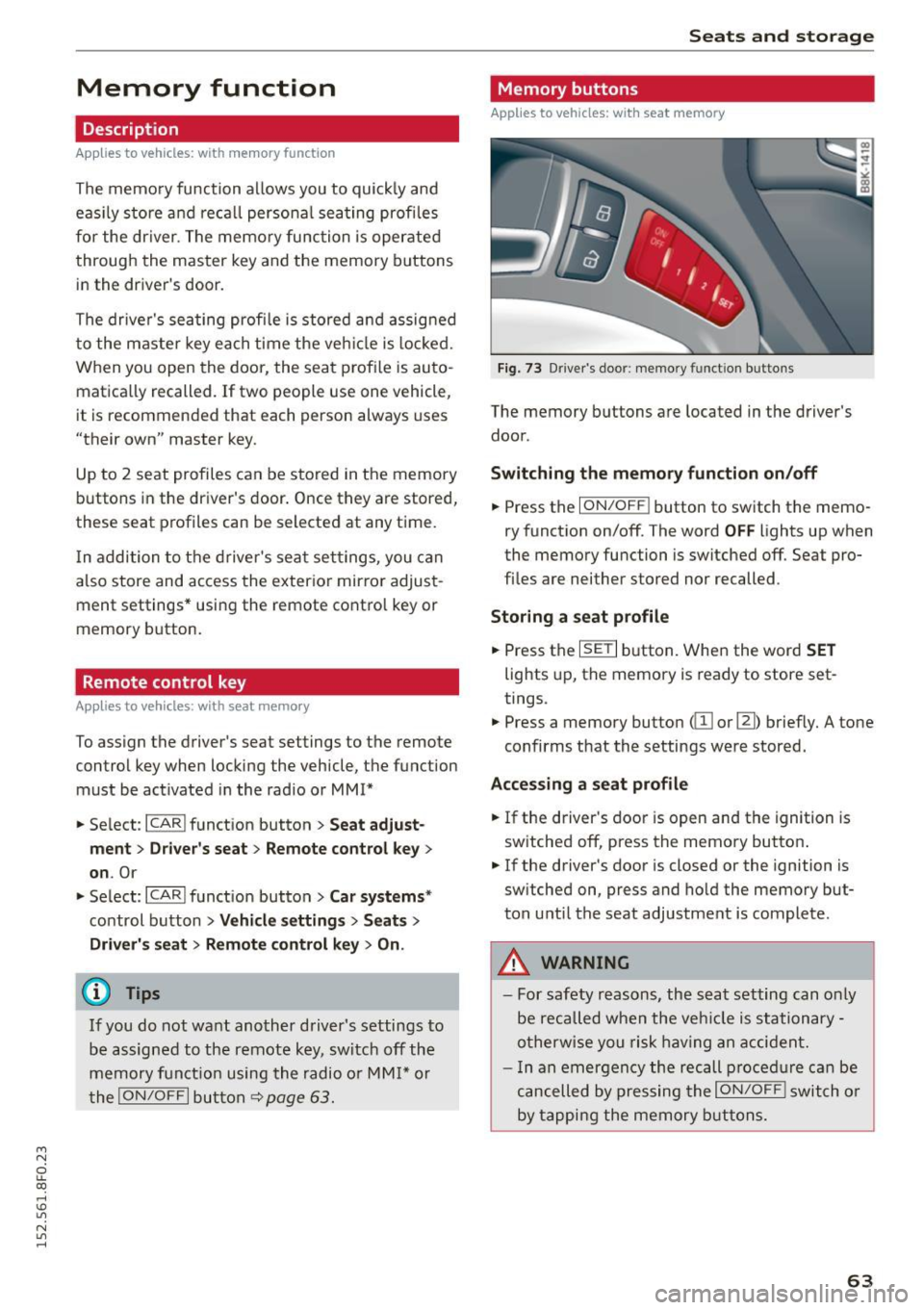
Fig. 73 Driver's door: memory func tion buttons
The memory buttons are located in the driver's
door.
Switching the memory function on/off
.,. Press the ION/OFF ! button to switch the memo
ry function on/off. The word
OFF lights up when
the memory function is switched off. Seat pro
files are neither stored nor recalled .
Storing a seat profile
.,. Press the ISETI button. When the word SET
lights up, the memory is ready to store set
tings.
• Press a memory button
(ill or [II) briefly. A tone
confirms that the settings were stored.
Accessing a seat profile
.,. If the driver's door is open and the ignition is
switched off, press the memory button .
.,. If the driver's door is closed or the ignition is
switched on, press and hold the memory but
ton until the seat adjustment is complete.
.8, WARNING
- For safety reasons, the seat setting can only
be recalled when the vehicle is stationary -
otherwise you risk having an accident.
- In an emergency the recall procedure can be
cancelled by pressing the
ION/OFF I switch or
by tapping the memory buttons.
63
Page 66 of 268
Seats and storag e
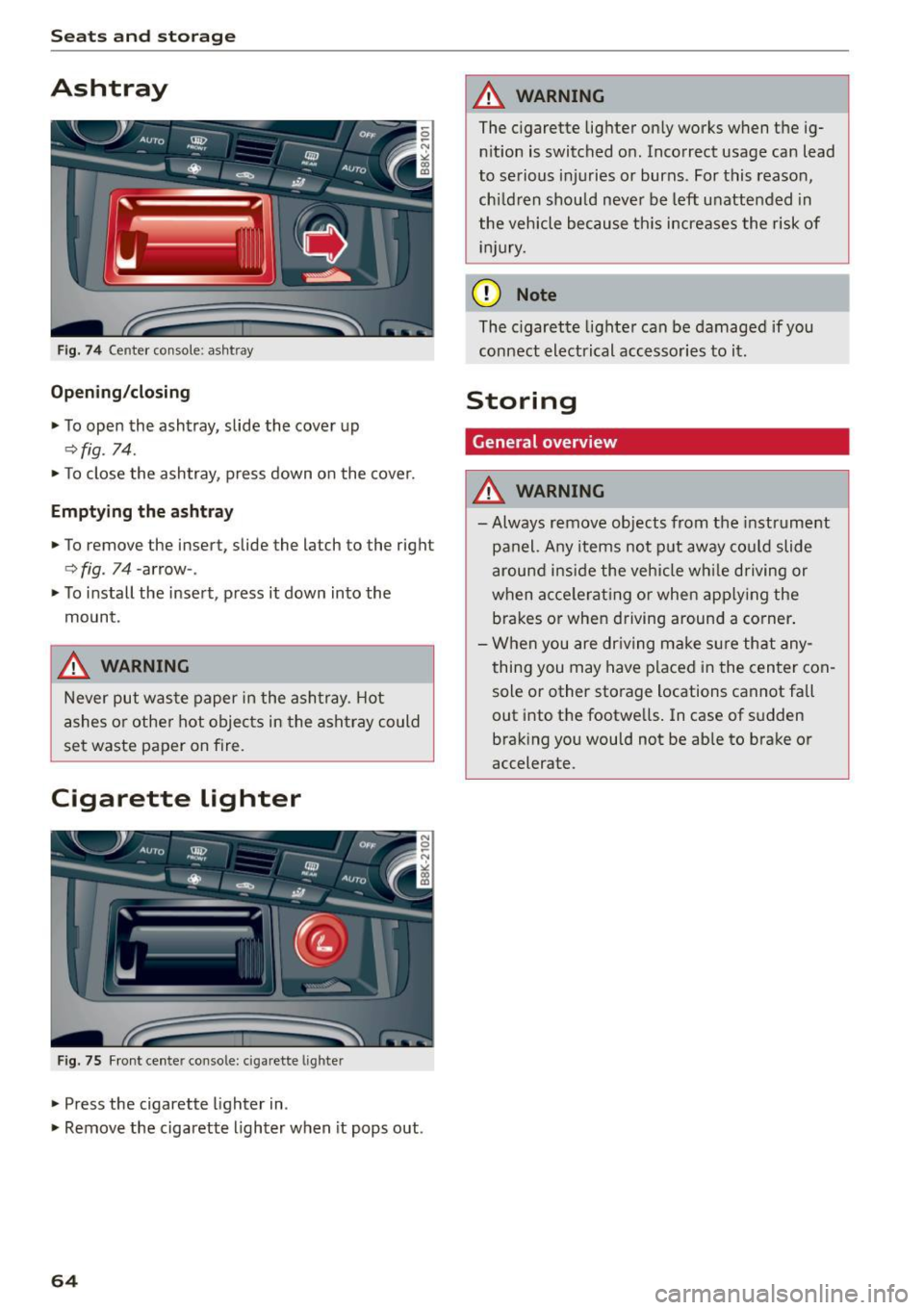
Ashtray
Fig. 74 Center console: ashtray
Open ing /closing
.,. To open the ashtray, slide the cover up
~fig. 74 .
.,. To close the ashtray, press down on the cover.
Empt ying th e asht ray
.,. To remove the insert, slide the latch to the right
c> fig. 74 -arrow- .
.,. To i nstall the insert, press it down into the
mount.
,&. WARNING
-
Never put waste paper in the ashtray. Hot
ashes or other hot objects in the ashtray could
se t waste paper on fire.
Cigarette Lighter
Fig. 75 Fr ont center console: cigarette l ighte r
.,. Press the cigarette lighter in .
.,. Remove the cigarette lighter when it pops out .
64
,&. WARNING
The cigarette lighter on ly wo rks when the ig
n ition is switched o n. Incorrect usage can lead
to serious injuries or burns. For this reason,
ch ildren shou ld never be left unattended in
the vehicle because th is increases the risk of
i nju ry.
(D Note
The c igarette lighter can be damaged if you
connect electrical accesso ries to it .
Storing
General overview
,&. WARNING
-Always remove objects from the instr ument
panel. Any items not put away cou ld slide
around i nside the vehicle wh ile driving or
when acce lerat ing o r when app ly ing the
brakes or when driving around a corner .
- When you are dr iving make sure that any
thing you may have placed i n the center con
sole or other storage locations cannot fall
out into the footwells. In case of s udden
brak ing you would not be able to brake or
accelerate.
Page 69 of 268
M N
ci LL co
rl I.O
"' N
"' rl
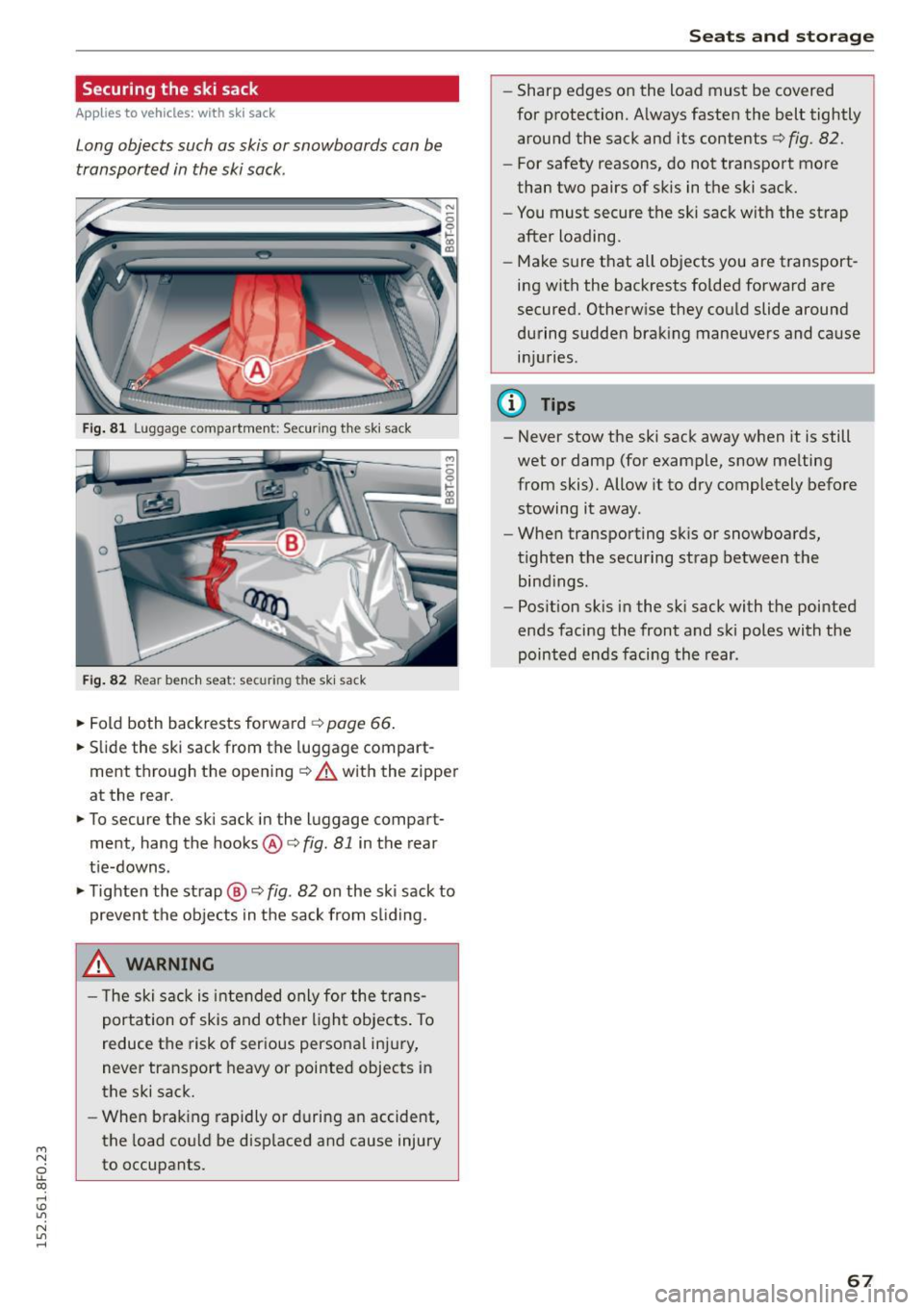
Securing the ski sack
Applies to vehicles: with sk i sack
Long objects such as skis or snowboards can be
transported in the ski sack.
Fig. 81 L uggage compartment: Securing th e sk i sack
Fig. 82 Rear bench seat: securi ng the ski sac k
~ Fold both backrests forward c> page 66.
~ Slide the ski sack from the luggage compart
ment through the opening
¢ A with the zipper
at the rear.
~ To secure the ski sack in the l uggage compart
ment, hang the hooks@c>
fig. 81 in the rear
tie-downs.
~ Tighten the strap @ c> fig. 82 on the ski sack to
prevent the objects in the sack from sliding .
_& WARNING
- The ski sack is intended only for the trans
portation of skis and other light objects. To
reduce the risk of serious personal injury,
never transport heavy or pointed objects in
the ski sack.
- When braking rapidly or during an accident,
the load could be displaced and cause injury
to occupants.
Seats and storage
- Sharp edges on the load must be covered
for protection. Always fasten the belt tightly
around the sack and its contents c>
fig. 82.
-For safety reasons, do not transport more
than two pairs of skis in the ski sack.
- You must secure the ski sack with the strap
after loading.
- Make sure that all objects you are transport
ing with the backrests folded forward are
secured. Otherwise they could slide around
during sudden braking maneuvers and cause injuries .
@ Tips
-Never stow the ski sack away when it is still
wet or damp (for example, snow melting
from skis). Allow it to dry completely before
stowing it away.
- When transporting sk is or snowboards,
tighten the securing strap between the bindings.
- Position skis in the ski sack with the pointed
ends facing the front and ski poles with the
pointed ends facing the rear .
67