light AUDI A5 CABRIOLET 2015 Workshop Manual
[x] Cancel search | Manufacturer: AUDI, Model Year: 2015, Model line: A5 CABRIOLET, Model: AUDI A5 CABRIOLET 2015Pages: 268, PDF Size: 66.88 MB
Page 95 of 268
M N
ci LL co
rl I.O
"' N
"' rl
Audi adapt ive crui se cont rol and bra king gu ard
tachometer @and is also shown briefly in the
display @c:>
fig. 108.
Swit ching Audi adapti ve c ru is e contr ol off
~ Push the lever away from you into position @
unt il it clicks into place. The message
AC C off
appea rs .
@ Indicator lights
II -Adaptive cru ise control is switched on. No
vehicles are detected up ahead . The stored speed
i s ma inta ined.
• -A moving vehicle is detected up ahead . The
adapt ive cruise control system regulates the
speed and distance to the moving vehicle ahead
and accelerates/brakes automatically .
• -When automatic braking is not able to keep
enough d istance to a prev iously detected mov ing
vehicle up ahead, you must take control and
brake ¢
page 95, Request for driver interven
tion.
© Displa y
If adaptive cruise control is not shown in the d is
play, you can call it up with the !RESE TI button
¢page 23.
Based on the symbo ls in the d isplay, you can de
termine if the system is ma inta ining a distance to
the vehicle ahead and what that distance is .
N o v ehicl e -No vehicle ahead was detected.
Wh it e v ehi cle -A vehicle ahead was detected .
Red v ehicl e -Prompt for the d river to take action
¢page 95.
Both arrows on the scale © indicate the distance
to the veh icle ahead. No arrow appears when the
vehi cle is on an open road and there is no object
ahead .
If an object is detected ahead, the arrow
moves on the scale.
The green zone on the scale shows the stored dis
tance . For informa tion on chang ing the stored
d ista nce, refe r to¢
page 94 . If the distance se
l ected is too close or may soon become too close,
the arrows move into the red zone on the scale .
A WARNING
Improper use of the adaptive cruise control
can cause collisions, other accidents and se ri
ous personal injuries.
- Pressing the !SET ! button when driving at
speeds below 20 mph (30 km/h), w ill auto
matica lly accelerate the vehicle to 20 mph
(30 km/h), which is the mi nimum speed
that can be set.
a) Tips
- If you switch the ignit ion or the adaptive
cruise control off, the set speed is erased
from the system memo ry.
- The electronic stab ilizat ion cont rol (ESC)
and the anti-slip-reg ulat ion (ASR) are a uto
matically turned on when the adaptive
cruise contro l is turned on. Both systems
cannot be turned off if the adaptive c ruise
control is turned on .
Changing the speed
Applies to vehicles: wit h Aud i adapt ive cru ise control
0
f
•
0
Fig . 109 Selector lever: chang ing the speed
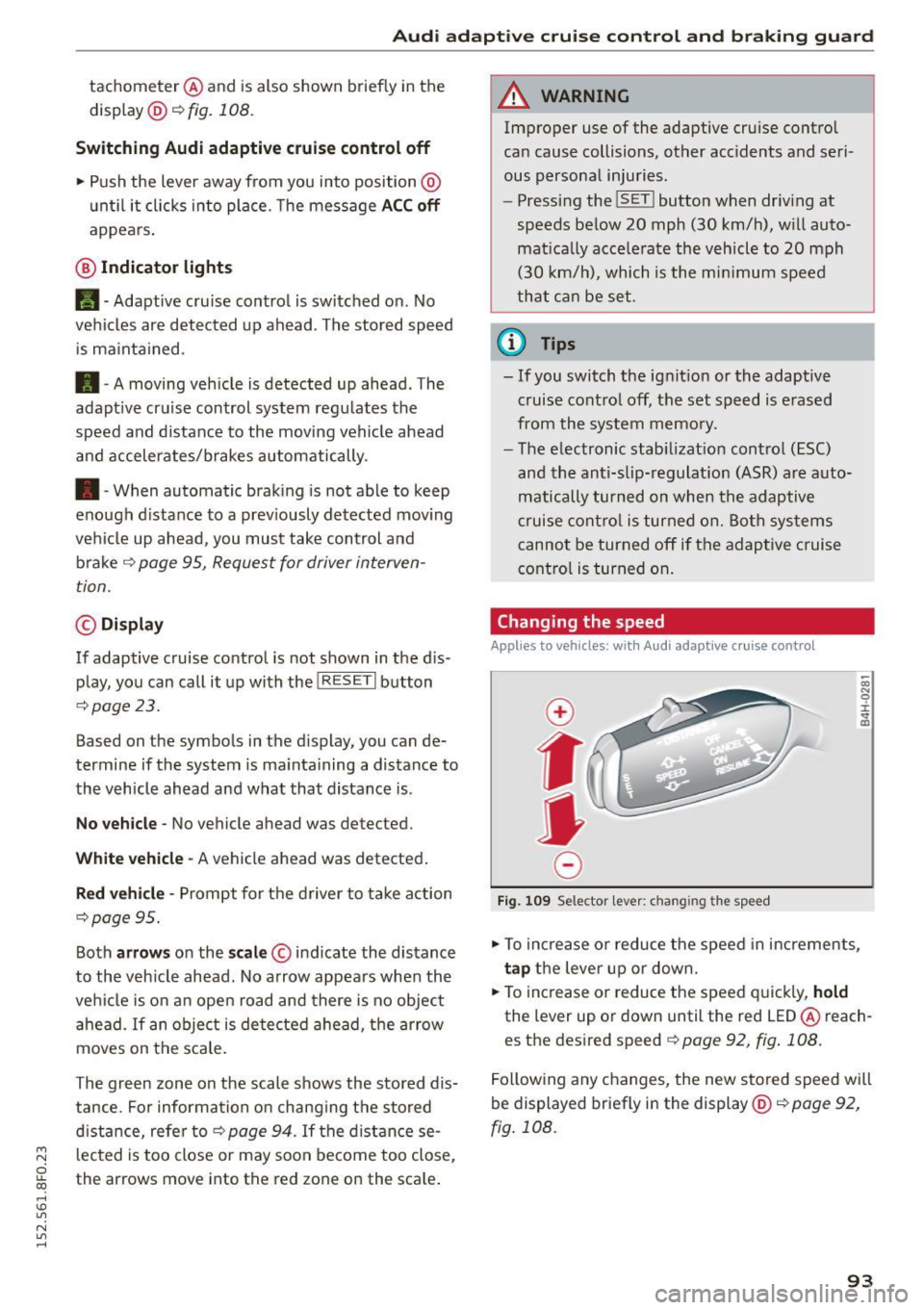
~ To increase o r reduce the speed in increments,
tap the lever up or down.
~ To increase o r reduce the speed q uickly, hold
the lever up or down until the red LED @ reach
es the des ired speed ¢
page 92, fig . 108.
Following any changes, the new stored speed wi ll
be displayed briefly in the display @¢
page 92,
fig . 108 .
93
Page 97 of 268
M N
ci LL co
rl I.O
"' N
"' rl
Audi adapt ive crui se cont rol and bra king gu ard
~ -- -~ -Di sta nce 3: This setting corresponds
to a distance of 164 feet/SO meters when trave l
ing at 62 mph (100 km/h), or a t ime interval of
1.8 seconds.
~ -- --~ Dista nc e 4: This setting corresponds
to a distance of 210 feet/64 meters when trave l
ing at 62 mph (100 km/h), or a t ime interval of
2 .3 seconds.
A WARNING
Following other vehicles too closely increases
the risk of collisions and ser ious personal in
jury.
- Setting short distances to the traffic ahead
reduces the time and distance available to
br ing your vehicle to a safe stop and makes
it even mo re necessary to pay close atten
tion to traffic.
- Always obey applicable traffic laws, use
good judgment, and select a safe following
distance for the traffic, road and weather
condit ions.
¢j) Tips
- Di stance
3 is set automatically each time
you switch t he ignition on.
- Your standa rd settings are automatically
stored and assigned to the remote contro l
k ey being used.
Setting the driving program
Applies to vehicles: with Audi adaptive cruise control
D epending on the se lected dr iv ing program and
distance, driving behavior when accelerating will
vary from dynamic to comfortab le .
Setting th e driving program for v ehicl es
without Audi d rive s elect*
~ In the radio/MMI*, select: !CAR !function but
ton >
Adapti ve c ru is e control > D riv ing prog. >
comfo rt, stand ard or d y namic . Or
~ Select : !CAR I function button> Ca r sy ste m s*
co ntrol button > D river ass ist > Adap tive cru ise
cont ro l
> Dr iving progr am * > Comfort, Stand
ard
or D ynamic . Setting the driving mode for vehicles w
ith
Audi dri ve select*
Refer to ¢ page 104.
(D Tips
Your settings are automatical ly stored and as
signed to the remote control key being used.
Request for driver intervention
Applies to vehicles: with Audi adaptive cruise control
Fig . 1 12 Instr ume nt cluster: reques t fo r dr ive r inte rven
t ion
In certa in situations, the system will prompt you
to ta ke act ion. This cou ld happen, fo r example , if
braking by the adaptive c ruise control system is
not enough to maintain enough distance to the
vehicle ahead.
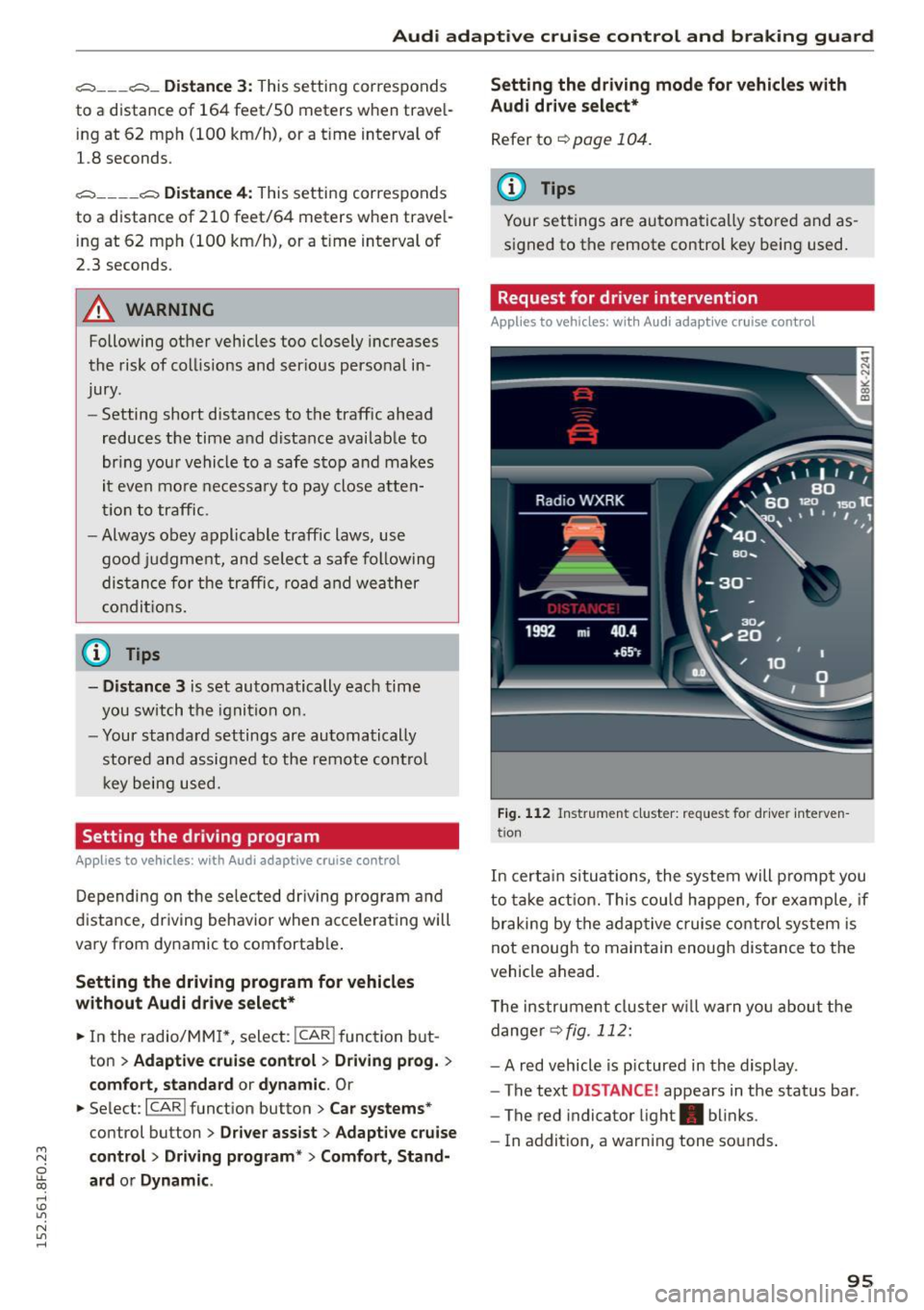
T he instrument cluster w ill warn you abou t the
dange r
~fig. 112:
-A red vehicle is p ictured in the display .
- The text
DISTANCE! appears in the status bar .
- The red indicator light . blinks .
- In addition, a warning tone sounds .
95
Page 98 of 268

Audi adaptive cruise control and braking guard
Audi braking guard
Description
Applies to veh icles: w ith Audi adaptive cruise co ntrol
Fig. 113 Instrument cluster : approach warn ing
Braking guard uses a radar sensor. It also func
tions within the limits of the system when adap
tive cruise control is switched off.
What can Audi braking guard do?
When detected in time, the system can assess
situations when a vehicle ahead brakes suddenly
or if your own vehicle is traveling at a high speed
and approaching a vehicle up ahead that is mov
ing more slowly . Braking guard does not react if it
cannot detect the situation .
The system advises you of various situations:
- The
distance warning is given if you are too
close to the vehicle ahead for a long time. If the
vehicle ahead brakes sharply, you will not be
able to avoid a collision. The indicator light.
in the display comes on .
- The
approach warning is given when a detected
vehicle up ahead in your lane is moving much
more slowly than you are or if it brakes sharply .
When this warning is given, it may only be pos
s ib le to avoid a collision by swerving or braking
sharply. The indicator light . and indicato r in
the display will wa rn you about the danger
¢ fig. 113 . You will also hear an acoustic signa l.
If you do not react fast enough or do not react at
all to the situation, Braking guard will intervene
by braking and the message
braking guard inter
vention
will appear.
ll Thi s is not available in so me c oun tries.
96
- If a co llision is imminent, the system wi ll first
provide an
acute warning by br iefly and sharply
app ly in g the brakes.
- If you do not react to the acute warning, brak
ing guard can brake within the limits of the sys
tem. This reduces the vehicle speed in the event
of a collision.
- At speeds under 20 mph (30 km/h), the system
can initiate a complete deceleration shortly be
fore a collisionl l_
-If the braking guard senses that you are not
braking hard enough when a collision is immi
nent, it can increase the braking force.
Which functions can be controlled?
You can switch braking guard and the distance/
approach warning on or off in the radio or MMI
¢page
97, Settings in the radio/MM!.
A WARNING
Lack of attent ion can cause collisions, other
accidents and ser ious personal injuries. The
braking guard is an assist system and cannot
prevent a coll is ion by itself. The dr iver must
always intervene. The driver is always respon
sib le for braking at the correct time.
- Always pay close attent ion to traffic, even
when the braking guard is switched on. Be
ready to intervene and be ready to take com
plete control whenever necessary. Always
keep the safe and legal distance between
your vehicle and vehicles up ahead.
- Braking guard works within limits and will
not respond outside the system limits, for
examp le when approaching a stopped vehi
cle or stationary obstacle (end of a traffic
jam or vehicle that has broken down in traf
fic).
- Always remember that the radar sensor for
the braking guard works only w ith in defined
detection and range limits that may prevent
the proper detection of other vehicles.
- The radar sensor's function and range can
be reduced by rain, snow and heavy spray.
Moving vehicles up ahead may not be
-
Page 110 of 268

Parking System
The rear acoustic park assist system is integrated
in the rear of the vehicle and the rear view cam
era is integrated in the rear lid
c::> page 109.
A WARNING
-
- The rear view camera has blind spots, in
which objects cannot be detected. Be espe
cially careful to check for small children and
animals before backing up. Small children and animals will not always be detected by
the sensors.
General Information
Applies to vehicles: with parking system (rear, with rear view
camera)
Fig. 123 Covered ar ea (D and uncovered area @ of the rea r
view came ra
Fig. 124 T runk lid: Location of the rear v iew camera
Sensors in the bumper
Sensors are located in the rear bumpers . If these
detect an obstacle, audible signals warn you . The
range at which the sensors begin to measure is
approximately:
To the side 2 ft (0.60 m)
Center rear 5.2 ft (1.60 m)
Distance warning when reversing starts when an
obstacle is detected in the range of the parking
108
assist system. As the distance decreases, the
time interval between the audible tones becomes
shorter.
When the distance is less than 1ft (0.30 m), the
tone becomes continuous. At this point you
should stop backing up.
If the distance to an obstacle stays the same, the
volume of the distance signal chime is gradually
reduced after about 4 seconds (does not affect
the continuous signal tone). Approaching anoth
er obstacle will cause the distance signal to
sound again at the normal volume.
Rear view camera coverage area
The MMI display shows the area covered by the
rear v iew camera
c::> fig. 123 @. Objects that are
not in the area covered @are not shown on the
MMI display.
We recommend that you practice parking with
the rear view camera in a traffic-free location or
parking lot to become familiar with the system,
the orientation lines, and their function. When
doing this, there should be good light and weath
er conditions.
In the MMI display, objects or vehicles appear
closer or further away if:
-you are driving in reverse gear from a level sur
face onto an incline, or a downward slope,
- you are driving in reverse gear toward protrud
ing objects,
- the vehicle is carrying too much load in the
rear.
The accuracy of the orientation lines and blue
surfaces diminishes if:
- the rear view camera does not provide a reliable
image, for example, in poor visibility conditions
or if the lens is dirty,
- the image on the screen is not visible due to sun glare and reflection .
Caring for the rear view camera lens
The rear view camera is located above the rear li
cense plate bracket. For the parking assist to op-
erate, the lens
c::> fig . 124 must be kept clean : .,._
Page 115 of 268
Driving safety
Basics
Safe driving habits
Please remember -safety first!
This chapter contains important information,
tips, instructions and warnings that you need to
read and observe for your own safety, the safety
of your passengers and others . We have summar
ized here what you need to know about safety
belts, airbags , chi ld restraints as well as child
safety. Your safety is for us
priority number 1. Al
ways observe the informat ion and warn ings in
this section - for your own safety as well as that
of your passengers .
The information in this section app lies to all
model ve rsions of your vehicle . Some of the fea
tures described in this sections may be standard
equipment on some models, or may be optional
eq uipment on others .
If you are not sure, ask
your authorized Audi dealer.
A WARNING
- Always make sure that you follow the in
struct ions and heed the WARNINGS in this
Manual. It is in your interest and in the in
terest of your passengers.
- Always keep the complete Owne r's Litera
ture in your Aud i when you lend or sell your
vehicle so that this important info rmation
will always be ava ilable to the driver and
passenge rs.
-
- Always keep the Owner's literature handy so
that you can find it easily if you have ques
tions.
Safety equipment
The safety features are part of the occupant re
straint system and work together to help reduce
the risk of injury in a wide variety of accident sit
uations.
M
6 Your safety and the safety of your passenge rs
~ should not be left to chance. Advances in tec h-,...., \!) 1.1'1
N 1.1'1 ,....,
nology have made a var iety of fea tures available
to help reduce the r isk o f injury in an accident.
Dr ivin g s afet y
The following is a list of just a few of the sa fety
features in your A udi:
- sophisticated s afety be lts fo r drive r and a ll pas-
senger seat ing pos itions,
- be lt fo rce limi ters for the front seats,
- belt pretensioners for the seats,
- head restra ints for each seating posit ion,
- front airbags,
- side airbags in the front seats,
- special LATCH anchorages for child rest raints,
- ad justab le steer ing column.
These ind iv idual safety features, can wo rk to
gether as a system to he lp p rotect you and you r
passengers in a w ide range of accidents . T hese
f ea tures cannot work as a system if they are not
always cor rect ly adjusted and correctly used .
Safet y is eve rybod y's res pon sibilit y!
Important things to do before driving
Safety is everybody 's job! Vehicle and occupant
safety always depends on the informed and care
f1,1l driver .
For you r safety and the safety of your passen
gers,
b efore driv ing alway s:
.,. Make sure that all lights and signals are operat
ing correctly .
.,. Make sure that the tire pressure is co rrect .
.,. Make s ure that all w indows are clean and afford
good vis ibility to the outs ide.
.,. Sec ure all luggage and other items caref ully
qpage 64.
.,. Make s ure that nothing can interfere with the
pedals.
.,. Adjust front seat, head restraint and mirrors
correctly for your height .
.,. Instruct passengers to adjust the head re
straints according to the ir height .
.,. Make su re to use the r ight child restraint cor
rectly to protect ch ildren
q page 152, Child
safety.
.,. Si t properly in your seat and ma ke s ure that
your passengers do the same
q page 59, Seats
and storage. .,.
113
Page 116 of 268
Driving safet y
• Fasten your safety belt and wear it properly . Al
so instruct your passengers to fasten the ir
safety belts properly ¢
page 124.
What impairs driving safety?
Safe driving is directly related to the condition of
the vehicle, the driver as well as the driver 's abili
ty to concentrate on the rood without being dis
tracted .
The driver is responsible for the safety of the ve
hicle and all of its occupants. If your ability to
drive is impaired, safety risks for everybody in the
veh icle increase and you also become a hazard to
everyone else on the road ¢,&. .Therefore:
• Do not let yourself be distracted by passengers
or by using a cellular telephone .
• NEVER drive when your driv ing ability is im
paired (by medicat ions, alcohol, drugs, etc .).
• Observe all traffic laws, rules of the road and
speed limits and plain common sense .
• ALWAYS adjust your speed to road, t raff ic and
weather cond itions .
• Take frequent breaks on long trips . Do not dr ive
f or more than two hours at a stretch.
• Do NOT drive when you are tired, under pres
sure or when you are stressed.
A WARNING
Impaired driving safety increases the risk of
ser ious personal injury and death whenever a
vehicle is being used.
114
.
Correct passenger
seating positions
Proper seating position for the driver
The proper driver seating position is important
for safe, relaxed driving.
Fig. 129 Co rrect seat ing posit ion
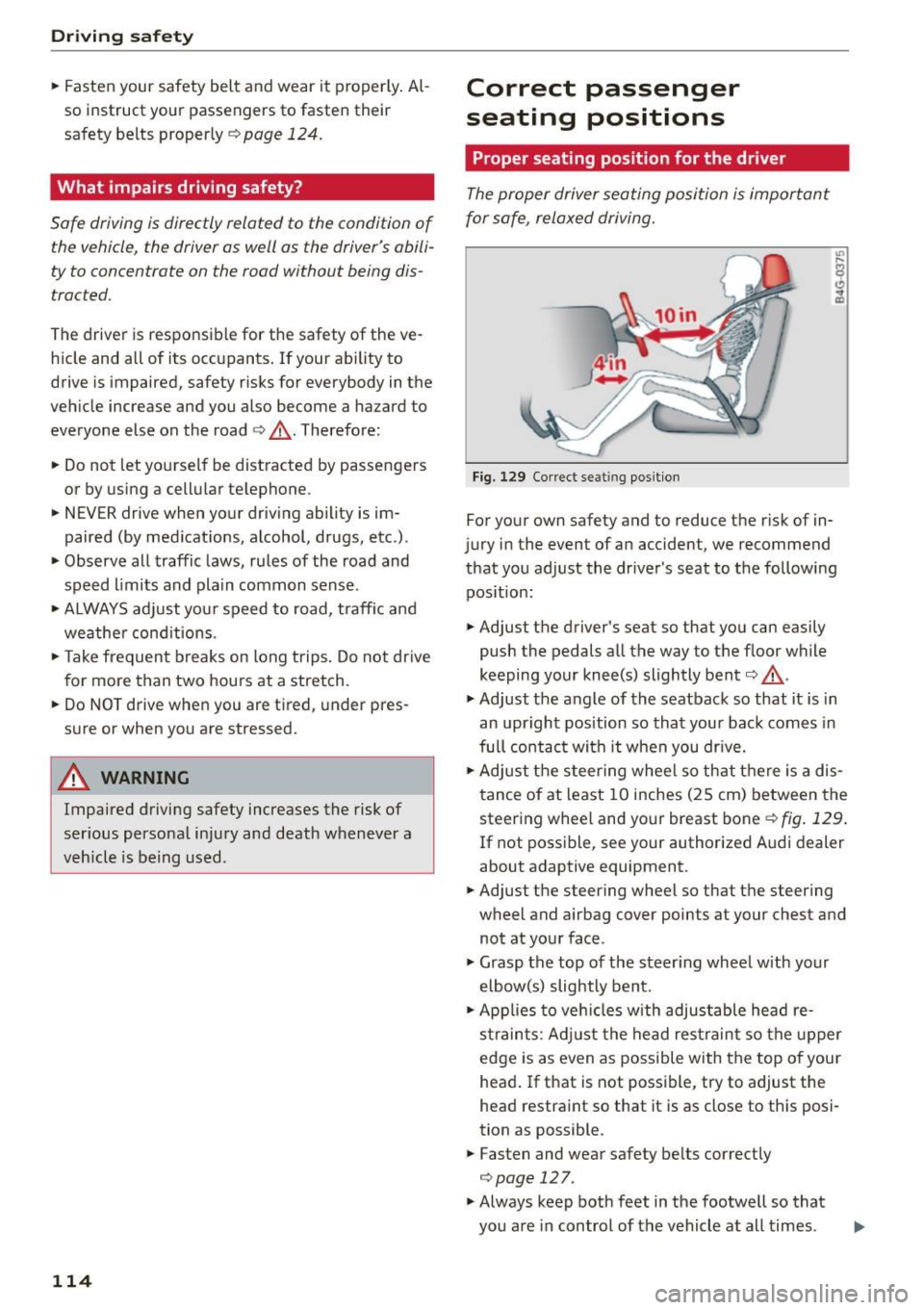
For your own safety and to reduce the risk of in
jury in the event of an accident, we recommend
that you adjust the driver's seat to the following pos ition:
• Adjust the driver 's seat so that you can easily
push the pedals all the way to the floor while
keeping your knee(s) slightly bent¢,&..
• Adjust the angle of the seatback so that it is in
an upright position so that your back comes in
full contact with it when you dr ive.
• Ad just the steering wheel so th at there is a dis
tance of at least 10 inches (25 cm) between the
steering whee l and your breast bone¢
fig. 129 .
If not possible, see your authorized A udi dealer
about adaptive equipment.
• Adjust the steering wheel so that the steering
wheel and airbag cover points at your chest and
not at your face.
• Grasp the top of the steer ing wheel with your
elbow(s) slightly bent.
• App lies to veh icles with adjustable head re
straints: Adjust the head res traint so the upper
edge is as even as possible with the top of your
head . If that is not possible, try to adjust the
head restraint so that it is as close to this posi
tion as possible.
• Fasten and wear safety belts correctly
¢page 127.
• Always keep both feet in the footwell so that
you are in control of the vehicle at all times .
Page 126 of 268
Safety belt s
Safety belts
General information
Always wear safety belts!
Wearing safety belts correctly saves lives!
This chapter explain s why safety be lts are neces
sary, how they work and how to adjust and wear
them correctly.
.. Read all the information that fo llows and heed
all of the instructions and WARNINGS.
&_ WARNING
Not wearing safety belts or wearing them im
properly increases the risk of serious personal
injury and death.
- Safety belts are the single most effective
means available to reduce the risk of serious
injury and death in automobile accidents.
For your protection and that of your passen
gers, always correct ly wear safety belts
when the vehicle is moving.
- Pregnant women, injured, or physically im
paired persons must also use safety belts.
L ik e all veh icle occupants, they are more
likely to be seriously injured if they do not
wear safety be lts . The best way to protect a
fetus is to protect the mother - throughout
the ent ire pregnancy.
Number of seats
Your Audi has a total of four seating positions:
two in the front and two in the rear. Each seating
position has a safety belt .
&_ WARNING
Not wearing safety belts or wearing them im
properly increases the risk of serious personal
injury and death.
- Never strap more than one person, includ
ing small ch ildren, into any belt. It is espe
cially dangerous to place a safety belt over a
child sitting on your lap.
- Never let more people ride in the vehicle
than there are safety belts available.
124
-Be sure everyone riding in the vehicle is
properly restrained with a separate safety
belt or child restraint.
Safety belt warning light
Your vehicle has a warning system for the driver
and (on USA models only) front seat passenger
to remind you about the importance of buckling
up .
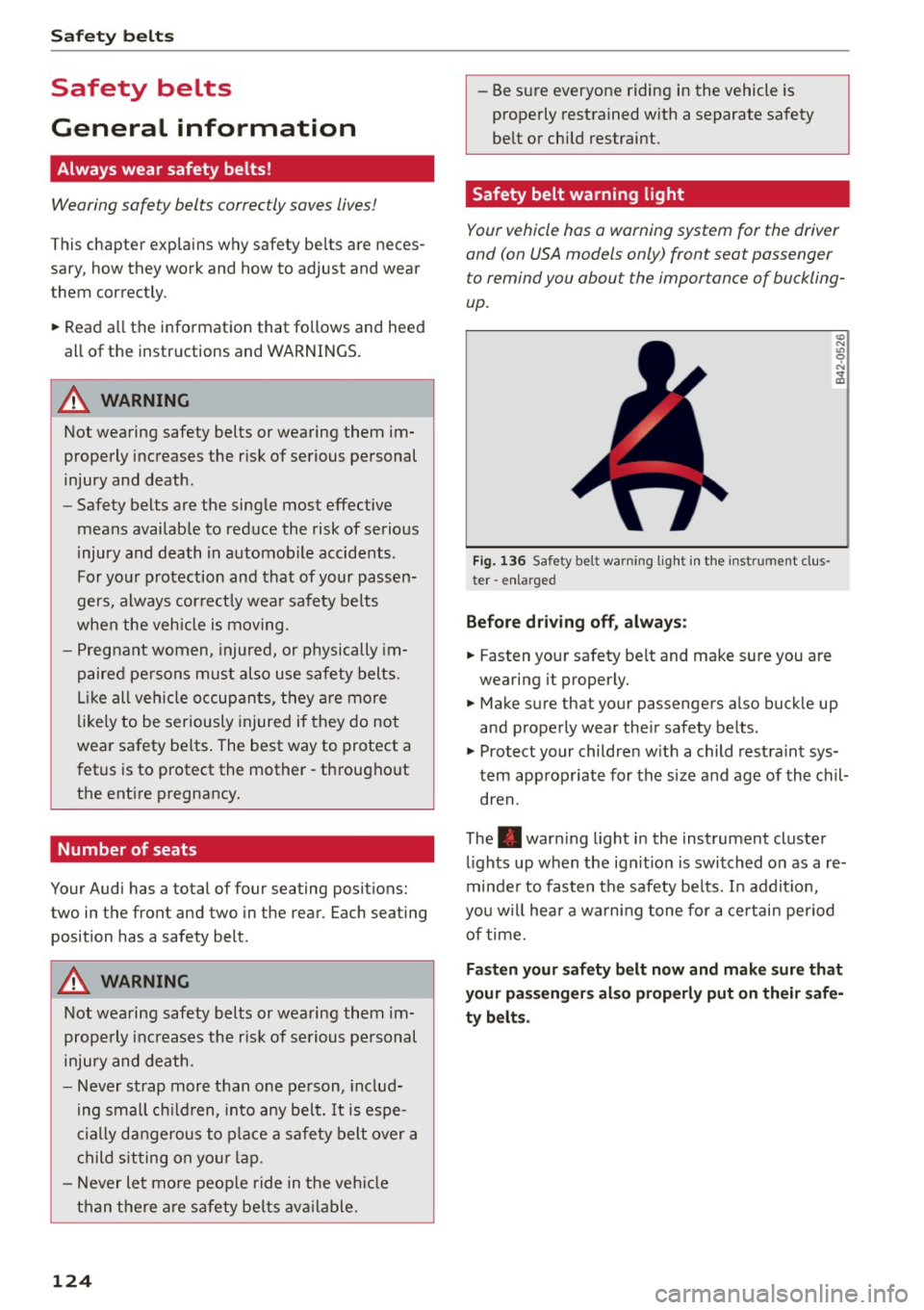
Fig. 136 Safety belt warning light in the instrument cl us
ter -enlarged
Before driving off, always:
.. Fas ten your safety belt and make sure you are
wearing it properly.
(0
"'
"' 0 N
and properly wear the ir safety belts .
.. Protect your children w ith a child restraint sys
tem appropriate for the siz e and age of the chil
dren.
The . warn ing light in the instrument cluster
lights up when the ign it ion is switched on as a re
minder to fasten the safety be lts. In addit io n,
you w ill hear a warning tone for a certain period
of time.
Fasten your safety belt now and make sure that
your passengers also properly put on their safe
ty belts.
Page 130 of 268
Safety belts
_& WARNING
-Only your authorized Audi dealer should
work on the system or remove and installing
system components when performing other
work.
- The belt positioners could cause injury or
damage if they pinch people or objects
when extending or retracting.
Fastening safety belts
Safety first · everybody buckle up!
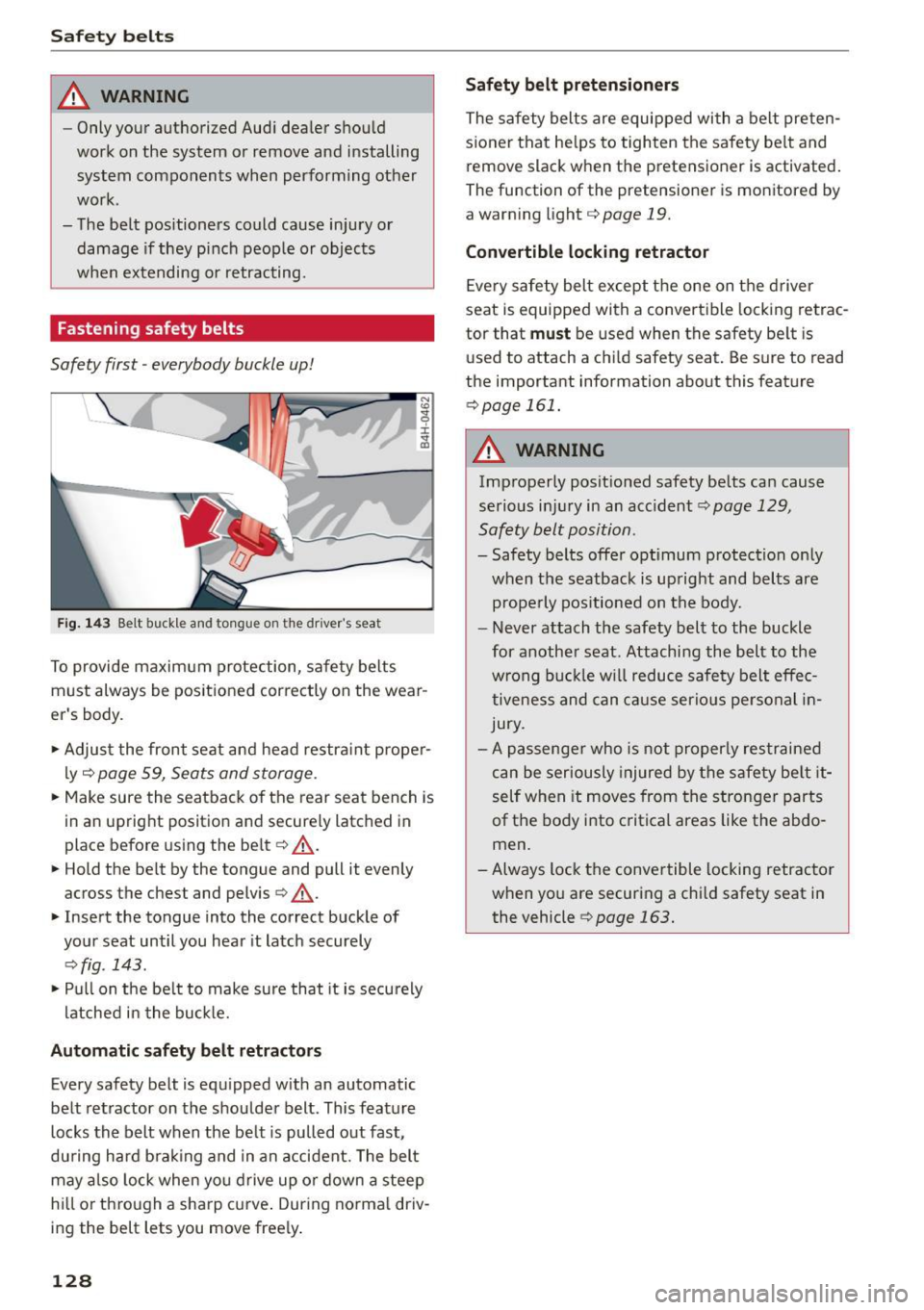
Fig. 143 Be lt buck le and tongue on t he driver's seat
To provide maximum protection, safety belts
must always be pos itioned correctly on the wear
er's body.
.,. Adjust the front seat and head restra int p roper
ly ¢
page 59, Seats and storage .
.,. Make sure the seatback of the rear seat bench is
in an upright position and securely latched in
place before using the belt ¢ .&, .
.,. Hold the belt by the tongue and pull it evenly
across the chest and pelvis ¢ .&, .
.,. Insert the tongue into the correct buckle of
your seat until you hear it latch securely
¢ fig . 143 .
.,. Pu ll on the be lt to make sure that it is securely
latched in the buckle.
Autom atic safety bel t retra cto rs
Every safety belt is equipped w ith an automatic
belt retractor on the shoulder belt. This feature
locks the belt when the be lt is pulled out fast ,
du ring hard b rak ing and in an accident. The belt
may a lso lock when you drive up o r down a steep
hi ll or through a sharp curve . During no rma l driv
ing the belt lets you move free ly .
128
Safety belt pr etensi oner s
The safety belts are equipped with a belt preten
s ioner that he lps to tighten the safety be lt and
remove slack when the pretensioner is activated .
The function of the pretensioner is mon itored by
a warning light¢
page 19.
Convertible lockin g re tra ctor
Every safety belt except the one on the driver
seat is equipped with a convert ible locking retrac
tor that
must be used when the safety belt is
used to attach a child safety seat. Be sure to read
the important information about this feature
¢page 161.
_& WARNING
Improperly posit ioned safety be lts can cause
serious inj ury in an accident ¢
page 129,
Safety belt position.
- Safety belts offer opt imum protection only
when the seatback is up right and belts are
p rope rly pos itioned on the body.
- Never attach the safety belt to the buckle
for a nother seat . Attaching the belt to the
w rong buc kle w ill reduce safety belt effe c
tiveness and can c ause serio us pe rsonal in
jury.
- A passenger who is not properly restrained
can be seriously injured by the safety be lt it
self when it moves from the stronge r parts
of the body into critical areas like the abdo
men .
-Always lock the conve rtible locking retractor
when yo u are securing a child safety seat in
the vehicle
¢ page 163.
Page 136 of 268

Airbag system
safety seat. It can be a very dangerous place for
an infant or a child in a rearward-facing seat.
The Advanced Airbag System in your veh icle has
been ce rtified to comp ly w ith the Requirements
of United States Federal Motor Vehicle Safety
Standard 208 as applicable at the time your vehi
cle was manufactured.
The Standard requires the front airbag on the
passenger side to be turned off ("suppressed") if
a child up to about one year of age restrained in
one of the rear-fac ing or forward-facing infant re
straints listed in Federal Motor Vehicle Safety
Standard 208 w ith which the Advanced A irbag
System in your vehicle was certified has been in
stalled on the front passenger seat. Fo r a listing
of the ch ild restraints that were used to certify
comp liance with the US Safety Standard
¢page 154.
The PASSENGER AIR BAG OFF light in the instru
ment panel tells you when the front Advanced
Ai rbag on the passenger side has been turned off
by the electron ic control unit.
E ach t ime you turn on the ignition, the
PASSEN
GER AIR BAG OFF light will come on for a few
seconds and:
- will stay on if the front passenger seat is not
occupied,
- will stay on if there is a small child or child re
stra int on the front passenger seat,
- will go off if the front passenger seat is occu
pied by an adult as registered by the weight
sensing mat¢
page 142, Monitoring the Ad
vanced Airbag System.
The PASSENGER AIR BAG OFF light comes on
when the control un it detects a total weight on
the front passenger seat that requ ires the front
ai rbag to be turned off.
If the tota l weight on the front passenger seat is
more than that of a typical 1 year -old child but
less than the we ight of a small adult, the front
ai rbag on the passenger side can deploy (the
PASSENGER AIR BAG OFF light does not come
on). If the
PASSENGER AIR BAG OFF light does
not come on, the front airbag on the passenger
side has not been turned off by the electronic
134
control unit and can dep loy if the control unit
senses an impact that meets the conditions stor
ed in its memory .
For example, the airbag may deploy if:
-a small ch ild that is heavier than a typical 1
year-old chi ld is on the front passenger seat (re
ga rdl ess of whethe r the child is in one of the
child safe ty seats listed¢
page 154), or
- a child who has outgrow n chi ld restraints is on
the front passenger seat .
If the front passenger airbag is turned off, the
PASSENGER AIR BAG OFF light comes on in the
instr ument cluster and stays on.
The front airbag on the passenger side may
not
deploy (the PASSENGER AIR BAG OFF light does
not illuminate and stay lit) even if a sma ll adult
o r teenager, or a passenger who is not sitt ing up
r ight w ith their back against a non-reclined back
rest with their feet on the vehicle floor in front of
the seat is on the front passenger seat
¢ page 114, Proper seating position for the driv
er .
If the front passenger airbag deploys, the Federal
Standard requires the airbag to meet the "low
risk" deployment criteria to reduce the risk of in
ju ry through interaction with the airbag. "Low
risk" deployment occurs in those crashes that
take place at lower decelerations as defined in
the electronic control unit ¢
page 142, PASSEN
GER AIR BAG OFF light .
Always remember, a child safety seat or infant
carr ier installed on the front seat may be struck
and knocked out of position by the rapidly inflat
i ng passenger's airbag in a frontal collision . The
airbag could greatly reduce the effectiveness of
the child restraint and even seriously injure the
child during inflation.
For th is reason, and because the back seat is the
safest place for children - when prope rly restra in
ed accord ing to their age and size -we strong ly
recommend that children always sit in the back
seat ¢
page 152, Child safety. ..,.
Page 137 of 268

M N
ci u.. co ,...., \!) 1.1'1
N 1.1'1 ,....,
A WARNING ,~
A child in a rearward-facing child safety seat
installed on the front passenger seat will be
seriously injured and can be killed if the front
airbag inflates - even with an Advanced Airbag
System.
- The inflating airbag will hit the child safety
seat or infant carrier with great force and
will smash the child safety seat and child
against the backrest, center armrest, door
or roof.
- Always install rear-facing child safety seats
on the rear seat.
- If you must install a rearward facing child
safety seat on the front passenger seat be
cause of exceptional circumstances and the
PASSENGER AIR BAG OFF light does not
come on and stay on, immediately install
the rear-facing child safety seat in a rear
seating position and have the airbag system
inspected by your authorized Audi dealer.
- Forward-facing child safety seats installed
on the front passenger's seat may interfere
with the deployment of the airbag and cause serious personal injury to the child .
A WARNING
If, in exceptional circumstances, you must in
stall a forward-facing child restraint on the
front passenger's seat:
-Always make sure the forward-facing seat
has been designed and certified by its man
ufacturer for use on a front seat with a pas
senger front and side airbag.
- Never put the forward-facing child restraint
up against or very near the instrument pan
el.
- Always move the passenger seat into its
rearmost position in the seat's fore and aft
adjustment range, as far away from the air
bag as possible before installing the for
ward-facing child restraint. The backrest must be adjusted to an upright position.
- Make sure that the
PASSENGER AIR BAG
OFF
light comes on and stays on all the time
whenever the ignition is switched on.
Airbag system
A WARNING
To reduce the risk of serious injury, make sure
that the
PASSENGER AIR BAG OFF light will
be displayed whenever a child restraint is in
stalled on the front passenger seat and the ignition is switched on .
- If the
PASSENGER AIR BAG OFF light does
not stay on, perform the checks described
~ page 142, Monitoring the Advanced Air
bag System.
- Take the child restraint off the front passen
ger seat and install it properly at one of the
rear seat positions if the
PASSENGER AIR
BAG OFF
light does not stay on.
- Have the airbag system inspected by your
authorized Audi dealer immediately.
-Always carefully follow instructions from
child restraint manufacturers when instal
ling child restraints.
A WARNING
If, in exceptional circumstances, you must in
stall a forward or rearward-facing child re
straint on the front passenger's seat:
- Improper installation of child restraints can
reduce their effectiveness or even prevent
them from providing any protection.
- An improperly installed child restraint can
interfere with the airbag as it deploys and
seriously injure or even kill the child -even
with an Advanced Airbag System.
-Always carefully follow the manufacturer's
instructions provided with the child safety
seat or carrier.
- Never place additional items on the seat
that can increase the total weight registered
by the weight-sensing mat and can cause in
jury in a crash.
135