ESP AUDI A5 CABRIOLET 2017 User Guide
[x] Cancel search | Manufacturer: AUDI, Model Year: 2017, Model line: A5 CABRIOLET, Model: AUDI A5 CABRIOLET 2017Pages: 266, PDF Size: 66.64 MB
Page 51 of 266

a:,
a:,
...... N
" N ...... 0
0
LL co
the windshield in this area in order to
prevent malfunctions or failures .
- Some exterior lighting functions can be ad
justed
c:, page 49.
- When you remove your key from the igni
tion while the vehicle's lights are turned on,
a buzzer sounds as long as the driver's door
is open.
- In cool or damp weather, the inside of the
headlights, turn signals and tail lights can
fog over due to the temperature difference
between the inside and outside. They will
clear shortly after switching them on. This does not affect the serv ice life of the light
ing .
- In the event of a light sensor malfunction,
the driver is notified in the instrument clus
ter display
c:, page 19.
Turn signals and high beam lever
The lever operates the turn signals, the high
beams and the headlight flasher.
Fig . 54 Turn signal and high beam lever
Turn signals¢¢
g N
0
~ CD
The turn signals activate when you move the lev
er into a turn signal position when the ignition is
switched on.
@ -right turn signal
@-left turn signal
The turn signal blinks three times if you just tap
the lever.
High beams and headlight flasher ~D
Move the lever to the corresponding position:
@ -high beams on
Lights and Vision
@-high beams off or headlight flasher
The indicator light
II in the instrument cluster
turns on.
Notes on these features
-The turn signals only work with the ignition
turned on. The indicator lights . or
II in the
instrument cluster also blink.
- After you have turned a corner, the turn signal
switches off automatically.
- The
high beam works only when the headlights
are on. The indicator light
II in the instrument
cluster illuminates when the high beams are
on.
- The
headlight flasher works only as long as you
hold the lever -even if there are no lights
switched on . The indicator light
II in the in
strument cluster illuminates when you use the
headlight flasher.
WARNING
Do not use the high beam or headlight flasher
if you know that these could blind oncoming
traffic.
Adjusting exterior lighting
The functions are selected in the radio or MMI* .
.,. Select: !CAR I function button> Exterior light
ing .
Or
.,. Select: 1-C~A ~ R-.l function button > Car systems*
control button > Vehicle settings > Exterior
lighting .
Coming home (light when leaving car)*,
Leaving home (light when unlocking car)*
The coming home function illuminates the area
around the vehicle when the ignition is switched
off and the driver's door is opened. Depending on
vehicle equipment, the function can be switched on and off or the length of time the lights remain
on* can be adjusted .
The
leaving home function illuminates the area
around the vehicle when unlocking it. This func-
tion can be switched on and off.
ll>
49
Page 54 of 266
Lights and Vision
Q/P -Adjusting the left/right exterior mirror.
Move the knob in the desired direction.
4ill -Heat ing the m irro r glass depending on the
ou tside temperat ure*.
.9 -Folding exterior mirrors* . In the Infotain
men t system, you can select if the mirrors fold in
automatically when you lock the veh icle
¢page 32.
Front passenger's ext erior mirror tilt
function*
To help you see the c urb when ba cking in to a
p ar king space, the surface of the mirror tilts
slightly. Fo r this to happen, the knob must be in
the posit ion for the front passenger's outs ide
mirror.
You can adjust the ti lted mi rror sur fa ce by turn
ing the knob in the desired direction. When you
move out of reverse and into another gear, the
new mirror position is stored and assigned to the
key yo u are us ing.
The mirror goes back into its original position
once yo u drive forward faster than 9 mph
(15 km/h) or tu rn the ignition
off .
A WARNING
Curved mir ror surfaces (convex or spherical *)
increase your f ield of view. Remember that
vehicles o r other objects will appear sma ller
and farther away than when seen in a flat mir
ror. If you use t his mirror to est imate d istan
ces of following vehicles whe n cha nging
lanes, yo u co uld estimate incor rec tly and
c ause an accident .
(D Note
-If the mir ror housing was moved by force
(fo r example, by r unning into an object
when maneuvering the vehi cle), the mirror
must be folded all the way in using the pow
er fold ing function . The mirror housing
must not be moved back into place by hand
beca use this would impair the f unction o f
the mirro r mechan ism.
- If you wash the ve hicle in an automatic car
wash, you m ust fold the exterior mi rrors in
52
to reduce the r isk o f damage to the m irrors .
Never fold power folding exterior mirrors*
by hand . On ly fold them in and out using
the power controls.
(D Tips
- If the power adjusting function malfunc
tions, the glass in both mirrors can be ad
justed by pressing on the edge of it by hand.
- The e xterior m irro r settings are sto red w it h
the memory funct ion *¢
page 61.
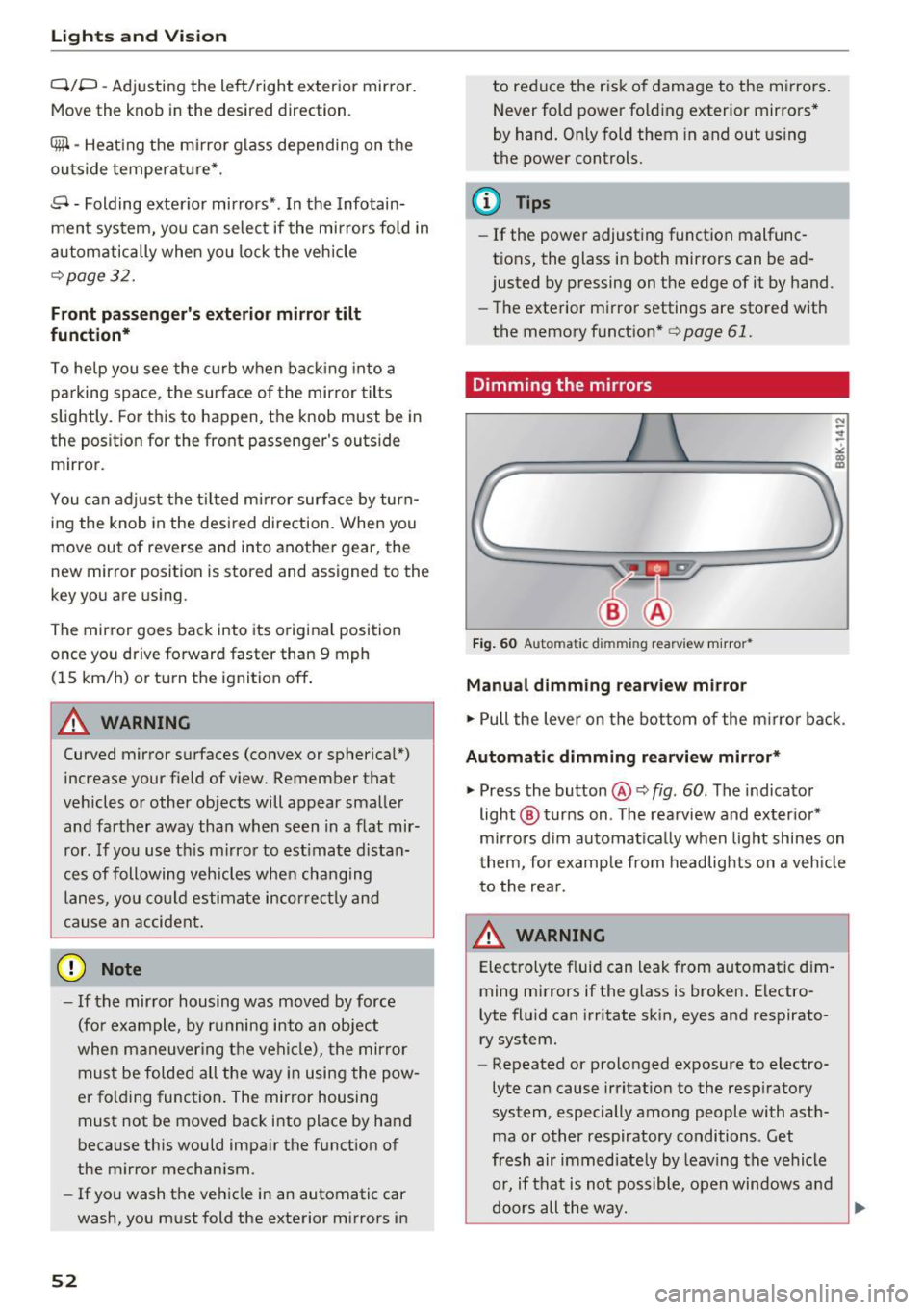
Dimming the mirrors
Fig. 60 Automatic dim ming rearview m ir ror *
Manual dimming rearview mirror
.,. Pull the lever on the bot tom of the m irror bac k.
Automat ic dimming rearvi ew mirror*
.,. Press the button@¢ fig. 60. The indicator
light @ turns on . The rea rview and ex ter ior*
m irrors d im au tomat ically when light shines on
them, for examp le from headlights on a veh icle
t o the rea r.
~ WARNING
Electrolyte fluid can leak from automatic d im
ming mirrors if the glass is broken . Electro
lyte fluid can irritate sk in, eyes and respirato
ry system.
- Repeated or prolonged exposure to electro
lyte can cause irritat ion to the resp iratory
system, especially among people with ast h
ma or other respiratory conditions. Get
fresh air immediate ly by leaving the vehicle
or, if that is not possible, open windows a nd
d oors all the way.
llll>
Page 56 of 266

Lights and Vi sion
the afterwipe operation . The afterwipe function
is reactivated the next time the ignition is switch
ed on.
Clean ing the headlights*. The headlight washer
system* operates on ly when the headlights are
on. If you move the lever to position @, the
headlights are washed in intervals .
A WARNING
-The rain sensor is only intended to assist the
dr iver. The driver is still responsib le for
ma nually switching the wipers o n accord ing
to the v is ibility conditions.
- The w indshield may not be treated with wa
ter-repelling windsh ield coating agents . Un
favorable conditions, such as wetness, dark ness, low sun, can result in increased glare.
Wiper b lade chatter is also possible.
- Properly f unctioning windsh ie ld wiper
blades are required for a clear view and safe
dr iv ing¢
page 54, Replacing windshield
wiper blades.
(D Note
- In the case of frost, check whethe r th e
windsh ie ld wiper b lades are froze n to the
windsh ield. Sw itching on the winds hield
wipers can damage the wiper blades!
- Prior to using a ca r w ash, the win dshi eld
wiper system m ust be switched o ff (lever in
pos ition @). This helps to p revent uninten
tiona l switching on and damage to the
windshie ld wiper system .
@ Tips
-The windshield wipers are switched off
when the ignition is turned off. Activate the
windsh ie ld wipers after the ign ition is
switched back on by moving the windsh ield
wiper leve r to any pos it ion.
- Wo rn or dirty windshield wiper blades result
i n streak ing. This can affect the ra in sensor*
funct ion. Check your windshield wiper
blades regularly .
- The washe r fluid nozzles of the windshield
washer system are heated at low tempera
tures when the ignition is on .
54
-When stopping temporari ly, (e.g. at a traf
fic light) the set speed of the windshield
wipers is automatically reduced by one
speed.
Cleaning windshield wiper blades
Clean the windshie ld w iper blades when they be
gin to leave streaks. Use a soft cloth and glass
cleaner to clean t he windsh ie ld w iper blades .
.,. Place the windshie ld w iper arms in the service
position. Refer to¢
page 54.
.,. Lift the w iper arm away from the front w indow.
'
A WARNING
Di rty windshie ld w iper blades can impa ir yo ur
v iew. This can lead to accidents.
Replacing windshield wiper blades
F ig. 63 Re moving w indsh ield w ipe r blade
Wiper serv ice position /blade replacement
posit ion
0, ... M 9
~ m
.,. Switch the ignit io n off and move the w indshield
w iper lever to position©¢
page 53, fig. 62.
The windsh ie ld wipers move in to the service po
si tion.
.,. To br ing the wipers back into the origina l posi
tion, switch the ignition on and press the wind
shie ld wiper lever .
You can also turn the se rvice posit ion on o r off in
the radio/ MM!* :
.,. Switch the windshie ld w ipers off (posit ion @
¢ page 53, fig . 62).
.,. Select: !CAR ! function button> Win dshiel d
wipers
> Ser vice position > on /off . Or
Page 59 of 266
a:,
a:,
...... N r--. N ...... 0
0
LL 00
Seats and storage
General information
Why is your seat adjustment so important?
The safety belts and the airbag system can only
provide maximum protection if the front seats are corr ectly adjusted .
There are various ways of adjusting the front
seats to provide safe and comfortable support
for the driver and the front passenger . Adjust
your seat properly so that:
- you can easily and quickly reach all the switches
and controls in the instrument panel
- your body is properly supported thus reducing
physical stress and fatigue
- the safety belts and a irbag system can offer
maximum protection
Q page 130.
In the following sections, you will see exact ly
how you can best adjust your seats.
There are spec ial regulations and instr uctions for
installing a child safety seat on the front pas
senger's seat . Always fo llow the information re
garding child safety provided in
¢ page 150,
Child safety.
A WARNING -
Refer to Q page 111, Driving safety for im
portant information, tips, suggestions and
warnings that you should read and follow for
your own safety and the safety of yo ur pas
senge rs.
A WARNING
Incorrect seat ing position of the driver and all
other passengers can result in serious person
al injury .
- Always keep yo ur feet on the floor when the
vehicle is in motion -never pu t your feet on
top of the instrument pane l, out o f the win
dow or on top of the seat cushion. This ap
plies especially to the passengers. If your
seating pos it ion is incorrect, you increase
the risk of injury in the case of sudden brak
ing or an accident. If the airbag inflates and
Seat s and sto rage
the seating position is incorrect, this could
result in persona l injury or even death.
- It is important for both the driver and front
passenger to keep a distance of at least
10 inches (25 cm) between themselves and
the steering wheel and/or instrument pan
el. If you're sitt ing any closer than this, the
airbag system cannot protect you properly .
In addition, the front seats and head re
stra ints must be adjusted to you r body
he ight so that they can g ive you maximum
p rotection.
- Always try to keep as much dis tance as pos
sible between yourself and the steer ing
wheel or instrument pane l.
- Do not adjust the driver's o r front passeng
er 's seat while the veh icle is moving . Your
seat may move unexpectedly, causing sud
den loss of vehicle contro l and personal in
jury. If you ad just your seat while the veh icle
is moving, you are out of pos ition.
Driver's seat
The correct seat position is important for safe
and relaxed driving.
We recommend that you adjust the driver's seat
in the following manner:
.,. Adjust the seat in fo re and aft direction so tha t
you c an ea sil y push the pedals to the floor
while keeping yo ur knees s light ly bent ¢.&.
in
Why is your seat adjustment so important? on
page
57.
.,. Adj ust the seatback so that when you sit with
your back against the seatback, you can still
grasp the top of the steering wheel.
.,. App lies to ve hicles w ith ad justable head re
stra ints: Adjust the head rest raint so the upper
edge is as even as possible w ith the top of your
head. If t hat is not possible , try to adjust the
he ad restraint so that it is as close to this pos i
tion as possible ¢
page 60.
A WARNING ~
Never place any objects in the driver 's foot-
well. An object could get into the pedal area and interfere with pedal function. In case of
57
Page 60 of 266
Sea ts and stor age
sudden braking or an accident, you would not
be able to brake or accelerate.
Front passenger's seat
Always move the front passenger seat into the
rearmost position.
To avoid contact with the a irbag while it is de
p loying, do not sit any closer to the instrument
panel than necessary and a lways wear the three
point safety belt provided adjusted correctly. We
recommend that you adjust the passenger's seat
in the following manner:
.,. Bring the backrest up to an (a lmost) upright
position .
Do not ride with the seat reclined.
.,. Applies to vehicles with adjustable head re
straints: Adjust the head restra int so the upper
edge is as even as poss ible with the top of your
head. If that is not possible, try to adjust the
head restraint so that it is as close to th is posi
tion as poss ible
¢ page 60.
.,. Place your feet on the floor in front of the pas
senger's seat.
Front seats
Power seat adjustment
App lies to: vehicles with power adjustable seats
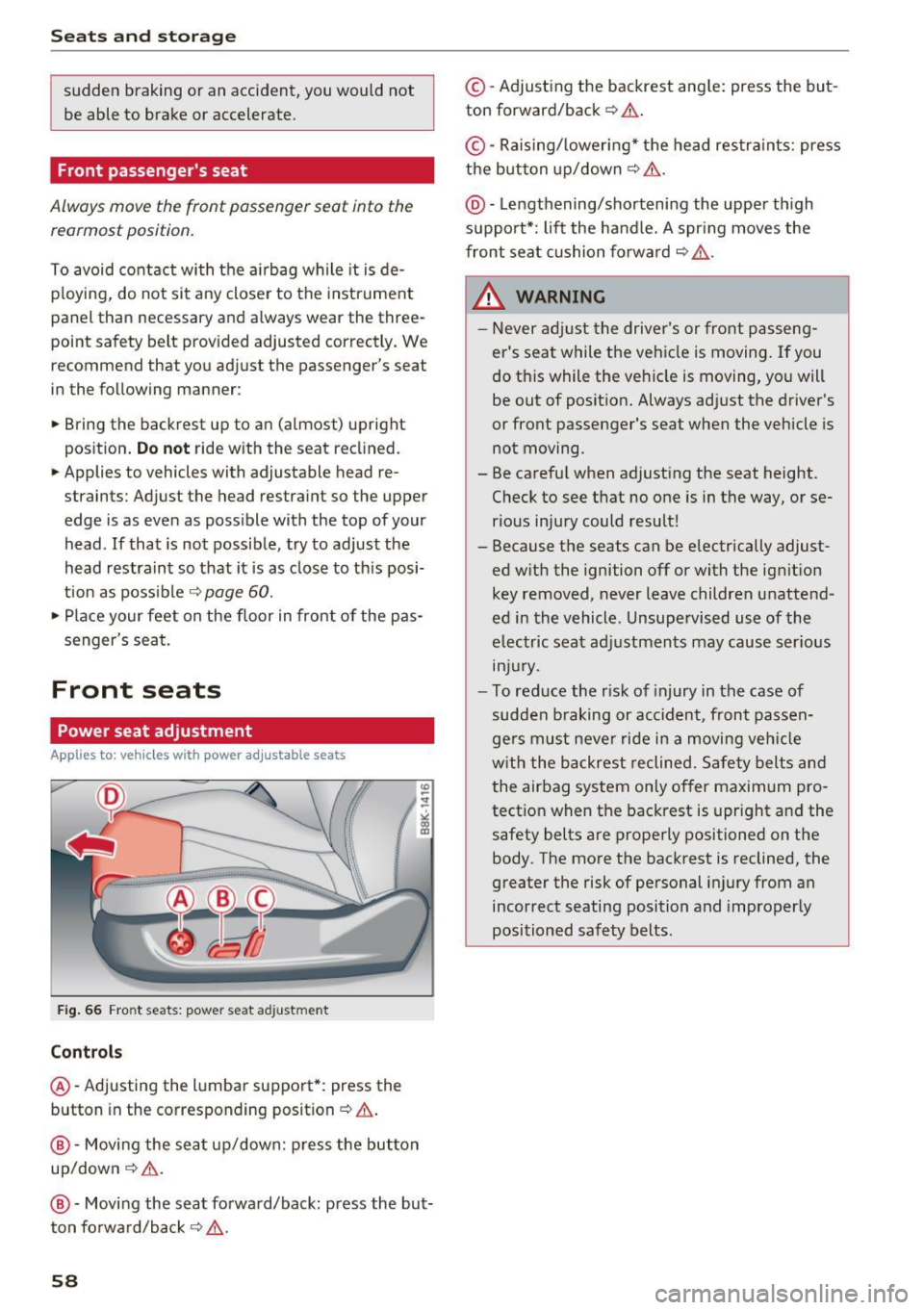
Fig . 66 Fro nt seats: power seat adjustment
Controls
@ -Adjusting the lumba r support*: press the
button in the corresponding position¢& .
@-Movi ng the seat up/down: p ress the but ton
up/down¢ &.
@ -Moving the seat forward/back: press the but
ton forwa rd/back ¢,& .
58
©-Adjusting the backrest ang le: press the but
ton forward/back ¢
.&..
©-Raising/ lower ing* the head restra ints: press
the button up/down ¢& .
@ -Lengthening/sho rtening the upper th igh
suppo rt*: lift the handle. A spr ing moves the
front seat cushion forward ¢
,&.
& WARNING
-Never ad just the driver's or front passeng
er's seat while the vehicle is moving.
If you
do this while the veh icle is moving, you will
be out of posit ion. Always ad just the driver's
or front passenger's seat when the vehicle is
not moving .
- Be carefu l when adjusting the seat height .
Check to see that no one is in the way, or se
rious injury could result!
- Because the seats can be electrically adjust
ed w ith the ignition off or with the ig nition
key removed, never leave children unattend
ed in the vehicle. Unsupe rvised use of the
electric seat adj ustments may cause ser ious
m Jur y.
- To red uce the r isk of injury in the case of
sudden b raking or acc ident, front passen
ge rs must neve r ride in a moving ve hicle
w it h the backrest reclined. Sa fety belts and
the airbag system on ly offer maximum pro
tect ion when the backrest is upr ight and the
safety belts are properly positioned on the
body. The more the backrest is reclined, the
greater the risk of personal injury from an
incorrect seating position and improper ly
positioned safety belts.
-
Page 61 of 266
a:,
a:,
...... N
" N ...... 0
0
LL co
Power easy entry function
Applies to: vehicles with power adjustable seats
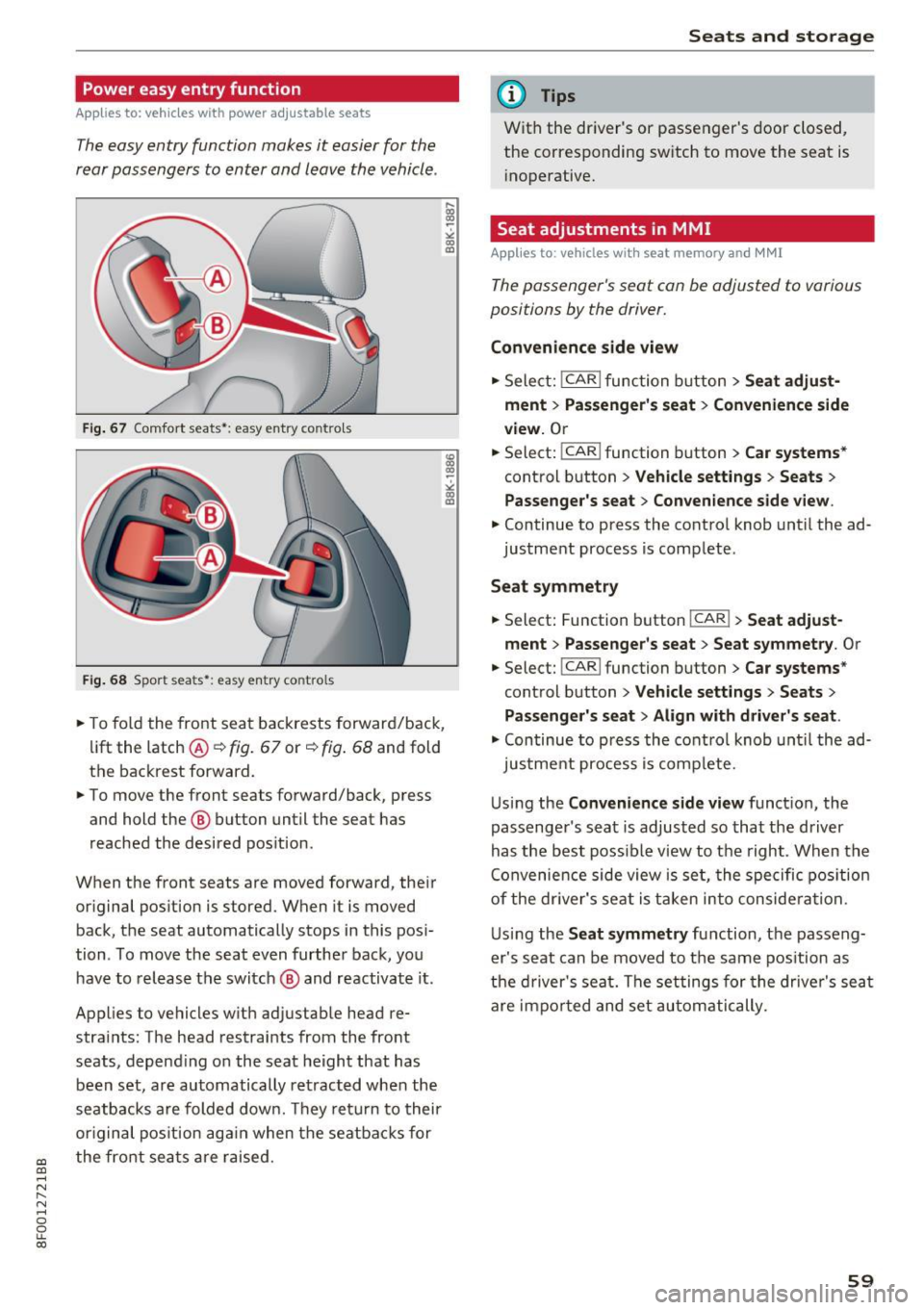
The easy entry function makes it easier for the
rear passengers to enter and leave the vehicle .
Fig. 67 Comfort seats •: easy e ntry co ntro ls
F ig. 68 Sport sea ts •: easy en try co ntro ls
.. To fo ld the front seat backrests forward/back,
lift the latch @¢ fig. 67 or ¢ fig. 68 and fold
the backrest forward .
.,. To move the front seats forward/back, press
and hold the @ button until the seat has
reached the desired pos ition .
When the front seats are moved forward, their or iginal pos ition is stored. When it is moved
back, the seat automatically stops in this pos i
tion . To move the seat even further back, you
have to release the switch @ and reactivate it .
Applies to vehicles w ith adjustab le head re
stra ints: The head restraints from the fro nt
seats, depend ing on the seat he ight that has
been set, are automatically retracted when the
seatbacks are folded dow n. Th ey retu rn to their
or iginal pos ition aga in when the seatbac ks for
the fro nt sea ts ar e raised.
Seats and storag e
(D Tips
With the dr iver's or passenger's door closed,
the corresponding sw itch to move the seat is
i noperative.
Seat adjustments in MMI
Appl ies to : vehicles with seat memory and MMI
The passenger's seat can be adjusted to various
positions by the driver.
Convenience side view
.,. Select: !CAR ! func tion button> Seat adju st
ment > Passenger' s seat > Convenience side
view.
O r
.. Select: !CAR ! function button > Car systems *
control button > Vehicle settings > Seats >
Passenger's seat > Conven ience side view .
.,. Continue to press the control knob until the ad
justment process
is comp lete .
Seat symmetry
.. Select: Function button !CAR !> Seat adjust ·
ment
> Pa ssenger 's seat > Seat symmetry . Or
.. Select: !CAR ! function button> Car systems *
control button > Vehicle settings > Seats >
Pas senger's seat> Align with driver's seat .
.,. Continue to press the control knob unt il the ad-
justment process is comp lete.
U si ng the
Convenience side view funct ion, the
passenger's sea t is adjusted so that the driver
has the best poss ib le view to the right . When the
Convenience side view is se t, the spe cific pos ition
of the dr iver's seat is taken into conside ra t ion.
U sing the
Seat symmetry function, the passeng
er's seat can be moved to the same pos ition as
the driver 's sea t. The settings for the drive r's seat
are impo rted and set au to ma tically.
59
Page 68 of 266
Warm and cold
Warm and cold
Climate control system
Description
The climate control system warms, cools and
adds humidity to the air in the veh icle inter ior. It
is the most effective when the windows and pow
er top are closed. If there is a bui ld-up of heat in
side the vehicle, ventilation can help to speed up
the cooling process.
I n all heating mode functions except
defrost, the
b lower only switches to a higher speed once the
engine coolant has reached a certain tempera
ture .
Condensat ion from the cooling system can drip
and form a puddle of water under the veh icle.
This is normal and does not mean there is a leak.
P ollutant filt er
The pol lutant filte r removes pollutants such as
dust and pollen from the a ir.
The air pollutants filter must be changed at the intervals specif ied in your Warranty
& Mainte
nance booklet, so that the a ir cond it ioner can
properly work.
If you drive your vehicle in an area with high air pollut ion, the filter may need to be changed
more frequently than specified i n your Aud i War
ranty
& Maintenance booklet. If in doubt, ask
your author ized Audi Service Advisor for advice.
Ke y cod ed setting s
The climate control settings are automatically
stored and assigned to the remote control key
that is in use . These sett ings are different whe n
the powe r top is open or closed.
_& WARNING
Reduced visibility is dangerous and can ca use
accidents.
6 6
- For safe driving it is very important that all
w indows be free of ice, snow and condensa
tion.
- Completely familiarize yourself with the
proper use and function of the heating and
ventilation system and especially how to de
fog and defrost the windows .
- Never use the windshield wiper/washer sys
tem in freezing weather until you have
warmed the windshield first, using the heat
ing and vent ilation system . The washe r solu
tion may freeze on the windshield and re
duce visibility.
(U;) Note
- If you suspect that the air conditioner has
been damaged, sw itch the system off to
avoid furthe r damage and have it inspected
by a q ualified dealership .
- Repa irs to the Aud i air cond itioner requ ire
special techn ica l know ledge and spec ial
tools. Contact an a uthorized Audi dea ler fo r
assistance .
@ For the sake of the environment
By reduc ing the amo unt of fuel you use, you
a lso red uce the amount of pollutants emitted
into the air.
(D Tips
- Keep the a ir intake slots (in front of the
windshield) free from ice, snow and debr is
in order to maintain the proper function of
the climate control system .
- The energy managemen t sys tem may sw itch
the seat heating * or rear window defroster
off temporarily. These systems are available
again as soon as the energy balance has
been restored.
- Air escapes through vents under the rear
window. When placing items of clothing on
the luggage compartment cover, ensure
that the openings are not covered.
Page 81 of 266
a:,
a:,
...... N
l'
N
...... 0
0
LL co
The maximum speed rema ins stored until it is
chang ed by press ing the
!SE Ti button again brief
l y or unt il it is deleted by a lengthy push on the
button .
Speed warning 2: setting a speed limit
The radio or MM!* control unit is used to set,
change or delete w arning threshold
2 .
• Se lect : I CAR I function button> Instrument
cluster
> Speed warning . Or
• Se lect: I CAR i funct ion button > C ar sy stem s*
contro l button > Dri ver a ssist > Speed wa rning .
Warning threshold 2 can be set in the speed
range start ing from 20 mph to 150 mph (30 km/
h to 240 km/h) . Settings can each be ad justed in
intervals of 5 mph (10 km/h).
Cruise control system
Switching on
The cruise control system makes it possible to
drive at a constant speed starting at
20 mph (30
km/h).
0
f
~
0
F ig . 93 Co ntrol leve r wit h pus h-butto n
Fig. 9 4 Disp lay : Se lecte d speed
D rivi ng
• Pull the lever to position (D c::> fig . 93 to sw itch
the system on .
• Dr ive at the speed to be contro lled .
• Press button @to set that speed .
T he sto red speed and the green symbol
@;\1)~14 (US mode l)/ El (Canadian model) are
shown in the display
c::> fig. 94. The d isp lay may
vary, depending on the type of display in you r ve
hicle .
The speed is kept constant by modifying engine power or through an act ive brake intervention .
_& WARNING
-Always pay attention to the traffic a round
you when the cruise contro l is in operation.
You are always respons ible fo r your speed
a nd the distance betwee n your ve hicle and
other veh icles.
- For reasons of safety, c ruise control sho uld
not be used in the c ity, in stop-an d-go t raf
fic, on tw ist ing roads and whe n roa d condi
tions a re poo r (s uch as ice, f og, gravel,
heavy rain and hydroplaning) -ris k of a cci
dent .
- Tu rn off the cr uise con trol te mpor arily whe n
e ntering t urn lanes, highway exit lanes or in
construct ion zones .
- P lease no te th at inadve rten tly "resting"
your foot on the acce lerator pedal causes
the cruise control not to brake. This is be
cause the cr uise control is overridden by the
driver's acce leration.
- If a b rake system malfunction such as ove r
heating occurs when the cruise control sys
tem is switched on, the brak ing funct io n in
the system may be switched of f. The other
cru ise control functions remain act ive as
long as the ind icator
light @;\1)~14 (US mod
e ls)
,ii (Ca nadian mo dels) is on .
@ Tips
The brake lights illuminate as soon as the
brakes apply automa tically.
79
Page 88 of 266

Automatic transmissio n
Appli es to vehicl es with a S troni c-/ tiptronic
t ran smissi on
When you depress the accelerator peda l beyond
the resistance point, the automatic t ransmission
downshifts into a lower gear, depending on vehi
cle s peed and engi ne speed. The upshift into the
next h igher gear takes place once the maximum
specif ied e ngine speed is reached.
A WARNING
Please note that the drive whee ls can spin if
kick-down is used on a smooth s lippery road -
there is a risk of skidding.
Launch Control Program
A pp lies to: ve hicles w ith S tro nic
The Launch Control Program provides the best
acceleration possible when starting from a stop.
Requirement: The engine must be at operating
temperature and the steer ing wheel must not be
turned .
"' Press the
lfl O FF ! button ¢ page 168 while the
engine is run ning . T he
II indicator light illumi
nates in the instrument cluste r and
Stabil iza
tion control (ESC ): Sp ort. Warning! R estricted
s tab ilit y
appears in the d river informat ion sys
tem display.
"' Move the selecto r lever to the D/S position to
select sport mode (S) or select the
d ynami c
driving mode in drive select * ¢page 102.
"'Press the brake pedal strongly with your left
foot and hold it down fo r at least 1 second.
"' At the same t ime, press the acce lerator pedal
down completely with your right foot until the engine reaches and maintains a high RPM .
"' Remove your foot from the b rake pedal within
S seconds ¢
&-
A WARNING
-Always adapt yo ur driv ing to the traffic flow.
- Only use the La unch Control Prog ram when
ro ad and tra ffic conditions allow it and oth
er drivers will not be endangered or an
noyed by you r driving and the vehicle 's ac
celeration.
86
- Please note that the d riving wheels can spin
and the vehicle can b reak away when sport
mode is switched on, espec ially when the
road is slippery .
- Once you have acce lerated, you should
sw itch sport mode off by pressing the
I ~ OFFI button .
(D Tips
-The transmission temperat ure may increase
significant ly after using the Launch Contro l
Program. If that happens, the program may
not be ava ilable for a few minutes . It will be
available again afte r a cool-down period .
- When accelerating using the Launch Control
program, all vehicle pa rts a re subject to
heavy loads . This ca n result in increased
wea r.
Transmission malfunction
App lies to: vehicles wi th mult itro nic/S tro nic/ tip tronic
I>] Tran smi ssion : Pres s brake ped al and select
gear again.
P ress the b rake peda l and select the desired se
l ector lever posi tion again. Yo u can then co nti nu e
driv ing.
I>] Tran smiss ion ov erheating: Plea se drive con
servativel y.
The transmission temperature has increased sig
nificantly due to t he sporty dr iving ma nner . Drive
i n a less spo rty manner unti l the temperature re
turns to t he norma l range and the i ndicator light
switches of.
I>] Tran smiss ion malfun ct ion : You can co ntinue
driv ing
There is a system malfunction in the transmis
s io n. You may continue driving. Dr ive to your au
thorized Audi dea ler or qua lified repair facility
soon to have the ma lfunction corrected .
I>] Transmission malfunct ion : Limited dri ving
functional ity
There is a system malfunction in the transmis-
s ion. The t ransmission is switch ing to emergency
mode. This mode only s hifts into certain gears or ..,_
Page 90 of 266

Audi adaptive cruise control and braking guard
Audi adaptive cruise
control and braking
guard
Introduction
A pp lies to: ve hicles w ith Aud i adapt ive cruise co ntro l
The adaptive cruise contro l system assists the
driver by regulating vehicle speed and helping to
maintain a set distance to the veh icle ahead ,
within the limits of the system. If the system de
tects a moving vehicle up ahead, adaptive cruise
control can brake and then accelerate your vehi
cle. This helps to make driving more comfortable
on long highway stretches.
The braking guard system can warn you about an
impending collision and initiate braking maneu
vers
c> page 94.
Adaptive cruise control and braking guard have
technical limitations that you must know, so
please read th is section carefully, understand
how the system works and use them properly at
all times.
General information
General information
A pplies to : ve hicles w ith Aud i adapt ive cruise co ntrol
Fig. 102 Front of t he veh icle: Posit ion of radar sensor
The area that contains the radar sensor
c> fig. 102 must never be covered by st ickers or
other objects or obstructed with dirt, insects,
snow or ice that w ill interfere w ith the adaptive
cruise control system and braking guard. For in
formation on cleaning, refer to
c> page 182. The
same appl ies for any modifications made in the
front area .
88
The function of the adaptive cruise control sys
tem and braking guard is limited under some
condit ions:
- Objects can only be detected when they are
within sensor range
<:!) page 90, fig . 105.
-The system has a limited ability to detect ob
jects that are a short distance ahead, off to the
side of your vehicle or moving into your lane.
- Some k inds of veh icles are hard to detect; for
example motorcycles, veh icles with high
ground clearance or overhanging loads may be
detected when it is too late or they may not be
detected at all.
- When driving through curves
c:::> page 89.
- Stationary objects i::!) page 89 .
& WARNING
-Always pay attention to traffic when adaptive
cruise control is switched on and braking
guard is active. As the driver, you are still re
sponsible for starting and for maintaining
speed and distance to other objects . Braking
guard is used to assist you . The driver must
a lways take act ion to avoid a collision . The
driver is always responsible for braking at the
cor rect time.
- Improper use of adaptive cruise contro l can
cause collisions, other accidents and serious
personal injury.
- Never let the comfort and convenience that
adapt ive cr uise control and braking guard
offe r distract you from the need to be alert
to traffic conditions and the need to remain
in full control of your ve hicle at all times,
- Always remember that the adaptive cruise
control and braking guard have limits -they
will not slow the vehicle down or maintain
the set distance when you dr ive towards an
obstacle or something on or near the road
that is not moving, such as vehicles stopped
in a traff ic jam, a stalled or disabled veh icle.
If registered by the radar sensor, veh icles o r
obstacles that are not moving can trigger a
coll ision warning and if confirmed by the
video camera, an acute collision warning. ..,