power steering AUDI A5 CABRIOLET 2017 Owners Manual
[x] Cancel search | Manufacturer: AUDI, Model Year: 2017, Model line: A5 CABRIOLET, Model: AUDI A5 CABRIOLET 2017Pages: 266, PDF Size: 66.64 MB
Page 4 of 266
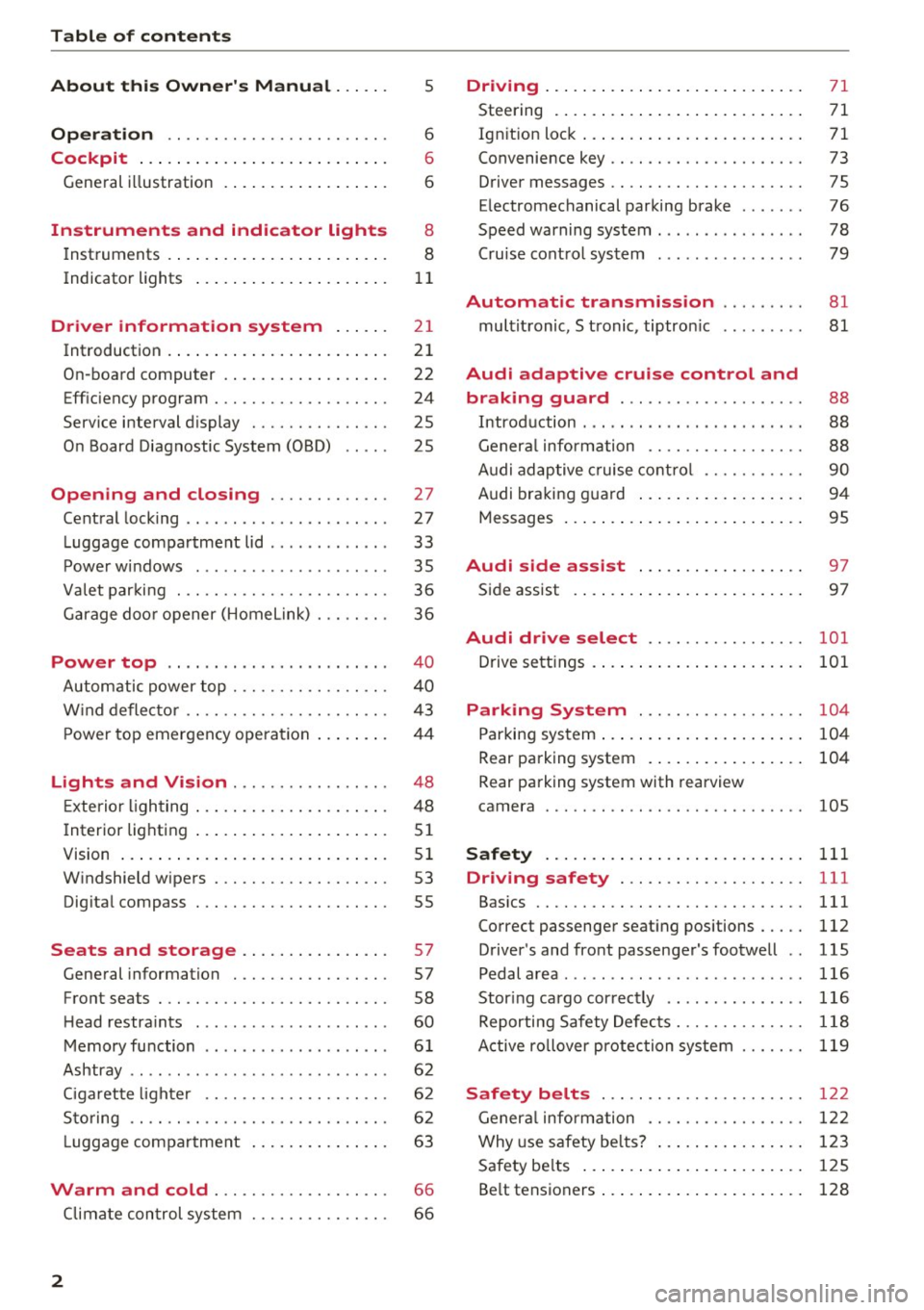
Table of contents
About this Owner's Manual. . . . . .
5
Operation . . . . . . . . . . . . . . . . . . . . . . . . 6
Cockpit . . . . . . . . . . . . . . . . . . . . . . . . . . . 6
Gene ral illustration . . . . . . . . . . . . . . . . . . 6
Instruments and indicator lights 8
Inst ruments . . . . . . . . . . . . . . . . . . . . . . . . 8
Indicator lights . . . . . . . . . . . . . . . . . . . . .
1 1
Driver information system . . . . . . 21
Int roduction . . . . . . . . . . . . . . . . . . . . . . . . 2 1
On-boa rd computer . . . . . . . . . . . . . . . . . . 22
Eff iciency program . . . . . . . . . . . . . . . . . . . 24
Service interval display . . . . . . . . . . . . . . . 25
O n Board Diagnostic System (OBD) . . . . . 25
Opening and closing . . . . . . . . . . . . . 27
Central lock ing . . . . . . . . . . . . . . . . . . . . . . 27
L uggage com partment lid . . . . . . . . . . . . . 33
P owe r windows . . . . . . . . . . . . . . . . . . . . . 35
Va let par king . . . . . . . . . . . . . . . . . . . . . . . 36
G arage do or opener (Home link) . . . . . . . . 36
Power top . . . . . . . . . . . . . . . . . . . . . . . . 4 0
Autom atic power top . . . . . . . . . . . . . . . . . 4 0
W ind defle ct or . . . . . . . . . . . . . . . . . . . . . . 43
P ower top emergen cy opera tion ... .. .. .
Lights and Vision ............ .. .. .
Exterio r lighting .... . ...... ... .. .. .. .
I nterior lighting .. .. .. ..... ... .. .. .. .
4 4
48
48
5 1
V1s1on . . . . . . . . . . . . . . . . . . . . . . . . . . . . . 5 1
W indshield w ipers . . . . . . . . . . . . . . . . . . . 53
Dig ita l compass . . . . . . . . . . . . . . . . . . . . . 55
Seats and storage . . . . . . . . . . . . . . . . 57
Gene ral information . . . . . . . . . . . . . . . . . 57
Front seats . . . . . . . . . . . . . . . . . . . . . . . . . 58
H ead restra ints . . . . . . . . . . . . . . . . . . . . .
60
Memory function . . . . . . . . . . . . . . . . . . . . 6 1
Ashtray . . . . . . . . . . . . . . . . . . . . . . . . . . . . 62
Ciga ret te ligh te r . . . . . . . . . . . . . . . . . . . . 6 2
Sto ring . . . . . . . . . . . . . . . . . . . . . . . . . . . . 6 2
Lugg age compa rtment . . . . . . . . . . . . . . . 63
Warm and cold . . . . . . . . . . . . . . . . . . . 66
Climate con trol system . . . . . . . . . . . . . . . 66
2
Driving .... . .. .. .. .. ... . .. .... ... . .
Steering . ... .. .. .. .. .. .. .. .... ... . .
Ign it ion loc k ... .. .. .. .. . ... .... ... . .
Convenience key .. .. .. ............. . .
D river messages .. .. .. ............. . .
E lectromechanical parking brake ...... .
Speed warning system ......... ..... . .
Cru ise cont rol system .............. . .
Automatic transmiss ion
mul tit ronic, S t ronic, tiptron ic
Audi adaptive crui se control and
braking guard ................... .
Introduction ....................... .
Genera l information .. .. ........... . .
Audi ad aptive cruise cont ro l .......... .
A udi br aki ng g uard ... .. . ... .... ... . .
Messages ... .. .. .. ... .. .. ..... ... . .
Audi side assist ... .. .. .. .... .. .. .
S ide ass ist . ... .. .. .. ... .. ..... ... . .
71
71
7 1
73
75
76
78
79
81
81
88
88
88
90
94
95
97
97
Audi drive select . . . . . . . . . . . . . . . . . 101
Drive sett ings . . . . . . . . . . . . . . . . . . . . . . . 101
Parking System . . . . . . . . . . . . . . . . . . 104
Parking sys tem ... .. .. ... . .. .... ... . .
Rear parking system .. .. .. .. .... ... . .
Rear park ing system with rearview
camera
Safety
104
104
105
111
Driving safety . . . . . . . . . . . . . . . . . . . . 111
Bas ics . . . . . . . . . . . . . . . . . . . . . . . . . . . . . 111
Correct passenger seat ing positions... .. 112
D river's and front passenger's footwell . . 115
Pedal area .......................... 116
Stor ing cargo cor rec tly . . . . . . . . . . . . . . . 116
Reporting Safety Defec ts . . . . . . . . . . . . . . 118
A ctive rollover protec tion system 119
Safety belts . . . . . . . . . . . . . . . . . . . . . . 122
Gener al infor mation . . . . . . . . . . . . . . . . . 122
Why use safety be lts? . . . . . . . . . . . . . . . . 123
Safe ty be lts . . . . . . . . . . . . . . . . . . . . . . . . 125
Be lt tensioners . . . . . . . . . . . . . . . . . . . . . . 128
Page 9 of 266
a:,
a:,
...... N r--. N ...... 0
0
LL 00
CD
@
®
©
®
®
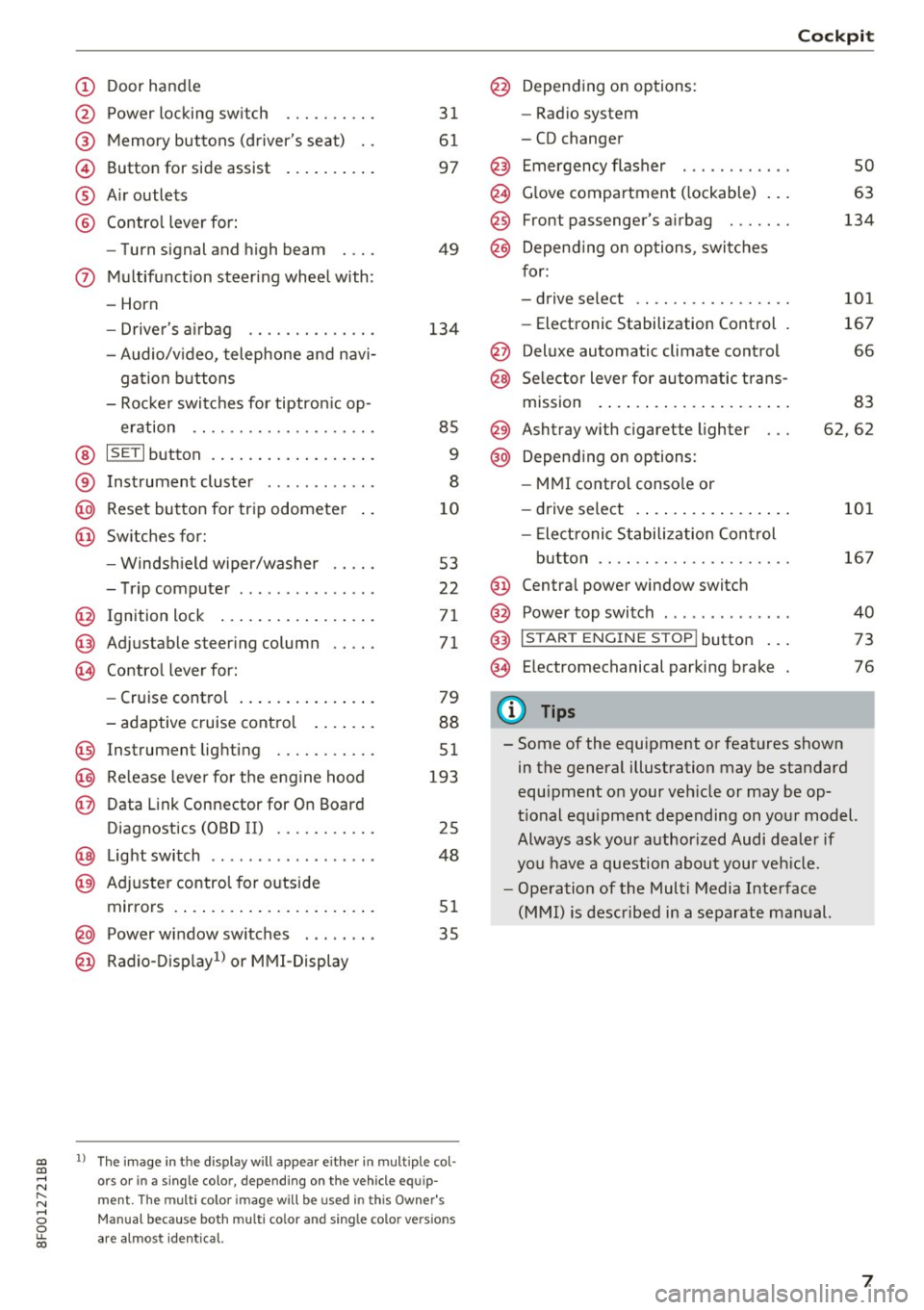
Door handle
Power locking switch
Memory buttons (driver's seat) . .
Button for side assist
A ir outlets
Contro l lever for:
- Turn signal and high beam
0 Multifunction steering wheel with:
- Horn
- Driver's airbag ........... .. .
- Audio/v ideo, telephone and nav i-
gation buttons
- Rocker switches for tiptron ic op -
eration .. ............. .. .. .
@ ISETI button ................ . .
® Instrument cluster ........... .
@
@ Reset button for trip odometer
Switches for:
- Windsh ield wiper/washer
- Trip computer .............. .
I gnition lock ................ .
Adjustable steering column
Contro l lever for:
- Cruise control .............. .
- adaptive cruise control ..... . .
@ Instrument lighting ........ .. .
@ Release lever for the engine hood
@ Data Link Connector for On Board
Diagnostics (OBD II) ........ .. .
@ Light switch ..... ....... ..... .
@ Adjuste r contro l for outside
mirrors . ... ................ . .
@ Power window switches . .. .... .
@ Radio-Display1l or MMI -Display
31
61
97
49
134
85
9
8
10
53
22
71
71
79
88
51
193
25
48
51
35
ll The image in t he d is pl ay wil l appear either in m ultiple col
o rs or in a single colo r, depending on the vehicle e quip
ment. The multi co lor im age will be used in this Owne r's
Man ual bec ause both multi co lor and single co lo r ve rsio ns
ar e almo st identica l.
@ Depending on options:
- Radio system
- CD changer
Emergency flasher
G love compartment ( lockable) .. .
Front passenger's airbag ...... .
Depend ing on options, switches
for:
- drive select .. .............. .
- Electronic Stabilization Control .
@ Deluxe automatic climate control
@ Selector lever for automatic trans-
mission . ... .. .. ............ .
@ Ashtray with cigarette lighter
@ Depending on options:
- MMI control console or
- drive select . ... ............ .
- Elect ronic Stabilization Control
button .. .. .. .. ............ .
@ Centra l power window switch
@ Power top switch . ............ .
@ I S TAR T ENGINE S TOP I button .. .
@ Electromechanical parking brake
0) Tips
Cockpit
so
63
134
101
167
66
83
62,62
101
167
40
73
76
- Some of the equipment or features shown in the general illustration may be standard
equipment on your veh icle or may be op
tional equ ipment depending on your model.
Always ask your authorized Audi dealer if
you have a question about your vehicle.
- Operation of the Multi Media Interface
(MMI) is described in a separate manual.
7
Page 13 of 266
a:,
a:,
...... N r--. N ...... 0
0
LL 00
Indicator lights
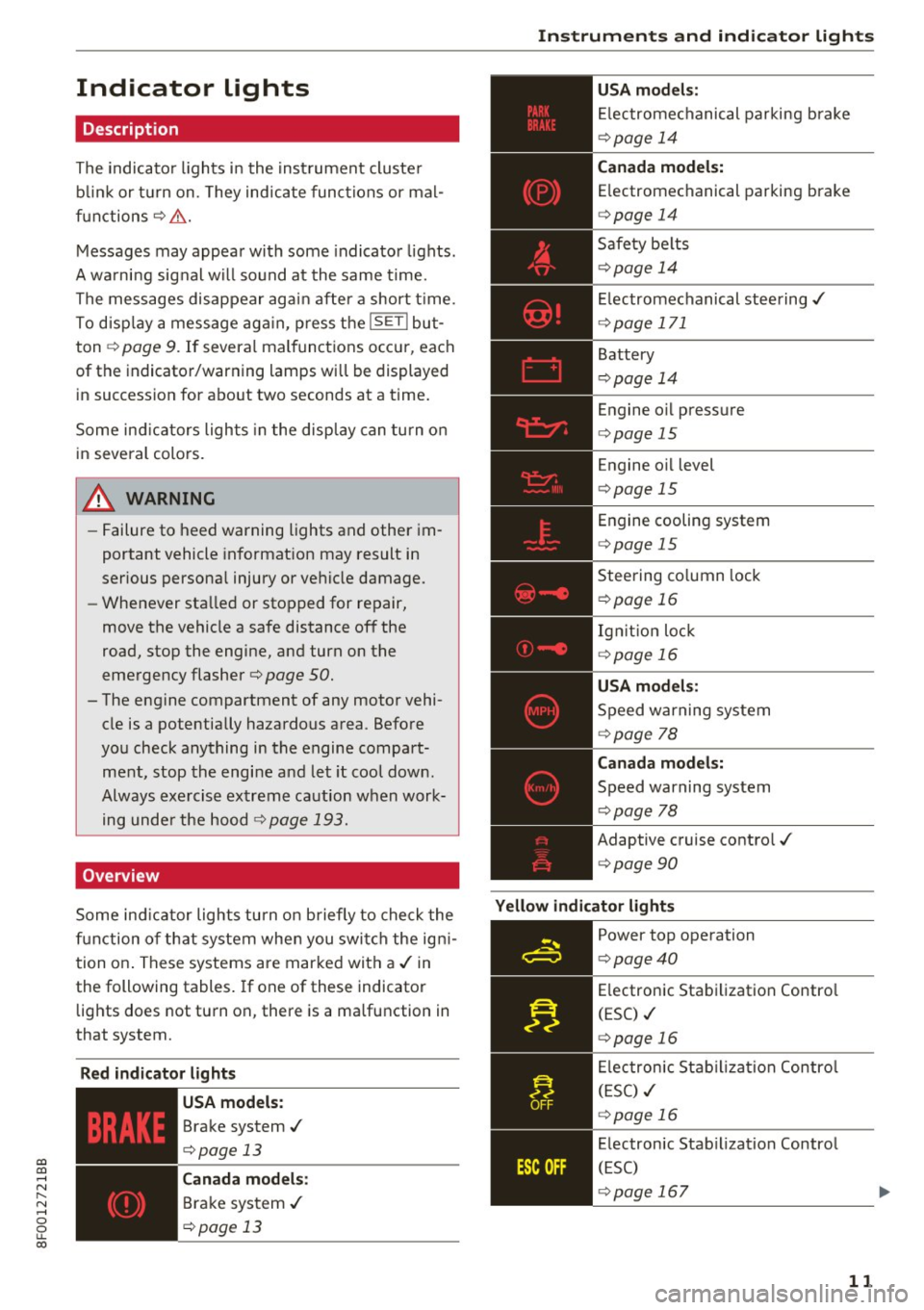
Description
The indicator lights in the instrument cluster
b link or turn on. They indicate functions or mal
functions ¢& .
Messages may appear with some indicator lights.
A warning signal will sound at the same time.
The messages disappear again after a short t ime.
To disp lay a message again, press the
ISETI but
ton ¢
page 9. If several malfunctions occur, each
of the indicator/warning lamps will be displayed
in succession for about two seconds at a time.
Some ind icators lights in the display can turn on
in several colors.
A WARNING
-
-Failure to heed warning lights and other im
portant vehicle informat ion may result in
serious personal injury or vehicle damage.
- Whenever stalled or stopped for repair,
move the vehicle a safe distance off the
road, stop the engine, and turn on th@
emergency flasher¢ page 50.
-The engine compartment of any motor vehi
cle is a potentially hazardous area . Before
you check anything in the engine compart ment, stop the engine and let it cool down.
Always exercise extreme caution when work ing under the hood¢
page 193.
Overview
Some ind icator lights turn on briefly to check the
function of that system when you switch the ign i
tion on . These systems are marked with a ,/ in
the following tables. If one of these indicator
lights does not turn on, there is a malfunction in
that system.
Red indicator lights
--------------
US A models:
Brake system./
¢page 13
Canada models:
Brake system ./
¢page 13
Instruments and indicator lights
USA models:
Electromechanical parking brake
¢page 14
Canada models:
Electromechanical parking brake
¢ page 14
Safety belts
¢page 14
Electromechanical steering./
¢page 171
Battery
¢page 14
Engine oil pressure
¢page 15
Engine oil level
¢page 15
Engine cooling system
¢page 15
Steering column lock
¢ page 16
Ignition lock
¢ page 16
USA models :
Speed warning system
¢page 78
Canada models:
Speed warning system
¢page 78
Adaptive cruise control./
¢page 90
Yellow indicator lights
--------------
Power top operation
¢page40
Electronic Stabilization Contro l
(ESC) ./
¢page 16
Electronic Stabilization Contro l
(ESC) ./
¢page 16
Electronic Stab ilization Control
(ESC)
¢ page 167
11
Page 14 of 266
Instruments and indicator lights
TPMS
-~--
12
USA models :
Anti-lock brak ing system (ABS) de
fective,/
¢ page 17
Canada mod els :
Anti-lock brak ing system (A BS) de
fective,/
¢ page 17
USA models :
Safety systems ./
¢page 17
Canada models :
Safety systems ./
¢page 17
Worn brake pads
¢page 18
Electromechan ical park ing brake
¢page 14
Tire pressure monitoring
system ,/
¢page 225
Tire pressure monitor ing system
¢page225
Electronic power control ,/
¢page 18
Malfunct io n ind icator Lamp (MIL)
,I
c::> page 18
Engi ne speed limitat ion
c::> page 18
Engine oil level
c::> page 15
Engine oil sensor
c::>page 18
Battery
c::> page 14
Tank system
c::>page 18
Warm up engine *
¢page 189
Windshield washe r fl uid leve l
¢page 19
Windshield wipers
¢page 19
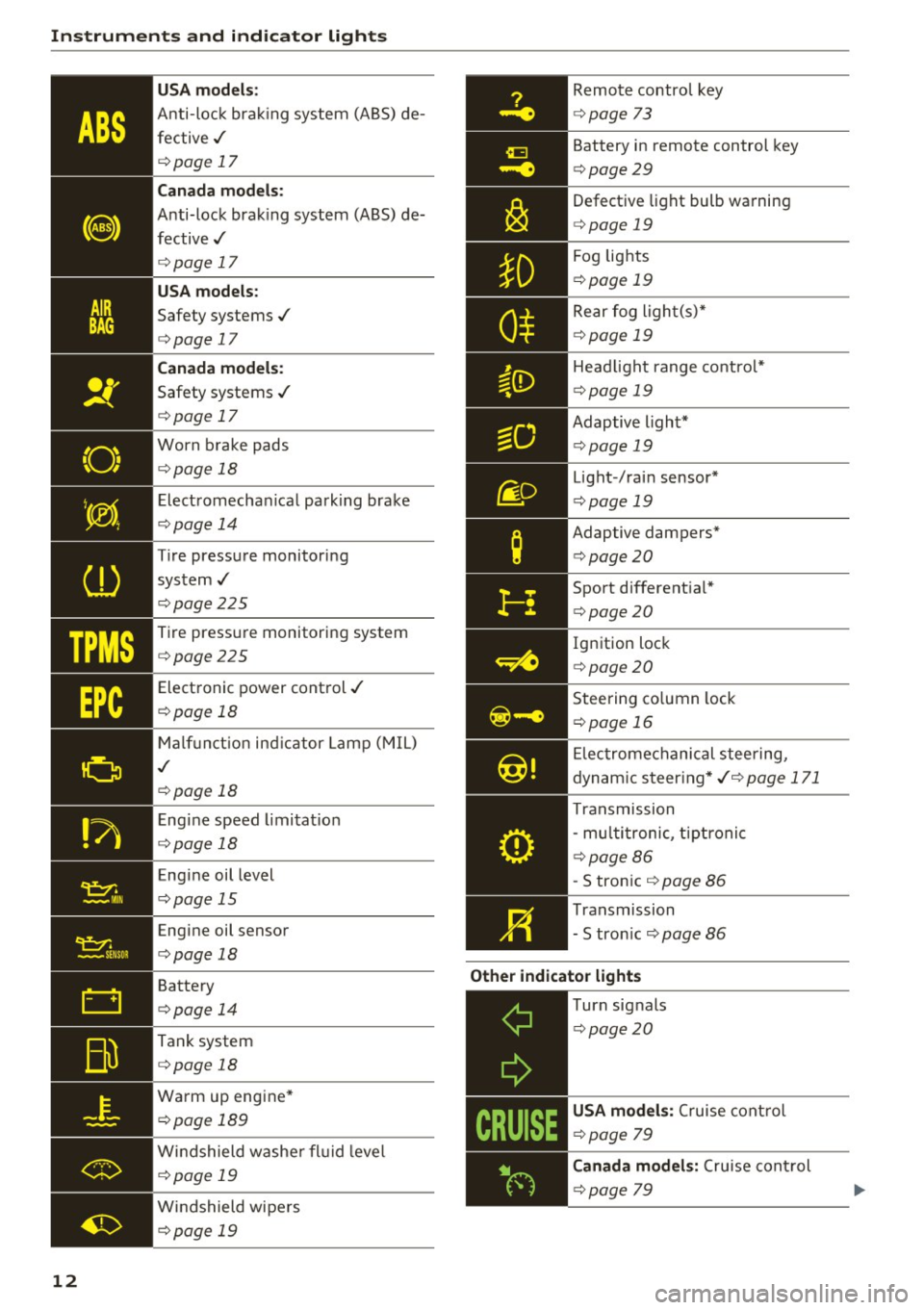
Remote control key
¢ page 73
Battery in remote control key
¢page 29
Defect ive light bulb wa rning
<=> page 19
Fog lights
¢page 19
Rear fog light(s)*
c> page 19
Headlight range control*
c> page 19
Adaptive light*
c>page 19
Light-/rai n sensor*
c> page 19
Adaptive dampers*
c>page20
Sport different ial*
<=> page20
Ig nition loc k
c>page 20
Steering co lumn lock
¢ page 16
Elec tromechanical stee ring,
dynam ic steer ing *
./c> page 171
Transmission
- mu lti tronic, tiptronic
c> page86
-S tron ic c> page 86
Transmission
- S tron ic
c::> page 86
Other indicator light s
c----=-----------
T urn signals
¢page20
USA mode ls: Cruise cont rol
c> page 79
Canada models : Cruise cont rol
¢ page 79
Page 18 of 266
Instruments and indicator lights
cooling system -you could damage your en
gine .
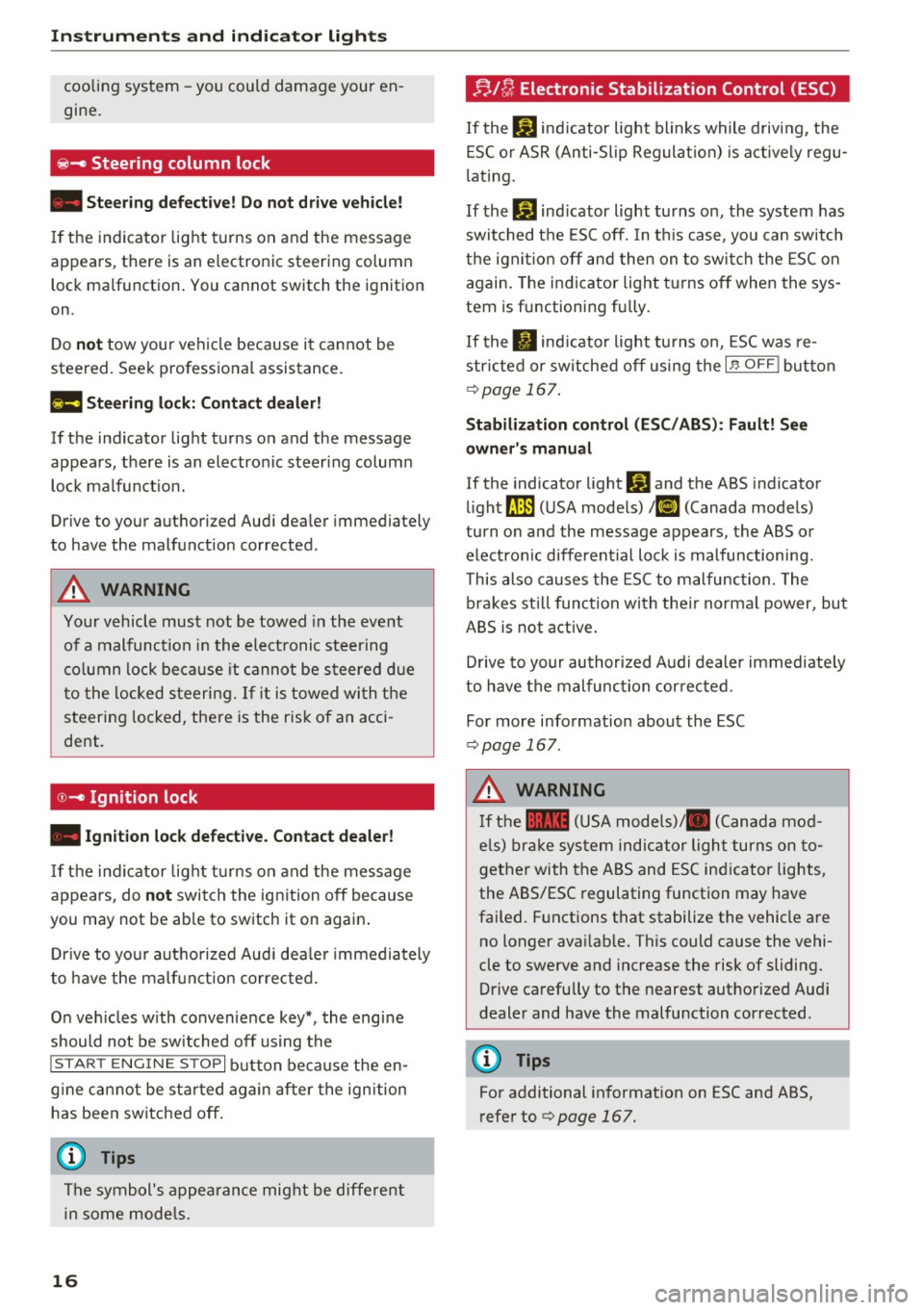
~- Steering column lock
• Steering defe cti ve! Do not dri ve vehicle!
If the indicator lig ht t urns on and the message
appears, there is an electronic steering column lock malf unction . You cannot switch the ignition
on.
Do
not tow your vehicle because i t cannot be
steered. Seek professional assistance.
£II S te erin g lo ck: C ontact dealer!
If t he indicator light turns on and the message
appears, there is an electro nic steer ing colum n
lock malfunct ion.
Drive to your authori zed Aud i dea ler immediately
to have the malfunct ion corrected.
A WARNING
Your vehicle must not be towed in the eve nt
of a malfunction i n the elect ronic steering
co lumn lock be ca use it cannot be steered d ue
t o the locked steering. If it is towed wi th t he
steering locked, the re is the r isk of an acci
dent .
0-Ignition lock
• Ignit ion lock defecti ve. Contact dealer!
If the indicator lig ht tu rns on and the message
appears, do
not switch the ign ition off because
you may not be ab le to switch it on again .
D rive to you r autho rized Aud i dea le r i mmedia tely
to have the malf unct ion corrected.
On ve hicles w ith convenience key*, the engine
should not be switched off using the
I S T AR T ENG IN E STOP I button because the en
g ine ca nnot be sta rted again after the ignition
has been switched off .
(D Tips
The symbol's appearance mig ht be diffe re nt
in some mode ls .
16
!;. J[/; Electronic Stabilization Control (ESC)
If the bJ ind icator light blinks while driving , the
ESC o r ASR (A nti-Sl ip Regulation) is act ively regu
l ating .
If the
bJ ind icator light turns on, the system has
switched the ESC off. In t his case, you can switch
t h e ign it io n off and then on to swi tch the ESC on
again. The indicator light t urns off when the sys
tem is functioning fu lly .
If the . indicator light turns on, ESC was re
stri cted or sw itched off using the
I.$ O FF I butto n
qpage 167 .
Stabilization cont rol (ESC / ABS ): Fault! See
owner' s manual
If the indicator l ight DJ and the ABS indicator
li ght
[IlJ (USA models) ;El] (Canada mode ls)
turn o n and the message appears, the ABS or
electron ic different ial lo ck is malfunctioning.
This also causes the ESC to malfunc tion. The
brakes st ill function with the ir norma l power, but
ABS is not active .
D rive to your au thori zed Audi dealer immediate ly
to have the malfunc tion cor rected .
Fo r more info rmation about the ESC
q page 167 .
A WARNING
If the 11111 (USA models)/ . (Canada mod
e ls) br ake system indicator light turns on to
gether with the ABS and ESC ind icator lights,
the ABS/ESC regulating function may have
failed. F unctions that stabilize the vehicle are
no longer ava ilab le. This could cause the vehi
cle to swerve and increase the risk of sliding. Drive carefully to the nearest authorized Aud i
dealer and have the malfunction corrected .
(D Tips
For additional informat ion on ESC and ABS,
r efer to
q page 167.
Page 74 of 266

Driving
Sw it c hing the ignit ion on /off
If you would like to switch the ignition on with
out starting the engine, follow these steps:
• Insert the key into the ignition lock.
• Press the key br iefly
withou t pressing the b rake
pedal.
• To switc h the ignition off, press the key again.
When start ing the engine, major electrical loads
are swi tched off temporarily.
You can only remove the key with the ignition
sw itched off.
If the engine should not start immed iate ly, the
starting process is automat ically stopped after a
short t ime . Repeat sta rting procedure.
A WARNING
- Never allow the engine to run in confined
spaces -dange r of asp hyxiation.
- Never remove the ignit ion key from the ign i
t ion loo k while the vehicle is moving. Other
wise, the steering lock cou ld sudden ly en
gage and you would not be able to stee r the
vehicle.
- Always ta ke the key wi th you whenever you
leave you r vehicle . Otherw ise, the engine
could be started or electrical equipment
suc h as the power windows cou ld be operat
ed. This can lead to serious injury.
- Never leave children or persons requiring as
sistance unattended in the vehicle. The doors can be locked using the remote trans
mitter, preventing people from escaping
from the vehicle on the ir own in the event o f
an emergency. Depend ing on the t ime of
year, people inside the vehicle can be ex posed to very hig h or very low tempera
t ur es.
([) Note
Avoid high engine rpm, fu ll thrott le and heavy
eng ine loads until the eng ine has reached op
era ting temperat ure -otherwise you r is k en
gi ne damage.
72
-
@) For the sake of the environment
Do not let the engine run while parked to
warm up. Beg in driving immed iate ly . Th is re
duces unnecessary emissions.
@ Tips
- If the key cannot be removed from the igni
t ion lock, you have to pull the mechan ica l
key out of the master key in order to be able
to lock the vehicle
c::, page 30.
-Some no ise after starting the engine is nor
ma l and is no cause for concern.
- If you leave the ve hicle w ith the ignition
switched on, the ignition w ill switch off af
ter a certain per iod of t ime. Please note that
electrical equipment such as exterior lights
w ill switch off as well when that happens .
Starting the vehicle with the emergency
key
Applies to: vehicles with ignition lock
You can use the emergency key as an ignition key
,n an emergency.
F ig . 88 Glove compartment: Adapter for emergency key
Fig . 89 Insert emerge ncy key into the adapter
• Take the adapter for the emergency key out of
the glove compartment
c::, fig. 88 . .,,_
Page 75 of 266

a:,
a:,
...... N
l'
N
...... 0
0
LL co
.. Push the emergency key¢ fig. 89 fully into the
adapt er. Make sure that th e Audi rings are fac
ing up .
.. Press the eme rgency key in the adapter down
until i t latches audibly .
.. Insert the adapter with the emergency key for
ward into the ignition switch. The engine can
now be started as usual.
('O Tips
The emergency key should not be stored in
side the vehicle .
Stopping the engine
Applies to: vehicles with ig ni tion lock
.. Bring the vehicle to a full stop .
.. Automatic transmission: Move the selector lev
er to the P or N position .
.. Press on the ignition key. The engine is turned
off.
.. You can now remove the key .
Steering lock
The steering locks when you remove the ignition
key. The locked steering helps prevent vehicle
theft.
Emergency off
If it is necessary in unusual circumstances , the
engine can be switched off while the vehicle is
moving . The engine will be switched off if you
press on the key for an extended period.
A WARNING ,-
- Never turn off the engine before the vehicle
has come to a complete stop. The full func
tion of the brake booster and the power
steering is not guaranteed. You must use
more force to turn or brake if necessary . Be
cause you cannot steer and brake as you
usually would, this could lead to crashes
and serious injuries.
- For safety reasons, you should always park
your vehicle with the selector lever in P.
Otherwise, the vehicle could inadvertently
roll away .
Driving
-The radiator fan can continue to run for up
to 10 minutes even after you have turned
off the engine and removed the ignition key.
The radiator fan can also turn on again if the
engine coolant heats up because of intense
sunlight or heat build-up in the engine com
partment.
- Always take the key with you whenever you
leave your vehicle. Otherwise, the engine
could be started or electrical equipment
such as the power windows could be operat
ed. This can lead to serious injury.
- Never leave children or persons requiring as
sistance unattended in the vehicle. The
doors can be locked using the remote trans
mitter, preventing people from escaping
from the vehicle on their own in the event of an emergency. Depending on the time of
year, people inside the vehicle can be ex posed to very high or very low tempera
tures .
(D Note
If the engine has been under heavy load for
an extended period, heat builds up in the en
gine compartment after the engine is switch
ed off -there is a risk of damaging the engine.
Allow the engine to run at idle for about two
minutes before switching it off.
Convenience key
Starting the engine
Applies to : vehicles wit h co nvenience key
The !S TAR T ENGINE ST OPI button switches the
ignition on ond storts the engin e.
Fig. 90 Cente r conso le : START ENGINE STOP bu tton
73
Page 76 of 266
Driving
Starting the engine
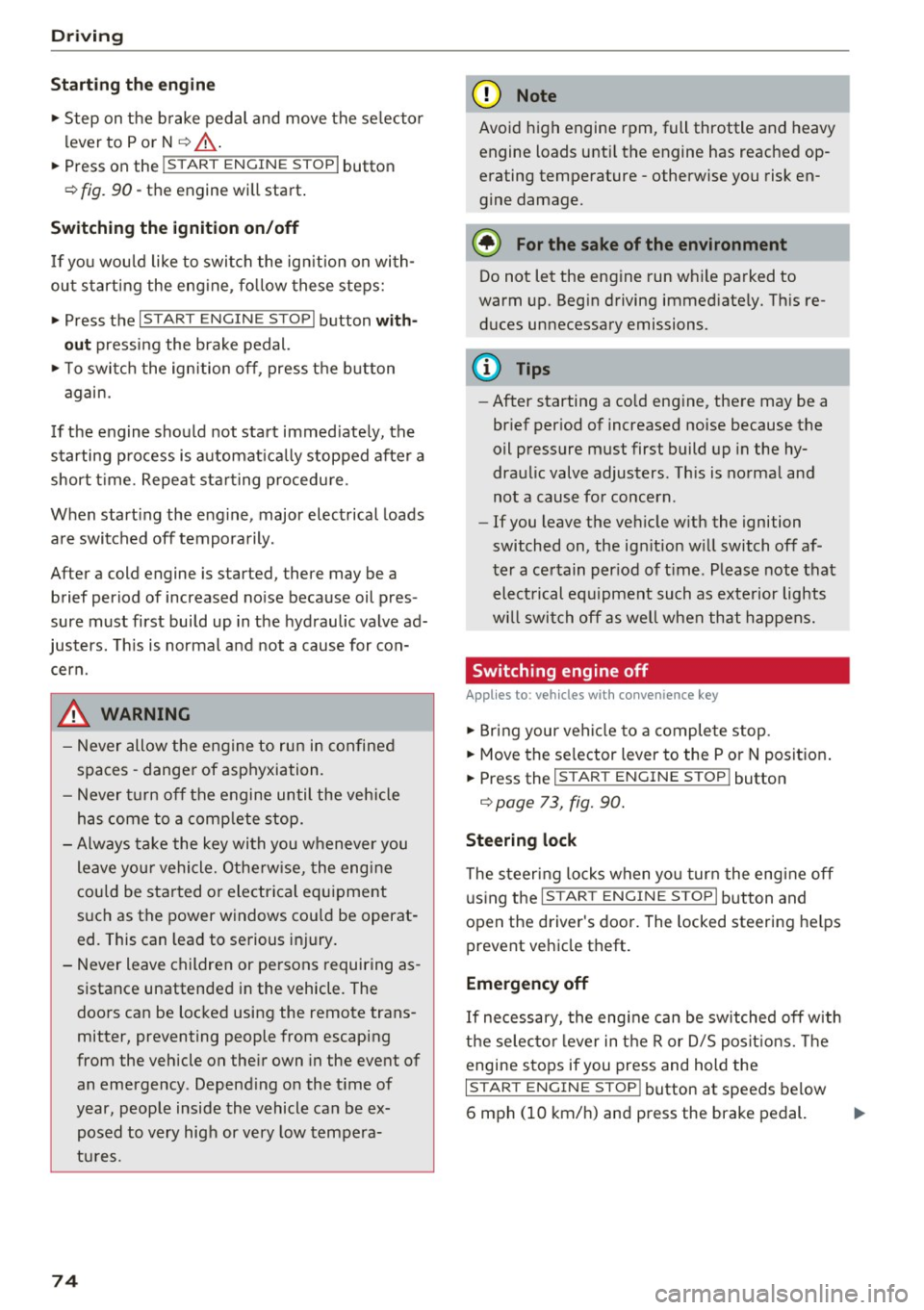
.,. Step on the b rake pedal and move the se lector
l ever to P o r N
¢ &, .
... Press on the r.l S::-:: T=- A,,., R ""T=-= E~ N":"'. G::- I ;-:N:-:-.:= E-;:Se:;T;=-;: O" P~I button
¢ fig.
90-the engine will start .
Switching the ignition on/off
If yo u wou ld like to switch the ign ition on with
ou t starting the eng ine, fo llow these steps:
.,. Press t he
I STAR T ENGIN E ST OPI button with
out
pressing the brake pedal.
.,. To switc h the ign ition off, press t he bu tton
again.
I f t he engine should not start immed iate ly, the
starting p rocess is a utomat ica lly stopped afte r a
short t ime. Repe at st arting procedu re .
When start ing the e ng ine, major elect rical loads
are switched off temporarily.
After a cold engine is started, there may be a b rief period of increased no ise beca use oil pres
sure must first bui ld up in the hydraulic valve ad
justers. This is no rmal a nd not a cause for con
cern.
.&, WARNING
- Never allow t he eng ine to run in confine d
spa ces -danger of asphyxiation.
- Never t urn off the engine until the vehi cle
has come to a comp lete stop.
- Always take the key wi th you w henever you
leave you r vehicle. Othe rw ise, the eng ine
c ould be sta rted o r ele ctrical eq uipment
s u ch as the power windows co uld be operat
ed. This can lead to se rious injury.
- Never leave children or pe rsons requiring as
sistance unattended i n the vehicle. The
doo rs can be loc ked using the remote trans
mitter, prevent ing people from escaping
from the vehicle on the ir own in the event of
an emergency . Depend ing o n the t ime of
year, peop le inside the vehicle can be ex
posed to very hig h or very low tempe ra-
t u r es.
74
-
(D Note
Avoid high engine rpm, full throttle and heavy
engine loads unti l the engine has reached op
e rating tempe rature -otherwise you risk en
gine damage.
@ For the sake of the environment
Do not let the eng ine run wh ile pa rked to
warm up. Beg in d riving immed iate ly. Th is re
duces unnecessary emissions.
(D Tips
- After starting a co ld eng ine, the re may be a
br ief per iod of increased noise because the
oil pressure must first build up in the hy
dra ulic valve adjusters . Th is is norma l and
not a cause for concern .
- If you leave the ve hicle w ith the ignition
switched on, the ig nition w ill switch off af
ter a ce rtain per iod of t ime . Please note that
elect rical equipment such as exte rior lights
w ill swi tch off as we ll when that happens.
Switching engine off
Applies to: vehicles with convenience key
.,. Br ing your vehi cle to a comple te stop .
.,. Move the se lector lever to the P or N position .
... Press the
I STAR T ENGINE S TOP I button
¢ page 73, fig. 90.
Steering lock
The steer ing locks when yo u turn the eng ine off
u sing t he
I S TART ENGI NE STOPI button and
open the driver's doo r. The locked steering he lps
prevent veh icle theft.
Emergency off
I f necessary, the eng ine can be switched off w ith
t h e se lec to r l ever in t he R or D/S posit ions. The
engine s tops if you press and hold the
I S T AR T EN GINE S TOP ! button at speeds be low
6 mph (10 km/ h) and press the brake pedal. .,,.
Page 77 of 266

a:,
a:,
...... N r--. N ...... 0
0
LL 00
A WARNING ,~
- Never turn off the engine before the veh icle
has come to a comp lete stop. T he f ull func
t io n of the brake booster and the power
steering is no t gua ran teed. You must us e
more for ce to turn or b rake if ne cessa ry. Be
c a use you ca n no t steer a nd bra ke as you
u sually wou ld, thi s could lead to crashes
and ser ious injuries .
- F or sa fe ty reasons, you should always par k
yo ur vehicle wi th t he selec tor lever in P .
Otherwise, the ve hicl e cou ld inadvertently
roll away.
- The radia tor fan can continue to run fo r up
to 10 m inutes even afte r you have turned
off the engine and removed t he ignition key.
The radiato r fan can also turn on again if the
engi ne coolant heats up because of intense
s u nlight or heat bui ld-up in the engine com
partmen t.
- Always take the key with you whenever you
leave your vehicle. Othe rw ise, the engine
cou ld be sta rted o r electrical e quipme nt
s u ch as the power windows co uld be opera t
ed. This can lead t o se rious inj ury.
0 Note
If the engine has been under heavy load for
an exte nded per iod, heat builds up in the en
g in e compa rtment after the eng ine is switch
ed off -there is a risk of damaging the eng ine.
Allow t he engine to r un at idle fo r abo ut two
m inu tes befo re swit chi ng i t off .
Driver messages
Ignition is on
This message appea rs and a warning tone sounds
if you open t he d river's doo r when the ignition is
sw itche d on.
No key identified
This message appea rs when the
I S TAR T ENGINE STOPI button is pressed if the re
is no master key ins ide the ve hicle or if the sys
tem does not recognize it . For examp le, the mas
ter key cannot be recognized if it is cove red by an
D riving
object (e .g. al uminum brief case) which screens
t h e radio signal. Electronic devices such as ce ll
phones can a lso interfe re with the radio signal.
Pre ss brake pedal to start engine
T h is message appears if you do not p ress the
bra ke peda l to s tart t he engine.
Shift to N or P to start engine
This message appears w hen attempting to start
the engine if the se lector lever for the automatic
transm ission is not in the P or N position. The en
gine can on ly be started with the se lector in
these positions .
I!! Is the key in the vehicle?
This message appears if the mas ter key is re
moved from the veh icle with the engine r unning .
If the master key is no longer in the vehicle, you
cannot sw itch on the ign ition after stopping the
engine a nd you also cannot start the engine
again . Moreover, you cannot lock the vehicle
from the o uts ide with the key .
Shift to P otherwise vehicle can roll away. Doo rs
do not lock if le ver is not in P.
This message appears for safety reasons along
with a warning signal. It appears if the selector l ever for the automat ic transmission is not in the
P position when switch ing off the ign ition. Move
t h e se lector lever to the P position, otherw ise the
vehicle is no t secured against roll ing away. Yo u
also cannot lock the vehicle us ing t he lock ing
button * on t he doo r handle o r using t he remo te
k ey.
Convenienc e key defective! Use ignition lock
This message appears if the engine must be
started or stopped using the ignition key and not
th e
I S TA RT ENGINE ST OPI button .
75
Page 103 of 266

Audi drive select Drive settings
Introduction
Applies to: vehicles with Audi drive select
Drive select provides the possibility to experience
d iff erent types of vehicle settings in one veh icle.
F or instance, using the three
Comfort, Auto and
Dynamic modes, the driver can switch from a
sporty to a comfortab le driving mode with the
press of a button.
Addit ionally, in vehicles with MM I*, the vehicle
setup for
Individual* mode can be customized by
you. This makes it possible to combine settings
such as a sporty engine tuning with comfortable
steering.
A WARNING
-
Improper use of the Audi drive select can
cause collisions, other accidents and serious
personal injury .
Description
Applie s to: vehicles with Audi drive select
The vehicle setup in each mode depends on the
veh icle's features . However, the engine, auto
matic transmission and steering are always in
volved.
Engine and automatic transmission
Depending on the mode, the engine and the au
tomatic transm ission respond quicker or in a
more balanced manner to accelerator pedal
movements . In the sporty dynam ic mode, the au
tomatic transmission shifts at higher RPMs .
Steering
The steering adapts in terms of steering effort
and steering ratios. Indirect steer ing that moves
eas ily, like the steering in comfort mode, is best
suited to long drives on a highway. In contrast,
dynamic mode provides sporty, direct steering.
gi The follow ing applies to vehicles with dynam ic
;:::: steering*: the steering rat io changes based on
r--.
~ vehicle speed in order to ma inta in optim um 0
fi:' steering effort for the driver at all times. This 00
Audi drive select
sets the steering to be less sensitive at higher
speeds in order to provide improved vehicle con
tro l. At reduced speeds, however, steering is
more direct in order to keep the steering effort as
minimal as possible when the driver is maneuver
ing the vehicle. At low and average speeds, dy
nam ic steering additionally prov ides more re
sponsive steering performance .
Adaptive dampers*
The adaptive dampers* use sensors to record in
formation regarding steering movements, brak
ing and acceleration operations by the driver,
road surface, driving speed, and load . This makes
it possible to adapt damping to the driving situa
t ion virtua lly in real time. Drive select also makes
it possible to sat isfy the desire for sporty suspen
sion (Dynamic) and comfortable suspension
(Comfort) without giving up balanced tuning (Au
to).
Sport differential*
As a component of the all whee l dr ive system
(quattro)
c::> page 172, the sport different ial* dis
tributes the driving power to the rear axle de
pending on the situation. The distribution of
power varies depending on the mode selected.
The goal is a high level of ag ility and ability to ac
celerate on curves. The vehicle is very responsive
to steering.
Audi adaptive cruise control*
The behavior when accelerating can be adjusted
from comfortable to sporty, depending on the
drive select mode. Adaptive cruise control also
responds to the driving behavior of the vehicle
ahead in a more conservative or sporty manner .
Engine sound*
The sound of the engine is adapted to the select
ed mode and ranges from subtle to sporty.
(D Tips
- In some models, the maximum vehicle
speed can only be reached in the
Auto and
Dynamic modes.
- For vehicles with an automatic transmis-
sion, se lecting the
Dynamic mode resu lts in ...,
101