instrument cluster AUDI A5 CABRIOLET 2017 User Guide
[x] Cancel search | Manufacturer: AUDI, Model Year: 2017, Model line: A5 CABRIOLET, Model: AUDI A5 CABRIOLET 2017Pages: 266, PDF Size: 66.64 MB
Page 42 of 266
Power top
Power top
Automatic power top
General information
The power top opens and closes automatically.
The entire power top is stored in the power top
compartment. The power top may be opened or
closed at speeds up to
30 mph (50 km/h).
Under normal conditions, the power top is wind
and waterproof. In rare cases, small droplets of
water may form under extreme weather condi
tions such as torrential or prolonged rain. That is
normal and no cause for concern.
Follow the care instructions to keep the roof
from leaking and to maintain its appearance over
time
¢ page 182, Care and cleaning . Also ob
serve the following:
- Only open and store the power top when it is
clean and dry . Sharp dirt particles can cause
damage to the rear window and the power top.
If the power top is stored when damp, dents
can form. If left stored for a long period of
time, mildew and other damage can develop .
- Do not leave the power top open for several
weeks or the creases in it may become discol
ored.
- Remove ice and snow before opening the power
top. Do not use any sharp edged objects to re
move ice and snow or the power top could be
scratched or damaged . The rear window may be
cleared with a standard ice scraper .
- Do not open the power top when temperatures
are below 32 °F
(0 °() . The fabric used in the
power top loses its elasticity when tempera-
tu res are below freezing.
40
Opening/closing the power top
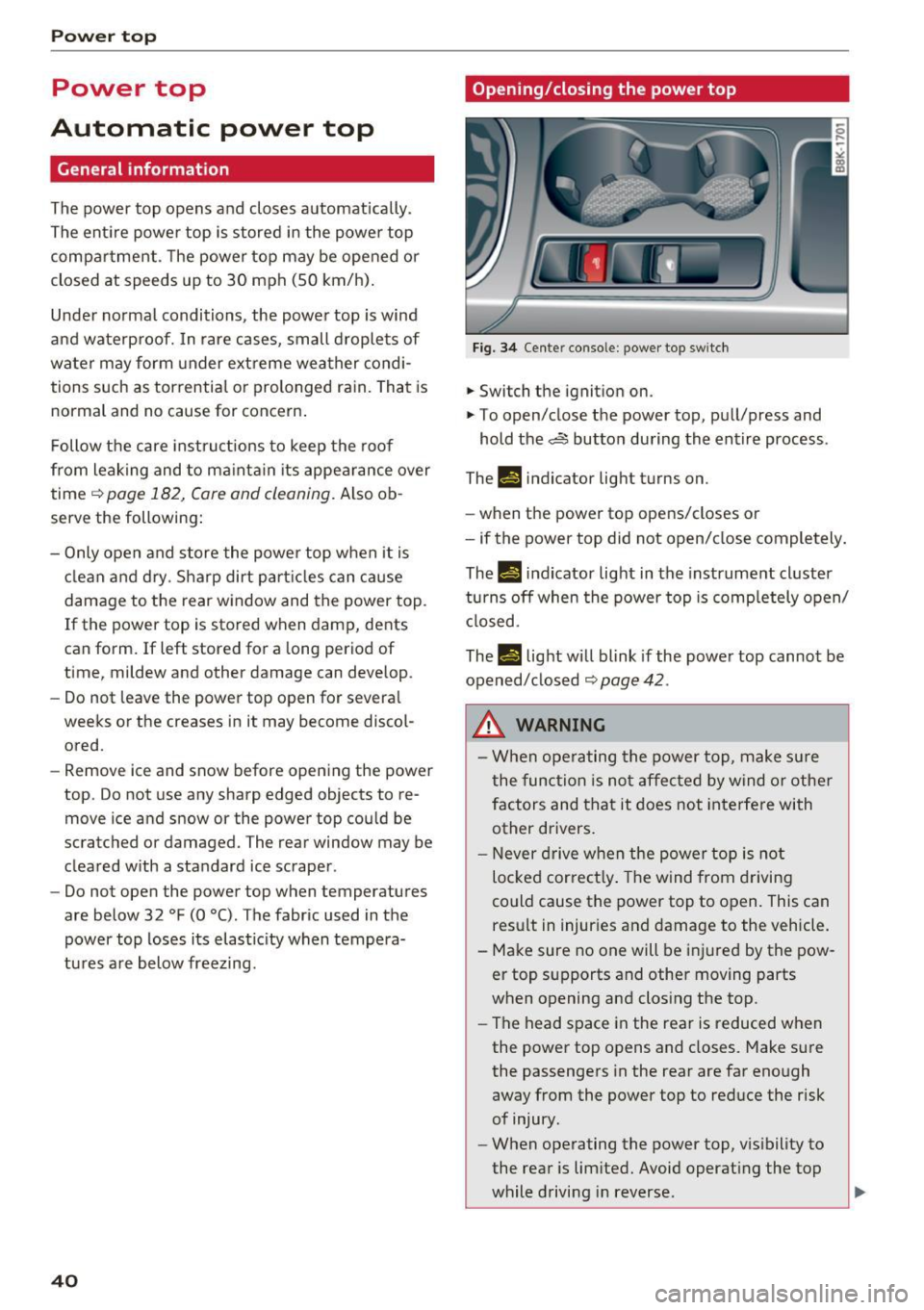
Fig. 34 Cente r conso le : power top sw itch
.. Switch the ignition on .
.,. To open/close the power top, pull/press and
hold the,,:;,§$ button during the entire process .
Th-f!.-) indicator light turns on.
- when the power top opens/closes or
- if the power top did not open/close completely.
Th.,
14 indicator light in the instrument cluster
turns off when the power top is completely open/
closed.
The
II light will blink if the power top cannot be
opened/ closed
¢ page 42 .
,&, WARNING
- When operating the power top, make sure
the function is not affected by wind or other
factors and that it does not interfere with
other drivers.
- Never drive when the power top is not
locked correctly. The wind from driving
could cause the power top to open. This can result in injuries and damage to the vehicle.
- Make sure no one will be injured by the pow
er top supports and other moving parts
when opening and closing the top.
- The head space in the rear is reduced when
the power top opens and closes. Make sure
the passengers in the rear are far enough
away from the power top to reduce the risk
of injury .
- When operating the power top, visibility to
the rear is limited. Avoid operating the top
while driving in reverse.
Page 43 of 266
a:,
a:,
...... N
" N ...... 0
0
LL co
(D Note
-To prevent damage to the power top:
- do not store any objects in the power top
compartment .
- make sure there is enough space above
the vehicle when opening or closing the power top.
- To reduce the risk of damage, make sure
there are no fragile objects within the stor
age bay's range of motion.
(D Tips
- To prevent the battery from draining, do not
open or close the power top repeatedly
when the engine is switched off.
- A message will appear in the instrument
cluster display if there is a power top mal
funct ion ¢
page 42.
-The power top can also be operated manual
l y if there is a malfunction
c:> page 44,
Power top emergency operation. The ca use
of the malfunction should be corrected by
an a uthorized Audi dea ler or authorized re
pair facility as soon as possible.
- The vehicle is not prote cted from the weath
er or from unauthorized entry if the vehicle
is left parked with the power top open. Lock
any objects you are leaving in the vehicle in
the luggage compartment. Close the power
top before leav ing the vehicle.
- The side windows lower slightly automati
cally when opening/closing the power top.
Power top convenience opening/closing
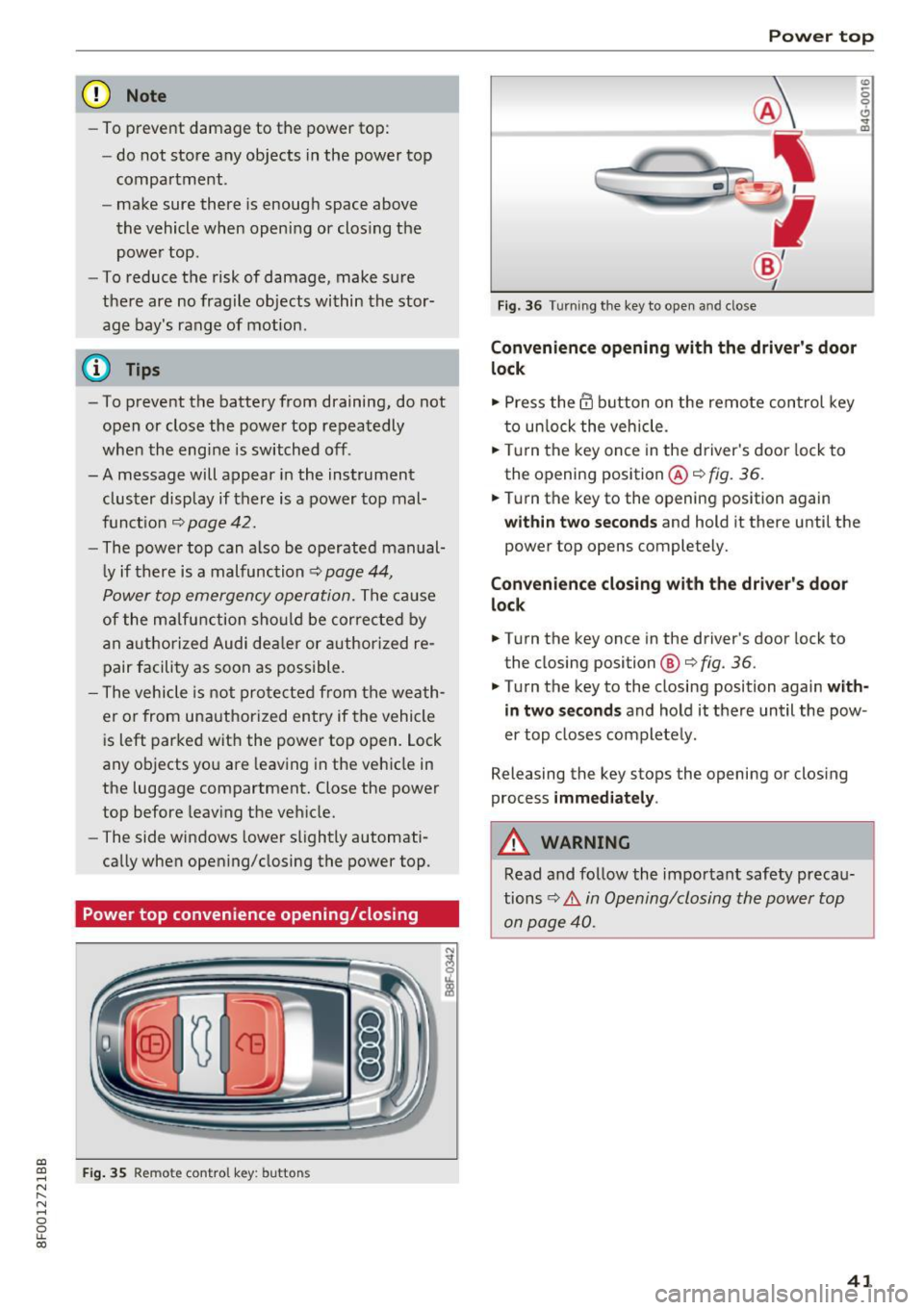
Fig . 35 Remote control key: buttons
Powe r top
Fig. 36 Turning the key to open and close
Conven ienc e opening with the driver's door
l o ck
.,. Press the @ button on the remote control key
to unlock the vehicle .
.,. Tu rn the key once in the driver's door lock to
the opening position @¢
fig. 36.
0
0 ... m
.,. Turn the key to the opening position again
within tw o second s and hold it there until the
power top opens completely.
Convenienc e closing with the dri ver's door
lock
.,. Turn the key once in the driver's door lock to
the closing position @¢
fig. 36.
.,. Turn the key to the closing position again with
in tw o second s
and hold it there until the pow
er top closes completely .
Releasing the key stops the opening or clos ing
process
imm edi ate ly .
A WARNING
Read and follow the important safety precau
tions~ .&.
in Opening/closing the power top
on page 40.
41
Page 51 of 266

a:,
a:,
...... N
" N ...... 0
0
LL co
the windshield in this area in order to
prevent malfunctions or failures .
- Some exterior lighting functions can be ad
justed
c:, page 49.
- When you remove your key from the igni
tion while the vehicle's lights are turned on,
a buzzer sounds as long as the driver's door
is open.
- In cool or damp weather, the inside of the
headlights, turn signals and tail lights can
fog over due to the temperature difference
between the inside and outside. They will
clear shortly after switching them on. This does not affect the serv ice life of the light
ing .
- In the event of a light sensor malfunction,
the driver is notified in the instrument clus
ter display
c:, page 19.
Turn signals and high beam lever
The lever operates the turn signals, the high
beams and the headlight flasher.
Fig . 54 Turn signal and high beam lever
Turn signals¢¢
g N
0
~ CD
The turn signals activate when you move the lev
er into a turn signal position when the ignition is
switched on.
@ -right turn signal
@-left turn signal
The turn signal blinks three times if you just tap
the lever.
High beams and headlight flasher ~D
Move the lever to the corresponding position:
@ -high beams on
Lights and Vision
@-high beams off or headlight flasher
The indicator light
II in the instrument cluster
turns on.
Notes on these features
-The turn signals only work with the ignition
turned on. The indicator lights . or
II in the
instrument cluster also blink.
- After you have turned a corner, the turn signal
switches off automatically.
- The
high beam works only when the headlights
are on. The indicator light
II in the instrument
cluster illuminates when the high beams are
on.
- The
headlight flasher works only as long as you
hold the lever -even if there are no lights
switched on . The indicator light
II in the in
strument cluster illuminates when you use the
headlight flasher.
WARNING
Do not use the high beam or headlight flasher
if you know that these could blind oncoming
traffic.
Adjusting exterior lighting
The functions are selected in the radio or MMI* .
.,. Select: !CAR I function button> Exterior light
ing .
Or
.,. Select: 1-C~A ~ R-.l function button > Car systems*
control button > Vehicle settings > Exterior
lighting .
Coming home (light when leaving car)*,
Leaving home (light when unlocking car)*
The coming home function illuminates the area
around the vehicle when the ignition is switched
off and the driver's door is opened. Depending on
vehicle equipment, the function can be switched on and off or the length of time the lights remain
on* can be adjusted .
The
leaving home function illuminates the area
around the vehicle when unlocking it. This func-
tion can be switched on and off.
ll>
49
Page 78 of 266
Driving
Electromechanical
parking brake
Operation
The electromechanical parking brake replaces
the hand brake.
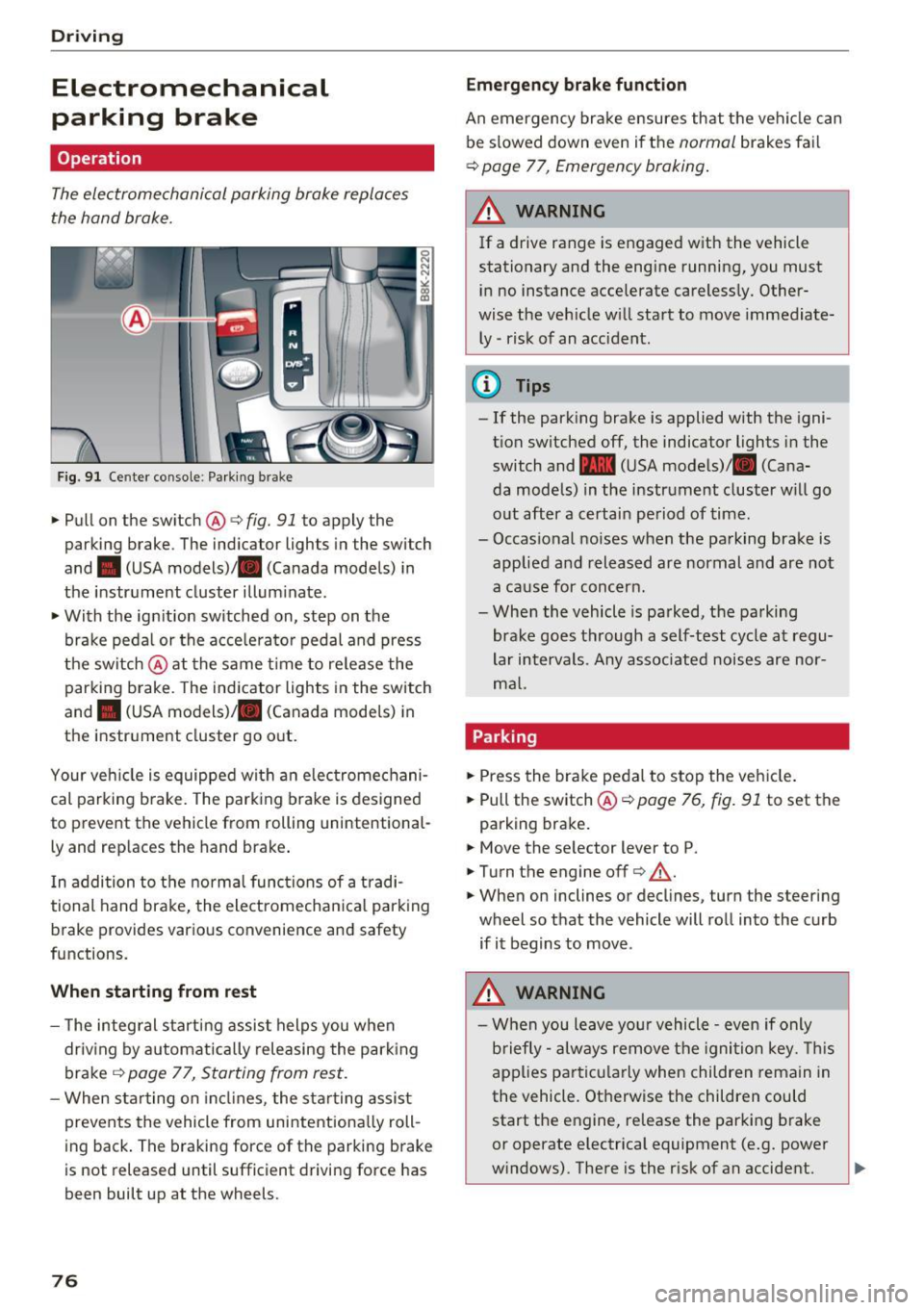
Fig. 91 Ce nter conso le: Park ing brak e
~Pullon the switch @c:>fig. 91 to apply the
parking brake . The ind icator lights in the switch
and . (USA
models) ;II (Canada models) in
the instr ument cluster illum inate.
~ With the ign ition switched on, step on the
brake peda l or the acce lerato r pedal and press
t he switch @at the same t ime to re lease the
parking brake . The indicator lights in the switch
and . (USA
models) ;II (Canada models) in
the instr ument cluster go o ut.
Your ve hicle is equipped wi th an elec tromechani
cal parking b rake. The park ing brake is designed
to prevent the vehicle from rolling un intent ional
ly and rep laces the hand brake .
I n addition to t he norma l func tions of a tradi
tional hand brake, the electromecha nica l park ing
b rake provides various convenience and safety
functions.
When starting from rest
- T he integ ral s tart ing assist helps you when
driv ing by a utomat ically releasing the park ing
brake ¢
page 77, Starting from rest .
-When starting on in cli nes, the sta rting assist
prevents the vehicle from unintentiona lly roll
ing back . The braking forc e of the park ing b rake
is not released until sufficient drivi ng force has
been built up at the wheels.
76
Emergency brake funct ion
An emergency bra ke ensures th at the vehicle can
be s lowed down even if t he
normal brakes fa il
c:> page 77, Emergency braking .
A WARNING
-
If a drive range is e ngaged w ith the vehicle
stationary and the engine running, you must
i n no instance accelerate careless ly. Other
wise the veh icle w ill start to move immediate
ly -risk of an accident.
(D Tips
- If the park ing brake is applied with the igni
t ion switched off, the indicator lights in the
switch and -(USA mode ls)/ . (Cana
da models) in the instrument cluster w ill go
o ut after a certai n pe riod of time.
- Occasional noises when the pa rking brake is
applie d and released are normal and are not
a ca use for conc ern.
- Whe n the vehicle is parked, the parking
brake goes through a self-test cycle at regu
lar intervals. Any associated noise s are nor
m al.
Parking
~ Press the bra ke peda l to stop the ve hicle.
~ Pull the switch@¢ page 76, fig. 91 to set the
parking bra ke .
~ Move the se lector lever to P.
~ T urn the engine off¢.&,. .
~ When on inclines or decl ines, turn the steer ing
wheel so that the vehicle will ro ll into the curb
if it begins to move .
.&_ WARNING
-W hen you leave yo ur vehicle -even if only
b riefly- always re move t he igni tion key. This
app lies p art ic ula rly when children remain in
the vehicle. Ot herwise the children could
start the e ngine, re lease the parking brake
or operate electrica l equipment (e .g. power
w indows) . The re is the r isk of an accident.
Page 81 of 266
a:,
a:,
...... N
l'
N
...... 0
0
LL co
The maximum speed rema ins stored until it is
chang ed by press ing the
!SE Ti button again brief
l y or unt il it is deleted by a lengthy push on the
button .
Speed warning 2: setting a speed limit
The radio or MM!* control unit is used to set,
change or delete w arning threshold
2 .
• Se lect : I CAR I function button> Instrument
cluster
> Speed warning . Or
• Se lect: I CAR i funct ion button > C ar sy stem s*
contro l button > Dri ver a ssist > Speed wa rning .
Warning threshold 2 can be set in the speed
range start ing from 20 mph to 150 mph (30 km/
h to 240 km/h) . Settings can each be ad justed in
intervals of 5 mph (10 km/h).
Cruise control system
Switching on
The cruise control system makes it possible to
drive at a constant speed starting at
20 mph (30
km/h).
0
f
~
0
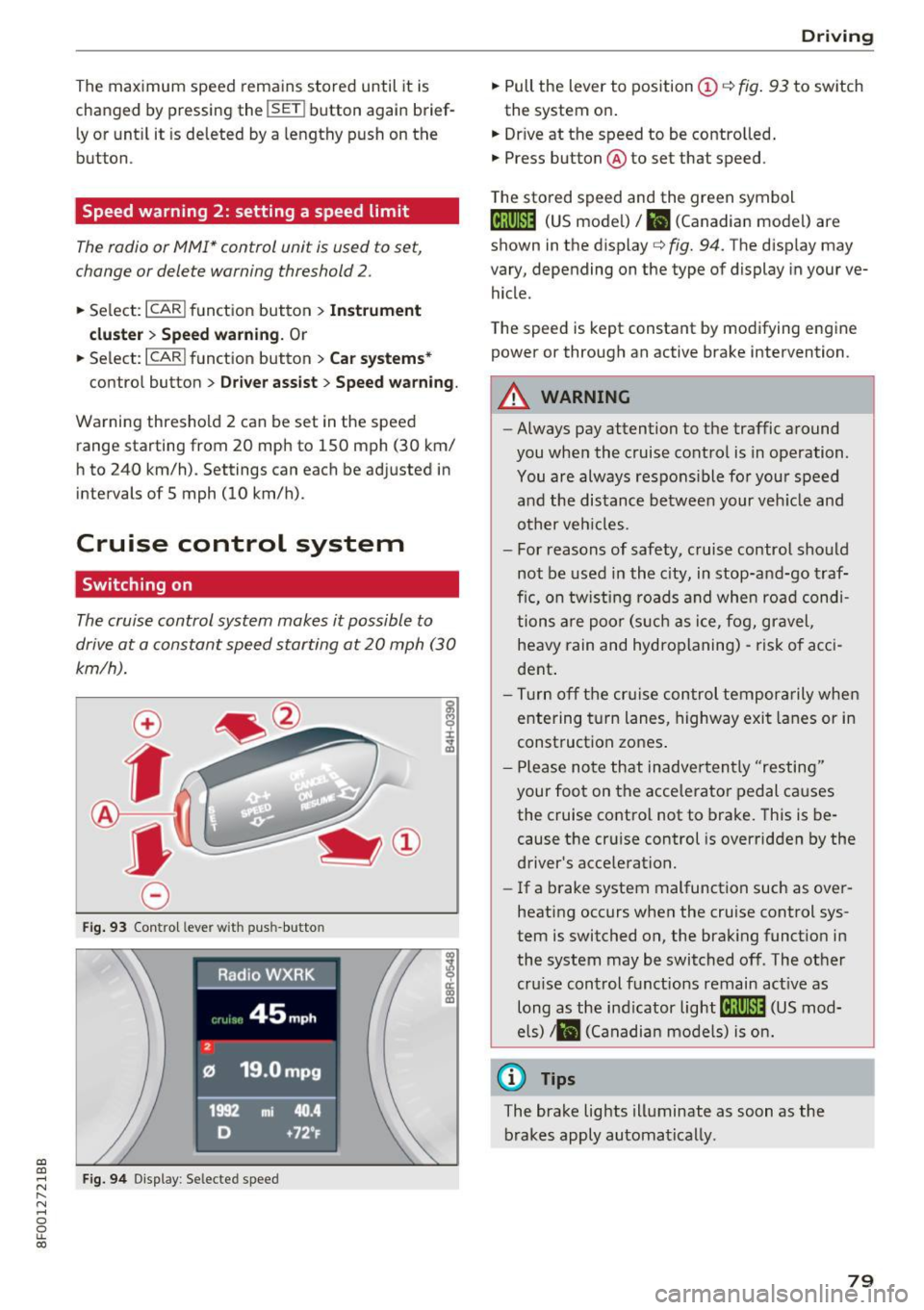
F ig . 93 Co ntrol leve r wit h pus h-butto n
Fig. 9 4 Disp lay : Se lecte d speed
D rivi ng
• Pull the lever to position (D c::> fig . 93 to sw itch
the system on .
• Dr ive at the speed to be contro lled .
• Press button @to set that speed .
T he sto red speed and the green symbol
@;\1)~14 (US mode l)/ El (Canadian model) are
shown in the display
c::> fig. 94. The d isp lay may
vary, depending on the type of display in you r ve
hicle .
The speed is kept constant by modifying engine power or through an act ive brake intervention .
_& WARNING
-Always pay attention to the traffic a round
you when the cruise contro l is in operation.
You are always respons ible fo r your speed
a nd the distance betwee n your ve hicle and
other veh icles.
- For reasons of safety, c ruise control sho uld
not be used in the c ity, in stop-an d-go t raf
fic, on tw ist ing roads and whe n roa d condi
tions a re poo r (s uch as ice, f og, gravel,
heavy rain and hydroplaning) -ris k of a cci
dent .
- Tu rn off the cr uise con trol te mpor arily whe n
e ntering t urn lanes, highway exit lanes or in
construct ion zones .
- P lease no te th at inadve rten tly "resting"
your foot on the acce lerator pedal causes
the cruise control not to brake. This is be
cause the cr uise control is overridden by the
driver's acce leration.
- If a b rake system malfunction such as ove r
heating occurs when the cruise control sys
tem is switched on, the brak ing funct io n in
the system may be switched of f. The other
cru ise control functions remain act ive as
long as the ind icator
light @;\1)~14 (US mod
e ls)
,ii (Ca nadian mo dels) is on .
@ Tips
The brake lights illuminate as soon as the
brakes apply automa tically.
79
Page 83 of 266
Automatic transmission multitronic, S tronic,
tiptronic
Introduction
Applies to: vehicle s with multitronic/S tronic/tiptronic
The automatic transmission is cont rolled e lec
tronica lly. The transmission upshifts or down
shifts automatically depending on which drive program is selected.
When a
moderate drivi ng style is used, the
transmission selects the most economical driving
mode. It will then change up early and delay the
downshifts to give better fuel economy.
The transm ission switches to a sporty mode afte r
a kick -down or when the driver uses a
s po rt y
d riv ing sty le
characterized by quick accelerator
pedal movements, heavy acce leration, frequent
changes in speed and traveling at the maximum
speed.
If desired, the driver can also select the gears
manually { tip tron ic mode) 9 page 81.
Various automatic transmissions may be instal
led, depending on the model :
multitronic transmission
The multitronic transmission is a cont inuous ly
va riable t ransmiss ion. Power is transferred using
a mu ltidisk clutch. In contrast to conventiona l
automatic transmissions using shifting opera
tions, the transmission ratio in the continuous ly
variable transmiss ion is changed continuously.
This optimizes the comfort level and conserves
fuel.
S tr onic transmi ssion
The S tronic is a dua l-clutch transmiss ion . Power
is transferred using two clutches that work inde
pendently from one another. They replace the
torque converter used in conventional automatic
transmissions and allow the vehicle to accelerate
without a noticeable interruption in tract ion.
a:,
a:,
...... tip tron ic tran smis sion N r--.
~ In the tiptron ic transmission, power is transfer-
fi:' red by a torque converter. 00
Autom atic tran sm iss ion
Selector lever positions
Applies to: vehicles wit h mult itron ic/S tro nic/t iptronic
F ig. 95 Display in the instrument cl uste r: se lector lever in
posit ion P
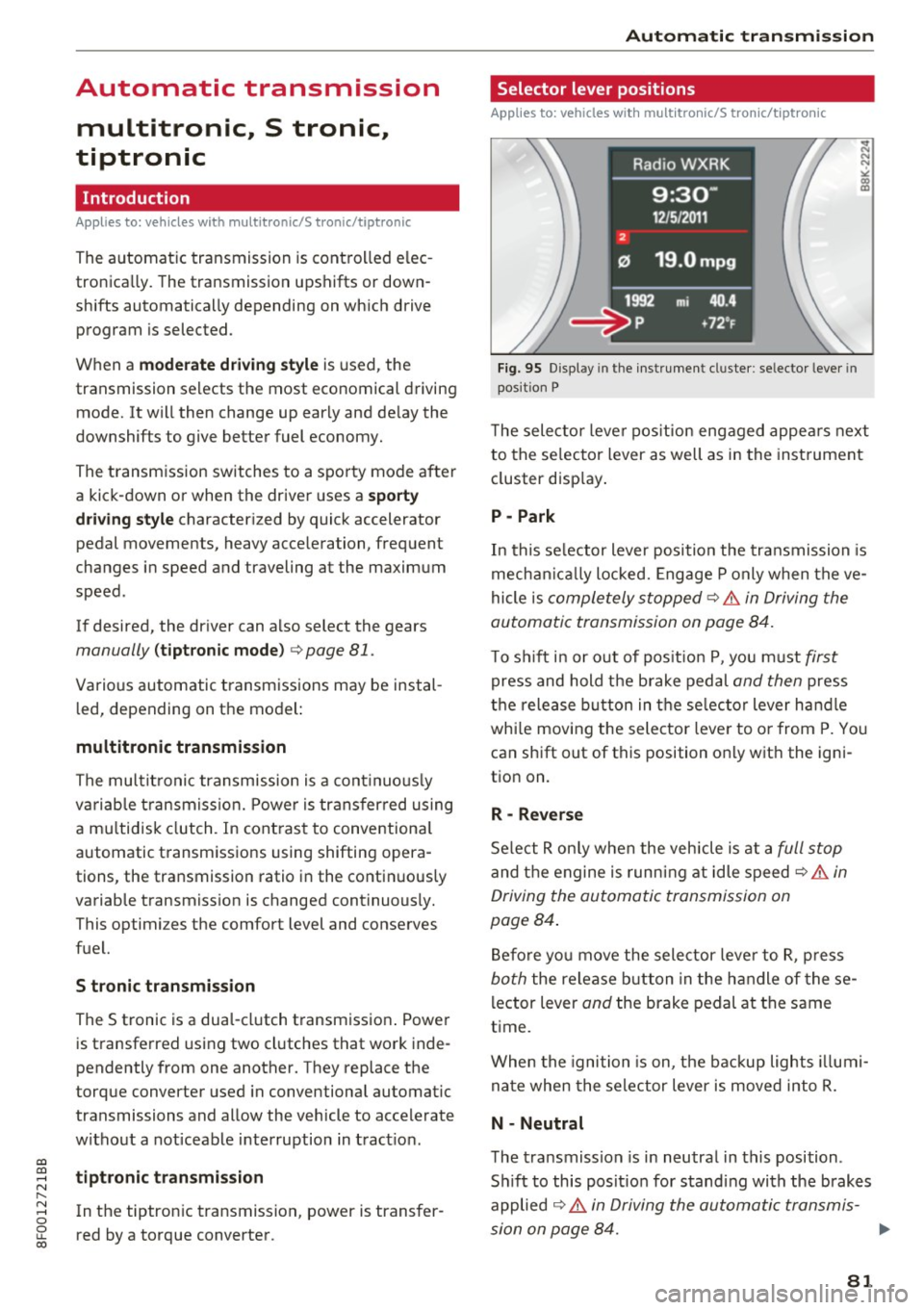
T he selector leve r pos ition engaged appea rs next
to the se lector lever as well as in the instrument
cluster disp lay .
P -Park
In this se lector lever position the transmission is
mechan ica lly locked. Engage P only when the ve
hicle is
completely stopped~.&. in Driving the
automatic transmission on page 84.
T o s hift i n or out of pos it ion P, you must first
press and hold the brake pedal and then press
t h e release button in the se lec tor lever ha ndle
whi le mov ing the selector lever to o r from P. Yo u
can shift out of this position on ly with the igni
tion on.
R -Reverse
Se lect R on ly when the vehicle is at a full stop
and the engine is runn ing at idle speed C? .&. in
Driving the automatic transmission on
page 84 .
Before yo u move the selector leve r to R, p ress
both the release b utton in the handle of these
l ector lever
and the brake pedal at the same
time.
When the ignition is on, t he backup lights illumi
na te when the selector lever is moved into R.
N -Neutral
The transmiss ion is in neutral in this position .
S hi ft to this posit io n for standing with the brakes
applied
~ .&. in Driving the automatic transmis-
sion on page 84. ..,
81
Page 87 of 266
a:,
a:,
...... N
" N ...... 0
0
LL co
Hill descent control switches off once the decline
levels out or you press the accelerator pedal.
On vehicles w ith the cruise control system*
¢ page 79, hill descent control is also activated
when the speed is set.
&,_ WARNING
H ill descent control cannot overcome physical
limitations, so it may not be able to maintain
a constant speed under all conditions. Always
be ready to apply the brakes.
Manual shift program
A ppl ies to: ve hicles w ith mul titronic/S tronic/tip troni c
Using the manual shift program you can man
ually select gears.
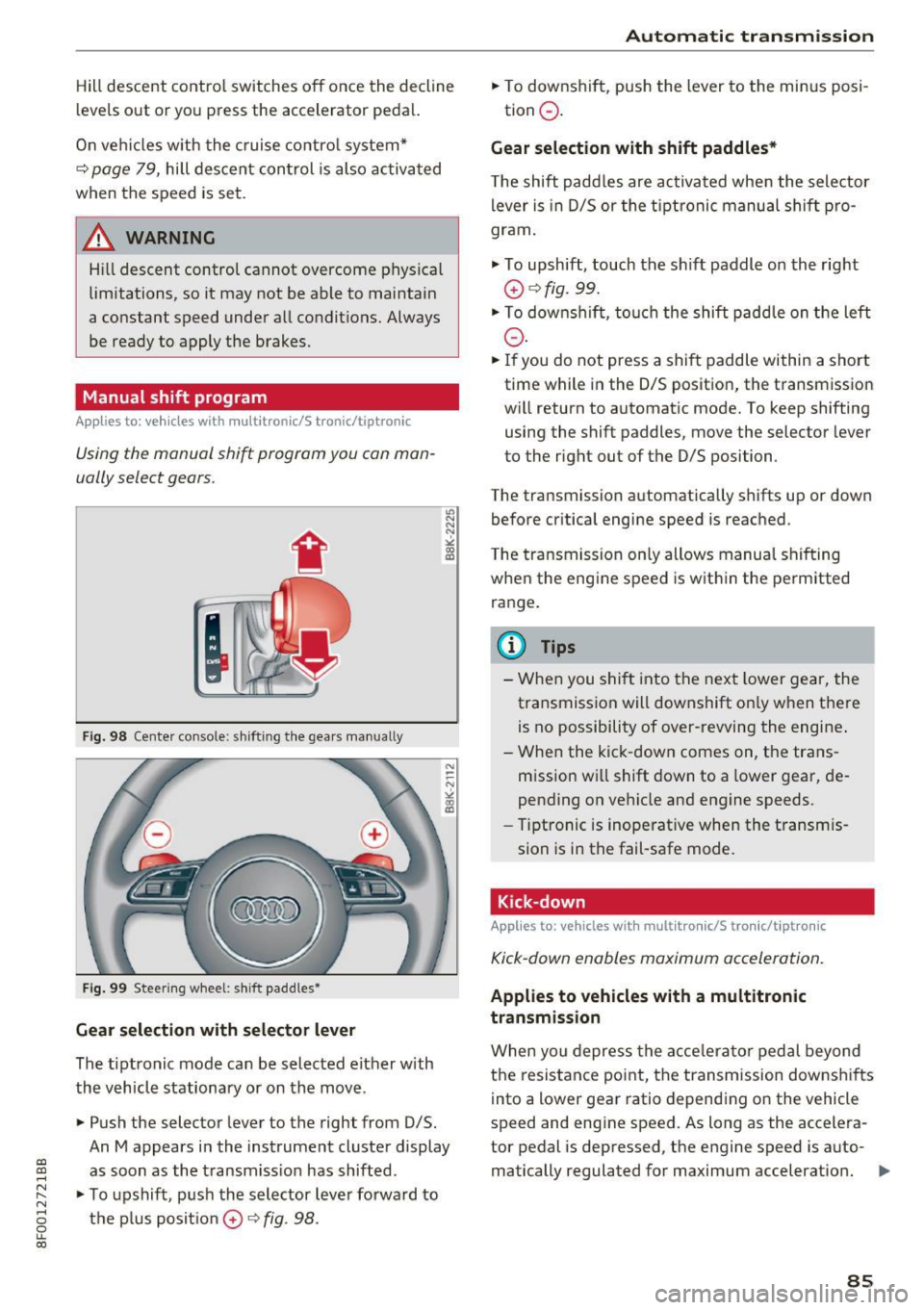
Fig. 98 Cente r console: shifting the gea rs manua lly
Fig. 99 Steering wheel: shift paddles•
Gear selection with selector lever
The tiptronic mode can be selected either with
the vehicle stationary or on the move.
• Push the selector lever to the right from D/5.
"' N N N ,.:i
~
An M appears in the instrument cluster display
as soon as the transmiss ion has shifted.
• To upshift, push the selector lever forwa rd to
the plus posit ion
0 ¢ fig . 98.
Automatic transmission
• To downshift, push the lever to the minus posi-
tion
0 .
Gear selection with shift paddles*
The shift paddles are activated when the selector
lever is in D/5 or the tip tronic manual shift pro
gram.
• To upshift, touch the sh ift paddle on the right
0 ¢fig. 99.
• To downshift, touch the shift paddle on the left
0-
• If you do not press a shift paddle within a short
time while in the 0/5 position, the transmission
wi ll return to automatic mode. To keep shifting
using the shift paddles, move the selector lever
to the right out of the D/S position.
The transmission automatically shifts up or down before critical engine speed is reached .
The transmission only allows manual shifting
when the engine speed is within the permitted
range.
@ Tips
- When you shift into the next lower gear, the
transmission will downshift on ly when there
is no possibility of over-revving the engine .
- When the kick-down comes on, the trans
mission will shift down to a lower gear, de
pending on vehicle and engine speeds.
- Tiptronic is inoperative when the transmis
sion is in the fail-safe mode.
Kick-down
Applies to : vehicles wi th mult itro nic/S tro nic/t ipt ronic
Kick-down enables maximum acceleration.
Applies to vehicles with a multitronic
transmission
When you depress the acce lerator pedal beyond
the resistance point, the transmission downshifts
into a lower gear ratio depending on the vehicle
speed and engine speed. As long as the accelera
tor pedal is depressed, the engine speed is auto-
matically regulated for maximum acceleration.
Ill>
85
Page 92 of 266

Audi adaptive cruise control and braking guard
Audi adaptive cruise
control
Description
A pplies to: ve hicles w ith Aud i adapt ive cruise co ntrol
F ig. 105 Detection range
What can Audi adaptive cruise control do?
The adaptive cruise control works in conjunct ion
with a radar sensor installed in the front of the
veh icle¢
page 88, fig. 102, wh ich is subject to
des ignated system limits
c:;;> page 90. Stationary
objects a re disregarded.
On open roads with no traffic, adaptive cru ise
control works like a regular cruise control sys
tem. The stored speed is ma inta ined. When ap
proaching a moving vehicle detected up ahead,
the adaptive cruise control system automatically
slows down to match that vehicle's speed and
then maintains the distance that the driver previ
ously stored. As soon as the system does not de
tect
a vehicle up ahead, adaptive cruise control
accelerates back up to the stored speed.
Which functions can be controlled?
When you switch adaptive cruise control on, you
can set the current speed as the "control speed"
¢ page 90, Switching on and off.
When driving, you can stop cruise control
¢
page 92 or change the speed ¢ page 91 at
any time.
You can also set the distance to the object ahead
and set the adaptive cruise control driving pro
gram
¢ page 92.
90
Switch ing on and off
App lies to : vehicles wit h Audi ada ptive cruise control
Fig. 106 Selector lever: switch ing o n/o ff
Fig. 107 Instrume nt cl uster: Aud i adapt ive cru ise con trol
You can set any speed between 20 mph and 95
mph (30 and 150 km/h) .
Indicator lamps and messages in the instrument
cluster display inform you about the current sys
tem status and settings.
Switching Audi adaptive cruise control on
"" Pull the lever toward you into position (D
¢ fig . 106 . ACC standby appears in the instru
ment cluster display .
Setting the speed and activating regulation
""To set the current speed, press the ISETI button
¢
page 9, fig . 4 . The set speed is shown in the .,_
Page 94 of 266

Audi adaptive cruise control and braking guard
Interrupting cruise control
Applies to: vehicles with Audi adaptive cruise contro l
Fig. 109 Selector leve r
Requirement: adaptive cruise control must be
switched on
¢ fig . 109 (D.
Overriding cruise control
• To accelerate manually , press the accelerator
pedal. The message
ACC override appears.
• To resume adaptive cruise control, remove your
foot from the gas pedal. The system re turns
again to the speed that was saved before .
• You can
save a new speed at any time by press
ing the
IS ETI button ¢ page 9, fig . 4.
Canceling cruise control while driving
• Move the lever into position @. The message
ACC standby appears . Or
• press the brake pedal.
• To resume the stored speed, move the lever in
to position
@.
.,&. WARNING
Never resum e the stored speed if the speed is
too high for prevailing road, traffic or weather
conditions.
92
Setting the distance
Applies to: vehicles with Audi adaptive cruise control
Fig. 110 Se lector leve r: setting the distance
• Tap the switch to display the current set dis
tance
¢ fig . 110 .
• To increase or reduce the distance by incre
ments, tap the switch again to the left or right.
The distance between the two veh icles will
change in the instrument cluster display .
When approaching a moving vehicle up ahead,
the adapt ive cruise control system b rakes to
match that object's speed and then maintains
the stored distance.
If the vehicle ahead acceler
ates, adaptive cruise control will also accelerate
up to the stored speed .
The higher the speed, the greater the distance in
yards (meters)
r:::;, .&. . The Distance 3 setting is
recommended.
The distances provided are spec ified values . De
pending on the driving situation and the how the
vehicle ahead is driving, the actua l distance may
be more or less than these target distances .
The var ious symbo ls for the time increments ap
pear briefly in the information line
@r:::;, page 90,
fig. 107 when you change the settings.
~ -~--- Distance 1: This setting corresponds
to a distance of 92 feet/28 meters when travel
i ng at 62 mph (100 km/h), or a time interval of 1
second.
~ -- ~-- Distance 2: This setting corresponds
to a distance of 118 feet/36 meters when travel
i ng at 62 mph (100 km/h), or a time interva l of
1.3 seconds.
Page 95 of 266

a:,
a:,
...... N
" N ...... 0
0
LL co
Audi adaptive cruise control and braking guard
~--- ~-Di stance 3: This setting corresponds
to a distance of 164 feet/SO meters when travel
ing at 62 mph (100 km/h), or a time interval of
1.8 seconds.
~ ---- ~ Distance 4: This setting corresponds
to a distance of 210 feet/64 meters when travel
ing at 62 mph (100 km/h), or a time interval of
2 .3 seconds.
A WARNING
Following other vehicles too closely increases
the risk of collisions and ser ious personal in
jury.
- Setting short distances to the traffic ahead
reduces the time and distance available to
br ing your vehicle to a safe stop and makes
it even more necessary to pay close atten
tion to traffic.
- Always obey applicable traffic laws, use
good judgment, and select a safe following
distance for the traffic, road and weather
conditions.
¢j) Tips
- Distance 3
is set automatically each time
you switch the ignition on.
- Your standard sett ings are automat ically
stored and assigned to the remot e control
k ey be ing used.
Setting the driving program
Applies to: vehicles with Audi adaptive cruise control
Depending on the selected dr iv in g program and
d istance, driving behavior when accelerating w ill
vary from dynamic to comfortable.
Setting the driving program for vehicles
without Audi drive select*
~ In the radio/MM!*, select: !CARI function but
ton >
Adaptive cruise control > Driving prog. >
comfort, standard or dynamic . Or
~ Select: ICARI function button> Car systems*
contro l button > Driver ass ist > Adaptive cruise
control > Driving program* > Comfort, Stand
ard or Dynamic . Setting the driving mode for vehicles with
Audi drive select*
Refer to c!:>poge 102 .
(D Tips
Your settings are automatically stored and as
s ig ned to the remote control key being used.
Request for driver intervention
Applies to: vehicles with Audi adaptive cruise control
Fig. 111 Instrument cluster: request fo r driver interven
tion
In certain situa tions, the system will prompt yo u
to take action . This could happen, for example, if
braking by the adaptive cruise control system is
not enough to maintain enough distance to the
vehicle ahead.
T he instrument cluster will warn you about the
danger
c!:> fig. 111:
-A red vehicle is pictured in the display.
- The text
DISTANCE ! appears in the status bar.
- The red indicator light . blinks.
- In addition, a warning tone sounds.
93