control AUDI A5 CABRIOLET 2017 Owner's Manual
[x] Cancel search | Manufacturer: AUDI, Model Year: 2017, Model line: A5 CABRIOLET, Model: AUDI A5 CABRIOLET 2017Pages: 266, PDF Size: 66.64 MB
Page 34 of 266
Opening and closing
using the opening function in the power lock
ing system switch
Iii .
Setting power locking
In the radio/MM!*, you can set which doors the
central locking system will unlock .
.,. Select : I C A RI funct ion button > Central locking .
Or
.,. Se lect : ICAR I functio n button> Car systems*
contro l button > Vehicle settings > (Central
locking)* .
Single door unlocking /Unlock doors* -
you can
specify which doors unlock when yo u open the ve
hicle.
- Selecting
off / All and pressing the~ button on
the remote control key unlocks the entire vehi
cle.
- Se lecting
on /Driver and press ing the ~ button
on the remote control key once unlocks only
the driver 's door. In vehicles w ith a convenienc e
key *, only the door whose hand le you pull will
unlock . If you press the @! button twice, the en
tire veh icle will unlock. If you press the
lm:I but
ton, the ent ire vehicle will a lways lock.
Luggage comp. lock/Lock exterior trunk handle
-If you se lect On , you can no longer open the
luggage compartment using the rear lid handle
<=>
page 33, fig . 24 . In this case , the rear lid can
be opened with the
1£1 button on the master key
¢ page 30, fig. 19 .
Tone when locking -if you select On , a tone will
sound when you lock the vehicle .
Auto Lock/Lock when driving -if you select On ,
the entire veh icle w ill lock automat ically when
the speed reaches 9 mph (15 km/h) .
32
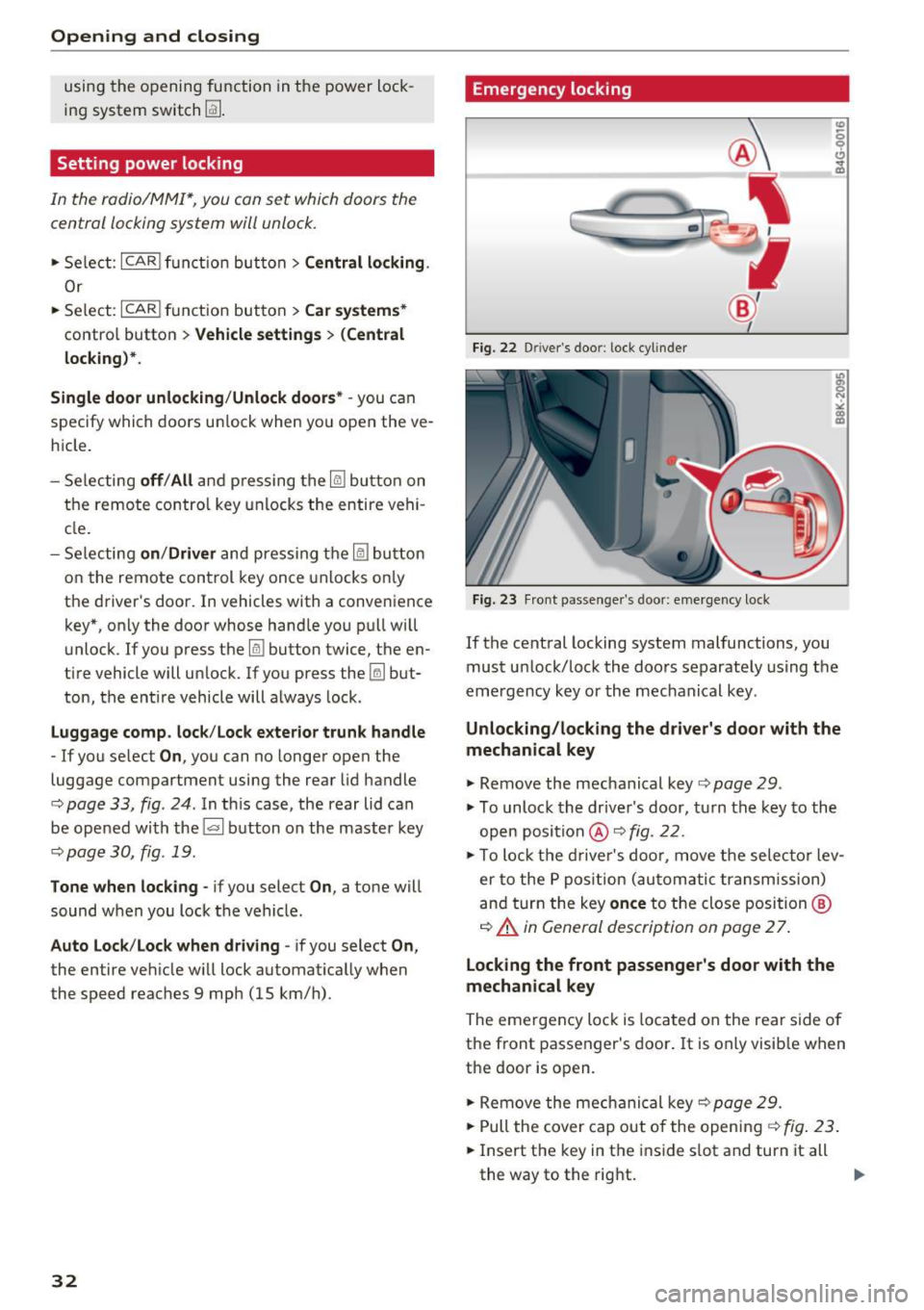
Emergency locking
Fig. 22 Driver 's doo r: lock cylin der
Fig. 23 Fron t passenger's door: emergency lock
If the central locking system malfunctions, you
must unlock/lock the doors separately using the
emergency key or the mechanical key .
Unlocking/locking the driver's door with the
mechanical key
.,. Remove the mechanical key <=> page 29.
.,. To unlock the driver's door, turn the key to the
open position @<=>
fig. 22 .
.,. To lock the driver's door, move the selecto r lev
er to the P position (automatic transmission)
and turn the key
once to the close position @
¢ A in General description on page 2 7.
Locking the front passenger's door with the
mechanical key
The emergency lock is loca ted on the rear side of
the front passenger's door. It is only visible when
the door is op en .
.,. Remove the mechanical key¢
page 29.
""Pull the cover cap out of the opening¢ fig. 23 .
.,. Insert the key in the inside slot and turn it all
th e way to the right.
IJJ,-
Page 35 of 266
a:,
a:,
...... N
" N ...... 0
0
LL co
Once the front passenger's door has been closed,
you cannot open it again from the outside. The
door can be opened from the inside by pulling
the door hand le.
A WARNING
Read and follow all WARNINGS¢&. in Gener
al description on page 2
7 .
@ Tips
After the ignition is switched on, the power
locking system switch is enabled.
Electronic immobilizer
The immobilizer prevents your vehicle from being
started by unauthorized persons .
Inside the key there is a computer chip. This chip
automatically activates/deactivates the electron ic immobilizer.
Applies to vehicles with ignition lock:
The electronic immobilizer deact ivates automati
cally when you insert the remote control key into
the ignition lock . It activates again automatically
when you remove the remote control key from
the ignition lock .
Applies to vehicles with convenience key:
If the remote control key is located inside the ve
hicle and you press the
I START ENGINE STOPI
button , the electronic immobilizer deactivates
automatically. If you switch the ignition off and remove the remote control key from the vehicle,
the electronic immobilizer activates again auto
matically .
A WARNING
Always take the key with you when you leave
the vehicle. The key can disarm the electronic
eng ine immobi lizer and permit an unauthor
ized person to start the engine and enable op
erat ion of the vehicle systems such as power
window or power sunroof leading to serious
personal injury.
Open ing and closing
(D Tips
-The vehicle cannot be started if an unau
thorized key is used. The vehicle may not
start if another radio device such as a key
for another veh icle or a transponder is lo
cated on the key ring.
- For Declaration of Compliance to United
States FCC and Industry Canada regulations
¢ page 249.
Luggage compartment
Lid
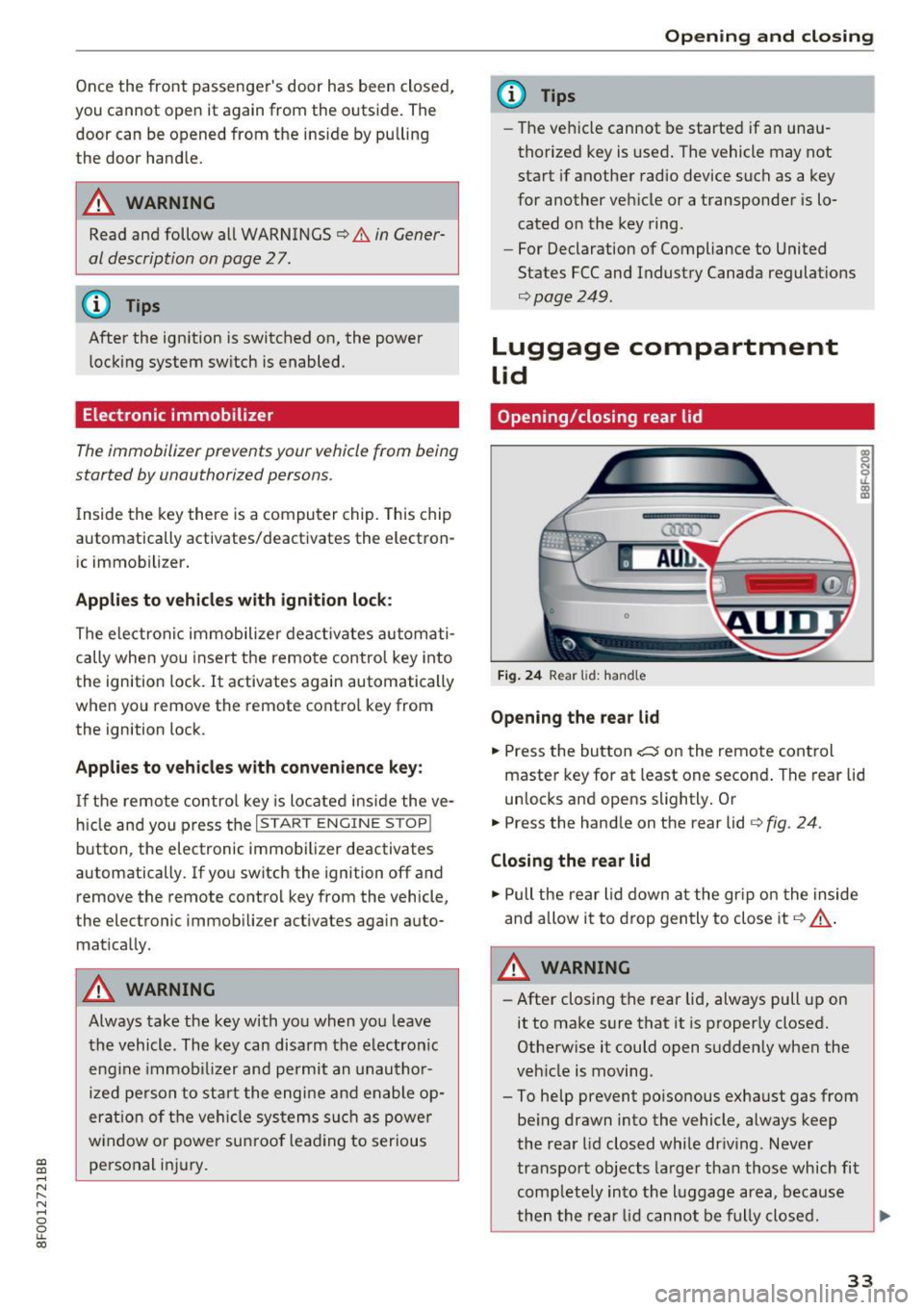
Opening /closing rear lid
Fig. 24 Rear lid: handle
Opening the rear lid
.. Press the button ~ on the remote control
master key for at least one second . The rear lid
unlocks and opens slightly. Or
.. Press the handle on the rear lid ¢
fig. 24.
Closing the rear lid
.. Pull the rear lid down at the gr ip on the inside
and allow it to drop gently to close it
Q &_.
A WARNING
-After closing the rear lid, always pull up on
it to make sure that it is properly closed.
Otherwise it could open suddenly when the
veh icle is moving.
- To help prevent po isonous exhaust gas from
being drawn into the vehicle, always keep
the rear lid closed while driving . Never
transport objects larger than those which fit
comp letely into the lu ggage area, because
then the rear lid cannot be fully closed. .,._
33
Page 37 of 266
a:,
a:,
...... N
" N ...... 0
0
LL co
Power windows
Controls
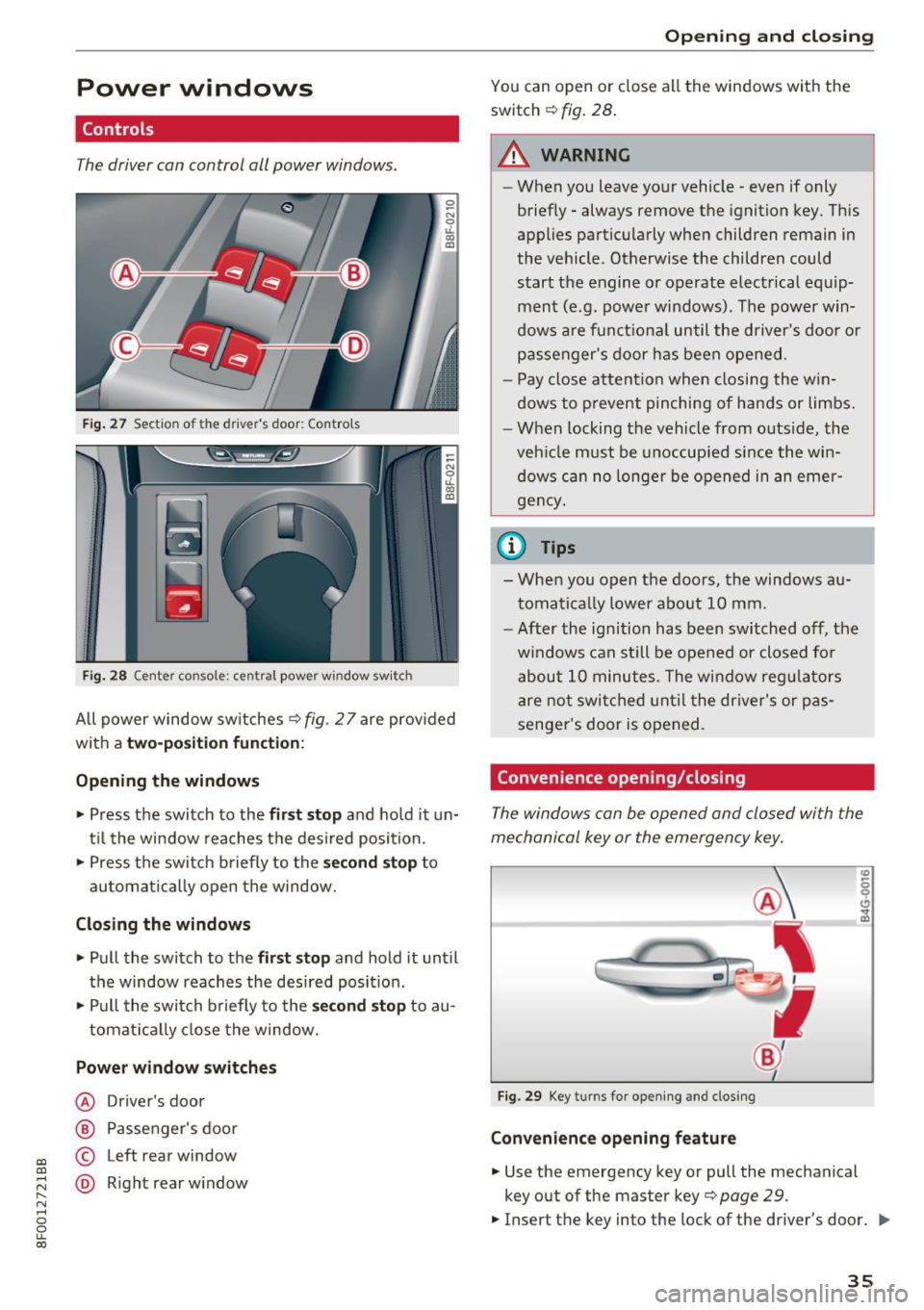
The driver can control all power windows.
Fig. 27 Section of the driver's door: Controls
l
l
f
I
I !
I
Fig. 28 Center console : central power window switch
All power window switches ¢ fig. 2 7 are provided
with a
two-position function:
Opening the windows
"'Press the switch to the first stop and hold it un
til the window reaches the desired position.
"' Press the switch briefly to the
second stop to
automatically open the window.
Closing the windows
"' Pull the switch to the first stop and hold it until
the window reaches the desired position.
"' Pull the switch briefly to the
second stop to au-
tomatically close the window.
Power window switches
@ Driver's door
@ Passenger 's door
© Left rear window
@ Right rear window
Opening and closing
You can open or close all the windows with the
switch ¢
fig. 28.
.&_ WARNING
-
-When you leave your vehicle -even if only
briefly - always remove the ignition key. This
applies particularly when children remain in
the vehicle. Otherwise the children could start the engine or operate electrical equip
ment (e.g. power windows). The power win
dows are functional until the driver's door or
passenger's door has been opened.
- Pay close attention when closing the win
dows to prevent pinching of hands or limbs.
- When locking the vehicle from outside, the
vehicle must be unoccupied since the win
dows can no longer be opened in an emer
gency.
(D Tips
- When you open the doors, the windows au
tomatically lower about 10 mm.
- After the ignition has been switched off, the
windows can still be opened or closed for
about 10 minutes. The window regulators
are not switched until the driver's or pas
senger's door is opened.
Convenience opening/closing
The windows can be opened and closed with the
mechanical key or the emergency key.
Fig. 29 Key turns for opening and closing
Convenience opening feature
"'Use the emergency key or pull the mechanical
key o ut of the master key¢
page 29.
.,. Insert the key into the lock of the driver's door . ..,_
35
Page 40 of 266
Opening and clo sin g
- De pen ding on the model of the system, you
may need to release the button on the re
mote control d uring programm ing and
press it aga in. Hold each position you try for
at least 15 seconds before trying another position. Keep the turn sig nals on your vehi
cle in view when doing t his.
- After programming the garage door ope ner,
i t may be necessary to synchronize the mo
tor w ith the system. Refer to the ma nufac
turer's i nstr uctions.
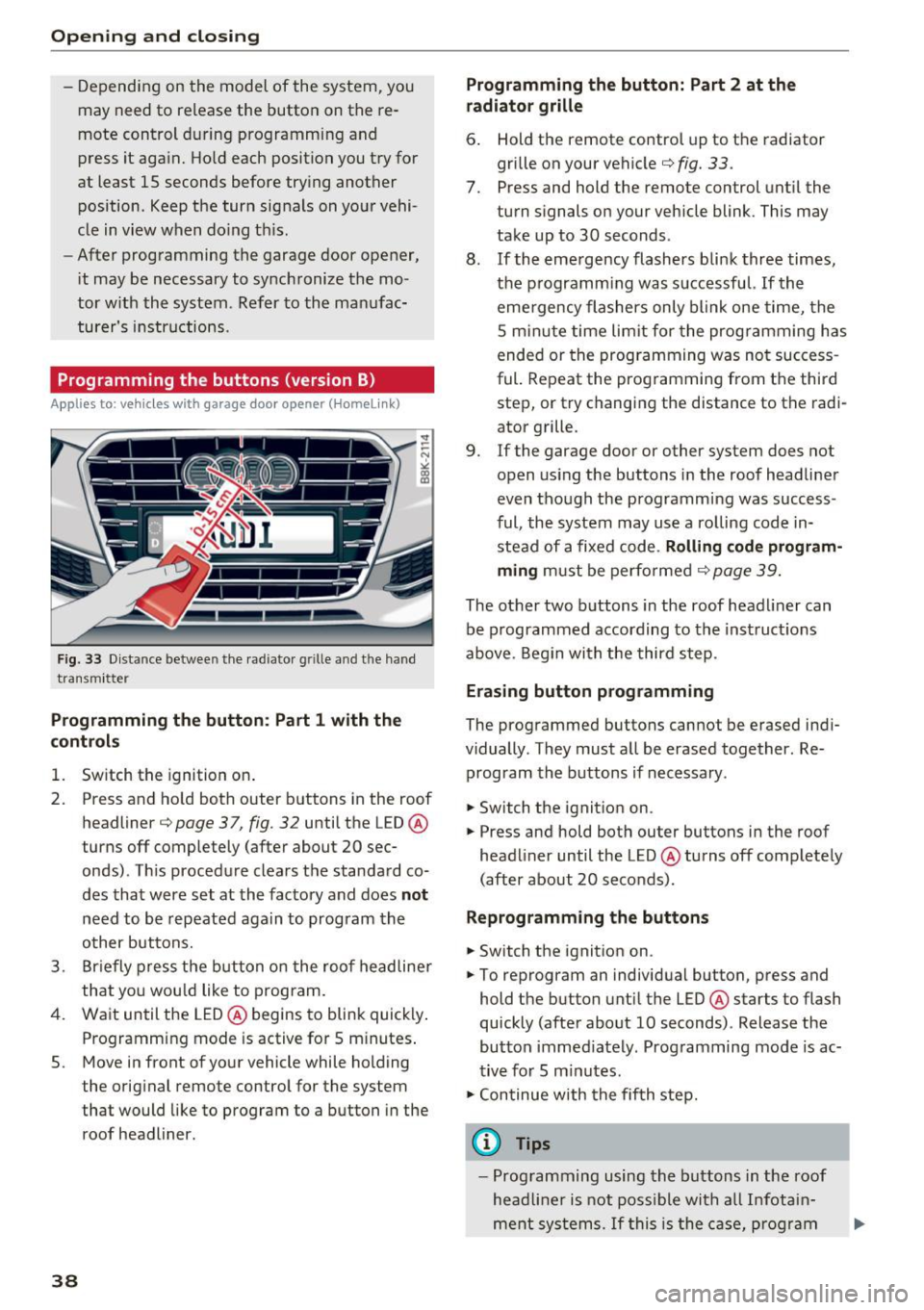
Programming the buttons (version
B)
Applies to: vehicles with garage door opener (Homelink}
F ig . 33 Distance between t he rad iato r g rille and t he hand
transm itter
Programming the button : Part 1 with the
control s
1. Switch the ignition on .
2. Press a nd ho ld both outer buttons in the roof
headliner ¢
page 37, fig. 32 until the LED@
turns off completely (after about 20 sec
onds). T his procedure clears t he standa rd co
des that were set at the factory and does
not
need to be repeated again to program the
o ther bu ttons.
3. Br iefly press the b utton o n the roof headline r
that yo u wou ld like to program.
4. Wait until the LED@ begins to blink quickly .
Programming mode is active for 5 m inutes .
5. Move in front of your vehicle while holding
the original remote contro l for the system
that would like to program to a button in the
roof headliner.
38
Programming the button: Part 2 at the
radiator grille
6 . Hold the remote contro l up to the radiator
grille on your vehicle¢
fig. 33.
7. Press and hold the remote control unt il the
turn s ignals on your vehicle blink. This may
take up to 30 seconds .
8 . If the eme rgency flashers bli nk three times,
the p rogramm ing was s uccessful.
If the
eme rgency flashers only blink one time, the
S m inute time limit for the prog ramming h as
ended or the prog ramming was no t success
ful. Repeat the prog ramming from t he third
step, or try changing the distance to the radi
ator grille.
9.
If the garage door or other system does not
open us ing the buttons in the roof headline r
even though the programm ing was success
ful, the system may use a ro lling code in
stead of a fixed code .
Rolling code program
ming must be perfo rmed ¢ page 39 .
The other two buttons in the roof head liner can
be programmed according to the inst ruct ions
above . Begin wi th the third step.
Erasing button prog ramming
The prog rammed buttons cannot be erased ind i
vidually . They must a ll be erased together . Re
program the buttons if necessary .
.. Switch the ignit ion on.
.. Press and hold bot h outer buttons in the roof
head liner until the LED@ turns off complete ly
(after about 20 seco nds).
Reprogramm ing th e buttons
.. Switch the ignition on .
.. To reprogram an individ ua l button, p ress and
hold the button unt il the LED @ starts to flash
quickly (after about 10 seconds) . Release the
button immed iately . Programming mode is ac
t ive for 5 m inutes .
.,. Con tinue with the fif th step.
@ Tips
- Prog ramming using the buttons in the roof
head liner is not poss ible with a ll Infota in
me nt sys tems.
If t his is the ca se, pr og ra m
Page 41 of 266

a:,
a:,
...... N r--. N ...... 0
0
LL 00
the buttons as described in version A
¢page 37 .
-The req uired distance between the hand
transmitter and the HomeL ink mod ule in
the radiator gri lle
¢fig. 33 depends on the
system that you are programming .
- Depending on the model of the system, you
may need to release the button on the re
mote control during programm ing and
press it aga in. Hold each position you try for
at least 15 seconds before trying another
pos ition. Keep the turn signals on your vehi
cle in view when do ing this .
Rolling code programming
Appl ies to: ve hicles with garage doo r opener (Homeli nk)
Rolling code programming is also needed for
some systems.
Ident ifying a rolling code
~ Press and hold the button in the roof headliner
that was already programmed .
~ Watch the LED @¢page 3 7, fig . 32. If the LED
blinks qu ickly, t he systems (such as a garage
doo r) is equ ipped with a rolling code.
~ Program the roll ing code as follows:
Acti vating the motor unit in a sy stem
~ Locate the programming button on the sys
tem's motor unit . The exact location and color
of the butto n may vary depending on the brand
of the system .
~ Press the programm ing button on the ga rage
doo r opener motor unit (th is w ill usually ac ti
vate a n "ind icator" on the mo to r u nit). You now
have approximate ly
30 seconds to program the
button in the roof headliner .
Programming the button in the roof
headliner
~ Press and hold the previously programmed b ut
ton in the roof headliner for 2 seconds.
~ To end rolling code programming, p ress and
hold the button aga in for 2 seconds.
~ With some systems, the button may need to be
pressed a third time to end the programmi ng
process .
Opening and cl osing
After programming, the system shou ld detect
the signal and begin moving when the button in
the roof headliner is pressed . Now you may pro
gram the other buttons as needed.
(D Tips
- The ro lling code can be programmed more
quickly and more easily with the he lp of a
second person.
- If you have diffic ulty programming the roll
ing code, referring to the user gu ide for the
system may help.
39
Page 43 of 266
a:,
a:,
...... N
" N ...... 0
0
LL co
(D Note
-To prevent damage to the power top:
- do not store any objects in the power top
compartment .
- make sure there is enough space above
the vehicle when opening or closing the power top.
- To reduce the risk of damage, make sure
there are no fragile objects within the stor
age bay's range of motion.
(D Tips
- To prevent the battery from draining, do not
open or close the power top repeatedly
when the engine is switched off.
- A message will appear in the instrument
cluster display if there is a power top mal
funct ion ¢
page 42.
-The power top can also be operated manual
l y if there is a malfunction
c:> page 44,
Power top emergency operation. The ca use
of the malfunction should be corrected by
an a uthorized Audi dea ler or authorized re
pair facility as soon as possible.
- The vehicle is not prote cted from the weath
er or from unauthorized entry if the vehicle
is left parked with the power top open. Lock
any objects you are leaving in the vehicle in
the luggage compartment. Close the power
top before leav ing the vehicle.
- The side windows lower slightly automati
cally when opening/closing the power top.
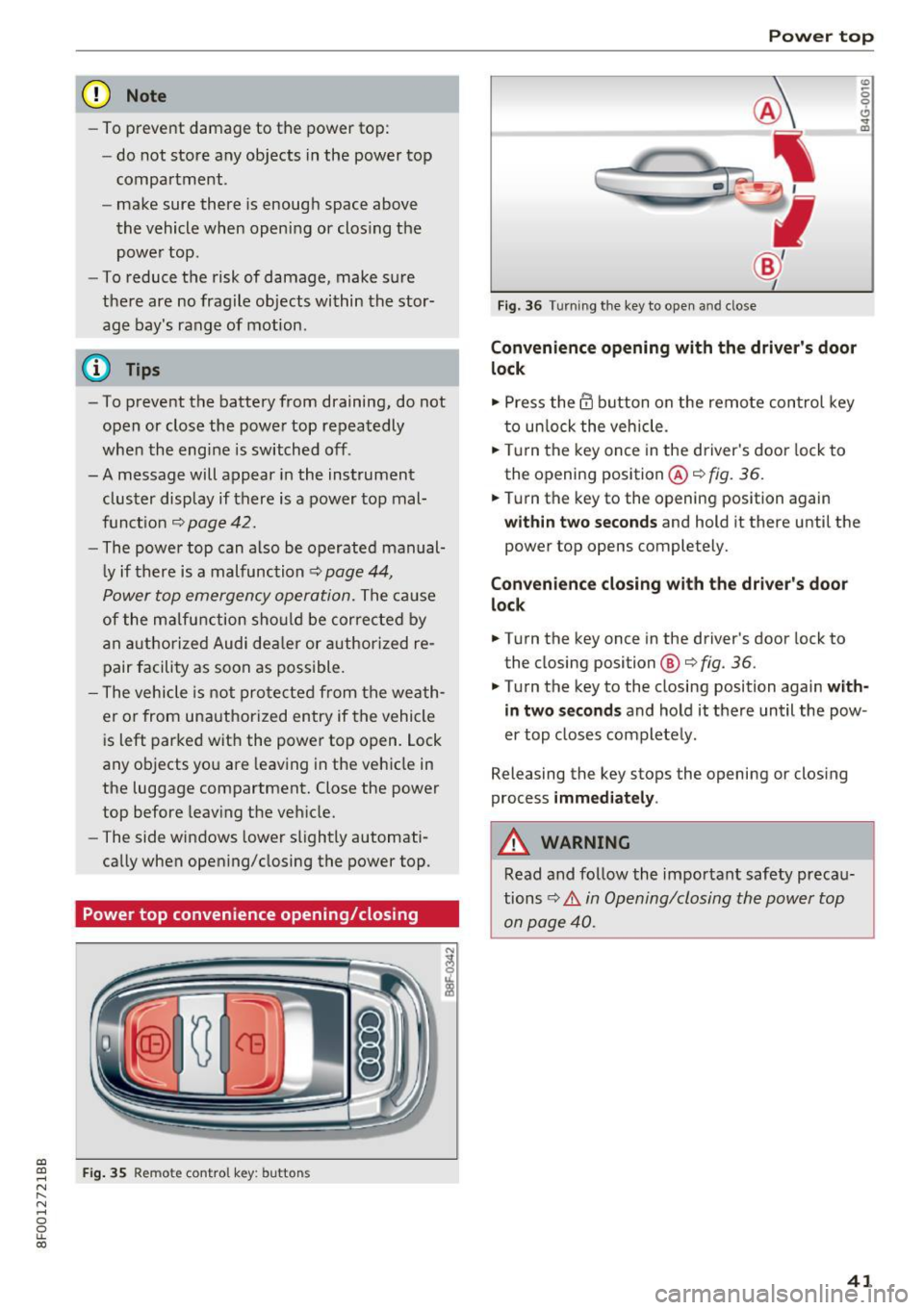
Power top convenience opening/closing
Fig . 35 Remote control key: buttons
Powe r top
Fig. 36 Turning the key to open and close
Conven ienc e opening with the driver's door
l o ck
.,. Press the @ button on the remote control key
to unlock the vehicle .
.,. Tu rn the key once in the driver's door lock to
the opening position @¢
fig. 36.
0
0 ... m
.,. Turn the key to the opening position again
within tw o second s and hold it there until the
power top opens completely.
Convenienc e closing with the dri ver's door
lock
.,. Turn the key once in the driver's door lock to
the closing position @¢
fig. 36.
.,. Turn the key to the closing position again with
in tw o second s
and hold it there until the pow
er top closes completely .
Releasing the key stops the opening or clos ing
process
imm edi ate ly .
A WARNING
Read and follow the important safety precau
tions~ .&.
in Opening/closing the power top
on page 40.
41
Page 51 of 266

a:,
a:,
...... N
" N ...... 0
0
LL co
the windshield in this area in order to
prevent malfunctions or failures .
- Some exterior lighting functions can be ad
justed
c:, page 49.
- When you remove your key from the igni
tion while the vehicle's lights are turned on,
a buzzer sounds as long as the driver's door
is open.
- In cool or damp weather, the inside of the
headlights, turn signals and tail lights can
fog over due to the temperature difference
between the inside and outside. They will
clear shortly after switching them on. This does not affect the serv ice life of the light
ing .
- In the event of a light sensor malfunction,
the driver is notified in the instrument clus
ter display
c:, page 19.
Turn signals and high beam lever
The lever operates the turn signals, the high
beams and the headlight flasher.
Fig . 54 Turn signal and high beam lever
Turn signals¢¢
g N
0
~ CD
The turn signals activate when you move the lev
er into a turn signal position when the ignition is
switched on.
@ -right turn signal
@-left turn signal
The turn signal blinks three times if you just tap
the lever.
High beams and headlight flasher ~D
Move the lever to the corresponding position:
@ -high beams on
Lights and Vision
@-high beams off or headlight flasher
The indicator light
II in the instrument cluster
turns on.
Notes on these features
-The turn signals only work with the ignition
turned on. The indicator lights . or
II in the
instrument cluster also blink.
- After you have turned a corner, the turn signal
switches off automatically.
- The
high beam works only when the headlights
are on. The indicator light
II in the instrument
cluster illuminates when the high beams are
on.
- The
headlight flasher works only as long as you
hold the lever -even if there are no lights
switched on . The indicator light
II in the in
strument cluster illuminates when you use the
headlight flasher.
WARNING
Do not use the high beam or headlight flasher
if you know that these could blind oncoming
traffic.
Adjusting exterior lighting
The functions are selected in the radio or MMI* .
.,. Select: !CAR I function button> Exterior light
ing .
Or
.,. Select: 1-C~A ~ R-.l function button > Car systems*
control button > Vehicle settings > Exterior
lighting .
Coming home (light when leaving car)*,
Leaving home (light when unlocking car)*
The coming home function illuminates the area
around the vehicle when the ignition is switched
off and the driver's door is opened. Depending on
vehicle equipment, the function can be switched on and off or the length of time the lights remain
on* can be adjusted .
The
leaving home function illuminates the area
around the vehicle when unlocking it. This func-
tion can be switched on and off.
ll>
49
Page 53 of 266
a:,
a:,
...... N
" N ...... 0
0
LL co
Interior Lighting
Front/rear interior lights
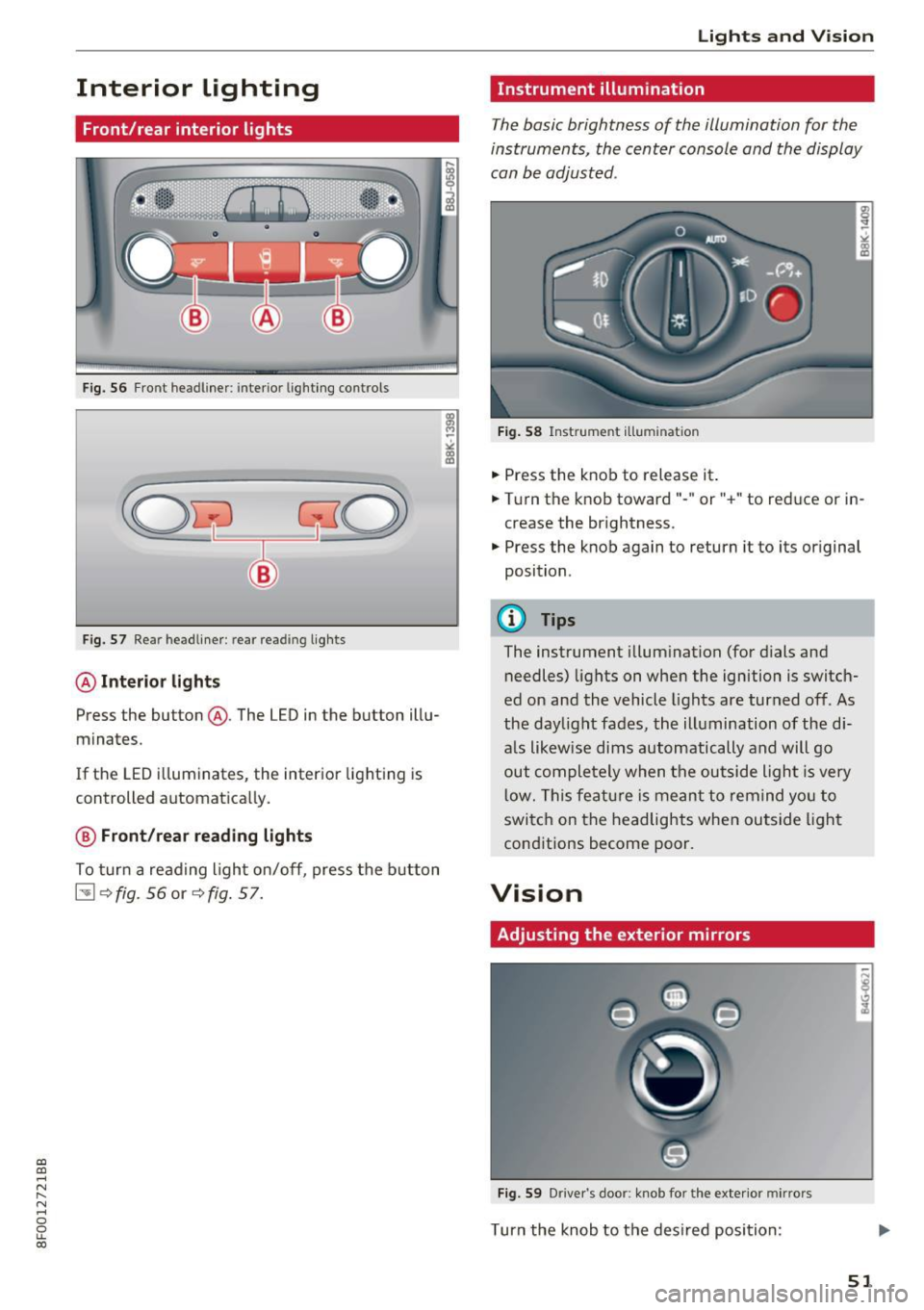
Fig. 56 Fro nt headliner: interio r lighting controls
Fig. 57 Re ar headliner: rear reading lights
@Interio r ligh ts
Press the button @. The LED in the button illu
minates.
If the LED i lluminates, the interior lighting is
controlled automatically.
@ Front /rear read ing light s
To turn a reading light on/off, press the b utton
~ <=>fig. 56 or <=>fig. 57.
Lights and V ision
Instrument illumination
Th e basic brightness of the illumination for the
instruments, the center console and the display
can be adjusted .
Fig. 58 Instrument ill umina tion
• Press the knob to release it.
• Turn the knob toward"- " or"+" to reduce or in
crease the brightness.
• Press the knob again to return it to its original
position .
@ Tips
The instrument illumination (for dials and
needles) lights on when the ignition
is switch
ed on and the vehicle lights are turned off. As
the daylight fades, the illumination of the di
a ls likewise dims automatically and will go
out completely when the outside light is very
low. This featu re is meant to remind yo u to
switch on the headlights when outside light
conditions become poor.
Vision
Adjusting the exterior mirrors
Fig. 59 Driver's door: knob for the exterior mirro rs
Turn the knob to the desired position :
51
Page 54 of 266
Lights and Vision
Q/P -Adjusting the left/right exterior mirror.
Move the knob in the desired direction.
4ill -Heat ing the m irro r glass depending on the
ou tside temperat ure*.
.9 -Folding exterior mirrors* . In the Infotain
men t system, you can select if the mirrors fold in
automatically when you lock the veh icle
¢page 32.
Front passenger's ext erior mirror tilt
function*
To help you see the c urb when ba cking in to a
p ar king space, the surface of the mirror tilts
slightly. Fo r this to happen, the knob must be in
the posit ion for the front passenger's outs ide
mirror.
You can adjust the ti lted mi rror sur fa ce by turn
ing the knob in the desired direction. When you
move out of reverse and into another gear, the
new mirror position is stored and assigned to the
key yo u are us ing.
The mirror goes back into its original position
once yo u drive forward faster than 9 mph
(15 km/h) or tu rn the ignition
off .
A WARNING
Curved mir ror surfaces (convex or spherical *)
increase your f ield of view. Remember that
vehicles o r other objects will appear sma ller
and farther away than when seen in a flat mir
ror. If you use t his mirror to est imate d istan
ces of following vehicles whe n cha nging
lanes, yo u co uld estimate incor rec tly and
c ause an accident .
(D Note
-If the mir ror housing was moved by force
(fo r example, by r unning into an object
when maneuvering the vehi cle), the mirror
must be folded all the way in using the pow
er fold ing function . The mirror housing
must not be moved back into place by hand
beca use this would impair the f unction o f
the mirro r mechan ism.
- If you wash the ve hicle in an automatic car
wash, you m ust fold the exterior mi rrors in
52
to reduce the r isk o f damage to the m irrors .
Never fold power folding exterior mirrors*
by hand . On ly fold them in and out using
the power controls.
(D Tips
- If the power adjusting function malfunc
tions, the glass in both mirrors can be ad
justed by pressing on the edge of it by hand.
- The e xterior m irro r settings are sto red w it h
the memory funct ion *¢
page 61.
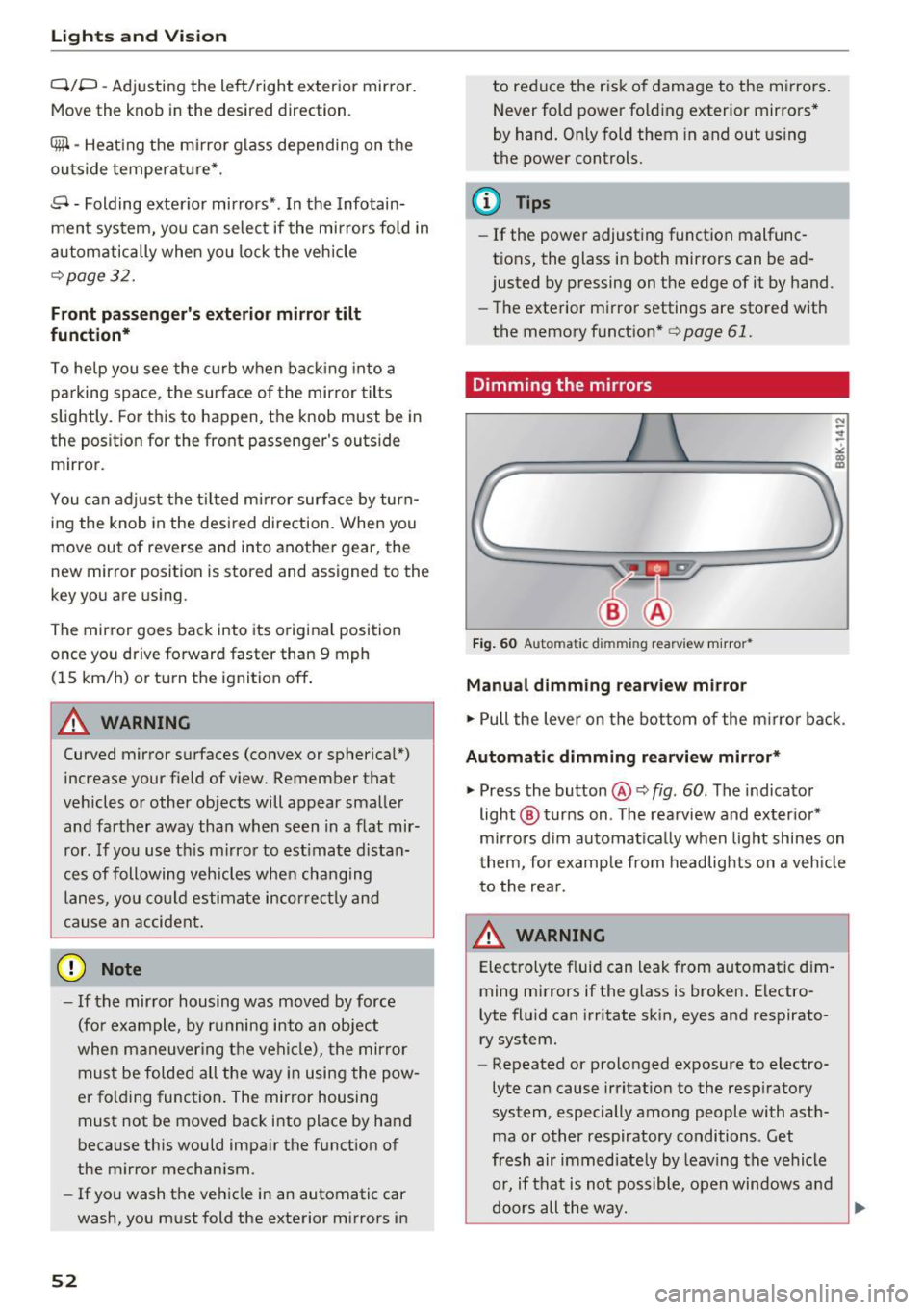
Dimming the mirrors
Fig. 60 Automatic dim ming rearview m ir ror *
Manual dimming rearview mirror
.,. Pull the lever on the bot tom of the m irror bac k.
Automat ic dimming rearvi ew mirror*
.,. Press the button@¢ fig. 60. The indicator
light @ turns on . The rea rview and ex ter ior*
m irrors d im au tomat ically when light shines on
them, for examp le from headlights on a veh icle
t o the rea r.
~ WARNING
Electrolyte fluid can leak from automatic d im
ming mirrors if the glass is broken . Electro
lyte fluid can irritate sk in, eyes and respirato
ry system.
- Repeated or prolonged exposure to electro
lyte can cause irritat ion to the resp iratory
system, especially among people with ast h
ma or other respiratory conditions. Get
fresh air immediate ly by leaving the vehicle
or, if that is not possible, open windows a nd
d oors all the way.
llll>
Page 55 of 266

a:,
a:,
...... N
" N ...... 0
0
LL co
-If electrolyte gets into the eyes, flush them
thoroughly with large amounts of clean wa
ter for at least 15 minutes; med ical atten
t ion is recommended .
- If electrolyte contacts skin, flush affected
area with clean water for at least 15 mi nutes and then wash affected area w ith
soap and water; medical attention is recom
mended. Thoroughly wash affected clothing
and shoes before reuse.
- If swallowed and person is conscious, rinse mouth with water for at least 15 m inutes.
Do not induce vomiting unless instructed to
do so by medical profession al. Get medical
attent ion immed iate ly.
(D Note
Liquid elect rolyte leaking from broken m irror
glass will damage any p lastic surfaces it
comes in co ntact wi th. C lean up sp illed ele c
t rolyte immediately with clean water and a
sponge .
@ Tips
-Switch ing off the dimming f unction of the
i nside rear v iew mirror also deactivates the
automatic dimming function of the exterior
mirrors.
- Automat ic dimming for the mirror on ly op
erates properly if the light striking the in
s ide mirror is not hindered by other objects.
- The automatic dimming mirrors do not dim
when the interior lighting is turned on or
the reverse gear is selected.
Sun visors
T.__~l
F ig . 61 Dr ive r's side: su n visor
Lights and V ision
The sun visors for the driver and passenger can
be pulled out of their brackets in the center of
the vehicle and turned towards the doors(!).
T he m irror light switches on when the cover ove r
the vanity mirror @opens.
Windshield wipers
Switching the windshield wipers on
®
Fig . 62 W inds hield w iper leve r
Move the windshield wiper lever to the corre
sponding position:
@ -Windshield wiper off
(!) -Interval mode. To extend/shorten the w iper
in tervals, move the switch @to the left/right. In
vehicles with a rain sensor* the wipers tu rn on in
the rain once the vehicle speed exceeds approxi mately 2 mph (4 km/h) . The higher the sensitivi
ty of the rain sensor* is set (switch @to the
right), the earlier the windshield wipers react to
moisture on the w indshield. In some models, you
can switch ra in sensor mode off and switch inter
mittent mode on in the MM I* . Select :
ICARI func
t ion button
> Car system s* control button > Driv
er assist > Rain sen sor.
In intermittent mode,
yo u can adjust the interval time using the@
switch.
@ -S low w ip ing
@ -Fast w iping
@ -Single wipe
® -Clean the w indshie ld. To eliminate wate r
droplets , the w indshield wiper performs one af
terwipe operation after several seconds whi le
driving. You can switch this function off by mov-
ing the lever to position ® within 10 seconds of ..,.
53