control AUDI A5 CABRIOLET 2017 Workshop Manual
[x] Cancel search | Manufacturer: AUDI, Model Year: 2017, Model line: A5 CABRIOLET, Model: AUDI A5 CABRIOLET 2017Pages: 266, PDF Size: 66.64 MB
Page 96 of 266

Audi adaptive cruise control and braking guard
Audi braking guard
Description
Applies to: vehicles w ith Audi adaptive cruise co ntro l
Fig. 112 Instrument cluster : approac h warning
Braking guard uses a radar sensor. It also func
tions within the limits of the system when adap
tive cruise control is switched off.
What can Audi braking guard do?
When detected in time, the system can assess
situations when a vehicle ahead brakes suddenly
or if your own vehicle is traveling at a high speed
and approaching a vehicle up ahead that is mov
ing more slowly. Braking guard does not react if
it cannot detect the situat ion.
The system advises you of various situations:
- The
distance warning is given if you are too
close to the vehicle ahead for a long time. If the
vehicle ahead brakes sharply, you will not be
able to avoid a collision. The indicator light .
in the display comes on.
- The
approach warning is given when a detected
vehicle up ahead in your lane is moving much
more slowly than you are or if it brakes sharply.
When this warning is given, it may only be pos
s ible to avoid a collision by swerving or braking
sharply. The indicator light . will warn yo u
about the danger¢
fig. 112. You will also hear
an acoustic signal.
If you do not react fast enough or do not react at
a ll to the situation, Braking guard will intervene
by braking and the message
braking guard inter
vention
will appear.
l) This is not ava ilab le in some countries.
94
- If a collision is imminent, the system will first
provide an
acute warning by briefly and sharply
app lying the brakes.
- If you do not react to the acute warning, brak
ing guard can brake within the limits of the sys
tem. This reduces the vehicle speed in the event
of a collis ion.
- At speeds under 20 mph (30 km/h), the system
can initiate a complete deceleration shortly be
fore a collision ll.
- If the braking guard senses that you are not
braking hard enough when a collision is immi
nent, it can increase the braking force.
Which functions can be controlled?
You can switch braking guard and the distance/
approach warning on or off in the radio or MMI
¢ page 95, Settings in the radio/MM!.
A WARNING
Lack of attent ion can cause collisions, other
accidents and ser ious personal injuries. The
braking guard is an assist system and cannot
prevent a collision by itself . The driver must
always intervene. The driver is always respon
sible for braking at the correct time .
- Always pay close attention to traffic, even
when the braking guard is switched on. Be
ready to intervene and be ready to take
complete control whenever necessary. Al
ways keep the safe and legal distance be
tween your vehicle and vehicles up ahead .
- Braking guard works within limits and will
not respond outside the system limits, for
examp le when approach ing a stopped vehi
cle or stationary obstacle (end of a traffic
jam or vehicle that has broken down in traf
fic).
- Always remember that the radar sensor for
the braking guard works only within defined
detection and range limits that may prevent
the proper detection of other vehicles.
- The radar sensor's function and range can
be reduced by rain, snow and heavy spray.
Moving vehicles up ahead may not be
-
Page 97 of 266

a:,
a:,
...... N r--. N ...... 0
0
LL 00
Audi adapt ive cruis e control and braking gua rd
promptly detected or may not be detected
at all.
- Reflective surfaces including crash barriers
or tunnel entrances may impair the function
of the radar sensor.
(D Tips
- You can cancel the braking that is initiated
by the system by braking yourse lf, by accel
erating noticeably or by swerving.
- Braking guard error messages ¢
page 95.
-Keep in mind that braking guard can brake
unexpected ly. Always secure any cargo or
objects that you are transporting to reduce
the risk of damage or injury.
Settings in the radio/MM!
A ppl ies to: vehicl es with Audi adaptive cruise co ntro l
... Se lect : I CARI funct ion button > C ar s ystem s*
control button > Driver a ssi st > Audi brak ing
guard .
Or
... Select:
~I C-A-R~I funct ion button > A udi braking
g uard .
S ystem -
Switch Audi braking guard On and Off.
When you sw itch the ignition on, the message
Audi bra king gua rd off appears if the system is
switched off.
Ea rly warn ing -The distance and approach warn
ings in the display can be switched
On/ Off.
(D Tips
-Your settings are automatically stored and
ass igned to the remote control key being
used at the times the sett ings are made.
- If you restrict or sw itch off the ESC, the
braking guard also sw itches itself off
¢ page 168 .
- Switch braking guard off when you are load
ing the veh icle onto a vehicle ca rr ier, train,
sh ip or other type of transportation . This
can p revent undesired warnings from the
braking gua rd system.
Messages
Applies to: vehicles wi th Aud i adapt ive c ruise control
Braking guard : Off
This dr iver message appears if the system is
tu rned off via the radio/MM I*. O therwise, if the
system is turne d off, the information appears ev
ery time shortly after t he start o f the trip .
T he driver message a lso appea rs if the system is
not avai lab le due to a ma lfunction o r if the ES C i s
not switched on
¢ page 168 . If th is is the case,
the system wi ll not provide warnings about a
possib le collision .
Braking guard : Ac tivated
This dr iver message appears if sharp brake pres
su re was applied due to an acute warning .
•••
Three white dots appear if a setting cannot be se
l ected with the operating lever. For example, this
happens if you want to raise/lower the speed
even though there was no previously saved
speed .
ACC: Sen sor bloc ked
T his message appears if the senso r view is ob
structed, for examp le by leaves, snow, heavy
spray or dirt. Clean the sensor ¢
page 88,
fig. 102.
ACC : not avail able
The dr iver message appears if there is a malfunc
t ion. The adaptive cruise control tu rns off. A
c hi me so unds as a reminde r. Have the system
c h ecke d by an author ized Audi dealer or au thor
ized Audi Se rvice Facility .
ACC: unavailable
The driver message appears if, for examp le, the
brake temperature is too high . The adapt ive
c ruise co ntro l is temporarily u navailable . A chime
sou nds as a reminder.
Shift lever posi tion!
The driver message appears if the se lector lever
is shifted to the N position. The adapt ive cru ise
contro l is not available wh ile in this position.
Ill>
95
Page 98 of 266
Audi adaptive cruise control and braking guard
Stabilization control (ESC )
This message appea rs if the elect ronic stab iliza
tion con tro l (E 5C) is t akin g action to st abiliz e t he
ve hicl e. The a dap tive cr uise control tu rns o ff. A
chime soun ds as a rem inder .
Speed too low
This message appea rs if the current speed is too
low
to set or to maintain the des ired speed.
The speed being saved m ust be at least 20 mph
(3 0 km/h). The cru ise cont rol is turned off for
speeds lowe r than 12 mph (20 km/h) . The adap
tive cruise contro l remai ns tu rned on for speeds
above 95 mph (150 km/ h) (over ride) .
It will sta
b iliz e again at 95 mph (150 km/ h) w hen t he d riv
e r ta kes hi s fo ot off of the gas ped al.
Parking brake!
The drive r message appea rs when the park ing
brake is activated. Adaptive c ruise contro l is
turned off. A chime sounds as a remi nder .
96
Page 101 of 266

a:,
a:,
...... N
" N ...... 0
0
LL co
-Improper reliance on the side assist system
can cause collisions and serious personal in
jury:
- Never rely only on side assist when chang
ing lanes.
- Always check rear view mirrors to make
sure that it is safe to change lanes.
- Side assist cannot detect all vehicles under
all conditions- danger of accident!
- Please note that side assist indicates there
are approaching vehicles, or vehicles in your
blind spot, only after your vehicle has
reached a driving speed of at least 19 mph
(30 km/h).
- In certain situations, the system may not
function or its function may be limited. For
example:
- if vehicles are approaching or being left
behind very quickly. The display may not
turn on in time.
- in poor weather conditions such as heavy
rain, snow or heavy mist.
- on very wide lanes, in tight curves or if
there is a rise in the road surface. Vehicles
in the adjacent lane may not be detected
because they are outside of the sensor
range.
(D Note
The sensors can be displaced by impacts or
damage to the bumper, wheel housing and
underbody. This can affect the system. Have
your authorized Audi dealer or authorized
Audi Service Facility check their function.
(D Tips
-If the window glass in the driver's door or
front passenger's door has been tinted , the
display in the exterior mirror may be misin
terpreted.
- For Declaration of Compliance to United
States FCC and Industry Canada regulations
¢page 249.
Audi side assist
Activating and deactivating
App lies to : veh icles w it h Aud i s ide ass ist
Fig. 117 Driver 's do or: Side ass ist button
.,. Press the button ¢ & in General information
on page
98to switch the system on/off . The
LED in the button turns on when side assist is
switched on .
Adjusting the display brightness
Applies to: veh icles w it h Audi s ide assist
The signal brightness can be set in the radio or
MM!*.
.,. Select: !CAR ! function button> Audi side assist .
.,. Select: I CAR I function button > Car systems*
control button > Driver assist > Audi side as
sist.
The display brightness adjusts automatically to
the brightness of the surroundings, both in the
information and in the warning stage . In very
dark or very bright surroundings, the display is
already set to the minimum or maximum level by
the automatic adjustment. In such cases, you
may notice no change when adjusting the bright
ness, or the change may only be noticeable once
the surroundings change.
Adjust the brightness to a level where the display
in the information stage will not disrupt your
view forward. If you change the brightness, the
display in the exterior mirror will briefly show the
brightness level in the information stage. The
brightness of the warning stage is linked to the
brightness in the information stage and is adjust
ed along with the information stage adjustment.
Ill>
99
Page 103 of 266

Audi drive select Drive settings
Introduction
Applies to: vehicles with Audi drive select
Drive select provides the possibility to experience
d iff erent types of vehicle settings in one veh icle.
F or instance, using the three
Comfort, Auto and
Dynamic modes, the driver can switch from a
sporty to a comfortab le driving mode with the
press of a button.
Addit ionally, in vehicles with MM I*, the vehicle
setup for
Individual* mode can be customized by
you. This makes it possible to combine settings
such as a sporty engine tuning with comfortable
steering.
A WARNING
-
Improper use of the Audi drive select can
cause collisions, other accidents and serious
personal injury .
Description
Applie s to: vehicles with Audi drive select
The vehicle setup in each mode depends on the
veh icle's features . However, the engine, auto
matic transmission and steering are always in
volved.
Engine and automatic transmission
Depending on the mode, the engine and the au
tomatic transm ission respond quicker or in a
more balanced manner to accelerator pedal
movements . In the sporty dynam ic mode, the au
tomatic transmission shifts at higher RPMs .
Steering
The steering adapts in terms of steering effort
and steering ratios. Indirect steer ing that moves
eas ily, like the steering in comfort mode, is best
suited to long drives on a highway. In contrast,
dynamic mode provides sporty, direct steering.
gi The follow ing applies to vehicles with dynam ic
;:::: steering*: the steering rat io changes based on
r--.
~ vehicle speed in order to ma inta in optim um 0
fi:' steering effort for the driver at all times. This 00
Audi drive select
sets the steering to be less sensitive at higher
speeds in order to provide improved vehicle con
tro l. At reduced speeds, however, steering is
more direct in order to keep the steering effort as
minimal as possible when the driver is maneuver
ing the vehicle. At low and average speeds, dy
nam ic steering additionally prov ides more re
sponsive steering performance .
Adaptive dampers*
The adaptive dampers* use sensors to record in
formation regarding steering movements, brak
ing and acceleration operations by the driver,
road surface, driving speed, and load . This makes
it possible to adapt damping to the driving situa
t ion virtua lly in real time. Drive select also makes
it possible to sat isfy the desire for sporty suspen
sion (Dynamic) and comfortable suspension
(Comfort) without giving up balanced tuning (Au
to).
Sport differential*
As a component of the all whee l dr ive system
(quattro)
c::> page 172, the sport different ial* dis
tributes the driving power to the rear axle de
pending on the situation. The distribution of
power varies depending on the mode selected.
The goal is a high level of ag ility and ability to ac
celerate on curves. The vehicle is very responsive
to steering.
Audi adaptive cruise control*
The behavior when accelerating can be adjusted
from comfortable to sporty, depending on the
drive select mode. Adaptive cruise control also
responds to the driving behavior of the vehicle
ahead in a more conservative or sporty manner .
Engine sound*
The sound of the engine is adapted to the select
ed mode and ranges from subtle to sporty.
(D Tips
- In some models, the maximum vehicle
speed can only be reached in the
Auto and
Dynamic modes.
- For vehicles with an automatic transmis-
sion, se lecting the
Dynamic mode resu lts in ...,
101
Page 104 of 266
Audi drive select
sporty shifting characteristics . The S gear
position engages automatically.
- In vehicles that have dynamic steering*, op
erating noise is heard when starting or stop
ping the engine. This does not ind icate a
problem.
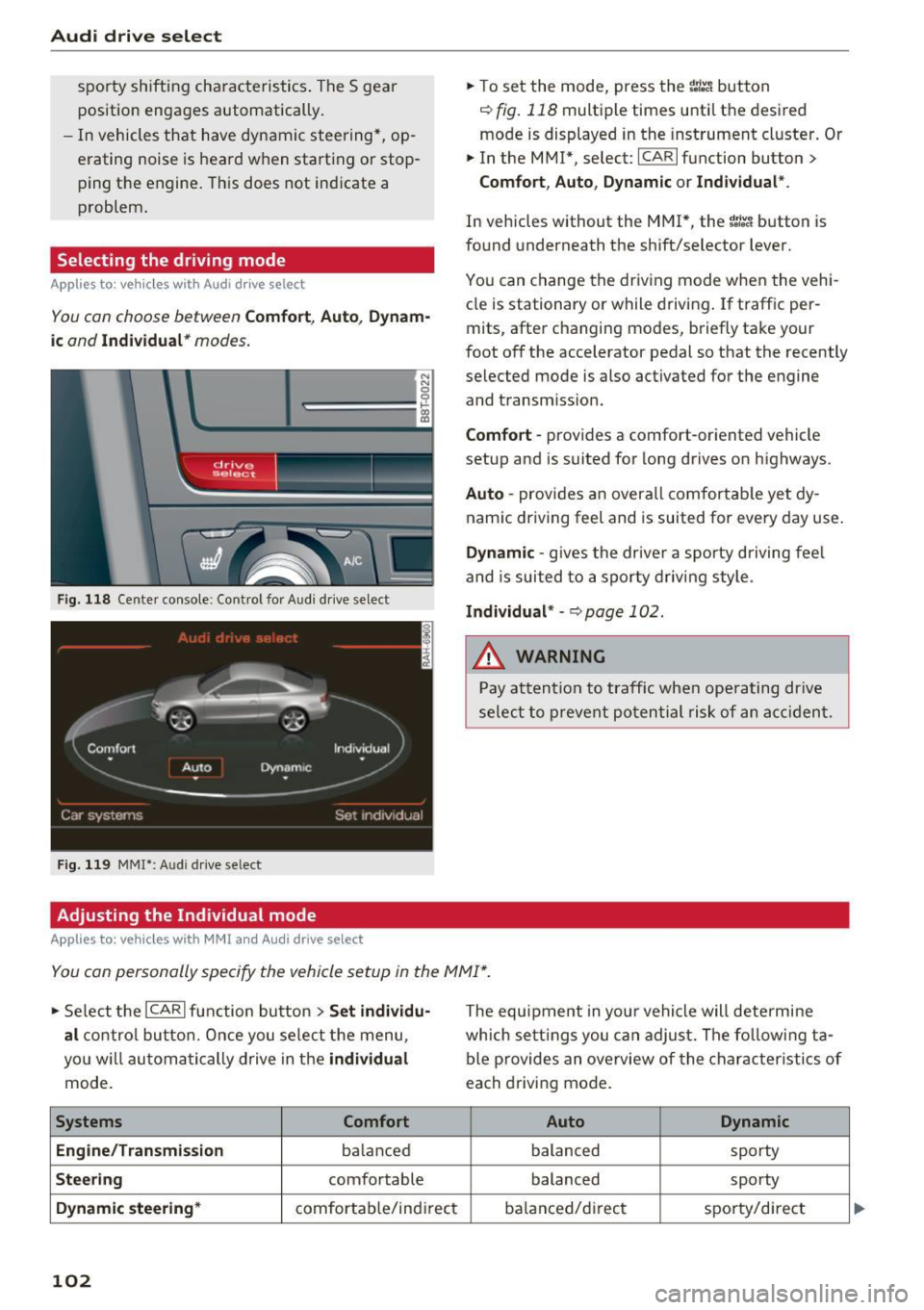
Selecting the driving mode
Applies to: vehicl es w ith Aud i dri ve select
You con choose between Comfort, Auto , Dynam
ic and Individual * modes.
N N 0
0
'l::=====:::: 1-'gi
drive I sel,.c,ct _ J -~-
Fig. 118 Center console: Control fo r Aud i dr ive select
Fig . 119 MMI*: A udi drive select
Adjusting the Individual mode
Applies to : ve hicles w ith MMI and Audi drive select
.,. To set the mode, press the ~:i:a button
r::!) fig. 118 multiple times until the desired
mode is displayed in the instrument cluster. Or
.,. In the MMI* , select: ICARlfunction button>
Comfort, Auto, Dynamic or Individual".
In vehicles without the MMI*, the ~:/:a button is
found underneath the shift/selector lever.
You can change the driving mode when the vehi
cle is stationary or while driving. If traff ic per
mits, after changing modes, briefly take your
foot off the accelerator pedal so that the recently
selected mode is also activated for the engine
and transm iss ion.
Comfort -provides a comfort-oriented vehicle
setup and is suited for long drives on highways.
Auto -provides an overall comfortable yet dy
namic driving feel and is suited for every day use.
Dynamic -gives the drive r a sporty driving fee l
and is suited to a sporty driving style .
Individual* -c>page 102.
&_ WARNING
Pay attention to traffic when operating drive
select to prevent potential risk of an accident.
You can personally specify the vehicle setup in the MMI* .
.,. Select the ICAR I function button > Set individu
al
control button. Once you select the menu,
you w ill automatically drive in the
individual
mode.
Systems Comfort
Engine/Transmission
ba lanced
Steering comfortable
Dynamic steering* comfortab le/indi rect
102
The equipment in you r vehicle will determine
which settings you can adjust. The following ta
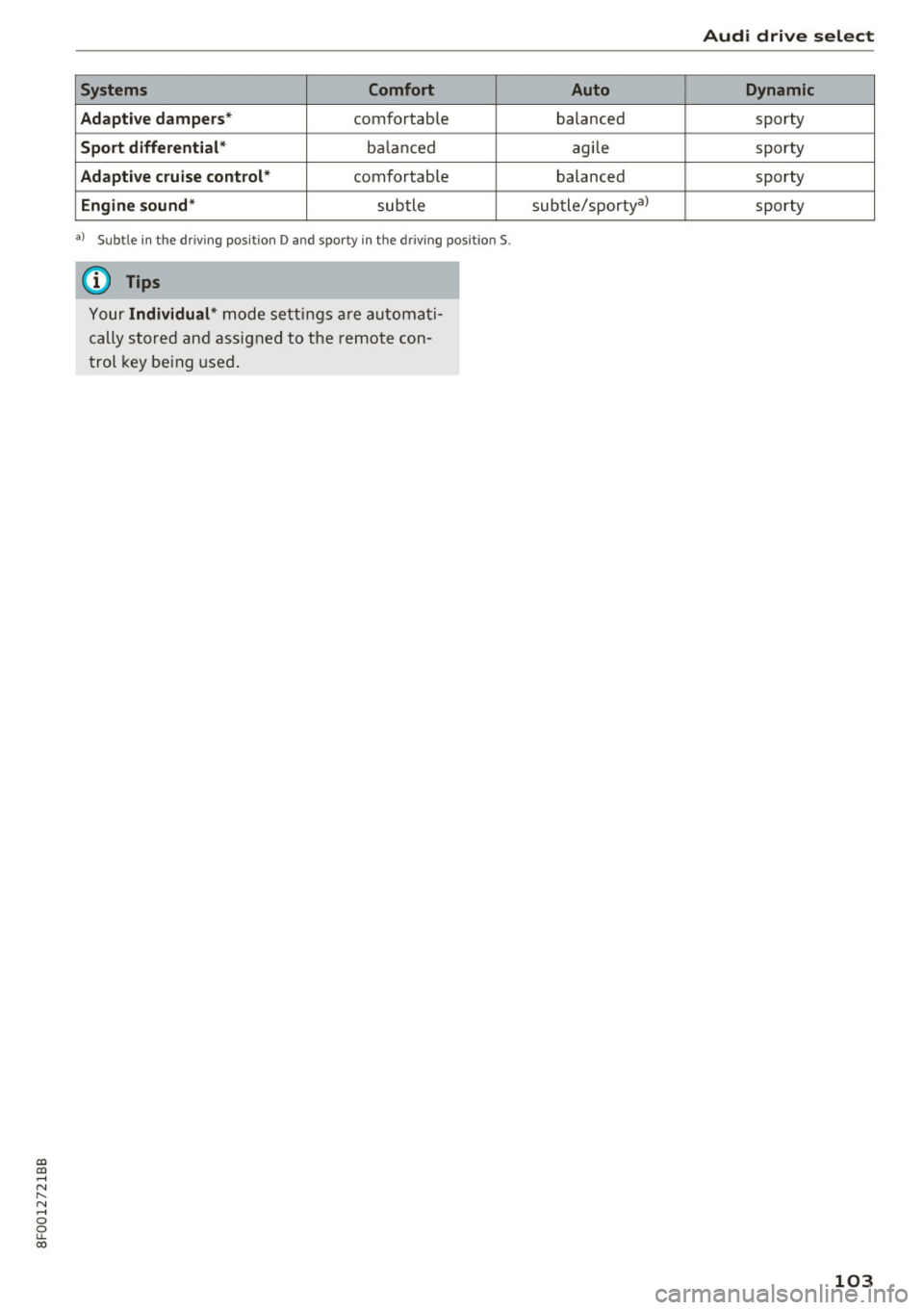
ble provides an overview of the characteristics of
each driving mode.
Auto Dynamic
balanced
sporty
balanced sporty
ba lanced/d irec t sporty/direct
Page 105 of 266
a:,
a:,
...... N r--. N ...... 0
0
LL 00
Systems Comfort
Adapti ve dampers *
comfortable
Sport differential * bala nced
Adapti ve cruise control * comfortab le
Engine sound * subtle
a) Subtle in t he dr iv in g pos itio n D and sp or ty in t he dr iv in g pos it ion S.
(D Tips
Y our Individual* m ode setti ngs are a uto mat i
cally store d an d assigned to the remo te con
trol key be ing used .
Audi drive select
Auto Dynamic
balanced sporty
agi le sporty
balanced sporty
sub tle/sportyal
sporty
103
Page 109 of 266

a:,
a:,
...... N r--. N ...... 0
0
LL 00
-Dampen the lens wi th a house ho ld alcoho l
based glass cl eaner , and clean the l ens with a
dry cloth
¢ (i) .
-Remove snow with a hand brush and ice pref
erab ly with a de-icing spray
¢ (i).
A WARNING
- The parking aid cannot replace the driver's
attent ion. The driver a lone is responsible for
park ing and s imilar driving maneuvers.
-Always keep your eyes on the vehicle's sur round ings, using the rear view m irror as
we ll.
- Do not a llow yourse lf to be d istracted from
traff ic by the rear view camera p ictures.
- If the posit ion and the installat ion ang le of
the camera has changed, for example, after
a rear end collision, do not continue to use
the system for safety reasons. Have it
checked by a qualified dealersh ip .
@ Note
- Low obstacles already s ignaled by a warn ing
ca n disappear from the system's detection
range as they are approached and will not
continue to be signa led. Objects such as
barrier chai ns, t rai ler d raw ba rs, thin pa int
ed verti cal poles o r fences may not be de
tec ted by t he sys tem, posing r isk o f dam
age.
- Neve r use warm or hot water to remove
snow or ice from the rear view camera lens -
danger of crack format ion on t he lens!
- When cleaning the lens, never use p roduc ts
that are abrasive.
Switching on/off
Applies to: veh icles with pa rk ing system (rear, with rear view
camera)
The rear view camera switches on automatically
togeth er with the acoustic park assist when you
put the vehicle in reverse.
Sw itching on
.,. Put the vehicle in reverse gear , th e acoustic
parking system w it h rear view camera is acti
vated a utomat ically . Act ivation of the acoust ic
Parking S ystem
parking system is confirmed by a brief acknow l
edgement sound.
Switching off
.,. Dr ive faste r than 9 mp h (15 km/h), o r
.,. take the ve hicle out of reve rse gear. The acous
t ic parking sys tem is immed iately deactivated,
and the rear view camera pictu re is deactivated
automatically after a period of abo ut 15 sec
onds, or
.,. sw itch off the ignit ion.
The delay in deactivating the camera provides an u ninterrupted view be hind th e vehicle especia lly
when maneuvering in t ight pa rking spaces and
prevents the picture from turning off t he every
t ime you shift o ut of reverse .
If the warning messag e appears in the display
but not the rear view camera picture, read and
confirm the warning message . The acoustic dis
tance sig nal is always active.
If you press a f unction button on the M MI control
console , the rear view camera picture disappears.
The rear view camera picture reappears the next
time you pa rk .
Further in format ion on th e warning message and
the MMI control console can be found in the MMI inst ruct ion booklet.
A WARNING
--
- On ly use the rearv iew camera to ass ist you if
it shows a good, clear pictu re . Fo r example,
the image may be affected by the sun shin i n g into the lens, dirt on the lens o r if t he re
is a defec t.
- Us e th e rearv iew cam era on ly w ith th e rear
lid comple tely closed . Make s ure any obje cts
you m ay h ave moun ted on t he rear lid do
not block the rearv iew camera.
(D Tips
- The rear view camera picture is available as
soo n as the M MI D ispla y or the MM I is
s w itched on, or the s tart- up phase is com
p le ted .
- Th e se nsors m ust be kep t clean and free of
s now and ice fo r th e park ass is t to operate.
107
Page 111 of 266

Parallel Parking
Applies to: vehicles with parking system (rear, with rear view
camera)
Use parking mode 2 to help you pork on the edge
of a street.
Fig. 126 MMI Display: b lue s urface in the parking spo t
Fig. 127 MMI D isplay : B lue cu rve o n th e curb
The following steps app ly only when there is no
obstacle (such as a wall) near the parking spot .
Otherw ise, please read the "T ips on Parking Next
to Obstacles"
c:::;, page 109.
.,. Activate the turn s ignal.
.,. Pos ition your vehicle parallel to the edge of the
street, approx imately 3
ft (1 m) from a parked
vehicle .
.,. Switch the MMI on and se lect the reverse gea r.
The pa rking aid tu rns on and parking mode 1
appears on the display.
.,. Press the
Mode c:::;, fig. 126 (!) control button on
the MMI control console. Parking mode 2 ap pears.
.,. Back up in reverse gear and align your vehicle
so that the blue area @borders on the rear end
~ of the vehicle or on the park ing spot line . The
;:::: blue area represents an extension of the veh i-
" ~ cle's outline by approximately 16 ft (5 m) to 0
~ the rear. The long side of the b lue area s hou ld co
Parking S ystem
be on the curb. The entire blue area must fit in
to the parking spot.
.,. Wh ile the vehicle is stat ionary, turn the steer
ing wheel to the right as far as it will go.
.,. Back into the parking spot. Stop the vehicle as
soon as the blue curve touches the curb
c:::;,fig. 127 .
.,. Wh ile the vehicle is stat ionary, turn the steer
ing wheel to the left as far as it will go .
.,. Continue to b ack up into the parking spot unt il
the vehicle is parked para lle l to the curb. @
marks the rear bumper. You should stop driving
in reverse as soon as and no later than when
the red or ientation line @abuts an object
c:::;, &_ ! Keep an eye on the front of your vehicle
while doing this
c:::;, (I) _
Parking n ext to ob stacles
When there is an obstacle (s uch as a wall) next to
the parking spot, choose a spot with mo re space
on the sides . Position the long side of the blue
area so that there is sufficient space from the
curb . The area must not be on the curb . You w ill
also need to start turning the steering wheel
much earlie r. There should be a sufficient
amount of space between the curb a nd the blue
c ur ve, and the blue curve
c:::;, fig. 127 mus t not
touch the curb.
A WARNING
- The rear view camera does not show the en
tire area behind the vehicle
c:::;, page 106,
fig. 122 .
Watch out especially for small chi l
dren and animals. The rear view camera can
not always detect them, posing r isk of an
accident!
- Please note that objects not touching the
ground can appear to be further away than
they rea lly are (for examp le, the bumper of
a parked vehicle, a t railer hitch, o r the rear
of a tr uck). In this case, you shou ld not use
the help lines to help wi th par kin g, which
poses dange r of an accident!
(D Note
In the MMI d isplay, the direction of travel of
the veh icle rear is represented depend ing on
the steer ing whee l ang le. The ve hicle front
109
Page 112 of 266
Parking System
swings out more than the vehicle rear. Main
tain plenty of distance from an obstacle so
that your outside mirror or a corner of your
vehicle does not collide with any obstacles -
danger of accident!
(D Tips
The left or right orientation lines and surfaces
will be displayed, depending on the turn sig
nal being used.
Adjusting the display and warning tones
A pp lies to: ve hicles w ith parkin g system (rear, wit h rear view
camera)
The display and warning tones ore adjusted in
the radio or MMI*.
.,. Select: ICARlfunction button> Parking system.
Or
.. Select: ICARI function button> Car systems*
control button > Driver assist > Parking aid.
Display
- Off -when the parking system is switched on,
only audible signals are given.
-On -when the parking system is switched on,
the picture from the rear view camera is dis
played.
Warning tones
- Rear volume -
rear sensor volume
-Rear frequency -rear sensor frequency
-Music volume while parking -when the park-
ing system is switched on, the volume of the
active audio source is lowered.
The newly adjusted value is briefly heard from
the signal generator. The settings are automati
cally stored and assigned to the remote control
key.
A WARNING
- Always make sure that the volume and fre quency of the warning tones is adjusted so
that you can easily hear the acoustic dis
tance signal even if the radio is playing, the
air-conditioner blower is on High or there is
a high level of outside noise.
110
- Check the settings whenever someone else
has driven the vehicle before you.
@ Tips
-The warning tones can also be adjusted di
rectly from the rear view camera image.
Simply press the Settings* control button.
- Changed settings are activated when park
ing assist is switched on again.
Error messages
App lies to: vehicles wit h parking system ( rea r, w ith rea r view
camera)
If a warning tone is audible for about five sec
onds when you turn on the ignition, there is a
malfunction in the system. Have the problem
corrected by your authorized Audi dealer .
Keep the sensors in the rear bumper clean and
free from ice so that the acoustic park assist sys
tem can function properly.