key AUDI A5 CABRIOLET 2017 Owner's Manual
[x] Cancel search | Manufacturer: AUDI, Model Year: 2017, Model line: A5 CABRIOLET, Model: AUDI A5 CABRIOLET 2017Pages: 266, PDF Size: 66.64 MB
Page 51 of 266

a:,
a:,
...... N
" N ...... 0
0
LL co
the windshield in this area in order to
prevent malfunctions or failures .
- Some exterior lighting functions can be ad
justed
c:, page 49.
- When you remove your key from the igni
tion while the vehicle's lights are turned on,
a buzzer sounds as long as the driver's door
is open.
- In cool or damp weather, the inside of the
headlights, turn signals and tail lights can
fog over due to the temperature difference
between the inside and outside. They will
clear shortly after switching them on. This does not affect the serv ice life of the light
ing .
- In the event of a light sensor malfunction,
the driver is notified in the instrument clus
ter display
c:, page 19.
Turn signals and high beam lever
The lever operates the turn signals, the high
beams and the headlight flasher.
Fig . 54 Turn signal and high beam lever
Turn signals¢¢
g N
0
~ CD
The turn signals activate when you move the lev
er into a turn signal position when the ignition is
switched on.
@ -right turn signal
@-left turn signal
The turn signal blinks three times if you just tap
the lever.
High beams and headlight flasher ~D
Move the lever to the corresponding position:
@ -high beams on
Lights and Vision
@-high beams off or headlight flasher
The indicator light
II in the instrument cluster
turns on.
Notes on these features
-The turn signals only work with the ignition
turned on. The indicator lights . or
II in the
instrument cluster also blink.
- After you have turned a corner, the turn signal
switches off automatically.
- The
high beam works only when the headlights
are on. The indicator light
II in the instrument
cluster illuminates when the high beams are
on.
- The
headlight flasher works only as long as you
hold the lever -even if there are no lights
switched on . The indicator light
II in the in
strument cluster illuminates when you use the
headlight flasher.
WARNING
Do not use the high beam or headlight flasher
if you know that these could blind oncoming
traffic.
Adjusting exterior lighting
The functions are selected in the radio or MMI* .
.,. Select: !CAR I function button> Exterior light
ing .
Or
.,. Select: 1-C~A ~ R-.l function button > Car systems*
control button > Vehicle settings > Exterior
lighting .
Coming home (light when leaving car)*,
Leaving home (light when unlocking car)*
The coming home function illuminates the area
around the vehicle when the ignition is switched
off and the driver's door is opened. Depending on
vehicle equipment, the function can be switched on and off or the length of time the lights remain
on* can be adjusted .
The
leaving home function illuminates the area
around the vehicle when unlocking it. This func-
tion can be switched on and off.
ll>
49
Page 54 of 266
Lights and Vision
Q/P -Adjusting the left/right exterior mirror.
Move the knob in the desired direction.
4ill -Heat ing the m irro r glass depending on the
ou tside temperat ure*.
.9 -Folding exterior mirrors* . In the Infotain
men t system, you can select if the mirrors fold in
automatically when you lock the veh icle
¢page 32.
Front passenger's ext erior mirror tilt
function*
To help you see the c urb when ba cking in to a
p ar king space, the surface of the mirror tilts
slightly. Fo r this to happen, the knob must be in
the posit ion for the front passenger's outs ide
mirror.
You can adjust the ti lted mi rror sur fa ce by turn
ing the knob in the desired direction. When you
move out of reverse and into another gear, the
new mirror position is stored and assigned to the
key yo u are us ing.
The mirror goes back into its original position
once yo u drive forward faster than 9 mph
(15 km/h) or tu rn the ignition
off .
A WARNING
Curved mir ror surfaces (convex or spherical *)
increase your f ield of view. Remember that
vehicles o r other objects will appear sma ller
and farther away than when seen in a flat mir
ror. If you use t his mirror to est imate d istan
ces of following vehicles whe n cha nging
lanes, yo u co uld estimate incor rec tly and
c ause an accident .
(D Note
-If the mir ror housing was moved by force
(fo r example, by r unning into an object
when maneuvering the vehi cle), the mirror
must be folded all the way in using the pow
er fold ing function . The mirror housing
must not be moved back into place by hand
beca use this would impair the f unction o f
the mirro r mechan ism.
- If you wash the ve hicle in an automatic car
wash, you m ust fold the exterior mi rrors in
52
to reduce the r isk o f damage to the m irrors .
Never fold power folding exterior mirrors*
by hand . On ly fold them in and out using
the power controls.
(D Tips
- If the power adjusting function malfunc
tions, the glass in both mirrors can be ad
justed by pressing on the edge of it by hand.
- The e xterior m irro r settings are sto red w it h
the memory funct ion *¢
page 61.
Dimming the mirrors
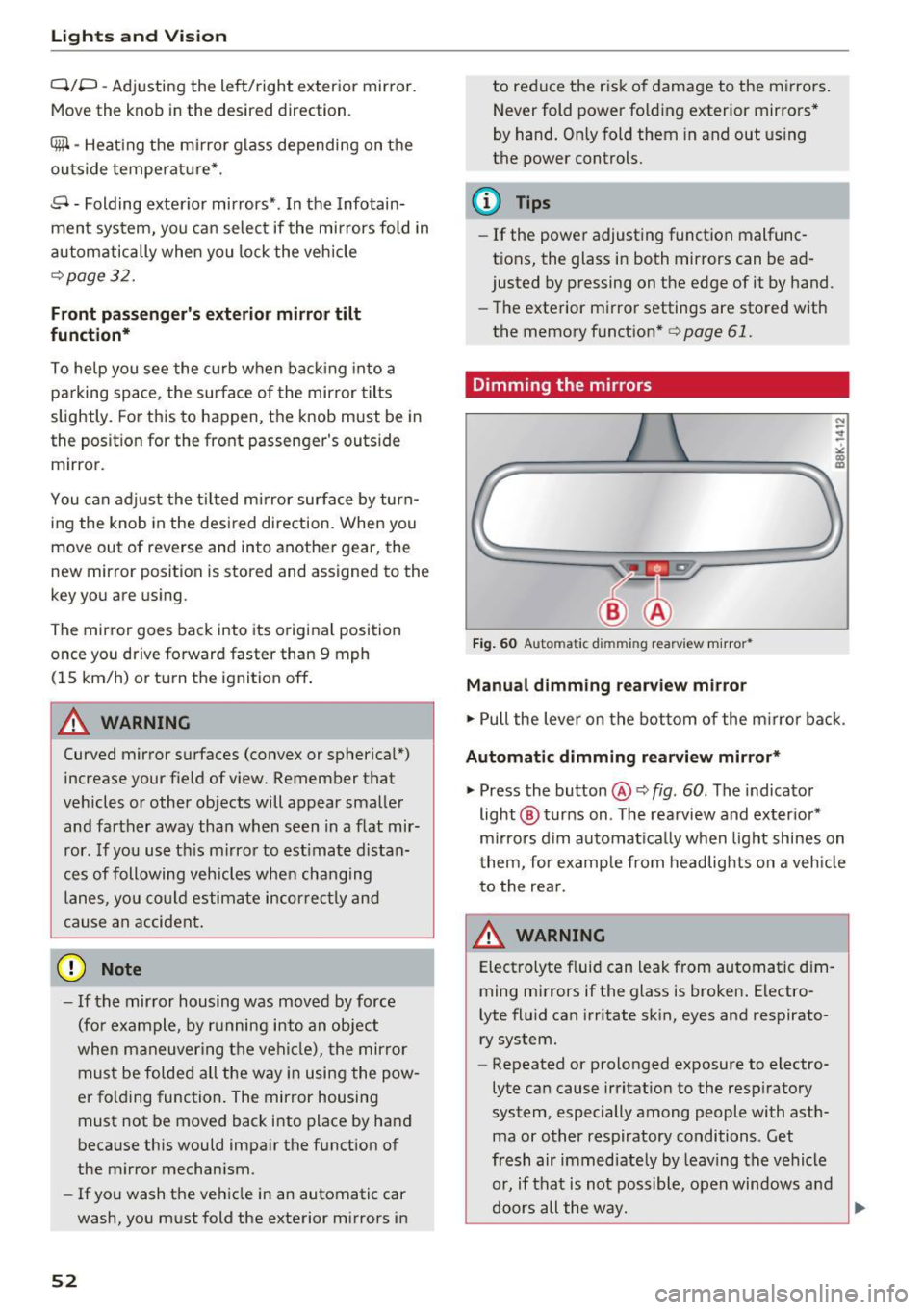
Fig. 60 Automatic dim ming rearview m ir ror *
Manual dimming rearview mirror
.,. Pull the lever on the bot tom of the m irror bac k.
Automat ic dimming rearvi ew mirror*
.,. Press the button@¢ fig. 60. The indicator
light @ turns on . The rea rview and ex ter ior*
m irrors d im au tomat ically when light shines on
them, for examp le from headlights on a veh icle
t o the rea r.
~ WARNING
Electrolyte fluid can leak from automatic d im
ming mirrors if the glass is broken . Electro
lyte fluid can irritate sk in, eyes and respirato
ry system.
- Repeated or prolonged exposure to electro
lyte can cause irritat ion to the resp iratory
system, especially among people with ast h
ma or other respiratory conditions. Get
fresh air immediate ly by leaving the vehicle
or, if that is not possible, open windows a nd
d oors all the way.
llll>
Page 60 of 266
Sea ts and stor age
sudden braking or an accident, you would not
be able to brake or accelerate.
Front passenger's seat
Always move the front passenger seat into the
rearmost position.
To avoid contact with the a irbag while it is de
p loying, do not sit any closer to the instrument
panel than necessary and a lways wear the three
point safety belt provided adjusted correctly. We
recommend that you adjust the passenger's seat
in the following manner:
.,. Bring the backrest up to an (a lmost) upright
position .
Do not ride with the seat reclined.
.,. Applies to vehicles with adjustable head re
straints: Adjust the head restra int so the upper
edge is as even as poss ible with the top of your
head. If that is not possible, try to adjust the
head restraint so that it is as close to th is posi
tion as poss ible
¢ page 60.
.,. Place your feet on the floor in front of the pas
senger's seat.
Front seats
Power seat adjustment
App lies to: vehicles with power adjustable seats
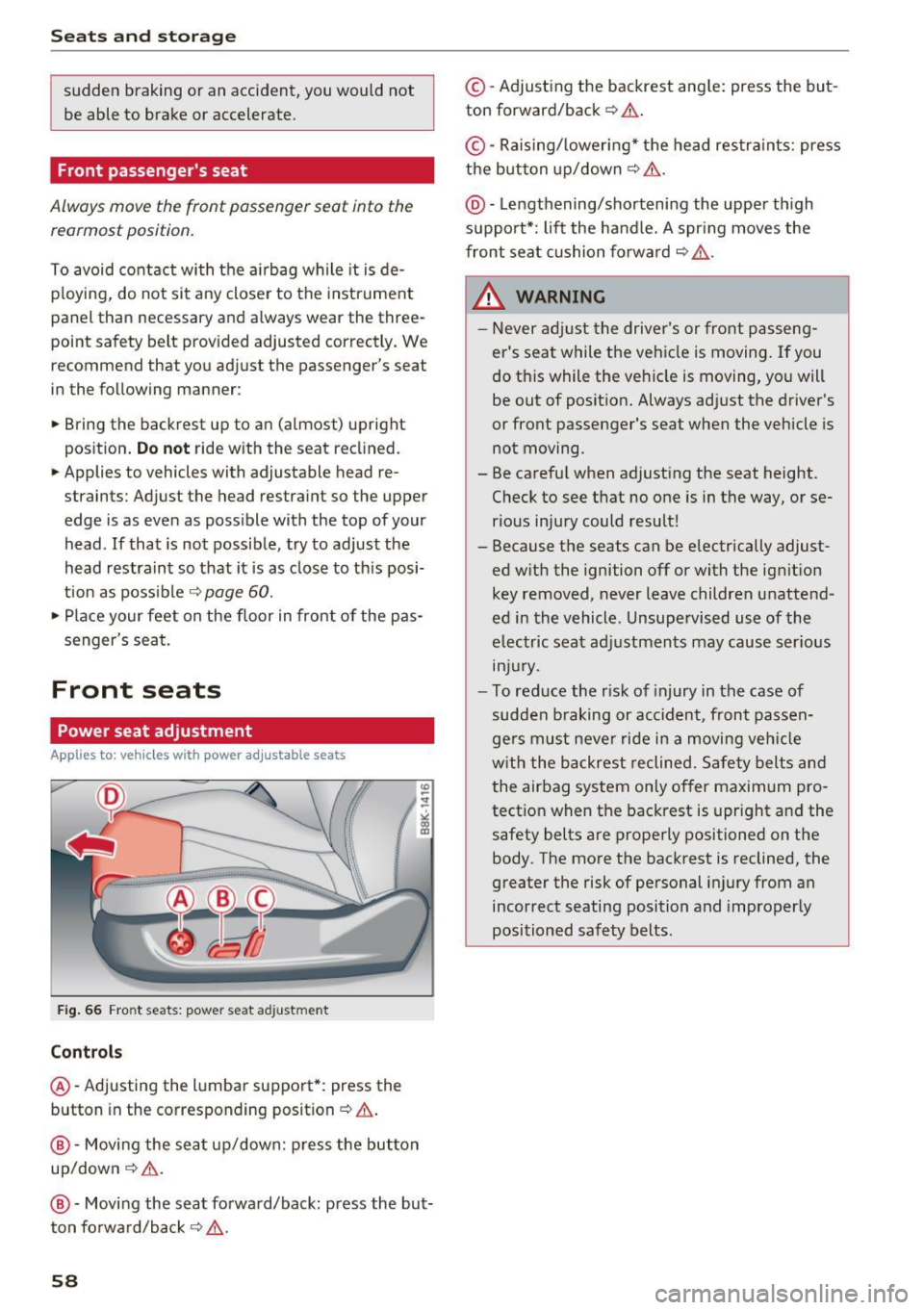
Fig . 66 Fro nt seats: power seat adjustment
Controls
@ -Adjusting the lumba r support*: press the
button in the corresponding position¢& .
@-Movi ng the seat up/down: p ress the but ton
up/down¢ &.
@ -Moving the seat forward/back: press the but
ton forwa rd/back ¢,& .
58
©-Adjusting the backrest ang le: press the but
ton forward/back ¢
.&..
©-Raising/ lower ing* the head restra ints: press
the button up/down ¢& .
@ -Lengthening/sho rtening the upper th igh
suppo rt*: lift the handle. A spr ing moves the
front seat cushion forward ¢
,&.
& WARNING
-Never ad just the driver's or front passeng
er's seat while the vehicle is moving.
If you
do this while the veh icle is moving, you will
be out of posit ion. Always ad just the driver's
or front passenger's seat when the vehicle is
not moving .
- Be carefu l when adjusting the seat height .
Check to see that no one is in the way, or se
rious injury could result!
- Because the seats can be electrically adjust
ed w ith the ignition off or with the ig nition
key removed, never leave children unattend
ed in the vehicle. Unsupe rvised use of the
electric seat adj ustments may cause ser ious
m Jur y.
- To red uce the r isk of injury in the case of
sudden b raking or acc ident, front passen
ge rs must neve r ride in a moving ve hicle
w it h the backrest reclined. Sa fety belts and
the airbag system on ly offer maximum pro
tect ion when the backrest is upr ight and the
safety belts are properly positioned on the
body. The more the backrest is reclined, the
greater the risk of personal injury from an
incorrect seating position and improper ly
positioned safety belts.
-
Page 63 of 266
a:,
a:,
,....,
N
" N ,....,
0
0
LL co
Memory function
Description
Applies to: vehicles with memory function
The memory funct ion allows yo u to qu ickly and
eas ily store and recall personal seat ing profi les
for the driver. The memory function is operated
through the master key and the memory buttons
in the driver 's door.
The drive r's seating profile is stored and assigned
to the maste r key each t ime the vehicle is locked.
When you open the door, the seat profile is auto
matica lly recalled.
If two people use one vehicle,
it is recomm ended that each person a lways uses
"their own" master key .
Up to 2 seat prof iles can be stored in the memory
buttons in the driver 's door . Once they are stor
ed, these s eat profiles can be selected at any
time.
I n addition to the driver 's seat settings, you can
a lso store and access the exterior mirror adjust
ment settings* using the remote control key or
memory button .
Remote control key
Applies to: veh icles with seat memory
To assign the driver 's seat settings to the remote
control key when locking the vehicle, the function
must be act ivated in the rad io or MMI*
.. Select :
I CARI function button > Seat adjust
ment > Driver's seat > Remote con trol ke y
>
on .Or
.,. Select :
- 1 C_ A_ R_ I funct io n button > Car sy stem s*
contro l button > Vehicl e sett ing s > Seat s>
Driv er' s s eat > Remote control key > On .
@ Tips
If you do not wa nt another driver 's settings to
be assigned to the remo te key, switch off the
memory fu nction us ing t he radio o r MMI* or
t he
I ON/OF F I button ¢ page 61.
Seats and storag e
Memory buttons
Applies to: vehicles with seat memory
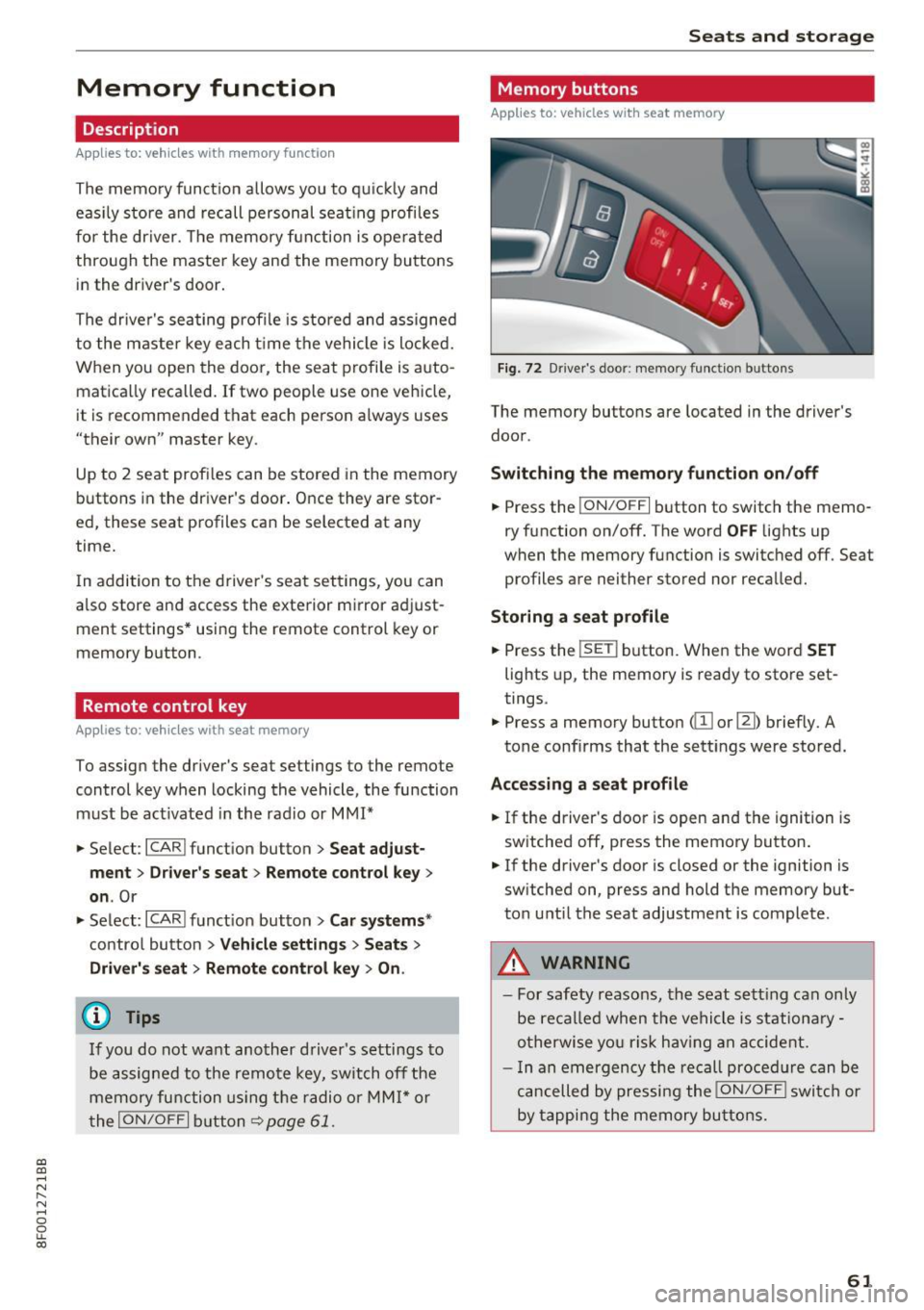
Fig. 72 D river 's doo r: memo ry fu ncti on butto ns
The memory buttons are located in the driver's
door .
Switching th e m emo ry functi on on /off
.. Press the ION/O FF I button to switch the memo
ry function on/off. The word
OFF lights up
when the memory function is swit ched off . Seat
profiles are nei ther stored nor recalled.
Storing a seat p rofil e
.. Press the ISE TI button. When the word S ET
lights up, the memory is ready to store set
tings.
.,. Press a memory button
Accessing a sea t profile
.. If the driver's door is open and the ignition is
switched off, press th e memory button .
.. If the driver's door is closed or the ignition is
sw itched on, press and hold the memory but
ton u ntil the seat adjustment is complete .
.&_ WARNING
-For safety reasons, the seat sett ing can only
be reca lled when the vehicle is st ationa ry -
o therwise yo u ris k hav ing an accident.
- I n an emergency the recall proced ure can be
cancelled by pressi ng the
I ON/OF F I switch or
by tapping the memory bu ttons.
61
Page 65 of 266
a:,
a:,
...... N
" N ...... 0
0
LL co
(upholder
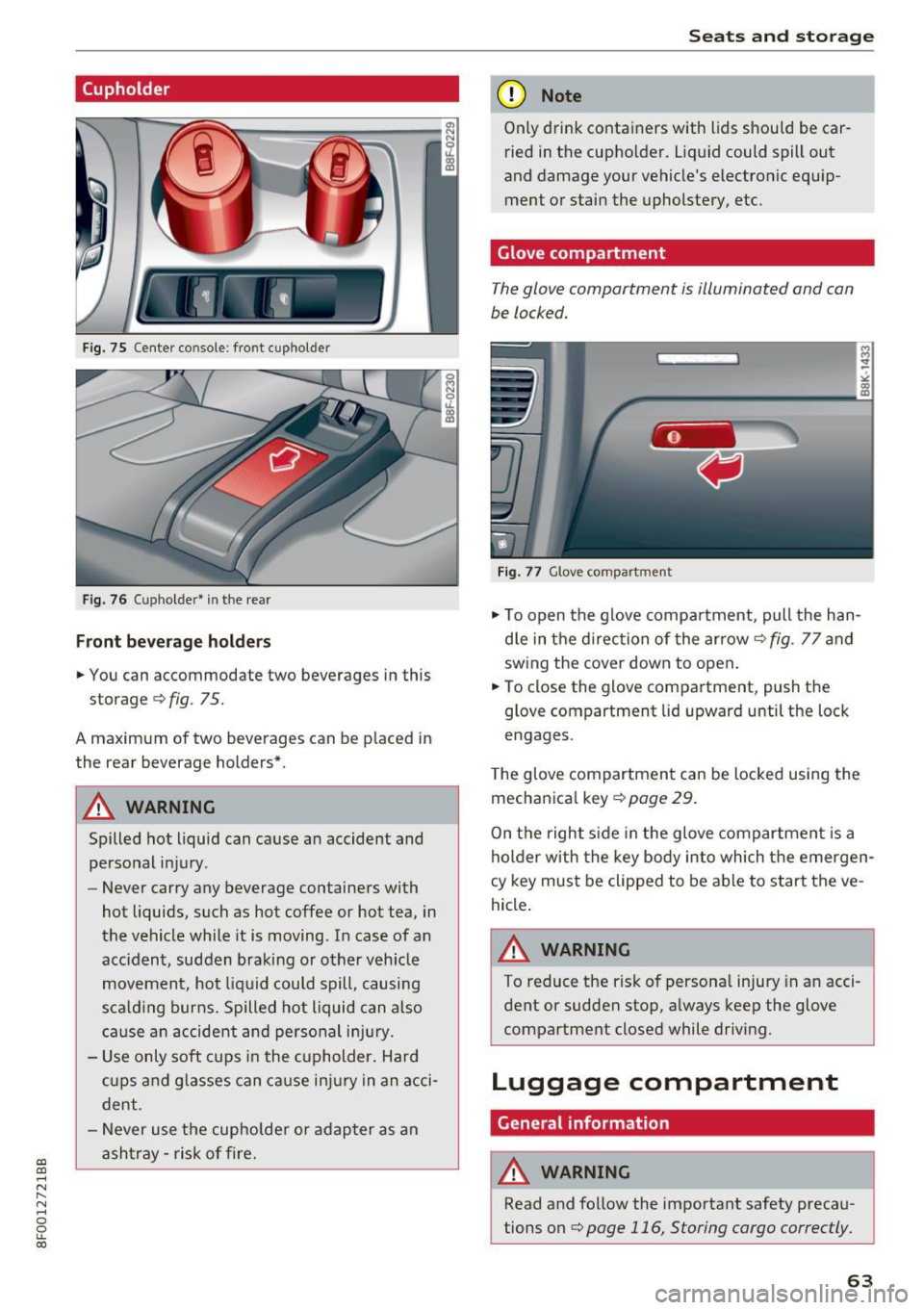
Fig. 75 Center co nsole: fro nt c upho ld er
Fig. 76 ( uph older • i n the rea r
Front be ve rage h olde rs
.. You can ac commodate two beverages in this
storage ¢
fig. 75.
A maxim um of two beverages can be p laced in
the rear beverage holders*.
A WARNING
Spilled hot liquid can cause an accident and
personal injury .
- Never carry any beverage containers with
hot liquids, such as hot coffee or hot tea, in
the vehicle while it is moving . In case of an
acc ident , sudden braking or o ther veh icle
movement, hot liq uid could spill, causing
s ca ld ing burns. Spilled hot liquid can also
c a use a n accident and perso nal i njur y.
- Use o nly soft cups in the c upholder. Hard
cu ps and g lasses can ca use i njur y in an acci
dent.
- Never use the cupholde r or adapter as an
asht ray -ris k of fire.
Seats and storag e
(D Note
Only drink containers with lids should be car
ried in the cupho lder. Liquid could spill out
and damage your vehicle's electronic equ ip
ment or stain the upholstery, etc.
Glove compartment
T he glove compartment is illuminated and can
be locked.
Fig . 77 G love co mpart ment
.. To open the glove compa rtment, pull the han
d le in the d irec tion of the arrow¢
fig. 77 and
sw ing the cover down to open .
.. To close the glove compartment, push t he
glove compartment lid upward until the lock
engages .
T he glove compartmen t can be locked using the
mechan ica l key ¢
page 29 .
On the right s ide in the glove compartmen t is a
holder with the key body into which the emergen
cy key mus t be clipped to be able to s tart the ve
hicle .
A WARNING
To reduce the risk of persona l injury in a n acci
dent or sudden stop, a lways keep the glove
compartment closed while driv ing.
Luggage compartment
General information
A WARNING
-
Read and follow the important safety preca u
tions on
¢ page 116, Storing cargo correctly.
63
Page 68 of 266
Warm and cold
Warm and cold
Climate control system
Description
The climate control system warms, cools and
adds humidity to the air in the veh icle inter ior. It
is the most effective when the windows and pow
er top are closed. If there is a bui ld-up of heat in
side the vehicle, ventilation can help to speed up
the cooling process.
I n all heating mode functions except
defrost, the
b lower only switches to a higher speed once the
engine coolant has reached a certain tempera
ture .
Condensat ion from the cooling system can drip
and form a puddle of water under the veh icle.
This is normal and does not mean there is a leak.
P ollutant filt er
The pol lutant filte r removes pollutants such as
dust and pollen from the a ir.
The air pollutants filter must be changed at the intervals specif ied in your Warranty
& Mainte
nance booklet, so that the a ir cond it ioner can
properly work.
If you drive your vehicle in an area with high air pollut ion, the filter may need to be changed
more frequently than specified i n your Aud i War
ranty
& Maintenance booklet. If in doubt, ask
your author ized Audi Service Advisor for advice.
Ke y cod ed setting s
The climate control settings are automatically
stored and assigned to the remote control key
that is in use . These sett ings are different whe n
the powe r top is open or closed.
_& WARNING
Reduced visibility is dangerous and can ca use
accidents.
6 6
- For safe driving it is very important that all
w indows be free of ice, snow and condensa
tion.
- Completely familiarize yourself with the
proper use and function of the heating and
ventilation system and especially how to de
fog and defrost the windows .
- Never use the windshield wiper/washer sys
tem in freezing weather until you have
warmed the windshield first, using the heat
ing and vent ilation system . The washe r solu
tion may freeze on the windshield and re
duce visibility.
(U;) Note
- If you suspect that the air conditioner has
been damaged, sw itch the system off to
avoid furthe r damage and have it inspected
by a q ualified dealership .
- Repa irs to the Aud i air cond itioner requ ire
special techn ica l know ledge and spec ial
tools. Contact an a uthorized Audi dea ler fo r
assistance .
@ For the sake of the environment
By reduc ing the amo unt of fuel you use, you
a lso red uce the amount of pollutants emitted
into the air.
(D Tips
- Keep the a ir intake slots (in front of the
windshield) free from ice, snow and debr is
in order to maintain the proper function of
the climate control system .
- The energy managemen t sys tem may sw itch
the seat heating * or rear window defroster
off temporarily. These systems are available
again as soon as the energy balance has
been restored.
- Air escapes through vents under the rear
window. When placing items of clothing on
the luggage compartment cover, ensure
that the openings are not covered.
Page 73 of 266

a:,
a:,
,....,
N
" N ,....,
0
0
LL co
Driving
Steering
Manually adjustable steering wheel
The steering wheel position is fully adjus table up
and down and forward and back .
Fig. 86 Lever under the ste ering column
Fi rst, ad just t he driver 's sea t correct ly.
• Pull the lever ¢
fig. 86 ¢ .&, .
• Move the steer ing whee l to the desired posi
t ion.
• Push the lever against the steeri ng column un-
ti l it locks .
There must be a t least 10 inches (25 cm) be
tween your chest and the center of the stee rin g
wheel. If yo u cannot sit mo re than 10 inches (25
cm) from the steering wheel, see if adaptive
equipment is available to help you reach the ped
als and increase the distance from the steering
wheel.
F or detai led information on how to adjust the
driver's seat, see
¢ page 58 .
.&_ WARNING
Improper use of steering whee l adjustment
and improper seating position can cause ser i
ous pe rsonal injury.
- Adjust the steer ing whee l co lumn on ly w hen
the vehicle is not mov ing to prevent loss of
vehicle control.
- Adjust the driver's seat or steering wheel so
that there is a min imum of 10 inches (25
cm) betwee n your chest and t he s teer ing
wheel
¢page 112, fig. 128 . If you ca nnot
-
D rivi ng
maintain t his minimum distance, the airbag
system cannot p rotect yo u proper ly.
- If physical limitations prevent you from sit
ting 10 inches (25 cm) or more from the
steer ing whee l, check with your author ized
Audi dealer to see if adaptive equipment is
ava ilable.
- If the steer ing whee l is aligned w ith your
face, the supplementa l driver's a irbag can
not provide as much protect io n in an acc i
dent. Always make sure that the steer ing
wheel is aligned with you r chest.
- Always hold the steering wheel with your
hands at the 9 o'clock and 3 o' clock posi
tions to reduce the risk of pe rso nal inju ry if
the dr iver's a irbag dep loys .
- Never ho ld the stee ring wheel at the 12
o'cl ock position or wi th you r hands inside
the stee rin g wheel rim or on t he s teer ing
wheel h ub. Holding the stee ring w heel the
wrong way can cause serious inj uries to the
hands, arms and head if the driver's airbag
deploys .
Ignition lock
Starting engine with the key
Applies to: vehicles with ignition lock
The ignition is switched on and the engine start·
ed with the ignition key .
Fig . 87 Ig nition key
Starting the engine
• Insert the key into the ignition lock .
• Step on the brake pedal and move the sele ctor
lever to the P or N position .
• Press the key ¢
fig. 87 -the engine will start.
71
Page 74 of 266

Driving
Sw it c hing the ignit ion on /off
If you would like to switch the ignition on with
out starting the engine, follow these steps:
• Insert the key into the ignition lock.
• Press the key br iefly
withou t pressing the b rake
pedal.
• To switc h the ignition off, press the key again.
When start ing the engine, major electrical loads
are swi tched off temporarily.
You can only remove the key with the ignition
sw itched off.
If the engine should not start immed iate ly, the
starting process is automat ically stopped after a
short t ime . Repeat sta rting procedure.
A WARNING
- Never allow the engine to run in confined
spaces -dange r of asp hyxiation.
- Never remove the ignit ion key from the ign i
t ion loo k while the vehicle is moving. Other
wise, the steering lock cou ld sudden ly en
gage and you would not be able to stee r the
vehicle.
- Always ta ke the key wi th you whenever you
leave you r vehicle . Otherw ise, the engine
could be started or electrical equipment
suc h as the power windows cou ld be operat
ed. This can lead to serious injury.
- Never leave children or persons requiring as
sistance unattended in the vehicle. The doors can be locked using the remote trans
mitter, preventing people from escaping
from the vehicle on the ir own in the event o f
an emergency. Depend ing on the t ime of
year, people inside the vehicle can be ex posed to very hig h or very low tempera
t ur es.
([) Note
Avoid high engine rpm, fu ll thrott le and heavy
eng ine loads until the eng ine has reached op
era ting temperat ure -otherwise you r is k en
gi ne damage.
72
-
@) For the sake of the environment
Do not let the engine run while parked to
warm up. Beg in driving immed iate ly . Th is re
duces unnecessary emissions.
@ Tips
- If the key cannot be removed from the igni
t ion lock, you have to pull the mechan ica l
key out of the master key in order to be able
to lock the vehicle
c::, page 30.
-Some no ise after starting the engine is nor
ma l and is no cause for concern.
- If you leave the ve hicle w ith the ignition
switched on, the ignition w ill switch off af
ter a certain per iod of t ime. Please note that
electrical equipment such as exterior lights
w ill switch off as well when that happens .
Starting the vehicle with the emergency
key
Applies to: vehicles with ignition lock
You can use the emergency key as an ignition key
,n an emergency.
F ig . 88 Glove compartment: Adapter for emergency key
Fig . 89 Insert emerge ncy key into the adapter
• Take the adapter for the emergency key out of
the glove compartment
c::, fig. 88 . .,,_
Page 75 of 266

a:,
a:,
...... N
l'
N
...... 0
0
LL co
.. Push the emergency key¢ fig. 89 fully into the
adapt er. Make sure that th e Audi rings are fac
ing up .
.. Press the eme rgency key in the adapter down
until i t latches audibly .
.. Insert the adapter with the emergency key for
ward into the ignition switch. The engine can
now be started as usual.
('O Tips
The emergency key should not be stored in
side the vehicle .
Stopping the engine
Applies to: vehicles with ig ni tion lock
.. Bring the vehicle to a full stop .
.. Automatic transmission: Move the selector lev
er to the P or N position .
.. Press on the ignition key. The engine is turned
off.
.. You can now remove the key .
Steering lock
The steering locks when you remove the ignition
key. The locked steering helps prevent vehicle
theft.
Emergency off
If it is necessary in unusual circumstances , the
engine can be switched off while the vehicle is
moving . The engine will be switched off if you
press on the key for an extended period.
A WARNING ,-
- Never turn off the engine before the vehicle
has come to a complete stop. The full func
tion of the brake booster and the power
steering is not guaranteed. You must use
more force to turn or brake if necessary . Be
cause you cannot steer and brake as you
usually would, this could lead to crashes
and serious injuries.
- For safety reasons, you should always park
your vehicle with the selector lever in P.
Otherwise, the vehicle could inadvertently
roll away .
Driving
-The radiator fan can continue to run for up
to 10 minutes even after you have turned
off the engine and removed the ignition key.
The radiator fan can also turn on again if the
engine coolant heats up because of intense
sunlight or heat build-up in the engine com
partment.
- Always take the key with you whenever you
leave your vehicle. Otherwise, the engine
could be started or electrical equipment
such as the power windows could be operat
ed. This can lead to serious injury.
- Never leave children or persons requiring as
sistance unattended in the vehicle. The
doors can be locked using the remote trans
mitter, preventing people from escaping
from the vehicle on their own in the event of an emergency. Depending on the time of
year, people inside the vehicle can be ex posed to very high or very low tempera
tures .
(D Note
If the engine has been under heavy load for
an extended period, heat builds up in the en
gine compartment after the engine is switch
ed off -there is a risk of damaging the engine.
Allow the engine to run at idle for about two
minutes before switching it off.
Convenience key
Starting the engine
Applies to : vehicles wit h co nvenience key
The !S TAR T ENGINE ST OPI button switches the
ignition on ond storts the engin e.
Fig. 90 Cente r conso le : START ENGINE STOP bu tton
73
Page 76 of 266
Driving
Starting the engine
.,. Step on the b rake pedal and move the se lector
l ever to P o r N
¢ &, .
... Press on the r.l S::-:: T=- A,,., R ""T=-= E~ N":"'. G::- I ;-:N:-:-.:= E-;:Se:;T;=-;: O" P~I button
¢ fig.
90-the engine will start .
Switching the ignition on/off
If yo u wou ld like to switch the ign ition on with
ou t starting the eng ine, fo llow these steps:
.,. Press t he
I STAR T ENGIN E ST OPI button with
out
pressing the brake pedal.
.,. To switc h the ign ition off, press t he bu tton
again.
I f t he engine should not start immed iate ly, the
starting p rocess is a utomat ica lly stopped afte r a
short t ime. Repe at st arting procedu re .
When start ing the e ng ine, major elect rical loads
are switched off temporarily.
After a cold engine is started, there may be a b rief period of increased no ise beca use oil pres
sure must first bui ld up in the hydraulic valve ad
justers. This is no rmal a nd not a cause for con
cern.
.&, WARNING
- Never allow t he eng ine to run in confine d
spa ces -danger of asphyxiation.
- Never t urn off the engine until the vehi cle
has come to a comp lete stop.
- Always take the key wi th you w henever you
leave you r vehicle. Othe rw ise, the eng ine
c ould be sta rted o r ele ctrical eq uipment
s u ch as the power windows co uld be operat
ed. This can lead to se rious injury.
- Never leave children or pe rsons requiring as
sistance unattended i n the vehicle. The
doo rs can be loc ked using the remote trans
mitter, prevent ing people from escaping
from the vehicle on the ir own in the event of
an emergency . Depend ing o n the t ime of
year, peop le inside the vehicle can be ex
posed to very hig h or very low tempe ra-
t u r es.
74
-
(D Note
Avoid high engine rpm, full throttle and heavy
engine loads unti l the engine has reached op
e rating tempe rature -otherwise you risk en
gine damage.
@ For the sake of the environment
Do not let the eng ine run wh ile pa rked to
warm up. Beg in d riving immed iate ly. Th is re
duces unnecessary emissions.
(D Tips
- After starting a co ld eng ine, the re may be a
br ief per iod of increased noise because the
oil pressure must first build up in the hy
dra ulic valve adjusters . Th is is norma l and
not a cause for concern .
- If you leave the ve hicle w ith the ignition
switched on, the ig nition w ill switch off af
ter a ce rtain per iod of t ime . Please note that
elect rical equipment such as exte rior lights
w ill swi tch off as we ll when that happens.
Switching engine off
Applies to: vehicles with convenience key
.,. Br ing your vehi cle to a comple te stop .
.,. Move the se lector lever to the P or N position .
... Press the
I STAR T ENGINE S TOP I button
¢ page 73, fig. 90.
Steering lock
The steer ing locks when yo u turn the eng ine off
u sing t he
I S TART ENGI NE STOPI button and
open the driver's doo r. The locked steering he lps
prevent veh icle theft.
Emergency off
I f necessary, the eng ine can be switched off w ith
t h e se lec to r l ever in t he R or D/S posit ions. The
engine s tops if you press and hold the
I S T AR T EN GINE S TOP ! button at speeds be low
6 mph (10 km/ h) and press the brake pedal. .,,.