cooling AUDI A5 COUPE 2008 Owner's Manual
[x] Cancel search | Manufacturer: AUDI, Model Year: 2008, Model line: A5 COUPE, Model: AUDI A5 COUPE 2008Pages: 313, PDF Size: 13.86 MB
Page 110 of 313
Heating and cooling
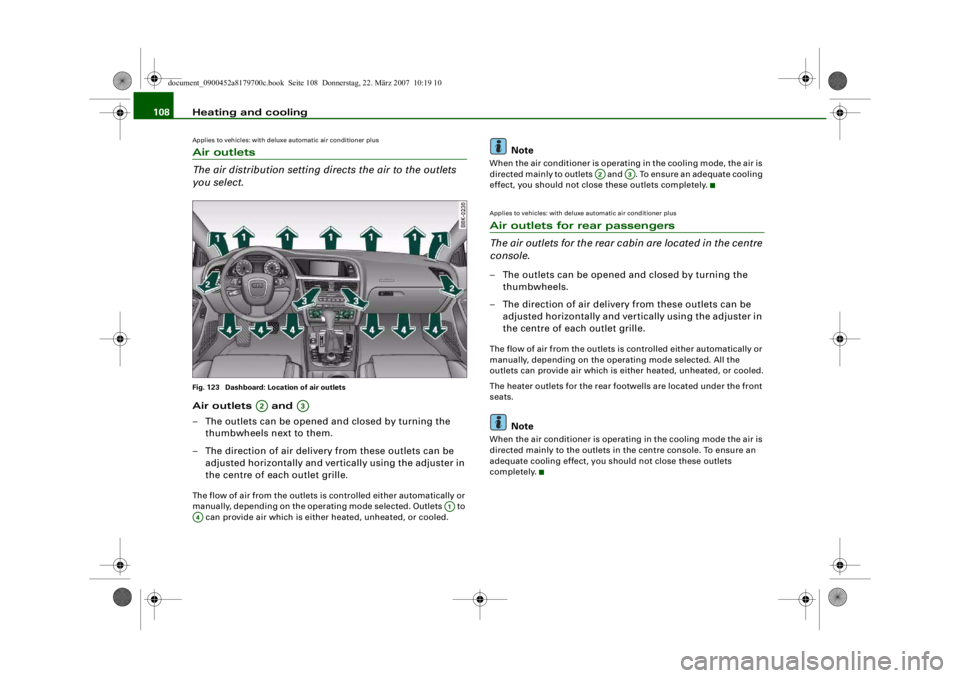
108Applies to vehicles: with deluxe automatic air conditioner plusAir outlets
The air distribution setting di rects the air to the outlets
you select.Fig. 123 Dashboard: Location of air outletsAir outlets and
– The outlets can be opened and closed by turning the
thumbwheels next to them.
– The direction of air delivery from these outlets can be adjusted horizontally and vertically using the adjuster in
the centre of each outlet grille.The flow of air from the outlets is controlled either automatically or
manually, depending on the operating mode selected. Outlets to
can provide air which is either heated, unheated, or cooled.
Note
When the air conditioner is operatin g in the cooling mode, the air is
directed mainly to outlets and . To ensure an adequate cooling
effect, you should not close these outlets completely.Applies to vehicles: with deluxe automatic air conditioner plusAir outlets for rear passengers
The air outlets for the rear cabin are located in the centre
console.– The outlets can be opened and closed by turning the thumbwheels.
– The direction of air delivery from these outlets can be adjusted horizontally and vertically using the adjuster in
the centre of each outlet grille.The flow of air from the outlets is controlled either automatically or
manually, depending on the operating mode selected. All the
outlets can provide air which is either heated, unheated, or cooled.
The heater outlets for the rear f ootwells are located under the front
seats.
Note
When the air conditioner is operating in the cooling mode the air is
directed mainly to the outlets in the centre console. To ensure an
adequate cooling effect, you sh ould not close these outlets
completely.
A2
A3
A1
A4
A2
A3
document_0900452a8179700c.book Seite 108 Donnerstag, 22. März 2007 10:19 10
--4 -
-
[I]
T
•
-+ +-
[I]
•
Page 111 of 313

Heating and cooling109
Controls
Safety
Driving tips
General maintenance
Self-help
Technical data
Applies to vehicles: with deluxe automatic air conditioner plusEconomical operation of the air conditioner
Economical operation of the ai r conditioner will help to
save fuel.When the air conditioner is operating in the cooling mode it
reduces engine power and increases fuel consumption. To
ensure that the cooling mode is activated only when really
necessary, please note the following points:
– Switch off the cooling mode by pressing the AC button
(LED off) if you wish to save fuel.
– You should also switch off the cooling mode by pressing
the AC button (LED off) if you open the windows or the
tilting panorama roof* while driving.
– If the vehicle has heated up after standing in the sun, open the windows and doors for a short time to cool the
vehicle.
For the sake of the environmentBy saving fuel you also reduce th e amount of pollutants emitted
from your vehicle.
Deluxe automatic air conditioner plus
- basic settingsApplies to vehicles: with deluxe automatic air conditioner plusGeneral notes
You can change the basic setti ngs for the air conditioner
on the MMI* or on the so und system control console.– Press the function selector button marked .
– Press the control button for AC ⇒fig. 124
3).
3)The display for the MMI basic differs slightly.
Fig. 124 MMI display:
AC menu optionFig. 125 MMI display:
Setup AC
CAR
document_0900452a8179700c.book Seite 109 Donnerstag, 22. März 2007 10:19 10
--4 -
-T
-+ +-
•
Page 112 of 313

Heating and cooling
110
– Select the desired air conditioner settings using the rotary pushbutton ⇒page 109, fig. 125.The following functions are available:•
Automatic air recirculation ⇒page 110
•
Synchronisation ⇒page 110
•
Auxiliary heating* ⇒ page 111
•
Auxiliary ventilation* ⇒page 111
•
Running time* ⇒page 113
•
Timer status* ⇒page 112
•
Timer 1* ⇒ page 112
•
Timer 2* ⇒page 112
•
Timer 3* ⇒page 112
•
Supplementary heater* ⇒page 110
Applies to vehicles: with deluxe automatic air conditioner plusAutomatic recirculation
If the outside air is polluted, an air purity sensor in the
vehicle will automatically switch on the air recirculation.To prevent fumes, etc. in the outside air from entering the interior,
we recommend that the automatic air recirculation should be
switched on at all times.
If the air purity sensor in the air conditioner system detects a certain
concentration of fumes in the outside air, the control unit will either
pass the incoming air through the pollution filter or automatically
switch on the air recirc ulation. If there is a high concentration of
pollution in the outside air, the air conditioner automatically
switches to air recirculation and cuts off the supply of air from the
outside. As soon as the level of pollution decreases, air is fed into
the vehicle from the outside again.
If the windows mist up when the automatic air recirculation is on,
press the
button immediately. The automatic air recirculation can switch itself off in certain condi-
tions. If the outside temperature is
less than about +10 °C, the auto-
matic air recirculation will only operate for 30 seconds. If the air
conditioner is switched to the ECON mode, or if the outside temper-
ature is less than about -1 °C, the automatic air recirculation will
only operate for 15 seconds.
Applies to vehicles: with deluxe automatic air conditioner plusSynchronisation
The air conditioner settings can be synchronised for all
passengers.When the synchronisation function is on, the driver's settings are
also applied to the front passenge r or vice versa. Any subsequent
changes to the air conditioner setti ngs (except for the seat heating*)
are also applied to the other occupant.
You can still change the setting on the “synchronised” side (this will
deactivate the synchronisation function).Applies to vehicles: with diesel engineSupplementary heater– Set the Supplementary heater to auto or off .Models with a diesel engine are equipped with a supplementary
heater to help warm up the interior more quickly. At outside temper-
atures below about +5 °C the supp lementary heater is switched on
(and off) automatically when the engine is running, depending on
the coolant temperature, the temperat ure in the vehicle interior and
the temperature the heater is set to.
document_0900452a8179700c.book Seite 110 Donnerstag, 22. März 2007 10:19 10
--4 -
-T
•
-+
•
•
+-
•
Page 113 of 313

Heating and cooling111
Controls
Safety
Driving tips
General maintenance
Self-help
Technical data
Auxiliary heating and auxiliary
ventilationApplies to vehicles: with auxiliary heating - under development at the time of printingDescription
The auxiliary heating and ventilation systems heat and
cool the interior independently of the engine.The auxiliary heating
works in conjunction with the air condi-
tioner system, but does not rely on heat from the engine. Instead of
this, the system burns fuel. The system's main function is to warm
up the interior of the vehicle and to defrost the windows in cold
weather.
The auxiliary heating system can be used both when the vehicle is
stationary and when driving (to provide extra heat while the engine
is warming up).
The auxiliary ventilation also operates independently of the
engine. This feature can be used to cool the interior with the blower
when the vehicle is left parked in the sun.
The system will automatically activate either the auxiliary heating or
the auxiliary ventilation mode, de pending on the actual tempera-
ture measured inside the car and the temperature you have set with
the air conditioner controls. It is possible to alter the temperature
setting while the auxiliary he ating/ventilation is running.
Switching on and off
There are two different ways of switching on the auxiliary
heating/ventilation system.
•
Immediate start: You can switch the auxiliary heating/ventilation
on and off at any time in the MMI Car menu ⇒page 112 . You can
also switch the system on and off using the remote control
⇒ page 114 .
•
Switching on via timer: You can programme various start times
using the timers ⇒ page 112. However you must first activate the timer before the auxiliary heating/ve
ntilation system will switch on
automatically.
The auxiliary heating/ventilation will switch itself off at the end of
the programmed running time. The running time can be set to 15,
30, 45 or 60 minutes ⇒page 113 .
WARNING
•
The auxiliary heating must no t be allowed to run when the
vehicle is in a confined space because it can give off toxic fumes.
•
To avoid any possible fire risk, never have the auxiliary heating
switched on when refuelling the vehicle.
•
Because of the high temperatur es which occur when the auxil-
iary heating is running, make sure when parking the car that the
exhaust outlet under the car is no t obstructed in any way and that
the exhaust gases do not come in to contact with flammable mate-
rials (fire risk).Note
•
It is advisable to open the air outlets when using the auxiliary
heating/ventilation.
•
The auxiliary heating/ventilation will not switch on if the fuel in
the tank has reached the reserve zone.
•
The auxiliary heating/ventilation wi ll not switch on if the battery
charge level is low.
•
The symbols
(auxiliary ventilation) or
(auxiliary heating)
flash in the instrument cluster ne xt to the clock display when the
auxiliary heating/ventilation is switched on. Both symbols light
continuously when the timer is activated.
•
At low outside temperatures some visible water vapour may
form in the engine compartment. This is a normal phenomenon,
and no reason for concern.
document_0900452a8179700c.book Seite 111 Donnerstag, 22. März 2007 10:19 10
--4 -
-T
-+
[I]
+-
•
Page 114 of 313

Heating and cooling
112Applies to vehicles: with auxiliary heating - under development at the time of printingSwitching on/off immediatelySwitching on immediately
– Press the button.
– Press the control button for AC.
–Set Aux. heating or Aux. ventilation to on.
Switching off immediately
– Press the button.
– Press the control button for AC.
–Set Aux. heating or Aux. ventilation to off.When the auxiliary heating/ventilat ion is running, you can press the
button on the air conditioner co nsole to switch off the blower
only. Pressing the button a second time will switch on the
blower again.
Note
The symbols
(auxiliary ventilation) or
(auxiliary heating) flash in
the instrument cluster next to th e clock display when the auxiliary
heating/ventilation is switched on.
Applies to vehicles: with auxiliary heating - under development at the time of printingSetting the timers
The timers need to be activated before they will switch on
the auxiliary heating/ventilation.Setting the timers
– Press the button.
– Press the control button for AC.
– Select the timer you wish to set, and enter the required
time and date ⇒fig. 127.
– Then press the rotary control to confirm the time and date settings.
Fig. 126 MMI display:
Setup AC
CARCAR
OFF
OFF
Fig. 127 MMI display:
TimerFig. 128 MMI display:
Timer status
CAR
document_0900452a8179700c.book Seite 112 Donnerstag, 22. März 2007 10:19 10
--4 -
-T
-+ +-
D
[I]
•
Page 115 of 313

Heating and cooling113
Controls
Safety
Driving tips
General maintenance
Self-help
Technical data
Activating a timer
– Press the button.
– Press the control button for AC.
– Select the Timer status and then select the timer you
want to start first.Three timers are available. This allows you to pre-set different
starting times and running times for the auxiliary heating/ ventila-
tion.
When the time set on one of the ti mers elapses, the date automati-
cally changes to the next day and the timer status is reset to off.
Each timer first has to be activated before it will switch on the auxil-
iary heating/ventilation at the time you have set.
The timers are not activated automa tically. This prevents the auxil-
iary heating/ventilation from switching on repeatedly when the
vehicle is not being used.
Note
Before activating the ti mer, make sure that the correct time and date
settings have been ente red. If the time and/or date are not correct,
the auxiliary heating will come on late or not at all. Please refer to
the MMI Operating Instructions fo r information on how to set the
date and time.
Applies to vehicles: with auxiliary heating - under development at the time of printingSetting the running time– Press the button.
– Press the control button for AC.
– Select Running time and then choose the time.The running time for the auxiliary heating/ventilation can be set to
a time between 15 and 60 minutes. The auxiliary heating/ventilation
will switch itself off at the end of the programmed running time.
CAR
Fig. 129 MMI display:
Running time
CAR
document_0900452a8179700c.book Seite 113 Donnerstag, 22. März 2007 10:19 10
--4 -
-T
-+ [{
+-
•
•
Page 116 of 313

Heating and cooling
114Applies to vehicles: with auxiliary heating - under development at the time of printingRemote control
The auxiliary heating and auxiliary ventilation can also be
switched on or off with the remote control.Switching on
– Press the button for about 2 seconds to activate the
auxiliary heating/ventilation ⇒fig. 130.
Switching off
– Press the button for about 2 seconds to switch off the auxiliary heating/ventilation. Changing the battery
– Push back and remove the battery cover on the remote
control ⇒fig. 131.
– Change the battery. The diagram in the battery compart- ment shows how the battery should be fitted. The new
battery must be of the same type as the old battery.
– Re-fit the battery cover.
When it is switched on, the auxili ary heating or auxiliary ventilation
starts immediately and remains on for the period set in the menu.
The maximum running time is 60 minutes.
If you want to switch the system on again after the end of the
programmed running time, press the button .
Transmitter indicator lamp
The transmitter indicator lamp will flash accordingly to show
whether the command you sent via the remote control was
successful.
When you switch the system on by pressing the button the
indicator lamp will flash green for about 30 seconds to confirm that
the heating/ ventilation has been switched on. When you switch the
system off by pressing the button the indicator lamp will
flash red to confirm that the heatin g/ ventilation has been switched
off.
If the remote control is outside th e transmitting range the indicator
lamp will flash red slowly. If there is a fault in the system (e.g. fuel
level is down to reserve), the indicator lamp will flash red rapidly. In
both cases the command will not be executed.
When the remote control battery is almost completely flat, the
transmitter indicator lamp will not light up and no commands will
be executed.
Fig. 130 Remote
control for auxiliary
heatingFig. 131 Remote
control: Changing
battery
A1
OFF
A2
A1
A3
A1
OFF
A2
document_0900452a8179700c.book Seite 114 Donnerstag, 22. März 2007 10:19 10
--4 -
-T
D
-+
D
+-
D
D
Page 117 of 313

Heating and cooling115
Controls
Safety
Driving tips
General maintenance
Self-help
Technical data
Transmitting range
The range of the remote control transmitter is about 600 metres.
However, this can be greatly reduced by obstacles (buildings, etc.)
between the remote control transmi
tter and the vehicle. Hold the
aerial upright when us ing the remote control.
You should not normally use the remote control at a distance of less
than 3 metres from the ve hicle. If you are closer than this, or if you
use the remote control inside the vehicle, this can cause signal over-
load.
For the sake of the environment
Please dispose of old batteries in the proper manner so that they do
not harm the environment.Seat heatingApplies to vehicles: with front seat heatingSeat heating for front seats
The seat cushions and backrests of the front seats can be
heated electrically.– Press the button for the seat heating . – Turn the rotary control to the desired setting.
In setting 0 the seat heating is switched off. Possible settings range
from 1 to 6.
The seat heating setting will
be shown on the MMI display
⇒ fig. 132 for a few seconds if the MMI is switched on.
Caution
To avoid damaging the heating elements of the seat heating, please
do not kneel on the seat or apply sharp pressure at a single point.Applies to vehicles: with seat heating for rear seatsSeat heating for rear seats
The seat cushions and backrests of the two outer rear
seats can be heated electrically.– Turn the left thumbwheel (on the centre console) to
switch on and regulate the heating for the left rear seat.
– Turn the right thumbwheel (o n the centre console) to
switch on and regulate the heating for the right rear seat.The heating is switched off when the thumbwheel is set to 0.
Possible settings range from 1 to 6.
The heating for the rear seats only operates when a sensor registers
the weight of the occupant in the seat. If nobody is travelling on the
rear seats, please switch off the rear seat heating to avoid activating
it unintentionally.
Caution
To avoid damaging the heating elements of the seat heating, please
do not kneel on the seat or apply sharp pressure at a single point.
A4
Fig. 132 MMI display:
Seat heating
document_0900452a8179700c.book Seite 115 Donnerstag, 22. März 2007 10:19 10
--4 -
-T
CD
•
•
-+
D
+-
~I
-=---7
auto
(l)
8}J
--0
a
;J
i~
0
,··-
CD
•
D
Page 210 of 313
Towing a trailer
208Towing a trailerDriving the vehicle with a trailer or
caravanTechnical requirements
The towing bracket must comply with certain technical
requirements.Your car is intended mainly for transporting passengers and
luggage. However, if suitably equipped, it can also be used to tow a
trailer or caravan.
If the car is supplied with a factory-fitted towing bracket it will
already have the necessary technical modifications and meet the
statutory requirements.
A 13-pin socket is provided to make the electrical connection
between the car and the trailer. If the trailer has a 7-pin plug you can
use an adapter cable. This is available from Audi dealers.
WARNING
If a towing bracket is retrofitted, the installation should be carried
out by a qualified workshop.•
In particular in high outside tem peratures it is not possible to
drive up long steep gradients with out a suitable cooling system.
The engine would then overheat.
•
Incorrect installation can result in a safety risk.
Points to check before towingTrailer weights
Never exceed the maximum permitted trailer weights ⇒page 295 .If you do not load the trailer up
to the maximum permitted trailer
weight, you can then climb correspondingly steeper gradients.
The maximum trailer weights listed are only applicable for altitudes
up to 1000 m above sea level. With increasing altitude the engine
power and therefore the car's climbing ability are impaired because
of the reduced air density, so the maximum trailer weight has to be
reduced accordingly. The weight of the car and trailer must be
reduced by 10% for every further 1000 m (or part thereof). This
figure refers to the combined weight of the (loaded) vehicle and
(loaded) trailer.
The figures for the draw bar weight that appear on the identification
plate of the towing bracket are for certification purposes only. The
correct figures for your specific vehicle, which may be lower than
these figures for the towing bracket, are given in the registration
documents. Also refer to ⇒page 295 .
Distributing the load
Distribute loads in the trailer so th at heavy objects are as near to the
axle as possible. Loads carried in the trailer must be secured to
prevent them slipping.
Where possible, operate the trai ler with the maximum permitted
draw bar weight on the ball joint of the towing bracket, but do not
exceed the specified limit.
Tyre pressure
Check the tyre pressures on your car and adjust for “full load” condi-
tions (refer to the sticker listing the tyre pressures on the end face
of the driver's door). It may also be necessary to adjust the tyre pres-
sures on the trailer according to the recommendations of the trailer
manufacturer.
Exterior mirrors
Check whether you can see enough of the road behind the trailer
with the standard mirrors. If this is not the case you should have
document_0900452a8179700c.book Seite 208 Donnerstag, 22. März 2007 10:19 10
--4 -
-T
-+ +-
•
Page 218 of 313
Towing a trailer
216
WARNING
M a k e su re t h a t t he so ck e t u ni t has closed off the mounting fixture
of the towing bracket properly. Oth erwise the ball joint may fail to
engage securely if dirt accumulates in the mounting fixture.Towing bracket (retrofitting)
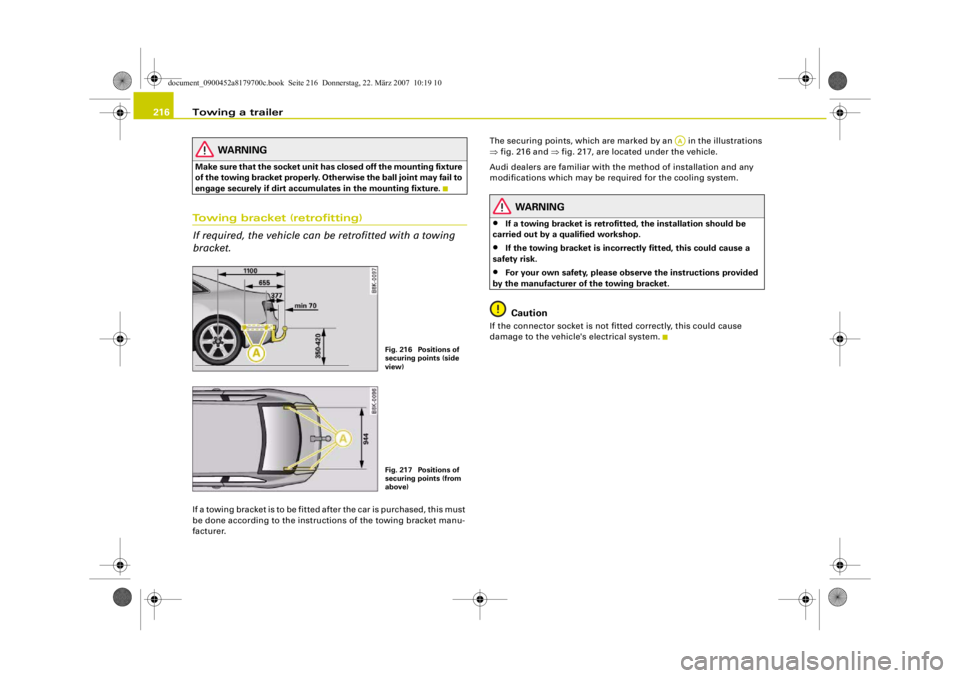
If required, the vehicle can be retrofitted with a towing
bracket.If a towing bracket is to be fitted after the car is purchased, this must
be done according to the instructions of the towing bracket manu-
facturer. The securing points, which are marked by an in the illustrations
⇒
fig. 216 and ⇒fig. 217, are located under the vehicle.
Audi dealers are familiar with the method of installation and any
modifications which may be required for the cooling system.
WARNING
•
If a towing bracket is retrofitted, the installation should be
carried out by a qualified workshop.
•
If the towing bracket is incorrectly fitted, this could cause a
safety risk.
•
For your own safety, please ob serve the instructions provided
by the manufacturer of the towing bracket.Caution
If the connector socket is not fi tted correctly, this could cause
damage to the vehicle's electrical system.
Fig. 216 Positions of
securing points (side
view)Fig. 217 Positions of
securing points (from
above)
AA
document_0900452a8179700c.book Seite 216 Donnerstag, 22. März 2007 10:19 10
--4 -
-
. I
,---------
T
-+
CD
•
+-
~
i
-
9
,
~
l
I
I
+
I
i
~
,
I
j
~..I
-
__./