engine AUDI A5 COUPE 2008 Owner's Manual
[x] Cancel search | Manufacturer: AUDI, Model Year: 2008, Model line: A5 COUPE, Model: AUDI A5 COUPE 2008Pages: 313, PDF Size: 13.86 MB
Page 42 of 313

Doors and windows
40
WARNING
•
Always switch off the ignition and take the key with you when
leaving the vehicle - even if you on ly intend to be gone for a short
time. This is especially im portant if children are left in the car. They
might otherwise be able to start the engine or use power-operated
equipment such as the electric windows - this could lead to inju-
ries.
•
Wait for the vehicle to come to a standstill before removing the
ignition key from the lock. Otherwise the steering lock could
engage suddenly, causing an accident.Note
The function of the remote control key may be impaired by interfer-
ence from other nearby radio signals (for example from a mobile
telephone or TV transmitter) if these are in the same frequency
range.Indicator lamp on remote control key
The indicator lamp on the remote control key lights up
when you press the buttons.
The indicator lamp should light up once briefly when you press one
of the buttons briefly. The indicator lamp should flash when you
press and hold one of the buttons (convenience open/close).
If the indicator lamp does not li ght up, this means the battery is
exhausted and must be replaced ⇒page 40 . The instrument cluster
display also sh ows the symbol
and the following message if the
battery is exhausted:
Please change key battery
Replacing the battery for the remote control key– Press the release button ⇒fig. 29.
Fig. 28 Indicator lamp
on remote control key
Fig. 29 Remote control
key: Removing the
emergency keyFig. 30 Remote control
key: Removing the
battery carrier
AA
document_0900452a8179700c.book Seite 40 Donnerstag, 22. März 2007 10:19 10
•
-+
•
.. "' : Ol
..
--4 -
-T +-
Page 44 of 313

Doors and windows
42
– Press the release catch ⇒page 41, fig. 32 using a ball-
point pen or a similar object and pull the emergency key out of the remote control key.
– Use the emergency key to lock the vehicle ⇒page 46 .
– Have the vehicle's electrical system checked by a quali- fied workshop.Starting the vehicle with the spare key– Open the glove box and take out the adapter for the spare key ⇒fig. 33 -arrow-. – Insert the spare key
⇒fig. 34 all the way into the adapter.
Please note that the key will only engage in one position.
– Press the spare key lightly into the adapter until you hear it click into place.
– Insert the adapter, spare key first, into the ignition lock. You should now be able to start the engine in the usual
way.
Central locking systemDescriptionThe vehicle can be locked and unlocked via the central locking
system. You can use any of the following:•
Remote control key ⇒page 44
•
Door handles in conjunction with advanced key* ⇒page 45
•
Lock on driver's door ⇒page 46
•
Interior central locking switch ⇒page 47
Unlocking one side of the vehicle only
When you lock the vehicle, the central locking system will lock the
doors and the boot lid. When you unlock the vehicle, the central
locking system will unlock either the driver's door only, or all the
locks on the vehicle, depending on the setting you have selected on
the sound system or MMI* ⇒page 44 .
Automatic locking function (Auto Lock)
The Auto Lock function locks the doors and the boot lid when the
vehicle exceeds a speed of about 15 km/h.
The vehicle is unlocked again when the ignition key is removed.
Alternatively, the vehicle can al so be unlocked via the central
locking switch or by pulling one of the inside door handles. The Auto
AA
AB
Fig. 33 Glove box:
Adapter for spare keyFig. 34 Inserting the
spare key into the
adapter
document_0900452a8179700c.book Seite 42 Donnerstag, 22. März 2007 10:19 10
--4 -
-T
•
•
-+ +-
Page 52 of 313
Doors and windows
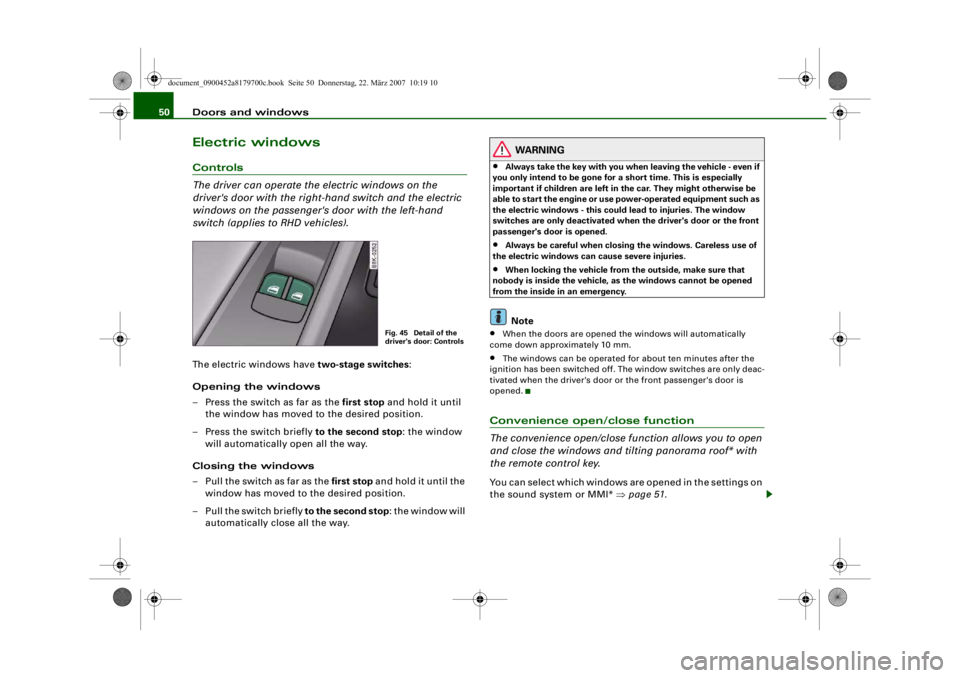
50Electric windowsControls
The driver can operate the electric windows on the
driver's door with the right- hand switch and the electric
windows on the passenger's door with the left-hand
switch (applies to RHD vehicles).The electric windows have two-stage switches:
Opening the windows
– Press the switch as far as the first stop and hold it until the window has moved to the desired position.
– Press the switch briefly to the second stop: the window
will automatically open all the way.
Closing the windows
– Pull the switch as far as the first stop and hold it until the
window has moved to the desired position.
– Pull the switch briefly to the second stop : the window will
automatically close all the way.
WARNING
•
Always take the key with you when leaving the vehicle - even if
you only intend to be gone for a short time. This is especially
important if children are left in the car. They might otherwise be
able to start the engine or use power-operated equipment such as
the electric windows - this could lead to injuries. The window
switches are only deactivated when the driver's door or the front
passenger's door is opened.
•
Always be careful when closing the windows. Careless use of
the electric windows can cause severe injuries.
•
When locking the vehicle from the outside, make sure that
nobody is inside the vehicle, as the windows cannot be opened
from the inside in an emergency.Note
•
When the doors are opened the windows will automatically
come down approximately 10 mm.
•
The windows can be operated for about ten minutes after the
ignition has been switched off. The window switches are only deac-
tivated when the driver's door or the front passenger's door is
opened.
Convenience open/close function
The convenience open/close function allows you to open
and close the windows and ti lting panorama roof* with
the remote control key.You can select which windows are opened in the settings on
the sound system or MMI* ⇒page 51 .
Fig. 45 Detail of the
driver's door: Controls
document_0900452a8179700c.book Seite 50 Donnerstag, 22. März 2007 10:19 10
--4 -
-T
-+
[I]
+-
•
Page 59 of 313

Lights and vision57
Controls
Safety
Driving tips
General maintenance
Self-help
Technical data
– Turn the thumbwheel
⇒ page 56, fig. 53 to the appro-
priate setting.
Adjustment settings
The settings correspond roughly to the following load conditions:
Two front occupants, luggage compartment empty
All seats occupied, luggage compartment empty
All seats occupied, luggage compartment loadedDriver only, luggage compartment loaded
Caution
Always adjust the headlights to avoid dazzling oncoming traffic.
Make sure you lower the headlights when the vehicle is carrying a
heavy load.Instrument lighting
The background lighting of the instruments, the centre
console and the display can be adjusted as required.– Briefly press the knob to release it.
– Turn the button clockwise +” to increase the brightness
of the instrument lighting in dark conditions. – Turn the button anti-clockwise -” to reduce the bright-
ness of the instrument lighting in dark conditions.
– Press the knob in again to prevent the setting from being changed unintentionally.
The instrument lighting (dials and needles), the centre console illu-
mination and the illumination of the displays are regulated by a
light sensor incorporated in the instrument cluster. In bright condi-
tions any changes made to the brigh tness of the instrument lighting
have no effect.
Note
The instrument lighting (illumination of dials and needles) is
switched on when the ignition is on and the vehicle's lights are off.
The instrument lighting is dimmed automatically as the daylight
starts to fade; it is switched off completely when the light condi-
tions become very poor. This function is intended to remind the
driver to switch on the dipped-beam headlights in good time when
light conditions become poor.Applies to vehicles: with xenon headlight bulbsDynamic headlight range controlHeadlights with xenon gas-discharge bulbs automatically adapt to
suit the load being carried when the engine is switched on. The
headlights are also automatically adjusted when the vehicle is in
motion (e.g. when accelerating and braking).
AOAIAIIAIII
Fig. 54 Instrument
lighting
document_0900452a8179700c.book Seite 57 Donnerstag, 22. März 2007 10:19 10
--4 -
-T
0
•
-+
•
+-
•
Page 90 of 313
Seats and storage
88The cigarette lighter employs a standard 12 Volt socket which can
also be used as a power source fo r electrical appliances. The appli-
ances connected to the socket must not exceed a power rating of
100 W.
WARNING
•
Take care when using the cigare tte lighter. Carelessness or
negligence when using the cigarette lighter can cause burns.
•
The cigarette lighter also works when the ignition is off and
when the ignition key is removed. To avoid the risk of fire, never
leave children unsuper vised in the vehicle.
•
The electrical sockets and any appliances connected to them
will operate only when the ignition is switched on. Improper use
of the electrical sockets or the appliances connected to them can
cause injuries or fire. To avoid the risk of injury, never leave chil-
dren unsupervised in the vehicle with the key.Caution
Always use the correct type of plugs to avoid damaging the sockets.
Note
Using electrical appliances with the engine switched off will drain
the battery.
Applies to vehicles: with 12 Volt sockets12 Volt sockets
Electrical equipment can be connected to both 12 Volt
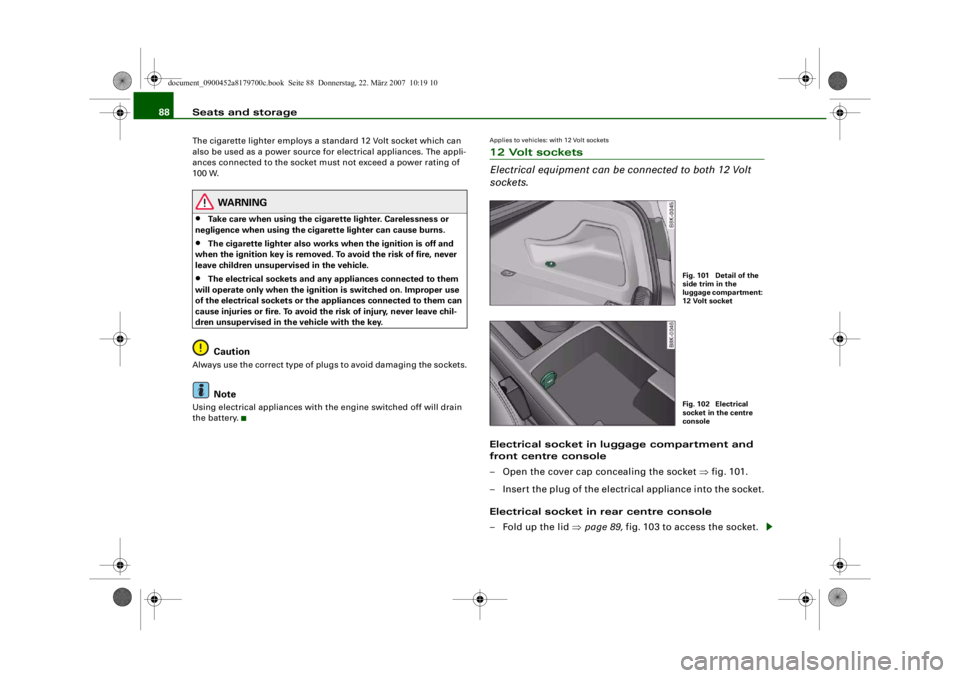
sockets.Electrical socket in luggage compartment and
front centre console
– Open the cover cap concealing the socket ⇒fig. 101.
– Insert the plug of the electrical appliance into the socket.
Electrical socket in rear centre console
– Fold up the lid ⇒page 89, fig. 103 to access the socket.
Fig. 101 Detail of the
side trim in the
luggage compartment:
12 Volt socketFig. 102 Electrical
socket in the centre
console
document_0900452a8179700c.book Seite 88 Donnerstag, 22. März 2007 10:19 10
-+
CD [I]
•
--4 -
-T +-
Page 91 of 313

Seats and storage89
Controls
Safety
Driving tips
General maintenance
Self-help
Technical data
– Insert the plug of the electric al appliance into the socket.Electrical equipment can be connected to the 12 Volt socket. The
appliances connected to the socket must not exceed a power rating
of 100 W.
WARNING
The electrical sockets and any a ppliances connected to them will
operate only when the ignition is switched on. Improper use of the
electrical sockets or the appliances connected to them can cause
injuries or fire. To avoid the risk of injury, never leave children
unsupervised in the vehicle with the key.
Caution
•
To avoid damage to the vehicle's electrical system, never
connect equipment that generates electrical current, such as a solar
panel or battery charger, to the 12 Volt sockets or cigarette lighter in
order to charge the vehicle's battery.
•
Use only equipment which has been tested for electromagnetic
compatibility in compliance with EC Directive 2004/104/EC.Note
Using electrical appliances with the engine switched off will drain
the battery.
Applies to vehicles: with 230 Volt Euro socketOn-board 230 Volt Euro socketElectrical equipment can be connected to the 230 Volt
Euro socket in the rear centre console.The 230 Volt Euro socket can only be used when the engine
is running ⇒.
– Fold up the lid to access the socket.
– Plug the Euro connector into the socket. This will auto- matically release the child safety device.LED in electrical socket
Appliances suitable for connection
Electrical equipment with a Euro plug connector can be connected
to the 230 Volt Euro socket. The appliances connected to the
230 Volt Euro socket must not exceed a power rating of 150 W
(300 W peak power).Steady green light:
The socket is ready for use.
Flashing red light:
The socket has tripped out due
to a power surge, overheating or
similar
Fig. 103 Rear centre
console: 230 Volt Euro
socket
document_0900452a8179700c.book Seite 89 Donnerstag, 22. März 2007 10:19 10
--4 -
-T
,·11·
«~~
a,-~ 23l!V 500l,__
1'11W
I
:. r,.i, . . . .... ·· 11>.-· aJ:1 .. -
: .. -
~
_,, :... ·n
CD
-+ +-
[I]
•
Page 92 of 313
Seats and storage
90If you connect more than one appliance, the total power rating of all
appliances must not exceed 150 W. If necessary, check the type
plates on the connected appliances for details of the power ratings.
Connected appliances must be in perfect condition and free of
defects.
WARNING
•
Heavy appliances or plugs (suc h as power supply units) can
damage the mounting of the 230 Volt Euro socket if they are
suspended directly from the socket – Risk of injury!
•
Make sure that all connected appliances are securely stowed
when driving to prevent them fr om being catapulted through the
car under braking or in an accident – Danger to life!
•
Never spill liquid over the socket – Danger to life! If the socket
does get wet, ensure that it is absolutely dry before using it again.
•
Improper use of the electrical socket or appliances connected
to it can cause injuries or fire – Risk of injury!
•
Never leave children unattended in the vehicle while the engine
is running – Risk of injury!
•
Connected appliances behave differently than when they are
connected to the public electricity grid. As a result, the connected
appliances may become hot during operation – Risk of injury!
•
When using adapters or exten sion cables, please remember
that the child safety device on the 230 Volt Euro socket is deacti-
vated and the socket is live – Risk of injury!
•
Do not insert conductive materi als, such as knitting needles,
into the contacts of the 230 Volt Euro socket – Danger to life!
•
Switch off the connected electrical appliances if the inverter
trips out due to overheat ing – Risk of injury!Caution
•
Please observe the operating instructions for the connected
appliances.
•
If the power drawn by the connected appliances is above 150 W,
the inverter in the socket will get warm. The inverter will trip out if
the temperature exceeds a certain limit. The inverter can trip out on
hot days even when an appliance with a suitable power rating is
used. The inverter will switch on again automatically after it has
cooled down. Appliances which are already connected and
switched on will be activated again automatically ⇒.
•
Do not connect lamps which cont ain a neon tube. For technical
reasons, this may damage the lamp.
•
Do not connect 115 Volt appliances to the 230 Volt Euro socket.
This may cause irreparable damage to the appliance. Check the type
plate on the appliance if you are unsure of the voltage rating.
•
With some power supplies (e.g. on laptop computers), the inte-
grated surge suppressor prevents the equipment from being
switched on because the starting current is too high. If this
happens, please disconnect the power supply unit from the load
and wait for about 10 seconds before re-connecting.Note
•
Unshielded equipment can cause interference on the radio, TV
and vehicle's electrical system.
•
The Euro socket has an integrated child safety device. There is no
power at the socket until the Euro connector is fully inserted.
•
Some appliances may not function normally due to the lower
power rating (wattage).
•
The socket can be operated with 115 Volt power supplies, as is
the case in certain countries. In this case, a different type of inverter
must be installed in the vehicle. Re trofit kits are available from your
Audi dealer. Do not connect 115 Vol t appliances to the 230 Volt Euro
socket.
•
Interference can occur on the radio's AM waveband if electrical
appliances are used near the rear window aerial.
document_0900452a8179700c.book Seite 90 Donnerstag, 22. März 2007 10:19 10
--4 -
-T
-+
[I]
+-
0
•
Page 93 of 313

Seats and storage91
Controls
Safety
Driving tips
General maintenance
Self-help
Technical data
Storage compartmentsOverview
There are several storage compartments at various points
in the vehicle.Glove box
The glove box is equipped with a lock* and a light.
Opening glove box
– Pull the catch on the lid in the direction indicated (arrow)
⇒fig. 104 and open the lid.
Closing glove box
– Close the lid and push it in until it engages.The glove box lid has separate holders for a pen and a note pad.
On the right-hand side of the glov e box there is a holder with a key
shell. In order to star t the engine with the spare key, it has to be
clipped into this shell.
WARNING
To avoid the risk of injuries, al ways keep the glove box lid closed
when driving.Compartment for (sun)glasses in headliner– To open the cover, lightly press the panel ⇒fig. 105
(arrow). The cover will then open by itself.
– To close the cover, push it upwards until it engages.
Glove box
⇒ page 91
Compartment for (sun)glasses in head-
liner
⇒page 91
Storage compartments in the front seats
⇒page 92
Coat hooks
⇒page 92
First-aid kit
⇒page 254
Side storage compartment in luggage
compartment
⇒page 79
Warning triangle
⇒page 254
Fig. 104 Glove box
Fig. 105 Compartment
for (sun)glasses in
headliner
document_0900452a8179700c.book Seite 91 Donnerstag, 22. März 2007 10:19 10
--4 -
-T
-+
•
+-
Page 95 of 313

Heating and cooling93
Controls
Safety
Driving tips
General maintenance
Self-help
Technical data
Heating and coolingDeluxe automatic air conditionerApplies to vehicles: with deluxe automatic air conditionerDescription
The air conditioner can be used to set a comfortable inte-
rior temperature in the vehicle.The air conditioner provides heatin g and ventilation and also cools
and dehumidifies the air inside the vehicle.
The air conditioner is fully automatic and will maintain the desired
temperature at a constant level. To achieve this, the temperature of
the air supplied to the interior, the blower speed (volume of air
delivery) and the air distribution are regulated automatically. The
system also allows for the effect of strong sunlight, so there is no
need for manual adjustment. For these reasons it is advisable to use
the automatic mode for the comfort of all the passengers in virtually
all conditions throughout the year ⇒page 95 .
Please note:
The humidity of the air is automatically reduced when the system
cools the interior of the vehicle. This helps to prevent condensation
on the windows.
If the humidity and temperature outside the vehicle are high,
condensation can drip off the evaporator in the air cooling system
and form a pool underneath the vehicle. This is normal and does not
indicate a leak.
If the outside temperature is low, the blower normally only switches
to a higher speed once the coolant has warmed up sufficiently (this
does not apply to the defrost setting).
In order to achieve maximum engine power, the air conditioner
compressor is temporarily switched off when pulling away from a
standstill with full throttle. The compressor also switches of
f if the coolant temperature is
excessively high, to ensure adequate engine cooling under extreme
loads.
Pollution filter
The pollution filter (a particle filt er) serves as a barrier against impu-
rities in the outside air, including dust and pollen, and odours. The
air is also filtered when the air recirculation mode is activated.
For the air conditioner to work with maximum efficiency, the pollu-
tion filter element must be replaced at the intervals specified in the
Service Schedule.
If the vehicle is driven in areas with a high level of air pollution and
the filter is no longer fully effective, it may be necessary to change
the filter element more frequently.
Key-coded settings
The currently selected air conditioner settings are automatically
stored and assigned to the remote control key.
Power management
To prevent the battery from becoming discharged and to maintain
the necessary power level, the syst em will temporarily shut off the
electrical components that are usin g a lot of power, or reduce the
current they are consuming ⇒page 202 . Heating systems in partic-
ular use a large amount of electrical power. If you notice, for
instance, that the rear window heater is not working, it may have
been temporarily switched off by the power management function,
or regulated to a lower heat output. These systems will be available
again as soon as sufficient electrical power is available.
document_0900452a8179700c.book Seite 93 Donnerstag, 22. März 2007 10:19 10
--4 -
-T
-+ +-
Page 100 of 313

Heating and cooling
98
– Turn the rotary control to the desired setting.You can use the air distribution setting to select the air outlets you
wish to activate. In setting
all the air is directed to the windows,
in setting
the air is directed to the driver (or passenger), and in
setting
to the footwells. In addition to this there are several other
possible combinations, allowing you to adjust the air distribution to
suit individual requirements.
Switch to for automatic control of the air distribution.
The air distribution setting will be shown on the MMI display
⇒ page 97, fig. 112 for a few seconds if the MMI is switched on.
Applies to vehicles: with deluxe automatic air conditionerDefrosting
The windscreen and side windows are defrosted or
demisted as quickly as possible.– To switch on, press the button.
– To switch off, press the button again, or press the
button.The temperature is regulated automatically. The air output is
increased to maximum and most of the air comes out of the outlets
below the windscreen.
The air recirculation mode is switched off when the button is
pressed.Applies to vehicles: with deluxe automatic air conditionerHeated rear window
The rear window heating helps to demist the rear window.– Press the
b u t t o n t o s w i t c h t h e r e a r w i n d o w h e a t i n g o n
and off.
The rear window heating only works when the engine is running. An
indicator lamp in the button lights up when the rear window heater
is switched on.
Depending on the outside temperat ure, the rear window heating
switches off automatically after about 10 to 20 minutes.
The rear window heating can be switched on permanently by
pressing the
button for longer than two seconds. It will then
remain on until the ignition is switched off. When the rear window
heating is switched on, this setting will remain activated for 15
minutes after switching off the ignition.
If the engine is started again during this period of 15 minutes, the
rear window heating will be switched on for about 10 to 20 minutes,
depending on the exterior temperature. This means you do not have
to manually switch on the rear window heating again if the vehicle
has only been parked for a short time.
For the sake of the environment
Switch off the heated rear window manually as soon as the rear
window is clear. By saving electrical power you can also save fuel.Applies to vehicles: with deluxe automatic air conditionerAC mode Deactivating the AC mode
– Press the button.
Activating the AC mode
– Press the button again.In the AC mode, the air cooling system is switched on and the
heating and ventilation are regulated automatically.
AUTO
AUTO
ACACAC
document_0900452a8179700c.book Seite 98 Donnerstag, 22. März 2007 10:19 10
--4 -
-T
•
D
-+
D
+-
D
•
D
D
D
•
D
D
~
~
4-
--11-
---r