engine AUDI A5 COUPE 2008 Workshop Manual
[x] Cancel search | Manufacturer: AUDI, Model Year: 2008, Model line: A5 COUPE, Model: AUDI A5 COUPE 2008Pages: 313, PDF Size: 13.86 MB
Page 132 of 313
Automatic gearbox
130Automatic gearboxmultitronic
®
Applies to vehicles: with multitronic®IntroductionThe vehicle is equipped with an electronically controlled continu-
ously variable transmission (multitronic
®). Unlike conventional
automatics, the gear ratios are not shifted in fixed steps but contin-
uously variable. This gives smoother transmission and makes for
better fuel economy.
The gearbox selects the gear ratio and shifts up or down automati-
cally according to the gear change programmes stored in the
control unit ⇒page 133, “Dynamic gear control program (DCP)”.
The gearbox also has the tiptronic manual shift feature. This system
allows the driver to select gears manually if required ⇒ page 134.
Please note that on vehicles with a multitronic gearbox, torque is
transmitted via a multi- plate clutch, and not via a torque converter
as on conventional automatics. This means that the car will not
“creep” as much as conventional automatics when the engine is
idling if you stop temporarily with the selector lever in position D, S
or R.
Applies to vehicles: with multitronic®General notes on using multitronic
®
The transmission ratio is varied continuously.Driving away from a standstill
– Press and hold the brake pedal.
– Press and hold the interlock button (the button in the selector lever handle), move the selector lever to the
desired position, for instance D, and release the interlock
button.
– Wait for the gearbox to engage the gear (a slight move- ment can be felt).
– Release the brake and press the accelerator ⇒.
Stopping briefly
– Apply the foot brake to hold the vehicle when stationary (for instance at traffic lights).
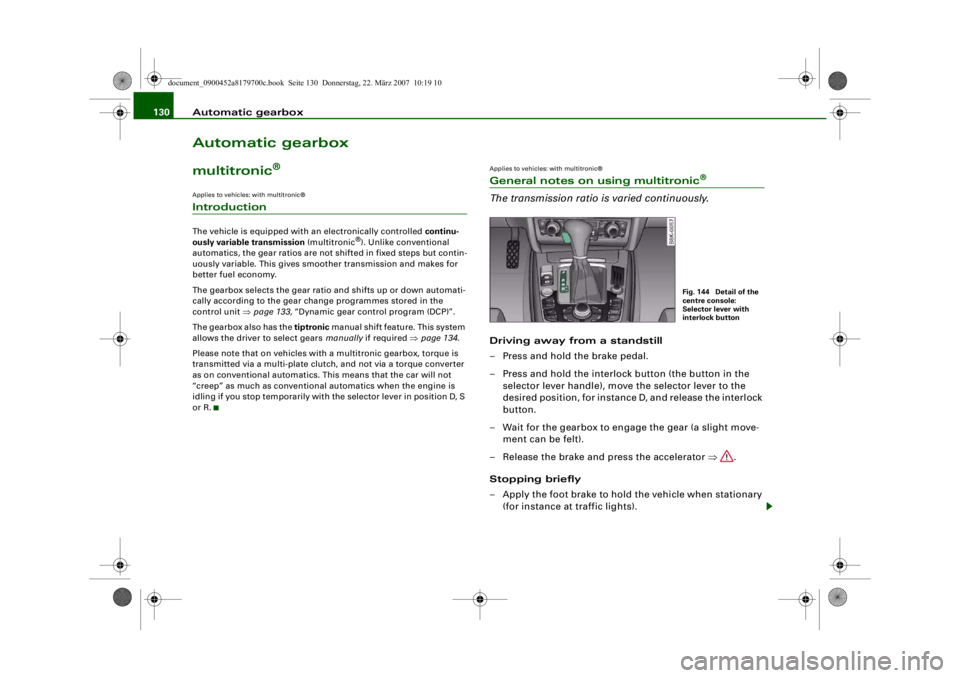
Fig. 144 Detail of the
centre console:
Selector lever with
interlock button
document_0900452a8179700c.book Seite 130 Donnerstag, 22. März 2007 10:19 10
--4 -
-T
-+ +-
•
Page 133 of 313

Automatic gearbox131
Controls
Safety
Driving tips
General maintenance
Self-help
Technical data
– To prevent the vehicle from rolling away, apply the
parking brake before moving off on steep gradients
⇒ .
– As soon as you accelerate as normal, the parking brake will automatically be released and the vehicle will start
moving.
Pa rking the c ar
– Press and hold the brake pedal ⇒.
– Apply the parking brake.
– Press and hold the interlock button, move the selector lever to P and release the interlock button.Your vehicle is equipped with the hill hold assist function which
makes it easier to drive away on a slope. The system is activated
when you press and hold the brake pedal for a few seconds. When
you release the brake pedal the braking force will be maintained for
a moment in order to prevent the vehicle rolling back when you drive
away.
The engine c an only be started when the selector lever is at P or N.
On level ground it is sufficient to move the selector lever to P. On a
gradient the parking brake should be applied first and the selector
lever should be moved to P. This reduces the load on the locking
mechanism and makes it easier to move the selector lever out of
position P.
WARNING
•
Do not press the accelerator while selecting a gear with the
vehicle stationary and the engine running, as this could cause an
accident.
•
Please note that some power will still be transmitted when you
stop temporarily with the selector lever in position D, S or R. For this reason, to avoid ri
sking an accident, appl y the footbrake firmly
when stopping to prevent the vehicle rolling away.
•
Never move the selector lever to R or P when driving, as this
could cause an accident.
Applies to vehicles: with multitronic®Selector lever positions
This section covers all the selector lever positions.The current selector lever position is shown in the instrument
cluster display.
P - Parking lock
This locks the driving wheels mechanically. The parking lock must
only be engaged when the vehicle is stationary ⇒.
The interlock button (the button in the selector lever handle) must
be pressed in and the brake pedal must be depressed before
moving the selector lever either in or out of position P. The lever can
only be moved out of position P when the ignition is on.
R - Reverse gear
When reverse gear is engaged the gearbox automatically selects the
lowest gear ratio.
Fig. 145 Display:
Selector lever posi-
tions
document_0900452a8179700c.book Seite 131 Donnerstag, 22. März 2007 10:19 10
--4 -
-T
•
-+ +-
Page 134 of 313
Automatic gearbox
132Reverse gear must only be engaged when the vehicle is stationary
and the engine is idling ⇒.
To move the selector lever to position R, press in the interlock
button and at the same time press the brake pedal. Depending on
the model, one or two reversing lights will come on in selector lever
position R (when ignition is switched on).
N - Neutral
In this position the gearbox is in neutral ⇒.
D - Drive (forwards)
In this position the gearbox auto matically selects the best gear
ratio. This depends on the engine load, the road speed and the
dynamic gear control program (DCP).
Press the brake pedal when moving the selector lever from N to D if
the vehicle is stationary or at speeds below 5 km/h ⇒.
In some situations (such as on mountain roads or when towing a
trailer or caravan) it can be advantageous to switch temporarily to
tiptronic mode ⇒page 134 , so that the gear ratios can be selected
manually to suit the driving conditions.
S - Sport position
Select this position if you wish to take full advantage of the car's
performance. This setting makes use of the engine's maximum
power output. When accelerating the gear shifts will be noticeable.
Press the brake pedal when moving the selector lever from N to S if
the vehicle is stationary or at speeds below 5 km/h ⇒.
WARNING
•
Never move the selector lever to R or P when driving, as this
could cause an accident.
•
In selector position D or S the vehicle must always be held with
the foot brake when the engine is running. This is because an auto-
matic gearbox still tran smits power even at idling speed, and the vehicle tends to “creep”. The
throttle must on no account be
opened inadvertently (for instan ce by hand from the engine
compartment) when a ge ar is engaged with the vehicle stationary.
The vehicle could otherwise star t moving immediately (in some
cases even if the parking brake is engaged) and possibly cause an
accident.
•
To avoid accidents, apply th e parking brake and put the
selector lever in position P befor e opening the bonnet and working
on the vehicle with the engine running. Please observe the impor-
tant safety warnings ⇒page 231, “Working on components in the
engine compartment”.
Applies to vehicles: with multitronic®Selector lever lock
The selector lever lock prevents gears from being
engaged inadvertently, so that the vehicle is not set in
motion unintentionally.The selector lever lock is released as follows:
– Switch on the ignition.
WARNING (continued)
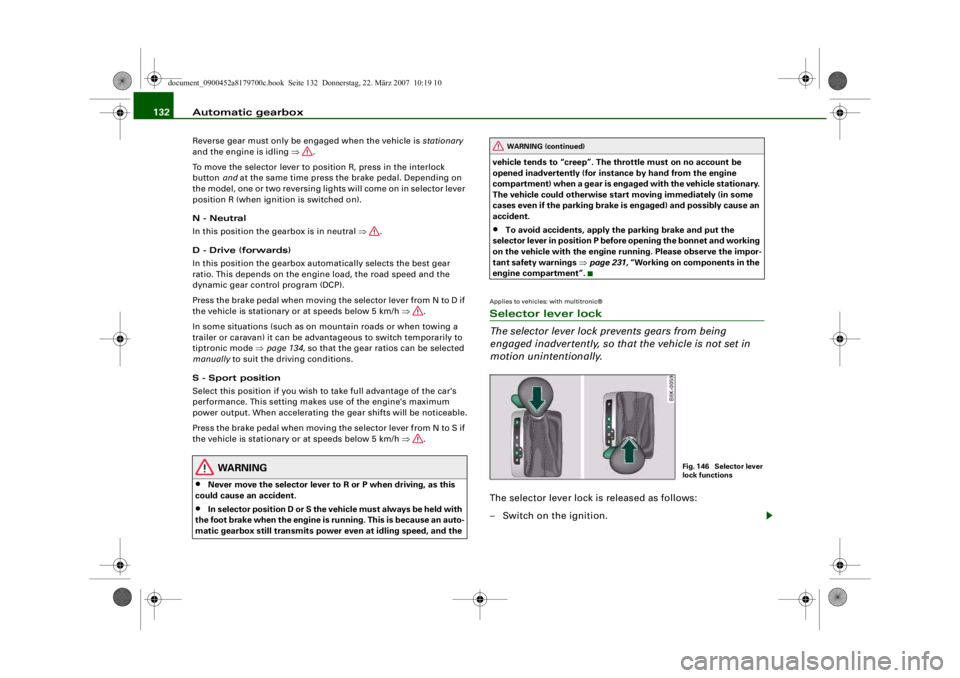
Fig. 146 Selector lever
lock functions
document_0900452a8179700c.book Seite 132 Donnerstag, 22. März 2007 10:19 10
--4 -
-T
•
-+ +-
Page 135 of 313
Automatic gearbox133
Controls
Safety
Driving tips
General maintenance
Self-help
Technical data
– Press the brake pedal and at the same time press in the
interlock button.Automatic selector lever lock
The selector lever is locked in the P and N positions when the igni-
tion is on. The brake pedal must be depressed before the lever can
be moved out of either of these positions. The following message
appears in the instrument display as a reminder for the driver when
the selector lever is in position P or N:
WHEN STATIONARY APPLY FOOTBRAKE WHILE SELECTING GEAR.
The selector lever lock only works if the vehicle is stationary or
driving at speeds up to 5 km/h. At higher speeds the selector lever
lock in the N position is disengaged automatically.
The selector lever lock is not engaged if the selector lever is moved
quickly through position N (e.g. when shifting from R to D). This
makes it possible, for instance, to “rock” the vehicle backwards and
forwards if it is stuck in snow or mud. The selector lever lock
engages automatically if the brake pedal is not depressed and the
lever is in position N for more than about a second.
Interlock button
The interlock button on the selector lever handle prevents the driver
from inadvertently engaging particul ar gears. Press the button in to
disengage the selector lever lock. Th e illustration shows the selector
lever positions in which the button has to be pressed, highlighted in
colour ⇒page 132, fig. 146.
Safety interlock for ignition key
The key can only be withdrawn with the ignition switched off and
the selector lever in position P. When the ignition key is removed,
the selector lever is locked in position P.
Applies to vehicles: with multitronic®Kick-down feature
The kick-down feature is designed to give maximum
acceleration.When the accelerator pedal is pressed right down past the point of
resistance at full throttle, the gearbox will select a lower gear,
depending on road speed and engine speed. While you keep the
accelerator depressed the engine speed is automatically controlled
to give your vehicle maximum acceleration.
WARNING
Please note that if the road surf ace is slippery or wet, the kick-
down feature could cause the driv ing wheels to spin, which could
result in skidding.Applies to vehicles: with multitronic®Dynamic gear control program (DCP)
The multitronic
® gearbox is controlled electronically.
The vehicle is equipped with an electronically controlled gearbox.
The gear ratios are selected automatically according to preset gear-
shift programmes.
When you drive at moderate speeds the gearbox will select the most
economical shift programme. It will then change up early and delay
the downshifts to give better fuel economy.
If you drive at higher speeds with heavy acceleration, if you open the
throttle quickly, or if you use the kick-down or the car's maximum
speed, the gearbox will automaticall y select the more “sporty” shift
programmes.
The gearbox is self-adapting, and continuously selects the most
suitable shift programme. At the same time, the driver can also
make the gearbox switch to a more "sporty" programme by pressing
document_0900452a8179700c.book Seite 133 Donnerstag, 22. März 2007 10:19 10
--4 -
-T
-+ +-
•
Page 136 of 313
Automatic gearbox
134the accelerator quickly. Depending on road speed, this makes the
gearbox shift down early into a lower gear ratio for more rapid accel-
eration (for instance to pass another vehicle), without having to
press the accelerator all the way down into the kick-down position.
After the gearbox has shifted back up it returns to the original
programme, depending on your style of driving.
The gearbox continuously adapts the gear ratios on uphill gradi-
ents. If the brake pedal is pressed on a downhill gradient the
gearbox automatically shifts to a lower gear ratio. This increases the
engine braking effect.Applies to vehicles: with multitronic®Manual gear selection (tiptronic mode)
With the manual shift programme (tiptronic) the driver
can manually select seven pre-programmed gears.
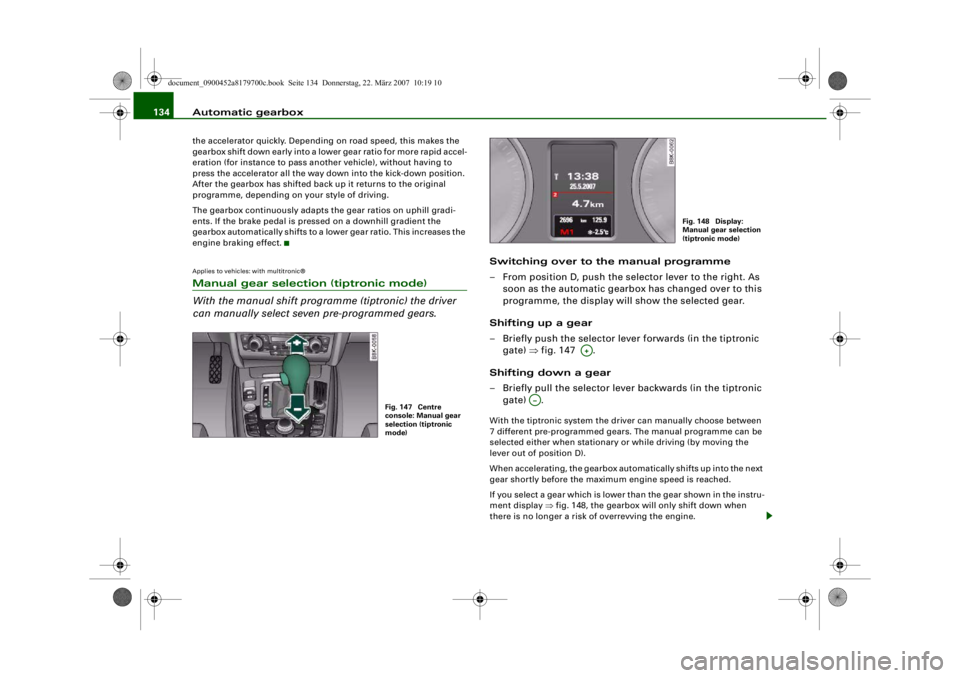
Switching over to the manual programme
– From position D, push the selector lever to the right. As
soon as the automatic gearbox has changed over to this
programme, the display will show the selected gear.
Shifting up a gear
– Briefly push the selector lever forwards (in the tiptronic gate) ⇒fig. 147 .
Shifting down a gear
– Briefly pull the selector lever backwards (in the tiptronic gate) .With the tiptronic system the driver can manually choose between
7 different pre-programmed gears. The manual programme can be
selected either when stationary or while driving (by moving the
lever out of position D).
When accelerating, the gearbox automatically shifts up into the next
gear shortly before the maximum engine speed is reached.
If you select a gear which is lower than the gear shown in the instru-
ment display ⇒fig. 148, the gearbox will only shift down when
there is no longer a risk of overrevving the engine.
Fig. 147 Centre
console: Manual gear
selection (tiptronic
mode)
Fig. 148 Display:
Manual gear selection
(tiptronic mode)
A+
A…
document_0900452a8179700c.book Seite 134 Donnerstag, 22. März 2007 10:19 10
--4 -
-T
•
-+ +-
Page 137 of 313
Automatic gearbox135
Controls
Safety
Driving tips
General maintenance
Self-help
Technical data
When the vehicle slows down (for
instance when braking), the
gearbox automatically shifts down into the next gear when the
minimum engine speed is reached.
Changing down to a lower gear increases the engine braking effect
on downhill gradients.
When the accelerator pedal is pressed right down past the point of
resistance at full throttle, the ge arbox will select a lower gear,
depending on road speed and engine speed.
Applies to vehicles: with multitronic®Back-up programme
A back-up system is in place should a fault occur in the
control system.The automatic gearbox switches to the back-up programme if a fault
should occur in the control system. This is indicated by all segments
of the display panel either lighti ng up together or going out
completely.
It is still possible to move the selector lever to all positions. The
manual shift programme (tiptronic) is not available when the back-
up programme is active.
It will still be possible to use reverse gear in the normal way.
However, the electronic lock for reverse gear will be switched off.
Caution
Should the gearbox ever switch into the back-up programme, you
should take the vehicle to an Audi dealer or qualified workshop as
soon as possible.
Applies to vehicles: Tiptronic controls on steering wheelSteering wheel with tiptronic controls
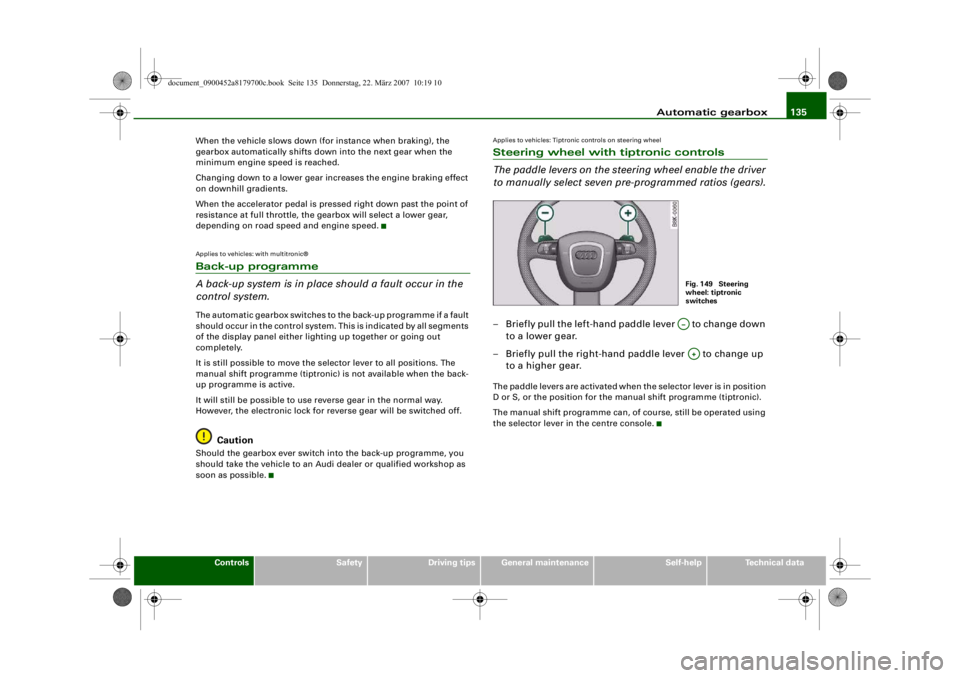
The paddle levers on the steering wheel enable the driver
to manually select seven pre-programmed ratios (gears).– Briefly pull the left-hand paddle lever to change down to a lower gear.
– Briefly pull the right-hand paddle lever to change up to a higher gear.The paddle levers are activated when the selector lever is in position
D or S, or the position for the manual shift programme (tiptronic).
The manual shift programme can, of course, still be operated using
the selector lever in the centre console.
Fig. 149 Steering
wheel: tiptronic
switchesA…A+
document_0900452a8179700c.book Seite 135 Donnerstag, 22. März 2007 10:19 10
--4 -
-T
•
-+ +-
•
CD
•
Page 157 of 313
HomeLink155
Controls
Safety
Driving tips
General maintenance
Self-help
Technical data
At the operating unit
1. Switch on the ignition (do not start the engine).
2. Press and hold down the two outer HomeLink buttons
⇒page 154, fig. 171 until the indicator diode
⇒ page 154, fig. 171 begins to flash after about
20 seconds. This procedure will delete the standard
factory settings and does not need to be repeated when
programming the other buttons.
3. Press the particular Home Link button which you would
like to program.
4. Wait until the diode begins to flash. The HomeLink module now remains in training mode for 5 minutes.
5. Now step in front of your vehicle with the original hand-
held transmitter for the garage door opener or any other
device you wish to assign to the HomeLink control
button.
At the radiator grille
6. Hold the original hand-held transmitter at or near the
centre of your car's radiator grille ⇒ page 154, fig. 172.
7. Press the activator button on the original hand-held
transmitter .
8. As you do so, watch the tu rn signals on your vehicle.
HomeLink confirms successful programming by flashing
all four turn signals three times.
9. If the turn signals fail to flash three times, repeat the procedure with the transmitter held at a different
distance from the radiator grille.
The proper distance between the hand-held transmitter and the
HomeLink module at the radiator grille depends on the system you
want to train. It may re quire several attempts.
The turn signals will flash once if the time limit for the programming
mode has been exceeded. In this case the programming procedure
needs to be performed again. Repeat the sequence at the operating
unit starting with step 3.
The programming instructions above also apply to th e other control
buttons. Start with step 3 if yo u wish to proceed and program the
other two buttons.
If the garage door or other devices st ill fail to be activated with the
HomeLink control buttons after programming is completed, it is
possible that these systems might be working with a rolling code
instead of the normal fixed security code. If this is the case, a rolling
code programming is required in addition to the steps described
above. ⇒page 155Applies to vehicles: with HomeLinkRolling code programming
Some devices require rolling code programming of the
HomeLink universal transmitter.Identifying a rolling code
– Press the already programmed HomeLink button again
and hold it down.
–Watch HomeLink diode ⇒ page 154, fig. 171. If the
diode starts flashing rapidly and turns into a constant
light after about 2 seconds, this indicates that the device
you wish to operate (e.g. a garage door opener) is
equipped with a rolling code.
– Program the rolling code as follows:
AA
AA
AA
document_0900452a8179700c.book Seite 155 Donnerstag, 22. März 2007 10:19 10
--4 -
-T
-+
•
+-
Page 158 of 313
HomeLink
156
Activating the garage door opener drive unit
– Locate the programming button on the garage door drive. The exact location and colour of the button may
vary depending on the type of garage door opener.
– Press the programming button on the door drive unit (this will normally cause a “programming mode indicator
lamp” on the unit to light up). You now have about 30
seconds to start and complete the programming of the
HomeLink control button on the operating unit.
Programming at the operating unit in the
headliner
– Press and release the already programmed HomeLink button.
– Press the HomeLink button again to complete rolling code programming.After programming at the operating unit in the headliner, the
garage door opener should recognize the HomeLink signal and
respond when the HomeLink button is pressed. Now the other
control buttons can be programmed as required.
Note
•
Having a second person assist you makes programming of the
rolling code easier and faster. For some makes of garage door
openers the HomeLink button may have to be pressed a third time
to complete the training sequence.
•
If you encounter problems programming the rolling code you
may find helpful information in the operating instructions of the
garage door opener or other device you wish to operate.
Applies to vehicles: with HomeLinkOperating HomeLink
The programmed devices are activated by means of the
HomeLink control buttons in the headliner.– Make sure that the ignition is on.
– Press the programmed HomeLink button ⇒page 154,
fig. 171. The device assigned to that button (e.g. garage
door) will be activated.The HomeLink indicator diode ⇒page 154, fig. 171 will light up
when you press the button.Applies to vehicles: with HomeLinkErasing the button programming
You can erase the complete HomeLink programming by
pressing the two outer buttons.– Switch on the ignition (do not start the engine).
– Press and hold down the two outer buttons until the indi- cator diode starts to flash ⇒page 154, fig. 171.
– Then release the buttons.After the programming of the Home Link buttons has been erased,
the system will return to the training mode and is ready to be re-
programmed at any time.
Note
•
Programmed buttons cannot be erased individually.
•
For security reasons it is advisable to erase the programming of
the HomeLink buttons prior to selling your vehicle.
document_0900452a8179700c.book Seite 156 Donnerstag, 22. März 2007 10:19 10
--4 -
-T
•
-+ +-
[I]
[I]
•
•
Page 198 of 313
Intelligent technology
196Intelligent technologyElectronic stabilisation program (ESP)General notes
The electronic stabilisation program increases the car's
stability on the road.The ESP is designed to enhance the control over the vehicle in crit-
ical handling situations, such as when accelerating and cornering.
It reduces the tendency to skid under all road conditions and
improves the stability and roadholding of the vehicle. The system
works at all speeds. The anti-lock brake system (ABS),
the electronic differential lock
(EDL) and the traction control system (ASR) are all integrated into
the electronic stabilisation program.
How the system works
The ESP control unit processes data from the three integrated
systems. It also processes addition al inputs provided by other high-
precision sensors. These register the vehicle's rotation about the
vertical axis (yaw rate), lateral acceleration, brake pressure and
steering wheel angle.
The system uses the steering wheel angle and road speed to calcu-
late the changes of direction intended by the driver, and constantly
compares them with the actual be haviour of the vehicle. If the
desired course is not being maintained (for instance, if the car is
starting to skid), then the ESP compensates automatically by
braking the appropriate wheel.
The forces acting on the braked wheel effectively bring the car back
to a stable condition. If the car is oversteering (rear wheels losing
grip first) the brake application is concentrated on the outside front
wheel; if the car is understeering (front wheels losing grip first), ESP
brakes the inside rear wheel. This automatic brake application is
accompanied by characteristic noises.
The ESP works in conj unction with the ABS ⇒page 197 . If a
malfunction should occur in the A BS, the ESP will also be out of
action.
Switching on
The ESP is switched on automatically when the engine is started
and performs a self-test routine. As soon as this routine is complete,
the system switches back to normal operating mode. You can press
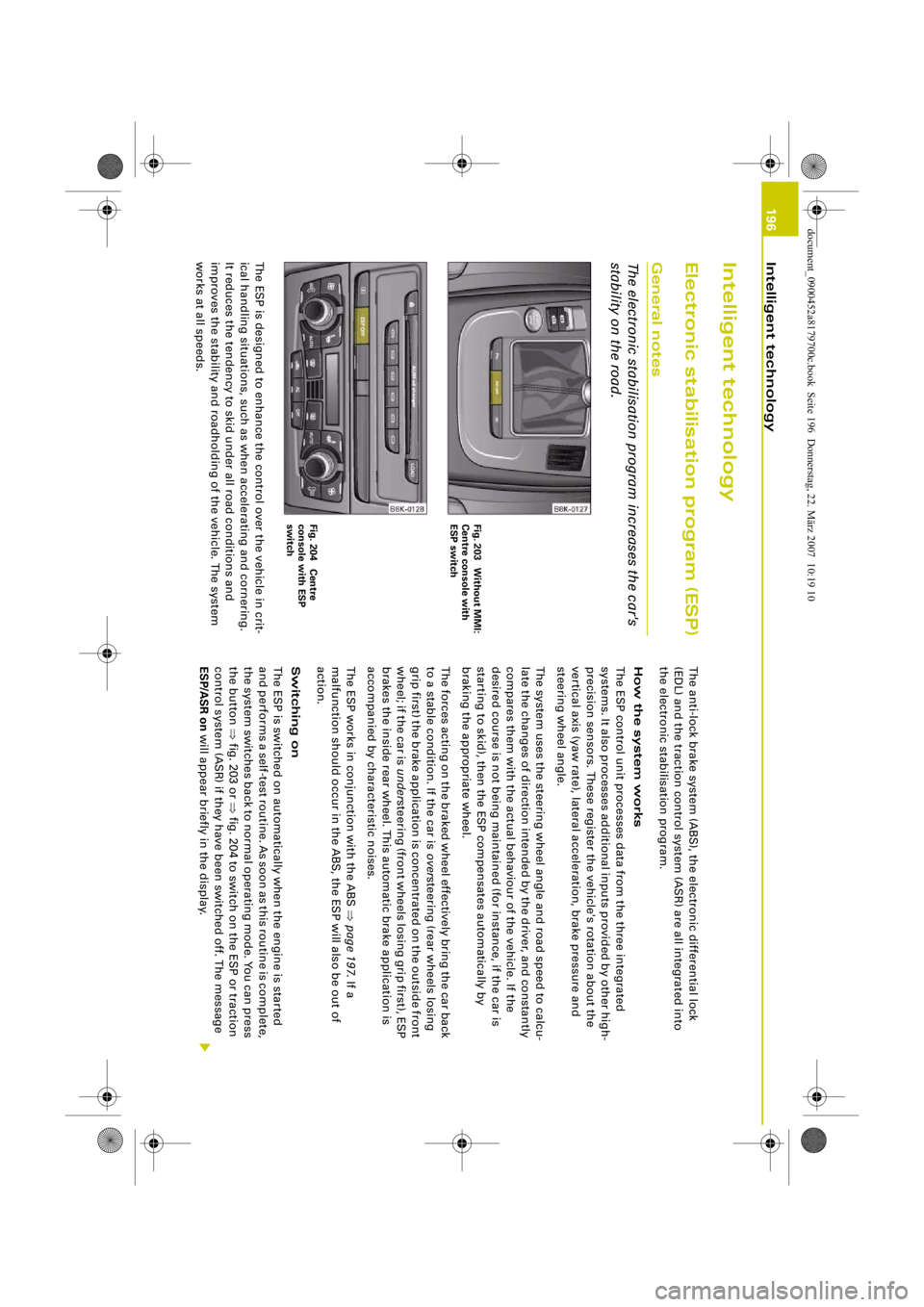
the button ⇒fig. 203 or ⇒ fig. 204 to switch on the ESP or traction
control system (ASR) if they have been switched off. The message
ESP/ASR on will appear briefly in the display.
Fig. 203 Without MMI:
Centre console with
ESP switchFig. 204 Centre
console with ESP
switch
document_0900452a8179700c.book Seite 196 Donnerstag, 22. März 2007 10:19 10
ei-4---------4--
-
~
-+
-4
r
....
j
' ,.~
'
' I l
----t-
4-
---,- 1 -
Page 200 of 313
Intelligent technology
198pedal very quickly, the brake assist system automatically boosts the
braking force to the maximum level, up to the point where the anti-
lock brake function (ABS) intervenes to stop the wheels from
locking. You should then keep the brake pedal pressed until the
vehicle has braked to the required speed. The brake assist system
switches itself off as soon as you release the brake pedal.
The brake assist system will not be operative if there is a malfunc-
tion in the ABS.
WARNING
Please remember that the accident risk always increases if you
drive too fast, especially in corners or on a slippery road, or if you
follow too close behind the vehicle in front of you. An increased
accident risk cannot be compensated even by the brake assist
system, so always be sure to maintain a safe speed.Traction control system (ASR)
The traction control system prevents the driven wheels
from spinning when the car is accelerating.General notes
The traction control system (ASR) is one of the functions incorpo-
rated in the electronic stabilisation program (ESP).
The traction control system (ASR) helps the car to start moving,
accelerate and climb a gradient in slippery conditions where this
may otherwise be difficult or even impossible.
How the system works
The ASR acts automatically i.e. without the driver's intervention.
With the aid of the ABS sensors ⇒page 197 , the ASR monitors the
speed of the driven wheels. If the wheels start to spin, the engine
power is reduced automatically to match the amount of grip avail-
able. The system works at all speeds. The ASR works in conjunction with the ABS. If a malfunction should
occur in the ABS, the ASR will also be out of action.
Switching on
The ESP is switched on automatically when the engine is started
and performs a self-test routine. As soon as this routine is complete,
the system switches back to normal operating mode. If the traction
control system (ASR) has been deactivated (for one of the reasons
noted below) you can switch it back on manually by pressing the
switch
⇒page 196, fig. 203. The message ESP/ASR on will appear
briefly in the display. If the traction control system (ASR) has been
deactivated, it will switch back on automatically at a speed of about
70 km/h on vehicles with front-wheel drive.
You can switch the traction control system (ASR) on again if neces-
sary by pressing the switch ⇒page 196, fig. 203.
Switching off
If required, the ASR can also be switched off manually by pressing
the switch briefly ⇒page 196, fig. 203 (for less than 3 seconds). The
ESP warning lamp lights up when the traction control system (ASR)
is switched off, see ⇒page 16 . The message ASR off will appear in
the display. For safety reasons, the system can only be switched off
at speeds below 50 km/h on vehicl es with front-wheel drive. The
ASR can be deactivated at any speed on vehicles with four-wheel
drive.
The traction control system should normally remain switched on at
all times. It should only be switched off manually in particular
circumstances where a certain amount of wheel slip may be desir-
able. For example:
•
when driving with snow chains
•
when driving in deep snow or on loose surfaces
•
when rocking the car backwards and forwards to free it.
The ASR should be switched on again afterwards as soon as
possible.
document_0900452a8179700c.book Seite 198 Donnerstag, 22. März 2007 10:19 10
--4 -
-T
-+
•
+-