ignition AUDI A5 COUPE 2008 Repair Manual
[x] Cancel search | Manufacturer: AUDI, Model Year: 2008, Model line: A5 COUPE, Model: AUDI A5 COUPE 2008Pages: 313, PDF Size: 13.86 MB
Page 134 of 313
Automatic gearbox
132Reverse gear must only be engaged when the vehicle is stationary
and the engine is idling ⇒.
To move the selector lever to position R, press in the interlock
button and at the same time press the brake pedal. Depending on
the model, one or two reversing lights will come on in selector lever
position R (when ignition is switched on).
N - Neutral
In this position the gearbox is in neutral ⇒.
D - Drive (forwards)
In this position the gearbox auto matically selects the best gear
ratio. This depends on the engine load, the road speed and the
dynamic gear control program (DCP).
Press the brake pedal when moving the selector lever from N to D if
the vehicle is stationary or at speeds below 5 km/h ⇒.
In some situations (such as on mountain roads or when towing a
trailer or caravan) it can be advantageous to switch temporarily to
tiptronic mode ⇒page 134 , so that the gear ratios can be selected
manually to suit the driving conditions.
S - Sport position
Select this position if you wish to take full advantage of the car's
performance. This setting makes use of the engine's maximum
power output. When accelerating the gear shifts will be noticeable.
Press the brake pedal when moving the selector lever from N to S if
the vehicle is stationary or at speeds below 5 km/h ⇒.
WARNING
•
Never move the selector lever to R or P when driving, as this
could cause an accident.
•
In selector position D or S the vehicle must always be held with
the foot brake when the engine is running. This is because an auto-
matic gearbox still tran smits power even at idling speed, and the vehicle tends to “creep”. The
throttle must on no account be
opened inadvertently (for instan ce by hand from the engine
compartment) when a ge ar is engaged with the vehicle stationary.
The vehicle could otherwise star t moving immediately (in some
cases even if the parking brake is engaged) and possibly cause an
accident.
•
To avoid accidents, apply th e parking brake and put the
selector lever in position P befor e opening the bonnet and working
on the vehicle with the engine running. Please observe the impor-
tant safety warnings ⇒page 231, “Working on components in the
engine compartment”.
Applies to vehicles: with multitronic®Selector lever lock
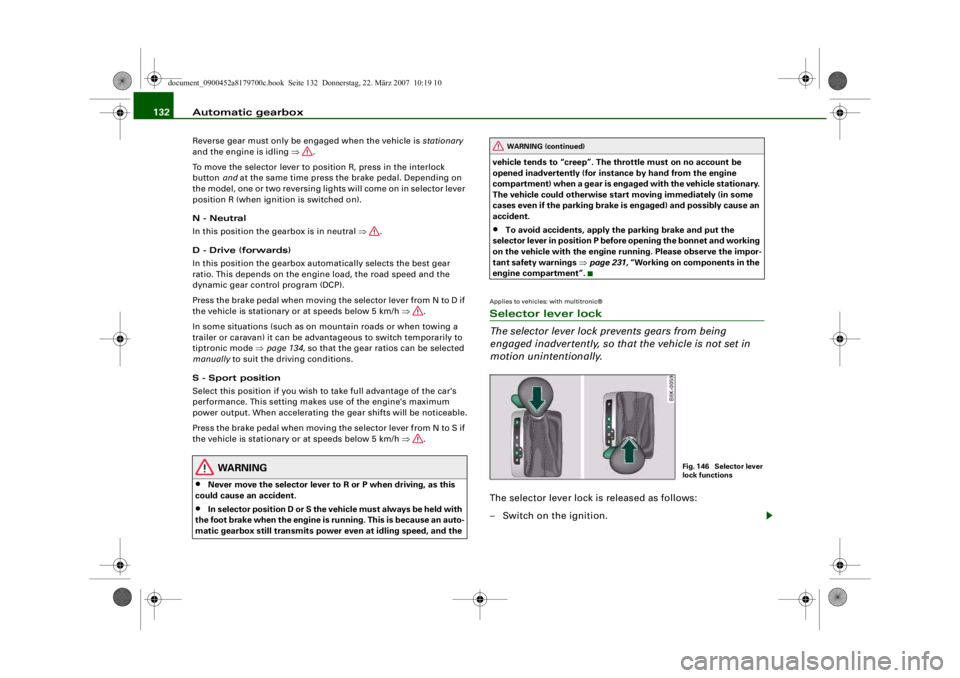
The selector lever lock prevents gears from being
engaged inadvertently, so that the vehicle is not set in
motion unintentionally.The selector lever lock is released as follows:
– Switch on the ignition.
WARNING (continued)
Fig. 146 Selector lever
lock functions
document_0900452a8179700c.book Seite 132 Donnerstag, 22. März 2007 10:19 10
--4 -
-T
•
-+ +-
Page 135 of 313
Automatic gearbox133
Controls
Safety
Driving tips
General maintenance
Self-help
Technical data
– Press the brake pedal and at the same time press in the
interlock button.Automatic selector lever lock
The selector lever is locked in the P and N positions when the igni-
tion is on. The brake pedal must be depressed before the lever can
be moved out of either of these positions. The following message
appears in the instrument display as a reminder for the driver when
the selector lever is in position P or N:
WHEN STATIONARY APPLY FOOTBRAKE WHILE SELECTING GEAR.
The selector lever lock only works if the vehicle is stationary or
driving at speeds up to 5 km/h. At higher speeds the selector lever
lock in the N position is disengaged automatically.
The selector lever lock is not engaged if the selector lever is moved
quickly through position N (e.g. when shifting from R to D). This
makes it possible, for instance, to “rock” the vehicle backwards and
forwards if it is stuck in snow or mud. The selector lever lock
engages automatically if the brake pedal is not depressed and the
lever is in position N for more than about a second.
Interlock button
The interlock button on the selector lever handle prevents the driver
from inadvertently engaging particul ar gears. Press the button in to
disengage the selector lever lock. Th e illustration shows the selector
lever positions in which the button has to be pressed, highlighted in
colour ⇒page 132, fig. 146.
Safety interlock for ignition key
The key can only be withdrawn with the ignition switched off and
the selector lever in position P. When the ignition key is removed,
the selector lever is locked in position P.
Applies to vehicles: with multitronic®Kick-down feature
The kick-down feature is designed to give maximum
acceleration.When the accelerator pedal is pressed right down past the point of
resistance at full throttle, the gearbox will select a lower gear,
depending on road speed and engine speed. While you keep the
accelerator depressed the engine speed is automatically controlled
to give your vehicle maximum acceleration.
WARNING
Please note that if the road surf ace is slippery or wet, the kick-
down feature could cause the driv ing wheels to spin, which could
result in skidding.Applies to vehicles: with multitronic®Dynamic gear control program (DCP)
The multitronic
® gearbox is controlled electronically.
The vehicle is equipped with an electronically controlled gearbox.
The gear ratios are selected automatically according to preset gear-
shift programmes.
When you drive at moderate speeds the gearbox will select the most
economical shift programme. It will then change up early and delay
the downshifts to give better fuel economy.
If you drive at higher speeds with heavy acceleration, if you open the
throttle quickly, or if you use the kick-down or the car's maximum
speed, the gearbox will automaticall y select the more “sporty” shift
programmes.
The gearbox is self-adapting, and continuously selects the most
suitable shift programme. At the same time, the driver can also
make the gearbox switch to a more "sporty" programme by pressing
document_0900452a8179700c.book Seite 133 Donnerstag, 22. März 2007 10:19 10
--4 -
-T
-+ +-
•
Page 138 of 313
Automatic gearbox
136Applies to vehicles: with multitronic®Manual release of selector lever
The selector lever can be rele ased manually if the elec-
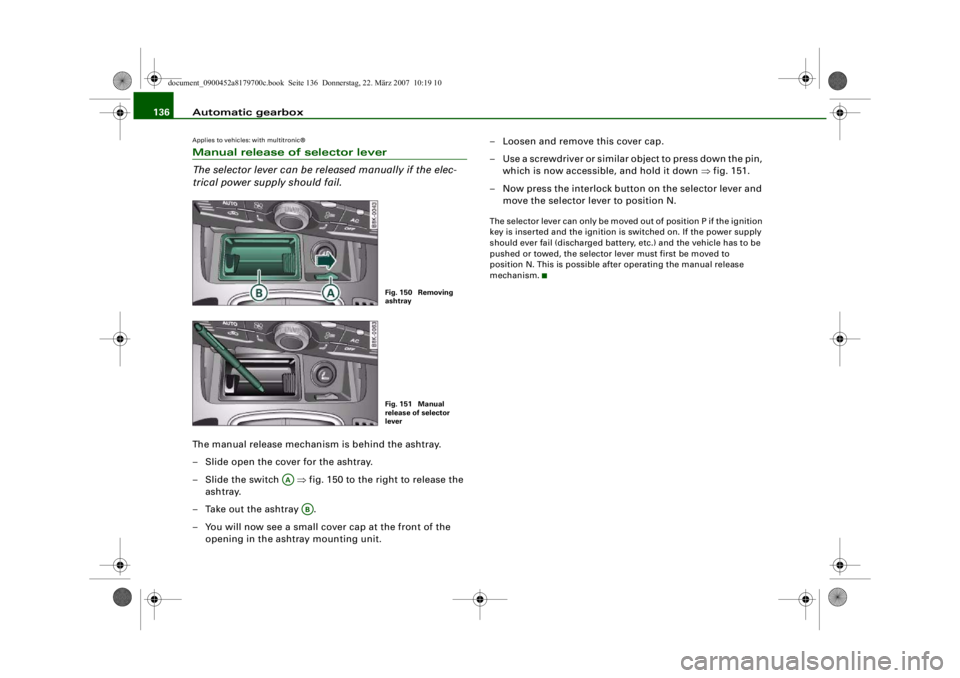
trical power supply should fail.The manual release mechanism is behind the ashtray.
– Slide open the cover for the ashtray.
–Slide the switch ⇒fig. 150 to the right to release the
ashtray.
– Take out the ashtray .
– You will now see a small cover cap at the front of the opening in the ashtray mounting unit. – Loosen and remove this cover cap.
– Use a screwdriver or similar object to press down the pin,
which is now accessible, and hold it down ⇒fig. 151.
– Now press the interlock button on the selector lever and move the selector lever to position N.
The selector lever can only be moved out of position P if the ignition
key is inserted and the ignition is switched on. If the power supply
should ever fail (discharged battery, etc.) and the vehicle has to be
pushed or towed, the selector lever must first be moved to
position N. This is possible after operating the manual release
mechanism.
Fig. 150 Removing
ashtrayFig. 151 Manual
release of selector
lever
AA
AB
document_0900452a8179700c.book Seite 136 Donnerstag, 22. März 2007 10:19 10
--4 -
-T
•
-+ +-
Page 141 of 313
Audi parking system139
Controls
Safety
Driving tips
General maintenance
Self-help
Technical data
Activating
– Engage reverse gear to automatically activate the
parking system plus, or
– Press the switch
⇒ page 138, fig. 152 in the centre
console to activate the parking system plus manually.
You will hear a short beep to confirm that the parking
system has been activated. The indicator lamp in the
switch will light up.
Deactivating
– Drive forwards faster than approx. 10 km/h, or
– Switch off the ignition to automatically deactivate the complete parking system, or
– Press the switch
⇒ page 138, fig. 152 to deactivate the
parking system plus manually. The indicator lamp in the
switch will go out.
Activate the system manually if you are driving forwards and would
like the system to give a warnin g as you approach potential obsta-
cles, for instance when parking.
The measuring range of the sensors in the front and rear bumpers
starts at approximately :
Warning beeps
The warning beeps are produced by sound boxes. The volume and
pitch of the beeps can be adjusted in the MMI ⇒page 148 . Mute function
An acoustic proximity warning is
cancelled when you apply the
parking brake or move the selector lever of the automatic gearbox
to position P. However, the system remains active. The warning
beeps will start again as soon as you release the parking brake or
move the selector lever out of position P if the system has detected
an obstacle.
Reversing/driving forwards
When the vehicle is reversing/driving forwards, the system starts to
beep if it registers an obstacle within its detection range (see
above). The warnings will beep increasingly rapidly as the vehicle
approaches the obstacle.
When the vehicle is less than appro x. 0.30 m away from the obstacle
the warning tone will sound continuously. From here at the latest,
the driver should then not reverse/drive forwards any further.
The volume of the warning beeps will be gradually reduced after
about 4 seconds if the vehicle remains at a constant distance from
a detected obstacle (it will not be reduced if the obstacle is closer
than 0.30 m). The warnings will then return to the normal volume if
the vehicle approaches th e detected obstacle again.
Parking
If the parking manoeuvre involves shunting backwards and
forwards, the warning sound will be switched off temporarily while
you change gear. The proximity gr aphic will, however, still be
displayed on the MMI screen. The warnings will then return to the
normal volume if the vehicle approaches the detected obstacle
again.
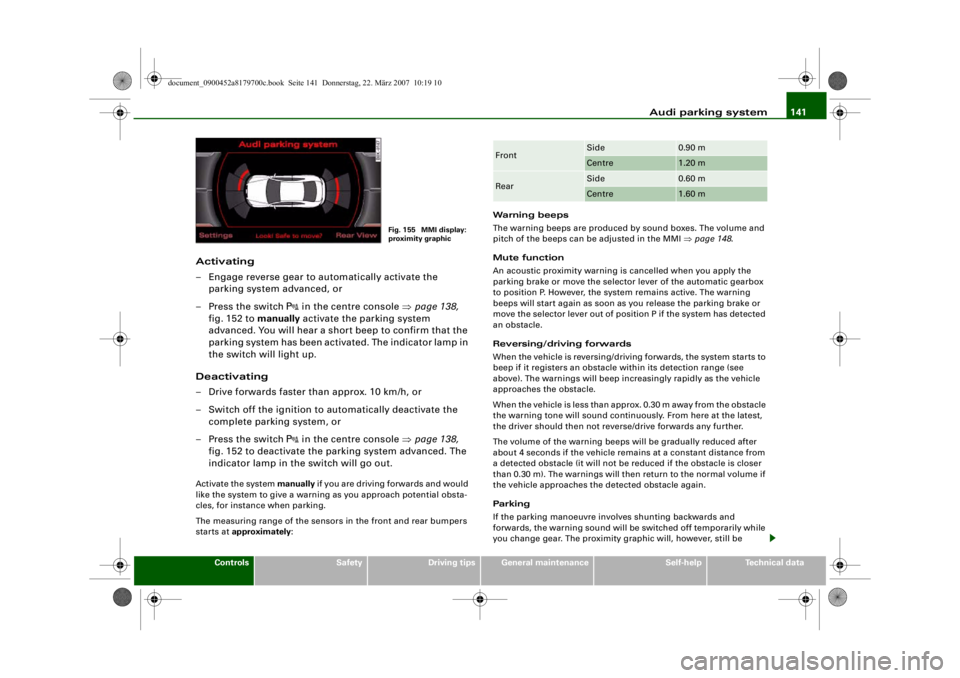
Graphic display
The segments in the MMI display indicate the distance between the
vehicle and a detected obstacle. The number of segments shown
depends on the obstacle in front of or behind the vehicle. The closer
the vehicle gets to the obstacle the closer the segments move
towards the vehicle in the graphic ⇒page 138, fig. 153. At the latest
when the penultimate segment is highlighted the vehicle has Front
Side
0.90 m
Centre
1.20 m
Rear
Side
0.60 m
Centre
1.60 m
document_0900452a8179700c.book Seite 139 Donnerstag, 22. März 2007 10:19 10
--4 -
-T
-+ +-
Page 143 of 313
Audi parking system141
Controls
Safety
Driving tips
General maintenance
Self-help
Technical data
Activating
– Engage reverse gear to automatically activate the
parking system advanced, or
– Press the switch
in the centre console ⇒page 138,
fig. 152 to manually activate the parking system
advanced. You will hear a short beep to confirm that the
parking system has been activated. The indicator lamp in
the switch will light up.
Deactivating
– Drive forwards faster than approx. 10 km/h, or
– Switch off the ignition to automatically deactivate the complete parking system, or
– Press the switch
in the centre console ⇒page 138,
fig. 152 to deactivate the parking system advanced. The
indicator lamp in the switch will go out.
Activate the system manually if you are driving forwards and would
like the system to give a warnin g as you approach potential obsta-
cles, for instance when parking.
The measuring range of the sensors in the front and rear bumpers
starts at approximately : Warning beeps
The warning beeps are produced by sound boxes. The volume and
pitch of the beeps can be adjusted in the MMI
⇒page 148 .
Mute function
An acoustic proximity warning is cancelled when you apply the
parking brake or move the selector lever of the automatic gearbox
to position P. However, the system remains active. The warning
beeps will start again as soon as you release the parking brake or
move the selector lever out of position P if the system has detected
an obstacle.
Reversing/driving forwards
When the vehicle is reversing/driving forwards, the system starts to
beep if it registers an obstacle within its detection range (see
above). The warnings will beep increasingly rapidly as the vehicle
approaches the obstacle.
When the vehicle is less than appro x. 0.30 m away from the obstacle
the warning tone will sound continuously. From here at the latest,
the driver should then not reverse/drive forwards any further.
The volume of the warning beeps will be gradually reduced after
about 4 seconds if the vehicle remains at a constant distance from
a detected obstacle (it will not be reduced if the obstacle is closer
than 0.30 m). The warnings will then return to the normal volume if
the vehicle approaches th e detected obstacle again.
Parking
If the parking manoeuvre involves shunting backwards and
forwards, the warning sound will be switched off temporarily while
you change gear. The proximity gr aphic will, however, still be
Fig. 155 MMI display:
proximity graphic
Front
Side
0.90 m
Centre
1.20 m
Rear
Side
0.60 m
Centre
1.60 m
document_0900452a8179700c.book Seite 141 Donnerstag, 22. März 2007 10:19 10
--4 -
-T
-+ +-
Page 154 of 313
Audi parking system
152Safety notesApplies to vehicles: with parking systemFault warning for the acoustic parking aidparking system:
If you hear a long beep when you engage reverse gear, the rear
parking aid is not functioning correctly.
parking system plus*/parking system advanced*:
If you hear a long beep for a few seconds when you engage reverse
gear and the diode in the switch
* starts flashing, there is a fault
in the rear and front parking system with graphic display.
You will be notified of a system fault
•
when you manually activate the parking system via the switch
* ⇒ page 138•
the first time you engage reverse gear after switching on the
ignition, or
•
immediately, if the fault is identified while you are using the
parking system.Note
If the system alerts you to a fault please have the fault rectified by
an Audi workshop or ot her qualified workshop.Applies to vehicles: with parking system advancedNotes on reversing cameraWe recommend that you practise parking with the reversing camera
in a quiet location (car park or similar) in order to become familiar
with the system, including the orientation lines and all the other
features. Ideally, the weather and light conditions should be good. Vehicles or other objects shown in
the MMI display appear to be
further away or closer, if:
•
you are reversing from a horizontal surface up a gradient or
down a hill,
•
you are reversing towards protruding objects,
•
the vehicle has been loaded with a greater load on the rear.
The accuracy of the orientation lines and the blue area markings
decreases if:
•
the reversing camera does not provide a reliable image, e.g. if
visibility is poor or the lens is dirty,
•
the sun is so dazzling that you cannot see the image on the
display screen.
How to clean the lens of the reversing camera:
•
Moisten the lens usin g a commercially available, alcohol-based
glass cleaning agent and clea n the lens with a dry cloth.
•
Remove snow using a small brush.
•
If possible, use de-icing spray to remove any ice ⇒.
WARNING
•
Even when using the reversing camera, the driver must still
keep a close watch on the area behind the vehicle and use the
mirrors.
•
For technical reasons, the reversing camera cannot show the
complete area behind the vehicle ⇒page 144, fig. 159. It is partic-
ularly important to ensure that there are no small children or
animals near the vehicle, as the reversing camera may not always
be able to detect th em (accident risk).
•
The parking aid cannot replace the full concentration of the
driver. The driver is always resp onsible for safety during parking
and other manoeuvres . Always keep a close watch on the area
around the vehicle.
document_0900452a8179700c.book Seite 152 Donnerstag, 22. März 2007 10:19 10
--4 -
-T
-+
0
+-
[I]
•
Page 157 of 313
HomeLink155
Controls
Safety
Driving tips
General maintenance
Self-help
Technical data
At the operating unit
1. Switch on the ignition (do not start the engine).
2. Press and hold down the two outer HomeLink buttons
⇒page 154, fig. 171 until the indicator diode
⇒ page 154, fig. 171 begins to flash after about
20 seconds. This procedure will delete the standard
factory settings and does not need to be repeated when
programming the other buttons.
3. Press the particular Home Link button which you would
like to program.
4. Wait until the diode begins to flash. The HomeLink module now remains in training mode for 5 minutes.
5. Now step in front of your vehicle with the original hand-
held transmitter for the garage door opener or any other
device you wish to assign to the HomeLink control
button.
At the radiator grille
6. Hold the original hand-held transmitter at or near the
centre of your car's radiator grille ⇒ page 154, fig. 172.
7. Press the activator button on the original hand-held
transmitter .
8. As you do so, watch the tu rn signals on your vehicle.
HomeLink confirms successful programming by flashing
all four turn signals three times.
9. If the turn signals fail to flash three times, repeat the procedure with the transmitter held at a different
distance from the radiator grille.
The proper distance between the hand-held transmitter and the
HomeLink module at the radiator grille depends on the system you
want to train. It may re quire several attempts.
The turn signals will flash once if the time limit for the programming
mode has been exceeded. In this case the programming procedure
needs to be performed again. Repeat the sequence at the operating
unit starting with step 3.
The programming instructions above also apply to th e other control
buttons. Start with step 3 if yo u wish to proceed and program the
other two buttons.
If the garage door or other devices st ill fail to be activated with the
HomeLink control buttons after programming is completed, it is
possible that these systems might be working with a rolling code
instead of the normal fixed security code. If this is the case, a rolling
code programming is required in addition to the steps described
above. ⇒page 155Applies to vehicles: with HomeLinkRolling code programming
Some devices require rolling code programming of the
HomeLink universal transmitter.Identifying a rolling code
– Press the already programmed HomeLink button again
and hold it down.
–Watch HomeLink diode ⇒ page 154, fig. 171. If the
diode starts flashing rapidly and turns into a constant
light after about 2 seconds, this indicates that the device
you wish to operate (e.g. a garage door opener) is
equipped with a rolling code.
– Program the rolling code as follows:
AA
AA
AA
document_0900452a8179700c.book Seite 155 Donnerstag, 22. März 2007 10:19 10
--4 -
-T
-+
•
+-
Page 158 of 313
HomeLink
156
Activating the garage door opener drive unit
– Locate the programming button on the garage door drive. The exact location and colour of the button may
vary depending on the type of garage door opener.
– Press the programming button on the door drive unit (this will normally cause a “programming mode indicator
lamp” on the unit to light up). You now have about 30
seconds to start and complete the programming of the
HomeLink control button on the operating unit.
Programming at the operating unit in the
headliner
– Press and release the already programmed HomeLink button.
– Press the HomeLink button again to complete rolling code programming.After programming at the operating unit in the headliner, the
garage door opener should recognize the HomeLink signal and
respond when the HomeLink button is pressed. Now the other
control buttons can be programmed as required.
Note
•
Having a second person assist you makes programming of the
rolling code easier and faster. For some makes of garage door
openers the HomeLink button may have to be pressed a third time
to complete the training sequence.
•
If you encounter problems programming the rolling code you
may find helpful information in the operating instructions of the
garage door opener or other device you wish to operate.
Applies to vehicles: with HomeLinkOperating HomeLink
The programmed devices are activated by means of the
HomeLink control buttons in the headliner.– Make sure that the ignition is on.
– Press the programmed HomeLink button ⇒page 154,
fig. 171. The device assigned to that button (e.g. garage
door) will be activated.The HomeLink indicator diode ⇒page 154, fig. 171 will light up
when you press the button.Applies to vehicles: with HomeLinkErasing the button programming
You can erase the complete HomeLink programming by
pressing the two outer buttons.– Switch on the ignition (do not start the engine).
– Press and hold down the two outer buttons until the indi- cator diode starts to flash ⇒page 154, fig. 171.
– Then release the buttons.After the programming of the Home Link buttons has been erased,
the system will return to the training mode and is ready to be re-
programmed at any time.
Note
•
Programmed buttons cannot be erased individually.
•
For security reasons it is advisable to erase the programming of
the HomeLink buttons prior to selling your vehicle.
document_0900452a8179700c.book Seite 156 Donnerstag, 22. März 2007 10:19 10
--4 -
-T
•
-+ +-
[I]
[I]
•
•
Page 178 of 313
Airbag system
176Airbag systemDescription of airbag systemGeneral notes on airbag system
The airbag is an integral part of the car's passive safety
system.In conjunction with the three-poin t seat belts, the airbag system
gives the front occupants additional protection for the head and
chest in the event of a severe frontal collision.
In a severe side collision the side airbags and the head-protection
airbags reduce the risk of injury to the occupants in the areas of the
body facing the impact ⇒.
In addition to th eir normal function of protecting the occupants in a
collision, the seat belts also hold them in a position where the
airbags can inflate properly and provide maximum protection.
The airbag system will only work with the ignition on. The airbag
system is monitored electronically; the airbag warning lamp indi-
cates whether the system is functioning properly.
The main parts of the airbag system are:•
the electronic monitoring system (control unit and sensors),
•
the two front airbags,
•
the front side airbags and head-protection airbags,
•
The airbag warning lamp in the instrument cluster.
There is a fault in the airbag system if the warning
lamp
•
does not come on when the ignition is switched on,
•
does not go out about 4 seconds after the ignition is switched
on,
•
goes out and then comes on again after the ignition is switched
on,
•
comes on or flickers while the car is moving.
WARNING
•
The airbags are not a substitute for the seat belts; they are an
integral part of the car's overall passive safety system. The airbags
can only offer effective protection if the occupants are wearing
their seat belts. For this reason it is very important to wear the
seat belts at all times ⇒page 170, “Why is it so important to use
seat belts?”.
•
The seat belts and airbags can only provide maximum protec-
tion if the occupant s are seated correctly ⇒page 70, “Seats and
storage”.
•
If you do not wear a seat belt, if you lean forward, or are not
seated correctly while th e vehicle is in motion, you are at greater
risk of injury should the airbag system be triggered in an accident.
•
Components of the airbag system are located in various parts
of the vehicle. If repairs to other vehicle components make it
necessary to perform work on the airbag system or to remove or
install parts of the airbag system , this may cause damage to the
airbag system. As a result, the ai rbags may not inflate correctly or
may not be triggered at all in an ac cident situation. For this reason,
you should always have the work carried out by a qualified work-
shop.
•
If a fault should occur in the airbag system, have the system
checked immediately by a qual ified workshop. Otherwise the
system may fail to trigger in an accident.
•
Do not attempt to modify components of the airbag system in
any way.
•
Never make any alterations to the front bumper or the body.
document_0900452a8179700c.book Seite 176 Donnerstag, 22. März 2007 10:19 10
--4 -
-T
&
-+ +-
Page 185 of 313
Airbag system183
Controls
Safety
Driving tips
General maintenance
Self-help
Technical data
control for the garage door). These
objects could cause injury if the
head-protection airbag is triggered.
•
The sensors for the airbags are lo cated in the front doors. You
must therefore not make any modi fications to the doors or door
trim (e.g. retrofitting loudspeakers), as this could impair the func-
tion of the side airbags. Any damage to the front doors could lead
to faults in the system. Repairs or any other work on the front
doors must therefore always be ca rried out by a qualified work-
shop.
•
Where sun blinds are fitted on th e rear doors, these must not
obstruct or impair the airbags in any way.
•
If unsuitable accessories are installed near the head-protection
airbag, the protection afforded by the airbag can be seriously
impaired if the system is triggered. When the head-protection
airbag opens, parts of these accessories coul d be thrown into the
vehicle and inju re passengers ⇒page 250 .
•
Any work involving the head-protection airbags, or removal
and installation of the airbag components for other repairs (such
as repairs to the roof liner), must always be performed by a quali-
fied workshop. Otherwise the airbag system may fail to work
properly.
Applies to vehicles: with key-operated switch for front passenger's airbagDeactivating the front passenger's airbag via the key-operated switchIf an airbag has been deactivated, it should be reactivated
as soon as possible so that it can continue to give the
required protection.The key-operated switch for deactivating the front
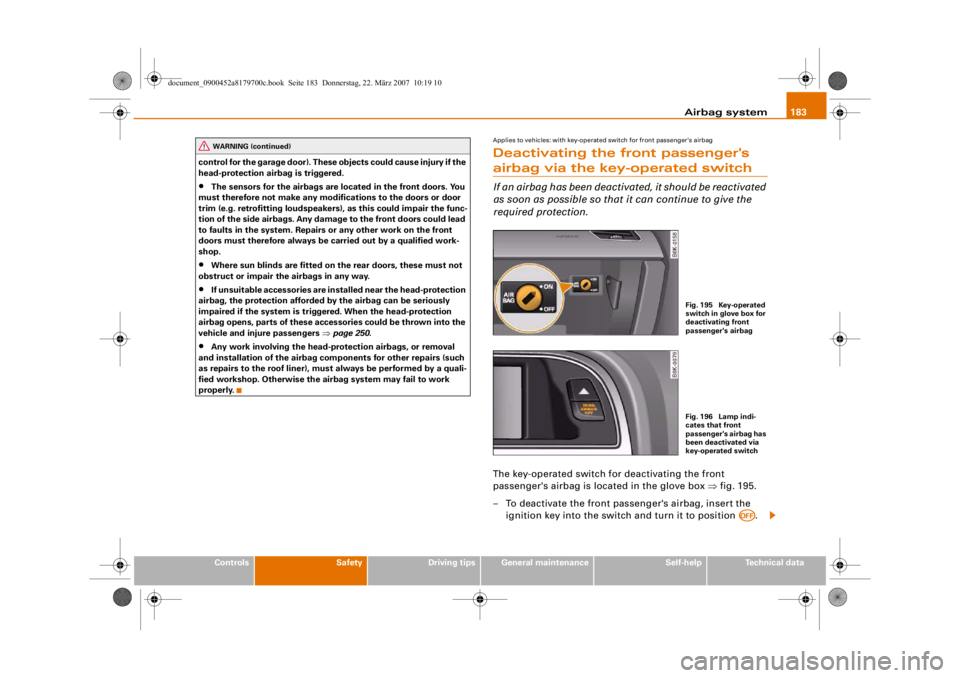
passenger's airbag is located in the glove box ⇒fig. 195.
– To deactivate the front passe nger's airbag, insert the
ignition key into the switch and turn it to position .
WARNING (continued)
Fig. 195 Key-operated
switch in glove box for
deactivating front
passenger's airbagFig. 196 Lamp indi-
cates that front
passenger's airbag has
been deactivated via
key-operated switch
AOFF
document_0900452a8179700c.book Seite 183 Donnerstag, 22. März 2007 10:19 10
--4 -
-T
-+ +-
•