automatic transmission AUDI A5 COUPE 2010 User Guide
[x] Cancel search | Manufacturer: AUDI, Model Year: 2010, Model line: A5 COUPE, Model: AUDI A5 COUPE 2010Pages: 360, PDF Size: 84.39 MB
Page 118 of 360
• .___O_ n_ t_h _e _ r_o _a_ d __________________________________________________ _
may vary, depending on the type of display in your vehicle. The indi
cator light
CRUISE (US model)/ (7)0 (Canadian model) will also light up
in the instrument cluster .
The speed is kept constant by modifying engine power or through
an active brake intervention.
& WARNING
• Always pay attention to the traffic around you when the cruise
control is in operation. You are always responsible for your speed
and the distance between your vehicle and other vehicles.
• For reasons of safety, cruise control should not be used in the
city, in stop-and-go traffic, on twisting roads and when road condi
tions are poor (such as ice, fog, gravel, heavy rain and hydro
planing) -you could have an accident.
• Switch the cruise control off temporarily when driving in
turning lanes, highway exits or in construction zones.
• Please note that unconsciously "resting" your foot on the
accelerator pedal causes cruise control not to brake. This is due to
the control system being overridden by the driver's acceleration.
[ i] Tips
• Vehicles with manual transmission: You can attain the set speed
only if the gear that is currently engaged will allow it, or if it does not tax the engine and allows it to run smoothly. Therefore shift into
a higher or lower gear in a timely manner.
• The brake lights illuminate as soon as the brakes apply
automatically .•
Changing speed
- Press the lever in the direction of the 0 ~ page 115,
fig. 120 or in the direction of the Q to increase or
decrease your speed. -
Let go of the lever to save that speed.
Change speed in increments of 1 mph (1 km/hi by lightly pressing
the lever . If you keep the lever pressed down, you will alter your
speed in 5 mph (10 km/hi increments.
You can also press the accelerator pedal down to increase your speed, e.g. if you want to pass someone. The speed you saved
earlier will resume as soon as you let off of the accelerator pedal.
If, however, you exceed your saved speed by 5 mph (10 km/h) for
longer than 5 minutes, the cruise control will be turned off tempo
rarily. The green symbol in the display turns white, the saved speed
is retained .•
Pre -selecting speed
You can pre-select your desired speed while the vehicle is
not moving.
Turn on the ignition.
- Pull lever into position 1
~ page 115, fig. 120.
Press the lever in the
0 or Q direction to increase or
decrease your speed.
- Let go of the lever to save that speed.
This function makes it possible, for example, to save the speed you
want before driving on the highway. Once on the highway, activate
the cruise control by pulling the lever toward
(D. •
Switching off
Temporary deactivation
- Step on the brake pedal, or
Page 130 of 360
• ..__A_ d_ a-'- p_t _iv _ e_ c_r _u _ i_s _e _ c_o_ n_t _r _o _l _____________________________________________ _
Engin e spee d !
The text message Engine sp ee d ! appears in vehicles with manual
transmission when the driver did not shift up or down in time while
using adaptive cruise contro l braking or accelerating, causing the
vehicle to exceed or not reach the perm itted limit speed. This
causes adaptive cruis e control to deactivate automatically . A chime
sounds as a reminder .
Parking brake !
The text message Parking brake! appears if emergency braking was
manually initiated with the Electromechanica l Parking Brake (EPBl.
The adaptive cruise contro l is turned off . This is accompanied by a
warning tone.
ESP a ctiv ati on
The text message ES P activati on appears if the E lectronic Stabil iza
tion Program (ESP ) has intervened . In this case the adapt ive cruise
control is automatical ly turned off . This is accompanied by a
warn ing tone.
Sp eed
The set speed in mph (Canada km/h ) a lways appears when saving or
changing the speed in adaptive cruise control~
page 121, "How is
the speed stored?" and~
page 121, "Changing stored speed".
Speed too low
The text message Speed too low appears if the cur ren t speed is too
low
to set or to hold the requested speed.
When setting a desired speed , it must be at leas t 20 mph (30 km/h).
At speeds below 12 mph (20 km/h), the cruise control is turned off.
In speeds over 95 mph (150 km/h), the system remains active and
resumes the speed of 95 mph (150 km /h) if the driver removes the
foot from the acce lerator .
Selec tor leve r posit io n!
The text message Selector lever po sition! appears when the
selector lever is moved to pos ition
N . In this position, adaptive
cruise control is no t avai lable. •
Applies to vehi cles : w it h ad apt ive crui se c ontr ol
Driver intervention prompt
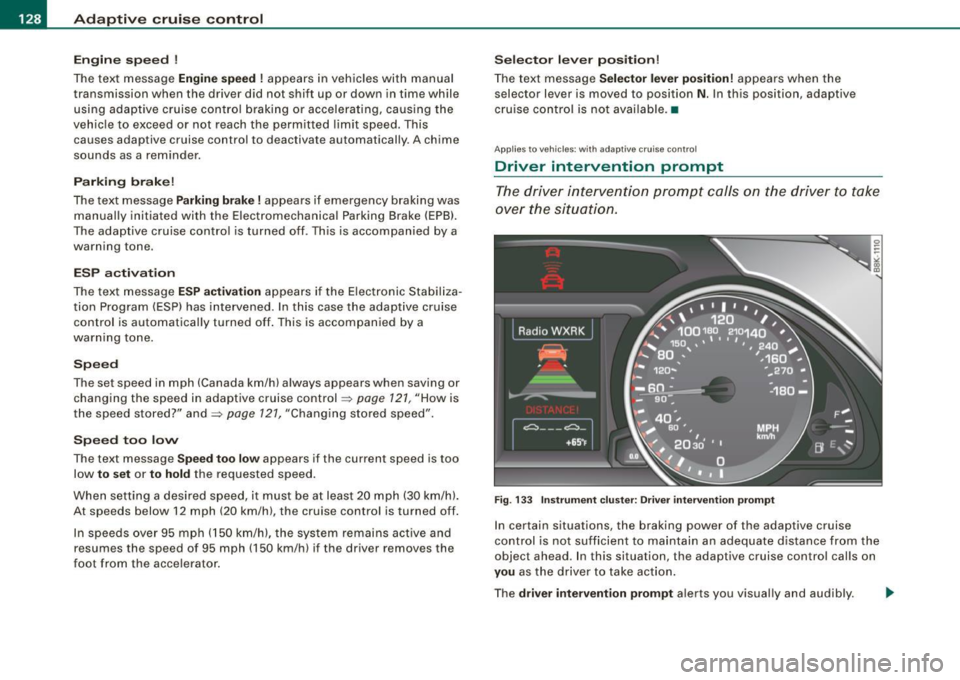
The dri ver i ntervention pr ompt c alls on the driver to take
ov er the situation.
F ig . 133 Instrument clu ster : Dr iv e r i nte rv enti on prompt
In certain situations, the braking power of the adaptive cruis e
control is not sufficient to maintain an adequate distance from the
objec t ahead . In this situation, th e adaptive cruise con trol cal ls on
you as the driver to take action .
The
driver intervent ion prompt alerts you visually and audibly. -.,
Page 147 of 360
__________________________________________________ A_ u_ d _ i_ d_ ri_v _ e_ s_ e_ le_ c_t _ __.9'
[ i J Tip s
• Sporty shifting characteristics can be set by selecting the
DYNAMIC mode . The S selector lever position is not available .
• The dynamic steering may make noise when sta rting or stopping
the engine. This does not indicate a problem. •
Applie s to v ehic les: wit h dr ive se le ct
Selecting the driving mode
You can choose between COMFORT, AUTO, DYNAMIC and
INDIVIDUAL* modes.
t
Con tro ls and eq uip
ment
i ;
-
~ ·
Fig. 15 5 Shift g ate:
Co ntr ol fo r Aud i d rive
s el ect
Fi g. 15 6 Center
co nso le: Co ntrol for
Aud i d rive s elect
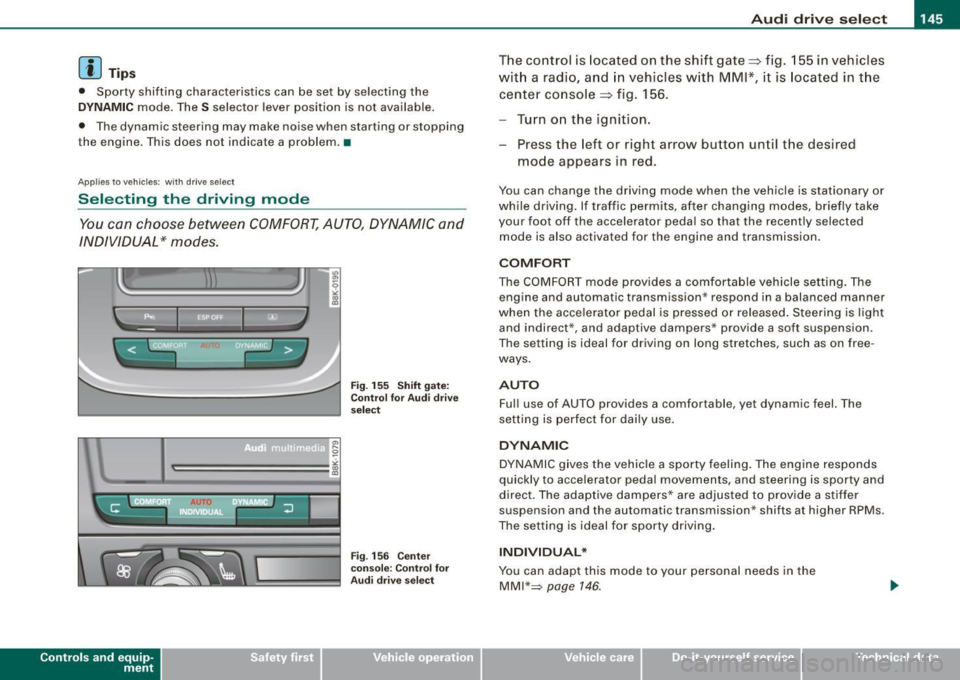
The co ntrol is located on the shift gate=:> fig. 155 in vehicles
wit h a radi o, a nd in vehicles w ith
MMI *, it is located in t he
cente r co nsole =:> fig . 156.
Turn o n the ignit ion.
Press the left or right arrow button unt il the desired
mode appears in red .
You can change the driving mode when the vehicle is stationary or
while driving. If traffic permits, after changing modes, briefly take
your foot off the accelerator peda l so that the recently se lected
mode is also activated for the engine and transmission .
COMFORT
The COMFORT mode provides a comfortable vehicle setting. The
engine and automatic transmission * respond in a balanced manner
when the acce lerator pedal is pressed or released . Steering is light
and indirect* , and adaptive dampers* provide a soft suspension .
The sett ing is ideal for driving on long stretches, such as on free
ways .
AUTO
Ful l use of AUTO prov ides a comfo rtable , yet dynamic feel. The
setting is perfect for dai ly use .
DYNAMIC
DYNAMIC g ives the vehicle a sporty feeling . The engine responds
quickly to accelerator peda l movements, and steering is sporty and
direc t. The adaptive dampers * are adjusted to provide a stiffer
suspension and the automatic transmission * shifts at higher RPMs.
The setting is ideal fo r sporty driving .
INDIVIDUAL *
You can adapt this mode to your pe rsonal needs in the
MMI"~ page 146 .
Vehicle care I I irechnical data
Page 149 of 360

____________________________________________________ T_ r_ a _n _s_ m_ i_ s _ s_ i_ o _ n _ ___._
Transmission
Manual transmission
Applies to vehicles: with manual transmission
Gearshift lever
The clutch pedal must be depressed all the way before
you can start the engine.
The manual transmission in your Audi is equipped with an
interlock-feature.
- Depress the clutch pedal all the way.
- Start the engine with the gearshift
lever in Neutral and
the clutch pedal depressed .
0 Note
Always depress the clutch pedal fully when changing gears. Do not
hold the vehicle on a hill with the clutch pedal partially depressed .
This may cause premature clutch wear or damage .
[ i J Tips
• Resting your hand on the gearshift lever knob while driving will
cause premature wear in the transmission.
• The back-up lights go on when you shift into Reverse with the
ignition on .•
Con tro ls and eq uip
ment
App lies to vehicles: with manual transm ission
Gearshift pattern (6-speed manual
transmission )
Engaging reverse gear (R)
Fig. 158 Gearshift
pattern: 6-s peed
manual transmission
- Move the shift lever all the way to the left, press it down,
then push it forward.
Especially after driving forward, stop the vehicle completely, shift
into
Neutral and rest the shift lever briefly in Neutral before shifting
into
Reverse. •
Automatic transmission
Applies to vehicles: wi th au tomat ic transmission
Introduction
Your vehicle is equipped with an electronically controlled 6 -speed
automatic transmission. Upshifting and downshifting takes place
automatically. ~
Vehicle care I I irechnical data
Page 150 of 360

• ..__T_ ra _ n_s_ m_ i_ s _s_ i_ o _ n ___________________________________________________ _
The transmission is also equipped with tiptronic. It allows the driver
t o shift gears
manually if desired => page 152. •
Applies to v ehi cles : w ith aut omati c tra nsm iss io n
Driving the automatic transmission
St artin g th e e ngin e
- The selector lever must be in
N or P.
Starting off
- Press and hold the brake pedal.
Fig. 159 S hift gate on
t h e ce nter co nso le :
selector lever with
re lease button
- Press and hold the release button in the selector lever
handle and move t he selector lever f rom
P or N to D and
release the button => & .
- Wait briefly until the transm ission has shif ted (you will
feel a sligh t movement).
Remove your foot from the brake pedal and accelerate.
Rocking back and forth to become unstu ck
- Sh ift only between
D and R w hen the vehicle is at a full
stop and the eng ine is running at idle speed . S
topp ing
- Press and hold the brake pedal until the vehicle has come
to a comp lete stop.
- Keep the brake pedal depressed so that the vehic le
cannot ro ll forward or backward while it is idling =>& .
- Once s topped,
do not depress the acce lerator pedal to
rev up the engine=>&.
P a rk in g
- Press and hold the brake pedal until the vehicle has come
to a comp lete stop.
Set the parking brake firmly=>
page 113, "Parking".
- Press and hold the release button in the selector lever
handle, move the selector leve r into
P and then let go of
the release button => & .
The selector lever must be in Nor P. If one of the driving positions
is engaged a safety switch will prevent the eng ine from being
started. See also=>
page 108 .
Before you move the selector lever from the P position, you must
a lways apply the brake pedal before and while depressing the
button in the handle of the se lector lever .
& WARNING
• Unintende d vehicle mov ement can cau se se rio us injur y.
- Wh en the sel ector l ever is in a driving posit io n, th e ve hicle
may c reep, ev en at idle speed . Th erefore d o no t re lease the
p ar king brak e or fo ot b ra ke u ntil you are rea dy to move,
be caus e po wer is tran sm itt ed to the wheels as s oon as a
dri ving po sition i s engag ed . ..,
Page 151 of 360
_______________________________________________________ T_ ra_ n_s_ m __ is_s_ io_ n __ BII
& WA RNIN G (continu ed )
- Do not accelerate while sele cting a driving pos ition. At this
time the engine mu st be at idle speed so that undue stre ss is
not placed on the clutches in the transmiss ion .
- Remember: Even when stopped briefly with the automatic
transmission in D ,S or R, engine power is being transmitted to
the wheels. Your vehicle could "creep " forward or back ward .
When stopped , keep the brake pedal fully depressed and use
the parking brake if necess ary to keep the vehicle from rolling.
• If the selector lever i s unintentionally moved into N while you
are driving, take your foot off the accele rator pedal and wait for
the eng ine to return to idle speed before selecting a dr iving posi
tion.
• Never shift into R or P when the vehicle is in mot ion .
• Never get out of the driver 's seat when the engine is running .
• If you mu st get out of the vehicle , move the selector lever
securely into the
P pos ition and apply the parking brake firmly .
• If the engine must remain running , never have any driving po si
tion engaged when che cking under the hood. Make sure the
selector lever has securely engaged and is locked in
P with the
parking brake firmly set~ page
263 , "Engine compartment ".
Otherwise , any increase in engine speed may set the vehicle in
motion , even with the parking brake applied. •
Controls and equip
ment
Ap plies to vehicles: wit h auto matic tra nsmiss io n
Selector lever positions
This sec tion describes the selec tor l ever positi ons an d
dr iv ing ra ng es.
Fig . 160 Display in the
instrument clu ste r:
se lector lever in posi
tion P
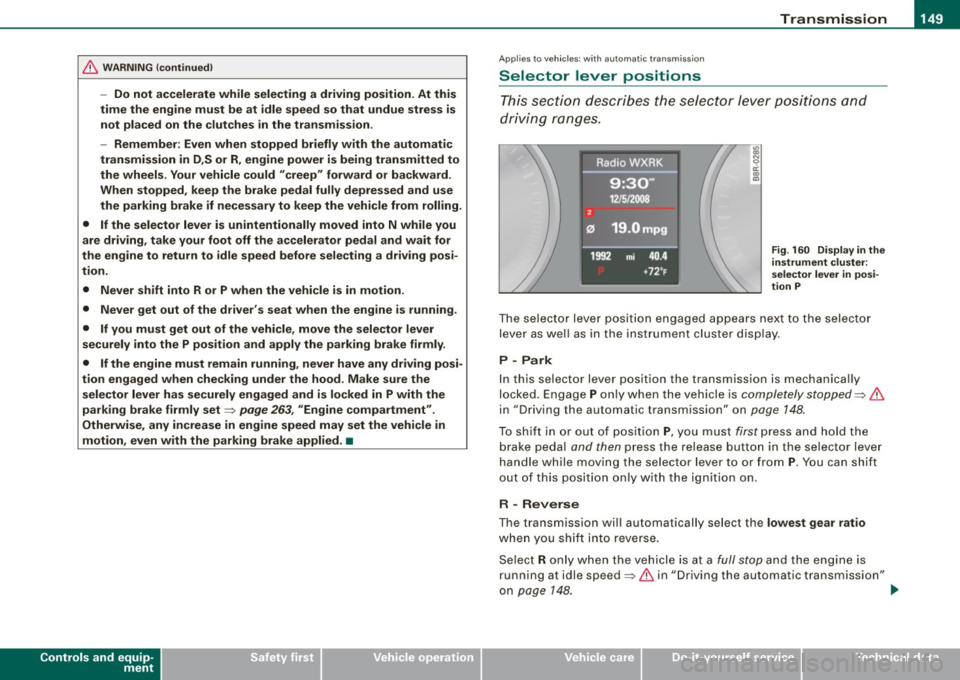
The se le cto r lev er p osit io n engaged ap pears ne xt to the selec to r
lever as wel l as in the instrument cluster display .
P -Park
In this selecto r lever position the transmission is mechanica lly
lo cked. Engage
P o nly w hen th e vehicle is comple tely stopped ~ &
in "Driving the automatic transm ission" on page 148.
To s hift i n or out of positi on P, yo u m us t first p ress and h old the
b rake peda l and then press the re lease button in the se lector lev er
handle while moving the selector lever to o r from
P . You can shift
out o f this pos it io n only with the ig niti on on .
R - Reverse
The transmission wi ll automatically sel ect the lowest gear ratio
whe n you sh ift i nto reverse.
Se lec t R only w hen th e ve hicle is a t a
full stop an d the en gin e is
running at idle speed~
& in "Driving the automatic transmission"
on page
14 8. ~
I • •
Page 152 of 360
• ..__T_ r_a _n_ s_ m_ is_ s_i o _ n ______________________________________________________ _
Before you move the selector lever to R, press both the button in the
handle of the selector lever
and the brake pedal at the same time .
When the ignition is on , the backup lights illumina te when the
selector lever is moved into R.
N -N eutr al
The transmission is in neutral in this position. Shift to this position
for standing with the brakes applied=:>
page 150.
When the vehicle is stationary or at speeds below 3 mph (5 km/h) ,
you must always apply the footbrake before and while moving the lever out of
N .
D -N or mal pos itio n fo r d rivi ng forward
Posi tion Dis for normal city and highway driving . It ranges from zero
to top speed and all gears shift automatically, depending on engine load , driv ing spe ed and automa tically selected shift programs .
When the vehicle is s tationary or at speeds below 3 mph (5 km/h).
you must always apply the foot brake befo re and while moving the
lever to
D ou t of N.
In certain circumstances it may be advantageous to temporarily
switch to the manual shift program to manually select gear ratios to
match specific driving conditions=:>
page 152.
S -Sp o rt posit io n*
Select this pos ition for sportier performance. In this position, the
transmission will not upshift as soon , allowing the vehicle to use the
increased power available at higher engine speeds to achieve live
lier acceleration.
When the vehicle is stationary or at speeds below 3 mph (5 km/h) ,
you must always apply the foot brake befo re and while moving the
lever to
S out of N.
& WARNING
R ea d and foll ow all WARNIN GS =:> & in "Dri vin g th e a utom atic
tr an smi ssion " on
pag e 148.
0 Note
Coasting downhill with the transmission in N and the engine not
running will result in damage to the automa tic transmission and
possibly the catalytic converter. •
Applies t o ve hicl es: wit h automa tic trans mis si on
Automatic Shift Lock (ASL )
The Automatic Shift Lock safeguards you against acciden
tally shifting into a forward or the reverse gear and
causing the vehicle to move unintentionally.
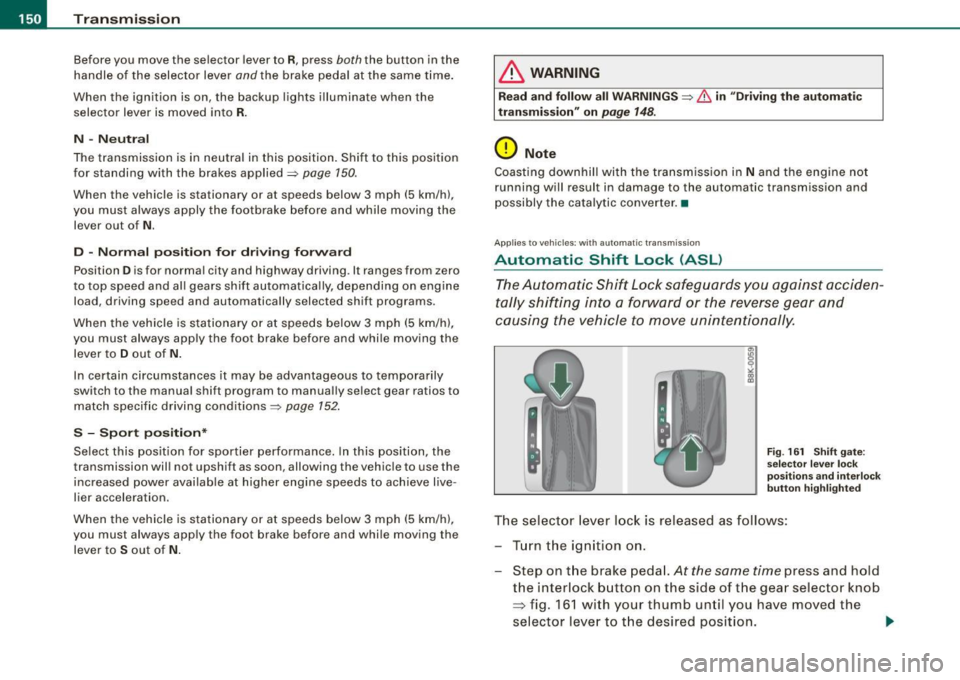
F ig . 16 1 Shift gate:
se lector le ver loc k
posit ions a nd int erl ock
butt on hi gh ligh ted
The selector lever l ock is released as follows :
Turn the ignit ion on .
Step on the brake peda l.
At the same time press and hold
the interlock button on the s ide of the gear selector knob
=> fig. 161 w ith your thumb until you have moved the
selector lever to t he desired position.
~
Page 153 of 360
Tra ns mi ssio n -
----------------
Aut omat ic selec to r l ever lock
The se lector lever is locked in the P and N positions when the igni
tion is turned on. To move the lever from these positions the driver
must depress the brake pedal. As a reminder to the driver, the
follow ing warning appears in the instrument cluster display when
the selector is in
P and N:
W hen sta tio nary app ly footbrake while selecting g ear
A time delay e lement prevents the selector lever from locking when
it is moved through the
N position (going from R to Dl. The locking
e lement will lock the selector lever if the lever is left in N (Neutral)
for more than approximately 1 second, without the brake peda l
being pressed.
At speeds above about 3 mph (5 km/h) the Automatic Shift Lock is
automatically deactivated in the
N position .
Interlock butt on
The lock button on the selector lever prevents the lever from being
accidentally shifted into certain positions. Pressing this button
deactivates the selector lever lock. Depending on the direction of
the shift, the selector lever locks at different positions. The positions
are highlighted in the illustration =>
page 150, fig. 161.
Igniti on key sa fe ty in te rlo ck
The key cannot be removed from the ignition unless the selector
lever is in the
P park position. When the ignition key is removed, the
selector lever wil l be locked in the
P position. •
Applies to vehicles : with automatic transm iss ion
Kick-down
The kick-down feature allows the vehicle to generate
maximum acceleration .
When you press the acce lerator pedal beyond the resistance point
that is reached at ful l throttle, the transmission wi ll select a lower
gear ratio based on vehic le speed and engine RPM. The engine RPM
Controls and equip
ment
wi ll be controlled to produce maximum vehic le acceleration as long
as you continue to press the accelerator pedal beyond this resis
tance point .
& WARNING
Be care ful whe n usi ng the kick -dow n fe atur e on slipp ery ro ads .
R apid acc eleration may cau se th e v ehicle to skid . •
App lies to vehicles : with automat ic transm ission
Dynamic shift program (DSP)
The aut omatic transmission is electronically controlled.
The transmission is se lf adapting and will a ut oma tica lly se lect the
best shift program suited to the driving conditions and driving style.
The transmission will select one of the
eco nom y programs when
you drive at a steady speed or a g radually changing speed without
heavy acceleration. This achieves optimum fuel efficiency, with early
upshifting and delayed downshifting.
The transmission will automatically select the
s p ort y shift programs
when you drive at higher speeds, or with heavy acceleration and
frequent ly changing speeds . Upshifts are delayed to make full use
of engine power . Downshifting takes place at higher engine speeds
than in the economy programs .
The se lect ion of the most su itable shift program is a continuous,
automatic process. The driver can also make the transmission
sw itch to a sporty program by
quick ly pressing down the gas peda l.
This causes the transmission to shift down to a lower gear to
achieve rapid acceleration, e.g. for quickly passing another vehicle .
You do not need to press the gas pedal into the kick-down range.
After the transm ission has upshifted, the original program is
selected accord ing to your driving sty le.
An additiona l shift program allows the automatic transmission to
select the proper gear for uph ill and downhi ll gradients. ..,.
I • •
Page 154 of 360
-Tr
ansmi ssio n
..__ ______________ _
This keeps the transmission from shifting up and down unneces
sari ly on hills. The transmission will shift down to a lower gear when
the driver presses the brake pedal on a downhi ll gradient. This
makes use of the braking effect of the engine without the need to
shift down manually. •
Applies to vehi cles: with aut om ati c transmi ssio n
Manual shift program
Using the manual shift program you can manually select
gears.
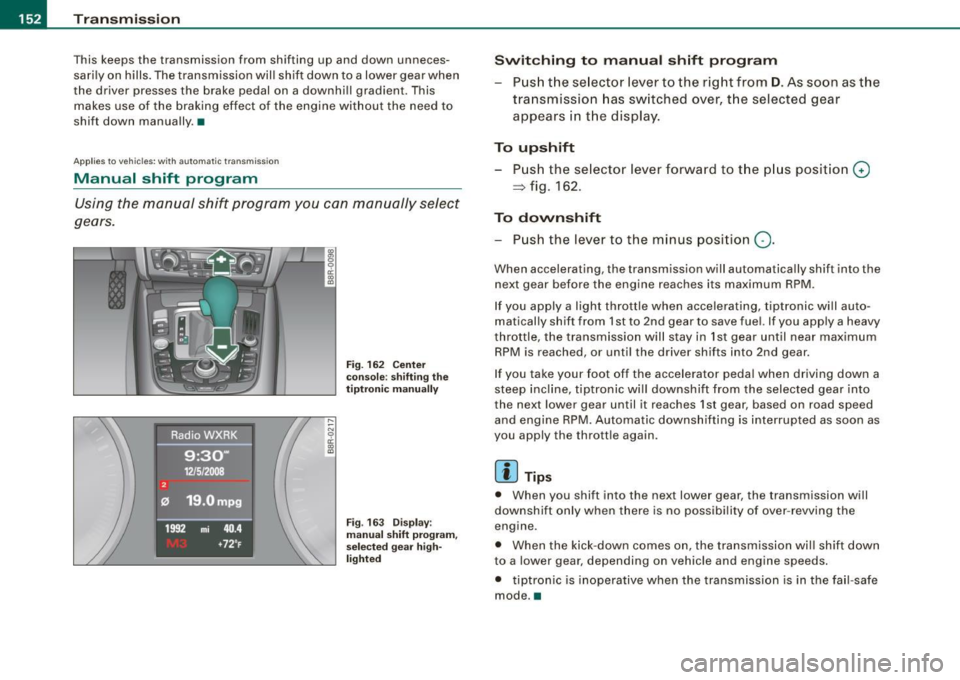
F ig . 162 Ce nter
conso le : sh if ting the
t iptr oni c man ually
Fig . 163 Disp lay:
m anua l shi ft p rogra m ,
selected gear hig h
li g ht ed
Swit chin g to m anu al s hift pr ogr am
Push the se lector lever to the right from D . As soon as the
transmission has switched over, the selected gear
appears in the display .
To upshift
Push the selector lever forward to the p lus position G)
~ fig . 162.
To dovvnshift
- Push the lever to the minus position Q.
When accelerating , the transmission will automatically shift into the
next gear before the engine reaches its maximum RPM .
If you apply a light throttle when accelerating, tiptronic wi ll au to
matically shift from 1st to 2nd gear to save fuel. If you apply a heavy
throttle, the transmission will s tay in 1st gear until near maximum
RPM is reached, or unti l the driver shif ts into 2nd gear.
If you take your foot off the accelerator peda l when driving down a
steep inc line, tiptronic wi ll downshift from the selected gear into
the neX1 lower gear until it reaches 1st gear, based on road speed
and engine RPM. Automatic downshifting is interrupted as soon as
you apply the thrott le again .
[ i ] Tips
• When you shift into the next lower gear, the transmission will
downshift only when there is no possibi lity of over -revving the
engine .
• When the kick-down comes on , the transmission wil l shift down
to a lower gear , depending on vehicle and engine speeds .
• tiptron ic is inoperative when the transmission is in the fa il-safe
mode. •
Page 155 of 360

Transmi ssion -_______________ ___.
Applies to vehi cles : wi th tip troni c st eer ing w heel
Steering wheel with tiptronic
The shift buttons on the steering wheel allow the driver to
shift gears manually.
F ig . 164 Steer in g
whee l: S hift b utt ons
- To downshift, touch the button on the left Q .
- To upshift , touch the button on t he r ight G) .
The shift buttons are activated when the selector lever is in D, S or
in the manual shift program (tip tronic) .
Of course, you can continue to use the manual shift program with
t he selector lever on the center console .•
A pplies to vehicle s: with automatic t ran sm iss ion
Fail -safe mode
If tiptronic suffers a malfunction, the f ail-safe mode main
tains minimum drivability .
In the event of particular system malfunctions, the automatic trans
mission switches to the fail-safe mode . This is signaled by all the
segments in the display illuminating or going out.
Con tro ls and eq uip
ment
You can continue to move the selector lever to a ll positions . The
manual shift p rogram (tiptronic) is switched off in the fail -safe
mode.
I n selector lever positions D and Sand in the manual shift program,
the transm ission remains in 3rd gear if 1st, 2nd or 3rd gear was
engaged previously. The transmission remains in 5th gear, if 4th, 5th
or 6th gear was engaged previously .
The next time you drive off or start the engine, 3rd gear is engaged .
You can continue to use reverse gear. But the electronic loc kout for
reverse gear is turned off .
0 Note
If the transmission switches to fail-sa fe mode, you should take the
vehicle to an authorized Audi dea le rship as soon as possib le to have
t he condition corrected .•
A pplies to vehi cles : w ith au to m atic t ran smi ssio n
Automatic transmission malfunction t'.!>
In the event of a system malfunction, the automatic transm ission
switches to emergency operation mode .
Gearb ox malfun cti on: you can continue dr iving
You can continue to drive the veh icle. See an authori zed Audi dealer
or other qua lified workshop at the next opportunity .
Gearbo x m alfun ction : you can continue driving !limited
fun ctionality )
There is a serious system ma lfunction:
• The program shifts only into certain gears .
• The engine may stall.
• I t is not poss ib le to restart the engine if it has been switched of f.
• Continuing to drive could resu lt in subsequent damage . .,,_
Vehicle care I I Technical data