mirror AUDI A5 COUPE 2010 Owner's Manual
[x] Cancel search | Manufacturer: AUDI, Model Year: 2010, Model line: A5 COUPE, Model: AUDI A5 COUPE 2010Pages: 360, PDF Size: 84.39 MB
Page 160 of 360

• ..__P_ a_r _k _ a_s _ s_ i_ s _t ____________________________________________________ _
•
Sensor s in th e bump er
Fig . 17 1 Tru nk l id:
L oca tion of th e r ear
vi ew c amera
Sensors are located in the rear bumpers. If these detect an obstac le,
audible and visual signals warn you . The range at which the sensors
begin to measure is approximately:
To the side 2 ft (0.60 ml
Center rear
5.2 ft (1.60 m)
Distance warning when reversing starts when an obstacle is
detected in the range of the parking assist system. As the distance
decreases, the time interval between the audible tones becomes
shorter.
When the distance is less than 1ft (0.30 ml, the tone becomes continuous . At this point you should stop backing up.
If the distance to an obstacle stays the same, the vo lume of the
distance signal chime is gradually reduced after about 4 seconds
(does not affect the continuous signal tone). Approaching another
obstac le wi ll cause the distance signal to sound again at the normal
volume.
R ea r vi ew camera cover age ar ea
The MMI display shows the area covered by the rear view camera
=>
page 157, fig . 170 G) . Objects that are not in the area covered 0
are not shown on the MMI display. We recommend that you practice parking with the rear view camera
in a traffic -free location or parking lot to become familiar with the
system, the orientation lines, and their function. When doing this,
there should be good ligh t and weather conditions.
In the MMI d isplay, objec ts or vehicles appear closer or further away
if:
• you are driving in reverse gear from a level surface onto an
incline, or a downward slope,
• you are driving in reverse gear toward protruding objects,
• the vehic le is carrying too much load in the rear.
The accuracy of the orientation lines and b lue surfaces diminishes
if:
• the rear view camera does not provide a reliable image, for
example, in poor visibility conditions or if the lens is dirty,
• the image on the screen is not visible due to sun glare and reflec
tion.
C aring for the rear vi ew c amera l en s
The rear view camera is located above the rear license plate bracket.
For the parking assist to operate, the lens => fig. 171 must be kept
clean :
• Dampen the lens with a household alcohol -based glass cleaner,
and clean the lens with a dry cloth
~ 0 .
• Remove snow with a hand brush and ice preferably with a de
icing spray=>
0 .
& WARNING
• The p arking aid cannot repl ace the driver' s attentio n. The
driv er alo ne is re spon sible for parkin g and similar dri ving m aneu
v ers .
• Alway s keep your eyes on the vehicle' s surrounding s, usin g the
r ea r vie w mirror as w ell. ..,.
Page 162 of 360
• ..__P_ a_r _k _ a_s _ s_ i_ s _t ____________________________________________________ _
Applies to veh ic les : w it h par king syste m lrear , w ith rear view camera)
Reverse Parking
Parking mode 1 can be used when parking in a garage or
parking space .
Fig. 172 MMI Display:
Aiming at a parking
spot
Fig. 173 MMI Display:
Aligning the vehicle
Switch the MMI on and select the reverse gear.
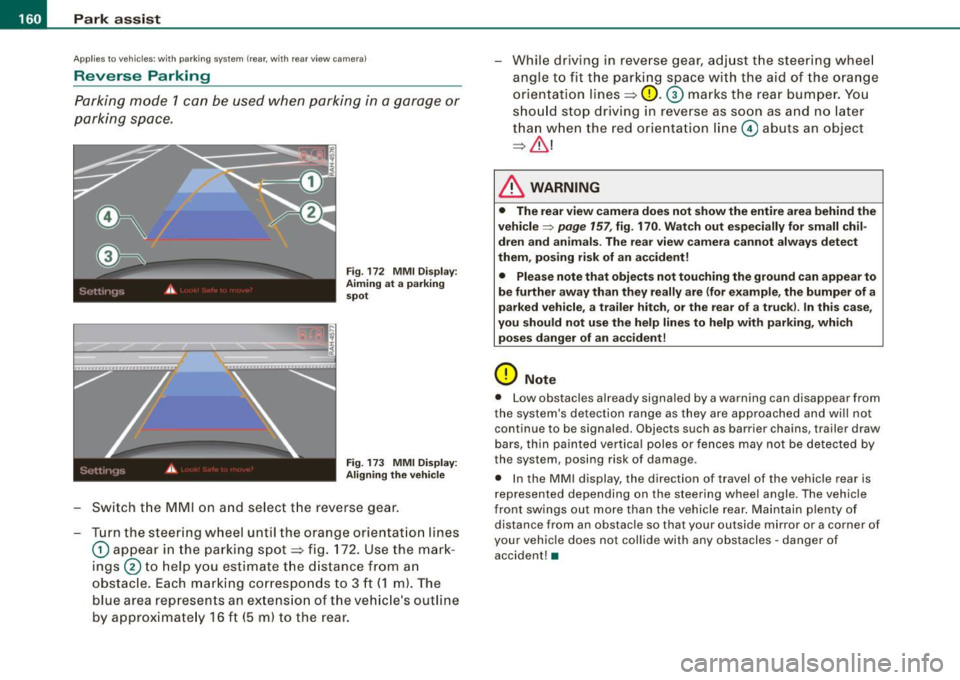
- Turn the steering wheel until the orange orientation lines
0 appear in the parking spot~ fig. 172. Use the mark
ings
0 to help you estimate the distance from an
obstacle. Each marking corresponds to 3 ft
(1 m). The
blue area represents an extension of the vehicle's outline
by approximately 16 ft (5 m) to the rear. While driving
in reverse gear, adjust the steering wheel
angle to fit the parking space with the aid of the orange
orientation lines~
0. G) marks the rear bumper. You
should stop driving in reverse as soon as and no later
than when the red orientation line
0 abuts an object
~& !
& WARNING
• The rear view camera does not show the entire area behind the
vehicle~
page 157 , fig. 170. Watch out especially for small chil
dren and animals . The rear view camera cannot always detect
them , posing risk of an accident!
• Please note that objects not touching the ground can appear to
be further away than they really are (for example, the bumper of a
parked vehicle, a trailer hitch, or the rear of a truck). In this case,
you should not use the help lines to help with parking, which
poses danger of an accident!
0 Note
• Low obstacles already signaled by a warning can disappear from
the system's detection range as they are approached and will not
continue to be signaled . Objects such as barrier chains, trailer draw
bars, thin painted vertical poles or fences may not be detected by
the system, posing risk of damage.
• In the MMI display , the direction of travel of the vehicle rear is
represented depending on the steering wheel angle. The vehicle
front swings out more than the vehicle rear. Maintain plenty of distance from an obstacle so that your ou tside mirror or a corner of
your vehicle does not collide with any obstacles -danger of
accident! •
Page 164 of 360
• ..__P_ a_r _k _ a_s _ s_ i_ s _t ____________________________________________________ _
& WARNING
• The rear view camera doe s not show the entire area behind the
vehicle
=> page 157 , fig. 1 70 . Watch out especially for small chil
dren and animal s. The rear view camera cannot always detect
them , posing ri sk of an a ccident!
• Please note that objects not tou ching the ground can appear to
be further away than they really are (for example , the bumper of a
parked vehi cle , a trailer h itch , or the rear of a t ruck ). In this case ,
you should not use the help lines to help with parking , which
poses danger of an a ccident !
0 Note
In the MMI d isplay, the d irection of trave l o f the vehicle rear is rep re
sented depending on the steering wheel angle. The vehicle front
swings out more than the veh ic le rear. Maintain ple nty of distance
from an obstacle so that your outside mirror or a corner of your
veh icle does not col lide with any obs tacles - danger of accident!
[ i J Tips
The left or r igh t ori entat ion li nes and s urfaces will be displayed,
depending on the turn signa l being used .•
Ap plies to veh ic les: w ith par king sy ste m !rear, with rear vie w camera)
Adjusting the display and warning tones
The d isplay and warning tones are adjusted in the radio
or
MM /*.
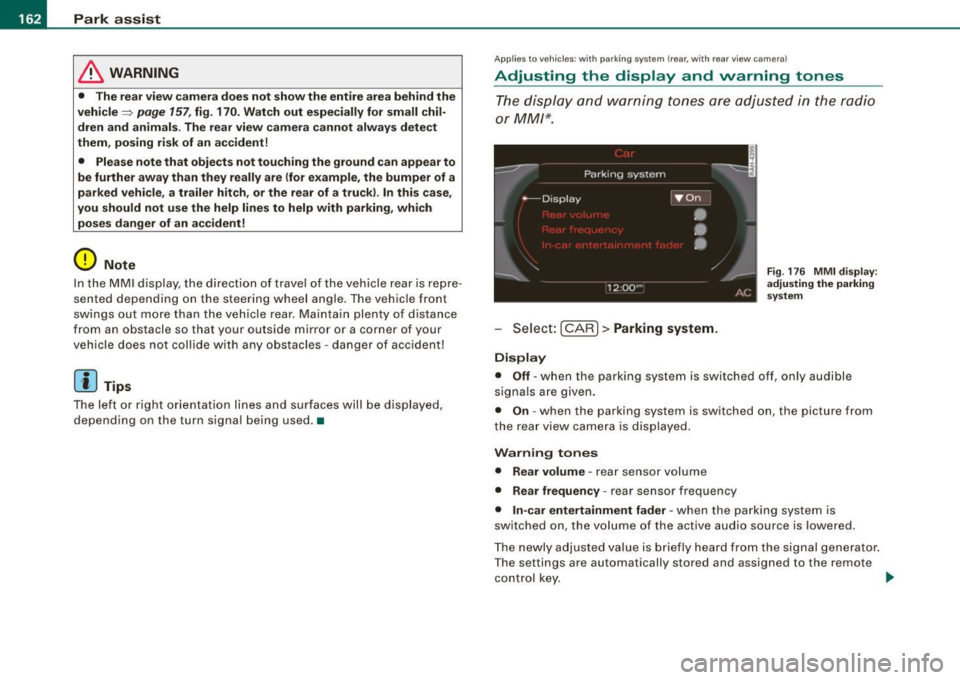
Sele ct: [CARI> Parking system .
Display
Fig . 17 6 MMI di spla y:
adjusting the parking
sys tem
• Off -when the parking system is switched off, on ly audible
sig nals a re given .
• On -when the par king system is switched on, the picture from
the rea r view came ra is displayed .
Warning tones
• Rear volume -
rear sensor volume
• Rear frequency -rear sensor frequency
• In-car entertainment fader -when the parking system is
switched on, the volume of the active audio source is lowered.
The newly a dju sted va lue is b riefly heard fr om the sig nal gene rator .
T he settings are automatically stored and assigned to the remote
control k ey.
~
Page 171 of 360

________________________________________________ D_r_iv _ i _n_ g~ S_ a_ fe_ ly __ BI
Important things to do before driving
Safety is everybody's job! Vehicle and occupant safety
always depends on the informed and careful driver.
For your safety and the safety of your passengers, before
driving always:
-Make sure that all lights and signals are operat ing
correctly.
- Make sure that the tire pressure is correct.
- Make sure that all windows are clean and afford good
visibility to the outside.
- Secure all luggage and other items carefully =>
page 88.
-Make sure that noth ing can interfere w ith the pedals.
- Adjust front seat, head restraint and mirrors correctly for your height .
- Instruct passengers to adjust the head restraints
according to their height.
- Make sure to use the right ch ild restraint correctly to
protect children =>
page 213, "Child Safety ".
- Sit properly in your seat and make sure that your passen
gers do the same=>
page 69, "General recommenda
tions".
- Fasten your safety belt and wear it p roperly. Also instruct
your passengers to fasten the ir safety belts properly
=>
page 179. •
Controls and equip
ment Safety first
Vehicle operation
What impairs driving safety?
Safe driving is directly related to the condition of the
vehicle, the driver as well as the driver's ability to concen
trate on the road without being distracted.
The driver is responsible for the safety of the vehicle and all
of its occupants. If your ability to drive is impaired, safety
risks for everybody in the vehicle increase and you also
become a hazard to everyone else on the road =>& .There
fore:
Do not let yourself be distracted by passengers or by
using a cellular telephone .
NEVER drive when your driving ability is impaired (by
medications, alcohol, drugs, etc.).
- Observe all traffic laws, rules of the road and speed limits
and plain common sense .
- ALWAYS adjust your speed to road, traffic and weather
conditions.
- Take frequent breaks on long trips. Do not drive for more
than two hours at a stretch.
- Do NOT drive when you are tired, under pressure or when
you are stressed .
& WARNING
Impaired driving safety increases the risk of serious personal
injury and death whenever a vehicle is being used. •
Vehicle care Do-it-yourself service Technical data
Page 250 of 360
-Traile r t ow ing
----- -=---------------------------------
Tr a ii er towing
Driving with a trailer
General information
Your Audi was designed primarily for passenger transpor
tation.
If you plan to tow a trailer, please remember that the additional load
wi ll affect durability , economy and performance.
Trai ler towing not on ly p laces more stress on the vehicle, it a lso ca lls
for more concentration from the driver.
For this reason, always fol low the operating and driving instructions
provided and use common sense. •
Technical requirements
Traile r hit ch
Use a weight -carrying hitch conforming to the gross trailer weight.
The hitch must be suitab le for your vehicle and tra iler and must be
mounted secure ly on the vehicle's chassis at a
technically sound
location . Use only a trailer hitch with a removable ball mount.
Always check with the trai ler hitch manufacturer to make sure that
you are using the correct hitch.
D o not u se a b umper hit ch .
The hitch must be installed in such a way that it does not interfere
w ith the impact-absorbing bumper system . No modifications
should be made to the vehicle exhaust and brake systems . From
time to time, check that all hitch mount ing bolts remain securely
fastened.
When you are not towing a trailer, remove the trailer hitch ball
mount. This prevents the hitch from causing damage should your
vehic le be struck from behind =:> & .
Tra iler br akes
If your trailer is equipped with a braking system, check to be sure
that it conforms to al l regu lations.
T he trailer hydraulic brake system must not be directly connected to
the vehicle's hydraulic brake system=:>& .
Safet y cha ins
Always use safety chai ns between y our vehicle and the trailer .
Traile r lights
Trai ler lights mus t meet all regulations. Be su re to check with your
authori zed Audi dealer for correct wiring, switches, and relays .
Mirrors
If you are unable to see the traffic behind you using the regu lar
outside mirrors, then you
must instal l extended m irrors. It is impor
tant that you
always have to the rear .
& WARNING
• If a trailer ha s el ectri cal brake s please note that the se brak es
are n ot act iva ted by the fa ctory -fitted control unit · ri sk of acc i
dent !
• After remo ving the tr ailer hit ch , d o n ot store it in yo ur vehi cle.
In ca se of sudden b raking , th e hitch could fly forw ard and injure
you or your p assengers . •
Operating instructions
M ax imum tr aile r w eight
A trai ler for your vehicle is limited to a typica l class 1 or class 2
trai ler.
Page 258 of 360
-~_C_ l_ e _a _n_ in_g=- a _n_d__, p,__ ro_ t_e _c_ t_ i_o _n _____________________________________________ _
Plastic and vinyl
Plastic needs special care.
Use a clean, damp cloth or sponge to remove dust and light surface
dirt. For other soil, use a lukewarm all -purpose cleaning solution or
a mild saddle soap for vinyl trim. Remove water spots and traces of
soap with a clean, damp cloth or sponge . Use a clean, soft cloth to
rub dry .
Grease, tar or oil stains can be removed with a clean cloth or sponge
soaked with all-purpose cleaner or with a solvent designed espe
cially to clean vinyl.
Occasionally apply a colorless vinyl or leather preservative to retain
the material's luster and pliability.
& WARNING
Always read and heed all WARNINGS and other information
~ page252. •
Aluminum trim
Use only neutral-pH products to remove spots and deposits from
aluminum surfaces. Chrome care products and alkaline cleaners
will attack aluminum surfaces and can damage them over time.
& WARNING
Always read and heed all WARNINGS and other information
~ page252 .•
Touch-up paint
Minor paint damages should be touched up immediately.
-Use either a touch -up paint stick or spray paint to cover
minor scratches and nicks.
Your authorized Audi dealer has touch-up paint for minor scratches
and stone chips. Scratches should be touched up soon after they
occur to prevent corrosion.
If a spot starts to rust, however, a simple touch-up job will not be
enough. The affected surface must be sanded smooth and coated
with an anti-rust primer before the painted finish can be restored.
The number for the original vehicle paint can be found on the
vehicle identification label~
page 334.
& WARNING
Always read and heed all WARNINGS and other information
~ page252.•
Windows
Clear vision to all sides.
Clean all windows regularly to remove road film and car
wash wax buildup.
- Remove snow from windows using a brush.
- Use a plastic ice scraper to remove ice from windows and
mirrors.
- Remove other residue on the windows with a spray-on
glass cleaner.
- Wipe the windows dry with a clean piece of cloth or
kitchen paper towel.
Page 259 of 360
_____________________________________________ C_ l_ e _a_ n_ in_ g_a _ n_d_ p_ r_ o_ t _e_ c_t _io _ n __ !II
•
T he best way to remove snow from windows and mirrors is to use a
brush . Use a non -abrasive
pla stic ice scraper -better still, a spray
deicer -to remove
ice from w indows and mirrors .
The windows must not be cleaned with insect remover or wax since
these can interfere with the function of the w inds hie ld w iper blades
(chatter).
O il, grease, or silicone res idue can be removed with
glas s cleaner or
silicone remover . However, wax residue requires the use of a
spec ially fo rmulated so lvent . Please contac t your authorized Audi
dea ler for advice on safe products for wax removal.
Windows should also be c leaned on the inside at regular interva ls .
Never dry windows with the same chamois that you use to dry
painted surfaces . Wax residue on the chamois can impair vision
t hrough the windows .
& WARNING
• Always read and heed all WARNING S and other information
=> page 252.
• The windshield mu st not be treated with water -repellent m ate
rials . They can in crea se glare under poor v isibilit y conditio ns su ch
a s wetne ss , darkne ss , or when the sun i s low on the hori zon. In
additio n, they can cau se the windsh ield wipers to chatter .
0 Note
• Never use warm or hot wat er to remove snow and ice from
windows a nd mirrors . This cou ld cause the glass to crack.
• T o prevent damage to the wires of the rear defogger, do not p lace
any adhesive stickers on the inside of the rear window over the
wires .
• To he lp prevent dirt from scratching the window, always scrape
in a forward direction -pushing the scraper away from you -never
back and forth. •
Water leaking from the inside of the rear windows may damage
sensitive e lec trical componen ts located eit her u nder the rear parcel
she lf or in the rear trunk area . Always ensure that water never leaks
t hrough the body section of the vehicle. You can do this by using
waterproof protection over the vehic le 's electrical components (e.g .
when instal ling window tinting).
• Damage or malfunction of e lectrical components due to water
damage or any other outside in fluence is no t cove red by the Audi
New Vehic le Limited Warranty. See your Warranty
& Maintenance
booklet for additional details about your war ranty. •
Weatherstrips
Complete car care includes the weatherstrips as well.
-App ly a suitable rubber cond itioner to the weatherstr ips
from t ime to ti me.
io be able sea l properly, the weatherstrips around the hood, doors,
r ear lid, etc. must rema in pliable . Spray the weatherstr ips with sil i
cone or coat them with talcum powder or g lycerin to retain the flex
ibility of the rubber and to protect them against freezing in the
winter.
& WARNING
Al ways read and heed all WARNINGS and other information
=> page 25 2.
[ i ] Tips
K eep si licone sprays off the windshield to avoid wiper smear in
ra in. •
Vehicle care I t •
Page 323 of 360
Fuses and bulbs -
------------------
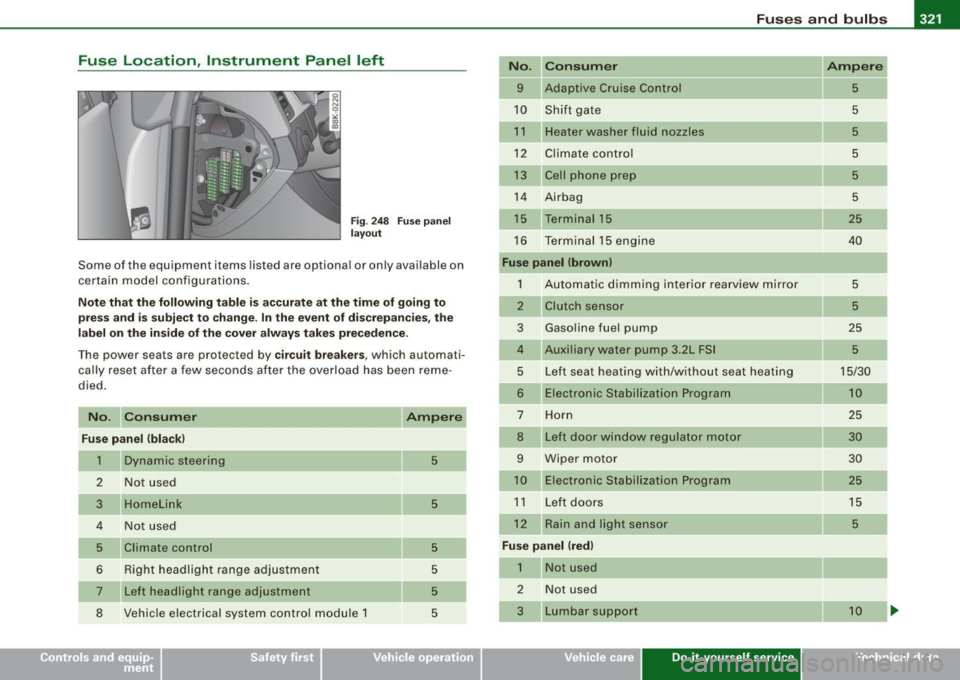
Fuse Location, Instrument Panel left
Fig . 248 Fuse panel
layout
Some of the equipment items listed are optional or only available on
certain model configurations.
Note that the following table is accurate at the time of going to
press and is subject to change. In the event of discrepancies, the
label on the inside of the cover always takes precedence.
The power seats are protected by circuit breakers , which automati
cally reset after a few seconds after the overload has been reme
died.
No. Consumer
Fuse panel (black)
1 Dynamic steering
2 Not used
3 Homelink
4 Not used
5 Climate control
6 Right headlight range adjustment
___ ,
7 Left headlight range adjustment
8 Vehicle electrical system control module 1
5
5
5
5
5
5
No.
9
10
11
12
13
14
16
Consumer
Adaptive Cruise Control
Shift gate
Heater washer fluid nozzles
Climate control
Cell phone prep
Airbag
Terminal 15
Te rminal 15 engine
Fuse panel (brown)
1 Automatic dimming interior rearview mirror
2
3
5
6
7
8
9
Clutch sensor
Gasoline fuel pump
Auxiliary water pump 3.2L FSI
Left seat heating with/without seat heating
Electronic Stabilization Program
Horn
Left door window regulator motor
Wiper motor Electronic Stabilization Program
11 Left doors
12 Rain and light sensor
Fuse panel Ired)
1
2
Not used
Not used
Lumbar support
Vehicle care Do-it-yourself service
Ampere
5
5
5
5
5
5
25
40
5
5
25
5
15/30 10
25
30 30
25
15
5
10
irechnical data
Page 339 of 360

___________________________________________________ D_a_ t_ a __ PII
Data
App lies to v ehicles : with 2.0 lite r 4-cy l. engine
211 hp, 2.0 liter 4-cyl. engine
En gin e data
Maximum output SAE net
Maximum torque SAE net
No _ of cylinders
Displacement
Stroke
Bore
Compression ratio
Fuel
Dim ension s (app rox.)
Length (with licence plate bracket)
Width (with outside mirrors fo lded)
Height (unloaded)
Turning circle diameter (curb to curb)
Ca pac ities (a pprox.)
F u el t ank
-Total capacity
- Reserve (of total capacity)
Wind shi eld and he adli ght * was her fluid container
E ngine oil
with filter change hp@rpm
lb-ft@ rpm
CID (cm
3
)
in (mm)
in (mm)
211 @ 4300 -6000
258
@ 1500 -4200
4
1 21 (1984)
3.65 (92.8)
3.25 (82.5)
9.6 : 1
Premium unleaded (91 AKI) Recommended for maximum engine performance. Fur
ther details =>
page 265, "Gasoline"
in (mm)
in (mm)
in (mm)
ft (ml
182.0 (4625)
73.0 (185 4)
54.0 (1372)
37 .4 (11.4)
gal Oiters)
gal (liters)
quarts (liters)
quarts (liters) 16.9 (64.0)
2.1 (8)
4 .8 (4_5)
4 .9 (4 .6)
•
Controls and equip
ment Safety first Vehicle operation
Vehicle care Do-it-yourself service Tec hn ica l da ta
Page 340 of 360
llftl __ D_a_ t_ a ___________________________________________________ _
Applies to vehicles : wit h 3.2 li ter 6-c yl. en gine
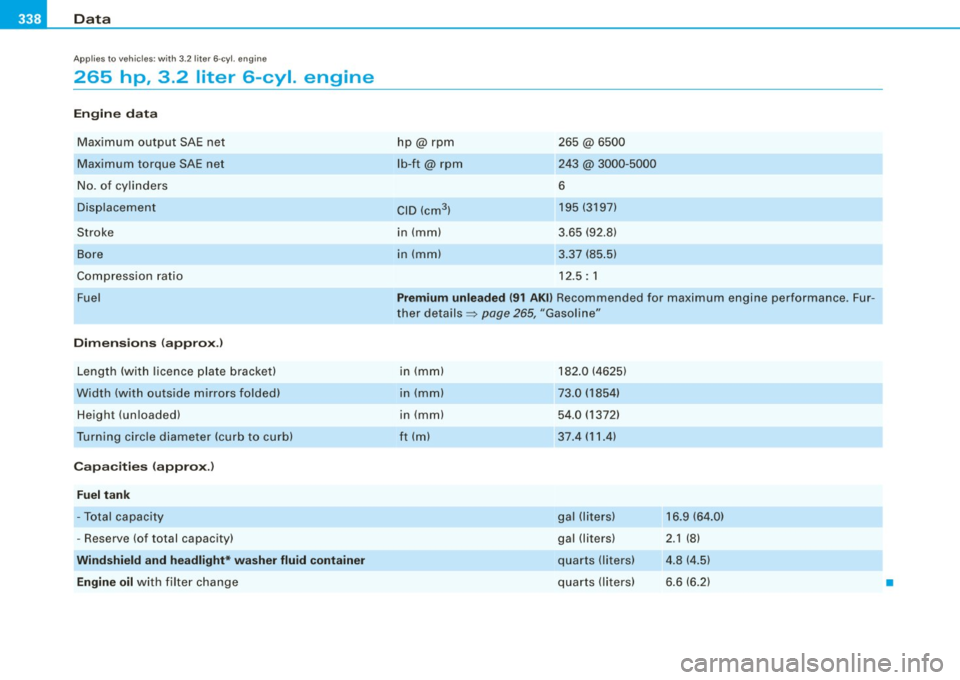
265 hp , 3.2 liter 6-cyl. engine
Engine data
Max imum output SAE net
Maximum torque SAE net
No . of cy lin ders
Di spl ac eme nt
Stroke
Bo re
Comp ress ion rati o
Fuel
Dimensions (appro x.)
Lengt h (with licence plate brac ket)
Width (wit h ou ts ide mirrors folded)
Height (un loaded)
T urn ing c ircle diameter (curb to curb)
Capacities {approx .)
Fuel tank
-To tal capacity
- Rese rve (of total capacity)
Windshield and headlight* washer fluid container
Engine oil
with filter cha n ge h
p@ rpm
lb-ft@ rpm
CID (cm
3 )
in (mm)
in (m m) 265 @6500
243 @ 3000-5000
6 195 (3197)
3 .65 (92 .8)
3 .37 (85 .5)
1 2 .5: 1
Premium unleaded {91 AKll Recommended for maximum engine performance . Fur
t her deta ils =:>
pag e 265, "Gasoli ne"
i n (m m)
in (m m)
in (mm)
ft ( ml 1
82 .0 ( 4625)
73.0 (1854)
5 4 .0 ( 1372)
37 .4 (11.4 )
g al (l iters)
gal (li ters)
qua rts (liters)
q ua rts (l ite rs) 1
6.9 (64 .0)
2 .1 (8)
4. 8 ( 4.5)
6 .6 (6.2)
•