light AUDI A5 COUPE 2011 User Guide
[x] Cancel search | Manufacturer: AUDI, Model Year: 2011, Model line: A5 COUPE, Model: AUDI A5 COUPE 2011Pages: 362, PDF Size: 84.88 MB
Page 19 of 362
For more Information=> page 181, "Safety belt warning light~".•
Malfunction Indicator Lamp (MIL} ~
The Malfunct ion Indicator Lamp (MIL) is part of the On-Board Diag
nostic (OBD II) system . The symbol lights up when the ignition is
turned on and will turn off after the engine has started and has
sett led at a cons tan t idle speed. This indica tes tha t the MIL is working
properly .
T he warning light illuminates when there is a malfunction in the
eng ine e lectro nic system. Contac t your authorized Audi dealer and
have the mal function corrected .
F or mo re informat io n =>
page 29. •
High beam ~D
The aD warn ing/ indicato r light ill uminates when the h igh beams a re
on or when yo u use the headlig ht flasher . For more information about
using the high beams, see=>
page 62. •
Cruise control CRUISE (USA models}/ (,)<)
(Canada models}
Th e wa rn in g/ind icator lig ht ill umina tes when the c ruise contro l is
activated. •
Controls and equip
ment Safety first
Instruments and warning
/indicator lights
Anti-lock brake system (ABS}
A
.:> (USA models}/ .....-(Canada models}
This warning/indicator light monitors t he ABS and the
electronic differentia l lock (E DL).
T he warning/indicator light w ill come on for a few seconds when the
ignition is sw itched o n. The light w ill go out after an automat ic check
sequence is comp leted .
There is a malfunction in the ABS when:
• The warnin g/in dica tor lig ht does not illumina te whe n you switc h
on the ig nitio n.
• Th e warn ing/in dicat or l ight does not go o ut a fter a few seconds .
• The warning/ind icator lig ht ill uminates while d riving.
The brake system will still re spond even without the assistance of
the ABS system . See your authorized Audi dealer a s soon as
possible to restore full braking performance.
For more informat ion
rega rding the ABS=>
page 241 .
The ABS w arning light and the brake warning light come on
together. The ABS will not work and you will notice a change in brak ing response and performance.
Malfunction in the brake system
If the b rake warn ing light => page 18 and the ABS warning ill uminate
together there may be a malfu nction in t he A BS, a nd the re may a lso
be a malfunction in the brake system itself => & .
I n t he even t of a
malfunction in the brake system the warning/ indi
cator light
BRA KE (USA models)/ ((D) (Canada models) in the instrume nt
clu ster flashes . By pressing the
[SETI bu tton, you can b ring up a
dr ive r message which ex pla ins the ma lfunction in more deta il. Please
note =>
page 33. .,,,
Vehicle care Technical data
Page 20 of 362
Instruments and warning/indicator lights
Malfunction in the electronic differential lock (EDL)
The ED L works toge ther w ith the ABS. The ABS warn ing lig ht w ill
come on if there is a mal func tion in the EDL system=>
page 238 . See
your authorized A udi dea le r as soon as poss ible .
& WARNING
• If the .. (USA models )/ ...,. (Canada models ) wa rning light
does not go out , or if it comes on while driving, the ABS system is
not working properly. The vehicle can then be stopped only with
the standard brakes (without ABS ). You will not have the p rotec
tion ABS provides. Contact your authorized Audi dealer a s soon as
pos sible.
• USA models : If the BRAKE warning light and the M, warning
light come on together, the rear wheels could lock up fir st under
hard braking. Rea r wheel lock-up can cause loss of vehicle cont rol
and an accident . Have your vehicle repaired immediately by your
autho rized Audi dealer or a qualified work shop. Dri ve slowly and
avoid sudden, hard brake applications.
• Canada models: If the brake warning light 0 and the ABS
warning light come on together, the rear wheels could lock up
first under hard braking. Rear wheel lock -up can cause loss of
vehicle control and an accident . Have your vehicle repaired imme
diately by you r authorized Audi dealer or a qualified wo rkshop.
Drive slowly and avoid sudden , hard brake applications .•
Electromechanical parking brake
~[ (USA models)/ (®) (Canada models)
The warning/indicator light monitors the electromechan
i c al parking brake .
With the parking brake app lied and the ignition turned on, the
wa rning/ind icator light illum ina tes . Afte r th e ign it io n has been
turned off, the wa rning/ind icator light continues to illuminate for
about 30 seconds . If the parking brake is applied with the ignition turned off, the warning/indicator light
illuminates fo r about 30
se cond s.
T he wa rn in g/ind icator light will go out when the parking brake is
re lease d.
If the war ning/ indi cato r l ight flashes cont in uo usly
after applying the
park ing b rake, braking force is not sufficient to prevent the vehicle
fr om rolling unin ten tionally. Please note the following:
• If the slope of the ground is too steep to par k the ve hicle, the addi
tional drive message appears
Caution: Vehicle parked too steep .
• In the event of a pa rking b rake malfunction, the ye llow symbol
appea rs in the instrument cluster display and the driver message
Parking brake malfunction! is displayed . Have the malfunction
repaire d as soon as possible by an authorized A udi dea le r or any other
qualified workshop .•
Brake system BRAKE (USA
models)/ ((D) (Canada models)
Th e warn ing/indica tor li ght flas hes if br ake fluid level is
lo w, if there i s an A BS system malf unctio n or a parki ng
b ra ke malfu nction.
Th e light i lluminates when the ignition is turned on . It goes out after
t he engine has been sta rted . This indicates that t he b rake war ning
light is functioning properly.
If the brake warning light does not light up when the engine is
cranking, there may be a malfunction in the electrical system. In
this case, contact an authorized Aud i dealer.
If t he brake system wa rning/indicator light flashes, the re is a bra ke
system malfunction. By pressing the
[ SET] button, you can bring up a
dr ive r message w hich expla ins the ma lf unc tion in more deta il
=>p~e33. ~
Page 21 of 362
If the ABS fails, the ABS warning/indicator light ~r (USA
mode ls)/ (C anada mode ls) flashes toge ther w ith the br ake system
wa rning/ind icator light=> &.
(USA models): If the warning light
BRAKE and the warning light i llu
m inate together, immed ia te ly co ntac t your author ized A udi deale r or
qualified workshop to have all brake pads inspected=>
page 38.
When the light comes on, an a ud ible w arni ng s ign al is also given.
& WARNING
• USA model s: If the BRAKE warning light and the S warning
light come on togethe r, the rear wheels could lock up first under
hard braking . R ear wheel lock-up can cause lo ss of vehicle control
and an accident. Ha ve your vehicle repa ired immediately by you r
authorized Audi dealer or a qualified work shop. Driv e slowly and
avoid sudden , hard brake applications.
• Canada model s: If the brake warning light(@ and the ABS
warning light ,. come on togethe r, the rear wheels co uld lock up
first under hard braking. Rear wheel lock-up can cau se lo ss of
veh icle cont rol and an accident . Have your vehicle repaired imme
diately by your authorized Audi dealer or a qualified workshop.
Drive slow ly and avoid sudden, hard brake applications .
• If the brake warning/indicator light doe s not go out after a few
seconds and the parking brake released, or lights up while you are
driving , the fluid level in the brake fluid rese rvoir is too low. If you
believe that it is safe to do so, proceed immediately at low speed
to the neare st authorized Audi dealer or qualified repair facility
and have the brake system inspected .
• Always keep in mind that after several brake applications , you
will need greater pressure on th e brake pedal to stop your vehicle .
Do not rely on strained brakes to respond with maximum stopping
power in critical situation s. You must allow for increased braking
distances. The extra distance used up by fading brakes could lead
to an accident . •
Controls and equip
ment Safety first
Instruments and warning
/indicator lights
Vehicle care Technical data
Page 22 of 362

Driver information display
Driver information display
Introduction
General notes
The driver information display inside the instrument
cluster provides you, the driver, with much useful infor
mation .
Fig. 8 Inst rument
cluster: center d isplay
Information from the driver information system is shown in the
display in the center of the instrument cluster.
When you tu rn on the ign ition and while you are driving, some func
tions and vehicle components are scanned for their operating status. Malfunctions or required service procedures are signaled audibly and
shown by red and yellow lighted symbols and reminders to the driver
in the display .
T he driver is a lso shown information about radio and CD operation
and directions for the navigation system*. You can find additional
information on these subjec ts in the MMI manual.
The illustrations in the instrument panel display differ in some of the
vehicles.
The driver information system provides the follow ing functions: Sound system display
Outside air temperature
Gearshift indicator*
Digital
speedometer
Open door- and luggage compartment warn ing
Service interval display
Auto Check system Driver information
Speed warning
T rip computer*
Gearsh ift selector positions
(Automatic transmission*)
Adaptive cruise control*
[ i ] Tips
=::, page21
=:>page21
=:> page22
=:> page22
=:>page23
=:> page23
=:> page31
=:>page31
=:> page30
=:> page24
=:>page 152
In the event of a malfunction either a red or yellow icon appears in the
display. Red symbols ind icate
Danger => page 32. Yellow symbols
ind icate a
Warning=> page 36. •
Page 23 of 362

Sound system display
Fig. 9 Di sp la y: s oun d
s ystem
If priority 1 or priority 2 fau lts are not shown by the Auto Check
Control, the name of the radio station you are tuned to or the
frequency and the recept io n range are shown in the upper area of the
display.
When the C D is in use, the title of the track be ing p layed is shown. The
CD changer * displays the number of the current CD (CDl to CD6). •
Outside temperature display
Fig . 10 D isplay :
ou tside temper ature
At temperatures below 41 °F ( +5 °C), a snowflake symbol appea rs in
front of the tempe ra tur e display.
It is intended to remi nd the dr ive r
to pay special attention to
ice on the road .
Con tro ls a nd e quip
m en t Vehicle
OP-eration
Driver information display
If your vehicle is stationary or if you are drivi ng at very low speeds, the
t empe ra tu re disp layed m ay be s light ly hig her t han the ac tual
temperature outside due to the heat rad iat ing from the engine .
T he unit of measurement for the temperature can be set in either °F
or in °Con the MM I* or on the radio co ntrol unit. The ou ts ide tempe r
ature display automatically shows the unit o f measurement that has
been set. For ad ditio nal info rmation, see t he MM I* or the r adio
instruction manual.
& WARNING
• Never use the outside temperatu re display to determine if a
road surface i s ic y or not . Keep in mind that road surfaces, espe
cially bridges and o verpasses , could be ice covered and slippery
even at an out side temperature above 41 °F (+5 °C ).
• Always remember , even if the "snowflake " symbol (ice
warning ) does not appear in the di splay, black ice could be on the
road.
• Always reduce your speed and drive with special care in cold
weathe r conditions when the chance of encountering icy road
s urfaces increa se s.
[I) Tips
• If the vehicle is s tat io nary, o r if you are d riving a t a very low speed,
the temperature shown in the disp lay might be slightly higher than
t he act ual o utside temperature. This is caused by the heat being radi
ated from the engine. •
Vehicle care Do-it-yourselt service iTechnical data
Page 24 of 362
Driver information display
Appli es to veh icles : wi th manua l tra nsm iss io n and gea rshift indic ator
Gearshift Indicator
This indicator can help conserve fuel.
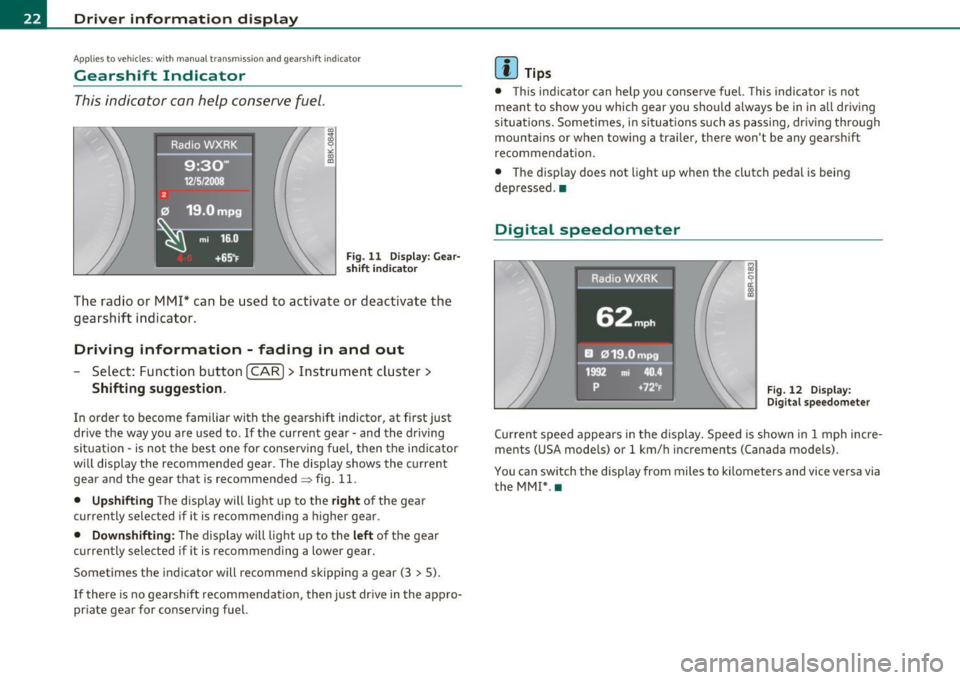
Fig. 11 Display: Gear
sh ift i ndica tor
The radio or MMI* can be used to activate or deactivate the
gearshift indicator .
Driving information - fading in and out
Select: Function button [CAR]> Instrument cluster>
Shifting suggestion.
In order to become familiar with the gearshift indictor, at first just
drive the way you are used to . If the current gear· and the driving
situation· is not the best one for conserving fuel, then the indicator
will display the recommended gear . The display shows the current
gear and the gear that is recommended~ fig . 11.
• Upshifting The display will light up to the right of the gear
currently selected if it is recommending a higher gear.
• Downshifting : The display will light up to the left of the gear
currently selected if it is recommending a lower gear.
Sometimes the indicator will recommend skipping a gear (3
> 5).
If there is no gearshift recommendation, then just drive in the appro
priate gear for conserving fuel.
[I] Tips
• T his ind icator can help you conserve fuel. This indicator is not
meant to show you which gear you should always be in in all driving
si tuations. Sometimes, in situations such as passing, driving through
mountains or when towing a trailer, there won't be any gearshift
recommendat ion.
• The display does not light up when the clutch pedal is being
depressed. •
Digital speedometer
Raaio,WXRK
62mph
EJ 019.Ompg
1992 mi 40.4
p +72°F Fig. 12 Display:
Digital speedometer
Current speed appears in the display. Speed is shown in 1 mph incre
ments (USA models) or 1 km/h increments (Canada models) .
You can switch the display from miles to kilometers and vice versa via the MM!* .•
Page 29 of 362
![AUDI A5 COUPE 2011 User Guide (]] Tips
The d riving information in the efficiency program* is also reset to
zero with the single-trip memory .•
Efficiency program
App lies to v ehicl es: w ith tri p comp uter w](/img/6/57583/w960_57583-28.png "AUDI A5 COUPE 2011 User Guide (]] Tips
The d riving information in the efficiency program* is also reset to
zero with the single-trip memory .•
Efficiency program
App lies to v ehicl es: w ith tri p comp uter w")
(]] Tips
The d riving information in the efficiency program* is also reset to
zero with the single-trip memory .•
Efficiency program
App lies to v ehicl es: w ith tri p comp uter with effic iency p rogram
Description
Fig . 18 Display: effi
ciency p rog ram
- Press the I RESET] button@~ page 26, fig . 17 repeat -
edly until the efficiency program appears in the display.
The efficiency program can help you to use less fuel. It evaluates
driving information in reference to fuel consumption and shows
other equipment influencing consumption as well as sh ift recom
mendations. Fuel economy messages~
page 28 provide tips for effi
cient driving .
The efficiency program uses distance and consumption data from trip computer 1. If the data are deleted in the effic iency program, those
values are also reset in trip computer 1. •
Contro ls a nd e quip
m en t Vehicle
OP-eration
Driver inf ormation display
App lies to ve hicles : with manual t ransmiss ion an d trip com pute r wi th eff icie ncy program
Enhanced shift indicator
Fig. 1 9 Display:
enhanced shift indi
cato r
-In the efficiency program, press the function selection
switch ~
page 26, fig. 17 ® repeatedly until the
enhanced shift indicator appears in the display.
The efficiency program also has an enhanced shift indicator . This
enhanced shift ind icator follows the same concept as the "standard"
shift indicator~
page 22. The selected and the recommended gears
are highlighted in colors like a traffic light.
The color of the circle indicates if the most suitable gear is engaged or if you should shift up or down.
Green circle without or with a
gear
Yellow circle~ fig. 19
Red circle
0 Not e
No gear or the most suitable
gear is engaged
Shift up or down one gear
Shift up two gears
This enhanced shift indicator can help you conserve fuel. It is not designed to recommend the correct gear in all driving situations.
Only the driver can decide which gear is correct in ce rtain dr iving situ -...
Vehicle care Do-it-yourselt service iTechnical data
Page 31 of 362

On-Board Diagnostic system (OBD)
Malfunction Indicator Lamp (MIL)
The Malfunction Indicator Lamp (MIL) in the instrument cluster
~ page 14, fig. 7 is part of the On-Board Diagnostic (OBD II) system.
The warn ing/ind icator light illuminates when the ignition is switched
on and goes out after the engine starts and the idle has stabilized.
This indicat es that the MIL is working properly.
If the light does not go out after the engine is started, or illuminates
while you are driving, a malfunction may exist in the engine system.
If the light illuminates, the catalytic co nverter could be damaged.
Continue driving
with reduced power (avoiding sustained high
speeds and/or rapid accelerations) and have the condition corrected.
Contact your authorized Audi dealer .
If the light illuminates, the electronic speed limiter may also be
malfunctioning. For more information~
page 29, "Electronic speed
limiter".
An improperly closed fuel filler cap may also cause the MIL light to
illuminate ~
page 271. •
On-Board Diagnostics
Contro ls a nd e quip
m en t
Fig. 22 Location of
Data Link Connector (DLC)
Vehicle OP-eration
Driver information display
On-Board Diagnostics monitors the components of your emission
control system . Each monitored component in your engine system
has been assigned a code. In case of a malfunction, the component
will be identified and the fault stored as a code in the control module
memory .
The MIL light may also illuminate if there is a leak in the on-board fue l
vapor recovery system. If the light illuminates after a refueling, stop
the vehicle and make sure the fuel filler cap is properly closed
=;, page 271 .
In order to make an accurate diagnosis, the stored data can only be
displayed using specia l diagnostic equipment (generic scan too l for
OBD).
In order to connect the special diagnostic equipment, push the plug
into the Data Link Connector (DLC). The DLC is located to the right of
the hood release=;, fig. 22.
Your authorized Aud i dealer or qualified workshop can interpret the
code and perform the necessary repair. •
Electronic speed limiter
Your vehicle may be factory equ ipped with tires that are rated for a
maximum speed of 130 mph (210 km/h). This is less than the
maximum speed of your vehicle. To reduce the risk of sudden tire
failure and loss of contro l if the vehicle is operated at excessive
speeds, your vehicle also has an electronic speed limite r. The elec
tronic speed limiter prevents your vehicle from going faster than the
tire speed rating . For more information =;,
page 303.
If the engine control unit receives faulty vehicle road speed signals,
the Malfunction Indicator Lamp (MIL) will illuminate . If this
occurs, contact the nearest authorized Audi dealer for ass istance. .,,_
Vehicle care Do-it-yourselt service iTechnical data
Page 35 of 362
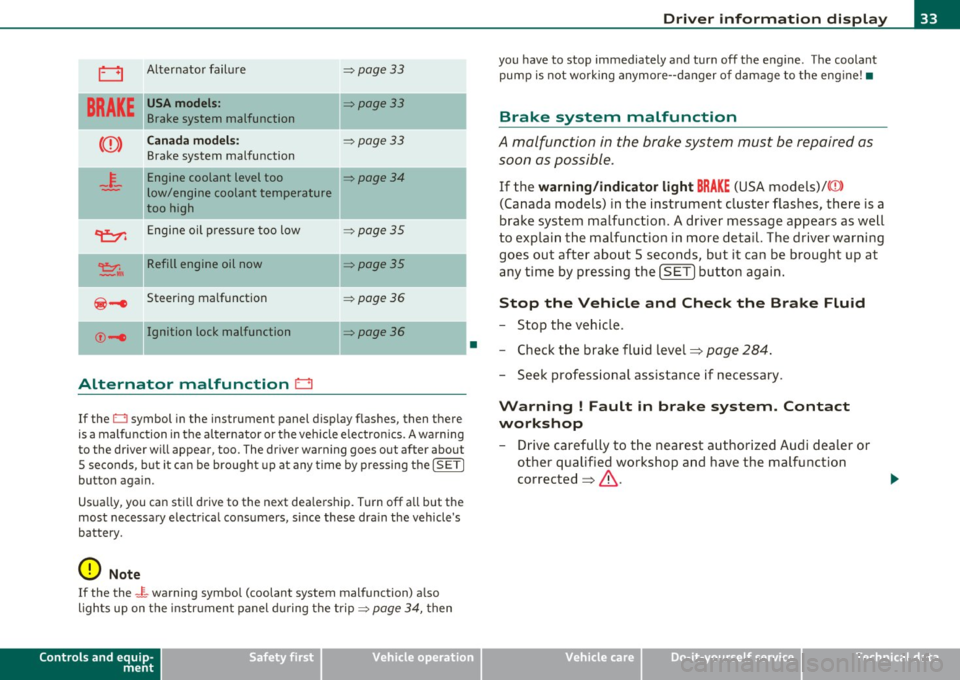
0 Alternator failure => page 33
BRAKE
USA models: =:>page 33
Brake system malfunction
Canada models: =:>page 33
Brake system malfunction
- -
4-
Engine coolant level too =:>page 34
low/engine coolant temperature
too high
~ Engine oil pressure too low =:>page 35
~ II Refill engine oil now =:>page 35
@-e Steering malfunction =:> page 36
©-1 Ignition lock malfunction ::::>poge36
-
Alternator malfunction 0
If the O symbol in the instrument panel display flashes, then there
is a malfunction in the alternator or the vehicle electron ics . A warning
to the driver will appear, too . The driver warning goes out after about
5 seconds, but it can be brought up at any time by pressing the
!SETI
button again.
Usua lly, you can sti ll drive to the next dea lership. Turn off all but the
most necessary e lectr ica l consumers, s ince these dra in the vehicle's
battery.
0 Note
If the the _ f_ warning symbol (coolant system malfunction) a lso
lights up on the instr ument panel during the trip =>
page 34, then
Controls and equip
ment Safety first
•
Driver information display
you
have to stop immediately and turn off the engine . The coolant
pump is not work ing anymore--danger of damage to the engine! •
Brake system malfunction
A malfunction in the brake system must be repaired as
soon as possible.
If the warning/indicator light BRAKE (USA models)/((D )
(Canada models) in the instrument cluster flashes, there is a
brake system malfunction . A driver message appears as well
to explain the malfunction in more detail. The driver warning
goes out after about 5 seconds, but it can be brought up at
any time by pressing the
[SET] button again.
Stop the Vehicle and Check the Brake Fluid
-Stop the vehicle .
- Check the brake fluid level=>
page 284.
-Seek professional assistance if necessary .
Warning ! Fault in brake system. Contact
workshop
- Drive carefully to the nearest authorized Audi dealer or
other qualified workshop and have the malfunction
corrected =>
&.
Vehicle care Technical data
Page 36 of 362
Driver information display
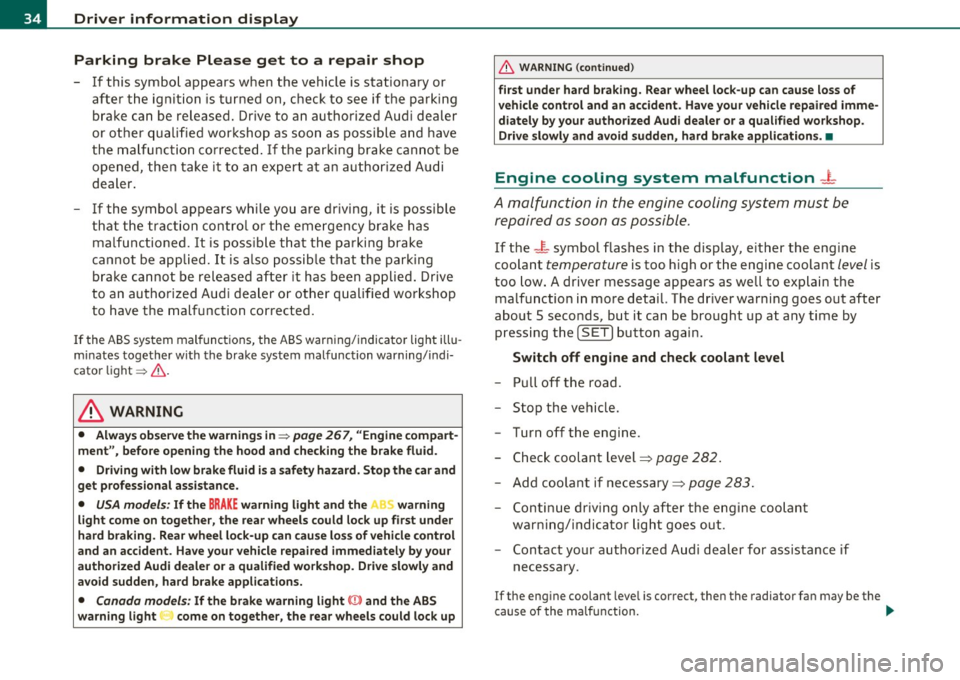
Parking brake Please get to a repair shop
-If this symbol appears when the vehicle is stationary or
after the ignition is turned on, check to see if the parking
brake can be released. Drive to an authorized Audi dealer
or other qualified workshop as soon as possible and have
the malfunction corrected. If the parking brake cannot be
opened, then take it to an expert at an authorized Audi
dealer.
- If the symbol appears while you are driving, it is possible
that the traction control or the emergency brake has malfunctioned. It is possible that the parking brake
cannot be applied. It is also possible that the parking
brake cannot be released after it has been applied. Drive
to an authorized Audi dealer or other qualified workshop
to have the malfunction corrected.
If the ABS system malfunctions, the ABS warning/indicator light illu
minates together with the brake system malfunction warning/indi
cator light~ & .
& WARNING
• Always observe the warnings in~ page 267, "Engine compart
ment", before opening the hood and checking the brake fluid.
• Driving with low brake fluid is a safety hazard. Stop the car and
get professional assistance.
• USA models: If the BRAKE warning light and the ' warning
light come on together, the rear wheels could lock up first under
hard braking. Rear wheel lock-up can cause loss of vehicle control
and an accident. Have your vehicle repaired immediately by your
authorized Audi dealer or a qualified workshop. Drive slowly and
avoid sudden, hard brake applications.
• Canada models: If the brake warning light (Q)} and the ABS
warning light come on together, the rear wheels could lock up
& WARNING (continued)
first under hard braking. Rear wheel lock-up can cause loss of
vehicle control and an accident. Have your vehicle repaired imme
diately by your authorized Audi dealer or a qualified workshop.
Drive slowly and avoid sudden, hard brake applications. •
Engine cooling system malfunction _L
A malfunction in the engine cooling system must be
repaired as soon as possible.
If the _ r_ symbol flashes in the display, either the engine
coolant
temperature is too high or the engine coolant level is
too low. A driver message appears as well to explain the
malfunction in more detail. The driver warning goes out after
about 5 seconds, but it can be brought up at any time by pressing the
(SET) button again .
Switch off engine and check coolant level
- Pull off the road.
- Stop the vehicle.
- Turn off the engine .
- Check coolant level==>
page 282.
-Add coolant if necessary==> page 283.
Continue driving only after the engine coolant
warning/indicator light goes out .
- Contact your authorized Audi dealer for assistance if
necessary .
If the engine coolant leve l is correct, then the radiator fan may be the
cause of the malfunction. ...