light AUDI A5 COUPE 2011 Workshop Manual
[x] Cancel search | Manufacturer: AUDI, Model Year: 2011, Model line: A5 COUPE, Model: AUDI A5 COUPE 2011Pages: 362, PDF Size: 84.88 MB
Page 103 of 362
_________________________________________________ w __ a _r _m __ a_n _d_ c_ o_ ld __ _
affected . To keep the time the climate control system is on as
short as possible, you should do the following:
- To save fuel, turn off cooling mode by pressing the
[AC)
button (indicator light goes out) .
- In addition, if you open the window or the
panorama/tilting sunroof* while driving, turn off cooling
mode by pressing the
[AC) button (indicator light goes
out).
- If the vehicle is extremely hot due to the heat of the sun,
briefly open doors and windows.
~ For the sake of th e environm ent
When you save fuel, you reduce emissions from the vehicle .•
Deluxe automatic climate control
plus
App lies to veh icles: w ith De luxe automatic climate control plus
Description
The air conditioner is fully automatic and is designed to
maintain a comfortable and uniform climate inside the
vehicle.
We recommend the following settings:
- Set the temperature to 75 °F (+23 °C).
- Press the
[AUTO) button.
With this setting, you attain maximum comfort in the least amount
of time. Change this setting, as desired, to meet your personal needs.
Controls and equip
ment Safety first
The climate controls are a combination
of heating, ventilation and
coo ling systems, which automatically red uce humidity and cool the
air inside your vehicle .
The climate control automatically maintains a temperature once it
has been set. The temperature of the air from the vents, fan speed
(air volume) and air distribution are also automatically adjusted. The
system a lso takes into account strong sunsh ine so that man ual
adjustment is not necessary. So in almost all cases,
automa tic mo de
offers the best condit ions for the comfort of the occupants at all
times of the year~
page 104.
Please note the following:
T urn on the a ir cond itioner to reduce humidity in the vehicle. This also
prevents the windows from fogging up.
When the outside temperature is high and the air is very humid,
condensati on from the evaporator may drip under the vehicle. This is
normal and does not indicate a leak .
If the outside temperature is low, the fan normally only switches to a
higher speed once the engine coolant has warmed up sufficiently.
T he air conditioner temporari ly switches off when you drive off from
a standstill using full throttle to save engine power.
T he compressor also switches off if the coolant temperature is too
high, so that the engine can be adequately cooled under extreme
loads.
Du st a nd p ollen filt er
The dust and pollen filter (a combined particle fi lter and activated
charcoal filter) reduces or prevents outside a ir po llution (dust, or
pollen) from entering the vehicle.
T he dust and pollen filter must be changed at the intervals specified
in your Maintenance booklet, so that the air conditioner can properly
work.
If you drive your vehicle in an area with a high degree of air pollution,
the filter may need to be changed more frequently than specified in .,.
Vehicle care Technical data
Page 105 of 362

_________________________________________________ W_ a_ r_m _ a_ n_d_ c_ o_ ld _ ___.lfll
App lies to veh icles : wi th Delu xe aut omat ic climate contro l plus
Controls
This overview will help you to familiarize yourself with the
climate controls .
Fig. 10 0 Clima te co ntrols
T he d isp lay shows the selected temperature for the driver 's s ide on
the left and the s elected temperature for the front passenger's side
on the right .
Functions are set by rotating the cont rol or are sw itched on and off by
tapping the bu ttons. The LED in the buttons ill uminates when the
function is active .
Contro ls a nd e quip
m en t Vehicle
OP-eration
Button(s) Meaning Page
(OFFJ Turns on and off :> page 104
Automatic operation -
(AUTO] driver's side / front pas-=> page 104
senger's side
- --
Temperature regu-
Temperature select ion -
lator
1 a) driver's side
:> page 104 Temperature regu- Temperature select ion -
lator
2a ) front passenger 's s ide
@
F an -driver's side/ front => page 105
passenger's side
I ~ lb' Recirculat ion mode
=> page 105
Air distribution -driver's
(§) side / front passenger's => page 106
side
~ Defrost => page 106
~ Rear window defogger =>page 106
(AC] Turns cooling system on => page 107 and off
~ :>page 109
a) The re gula tor is a lso used to set the fan speed, a ir dist ribut ion and sea t
hea ting .
bl The sy mbol m ay appear slightly differe nt in some mo dels .
(I) Tips
• The grille on the controls=> fig. 100 must remain unobstructed
and must not be taped over . Measuring senso rs a re located behind
it . •
Vehicle care Do-it-yourselt service iTechnical data
Page 108 of 362
![AUDI A5 COUPE 2011 Workshop Manual ffl..__w __ a _r _m __ a_n _ d_ c_ o_ ld ________________________________________________ _
Applies to veh icles : w ith Deluxe automatic climate contro l p lus
Air distribution [~]
The au](/img/6/57583/w960_57583-107.png "AUDI A5 COUPE 2011 Workshop Manual ffl..__w __ a _r _m __ a_n _ d_ c_ o_ ld ________________________________________________ _
Applies to veh icles : w ith Deluxe automatic climate contro l p lus
Air distribution [~]
The au")
ffl..__w __ a _r _m __ a_n _ d_ c_ o_ ld ________________________________________________ _
Applies to veh icles : w ith Deluxe automatic climate contro l p lus
Air distribution [~]
The automatically preset air distribution can be changed.
- Press the[~] button=> fig. 103.
Fig. 103 Air distribu
tion button and regu
lator
- Rotate the regulator to the desired setting.
You can adjust the air distribution so that air flows from specific
vents . In position
;J air flows only to the windows, in position :J, it
flows to the driver or passenger, and in position
!,O it flows to the
footwell. There are additional combinations availab le to adjust air
distribution as needed.
To regulate air distribution automatically , switch to
[AUTO] .
When the MMI display is turned on, the air distribution setting
appears for a few seconds on the screen. •
Applies to vehicles: w ith De luxe automatic climate control plus
Defrost [@]
The windshield and side windows are defrosted or cleared
of condensation as quickly as possible.
- Press the[@] button to turn on the defroster. -
Press the[@] button again, or press the (AUTO
I button to
turn it off.
T emperat ure is controlled automatically. The maximum amount of
air flows mainly from the vents below the windshield.
Pressing the
I@ ] button switches off recirculation mode. •
Applies to vehicl es: w ith Deluxe automat ic clima te control plus
Rear window defogger [ Qiil ]
The rear window defogger clears the rear window of
condensation.
- Press the [lllil] button to turn the rear window defogger on
and off .
The rear window defogger works only when the engine is running. The
indicator light in the button illuminates when the rear wind ow
defogger is on.
The rear window defogger is switched off automatically after 10 to
20 minutes, depending on the outside temperature.
The rear window defogger can be turned on permanently by pressing
the
[Qlil] button for more than two seconds. This remains stored until
the ign it ion is switched off. A rear window defogger that was
switched on also remains stored for 15 minutes after the ignition is
switched off.
If the engine is restarted within these 15 minutes, the rear window
defogger is activated for 10 to 20 minutes, depending on outside
temperature. When a vehicle is parked for a short time, the rear
window defogger does not need to be manually activated again. •
Page 110 of 362
![AUDI A5 COUPE 2011 Workshop Manual 1111....__w __ a _r_ m __ a_n_ d_ c_ o _ l_d _______________________________________________ _
(I] Tips
If the climate control is running in cooling mode, air flows mainly
from vents @ and @. T](/img/6/57583/w960_57583-109.png "AUDI A5 COUPE 2011 Workshop Manual 1111....__w __ a _r_ m __ a_n_ d_ c_ o _ l_d _______________________________________________ _
(I] Tips
If the climate control is running in cooling mode, air flows mainly
from vents @ and @. T")
1111....__w __ a _r_ m __ a_n_ d_ c_ o _ l_d _______________________________________________ _
(I] Tips
If the climate control is running in cooling mode, air flows mainly
from vents @ and @. To achieve adequate cooling, you should never
close these vents completely. •
Applies to vehicles: with Deluxe automatic cl imate control plus
Rear air vents
The rear air vents are located in the center console.
- Rotate the thumbwheel to open and close the vents .
- To adjust the direction of the airflow from the outlet,
move the tab in the center of the outlet in the desired
direction . The direction of the air delivered from the vents
can be adjusted horizontally and vertically.
The air vents are actuated either automatically or manually
depending on the operating mode selected. Heated or unheated
fresh air, or cooled air flows from the vents .
The air vents to heat the rear footwell are located under the front
seats.
(I] Tips
If the climate control is operating in cooling mode, air flows primarily
from the vents in the center console. To achieve adequate cooling,
you should never close these vents completely. •
Applies to vehicles: with De luxe automatic climate contro l p lus
Economical use of the climate control
system
Economical use of the climate control system helps save
fuel.
When the climate control system is working in cooling mode,
engine performance is reduced and fuel consumption is
affected. To keep the time the climate control system is on as
short as possible, you should do the following:
- To save fuel, turn off cooling mode by pressing the AC
button (indicator light goes out).
- In addition, if you open the window or the panoramic
sliding/tilting sunroof* while driving, turn off cooling
mode by pressing the AC button (indicator light goes out).
- If the vehicle is extremely hot due to the heat of the sun,
briefly open doors and windows.
~ For the sake of the environment
When you save fuel, you reduce emissions from the vehicle. •
Deluxe automatic climate control
plus - basic settings
Applies to veh icles: with De luxe automatic climate control plus
General information
The basic climate control settings can be adjusted in the
radio or f\1/\11*.
-Select: Function button I CAR] > Control button AC. ~
Page 115 of 362

On the road -
----------------
& WARNING (co ntinued )
• Never leave children or per sons requiring a ssistan ce unat
tended in the vehicle. The doors can be locked using the remote transmitter, p reventing people from escaping from the vehicle on
their own in the event of an emergency. Depending on the time of
year , people inside the vehicle can be e xposed to very high or very
low t emperatures .
• Never remove the ignition key from the ignition look while the
vehicle is moving. Otherw ise, the steering lock could suddenly
engage and you would not be able to steer the vehicle.
0 Note
• In the event of a malfunct ion in the electronic ignit ion lock a
symbo l in th e i nstr umen t cluster flashes wi th the message
Ignition
lock defective .
• Avoid high eng ine spee ds, fast a cce le ra ti on or heavy eng ine load s
whi le the engine is still cold. This cou ld damage t he eng ine .
do no t let your vehicle s tand and w arm up. Be re ady to dr ive off i mme
diately after starting your ve hicle . Maintain moderate speed unt il the
engine is complete ly warm . R emember, the engine per forms best at
operati ng temperature .
[I) Tips
• If the key ca nnot be removed from the ignition loc k, yo u have to
pull the mec hanical key o ut of t he maste r key in orde r to be able to
loc k the ve hicle The ve hicle can b e loc ked wi th the mec hani ca l key
=> page 44.
• If you open the driver's doo r wi th the ig nit io n switched on, a
buzzer soun ds an d the message
Ignition is on appea rs in the instru
m ent cl uster d isplay. Swit ch the ig nitio n off. •
Controls and equip
ment Safety first
Stopping the engine
-
Bring th e v ehicle t o a f ull s to p.
- Automatic transmission*: Move th e selector lever to t he P
or N position .
-Press on the igni tion key. The e ngi ne is tu rned off .
Emergency off
If it i s n ecess ary in unusu al circum stances, the eng ine can be
switched of f while the vehicle is mov ing. The engine will be switched
o ff if you pres s on t he key fo r an e xtende d peri od.
& WARNING
• Never turn off the engine until the vehicle has come to a
complete stop.
• The brake booster and servotronic only work when the engine
is running. With the ignition turned off , you have to apply more
force when steering or braking. Since you cannot steer and stop
normally , this can lead to accidents and serious injuries .
• The radiator fan can continue to run for up to 10 minutes even
after you have turned off the engine and removed the ignition key.
The radiator fan can also turn on again if the engine coolant heat s
up because of intense sunlight or heat build-up in the engine
c ompartment.
0 Note
Do no t stop the engine im medi ately a fter hard or ex tended dr iv ing.
Keep the eng ine running for approx imately two m in utes to prevent
exces sive he at build- up. •
Vehicle care Technical data
Page 118 of 362
lffll..__O_ n_ t_h _e_ r_o _ a_ d _________________________________________________ _
& WARN ING (con tinu ed)
• For safety rea sons , y o u should alwa ys park your vehicle with
the selector lever in P . Otherw ise, the vehicle could inadvertently
roll
away.
• After the engine has been switched off, the radiator fan can
continue to run for up to 10 minutes -even with the ign ition
switched off.
It can al so switch on again after some time if the
c oolant tempe rature rises as the result of a heat buildup o r if the
engine i s hot and the engine compartment is additionally heated
by the sun 's rays.
0 Note
If the eng ine has been under heavy load for an extended per iod, heat
build s up i n the engine comp artment afte r the engine is swi tched off
- there is a risk of damaging t he engine. Allow the engine to run at id le
for about 2 m inutes befo re swi tc h ing it off. •
Electromechanical parking brake
Operation
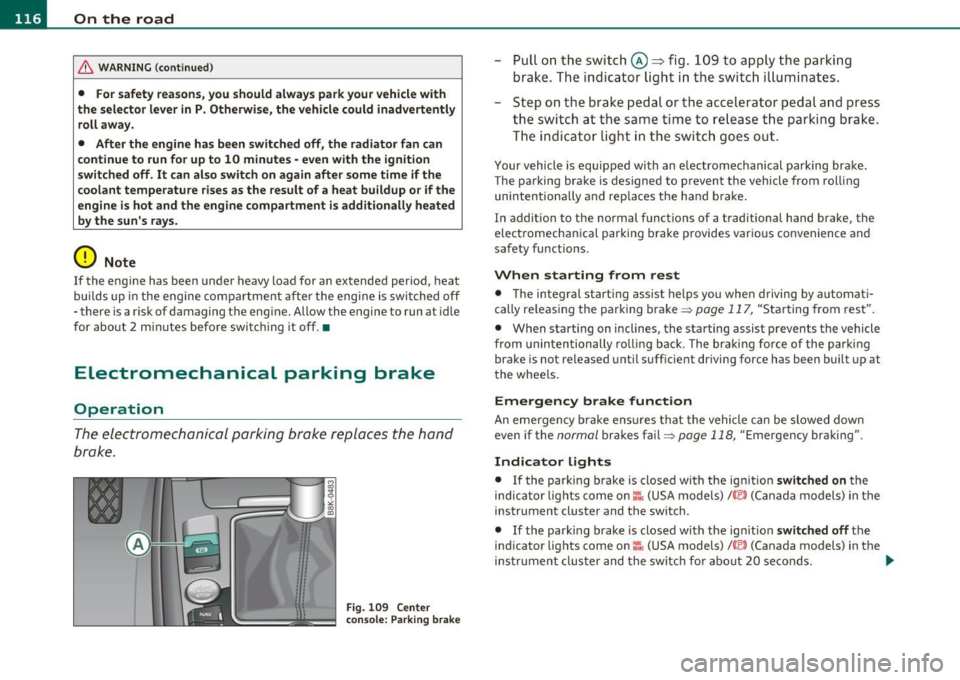
The ele ctromechanical parking bra ke re places the hand
brake.
Fig. 1 09 Center
c o ns ole: P arki ng bra ke
- Pull o n the switc h@ ~ fig . 109 to app ly the parking
brake . The ind icator ligh t in the switc h illu minates.
- Step o n the brake pedal or the accelerator pedal a nd press
t he swit ch at the same ti me to release t he parking brake.
T he indicator lig ht in th e swi tc h go es o ut.
Your vehicle is equ ip ped with an e lectromechanical pa rking bra ke.
The parking brake is designed to prevent the vehicle from rol ling
unintentio nally and rep laces t he ha nd b rake.
In addit ion to the normal functions of a traditional hand brake, the
elect romecha nica l par kin g brake provides various convenience and
safety functions .
When starting from rest
• The integral start ing assist helps you when driving by automat i
cally re leas ing the parking bra ke =>
page 11 7, "Starting from res t".
• When starting on inclines, the sta rting assist prevents the vehicle
from uninten tionally ro llin g back. The br aking f orce of the par king
brake is not released unti l suff icient dr iving force has been built up at
t he whee ls.
Emergency brake function
An e mergency b rake ens ures t hat the vehicle can be sl owed down
even if the
normal brakes fail=> page 118, "Emergency bra kin g" .
Indicator lights
• If the park ing brake is closed w ith the ign it io n switched on the
indic ator lig hts come on
::'fa (USA models)/ © (Can ada models) in the
instrument cluster and the switch.
• If the park ing b rak e is closed with the ign it io n switched off the
indicator lights come on ::':. (USA models)/ © (Canada models) in the
in st rum ent cl ust er and the swit ch for abou t 20 se conds. ._
Page 122 of 362
lffl!I.___O_ n_ t_h_ e_ r_ o_ a _ d _________________________________________________ _
may vary, depending on the type of display in your vehicle. The indi
cator ligh t
CRUISE (US model)/ 0" (C anadia n mo del) w ill also light up
in the instrume nt cluster .
The speed is kept constant by modifying engine power or through an
active brake intervention.
& WARNING
• Always pay attention to the traffic around you when the cruise
control is in operation . You are always responsible for your speed
and the distance between your vehicle and other vehicles.
• For reasons of safety, cruise control should not be used in the
city, in stop-and-go traffic, on twisting roads and when road
conditions are poor (such as ice, fog , gravel, heavy rain and hydro
planing) -you could have an accident.
• Switch the cruise control off temporarily when driving in
turning lanes, highway exits or in construction zones.
• Please note that unconsciously "resting" your foot on the
accelerator pedal causes cruise control not to brake. This is due to
the control system being overridden by the driver's acceleration.
(I) Tips
• Vehicles with manual transmission: You can attain the set speed
only if the gear that is currently engaged will allow it, or if it does not
tax the engine and allows it to run smoothly. Therefore shift into a
hig her o r lower gear in a t imely manne r.
• The brake lights illuminate as soon as the brakes apply
automatically .•
Changing speed
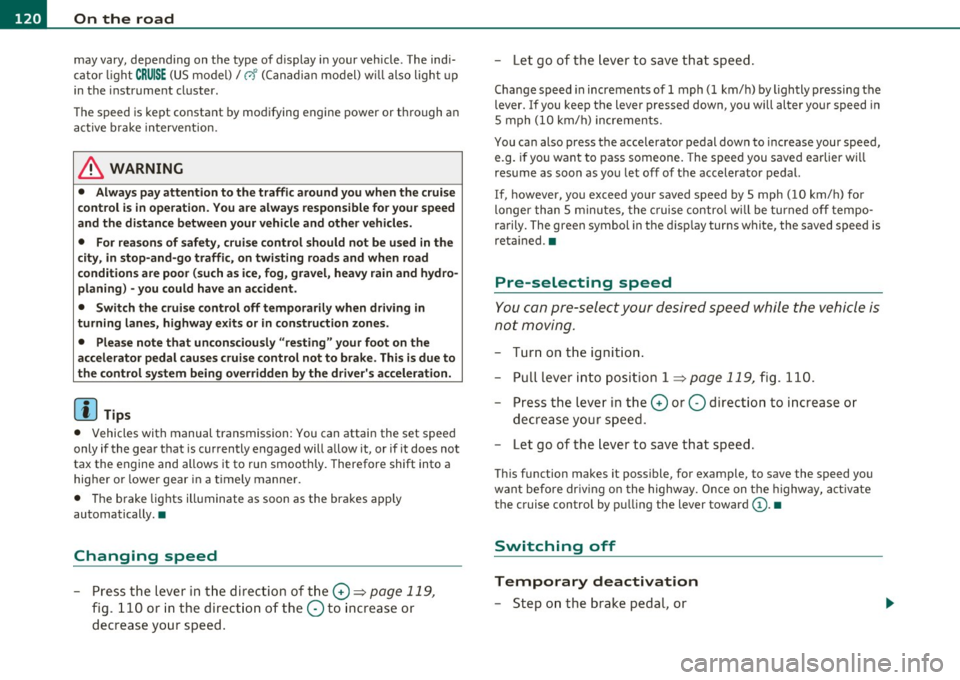
- Press the lever in the direction of the 0 => page 119,
fig. 110 or in the dire ction of the Oto increase or
decrease your speed . -
Let go of the lever to save that speed.
Change speed in increments of 1 mph (1 km/h) by lightly pressing the
lever. If you keep the lever pressed down, you will alter your speed in
S mph
(10 km/h) increments.
You can also press the accelerator pedal down to increase your speed,
e.g. if you want to pass someone. The speed you saved earlier will
resume as soon as you let off of the accelerator pedal.
If, however, you exceed your saved speed by 5 mph
(10 km/h) for
longer than 5 minutes, the cruise control will be turned off tempo
rarily. The green symbol in the d isp lay turns white, the saved speed is
reta ined. •
Pre-selecting speed
You can pre -select your desired speed while the vehicle is
not moving.
- Turn on the ign ition .
- Pull lever into position 1
:::> page 119, fig. 110.
- Press the lever in the
0 or O direction to increase or
decrease your speed.
- Let go of the lever to save that speed.
This function makes it possible, for example, to save the speed you
want before dr iv ing on the highway. Once on the highway, activate
the cruise control by pulling the lever toward
(D . •
Switching off
Temporary deactivation
- Step on the brake pedal, or
Page 127 of 362
Adaptive cruise control Ill ____________ ____,___ __ ____.
App lies to veh icles : w ith a dapt ive cruise contro l
How is the speed stored?
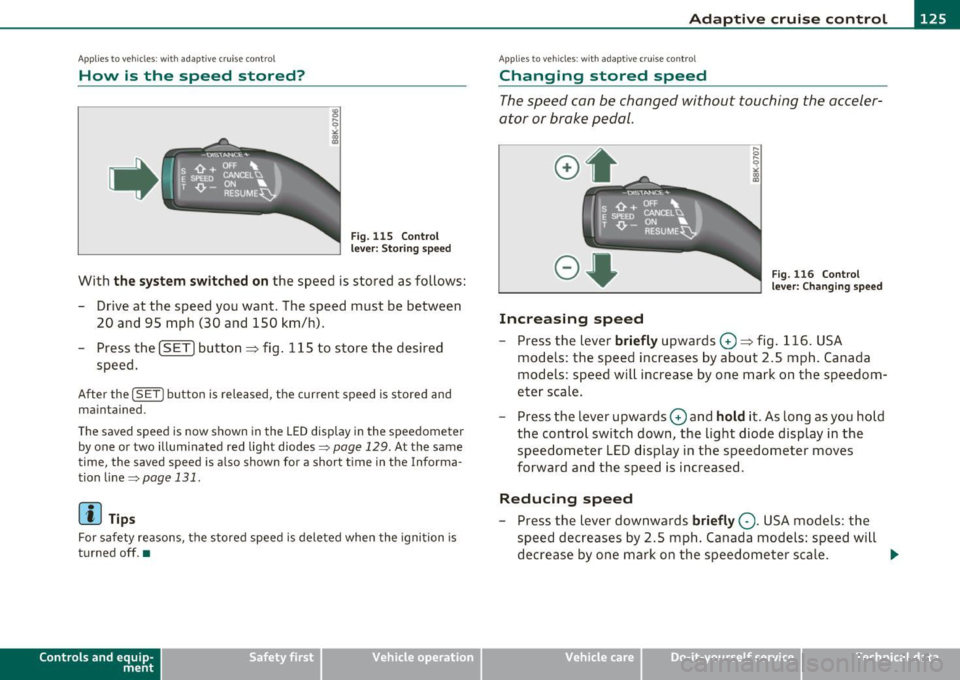
Fig. 1 15 Contro l
l eve r: S tori ng s pee d
With th e sys te m switched on the speed is stored as follows:
- Drive at the speed you want . The speed must be between
20 and 95 mph (30 and 150 km/h) .
- Press the
!SET I button ~ fig . 115 to store the desired
speed .
After the ( SETI button is released, the current speed is stored and
m ain tained .
The saved speed is now shown in th e LED d isplay in the speedom et e r
by one or two illuminated red light diodes=>
page 129. At the same
time, the saved speed is a lso shown fo r a short time in the Info rma
tion
lin e~page 131 .
(I) Tips
For safety reasons, the stored speed is deleted when the ignition is
turned off .•
Con tro ls a nd e quip
m en t Vehicle
OP-eration
Applies to vehicles : w ith ada ptive cru ise cont ro l
Changing stored speed
The speed can be changed without touching the acceler
ator or brake pedal.
Increasing speed
,... 0
~
ill
Fig . 1 16 Con trol
l e ver: Chan ging spee d
- Press the lever briefly upwards 0 ~ fig. 116. USA
models : the speed increases by about 2.5 mph . Canada
models : speed will increase by one mark on the speedom
eter scale .
- Press the lever upwards
0 and hold it . As long as you hold
the control switch down, the light diode display in the
speedometer LED display in the speedometer moves
forward and the speed is increased .
Reducing speed
- Press the lever downwards briefly Q. USA models : the
speed decreases by 2 .5 mph . Canada models: speed will
decrease by one mark on the speedometer scale . _,.
Vehicle care Do-it-yourselt service iTechnical data
Page 128 of 362
BI..__A_ d_a_ p,__ t_i v_ e_ c_r _ u _i _ s _e _ c_o _n _ t_ r_ o_ l ___________________________________________ _
-Press the lever downwards Q and hol d it. As long as you
hold the control switch down, the light diode display in the
speedometer LED display moves backward and the speed
is reduced.
After releasing the control switch, the system r egulates the speed to
the value just set.
Aft er each adjustment, the newly-set speed is shown for a short time
in the Information line~
page 131.
[ i ] Tips
You can increase your speed at any time by stepping on the acceler
ator pedal. After you release the accelerator pedal, the system
adjusts back down to the speed you previously set. A new desired
speed can be stored at any time by pressing the [SET ] button
~ page 125, fig. 115 . •
Applies to veh icles: with adaptive cruise control
Turning adaptive cruise control off
temporarily
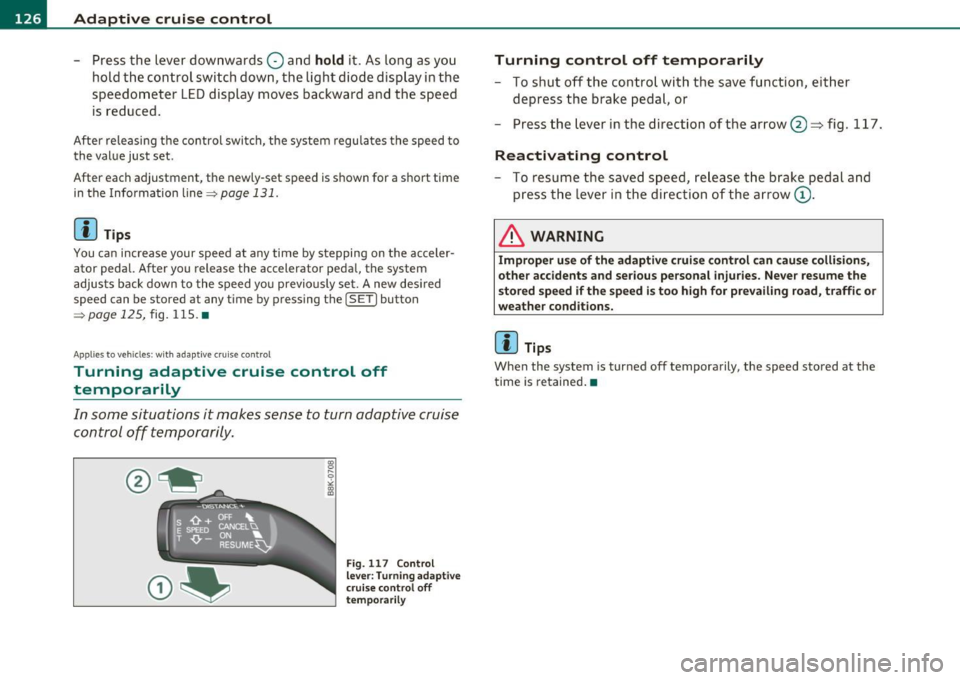
In some situations it makes sense to turn adaptive cruise control off temporarily.
Fig. 117 Co ntrol
lever: Turning adaptive
cru ise control off
temporarily
Turning contro l off temporaril y
-To shut off the control with the save function, either
depress the brake pedal, or
- Press the lever in the direction of the arrow @~fi g. 117.
R eactivating control
- To resume the saved speed, release the brake pedal and
press the lever in the direction of the arrow
(D .
& WARNING
Impr oper u se o f the ad apti ve crui se co ntro l ca n ca use co llisions,
o th er acci dents a nd se rious perso na l inju ri es. Ne ver resu me th e
s t o red sp eed if the s pee d i s too high fo r pr eva ilin g road, t ra ffi c o r
weathe r co ndi tions.
lil Tips
When the system is turned off temporarily, the speed stored at the
time is retained. •
Page 130 of 362
IIII..__A_ d_a_ p,__ t_iv _ e_ c_r_ u _i _ s _e _ c_o _n _ t_ r_ o_ l ___________________________________________ _
Driving pro
gram
Dis tance 1
Distance 2
Distance 3
& WARNING
dynamic
1
2
2
3
standard
2
3
3
4
comfort
3
4
4
5
-
When setting the distance, the dri ver is responsible for adhering
to the respect ive national and country -specific regulations .
• Following other vehicles too closely increase s the risk of colli
sions and serious personal injury.
• Setting short distance s to the traffic ahead reduce s the time
and d istanc e av ailable to bring your vehicle to a safe stop and
makes it even more neces sary to pay clo se attention to traffi c.
• Always use good judgment and select a safe following distance
for the traffic , road and weather condition s.
(I] Tips
The d istance setting is reset to the factory default DISTANCE 3 the
next time the ignition is t urned on .•
Driver information
Ap plies to veh icles: w it h ad aptiv e c ru is e co ntro l
Displays in the instrument cluster
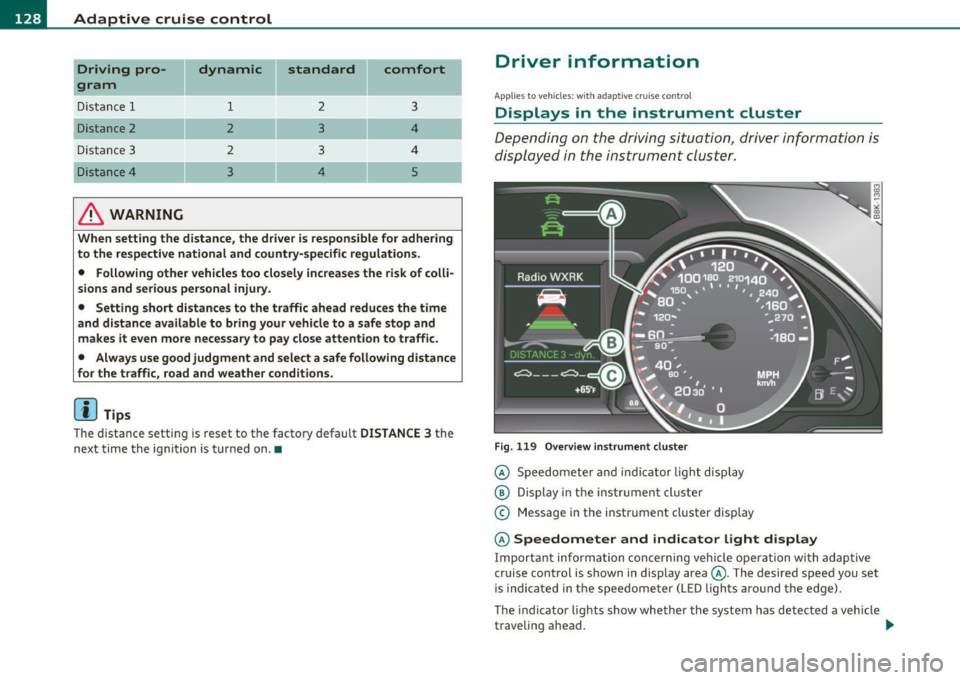
Depending on the driving situation, driver information is
displayed in the instrument cluster.
Fig. 11 9 Ove rv iew i nstrum ent clu ste r
© Speedomete r and indicator light disp lay
@ Display in the ins trument cluste r
© Message in the instr ument cluster disp lay
© Speedometer and indicator light d isplay
Important informa tion concerning vehicle ope ration wi th adap tive
cruise control is shown in display area@. The desired speed you set
is indica ted in the speedome ter (L ED ligh ts aro und the edge).
T he indicator lights show whether the system has detected a veh icle
traveling ahead . .,,.