steering AUDI A5 COUPE 2011 User Guide
[x] Cancel search | Manufacturer: AUDI, Model Year: 2011, Model line: A5 COUPE, Model: AUDI A5 COUPE 2011Pages: 362, PDF Size: 84.88 MB
Page 65 of 362

High beam l[D ®
-Push the lever forward to switch on the high beam.
- Pull the lever back towards you to switch off the high
beam.
Headlight flasher l[D ©
-Pu ll the lever toward the steering wheel to use the head
light flasher.
Notes on the se fea ture s
• The turn signals only work with the ignition turned on. The indi
cato r lights ¢ or¢ in the instrument cluste r also blink.
• After you have turned a corner, the turn signal switches off auto
matically.
• The
high beam works only when the headlights are on. The indi
cato r light [D in the instrument cluster illuminates when the h igh
beams are on.
• T he
headlight flasher works only as long as you ho ld the lever -
even if there are no lights switched on. The ind icator light [Din the
instrument cluste r illuminates when yo u use the headlight flasher.
0 Note
Do not use the high beam or headlight flasher in if you know that
these could be blinding oncoming traffic. •
Contro ls a nd e quip
m en t Vehicle
OP-eration
Clear vision
Interior lights
Front interior lights
The front interior lights also contain reading lights for
the driver and passenger.
Fig. 56 Headli ner:
Fron t interior lig hts
The rocker switch©==> fig . 56 for operating the inter ior
light ing has the following functions:
Doo r contact switch
- Place the switch© in the middle position.
Interior light switched on
-Place the switch© in position I.
Interior light switched off
-Place the switch© in position 0 .
Front reading lights ~
-Press one of the switches ® to turn the r ight or left
reading light on or off.
Vehicle care Do-it-yourselt service iTechnical data
Page 75 of 362
Seats and storage
General recommendations
Why is your seat adjustment so important?
The safety belts and the airbag system can only provide
maximum protection if the front seats are correctly
adju sted.
Th ere a re various ways of adjusting t he front seats to provide safe and
comfortable support for the driver and the front passenger . Ad just
your seat properly so that :
• you can easily and quickly reach a ll the switc hes and contro ls in the
ins trumen t pa nel
• your body is properly supported thus reducing phys ica l stress and
fatigue
• the safety be lts and airbag system can offer maximum protection
=>
page 190 .
In the following sections, you w ill see exact ly how you can best ad just
your sea ts .
Th ere are special regulations a nd instr uctions for install ing a child
safety seat on the front passenger's sea t. Always follow the informa
tion regarding child safety p rovided in=>
page 215, "Child Safety ".
& WARNING
Incorrect seating posit ion of the dri ver and all other passengers
can result in seriou s personal injury.
• Always keep your feet on the floor when the vehicle is in
motion -never put your feet on top of the instrument panel, out
of the window o r on top of the seat cush ion. This applies especially
to the passengers.
If your seating po sition is incorrect, you
increase the ri sk of injury in the case of sudden braking or an acci-
Controls and equip
ment Safety first
Seats and storage
& WARNING
(con tinu ed)
dent . If the airbag inflates and the seating position is incorrect ,
this could result in per sonal injury or even death .
• It is important for both the dri ver and front passenger to keep
a distan ce of at least 10 inche s (25 cm) between themselves and
the steering wheel and /or instrument panel. If you 're sitting any
closer than this , the airbag system cannot protect you properly. In
addition, the front seats and head restraints must be adjusted to
your body height so that they can give you maximum protection .
• Always try to keep as much distance as possible between your
self and the steering wheel or instrument panel.
• Do not adjust the driver's or front passenger 's seat while the
vehicle is moving. You r seat may move unexpectedly , causing
sudden loss of vehicle control and personal injury . If you adjust
your seat while the vehicle is moving , you are out of position. •
Driver's seat
The correct seat position is important for saf e and
re lax ed driving.
W e recomme nd that you a djust the drive r's sea t in the
f ollowing man ner :
- Ad just the seat in fore and aft direction so that you can
easily pus h the pedals to the floor w hile keeping your
knees slightly bent=>
& in "Why is yo ur seat a djus tme nt
so importa nt?" .
- Adjust the seatback so that when yo u sit with yo ur back
agai nst t he seatback , you can st ill grasp t he top of the
steering w heel. ..,
Vehicle care Technical data
Page 113 of 362

________________________________________________ ..::O ::_ n :...:_ t:::: h:...:.:: e:....'....: ro~ a'.!d :=.._ _J-
On the road
Steering
Manually adjustable steering wheel
The h eight and reac h of th e steering wh eel c an be
a djusted.
First, adjust t he dr iver's se at correct ly.
Fi g. 10 6 Leve r und er
the ste ering column
- Pull the lever:::::, fig. 106 -A rrow-:::::, &.
- M ove t he steeri ng wheel to the d esir ed po sition.
- Push the lever against the steeri ng column un til it loc ks.
T here must be at least 10 inches (25 cm) between your chest and the
cen ter o f the stee ring whee l. If you canno t sit more than 10 inches
(25 cm) from the steer ing wheel , see if adaptive equ ipment is avail
able to help you reach the pedals and increase t he distance from the
steering wheel.
For detai led information on how to adjust the dr iver's seat , see
::>page 76.
Con tro ls a nd e quip
m en t Vehicle
OP-eration T
he steering wheel can be adjusted even whe n the ign ition is turned
off. For veh icles with seat memory, the individual positions for the
stee ring wheel ca n be st ored along wi th t he sea t pos it ion.
& WARNING
Improper use of steering wheel adjustment and improper seating
position can cause serious personal injury .
• Adjust the steer ing wheel column only when the vehicle is not
moving to prevent loss of vehicle control.
• Adjust the dri ver's seat or steering wheel so that there is a
minimum of 10 inches (25 cm) between your che st and the
steering wheel=>
page 172, fig. 164. If you cannot maintain th is
minimum distance , the airbag system cannot protect you prop
erly .
• If phy sical limitations prevent you from sitting 10 in ches (25
cm) or more from the steering wheel, check with your authorized
Audi dealer to see if adaptive equipment is available.
• If the steering wheel is al igned w ith your face , the supp le
mental driver 's airbag cannot provide as much protection in an
accident . Always make sure that the steering wheel is aligned with
your chest.
• Always hold the steering wheel with your hands at the 9 o 'clock
and 3 o'clo ck position s to reduce the risk of personal injury if the
driver 's airbag deploys .
• Never hold the steering wheel at the 12 o'clock po sition or with
your hands inside the steering wheel
rim or on the steer ing wheel
hub. Holding the stee ring wheel the wrong way can cause serious
injur ies to the hands, arms and head if the driver's airbag
deploys. •
Vehicle care Do-it-yourselt service iTechnical data
Page 114 of 362

-On the road .,.,..___ ______________ _
Ignition Lock and ignition switch
Starting engine with the key
The ignition is switched on and the engine started with
the ignition key.
Fig. 107 Ignition key
-Insert the key into the ignition lock.
-fvtanual transmission: Fully depress the clutch pedal and
move the shift lever to the neutral position.
-Automatic transmission*: Step on the brake pedal and
move the selector lever to the
P or N position.
- Press the key=> fig. 107 -the engine will start .
By pressing the key without stepping on the clutch or the brake, the
ign ition is switched on and off. With the ignition on, the steering
wheel is unlocked.
You can only remove the key with the ignition switched off . To do this,
you have to press on the key again. With an automatic transmiss ion,
the selector lever must be in the
P position.
When starting the engine, major electrical loads are switched off
temporarily . After
starting a cold engine, there may be a brief period of increased
noise because the oil pressure must first build up in the hydraulic
valve adjusters . This is normal and not a cause for concern .
If the engine should not start immediately, the starting process is
automatically stopped after a short time. Repeat starting procedure.
Driver message in the instrument cluster display
Press brake pedal to start engine
This message appears if you do not step on the brake pedal to start
the engine on a vehicle w ith an automatic transmission .
Press clutch pedal to start engine
This message appears if you do not step on the clutch pedal to start
th e engine on a vehicle with a manual transmission.
Engage N or P to start engine
This message appears when attempting to start the engine if the
selector lever for the automatic transmission is not in the
P or N posi
tion . The engine can only be started with the selector in these posi
tions.
Shift to P, otherwise vehicle can roll away. Doors do not lock if lever
is not in P.
Thi s message appears for safety reasons along with a warning signal.
It appears if the selector lever for the automatic transmission is not
in the
P position after the ignition is switched off . Move the selector
lever to the
P position, otherw ise the vehicle is not secured against
rolling away. You also cannot lock the vehicle using the locking
button on the door handle or using the remote key.
& WARNING
• Always take the key with you whenever you leave your vehicle.
Otherwise, the engine could be started or electrical equipment
such as the power windows could be operated. This can lead to
serious injury.
Page 115 of 362

On the road -
----------------
& WARNING (co ntinued )
• Never leave children or per sons requiring a ssistan ce unat
tended in the vehicle. The doors can be locked using the remote transmitter, p reventing people from escaping from the vehicle on
their own in the event of an emergency. Depending on the time of
year , people inside the vehicle can be e xposed to very high or very
low t emperatures .
• Never remove the ignition key from the ignition look while the
vehicle is moving. Otherw ise, the steering lock could suddenly
engage and you would not be able to steer the vehicle.
0 Note
• In the event of a malfunct ion in the electronic ignit ion lock a
symbo l in th e i nstr umen t cluster flashes wi th the message
Ignition
lock defective .
• Avoid high eng ine spee ds, fast a cce le ra ti on or heavy eng ine load s
whi le the engine is still cold. This cou ld damage t he eng ine .
do no t let your vehicle s tand and w arm up. Be re ady to dr ive off i mme
diately after starting your ve hicle . Maintain moderate speed unt il the
engine is complete ly warm . R emember, the engine per forms best at
operati ng temperature .
[I) Tips
• If the key ca nnot be removed from the ignition loc k, yo u have to
pull the mec hanical key o ut of t he maste r key in orde r to be able to
loc k the ve hicle The ve hicle can b e loc ked wi th the mec hani ca l key
=> page 44.
• If you open the driver's doo r wi th the ig nit io n switched on, a
buzzer soun ds an d the message
Ignition is on appea rs in the instru
m ent cl uster d isplay. Swit ch the ig nitio n off. •
Controls and equip
ment Safety first
Stopping the engine
-
Bring th e v ehicle t o a f ull s to p.
- Automatic transmission*: Move th e selector lever to t he P
or N position .
-Press on the igni tion key. The e ngi ne is tu rned off .
Emergency off
If it i s n ecess ary in unusu al circum stances, the eng ine can be
switched of f while the vehicle is mov ing. The engine will be switched
o ff if you pres s on t he key fo r an e xtende d peri od.
& WARNING
• Never turn off the engine until the vehicle has come to a
complete stop.
• The brake booster and servotronic only work when the engine
is running. With the ignition turned off , you have to apply more
force when steering or braking. Since you cannot steer and stop
normally , this can lead to accidents and serious injuries .
• The radiator fan can continue to run for up to 10 minutes even
after you have turned off the engine and removed the ignition key.
The radiator fan can also turn on again if the engine coolant heat s
up because of intense sunlight or heat build-up in the engine
c ompartment.
0 Note
Do no t stop the engine im medi ately a fter hard or ex tended dr iv ing.
Keep the eng ine running for approx imately two m in utes to prevent
exces sive he at build- up. •
Vehicle care Technical data
Page 117 of 362

On the road Ill
----------------
engine again . Moreove r, yo u ca nn ot loc k the ve hicle from the outside
w ith th e key.
Shift to P , otherwise vehicle can roll away. Doors do not lock if lever
is not in P.
T hi s message appears for safety reasons along with a wa rn ing signal.
I t app ear s if the sele ct or l eve r for the a utomatic t ran smi ssion is not
in the
P pos itio n w hen sw itch ing off t he ig ni tio n wit h the
!START E NGINE STO P! bu tton . Move t he se lec to r lever to the P
posi tion, otherwise the vehicle is not sec ure d aga inst rolling away .
You also cannot l ock the ve hicl e usin g th e lockin g button on the door
han dle or us ing the remo te key .
Convenience key defe ctive ! Use ignition lock
T his me ssag e ap pea rs if t he v ehi cle has to be star ted not w it h t he
!START ENGINE S TOPJ button bu t with the ig nitio n key.
& WARNING
• Never allow the engine to run in confined spaces· danger of
asphyxiation.
• Never turn off the engine until the vehicle has come to a
complete stop.
• The brake booster and servotronic only work when the engine
is running. With the ignition turned off, you have to apply mo re
force when steering or braking . Since you cannot steer and stop
normally, this can lead to accidents and serious injuries .
0 Note
• Avoid high engine rpm, full throttle and heavy engine loads until
t he e ngine h as re ache d op era ting te m pera tu re - oth erwise you risk
eng ine damage.
• Th e engi ne can not b e start ed by p ushin g or t owing th e vehi cle.
• If the eng ine has bee n unde r heavy load for a n extended per iod,
heat builds up i n the engine compa rt me nt after the en gine is
Controls and equip
ment Safety first
switched off- t
here is a risk o f damag ing the engine. Allow the engine
to run at id le f or ab out 2 minu tes before sw itc hing it off .
W Tips
If you open the driver's doo r with t he ignition switc hed o n, a buzzer
so unds a nd the message
Ignition is on ap pears in t he instr ument
cl uster disp lay . Switc h the ign ition off .•
A pp lies to vehicles : w it h c onvenie nce key
Sw itching engine off with the
[ STAR T ENGINE S TOP] button
- Bring y our ve hic le to a c om ple te s top.
- Auto mat ic t ra nsm iss ion*: Mo ve t he sele ct o r le ver to th e
P
o r N po sition .
- Press the [START ENGINE STOP ] button ~ page 114,
fi g. 108 .
Emergency OFF function
If necessa ry, th e eng ine c an b e swi tched off w ith the se lec to r lever in
t he
R , D or S* positio ns. To do so, step on t he b rake pedal a nd pr ess
and ho ld the
!START ENGINE STO P! button (veh icle spee d must be
less than 6 mph/ 10 km/h.
& WARNING
• Never turn off the engine until the vehicle has come to a
c omplete stop.
• The brake booster and servotronic only work when the engine
is running . With the ignition turned off, you have to apply more
force when steering or braking. Since you cannot steer and stop
normally , this can lead to accident s and serious injuries.
~
Vehicle care Technical data
Page 138 of 362
IIII.___A_ d_ a,.:.p _ t_ i _v _ e_ c_ r _u _ is_ e_ c_o _n_ t_r _o _l _____________________________________________ _
The Audi braking guard is active from a speed of approx. 20 mph
(30 km/h) and works within the system limits=>
page 133 even when
the adaptive cruise control is deactivated.
A radar sensor is built into the front of the vehicle=>
page 122,
fig. 112. The system is intended to measure the distance to reflective
surfaces. If a measurement is not possible, the system does not
respond.
When the measurement has taken place, the system can assess a
hazardous situation, when a vehicle ahead suddenly brakes or when
your own vehicle is dr iving at high speed towards a much slower
vehicle ahead. As soon as the system assumes that a possible colli
sion w ith the vehicle ahead can only be avoided by immediate all-out
braking or by an avoiding maneuver, a warning appears .
Th e system has a pre-set response time to be able to warn in good
time. This system response time is automatically reduced if you accel
erate actively, for example to join a highway. Braking, transverse
acceleration and the steering angle can lead to a reduced system
response time. The warning is deactivated if you begin to overtake
with full accelerat ion.
The system draws your attention to two different hazardous situa
tions:
Distance
Th e distance wa rning is issued in the event of inadequate distance to
the vehicle ahead a period of more than S seconds. If the distance is
less than 30 feet (9 meters) at SO mph (80 km/h), for example, an
optical display is faded in on the instrument cluster=>
page 135,
fig. 131.
If the vehicle ahead brakes sharply, a collision cannot be avoided,
even in the case of an immediate response. In this case, increase the
distance to the vehicle ahead.
Speed
If there is a much slower vehicle ahead in your lane, or if the vehicle
ahead brakes sha rply, the Audi braking guard calculates the point from which a collision can only be avoided by all-out brak
ing or by an
avoiding maneuver. If a warning does sound, a possible collision with
the vehicle in front can be avoided through an evasive maneuver or by
braking.
Th e warn ing is given in two stages:
• Pre-warning: An optical display appears in the instrument cluster
and a warning tone sounds.
• Acute warning: If you do not respond to the pre-warning, the
second stage, the acute warning, is issued. A brake jolt reminds you
to concentrate on the road again.
Under heavy breaking, brake assist =>
page 241 also helps you obtain
maximum braking effic ien cy.
& WARNING
Always pay attention to traffic, even when the Audi braking guard
is switched on. You are always resp onsible for
your speed and the
distance between your vehicle and other vehicles.
• Always keep the legally stipulated safety distance between
your vehicle and the vehicle ahead -danger of accident!
• The Audi braking guard does not respond outside the system
limits, for example if you approach a stationary obstacle (end of a
traffic jam or breakdown vehicle).
• Please observe that the Audi braking guard is subject to restric
tions in narrow bends due to the field of vision of the radar sensor.
This may possibly lead to obstacles not being detected.
• The radar sensor's
vision can be reduced by rain, snow and
heavy spray . This can result in vehicles driving ahead being inade
quately detected or, in some circumstances, not detected at all.
Always watch where you are driving.
• Reflecting objects such as e.g. crash barriers or the entrance to
a tunnel may impair the function of the radar sensor.•
Page 149 of 362

_____________________________________________ _:_A..:. u =.= d:.:i...: d=.:.. r.:..:iv :..:e=-..: s:.: e=. l:.: e:.: c=. t:..__1!'11
Audi drive select
Driving settings
Applies to veh icles: with dr ive select
Introduction
Audi drive se lect provides the possib ility to experience different types
o f vehicle se ttings in one ve hicle. For ins tan ce, using the t hree
COMFORT, AUTO and DYNA MIC modes, the driver can switch from a
sporty to a com fortab le dr iv ing mode with the p ress of a bu tton .
Add itionally, in ve hicles with MMI*, the veh icle se tup for I NDI
VIDUAL * mo de can be c ustomized by you. This makes it poss ib le to
combi ne sett ings such as a sporty engi ne tuning w it h light st eering.
& WARNING
• Improper use of the Audi drive select can cause collisions,
other accidents and serious personal injury.
• Never drive at speeds that are too high for traffic , road and
weather conditions. •
Applies to vehicles: with drive select
Description
The ve hicle setup in eac h mode depends on the vehicle's features.
However, the engine and servo tron ic are always affe cted . The auto
matic transm issio n*, dy namic steering* and adapt ive dampers * are
also ad justab le.
Depe nd ing o n the mode, t he
engine and automatic transmission*
respond more quickly or in a more balanced manner to accelerator
ped al m oveme nts.
Controls and equip
ment Safety first
Th
e Servotronic (st ee ring s ervo assistance) ~ page 242 can a lso be
adapted to d riving situations.
Dynamic steering c hanges the s teer ing ra tio as a func tion of the
dr iv ing speed in order to optimize the driver's required steering
effor t. T his se ts the s teer ing to be less sensi tive at hig he r speeds in
orde r to provide greate r co ntro l over the ve hicle. At reduced speeds,
however, steering is more direct in o rder to keep the stee rin g effort
as min imal as possible whe n the dr ive r is maneuvering the vehicle. At
low and average speeds, dynam ic steer ing add it iona lly p rovides more
respo nsive steer ing pe rfo rmance. The dr iver can set the basic
steering ratio characteristics.
Th e
adaptive dampers use senso rs to recor d info rmat io n regar ding
steering movements, braking and acce lera tion operations by the
dr ive r, road sur face, driving speed, and lo ad . T his makes i t possib le to
adapt damp ing to the driving si tuat ion v irt ua lly in r eal t ime . Audi
dr ive select a lso makes it poss ible to satisfy the desire fo r sporty
s u spension (DY NAMIC) and comfortab le sus pension (COMFOR T)
without giving up balanced tun ing (A UTO) .
Th e follow ing ch art prov ides a n overv iew o f th e ch ara cterist ics o f
each driving mode.
Systems AUTO DYNAMIC
Engine/gearbox b ala nce d balan ced sp orty
Servotronic comfortable balanced sporty
Dynamic steering comfort- bal- spo rty/d irect
a b le/indire ct anc ed/ direct
Adaptive dampers comfortable balanced sporty
Th e Servotr onic sett in gs are ad juste d und er the
Dyn. steering menu
item. .,_
Vehicle care Technical data
Page 150 of 362
ffl..__A_ u_d_ i _d _r_ i_v _e _ s_e _ l_ e _ c_ t _______________________________________________ _
(I) Tips
• Sporty sh ifting characteristics can be set by selecting the
DYNAMIC mode. The S selector lev er position is not available.
• The dynamic steering may make noise when starting or stopp ing
the engine. This does not indicate a problem .•
Ap plies to ve hicles : with drive se lect
Selecting the driving mode
You can choose between COMFORT, AUTO, DYNAMIC and
INDIVIDUAL* modes.
__, __ . -
.,,
~
--========== "' "" l8
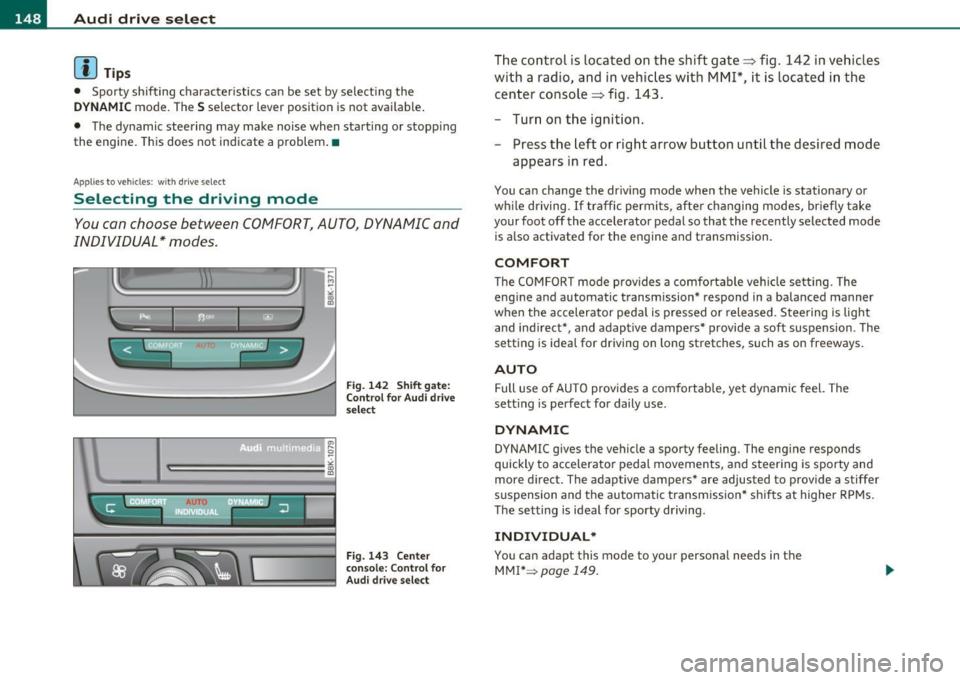
Fig. 142 Shift gate:
Control for Audi drive
select
Fig. 143 Center
console: Co ntrol for
Audi drive select
The control is located on the shift gate:::::, fig. 142 in vehic les
with a radio, and in vehicles with
MMI*, it is located in the
center console :::::, fig . 143 .
- Turn on the ignition.
- Press the left or right arrow button until the desired mode
appears in red.
You can change the driv ing mode when the vehicle is stationary or
w hil e driving. If traffic permits, after chan ging modes, briefly take
your foot off the accelerator pedal so that the recently selected mode
is also activated for the eng ine and transmission .
COMFORT
The COMFORT mode prov ides a comfo rtable vehi cle se tting . The
engine and automatic t ransm ission * respond in a balanced manner
when the accelerator pedal is pressed or released. Steering is light
and ind irect*, and adaptive dampers* provide a soft suspension . The
setting is ideal for driving on long stretches , such as on freeways.
AUTO
Full use of AUTO provides a comfortable, yet dynamic feel. The
sett ing is perfect for daily use .
DYNAMIC
DYNAMIC gives the vehicle a sporty feeling. The eng ine responds
quickly to accelerator pedal movements, and steer ing is sporty and
more direct. The adap tive dampers* are adjus ted to provide a stiffer
suspension and the automatic t ransmission* sh ifts at higher RPMs.
The setting is ideal for sporty driving .
INDIVIDUAL*
You can adap t this mode to your personal needs in the
MMI* =>
page 149.
Page 158 of 362

1111..__T_ r_a _ n_ s_m_ i _s_ s_ io_ n _____________________________________________________ _
Applie s to veh icles : wi th tiptro nic steer ing whe el
Steering wheel with tiptronic
The shift buttons on the steering wheel allow the driver to
shift gears manually.
F ig. 15 0 Steering
wh eel: Sh ift butt ons
- To downshift, touch the button on the left Q.
- To upshift , touch the button on the right G) .
The shift but tons are a ct ivated when the selec to r l ever is in D, Sor in
the manual shift program (t iptronic).
Of course, you can continue to use the manual shift program with the
selector lever on the cente r console. •
Applies to veh icles: w ith automat ic transm ission
Automatic transmission malfunction l
In the event of a system malfunction, the automatic transmission
switches to emergency operation mode.
Gearbox malfunction : you can continue driving
You can continue to dr ive the vehicle . See an authorized Audi dealer
or other qualifie d workshop at the next opportu nity.
Gearbo x malfunction : you can continue driving (limited
functionality)
T he re is a ser ious system malfunc tion:
• The program sh if ts only into certa in gea rs .
• T he engine may stall.
• It is not possible to restart the engine if it has been switched off.
• Continuing to d rive cou ld res ult in subseq uent damage .
0 Note
If the transmission switches to fail-safe mode, you sho uld take the
vehicle to an authorized Audi dea lership as soon as poss ible to have
t he con ditio n corre cted. •
Applies t o vehi cles: with au to m ati c transm iss ion
Emergency release of the selector lever
I f the vehi cle's power supply fails, the selector lever can
be released in an emergency.
Fig. 1 51 Removi ng
as htr ay in sert ..