wheel AUDI A5 COUPE 2011 User Guide
[x] Cancel search | Manufacturer: AUDI, Model Year: 2011, Model line: A5 COUPE, Model: AUDI A5 COUPE 2011Pages: 362, PDF Size: 84.88 MB
Page 77 of 362
Applies to veh icles : w ith manua lly ad justable seats
Adjusting the seat
Position and shape of the seat can be adjusted manually
to ensure safe and comfortable seating.
Read and follow the warning notices~ & before you adjust
your seat .
Fore-and-aft adjustment
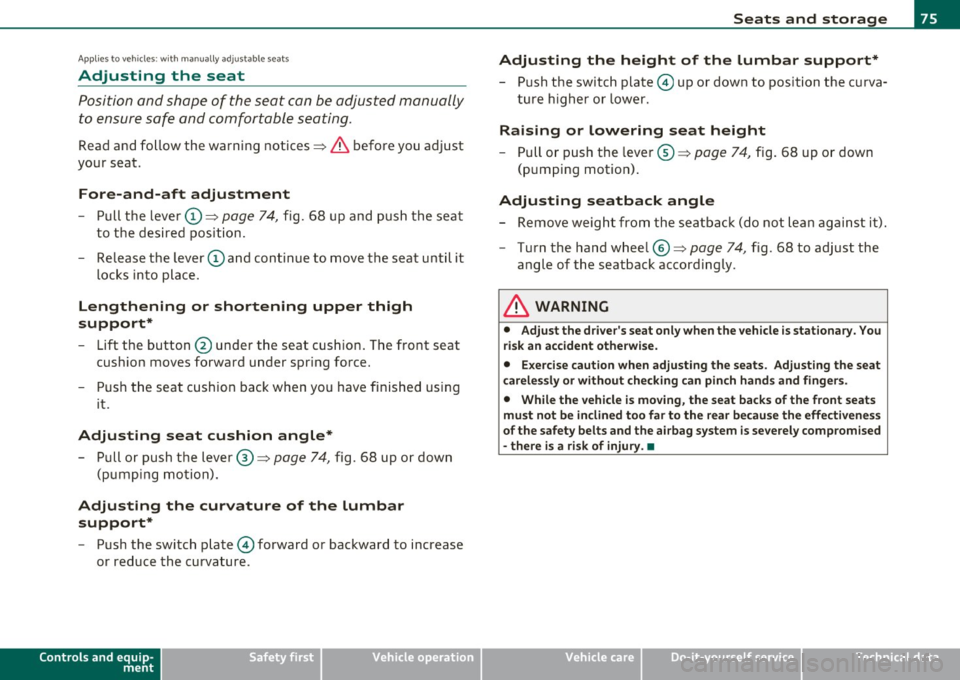
- Pull the lever CD~ page 74, fig. 68 up and push the seat
to the desired position.
- Release the lever
CD and continue to move the seat until it
locks into place.
L e ngthening or shortening upper thigh
support *
- Lift the button@ under the seat cush ion. The front seat
cushion moves forward under spring force.
- Push the seat cushion back when you have finished using it.
Adjusting seat cushion angle *
- Pull or push the lever®==> page 74, fig. 68 up or down
(pumping motion) .
Adjusting the curv ature of the lumb ar
support *
-Push the switch plate© forward or backward to increase
or reduce the curvature .
Controls and equip
ment Safety first
S
eats and storage
Adjusting the height of the lumbar support *
- Push the switch plate© up or down to position the curva
ture higher or lower.
R aising or lowering seat height
- Pull or push the lever©==> page 74, fig. 68 up or down
(pump ing motion) .
Adjusting s eatback angl e
Remove weight from the seatback (do not lean against it) .
- Turn the hand wheel©==>
page 74, fig. 68 to adjust the
angle of the seatback accordingly .
L1}. WARNING
• Adju st t he d riv er 's se at onl y when th e v ehicle is st atio nary. Y ou
ri sk an ac cident oth erwi se .
• Exe rci se ca ution w hen a djust in g th e sea ts. A dju st in g th e sea t
ca re less ly o r witho ut checkin g ca n pinch h and s and fin gers.
• While the vehicle is m oving , th e seat backs of th e front seats
mu st n ot b e incl in ed t oo far to the re ar b ecau se the effe cti ve ness
o f the s afe ty bel ts and th e air ba g sys te m is sev erel y co mpr om is e d
- ther e is a risk of injury. •
Vehicle care Technical data
Page 109 of 362
_______________________________________________ W_ a _r_m _ a_ n_d _ c_o _l_ d _ __.ffl'I
<£> For the sake of the environment
As soon as the rear window is clear, you should switch the rear
window defogger off. The reduced power consumpt ion has a benefi
cial effect on fue l consumption .•
Ap plies to vehicl es : w ith De lux e auto matic cl ima te cont ro l plu s
AC mode !AC ]
Turning AC off
-Press the !AC] button .
Turning AC on
-Press the !AC] button again.
The cooling system is turned on in AC mode. The heating and ventila
tion system is cont rolled automatically.
[I] Tips
If the LED in the switch does not illumin ate after AC mode has been
turned on(= turning the AC off), there is a fault in an air-conditioning
component. Please consult a authorized dealership if there is an
operat ing problem. •
Contro ls a nd e quip
m en t Vehicle
OP-eration
Applies to ve hicles : wi th Deluxe au tomat ic cl im at e con tro l plus
Air vents
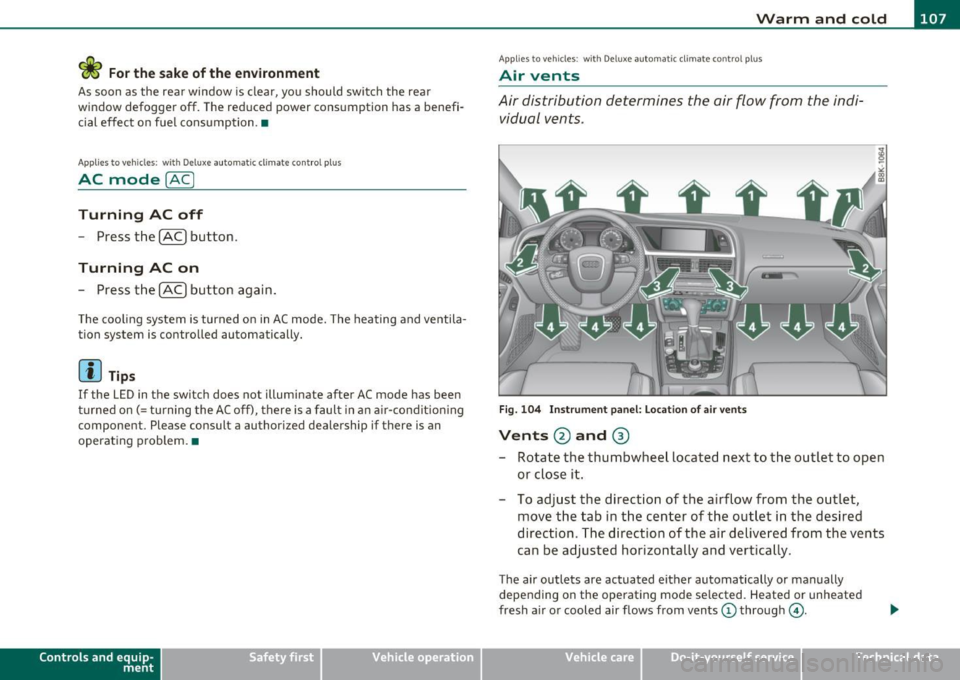
Air distribution determines the air flow from the indi
vidual vents .
Fig. 104 Instrument panel: Location of air vents
Vents @and ®
- Rotate the thumbwheel located next to the outlet to open
or close it.
- To adjust the direction of the airflow from the outlet,
move the tab in the center of the outlet in the desired
direction . The direction of the air delivered from the vents
can be adjusted horizontally and vertically .
The air outlets are actuated either automatically or manually
depending on the operat ing mode selected. Heated or unheated
fresh air or cooled air flows from vents(!) through @.
Vehicle care Do-it-yourselt service iTechnical data
Page 110 of 362
![AUDI A5 COUPE 2011 User Guide 1111....__w __ a _r_ m __ a_n_ d_ c_ o _ l_d _______________________________________________ _
(I] Tips
If the climate control is running in cooling mode, air flows mainly
from vents @ and @. T](/img/6/57583/w960_57583-109.png "AUDI A5 COUPE 2011 User Guide 1111....__w __ a _r_ m __ a_n_ d_ c_ o _ l_d _______________________________________________ _
(I] Tips
If the climate control is running in cooling mode, air flows mainly
from vents @ and @. T")
1111....__w __ a _r_ m __ a_n_ d_ c_ o _ l_d _______________________________________________ _
(I] Tips
If the climate control is running in cooling mode, air flows mainly
from vents @ and @. To achieve adequate cooling, you should never
close these vents completely. •
Applies to vehicles: with Deluxe automatic cl imate control plus
Rear air vents
The rear air vents are located in the center console.
- Rotate the thumbwheel to open and close the vents .
- To adjust the direction of the airflow from the outlet,
move the tab in the center of the outlet in the desired
direction . The direction of the air delivered from the vents
can be adjusted horizontally and vertically.
The air vents are actuated either automatically or manually
depending on the operating mode selected. Heated or unheated
fresh air, or cooled air flows from the vents .
The air vents to heat the rear footwell are located under the front
seats.
(I] Tips
If the climate control is operating in cooling mode, air flows primarily
from the vents in the center console. To achieve adequate cooling,
you should never close these vents completely. •
Applies to vehicles: with De luxe automatic climate contro l p lus
Economical use of the climate control
system
Economical use of the climate control system helps save
fuel.
When the climate control system is working in cooling mode,
engine performance is reduced and fuel consumption is
affected. To keep the time the climate control system is on as
short as possible, you should do the following:
- To save fuel, turn off cooling mode by pressing the AC
button (indicator light goes out).
- In addition, if you open the window or the panoramic
sliding/tilting sunroof* while driving, turn off cooling
mode by pressing the AC button (indicator light goes out).
- If the vehicle is extremely hot due to the heat of the sun,
briefly open doors and windows.
~ For the sake of the environment
When you save fuel, you reduce emissions from the vehicle. •
Deluxe automatic climate control
plus - basic settings
Applies to veh icles: with De luxe automatic climate control plus
General information
The basic climate control settings can be adjusted in the
radio or f\1/\11*.
-Select: Function button I CAR] > Control button AC. ~
Page 113 of 362

________________________________________________ ..::O ::_ n :...:_ t:::: h:...:.:: e:....'....: ro~ a'.!d :=.._ _J-
On the road
Steering
Manually adjustable steering wheel
The h eight and reac h of th e steering wh eel c an be
a djusted.
First, adjust t he dr iver's se at correct ly.
Fi g. 10 6 Leve r und er
the ste ering column
- Pull the lever:::::, fig. 106 -A rrow-:::::, &.
- M ove t he steeri ng wheel to the d esir ed po sition.
- Push the lever against the steeri ng column un til it loc ks.
T here must be at least 10 inches (25 cm) between your chest and the
cen ter o f the stee ring whee l. If you canno t sit more than 10 inches
(25 cm) from the steer ing wheel , see if adaptive equ ipment is avail
able to help you reach the pedals and increase t he distance from the
steering wheel.
For detai led information on how to adjust the dr iver's seat , see
::>page 76.
Con tro ls a nd e quip
m en t Vehicle
OP-eration T
he steering wheel can be adjusted even whe n the ign ition is turned
off. For veh icles with seat memory, the individual positions for the
stee ring wheel ca n be st ored along wi th t he sea t pos it ion.
& WARNING
Improper use of steering wheel adjustment and improper seating
position can cause serious personal injury .
• Adjust the steer ing wheel column only when the vehicle is not
moving to prevent loss of vehicle control.
• Adjust the dri ver's seat or steering wheel so that there is a
minimum of 10 inches (25 cm) between your che st and the
steering wheel=>
page 172, fig. 164. If you cannot maintain th is
minimum distance , the airbag system cannot protect you prop
erly .
• If phy sical limitations prevent you from sitting 10 in ches (25
cm) or more from the steering wheel, check with your authorized
Audi dealer to see if adaptive equipment is available.
• If the steering wheel is al igned w ith your face , the supp le
mental driver 's airbag cannot provide as much protection in an
accident . Always make sure that the steering wheel is aligned with
your chest.
• Always hold the steering wheel with your hands at the 9 o 'clock
and 3 o'clo ck position s to reduce the risk of personal injury if the
driver 's airbag deploys .
• Never hold the steering wheel at the 12 o'clock po sition or with
your hands inside the steering wheel
rim or on the steer ing wheel
hub. Holding the stee ring wheel the wrong way can cause serious
injur ies to the hands, arms and head if the driver's airbag
deploys. •
Vehicle care Do-it-yourselt service iTechnical data
Page 114 of 362

-On the road .,.,..___ ______________ _
Ignition Lock and ignition switch
Starting engine with the key
The ignition is switched on and the engine started with
the ignition key.
Fig. 107 Ignition key
-Insert the key into the ignition lock.
-fvtanual transmission: Fully depress the clutch pedal and
move the shift lever to the neutral position.
-Automatic transmission*: Step on the brake pedal and
move the selector lever to the
P or N position.
- Press the key=> fig. 107 -the engine will start .
By pressing the key without stepping on the clutch or the brake, the
ign ition is switched on and off. With the ignition on, the steering
wheel is unlocked.
You can only remove the key with the ignition switched off . To do this,
you have to press on the key again. With an automatic transmiss ion,
the selector lever must be in the
P position.
When starting the engine, major electrical loads are switched off
temporarily . After
starting a cold engine, there may be a brief period of increased
noise because the oil pressure must first build up in the hydraulic
valve adjusters . This is normal and not a cause for concern .
If the engine should not start immediately, the starting process is
automatically stopped after a short time. Repeat starting procedure.
Driver message in the instrument cluster display
Press brake pedal to start engine
This message appears if you do not step on the brake pedal to start
the engine on a vehicle w ith an automatic transmission .
Press clutch pedal to start engine
This message appears if you do not step on the clutch pedal to start
th e engine on a vehicle with a manual transmission.
Engage N or P to start engine
This message appears when attempting to start the engine if the
selector lever for the automatic transmission is not in the
P or N posi
tion . The engine can only be started with the selector in these posi
tions.
Shift to P, otherwise vehicle can roll away. Doors do not lock if lever
is not in P.
Thi s message appears for safety reasons along with a warning signal.
It appears if the selector lever for the automatic transmission is not
in the
P position after the ignition is switched off . Move the selector
lever to the
P position, otherw ise the vehicle is not secured against
rolling away. You also cannot lock the vehicle using the locking
button on the door handle or using the remote key.
& WARNING
• Always take the key with you whenever you leave your vehicle.
Otherwise, the engine could be started or electrical equipment
such as the power windows could be operated. This can lead to
serious injury.
Page 120 of 362

_____ o_ n_ t_h _e_ r_o _a _ d ________________________________________________ _
When stopping at a traffic signal or stopping in city traffic on vehicles
with an automatic transmission, the parking brake can be applied.
The vehicle does not have to be held with the footbrake . The parking
brake eliminates the tendency to creep with a drive range engaged.
As soon as you drive
off as usual, the parking brake is released auto
matically and the vehicle starts to move.
Starting on slopes
When starting on inclines, the starting assist prevents the vehicle
from unintentionally rolling back. The braking force of the parking
brake is not released until sufficient driving force has been built up at
the wheels .
[I) Tips
For safety reasons, the parking brake is released automatically only
when the driver 's safety belt is engaged in the buckle. •
Starting off with a trailer
To prevent rolling back unintentionally on an incline, do
the following:
- Keep the switch pulled and depress the accelerator. The
parking brake stays applied and prevents the vehicle from
rolling backward.
- You can release the switch once you are sure that you are
developing enough driving force at the wheels by
depressing the accelerator.
Depending on the weight of the rig (vehicle and trailer) and the
severity of the incline, you may roll backwards as you start. You can
prevent rolling backwards by holding the parking brake switch pulled
out and accelerating -just as you would when starting on a hill with a
conventional hand brake. •
Emergency braking
In the event that the conventional brake system fails or
locks.
- In an emergency, pull the switch and continue to pull it to
slow your vehicle down with the parking brake .
- As soon as you release the switch or accelerate, the
braking process stops.
If you pull the switch and hold it above a speed of about 5 mph (8
km/h), the emergency braking function is initiated. The vehicle is
braked at all four wheels by activating the hydraulic brake system.
The brake performance is similar to making an emergency stop:::>& .
In order not to activate the emergency braking by mistake, an audible
warning tone (buzzer) sounds when the switch is pulled. As soon as
the switch is released, or the accelerator pedal is depressed, emer
gency braking stops.
& WARNING
Emergency braking should only be used in an emergency, when
the normal foot brake has failed or the brake pedal is obstructed.
Using the parking brake to perform emergency braking will slow
your vehicle down as if you had made a full brake application. The laws of physics cannot be suspended even with ESP and its associ
ated components (ABS, ASR, EDS). In corners and when road or
weather conditions are bad, a full brake application can cause the
vehicle to skid or the rear end to break away· risking an accident. •
Driver messages in the instrument cluster
Warning Vehicle incline is excessive
This message appears when the parking brake is applied on an incline
that exceeds about 30%. ._
Page 124 of 362
ffl..__A_ d_a_ p :...... t_iv _ e_ c_r _u _i_s _e _ c..;.,o _n_ t..;., r _o.;.__ l ___________________________________________ _
Adaptive cruise control
Speed and distance control system
Applies to veh icl es : w it h adaptive c ruise contro l
Description
The adaptive cruise control driver assistan ce program is a
combined speed and distance control system .
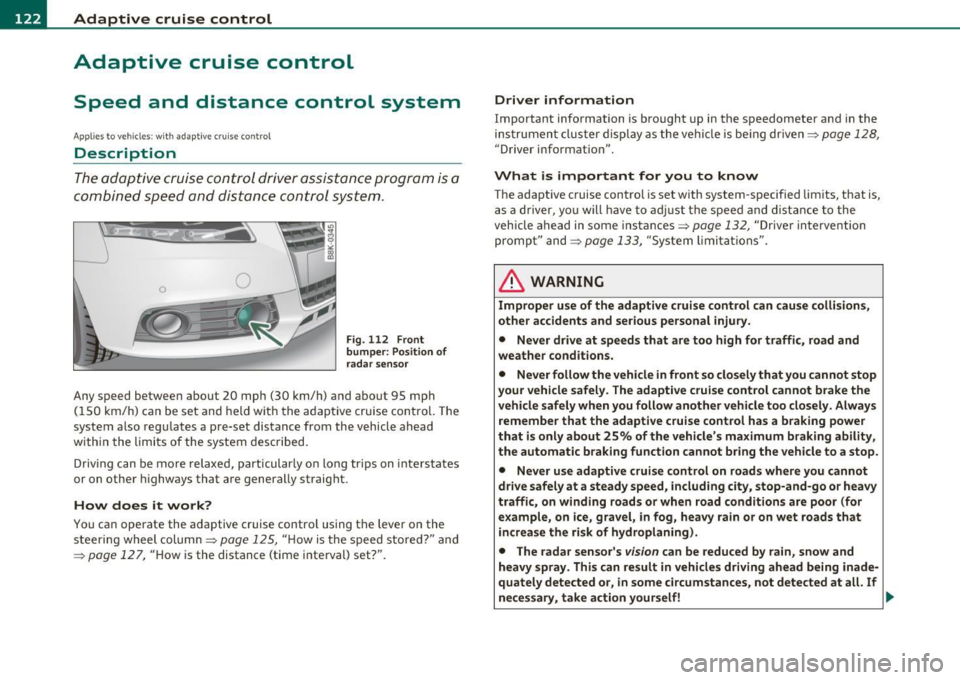
Fig. 112 Front
bum per : Po sitio n of
r a d ar sen sor
Any speed betwee n about 20 mph (30 km/h) and about 95 mph
( 1 50 km/ h) can be set and held with the adaptive cruise control. The
system also regu lates a pre-set distance from the vehicle ahead
w ith in the limits of the system described.
Driv ing c an be more relaxed, particularly o n long tr ips on inter states
or on other highways that a re generally straig ht.
How does it work?
Yo u ca n operate the adaptive c ruise contro l using the leve r o n the
steer ing wheel column:::,
page 125, "H ow is the speed sto red? " and
=:> pag e 12 7, "How is the distance (time interval) set?".
Driver information
Important info rmation is brought up in the speedometer and in the
instrumen t clust er dis play as the ve hicl e is be ing driven :::,
page 128,
"Driver in format ion ".
What is important for you to know
The adaptive cru ise cont rol is set with system-specified lim its, that is,
a s a driver, yo u will h ave to adju st the speed and dist an ce to the
vehicle ahead in some instances :::,
page 132, "Driver inte rvention
promp t" and =>
page 133, "Sy stem limi ta tions ".
& WARNING
Improper u se of the adaptive cruise control can cause colli sion s,
othe r accidents and serious personal injury.
• Never drive at speeds that are too high for traffic, road and
weather condition s.
• Never follow the vehicle in front so closely that you cannot stop
your vehicle safel y. The adaptive cruise control cannot brake the
vehicle safely when you follow another vehicle too closely . Alway s
remember that the adapti ve cruise control has a braking power
that i s only about 25% of the vehicle 's maximum br aking ability,
the automatic b rak ing function cannot bring the vehicle to a stop.
• Never use adaptive cruise control on roads where you cannot
drive safely at a steady speed , including city , stop-and-go or heavy
traffi c, on winding roads or when road condition s are poor (for
example , on ice, gravel, in fog, heavy rain or on wet roads that
in crea se the risk of hydroplaning).
• The rada r sensor's
vis io n can be reduced by rain, snow and
heavy spray . This can re sult in vehicle s driving ahead being inade
qu ately detected or, in some circumstances , not detected at all. If
necessary, take action yourself! ..,
Page 137 of 362
Adaptive cruise control Ill ____________ ____,___ __ ____.
App lies to ve hicles : with a daptiv e cr uise c ontro l
Vehicles that are difficult to detect
OJ
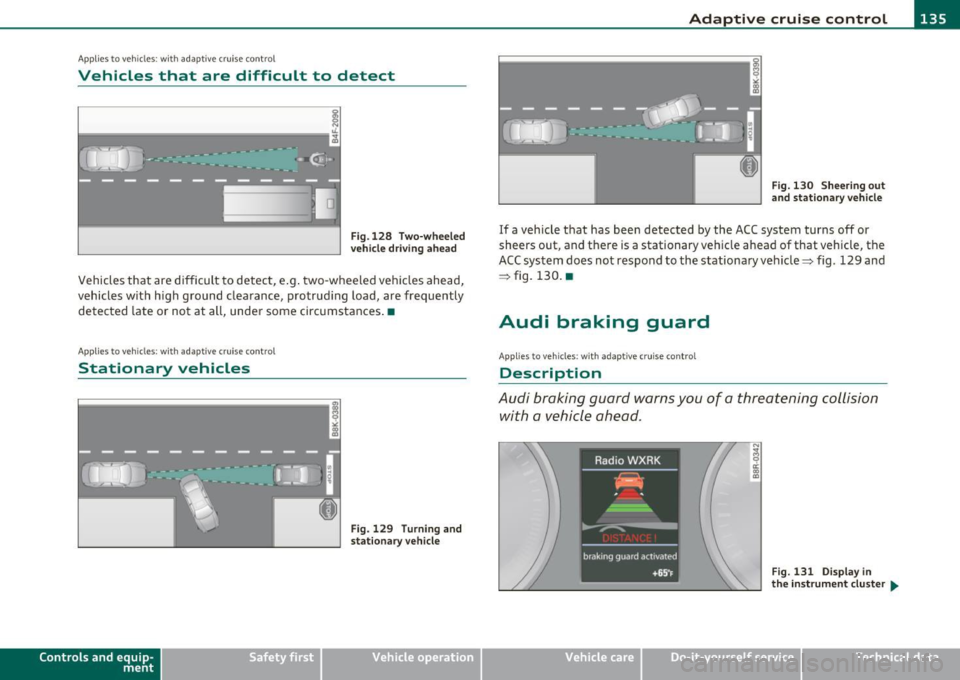
Fig .128 Two-wheeled
vehicle driving ahead
Vehicles that are difficult to detect, e.g . two-wheeled vehicles ahead,
vehicles with h igh ground clearance, protrud ing load, are frequently
detected late or not at all, under some circumstances .•
A ppli es to ve hicl es: with ad apti ve c rui se cont rol
Stationary vehicles
ij - .--......i:;1 ... _;1,,1
Contro ls a nd e quip
m en t
u
Fig. 129 Turning and
stationary ve hicle
Vehicle OP-eration
Fig. 130 Sheering out
and stationary vehicle
If a vehicle that has been detected by the ACC system turns off or
sheers out, and there is a stationary veh icle ahead of that vehicle, the
ACC system does not respond to the stationary vehicle=> fig. 129 and
=> fig. 130. •
Audi braking guard
Applies to ve hicles: w ith ada ptiv e cr uise con trol
Description
Audi braking guard warns you of a threatening collision
with a vehicle ahead .
N
I
Fig. 131 Display in
the in strum ent cluster ...
Vehicle care Do-it-yourselt service iTechnical data
Page 153 of 362
Transmission -_______________ ___.
The transmiss ion is also equipped with tiptronic . It allows the driver
t o shift gea rs
manually if desired ~ page 155 . •
Applies to vehicles: wit h au tom atic tr ansm ission
Driving the automatic transmission
Starting the engine
- The se lector lever must be in N or P.
Starting off
- Press and hold the brake pedal.
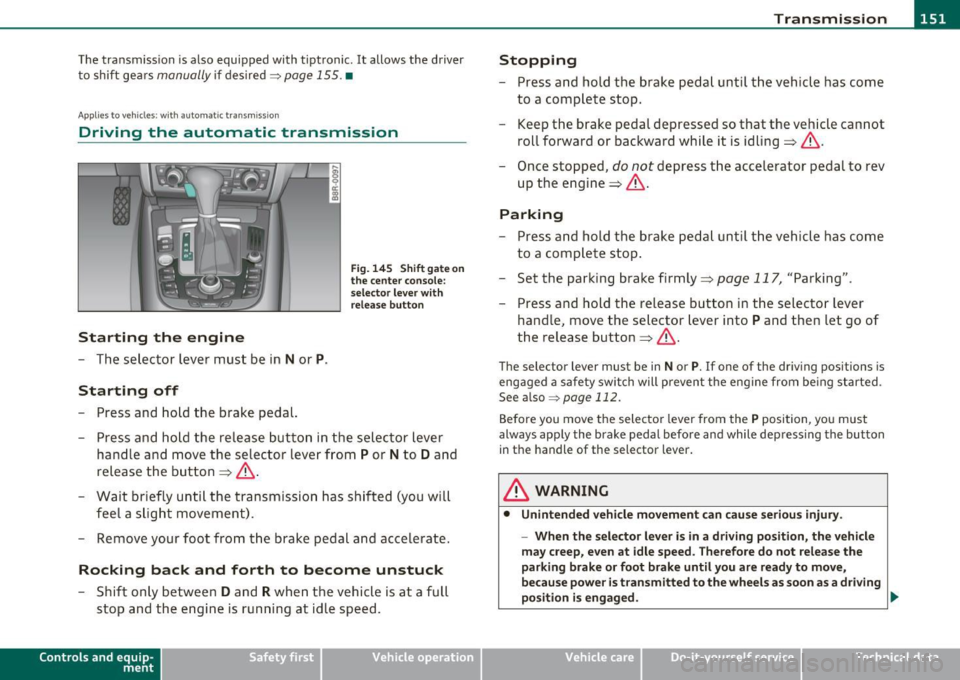
Fi g. 14 5 Sh ift gat e on
the center con sole:
s e le ctor le ve r with
r e lea se b utton
- Press and ho ld the release button in the sel ector lever
handle a nd move the selector lever from
P or N to D and
release the but ton => &, .
- Wait briefly unti l the tran smission has shif ted (you will
feel a slight movement).
- Remove your foot from t he brake pedal and accelerate.
Rocking back and forth to become unstuck
- Shift o nly betwee n D and R when the ve hicle is at a full
stop and the engine is running at idle speed.
Con tro ls a nd e quip
m en t Vehicle
OP-eration
Stopping
-Press and hold the brake peda l unti l th e vehicle has come
to a complete stop.
- Keep the brake pedal depressed so that the veh icle can not
roll forward or backward while it is idling => &, .
- Once stopped,
do not depress t he accelerator pedal to rev
up the engine=> &,.
Parking
-Press and ho ld the brake peda l unt il the veh icle has come
to a compl ete stop .
- Set the parking brake firmly=>
page 117, "Parking" .
- Press and hold the release button in the selector lever
handle, move the selector lever into
P and then let go of
the release button=>&, .
The selector lever must be in Nor P. If one of the dr iv ing positions is
engaged a safety swi tch will prevent the eng ine from be ing started.
See also ~
page 112.
Before you move the selecto r lever from the P position, yo u must
always apply the brake pedal befo re and while depressing the button
in the handle of the selector lever .
& WARNING
• Unintended vehicle movement can c ause seriou s injur y.
- When th e selector l ever is in a driv ing po sition, the vehicl e
m ay creep , even at idle speed. Therefore do not relea se the
parking bra ke or foot brak e until you are ready to mov e,
because power is t ransmitted to the wheel s as soon as a dri ving
po sition i s engaged . ._
Vehicle care Do-it-yourselt service iTechnical data
Page 154 of 362
-Transmission •m ___________________ _
& WARNING (continued)
- Do not accelerate while selecting a driving position . At this
time the engine must be at idle speed so that undue stre ss is
not placed on the clutches in the transmission.
- Remember : Even when stopped briefly with the automatic
transmission in D,S or R , engine power is being transmitted to
the wheels . Your vehicle could " creep" forward or backward.
When stopped, keep the brake pedal fully depressed and use
the parking brake if necessary to keep the vehicle from rolling .
• If the selector lever is unintentionally mo ved into N while you
are driving, take your foot off the accelerator p edal and wait for
the engine to return to idle speed before selecting a driv ing posi
tion .
• Never shift into R or P when the vehicle is in motion.
• Never get out of the dr iver's seat when the engine is running.
• If you must get out of the vehicle, move the selector lever
secure ly into the P position and app ly the parking brake firmly.
• If the engine must remain running, never have any driving
position engaged when checking under the hood. Make sure the
selector lever has securely engaged and is locked in P with the parking brake firmly set=>
page 267, "Engine compartment ".
Otherwi se, any increase in engine speed may set the vehicle in
motion, even with the parking brake applied. •
Applie s to v ehicl es: wi th auto matic tra nsm issi on
Selector Lever positions
This section descri bes the se lector lever positions and
driving r ang es .
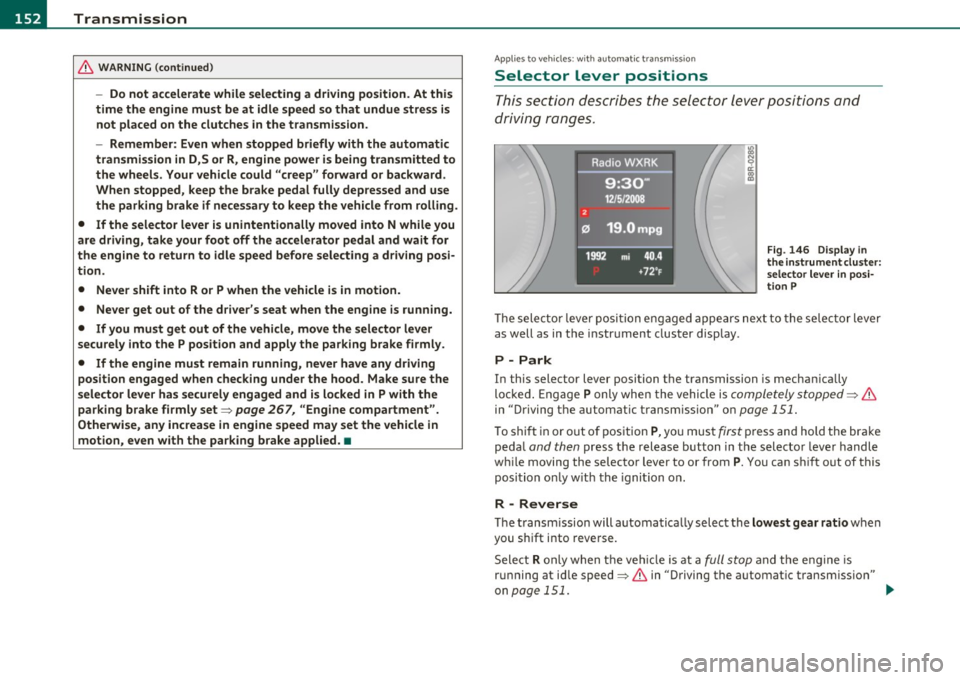
Fig. 146 Dis play in
the in strument clu ster :
selecto r leve r
in posi
ti on P
Th e sele cto r lever posi tio n engaged appears nex t to the se lec tor lever
as well as in the i nstr ument clus ter disp lay .
P -Park
In this selector lever position th e transmission is mechan ically
lo ck ed. En gage
P only whe n the ve hicl e is completely stopped=> &
in "Driving the automatic t ransm ission" on page 151.
To shift in or o ut o f p osit ion P, yo u must first press and hold the bra ke
peda l
and then press t he release button in t he selecto r leve r handle
w hil e moving the selector lever to or from
P. You can shif t out of this
position on ly w it h t he i gni tion o n.
R -Reverse
Th e transm ission will automa tica lly select the lowest gear ratio when
you sh ift into reverse.
Sele ct
R o nl y when t he ve hicle is at a full stop a nd t he e ng ine is
ru nning at idle speed=>
& in "Driving th e automat ic transm issio n"
on
page 151 . ...