ignition AUDI A5 COUPE 2011 Workshop Manual
[x] Cancel search | Manufacturer: AUDI, Model Year: 2011, Model line: A5 COUPE, Model: AUDI A5 COUPE 2011Pages: 362, PDF Size: 84.88 MB
Page 155 of 362
Transmission Ill _______________ ___.
Before you move the selector lever to R, press both the button in the
hand le of the se lec tor lever
and the brake peda l at the same t ime .
When the ignition is on, the backup lights illuminate when the
selector lever is moved into
R .
N -Neutral
The transmission is in neutral in this position. Sh ift to th is position
for standing with the brakes applied~
page 153.
When the vehicle is stationary or at speeds below 3 mph (5 km/h) ,
you must always apply the footbrake before and wh ile moving the
lever out of
N .
D -Normal po sition for driving forw ard
Posit ion Dis for normal city and highway driving. It ranges from zero
to top speed and al l gears shift automatically, depending on engine
load, driving speed and automatically selected shift programs .
When the vehicle is stat ionary or at speeds below 3 mph (5 km/h),
you must always apply the foot brake before and while moving the lever to
D out o f N.
In certa in circumstances it may be advantageous to temporarily
switch to the manual shift program to manually select gear rat ios to
match specific driving conditions~
page 155.
S -Sport position *
Select this position for sportie r performance. In this position, the
transm ission will not upsh ift as soon, allowing the vehicle to use the
increased power available at higher eng ine speeds to ach ieve livelier
acceleration .
When the vehicle is stat ionary o r at speeds be low 3 mph (5 km/h),
you must always apply the foot brake before and while moving the lever to
S out of N .
Con tro ls a nd e quip
m en t Vehicle
OP-eration
& WARNING
Read and fo llow all WARNING S~ & in "Dri ving th e a utomatic
tran smi ssion" on
pa ge 151 .
0 Note
Coast ing downh ill with the transmission in N and the engine not
running will result in damage to the automatic transmission and
possibly the cata lytic converter. •
Applies to vehicle s: wi th auto mat ic tra nsmi ss ion
Automatic Shift Lock (ASL)
The Automatic Shift Lock safeguards you against acci
dentally shifting into a forward or the reverse gear and
causing the vehicle to move unintentionally .
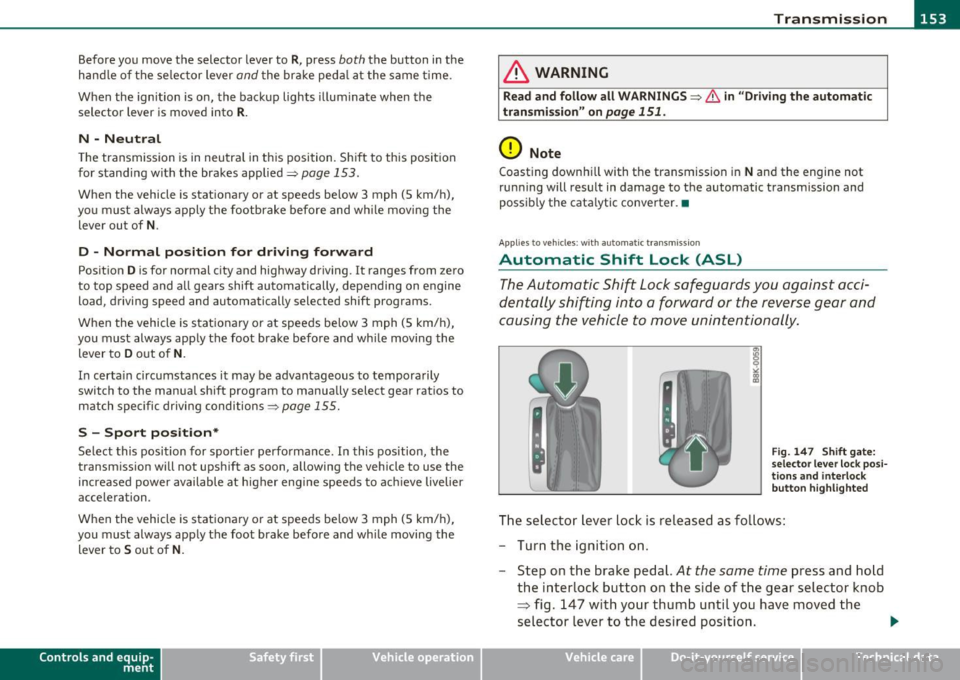
Fig. 14 7 S hift gate:
s e le ctor lever lock pos i
tio ns and in te rlo ck
bu tton hi ghligh ted
The selector lever lock is released as fo llows:
- Turn the ignit ion on.
- Step on the brake pedal.
At the same time press and hold
the interlock button on the s ide of the gear selector knob
=> fig . 147 with your thumb until you have moved the
selector lever to the desired position. .,
Vehicle care Do-it-yourselt service iTechnical data
Page 156 of 362
1111 ...... __ T _r_ a_ n _ s_ m __ is_ s_io _ n _____________________________________________________ _
Automatic selector lever lock
The selector lever is locked in the P and N positions when the ignition
is turned on . To move the lever from these positions the driver must
depress the brake pedal. As a reminder to the driver, the following
warning appears in the instrument cluster display when the selector
is in
P and N:
When stationary apply footbrake while selecting gear
A time delay element prevents the selector lever from locking when
it is moved through the
N position (going from R to D). The locking
element will lock the selector lever if the lever is left in N (Neutral) for
more than approximately 1 second, without the brake pedal being
pressed .
At speeds above about 3 mph (5 km/h) the Automatic Shift Lock is
automatically deactivated in the
N position.
Interlock button
The lock button on the selector lever prevents the lever from being
accidentally shifted into ce rtain positions. Pressing this button deac
tivates the selector lever lock. Depending on the direction of the
shift, the selector lever locks at different positions . The positions are
highlighted in the illustration ~
page 153, fig. 147.
Ignition key safety interlock
The key cannot be removed from the ignition unless the selector lever
is in the
P park position . When the ignition key is removed, the
selector lever will be locked in the
P position. •
Applies to vehicle s: with au toma tic tr ansm is si on
Kick-down
The kick-down feature allows the vehicle to generate
maximum acceleration.
When you press the accelerator pedal beyond the resistance point
that is reached at full throttle, the transmission will select a lower
gear ratio based on vehicle speed and engine RPM . The engine RPM will be controlled to produce maximum vehicle acceleration as
long
as you continue to press the accelerator pedal beyond this resistance
point .
& WARNING
Be careful when using the kick-down feature on slippery roads.
Rapid acceleration may cause the vehicle to skid. •
Applies to ve hicles : with automatic t ransm iss ion
Dynamic shift program (DSP)
The automatic transmission is electronically controlled.
The transmission is self adapting and will automatically select the
best shift program suited to the driving conditions and driving style .
The transmission will select one of the
economy programs when you
drive at a steady speed or a gradually changing speed without heavy
acceleration . This achieves optimum fuel efficiency, with early
upshifting and delayed downshifting.
The transmission will automatically select the
sporty shift programs
when you drive at higher speeds, or with heavy acceleration and
frequently changing speeds. Upshifts are delayed to make full use of
engine power . Downshifting takes place at higher engine speeds than
in the economy programs.
The selection of the most suitable shift program is a continuous,
automatic process . The driver can also make the transmission switch
to a sporty program by
quickly pressing down the gas pedal.
This causes the transmission to shift down to a lower gear to achieve rapid acceleration, e.g. for quickly passing another vehicle. You do
not need to press the gas pedal into the kick -down range. After the
transmission has upshifted, the original program is selected
according to your driving style.
An additional shift program allows the automatic transmission to
select the proper gear for uphill and downhill gradients.
Page 161 of 362
___________________________________________________ P_a _r _k _ a_s _s_ i_s _t __ _
Please note that low objects a lready s ignalled by a war ning can disap
pe ar from the sys te m 's d etection r ange and will not co nti nue to be
signa lled .
If the distance to an obstacle remains t he same, the vo lume of the
dis tan ce warn ing is gradu ally redu ced af ter abou t 4 seco nds.
Approaching another obstacle will result in the distance warning
s ou nding a t th e normal vo lume aga in.
Malfunctions in the system
If a wa rning tone is aud ible fo r about five seconds when you turn o n
the ignition , there is a ma lfunction in the system. Have the prob lem
c o rrected by yo ur auth orized Aud i de aler.
Keep the sensors in the rear bumper clean and free from ice so t hat
t he acous tic par k ass ist system can func tion prope rly.
& WARNING
• Sens ors have dead space s in whi ch objects cannot be dete cted.
Be especi ally alert for small children and animals , since they are
not alway s detected by the sen sors.
• The acou stic parking system is not a substitute for the dr iver 's
own caution and alertne ss. Ultimate respon sibility alway s
remains w ith the driver during parking and similar maneuvers.
Alway s w atch wh ere you are driving .
• You should always adjust the volume and frequency of the
warning tone s so that you can e asily hear the acoustic di stan ce
wa rning e ven if the radio is pl aying, the air -conditioner blowe r is
on High or there i s a high level of out side noi se .
- Check the setting s whenever anyone else has driven the
vehicle before you.
0 Note
• Remember that low obst acles fo r which a warning has a lready
been issued may "d ive" below the system 's sensing zone if the ve hicle
is be ing b acked up closer . In th is case, the wa rni ng so und shutting off
Controls and equip
ment Safety first
does not ind
icate that you have cleared the obstacle . Instead, impact
is imm inen t.
• Objects such as trai ler hitches, chains, narrow posts or fences
c ove red by a th in layer of paint m ay no t always be detec ted by the
system . They can st ill damage your vehicle w ithout warning .
lI] Tips
Keep the sensors in the rear b umper clean and free of snow and ice so
that the aco ustic parki ng assist system can function proper ly .•
App lies to ve hicles : w it h pa rkin g system (re ar)
Adjusting the warning tones
The warning tones can be adjusted in the MMI*.
-Select : [CAR]> Parking sy stem .
• Rear volume · rear sensor vol ume
• Rear frequ ency -rear sensor frequency
• In-car entertainment fad er-when the park ing system is switched
on , the vol ume of the active audio source is lowered .
Th e newly adj usted value is br iefly heard from the signa l gene rator.
The settings are automatically stored and ass igned to the master key
with remote control. •
Vehicle care Technical data
Page 164 of 362
1111...._ __ P_a _ r_ k_ a_ s_ s_is _ t ____________________________________________________ _
• Never use warm or hot water to remove snow or ice from the
camera lens -danger of crack fo rmation on the lens!
• When cleaning the lens, never use products that are abrasive. •
App lies to veh icles : wi th par kin g syst em (re ar, wi th rea r vi ew cam era)
Switching on/off
The rear view camera switches on automatically together
with the acoustic park assist when you put the vehicle in
reverse.
Switching on
- Put the vehicle in reverse gear, the acoustic parking
system with rear view camera is activa ted automatically .
Activation of the acoustic parking system is confirmed by
a brief acknowledgement sound.
Switching off
-Drive faster than 6 mph (10 km/h), or
- take the vehicle out of reverse gear. The acoustic parking
system is immediately deactivated, and the rear view
camera picture is deact ivated automatically after a period
of about 15 seconds, or
- switch off the ignition.
T he delay in deactivating the camera provides an uninterrupted view
behind the vehicle espec ially when maneuver ing in tight parking
spaces and prevents the picture from tu rning off the every time you
shift out of reverse .
If the warning message appears in the display but not the rear view
came ra pict ure, read and confi rm the warning message . T he acoustic
distance s ignal is always active. If
you press a function button on the MMI control console, the rear
view came ra pictu re disappears. The rear view camera pict ure reap
pears the next time you park .
Further information on the warning message and the MMI control
conso le can be found in the MMI instruction booklet.
[I] Tips
• The rear view came ra pi cture is avai lable as soon as the MM I
Display or the MMI is switched on, or the start-up phase is completed.
• Keep the sensors in the rear bumper and the rear view came ra lens
clean and free of snow and ice, so that the parking system can work
properly . P lease follow the additional notes on~
page 165. •
Applies to veh icles: wit h park ing system (rear, wit h rear view camera )
Reverse Parking
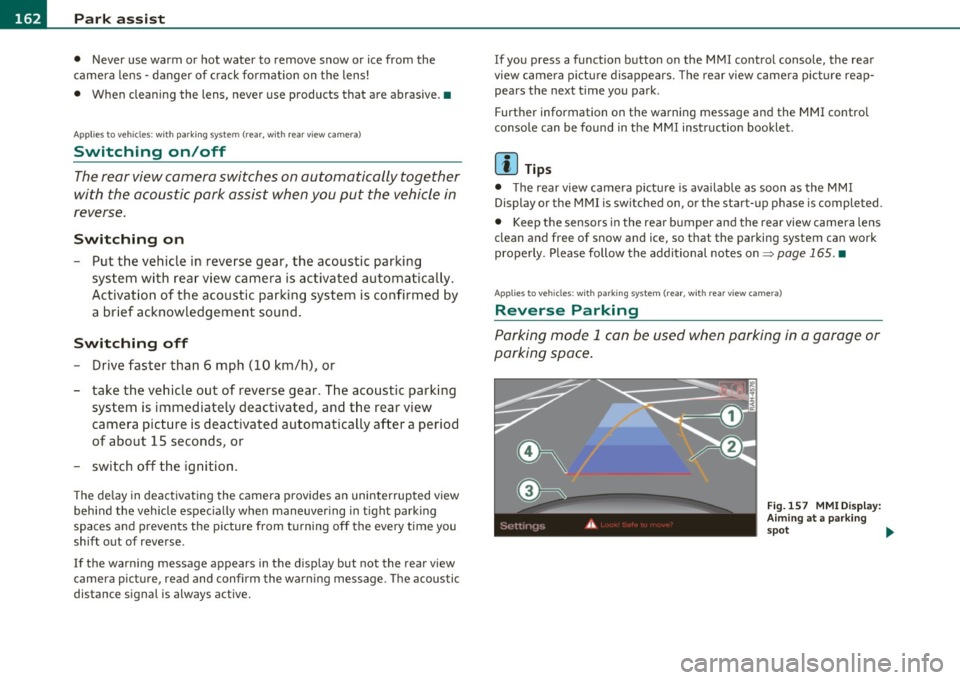
Parking mode l can be used when parking in a garage or
parking space .
Fig.157 M MI Disp lay :
Aimi ng a t a park ing
s p ot .,,,
Page 167 of 362
Park assist IIJII _________________________________ _____;.....:;_;_.:..:,____;;_ ____ _
0 Note
In the MMI display, the d irect ion of t ravel of the vehicle rear is rep re
sented depend ing on the steering wheel angle. The vehicle front
swi ngs ou t mo re t han t he ve hicle re ar. M ain tain ple nty of dist ance
from an obstacle so t hat your outs ide mirror or a corner of your
vehicle d oes no t collide with any o bstacles - dange r of accide nt!
[ i ) Tips
Th e left or right or ientat ion lines and s urfaces will be displ aye d,
depending on the tu rn signal being used. •
App lies to veh icles : with park ing syst em (rear, wit h rea r view cam era)
Adjusting the display and warning tones
The display and warning tones are adjusted in the radio
or fv1fv1 I*.
-Select : [CAR]> Parking system.
Display
• Off -
when the parking system is switched off, only aud ible sig nals
are given.
• On -when the pa rking system is switc hed on, the pic ture from the
rea r view camera is displayed.
Warning tones
• Rear volume -rear sensor vo lume
• Rear frequency -rear sensor frequency
• In-car entertainment fader -when the par kin g sys tem i s sw itched
on, the volume of the active audio source is lowered.
T he newly a djusted value is br iefly hear d from the signal generator .
T he settings are automatica lly stored and assigned to the remote
cont rol key.
Controls and equip
ment Safety first
& WARNING
•
Always make sure that the volume and frequency of the
warning tones i s adju sted so that you can easily hear the acou stic
distance signal even if the radio is playing , the air-conditioner
blower is on High or there is a high level of outside noise.
• Check the settings whenever someone else has driven the
vehicle before you.
[I] Tips
• Th e warning tones can also be ad justed directly from the rea r view
camera image . Simply p ress the
[Settings I* cont rol b utton .
• C han ged settings are a ctivat ed w hen parking assist is switched on
again .•
A pplies to v ehicl es: w ith park ing syst em (r e a r, wi th re ar view cam era)
Error messages
If a warni ng tone is aud ible fo r about five se conds when yo u turn on
the ignition, the re is a ma lfunction in t he system. Have the prob lem
co rrected by yo ur a utho rized Audi dea ler .
K eep the se nsors in the rear b umper clean and free from i ce s o th at
the acoustic pa rk assist system can function p roper ly .•
Vehicle care Technical data
Page 169 of 362

_________________________________________________ H_ o_ m_ e_ L_in _ k_® _ __.fflll
App lies to veh icles : w ith Home link® un iversa l remote control
Progr amming the Homelink ® tr ansmitter
The transmitter is programmed in two phases . For rolling
code transmitters, a third phase is also necessary .
,,,,, r, o: o "'' '''"
Fig. 161 Ove rhead
console: Homelink ®
keypa d
Fig. 162 Rad iator
g rille
Phase 1: progr amming the overhe ad keyp ad
1. Make sure your vehicle is within operating range of the
r emote controlled garage door opener .
2 . Set the parking brake:::::>
& in "General information " on
page 166.
3. Turn the ignition on. Do not start the engine!
Con tro ls a nd e quip
m en t Vehicle
OP-eration
4. Press and hold the two outside Homelink ® buttons G)and
@ for approximately
20 seconds until indicator light@
:::::> fig. 161 begins to flash . Then release both buttons. Do
not hold the buttons for longer than
30 seconds .
- This procedure only needs to be performed
once. It erases
the factory-set default codes and does not have to be repeated to program additional remote controls.
5. Press and hold the Homelink ® button G), @ or@ until
the indicator light @starts flashing
slowly . Release the
button.
- The system will remain in programming mode for 5
minutes .
Co to the front of the vehicle and proceed with
phase
2 .
Phase 2: at the rad iator g rille
6. Point the o rigi nal r emote control to the m iddle of the
radiator grille of your vehicle=> fig.
162 .
7. Hold the original remote control at a distance between O
S in. (0-13 cm) (use the shortest distance possible) .
8 . Press and hold the activation button on the remote
control.
- May be different in Canada . If so, press and re-press
(cycle) the activation button on your remote control every
two seconds.
9. The emergency flashers will flash
three tim es (after about
15-60 seconds) when the programming is successful.
Release the button on the remote control.
- To program more devices , repeat steps 4 to 9.
Vehicle care Do-it-yourselt service iTechnical data
Page 195 of 362
_________________________________________________ A_ ir_ b_ a_,,g :;..__ s-=y '"- s_ t_ e_ m __ _
defined in the electronic contro l unit~ page 202, "PASSE NGER
AI RB AG OF F ligh t".
Always remember, a c hild safety seat or infa nt ca rr ie r i nstalled on th e
front seat may be str uck and k noc ked out of position by the ra pidly
in flating p assenge r's ai rbag in a frontal coll is io n. T he a irbag could
great ly reduce the effect iveness of the c hild restraint and even seri
o us ly i njur e the chi ld dur ing inflation.
For this reason, and because t he back seat is the safest place for chil
dren -whe n properly restrained according to their age an d size -we
st rong ly recommend t hat childre n always sit in the back seat
~ page 21 5, "C hild Safety" .
& WARNING
A child in a rearward-facing child safety seat installed on the front
passenger seat will be ser iously injured and can be killed if the
front airbag inflates - even with an Advanced Airbag System .
• The inflat ing airbag w ill hit the child safety seat or infant
carrier with great force and will smash the child safety seat and
child against the backrest, center armrest, door or roof .
• Always install rear-facing child safety seats on the rear seat .
• If you must install a rearward facing child safety seat on the
front passenger seat because of exceptional circumstances and
the PASSENGER AIR BAG OFF light does not come on and stay on,
immediately install the rear-facing child safety seat in a rear
seating position and have the airbag system inspected by your
authorized Audi dealer.
• Forward-facing child safety seats installed on the front
pa ssenger 's seat may interfere with the deployment of the airbag
and cause ser ious personal injury to the child.
& WARNING
If , in exceptional circumstances , you must install a forward-facing
c hild restraint on the front passenger's seat:
Controls and equip ment Safety first Vehicle operation
& WARNING
(co ntinued )
• Always make sure the forward-facing seat has been designed
and certified by its manufacturer for use on a front seat with a
passenger front and side airbag.
• Never put the forward-facing child restraint up against or very
near the instrument panel.
• Always move the passenger seat into its rearmost position in
the seat's fore and aft adjustment range, as far away from the
airbag as possible before installing the forward-facing child
restraint. The backrest must be ad justed to an upright position.
• Make sure that the PASSENGER AIR BAG OFF light comes on
and stays on all the time whenever the ignition is switched on.
& WARNING
To reduce the risk of serious injury, make sure that the
PASSENGER AIR BAG OFF light will be displayed whenever a child
re straint is installed on the front passenger seat and the ignition
is switched on.
• If the PASSENGER AIR BAG OFF light does not stay on, perform
the checks described~
page 201, "Monitoring the Advanced
Airbag System ".
• Take the child restra int off the front passenger seat and install
it properly at one of the rear seat positions if the PASSENGER AIR BAG OFF light does not stay on .
• Have the airbag system inspected by your authorized Audi
dealer immediately.
• Always carefully follow instructions from child restraint manu
facturers when installing child restraints .
& WARNING
If, in exceptional circumstances , you must install a forward or
rearward-facing child restraint on the front passenger's seat :
Vehicle care Do-it-yourself service Technical data
Page 199 of 362

_______________________________________________ A_ ir_ b_ a_,,,g '--- s.:.y _s _t_ e _ m ___ ffl'II
& WARNING (co ntinued )
• The inflating airbag will hit the child safety seat or infant
carrier with great force and will smash the child safety seat and
c hild against the backrest, center arm rest , door, or roof .
• Always install rearwa rd-facing child restraints in the back seat.
• If you must install a rearward facing child safety seat on the
front passenger seat because of except ional circumstances and
the PASSENGER AIR BAG OFF light does not come on and stay on ,
immediately install the rear-facing child safety seat in a rear
seating position and have the airbag system inspected by your
authorized Audi dealer.
& WARNING
If, in except ional circumstances, you must install a forward-facing
child re straint on the front pa ssenger's seat:
• Always make sure the forward-facing seat has been designed
and certified by its manufacturer for us e on a front seat with a
passenger front and s ide airbag.
• Never put the forward-facing child restraint up again st or very
near the instrument panel.
• Always move the passenger seat into its rearmost position
in
the seat's fore and aft adjustment range, as far away from the
airbag a s po ssible, before installing the forward-facing child
restraint. The backrest must be adjusted to an upr ight position.
• Make sure that the PASSENGER AIR BAG OFF light comes on
and stays on all the time whenever the ignition is switched on .•
Advanced Airbag System components
Th e front passenger seat i n your ve hicle has a lot of very im portant
parts o f th e Ad van ced A irbag System in it. These parts include t he
we ight-sens ing mat, sensors, wir ing, brackets, and mo re . The func-
Controls and equip
ment Safety first Vehicle operation
tion of the system
in the front passenger seat is checked by the elec
t ronic contro l unit whe n t he ignit io n is on. The con tro l u nit mon itors
t he Advanced A irbag System and tu rns th e airbag indicator light on
when a malfunction in the system components is detected. The func
tion of the a irbag indicator light is descr ibed in greater deta il below.
Beca use the front passen ger seat contains importa nt parts of the
Advance d Ai rbag System, you mus t take care to p revent i t fro m be ing
dama ged. Damage to the seat may prevent t he Advance d Airbag for
t he front p assenge r seat fro m d oin g its job in a cra sh.
The front Advanced Airbag System consists of the
following:
• Cras h sensors in the front of the vehicle t hat measure vehicle
acc ele ra tio n/d ecele ration to prov ide info rmat io n t o the Adva nced
Airbag System about t he severity of the crash.
• An elec tron ic con tro l unit, w it h i nteg rated crash senso rs fo r front
and side impacts . The contro l unit " dec ides" w het her to fire the front
a irbag s base d on th e informa tion re ceived from t he cr ash sensors.
The control unit also "decides" whether the safety be lt pretens ioners
s ho uld b e activa ted.
• An Advanced Airbag with gas generator and cont rol va lve for the
dr ive r inside t he st eer ing whee l hub .
• An Advanced Air ba g with gas gene rator and control valve inside
t he inst rume nt pan el for the front pass enger.
• A weig ht-sensing mat unde r the upholste ry paddin g of the front
passenger seat c ushi on that measures the tota l weigh t on the seat .
T he information registe red is se nt co ntin u ously to the electronic
cont rol uni t t o reg ulate deployment of t he front Advanc ed A irbag o n
the passenger side .
• An a irbag mon itoring system and ind icator light in the inst rume nt
cluster =>
page 201.
• A sensor in each fro nt seat reg isters the distance between t he
res pective seat and the s teer ing whee l o r i nst rume nt pane l. The
information reg iste red is sent co ntin uously to the e lectro nic cont rol
uni t to reg ulate dep loyment o f the front Advanced Airbags . .,_
Vehicle care Do-it-yourself service Technical data
Page 202 of 362
-L___:_A~ i r'....: b~ a ::::: gL:: s~y -=s ::..:t :.:e :..: m..:..:.. ______________________________________________ _
lower parts of the body. Front airbags only supplement the three
point s afety be lts i n some fro ntal c ollisions in which t he vehicle de ce l
eratio n is h igh enough to dep loy the a irbags.
Front airbags will not deploy:
• if the ignition is sw itched off when a cras h occu rs,
• in s ide collisions,
• in rea r-end collisions,
• in rollovers,
• when the cras h deceleration me asured by the ai rbag syste m is less
than t he m in imum threshold needed for airbag dep loyment as regis
t ere d by the e lectro nic cont rol unit.
The front passenger airbag will also not deploy:
• when the fron t pa sse nger sea t is not o ccupied,
• when the we ight on the front passenge r seat as sense d by the
Advanced Airbag Sys tem in dicates t hat the front airbag on the
passenger side has to be turned off by t he e lectron ic control un it (the
PASSENGER AIR BAG OFF light comes on and st ay s on).
& WARNING
Sitt ing in the wrong posit ion can increa se the risk of serious injury
in crashes .
• To reduce the risk of injury when the airbags inflate , the driver
and passengers must always sit in an upright position , must not
lean against or place any part of their body too close to the ar ea
where the airbags are located.
• Occupants who are unbelted, out of position or too close to the
airbag can be ser iously injured by an airbag as it unfolds with
great force in the blink of an eye=>
page 192.
& WARNING
A child in a rearward-facing ch ild safety seat installed on the front
pa ssenger seat will be seriou sly injured and can be killed if the
front airbag inflates -even with an Advanced Airbag System.
• The inflating airbag will hit the child safety seat or infant
carrier with great force and will smash the child safety seat and
child against the backrest, center armrest , door or roof.
• Always install rear-f acing child safety seats on the rear seat.
• If you must install a rearward facing child safety seat on the
front p assenger seat because of e xceptional circumstances and
the PASSENGER AIR BAG OFF light does not come on and stay on,
i mmediately install the rear-facing child safety seat in a rear
seating position and have the airbag system inspected by your
authorized Audi dealer.
& WARNING
Objects between you and the airb ag wilt increase the risk of injury
in a crash by interfering with the way the airbag unfolds or by
being pushed into you as the airbag inflates.
• N ever hold things in your hands or on your lap when the vehicle
is in use.
• Never tran sport items on or in the area of the front passenger
seat . Object s could move into the area of the front airbag s during
brak ing or other sudden maneuver and become dangerous projec
tiles that can cause serious personal injury if the airbags inflate.
• Never place or attach accessories or other objects (such as
cupholders , telephone bra ckets , large, heavy o r bulky objects) on
the doors, over or near the area marked "AIRBAG " on the steering
wheel, instrument panel , seat backrests or between those areas
and yourself . The se obj ect s could cause injury in a crash , especially
when the airbags inflate .
• Never recl ine the front passenger's seat to transport objects.
Items can also move into the area of the side airbag or the front ..,
Page 203 of 362

_________________________________________________ A_ ir_ b_ a_,,g :;..__ s-=y '"- s_ t_ e_ m __ _
& WARNING (co ntinued )
airbag during braking or in a sudden maneuver. Objects near the
airbags can b ecome projectiles and cause injury , particularly when
the seat is reclined.
& WARNING
The fine dust created when airbags deploy can c ause breathing
problems
for people with a history of asthma or other breathing
conditions.
• To
reduce the risk of breathing probl ems, those with asthma or
other respiratory conditions should get fresh air right away by
getting out of the vehicle or opening windows or doors.
• If you are in a colli sion in which airbags deploy, wash your
hands and face with
mild soap and water before eating .
• Be careful
not to get the dust into your eyes, or into any cuts or
scratches.
• If the residue should get into your eyes, flush them with
water. •
Monitoring the Advanced Airbag
System
Airbag monitoring indicator Light~~
Two sep ara te i ndic a to rs mo nit o r the func tio n of the
A dvan ced Ai rb ag Sy stem: th e airbag mo nito ring i ndic ator
lig ht and th e
PASSENGER AIR BAG OFF light.
The A dvanced A irbag System ( includ ing the elect ronic contro l unit,
senso r circu it s and system wir ing) is mon it or ed co ntinuous ly to make
sure that it is function ing p roperly whenever the ignition is on. Eac h
tim e you turn on the igni tion, the airba g mo nitoring indicat or ligh t
t:.
will come o n for a few seconds (se lf diagnostics) .
Controls and equip
ment Safety first Vehicle operation
The system must be inspected when the indicator
light ~:
• does not come o n when the ignit io n i s switched on,
• does not go o ut a few se conds a fter you h ave switche d on t he ig ni
tion, or
• co mes on whil e dr iving.
If a n airbag system malfunction is detected, the ind icator light will
fi rst start flashing to catc h the dr iver 's attention and t hen stay on
cont inuo usly to s erve as a constan t rem inder to have the system
inspected immediately .
If a ma lf u ncti on oc curs that tur ns th e fron t air bag on the passe nger
side off, the
PASSENGER AIR BAG OFF light will come on and stay on
w henever the ignition is on.
& WARNING
An airbag system that is not functioning properly cannot provide
supplemental p rotect ion in a frontal crash .
• If the airbag indicator light comes on, it means that there may
be something wrong with the Advanced Airbag System. It is
possible that the airbag will inflate when it is not supposed to, or
will not inflate when it should .
• Have the airbag system inspected immediately by your autho
rized Audi dealer. •
Vehicle care Do-it-yourself service Technical data