ignition AUDI A5 COUPE 2011 Owner's Manual
[x] Cancel search | Manufacturer: AUDI, Model Year: 2011, Model line: A5 COUPE, Model: AUDI A5 COUPE 2011Pages: 362, PDF Size: 84.88 MB
Page 44 of 362
Opening and closing
Opening and closing
Keys
Key set
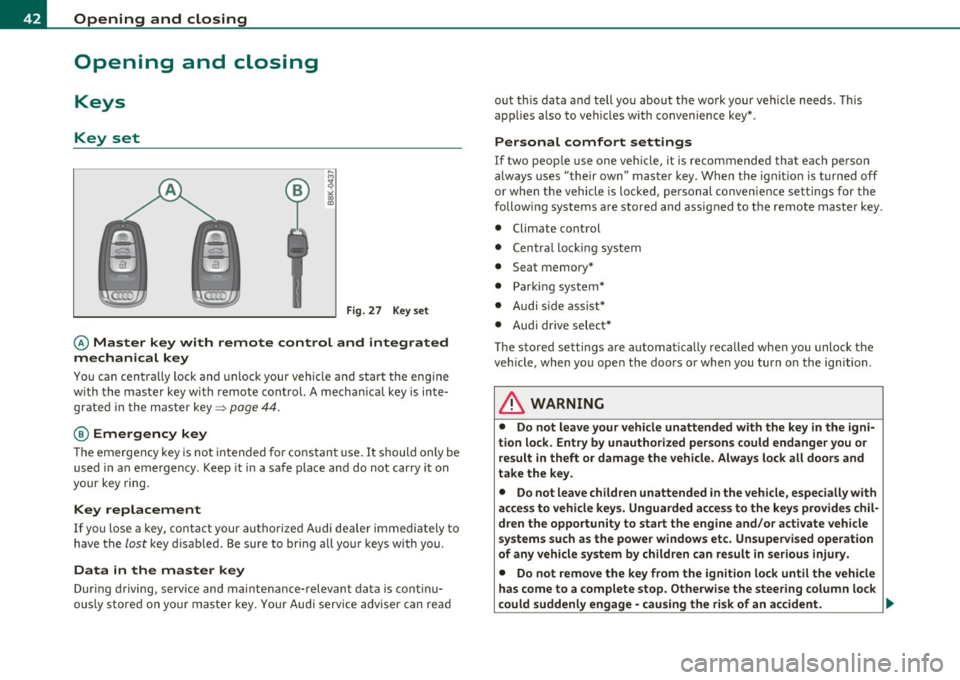
B
Fig. 27 Key se t
© Master key with remote control and integrated
mechanical key
You can centra lly lock and un lock your vehicle and start the engine
w ith the master key w ith remote cont ro l. A mecha nica l key is inte
grated in the master key=>
page 44.
@ Emergency key
The emergency key is not intended for constan t use. It should on ly be
used in an emergency. Keep it in a safe place and do not car ry it on
your key ring.
Key replacement
If you lose a key, cont act your autho riz e d Audi de aler immedia tely to
have the
lost key d isab led . Be sure to bri ng all your keys with you .
Data in the master key
During d riving, service and mai ntenance-relevant data is cont in u
ously s tore d on yo ur ma ster key. Your Audi service adviser can re ad out this data a
nd tell you about th e wo rk your ve hicle needs . T his
applies also to vehicles with convenience key* .
Personal comfort settings
If two peop le use one vehicle, it is recommended that each person
always uses "their ow n" mas ter key . When t he ignition is t urne d off
or when the vehicle is locked, pe rsonal convenience settings for the
followi ng systems a re stored and assig ned to the remote maste r key .
• Climate control
• Centra l lo cki ng sy stem
• Seat memory*
• Parki ng system *
• Audi s ide ass ist*
• Audi dr ive select *
Th e s tored se ttings a re au toma ticall y recalled when you unlock t he
veh icle, when yo u ope n the doo rs o r whe n you turn on the ign ition.
& WARNING
• Do not leave your vehicle unattended with the key in the igni
tion lo ck . Entry by unauthorized per sons could endanger you or
result in theft or damage the vehicle. Always lock all doors and
take the key.
• Do not leave children unattended in the vehicle, especially with
acce ss to vehicle key s. Unguarded acce ss to the keys provides chil
d ren the opportunity to start the engine and/or activate vehicle
system s such as the power windows et c. Un supervised operation
of any vehicle system by children can result in serious injury .
• Do not remove the key from the ignition lock until the vehicle
has come to a complete stop. Otherwise the steer ing column lock
could suddenly engage -cau sing the ri sk of an accident.
~
Page 46 of 362
Open ing and closing
- Pull the mechanical key ® out of the master key.
- Press the release button©=>
page 43, fig. 30 on the
battery holder and at the same time pull the battery
holder out of the master key in the di rec tion of the arrow.
- Install the new battery CR 2032 w ith the"+" sign facing
down.
- Push the battery holder carefully into the master key.
- Install the mechanical key.
<£> For the sake of the environment
Dispose of dead batteries properly so as not to pollute t he environ
me nt.
(I] Tips
T he replacement battery must be the same specification as the
orig inal. •
Removing the mechanical key
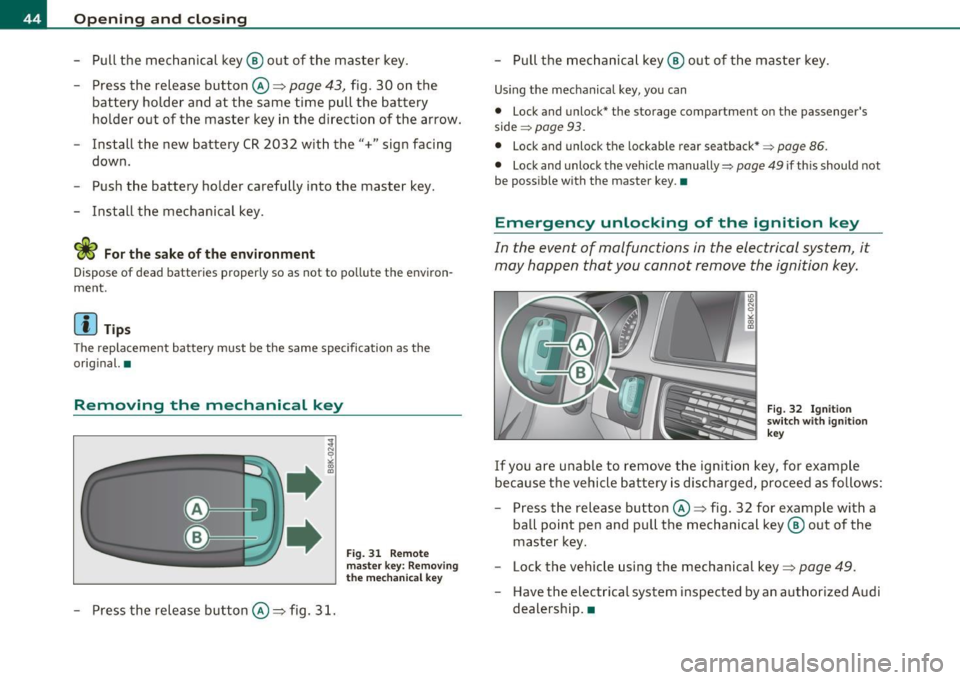
-Press the release button©=> fig. 31.
Fig. 31 Re mote
m aster key: Removi ng
t he mecha nica l key
- Pull the mechanical key ® out of the master key .
Using the mechanical key, you can
• Lock and unlock* the storage compartment on the passenger's
side
~ page 93.
• Lock and unlock the lockable rear seatback* ~ page 86.
• Lock and unlock the vehicle manually~ page 49 if this should not
be poss ible with the master key .•
Emergency unlocking of the ignition key
In the event of malfunctions in the electrical system, it
may happen that you cannot remove the ignition key .
Fig. 3 2 I gnit ion
s wit ch with ignitio n
k ey
If you are unable to remove the ignitio n key , for examp le
because the vehicle batt ery is discharged, proceed as fo llows :
- Press the release button©=> fig. 32 for example with a
ba ll point pen and pull the mec hanica l key @ out of the
maste r key.
- Lock the vehicle using the mechanical key=>
page 49.
-Have the elect rical sys tem inspected by an authorized Audi
dealersh ip .•
Page 47 of 362
Starting the vehicle with the emergency
key
I,; N 9
" :g
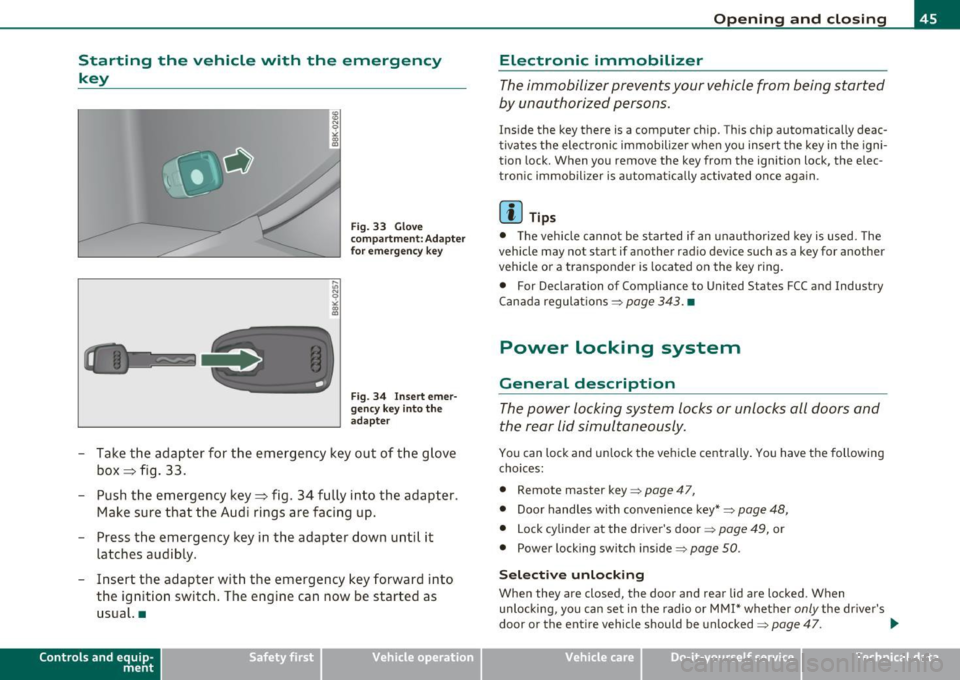
Fig. 33 Glove
compartment: Adapter
fo r emergency key
Fig. 34 Inser t emer
gency key i nto the
adapter
- Take the adapter for the emergency key out of the glove
box ~ fig . 33.
- Push the emergency key~ fig. 34 fully into the adapter.
Make sure that the Audi rings are facing up.
- Press the emergency key in the adapter down until it
latches audibly.
- Insert the adapter with the emergency key forward into the ign ition switch. The engine can now be started as
usual. •
Contro ls a nd e quip
m en t Vehicle
OP-eration
Opening and closing
Electronic immobilizer
The immobilizer prevents your vehicle from being started
by unauthorized persons.
Ins ide the key there is a computer chip. This ch ip automatically deac
tivates the elect ronic immobilizer when yo u insert the key in the igni
tion lock. When you remove the key from the ignition lock, the elec
tronic immobilizer is automat ica lly activated once aga in .
[ i ] Tips
• T he vehicle cannot be started if an unauthorized key is used. The
vehicle may no t start if another rad io dev ice such as a key for another
vehicle or a transponder is located on the key ring .
• For Declarat ion of Compliance to Uni ted S tates FCC and Industry
Canada regula tions =>
page 343 . •
Power locking system
General description
The power locking system locks or unlocks all doors and
the rear Lid simultaneously .
You can lock and unlock the ve hicle cent rally . You have the following
choices:
• Remote maste r key =>
page 47,
• Door handles with convenience key*=> page 48,
• Lock cylinder at the drive r's door => page 49, or
• Power locking swit ch inside =>
page 50.
Sele ct ive unl ocking
When they a re closed, the door and rear lid a re locked . Wh en
unlocking, you can set in the radio or MMI* whether
only the dr ive r's
door or the entire veh icle should be unlocked=>
page 47. .,_
Vehicle care Do-it-yourselt service iTechnical data
Page 48 of 362
Opening and closing
Automatic locking
The a utomat ic lock ing feature loc ks all t he vehi cle doo rs and the rea r
lid wh en you d rive faster tha n 9 m ph (15 km/h) .
T he car is unlocked again once t he ignit ion key is removed. In add i
t ion , th e ve hicl e ca n be u nlocked if the ope ning func tion in t he power
locking system switch o r at one of the door levers is actuated. The
Au to Lo ck funct ion ca n b e tur ned o n and off in t he radio or
M MI*
=> page 47.
Add itionally , in t he even t of a cras h with a irbag deployme nt the doors
ar e au to m atically u nlocked to allow access to the vehicle.
Anti-theft alarm warning system
If the anti -theft a larm warn ing system de tects a break-i n into t he
vehicle, acous tic an d visual warning s ignals are triggered.
Th e a nti-theft wa rning system is acti va ted a uto mati ca lly wh en you
lock the vehicle . It is deactivated w hen unl ocking using t he
remote
key ,
with t he mechanical key , and when you swi tch o n the igni tion .
The alarm also turns off w hen the alarm cycle has expired .
Turn signals
When you unlock the vehicle, the t urn s ignals flash twice, when y ou
l ock it o nc e.
If they do not fl ash, one of the door s, the rea r lid or the
hood is not locked .
Unintentionally locking yourself out
In the following cases the re safeguards to p revent yo u lock ing your
re mote m aste r k ey in the ve hicl e:
• The veh icle does not lock with t he centra l lock ing sw itch
=>
pa ge 50 if the drive r's door is o pen.
• On vehicles with conven ience key *, if the most recently used
m aste r key i s in t he lug gage compartme nt, the re ar lid is aut om at i
cally unloc ked aga in af ter i t is closed =>
page 51 .
Do not loc k yo ur vehicle w it h the remote master key until all doo rs
and the rear lid are closed . In t his way yo u avoid locking yoursel f out
acc identally .
& WARNING
• When you leave the vehicle, always remove the ignition key
and take it with you. This will prevent pas sengers (children, for
example ) from accidentally being locked in the vehicle should
they accidentally press the power locking switch in the front
doors.
• Do not leave children inside the vehicle unsupervised. In an
emergency it would be impossible to open the doors from the
outside without the key.
[ i ] Tips
• In the event of a cras h w it h ai rbag deployme nt all locked doo rs
w ill be a uto mat ically u nlocked to giv e access to t he v ehi cle occu pants
from t he outside .
• If the power locki ng system should malfunction, you ca n lock the
driver's door using the mechanical key =>
page 51.
• If the power locking system should fail, yo u can still o pen t he fuel
tank flap in an
emergency ::::>page273 .
• You a re well advised not to keep valuables inside a n unattended
veh icle, v isible or no t. Even a prope rly lo ck ed ve hicle canno t pro vide
the secu rity of a safe .
• If the L ED in th e upp er edge of th e dr iver 's d oor p anel come s on
for abo ut 30 seco nds afte r th e ve hicle is locked , there is a ma lfu nc
tion in t he powe r locking or the a nti- t heft wa rnin g system . H ave the
ma lf u nctio n corrected by an a uth orized Aud i dea lership o r qualified
re pair facility. •
Page 52 of 362
Opening and closing
-Tur n the me chanical key i n th e lo ck of the d river's door to
the lock position @=> & in "General descr iption" on
pag e 45.
If the power locki ng system f ail s, there is eme rge ncy locki ng for the
passenger 's door=>
page 51.
& WARNING
Read and follow all WARNINGS=> & in "General descript ion" on
page 45.
[IJ Tips
• After the ignit ion is swi tched on, the power locking sys tem swi tch
and the unlocking button for the rear lid
c;:; i n the door are enabled .•
Locking and unlocking the vehicle from
inside
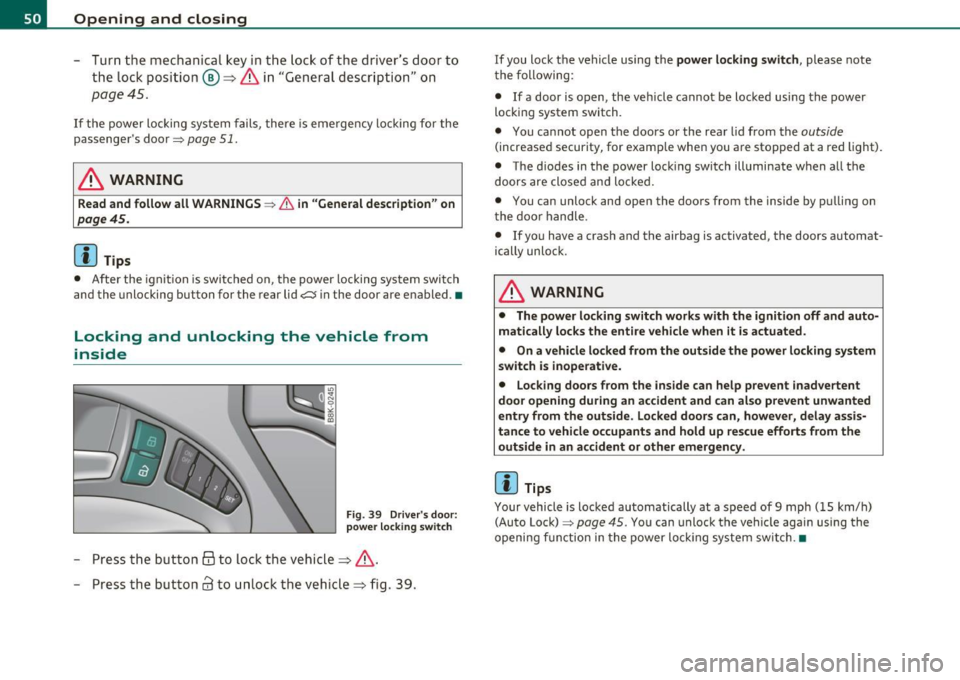
Fig . 39 Driver 's door :
power lo cking switch
- Press the b utto n @ to lo ck the vehicl e=> & .
- Press the but ton
63 to u nloc k the veh icle => fig. 39.
If you lock the vehicle using the power locking switch , please note
t he following:
• If a door is open, the veh icle cannot be locked using the power
loc kin g system switch.
• You ca nnot open the doors or the rear lid from the
outside
(increased security, for examp le when you are sto pped at a red light).
• The diodes in the power loc king switch ill uminate when a ll the
doors are close d an d lock ed .
• You can unlock and open the doors from the inside by p ulling on
t he doo r handle .
• If yo u have a crash and the airbag is activated, the doors automat
ically unlo ck.
& WARNING
• The power locking switch works with the ignition off and auto
matically locks the entire vehicle when it is actuated .
• On a vehicle locked from the outside the power locking system
switch is inoperati ve.
• Locking doors from the inside can help prevent inadvertent
door opening during an accident and can al so prevent unwanted
entry from the outside. Locked doors can, however, delay assis
tance to vehicle occupants and hold up rescue efforts from the outside in an accident or other emergency .
[IJ Tips
Your vehicle is loc ked automatically at a speed of 9 mph ( 15 km/h)
(Auto Lock)=>
page 45. You can unlock t he vehicle again using the
openi ng f unction in the power loc king system sw itch. •
Page 55 of 362

Power windows
Controls
The driver can operate the window regulator for the
driver's door with the left switch and the window regu
lator for the passenger's door with the right switch.
Fig. 44 Driver's door:
power window
switches
If the respective switch is pushed or pulled the window will
open or close. The power window switches have a
two-posi
tion function:
Opening the windows
- Push the switch to the first stop and hold it there until the
window has lowered to the desired position .
- Push the switch briefly to the
second stop : the window
will automatically open all the way .
Closing the windows
-Pull the switch up to the first stop and hold it there until
the window has risen to the desired position.
- Pull the switch quickly to the
second position: the window
will automatically close all the way.
Con tro ls a nd e quip
m en t Vehicle
OP-eration
Opening and closing
& WARNING
• Do not leave children unattended in the vehicle, especially with
access to vehicle keys. Unsupervised use of the keys can result in
starting of the engine and use of vehicle systems such as power
windows, etc. which could result in serious injury.
• Remember -you can still open or close the power windows for
about ten minutes after the ignition is switched off. Only when
either of the doors are opened are the power windows switched
off.
• Be careful when closing the windows. Check to see that no one
is in the way, or serious injury could result!
• Always remove the ignition key whenever you leave your
vehicle.
• If you lock your vehicle from the outside, no one, especially
children, should remain in the vehicle.
• Do not stick anything on the windows or the windshield that
may interfere with the driver 's field of vision.
(I) Tips
• When you open the doors, the windows automatically lower about
10mm.
• After the ignition has been switched off, the windows can still be
opened o r closed for about 10 minutes. The window regulato rs are
not switched until the driver's or passenger's door is opened. •
Vehicle care Do-it-yourselt service iTechnical data
Page 57 of 362

Valet parking
Through the "valet parking" feature the luggage
compartment of your vehicle is secured from unautho
rized access during the valet parking service.
Fig. 46 Valet parking
button
With "valet parking " activated, the rear lid cannot be opened.
- Take the mechanical key out of the master key=>
page 44.
- Open the glove box=> page 93 and activate => fig. 46 the
"valet parking" feature by pressing the
[VALET) button.
The indicator light in the switch illuminates .
- Close the glove box and lock it with the mechanical key.
- Lock both rear seatbacks with the mechanical key =>
page 86.
- Lock the luggage compartment pass-through with the
mechanical key=>
page 87.
-Leave the master key with the service personnel for
parking and keep the mechanical key with you .
When the "valet parking" feature is activated:
• the unlocking button for the rear lid
<::::::5 in the driver's door is inac
tive
Con tro ls a nd e quip
m en t Vehicle
OP-eration
Opening and closing
• the button <::::::5 on the master key is inactive
• the opening handle in the rear lid is inactive .
The vehicle can be driven and locked and unlocked with the master key. Access to the luggage compartment is blocked.•
Panoramic tilting sunroof
Tilting and closing
,,,,, OJ?1 11111
Fig. 47 Section of
headliner: Switch for
panoramic tilting
sunroof
- To tilt the panoramic tilting sunroof, press the switch briefly.
- To close the panoramic tilting sunroof, pull the switch briefly.
- To set an intermediate position, press/pull the switch
until the roof reaches the desired position .
After the ignition is switched off, you can still operate the Panorama
for about 10 minutes . As soon as the driver's or passenger's door is
opened, the switch is inoperative.
Sun blind
The sun blind can be opened and closed manually in any position.
Vehicle care Do-it-yourselt service iTechnical data
Page 58 of 362

Opening and closing
& WARNING
Pay careful attention when closing the panoramic tilting sunroof
• otherwise serious injury could result! For this reason, always
remove the ignition key when leaving the vehicle.
• Never leave children or persons requiring assistance alone in
the vehicle, especially when they could access the vehicle keys.
Unsupervised use of the keys can result in the engine being started
or use of vehicle systems such as the power windows, etc. which
could result in serious injury. The doors could be locked with the remote key, delaying help in an emergency.
• The panoramic tilting sunroof will continue to operate until
the ignition key has been removed and one of the front doors has
been opened .
0 Note
Always close your panoramic tilting sunroof when leaving your
vehicle . Sudden rain can cause damage to the interior equipment of
your vehicle, particularly the electronic equipment.
[ i J Tips
• Information on convenience opening/closing=> page 54. •
Emergency closing of the panoramic tilting
sunroof
The panoramic tilting sunroof can be closed manually in
an emergency .
Fig. 48 Section of
headliner: Unscrewing
lighting unit
Fig. 49 Section from
headliner: Crank for
emergency operation
If the panorama sunroof detects an object in its path when it
is closing, it will open again automatically. In this case, you
can close the roof with the power emergency closing func-
tion.
~
Page 60 of 362

Clear vision
Clear vision
Lights
Switching the lights on and off ·'t/..·
Fig. SO Instrument
panel: Headlight
control switch
Switching on AUTO -Automatic headlight
control*
- Turn the light switch to AUTO=> fig. 50.
Turning on the side marker Lights
-Turn the head light control switch to ~oo~.
Switching on low beams
-Turn the headlight control switch to @:D .
Switching off the Lights
- Turn the headlight control switch to 0.
The low beams only illuminate with the ign it ion turned on.
With the side marker lights or headlights switched on, the symbol next to the light switch illuminates
;o o: .
AUTO -Automatic headlight control*
With the switch in the AUTO position, the low beams are switched on
automatically depending on the ambient light, for example in a
tunnel, at dusk and when it is raining or snowing . When the low
beams are switched on, the
;oo :: symbol comes on. The low beams
remain switched on regardless of the ambient light when you turn on
the fog lights.
When you turn off the ignition, the low beams are automatically
switched off .
On vehicles with a rain sensor* the headlights switch on automatically
after a few windshield wiper passes . However, the instrument
lighting will not be switched on.
With automat ic headlight control, you also have the high-beam func
tion available. However, if you have not switched high beams back to
low beams while driving with automatic headlight contro l, only the
low beams come on the next time you turn on automatic headlight
control. In order to return to high beams again, you first have to pull
the high beam lever back to the normal position and then push the lever forward.
Light sensor* malfunction
In the event of a light sensor* malfunct ion, the driver is notified in
the instrument cluster display:
Automatic driving lights/automatic wipers defective
For safety reasons, the low beams are turned on permanently w ith
the switch in
AUTO . However, you can continue to turn the lights on
and off using the light sw itch. Have the light sensor checked as soon
as possible at an authorized Audi dealer or other qualified workshop . .,_
Page 62 of 362
![AUDI A5 COUPE 2011 Owners Manual Clear vision
Adjusting exterior Lighting
The functions are selected in the radio or fvf fvfI *.
- Select : Function button I CAR ]> E xterior lighting .
Coming home*
The coming home](/img/6/57583/w960_57583-61.png "AUDI A5 COUPE 2011 Owners Manual Clear vision
Adjusting exterior Lighting
The functions are selected in the radio or fvf fvfI *.
- Select : Function button I CAR ]> E xterior lighting .
Coming home*
The coming home")
Clear vision
Adjusting exterior Lighting
The functions are selected in the radio or fvf fvfI *.
- Select : Function button I CAR ]> E xterior lighting .
Coming home*
The coming home function ensures that after
tu rning off the ignition
a nd op enin g th e driv er' s door
the vehi cle periphery is illum inated i n
the dark . In addition, the fron t fog lights, the ta il ligh ts and the
license p late light a re tu rned on . The power-on time can be set for a
period from O (off) to 30 or 60 seconds .
Leaving home *
The leaving home funct ions ensures that
w hen unlocking , the vehicle
periphery is illuminated in t he da rk. In addi tion, the front fog l igh ts,
the tail lights and the license p late light are turned on . This function
can be tu rned on and off.
Auto he adligh ts*
When the light switch is in the AUTO=> page 58 position, the switch
on point of the l ights can be changed in the automatic driving light
function.
D aytime running lights
T he daytime running lights ca n be tu rn ed on o r off using this func
tion*. If the function is act ive, the dayt ime runn ing lights are turned
on a utomat ica lly when the ignition is switched on.
[ i ] Tips
T he coming home/ leaving home f unct ion * is avai lab le only wi th the
switch in the AUTO position .•
Daytime running Lights
When you turn on the ignition the daytime running lights
will
come on automatically .
USA models
Th e daytime running lights a re a ct ivated when the lig ht switch
=>
page 58, fig. SO is in the O position or the AUTO position (only in
daylig ht condit ions) . The daytime running lig hts function can be
turned on and off in the radio or MMI* menu
E xterior lighting
=> page 60.
Canada models
Th e dayt ime running lights are act ivated when the lig ht switch
=>
page 58, fig. SO is in the O position, oo oc position or the AUT O posi
tion (only in day light conditions) . The daytime r unning lights funct ion
cannot be turned off .
& WARNING
Never use daytime runn ing lights to see whe re you a re going . They
are not bright enough and will not l et you see far enough ahead
fo r safety , espe cially at dusk or when it is dark. Be aware of
changes in out side light condition s when you are driving and
r espond by swi tching on your low beams
io .
0 Note
Alw ay s be aware of change s in out side light conditions whil e you
are d riving. Re spond in time to fading d aylight by turning the light
s witch to position
io (or "AUTO ") to turn on you r head lights. •