brake light AUDI A5 COUPE 2012 User Guide
[x] Cancel search | Manufacturer: AUDI, Model Year: 2012, Model line: A5 COUPE, Model: AUDI A5 COUPE 2012Pages: 316, PDF Size: 78.59 MB
Page 37 of 316

-If the El war ning light and the -
warning light
l ) w ith the message Br ake
pads !
comes on in the instrument cluster
display, immediately contact your au
thorized Aud i dealer o r qualified work
shop to have a ll brake pads checked or
replaced if necessary.
~ Defective light bulb warning
Applies to vehicles: with defective light bulb warning
The defective light bulb warning monitors the
function of the light bulbs in the vehicle.
The defective l ight bulb warning monitors the
function of the light bulbs . If a defect ive lig ht
bu lb is detected, or if a light bulb has burned
out, the
I symbol appears as well as a notifi
cation that shows wh ic h light bulb is defe c
tive.
A WARNING
- Ligh t bul bs are under pressure and can
exp lode when bulbs a re replaced -risk o f
injury.
- W it h gas -discharge lamps* (xenon head
lights), the high-voltage component
must be handled approp riately. Doing
otherwise poses a risk of death!
(D Tips
Have an author ized Audi dealer or other
qua lified workshop perform the rep lace
ment or the repai r.
c:> Windshield washer fluid level too
low
f-4 "lease refill washer fluid
-
If the symbo l illuminates, add windshield
washer fluid to the washer system and also to
the head light washer system*
c::> page 251 .
1) - : USA mod els on ly
Dri ver information di spla y 35
Ehl Fuel supply too low
When the 11)1 symbol illum inates, t his means
th ere are abo ut 2.1 gallons (8 lite rs) of fuel
l eft in the fue l tank . Time to re fuel!
<=:> page 233.
If the symbol lights up, even when there is
amp le fue l in the t ank, and the text
TANK
SYSTEM MALFUNCTION
! CONTACT WORK
SHOP
appears in the disp lay, there is a fa ult in
the system . Contact a qualified works hop to
have the fa ult rectif ied .
0 Battery voltage
App lies to vehicles : with battery voltage warn ing
If battery power drops into the range where it
can limit the ability of the engi ne to start, this
thP
(•i symbol appears i n the instrumen t
cluster d isp lay with the fo llow ing drive r mes
sage
batter y charge low : Indicates charging
by being driven .
While this d river notification is d isp layed, you
have to be prepa red fo r limited starting capa
bility.
Driver message appears and goes out
again
If this drive r message appea rs after the ign i
t ion is tu rned on or while dr iv in g and it goes
o ut again afte r a while, t he battery has been
adequate ly re charged.
Driver message appears and does not go
out again
If this d rive r notifi cation appea rs after the ig
ni tion is t urne d on o r wh ile dr iving and does
not go out again, the ba tte ry's state of charge
is not in the optima l range . Starting capab ility
is restricted . Have the battery checked at an
authorized Aud i dea ler or other q ualified
wor kshop as soon as possib le.
Page 63 of 316

Seats and storage
General recommen
dations
Why is your seat adjustment so important?
The safety belts and the airbag system can
only provide maximum protection if the front
seats are correctly adjusted.
There are various ways of adjusting the front
seats to provide safe and comfortable support
for the driver and the front passenger. Adjust
your seat properly so that :
- you can easily and quick ly reach all the
switches and controls in the instrument
panel
- your body is properly supported thus reduc ing physical stress and fatigue
- the safety belts and airbag system can offe r
maximum protection
¢ page 162.
In the following sections, you will see exactly
how you can best adjust your seats .
There are special regulations and instructions
for installing a child safety seat on the front passenger's seat. Always follow the informa
tion regard ing child safety provided in
¢ page 186, Child Safety.
A WARNING
Incorrect seating position of the driver and
all other passengers can result in serious
personal injury.
- Always keep your feet on the f loor when
the vehicle is in motion -never p ut your
feet on top of the instrument panel, out
of the w indow or on top of the seat cush
ion. Th is applies especially to the passen
gers . If your seating position is incorrect,
you increase the r isk of injury in the case
of sudden braking or an acc ident. If the
airbag inflates and the seating position
is incorrect, this could result in persona l
injury or even death.
- It is important for bo th the driver and
front passenger to keep a distance of a t
Seat s an d sto rage 61
least 10 inches (25 cm) between them
selves and the steering wheel and/or in
strument panel. If you're s itting any
closer than th is, the airbag system can
not protect you properly. In addition, the
front seats and head restraints must be
adjusted to your body height so that t hey
can give you maximum protect ion.
- Always try to keep as much distance as
possible between yourself and the s teer
ing wheel o r instrument pane l.
- Do not adjust the driver's or front pas
senger's seat whi le the vehicle is moving.
Your sea t may move unexpected ly, caus
ing sudden loss of vehicle cont rol and
personal injury . If you adjust yo ur seat
while the veh icle is moving, yo u are out
of posit ion.
Driver's seat
The correct seat position is important for safe
and relaxed driving.
We recommend that you adjus t the dr iver's
seat in the fo llowing manner:
.,. Adjust t he seat in fore and aft direction so
that you can easily push the peda ls to the
floor wh ile keeping your knees s lightly bent
i:::> A in Why is your seat adjustment so im
portant? on page 61.
.,. Adjust the seatback so that when you sit
w ith your back against the seatback, you can
still grasp the top of the steering wheel.
.,. Adjust the head restraint so the upper edge
is as even as possible with the top of your head . If that is not poss ible , try to adjust
the head res traint so that it is as close to
this pos ition as possib le
i:::> page 67.
A WARNING
Never place any objects in the dr iver's foot
well. An object could get into the pedal
area and interfere with pedal funct ion . In
case of sudden braking or an acc ident, you
wo uld not be able to brake or accelerate.
Page 79 of 316
_& WARNING
-Always remove objects from the instru
ment panel. Any items not put away
could slide around inside the vehicle
whi le driving or when accelerating or
when applying the brakes or when driv
ing around a corner.
- When you are driving make sure that
anything you may have placed in the cen
ter console or other storage locat ions
cannot fa ll out into the footwells. In case
of sudden braking you would not be able
to brake, depress the clutch or acceler
ate.
- Any pieces of clothing that you have
hung up must not interfere with the driv
er's v iew. The coat hooks are designed
only for lightweight clothing. Never hang
any clothing with hard, pointed or heavy
objects in the pockets on the coat hooks.
During sudden braking or in an accident -
especially if the airbag is deployed -
these objects cou ld injure any passen
gers inside the vehicle.
Glove compartment
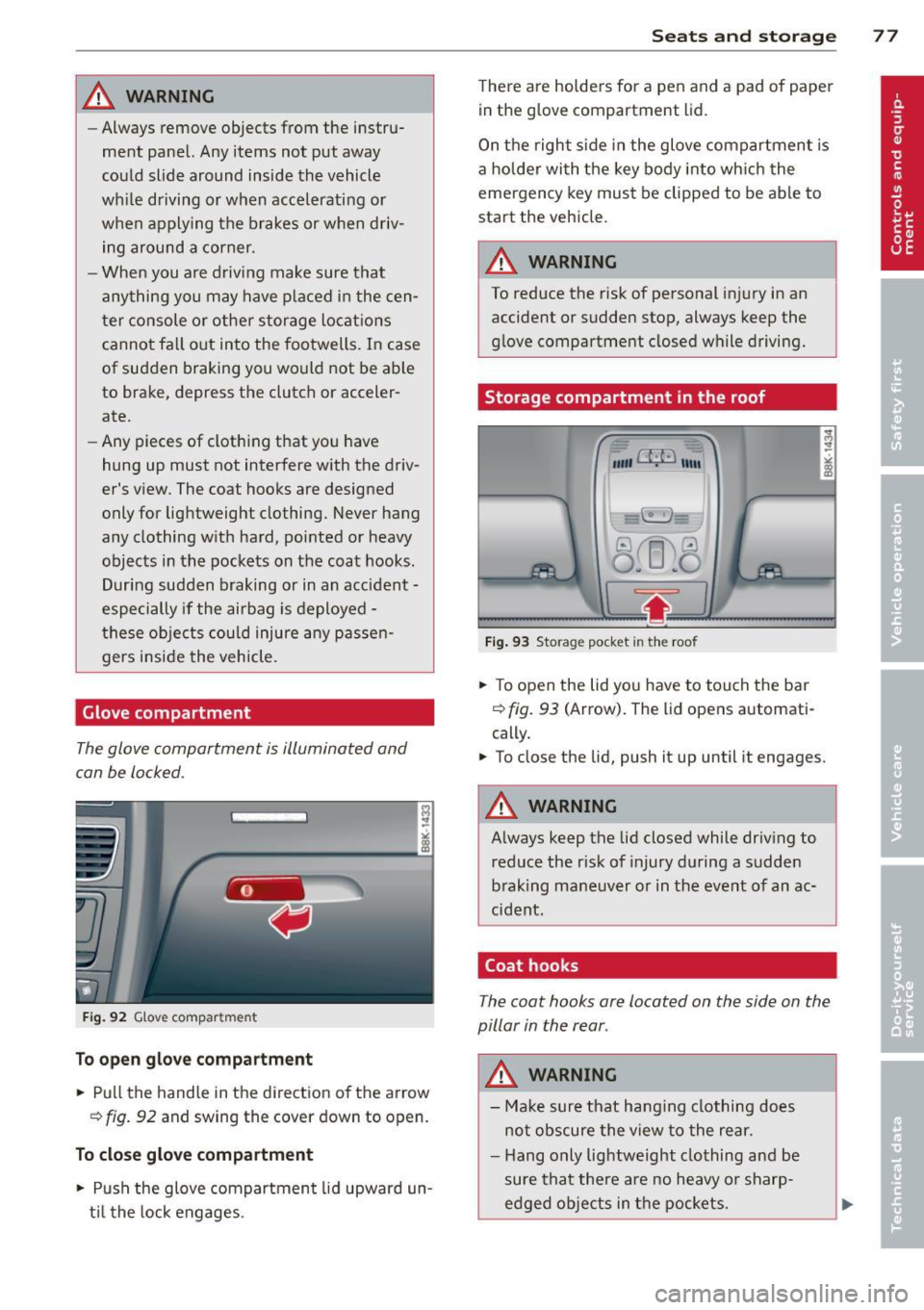
The glove compartment is illuminated and
can be locked.
F ig . 92 G love compartme nt
To open glove compa rtment
.. Pu ll the hand le in the direction of the a rrow
~ fig . 92 and swing the cover down to open.
T o clos e glo ve compartm ent
.,. Push the glove compartment lid upward un
t il the lock engages .
Sea ts a nd s to rage 77
There are holders for a pen and a pad of paper
in the glove compartment lid.
On the right s ide in the glove compartment is
a holde r with the key body into which the
emergency key must be clipped to be able to
start the vehicle.
A WARNING
To reduce the risk of personal injury in an
accident or sudden stop, always keep the
glove compartment closed while driving.
Storage compartment in the roof
"'" CfJ:' 11111
.8=5: ~I
Fig . 93 Storage pocket in the roof
.,. To open the lid yo u have to touch the bar
~ fig. 93 (Arrow). The lid opens automati
cally.
.. To close the lid, push it up until it engages.
A WARNING
-
Always keep the lid closed while driv ing to
reduce the risk of injury during a sudden
braking mane uver or in the event of an ac
cident.
Coat hooks
The coat hooks are located on the side on the
pillar in the rear .
A WARNING
--Ma ke sure that hanging clothing does
not obscure the view to the rear.
- Hang only lightweight clothing and be
sure that there are no heavy o r sharp
edged objects in t he pockets.
-
Page 96 of 316

94 On the road
@ For the sake of the environment
To avoid unnecessary engine wear and to reduce exhaust emissions, do not let your
veh icle stand and warm up. Be ready to
drive off immediately after start ing your
veh icle. Maintain moderate speed until the
engine is comp letely warm. Remember,
the engine performs best at operating
temperature.
@ Tips
- If the key cannot be removed from the
ignition lock, you have to pull the me
chanical key out of the master key in or
der to be ab le to loc k the vehicle The ve
hicle can be locked with the mechanica l
key
~page 39.
-If you open the driver's door wi th the ig
nit ion switched on, a buzzer sounds and
the message
Ignition i s on appears in
the instr ument cluster disp lay . Switch
the ignition off.
Stopping the engine
> Bring the vehicle to a full stop.
> Automatic transmission*: Move the selec
tor lever to the
P or N position .
> Press on the ignition key. The engine is
turned off.
Emergency off
If it is necessary in unusual circumstances, the
engine can be switched off wh ile the vehicle is
mov ing . The engine will be switched off if you
p ress on the key for an extended period .
_& WARNING
-Never turn off the eng ine unti l the vehi
cle has come to a complete stop.
- T he brake booster and se rvotronic only
work when the engine is running. With
the ignition turned off, you have to apply
more force when steering or braking .
Since you cannot steer and stop norma l
ly, this can lead to accidents and serious
injuries. -
The radiator fan can continue to run for
up to 10 minutes even after you have
turned off the engine and removed the
ignit ion key. The radiator fan can also
turn on again if the engine coolant heats
up because of intense sunlight or heat
bu ild-up in the engine compa rtment.
(D Note
Do not stop the engine immediately after
hard or extended driving . Keep the engine
runn ing for approximate ly two minutes to
prevent excess ive heat bu ild-up .
Starting and stopping
the engine with
convenience key
St t· th ng ·n ith the
button
Applies to vehicles: wit h co nvenience key
This button switches on the ignition and
starts the engine.
Fig. 106 Conven ience key: STAR T ENGINE STOP button
> Manual transmission: Fully depress the
clutch pedal and move the shift lever to the
neutral posit ion.
> Automatic transmission*: Step on the brake
pedal and move the selector leve r to
P or N
~ .&. -
> Pr ess on the !START ENGINE STOPI b utton
~ fig. 106 -the engine will start.
By pressing the
! START ENGINE STOPI button
without depressing the clut ch or the brake
peal, the ignition is switched on and switched
off by pressing it again.
IJi,,
Page 98 of 316

96 On the road
-If the engine has been under heavy load
for an extended period, heat builds up in
the engine compartment after the en
gine is switched off -there is a risk of
damaging the engine. Allow the engine
to run at idle for about 2 m inutes befo re
switching it off .
@ Tips
If you open the driver's door with the igni
tion switched on, a buzzer sounds and the
message
Ignition i s on appears in the in
strument cluster display . Switch the igni
tion off.
Switching engine off with the button
Applies to vehicles: w it h conve nience key
.,. Bring your vehicle to a complete stop.
.,. Automatic transmission* : Move the selector
lever to the
P or N pos ition.
> Pre ss the I STAR T ENGINE STOP I button
c::>page 94, fig. 106 .
Emerg enc y OFF function
If necessary, the engine can be switched off
with the selector lever in the
R , D or S* posi
tions. To do so, step on the brake pedal and press and hold the
I START ENGINE S T OP I but
ton (veh icle speed must be less than 6 mph/
10 km/h.
& WARNING
- Never turn off the eng ine unti l the vehi
cle has come to a comple te stop.
- The brake booste r and se rvotronic only
work when t he engine
is running. With
the ignition turned off, yo u have to apply
more force when steering or braki ng .
Since you cannot steer and stop norma l
ly, this can lead to accidents and serious
injuries.
- For safety reasons, you should always
park your vehicle with the se lector lever
in P. Otherwise, the veh icle could inad
vertently roll away. -
After the engine has been switched off,
the radiator fan can cont inue to run for
up to 10 minutes -even with the ignition
switched off. It can also sw itch on again
after some t ime if the coolant tempera
ture rises as the result of a heat bu ildup
or if the engine is hot and the engine
compartment is additionally heated by
the s un's rays .
Q;) Note
If the engine has been under heavy load
fo r an extended period, heat bu ilds up in
the engine compartment after the engine i s switched off -there is a r isk of damag ing
the engine. Allow the engine to run at id le
for abo ut 2 minutes before switching it
off .
Electromechanical
parking brake
Operation
The ele ctromechanical parking brake replaces
the hand brake.
Fig . 107 Center console: Parking b rake
> Pull on the switch @ c::> fig. 107 to apply the
parking brake. The indicator light in the
sw itch illuminates .
.,. Step on the brake pedal or the accelerator
pedal and press the switch at the same t ime
to re lease the park ing brake. The indicator
light in the sw itch goes out .
Your vehicle is equipped with an electrome chanical parking brake . The parking brake is
designed to p revent the veh icle from rolling
u nintentionally and replaces the hand b rake. .,..
Page 99 of 316

In addition to the norma l functions of a tradi
tional hand brake, the electromechanica l
parking brake provides various convenience
and safety functions.
When start ing f rom re st
- T he integ ral starting assist helps you when
driving by automatically releasing the park
ing brake ¢
page 98, Starting from rest.
-When starting on inclines, the starting as
sist prevents the vehicle from unintentional
l y rolling back. The braking force of the
parking brake is not released until sufficient
driv ing force has been built up at the
wheels .
Emergenc y bra ke function
An emergency brake ensures that the vehicle
can be slowed down even if the
normal brakes
fa il¢
page 98, Emergency braking .
Indicator light s
-If the parking brake is closed w ith the igni
tion
s witch ed on the . (USA models) /
• (Canada models) indicator lights come
on in the instrument cluster and the switch.
-If the parking brake is closed with the igni
tion
s witched off the . (USA models) I
• (Canada models) indicator lights come
on in the instrument cluster and the switch
for about 20 seconds.
A WARNING
If a gear or a drive range (automat ic trans
m ission) is engaged with the vehicle sta
tionary and the engine run ning, you must
in no inst ance accelerate o r release the
cl utch carelessly. Otherwise the veh icle
wi ll start to move immediately -risk of an
accident.
CJ) Note
If the . symbol in the disp lay o r the
- (USA
models) ;II (Canada mode ls)
ind icator light in the instr ument cluster
flashes, there is a ma lfunction in the brake
system. By pressing the
! SETI button, you
can br ing up a driver message which ex-
On th e ro ad 97
plains the ma lf u nction in more detail. If
the driver message
P ark ing brake! ap
pears, the re is an operating malfunct ion in
the parking brake which you should have
repaired immed iate ly by an authorized Au
di dealer or other qualified workshop
¢page 30.
(D Tips
-You can apply the parking brake at any
time -even with the ign ition turned off.
The ignit ion must be turned on in order
to release the par king b rake .
- Occasional noises when the parking
brake is applied and released are normal
and are not a cause fo r conce rn.
- When the vehicle is parked, the park ing
brake goes throug h a self-test cycle at
regu lar inte rva ls. Any associated noises
are normal.
Parking
Various rules apply to prevent the parked ve
hicle from rolling away accidentally.
Parking
"' Stop the vehicle with t he foot brake .
"' Pull the switch to apply the parking brake.
"' Automatic transmission*: Move the selector
lever to
P .
"' Tur n the engine off¢_&.
"' Ma nual transmiss ion: Shift into 1s t gear.
In addition on inclines and grades
"' Turn the steering wheel so that your vehicle
w ill roll aga inst the curb in case it shou ld
start to move.
A WARNING
- When you leave you r vehicle -even i f on
ly briefly -always remove t he ignition
key. This app lies pa rticularly when chil
dren remain in the vehicle. Otherwise t he
children could start the eng ine, release
the park ing brake or operate electrical
equ ipme nt (e.g. power windows). There
is the risk of an acc ident.
Page 101 of 316

Using the parking brake to perform emer
gency braking will slow your vehicle down
as if you had made a full brake application.
The laws of physics cannot be suspended
even w ith ESP and its associated compo
nents (ABS, ASR, EDS). In corne rs and
when road or weather conditions a re bad,
a full brak e application can cause the vehi
cle to skid or the rear end to break away -
r isking an accident.
Driver messages in the instrument
cluster
Caution: Vehicle parked too steep
This message appears when the park ing brake
is applied on an incline that exceeds about
30%.
In this case the braking power of the parking
brake may
not be adequate to prevent the ve
hicle from rolling unintentionally .
Press brake pedal to release parking brake
This driver message appears when the switch
to release the parking brake was pressed. The
parking brake can only be released if you step
on the brake pedal and at the same time press
the switch or you automatically release the
parking brake with the start ing ass ist
<=> page 98.
(p] Parking brake m alfunction!
This driver message appears together with
the yellow
IIJ symbo l when there is a parking
brake malfunction.
On the road 99
Cruise control
Switching on
The cruise control system makes it possible to
drive at a constant speed starting at 20 mph (30 km/h) .
Fig. 108 Contro l l ever w ith push-b utton
Fig. 109 D isp lay : Selected speed
.. Pull the lever to position @<=> fig. 108 to
sw itch the system on.
.. Drive at the speed to be controlled.
.. Press button @to set that speed.
a,
~ 0 er a, a,
The stored speed and the green symbol
[ijj(Q~i~ (US model) /. (Canadian model) are
shown in the display<=> fig. 109. The display
may vary, depending on the type of display in
your vehicle. The ind icator light
mJJlm (US model)/ . (Canad ian model) will
also light up in the instrument cluster .
The speed is kept constant by modifying en
gine power or through an active brake inter
vention.
A WARNING
- Always pay attention to the traffic
around you when the cruise control is in
operation. You are always responsible for ..,.
Page 102 of 316

100 On the road
you r speed and the distance between
your vehicle and othe r vehicles.
- For reasons of safety, cruise contro l
sho uld not be used in the city, in sto p
and-go traff ic, on twist ing roads and
w hen road conditions are poor (such as
ice, fog, gravel, heavy rain and hydro
planing) -you cou ld have an acc ident .
- Switch the cruise contro l off temporarily
when d rivi ng in turn ing lanes, highway
exits or in construction zones .
- Please note that unconsciously "resting" yo ur foot on the accelerator pedal causes
c ruise contro l not to brake. This is due to
the control system be ing ove rridden by
the drive r's ac celeration.
{O) Tips
- Vehicles with manual t ransmission: You
can attain the set speed only if the gea r
that is currently engaged wi ll allow it, or
if i t does not tax t he engine and allows it
to run smoothly . There fore shift into a
higher or lower gear in a timely manner.
- The bra ke ligh ts illuminate as soo n as
the b rakes app ly automatica lly.
Changing speed
.. Press the lever in the direction of the 0
r::!v page 99, fig. 108 or in the direction of the
0 to increase or decrease your speed.
.,. Let go of the lever to save that speed.
Change speed in increments of 1 mph (1 km/ h) by light ly pressing the lever. If you keep the
lever pressed down, you will alter your speed
in 5 mph (10 km/h) increments .
You can a lso press the accelerator pedal down
to increase your speed, e.g. if yo u want to
pass someone. The speed you saved earl ier
will resume as soon as you let off of the accel
erator pedal.
If, however, you exceed your saved speed by
5 mp h (10 km/h) for longer than 5 minutes,
the cruise contro l will be turned offtempora -rily. The green symbo
l in the d isp lay t urns
white, the saved speed is retained .
Pre-selecting speed
You can pre-select your desired speed while
the vehicle is not moving .
.,. Tur n on the ign ition.
.,. Pull leve r into posi tion 1
¢ page 99,
fig. 108 .
.. Press the lever in the 0 or 0 direction to
increase or decrease your speed .
.,. Let go of the lever to save that speed.
This function makes it possib le, for examp le,
to save the speed you want before driving on
the h ighway. Once on the h ighway, act ivate
the cru ise control by pulling the lever toward
(D .
Switching off
Temporary deactivat ion
.,. Step on the brake pedal, or
.,. Manual transmission: Keep the cl utch pedal
pressed down
Longer, o r
.,. Press t he leve r into position @(n ot clicked
into place)
¢ page 99, fig . 108, or
.,. Drive for longer than 5 m inutes a t more
t han 5 mph (10 km/h) above the stored
spee d.
Switching off completely
.,. Press lever into position @(clicked into
p lace), or
.,. Switch t he ignit ion off .
T he speed you saved will be retai ned if the
cr uise control ha s been switched off tempora
rily . To resume the saved speed, le t up o n the
brake or clutch pedal and p ull the leve r to po
sition
(D .
The saved speed w ill be erased afte r tu rning
t h e ignit io n off. .,..
Page 106 of 316

104 Adapti ve crui se control
keep a safe distance from vehicle in front of
you or to avoid a rear-end collision . In this sit
uation, a symbol appears and a warning tone
sounds
¢ page 111.
Passi ng anoth er vehicl e
If you move into the passi ng lane and no veh i
cle is detected ahead, the adaptive cruise con
trol accelerates to the speed you have set and maintains it.
Overrid e
You can increase your speed at any t ime by
stepp ing on the acce lerator pedal. After yo u
re lease the accelerator pedal, the system ad
justs back down to the speed you previously set .
@ Tips
Please note that the amount of accelera
tion the adaptive cruise control uses de pends on the Distance setting selected.
DISTANCE 1 gives you accelerat ion that is
dynamic and sporty . DISTANCE 4, o n the
other hand, g ives more moderate accelera
tion . For more information about the time
intervals ¢
page 106, How is the distance
(time interval) set?.
- Please note that if the adaptive cruise
control has begun braking the vehicle
and the driver chooses to brake the vehi
cle add itionally, the brakes may fee l
"hard" . This is simply due to the pressure
build- up of the initial braking.
- Adaptive cruise control is sw itched off af
ter pressing the footbrake . The speed
saved up this point can be resumed. To resume the saved speed, release the
brake pedal and pull the control lever
¢ page 105, Turning adaptive cruise
control off temporarily .
Switching the system on and off
Applies to vehicles: with adaptive cruise contro l
Fig. 112 Co ntrol lever : Sw itching o n and off
Sw itching the system on
.,. Pull the lever to position (D c::> fig. 112 .
Switching the system off
.,. Pres s the lever to pos it ion @ (latched).
How is the speed stored?
Applies to vehicles: wit h Audi adaptive cruise control
,' ts ~:_" ';;;", ' , E Sl'EEO CANCELU
. T ,0. -ON ... . RESUME~
Fig. 11 3 Control lever: Sto ring s peed
With the system switched on the speed is
stored as follows:
• Drive at the speed you want. The speed
must be between 20 and 95 mph (30 and
150 km/h).
.,. Press the
~ I S-ET ~I button c::> fig . 113 to store
the desired speed .
After the
I S ET I button is released, the current
speed is stored and ma intained .
The saved speed is now shown in the LED dis play in the speedometer by one or two illumi
nated red light diodes ¢
page 108 . At the
same t ime, the saved speed is also shown for
a short time in the Information line
¢ page 109. ...,
Page 107 of 316
@ Tips
For safety reasons, the stored speed is de
leted when the ign ition is turned off.
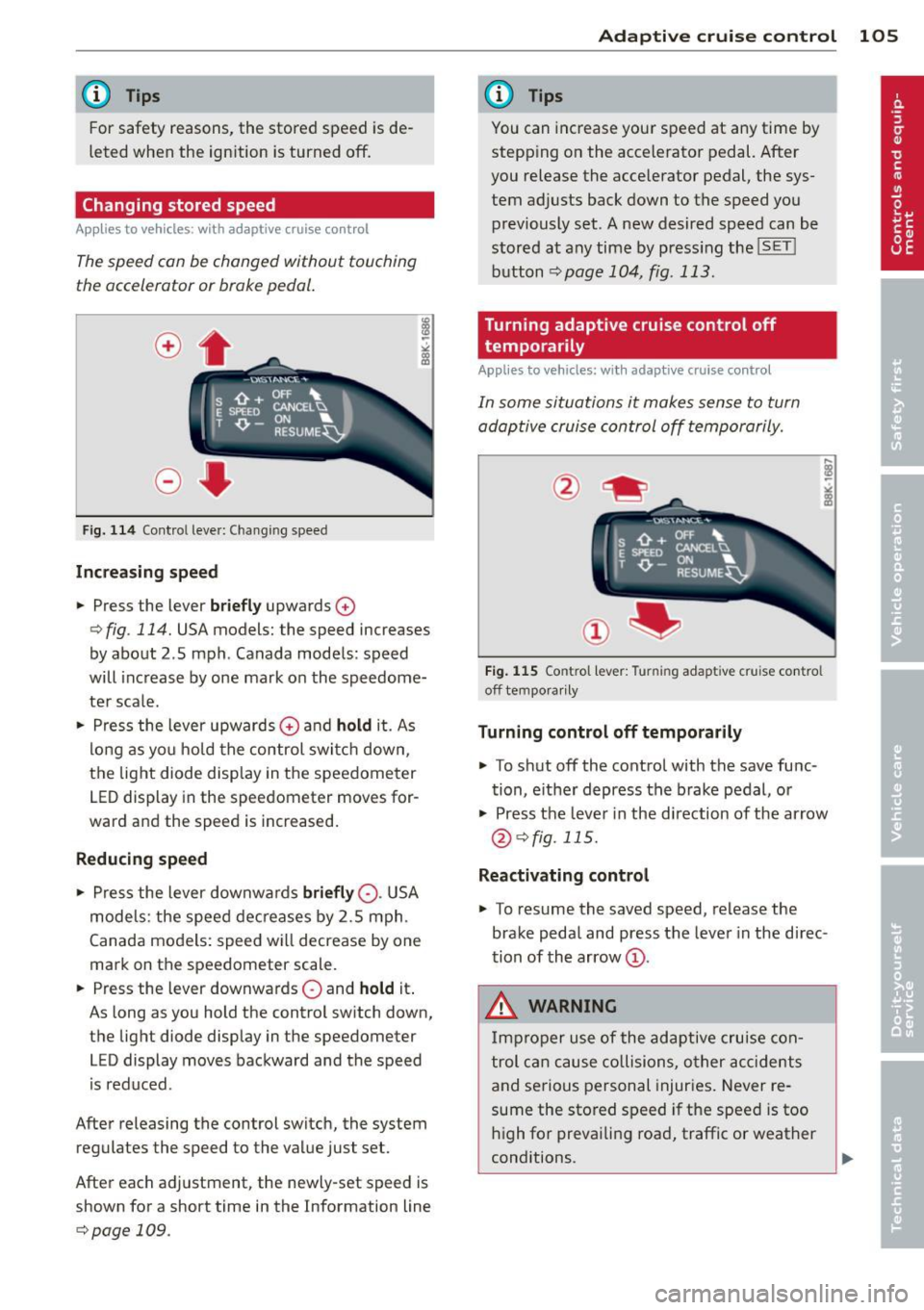
Changing stored speed
App lies to vehicles: with adaptive cruise co ntrol
The speed con be changed without touching
the accelerator or broke pedal.
Fig. 114 Contro l leve r: Changing speed
Increasing speed
.. Press the lever briefly upwards 0
¢ fig. 114. USA models: the speed increases
by about 2 .5 mph . Canada models : speed
will increase by one mark on the speedome
ter sca le .
.. Press the lever upwards
0 and hold it. As
long as you hold the control switch down,
the light diode display in the speedometer
LED display in the speedometer moves for
ward and the speed is increased.
Reducing speed
.,. Press the lever downwa rds briefly 0-USA
models: the speed decreases by 2.5 mph.
Canada models: speed will decrease by one
mark on the speedometer scale .
.. Press the lever downwards
0 and hold it.
As long as you hold the control sw itch down,
the light diode display in the speedometer
LED display moves backward and the speed
i s reduced .
After releasing the control switch, the system
regulates the speed to the value just set.
After each adjustment, the newly-set speed is
shown for a short time in the Information line
¢page 109.
Adaptive cruise control 105
@ Tips
You can increase your speed at any time by
stepp ing on the accelerator pedal. After
you release the acce lerator pedal, the sys
tem adjusts back down to the speed you
previously set. A new desired speed can be
stored at any time by press ing the
!SET !
button ¢page 104, fig . 113.
Turning adaptive cruise control off
temporarily
Appl ies to vehicles: wit h adaptive cruise control
In some situations it makes sense to turn
adoptive cruise control off temporarily.
Fig. 115 Contro l l ever: Turnin g adapt ive cru ise contro l
off tempora rily
Turning control off temporarily
.. To shut off the control with the save func
tion, either depress the brake pedal, or
.. Press the lever in the d irection of the arrow
@¢fig. 115.
Reactivating control
.,. To resume the saved speed, release the
brake pedal and press the lever in the d irec
tion of the arrow
(D.
_&. WARNING
Improper use of the adaptive cruise con
trol can cause collisions, other accidents
and serious personal injuries. Never re-
sume the stored speed if the speed is too
high for prevailing road, traffic or weather
-
conditions. ..,.