brake light AUDI A5 COUPE 2012 Owner's Manual
[x] Cancel search | Manufacturer: AUDI, Model Year: 2012, Model line: A5 COUPE, Model: AUDI A5 COUPE 2012Pages: 316, PDF Size: 78.59 MB
Page 110 of 316

108 Adapti ve crui se control
You can select among the different in forma
tion by repeated brief taps on the
I RESET I but
ton on the windshield wiper lever¢
page 23,
Operation.
© S tatus in dicator
The information in area © is not displayed
permanently. Information is disp layed only if
you set or change the speed setting, change
the time interval, when messages are dis
played or if the adaptive cruise control is
turned off for safety reasons.
Speedometer and indicator light display
App lies to vehicles: with adaptive cruise control
~
- ---
~
® @ ©
Fig . 118 Instrument clus ter: Indicator light
Desired spe ed
The desired speed set by the driver is dis
p layed by a red LED in the LED display in the
speedometer.
N
?3
" 00 a,
I f the des ired speed was set between two
lines on the speedometer using the
ISETI b ut
ton, the two closest light diodes wi ll come on
¢ page 107, fig. 117.
The system a llows only speeds from 20 to 95
mph (30 to 150 km/h) to be set. This speed
range is faint ly illuminated in the speedome
ter (LED lights) .
Indicator lights (symbols )
- @ Open r oad :
The ind icator light shows
that adapt ive cru ise contro l is active a nd
that no object is ahead of the veh icle. Astor
ed speed requested is maintai ned .
-@ Driving in traff ic: The ind icator light indi
cates that an object has been detected trav
eling in front. Your speed is adjusted accord- ing to the speed of the vehicle in front.
The
adaptive cruise contro l accelerates and
brakes automatica lly w ithin the system's op
eration parameters.
- ©
Dri ver i nte rvention prompt : The red
flashing warning light means
Reque st for
driver to as sume con trol.
You as the dr iver
must slow the vehicle with the foot brake.
The symbol tells you that the adaptive
cruise control is not able to slow the veh icle
down enough to keep a enough distance to
the vehicle in front of you. An warning tone
w ill also sound when the symbo l appears.
For more information about the driver inter
vention prompt
¢ page 111.
CJ) Tips
-If you use the accelera tor to go faste r
t han the speed of the object ahead of
you, the
d riv e r intervent ion p rompt wi ll
not be accompanied by a warning s ignal.
- If the speed you previously set is exceed
ed, the indicator light in the speedome
ter wi ll switch off.
Display in the instrument cluster
Applies to vehicles: wit h adaptive cruise control
F ig . 119 Display in the inst rume nt cluster
Scroll th roug h the available informa tion d is
plays by briefly tapping the
I RESET ! button at
the end of the windshield wiper lever. You can
se lect information from the tr ip computer,
navigation system* or adaptive cruise control.
@ Vehicle symbol
@ Distance
© Status
Page 112 of 316

110 Adaptive cruise control
any objects over an extended time period. For
the time being, the distance to vehicles up
ahead is not being controlled. The ACC system
is not switched off, so increased alertness is
required. The following may be reasons for
the text message ACC Functionally limited:
- The ACC sensor is dirty. The ACC system is
not reacting, or is not reacting correctly, to
vehicles traveling ahead .
- It is possible that you are driving on a road
with very light traffic
without anything at
the side of the road (e.g. guard rails, traffic
signs, trees). As soon as a vehicle is detected
by the system again, it returns to its control
range and the text message disappears.
The ACC sensor is located in the right front
trim grille
¢ page 102, fig . 110. If there is a
loss of operation due to heavy contamination,
this area should cleaned to restore proper op
eration.
ACC not available
The text message ACC not available appears,
for example, if the temperature of the brakes
is excessive . Adaptive cruise control is tempo
rarily not available. A warning tone sounds as
a reminder.
ACC not available!
The text message ACC not available! appears
in the event of a malfunction. Adaptive cruise
control is turned off. A warning tone sounds
as a reminder. Have the system inspected by a
qualified dealership.
ACC sensor blocked !
The text message ACC sensor blocked ! ap
pears when the ACC system can no longer
guarantee safe detection of objects. Adaptive
cruise control is turned off. A warning tone
sounds as a reminder.
To decide whether it is necessary to switch off
the ACC (ACC sensor blocked
!) or if it is only a
temporary condition (ACC Functionally limit
ed), the system will also takes into considera
tion the outside temperature and/or the wind
shield wiper operation. The
ACC sensor is dirty or blocked (e.g. leaves,
snow).
The sensor should be cleaned to restore prop
er sensor function¢
page 102, fig. 110.
Engine speed !
The text message Engine speed ! appears in
vehicles with manual transmission when the driver did not shift up or down in time while
using adaptive cruise control braking or accel
erating, causing the vehicle to exceed or not
reach the permitted limit speed. This causes
adaptive cruise control to deactivate automat
ically. A chime sounds as a reminder.
Parking brake!
The text message Parking brake! appears if
emergency braking was manually initiated
with the Electromechanical Parking Brake
(EPB). The adaptive cruise control is turned
off. This is accompanied by a warning tone.
Stabilisation program
The text message Stabilisation program ap
pears if the Electronic Stabilization Program
(ESP) has intervened. In this case the adaptive
cruise control is automatically turned off. This
is accompanied by a warning tone.
Speed
The set speed in mph (Canada km/h) always
appears when saving or changing the speed in
adaptive cruise control¢
page 104, How is
the speed stored?
and ¢ page 105, Changing
stored speed.
Speed too low
The text message Speed too low appears if
the current speed is too low
to set or to hold
the requested speed.
When setting a desired speed, it must be at
least 20 mph (30 km/h). At speeds below 12
mph (20 km/h), the cruise control is turned
off.
In speeds over 95 mph (150 km/h), the sys-
tem remains active and resumes the speed of .,..
Page 113 of 316

95 mph (150 km/h) if the driver removes the
foot from the accelerator .
Selector lever position!
The text message Selector lever position! ap
pears when the selector lever is moved to po
sition
N. In thi s position, adaptive cruise con
trol is not avai lab le .
Driver intervention prompt
Applies to vehicles: with adaptive cruise control
The driver intervention prompt co/ls on the
driver to toke over the situation.
Fig. 121 Instrument clus te r: Driver inte rven tion
pr ompt
In certain situations, the braking power of the
adaptive cruise control is not sufficient to
maintain an adequate distance from the ob
ject ahead . In this situation, the adaptive
cru ise control calls on
you as the driver to take
action.
The
driver intervention prompt alerts you vis
ually and audib ly .
- A red vehicle is shown in the instrument
cluster disp lay
¢ fig . 121 .
-The text DISTANCE! appears in the status
line .
Adaptive cruise control 111
- The indicator light in the Instrument cluster
blinks red.
- A warning tone sounds.
(0 Tips
-If the adaptive cruise control initiates
braking, the hydraulic brake system is
under pressure . Th erefore, the brake
pedal distance is shorter and the pedal
"feels" harder.
- Adaptive cruise contro l is swi tched off af
ter pressing the footbrake. The speed
saved up this point can be resumed.
- To resume the saved speed, re lease the
brake pedal and press the control lever
¢ page 105, Turning adaptive cruise
control off temporarily.
- If you use the accelerator to go faster
than the speed of the object ahead of
you, the
driver intervention prompt will
not be accompan ied by a warn ing signal.
- If the speed you previously set is exceed
ed, the indicator light in the speedome
ter will switch off.
MMI settings
App lies to vehicles: with adaptive cruise control
Individual settings for adoptive cruise control
con be selected in the MMI*.
Settings for the driving program can be ad
justed individually to the particular user and saved in the MM!*.
,,. Select:
I CAR ! function button > Adaptive
Cruise Control
> Driving program .
Setting the driving program
In the driving program menu you can adjust
the characteristics of adaptive cruise control
to what you want using
dynamic , standard or
comfort.
Saving settings
Your individua l settings are automatically
saved and assigned to the remote control key
being used ( remote key storage). If the key is .,..
Page 128 of 316
126 Transmission
Transmission Manual transmission
Gearshift lever
Applies to vehicles: with manual transmission
The clutch pedal must be depressed all the
way before you can start the engine.
The manual transmission in your Audi is
equipped with an
interlock-feature.
• Depress the clutch pedal a ll the way.
• Start the engine with the gearshift lever in
Neutral and the clutch pedal depressed.
(D Note
Always depress the clutch pedal fully when
changing gears. Do not hold the vehicle on
a hill with the clutch pedal partially de
pressed. This may cause premature clutch
wear or damage.
@ Tips
- Resting your hand on the gearshift lever
knob while driving will cause premature
wear in the transmission.
- The back-up lights go on when you sh ift
in to Reverse with the ignition on.
Gearshift pattern (6-speed manual
transmission)
Applies to vehicles: with manual transmission
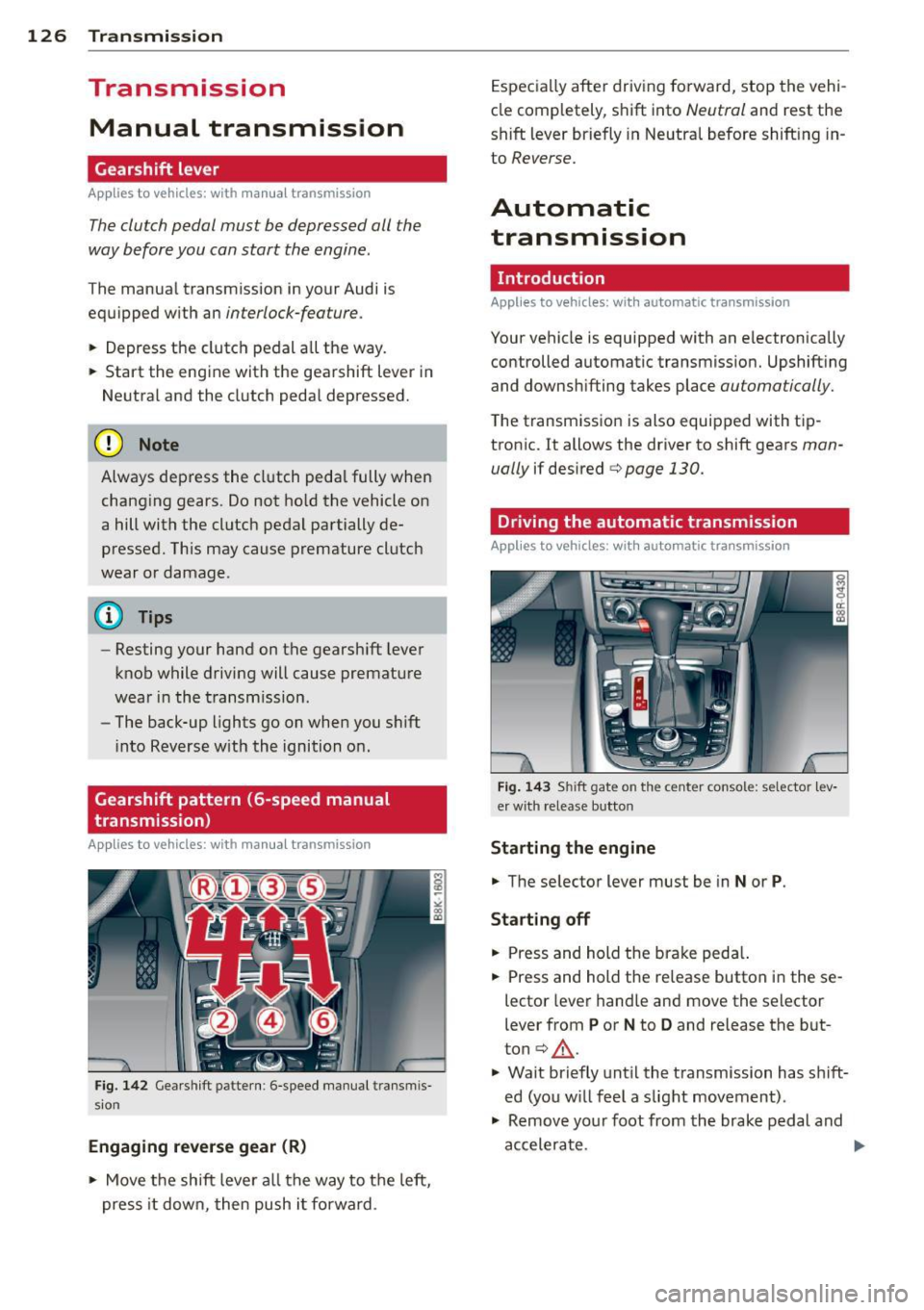
Fig. 142 Gearshift patte rn: 6 -speed manual transmis
sion
Engaging reverse gear (R)
• Move the shift lever all the way to the left,
press it down, then push i t forward . Especially
after driving forward, stop the vehi
cle comp letely, shift into
Neutral and rest the
shift lever briefly in Neutral before shift ing in
to
Reverse.
Automatic
transmission
Introduction
Applies to vehicles: with automatic transmission
Your vehicle is equipped with an electronically
controlled automatic transmission. Upshift ing
and downshifting takes place
automatically.
The transmission is also equipped with tip
tronic. It allows the driver to shift gears
man
ually
if desired c:> page 130.
Driving the automatic transmission
Applies to vehicles: with automatic transmission
Fig. 143 Shift gate on the center console: selector lev
er with release button
Starting the engine
• The selector lever must be in
Nor P.
Starting off
• Press and hold the brake peda l.
• Press and hold the release button in these
lector lever hand le and move the selector
lever from
P or N to D and release the but
ton
c:> .&_ .
• Wait briefly until the transmission has s hift
ed (you w ill feel a slight movement) .
• Remove your foot from the brake pedal and
accelerate.
Page 131 of 316
Automatic Shift Lock (ASL)
Applies to vehicles: with a utomat ic transm ission
The Automatic Shift Lock safeguards you
against accidentally shi~ing into a forward or
the reverse gear and causing the vehicle to
move unintentionally .
;_ '"''1
·- I , . ,......._
W'.o ,)
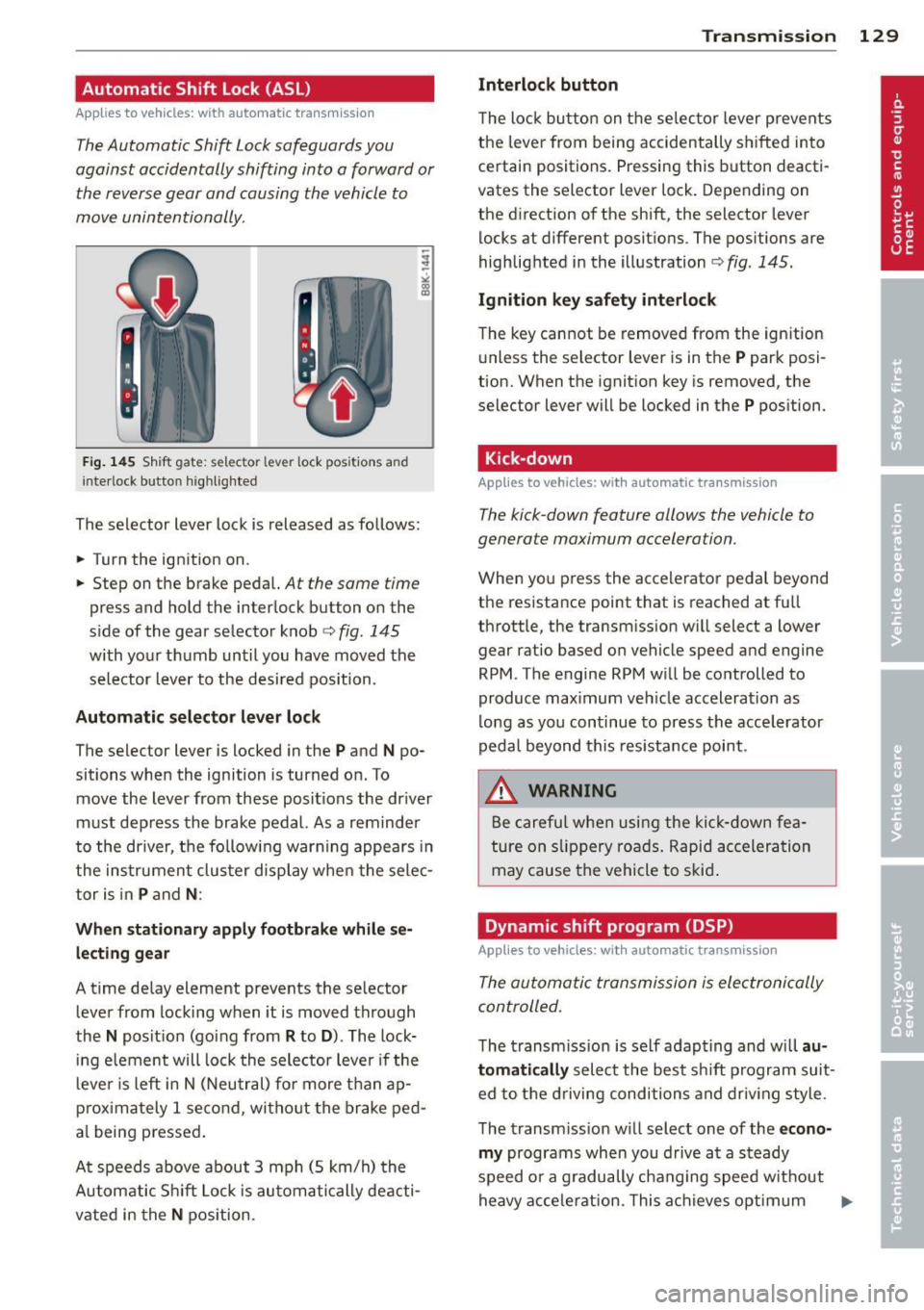
Fig. 145 Shift gate: selector lever lock positions and
in terlock b utto n highlighted
The selector lever lock is released as follows:
.. Turn the ignition on.
.. Step on the brake pedal.
At the same time
press and hold the interlock button on the
s ide of the gear selector knob
c::> fig. 145
with your thumb until you have moved the
selector lever to the desired position.
Automatic selector lever lock
The select or lever is Locked in the P and N po
sitions when the ignition is turned on. To
move the lever from these positions the driver
must depress the brake pedal. As a reminder
to the driver, the following warning appears in
the instrument cluster display when the selec
tor is in
P and N:
When stationary apply footbrake while se
lecting gear
A time delay element prevents the selector
lever from locking when it is moved through
the
N position (going from R to D ). The lock
ing element will lock the selector lever if the
lever is left in N (Neutral) for more than ap
proximately 1 second , without the brake ped
a l being pressed.
At speeds above about 3 mph (5 km/h) the
Automatic Shift Lock is automatically deacti
vated in the
N position.
Transmission 129
Interlock button
The lock button on the selector lever prevents
the lever from being accidentally shifted into
certain positions. Pressing this button deacti
vates the selector lever lock. Depending on
the direction of the shift, the selector lever
locks at different positions. The positions are
highlighted in the illustration
c::> fig . 145.
Ignition key safety interlock
The key cannot be removed from the ignition
unless the selector lever is in the
P park posi
tion. When the ignition key is removed, the
se lec tor Lever will be locked in the
P position.
Kick-down
App lies to vehicles: with automatic transmission
The kick-down feature allows the vehicle to
generate maximum acceleration .
When you press the accelerator pedal beyond
the resistance point that is reached at full
throttle, the transmission will select a lower
gear ratio based on vehicle speed and engine
RPM . The engine RPM will be controlled to
produce maximum vehicle acceleration as
long as you continue to press the accelerator
pedal beyond this resistance point.
.&, WARNING
Be careful when using the kick-down fea
ture on slippery roads. Rapid acceleration
may cause the vehicle to skid .
Dynamic shift program (DSP)
Applies to vehicles: wit h automatic transmission
The automatic transmission is electronically
controlled.
-
The transmission is self adapting and will au
tomatically
select the best sh ift program suit
ed to the driving conditions and driving style .
The transmission will select one of the
econo
my
programs when you drive at a steady
speed or a gradually changing speed w ithout
heavy acceleration. This achieves optimum ..,.
Page 132 of 316
130 Transmi ssion
fuel efficiency, with ear ly upshifting and
de layed downshifting.
The transmission will a utomat ica lly select the
s port y shift prog rams when you drive at high
e r speeds, or w ith heavy acceleration and fre
quent ly changing speeds. Upshifts are de layed
to make full use of eng ine power. Downsh ift
ing takes p lace at h igher engine speeds than
in the economy programs .
The selection of the most suitab le shift pro
gram is a cont inuous, automatic process. The
driver can also make the transmission switch
to a sporty program by quickly pressing down
the gas pedal.
This causes the transmission to shift down to
a lower gear to achieve rapid acceleration, e.g.
for quickly passing another vehicle. You do not need to press the gas pedal into the kick -down
range . After the transmission has upshifted,
the orig inal program is se lected acco rding to
your d riving s tyle.
A n addit ional shift program allows the auto
mat ic transm iss ion to select the proper gear
for uphill and downhill gradients .
This keeps the transmission from shifting up
a nd down unnecessar ily on hills . The trans
miss ion will shift down to a lowe r gear when
the dr iver presses the brake pedal on a down
hill grad ient. This makes use of t he b raking ef
fe ct of the eng ine wi thout the need to shift
down manua lly. Manual shift program
Applies to
vehicles: with automatic transmission
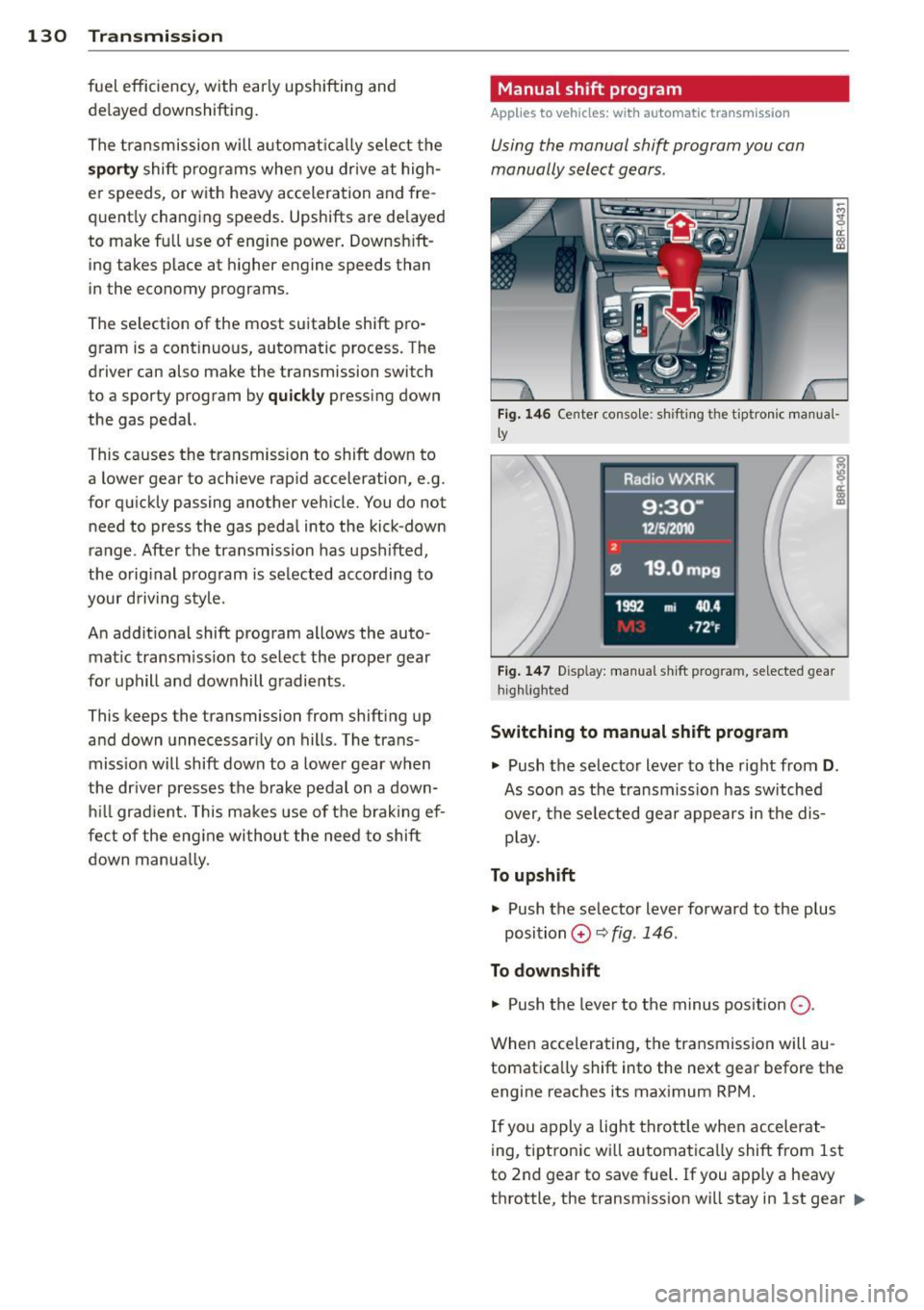
Using the manual shift program you can
manually select gears .
Fig . 14 6 Ce nter conso le: sh ift ing the t iptron ic m an ua l·
l y
F ig. 14 7 Disp lay: manu al shi ft p rog ra m , se lected gear
hi ghlight ed
Switching to manual shift program
.,. Push the selector lever to the right from
D.
As soon as the transmiss ion has sw itched
over, the se lected gea r appears in the dis
p lay .
To upshift .,. Push the selecto r lever forwa rd to the p lus
position
0 ¢ fig . 146 .
To down shift
.,. Push the lever to the minus pos ition
0 -
When accelerating, t he transmission will au
tomatica lly shift into the next gear before the
engine reaches its maximum RPM.
If you apply a light throttle whe n accelerat-
ing, tiptronic wi ll automatica lly shift from 1st
to 2nd gear to save fuel. If you apply a heavy
throttle , the transm iss ion wi ll stay in 1st gear .,.
Page 133 of 316
until near maxim um RPM is reached, or unt il
the driver shifts into 2nd gear .
I f y ou ta ke your foo t off the acceler ator ped al
when dr iving down a steep in cline, tiptronic
will downshift from the se lected gea r into the
next lowe r gear until it reaches 1st gea r,
based on road speed and eng ine RPM. A uto
mat ic downshifting is interrupted as soon as
you apply the thrott le aga in.
@ Tips
- When yo u shift into the next lower gear,
t h e transmiss io n will downs hift only
when there is no possibility of over-rev
v ing the e ngine.
- When t he kick-down comes on, the
transmission will sh ift down to a lower
gear, d epe nding on vehicle a nd e ngine
s peeds .
- tiptron ic is inoperative when the trans
mission is in th e fail-safe mode .
Steering wheel with tiptronic
Applies to vehicles: with tiptronic steer ing wheel
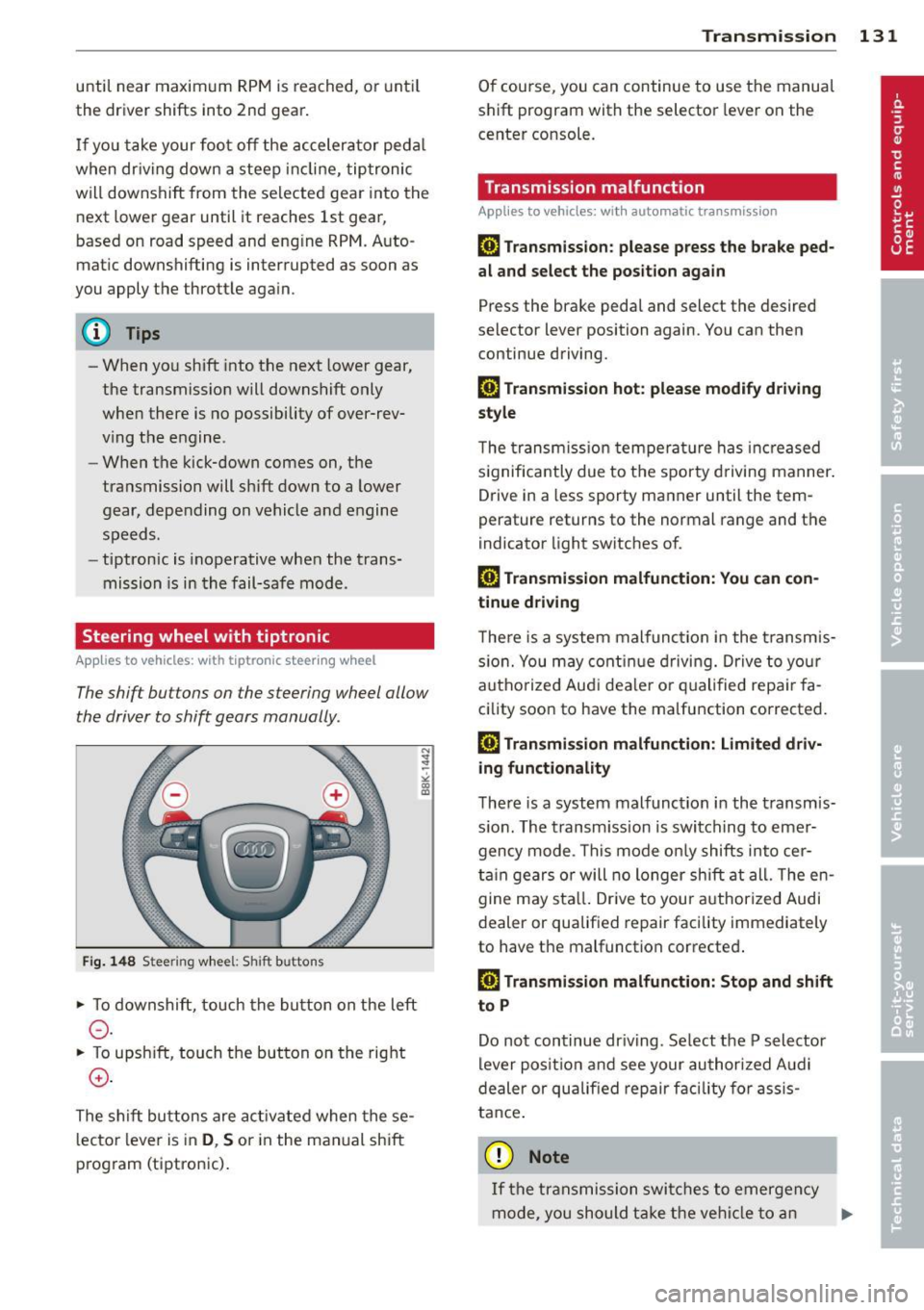
The shift buttons on the steering wheel allow
the driver to shift gears manually .
Fig. 148 S tee rin g w hee l: S hift buttons
• To downshift, to uch the button on the left
0 -
• To upsh ift, touch the but ton on the rig ht
0 -
The s hift buttons are ac tivated when the se
l ecto r lever is in
D , S or in the manual shift
p rog ram (tiptron ic) .
Transm ission 131
O f course, you can continue to use the manua l
s h ift pr ogram with the selector lever on the
cente r co nsole.
Transmission malfunction
Applies to vehicles: wit h automatic transmission
[O] Transmission : please press the brake ped
al and select the position again
Press the bra ke pedal and select the desired
selector lever position again. You can then
continue driving.
[O] Transmi ssion hot: please modify driving
style
T he trans mission tempe ra tur e has increased
s ignifica ntly due to t he spor ty dr ivin g manner .
Drive in a less sporty ma nner until the tem
perature returns to the normal range and the
indicator light switches o f.
[O] Transmission malfunction: You can con
tinue driv ing
T here is a system malfunc tion in the transm is
s io n. You may con tinu e dr ivin g. D rive to yo ur
a utho rize d Au di dea le r or qu alified repa ir fa
c ility soon to have the ma lfunction corrected .
[O] Transmission malfunction: Limited driv
ing functionality
T he re is a system mal func tion in the t ransmis
s io n. The transm iss ion is swi tching to emer
gency m ode . Th is mode o nly shifts into cer
t ain gears o r will no longer shi ft at all. The en
g ine m ay sta ll. Drive to you r author ized Audi
dealer or qualif ied repair facility immediately
to have the malfunction corrected .
[O] Transmission malfunction: Stop and shift
to P
Do n ot continue dr iving. Se lect t he P selector
lever posi tion an d see your au thori zed A udi
de aler or qu alified re pair facili ty for assis
ta nc e.
(D Note
If th e tra ns missi on swit ches to emer gen cy
mode, y ou sh oul d tak e th e ve hicl e to an
IJll>
Page 142 of 316
140 Homelink®
Homelink®
Universal remote
control
General information
Applies to vehicles: with Home link® universal remote
control
The Homelink ® feature can learn up to three
radio frequency codes for most current trans
mitters used for operating garage doors, es tate gates, home or outdoor lighting sys
tems, and other devices.
You must first program the Homelink ® trans
mitter before you can use the system
~ page 141, Programming the Homelink ®
transmitter.
In order to program the Home link ® transmit
ter for dev ices utilizing rolling code, a second
pe rson on a ladder who ca n safe ly reach the
garage door opener motor is recommended. I t is also necessary to locate the "learn" but
ton on your garage door opener motor . Refer
to the operating instructions for the opener,
as the location and color of this button may
vary by manufacturer.
You can still use the origina l remote contro l
for the device at any time .
.&_ WARNING
-
- Never use the Homelink ® transmitte r
with any garage door opener that does
have not the safety stop and reverse fea
tu re as requ ired by federa l safety stand
ards. Th is includes any garage door open
er mode l manufact ured before April 1,
1982.
- A garage door op ener which cannot de
te ct an object, signa ling the doo r to stop
and reverse does no t mee t current feder
al safety s tandards. Using a garage doo r
opener wi tho ut these features increases
risk of serious in jury or death.
- F or sa fety reasons never release the
par king brake or start the engine w hile
anyone is stand ing in front of the vehicle . -
A garage door or an estate gate may
sometimes be set in mot ion when the
Homelink ® remote control is being pro
grammed. If the device is repeatedly ac
tivated, this can overstrain motor and
damage its e lectr ical components -an
overheated moto r is a fire hazard !
- To avo id possible injuries or property
damage, please always make abso lutely
certain that no persons o r obje cts are lo
ca ted in the range of motion o f any
eq uipment being ope rated .
(D Tips
-If you would li ke more information on
Home link ®, w here to purchase the
Homel ink ® compatib le produc ts, or
would like to purchase the Homelink ®
Home Lighting Package , please ca ll to ll
free: 1-800-355-3515 .
- For Declaration of Compliance to United States FCC and Ind ustry Canada reg ula
tions~
page 296.
Page 143 of 316
Programming the Homelink®
transmitter
Applies to vehicles: with Horne link® universal remote
control
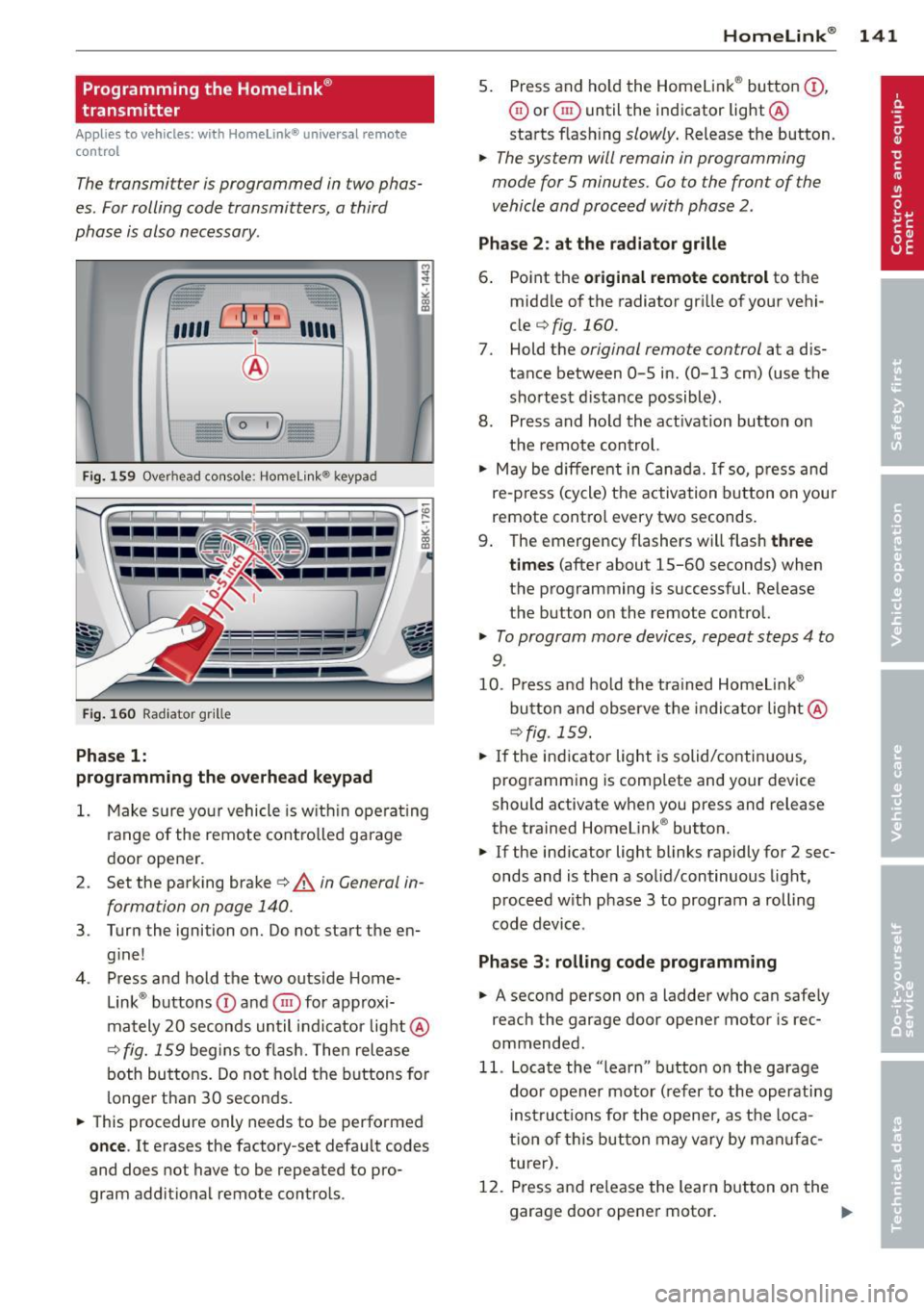
The transmitter is programmed in two phas
es. For rolling code transmitters, a third
phase is also necessary .
/
'/' ~ ..,.-,,,, ~
;,, r ,O :O·,) ,,,, ;
®
)
I~-,- ( o
-
,)- ~ (> ~
Fig. 159 Ove rhead co nsole: Homelink ® keypad
Fig. 160 Radiator gr ille
Phase 1:
programming the overhead keypad
l
~
" CX> !E
;
CX> a,
1. Make sure your vehicle is w ithin operat ing
range of the remote controlled garage
door opener.
2 . Set the parking brake~
A in General in
forma tion on page 140.
3 . Turn the ignition on. Do not start the en
gine!
4. Press and hold the two outs ide Home
Link ® buttons
(D and @for approxi
mately 20 seconds until indicator light@
c:;, fig. 159 begins to flash. Then release
both buttons. Do not hold the buttons for
longer than
30 seconds .
• This procedure only needs to be performed
once. It erases the factory-set default codes
and does not have to be repeated to pro
gram additional remote controls .
Homelink® 141
5. Press and hold the Homelink® button (D ,
@ or @ until the indicator light @
starts flashing
slowly . Release the button.
• The system will remain in programming
mode for 5 minutes. Co to the front of the
vehicle and proceed with phase 2 .
Phase 2: at the radiator grille
6. Point the original remote control to the
middle of the radiator grille of your vehi
cle
¢ fig. 160.
7. Hold the original remote control at a dis
tance between
0 -5 in. (0-13 cm) (use the
shortest distance possible) .
8. Press and hold the activation button on
the remote control.
• May be different in Canada. If so, press and
re-press (cycle) the activation button on your
remote contro l every two seconds.
9. The emergency flashers will flash
three
times
(after about 15-60 seconds) when
the programming is successful. Release
the button on the remote control.
• To program more devices, repeat steps 4 to
9.
10 . Press and hold the trained Homelink ®
button and observe the indicator light@
¢fig. 159.
• If the indicator light is solid/continuous ,
programming is comp lete and your device
should activate when you press and release
the trained Homelink ® button.
• If the indicator light blinks rapidly for 2 sec
onds and is then a solid/continuous light,
proceed w ith phase 3 to program a rolling
code device .
Phase 3: rolling code programming
• A second person on a ladder who can safely
reach the garage door opener motor is rec
ommended.
11. Locate the "learn" button on the garage
door opener motor (refer to the operating
instructions for the opener, as the loca
t ion of this button may vary by man ufac
turer) .
12 . Press and re lease the learn button on the
garage door opener motor .
Page 207 of 316
vertical axis, vehicle acceleration in the fore
and-aft and lateral directions , the brake pres
sure, and the steering ang le are all measured .
The direction in which the d river wishes to
travel is determined with the aid of the steer
ing angle and vehicle speed and is continually
compared with the actual behavior of the ve
h icle. If the two do not match, for examp le,
when the vehicle starts hydroplaning on a wet
road, ESP will automatically brake the appro
priate wheel to correct the problem.
The vehicle is then stabili zed by the forces act
ing on the wheel dur ing braking. If the vehicle
is
oversteering (the veh icle turns too sharply
and the rear wheels sl ide toward the outs ide
of a curve), the brakes are main ly applied on
the wheel that is on the outside of the curve.
I n the case of a ve hicle that is
understeering
(the vehicle does not turn sha rply enough and
pushes out of a curve) , the brakes are applied
as needed on the whee l that is on the inside of
the curve o r additiona lly on the other wheels.
An acoust ic signal indicates when ESP brake
application cuts in
q .& .
The system operates across the entire speed
range in combination with the ABS system
q page 208. If the Anti-Lock Brake System
(ABS) malfunctions, the ESP will be out of ac
tion as well.
Acti vating
When you turn on the engine, ESP wi ll auto
matica lly be activated and will perfo rm a se lf
test. As soon as the test is completed, the sys
tem is in normal operating mode .
You can activate a deactivated ESP or deacti
vated ESP/ASR if required by pressing the
qfig. 196 q fig . 195 button. When they are
activated, the message
Stabilisation prog ram
on
appears briefly in the d isplay.
D eacti vating
The ESP sho uld normally be activated all the
time. If necessary, you can deactivate Anti
Slip Regulation (ASR) or the Electron ic Stabili
zation Program (ESP) by pressing the button
<:::;, fig. 196 .
Intellig ent technolog y 205
-Dea cti vating ASR: Tap the b utton. In cer
tain exceptional situations (e.g . driving with
tire chains), the Anti -Slip Regu lation (ASR)
can be deactivated
q page 206. The mes
sage
ASR off Caution ! Limited d riv ing sta
bilit y
appears in the display as we ll.
- Deacti vating ESP /A SR Press the button for
more than 3 seconds. Wi th the ESP/ASR de
activated, the ind icator light comes on, see
c:::;, page 15 . The message War ning! R estrict
ed stability
appea rs in the d isp lay as well.
.8, WARNING -
The Electronic Stabi liz a tion Program is
neverthe less subjec t to the laws o f phys
ics. It is part icu la rly important to pay a t
tention to this fact on wet and slippery roads. It is therefo re important that you
a lways adapt your driving to the condit ion
of the road and traff ic conditions. Do not
allow the increased safety provided by the Elect ronic Stabilization Program system to
lull you into accepting addit iona l safety
r isks.
Electronic differential lock (EDL)
The electronic differential lock monitors the
rotational speed of the drive wheels .
General not es
The electronic d ifferential lock ( E0L) he lps the
car to star t moving, acce lerate and climb a
gradient on surfaces providing poor or almos t
no grip . Without EDL, this would be d iff icult,
if not impossible .
How the sy stem works
The EDL operates automatically. It mon itors
the rotational speed of wheels with the he lp
of the ABS sensors
q page 208 . If a noticea
ble
slip is detected at the wheels (e .g . on s lip
pery ground
on one side), the sp inning wheels
are braked and power is t ransferred to the
othe r whee ls. Thi s is done up to a speed of
abo ut 60 mph (100 km/h) . Noises from the
brake system signa l that wheel spin is be ing
controlled .
Ill>
•
•