ECO mode AUDI A5 COUPE 2013 User Guide
[x] Cancel search | Manufacturer: AUDI, Model Year: 2013, Model line: A5 COUPE, Model: AUDI A5 COUPE 2013Pages: 294, PDF Size: 73.84 MB
Page 53 of 294
-To help prevent damage to the wiper
arms or other components, do not at
tempt to move the wipers by hand .
@ Tips
-Commercial hot waxes applied by auto
matic car washes affect the how easily
the glass surface can be cleaned.
- You can also use the service position, for
example, if you want to protect the
windshield from icing by using a cover.
Digital compass
Switching the compass on and off
A pp lies to vehicles: with digital compass
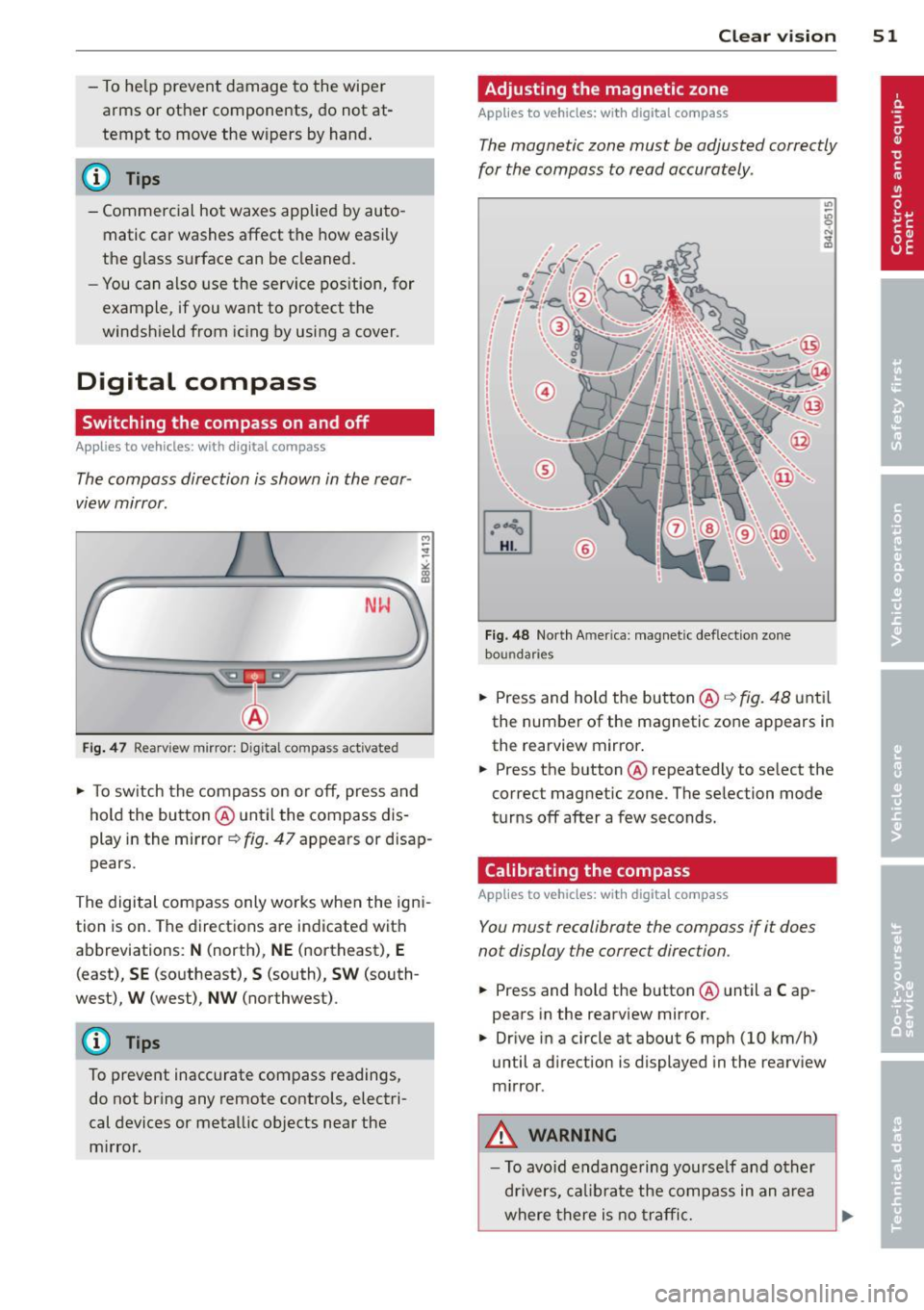
The compass direction is shown in the rear
view mirror .
NlrJ
Fig . 47 Rearview mirror: D ig ital compass act ivated
.. To sw itch the compass on or off, press and
hold the button @ until the compass dis
play in the mirror~ fig. 47 appears or disap
pears.
The digital compass only works when the igni
tion is on. The directions are indicated with
abbreviations:
N (north), NE (northeast), E
(east), SE (southeast), S (south), SW (south
west),
W (west), NW (northwest).
(D Tips
To prevent inaccurate compass readings,
do not bring any remote controls, electri
cal devices or metallic objects near the
m irror. Clear vi
sion 51
Adjusting the magnetic zone
App lies to vehicles : wi th digi ta l co mpass
The magnetic zone must be adjusted correctly
for the compass to read accurately .
Fig. 48 North Amer ica: magne tic deflect ion zone
bou ndaries
.. Press and hold the but ton @ C? fig. 48 until
the number of the magnetic zone appears in
the rearview mirror .
.. Press the button @repeatedly to select the
correct magnetic zone. The selection mode
turns off after a few seconds.
Calibrating the compass
App lies to vehicles: wit h digita l comp ass
You must recalibrate the compass if it does
not display the correct direction.
.. Press and hold the button @ until a Cap
pears in the rearview mirror.
.. Drive in a circle at about 6 mph (10 km/h)
until a direction is displayed in the rearv iew
m irror.
,&. WARNING
- To avo id endange ring yourse lf and other
d rivers, calibrate the compass in an area
where there is no traffic.
Page 70 of 294
68 Warm and cold
Operation
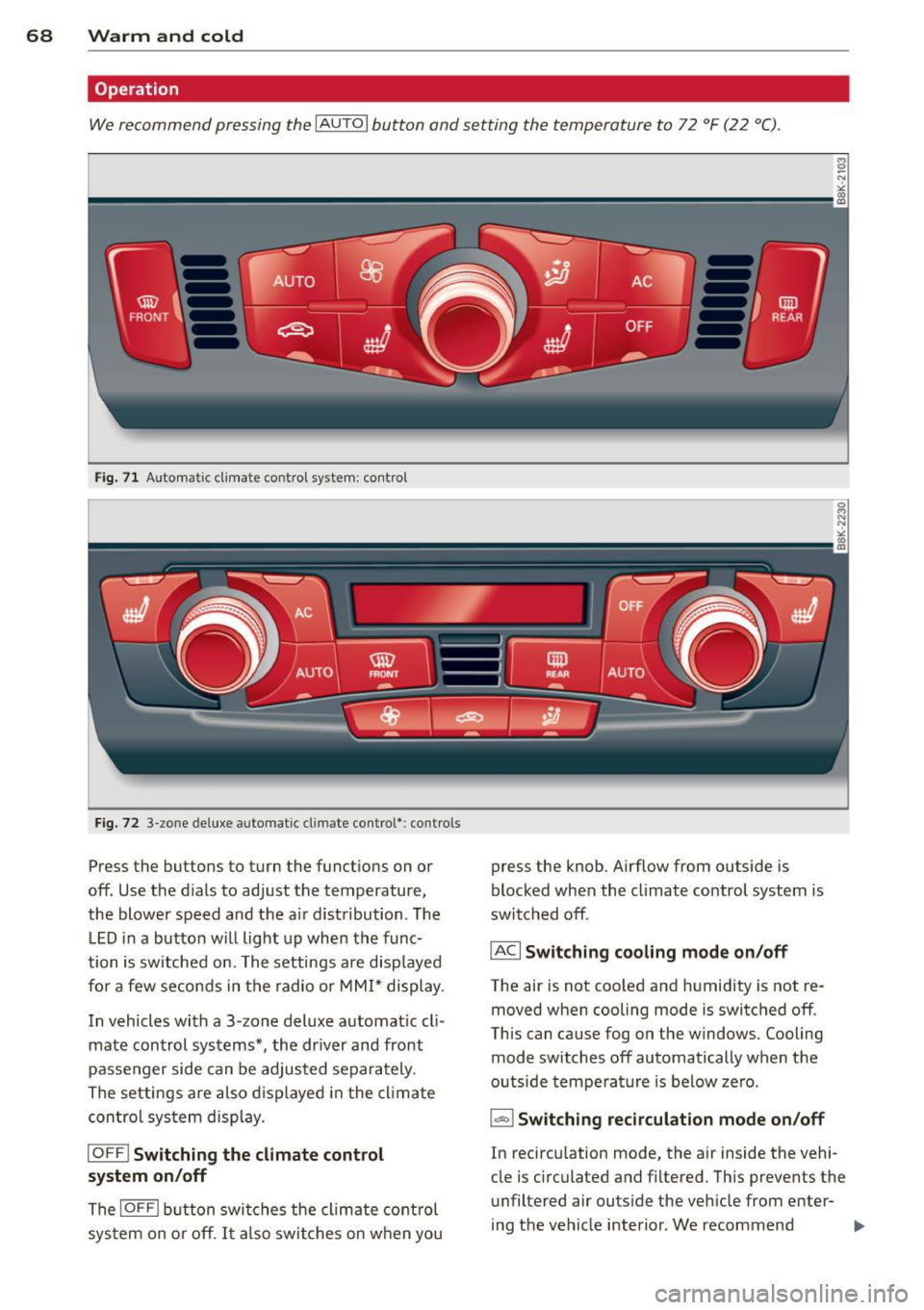
We recommend pressing the IAUTOI button and setting the temperature to 72 °F (22 °C) .
Fig. 71 Automat ic cl imate control system: control
Fig. 72 3-zo ne de luxe automatic cl imate contro l' : contro ls
Press the buttons to turn the funct ions on or
off. Use the d ials to adjust the temperature,
the blower speed and the a ir distribution . The
LED in a button will light up when the func
tion is switched on. The settings are disp layed
for a few seconds in the radio or MMI* display .
In vehicles with a 3 -zone deluxe automat ic cl i
mate control systems*, the dr iver and front
passenger side can be adjusted separately .
The settings are also displayed in the climate
control sys tem display.
IOFF I Switching the climate control
system on/off
The IOFFI button switches the climate control
sys tem on or off . It also switches on when you press the knob. Airflow from outside
is
blocked when the climate control system is
switched off .
IAC I Switching cooling mode on/off
The air is not coo led and humidity is not re
moved when cooling mode is switched off .
This can cause fog on the windows. Cooling
mode switches off automatically when the
outside temperature is below ze ro .
1- 1 Switching recirculation mode on/off
In recircu lation mode, the air inside the vehi
cle is c irculated and filtered. This prevents the
unfiltered air outside the vehicle from enter
ing the vehicle interior . We recommend
Page 71 of 294
switching recirculation mode on when driving
through a tunnel or when sitting in traffic
c::>_& .
The IAU TO I button or I@ FR ON T I button
switches recircu lation mode off .
IAUTO I Switching automatic mode on
Automatic mode ma inta ins a constant tem
peratu re inside the vehi cle. Air temperature,
a irflow and air d istribution are controlled au
tomatically.
Adjusting th e tempe ratur e
Temperatures between 60 °F (+16 °C) and
84 °F ( +28 °C) can be set . Outside of this
range,
L O or HI will appear in the cl imate con
trol system disp lay. At both of these settings,
the climate control system runs continuously
at maximum cooling or heating power . There
is no temperature regu lation.
~ Ad just ing the airflow
You can adjust the airflow manually to su it
your needs . To have the airflow regulated au
tomatically, press the IAUTO ! button.
~Adjusting the air distribution
You can manually se lect the vents where the
a ir will flow. To have the air d istr ibution regu
l ated automatically, press the
IAU TOI button .
~ Adjusting seat heat ing *
Pressing the button switches the seat heating
on at the highest sett ing (level 3). The LEDs
indicate the temperature leve l. To reduce the
temperature, press the button again . To
switch the seat heating off , press the button
repeatedly unt il the L ED turns off.
After 10 minutes , the seat heat ing automati
cally switches from level 3 to level 2.
I @ FRON T I Switch the d efro ster on /off
The windshield and s ide windows are defrost
ed or cleared of condensation as quickly as
possible. The max imum amount of air flows
mainly from the vents below the windsh ield.
Recirculation mode switches off . T he tempera
ture is controlled a utomat ica lly.
Warm and c old 69
The !AUTO ! button switches the defroster off.
lmn R EAR ! Switching rear window heater
on /off
T he rea r window heater on ly operates when
the engine is running. It sw itches off auto
matically after a few m inutes, depending on
the outs ide temperature .
T o p reven t the re ar window heater from
switching off automatically, press and hold
the
l oo REARI b utton for more than 2 seconds .
This remains stored until the ign ition is
switched off .
Air vents
You can open and close the center and rear air
vents using the thumbwheels . The levers ad
just the direction of the airflow from the
vents.
In vehicles with a 3 -zone deluxe automatic cli
mate control system*, you can adjust the air
temperature in the rear by turning the thumb
whee l toward the red side to make it warmer
or toward t he blue side to make it coo ler.
A WARNING ...
- Do not use the recircu lation for extended
pe riods of time . The windows could fog
up since no fresh a ir can enter the vehi
cle .
If the windows fog up, press the air
reci rculation button aga in immediately
to switch off the air reci rc u lation func
tion or se lect defrost .
- I ndividuals w ith red uced sensitivity to
pa in or temperature cou ld deve lop burns
when using t he seat heating function. To
red uce the risk of injury, these individu
a ls shou ld not use seat heating.
(D Note
To avoid damage to the heat ing e lements
i n the seats, do not kneel on the seats or
place heavy loads on a small area of the
seat.
Page 79 of 294
Emergency brake fun ction
An emergency brake ensures that the vehicle
can be slowed down even if the
normal b rakes
fail
c::> page 78, Emergency broking.
Ind icat or light s
-If the par king b rake is closed w ith the igni
t ion
s wit ched on the . (USA models)/
• (Canada models) indicato r lights come
on in the instrument cluster and the switch .
-If the par king brake is closed w ith the igni
tion
s witc hed off the . (USA models)/
• (Canada mode ls) indicator lights come
on in the instrument cluster and the switc h
for about 20 seconds.
A WARNING
If a gear or a drive range (automat ic trans
m ission) is engaged with the vehicle sta
tionary and the engine runn ing, you must
in no instance accelerate or release the
clutch carelessly. Othe rwise the vehicle
w ill sta rt to move immediately- r isk of an
accident.
(D Note
If the . symbol in the display or the
.. (USA models) . (Canada models)
ind icator light in the instr ument cluster
flashes, there is a ma lfunction in the b rake
system. By press ing the
!SETI button, you
can bring up a driver message which ex
plains the malfunction in more detail. If
the driver message
Pa rking brake! ap
pears, there is an operating malfunction in
the parking brake which you should have
repaired immediately by an authorized
Aud i dealer or other q ual ified workshop
c::> poge 15.
(j) Tips
- You can apply the parking brake at any
time -even w ith the ignition switched
off . T he ignit io n must be tu rned on in o r
der to release the parking b rake.
On th e ro ad 77
-Occasional noises when the parking
brake is app lied and released are normal
and are not a cause for concern.
- When the vehicle is pa rked, the park ing
brake goes through a self -test cycle at
regu lar interva ls. Any associated noises
are normal.
Parking
Parking
.,. Press the brake pedal to stop the veh icle .
.,. Pull the button
@ c::> page 76, fig. 78 to set
the parking brake .
.,. Automatic transmission: Move the selector
lever to P.
.,. Tur n the engine off
c::> &_ .
.,. Manual transmiss ion: Shift into 1s t gear.
In addition on inclines and grades
.,. Turn the steering wheel so that your vehicle
w ill roll aga inst the curb in case it shou ld
start to move.
_&. WARNING
- When you leave you r vehicle -even i f on
ly briefly -always remove the ignition
key. This app lies particularly when chil
dren remain in the vehicle. Otherwise the
children could start the eng ine, release
the parking brake or operate electrical
equ ipment (e .g . power windows) . There
is the risk of an acc ident .
- When the veh icle is locked, no one -par
ticularly not childre n should rema in in
the vehicle . Locked doors make it mo re
difficult for emergency wo rke rs to get in
to the vehicle -put ting lives at risk .
Starting from rest
The starting assist function ensures that the
parking broke is released automatically upon starting.
Stopping and applying p arking brake
.,. Pull the switch @ c::> page 76, fig. 78 to ap-
ply the parking brake .
Ill>-
Page 81 of 294
vehicle speed excee ds the set speed by about
3 mph (3 km/h). At the same time, a wa rning
symbo l appears in the d isp lay . The symbol's
appearance might be different in some mod
e ls.
The speed warning system has two warning thresholds that function independently of
each other and that have somewhat different
pu rposes:
Speed warning 1
You ca n use speed warnin g 1 to set the maxi
mum s peed w hile you are driv ing. Th is sett ing
will remain in effect until you t urn off the igni
tion, assuming that you have not changed or reset the setting.
The . (USA
models) ;a (Canada models)
speed warning symbol in the warning 1 dis
p lay appears when you exceed t he maximum
speed. It goes o ut w hen t he speed fa lls below
the stored max imum speed.
The speed warning symbo l wi ll also go out i f
the speed exceeds the stored maximum speed
by more than about 25 mph (40 km/h) for at
least 10 seconds. The stored maximum speed
i s deleted .
Speed warning 2
Storing warn ing 2 is recommended if you al
ways want to be reminded of a certa in speed ,
for example when you a re traveling in a coun
try that has a general maximum speed limi t,
or if you do not want to exceed a spec ified
speed fo r winter tires.
The . (USA mode ls)/ . (Canada models)
speed war ning 2 symbo l appea rs in the d is
p lay w hen you exceed the stored speed lim it.
Unlike war ning 1, it will not go out u nti l th e
ve hicl e spee d drops be low the stored spee d
limit.
Se tti ng s pee d wa rning 2 <=;>page 79.
@ Tips
Even t hough you r vehicle is equipped with
a speed wa rning system, yo u should st ill
On the road 79
watch the spee dome ter to ma ke sur e yo u
are not dr iv ing faste r th an the speed limit .
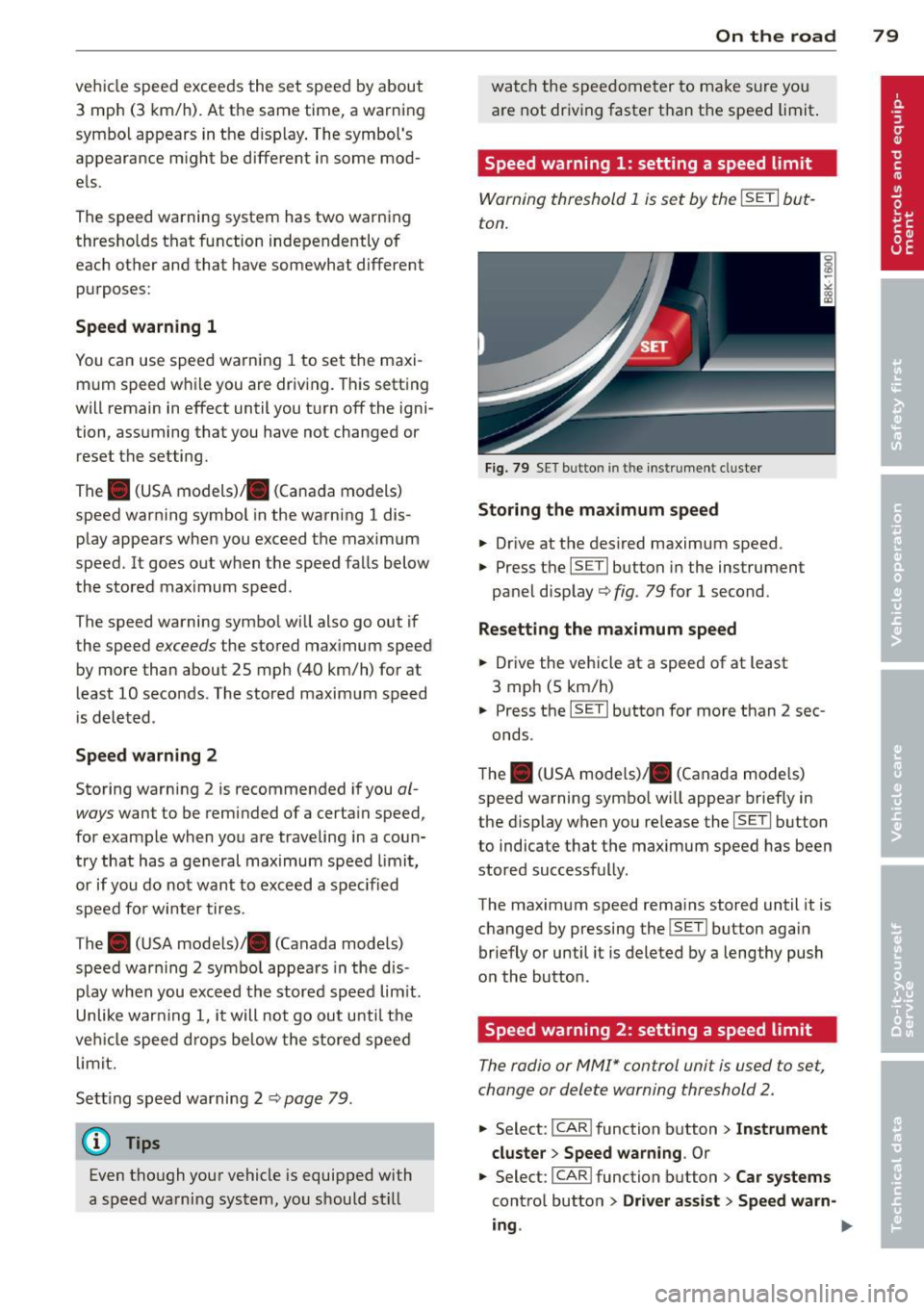
Speed warning 1: setting a speed limit
Warning threshold 1 is set by the !SE TI but
ton.
Fig . 79 SE T button in the instr um ent cl uste r
Storing the maximum speed
.. Drive at the des ired maximum speed.
.,. Press the
!SETI button in the instrument
pane l d isp lay ¢ fig . 79 for 1 second .
Resetting the maximum speed
.. Drive the vehicle at a speed of at least
3 mph (5 km/h)
.,. Press the
ISETI button for more than 2 sec-
onds.
T he . (U SA models)/ . (Canada models)
speed warning symbo l wi ll appear brief ly in
the d isplay when you re lease the
!SE TI button
to indicate that the ma ximum speed has been
stored successfully .
The maxim um speed rema ins stored until it is
c h anged by pressing the
!SE TI button again
briefly or until it is deleted by a lengthy push
o n the button.
Speed warning 2: setting a speed limit
The radio or MMI* control unit is used to set,
change or delete warning th reshold 2 .
.,. Select:
I CA R I function b utton> Instrument
cluster > Speed warning .
Or
.,. Select: I CAR I function butt on > Car systems
cont ro l butto n > Driver assist > Speed warn-
ing .
II>
Page 87 of 294
@ Tips
On vehicles with Audi drive select*, you can
adjust the sporty shift characteristics in
the
Dynamic driving mode. 5 will appear in
the instrument cluster display instead of
D.
Automatic Shift Lock (ASL)
Applies to vehicles: with tiptro nic
The Automatic Shift Lock safeguards you
against accidentally shifting into a forward or
the reverse gear and causing the vehicle to
move unintentionally .
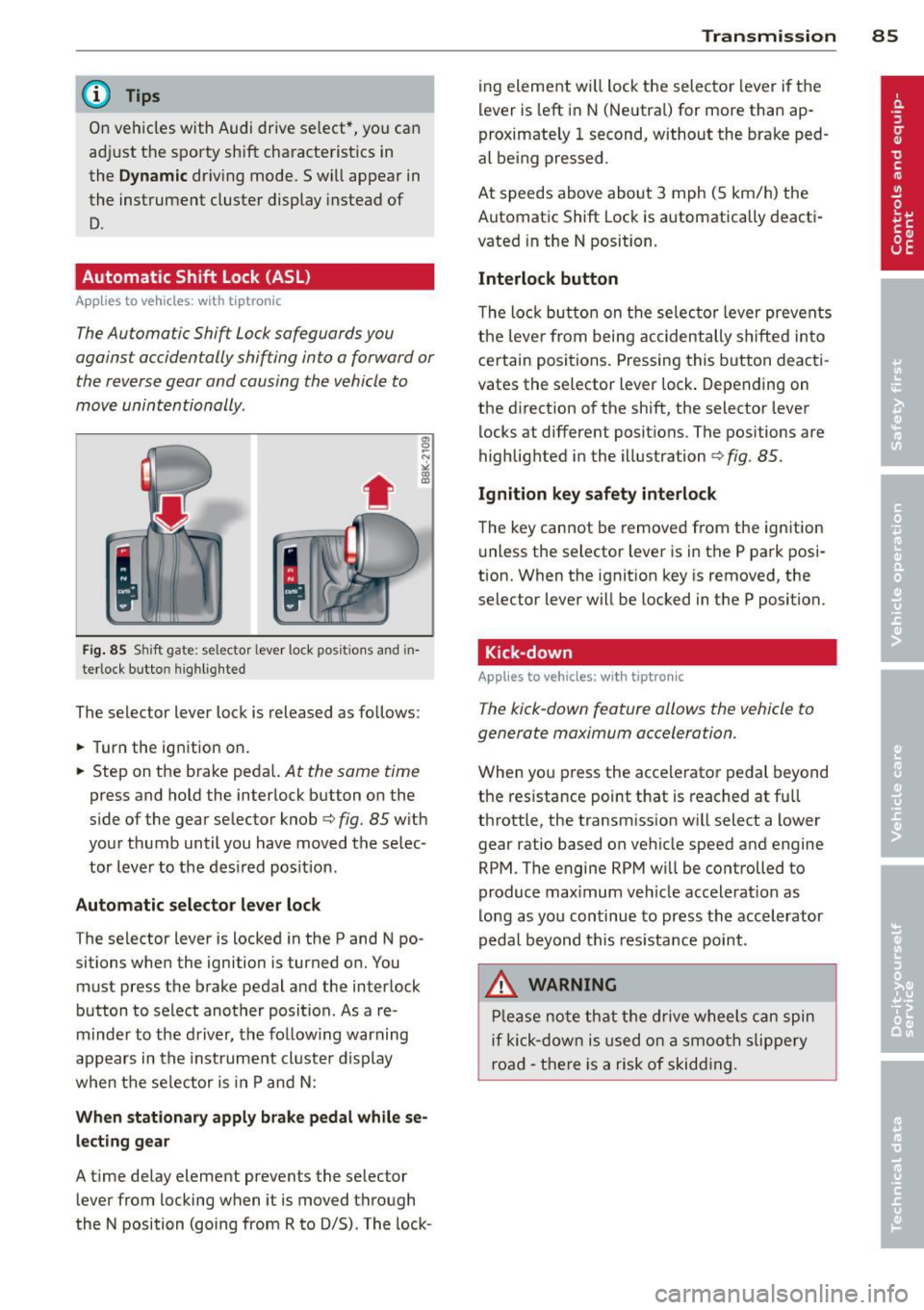
' Fig. 85 S hi ft gate: se lector lever lock po siti ons and in
terlock b utto n highlighted
The selector lever lock is released as follows :
.,. Turn the ignition on .
.,. Step on the brake peda l.
At the same time
press and hold the interlock button on the
side of the gear selector knob
c:> fig. 85 with
your thumb until you have moved the selec
tor lever to the desired position .
Automatic selector lever lock
The selector lever is locked in the P and N po
sitions when the ignition is turned on. You
must press the brake pedal and the interlock
button to select another position . As a re
minder to the driver, the following warning
appears in the instrument cluster display
when the se lector is in P and N :
When stationary apply brake pedal while se
lecting gear
A time delay element prevents the selector
lever from locking when it is moved through
the N position (going from R to D/5) . The lock- Transmission 85
ing element will lock the selector lever if the
lever is left in N (Neutral) for more than ap
proximately 1 second, without the brake ped
al being pressed .
At speeds above about 3 mph (5 km/h) the
Automatic Shift Lock is automatically deacti
vated in the N position.
Interlock button
The lock button on the selector lever prevents
the lever from being accidentally sh ifted into
certain positions. Pressing this button deacti
vates the selector lever lock . Depending on
the direction of the shift, the selector lever
locks at different positions . The positions are
highlighted in the illustration
c:> fig . 85.
Ignition key safety interlock
The key cannot be removed from the ignition
unless the selector lever is in the P park posi
tion. When the ignition key is removed, the
selector lever will be locked in the P position.
Kick-down
App lies to vehicles: with tipt ron ic
The kick-down feature allows the vehicle to
generate maximum acceleration .
When you press the accelerator pedal beyond
the resistance point that is reached at full
throttle, the transmission will select a lower
gear ratio based on vehicle speed and engine
RPM . The engine RPM will be controlled to
produce max imum veh icle acceleration as
long as you continue to press the accelerator
pedal beyond this resistance point .
,8. WARNING
Please note that the drive wheels can spin
if kick-down is used on a smooth slippery
road - there is a risk of skidding.
Page 88 of 294
86 Transmis sion
Dynamic shift program (DSP)
App lies to vehicles: with tiptronic
The automatic transmission is el ectron ically
controlled .
The transmission is self adapting a nd will au
toma tically
select t he best shift prog ram suit
ed to the driving conditions and driving style .
The transmission will se lect one of the
econo
my
programs when you drive at a steady
speed or a gradually changing speed without
heavy acceleration . This achieves optimum
fuel efficiency, with early upsh ifting and de
l ayed downshifting.
The transmission will automatically select the
sporty shift programs whe n you drive at high
e r speeds, or w ith heavy acceleration and fre
quent ly chang ing speeds. Upshifts are de layed
t o make f ull use of eng ine power. D owns hift
i ng takes p lace a t higher engine speeds than
in the economy programs.
The se lection of the most s uitable shift p ro
g ram is a con tinuous, automa tic process. The
d river can also make the t ransmission switch
to a sporty prog ram by
quickly pressing down
the gas peda l.
T his causes the tran smission to shift down to
a lower gear to achieve ra pid acceler ation, e.g.
for q uickly passing another veh icle. You do not
need to press the gas peda l into the kick -down
range. After the transmission has ups hifted,
the original program is se lected according to
your driving style.
When driv ing on hills and mountains, the gear
selection adapts to the grade. This prevents
constant upsh ifting and downshifting when
driving uph il l.
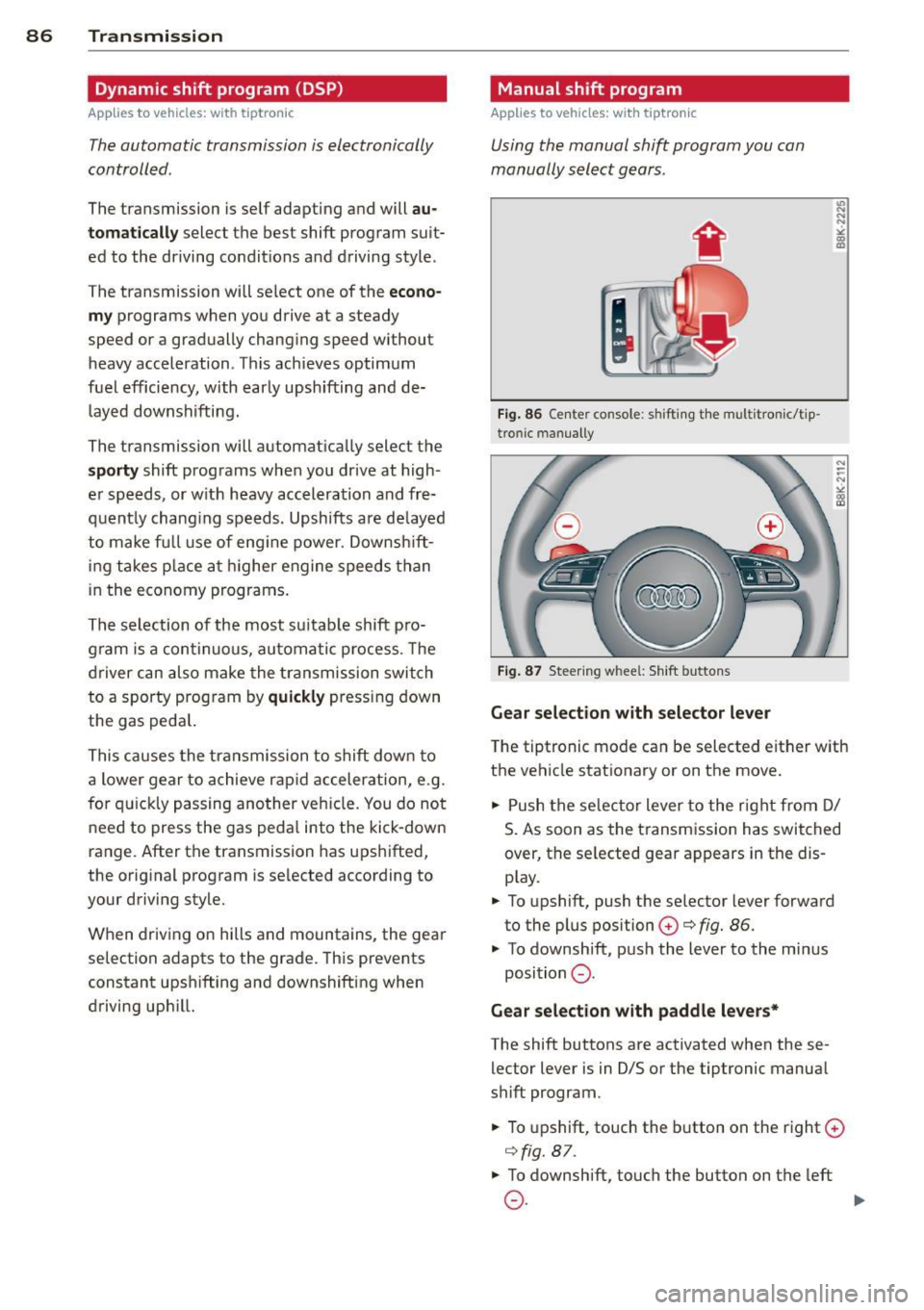
Manual shift program
Applies to vehicles: wit h tiptronic
Using the manual shift prog ram you can
manually select gears .
'
Fig. 86 Center co nsole: s hiftin g t he m ult itr onic/t ip ·
tro nic man ually
Fig. 87 Steer ing w hee l: Sh ift b utto ns
Gear select ion with select or leve r
.,. N
N
~ m Ill
The tiptronic mode ca n be selected either w ith
the vehicle stat ionary or on the move.
.,. Push the se lec tor lever to the r ight from D/
S. As soon as the t ransm ission has switched
over , the se lected gear a ppears in the dis
p lay .
.,. To upshift, push the se lector lever forward
to the plus position
0 ¢ fig. 86.
.,. To downsh ift, pus h the lever to the mi nus
position
0 .
Gear select ion w ith paddle lever s*
The shift buttons are activated when these
lector lever is in D/S or the tiptronic manua l
shift program .
.,. To upshift, touch the button on the r ight
0
¢ fig. 87 .
.,. To downshift, touch the button on the left
0-~
Page 93 of 294
may be useful to switch temporarily to the
manual shift program in order to adjust the
gears to the driving conditions by hand
Q & .
On slopes, activate the parking brake first and
then move the selector lever to the P position.
This prevents the locking mechanism from be ing loaded too heavily and will make it easier
to move the selector lever out of P.
A WARNING
-Never leave your vehicle with the engine
running while in gear. If you must leave
your vehicle when the engine is running, activate the parking brake and move the
selector lever to P.
- Power is still transmitted to the wheels
when the engine is running at idle. To
prevent the vehicle from "creeping", you
must keep your foot on the brake when
the engine is running and the selector
lever is in D/S or R or "tiptronic" mode is
selected.
- Do not press the accelerator pedal when
changing the selector lever position
while the vehicle is stationary and the
engine is running.
- Never shift into R or P while driving.
- Before driving down a steep slope, re-
duce your speed and shift into a lower
gear with "tiptronic".
- Do not ride the brakes or press the brake
pedal too often or too long. Constant
braking causes the brakes to overheat
and substantially reduces braking per
formance, increases braking distance or
causes complete failure of the brake sys
tem .
- To prevent the vehicle from rolling back
when stopping on inclines, always hold it
in place with the brake pedal or parking
brake.
- Never hold the vehicle on an incline with
a slipping clutch . The clutch opens auto
matically when it becomes too hot from
the overload. An indicator lamp
[O] illu
minates and a driver message appears
Transmission 91
Q page 93 when the clutch is overload
ed.
(D Note
- When stopping on an incline, do not try
to hold the vehicle in place by pressing
the accelerator pedal while a driving gear
is selected. This can cause the S tronic
transmission to overheat and can dam
age it . Activate the parking brake or
press the brake pedal to prevent the ve
hicle from rolling .
- Allowing the vehicle to roll when the en
gine is stopped and the selector lever is
in N will damage the S tronic transmis
sion because it is not lubricated under
those circumstances.
(D Tips
For safety reasons, the parking brake is re
leased automatically only when the driv
er's safety belt is engaged in the buckle.
Hill descent control
App lies to vehicles : wi th S tronic t ra nsmi ssio n and hill de ·
sce nt contro l
The hill descent con trol system assists the
driver when driving down declines .
Hill descent control is activated when these
lector lever is in D/S and you press the brake
pedal. The S tronic transmission automatically
shifts down into a gear suitable for the de cline. Hill descent control tries to maintain
the speed achieved at the time of braking,
within physical and technical limitations. If
may still be necessary to adjust the speed
with the brakes.
Hill descent control switches off once the de
cline levels out or you press the accelerator
pedal.
On vehicles with the cruise control system*
Q page 80, hill descent control is also activat-
ed when the speed is set. .,,.
Page 95 of 294
shifts up into the ne xt higher gea r once the
maximum specified engine RPM is reached .
A WARNING
Please note that the wheels could spin on
slick or slippery roads when kick-down is
active.
Launch Control Program
Applies to vehicles: with S tronic transmission
The Launch Control Program provides the
best ac celeration possible when starting from
a s top .
Requirement: The engine must be at operat
i ng temperature and the steering wheel must
not be turned.
... Press the
I~ OFF I button ¢ page 187 while
the engine is running . The
II indicator light
i ll uminates in the instrument cluster and
T raction control (ASR ): Off. Wa rn ing! Re
stricted stabil it y
appears in the driver infor
mation system d isplay .
... Move the selector lever to the D/S position
o r se lect t he
dynamic d riving mode in Aud i
drive selec t* ¢ page 110 .
... Press the br ake ped al stro ng ly w it h your left
f oot and hold it down for at least one sec
ond.
... At t he same time, press the accelerato r
peda l down completely with your right foot
unti l the engine reaches and maintains a
high RPM.
... Remove your foot from the brake peda l
within 5 seconds¢_&. .
A WARNING
-Always adapt you r d rivi ng to the traffic
flow.
- Only use the Launch Control P rogram
when roa d and tr affic cond it ions allow it
and ot her dr ivers will not be end angered
o r annoyed by yo ur driv ing and the vehi
cl e's acce leration .
- P lease note th at t he driving wheels can
spin and the vehicle can brea k away
-
Tran sm iss ion 93
when ASR is switched off, especially
when t he road is sli ppery .
- Once you have accelerated, you shou ld
sw itch the ASR back on by pressing the
I ~ OFFI button.
(D Tips
- The transmission temperature may in
crease s ignificantly after using the
launch control program. I f that happens,
the program may not be ava ilable for a
few minutes. It w ill be available again af
t er a cool-down per iod .
- When accelerating using the Launch
Cont ro l program, a ll vehicle parts are
subjec t to heavy loads . T his can r esult in
increase d wear .
Transmission malfunction
Applies to vehicles: with S tronic transmission
[O] Tran smission: Press brake pedal and s e
lect gear again.
P ress the brake pedal and select the desire d
selector lever position again. You ca n the n
continue d riving.
[O] Transmis sion overheating: Pleas e driv e
conservatively .
The transmiss ion temperature has increased
s ignificantly due to the sporty driving manner.
D rive in a less sporty ma nner until the tem
perature returns to the normal range and the
i ndicato r light switches of.
[O] Transmission malfunction: You can con
tinue driving
There is a system malfunction in the transmis
s ion. You may cont inue driving. Drive to yo ur
authori zed Aud i dea ler or qualified repa ir fa
c ili ty soon to have the malfunction corrected .
[O] Transmission malfunction : Limited dr iv-
ing functionality
""°
Page 111 of 294
Audi drive select Driving settings
Introduction
App lies to vehicles: w it h drive se lect
Aud i drive select provides the possibility to ex
perience different types of veh icle sett ings in
one veh icle. For instance, using the three
C o mfort , Au to and Dyna mic modes, the driv
er can switch from a sporty to a comfortab le
driving mode with the press of a button.
Addit ionally, in vehicles with MM I*, the vehi
cle setup for
Indi vidual * mode can be cus
tomized by you. This makes it possib le to
combine settings such as a sporty engine tun
ing with comfortable steering.
A WARNING
Improper use of the Audi drive select can
cause collisions, other acc idents and seri
ous personal injury.
Description
Ap plies to vehicles: w it h drive se lect
The vehicle setup in each mode depends on
the vehicle's features. However, the engine,
automatic t ransmission* and steering are al
ways involved.
.
Engine and automatic transmi ssio n*
Depending on the mode, the engine and the
automatic transmission respond quicker or in
a more ba lanced manner to acce lerator pedal
movements. In the sporty dynamic mode, the
automatic t ransmission shifts at h igher R PMs .
Steering
The steering adapts in terms of steering effort
and steering ratios . Indirect steer ing that
moves eas ily, like the stee ring in comfort
mode, is best su ited to long dr ives on a high
way. In contrast, dynam ic mode prov ides
sporty, di rect steering .
The follow ing applies to vehicles with dynam ic
steer ing*: the stee ring ratio changes based on
ve hicle speed in order to maintain optimum
Aud i dri ve sel ect 109
steering effort for the drive r at all times. This
sets the steering to be less sensitive at higher
speeds in order to provide improved vehicle
control. At reduced speeds, however, steer ing
is more d irect in order to keep the steering ef
fort as minimal as poss ible when the driver is
maneuveri ng the vehicle . At low and average
speeds, dynamic steering addit iona lly pro
vides more responsive stee ring pe rformance.
Adapt ive dampers*
The adaptive dampers* use sensors to record
i nformation regarding steering movements,
braking and acceleration ope rations by the
drive r, road surface, driving speed, and load.
T his makes it possible to adapt damp ing to
the d riving situation v irtually i n rea l time.
Audi drive select also makes it possible to sat isfy the desire for sporty s uspension (Dynam
ic) and comfortable suspension (Comfort)
without giv ing up ba lanced tuning (Auto).
Sport diff ere ntial *
As a component of the all whee l dr ive system
(quattro ®)
q page 190, the sport differential*
distributes the driving power to the rear ax le
depending on the situation . The distribution
of power var ies depending on the mode se
lected. The goal is a high level of agility and
ability to accelerate on curves . The ve hicle is
very respons ive to steering .
Adaptive crui se control *
The behav ior when accelerating can be adjust
ed from comfortab le to sporty, depending on
the drive select mode. Adaptive cru ise control
also responds to the driv ing behavior of the
vehicle ahead in a mo re conservative or spo rty
manner .
Engine sound*
The sound of the eng ine is adapted to the se
lected mode and ranges from subtle to sporty.
0) Tips
- In some models, the maximum vehicle
speed can only be reached in the
Auto
and D ynamic modes.