wheel AUDI A5 COUPE 2013 User Guide
[x] Cancel search | Manufacturer: AUDI, Model Year: 2013, Model line: A5 COUPE, Model: AUDI A5 COUPE 2013Pages: 294, PDF Size: 73.84 MB
Page 80 of 294
78 On the road
Startin g and automati cally r ele a s ing the
p ark ing b rake
.. When you start to drive as usua l, the park
ing brake is automatically released and your
vehicle begins to move.
When stopping at a traffic signal or stopping
in city traffic on vehicles with an automatic
transmission, the parking brake can be ap
plied. The vehicle does not have to be held
with the footbrake. The park ing brake elimi
nates the tendency to creep with a drive range
engaged. As soon as you dr ive off as usual,
the park ing brake is released automatically
and the veh icle starts to move .
Starting on slopes
When starting on inclines, the start ing ass ist
prevents the vehicle from unintentionally roll
ing back. The braking force of the parking
b rake is not released until sufficient dr iving
fo rce has been bu ilt up at the whee ls.
(D Tips
For safety reasons, the park ing brake is re
leased automatically only when the dr iv
er 's sa fety belt is engaged in the bu ck le.
Starting off with a trailer
To prevent rolling back unintentionally on an
incline, do the following:
.. Keep the switch@c::> page 76, fig. 78
pulled and depress the accelerator . The
parking b rake stays applied and prevents
the vehi cle from rolling backward.
.. You can release the switch @once you are
s u re that yo u are developing enough driving
force at the wheels by depressing the accel
erator.
Depending on the weight o f the rig (vehicle
and trai ler) and the severity of the incline, you
may roll backwards as you start . Yo u can pre
vent roll ing backwards by holding the parking
brake switch @pulled out and accelerating -
just as you would when starting on a hill with
a conventional hand brake.
Emergency braking
In the event that the conventional brake sys
tem fails or locks .
.. In an emergency, pull the switch@
c::> page 76, fig. 78 and continue to pull it to
slow your vehicle down with the parking brake .
.. As soon as you release the switch @or ac-
celerate, t he b ra ki ng pro cess stops.
If you pull the switch @and hold it above a
speed of about 5 mph (8 km/h), the emergen
cy bra king funct ion is initiated. The ve hicl e is
braked at all fou r whee ls by activating the hy
draulic brake sys tem. The brake performance
is similar to making an emergency stop
c::> ,&.
In order not to a ct ivate the eme rgency brak
ing by mis take, an audib le warning tone (buz
zer) so unds when the switch @is pulled. As
soon as the switch @ is released, or the acce l
erator pedal is depressed, emergency braking
stops.
A WARNING ,-
Emergency braking should only be used in
an emergency, when the normal foot brake
has fa iled or the brake pedal is obstructed .
Using the par king brake to pe rform eme r
gency b raking will s low your veh icle down
as if you had made a full brake application.
The laws of phys ics cannot be suspended
even with ESC and its associated compo
nents (ABS, ASR, EDS). In corners and
when road or weathe r cond itions are bad,
a full brake application can cause the vehi
cle to skid or the rear end to break away
risking an accident.
Speed warning system
Overview
The speed warning system helps you to keep
your driving speed below a set speed limit.
T he speed warn ing system warns if the driver
exceeds a p reviously sto red max imum speed.
A warning tone w ill sound as soon as the
Ill-
Page 85 of 294
Rocking back and forth to become
un stuck
~ Shi ft on ly between D/S and R when the ve
hicle is at a full stop and the engine is
runn ing at idle speed.
Stopp ing
~ Press and ho ld the brake pedal unti l the ve
hicle has come to a complete stop .
~ Keep the brake pedal depressed so that the
vehicle cannot roll forward or backward
while it is idling¢ .&_.
~ Once stopped, do not depress the accelera-
tor pedal to rev up the engine ¢.&_ .
Pa rking
If the selector lever is not in the P position
when you open the dr iver's door, the vehicle
could ro ll. The message
T ra nsmi ssion: C ar
may roll! Shift to park!
appears.
~ Press and ho ld the brake pedal unti l the ve
hicle has come to a complete stop.
~ Set the parking brake firmly¢ page 77,
Parking.
~ Press and ho ld the release button in these
l ector lever handle, move the selector lever
into P and then let go of the release button
¢ .&_ .
The engine can only be
s tart ed when these
l ecto r lever is in the P o r N posit ions .
On slopes , activate the parking brake first and
the n move the selector lever to the P pos it ion .
This prevents too much stress from being
p laced on the lock ing mecha nism .
_& WARNING
-Unin tended veh icle movement ca n cause
serious injury .
- When the selector lever is in a dr iving
position, the veh icle may creep, even at
id le speed. Therefore do not release
the park ing brake or foo t brake until
you are ready to move, because powe r
is t ransmitted to the whee ls as soon as
a dr iving posit ion is engaged.
Tran sm iss ion 83
-Do not accelerate wh ile selecting a
driv ing position. At this time the en
gine must be at idle speed so that un due stress is not placed on the clutches
i n the transmiss ion.
- Remember: Even when stopped br iefly
with the automatic t ransmission in D/S
o r R, eng ine power is being transmit
ted to the wheels. Your veh icle cou ld
"creep" forward or backwa rd. Whe n
stopped, keep the brake pe dal fu lly de
pressed and use the pa rking brake if
necessary to keep the vehicle from ro ll
ing.
- If the selec to r l ever is unintentionally
moved into N while you are driving, take
your foot off the accelerator peda l and
wait for the eng ine to ret urn to idle
speed before se lecting a dr iv ing pos ition.
- Never sh ift into R or P when the vehicle is
in motion.
- Never get out of the d river's seat when
the eng ine is running.
- If you m ust get out of the vehicle, move
the selector lever secure ly into the P po
sition and apply the parking brake firmly.
- If the engine must remain r unning, neve r
have any driving position engaged when
checking under the hood . Make sure the
selector lever has securely engaged and
is locked in P w it h the par king brake
fi rm ly set¢
page 209, Engine compart
ment.
Othe rwise, any in cr ease in engine
speed may set t he vehi cle in motion,
even with the park ing brake applied .
(D Tips
For safety reasons, the pa rking brake is re
l eased a utomatically o nly when the d riv
er's safety belt is engaged in the buckle.
Page 87 of 294
@ Tips
On vehicles with Audi drive select*, you can
adjust the sporty shift characteristics in
the
Dynamic driving mode. 5 will appear in
the instrument cluster display instead of
D.
Automatic Shift Lock (ASL)
Applies to vehicles: with tiptro nic
The Automatic Shift Lock safeguards you
against accidentally shifting into a forward or
the reverse gear and causing the vehicle to
move unintentionally .
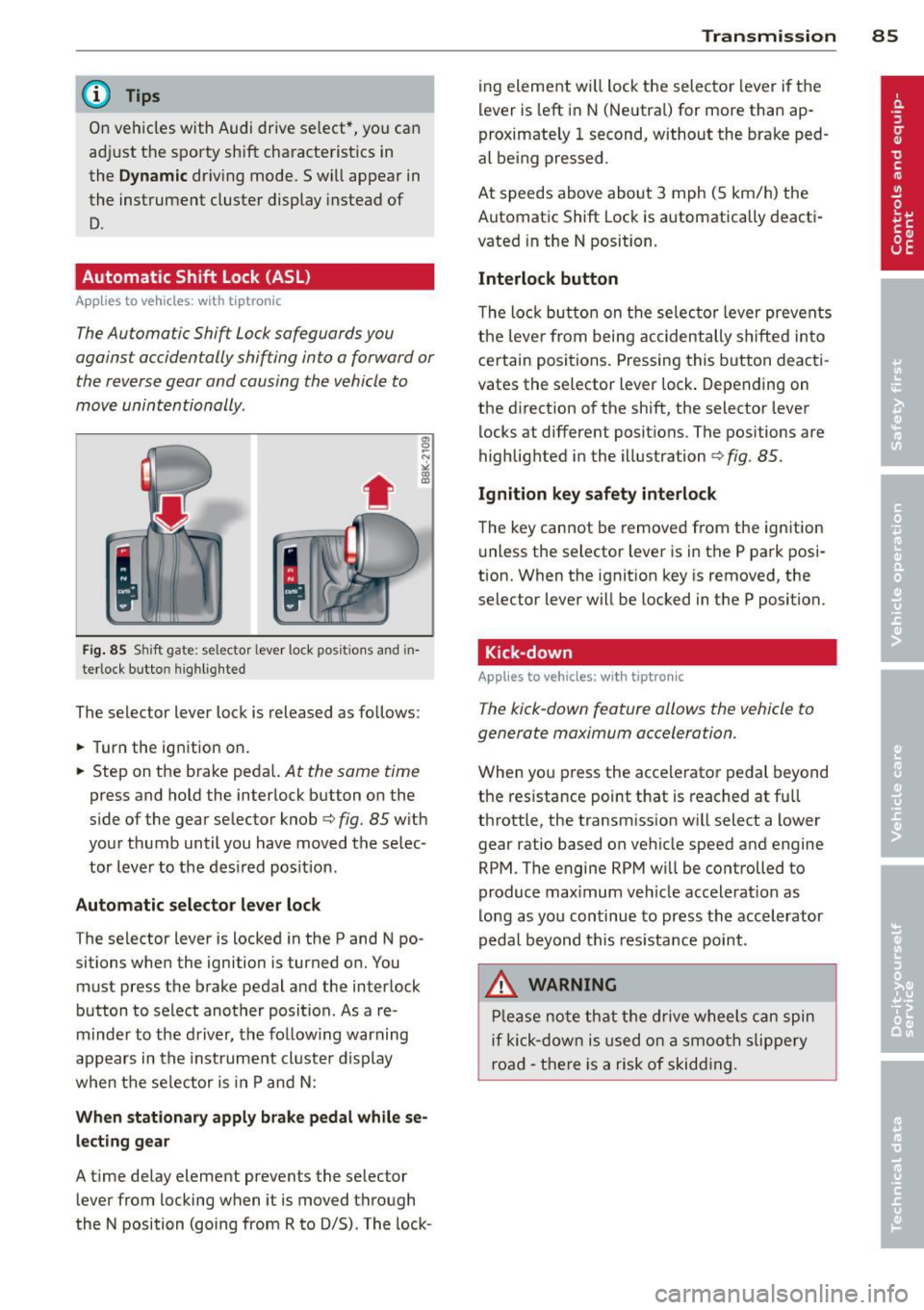
' Fig. 85 S hi ft gate: se lector lever lock po siti ons and in
terlock b utto n highlighted
The selector lever lock is released as follows :
.,. Turn the ignition on .
.,. Step on the brake peda l.
At the same time
press and hold the interlock button on the
side of the gear selector knob
c:> fig. 85 with
your thumb until you have moved the selec
tor lever to the desired position .
Automatic selector lever lock
The selector lever is locked in the P and N po
sitions when the ignition is turned on. You
must press the brake pedal and the interlock
button to select another position . As a re
minder to the driver, the following warning
appears in the instrument cluster display
when the se lector is in P and N :
When stationary apply brake pedal while se
lecting gear
A time delay element prevents the selector
lever from locking when it is moved through
the N position (going from R to D/5) . The lock- Transmission 85
ing element will lock the selector lever if the
lever is left in N (Neutral) for more than ap
proximately 1 second, without the brake ped
al being pressed .
At speeds above about 3 mph (5 km/h) the
Automatic Shift Lock is automatically deacti
vated in the N position.
Interlock button
The lock button on the selector lever prevents
the lever from being accidentally sh ifted into
certain positions. Pressing this button deacti
vates the selector lever lock . Depending on
the direction of the shift, the selector lever
locks at different positions . The positions are
highlighted in the illustration
c:> fig . 85.
Ignition key safety interlock
The key cannot be removed from the ignition
unless the selector lever is in the P park posi
tion. When the ignition key is removed, the
selector lever will be locked in the P position.
Kick-down
App lies to vehicles: with tipt ron ic
The kick-down feature allows the vehicle to
generate maximum acceleration .
When you press the accelerator pedal beyond
the resistance point that is reached at full
throttle, the transmission will select a lower
gear ratio based on vehicle speed and engine
RPM . The engine RPM will be controlled to
produce max imum veh icle acceleration as
long as you continue to press the accelerator
pedal beyond this resistance point .
,8. WARNING
Please note that the drive wheels can spin
if kick-down is used on a smooth slippery
road - there is a risk of skidding.
Page 90 of 294
88 Transmission
Emergency release of the selector lever
App lies to vehicles: with tiptronic
If the vehicle's power supply foils, the selec
tor lever con be released in on emergency.
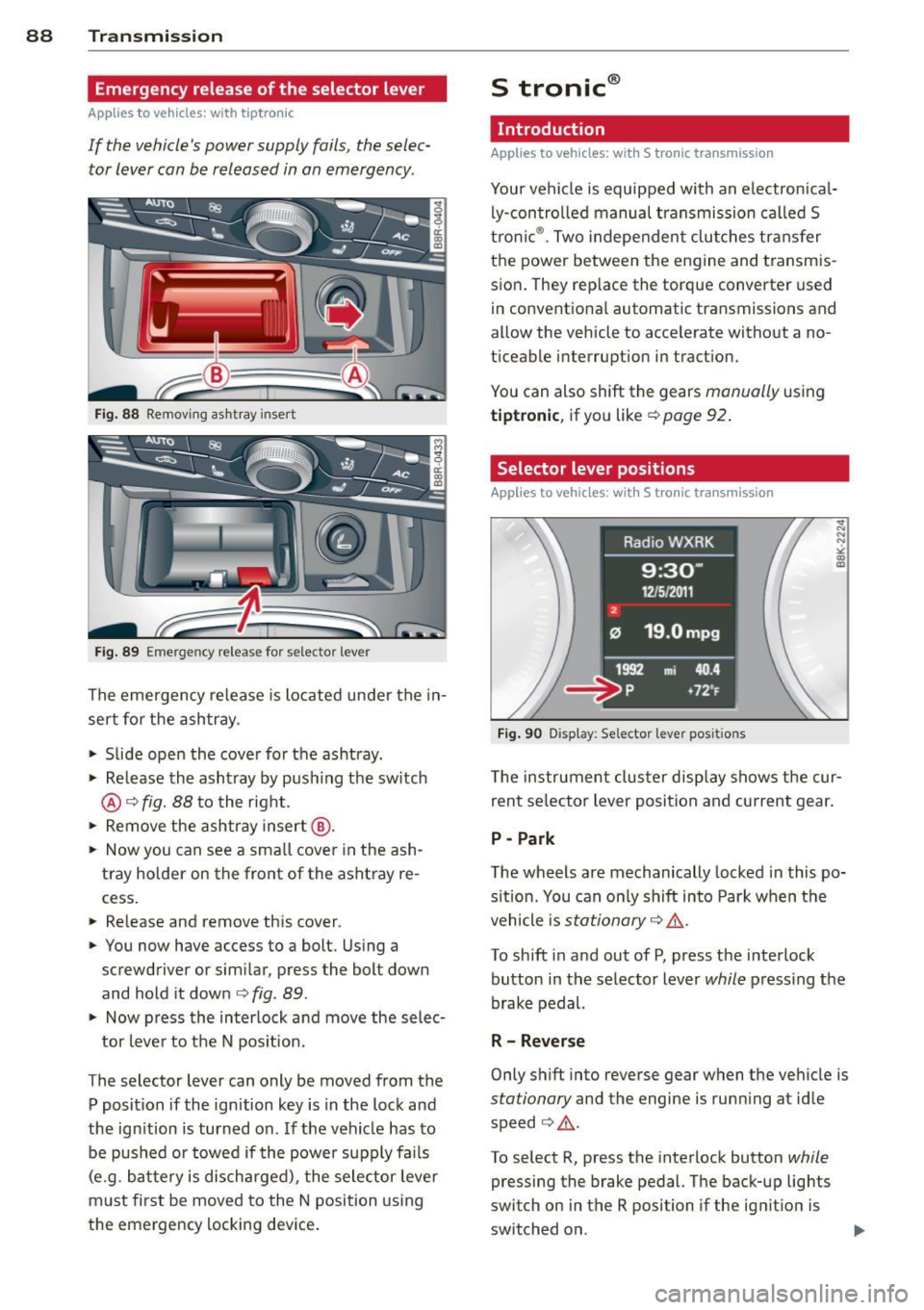
Fig. 88 Removing ashtray insert
Fig. 89 Emergency release for selector lever
The emergency release is located under the in
sert for the ashtray.
.. Slide open the cover for the ashtray.
.. Release the ashtray by push ing the switch
@¢fig. 88 to the right.
.. Remove the ashtray insert@.
.. Now you can see a small cover in the ash
tray holder on the front of the ashtray re
cess.
.. Re lease and remove this cover .
.. You now have access to a bolt. Using a
screwdriver or similar, press the bolt down
and hold it down ¢
fig. 89.
.. Now press the interlock and move the selec-
tor lever to the N pos ition .
The selector lever can only be moved from the
P position if the ignition key is in the lock and
the ignition is turned on. If the vehicle has to
be pushed or towed if the power supply fa ils
(e.g. battery is discharged), the selector lever
must first be moved to the N position using
the emergency locking device.
S tronic ®
Introduction
Applies to vehicles: with S tronic transm ission
Your vehicle is equipped with an electronical
ly-controlled manual transmission called S
tronic ®. Two independent clutches transfer
the power between the engine and transmis
sion . They rep lace the torque converter used
in conventional automatic transmissions and
allow the vehicle to accelerate without a no
ticeable interruption in traction.
You can also shift the gears
manually using
tiptronic , if you like ¢ page 92.
Selector lever positions
Applies to vehicles: wit h S t ronic tra nsmi ssio n
Fig. 90 Display: Se lector lever posit ions
The instrument cluster display shows the cur
rent se lector lever position and current gear .
P -Park
The wheels are mechanically locked in this po
sition. You can only shift into Park when the
vehicle is
stationary ¢ /1. .
To shift in and out of P, press the interlock
button in the selector lever
while press ing the
brake pedal.
R - Reverse
Only shift into reverse gear when the vehicle is
stationary and the engine is running at idle
speed ¢
/1..
To select R, press the interlock button while
pressing the brake pedal. The back-up lights
switch on in the R position if the ignition is
switched on .
Page 91 of 294
N -Neutral
The transmission is in idle in this position.
DIS -Normal position for driving forward
In the 0/5 position , the transmission can be
operated either in the normal D mode or in
the 5 sport mode. To select the S sport mode ,
pull the se lector lever back briefly. Pulling the
lever back again will select the normal D
mode. The instrument cluster disp lay shows
the selected driving mode.
I n the
normal mode D, the transmission auto
matica lly selects the best gear ratio . It de
pends on engine load, vehicle speed and the
dynamic control program (DRP).
Select the
sport mode S for sporty driv ing.
The vehicle makes full use of the engine's
power. Shifting is more noticeable when accel
erating.
When the vehicle is stationary or at speeds below 3 mph (5 km/h), you must always apply
the foot brake before and while moving the l ever to D/S out of N.
I n certain circumstances it may be advanta
geous to temporarily switch to the manual
shift program to manually select gear ratios
to match specific driving conditions
~ page 92.
A WARNING
-Never select R or P while driving.
- Power is stil l transmitted to the wheels
when the eng ine is running at idle. To
prevent the vehicle from "creeping", you
must keep your foot on the brake in all
selector lever positions (except P) when
the engine is running. Do not inadver
tent ly press the accelerator pedal when
the vehicle is stopped if a gear is engag
ed . Otherwise the vehicle will start to
move immediately. This could happen
even if the parking brake is activated.
- Before opening the hood and working on
a running engine, select P with the se lec
tor lever and activate the parking brake.
Always read and follow the applicable
Transmission 89
warnings ~ page 209, Engine compart
ment.
@ Tips
- On vehicles with Audi drive select*, you
can adjust the sporty shift characteristics
in the
Dynamic driving mode.Swill ap
pear in the instrument cluster display in
stead of D.
- If you accidentally select N while driving,
take your foot off the accelerator pedal
immediately and wait for the engine to
slow down to idle before selecting D/S.
- If there is a power failure, the selector
lever will not move out of the P position .
The emergency release can be used if
this happens~
page 94.
. Selector lever lock
Applies to vehicles: with S tronic transmission
The selector lever lock prevents you from se
lecting a gear accidentally , causing the vehi
cle to roll .
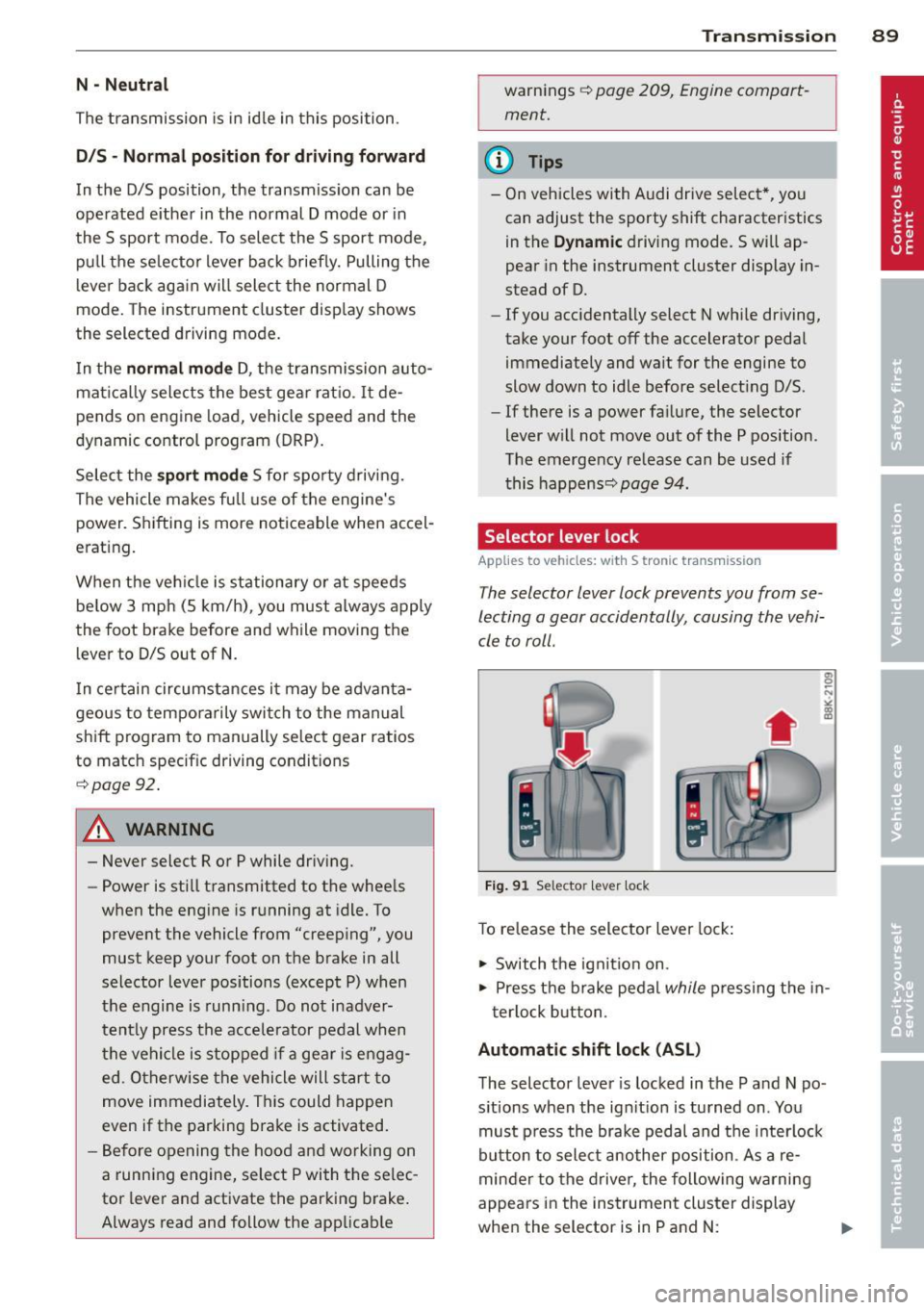
Fig. 91 Selector le ve r lock
To release the selector lever lock :
1-Switch the ignition on.
.. Press the brake pedal
while pressing the in-
terlock button.
Automatic shift lock (ASL)
The selector lever is locked in the P and N po
sitions when the ignition is turned on . You
must press the brake pedal and the interlock
button to select another position. As a re
minder to the driver, the following warning
appears in the instrument cluster display
when the selector is in P and N:
Page 93 of 294
may be useful to switch temporarily to the
manual shift program in order to adjust the
gears to the driving conditions by hand
Q & .
On slopes, activate the parking brake first and
then move the selector lever to the P position.
This prevents the locking mechanism from be ing loaded too heavily and will make it easier
to move the selector lever out of P.
A WARNING
-Never leave your vehicle with the engine
running while in gear. If you must leave
your vehicle when the engine is running, activate the parking brake and move the
selector lever to P.
- Power is still transmitted to the wheels
when the engine is running at idle. To
prevent the vehicle from "creeping", you
must keep your foot on the brake when
the engine is running and the selector
lever is in D/S or R or "tiptronic" mode is
selected.
- Do not press the accelerator pedal when
changing the selector lever position
while the vehicle is stationary and the
engine is running.
- Never shift into R or P while driving.
- Before driving down a steep slope, re-
duce your speed and shift into a lower
gear with "tiptronic".
- Do not ride the brakes or press the brake
pedal too often or too long. Constant
braking causes the brakes to overheat
and substantially reduces braking per
formance, increases braking distance or
causes complete failure of the brake sys
tem .
- To prevent the vehicle from rolling back
when stopping on inclines, always hold it
in place with the brake pedal or parking
brake.
- Never hold the vehicle on an incline with
a slipping clutch . The clutch opens auto
matically when it becomes too hot from
the overload. An indicator lamp
[O] illu
minates and a driver message appears
Transmission 91
Q page 93 when the clutch is overload
ed.
(D Note
- When stopping on an incline, do not try
to hold the vehicle in place by pressing
the accelerator pedal while a driving gear
is selected. This can cause the S tronic
transmission to overheat and can dam
age it . Activate the parking brake or
press the brake pedal to prevent the ve
hicle from rolling .
- Allowing the vehicle to roll when the en
gine is stopped and the selector lever is
in N will damage the S tronic transmis
sion because it is not lubricated under
those circumstances.
(D Tips
For safety reasons, the parking brake is re
leased automatically only when the driv
er's safety belt is engaged in the buckle.
Hill descent control
App lies to vehicles : wi th S tronic t ra nsmi ssio n and hill de ·
sce nt contro l
The hill descent con trol system assists the
driver when driving down declines .
Hill descent control is activated when these
lector lever is in D/S and you press the brake
pedal. The S tronic transmission automatically
shifts down into a gear suitable for the de cline. Hill descent control tries to maintain
the speed achieved at the time of braking,
within physical and technical limitations. If
may still be necessary to adjust the speed
with the brakes.
Hill descent control switches off once the de
cline levels out or you press the accelerator
pedal.
On vehicles with the cruise control system*
Q page 80, hill descent control is also activat-
ed when the speed is set. .,,.
Page 94 of 294
92 Transmission
& WARNING
Hill descent control cannot overcome
physical limitations, so it may not be able
to maintain a constant speed under all
conditions. Always be ready to apply the
brakes.
Manual shift program
Applies to vehicles: with S tronic transmission
Using the manual shift program you can
manually select gears .
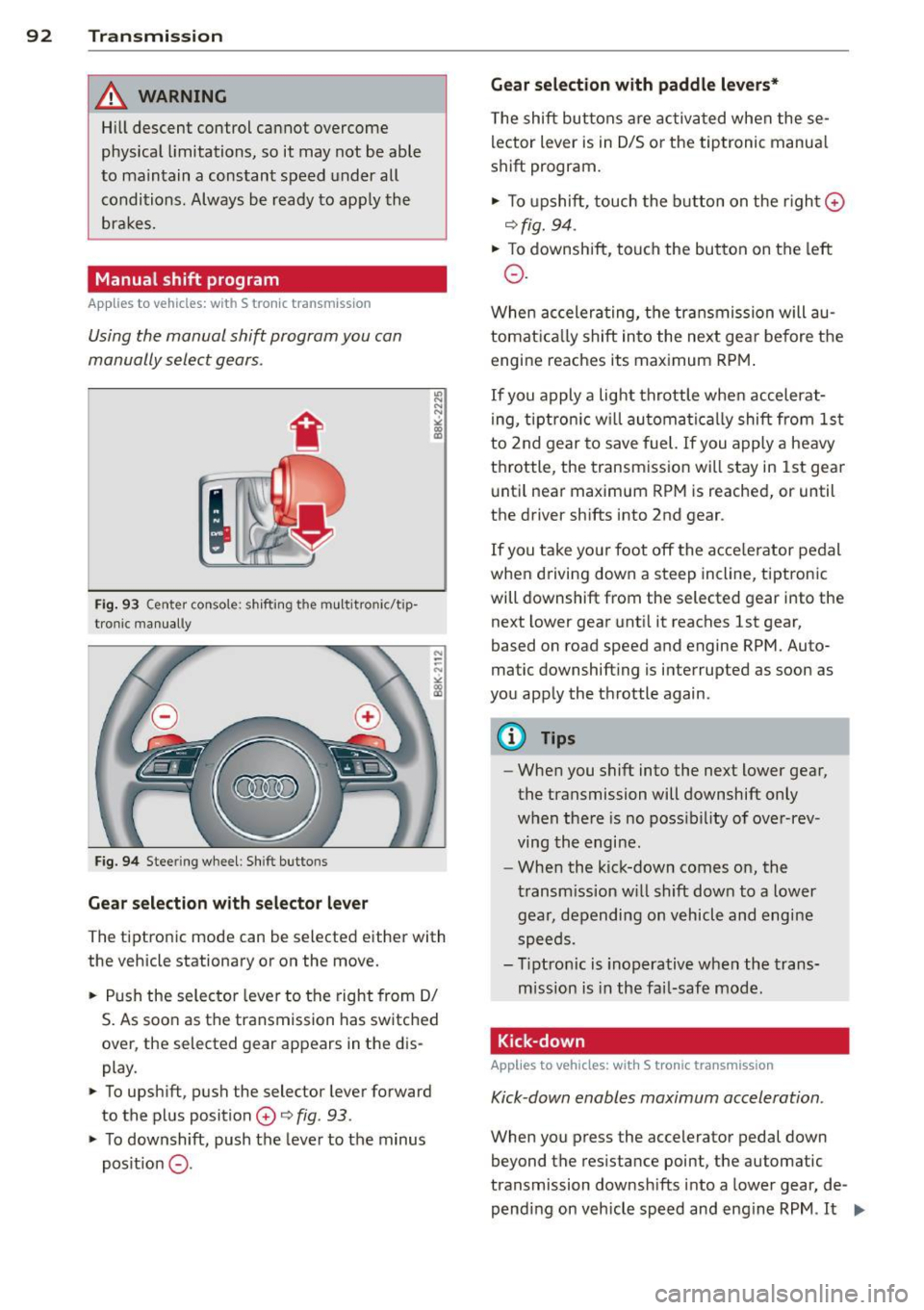
Fig. 93 C en ter conso le : shift in g th e mu ltitro nic/t ip
tron i c manually
Fig. 94 Steering wheel : Shi ft buttons
Gear selection with selector lever
"' N N N
" "' a)
The tiptronic mode can be s elected either with
the vehicle stationary or on the move.
.. Push the selector lever to the right from 0/
S. As soon as the transmission has switched
over , the selected gear appears in the dis
play .
.. To upshift, push the selector lever forward
to the plus position
0 o fig . 93 .
.. To downshift, push the lever to the minus
pos it ion
0 -
Gear selection with paddle levers*
The shift buttons are activated when these
lector lever is in 0/5 or the tiptronic manua l
shift program.
.. To upshift, touch the button on the right ©
ofig. 94 .
.. To downshift, touch the button on the left
0 .
When accelerating, the transmission will au
tomatically shift into the next gea r before the
engine reaches its maximum RPM.
If you apply a light throttle when accelerat
ing, tiptronic will automatically shift from 1st
to 2nd gear to save fuel. If you apply a heavy
throttle , the transmission will stay in 1st gear
until near maximum RPM is reached, or until
the drive r shifts into 2nd gear .
If you take you r foot off the acce le rator pedal
when dr iving down a steep incline, tiptronic
will downshift from the selected gear into the
next lower gear until it reaches 1st gear,
based on road speed and engine RPM. Auto
matic downshifting is interrupted as soon as
you apply the throttle again.
@ Tips
-When you shift into the next lower gear,
the transmission will downshift only
when there is no possibility of over-rev
ving the engi ne.
- When the kick-down comes on, the
transmission will shift down to a lower
gear, depending on vehicl e and engine
speeds .
- Tiptronic is inoperative when the trans
mission is in the fail-safe mode .
Kick-down
Applies to vehicles: with S tronic transmission
Kick-down enables maximum acceleration .
When you press the accelerator pedal down
beyond the resistance point, the automatic
transmission downshifts into a lower gear, de
pending on vehicle speed and engine RPM .
It ...
Page 95 of 294
shifts up into the ne xt higher gea r once the
maximum specified engine RPM is reached .
A WARNING
Please note that the wheels could spin on
slick or slippery roads when kick-down is
active.
Launch Control Program
Applies to vehicles: with S tronic transmission
The Launch Control Program provides the
best ac celeration possible when starting from
a s top .
Requirement: The engine must be at operat
i ng temperature and the steering wheel must
not be turned.
... Press the
I~ OFF I button ¢ page 187 while
the engine is running . The
II indicator light
i ll uminates in the instrument cluster and
T raction control (ASR ): Off. Wa rn ing! Re
stricted stabil it y
appears in the driver infor
mation system d isplay .
... Move the selector lever to the D/S position
o r se lect t he
dynamic d riving mode in Aud i
drive selec t* ¢ page 110 .
... Press the br ake ped al stro ng ly w it h your left
f oot and hold it down for at least one sec
ond.
... At t he same time, press the accelerato r
peda l down completely with your right foot
unti l the engine reaches and maintains a
high RPM.
... Remove your foot from the brake peda l
within 5 seconds¢_&. .
A WARNING
-Always adapt you r d rivi ng to the traffic
flow.
- Only use the Launch Control P rogram
when roa d and tr affic cond it ions allow it
and ot her dr ivers will not be end angered
o r annoyed by yo ur driv ing and the vehi
cl e's acce leration .
- P lease note th at t he driving wheels can
spin and the vehicle can brea k away
-
Tran sm iss ion 93
when ASR is switched off, especially
when t he road is sli ppery .
- Once you have accelerated, you shou ld
sw itch the ASR back on by pressing the
I ~ OFFI button.
(D Tips
- The transmission temperature may in
crease s ignificantly after using the
launch control program. I f that happens,
the program may not be ava ilable for a
few minutes. It w ill be available again af
t er a cool-down per iod .
- When accelerating using the Launch
Cont ro l program, a ll vehicle parts are
subjec t to heavy loads . T his can r esult in
increase d wear .
Transmission malfunction
Applies to vehicles: with S tronic transmission
[O] Tran smission: Press brake pedal and s e
lect gear again.
P ress the brake pedal and select the desire d
selector lever position again. You ca n the n
continue d riving.
[O] Transmis sion overheating: Pleas e driv e
conservatively .
The transmiss ion temperature has increased
s ignificantly due to the sporty driving manner.
D rive in a less sporty ma nner until the tem
perature returns to the normal range and the
i ndicato r light switches of.
[O] Transmission malfunction: You can con
tinue driving
There is a system malfunction in the transmis
s ion. You may cont inue driving. Drive to yo ur
authori zed Aud i dea ler or qualified repa ir fa
c ili ty soon to have the malfunction corrected .
[O] Transmission malfunction : Limited dr iv-
ing functionality
""°
Page 98 of 294
96 Audi adaptive cruise control and braking guard
confirmed by the video camera, an acute
collision warning.
- For safety reasons, do not use adaptive
cruise control when driving on roads with
many curves, when the road surface is in
poor condition and/or in bad weather
(such as ice, fog, gravel, heavy rain and
hydroplaning). Using the system under
these conditions could result in a colli
sion.
- Switch adaptive cruise control off tempo
rarily when driving in turning lanes, on
expressway exits or in construction
zones. This prevents the vehicle from ac
celerating to the set speed when in these
situations.
- The adaptive cruise control system will
not brake by itself if you put your foot on
the accelerator pedal. Doing so can over
ride the speed and distance regulation.
- When approaching stationary objects
such as stopped traffic, adaptive cruise
control will not respond and braking
guard will have limited function.
- The adaptive cruise control system and
braking guard do not react to people, an
imals, objects crossing the road or on
coming objects .
- The function of the radar sensor can be
affected by reflective objects such as
guard rails, the entrance to a tunnel,
heavy rain or ice.
- Never follow a vehicle so closely that you cannot stop your vehicle safely. The
adaptive cruise control cannot slow or
brake the vehicle safely when you follow
another vehicle too closely . Always re
member that the automatic braking
function cannot bring the vehicle to a sudden or emergency stop under these
conditions.
- To prevent unintended operation, always
switch ACC
off when it is not being used.
{[) Note
The sensor can be displaced by impacts or
damage to the bumper, wheel housing and
underbody. That could affect the adaptive cruise control system and braking guard.
Have your authorized Audi dealer or au
thorized Audi Service Facility check their
function.
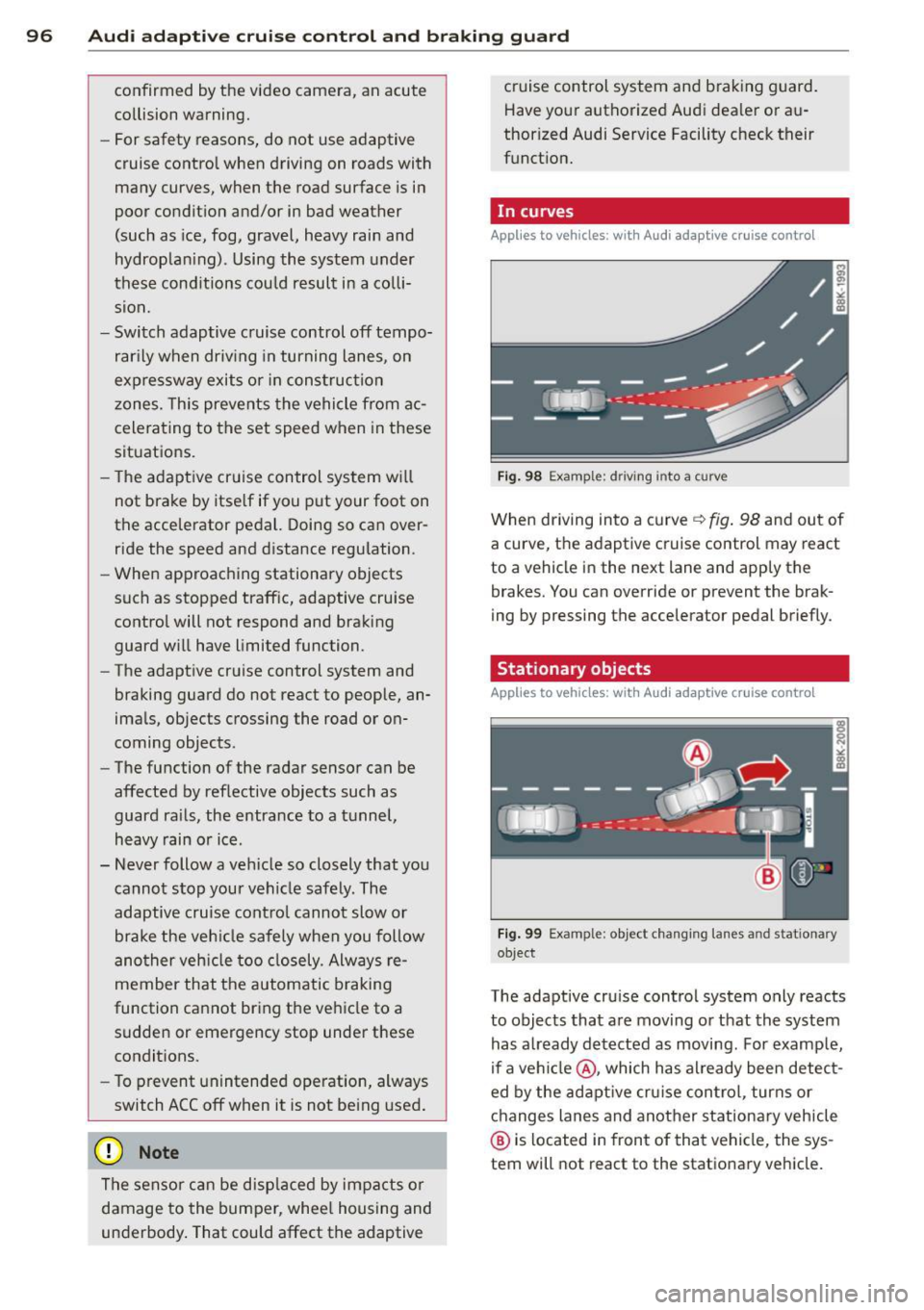
, In curves
App lies to vehicles: wi th Audi ada ptive c ruise contro l
Fig. 98 Example: d riving i nto a curve
When driving into a curve ~ fig. 98 and out of
a curve, the adaptive cruise control may react
to a vehicle in the next lane and apply the
brakes. You can override or prevent the brak
ing by pressing the accelerator pedal briefly.
Stationary objects
Applies to vehicles : wi th Audi adapt ive crui se contro l
Fig. 99 Example: object changing lanes a nd stat ionary
object
The adaptive cruise control system only reacts
to objects that are moving or that the system
has already detected as moving. For example,
if a vehicle @, which has already been detect
ed by the adaptive cruise control, turns or
changes lanes and another stationary vehicle
@ is located in front of that vehicle, the sys
tem will not react to the stationary vehicle.
Page 108 of 294
106 Audi side assist
General information
App lies to vehicles: with side assist
®
©
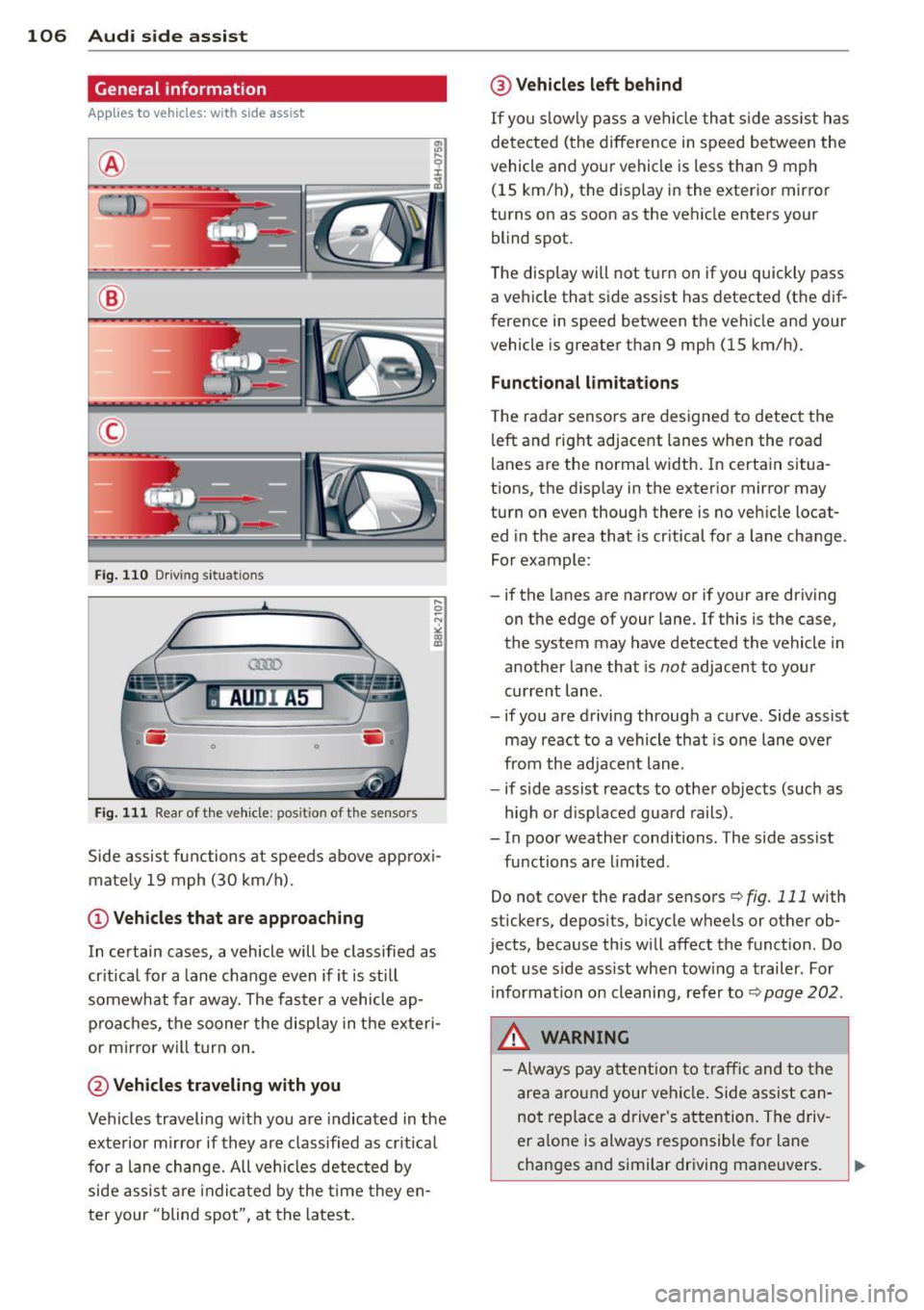
Fig. 110 Driving s it u at ions
AU DI A5
-~~~~-. -. . -.
F ig . 11 1 Rea r of th e ve hicle: pos it io n of t he se nso rs
Side assis t fu nctions at speeds above ap prox i
ma tely 19 mph (30 km/h).
(D V ehicles that are approaching
In certain cases, a vehicle will be classified as
cr itical for a lane change
even if it is still
somewhat far away. The fas ter a vehicle ap
p ro aches, the sooner the disp lay in the exteri
or m irror will t urn on.
@ Vehicles traveling with you
Vehicles traveling w ith you are indicated in the
exterior m irror if they are classified as cr it ical
for a lane change. All vehicles detec ted by
side assis t are in dicated by the time they en
ter your "blind spot", at the latest.
@ Vehicles left behind
If you s low ly pass a ve hicl e tha t sid e ass ist has
dete cted ( the difference in s peed between the
vehicle and you r vehicle is less than 9 mph
(15 km/h), the display in the exter ior mirror
turns on as soon as the vehicle enters your blind spot.
The display wi ll not t urn on if you quickly pass
a vehicle that s ide assist has detected (t he d if
f erence in speed between the ve hicle and your
vehicle is greater than 9 mph (15 km/h).
Functional limitations
T he radar senso rs are designed to detect the
left and right adjacent lanes whe n the road
l anes a re the normal width. In certain situa
t ions, the d isp lay in the exterior mirror may
turn on even though there is no ve hicle locat
ed in the area that is cr itical fo r a la ne cha nge.
Fo r example:
- if the lanes are narrow or if your are driving on t he edge of your lane. If this is the case,
the system may have detected the vehicle in
another la ne that is
not adjacent to you r
cur rent lane .
- if you a re driving throug h a c urve . Side assist
may react to a vehicle that is one lane ove r
from the ad jacent lane .
- if side assist reacts to other objects (such as
high or d isp laced gua rd rails) .
- In poor weather conditions. The side assist fu nctions are limited .
Do not cover the radar sensors
c::> fig. 111 with
stickers, depos its, bicycle wheels or other ob
jects, because this will affect the funct ion. Do
not use s ide ass ist when towing a trailer . For
i nforma tion on cleaning, refe r to
c::> page 202 .
&_ WARNING
-Always pay a ttention t o traffic and to th e
ar ea arou nd your vehi cle. Side a ssist c an
no t repl ace a driver 's atte ntion. The driv
er a lone is always res ponsible fo r lane
cha nges a nd similar driving maneuvers.