wheel AUDI A5 COUPE 2013 Owner's Manual
[x] Cancel search | Manufacturer: AUDI, Model Year: 2013, Model line: A5 COUPE, Model: AUDI A5 COUPE 2013Pages: 294, PDF Size: 73.84 MB
Page 109 of 294
-Improper reliance on the side assist sys
tem can cause collisions and serious
personal injury:
- Never rely only on side assist when
changing lanes.
- Always check rear view mirrors to make
sure that it is safe to change lanes.
- Side assist cannot detect all vehicles un
der all conditions- danger of accident!
- Please note that side assist indicates
there are approaching vehicles, or
vehicles in your blind spot, only after
your vehicle has reached a driving speed
of at least 19 mph (30 km/h).
- In certain situations, the system may not
function or its function may be limited.
For example:
- if vehicles are approaching or being left
behind very quickly. The display may
not turn on in time.
- in poor weather conditions such as
heavy rain, snow or heavy mist .
- on very wide lanes, in tight curves or if
there is a rise in the road surface .
Vehicles in the adjacent lane may not
be detected because they are outside
of the sensor range.
(D Note
The sensors can be displaced by impacts or
damage to the bumper, wheel housing and
underbody. This can affect the system .
Have your authorized Audi dealer or au
thorized Audi Service Facility check their
function.
(D Tips
- If the window glass in the driver's door
or front passenger's door has been tint
ed, the display in the exterior mirror may be misinterpreted.
- For Declaration of Compliance to United
States FCC and Industry Canada regula
tions
~ page 2 76.
Audi side assist 107
Activating and deactivating
Applies to vehicles: mit side ass ist
Fig. 112 D river 's doo r: Side assis t button
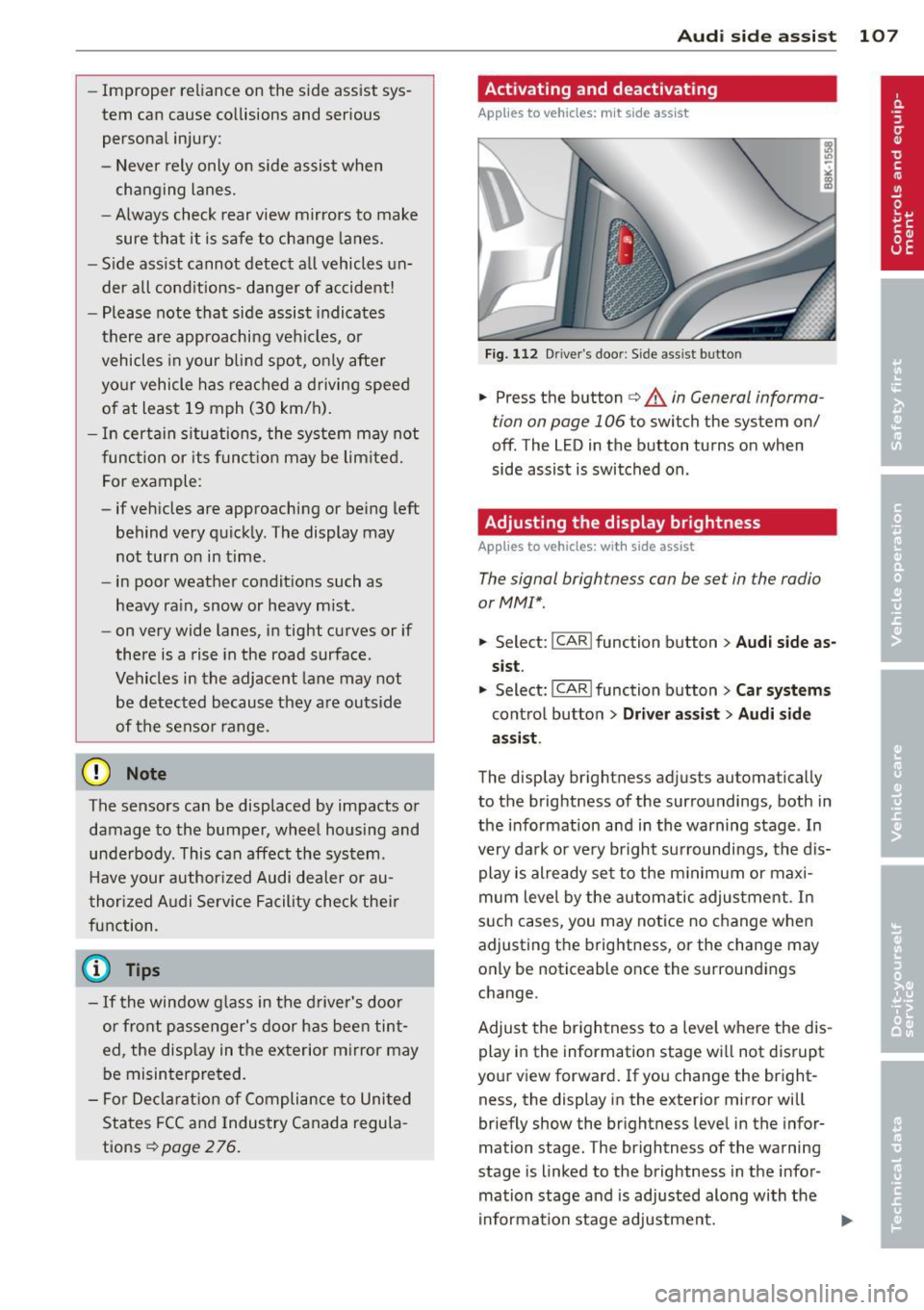
.,. Press the button c> .&. in General informa
tion on page 106
to switch the system on/
off . The LED in the button turns on when
side assist is switched on.
Adjusting the display brightness
Applies to vehicles: with side assist
The signal brightness can be set in the radio
orMMI* .
.,. Select: I CAR I function button > Audi side as
sist.
.,. Select: I CAR ! function button > Car systems
control button > Driver assist > Audi side
assist .
The display brightness adjusts automatically
to the brightness of the surroundings, both in
the information and in the warning stage . In
very dark or very bright surroundings, the dis play is already set to the minimum or maxi
mum level by the automatic adjustment. In
such cases, you may notice no change when
adjusting the brightness, or the change may
only be noticeable once the surroundings
change.
Adjust the brightness to a level where the dis
play in the information stage will not disrupt
your view forward. If you change the bright
ness, the display in the exterior mirror will
briefly show the brightness level in the infor
mation stage. The brightness of the warning
stage is linked to the brightness in the infor
mation stage and is adjusted along with the
information stage adjustment.
Page 110 of 294
108 Audi side assist
- Side assist is not active while you are
making the adjustment.
- Your settings are automatically stored
and assigned to the remote control key
being used.
Driver messages
App lies to vehicles: with side assist
If side assist switches off by itself, the LED in
the button turns off and a message will ap
pear in the instrument cluster display:
Audi side assist unavailable: Sensors blocked
The radar sensors' vision is affected. Do not
cover the area in front of the sensors with bike
wheels, stickers, dirt or other objects. Clean
the area in front of the sensors, if necessary
c:::;,page 106, fig. 111.
Audi side assist: Currently unavailable
Side assist cannot be switched on temporarily
because there is a malfunction (for example,
the battery charge level may be too low) .
Audi side assist: System fault!
The system cannot guarantee that it will de
tect vehicles correctly and it is switched off .
The sensors have been displaced or are faulty .
Have the system checked by an authorized
Aud i dealer or authorized Audi Service Facility
soon .
Audi side assist: Unavailable when towing
Side assist switches off automatically when a
factory-installed trailer hitch is connected to
the electrical connector on the trailer . There is
no guarantee the system will switch off when
using a retrofitted trailer hitch. Do not use
side assist when towing a trailer.
Page 118 of 294
116 Park ass is t
@ Tips
- The rear view camera picture is avai lable
as soon as the MMI D isplay or the MMI is
switched on, or the start-up phase is
completed.
- Keep the sensors in the rear bumper and the rear view camera lens clean and free
of snow and ice, so that the parking sys
tem can work properly . Please follow the
additional notes on~
pag e 118.
Reverse Park ing
App lies to vehicles: with parking system (rear, wit h rear
view came ra)
Parking mod e 1 can be used when parking in
a garage or parking space.
F ig. 1 19 MMI Di splay : Aim ing at a p arkin g spot
Fig . 120 MMI Disp lay: Ali gning th e vehi cle
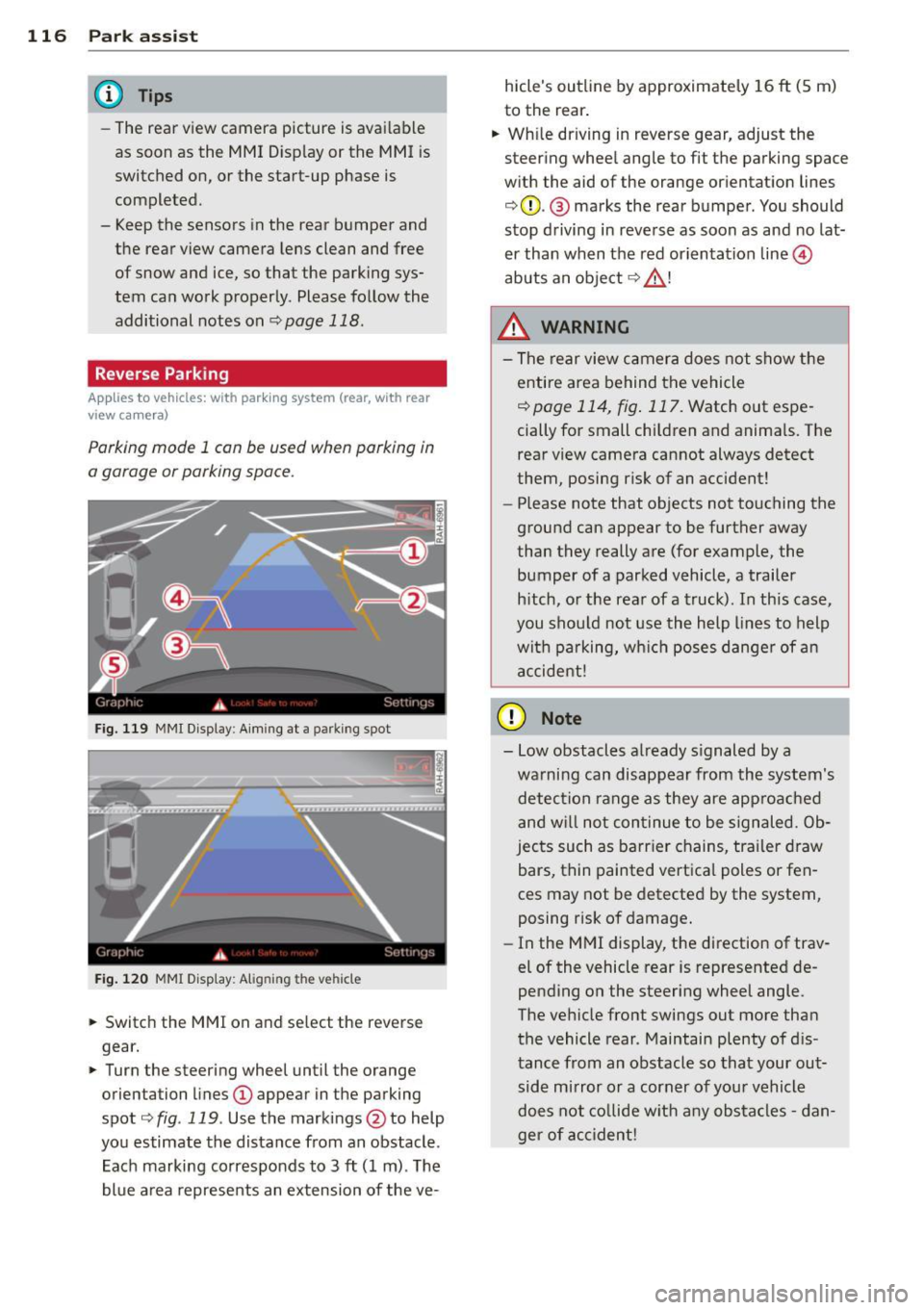
"' Switch the MMI on and se lect the reverse
gear.
"' Turn the steering wheel until the orange
orienta tion lines
(D appear in the parking
spot ¢
fig. 119 . Use the mark ings @to help
yo u estimate the distance from an obstacle .
Each marking corresponds to 3
ft (1 m) . T he
blue a rea represents an extension of the ve- hicle's outline by approximate
ly 16
ft (5 m)
to the rear .
"' Wh ile driving in reverse gear, adjust the
steering whee l angle to fit the parking space
w ith the aid of the orange or ientation lines
¢ 0 . @ marks the rear bumper . You should
stop d riving in reve rse as soon as and no lat
er than when the red orientation line©
abuts a n obje ct ¢ _&. !
_& WARNING
- The rear view c amera does not show t he
e ntire area behind t he vehicle
¢
page 114, fig . 117. Watch out espe
cially for small children and anima ls. The
rear view camera cannot always detect
them, posing risk of an accident!
- Please note that objects not touching the
ground can appear to be further away
than they really a re (for example, the
bumper of a parked vehicle , a trailer
h itch, o r the rea r of a truck). In this case,
you shou ld not use the h elp lines to help
wit h pa rking, wh ich poses danger of a n
a ccident!
(D Note
- Low obstacles a lready s ignaled by a
wa rning can disappear from th e system's
detec tion range as they are approa ched
and w ill not con tinue to be signaled. Ob
jec ts such as barr ier chains, tr ailer draw
bars, thin painted vertica l poles or fen
ces may not be detecte d by the system,
posing risk of damage.
- In the MMI display, t he direction of trav
el of the vehicle rear is represented de
pending on the steering wheel angle.
The ve hicle fro nt swings out more tha n
the vehicle rear . Maintain plenty of d is
tance from an obstacle so that your out side mirror o r a corner of you r vehicle
d oes not co llide w it h any obs ta cl es -d an
ger of accident!
Page 119 of 294
Parallel Parking
Applies to vehicles: with parking system (rear, with rear
view ca mera)
Use parking mode 2 to help you pork on the
edge of o street.
F ig. 121 MMI Display : blue surface in the park ing spot
Fig. 122 MMI Disp lay: Blue curve on t he c urb
The following steps app ly only when there is
no obstacle (such as a wall) near the parking
spot. Otherwise, please read the "Tips on
Parking Next to Obstacles".
• Activate the turn signal.
• Switch the MMI on and se lect the reverse
gear. The parking aid turns on and park ing
mode 1 appears on the display.
• Position your vehicle parallel to the edge of
the street, approximately 3 ft (1 m) from a parked vehicle .
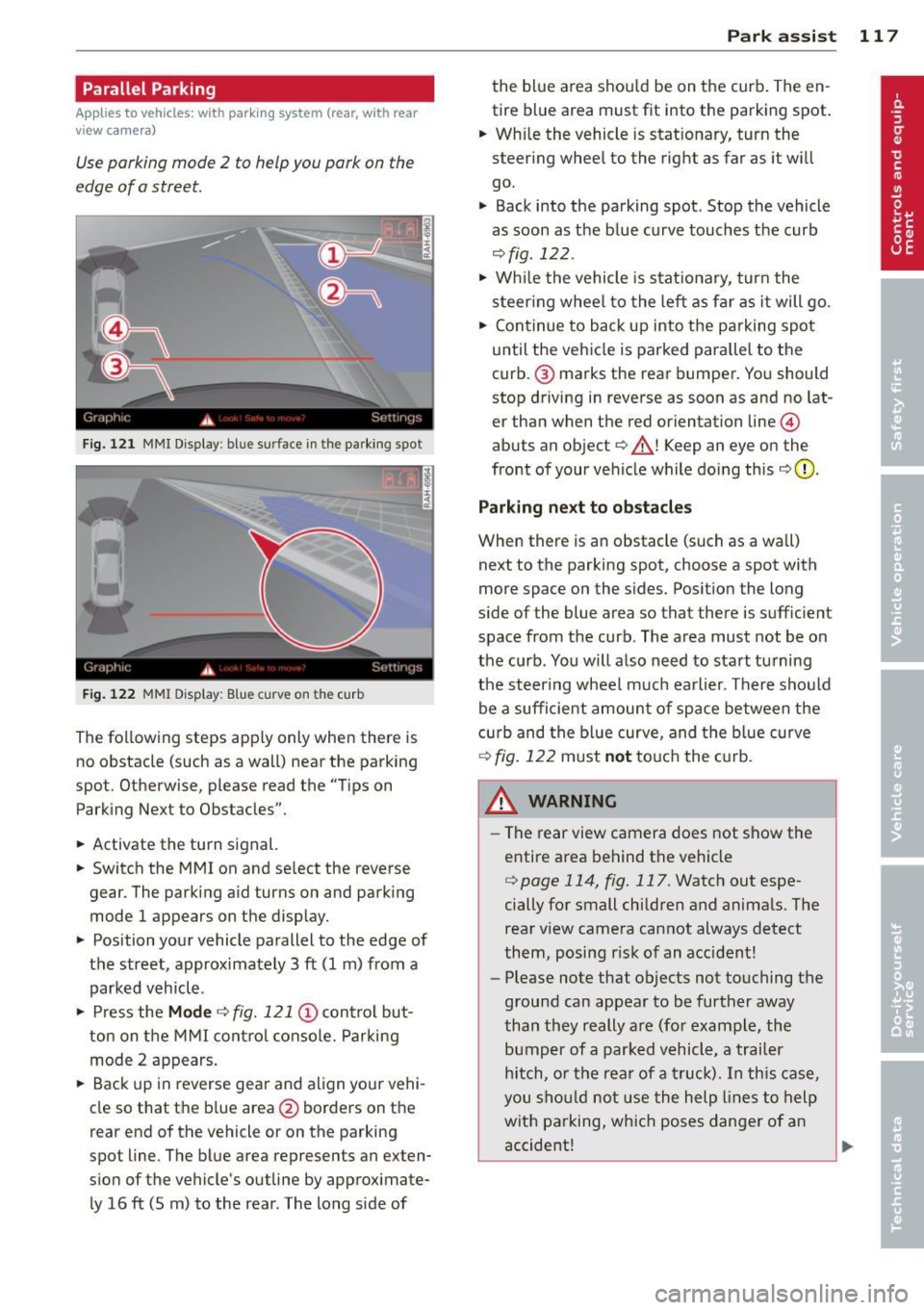
• Press the
Mode ¢ fig. 121 © control but
ton on the MMI control console. Parking
mode 2 appears.
• Back up in reverse gear and align your vehi
cle so that the b lue area
@ borders on the
rear end of the vehicle or on the parking
spot line . The blue area represents an exten
s ion of the vehicle's outline by approximate
ly 16 ft (5 m) to the rear . The long s ide of
Park assist 11 7
the blue a rea shou ld be on the curb. The en
tire blue area must fit into the parking spot.
• Wh ile the vehicle is stat ionary, turn the
steer ing whee l to the right as far as it wi ll
go.
• Back into the parking spot . Stop the vehicle
as soon as the blue curve touches the curb
¢ fig . 122 .
• Wh ile the vehicle is stationary, turn the
s t eering whee l to the left as far as it will go.
• Continue to back up into the parking spot
until the vehicle is parked parallel to the
curb .@ marks the rear bumper. You should
stop driving in reverse as soon as and no lat
er than when the red orientat ion line @
abuts an object¢_& ! Keep an eye on the
front of your vehicle while doing this
¢ 0 .
Parking next to obstacles
When there is an obstacle (such as a wall)
next to the parking spot, choose a spot with
more space on the sides. Posit ion the long
s ide of the blue area so that there is suff ic ient
space from the curb. The area must not be on
the curb . You will also need to start tu rning
the steer ing wheel much earlier. There should
be a sufficient amount of space between the
c urb and the blue curve, and the blue curve
¢ fig. 122 must not touch the curb.
&_ WARNING
- The rear view camera does not show the
entire area behind the vehicle
¢ page 114 , fig. 117. Watch out espe
cially for small children and animals. The
rear view camera cannot always detect
them, posing r isk of an accident!
- Please note that objects not touching the
ground can appear to be further away
than they really are (for example, the
bumper of a parked vehicle, a trailer
hitch, or the rear of a truck). In this case,
you should not use the help lines to help
with parking, which poses danger of an
accident!
.__ _____________ _J ...
Page 120 of 294
118 Park assis t
In the MMI display, the d irection of t ravel
of the vehicle rea r is represented depend
ing on the steering wheel angle. The vehi
cle front sw ings out more than the ve hicle
rear. Maintain plenty of distance from an
obstacle so that your o utside mirror or a
corne r of your veh icle does not co llide with
any obs ta cl es -danger of ac cident!
@ Tips
The left or right orientation li nes and sur
faces wi ll be displayed, depending on the
t urn sig na l being used.
Adjusting the display and warning tones
A ppl ies to vehicles: with pa rk in g system (rear, with rea r
view ca mera )
The display and warning tones are adjusted in
the radio or MM!*.
"' Se lect:
I CARI f u nction button > Parking sys ·
tern .
Or
"' Se lect: ~I C~A~R~I funct ion button > Car systems
control button > Dr iver assist > Parking aid .
Display
- Off -when the parking system is switched
off, on ly aud ible signals are given .
-On -when t he parking system is switched
on, the pict ure from the rear view camera is
displayed.
Warning tones
- Rear volume -
rear sensor volume
-Rear frequency -rear sensor frequency
-Music volum e while parking -when the
park ing system is switched on, the volume
of the act ive a udio source is lowered.
The new ly adjusted value is briefly heard from
the signal gene rator. The sett ings a re auto
mat ica lly stored and assigned to the remote
con trol key.
_& WARNING
- Alw ays m ake su re th at the volume and
freq uency of the warning tones is adjus t-
-
ed so that you can easily hear the acous
tic d istance signa l even if the radio is
playing, the air-cond it ioner blower is on
Hi gh or there is a hig h level of outside
noise.
- Check the settings w henever someone
else has driven the vehicle before you.
(D Tips
- The warn ing tones can also be adjusted
directly from the rear view camera im
age. Simply press the Settings* contro l
butto n.
- Changed settings are activated when
park ing ass ist is switc hed on aga in.
Error messages
App lies to vehicles: wit h parking system (rear, wit h rear
v iew camera)
If a warning tone is aud ible for about five sec
onds when you turn on the ignition, there is a
malfunction in the system . Have the problem
cor rected by your author ized Audi dealer.
Keep the senso rs in the rear bumpe r clean and
free from ice so that the acoustic park assist
system can function properly.
Page 127 of 294
.. Sit properly in your seat and make sure that
your passengers do the same
¢page 53,
Seats and storage.
.. Fasten your safety belt and wear it properly.
Also instruct your passengers to fasten their
safety belts properly¢
page 134 .
What impairs driving safety?
Safe driving is directly related to the condi
tion of the vehicle , the driver as well as the
driver's ability to concentrate on the road
without being distracted .
The driver is responsible for the safety of the
vehicle and all of its occupants. If your ability
to drive is impaired, safety r isks for everybody
in the vehicle increase and you a lso become a
hazard to everyone else on the road
~ .&_.
Therefo re:
.. Do not let yourself be distracted by passen
gers or by using a cellular telephone .
.. NEVE R drive when yo ur driv ing ability is im
paired (by medicat ions, alcohol, drugs, etc.).
.. Observe all traffic laws, rules of the road
and speed limits and plain common sense .
.. ALWAYS adjust your speed to road, traffic
and weather conditions .
.,. Take frequent breaks on long trips. Do not
drive for more than two hours at a stretch.
.. Do NOT drive when you are tired, under
pressure or when you are stressed .
& WARNING
Impaired driving safety increases the risk
of serious personal injury and death when
ever a vehicle is being used.
Driving Safely 125
Proper occupant
seating positions
Proper seating position for the driver
The proper driver seating position is impor
tant for safe, relaxed driving.
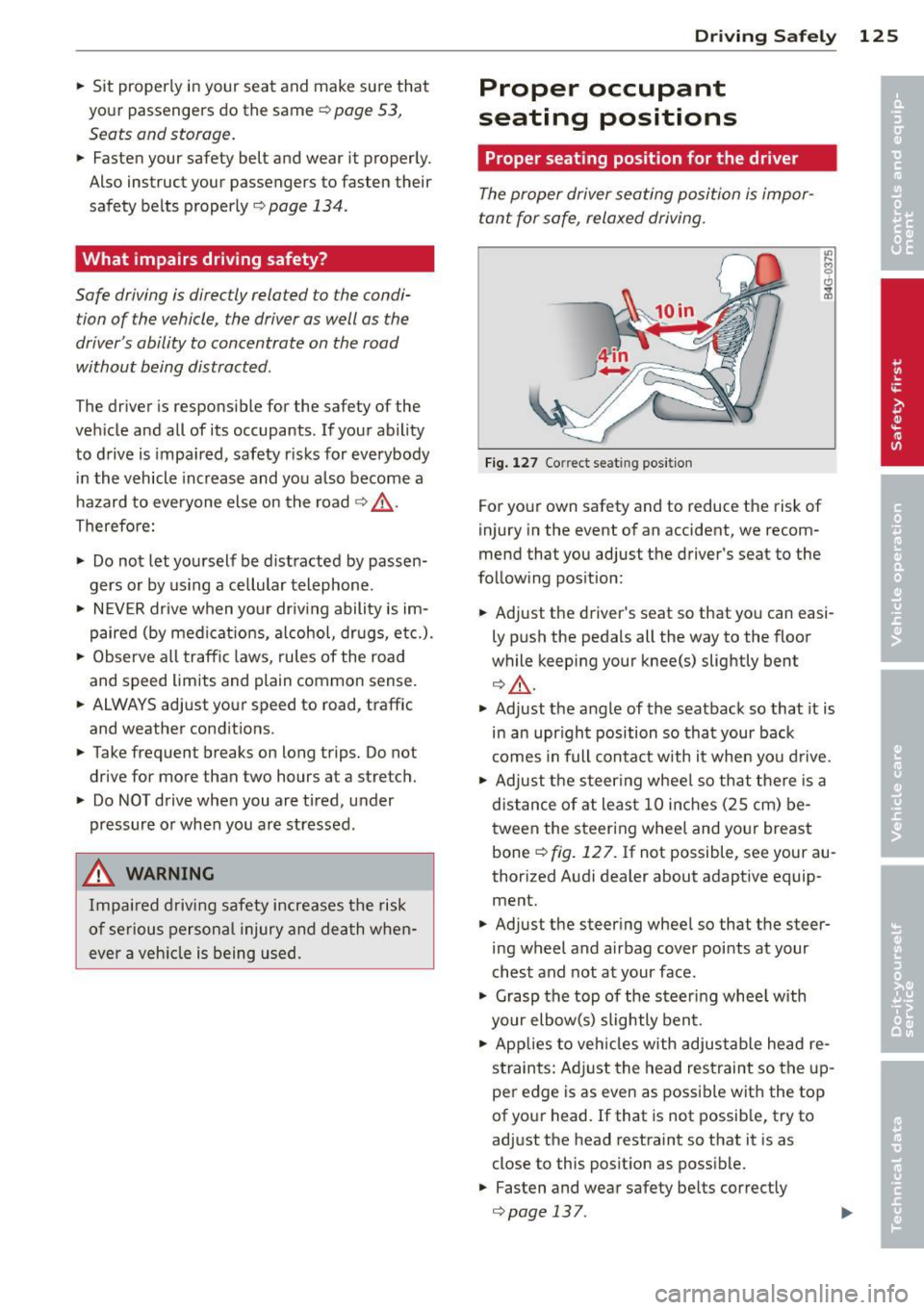
Fig. 127 Correct seat ing pos it ion
For your own safety and to reduce the risk of
injury in the event of an accident, we recom
mend that you adjust the driver's seat to the
follow ing pos ition:
.. Adjust the driver's seat so that you can easi
ly push the pedals all the way to the floor
wh ile keeping your knee(s) slightly bent
¢&_ .
.. Adjust the angle of the seatback so that it is
in an upr ight position so that your back
comes in full contact w ith it when you drive.
.. Adjust the steering wheel so that there is a
distance of at least 10 inches (25 cm) be
tween the steering wheel and yo ur breast
bone
~ fig. 12 7. If not possible, see your au
thorized Audi dealer about adaptive equip
ment.
.. Adjust the steer ing wheel so that the steer
ing wheel and airbag cover points at your
chest and not at your face .
.,. Grasp the top of the steering whee l with
your elbow(s) slightly bent .
.. App lies to vehicles with adjustable head re
s tra ints: Ad just the head restraint so the up
per edge is as even as possible with the top
of your head. If that is not possible, try to
adjust the head restraint so that it is as
close to this pos it ion as possible .
.. Fasten and wear safety be lts correctly
¢ page 13 7 . .,._
Page 128 of 294
126 Driving Safely
• Always keep both feet in the footwell so
that you are in control of the vehicle at all
times.
For detailed information on how to adjust the
driver's seat, see
¢ page 54 .
A WARNING
Drivers who are unbelted, out of position
or too close to the airbag can be seriously
injured by an airbag as it unfolds. To help
reduce the risk of serious personal injury:
- Always adjust the driver's seat and the
steering wheel so that there are at least
10 inches (25 cm) between your breast
bone and the steering wheel.
- Always hold the steering wheel on the
outside of the steering wheel rim with
your hands at the 9 o'clock and 3 o'clock positions to help reduce the risk of per
sonal injury if the driver's airbag inflates.
- Never hold the steering wheel at the
12 o'clock position or with your hands at
other positions inside the steering wheel
rim or on the steering wheel hub. Hold
ing the steering wheel the wrong way
can cause serious injuries to the hands,
arms and head if the driver's airbag de
ploys.
- Pointing the steering wheel toward your
face decreases the ability of the supple
mental driver 's airbag to protect you in a
collision .
- Always sit in an upright position and nev
er lean against or place any part of your
body too close to the area where the air
bags are located.
- Before driving, always adjust the front
seats and head restraints properly and
make sure that all passengers are prop
erly restrained.
- Never adjust the seats while the vehicle
is moving . Your seat may move unexpect
edly and you could lose control of the ve
hicle.
- Never drive with the backrest reclined or
tilted far back! The farther the backrests
are tilted back, the greater the risk of in- jury due to incorrect positioning of the
safety belt and improper seating posi
tion.
- Children must always ride in child safety
seats ¢
page 166. Special precautions
apply when installing a child safety seat
on the front passenger seat¢
page 142 .
Proper seating position for the front
passenger
The proper front passenger seating position
is important for safe, relaxed driving .
For your own safety and to reduce the risk of
injury in the event of an accident, we recom
mend that you adjust the seat for the front
passenger to the following position :
• Move the front passenger seat back as far
as possible . There must be a minimum of
10 inches (25 cm) between the breastbone
and the instrument panel¢,&. .
• Adjust the angle of the seatback so that it is
in an upright position and your back comes
in full contact with it whenever the vehicle is
moving.
• Applies to vehicles with adjustable head re
straints: Adjust the head restraint so the up
per edge is as even as possible with the top
of your head. If tha t is not possible, try to
adjust the head restraint so that it is as
close to this position as possible.
• Keep both feet flat on the floor in front of
the front passenger seat.
• Fasten and wear safety belts correctly
¢page 137.
For detailed information on how to adjust the
front passenger's seat, see
¢ page 53.
A WARNING
-
Front seat passengers who are unbelted,
out of position or too close to the airbag
can be seriously injured or killed by the air
bag as it unfolds. To help reduce the risk of
serious personal injury:
Page 144 of 294
142 Airbag sys te m
Airbag system
Important things to know
Importance of wearing safety belts and
sitting properly
Airbags are only supplemental restraints. For
airbags to do their job , occupants must al
ways properly wear their safety belts and be
in a proper seating position.
F or your safety and the safety of your passen
gers, before driving off, always:
• Adjust the dr iver's seat and steering wheel
properly ¢
page 125,
• Adjust the front passenger's seat properly
¢page 54,
• Wear safety be lts properly ¢ page 137,
• Always properly use the proper child re-
stra int to protect children¢
page 166.
In a collision airbags must inflate within the
blink of an eye and with considerable force .
The supplementa l airbags can cause injuries if
the dr iver or the front seat passenger is not
seated properly . Therefore in order to he lp the
a irbag to do its job, it is important, both as a
d river and as a passenge r to sit properly at all
times.
By keeping room between your body and the
steering wheel and the front of the passenger
compartment, the airbag ca n inflate fully and
comp letely and provide supp lemental p rotec
tion in ce rtain frontal collisions¢
page 125,
Proper occupant seating positions .
For detai ls
on the operat ion of the seat adjustment con
trols ¢
page 54.
It's especially important that children a re
properly restrained ¢
page 166.
There is a lot that the driver and the passen
gers can and must do to help the individua l
safety features ins talled in your A udi work to
gether as a system.
Prope r seat ing pos ition is important so that
the front airbag on the driver s ide can do i ts
job. If yo u have a physical impa irment or con- dition that prevents you from sitting properly
on the driver seat with the safety belt properly
fastened and reaching the peda ls , spec ial
modifications to your vehicle may be necessa
ry.
Contact your a uthorized Audi dea ler, or call
Audi C ustomer Re lations at 1-800-822-2834 .
When the airbag system dep loys, a gas gener
ator will f ill the airbags, break open the pad
ded covers, and inf late between the steering
whee l and the dr iver and between the instru
ment pane l and the front passenger. The air
bags will deflate immediately after dep loy
ment so that the front occupants can see
th rough the w indshield aga in without inter
ruption .
All of th is take s place in the blink of an eye, so
fast that many people don't even realize that
the a irbags have dep loyed . The airbags also
inflate with a great dea l of force and nothing
shou ld be in their way when they deploy.
F ront a irbags in combination with properly
worn safety belts slow down and lim it the oc
cupant's forward movement. Together they
help to prevent the drive r and front seat pas
senger from hitting parts of the inside the ve
hicle while reducing the forces acting on the
occupant dur ing the crash. In this way they
help to reduce the risk of injury to the head
and uppe r body i n the c rash . A irbags do not
protect the a rms or the lower parts of the
body.
Both front a irbags w ill not i nflate in all fronta l
collisions . The t rigge ring of the a irbag system
depends on the vehicle dece lerat ion rate
c aused by the co llision and registered by the
elect ron ic cont ro l u nit. If t his rate is below
the re ference value programmed into the con
trol unit, the airbags will not be trigge red ,
even though the car may be bad ly damaged as
a resu lt of the collision . Veh icle damage, re
pair costs or even the lack of veh icle damage
is no t necessarily an indication of whether an
airbag should inflate or not .
It is not possib le to define a range of vehicle
speeds that w ill cover every possib le kind and .,.
Page 145 of 294
angle of impact that will always trigger the
airbags, since the circumstances will vary con
siderably between one collision and another.
Important factors include, for example, the nature (hard or soft) of the object which the
car hits, the angle of impact, vehicle speed,
etc. The front airbags will also not inflate in
side or rear collisions, or in ro ll-overs .
Alwa ys rem ember : Airbags will deploy only
once, and only in certa in kinds of collisions .
Your safety belts are always there to offer pro
tection in those s ituations in which airbags
are not supposed to deploy , or when they have
a lready deployed ; fo r example , when yo ur ve
h icle strikes or is struck by another after the
first collision .
This is just one of the reasons why an a irbag is
a supplementary restra int and is not a s ubst i
tute for a safety belt . The airbag system
works most effectively when used with the
safety belts. Therefore, always properly wear
your safety belts
¢ page 134.
A WARNING
Sitting too close to the steer ing wheel or
instrument panel will decrease the effec
tiveness of the airbags and will increase
the risk of pe rsonal injury in a co llision .
- Never sit closer than
10 inches (25 cm)
to the stee ring wheel or instrument pan
el.
- If you cannot sit more than
10 i nches
(25 cm) from the steer ing whee l, investi
gate whether adaptive equipment may
be available to help you reach the pedals
and increase your seating dis tance from
the steering wheel.
- If you are unrestrained, lean ing fo rward,
sitting sideways or out of position in any
way, yo ur risk of inj ury is much highe r.
- You w il l also receive serio us inju ries and
cou ld even be killed if you are up against
the airbag or too close to it when it in
flates -even with an Advanced Airbag.
- To reduce the r isk o f injury when an air
bag inflates, a lways wear safety belts
proper ly ¢
page 137, Safety belts .
Airbag system 143
-Always make certain that chi ld ren age 12
or younger a lways ride in the rear seat. If
children are not properly restrained, they may be severe ly inju red or killed when an
airbag inf lates .
- Never let ch ildren ride unrestra ined or
improperly restrained in the vehicle . Ad
just the front seats prope rly.
- Never ride with the backrest reclined.
- Always sit as far as possible from the
steer ing whee l or the instrument pane l
¢page 125.
-Always sit upright with your back against
the backrest of your seat.
- Never p lace your feet on the instrument
panel or on the seat. Always keep both
feet on the f loor in front of the seat to
he lp prevent serio us in juries to the legs
a nd h ips if the airbag inflates.
- Never recline the front passenger 's seat
to tra nsport objects. Items can a lso
move i nto the area of the s ide a irbag or
the front a irbag du ring bra king or in a
sud den maneuve r. Obje cts ne ar the air
bags can become projectiles and cause
injury when an airbag inflates.
_&. WARNING ~
A irbags that have de ployed in a crash must
be replaced.
- Use on ly original equipment airbags ap
proved by Audi and installed by a trai ned
technician who has the necessary too ls
and d iagnost ic equipment to properly re
place any airbag in your vehicle and as
sure system effectiveness in a crash .
- Never perm it salvaged or recycled air
bags to be installed in your vehicle .
Child restraints on the front seat - some
important things to know
.,. Be su re to read t he important information
and head the WARNINGS fo r important de
tails about children and Advanced Airbags
¢ page 166. ..,.
•
•
Page 148 of 294
146 Airbag system
-Never place additional items on the seat
that can increase the total weight regis
tered by the weight-sensing mat and can
cause injury in a crash .
Front airbags
Description of front airbags
The airbag system can provide supplemental
protection to properly restrained front seat
occupants.
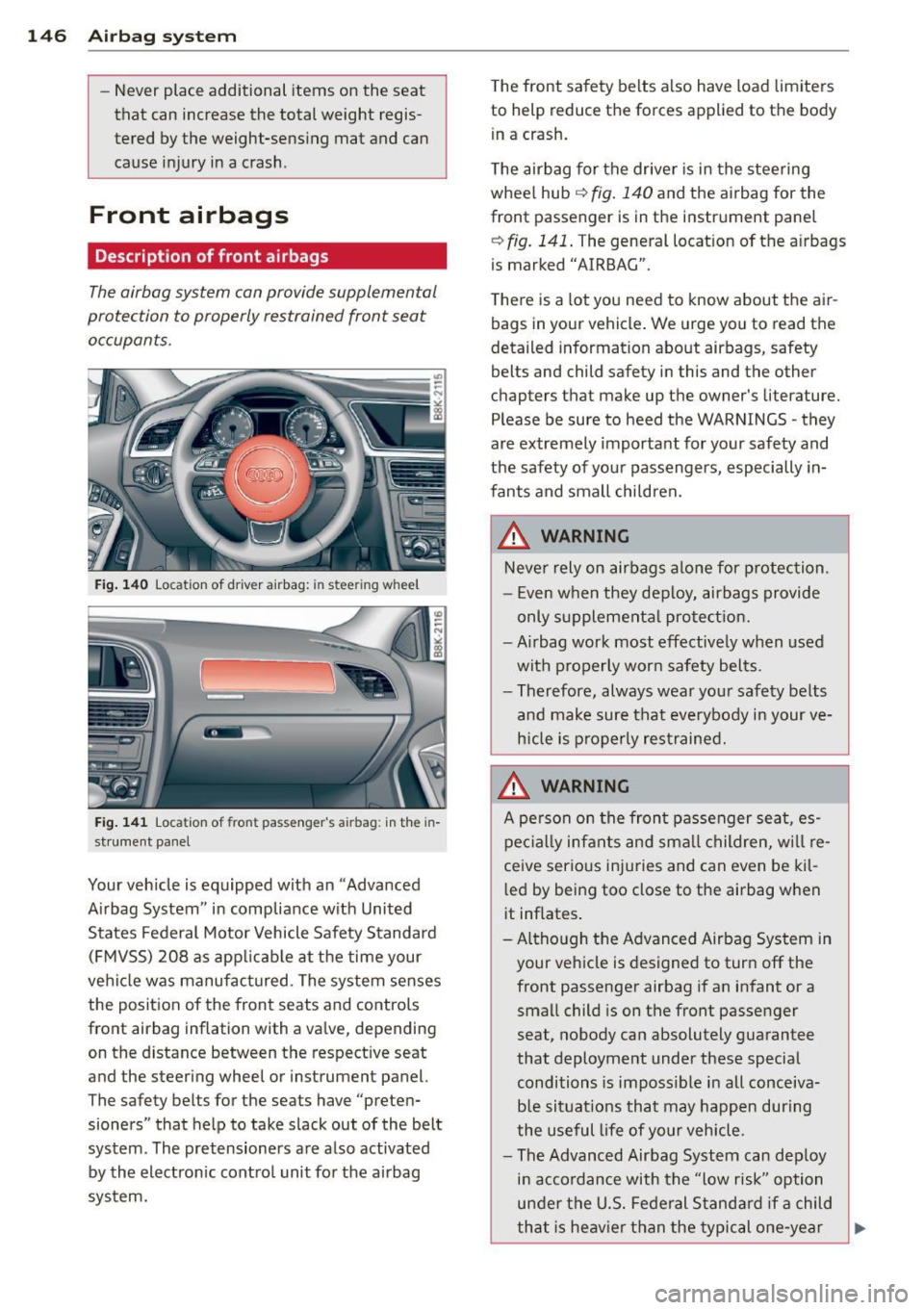
Fig. 140 Location of dr iver airbag: in stee ring wh eel
Fig. 141 Location of front pass enger's a irbag: in the in
strument panel
Your veh icle is equipped with an "Advanced
Airbag System" in compliance with United
States Federal Motor Vehicle Safety Standard (FMVSS) 208 as applicable at the time your
vehicle was manufactured . The system senses
the position of the front seats and controls
front airbag inflation with a valve, depend ing
on the distance between the respective seat
and the steering wheel or instrument panel.
The safety belts for the seats have "preten
sioners" that help to take slack out of the belt
system. The pretensioners are also activated by the electronic control unit for the airbag
system. The
front safety belts also have load limiters
to help reduce the forces applied to the body
in a crash.
The airbag for the driver is in the steering
wheel hub ¢
fig. 140 and the airbag for the
front passenger is in the instrument panel
~ fig. 141 . The general location of the airbags
i s marked "AIRBAG".
There is a lot you need to know about the air
bags in your vehicle . We urge you to read the
detailed information about airbags, safety
belts and child safety in this and the other
ch apters that make up the owner 's literature.
Please be sure to heed the WARNINGS -they
are extremely important for your safety and
the safety of your passengers, especially in
fants and small children.
_&. WARNING
Never rely on airbags alone for protection.
- Even when they deploy, airbags provide
only supplemental protection.
-Airbag work most effectively when used
with properly worn safety belts.
- Therefore, always wear your safety belts
and make sure that everybody in your ve
hicle is properly restrained.
_&. WARNING
A person on the front passenger seat, es
pecially infants and small children, will re
ceive serious injuries and can even be kil
led by being too close to the airbag when
it inflates .
- Although the Advanced Airbag System in
your vehicle is designed to turn off the
front passenger airbag if an infant or a
small child is on the front passenger
seat, nobody can absolutely guarantee
that deployment under these special
conditions is impossible in all conceiva
b le situations that may happen during
the useful life of your vehicle .
- The Advanced Airbag System can deploy
in accordance with the "low risk" option
under the U.S. Federal Standard if a child
that is heavier than the typical one-year
-
.