service AUDI A5 COUPE 2014 User Guide
[x] Cancel search | Manufacturer: AUDI, Model Year: 2014, Model line: A5 COUPE, Model: AUDI A5 COUPE 2014Pages: 286, PDF Size: 70.99 MB
Page 46 of 286
44 Clear vis ion
@ Tips
- The light sensor* for headlight control is
located in the rear view m irror mount.
You should therefore not apply any st ick
ers to the windsh ield in this area in order
to prevent malfunctions or failures.
- Some exterior lighting functions can be
adjusted
c> page 44.
- When you remove your key from the igni
tion while the vehicle's lights are turned
on, a buzzer sounds as long as the driv
er's door is open .
- In cool or damp weather, the ins ide of
the headlights, turn signals and tail lights can fog over due to the tempera
ture difference between the inside and
outside. They will clea r shor tly after
switching them on. This does not affect
the service life of the lighting.
- In the even t of a light sensor malfunc
tion, the driver is no tified in the instru
ment cluster disp lay¢
page 22.
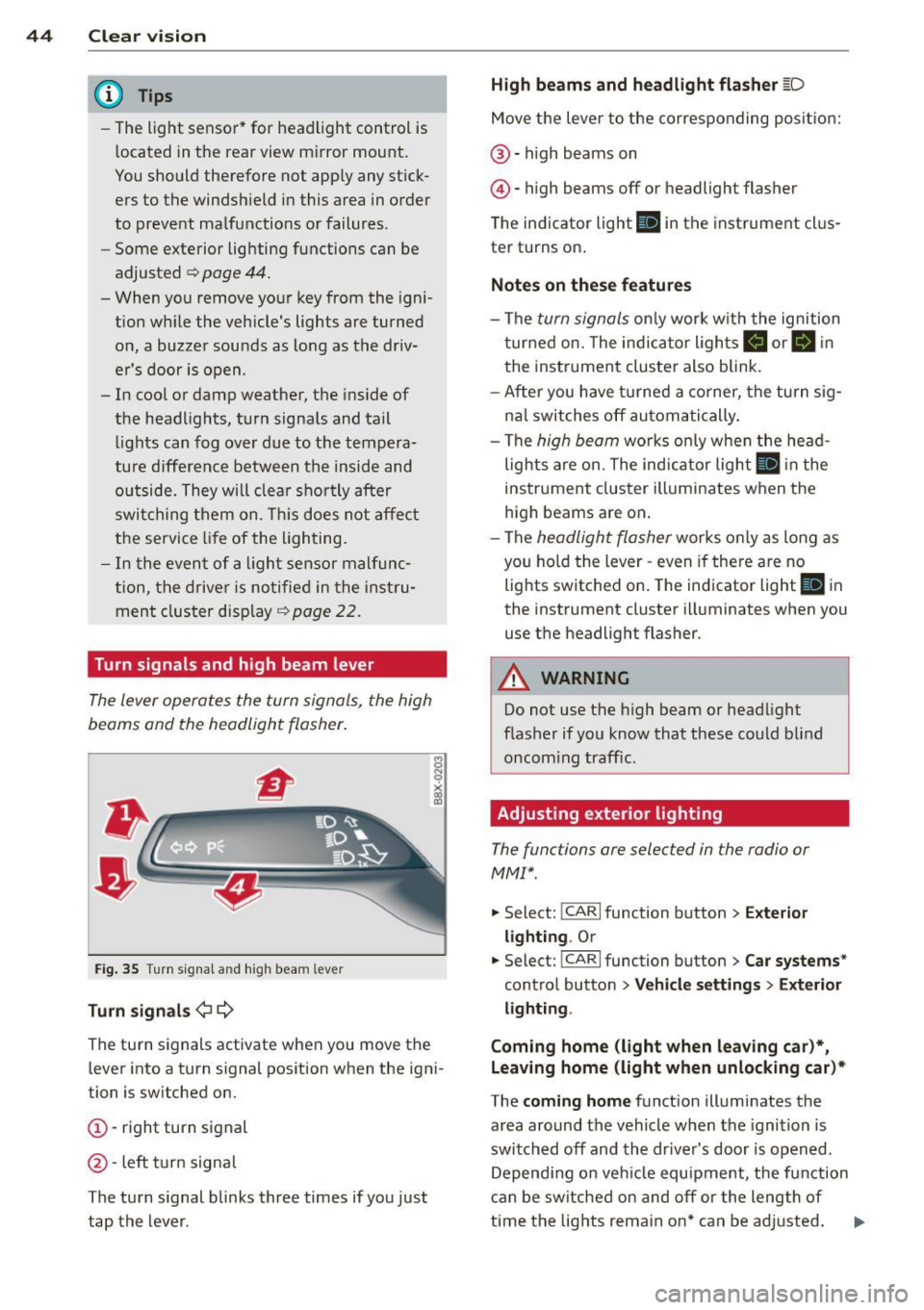
Turn signals and high beam lever
The lever operates the turn signals, the high
beams and the headlight flasher .
Fig. 35 T u rn s ig na l and hig h beam lever
Turn sign als ¢i ¢
The turn signals activate when you move the
l ever into a turn s ignal pos ition when the ign i
tion is switched on.
(D -right turn signal
@-left tur n signa l
The turn s ignal blinks three times if you just
tap the lever .
High be ams and headlight flasher [D
Move the lever to the correspon ding posit io n:
@ -high beams on
@ -high beams off or headlight flasher
The indicator light
ii in the instrument cl us
te r turns on .
Notes on thes e features
-The turn signals on ly wor k w ith the ignition
t ur ned on. The indicator ligh ts
Ct or a in
the instrument cluster also blink.
- After you have turned a co rner, the turn s ig
na l switches off au toma tically .
- The
high beam works on ly w hen the head
lights a re on. The ind icator ligh t
II in the
instrument cluster illuminates when the
high beams are on .
- The
headlight flasher works o nly as long as
you ho ld the lever -even if there a re no
lights switched on . The indicator light
II in
the instrument cluster illuminates when you
use the headlight flasher.
A WARNING
--
Do not use the h igh beam or headlight
flasher if you know that these could blind
oncom ing traffic.
Adjusting exterior lighting
The functions ore selected in the radio or
MMI" .
.,. Select: !CARI function button> Exte rior
light ing .
Or
.,. Select: !CARI function button > Car systems *
control button > Vehicle s etting s> Exterior
lighting .
Coming home (light when leav ing car }*,
Leav ing home (light when unlocking car )*
The coming home function illuminates the
area around the vehicle when the ignition is
switched off and th e dr ive r's door is open ed.
Depend ing on veh icle equ ipment, the function
can be switched on and off or the length of
time the lig hts remain on* can be ad justed . ..,.
Page 52 of 286
50 Clear vis ion
is sw itched b ack on by mov ing the
winds hield wiper lever to any position .
- Worn or dirty windshie ld wiper b lades
r es ult in streaking. This can affect the
rain sensor* function. Check your wind
shield wiper b lades regularly.
- The was her fluid nozzles of the wind
s h ield washer system are heated at low
temperatures when t he ignit ion is on.
- When stopping temporarily, (e .g . at a
traff ic light) the set speed of the wind
shield wipers is automatically red uced by
one speed.
Cleaning windshield wiper blades
C lea n the w indshield wiper blades when they
begin to leave streaks . Use a soft cloth and
g lass cleaner to clean the winds hield wiper
b lades.
,. Place the windshield wiper arms in the serv
i ce position . Refer to ¢
page 50.
,. Lift the w iper arm away from the front win
dow.
& WARNING
Dirty windshie ld w iper blades can impa ir
your view. This can lead to acc idents .
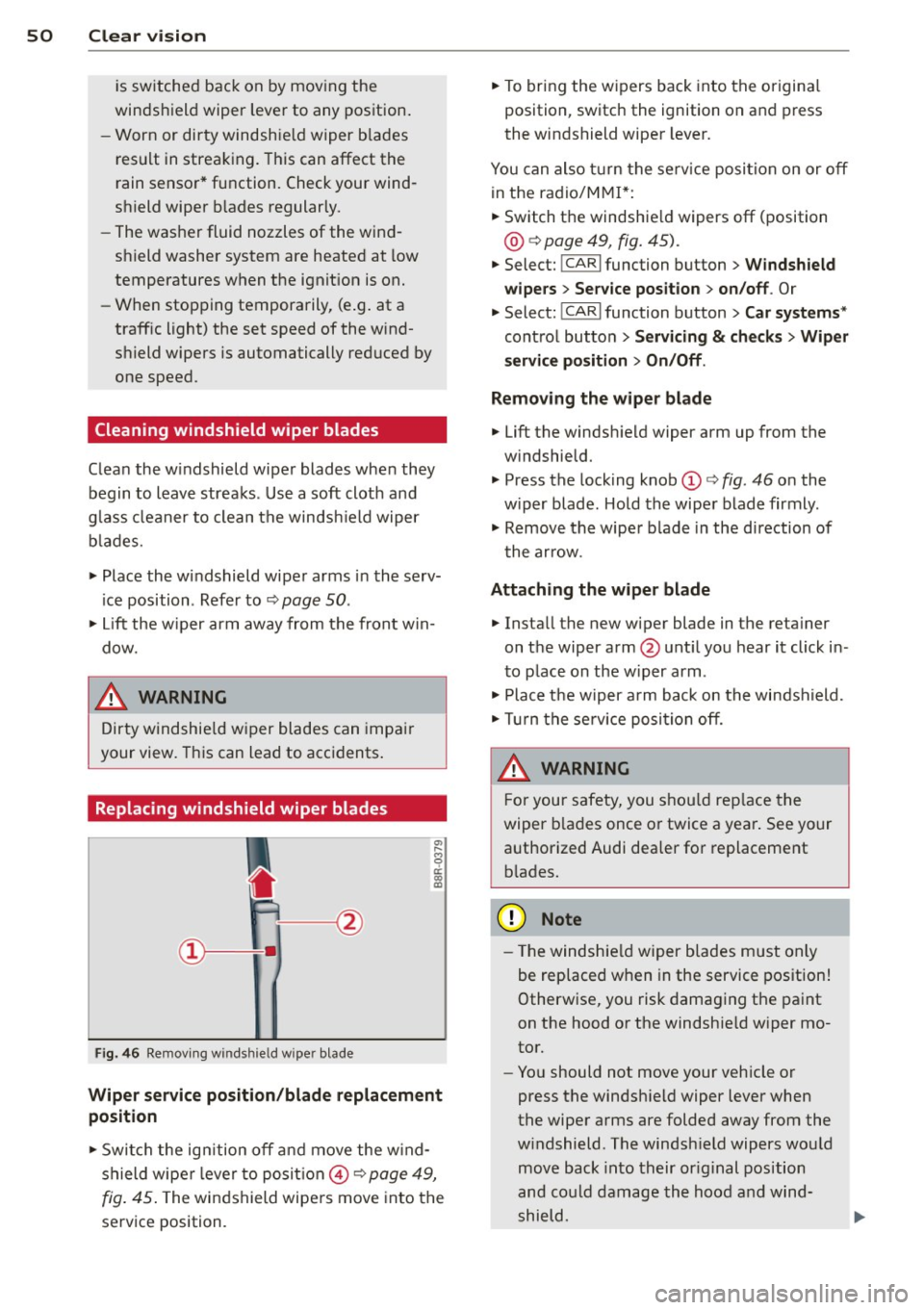
Replacing windshield wiper blades
Fig . 4 6 Remov ing w inds hie ld w ipe r blade
-
Wiper service position /blade replac ement
position
,. Swi tch the ig nition off and move the w ind
shield wiper leve r to posit ion @ ¢
page 49,
fig. 45 . The wi ndshield wipe rs move into the
service position. ,.
To bring the w ipers back into the origina l
position , switch the ignition on and p ress
the windshield wiper lever.
You can also t urn the serv ice posi tion on or
o ff
in the radio/M M!*:
,. Switch the windshie ld wipers
off (position
@ ¢ page 49, fig. 45) .
,. Select: !CAR I function button> Windshield
wipe rs
> Ser vice position > on/off . Or
,. Select:
!CARI function button > Car systems*
cont rol butto n > Servicing & checks > Wiper
s ervice position
> On /Off .
Removing the wiper bl ade
,. Lift the windsh ie ld wiper arm up from the
w indshield.
,. Press the locking knob
(D ¢ fig. 46 o n the
w iper blade . Hold the wipe r blade firmly .
,. Remove the wipe r blade in the direction of
t he arrow .
Attaching the wiper blade
,. Insta ll the new wiper blade in the reta iner
on the wiper arm @unt il you hear it click in
to p lace on the w iper arm .
,. Place t he wiper a rm back on the windshield.
,. Tur n the se rvice position
off.
& WARNING ~
F or your safety, you sho uld rep lace the
wiper b la d es once o r twice a yea r. See your
authorized Audi dealer fo r replacement
b lades.
(D Note
- T he windshie ld wiper b lades m ust only
be rep laced when in the service position!
Otherw ise, you risk damag ing the pa int
on the hood o r the windshie ld w iper mo
tor.
- Yo u should not move your veh icle or
press the windsh ie ld wiper lever when
the wiper arms are folded away from the
w indshield. The winds hield wipers wou ld
move back into their or iginal position
and co uld damage th e hood a nd wind
shield.
Page 53 of 286
-To help prevent damage to the wiper sys
tem, always loosen blades which are fro
zen to the windsh ield before operat ing
wipers.
- To he lp prevent damage to wiper blades,
do not use gasoline , kerosene, pa int
th inner, or other solvents on or near the
wipe r blades.
- To he lp prevent damage to the wiper
arms or other components, do not at
tempt to move the wipers by hand.
{!) Tips
- Commerc ial hot waxes applied by auto
matic car washes affect the how easily
the glass surface can be cleaned .
- You can also use the service pos ition, for
example, if you want to protect the
windsh ield from ic ing by using a cover .
Digital compass
Switching the compass on and off
Applies to vehicles: with digital compass
The compass direction is shown in the rear
view mirror.
Fig. 47 Rearview m irror : D ig ital compass activated
.. To switch the compass on or off, press and
hold the button @until the compass dis
play in the mirror ¢
fig. 47 appears or disap
pears.
The digital compass only works when the igni
tion is on. The direct ions are indicated with
abbreviations:
N (north), NE (northeast), E
(east), SE (southeast), S (south), SW (south
west),
W (west), NW (northwest).
Clear vi sion 51
@ Tips
To prevent inaccurate compass readings,
do not bring any remote contro ls, e lectr i
ca l devices or metallic objects near the
mirror.
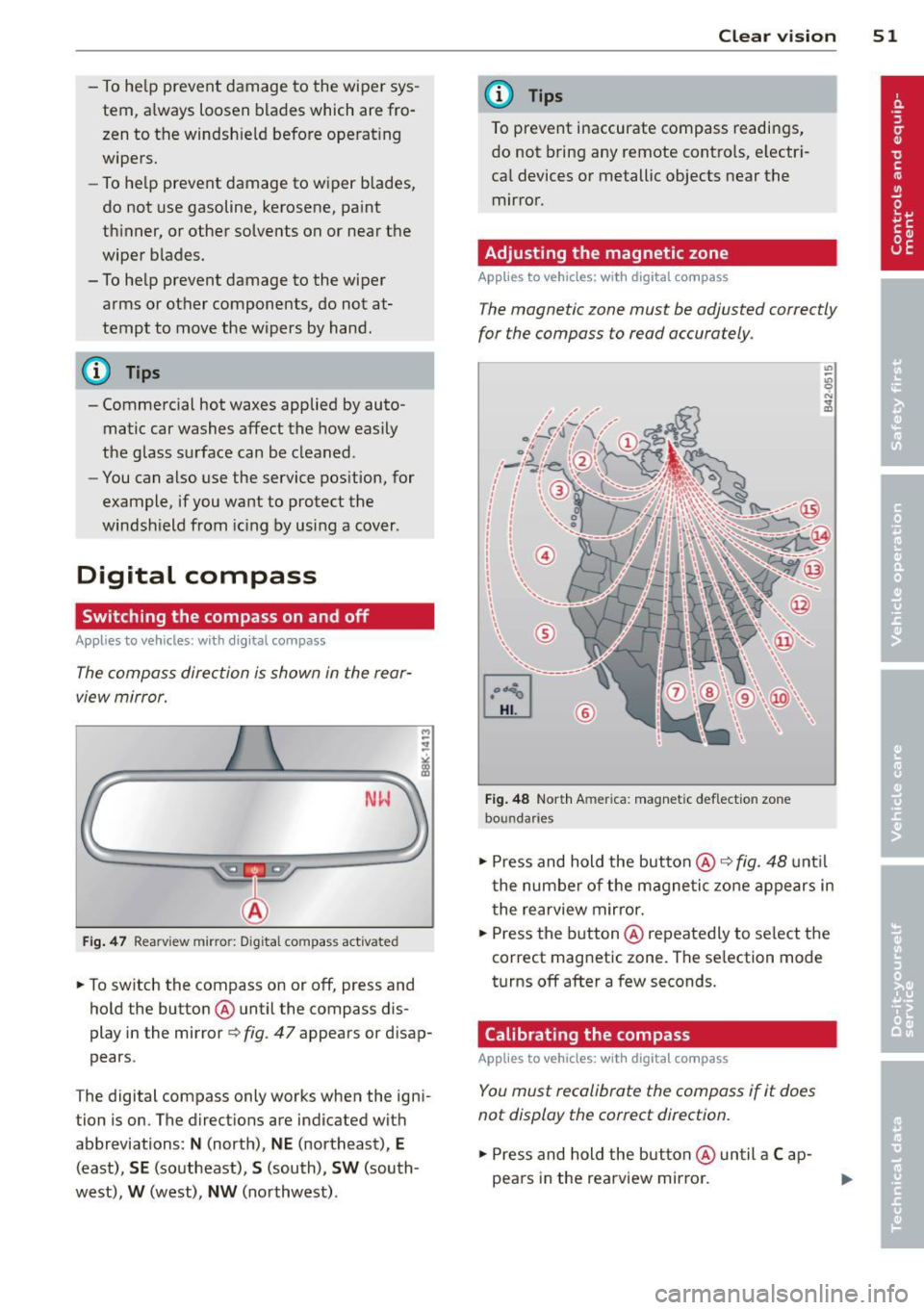
Adjusting the magnetic zone
App lies to vehicles: w ith digital compass
The magnetic zone must be adjusted correctly
for the compass to read accurately .
©
Fig. 48 Nort h Americ a: magnet ic def lect ion zone
bo undari es
.. Press and hold the button@9 fig. 48 until
the number of the magne tic zon e appears in
t he rearview mirror .
.. Press the button @ repeatedly to se lect the
correct magnetic zone. The se lection mode
turns off after a few seconds .
Calibrating the compass
Applies to veh icles: wit h digital compass
You must recalibrate the compass if it does
not display the correct direction.
.. Press and hold the but ton @ until a Cap
pea rs in the rearview mir ror.
Page 69 of 286
Warm and cold Climate controls
Description
Th e climate control sy stem warms, cools and
adds humidity to the a ir in the veh icle inter io r.
It is the most effect ive when the windows and
sunroof are closed . If the re is a build-up of
h eat inside the vehicle, ventilation can help to
speed up the cooling process .
I n all he ating mode functions except
defrost,
the blower on ly switches to a higher speed
once the engine coolant has reached a certain
temperature.
Condensat ion from the cooling sys tem can
d rip and form a puddle of water under the ve
h icle. This is normal and does not mean there
is a leak .
Pollutant filter
The po llutant filte r removes po llutants such
as dus t and pollen from the air.
The air pollutants filte r must be changed at
the intervals spec ified in you r Wa rra nty
&
M aintenance book let, so tha t the air condi
tioner can prope rly work .
If you drive your vehicle in an area w ith h igh
a ir po llution, the fi lter may need to be
changed more frequent ly than specified in
your Aud i Warranty
& Ma intenance bookle t. If
in doubt, ask your authorized A udi Service Ad
v isor for advice .
Key coded settings
The clima te control sett ings are automat ically
stored and assigned to the remote co ntro l key
that is in use.
WARNING
Reduced vis ibili ty is dangero us and can
cause accidents.
Warm and c old 67
-For safe driving it is very important that
all windows be free of ice, snow and con
densat ion.
- Comp letely fam iliarize yourse lf with the
proper use and funct ion of the heat ing
and ve nti lation system and especially
how to defog and defrost the w indows.
- Never use the windshield wiper/washer
system in freez ing weather unt il you
have warmed the w indshield first, using
the heating and ventilation system. The
washer sol ution may free ze o n the wind
shie ld an d red uce visib ility.
(D Note
- If you suspect that the air conditioner has been damaged, switch the system
off to avoid furt her damage and have it
i n spected by a q ua lified dea lership.
- Repairs to the Audi air condition er re
quire specia l techni cal know ledge and
speci al tools. Contact an autho rized Aud i
dealer fo r ass istance.
@ For the sake of the environment
B y reduci ng the amou nt of f uel you use,
you also re duce the amount of pollu tan ts
emitted in to the a ir.
(D Tips
- Keep the air intake s lo ts ( in fro nt of the
w indshield) free from ice, snow and de
br is in order to maintai n the proper f unc
tion of the climate control system.
- T he energy m anagement system may
switch the seat heating* or rear window
defroster off temporar ily . These systems
are available again as soon as the energy
balance has been restored.
- Air escapes through vents under the rear
window. When placing items of clothing
on the luggage compartment cover, en
sure that the openings are not covered.
Page 93 of 286
Audi adapt ive crui se c ontrol an d bra kin g guard 91
confirmed by the video camera, an acute
collision warning.
- For safety reasons, do not use adaptive
cruise control when driving on roads with
many curves, when the road surface is in
poor condition and/or in bad weather
(such as ice, fog, gravel, heavy rain and
hydroplan ing). Using the system under
these conditions cou ld result in a co lli
sion.
- Switch adaptive cruise control off tempo rar ily when driving in turning lanes, on
expressway exits or in cons truction
zones. This prevents the vehicle from ac celerating to the set speed when in these
situations.
- The adaptive cr uise control system wi ll
not brake by itse lf if you p ut your foot on
the accelerator pedal. Doing so can over
ride the speed and distance regulation .
- When approaching stationary objects
such as stopped traff ic, adaptive cruise
control will not respond and braking
guard w ill have limited function.
- The adaptive cruise control system and
braking guard do not react to people, an
ima ls, objects crossing the road or on
coming objects.
- The function of the radar sensor can be
affected by reflective objects such as
guard rails, the entrance to a tunnel,
heavy rain or ice.
- Never follow a ve hicle so closely that you
cannot stop your vehicle safely. The
adaptive cruise cont ro l cannot slow or
brake the veh icle safely when you follow
ano ther veh icle too closely. Alway s re
member that the automatic braking
function cannot bring the vehicle to a sudden or emergency stop under these
condit ions.
- To prevent unintended operation, always
switch ACC off when it is not being used.
(D Note
The sensor can be disp laced by impacts or
damage to the bumper, whee l housing and
underbody . That could affect the adaptive cruise control system and braking g
uard.
Have your authorized Audi dea ler o r au
thorized Audi Service Facility chec k their
funct ion.
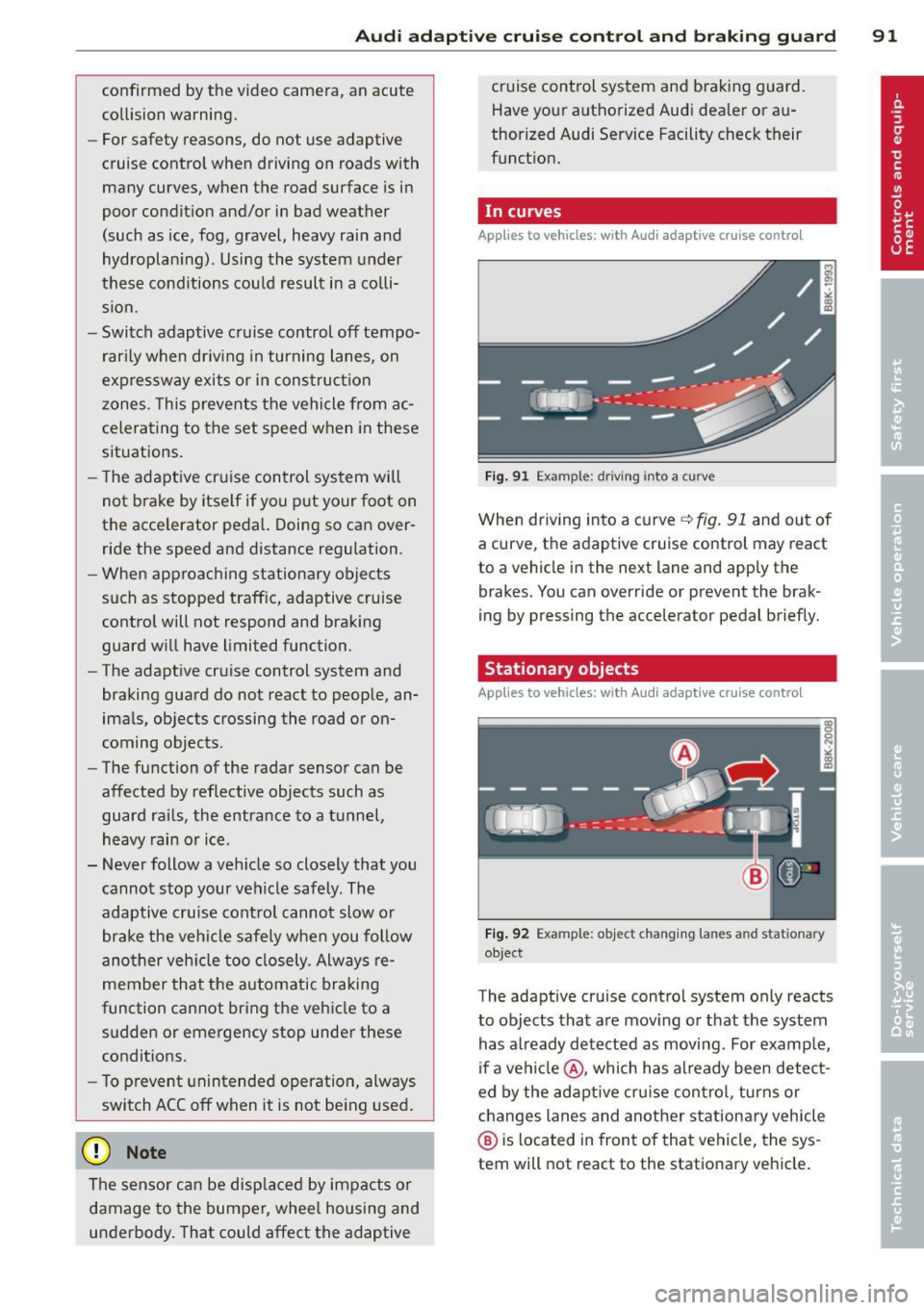
In curves
App lies to vehicles: with A ud i ada ptive c ruise contro l
F ig . 91 Example: driving into a curve
When driving into a curve <=.> fig. 91 and ou t of
a curve, the adaptive cruise control may react
to a vehicle in the next lane and apply the
brakes. You can override or prevent the brak
ing by pressing the accelerator pedal briefly.
Stationary objects
App lies to vehicles: wit h Audi adapt ive cr uise contro l
F ig . 92 Example : objec t changing lanes an d stationary
object
The adaptive cru ise contro l system only reacts
to objects that are mov ing or that the system
has a lready detected as moving. For examp le,
if a ve hicle@ , which has already been detec t
ed by the adaptive cru ise con trol , turns or
changes lanes and another stationa ry vehicle
@ is located in front of that vehicle, the sys
tem will not react to the stationary vehicle.
Page 100 of 286
98 Audi adaptive cruise control and braking guard
-If you restrict or switch off the ESC, the
braking guard also switches itself off
r=;,page 182.
-Switch braking guard off when you are
loading the vehicle onto a vehicle carrier,
train, ship or other type of transporta
tion. This can prevent undesired warn ings from the braking guard system.
Messages
Applies to vehicles: with Audi adaptive cruise co ntro l
Braking guard: Off
This driver message appears if the system is
turned off via the radio/MM!*. Otherwise, if
the system is turned off, the information ap pears every time shortly after the start of the
trip.
The driver message also appears if the system is not available due to a malfunction or if the
ESC is not switched on
r=;, page 182 . If this is
the case, the system will not provide warnings
about a possible collision.
Braking guard: Activated
This driver message appears if sharp brake
pressure was applied due to an acute warning.
•••
Three white dots appear if a setting cannot be
selected with the operating lever. For exam
ple, this happens if you want to raise/lower
the speed even though there was no previous
ly saved speed .
ACC: Deactivation
The driver message appears in vehicles with
manual transmission . If the clutch pedal was
pressed down for too long, the adaptive cruise
control turns off. A chime sounds as a remind
er .
ACC: Sensor blocked
This message appears if the sensor view is ob
structed, for example by leaves, snow, heavy
spray or dirt. Clean the sensor
r=;, page 90,
fig. 90 .
ACC: not available
The driver message appears if there is a mal
function. The adaptive cruise control turns off.
A chime sounds as a reminder. Have the sys
tem checked by an authori zed Audi dealer or
authorized Audi Service Facility.
ACC: unavailable
The driver message appears if, for example,
the brake temperature is too high. The adap
tive cruise control is temporarily unavailable.
A chime sounds as a reminder.
Engine speed!
This driver message appears in vehicles with
manual transmission if the driver had not up
shifted or downshifted in time while using
adaptive cruise control braking or accelerat
ing, causing the vehicle to exceed or not reach
the permitted limit speed. The adaptive cruise control turns off. A chime sounds as a remind
er .
Shift lever position!
Vehicles with an automatic transmission: the
driver message appears if the selector lever is
shifted to the N position. The adaptive cruise
control is not available while in this position.
Vehicles with manual transmission: the driver
message appears for vehicles with manual
transmission if there is no forward gear en
gaged, meaning if the reverse gear or the 1st
gear is engaged or if the selector lever is in
the neutral position. The adaptive cruise con
trol is not available while in this position.
Stabilization control (ESC)
This message appears if the electronic stabili
zation control (ESC) is taking action to stabi
lize the vehicle. The adaptive cruise control
turns off . A chime sounds as a reminder .
Speed too low
This message appears if the current speed is
too low
to set or to maintain the desired
speed .
The speed being saved must be at least
20 mph (30 km/h). The cruise control is
turned off for speeds lower than 12 mph
Page 104 of 286
102 Audi side assist
-Improper reliance on the side assist sys
tem can cause collisions and serious
personal injury:
- Never rely only on side assist when
changing lanes.
- Always check rear view mirrors to make
sure that it is safe to change lanes.
- Side assist cannot detect all vehicles un
der all conditions- danger of accident!
- Please note that side assist indicates
there are approaching vehicles, or
vehicles in your blind spot, only after
your vehicle has reached a driving speed
of at least 19 mph (30 km/h).
- In certain situations, the system may not
function or its function may be limited.
For example:
- if vehicles are approaching or being left
behind very quickly . The display may
not turn on in time.
- in poor weather conditions such as
heavy rain, snow or heavy mist .
- on very wide lanes, in tight curves or if
there is a rise in the road surface.
Vehicles in the adjacent lane may not
be detected because they are outside
of the sensor range.
(D Note
The sensors can be displaced by impacts or
damage to the bumper, wheel housing and
underbody. This can affect the system.
Have your authorized Audi dealer or au
thorized Audi Service Facility check their
function.
@ Tips
- If the window glass in the driver's door
or front passenger's door has been tint
ed, the display in the exterior mirror may
be misinterpreted.
- For Declaration of Compliance to United
States FCC and Industry Canada regula
tions¢
page 267.
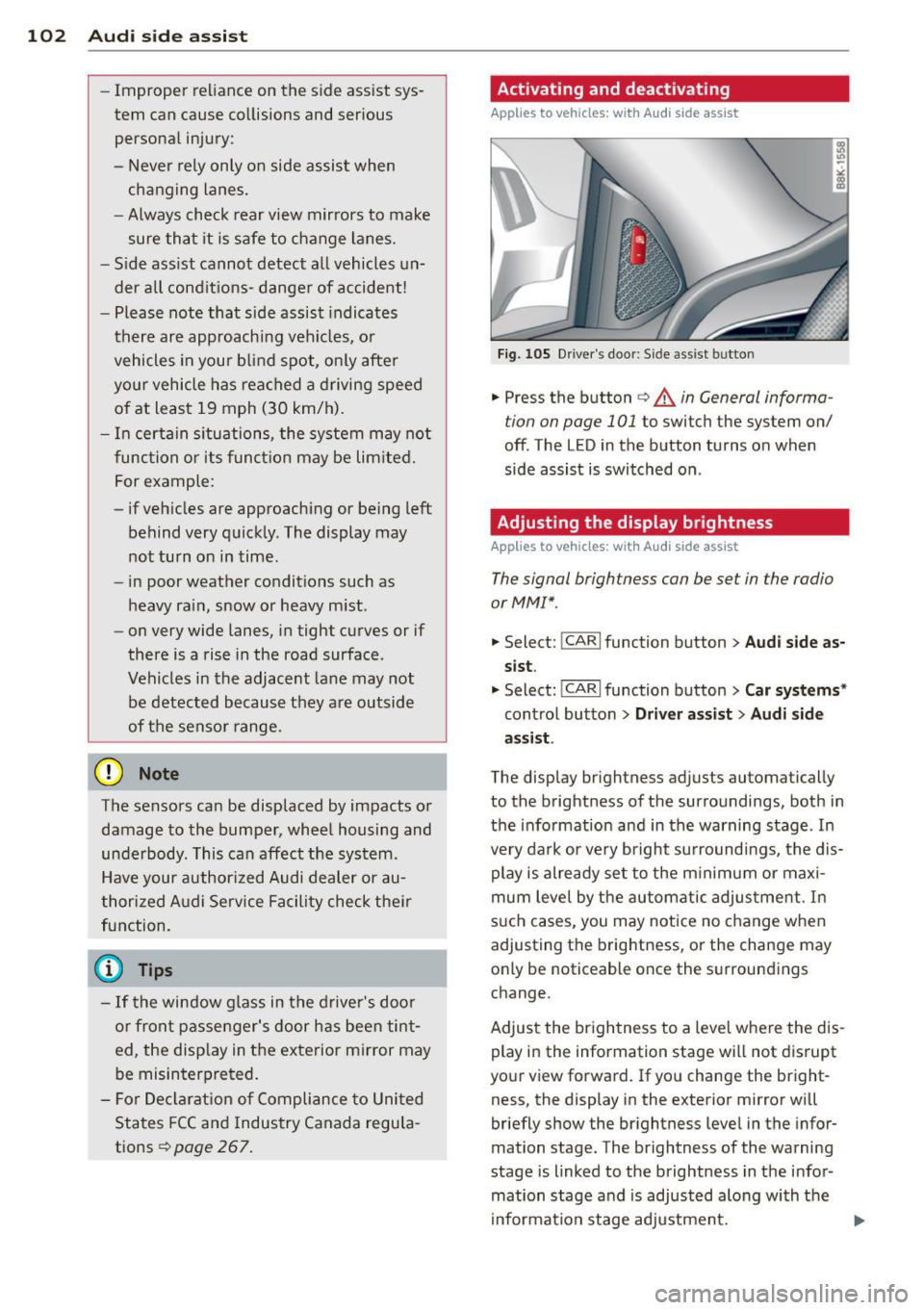
Activating and deactivating
A pp lies to vehic les : wi th Audi s ide ass ist
Fig. 105 D river's door: Side ass ist butto n
.. Press the button c> A in General informa
tion on page 101
to switch the system on/
off. The LED in the button turns on when
side assist is switched on .
Adjusting the display brightness
Applies to vehicles: wit h Audi side ass ist
The signal brightness con be set in the radio
or MM!*.
.. Select: I CAR I function button > Audi side as
sist.
.. Select: !CARI function button> Car systems*
control button > Driver assist> Audi side
assist .
The display brightness adjusts automatically
to the brightness of the surroundings, both in
the information and in the warning stage . In
very dark or very bright surroundings, the dis play is already set to the minimum or maxi
mum level by the automatic adjustment. In
such cases, you may notice no change when
adjusting the brightness, or the change may
only be noticeable once the surroundings
change.
Adjust the brightness to a level where the dis
play in the information stage will not disrupt
your view forward. If you change the bright
ness, the display in the exterior mirror will
briefly show the brightness level in the infor
mation stage. The brightness of the warning
stage is linked to the brightness in the infor
mation stage and is adjusted along with the
information stage adjustment.
Page 105 of 286
@ Tips
-Side assist is not active whi le you are
making the adjustment.
- Your settings are automatica lly stored
and assigned to the remote control key
being used.
Driver messages
Applies to vehicles: with Audi side assist
If s ide ass ist switches off by itself, the LED in
the button turns off and a message will ap
pear in the instrument cluster display:
Audi side assist unavailable: Sensors blocked
The radar sensors' vision is affected. Do not
cover the area in front of the sensors with bike
wheels, stickers, dirt or other objects. Clean
the area in front of the sensors, if necessary
c;.page 101, fig. 104.
Audi side assist: Currently unavailable
Side assist cannot be switched on temporarily
because there is a malfunc tion (for example,
the battery charge leve l may be too low) .
Audi side assist: System fault!
The system cannot guara ntee that it will de
tect veh icles correctly and it is switched off .
The sensors have been displaced or are faulty.
H ave the system checked by an authorized
Aud i dealer or authorized Aud i Service Facility
soon.
Audi side assist: Unavailable when towing
Side assist sw itches off automatically when a
factory- insta lled trailer h itch is connected to
the electrical connector on the trailer. There is
no guarantee the system will switch off when
usi ng a retrofitted trailer hitch. Do not use
side assist when towing a trailer .
Audi side assist 103
Page 137 of 286
Improperly worn safety belts
Incorrectly positioned safety belts can cause
severe injuries .
Wearing safety belts improperly can cause se
rious injury or death. Safety belts can only
work when they are correctly positioned on the body . Improper seating positions reduce
the effectiveness of safety belts and will even increase the risk of injury and death by mov
ing the safety belt to critical areas of the
body . Improper seating positions also in
crease the risk of serious injury and death
when an airbag deploys and strikes an occu
pant who is not in the correct seating posi
tion . A driver is responsible for the safety of
all vehicle occupants and especially for chil
dren . Therefore:
... Never permit anyone to assume an incorrect
sitting position in the vehicle while traveling
¢ ,& .
A WARNING
Improperly worn safety belts increase the
risk of serious personal injury and death
whenever a vehicle is being used.
- Always make sure that all vehicle occu
pants are correctly restrained and stay in
a correct seating posit ion whenever the
vehicle is be ing used.
- Always read and heed all WARNINGS and
other important information
c:>page 132.
Safety belt preten
sioners
How safety belt pretensioners work
In front, side and rear-end collisions above a
particular severity, safety belts are tensioned
automatically.
The safety belts are equipped with safety belt
pretensioners . The system is activated by sen
sors in front, side and rear-end collisions of
great severity. This tightens the belt and takes
up be lt slack
c:> .&. in Service and disposal of
Safety belts 13 5
safety belt pretensioner on page 136. Taking
up the slack he lps to reduce forward occupant
movement during a collision.
Q) Note
Never let the belt remain over a rear seat
back that has been fo lded forward.
(D Tips
The safety belt pretensioner can only be
activated once.
- In minor frontal and side collisions, in
rear-end collisions, in a rollover and in
accidents involving very little impact
force, the safety be lt pretensioner are
not activated.
- In the case of a side crash, the safety
belt pretensioners will activate on the
driver's or front passenger's sides only,
depending on which side of the vehicle
the crash occurs.
- When the safety belt pretensioners are
activated, a fine dust is released. This is
normal and is not caused
by a fire in the
vehicle.
- The relevant safety requirements must
be observed when the vehicle or compo
nents of the system are scrapped. An au
thorized Aud i dealer or qualified work
shop is familiar w ith these regu lations
and will be pleased to pass on the infor
mation to you.
- Be sure to observe all safety, env iron
menta l and other regu lations if the vehi
cle or individual parts of the system, par
ticularly the safety belt or airbag, are to
be disposed. We recommend you have
your authorized Audi dealer perform this
service for you.
Service and disposal of safety belt
pretensioner
The safety belt pretens ioners are parts of the
safety belts on your Aud i. Insta lling, remov
ing, servicing or repair ing of be lt pretension-
ers can damage the safety belt system and .,.
•
•
Page 138 of 286
136 Safety belts
prevent it from working correctly in a
collision.
There are some important things you have to know to make sure that the effectiveness of
the system will not be impaired and that dis
carded components do not cause injury or pol
lute the environment .
.&_ WARNING
Improper care, servicing and repair proce
dures can increase the risk of personal in
jury and death by preventing a safety belt
pretensioner from activating when needed
or activating it unexpectedly:
- The belt pretensioner system can be acti
vated only once . If belt pretensioners
have been activated , the system must be
replaced.
- Never repair, adjust, or change any parts
of the safety belt system.
- Safety belt systems including safety belt
pretensioners cannot be repaired. Spe
cial procedures are required for removal ,
in5tallation and di5po5al of thi5 5y5tem.
-For any work on the safety belt system,
we strongly recommend that you see
your authorized Audi dealer or qualified
technician who has an Audi approved re pair manual, training and special equip
ment necessary.
@) For the sake of the environment
Undeployed airbag modules and preten
sioners might be classified as Perchlorate
Material - special handling may apply, see
www.dtsc.ca .gov/haza rdouswaste/per
chlorate. When the vehicle or parts of the restraint system including airbag modules
safety belts with pretensioners are scrap
ped, all applicable laws and regulations
must be observed . Your authorized Audi
dealer is familiar with these requirements
and we recommend that you have your
dealer perform this service for you .