lights AUDI A5 COUPE 2014 Owner's Manual
[x] Cancel search | Manufacturer: AUDI, Model Year: 2014, Model line: A5 COUPE, Model: AUDI A5 COUPE 2014Pages: 286, PDF Size: 70.99 MB
Page 51 of 286
@ Tips
-Pressing the button~ several times
consecutively can trigger the overload protection. The sun shade can only be ex
tended/retracted again after a brief wa it
i ng per iod.
- The rear window sun shade only func
tions when the veh icle inter ior is warmer
than 14°F (-10°C).
Wiper and washer system
Switching the windshield wipers on
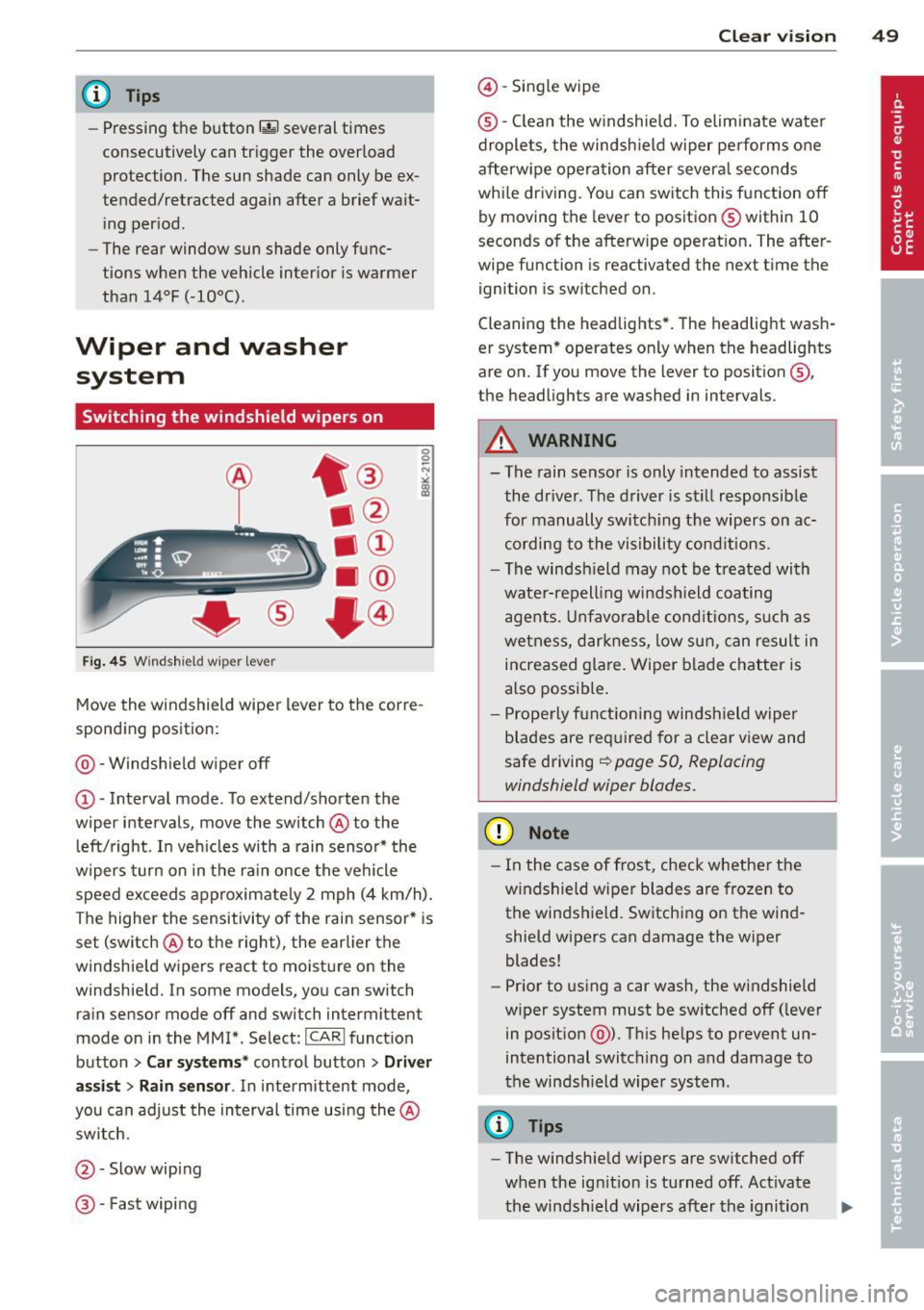
Fi g. 45 Windshield wiper lever
Move the windshield wiper lever to the corre
spond ing position:
@ -Windshie ld w iper
off
CD -Interval mode. To extend/shorten the
wiper intervals, move the switch @to the
l eft/right. I n veh icles with a rain sensor* the
wipers turn on in the ra in once the vehicle
speed exceeds approximate ly 2 mph (4 km/h).
The highe r the sensitivity of the rain sensor* is
set (switch @to the right), the earlier the
windshie ld w ipers react to moistu re on the
windshie ld. In some models, you can switch
rain sensor mode
off and switch intermittent
mode on in the MMI*. Select:
ICAR I funct ion
button
> Car sy stem s* contro l butto n > Driver
as sist > Rain s en sor .
In inte rmittent mode '
you can adjust the interval time using the @
sw itch.
@ -Slow wip ing
® -Fast wiping
Clear vi sion 49
@ -Single wipe
® -C lean the w indshie ld. To elim ina te wate r
drople ts, the windsh ield w iper pe rform s one
afterw ipe operation after severa l se conds
whi le dr iving. You can sw itch this f unction
off
by moving the leve r to positio n® within 10
seconds of the afterwipe operat ion . The after
wipe function is reactivated the next t ime the
ignition is switched on .
Cleaning the headlig hts* . The headlight wash
er system * operates only when the headlights
are o n. If you move the lever to position @,
the headlights are washed in intervals.
A WARNING
- The rain senso r is only intended to assist
the dr iver. The d river is st ill responsib le
for manually switc hing the wipers on ac
cording to the vi sibility cond itions.
- The windsh ield may not b e treated with
wate r-repell ing windsh ield coating
agen ts. Un fa vo rable cond iti ons, s uch as
we tnes s, d arkn ess, low sun, can result in
increased g lare. Wiper blade c hatter is
a lso possib le .
- P rope rly f unct io ni ng win dsh ield wipe r
b lades are re quired for a clear view and
safe driving
~ page 50, Replacing
windshield wiper blades.
(D Note
- I n the case of frost, check whethe r the
w indshield wiper blades are frozen to
the winds hield. Switchi ng on the wind
shield wipers can damage the wiper
blades!
- Pr ior to using a car wash, the windshield
w iper system must be sw itched
off ( lever
in posit ion @). T his he lps to prevent un
intentional switching on and damage to
t he windsh ield wiper system.
@ Tips
- The windshiel d w ipers are switched off
when the ig nition is tu rned off. Act ivate
t he windsh ield wipers after the ignition
Page 60 of 286
58 Seats and storage
they are stored, these seat profiles can be
se lected at any time .
I n addition to the driver 's sea t set tings, you
can also s tore and access the exterior mir ror
adj ustment settings* using the remote con
trol key or memory button .
Remote control key
Applies to vehicles: with seat memo ry
To assign the driver's seat settings to the re
mote control key when locking the vehicle, the
function must be activated in the radio or
MMI*
.. Se lect :
ICAR I function button> Seat adj ust
ment
> D riv er's s eat > Remote control key >
on .Or
> Select: ~ I C~ A~ Rc-, 1 funct ion button > Car sy st e m s*
control button > Vehicle setting s > Seat s>
Driv er' s s eat > Remot e control key > On .
@ Tips
If you do not want another driver's set
tings to be assigned to the remote key,
switch off the memory fu nction us ing t he
radio or MMI* or the
ION/OFF I button
qpage58.
Memory buttons
Applies to vehicles: with seat memo ry
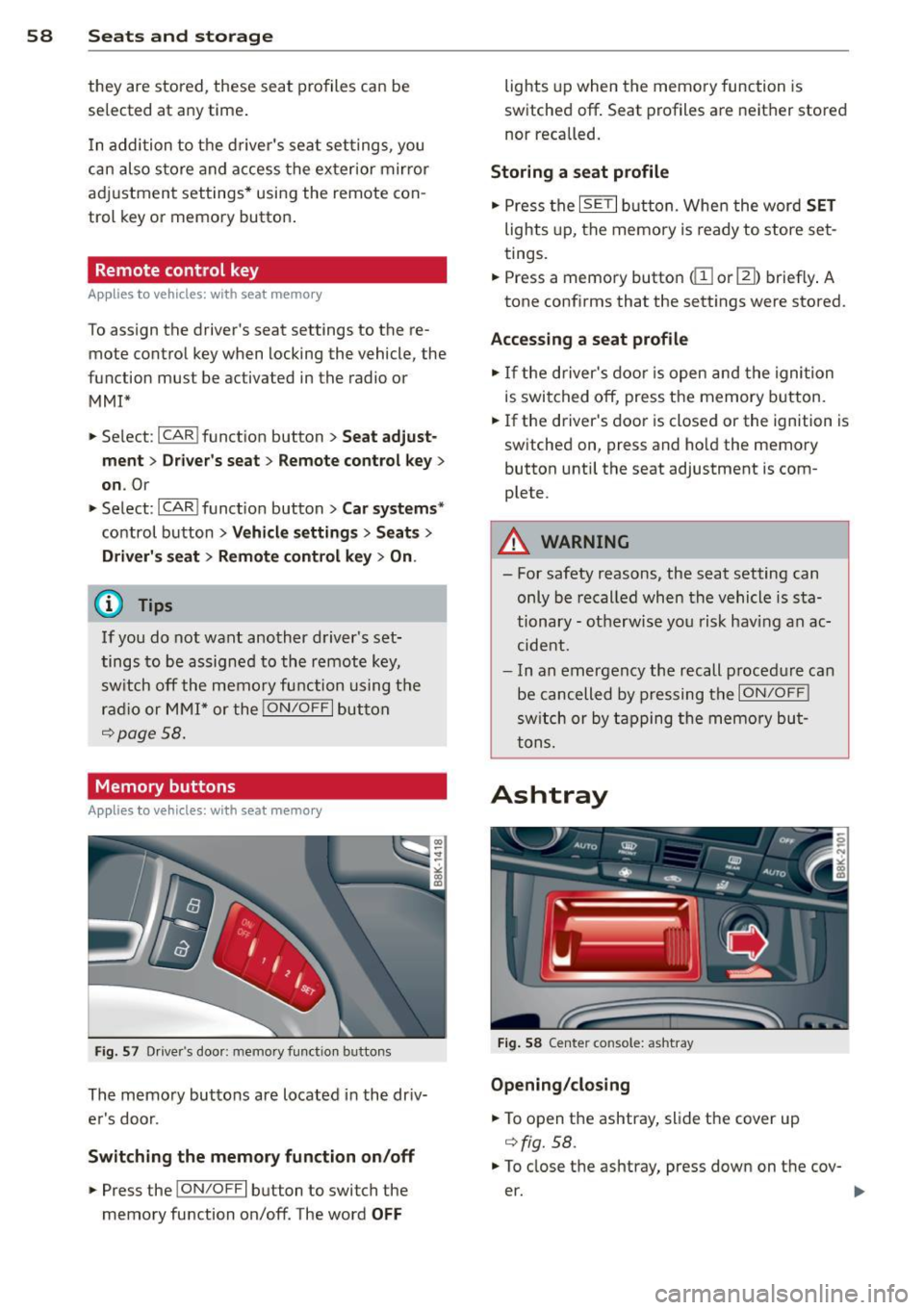
F ig. 57 D river's door: memory functio n buttons
The memory buttons are located in the driv
er's door.
Swit ching the memory fun ction on /off
.. Press the !ON/O FF I button to switch the
memory function on/off. The word
OFF
lights up when the memo ry function is
switched off . Seat profiles are neither stored
nor recalled.
Storing a seat profile
.. Press the ISET I button. Whe n the word SET
lights up, the memory is ready to store set
tings .
.. Press a memory button
dil or III) briefly . A
tone confirms that the sett ings were stored.
Accessing a seat pr ofile
.. If the driver's door is open and the ignition
is swi tched off, press the memory button.
.. If the driver's door is closed or the ignition is
switched on, press and ho ld the memory
button until the seat adjustment is com
plete.
A WARNING
- For safety reasons, the seat setting can
only be recalled when the vehicle is sta
tionary - ot herwise you risk hav ing an ac
cide nt.
- In an emergency the recall p rocedure can
be cancelled by pressing the
I ON/OFF !
switch or by tapping the memory bu t
tons.
Ashtray
F ig . 58 Center console: ashtray
Opening /cl os ing
.. To open the ashtray, slide the cover up
qfig. 58.
.. To close the ashtray, press down on the cov
er.
Page 77 of 286
in the hy draulic valve adjus ters. This is
norma l and not a cause for concern .
- If you leave the vehicle with the ignit ion
switched on, the ignition will switch off
after a certain pe riod of time . Please
note that e lectr ica l equipment such as
exterior lights will swi tch off as well
when tha t happens .
Switching engine off
Applies to vehicles: with conven ie nce key
.,. Bring your vehicle to a complete stop .
.,. Automatic transmiss ion: Move the selector
lever to the P or N pos it ion.
.. Press the
I STA RT ENGINE STOPI button
~ page 74, fig. 77.
Steering lock
The steering locks when you turn the engine
off us ing the
I STAR T ENGIN E STOP I button
and open the dr iver's door. The locked stee r
i ng helps prevent vehi cle theft.
Emergency off
If necessary , the eng ine can be sw itched off
with the selector lever in the R or D/S pos i
tions. To do so , step on the brake peda l and
p ress and hold the
I S TA RT E NGINE STO PI bu t
ton vehicle speed must be less than 6 mph (10 km/h).
A WARNING
- Never turn off the eng ine before the ve
hicle has come to a complete stop . The
full function of the brake booster and the
power steering is not guaranteed. You
must use more force to turn or brake if
necessary . Because you cannot steer and
brake as you usua lly would, t his could
lead to crashes and serious injur ies .
- For safety reasons, you should always
par k your vehicle with the se lector lever
in P. Otherwise, the ve hicle co uld i nad
vertent ly roll away.
- T he rad iator fan ca n con tinue to ru n for
u p to 10 min utes eve n after yo u have
t ur ned o ff the eng ine and removed the
On th e ro ad 75
ignition key. The radiator fan can a lso
turn on again if the engine coo lant heats
up because of intense sunlight or heat
bu ild-up in the engine compartment.
- Always take the key w ith you whenever
you leave your ve hicle. Otherw ise, the
engine could be started or electrical
equ ipme nt such as the power windows
could be ope rated. This can lead to seri
ous injury.
0 Note
If the engine has been under heavy load
fo r an extended pe riod, heat bu ilds up in
the engine compartm ent after the engine
i s sw itched off -th ere is a r is k of damag ing
the engine . A llow the engi ne to run at id le
fo r abo ut two minutes before switching it
off.
Driver messages
Ignition is o n
This message appears and a warning tone
sou nds if you open the d river's door when the
ignition is sw itched on .
No key ident ified
This message appears when the
I S TART ENG IN E STOP I bu tton is pressed if
there is no master key ins ide the veh icle or if
the system does not recognize it . Fo r exam
ple , the master key cannot be recogni zed if it
is covered by an obje ct (e.g . al uminum brief
case) which
screens t he radio s ignal. Elec tron
i c dev ices such as cell phones can also inter
fere with the radio s ignal.
Pre ss brak e pedal to start engine
This message appears if you do not press the
brake pedal to start the eng ine in a vehicle
with an automat ic transm iss ion.
Press clutch pedal to start engine
T his message appears if you do not press the
clutch pedal to start the engine in a veh icle
with a manual tr ansmission . ..,.
Page 79 of 286
Emergency brake fun ction
An emergency brake ensures that the vehicle
can be slowed down even if the
normal b rakes
fail
c::> pag e 78 , Emergency broking .
Indicat or light s
-If the par king b rake is closed w ith the igni
t ion
s wit ched on the . (USA mode ls) /
• (Canada models) indica tor lights come
on in the instrument cluster and the switch .
-If the par king brake is closed w ith the igni
tion
s witched off the . (USA mode ls) /
• (Canada models) indicator lights come
on in the instrument cluster and the switc h
for about 20 seconds.
A WARNING
If a gear or a drive range (automat ic trans
m ission) is engaged with the vehicle s ta
tionary and the engine runn ing, you must
in no instance accelerate or release the
clutch* care lessly. Otherw ise the vehicle
w ill sta rt to move immediately- risk of an
accident.
(D Note
If the . symbol in the display or the.
(USA models) . (Canada mode ls) indica
tor light i n the instrument cluster flashes,
there is a mal function i n the brake system.
By pressing the
I SETI button, you can bring
up a driver message which explains the
malfunction in more detai l. If the driver
message
Park ing brake! appears, there is
an operating malfunct ion in the parking
brake wh ich you shou ld have repa ired im
mediately by an author ized Audi dealer or
qualified workshop
c::> poge 15.
(D} Tips
-You can apply the parking brake at any
time -even w ith the ignition switched
off . The ignit ion must be t urned on and
the brake peda l must be pressed in o rder
to release the pa rking bra ke .
On th e ro ad 77
-Occasional noises when the parking
brake is app lied and released are normal
and are not a cause for concern.
- When the vehicle is pa rked, the park ing
brake goes through a self -test cycle at
regu lar interva ls. Any associated noises
are normal.
Parking
.,. Press the brake pedal to stop the veh icle .
.. Pull the sw itch @
c::> page 76, fig . 78 to set
the parking brake .
.,. Automatic transmission : M ove the selecto r
lever to P.
.. Tu rn the engine off¢,&. .
.. Manual transmission: Shift into 1st gear.
.. When on inclines or declines, turn the steer
ing wheel so that the vehicle will roll into
the curb if i t beg ins to move.
A WARNING
--- When you leave your vehicle -even if on-
ly briefly -always remove the ignition
key . Thi s app lies pa rticula rly whe n chil
dren remain in the vehicle. Ot herwise t he
children could star t the eng ine , release
the par king brake or operate electrical
equipment (e.g. power windows). There
is the risk of an accident.
- When the veh icle is locked, no one -par
ticularly not children should remain in
the vehicle . Locked doors make it more
difficult for emergency workers to get in
to the vehicle -putting lives at risk .
Starting from rest
The starting assist function ensures that the
parking brak e is r ele ased automatically upon
star ting.
Stopping and applying park ing brake
.. Pull the switch @¢ page 76, fig. 78 to ap-
ply th e parking brake. ..,.
Page 82 of 286
80 On the road
Warning threshold 2 can be set in the speed range starting from
20 mph to 150 mph (30
km/h to 240 km/h). Settings can each be ad
justed in intervals of
6 mph (10 km/h).
Cruise control
Switching on
The cruise control system makes it possible to
drive at a constant speed starting at
20 mph
(30 km/h).
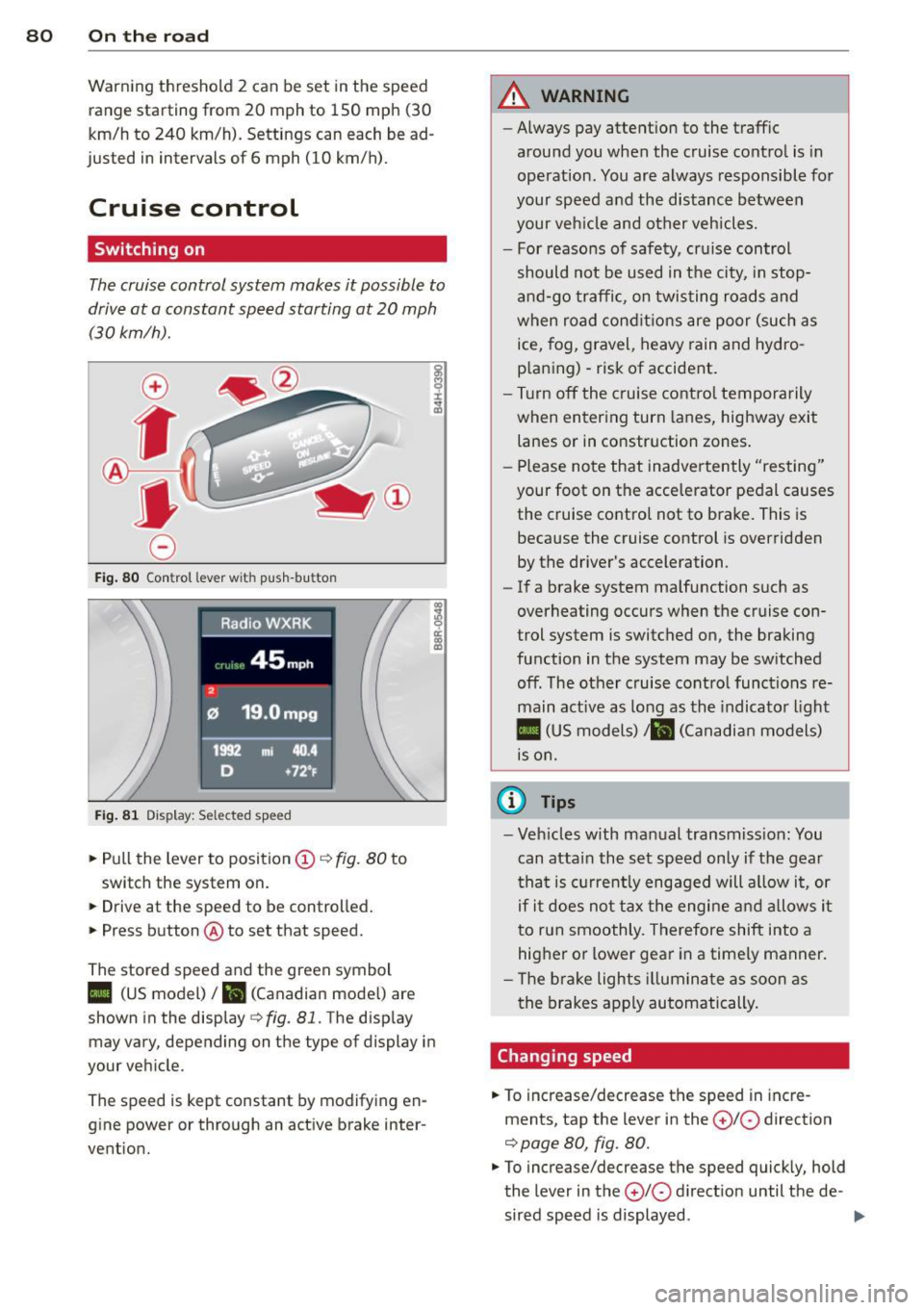
Fig. 80 Control lever w it h push-bu tton
Fig. 81 Dis play : Sel ected speed
.. Pull the lever to position(;)¢ fig. 80 to
switch the system on.
.. Drive at the speed to be controlled .
.. Press button @ to set that speed.
The stored speed and the green symbol
co ~ 9 a:
l:l
II (US model)/ B (Canadian mode l) are
shown in the display¢
fig. 81. The display
may vary, depending on the type of display in
your vehicle.
The speed is kept constant by modifying en
g ine power or through an active brake inter
vention.
A WARNING
-- Always pay attent ion to the traffic
around you when the cruise control is in
operation. You are always responsible for
your speed and the distance between
your veh icle and other vehicles.
- For reasons of safety, cruise control
should not be used in t he city, in stop
and-go traffic, on twisting roads and
when road conditions are poor (such as
ice, fog, gravel, heavy rain and hydro
p laning) -risk of accident .
- Turn off the cruise control temporarily
when entering turn lanes, highway exit
lanes or in constr uction zones .
- Please note that inadve rtently "resting"
your foot on the accelerator pedal causes the cruise control not to brake. This is
because the cruise control is overridden
by the driver's acceleration.
- If a brake system malfunction such as
overheating occurs when the cruise con
trol system is switched on, the braking
function in the system may be sw itched
off. The other cruise control functions re
main active as long as the indicator light
II (US models)/ ... (Canadian models)
is on.
(D Tips
-Veh icles with manual transmiss ion: You
can attain the set speed only if the gear
th at is cur rently engaged will allow it, or
if it does not tax the engine and allows it
to run smoothly. Therefore shift into a
hig her or lower gear in a timely manner.
- Th e brake lights illuminate as soon as
the brakes apply automatically.
Changing speed
.. To increase/decrease the speed in incre
ments, tap the lever in the
0 10 direction
¢ page 80, fig. 80.
.. To increase/decrease the speed quickly, hold
the lever in the
0 10 d irect io n until the de -
sired speed is displayed . ..,.
Page 84 of 286
82 Transmission
Transmission Manual transmission
Gearshift lever
Applies to vehicles: with manual transmission
The clutch pedal must be depressed all the
way before you can start the engine.
The manual transmission in your Audi is
equipped with an
interlock-feature .
• Depress the clutch pedal all the way.
• Start the engine with the gearshift lever in
Neutral and the clutch pedal depressed.
(D Note
Always depress the clutch pedal fully when
changing gears. Do not hold the vehicle on
a hill with the clutch pedal partially de
pressed. This may cause premature clutch
wear or damage .
@ Tips
-Resting your hand on the gearshift lever
knob while driving will cause premature
wear in the transmission.
- The back-up lights go on when you sh ift
in to Reverse with the ignition on.
Gearshift pattern (6-speed manual
transmission)
Applies to vehicles: with manual transmission
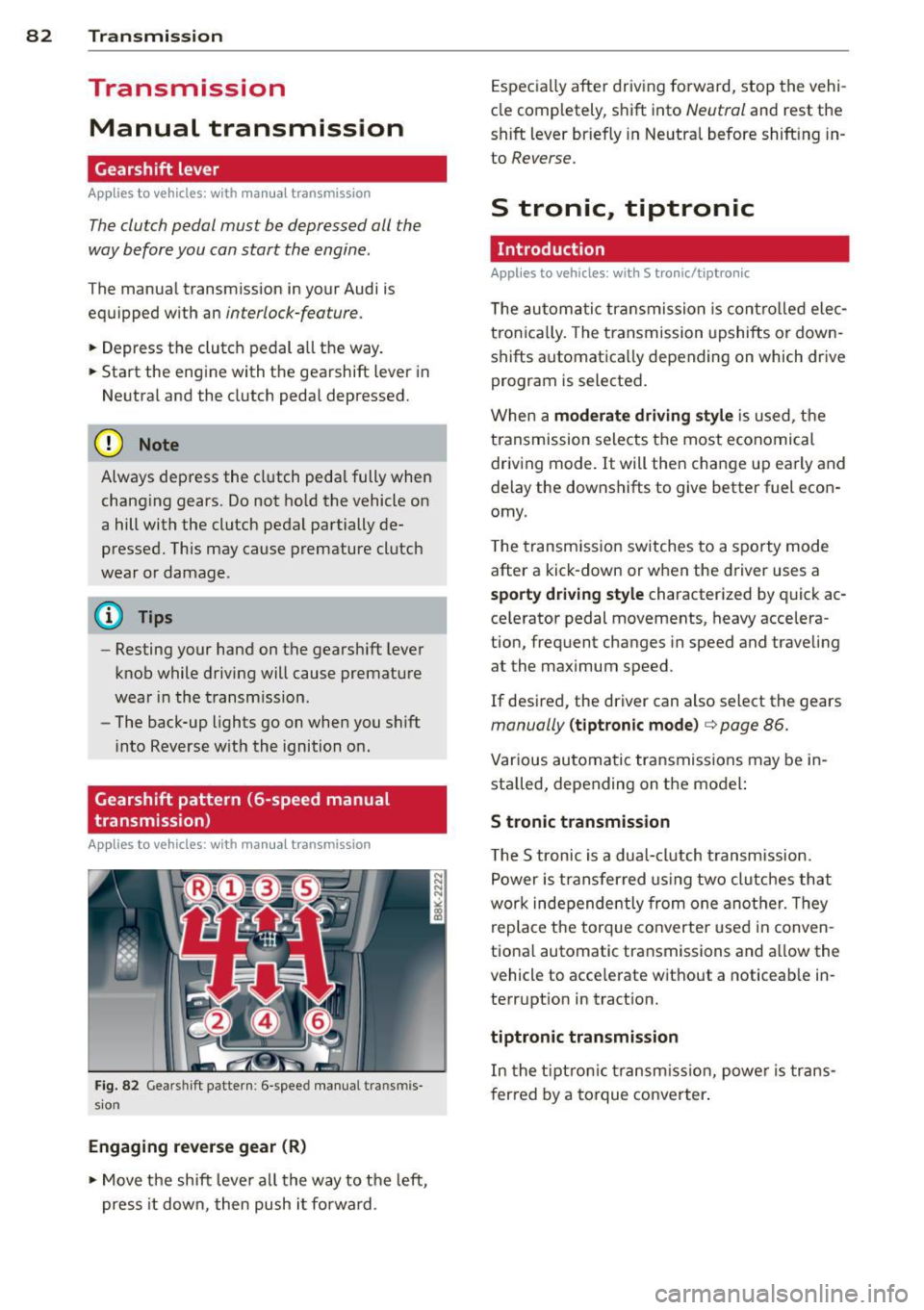
Fig. 82 Gears hi ft pattern : 6 -speed manual tra n smi s
sio n
Engaging reverse gear (R)
• Move the shift lever all the way to the left,
press it down, then push i t forward . Especially
after driving forward, stop the vehi
cle completely, shift into
Neutral and rest the
shift lever briefly in Neutral before shift ing in
to
Reverse.
S tronic, tiptronic
Introduction
Applies to vehicles: with S tronic/tiptronic
T he automatic transmission is controlled elec
tronically. The transmission upshifts or down
shifts automatica lly depending on which drive
program is selected.
When a
moderate driving style is used, the
transmission selects the most economical
driving mode. It will then change up early and
delay the downshifts to give better fuel econ
omy .
T he transmission switches to a sporty mode
after a kick-down or when the driver uses a
sporty driving style characterized by quick ac
ce lerator pedal movements, heavy accelera
tion, frequent changes in speed and traveling
at the maximum speed.
If desired, the driver can also select the gears
manually (tiptronic mode) c> page 86.
Various automatic transmissions may be in
stalled, depending on the model:
S tronic transmission
The S tronic is a dual-clutch transmission.
Power is transferred using two clutches that
work independe ntly from one another. Th ey
replace the torque converter used in conven
tional automatic transmissions and al low the
vehicle to acce lerate without a noticeable in
terruption in tract ion.
tiptronic transmission
In the tiptronic transmission, power is trans
f er red by a torque converter.
Page 87 of 286
~ Press and hold the release button in these
lector lever handle, se lect the desired se lec
tor lever position such as D/S and re lease
the button.
~ Wait br iefly until the transmission has shift
ed (you will feel a slight movement).
~ Remove your foot from the brake pedal and
acce lerate.
Stopp ing temporaril y
~ Keep the vehicle stationary us ing the brak
ing pedal, for example at traffic lights.
~ Do not press the accelerator pedal when do
i ng this.
~ To p revent the veh icle from rolling when you
sta rt driving, set the pa rking brake whe n
stopp ing on steep inclines ¢
&-
~ The parking brake will re lease automatically
and the vehicle will start moving once yo u
press the accelerator peda l.
Stopping /pa rking
If the selecto r lever is not in the P position
when yo u ope n the dr iver's door, the vehicle
could ro ll. The message
Transmis sion: Car
m ay ro ll! Shift to pa rk!
appears.
~ Press and ho ld the brake pedal unt il the ve-
hicle has come to a comple te stop.
~ Apply the parking brake ¢ page 77, Parking.
~ Select the P selector lever position c::, & -
Stopping on an incline
~ Always press t he b rake pedal to hold the ve
hicle i n place and preven t it from " rolling
back" ¢
& -Do not try to prevent the vehi
cle from "rolling back" when a gear is en
gaged by increasing the engine speed ¢(D .
Starting on an incline
~ Activate the par kin g b rake.
~ Wi th the driving gea r se lected, press the ac
ce lerato r pedal ca re fully . The parking brake
will release a utomatically i f yo ur seat belt is
fastened.
Under certain circumstances, s uch as driv ing
in the mountains, it may be useful to switch
temporari ly to the manua l shift program in or-
Tran sm iss ion 85
der to ad just the gears to the driv ing cond i
tions by hand
c::, page 86.
On s lopes, activ ate the parki ng b rake first and
then move the selec to r l ever to the P posi tion.
T his prevents too much st ress from being
placed on the locking mechanism .
A WARNING
-The vehicle can also roll when the engine
is stopped.
- Unintended vehicle movement can cause
serio us injury.
- Never leave your vehicle with the engine
ru nning while in gear. If yo u must leave
your veh icle when the engine is running,
activate the parking brake and move the
selector lever to P.
- Power is still transm itted to the wheels
when the engine is runn ing at idle. To
prevent the vehicle from "creeping", you
must keep your foot on the brake when
the eng ine is ru nning and the se lector
leve r is in D/S o r R or "t ipt ron ic" mode is
selec ted .
-Do not press the accelerator pedal when
changing t he se lector lever posi tion
while the veh icle is s ta tionary and the
engine is running .
- Never sh ift into R o r P wh ile d rivi ng.
- Before driving dow n a steep slope, re-
duce your speed and shift into a lowe r
gear wi th "tiptronic".
- Do not ride the bra kes o r press the bra ke
pe dal too ofte n or too long whe n driving
down a hi ll. Constant braking causes the
brakes to over heat and substantially re
duces braking performance, increases
brak ing distance or causes complete fa il
ure of t he brake system.
- To prevent the vehicle from ro lling back
when stopp ing o n inclines, always ho ld it
in place with the brake pedal or parking
brake.
- Never hold the vehicle on an incline with
a slipping clutch. The clutch opens auto mat ically when it becomes too hot from
the overload. An indicato r lamp
mJ
Page 95 of 286
Audi adaptive cruise control and braking guard 93
Switching on and off
Applies to vehicles: with Audi adaptive cruise control
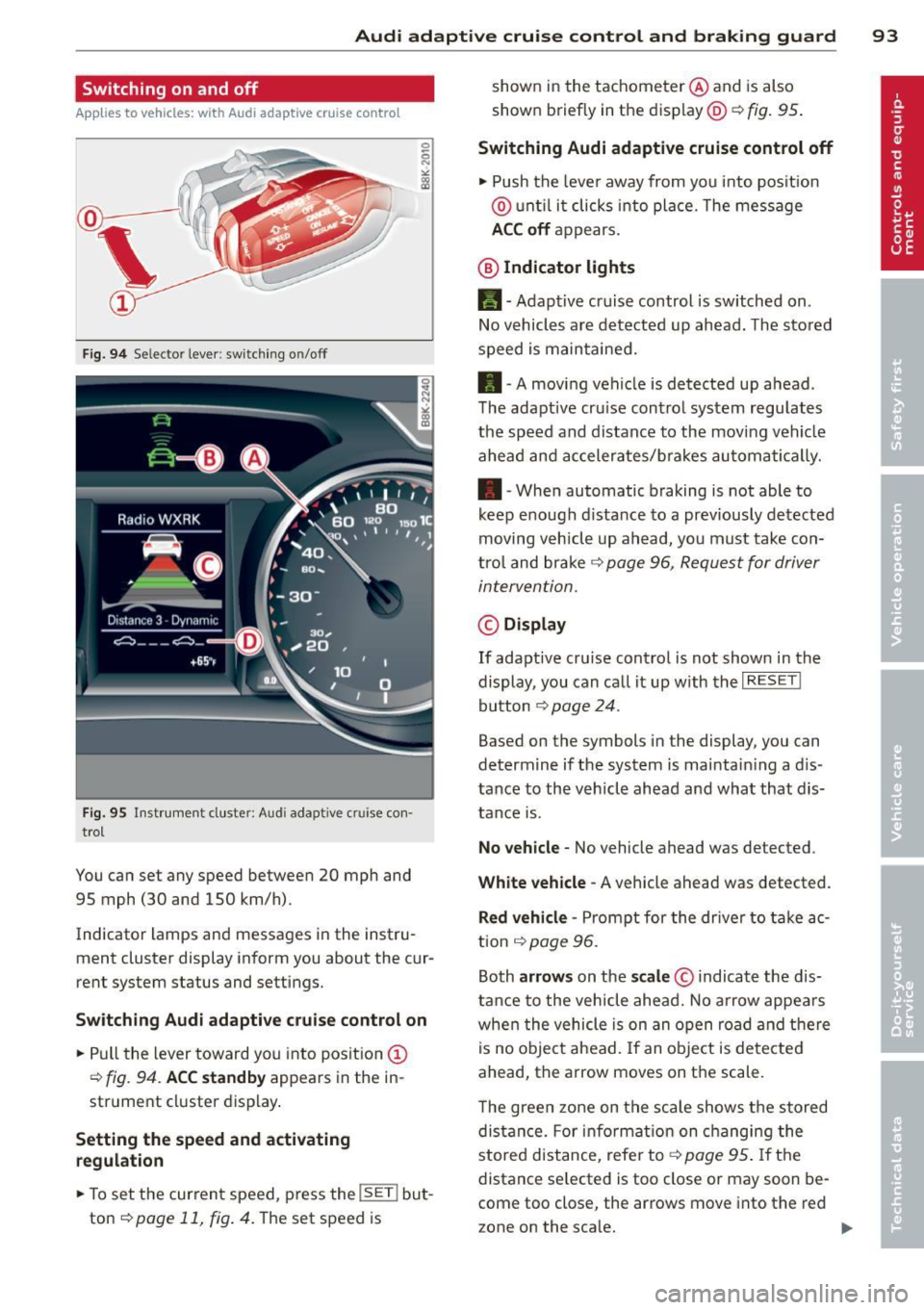
Fig. 9 4 Selector lever : sw it ching o n/off
Fi g. 95 Instrum ent cluste r: Audi a da ptive c ruise co n·
trol
You can set any speed between 20 mph and
95 mph (30 and 150 km/h).
Indicator lamps and messages in the instru· ment cluster d isplay inform you about the cur
rent system sta tus and settings .
Switching Audi adaptive cruise control on
.,. Pull the lever toward you into position @
¢
fig. 94. ACC standby appears in the in
strument cluster display .
Setting the speed and activating
regulation
.,. To set the current speed , press the !SE T! but
ton
q page 11, fig . 4. The set speed is shown in
the tachometer @ and is also
shown briefly in the display@~
fig. 95 .
Switching Audi adaptive cruise control off
.,. Push the leve r away from you into position
@ until it clicks into place. The message
ACC off appears.
@ Indicator lights
Ill -Adapt ive cruise control is switched on .
No vehicles are detected up ahead. The stored
speed is maintained.
• -A moving vehicle is detected up ahead .
The adaptive cru ise control system regulates
the speed and distance to the moving vehicle
ahead and accelerates/b rakes automatically.
• -When automatic braking i s not able to
keep enough distance to a previously detected
moving vehicle up ahead, you must take con
trol and brake ~
page 96, Request for driver
intervention.
© Display
If adapt ive cru ise control is not shown in the
display, you can call it up with the
I RES ET I
button ¢ page 24 .
Based on the symbol s in the display , you can
determine if the system is maintain ing a d is
tance to the vehicle ahead and what that dis
tance is.
No vehicle· No veh icle ahead was de tected .
White vehicle -A vehicle ahead was detected.
Red vehicle -Prompt for the driver to take ac
tion
q page 96.
Both
arrows on the scale © indicate the d is
tance to the vehicle ahead. No arrow appears
when the vehicle is on an open road and there
is no object ahead. If an object is detected
ahead, the arrow moves on the scale.
T he green zone on the scale shows the stored
distance. For infor mation on changing the
stored distance, refer to¢
page 95 . If the
distance selected is too close or may soon be
come too close, the arrows mov e into the re d
z one on the sca le. .,._
Page 117 of 286
Homelink
Universal remote
control
Description
Applies to vehicles: with Home link
The HomeLink universal remote control can
be programmed with the remote control for
devices that are already present.
With Home Link, you can control devices such
as the garage door, security systems, house
lights , etc. comfortably from the inside of you
vehicle.
Homelink makes it possible for you to rep lace
three different remote controls from dev ices
in your home with one universal remote. This
feature works for most garage door and exte
rior door motor signals. Programming the in
dividual remote control for your remote con
trol takes place near the center of the radiator
grille. There is a control module attached at
this location .
A one-time programming of the sensor must be performed before you are able to use sys
tems with Homelink. If the system does not activate after performing the one-time pro
gramming, check whether the system uses a rolling coder:!.>
page 118 for vehicles without
the
MMI*.
,& WARNING
-
- Never use the Homelink transmitter
with any garage door opener that does
have not the safety stop and reverse fea
ture as requ ired by federa l safety stand
ards. This includes any garage door open
er model manufactured before April 1,
1982.
-A garage door opener which cannot de
tect an object, signaling the door to stop
and reverse does not meet current feder
al safety standards . Using a garage door
opener without these features increases
risk of serious injury or death.
Homelink 115
- For safety reasons never release the
parking brake or start the engine while
anyone is standing in front of the vehicle .
- A garage door or an estate gate may
sometimes be set in motion when the
Homelink remote control is being pro
grammed. If the device is repeatedly ac
tivated, th is can overstrain motor and
damage its electrical components - an
overheated mo tor is a fire hazard!
- To avoid possib le injuries or property
damage, please always make abso lutely
certa in that no persons or objects are lo
cated in the range of motion of any
equipment being operated.
(0 Tips
- If you would like more information on
Homelink, where to purchase the Home
Link compat ible products, or would like
to purchase the Home Link Home Light
ing Package, please call toll-free :
1-800-355-3515.
-For Declaration of Compliance to United
States FCC and Industry Canada regula
tions
¢ page 267.
-For security reasons, we recommend that
you clear the programmed buttons be
fore selling the vehicle.
Operation
App lies to vehicles : with Homeli nk
,~
1~
1 r ·O : O ·) 1111 ~
®
Fig.
116 Headl iner: controls
Req uirement: The buttons must be program-
med
¢page 116 or ¢page 117. ..,_
Page 121 of 286
Driving Safely
General notes
Safe driving habits
Please remember -safety first!
This chapter contains important information,
tips, instructions and warnings that you need
to read and observe for your own safety, the
safety of your passengers and others . We have
summarized here what you need to know
about safety belts, airbags, child restraints as
well as child safety. Your safety is for us
priori
ty number 1.
Always observe the information
and warnings in this section - for your own
safety as well as that of your passengers.
The information in this section applies to all
model versions of your vehicle . Some of the
features described in this sections may be
standard equipment on some models, or may
be optional equipment on others. If you are
not sure, ask your authorized Audi dealer.
A WARNING
- Always make sure that you follow the in
structions and heed the WARNINGS in
this Manual. It is in your interest and in
the interest of your passengers.
- Always keep the complete Owner's Liter
ature in your Audi when you lend or sell
your vehicle so that this important infor
mation will always be available to the
driver and passengers.
- Always keep the Owner's literature handy
so that you can find it easily if you have
questions.
Safety equipment
The safety features are part of the occupant
restraint system and work together to help
reduce the risk of injury in a wide variety of
accident situations .
Your safety and the safety of your passengers
should not be left to chance. Advances in
technology have made a variety of features
available to help reduce the risk of injury in an
Driving Safely 119
accident. The following is a list of just a few of
the safety features in your Audi :
- sophisticated safety belts for driver and all
passenger seating positions,
- belt force limiters for the front seats,
- belt pretensioners for the seats,
- head restraints for each seating position,
- front airbags,
- side airbags in the front seats,
- side curtain airbags ,
- special LATCH anchorages for child re-
straints,
- adjustable steering column.
These individual safety features, can work to
gether as a system to help protect you and
your passengers in a wide range of accidents.
These features cannot work as a system if
they are not always correctly adjusted and cor
rectly used.
Safety is everybody's responsibility!
Important things to do before driving
Safety is everybody's job! Vehicle and occu
pant safety always depends on the informed and careful driver.
For your safety and the safety of your passen
gers,
before driving always:
"'Make sure that all lights and signals are op
erating correctly .
"' Make sure that the tire pressure is correct.
"'Make sure that all windows are clean and af
ford good visibility to the outside.
"'Secure all luggage and other items carefully
qpage59.
"'Make sure that nothing can interfere with
the pedals.
"'Adjust front seat, head restraint and mirrors
correctly for your height .
"'Instruct rear seat passengers to adjust the
head restraints according to their height.
"' Make sure to use the right child restraint
correctly to protect children
q page 161,
and~~fy. ~
•
•