transmission AUDI A5 COUPE 2015 Owner's Manual
[x] Cancel search | Manufacturer: AUDI, Model Year: 2015, Model line: A5 COUPE, Model: AUDI A5 COUPE 2015Pages: 264, PDF Size: 66.83 MB
Page 88 of 264
Automatic transmission
¢ page 191. Otherwise, any increase in en
gine speed may set the veh icle in motion,
even with the parking brake applied.
(D Note
- When stopping on an incline, do not try to
hold the vehicle in place by pressing the ac
ce lerator pedal while a driving gear is se
lected. This can cause the transmission to
overheat and can damage it . Activate the
parking brake or press the brake pedal to
prevent the vehicle from rolling.
- Allowing the vehicle to roll when the engine
i s stopped and the selector lever is in
N w ill
damage the transm ission because it is not
lubr icated under those circumstances.
@ Tips
For safety reasons, the park ing brake is re
leased automatically only when the dr iver's
safety belt is engaged in the buckle.
Hill descent control
A pp lies to veh icles: w ith 5 tro nic/t iptronic
The hill descent control system assists the driver
when driving down declines.
Hill descent control is activated when the selec
tor lever is in D/S and you press the brake pedal.
The transmission automatica lly selects a gear
that is suitable for the incline. Hill descent con
trol tries to maintain the speed achieved at the
tim e of braking, within physical and technical
limitations. It may still be necessary to adjust the
speed with the brakes.
Hill descent control switches off once the decline
levels out or you press the acce lerator pedal.
On veh icles w ith the cruise control system*
¢ page 80, hill descent control is also act ivated
when the speed is set.
& WARNING
Hi ll descent control cannot overcome physical
limitations, so it may not be ab le to maintain
a constant speed under all conditions. Always
be ready to apply the brakes.
86
Manual sh ift program
App lies to vehicles: wit h S tron ic/tip tro nic
Using the manual shift program you can man
ually select gears.
'
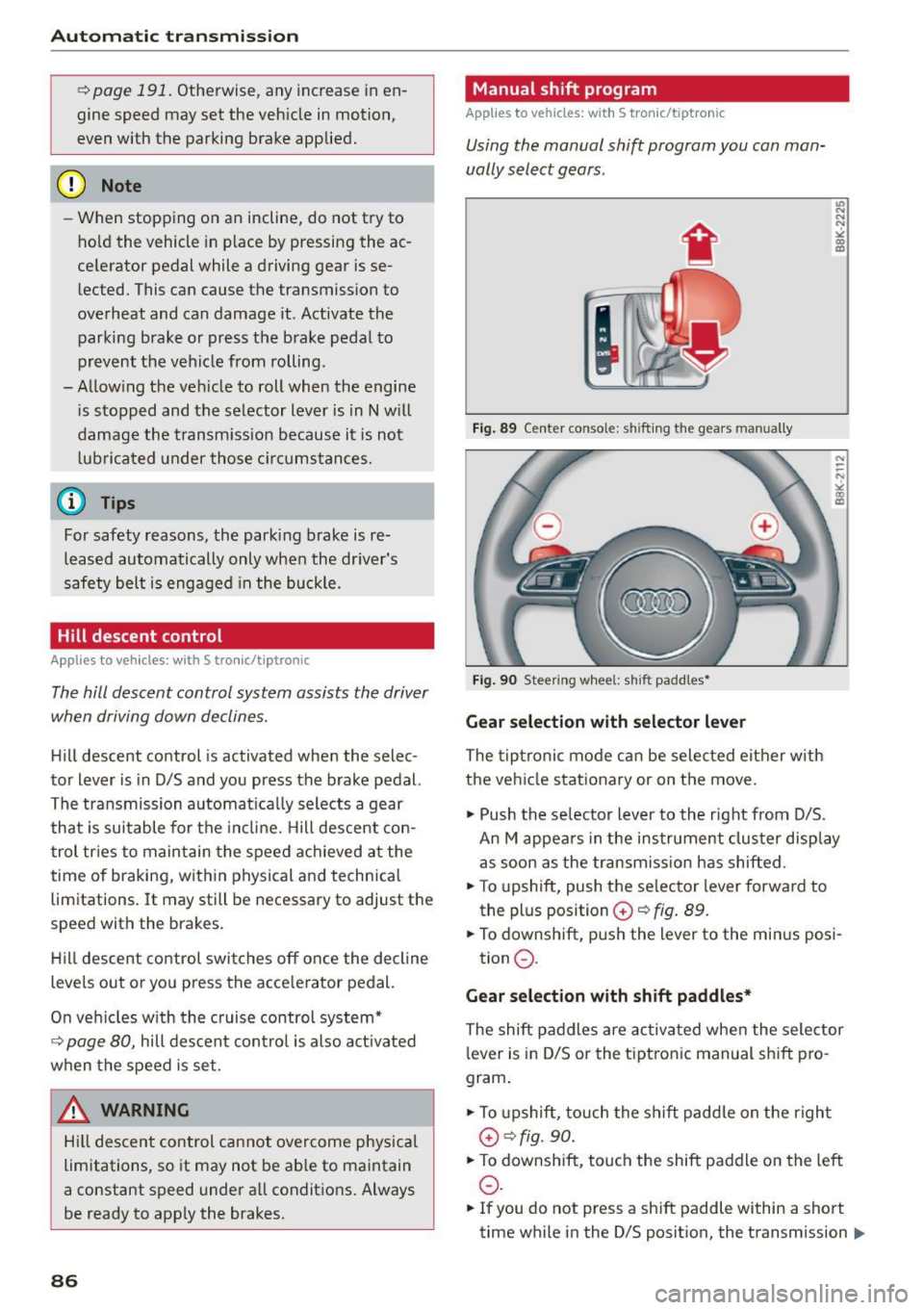
Fig. 89 Center console: shifting the gears manually
Fig. 90 Steering wheel: sh ift padd les•
Gear selection with selector lever
The tiptronic mode can be selected either w ith
the vehicle stationary or on the move.
11> Push the se lector lever to the right from D/S.
An M appears in the instrument cluster display
as soon as the transmission has shifted .
"T o upshift, push the se lector lever forwa rd to
the plus position
G) ¢ fig. 89.
" To downshift, push the lever to the minus posi-
tion
0 .
Gear selection with shift paddles*
The shift paddles are activated when the selector
l ever is in D/S or the tiptronic manual sh ift pro
gram .
" To upshift, touch the shift padd le on the r ight
G) ¢fig. 90.
"To downshift, touch the shift paddle on the left
0 .
11o Ifyou do not press a shift p addle within a short
time while in the 0/5 position, the transmission .,.
Page 89 of 264
M N
i? co ,...., \!) 1.1'1
N 1.1'1 ,....,
will return to automatic mode. To keep shifting
using the shift paddles, move the s elector lever
to the right out of the 0/5 position.
The t ransmission automatically shifts up o r down
before critica l engine speed is reached.
The transmission only allows manua l shift ing
when the engine speed is within the permitted range .
@ Tips
-When you sh ift into the next lower gear, the
transmission will downshift only when there i s no poss ibility of over -revving the engine.
- When the kick-down comes on, the trans
mission will sh ift down to a lower gear, de
pending on vehicle and engine speeds .
- Tiptronic is inoperat ive when the transmis
s ion is in the fa il-safe mode .
Kick-down
Appl ies to vehicles: with S tro nic/t iptronic
Kick-down enables maximum acceleration.
When you depress the accelerato r pedal beyond
the resistance po int, the automatic transm iss ion
downshifts into a lower gear, depend ing o n ve hi
cle speed and engine speed. The upsh ift into the
nex t higher gear ta kes place once the maximum
specified engine speed is reached .
A WARNING
Please note that the drive wheels can spin if
kick-down is used on a smooth slippery road -
there is a risk of sk idding.
Launch Control Program
App lies to vehicles: with S tro nic
Th e Launch Control Program provides the best
acceleration possible when starting from a stop .
Requirement: The engine must be at operating
temperature and the steering wheel must not be
turn ed .
.,. Press the
1.$ O FF I button ¢ page 171 while the
engine is running. The
II i ndicator light ill umi
nates i n the instrument cluster and
Stabiliza-
Aut omatic transm issio n
tion control (ESC): Sport. W arning! Re stri cted
s tability
appears in the driver information sys
tem display .
.,. Move the sele ctor leve r to the 0/5 position to
select spo rt mode (5) or se lect the
d y namic
driving mode in drive se lect* ¢ page 103 .
.,. Press the brake pedal strongly with your left
foot and ho ld it down fo r at least 1 second.
.,. At the same time, press the accelerator pedal
down comp lete ly with yo ur right foot u nti l th e
eng ine reaches and mainta ins a high R PM .
.,. Remove your foot from the brake pedal within 5
seconds ¢
,A.
A WARNING
-Always adapt your dr iving to the traff ic flow.
- Onl y use the Launch Cont ro l Program when
road and traffic cond itions allow it and oth
er drivers will not be endangered or annoyed by your driving and the vehicle's acce lera
tion .
- Please note that the driving wheels can spin
and the vehicle can break away when sport
mode is switched on, especially when the
road is s lippery .
- Once you have accelerated, you shou ld
sw itch sport mode off by pressing the
l.f3 OFF I button .
(D Tips
-The tra nsmission temperature may increase
signif icant ly after us ing the Launch Contro l
Program. If that happens , the program may
not be availab le for a few minutes.
It wi ll be
available again afte r a cool-down per iod.
- When acc elerating using the Launch Control
program, a ll vehicle parts are subject to
heavy loads. Thi s can resu lt in in creased
wear.
Transmission malfunction
App lies to vehicles : wi th S tronic/tip tro nic
[cjJ Tran smi ssion: Pre ss brake pedal and select
gear again . ..,.
87
Page 90 of 264
Automatic transmission
Press the brake pedal a nd se lect the desi red se
lector le ver positio n again. You can then continue
driving .
rm Transmi ssion overheating : Please drive con·
s ervatively .
The transmission temperature has increased sig
n ifi cant ly due to the s porty dr iv ing m anne r. D rive
i n a less sporty manner u ntil t he tempera ture re
tur ns to the normal range and the indica to r li ght
switches of .
rm Transmission malfunction: You can continue
driving
There is a system ma lfunction in the tra nsmis
sion . You may continue driving. Drive to your au
thor ized A udi de aler or qu alified repair f acility
soon to have the ma lfunct io n corrected.
[O] Transmission malfunction: Limited driv ing
functionality
There is a system ma lf u nction in the tra nsmis
sion . The transmission is sw itch ing to emergency
mo de . T his mode only shifts into certa in gears o r
w ill no longer s hift a t all. The engi ne may stall.
D rive t o your author ized Aud i de aler o r q ualified
re pai r facili ty immedia tely to have the m alfu n c
tion correcte d.
l'§J l:t Transmission malfunction : No reverse
You c an continue driving
S tron ic tr ansm ission : There is a sys tem ma lf u nc
tion in the transmiss io n. The transm iss ion is
sw itching to emergency mode . Thi s mode on ly
shi fts i nto ce rtain ge ars or w ill no longer shi ft at
a ll . T he engine may s tal l. You canno t engage the
reve rse gear . Dr ive to your authorized Audi dea ler
or qualified repair faci lity immediately to have
the ma lfunction corrected .
rm Transmission malfunction: Stop vehicle and
s hift to park.
D o not cont inue d riving. Select the P se le ctor lev
er position and see yo ur auth orize d Aud i de aler
or qualified rep air f acili ty for assist ance.
(D Note
If the trans mission s witc hes to e mergen cy
m od e, y ou s hould ta ke the vehicle to an au-
88
thorized Audi dea lership as soon as possible
to have the condition correcte d.
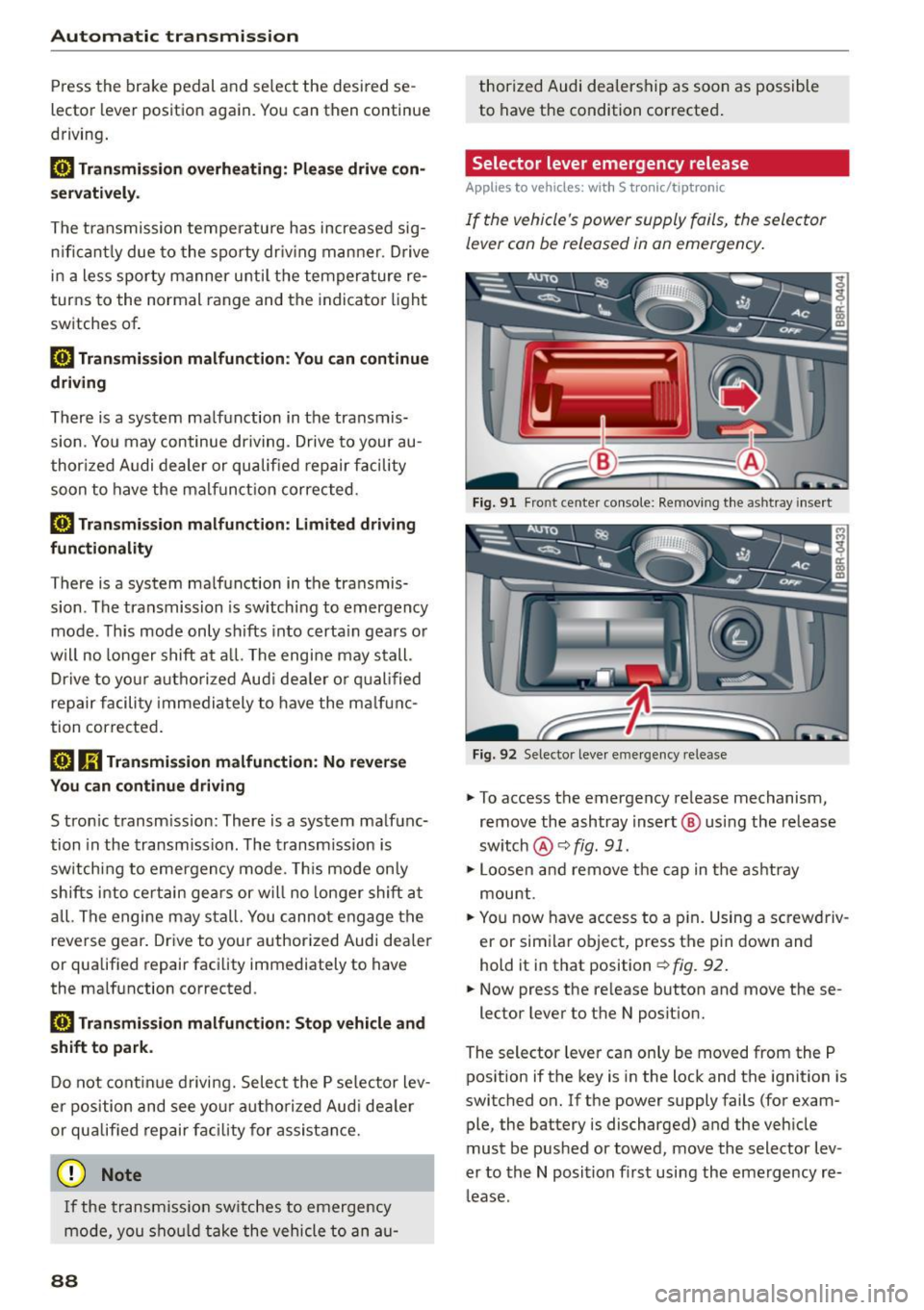
Selector lever emergency release
Applies to vehicles: with S tronic/tiptro nic
If the vehicle's power supply fails, the sele ctor
lever can be released in an emergency .
Fig. 91 Fro nt ce nte r co nsole : Rem oving t he as htray i nse rt
Fig. 92 Selec to r leve r em erge ncy re lease
.,. To access the emergency re lease mechanism,
remove the ashtray insert @ using the release
sw itch
@ ¢fig. 91.
.,. Loosen a nd remove t he cap in t he as htray
mou nt.
.,. Yo u now have access to a p in. Using a sc rewdriv
er or sim ila r o bject, press t he pi n down and
hold it in that position
¢ fig. 92 .
.,. Now press the re lease button and move these -
lector lever to t he N posit ion.
The selector leve r ca n only be moved from the P
pos ition if the key is in the lock and the ignition is
switc hed on . If the power supply fails (for exam
ple, the battery is discharged) and the veh icle
must be pus hed or towed, move the selector lev
er to th e N position fi rst usi ng the emerg ency re
l ease .
Page 92 of 264
Audi adapt ive cru ise control and brak ing gu ard
- For safety reasons, do not use adaptive
cruise control when driving on roads with
many curves, when the road surface is in
poor condition and/or in bad weather (such
as ice, fog, gravel, heavy rain and hydrop lan
ing). Using the system under these condi
t ions could resu lt in a col lision.
- Switch adaptive cruise control off tempora
rily when driving in turn ing lanes, on ex
pressway exits or in construction zones. This
prevents the vehicle from accelerating to
the set speed when in these situat ions.
- The adapt ive cr uise control sys tem wi ll not
brake by itself if yo u put you r foot on the ac
celerator pedal. Doing so can ove rride the
speed and distance regulation.
- When approach ing stationary objects such
as stopped traffic, adaptive cruise control
will not respond and braking g uard will have
limited function.
- The adapt ive cr uise control system and brak
ing guard do not react to people, animals,
objects cross ing the road or oncoming ob
jects.
- The function of the radar sensor can be af
fected by reflective objects such as guard
rails, the entrance to a tunnel, heavy rain or
ice.
- Never follow a veh icle so closely that you
cannot stop your vehicle safe ly. The adap
t ive cru ise control cannot s low or brake the
vehicle safely when you fo llow another veh i
cl e too close ly. Always remembe r that the
automa tic brak ing funct ion c annot bring the
vehicle to a sud den or emergency stop un
der these conditions.
- To prevent unin tended operation, always
switch ACC off when it is not be ing use d.
(D Note
The sensor can be disp laced by impacts or
damage to the bum per, whee l hou sing and
unde rbody. That could affe ct the adap tive
cruise contro l system and braking guard . Have
your authorized A udi dealer or authorized
Audi Service Facility c heck their function.
90
In curves
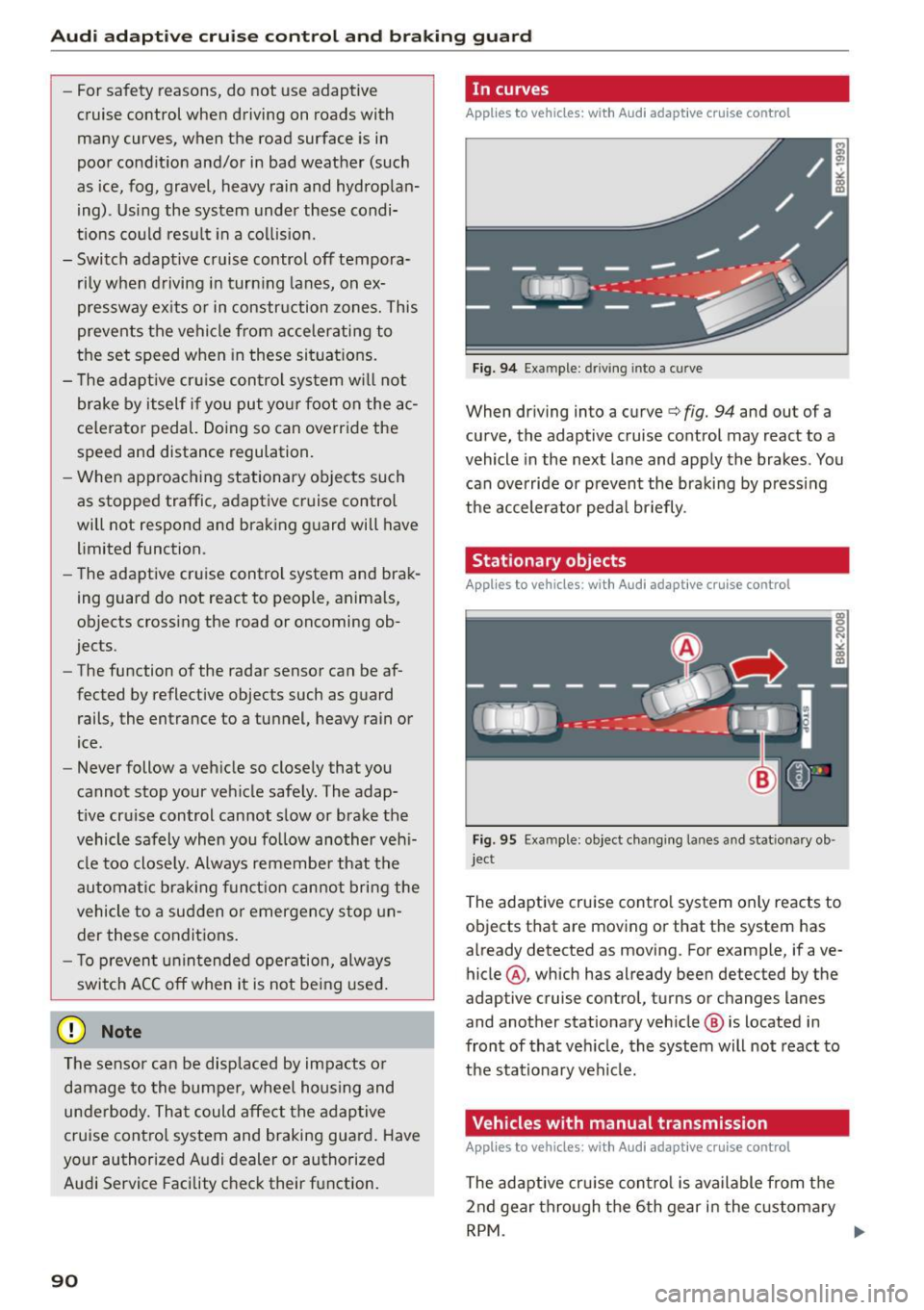
App lies to vehicles: wi th Aud i adapt ive cru ise contro l
Fig. 94 Example: dr iving into a cu rve
When dr iving into a curve c:::> fig. 94 and out of a
curve, the adaptive cruise control may react to a
vehicle in the next lane and apply the brakes. You
can override or prevent the braking by pressing
the accelerator peda l briefly .
Stationary objects
Applies to vehicles: wi th Aud i adap tive cr uise con tro l
Fig. 95 Example: object chang ing lanes and stationary ob ·
jec t
The adaptive cruise contro l system only reacts to
ob jects that are moving or that the system has
already detected as moving. For example, if ave
hicle @, which has already been detected by the
adaptive cruise control, turns or changes lanes
and another stationary veh icle @ is located in
front of that veh icle, the system will not react to
the stat ionary vehicle.
Vehicles with manual transmission
App lies to vehicles: wi th Aud i adap tive cru ise contro l
The adaptive cru ise con tro l is available from the
2nd gear thro ugh the 6th gear in the c ustomary
RPM . ....
Page 98 of 264
Audi adaptive cru ise control and b ra king guard
promptly detected or may not be detected
at all.
- Reflective surfaces including crash barriers
or tunnel entrances may impair the function
of the radar sensor.
(D Tips
- You can cance l the braking that is initiated
by the system by braking yourself, by accel
erating noticeably or by swerving.
- Braking g uard error messages ~
page 96.
- Keep in mind that braking guard can brake
unexpected ly . Always secure any cargo or
objects that you are transporting to reduce
the risk of damage or injury.
Settings in the radio/MMI
Applies to veh icles : w ith Audi adaptive cruise control
.,. Select : I CARI funct ion button > Car system s*
control button > Driver assis t> Aud i braking
guard .
Or
.,. Se lect :
~I C-A-R~I funct ion button > Audi braking
guard .
S ys tem -
Sw itch Audi braking guard O n and Off .
When you switch the ignition on, the message
Aud i braking gu ard off appears if the system is
sw itched off.
Ea rly warning -The distance and approach warn
ings in the display can be sw itched
On /Off.
@ Tips
- Your settings are automat ically stored and
assigned to the remote control key being
used at the times the sett ings are made .
- If you restrict or switch off the ESC, the
braking guard also switches itself off
~page 171.
- Switch brak ing guard off when you are load
i ng the veh icle onto a vehicle carr ier, tra in,
sh ip or other type of transportation . Th is
can prevent undesired wa rnings from the
braking guard system.
96
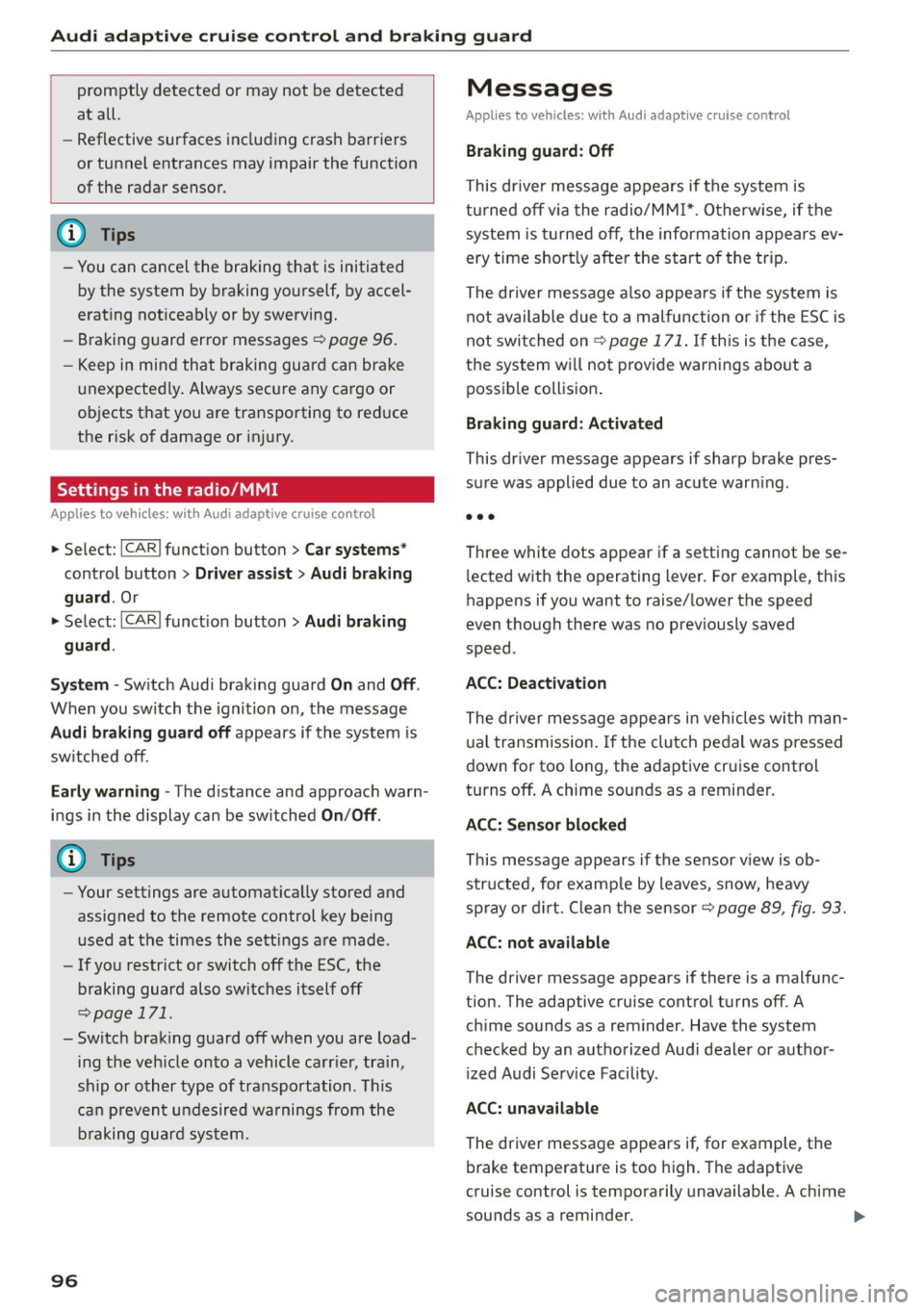
Messages
App lies to vehicles: wi th Audi adap tive c ru ise contro l
Bra king gu ard : Off
This dr iver message appears if the system is
tu rned off via the radio/MM I*. O therwise, if the
system is t urned off, the information appears ev
ery time short ly after the start of the trip.
The driver message a lso appea rs if the system is
not available due to a malfunction or if the ESC is
not sw itched on
~ page 171 . If th is is the case,
the system wi ll not provide warnings abo ut a
possible collision .
Braking guard : A cti vated
This dr ive r message appears if sharp brake pres
sure was applied due to an acute warn ing .
•••
Three white dots appear if a setting cannot be se
l ected with the operating lever. For example, this
happens if you want to raise/ lower the speed
even though there was no prev iously saved
speed .
ACC: D ea ctiv ation
The dr iver message appears in vehicles with man
ual transmission . If the clutch pedal was p ressed
down for too long , the adaptive cruise control
turns off. A chime sounds as a reminder.
A CC: S enso r blo ck e d
This message appears if the sensor v iew is ob
structed, for examp le by leaves, snow, heavy
spray or d irt . Clean the sensor~
page 89, fig. 93.
ACC: not a vailabl e
The driver message appears if there is a malfunc
tion. The adaptive cruise control turns off . A
ch ime sounds as a rem inder . Have the system
checked by an authorized Aud i deale r or author
i zed Audi Serv ice Facility .
ACC : un available
The driver message appears if, for example, the
brake temperature is too high. The adaptive
cruise control is temporarily unavailable . A chime
sounds as a reminder . .,.
Page 99 of 264
M N
i? co ,...., \!) 1.1'1
N 1.1'1 ,....,
Audi adaptive cruise control and braking guard
Engine speed!
This d rive r message appea rs in vehi cles w it h
m anu al t ran smis sion if the d river h ad not up
shi fted o r downshifted in time while using adap
tive cruise contro l braking or accelera ting, ca us
ing the vehicle to exceed or not reac h the permit
ted limit s peed. The adaptive c ruise control turns
off. A chime s ounds as a reminder.
Shift leve r po sition!
Ve hicles w it h an autom atic transmission: the
d river me ssage appe ars if the sele ctor leve r is
shi fted to the N pos it io n. The a daptive cru ise con
trol is not avai lab le while in this pos ition .
Ve hicles w it h manual tra nsmission : the d river
m essage appe ars for vehi cles w it h manu al tra ns
miss io n if there is no forward ge ar engaged,
meanin g if the reverse gear o r the 1s t gear is en
gaged o r if the selecto r leve r is in the neutra l po
sition . The adaptive cruise control is not ava ilab le
while in this p osit ion.
Stabilization cont rol (ESC )
This message appea rs if the elec troni c stab ili za
ti on con trol ( ESC) i s takin g action to stabi lize t he
ve hicl e. The a daptive cru ise contro l tur ns off. A
chime soun ds as a remin der .
Speed too low
This message appea rs if the current speed is too
l ow
to set or to maintain the des ired speed.
The speed being saved must be at least 20 mph (30 km/h). T he cr uise control is turned off for
speeds lowe r th an 12 mph (20 km/h) . The adap
tive c ruise co ntrol re m ains turned o n for speeds
above 9 5 mph (150 km/ h) (override).
It w ill sta
biliz e again at 9 5 mph (15 0 km/h) whe n the dr iv
e r ta ke s his foot off of the g as pedal.
Parking brake!
The drive r message appears when the park ing
b rake is activated. Adaptive cru ise cont ro l is
turned off . A ch ime sounds as a remi nder .
97
Page 104 of 264
Audi drive select
Audi drive select
Driving settings
Introduction
Applies to veh icles: w ith Audi drive select
Drive select provides the possibility to experience
d ifferent types of vehicle settings in one vehicle.
F or instance, using the three
Comfort, Auto and
Dynamic modes, the driver can switch from a
sporty to a comfortable driving mode with the press of a button.
Addit ionally, in vehicles with MM I*, the vehicle
setup for
Individual* mode can be customized by
you. This makes it possible to combine settings
such as a sporty engine tuning with comfortable
steering .
A WARNING
Improper use of the Audi drive select can
cause collisions, other acc idents and serious
personal injury.
Description
Applies to veh icles: w ith Audi dr ive select
-
The vehicle setup in each mode depends on the
veh icle's features . However, the engine, automat
ic transmission* and steering are always involved.
Engine and automatic transmission*
Depending on the mode, the engine and the au
tomatic transmission respond quicker or in a
more balanced manner to accelerator pedal
movements. In the sporty dynamic mode, the au
tomatic transmission shifts at higher RPMs.
Steering
The steering adapts in terms of steering effort
and steering ratios. Indirect steer ing that moves
easily, like the steering in comfort mode, is best
suited to long drives on a highway. In contrast,
dynamic mode provides sporty, direct stee ring.
The follow ing applies to vehicles with dynam ic
steer ing*: the steering ratio changes based on ve
h icle speed in order to maintain optimum steer
ing effort for the dr iver at all times. This sets the
s teer ing to be less sensitive at higher speeds in
102
order to provide improved vehicle control. At re
duced speeds, however, steering is more direct in
order to keep the steer ing effort as m inima l as
possib le when the driver is maneuver ing the vehi
cle. At low and average speeds, dynam ic steering
additionally provides more responsive steering
performance.
Adaptive dampers*
The adaptive dampers* use sensors to record in
formation regarding steering movements, brak ing and acceleration operations by the driver,
road surface, driving speed, and load. This makes
i t possible to adapt damp ing to the driving situa
tion virtually in real t ime . Drive select also makes
i t possible to sat isfy the desire fo r sporty suspen
s ion (Dynamic) and comfortable suspension
(Comfo rt) without giving up ba lanced tuning (Au
to).
Sport differential*
As a compone nt of the all whee l dr ive system
(quattro)
<> page 174, t he sport differential* dis
tributes the driving power to the rear axle de
pending on the situation. The distribution of
power varies depending on the mode selected.
The goal is a high level of agility and ability to ac
ce lerate on curves. The vehicle is very responsive
to steering.
Audi adaptive cruise control*
The behavior when accelerating can be adjusted
from comfortable to sporty, depending on the drive select mode. Adaptive cruise control a lso
responds to the driving behavior of the vehicle
ahead in a more conservative or sporty manner.
Engine sound*
The sound of the engine is adapted to the select
ed mode and ranges from subtle to sporty.
(D Tips
- In some models, the maximum vehicle
speed can only be reached in the
Auto and
Dynamic modes.
- For vehicles with an automatic transmis-
sion, se lecting the
Dynamic mode results in 1111-
Page 105 of 264
M N
0 loo
rl I.O
"' N
"' rl
sporty sh ifting charac ter istics . The 5 gear
position engages automatically.
- In vehicles that have dynamic steering*, op
erating noise is hea rd when starting or sto p
p ing the engine . This does not indicate a
problem.
Selecting the driving mode
Applies to vehicles: with Audi drive select
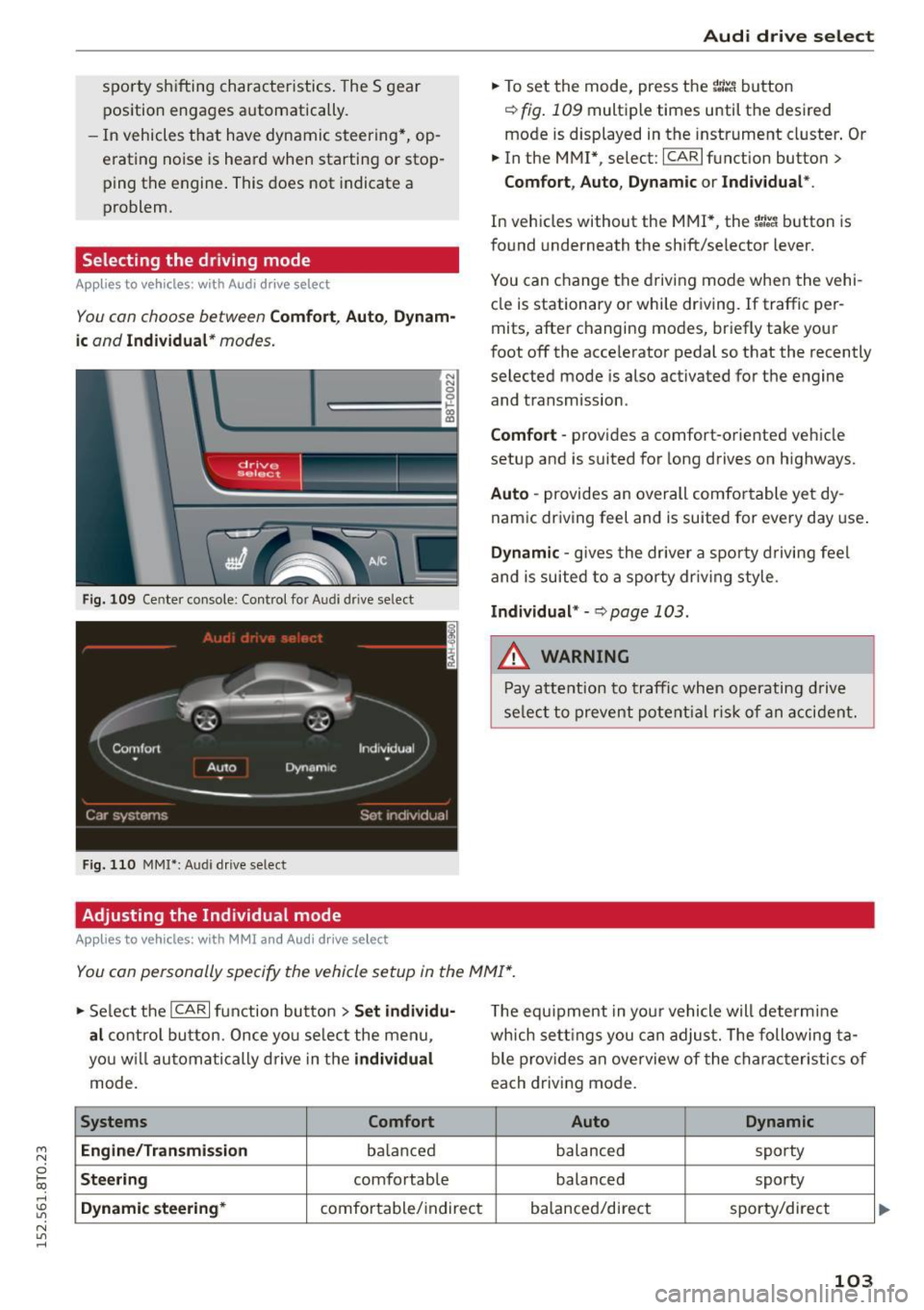
You con choose between Comfort , Auto , Dynam·
ic
and Individual * modes.
N N 0
~=== =:::: ~ ~
drive I se lect _ ~ -~-
F ig . 109 Ce nter co nso le : Con trol fo r A udi dri ve se lect
F ig. 110 MMI*: Audi drive se lect
Adjusting the Individual mode
Applies to vehicles: with MMI an d Aud i d rive select
Aud i drive select
.,. To set the mode, press the r.:i:.~ button
~ fig . 109 multip le times until the des ired
mode is displayed in the instrument cl uster . Or
.,. In the M MI*, se lect : ICARlfunction button>
Comfort , Auto , Dyn amic or Individual *.
In veh icles without the MMI*, the r:l:e'i button is
fo und underneath the shift/selector lever.
You can change the driving mode when the vehi
cle is stationary or while dr iving.
If traffic per
mits, after c hanging modes, briefly take your
foot off the acce lerator pedal so that the recently
selected mode is also activated for t he engine
and transmission .
Comfort -provides a comfort-o riented veh icle
setup and is suited for long drives on highways.
Auto -provides an overall comfo rtable ye t dy
nam ic dr iving feel and is suited for every day use .
Dynamic -gives the driver a spor ty driving feel
and is suited to a sporty dr iv ing style.
Individual * -~ page 103 .
.&, WARNING
-Pay atte ntion to tra ffic when op era ti ng d rive
se lect to preven t pote ntial r is k of an a cci dent.
You con personally specify the vehicle setup in the MMI* .
.,. Se lect the ICAR I function bu tton > Set individu·
al
c o ntro l bu tton. Once yo u se lec t the me nu,
yo u will a utoma tical ly dr ive in the
individual
mode.
Systems Comfort
Engine/Transmi ssion
balan ced
Steering comfo rtable
Dynamic steering* comfor table/ indirect T
he equipment in you r vehicle will determine
wh ich se tt in gs y ou can adjust. The following ta
ble p rov ides an overview of the charac teristics of
each driving mode.
Auto Dynamic
balanced sporty
balanced sporty
ba lanced/direct sporty/direct
103
Page 175 of 264
Operating noise
Noises may occur when braking depending on the
speed, braking force and outside conditions such
as temperature and humidity.
Effect of water and road salt
In certain situat ions, for example after driving
through water, in heavy ra in, after overn ight con
densat ion or after washing your car, the braking
effect can be reduced by moisture or ice on the
brake rotors and brake pads. The brakes must be
dried first with a few carefu l brake applications.
At higher speeds and with the w indshie ld w ipers
turned on, the brake pads press against the brake
rotors for a short amount of time. This occurs at
regular intervals without the driver noticing and
provides for better brake response time under
wet conditions.
The effectiveness of the brakes can be reduced
when the vehicle is driven on a salt-covered road
and the brakes are not used. Likewise, you clean
off accumulated salt coating from brake discs
and pads with a few cautious applications of the
brake ¢.& .
Corrosion
There may be a tendency for dirt to build up on
the brake pads and corros ion to form on the discs
if the car is not driven regularly or only for short
tr ips with little use of the brakes.
If the brakes are not used frequently, or if corro
sion has formed on the discs, it is advisab le to
clean off the pads and discs by braking firmly a
few t imes from a moderately high speed¢.&.
Faults in the brake system
If you should notice a sudden increase in brake
pedal trave l, then one of the two brake circuits
may have failed
c:> .& .
Low brake fluid level
Malfunctions can occur in the brake system if the
brake fluid level is too low. The brake fluid leve l is
~ monitored e lectronically.
i? co ,...., \!) ..,.,
N ..,., ,....,
Smart Technology
Brake booster
T he brake booster increases the pressure that you
generate w ith the brake pedal.
It works on ly
when the engine is running
.c:> .&
Brake lining wear status
Brake lining wear may be checked by visual in
spect ion of the condition of the brake pads
through the openings in the wheel. If necessary,
the wheel may be removed for this inspection
c:> page 226, Replacing wheels.
_8 WARNING "'---
-New brake pads don't have the best stop
pin g power and must be "broken-in" during
the initial 250 miles (400 kilometers). You
can compensate for this by press ing the
brake pedal more firmly. This also applies
later when new pads are installed.
-
- You shou ld perform braking maneuvers for
the purpose of cleaning the brake system
only if road conditions permit. Other road
users must not be put at r isk -you may
cause an acciden t!
- Before descending a steep grade, reduce
speed and shift transmission into a lower
gear or lower driving range. Do not ride the
brakes or hold the pedal down too long or
too often . This could cause the brakes to get
hot and diminish braking efficiency.
- Do not "ride the brakes" by resting your foot
on the pedal when you do not intend to
brake. This may cause the brakes to over
heat, premature wear and increased stop
p in g distance.
- Under certain cl imatic and operat ing condi
tions such as passing through water, dr iv ing
in heavy rain or after washing the vehicle,
the effectiveness of the brakes can be re
duced. In winter, ice can accumulate on the
b rak e pads, linings, discs and drums. Care
fully apply brakes for a test. Brakes will dry
and ice coatings will be cleaned off after a
few careful brake applications.
- Driving for an extended period of time on
salt -covered roads wi thout using your
brakes can a lso affect braking efficiency .
173
Page 179 of 264
Driving and the
environment
Breaking in
New engine
The engine needs to be run-in during the first
1,000 miles (1,500 km).
For the first 600 miles (1,000 kilometers ):
"' Do not use full throttle .
"' Do not drive at engine speeds that are more
than
2/3 of the max imum permitted RPM .
From 600 to 1,000 miles (1,000 to 1,500
kilometers):
"' Speeds can gradually be increased to the maxi
mum perm issible road or engine speed.
During and after break-in period
"'Do not rev the engine up to high speeds when it
is cold. This applies whether the transmission is
in N (Neutral) or in gear .
After the break-in period
"'Do not exceed maximum engine speed under
any circumstances.
"'U pshift into the next higher gear
before reach
ing the red area at the end of the tachometer
scale
c=> page 10.
During the first few hours of driving, the engine's
internal friction is higher than later when all the
moving parts have been broken in. How well this
break-in process is done depends to a considera
ble extent on the way the vehicle is driven during
the first 1,000 miles (1,500 kilometers).
(D Note
Extremely high engine speeds are automati
cally reduced. However, these rpm limits are
p rog rammed for an engine wel l run- in, not a
new engine.
@) For the sake of the environment
Do not dr ive with unnecessarily high eng ine
speeds -upshifting early saves fuel, reduces
noise and protects the environment.
Driving and the environment
New tires
If your vehicle is running on new tires, drive very
carefully for the fi rst 350 m iles (500 kilometers)
after fitting .
New tires tend to be slippery and must also
be "broken-in". Be sure to remember this dur
ing the first
350 miles (500 kilometers).
Brake gently. Avoid following closely behind
other vehicles or other situations that might
require sudden, hard brak ing .
Avoid damaging the
vehicle
When you are d riving on poor roads, or over
curbs, steep ramps, etc., ma ke certain that low
lying parts such as spoilers and exhaust system
parts do not bottom out and get damaged.
T his is espec ially true for veh icles with low-s lung
chassis (sports chassis)* and fully loaded
vehicles.
Driving through water on
roads
Note the following to avoid vehicle damage when
driving through water, for example on f looded
roads:
- The water must not be any higher than the bot
tom of the vehicle body.
- Do not drive faster than walking speed.
A WARNING
= -
After driving through water, mud, slush, etc.,
the brakes may be s low to take effect because
of wet brake rotors and pads. Dry the brakes
first by braking carefully to restore the full braking effect.
(D Note
Vehicle components such as the engine,
transmission, suspension or electrical system
can be severely damaged by driving through
water . ""
177