warning AUDI A5 COUPE 2015 Owner's Manual
[x] Cancel search | Manufacturer: AUDI, Model Year: 2015, Model line: A5 COUPE, Model: AUDI A5 COUPE 2015Pages: 264, PDF Size: 66.83 MB
Page 36 of 264
Opening and closing
Emergency unlocking of the ignition key
In the event of malfunctions in the electrical sys
tem, it may happen that you cannot remove the
ignition key.
.,. Remove the mechanical key <=>page 33.
.,. Lock the vehicle using the mechanical key
<=>page 36.
.,. Have the e lectrica l system inspected by an au
thorized Aud i dea lership.
Locking and unlocking the vehicle with the
remote control
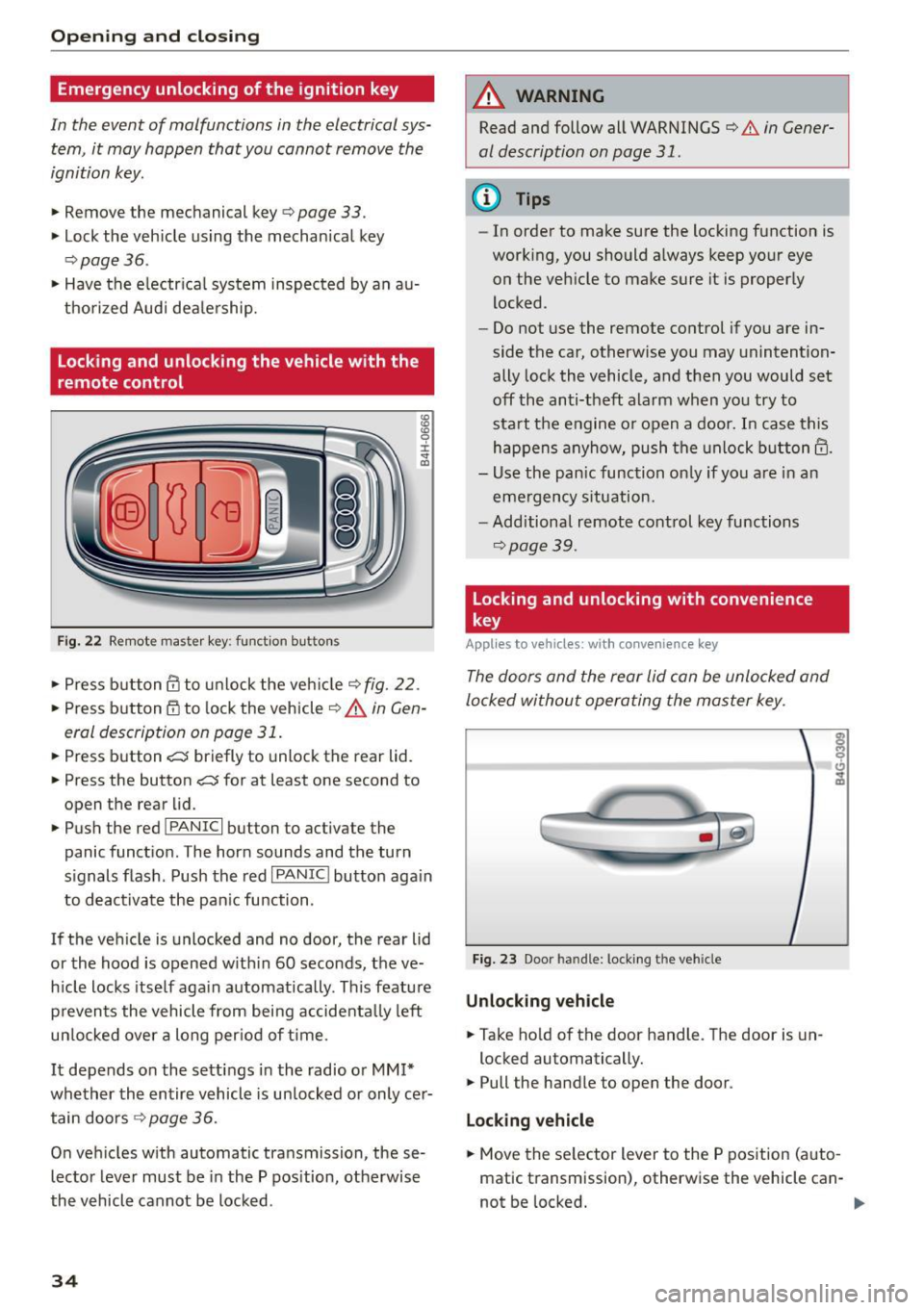
Fig. 22 Remote master key: funct ion bu tto ns
:8
"' 0 ±
"' OJ
.,. Press b utton ill to unlock the vehicle<=> fig. 22.
... Press button m to lock the vehicle ¢ A in Gen
eral description on page 31 .
.,. Press button c::5 briefly to unlock the rear lid .
.,. Press the button
c::5 for at least one second to
open the rear lid .
.,. Push the red
!PANIC I button to activate the
panic function. The horn sounds and the turn
s ignals flash . Push the red
I PANIC! button aga in
to deactivate the pan ic function .
If the vehicle is unlocked and no door, the rear lid
or the hood is opened w ith in 60 seconds, the ve
hicle locks itself again automatically . This feature
prevents the vehicle from being accidenta lly left
un locked over a long per iod of time .
It depends on the settings in the radio or
MM!*
whether the entire vehicle is unlocked or only cer
tain doors <=>
page 36.
On vehicles with automatic transmission, these
lector lever must be in the P pos ition, otherwise
the vehicle cannot be locked .
34
A WARNING
Read and follow all WARNINGS
<=> .&. in Gener
al description on page 31.
(D Tips
- In order to make sure the locking function is
work ing, you should always keep your eye
on the vehicle to make sure it is properly
locked .
- Do not use the remote control if you are in
side the car, otherwise you may unintention
ally lock the vehicle, and then you would set
off the anti-theft alarm when you try to
start the engine or open a door. In case this
happens anyhow, push the unlock button@.
- Use the pan ic function on ly if you are in an
emergency situation.
- Additional remote control key functions
¢page 39.
Locking and unlocking with convenience
key
Applies to vehicles: wit h co nvenience key
The doors and the rear lid can be unlocked and
locked without operating the master key .
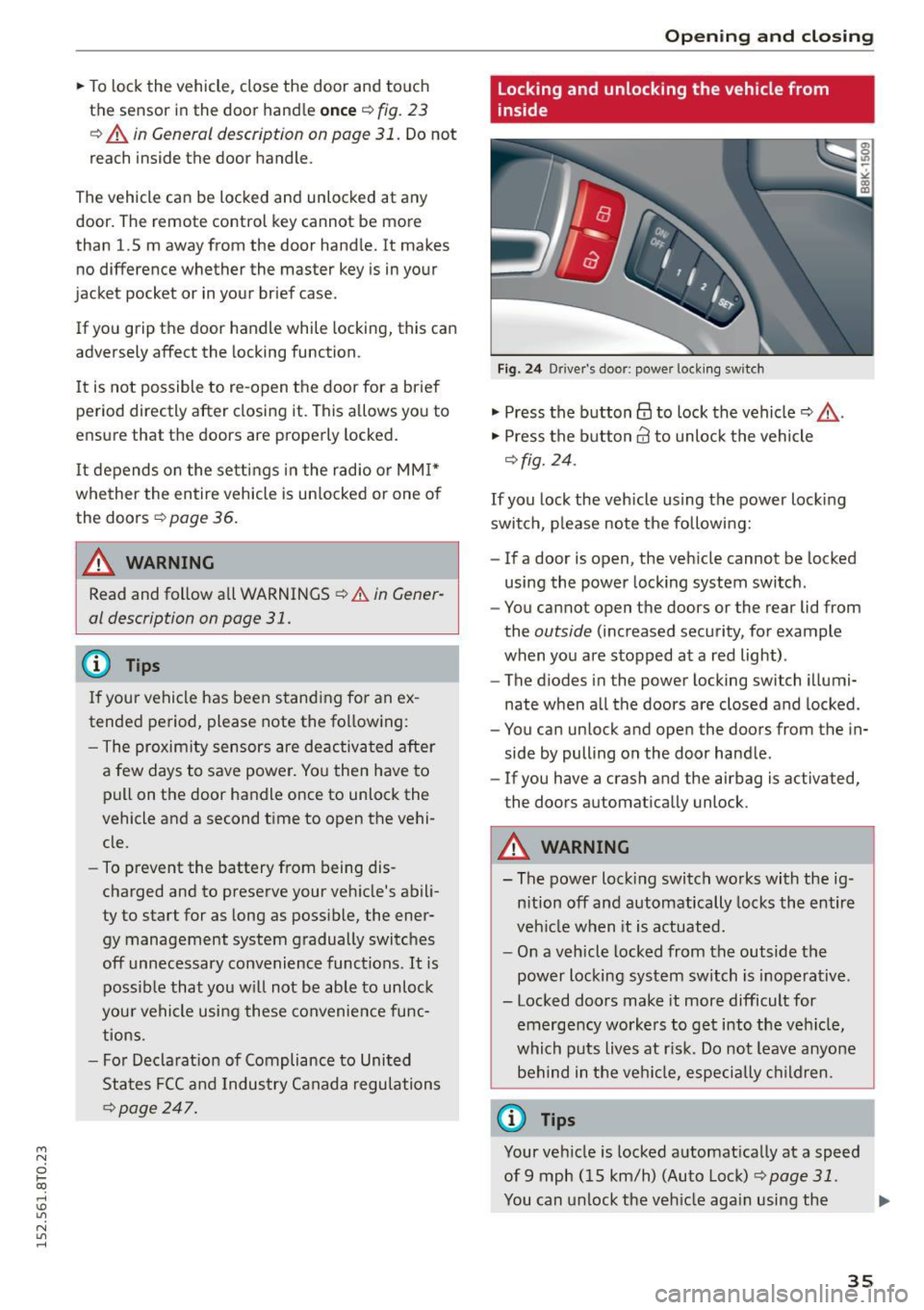
Fig. 23 Door handle: lock ing the vehicle
Unlocking vehicle
.,. Ta ke hold of the door handle. The door is un-
locked automatically.
.,. Pull the handle to open the door .
Locking vehicle
.,. Move the se lector lever to the P position (auto
matic transmission), otherwise the vehicle can-
not be locked. .,..
Page 37 of 264
M N
0 loo
rl I.O
"' N
"' rl
"'To lock the vehicle, close the door and touch
the sensor in the door hand le
once ¢ fig. 23
¢ A in General description on page 31 . Do not
reach inside the door handle.
The vehicle can be locked and unlocked at any
door. The remote control key cannot be more
than 1.5 m away from the door hand le. It makes
no difference whether the master key is in your
jacket pocket or in your brief case .
If you g rip the door handle while locking, this can
adversely affect the locking function.
It is not possible to re -open the door for a brief
pe riod directly after closing it . This allows yo u to
ensure that the doors are properly locked .
It depends o n the se ttings i n the radio or MM I*
whether the entire vehicle is un locked or one o f
the doors ¢
page 36.
A WARNING
Read and follow all WARNINGS ¢ A in Gener·
al description on page 31.
@ Tips
I f your vehicle has been stand ing fo r an ex
tended period, please note the following:
- The proximity sensors are deac tivated after
a few days to save power. Yo u then have to
pull on the door handle once to unlock the
vehicle and a second time to open the vehi
cle.
- To prevent the battery from being dis
charged and to preserve your veh icle's abili
ty to start for as long as possible, the ener
gy management system g radually switc hes
off unnecessary convenience functions. It is poss ible that you w ill not be ab le to unlock
you r vehicle using these convenie nce func
tions .
- Fo r Decla rat ion of Compliance to Uni ted
Sta tes FCC a nd Industry Canada regulations
~ page 24 7.
Open ing and clo sing
Locking and unlocking the vehicle from
inside
F ig. 2 4 Driver's door; power lock ing sw itch
"' Press the button@ to lock the vehicle¢_& .
"' Press the button@ to unlock the vehicle
¢fig. 24 .
If you lock the veh icle using the power loc king
swit ch, p lease note the following:
- If a door is open, the veh icle cannot be locked
using the power locking system switch .
- You cannot open the doors or the rear lid from
the
outside (increased security, for example
when you are stopped at a red light) .
- The diodes in the power locking switch illumi
nate when a ll the doors are closed and locked .
- You can unlock and open the doors from the in
side by pulling on the door hand le .
- If you have a crash and the airbag is activated,
the doors automa tically unlock .
A WARNING
-- The power lock ing switch works with the ig-
n ition off and automatically locks the entire
veh icle when it is actuated.
- On a vehicle locked from the outside the
power locking sy stem switch is inoperative .
- Locked doors make it more difficult for
emerge ncy worke rs to get into the veh icle,
which puts liv es at r isk. Do not leave anyone
be hind in the vehi cle, especially children .
@ Tips
Your vehicle is locked a utomat ically at a speed
of9 mph ( 15 km/h) (Auto Loc k)
¢ page 31.
You can unlock the veh icle aga in using the .,.
35
Page 39 of 264
M N
0 loo
rl I.O
"' N
"' rl
Once the front passenger's door has been closed,
you cannot open it again from the outside. The
doo r can be opened from the inside by pulling
t he door hand le.
A WARNING
Read and follow all WARNINGS q .&. in Gener
al description on page 31 .
@ Tips
After the ignition is switched on, the power
locking system sw itch and the unlocking but
ton for the rear lid
.c::5 in the door are ena
bled .
Electronic immobilizer
The immobili zer prevents your vehicle from being
s tarted by unauthorized persons .
Inside the key there is a computer chip. This chip
automatically activates/deact ivates the electron
ic immobili zer.
Applie s to vehicl es with ign ition lock :
The electronic immobilizer deactivates automati
cally when you insert the remote control key into
the ignition lock . It activates again automatically
when you remove the remote control key from
t he ignition lock .
Applies to v eh icl es with conven ienc e key :
If t he remote control key is located inside the ve
hicle and you press the
! S TAR T ENGINE ST OPI
button, the electronic immobilizer deactivates
au tomatically . If you switch the igni tion off and
remove the remote control key from the ve hicle,
the electronic immobilizer activates again auto
mat ica lly.
A WARNING
Always take the key with you when you leave
the vehicle. The key ca n disa rm the electron ic
eng ine immob ilizer and permit an unau thor
ized pe rson to start the eng ine and enable op
eration of the vehicle systems such as power
w indow or power sunroof leading to serious
personal in jury.
Open ing and clo sing
(D Tips
- The vehicle cannot be started if an una u
thorized key is used . The vehicle may not
start if another radio device s uch as a key
for another ve hicle or a transponder is locat
ed on the key ring.
- For Declaration of Comp liance to United
States FCC and Industry Canada regulations
¢ page 247.
Luggage compartment
Lid
Opening/closing rear lid
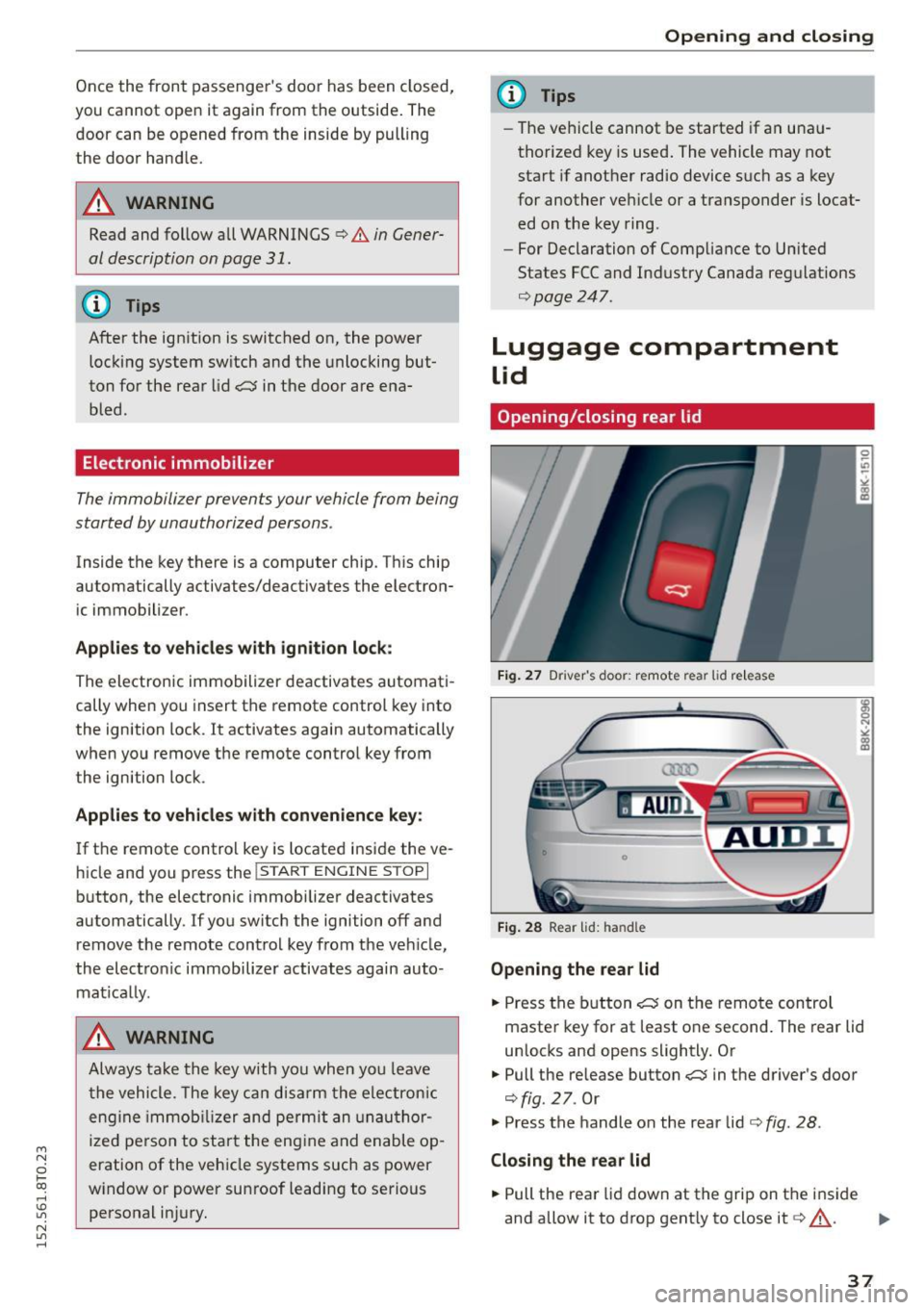
Fig. 2 7 Drive r's doo r: remot e rear lid re le a se
Fig . 2 8 Rea r lid : han d le
Opening the rear lid
.. Press the b utton .c::5 on t he remote control
maste r key for at least o ne second. The rear lid
unlocks and opens slightly. Or
.,. Pull the release button
.c::5 in the driver's door
¢fig. 27. Or
.,. Press the handle on the rear lid¢
fig. 28 .
Closing the rear lid
.. Pull the rea r lid down at the grip on t he i nside
and allow it to drop gent ly to close it¢,&. .
II>-
37
Page 40 of 264
Opening and closing
_& WARNING
- After closing the rear lid, always pull up on
it to make sure that it is properly closed .
Otherwise it could open suddenly when the
vehicle is moving.
- To help prevent poisonous exhaust gas from
being drawn into the vehicle, a lways keep
the rear lid closed while driving. Never
transport objects larger than those which fit completely into the luggage area, because
then the rear lid cannot be fully closed .
- Never leave your vehicle unattended espe
cially w ith the rear lid left open . A child
could crawl into the car through the luggage
compartment and pull the lid shut, becom
ing trapped and unable to get out. To reduce
the risk of personal injury, never let children
play in or around your veh icle. Always keep
the rear lid as well as the vehicle doors
closed when not in use.
- Always ensure that no one is within range of
the rear lid when it is moving, in particular
close to the hinges -fingers or hands can be
pinched.
(D Tips
When the vehicle is locked, the rear lid can be
opened separately by pressing the button
c:::5
on the master key. When you close the rear lid
again, it locks automatically.
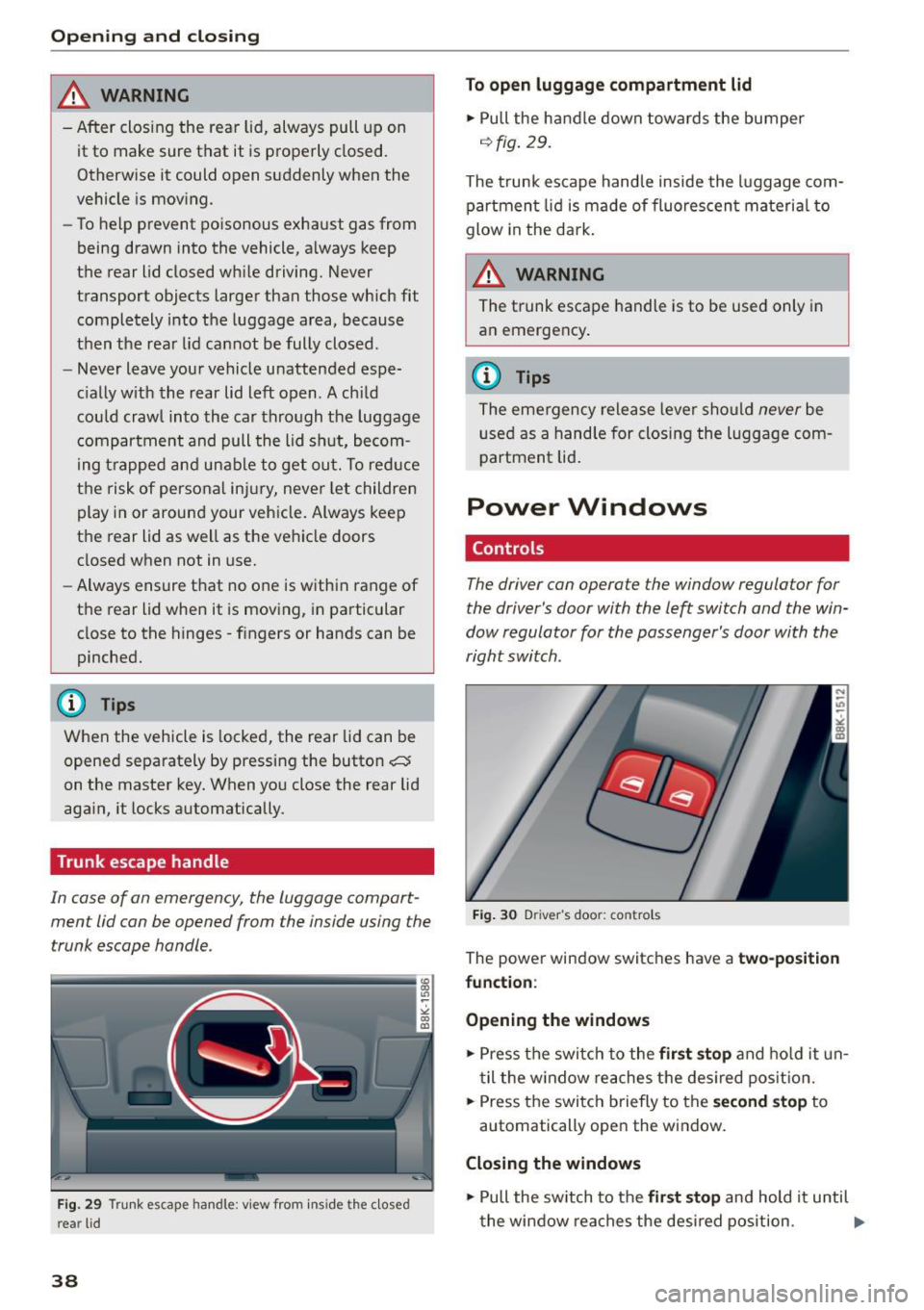
Trunk escape handle
In cas e of an emergency, th e luggage compart
men t lid can be opened from the inside using the
trunk escape handle .
Fig. 29 Trunk esc ape han dle: v iew from ins ide the close d
r e ar lid
38
To open luggage compartment lid
.,. Pull the handle down towards the bumper
<=:>fig. 29 .
The trunk escape handle inside the luggage com
partment lid is made of fluorescent material to
glow in the dark .
_& WARNING
The trunk escape handle is to be used only in
an emergency .
{!) Tips
The emergency release lever should never be
used as a handle for closing the luggage com
partment lid.
Power Windows
Controls
The driver can operate the window regulator for
the driver's door with the Left switch and the win
dow regulator for the passenger's door with the
right switch .
Fig. 30 Driver 's doo r: contro ls
The power w indow switches have a two-position
function :
Opening the windows
.,. Press the switch to the first stop and hold it un
til the w indow reaches the desired posit ion .
.,. Press the switch briefly to the
second stop to
automatically open the window.
Closing the windows
.,. Pull the sw itch to the first stop and hold it until
the window reaches the desired position. .,.
Page 41 of 264
M N
i? co ,...., \!) 1.1'1
N 1.1'1 ,....,
• Pull the switch briefly to the se con d s top to au
tomatica lly close the window.
A WARNING
-When you leave your veh icle -even if only
br iefly -always remove the ignition key. This
applies part icularly when children remain in
the vehicle. Otherwise the children could start the engine o r operate electr ical equip
ment (e.g. power w indows). The power win
dows are functional until the d river's door o r
passenger's door has been opened.
- Pay close attention when closing the w in
dows to prevent pinch ing of hands or limbs.
- When loc king the veh icle from outs ide, the
vehicle must be unoccupied since t he win
dows can no longer be opened in an emer
gency.
@ Tips
- When you open the doors, the windows au
tomatically lower about 10 mm.
- After the ignition has been switched off, the
windows can st ill be opened or closed for
abo ut 10 m inutes. The window regulato rs
are not switched until the driver's or pas
senger's door is opened .
Convenience opening/closing
The windows and the panoramic tilting sunroof
can be opened and closed with the mechanical
key or the emergency key.
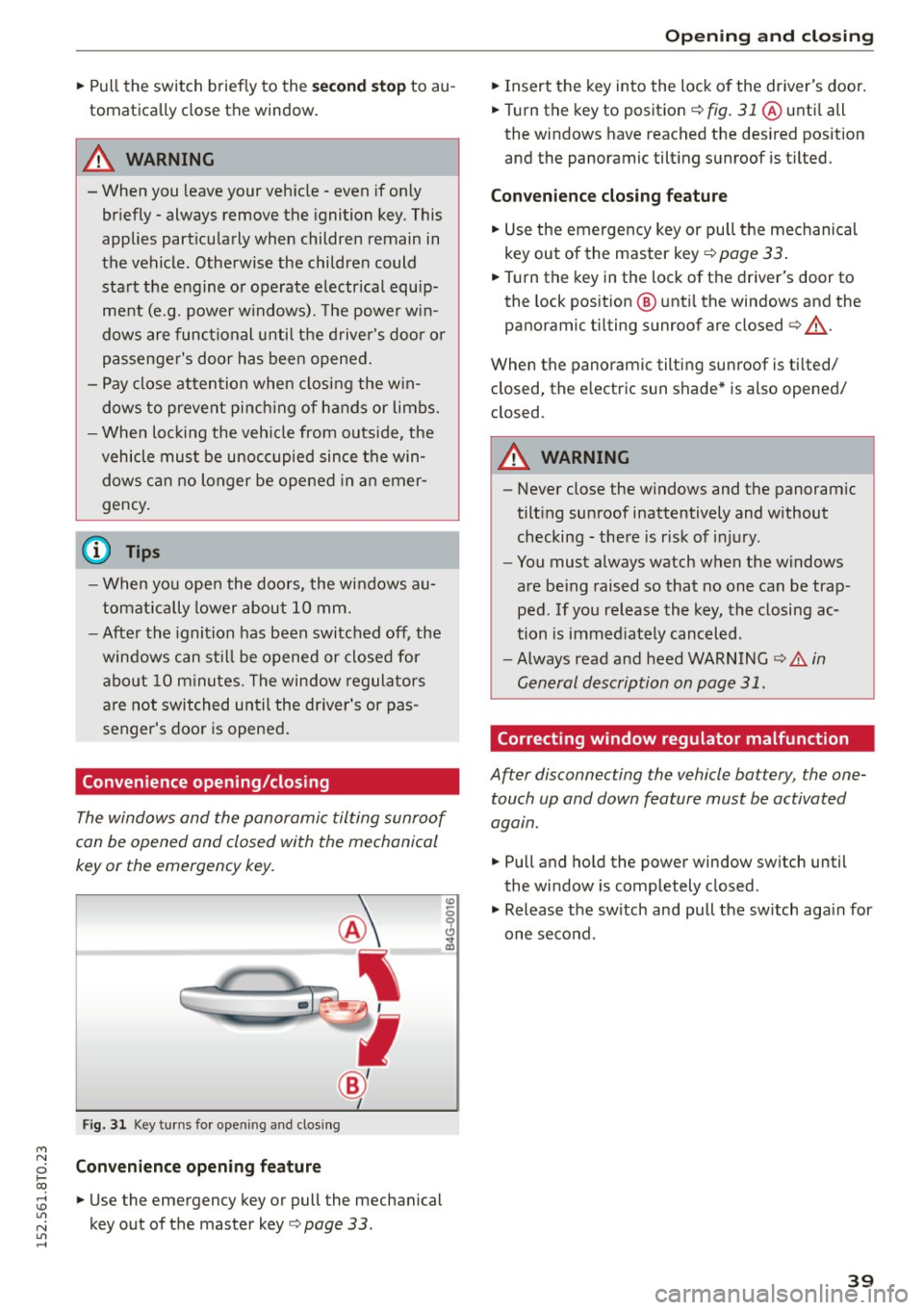
Fig. 3 1 Key tu rns fo r opening a nd clos ing
Con venience open ing fea ture
• Use the emergency key or pull the mechanical
key out of the master key
Q page 33 .
-
Opening and cl osing
• Insert the key into the lock of the driver's doo r.
• Turn the key to position
Q fig. 31 @ unti l all
the windows have reached the des ired pos ition
and the panoramic tilting sunroof is tilted.
Convenienc e clo sing featur e
• Use the emergency key or pull the mechanical
key out of the master key
Q page 33 .
• Turn the key in the lock of the d river's door to
the lock position @ unti l the windows and the
panoramic tilting sunroof are closed
Q ,A.
When the panoramic tilting sunroof is tilted/
closed, the electric sun shade* is also opened/
closed.
A WARNING
-- Never close the w indows and the panoram ic
tilt ing sunroof inattentively and without
checking - there is risk of injury.
- You must always watch when the windows
are be ing raised so that no one can be trap
ped. If you release the key, the closing ac
tion is immed iate ly canceled.
- Always read and heed WARNING
Q .&. in
General description on page 31.
Correcting window regulator malfunction
After disconnecting the vehicle battery , the one
touch up and down feature must be activated
again.
• Pull and hold the power window switch until
the window is completely closed.
• Release the sw itch and pull the sw itch again for
one second .
39
Page 42 of 264
Opening and closing
Panorama roof
Operation
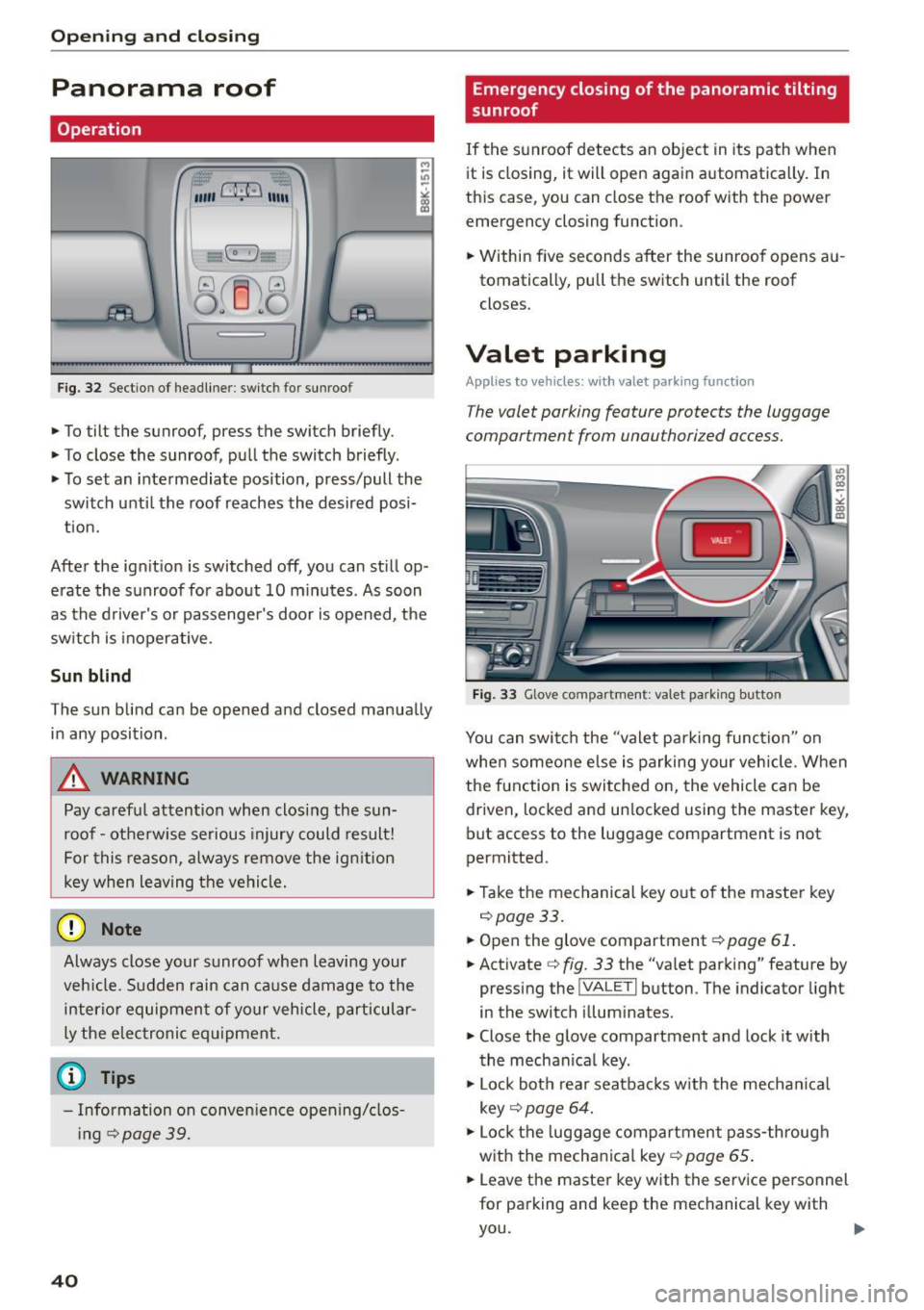
Fig. 32 Sectio n of headliner : swi tc h fo r sunroo f
.,. To tilt the sunroof, press the switch briefly .
• To close the sunroof, pull the switch briefly .
• To set an intermediate position, press/pull the
switch until the roof reaches the desired posi
tion.
After the ignition is switched off, you can still op
erate the sunroof for about 10 minutes . As soon
as the driver's or passenger's door is opened, the
switch is inoperative .
Sun blind
The sun blind can be opened and closed manually in any position .
A WARNING
Pay careful attention when closing the sun
roof - otherwise serious injury could result!
For this reason, always remove the ignition
key when leaving the vehicle.
(D Note
Always close your sunroof when leaving your
veh icle. Sudden rain can cause damage to the
interior equipment of your vehicle, particular
ly the electronic equipment.
- Information on convenience opening/clos
i ng
c::> page 39.
40
Emergency closing of the panoramic tilting
sunroof
If the sunroof detects an object in its path when
it is closing, it will open again automatically . In
this case, you can close the roof with the power
emergency closing function.
• Within five seconds after the sunroof opens au
tomatically, pull the switch until the roof
closes .
Valet parking
Applies to vehicles: wi th valet parkin g function
The valet parking feature protects the luggage
compartment from unau thorized access.
-
Fig. 33 Glove com partment: va let pa rk ing b utto n
You can switch the "valet parking function" on
when someone else is parking your vehicle. When
the function is switched on, the vehicle can be driven, locked and un locked using the master key,
but access to the luggage compartment is not
permitted.
• Take the mechanical key out of the master key
c::>page33.
• Open the glove compartment c::> page 61.
• Activate c::> fig. 33 the "valet parking" feature by
pressing the
! VA LET I button . The indicator light
in the switch illuminates.
• Close the glove compartment and lock it with
the mechanical key .
• Lock both rear seatbacks w ith the mechan ical
key
c::> page 64.
• Lock the luggage compartment pass-through
with the mechanical key
c::> page 65 .
• Leave the master key with the service personnel
for parking and keep the mechanical key with
you.
Page 43 of 264
M N
0 loo
rl I.O
"' N
"' rl
The following buttons are deactivated when the
va let parking function is switched on:
- l'-"' I button in the dr iver's door
- I""' I button on the master key
- Handle in the rear lid
When the valet parking feature is activated, the message
V alet pa rk ing acti vated appears in the
instrument cluster d isp lay when you switch the
ignit ion on .
Garage door opener
(Homelink)
Description
Applies to vehicles: with ga rage door opener (Homeli nk)
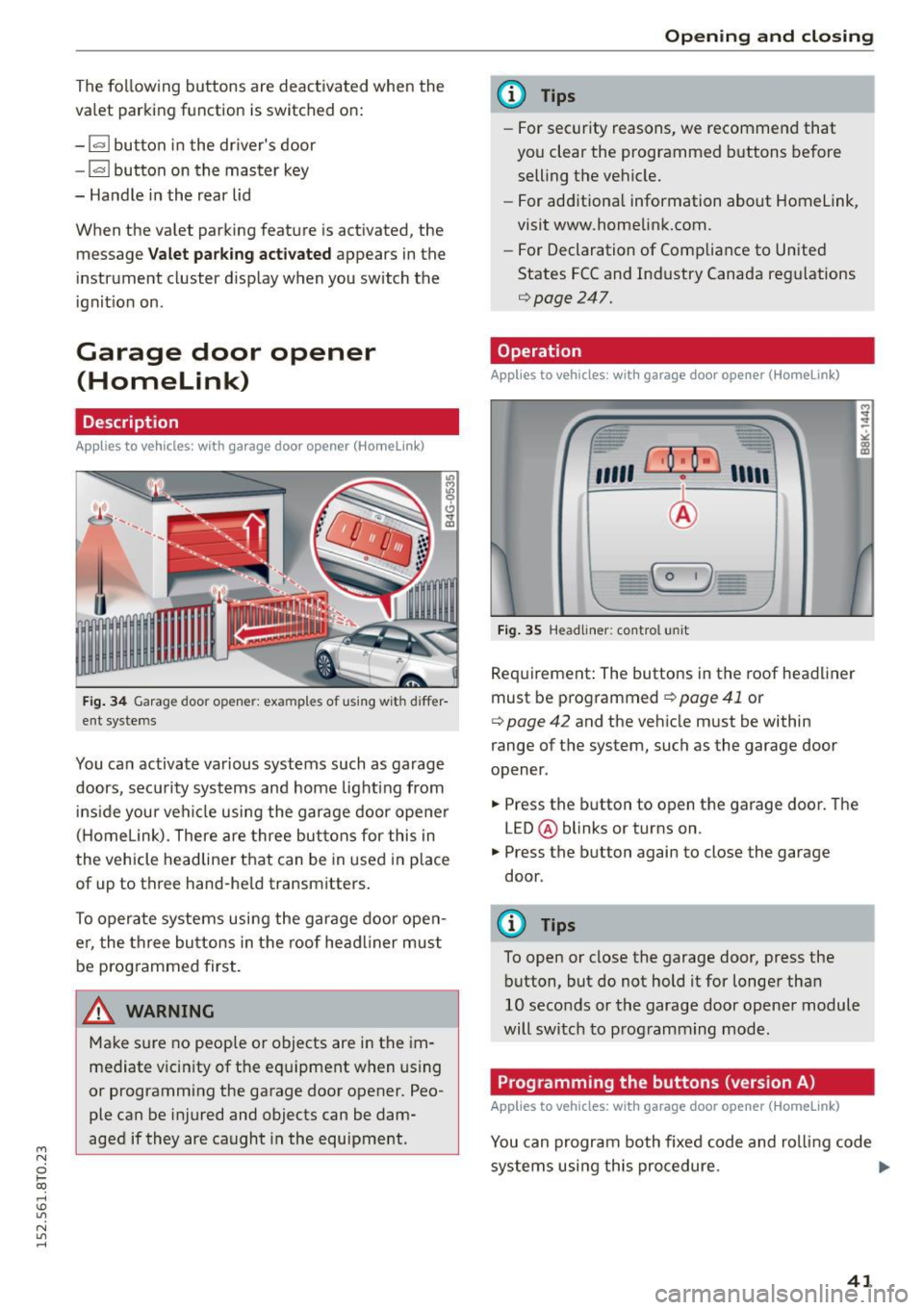
Fig. 34 Garage door opene r: exa mples of us ing wit h differ
ent systems
You can activate various systems such as garage
doors, security systems and home lighting from
i nside your vehicle using the garage door opener
( H omelink). There are three buttons for this in
the vehicle headliner that can be in used in p lace
of up to three hand-he ld transmitters .
To operate systems using the garage door ope n
er, the th ree bu ttons in the roof head liner must
be p rog rammed first.
A WARNING
Make sure no people or objects are in the im
mediate v icin ity of the equipment when us ing
or programming the garage door opener. Peo
ple can be injured and objects can be dam
aged if they are caught in the equipment .
Opening and clo sing
(D Tips
- For security reasons, we recomme nd that
you clear the programmed b uttons before
selling the vehicle.
- For add itiona l information about Homelink
'
visit www.homelink.com.
- For Declaration of Compliance to United
States FCC and Ind ustry Canada reg ulations
¢page 247.
Operation
Applies to vehicles: wit h garage door opener (Homelink)
Fig . 3 5 Headliner : contro l uni t
Requirement: The buttons in the roof headliner
must be programmed ¢
page 41 or
¢
page 42 and the veh icle must be within
range of the system, such as the garage door
opener .
.,. Press the button to open the garage door. The
LED @ blinks or turns on .
.,. Press the button again to close the garage
door .
(D Tips
To open or close the garage door, press the
button, but do not hold it for longer than
10 seconds or the garage door opene r module
will switch to programming mode .
Programming the buttons (version A)
Applies to vehicles: with garage door opener (Homelink)
You can program both fixed code and ro lling code
systems using this procedure. .,.
41
Page 46 of 264
Lights and Vi sion
Lights and Vision
Exterior Lighting
Switching the lights on and off
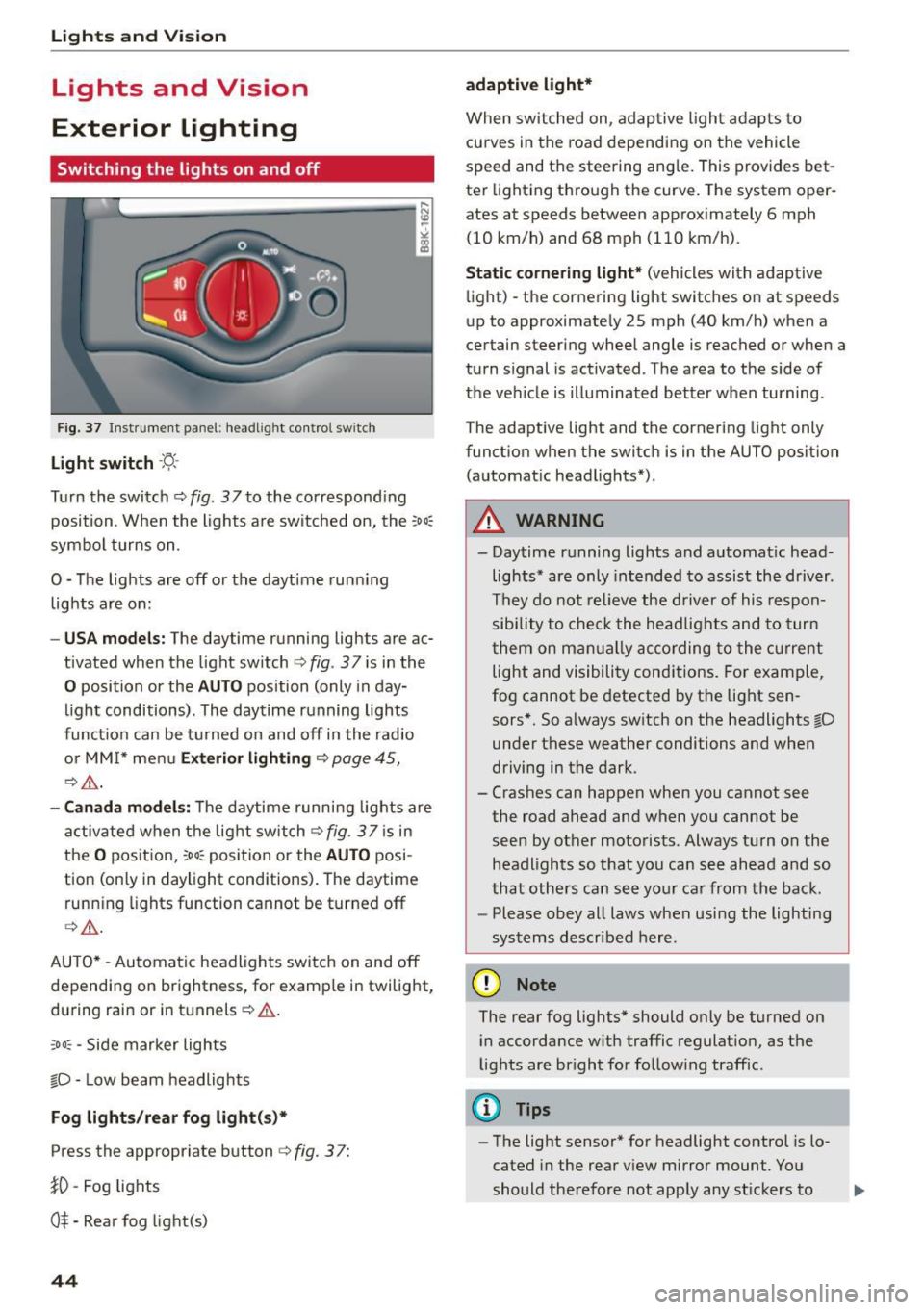
Fig. 3 7 Instrume nt pane l: headl ig h t co ntrol switc h
Light switch ·'t/-·
Tu rn the switch ¢ fig. 37 to the co rr e spond ing
position . Whe n the lights a re switched on, the
:oo,
symbo l turns on.
0 -The lights are off or the daytime runn ing
lights are on:
- USA models : The daytime running lights are ac
tivated when the light sw itch
¢ fig . 37 is in the
0 position or the AUTO position (only in day
li ght conditions). The daytime running lights
funct io n can be turned on and off in the radio
o r MM I* men u
Exterior lighting ¢ page 45,
c:?,& .
-Canada model s: T he daytime r unni ng lights are
activated when the lig ht switch
C?fig. 37 is in
t h e
O pos it ion, 300, position or the AUTO posi
tion (only in daylight conditions) . The daytime
runn ing lights function cannot be turned off
¢ ,A .
AUTO* -Au tomatic headlights swi tch on and off
depending on brightness, for examp le in twilight,
during rain or in tu nnels ¢
A.
:oo , -Side marker lights
fO -Low beam headlights
Fog lights /rear fog light(s )*
Press the appropriate button c:? fig. 3 7:
}0 -Fog lights
O* -Rea r fog light(s)
44
adaptive light*
When switched on, adap tive ligh t ad ap ts to
curves in the road depending on the vehicle
speed and the steering ang le. This provides bet
ter light ing through the curve. The system oper
ates at speeds between approximately 6 mph
(10 km/h) and 68 mph (110 km/h).
Static cornering light* (vehicles with adaptive
li ght) -the corne ring light switches on at speeds
up to approximate ly 25 mph (40 km/h) when a
certain steering wheel angle is reached or when a
turn s ignal is act ivated . T he area to the side of
the ve hicle is illuminated better when turning .
The adaptive light and the cornering light only
funct io n when the switc h is in the AUTO position
(automat ic head lights*) .
A WARNING
- Daytime r unning lights and a utomat ic head
lights* are only intended to as sist the driver .
T h ey do not re lieve the driver of his respon
sibility to c heck t he hea dlights and to tur n
t hem on m anually ac co rding to the cur rent
light and visibili ty conditions. Fo r exam ple,
fog cannot be detected by the light sen
sors*. So a lways sw itch on the headlights
l[D
under these weather conditi ons and when
driving in the dark.
- Crashes can happen when y ou cannot see
the road ahead and when you cannot be
seen by ot her moto rists. Always tu rn on the
headlights so that yo u ca n see ahead a nd so
that othe rs can see yo ur ca r from the back.
- Please obey all laws when usi ng the lighting
sys tems described here.
(D Note
The rear fog lights* should on ly be turned on
i n accordance w ith traffic regulat ion, as t he
lights are br ight for follow ing traffic.
{!) Tips
- The light sensor* for headlight control is lo
cated in the rear v iew mirror mount. Yo u
should the refore not app ly any st ickers to
Page 47 of 264
M N
0 loo
rl I.O
"' N
"' rl
the windshield in this a rea in order to
prevent malfunctions or failures .
- Some exterior lighting functions can be ad
ju ste d
~ page 45 .
-When yo u remove your key from the igni tion
while the vehi cle's ligh ts are turned o n, a
buzzer sounds as long as t he driver 's door is
open.
- In coo l o r dam p weather, t he inside of the
h eadlights, turn sig nals and tail lights can
fog over d ue to the temperature difference
between the inside and outs ide. They will
clea r shortly after switching them on. T his
does not affect t he service li fe of the light
i ng.
- In the event of a light sensor malfunction,
the driver is not ified in the instr ume nt clus
te r display~
page 21.
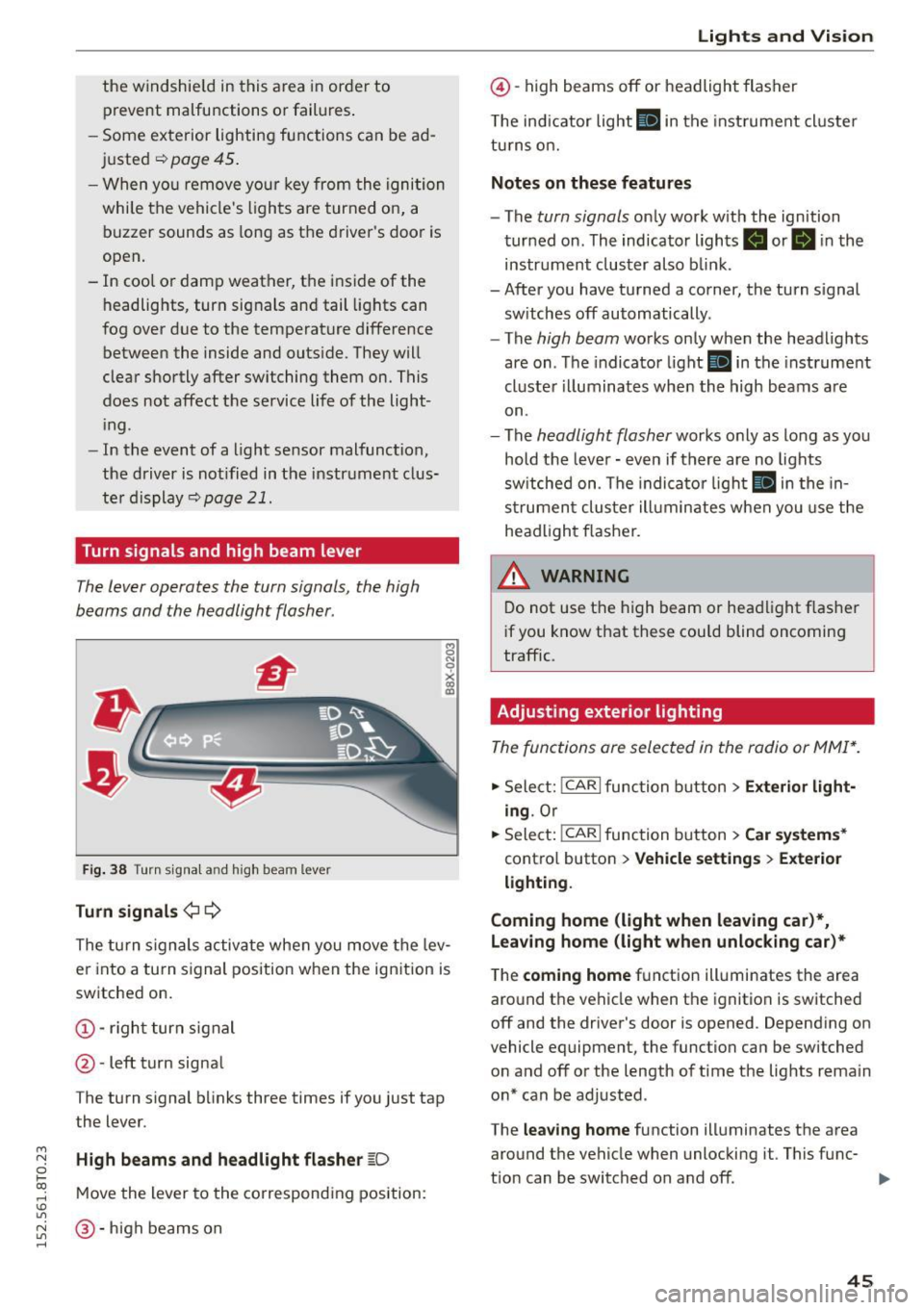
Turn signals and high beam lever
The lever operates the turn signals, the high
b eams and the headlight flasher.
Fi g. 3 8 Tu rn signa l and high beam lever
Turn signals ¢ Q
g N
0
~ CD
The turn signals activate when you move the lev
er into a turn s ignal position when the ignition is
switched on.
@ -righ t tur n signal
@ -left turn signa l
The turn s ignal b links three times if you just tap
the lever.
High beams and headlight flasher
[0
M ove the lever to the corresponding position:
@ -high beams o n
Lights and Vis ion
@ -high beams off or headlight flasher
T he ind icator light
II in t he inst rument cl uste r
tu rns on.
Notes on these features
- The
turn signals on ly wor k w ith the ign ition
tur ned on. The indicator ligh ts . or
II in the
instr um ent clus ter also b link.
-After you have tu rned a corner, the turn s ignal
sw itches off automatically.
- The
high beam works on ly when the headlights
are on . T he indicator light
II in the instrument
cluste r illuminates whe n the high beams a re
on.
- The
headlight flash er works o nly as long as yo u
hold the leve r - even if there are no lights
sw itched on . The indica to r li ght
II in the in
s trumen t cluste r ill umin ates when you use t he
head light flasher.
,&. WARNING
D o not use t he h igh beam or hea dlight flashe r
i f you know that these could blind oncoming
traffic.
Adjusting exterior lighting
The func tions are selected in the radio or MMI* .
.,. Select: !CAR I func tion b utton > Exterior light
ing .
Or
.,. Sele ct: !~C_A _R~ I function b utton > Car systems *
contro l butto n > Vehicle settings > Exterior
lighting .
Coming home (light when leaving car )*,
Leaving home (light when unlocking car)*
The
coming home f u nction illuminates the area
aro und t he vehicle when the ignition is switched
off and the driver's door is opened. Depend ing on
vehicle equipment, the function can be switched o n and off o r the length of t ime t he lig hts rema in
on* can be adjusted .
The
leaving home function illuminates t he area
around th e vehicle when unloc kin g it. This func-
t ion can be switched on and off. ""
45
Page 50 of 264
Lights and Vision
Q/P -Adjusting the left/right exterior mirror .
Move the knob in the des ired direction.
4ill -Heat ing the m irror g lass depending on the
outside temperature*.
.9 -Folding exterior mirrors* . In the Infotain
ment system, you can select if the mirrors fold in
automatically when you lock the vehicle
¢ page 36.
Front passenger's exterior mirror tilt
function*
To help you see the curb when backing into a
parking space, the surface of the mirror t ilts
slightly . Fo r this to happen, the knob must be in
the position for the front passenger 's outside
mirror.
You can adjust the tilted mirror su rface by turn
ing the knob in the des ired direction . Wh en you
move out of revers e and into another gear, the
new mirror position is stored and assigned to the
key you are using.
The mirror goes back into its origina l position
once you drive forward faster than 9 mph (15 km/h) or turn the ignition off.
A WARNING
Curved mirror surfaces (convex or spherical*)
increase your field of view. Remember that
vehicles or other objects will appear smaller
and farther away than when seen in a flat mir
ror. If you use this mirror to estimate distan
ces of following vehicles when changing
lanes, you cou ld estimate incorrectly and
cause an accident.
(D Note
-If the mirror hous ing was moved by force
(for example, by running into an object
when maneuvering the vehi cle), the mirror
must be folded all the way in using the pow
er folding function. The mirror housing
must not be moved back into place by hand
because this would impair the function of
the mirror mechanism.
- If you wash the vehicle in an automatic car
wash, you must fold the exterior mirrors in
48
to reduce the risk of damage to the mirrors.
Never fold power folding exterior mirrors*
by hand. Only fold them in and out using
the power controls.
(D Tips
-If the power adjusting function malfunc
tions, the g lass in both mirrors can be ad
justed by pressing on the edge of it by hand.
- The exterior mirror settings are stored with
the memory function* ¢
page 58.
Dimming the mirrors
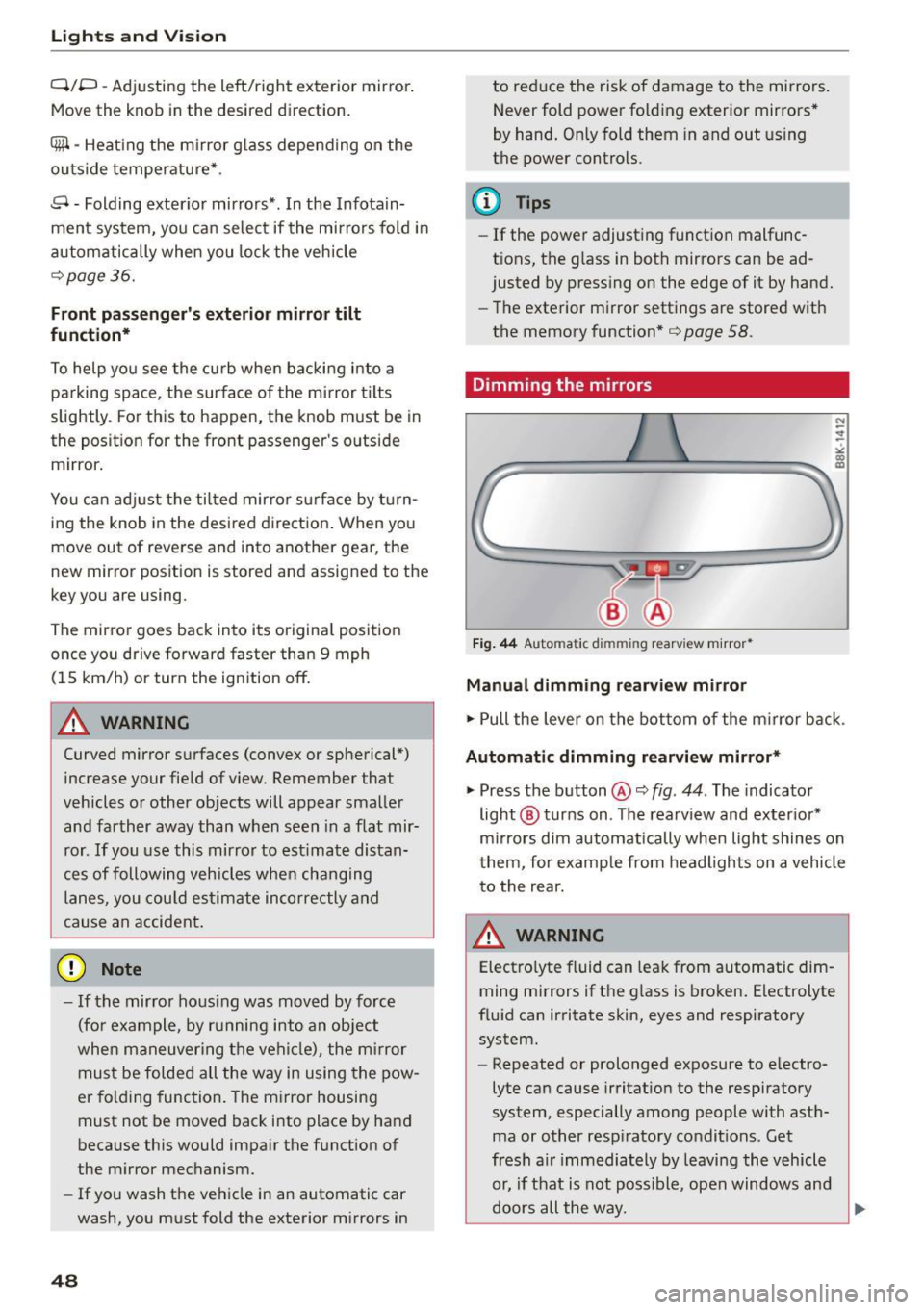
Fig. 44 Automat ic dimmin g rearv iew mirro r•
Manual dimming rearview mirror
.,. Pull the lever on the bottom of the m irror back .
Automat ic dimming rearview mirror*
.,. Press the button@¢ fig. 44. The indicator
light @ turns on . The rearview and exter ior*
mirrors dim automatically when light shines on
them, for example from headlights on a vehicle
to the rear.
~ WARNING
Electro lyte fluid can leak from automatic dim
ming mirrors if the glass is broken. Electrolyte
fluid can irritate skin, eyes and respiratory system.
- Repeated or prolonged exposure to e lectro
lyte can cause irritation to the respiratory
system, especially among people with asth
ma or other resp iratory conditions . Get
fresh a ir immediately by leaving the vehicle
or, if that is not possible, open windows and
doors all the way.
~