ESP AUDI A5 COUPE 2018 User Guide
[x] Cancel search | Manufacturer: AUDI, Model Year: 2018, Model line: A5 COUPE, Model: AUDI A5 COUPE 2018Pages: 409, PDF Size: 67.63 MB
Page 65 of 409
• Headlight assista nt: m alfun cti on! See own
e r's manual
Drive to an autho rized Aud i deale r or a uthorized
Aud i Service Facility immedia tely to have the
malfunct ion corrected. You can still switch the
high beams on or off manually.
• Headlight a ssi stant : currently unavailabl e.
C amera view re stricted due to surrounding s.
See owne r's manual
The camera view is b locked, fo r example by a
sticker o r debris.
The sensor is located between the interior rear
view mirror and the windshield . Do not place any
stickers in th is area on the wi ndsh ield .
& WARNING
High beam assistan t is only i ntended to assist
the drive r. The dr iver is still responsible for
controlling the headlights and may need to
switch them on and off manually depend ing
on light and visibility conditions. It may be
necessary to ope rate them manually in s itua
tions such as:
- In adverse weather conditions such as fog, heavy ra in, b low ing snow or spraying water .
- On roads where oncoming traffic may be
partially obsc ured, such as expressways.
- When there are road users that do not have
su fficient lighting, s uch as bicyclers or
vehicles with dirty ta il lamps.
- In tight cu rves and on steep hills .
- In poorly lit areas.
- Wi th strong ref lec to rs , such as s igns.
- If the area of the windsh ield near the senso r
is f ogged ove r, dirty, icy or covere d wi th a
st icker.
Adjusting the exterior lighting
The functions ore adjust ed in the Infotainment
system.
• Select in the Info tainment system : IM ENUI but-
~ ton >Vehicle > left contro l button > Vehicle ~
~ setting s> Exterior lighting . N ~ 0
'° ~ co
Lights and Vision
Automatic headlights
You can adjust the following se ttings in the Au
t o matic headlights
menu :
Activation tim e -you can adjust if the headlights
switch on
Early , Medium or Late accord ing to the
sensit ivi ty of the light sensor .
Headlight assistant * -you can switch the high
beam assistant* on and off.
Entry /exit lighting
When it is dark, the Ent ry /e xit lighting ill umi
nates the area around the vehicle when unlocking
the vehicle and after switching off the ignit ion
and opening the dr iver's door .
The
Entry /exit lighting only works when it is
dark and the light sw itch is in the
AUTO position.
Daytime running l ight s
USA model s:
the daytime running lights can be
switched on/off . Sel ect
On or Off.
Canad a model s:
this f unction canno t be switched
off. They activate automatically eac h time the ig
nition is switched on .
Emergency flashers
-- ---
] -~ ~-
--------
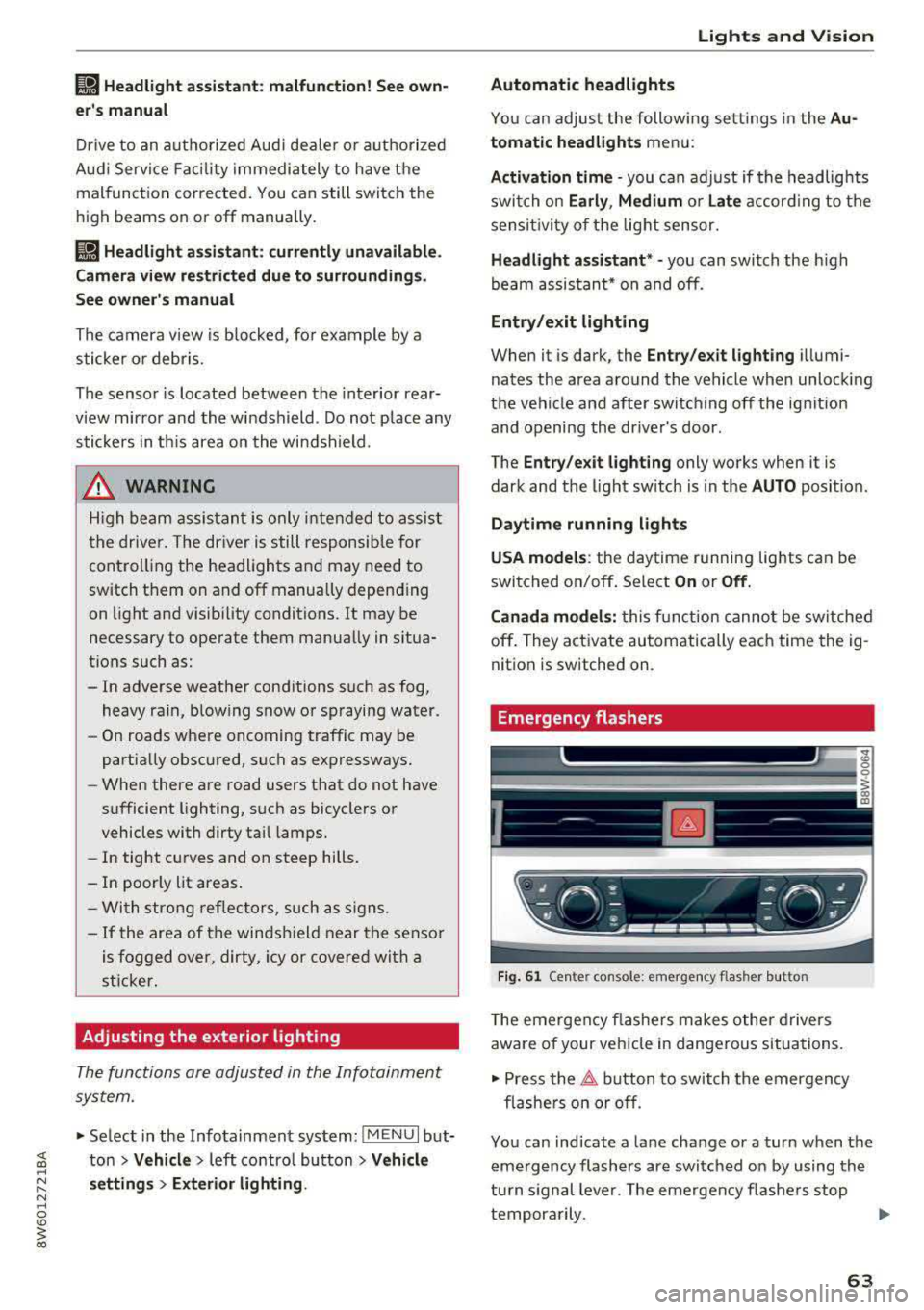
Fig . 61 Ce nte r con so le: emergency flas her butto n
T he emergen cy flashe rs makes othe r d rivers
aware of your vehicle in dangerous situat ions.
• Press the 11 b utton to switch the emergency
flashe rs on or off .
You can ind icate a lane change or a turn when the
eme rgency flashers are switched on by using the
tu rn s ignal lever. The emergency flashe rs stop
tempora rily.
.,.
63
Page 66 of 409
Lights and Vision
The emergency flashers also work whe n the igni
tion is turned off.
@ Tips
You s hou ld sw itch the emergency flashers on
if:
- you are the last car in a traff ic jam so that
a ll other vehicles approaching from behind
can see you, or if
- your ve hicle has bro ke n down or you are
having an eme rgency, or i f
- you r vehicle i s being towed or if yo u are tow
ing another vehicle
Interior lighting
Front interior lighting
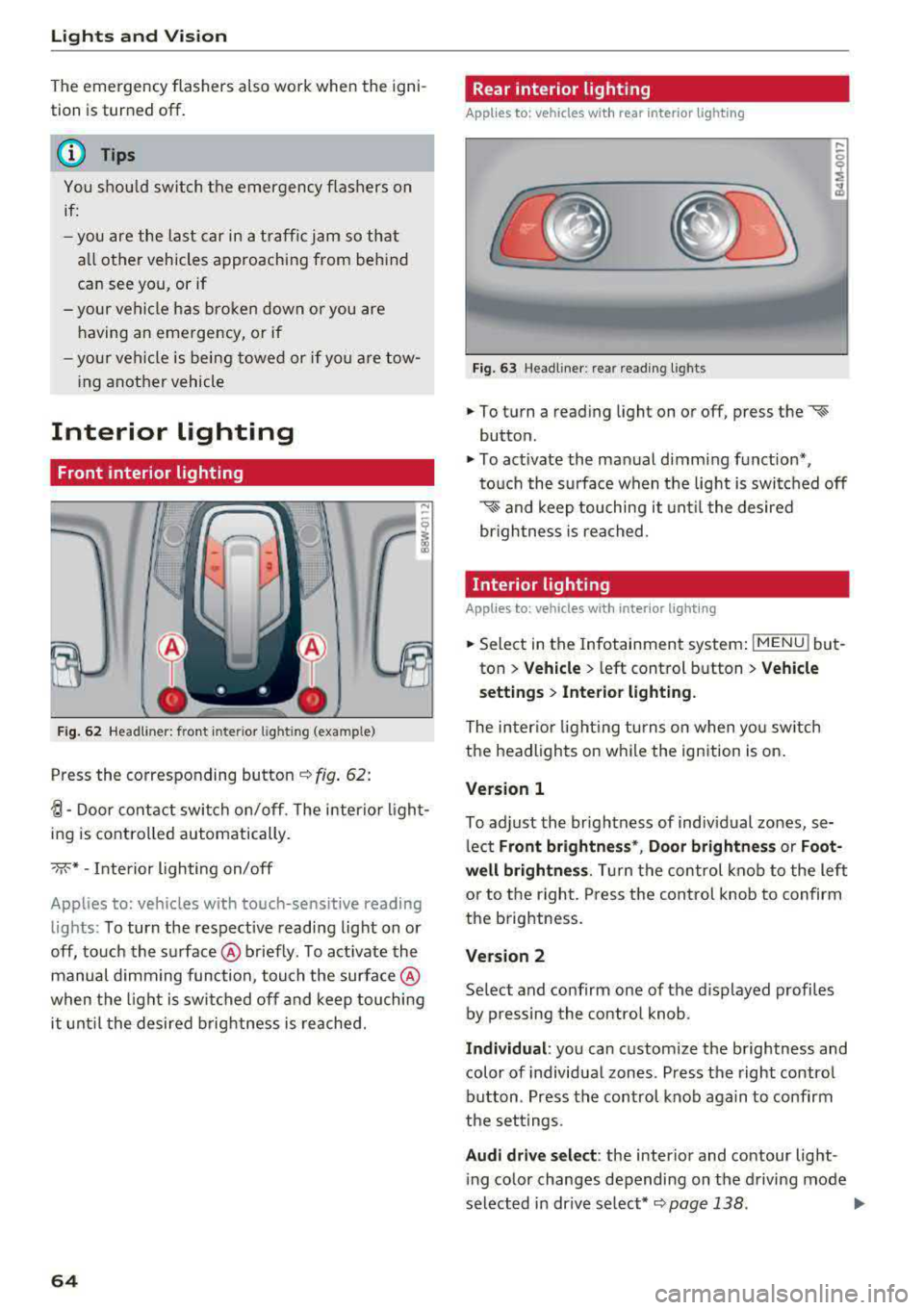
F ig. 62 Headliner: front inter ior l ight ing (example)
Press the corresponding button c::> fig . 62:
~-Door contac t switch on/off. The interior ligh t
ing is controlled automatically.
->;<-* -Inte rior l ighting on/off
Applies to: vehicles with touch-sensitive reading
lights: To turn the respect ive reading light on or
off, touch the surface @ briefly . To activate the
manual dimming function, touch the surface @
when the light is swi tched off and keep touching
it unt il t he desired brig htness is reached.
64
Rear interior lighting
Applies to: vehicles with rear interior lighting
Fig. 63 Headline r: rear reading lights
.,. To turn a reading light on or off, press the «~
button .
.,. To activate the ma nual dimming f unction*,
t o uch the s urface when the light is swi tc h ed off
'* and keep touching it unt il the desired
brightness is rea ched.
Interior lighting
Applies to: vehicles with interior lighting
.,. Select in the Infotainment system : IMENUj but
ton
> Vehicle > l eft control b utton > Vehicle
s etting s
> Interior lighting.
The inter io r l ight ing turns on when you sw itch
the headlights on w hile the ignition is on.
Version 1
To adjust the brightness of indiv idual zones, se
l ect
Front brightne ss*, Door brightnes s or Foot
well brightness .
Tur n the control kno b to the left
or to the right. Press the con trol knob to confirm
the b rightness.
Version 2
Se lect and confirm one of the d isplayed p rofiles
by pressing the con tro l knob.
Individual : you can custom ize the brightness and
color of individual zones. Press the right contro l
button. Press the control knob aga in to confirm
the set tings .
Audi driv e sel ect : the interio r and contour lig ht
i ng color changes depending on the d riving mode
selected in dr ive se lect*
c::> page 138 . ..,.
Page 68 of 409
Lights and Vision
make objects in the mirror appear smaller
and farther away. Your may estimate incor
rectly when you use these mirrors to gauge
your distance from the vehicles behind you
when changing lanes, which increases the risk of an accident.
{U) Note
- Applies to vehicles with power folding exte rior mirrors: if the mirror housing was
moved by outside forces (such as an impact
when maneuvering), you must use the pow
er folding function to fold the mirror all the
way out. The mirrors will make a loud noise
when they latch into place. The mirror hous
ing must not be moved back into place by
hand because this would impair the func
tion of the mirror mechanism.
- Applies to vehicles without power folding exterior mirrors: if the mirror housing was
moved by outside forces (such as an impact
when maneuvering), you must move it back
in place by hand.
- If you wash
th@ vehicle in an automatic car
wash, you must fold the exterior mirrors in
to reduce the risk of damage to the mirrors.
Never fold power folding exterior mirrors*
by hand . Only fold them in and out using
the power controls.
@ Tips
-If the power adjusting function malfunc
tions, the glass in both mirrors can be ad
justed by pressing on the edge of it by hand.
- The exterior mirror settings are stored with
the memory function*
9 page 74.
Dimming the mirrors
Your vehicle is equipped with a manual or auto
matic* dimming rearview mirror.
Manual dimming rearview mirror
.,. Pull the lever on the bottom of the mirror back.
66
Automatic dimming rearview mirror*
.,. The interior and exterior mirrors dim automati
cally when light shines on them, for example
from headlights on a vehicle behind you.
A WARNING
If the glass on an automatic dimming mirror
breaks, electrolyte can leak out. This liquid
can irritate the skin, eyes and respiratory sys
tem. If there is contact with the fluid, flush
immediately with plenty of water. Consult a
physician if necessary.
- Repeated or long-term exposure to electro lyte fluid can lead to irritation of the air
ways, especially in people with asthma or
other respiratory conditions. Take deep
breaths immediately after leaving the vehi
cle or, if this is not possible, open all of the
doors and windows as wide as possible.
- If electrolyte fluid enters the eyes, flush
them thoroughly with a large amount of
clean water for at least 15 minutes and then
seek medical attention.
- If electrolyte fluid comes into contact with
the skin, flush the affected area with clean
water for at least 15 minutes and then clean
with soap and water and seek medical at
tention. Clean affected clothing and shoes
thoroughly before wearing again.
- If the fluid was swallowed and the person is
conscious, flush the mouth with water for at least 15 minutes. Do not induce vomiting
unless this is recommended by medical pro
fessionals. Seek medical attention immedi
ately .
([) Note
If the glass on an automatic dimming mirror
breaks, electrolyte can leak out. This liquid
damages plastic surfaces and paint. Clean
this liquid as quickly as possible, for example
with a wet sponge.
(D Tips
- If the light reaching the rearview mirror is
obstructed, the automatic dimming mirror
will not function correctly,
Page 69 of 409

-The automatic dimming mirrors do not dim
when the interior lighting is turned on or
the reverse gear is selected.
Sun visors
9 :a
W- -- ----___._, dri~
Fig. 66 Su n visor
Sun visor
The sun visors for the driver and front passenger
can be re leased from their mounts and turned to
ward the doors
¢ fig. 66 @.
They can a lso be moved back and fo rth le ngth
wise in this posit ion.
Vanity mirror
The mirror lighting* switches on when the cover
over the vanity mirror @opens .
Windshield wipers
Switching the wipers on
Fig. 67 Windshield w iper lever
Move the windshield wiper lever to the corre
spond ing pos ition:
@ -Windshield wipers off
en 0 0
> u. III
@ -Rain sensor mode. The windshield wipers
switch on once the vehicle speed exceeds approx-
Lights and V ision
imately 2 mph (4 km/h) and it is raining. The
higher the sensitivity of the rain sensor that is set
(switch @to the right), the earlier the w ind
shield wipers react to moisture on the wind
shield. You can deactivate the rain sensor mode in the Infotainment system, wh ich sw itches the
intermittent mode on. To do this, select:
IMENUI
button > Vehicle > left control button > Driver
a ss istance > Rain sensor .
In inte rmittent mode,
you can adjust the interval time using the switch
@.
@ -Slow wiping
®-Fast wiping
@ -Single wipe. If you ho ld the lever in this posi
t ion longer, the wipers switch from slow wip ing
to fast wiping.
® -Clean the windshield . The wipers wipe one
time after several seconds of driving to remove
water droplets. You can sw itch this function off
by moving the lever to posit ion ® within
10 sec
onds of the afterwipe. The afterwipe function is
reactivated the next time you switch the ignit ion
on.
Clean the headlights*. The headlight washer sys
tem* operates only when the low beam head lights are on. If you move the lever into position
@, the headlights will be cleaned at fixed inter
vals .
_&. WARNING
-The rain sensor is on ly intended to ass ist the
d river. The driver may sti ll be responsible
for manually switching the wipers on based on visibility conditions.
-The windsh ield may not be treated w ith wa
ter-repelling windshield coating agents. Un
favorable conditions, such as wetness, dark
ness or low sun, can result in increased
g lare, which increases the risk of an acci
dent. Wiper blade chatter is also possible.
-Properly functioning windshield wiper
blades are required for a clear v iew and safe
driving
c;, page 68, Replacing wiper
blades .
~
67
Page 74 of 409
Sea ts and stor age
Operating
.. If you turn the m ultif unction bu tton CD
¢ page 71, fig . 72 to the left or to the right,
the possible seat settings @ are shown in the
Infotainment system
~ fig . 73 .
.. To se lect a seat setting, turn the multifunction
button
CD in the corresponding direction until
the des ired seat setting is outlined in red.
• The arrows @ represent the possible adjust
ments . Fo r example, to lower the lumbar sup
po rt, p ress the m ultifunction bu tton
CD down.
T he co rresponding arrow © lights up.
The fo llowing seat sett ings @ are possible :
Massage func tion * -select the massage type
Wave, St retch , Knead or Off . You can adjust the
i n tens ity of each massage from 1 to 3 . You can
sw itch the selected massage on/off using the
button @~ fig. 73 .
Lumb ar support -you can adjust t he lumbar sup
port up/down and to be stronger/weaker .
Side bolsters * -you can increase/decrease the
side support in the seat using the side bo lsters
on the seat backrest .
(I) Tips
-The massage function switches off a uto
matically after approx imately 10 minutes.
- The air in the side bo lsters* is released as
soon as the driver's door opens. This makes
i s possible to enter and exit the vehicle
mo re comfortab ly. As soon as you sta rt driv
i ng the veh icle, the s ide bo lsters fill.
1l Requ irem en t: the ve hicl e battery m ust have a suff icien t
c ha rge le v e l.
72
Easy seat entry
App lies to: vehicles with entry ass istance
Entry assistance makes it easier for the rear pas
sengers to enter and leave the vehicle .
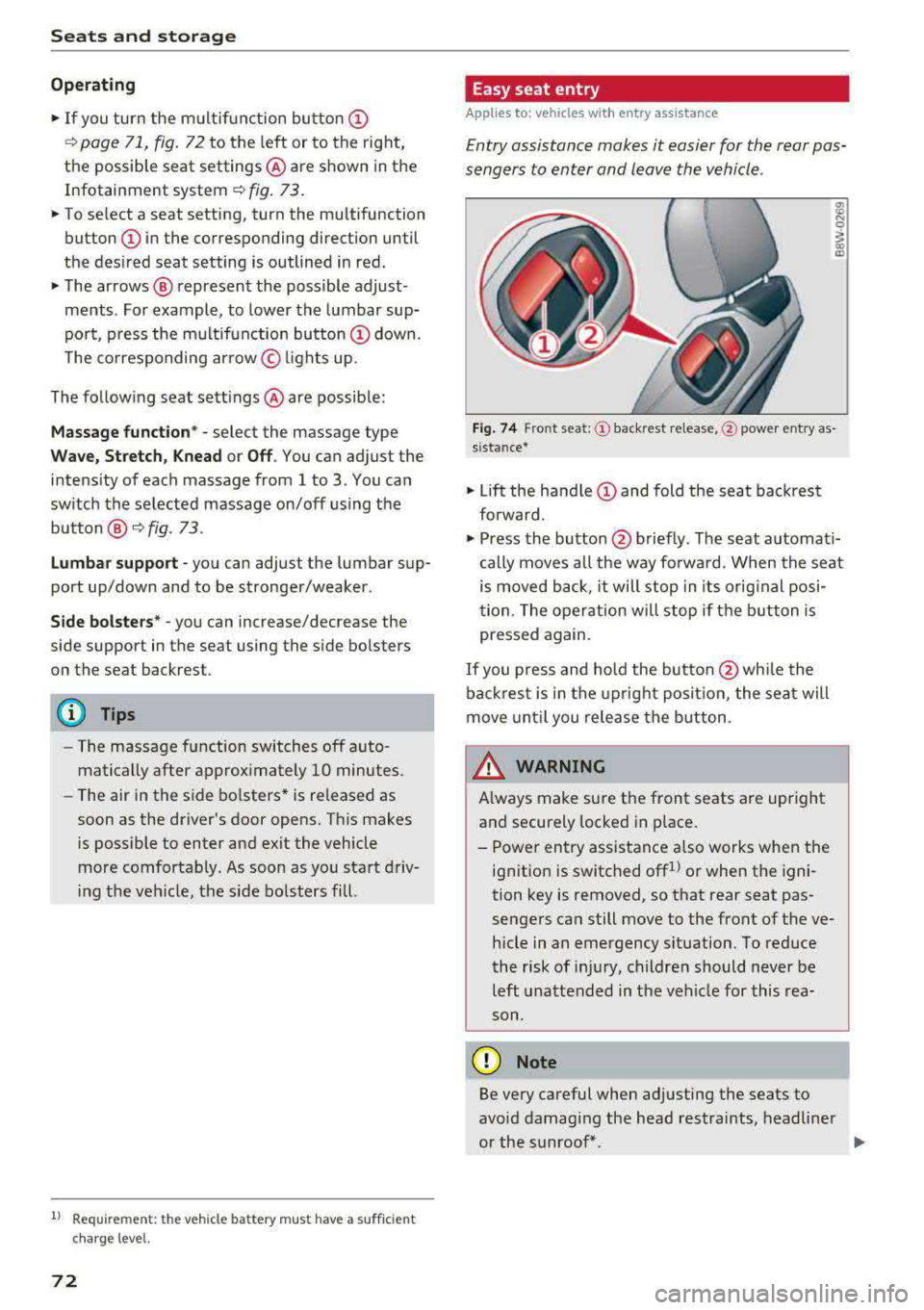
Fig . 7 4 Fro nt seat: © backrest re lease, @powe r entry as
s ista nce*
• Lift the hand le CD and fold the seat backrest
forward .
• Press the button@ briefly . T he seat automati
cally moves a ll the way fo rwa rd . When the seat
is moved back, it will stop in its o rig inal posi
tion . The operation will stop if t he b utton is
pressed again.
If you p ress and hold the butto n
@while the
bac kres t is in the upright posi tion, the sea t will
move unt il you release the b utton .
& WARNING
Always make su re the front seats are upright
and securely locked in p lace .
- Power entry assistance also works when the
ignit ion is switched off
1
) or when the igni
tion key is removed , so t hat rear seat pas
sengers can still move to the front of the ve
hicle in an emergency s ituation. To red uce
the risk of inj ury, childre n should never be
left unattended in the vehicle for this rea
son .
(D Note
Be very careful when adjusting the seats to
avo id damaging the head restraints, headline r
or the sunroof*.
Page 80 of 409
Seats and storage
_&. WARNING
-The luggage c ompartment cover is not a
surface for storin9 objects. Objects placed
on the cover could endanger all vehicle oc
cupants during sudden braking maneuvers
or in a crash.
- To reduce the risk of accidents, the luggage
compartment cover should never be unse
cured under any circumstances.
Increasing the size of the vehicle interior
Applies to : vehicles with folding backrests
The rear seat backrests can be folded forward ei
ther separately* or together.
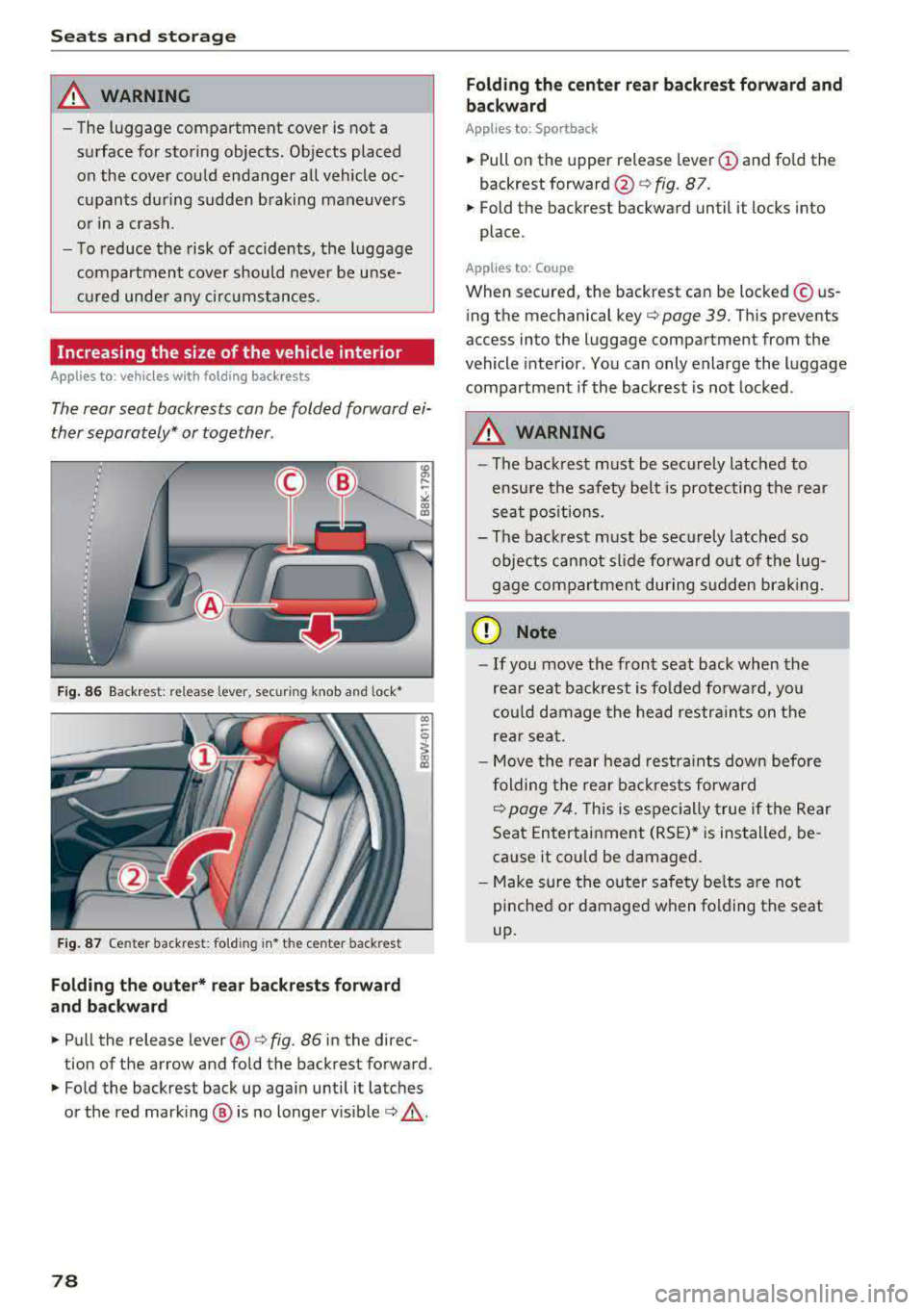
Fig. 86 Backrest : release lever, securing knob and lock*
Fig. 87 Center backrest: fold ing in* the center backrest
Folding the outer* rear backrests forward
and backward
.,. Pull the release lever @¢ fig. 86 in the direc
tion of the arrow and fold the backrest forward .
.,. Fold the backrest back up again until it latches
or the red marking @ is no longer
visible¢ &,.
78
Folding the center rear backrest forward and
backward
Applies to: Sportback
.,. Pull on the upper release lever (D and fold the
backrest
forward @¢ fig. 87.
.,. Fold the backrest backward until it locks into
place .
Applies to : Coupe
When secured, the backrest can be locked© us
ing the mechanical
key¢ page 39. This prevents
access into the luggage compartment from the
vehicle interior. You can only enlarge the luggage
compartment if the backrest is not locked .
_&. WARNING
-The backrest must be securely latched to
ensure the safety belt is protecting the rear
seat positions.
- The backrest must be securely latched so
objects cannot slide forward out of the lug
gage compartment during sudden braking.
(D Note
- If you move the front seat back when the
rear seat backrest is folded forward, you
could damage the head restraints on the
rear seat.
- Move the rear head restraints down before
folding the rear backrests forward
~ page 74. This is especially true if the Rear
Seat Entertainment (RSE)* is installed, be
cause it could be damaged.
- Make sure the outer safety belts are not
pinched or damaged when folding the seat
up.
-
Page 81 of 409
Increasing the size of the luggage
compartment
Applies to: vehicles with release lever in the luggage com
partment
The rear seat backrests can be folded forward ei
ther separately* or together .
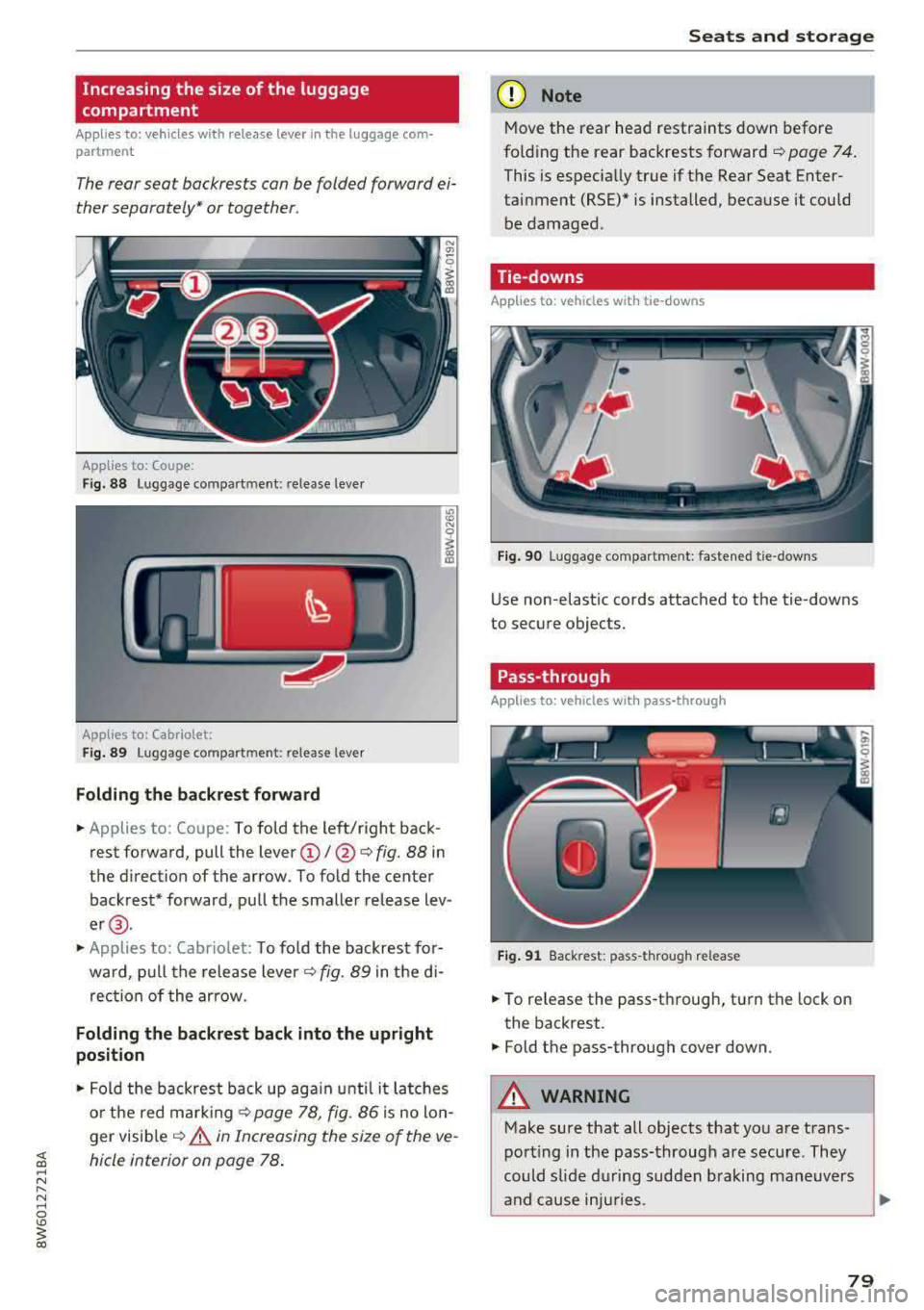
Applies to: Coupe:
Fig. 88 Luggage compart ment: re lease leve r
Applies to: Cabriolet:
F ig. 89 Luggage co mpart m ent: re lease lever
Folding the b ack re st forwa rd
.. Applies to: Coupe: To fold the left/right back
rest forward, pull the
lever (!)/@ <=:> fig. 88 in
the d irection of the arrow . To fold the center
backrest* forward, pull the smaller release lev
er @ .
.. Applies to: Cabrio let: To fo ld the backrest for
wa rd, p ull the release lever
c:::> fig. 89 in the d i
rec tion of the ar row .
Folding the backrest back into the upright
posit ion
.. Fold the backrest back up aga in until i t latches
o r the red mark ing
<=:> page 78, fig . 86 is no lo n
ger visib le
c:::> &. in Increasing the size of the ve
hicle interior on page 78 .
Seats and storag e
(D Note
Move the rear head restraints down before
fo ld ing the rear backrests forward
c:::> page 7 4.
This is espec ia lly true if the Rear Seat Enter
tainment (RSE)* is installed, because it could
be damaged.
Tie-downs
Applies to : veh icles w ith tie -downs
Fig . 90 Luggage compar tment: faste ned t ie- downs
Use non-elastic cords attached to the tie-downs
to secure objec ts.
Pass-through
Applies to: veh icles w ith pass-t hrough
Fi g. 91 Back rest: pass -throu gh release
.. To re lease the pass-t hrough, turn the lock on
the backrest.
.. Fold the pass-through cover down.
A WARNING
-Make sure that all objects that you are-trans -
port ing in the pass-through are secure . They
could slide during sudden b raking maneuvers
and cause inju ries .
1J1>
79
Page 84 of 409

Warm and cold
3 zone deluxe automatic climate control
Operation
Fig. 94 3-zone de luxe automatic cl imate co ntrol : co ckp it co ntr ol s
Fig. 95 3-zo ne deluxe automatic cl imate co ntrol system : rear con trols
Press the knobs, buttons or rocker switches to
turn the functions on or off . When the funct ion is
sw itched on, the LED in the respective button or
knob turns
on¢ fig. 94. The rocker switches are
sensitive to touch. The driver and front passenger
settings can be adjusted separately.
You can adjust the settings for the rear of the ve
hicle using the controls in the rear
¢fig . 95.
On right-hand drive vehicles*, the functions of
the rocker switched ®
and® are switched .
OFF
climate control system
The OFF button switches the cl imate control sys
tem on or off. It also switches on when you press
82
another button or a knob. Airflow from outside is
blocked when the climate control system is
switched off .
A/C
Cooling mode
You can switch the cooling mode on or off using
the rocker switch ®· The air is not cooled and hu
midity is not removed when cooling mode is
switched off . This can cause fog on the windows.
Cooling mode switches off automatically when
the outside temperature is below zero.
A/Ceco
Cooling mode*
You can switch the eco cooling mode on or o ff us-
ing the rocker switch @. T he climate control
..,.
Page 85 of 409

<( a, .... N ,....
N .... 0 \0
3 a,
system operates most efficiently in eco cooling
mode.
A/C MAX Cooling mode*
You can switch the maximum cooling mode on or
off using the rocker switch@. Th e air is not
cooled and humidity is not removed when coo ling
mode is switched off. This can cause fog on the
windows. Cooling mode switches off automati
cally when the outside temperature is below
zero. When the cooling mode is switched on, the
vehicle interior is cooled as quickly as possible and dehumidified.
c:E) Recirculation mode
In recirculation mode, the air inside the vehicle is
circulated and fi ltered. This prevents the unfil
tered air outside the vehicle from entering the
vehicle interior. Switching recirculation mode on
when dr iving through a tunnel or when sitting in
traffic is recommended
~ ,&. .
You can switch the recirculation mode on or off
using
the~ button. You can also switch the re
circulation mode off by pressing the knob (Dor
the~ button.
AUTO
automatic mode
Automatic mode maintains a constant tempera
ture inside the veh icle. Air temperature, airflow
and a ir distribution are controlled automatically .
You can switch automatic mode on or off by pressing the
knob @.
Temperature
You can adjust the temperature between 60°F
(+16°()
and 84°F (+28°() by turning the knob
(D . Outside of this range, LO or HI will appear in
the cl imate control system display. In both set
tings, the climate cont rol runs constantly at the
maximum cooling or heating leve l. The tempera
ture is not regulated.
The temperature can be adjusted in the rear
us
ing the rear contro ls~ fig. 95.
86'~ Blower
You can adjust the vo lume of air generated by the
blower to your preference using the rocker sw itch
@ . The blower should always run at a low setting
Warm and cold
to prevent the windows from fogging and to en
sure a continuous exchange of air inside the vehi
cle. To have the blower regulated automatically,
press one of the knobs
(D .
Air distribution
You can use the rocker sw itches @to adjust the
vents where the air wi ll flow out of. Press the
rocker switches @repeatedly until the desired
air distribution sett ing is disp layed in the climate
control system controls. To have the air distribu
t ion regulated automat ically, press one of the
knobs
(D .
"'11\2' OPEN/CLOSE the wide vent
You can open and close the wide vent in the cock
pit using the rocker switch ®·
JI j Seat/neck heating*
If you press the JI j button when the engine is
running, the seat o r neck heating will switch on
at the highest level (3). The LEDs indicate the
temperature level. To reduce the temperature, press the button again. To switch the seat or
neck heat ing
off, press the respective button re
peatedly until the LED turns off.
~ Seat ventilation*
Pressing the~ button switches the seat ventila
tion on at the highest level (3). The LEDs indicate
the temperature level. To reduce the ventilation
level, press the button again. To sw itch the seat
ventilat ion off, press the button repeatedly until
the LED turns off.
I Seat heating/ventilation*
If you press the lo button, you can turn either the
seat ventilation or the seat heating on or off.
- If you turn the knob clockwise, you wi ll turn the
seat heating down to the lowest level (1). The
red LED in the button turns on. To increase the
temperature, keep turn ing clockwise to the
highest level (3).
- If you turn the knob counterclockwise, you will
turn the seat ventilation down to the lowest
level (1). The b lue LED in the button turns on .
To increase the ventilation, keep turning coun-
terclockwise to the highest level (3).
.,..
83
Page 88 of 409
Driving
Driving
General information
Breaking in
A new vehicle must be broken in for the first 1,000 mi les (1,500 km). Do not drive at speeds
that will exceed 2/3 of the maximum perm itted
engine speed (RPM) for the first 600 miles
(1,000 km), and avoid full acceleration during
this period . You may gradually start increasing
the RPM and the speed between 600 miles (1,000 km) and 1,000 miles (1,500 km) .
During the first hours of use, the engine has a
h igher internal friction than later on when all
moving parts have settled into place with each
other.
How the vehicle is driven during the first 1,000
miles (1,500 km) also affects the engine quality.
Drive at moderate engine speeds after the initial
break-in period, particularly when running a cold
engine. This will reduce engine wear and improve
the mileage .
Do not drive at too low of an engine speed (RPM) .
Shift down if the engine stops running "smooth ly". Extremely high engine speeds are automati
cally reduced .
Reducing the risk of vehicle damage
(D Note
When driving on poor roads, by curbs and on
steep ramps, make su re that low-hang ing
components such as the spoi ler and exhaust
system do not come into contact with these
or they could be damaged. This especially ap
plies to vehicles with low ground clearance
and vehicles that are heavily loaded.
Driving through water on roads
Note the following to reduce the risk of vehicle
damage when driv ing through water, for example
on flooded roads:
-The water must not be any higher than the bot
tom of the vehicle body .
86
-Do not drive faster than walking speed .
A WARNING
After driving through water or mud, the effec
tiveness of the brakes may be reduced due to
moisture on the brake rotors and brake pads.
A few careful brake applications should dry
off the brakes and restore the full braking ef
fect .
{CT) Note
-Vehicle components such as the engine,
transmission, suspension or electrical sys-
tem can be severely damaged by driving
through water .
-Always switch the Start/Stop system* off
when driving through water <=:>page
91.
@ Tips
-Determine the depth before driving through
water.
-Do not stop the vehicle, drive in reverse or
switch the engine off when driving through
water .
'
-Keep in mind that oncoming vehicles may
create waves that raise the water level and
make it too deep for your vehicle to drive
through safe ly .
-Avoid driving through salt water, because
this can cause corrosion .
Economical and environmentally -friendly
dr iving
The amount of fuel consumption, the environ
mental impact and the wear to the engine,
brakes and tires depends mostly on your driving
style. With an anticipatory and economic driving
style, fuel consumption can be reduced by ap proximately 10-15%. The following tips will help
you conserve the environment and your money at the same time .
Anticipatory driving
A vehicle uses the most fuel when accelerating.
When you drive with anticipation, you do not need to brake as often and so you accelerate less.
When possible, let your vehicle coast with a gear
..,.