battery AUDI A5 COUPE 2018 User Guide
[x] Cancel search | Manufacturer: AUDI, Model Year: 2018, Model line: A5 COUPE, Model: AUDI A5 COUPE 2018Pages: 409, PDF Size: 67.63 MB
Page 74 of 409
Sea ts and stor age
Operating
.. If you turn the m ultif unction bu tton CD
¢ page 71, fig . 72 to the left or to the right,
the possible seat settings @ are shown in the
Infotainment system
~ fig . 73 .
.. To se lect a seat setting, turn the multifunction
button
CD in the corresponding direction until
the des ired seat setting is outlined in red.
• The arrows @ represent the possible adjust
ments . Fo r example, to lower the lumbar sup
po rt, p ress the m ultifunction bu tton
CD down.
T he co rresponding arrow © lights up.
The fo llowing seat sett ings @ are possible :
Massage func tion * -select the massage type
Wave, St retch , Knead or Off . You can adjust the
i n tens ity of each massage from 1 to 3 . You can
sw itch the selected massage on/off using the
button @~ fig. 73 .
Lumb ar support -you can adjust t he lumbar sup
port up/down and to be stronger/weaker .
Side bolsters * -you can increase/decrease the
side support in the seat using the side bo lsters
on the seat backrest .
(I) Tips
-The massage function switches off a uto
matically after approx imately 10 minutes.
- The air in the side bo lsters* is released as
soon as the driver's door opens. This makes
i s possible to enter and exit the vehicle
mo re comfortab ly. As soon as you sta rt driv
i ng the veh icle, the s ide bo lsters fill.
1l Requ irem en t: the ve hicl e battery m ust have a suff icien t
c ha rge le v e l.
72
Easy seat entry
App lies to: vehicles with entry ass istance
Entry assistance makes it easier for the rear pas
sengers to enter and leave the vehicle .
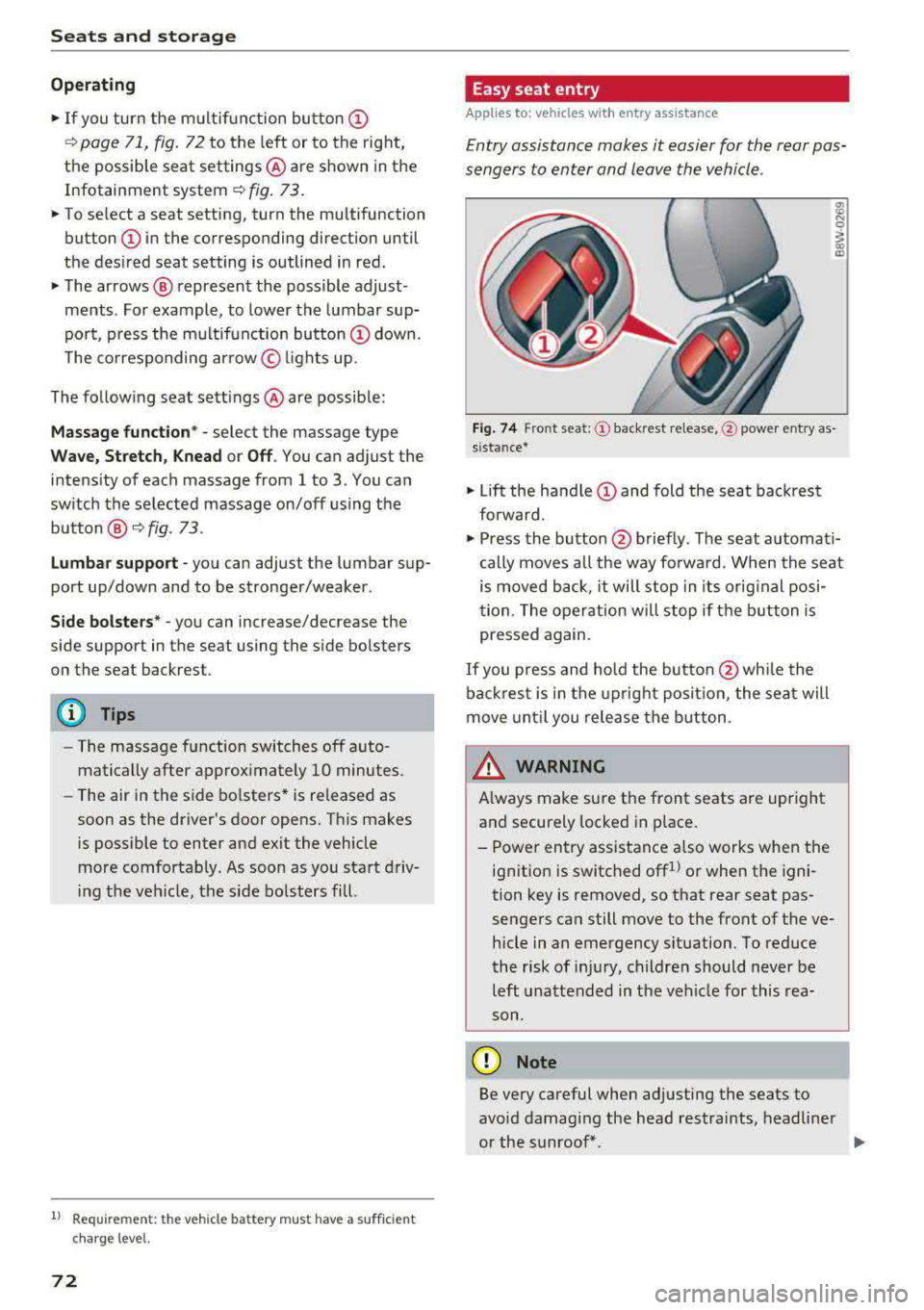
Fig . 7 4 Fro nt seat: © backrest re lease, @powe r entry as
s ista nce*
• Lift the hand le CD and fold the seat backrest
forward .
• Press the button@ briefly . T he seat automati
cally moves a ll the way fo rwa rd . When the seat
is moved back, it will stop in its o rig inal posi
tion . The operation will stop if t he b utton is
pressed again.
If you p ress and hold the butto n
@while the
bac kres t is in the upright posi tion, the sea t will
move unt il you release the b utton .
& WARNING
Always make su re the front seats are upright
and securely locked in p lace .
- Power entry assistance also works when the
ignit ion is switched off
1
) or when the igni
tion key is removed , so t hat rear seat pas
sengers can still move to the front of the ve
hicle in an emergency s ituation. To red uce
the risk of inj ury, childre n should never be
left unattended in the vehicle for this rea
son .
(D Note
Be very careful when adjusting the seats to
avo id damaging the head restraints, headline r
or the sunroof*.
Page 78 of 409

Sea ts and stor age
of injuries, never leave ch ildren unattended in
the vehicle with the veh icle key.
CD Note
- To reduce the risk of damage to the vehicle
electrica l system, never attempt to charge
the vehicle battery by connecting accesso ries that prov ide power, such as solar panels
or battery chargers, to the 12 Volt sockets
or the cigarette lighter.
- To reduce the risk of damage to the sockets,
only use plugs that fit correct ly.
Storage
Cup holders
F ig . 8 2 Rear cente r armrest: cup holders•
Your vehicle has cup ho lders in the front cen ter
console, in the cente r of the rear bench seat* or
in the rea r center a rm rest * as well as on the right
and left side in t he rear*.
Cup hold ers in the rear c enter armrest*
• Fold the center armrest downward.
• To open the cup ho lders, pull th e top cover on
the cup holders forward
¢ fig. 82.
• Set yo ur beverage in the holde r.
• To close the cup holder, fold the cover back un
ti l it clicks into place .
&_ WARNING
-
-Do not put any hot beverages in the cup
holder w hile the vehicle is mov ing. Hot bev
erages could spill, wh ich increases the r isk
of injury.
-Do not use any breakable beverage contain
ers (for example, made out of glass or por-
76
celain). You could be injured by them in the
event of an accident.
CD Note
Beverage containers in the cup holders should
a lways have a lid .
If not, beverages could spill
and ca use damage to veh icle equipment, such
e lectron ics or seat covers.
Cooled glove compartment
Applies to: vehicles with cooled g love co mpartment
The cooled glove compartment only functions
when the AIC system is switched on.
F ig. 83 G love compartment: sw itch ing cooling mode on/
off
• Turn the knob @ counter-clockwise to switch
the cooling on . The symbols on the knob must
appear as they do in
¢ fig. 83.
• Turn the knob @ clockwise to switch the cool
ing off .
If the heating is switched on, switching the glove
compartment cooling mode off is recommended.
Addit ional storage compartments
You w ill find a variety of storage compartments
and holders at various locat io ns in the vehicle .
- Glove compartment: the glove compartment
can be locked using the mechanical key
¢ page 38, Key set .
-In the door trim panels
- Safety vest compartment in the door trim pan-
els on the dr iver's side and front passenger's
side
-Storage compartment under the front center
armrest
.,.
Page 93 of 409
you stop it. You also cannot lock the vehicle from
the outside .
Applies to: vehicles with au tomatic transm issions
Shift to P , otherwise vehicle can roll away.
Doors do not lock if gearshift is not in P
This message appears for safety reasons if the
selector lever is in the N position when you
sw itch the ignition off. Move the selector leve r to
the P position. Otherwise the vehicle is not pro
tected from ro lling and it cannot be locked .
DJ Remote control key: hold back of key
against the designated area . See owner 's man
ual
If the indicator light turns on and th is message
appears, there is a malfunction
c> page 91 .
Applies to: vehicles with automatic transmissions
Shift to P before leaving car, otherwise vehicle
can roll away
This message appears if the driver's door is
opened while the ignition is switched on and the
transmission has not been shifted to the P posi
tion . Sh ift the transmiss ion into the P position
and turn off the ignition if you are leaving the ve
hicle . Otherwise the vehicle could roll. Also see
c::> page93 .
Starting the engine when there is a
malfunction
It may not be possible to start the engine under
certain circumstances, for example if the battery
in the vehicle key is drained, if interference is af
fected the key or if there is a system malfunc
tion .
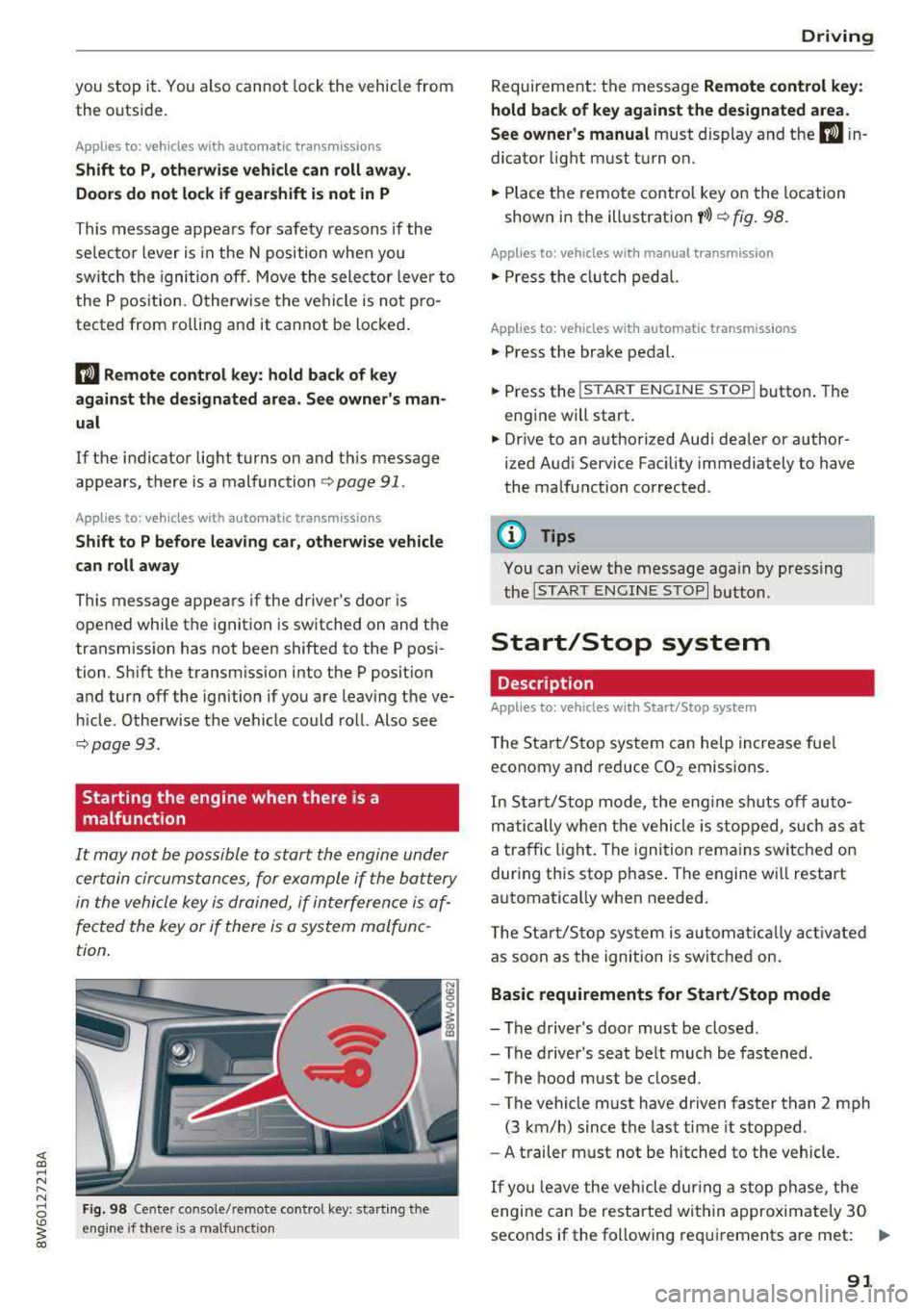
Fig. 98 Cente r console/ remote contro l key: starting t he
eng ine if there is a malfunc tion
Driving
Requirement: the message Remote control key:
hold back of key against the designated area .
See owner's manual
must display and the DJ i n
dicator light must turn on.
.,. Place the remote control key on the location
shown in the illustration
y >l) c::> fig . 98.
Applies to: vehicles with manual transmission
.,. Press the clutch pedal.
Applies to: vehicles with automatic transmissions
• Press the brake pedal.
.. Press the !START ENGINE STOP ! button. The
engine will start.
.,. Drive to an authorized Audi dea ler or author
ized Aud i Service Facility immediately to have
the malfunction corrected.
@ Tips
You can view the message again by pressing
the
I S TART ENGINE STOP I button.
Start/Stop system
Description
Applies to: vehicles with Start/Stop system
The Start/Stop system can help increase fue l
economy and reduce CO2 emissions.
In Sta rt/Stop mode, the engine shuts off auto
matically when the vehicle is stopped, such as at
a traffic light. The ignition remains switched on
during this stop phase . The engine wi ll restart
automatica lly when needed .
Th e Start/Stop system is a utomaticall y activated
as soon as the ignition is switched on.
Basic requirements for Start/Stop mode
-The driver's door must be closed .
-The driver's seat belt much be fastened.
- The hood must be closed.
- The vehicle must have driven faster than
2 mph
(3 km/h) since the last time it stopped .
- A trailer must not be hitched to the vehicle.
If you leave the vehicle during a stop phase, the
engine can be restarted within approximately 30
seconds if the following requi rements are met:
IJ>
91
Page 95 of 409
@j indicator light appears in the instrument clus
ter disp lay, the engine will not be stopped, for
examp le in the following situations:
- T he eng ine has not reached the minimum re
quired temperature for Start/Stop mode.
- T he interior temperature selected by the cli-
mate contro l system has not been reached .
- T he outs ide temperature is ext remely h igh/low.
- The windshield is being defrosted.
- The neck heating* is turned on .
- The vehicle battery charge level is too low.
- The steering wheel is turned at a sharp angle or is moving .
- After engaging the reverse gear.
- On sharp inclines.
- At high altitudes .
Engine automatically restarts
The standard Start/Stop mode will be canceled
during a stop phase in the follow ing s ituations .
The engine resta rts without any action by the
driver.
- The vehicle rolls , for example while on a slope.
- The interior temperature differs from the tem-
perature selected in the A/C system .
- The windshield is being defrosted.
- The brake pedal is pressed several times in a
row.
- The vehicle battery charge level is too low .
- Power consumption is high.
The engine can turn off again when the condi
tions for Start/Stop mode are met.
Ignition is switched off automatically
To prevent the vehicle battery from draining, the
ignition will switch off automat ically under the
following conditions :
- The Start/Stop system has stopped the engine .
- The vehicle is stationary.
- You left the ve hicle and the engine was not re-
started within approximate ly 30 seconds .
If th is happens, you w ill see the message
Igni
<( ~ tion turns off automatically in the instrument
~ cluster and the activated low beams are replaced N
8 by the parking light. The parking lights will \0
3
switch off after approximately 30 minutes or
when you lock the vehicle .
T he ign ition also switches off when you lock the
vehicle from the outside during a stop phase.
If the Start/Stop system has not turned off the
engine or if you have switched the Start/Stop sys
tem off manually, the ignition w ill no t be auto
matically sw itched off and the eng ine will contin
ue to
run ¢& .
A WARNING
To reduce the risk of poisoning, never allow
the engine to run in confined spaces.
(D Tips
Applies to: vehicles with automatic transmissions
- If you leave the vehicle with the 0/5 or R se
lector lever position engaged, the parking
brake is automatically set.
- If you select the D or N selector lever posi
tion after shifting into reverse, the vehicle
must be driven faster than 6 mph (10 km/h)
in order for the engine to switch off again .
Manually switching the Start/Stop system
off/on
Applies to: veh icles w ith Start/Stop system
If you do not wish to use the system, you can
switch it off manually.
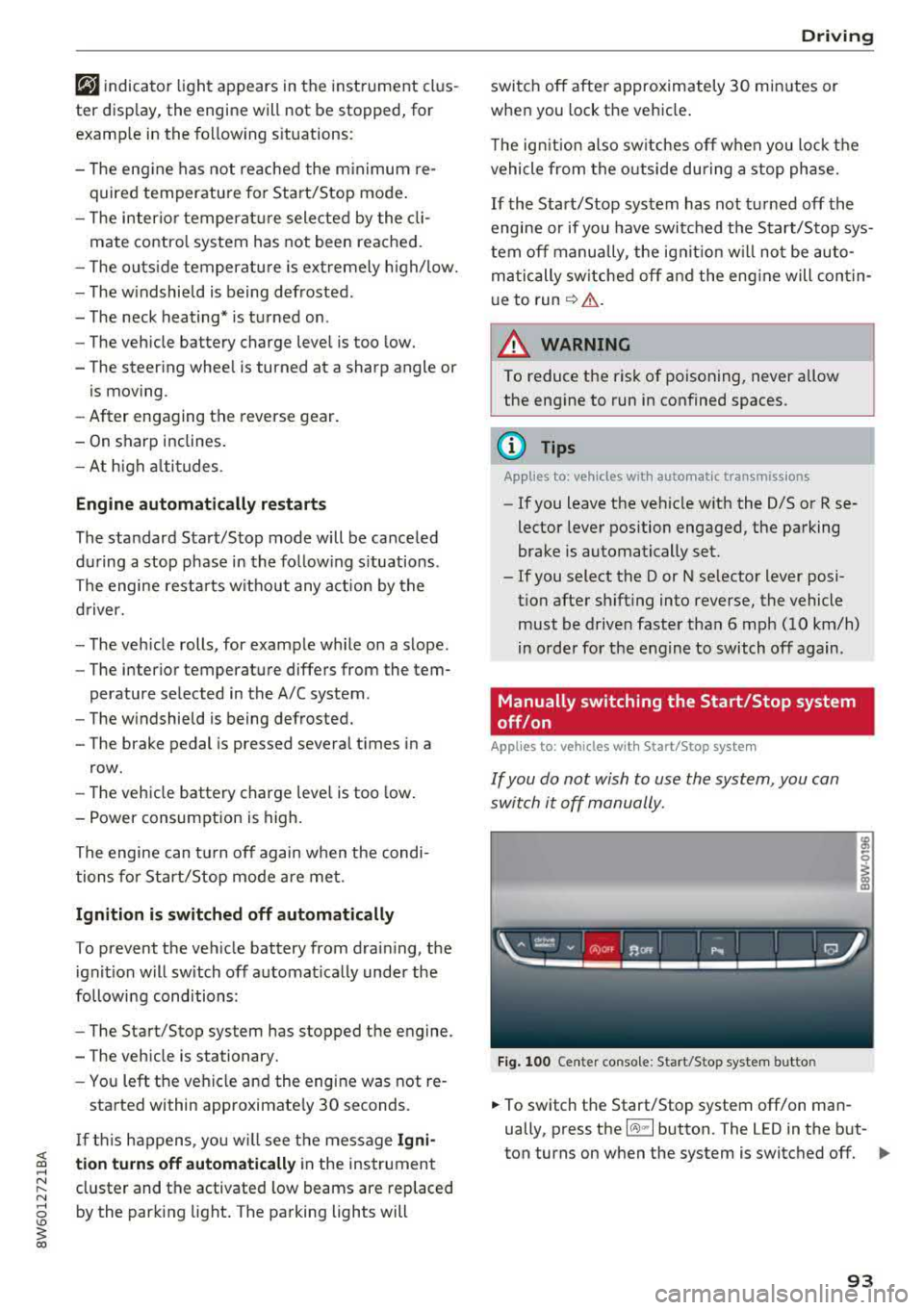
Fig. 100 Center co nsole: Start/Stop system butto n
-
.,. To switch the Start/Stop system off/on man
ually, press the
l (A) ml button. The LED in the but
ton turns on when the system is switched off.
Ill-
93
Page 157 of 409
<( a, .... N ,....
N .... 0 \0
3 a,
snow and ice. Always read and follow safety
precautions¢.&. .
Winter tires
By using all wheel drive, your vehicle has good
forward motion with standard tires in winter con
ditions. However, using winter or all season tires
on
all four wheels in the winter is recommended,
because this will improve the
braking effect.
Snow chains
If there are snow chain laws, snow chains must
also be used on vehicles with all wheel drive
¢ page 358, Snow chains.
Replacing tires
For vehicles with all wheel drive, only wheels with
the same rolling circumference should be used.
Avoid using tires with different tread depths
¢ page 348, New tires or wheels.
Offroad vehicle?
Your Audi is not an offroad vehicle -there is not
enough ground clearance. For this reason, avoid
difficult terrain .
A WARNING
-Also, in vehicles with all wheel drive, adapt
your driving style to the current road and
traffic conditions. Do not let the increased
safety provided tempt you into taking risks,
because this increases the risk of an acci
dent .
- The braking ability of your vehicle is limited
to the traction of the wheels. In this way, it
is not different from a two wheel drive vehi
cle. Do not be tempted to accelerate to a
high speed when the road is slippery, be
cause this increases the risk of an accident .
- Note that on wet streets, the front wheels
can "hydroplane" if driving at speeds that
are too high. Unlike front wheel drive
vehicles, the engine does not rev higher sud
denly when the vehicle begins hydroplaning.
For this reason, adapt your speed to the
road conditions to reduce the risk of an acci
dent.
Intelligent Technology
Energy management
The starting ability is optimized
T he energy management system manages the
electrical energy distribution and optimizes the
availability of electrical energy for starting the
engtne.
When a vehicle with a conventional energy sys
tem is not driven for a long time, the vehicle bat
tery is drained by equipment (for example, the
immobilizer). In certain circumstances , there
could may not be enough energy to start the en
gine.
Your vehicle is equipped with an intelligent ener
gy management system for distributing electrici
ty. This significantly improves the starting ability
and increases the vehicle battery life.
The energy management system Is made up of
battery diagnosis, idling current management,
and dynamic energy management.
Battery diagnosis
The battery diagnosis determines the vehicle bat
tery charge level. The sensors determine the bat
tery voltage, the battery current, and the battery
temperature. The current charge level and the
performance of the vehicle battery are deter
mined based on this.
Idling current management
The idling current management decreases the
energy used while parked. With the engine
switched off, it manages the energy distribution
to the different electrical components . Data from
the battery diagnosis is taken into account for
this.
Depending on the vehicle battery charge level,
electrical equipment is switched off one item af
ter the other to prevent the vehicle battery from draining and to maintain the starting ability.
Dynamic energy management
While driving, dynamic energy management dis
tributes the appropriate amount of energy to the
electrical equipment.
It controls the battery
charge level so that the amount of energy is not
..,.
155
Page 158 of 409
Intelligent Technology
greater than the amount being generated in or
der to maintain an optimal vehicle battery charge
level.
(D Tips
- Energy management cannot overcome the laws of physics. Note that the charge level
and length of the vehicle battery life are
limited.
- When the starting ability is endangered, the
(•j indicator light turns on ¢ page 30.
What you should know
Maintaining the starting ability is the highest
priority.
A lot of stress is placed on the vehicle battery
when driving short distances, during city driving,
and at cold times of the year. A lot of energy is
used but little is generated. It is also critical
when the engine is not running but electrical
equipment is switched on. In this case, energy is used but none is generated .
In situations like this, energy management will
actively regulate the distribution of energy.
Long periods without use
If you do not drive your vehicle for several days or
weeks, electrical equipment is gradually scaled
back or switched off. This reduces energy use and
ensures the vehicle will be able to start after long
periods of time. Some convenience functions,
such as interior lighting or power seat adjust
ment, may not be available under certain circum
stances . These convenience functions will be
available again once you switch the ignition on
and start the engine.
With the engine switched off
The vehicle battery will drain if you use Infotain
ment functions such as listening to the radio
while the engine is switched off .
If the vehicle's ability to start may be impaired by
the energy use, a message will appear in the In
fotainment system display. The message indi
cates that the system will switch off automatical-
156
ly soon. If you would like to continue using the
functions, you must start the engine.
With the engine running
Although electrical energy is generated while
driving , the vehicle battery can drain. This can
happen if little energy is generated but much is
used, and the charge level of the vehicle battery
is not optimal.
To restore the balance of energy, components
that require large amounts of energy are tempo
rarily scaled back or switched off . Heating sys
tems in particular require a great deal of energy. If you notice, for example, that the seat heating*
or rear window defogger is not working, then it
has been temporarily reduced or switched off.
T hese systems are available again as soon as the
energy supply has been restored.
In addition, you may notice that the idle speed has slightly increased. That is normal and no
cause for concern . By increasing the idling speed,
the additional required energy will be generated
and the vehicle battery will be charged.
Notice about data
recorded by the Event
Data Recorder and
vehicle control modules
Event Data Recorder
This vehicle is equipped with an Event Data Re
corder (EDR). The main purpose of an EDR is to
record, in certain crash or near crash-like situa
tions, such as an airbag deployment or hitting a
road obstacle, data that will assist in understand
ing how a vehicle's systems performed. The EDR
is designed to record data related to vehicle dy
namics and safety systems for a short period of
time , typically 30 seconds or less. The EDR in this
vehicle is designed to record such data as:
- How various systems in your vehicle were oper ating;
- Whether or not the driver and passenger safety
belts were buckled/fastened;
- How far (if at all) the driver was depressing the
accelerator and/or brake pedal; and,
.,_
Page 161 of 409
Switching the MMI on/off: the MMI can be
switched on/off manua lly.
-Switching on manually : press the On/Off knob
(f)c:> fig . 162 briefly . Or: press the I MENU I but
ton @
c:>page 158, fig. 160 or c:>page 158,
fig. 161,
or one of the buttons to open the me
nus
directly @.
-Switching off manually : press and hold the
On/Off knob
(f) c::> fig. 162 until the MMI
switches off . If the MMI has been switched off
ma nually, it does
not sw itch on again automati
ca lly the next time the ignit ion is switched on .
Additional functions:
- Adjusting the volume:
turn the On/Off knob (f)
c::>fig. 162.
- Muting : press the On/Off knob (f) c:> fig. 162
briefly.
-Selecting the previous /next function (for ex
ample, a radio station/track) :
press the On/Off
knob
(f) c::> fig . 162 briefly toward the left l<3
t>l>I.
-Fast forwarding /rewinding (for example
songs):
press and hold the On/Off knob (f)
c::> fig. 162 toward the left l<3
A WARNING
Adjust the volume of the audio system so that
signa ls from outside the vehicle, such as po
lice and fire sirens, can be heard easily at all
times.
@ Tips
The M MI switches off automatically if the en
gine is not running and the vehicle battery is
low.
Infotainment system
display
Switching on and off
- Switching on and off manually :
press the l('.)J
button @ c> page 8, fig. 2.
When the MMI is switched on and the display is
switched off, you can operate certain functions
using the On/Off knob with the MMI joystick
function
c> page 158 .
Multi Media Interface
Information on display images
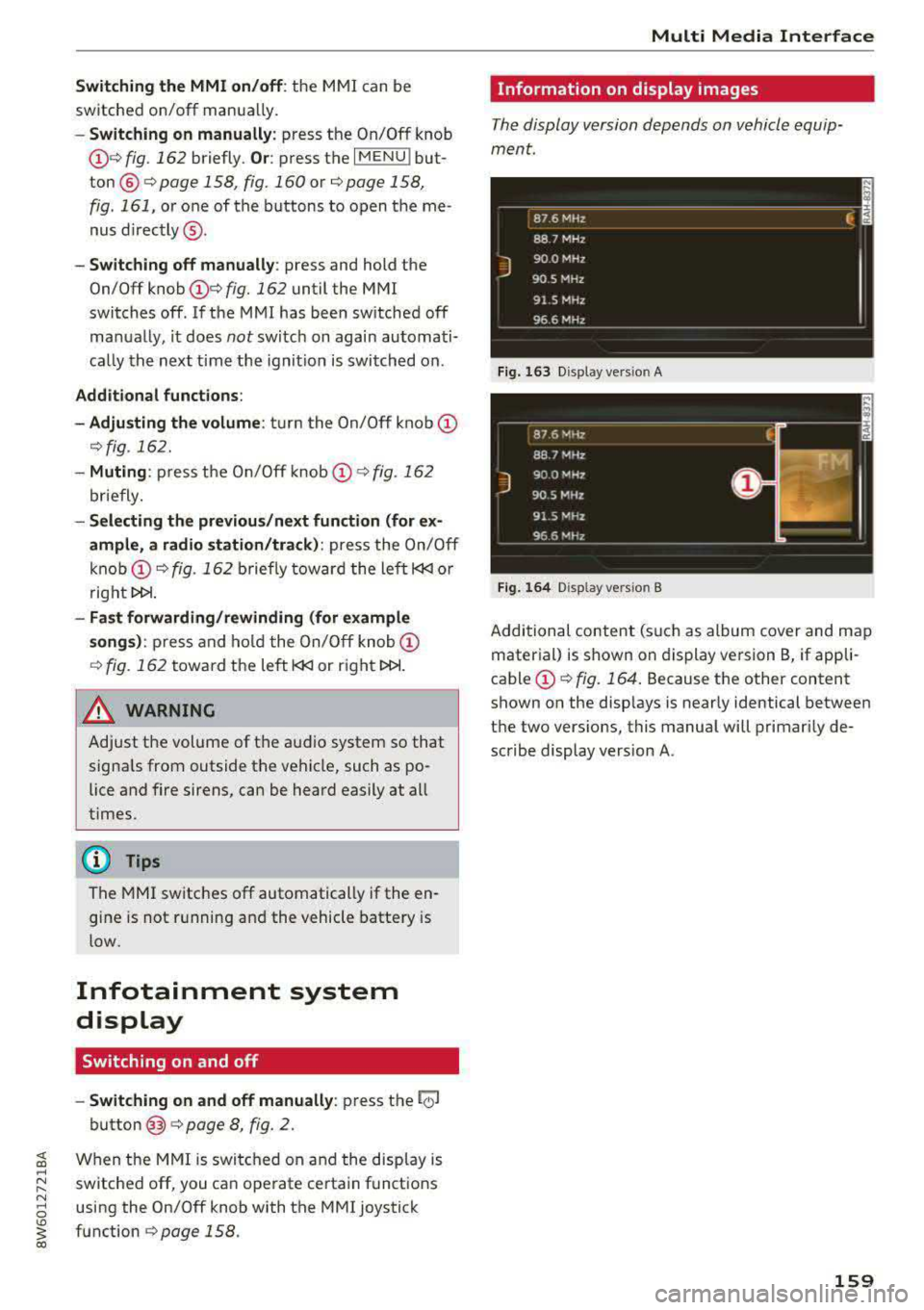
The display version depends on vehicle equip
ment.
Fig . 163 D isp lay ve rs io n A
Fig. 164 Disp lay ve rs io n B
Additional content (such as album cover and map
material) is shown on display version B, if appli
cable
(f) ~ fig. 164. Because the other content
shown on the disp lays is nearly identical between
the two vers ions, this manual will primarily de
scribe display version A .
159
Page 203 of 409
<( a, .... N ,....
N .... 0 \0
3 a,
Audi connect vehicle control
Introduction
Applies to vehicles with Aud i connect vehicle control
With the Audi connect vehicle control services l) ,
you can access various information or use individ
ual functions in the
Audi MMI connect app or in
myAudi .
Audi connect vehicle control includes the follow
ing services:
- Remote locking and unlocking ¢
page 202.
-Vehicle status report ¢ page 202.
-Parking location ¢ page 202.
-Geofencing Alert ¢ page 203.
-Speed Alert ¢ page 203.
-Valet Alert¢ page 203 .
- Stolen Vehicle Locator ¢ page 203.
-Online Audi service request ¢ page 203.
(D Tips
-Accessing specific data or controlling func
tions remote ly depends on the charge level
of the vehicle battery. Therefore, these
functions only have limited availability after
switching off the ignition.
- The services are provided through a SIM
card installed in the vehicle . The cost of the
call and data connections is included in the
price for the services. Services are provided
assuming that the cell phone network re
quired for the installed S IM card is funct ion
i ng and ready to operate. The available serv
ic es set by Audi AG are only available within
the cell phone network coverage area for
the cell phone service provider selected by
Audi AG .
- You can also find more information on Audi
connect on line at www.audiusa.com.
l) In pre parat io n at the time of pri nting. T he ava ilab ilit y of
the services offe red depends on th e co untry an d ma y
c hang e over tim e.
Audi connect vehicle control
Setup
Applies to vehicles with Audi connect vehicle control
To use Audi connect vehicle control services 1l,
please note the following:
Creating and verifying a user account
"'Create an account at www.audiusa.com/myaudi
and verify it.
Setting a key user in the vehicle
Requirements: the ignition must be switched on .
Another key user must not be set in the vehicle .
If necessary, reset the key user¢
page 202.
"'Select in the Infotainment system: I MENU ! but-
ton >
Audi connect > if necessary, Display
available functions >
right control button>
Audi connect user management > Key user >
Set key u ser.
"' Enter the user name for your ve rified account
and enter the 10-digit vehicle code. You can rub
the key tag for your remote control key to re
veal the vehicle code ¢
page 38.
"'Select and confirm Log in.
You can now use the vehicle control services
through the
Audi MMI connect app or thro ugh
www.audiusa.com/myaudi.
Using vehicle control services in the Audi
MMI connect app
Requirement: your mobile devices must be com
patible.
"' Install and start the Audi MMI connect app on
your mobi le device .
"'Log in to the Audi MMI connect app using your
user name and Audi online password and select
your vehicle.
(D Tips
- Store the vehicle code in a secure place. It
may be necessary to re-enter the vehicle
code.
201
Page 235 of 409
<( a, .... N ,....
N .... 0 \0
3 a,
When importing, the audio files a re automatical
l y sorted into the media center categor ies based
on the stored addit ional info rmation
c:> page 240. The copied video files are stored in
the media ce nter under the
Videos category.
Playing the Ju kebo x
Req uirement: the J ukebox must contain audio/
vi deo fi les
c:> page 232, Adding files to the Juke
box.
The Jukebox is a ccesse d and ope rated thr ou gh
the
M MI(D c:>page239, fig. 219.
Displaying Jukebox memory capacity
Select: r igh t control button > Jukebox memory
capacity .
Inform ation abou t the J ukebox memory
c a pacity an d the numbe r of store d tra cks is dis
p layed .
Deleting tracks from the Jukebox1
)
Req uirement: the Ju kebox must contain audio/
video fi les.
- Deleting an entry : select an entry from the
Jukebox media center. Select: rig ht cont ro l but
ton
> Delete from jukebox > This entry or En
tire list .
- The s tatus of the de leti ng p rocess is shown in
the MMI. Jukebox playback stops d uring the de
l eting process a nd starts again au tomatically
on ce the dele tio n i s comp lete.
(D Note
D o not import au dio/video files when the en
g in e is t urned off because this will d rain the
ve hicl e battery.
(D Tips
-Tracks fro m aud io C Ds cannot be impo rted
t o the Jukebox for leg al re as ons.
- Files that have al rea dy been import ed are
a utomat ica lly r ecogn ized and ca n not be
cop ied to the Juk eb ox again.
- It is no t possib le to play audio/v ideo* files
i n the C D/D V D* drive while import ing the m.
l) Not in th e Playba ck view .
Media
-The Jukebox does not provi de a n export
function d ue to legal reasons .
- F iles o r trac ks w ithout addi tio nal store d in
formatio n are listed as
Unknown . Audi rec
ommends adding a dditio nal info rmation
(such as ID3 tags) to a udio f iles.
- Reset the
Jukebox to the factory defa ult
sett ings when selling yo ur vehicle
<=:>page 252.
Bluetooth audio player
Appl ies to: vehicles with Bluetooth audio player
With the Bluetooth audio player, you con ploy
music wirelessly from your Bluetooth-capoble
device (such as a cell phone) through th e MMI.
Requirement: the vehicle must be stationary and
the Bluetooth function on your Bl uetooth device
and the
Bluetooth audio player c:> page 254 in
the MMI m ust both be sw itched on .
-Connecting a Bluetooth device : press the
!MEDI Ai butto n. Press the left control button
until the sources overview is disp layed. Selec t
and confirm Bluetooth audio player ®
<=:>page 239, fig. 220 .
-If necessa ry, select and co nfirm, Not connected
> Connect Bluetooth audio player . The Blue
t oot h dev ice searc h starts. Follow the inst ru c
tion s in the M MI.
- Select and confirm the des ire d B luetooth d e
vice from the list. The M MI generates a PIN fo r
t he conne ction.
- Select an d confirm
Yes .
-En ter the PIN for connect ing o n your Bl uetoo th
dev ice .
Or : if the PIN is already displayed on
your Bl uetoo th device, co nfi rm i t in the Bl ue
t ooth dev ice and in the MMI. The t ime a llowed
for ente ring the P IN is lim ite d t o approx ima tely
30 seconds.
T he media is s tarted and operated thro ugh the
mobile device o r th e
M MI, depending on t he de-
vi ce being used.
..,.
233
Page 238 of 409
Media
-Do not u se any wireless devices on the fro nt
seats within range of the airba gs w hile driv
ing. Also read and follow the warnings in
c:> page 281, Fro nt airbags.
CD Note
- Always follow the information found in c> 0
in Wi-Fi hotspot on page 197 .
-Please note that there generally are add i
tiona l costs when using an online media
service account, especially when it is used i nternationally.
{!) Tips
-Depending on the Internet connection and
network traff ic, a connection loss can occur
during p layback of on line media serv ices.
-Online media and Internet radio usage de
pends on the serv ice avai lability of the third
party provider.
- Audi AG simply makes the access to on line
media serv ices possible t hrough the MMI
and does not take any respons ibility for the
contents of the onli ne med ia serv ices .
-Always read the chapter c:> page 198, Audi
connect (Infotainment) general informa
tion.
-Depending on the mobile device used, the re
may be interr uptions du ring media playback
and when using the
Audi MMI connect app.
T o avoi d inter ruption s when usi ng a mob ile
device, do no t loc k t he s creen on you r mo
bi le dev ice a nd keep the
Audi MMI connect
app in the foreground .
- Co ntact an a utho rized Audi dea le r or a u
thorized Audi Service Facili ty for additional
informat ion about on line media .
236
Multimedia connections
USB adapter for Audi music interface
You can connect your mobile devices (such as a
smartphone or
MP3 player) to the Audi music in
terface and charge them using a special USB
adapter .
®-
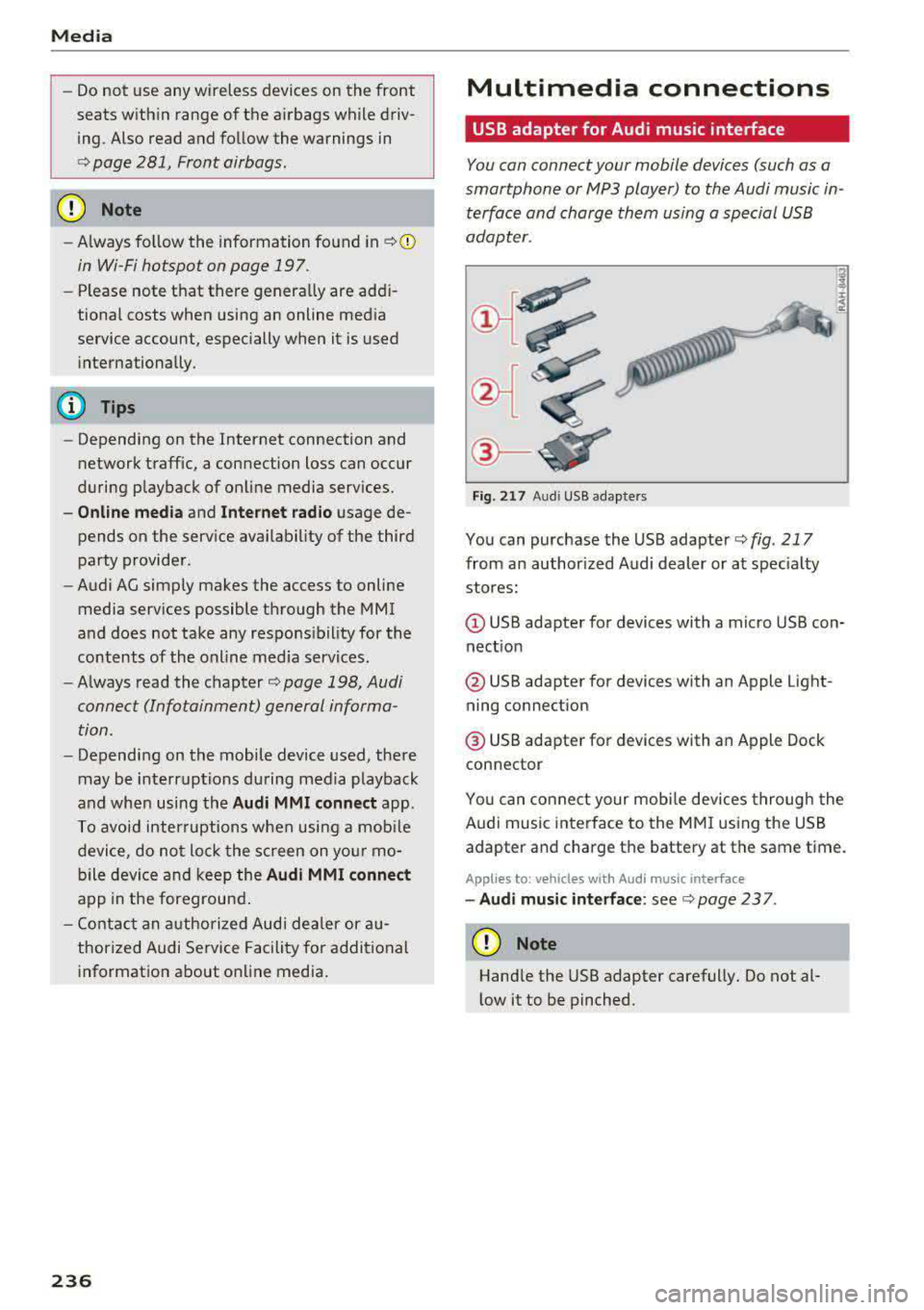
Fig. 21 7 Audi USB adapters
You can purchase the USB adapter c> fig . 217
from an author ized Audi dealer or at spec ia lty
stores:
Q) USB adapter for devices with a micro USB con
nect ion
@ USB adapter for devices with an Apple Light
ning connect ion
@ USB adapte r for devices with an Apple Dock
connector
You can conne ct your mob ile dev ices throug h the
Audi music interface to the MM I using the USB
adapter and charge the battery at the same time.
Applies to: vehicles wit h Aud i music interface
-Audi musi c interface : see c> page 237.
CD Note
Handle the USB adapter carefully. Do not al
l ow it to be pinched .