buttons AUDI A5 COUPE 2018 User Guide
[x] Cancel search | Manufacturer: AUDI, Model Year: 2018, Model line: A5 COUPE, Model: AUDI A5 COUPE 2018Pages: 409, PDF Size: 67.63 MB
Page 118 of 409
Assistance systems
Indicator lights and messages in the instrument
cluster display inform you about the current sit
uation and setting.
An add itiona l ind icator appears in the head-up
disp lay*.
Switching adaptive cruise control on
.,. Pull the lever toward you into position@
<::;,fig. 115.
Storing the speed and activating regulation
.,. To store the current speed, press the !SET ! but
ton
¢ fig . 115 . The stored speed is shown in the
speedometer in the LED line @and appears
briefly in the status
line @c:;, fig. 116 .
.,. Applies to: vehicles with automatic transmis
sion: To activate the control when stationary,
also press the brake pedal.
Switching adaptive cruise control off
.,. Push the lever away from you into position @
until it clicks into place. The message
ACC: off
appears.
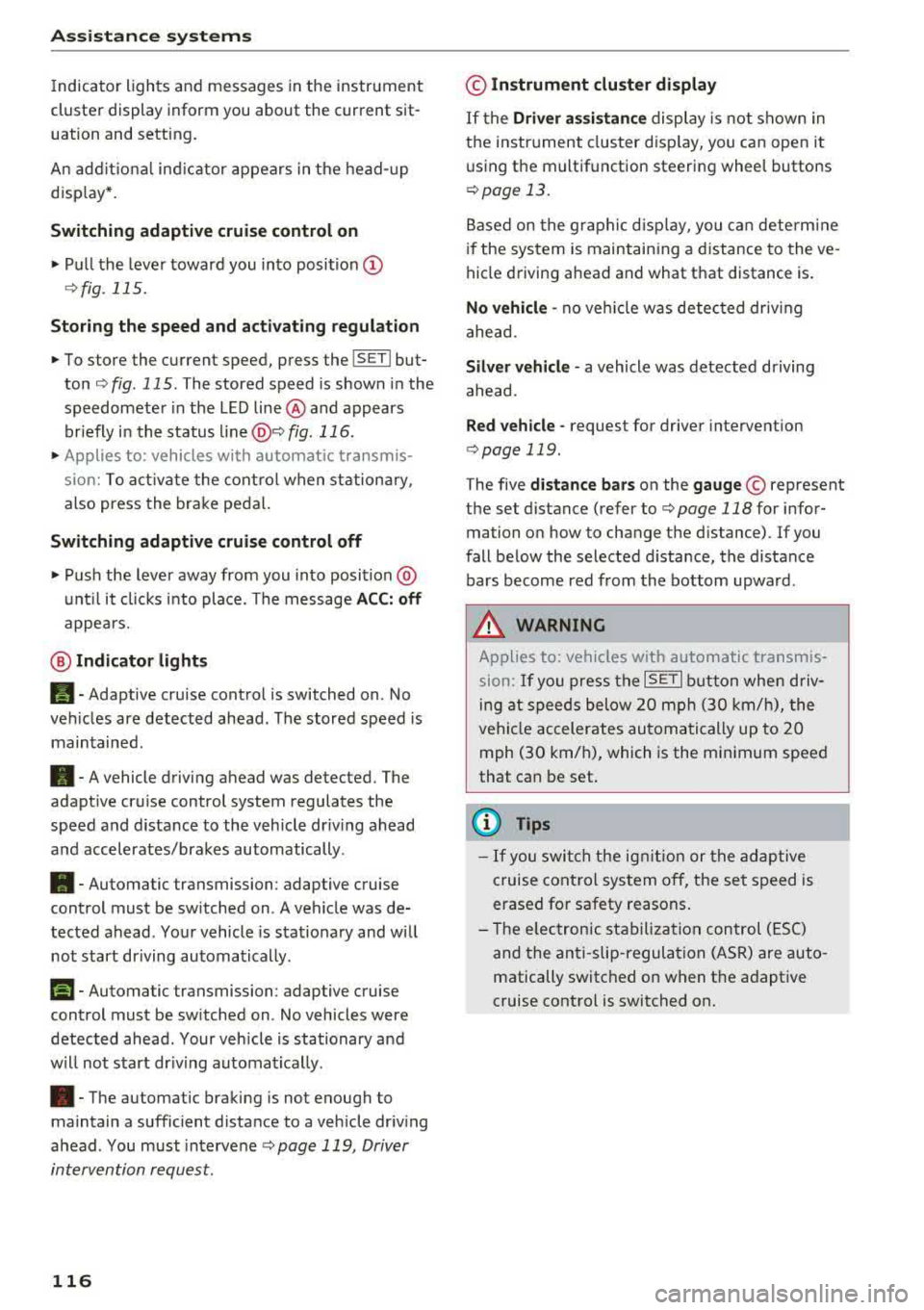
@ Indicator lights
Ill-Adaptive cruise control is switched on . No
veh icles are detected ahead . The stored speed is
maintained.
• -A vehicle driving ahead was detected. The
adapt ive cruise control system regulates the
speed and distance to the vehicle dr iv ing ahead
and accelerates/brakes automatically.
• -Automatic transmission : adaptive cruise
control must be switched on . A vehicle was de
tected ahead . Your vehicle is stat ionary and will
not start driving automatically .
fai-Automatic transmission : adaptive cruise
control must be switched on . No vehicles were
detected ahead. Your vehicle is stationary and
will not start dr iving automatically .
•-The automatic braking is not enough to
maintain a sufficient distance to a vehicle driving
ahead . You must intervene
c:;, page 119, Driver
intervention request.
116
© Instrument cluster display
If the Driver assistance display is not shown in
the instrument cluster display, you can open it
using the multif unction steering wheel buttons
c:;, page 13.
Based on the graphic display, you can determine
if the system is maintaining a distance to the ve
hicle driving ahead and what that distance is .
No vehicle -no veh icle was detected driv ing
ahead .
Silver vehicle -a vehicle was detected driving
ahead.
Red vehicle -request for driver intervention
¢ page 119 .
The five distance bars on the gauge© represent
the set distance (refer to
c:;, page 118 for infor
mation on how to change the distance). If you
fall below the selected d istance, the distance
bars become red from the bottom upwa rd .
A WARNING
Applies to: vehicles with automatic transmis
sion: If you press the
ISET ! button when driv
ing at speeds below 20 mph (30 km/h), the
vehicle accelerates automatically up to 20
mph (30 km/h), which is the minimum speed
that can be set.
(D Tips
- If you switch the ignitio n or the adaptive
cruise control system off, the set speed is
erased for safety reasons .
- T he electronic stabilization control (ESC)
and the anti-slip-regulation (ASR) are auto
matically switched on when the adaptive
cruise control is switched on.
Page 124 of 409
Assistance systems
In a speed range under 40 mph (65 km/h), traffic
jam assist can help to keep the vehicle within a
lane calculated by the system. Within the limits
of the system, the system controls the steering
automatically when adaptive cruise control is
switched on . Since traffic jam assist is only an as
sist system, the driver must always keep his or
her hands on the steering wheel and be ready to
steer. The driver can override the control at any
time by actively steering.
The system is designed for driving on express
ways and highways.
Switching traffic jam assist on and off
.., Press the button to switch the system on and
off¢fig. 123.
.., To turn the system off completely, select in the
Infotainment system:
I M ENU I button > Vehicle
> left contro l button > Driver assistance > Traf
fic jam assist.
If traffic jam assist was deactivated through the
Infotainment system, you can cont inue operating
the active lane assist using the
c::> fig . 123 button
c::> page 131. T he traffic jam assist functions a re
no longer available.
Requirements for using traffic jam assist:
- Traffic jam assist must be switched on in the
Infota inment system.
- Adaptive cruise control must be switched on
and active
c;> page 115 .
Always switch off traffic jam assist in the
following situations:
- When increased attention is needed from the
driver .
- In poor weather conditions such as snow or
heavy rain .
- When driving on roads in poor condition.
- In construction zones.
- In city driving.
Traffic jam assist availability:
If you are in the Driver assistance disp lay in the
i n strument cluster,
the@ indicat or light and
the message
Traffic jam assist available appea rs
if traffic congestion situation was recognized.
You can open the
D rive r assistance disp lay using
122
the multifunction steering wheel buttons
¢ page 13. To activate traffic jam assist, you
must press the
c;> fig. 123 button and switch on
the adapt ive cruise control
¢ page 115.
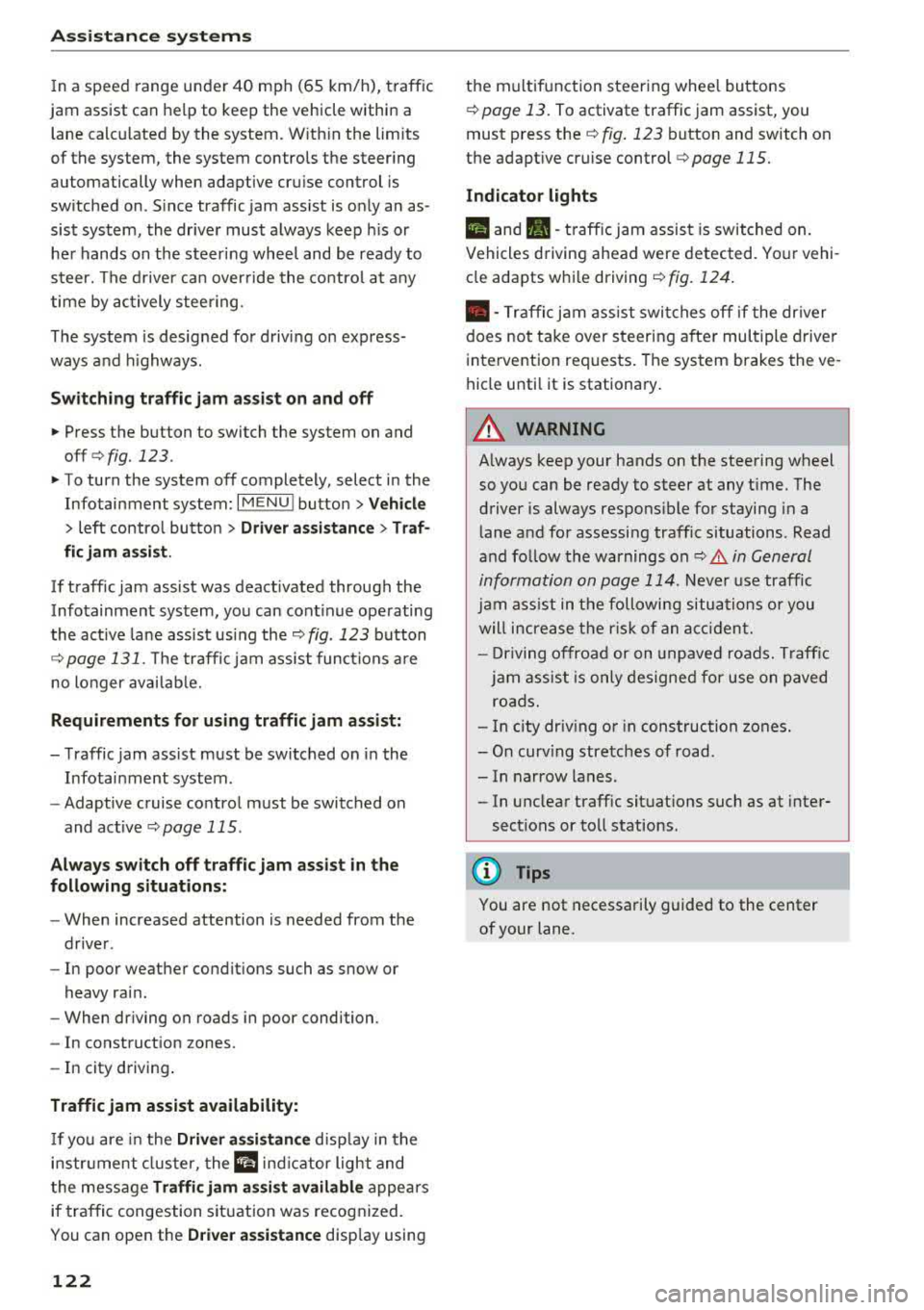
Indicator lights
Ill and. -traff ic jam assist is switched on.
Vehicles driving ahead were detected. Your vehi
cle adapts whi le driving
c;> fig. 124.
• - Traffic jam assist switches off if the driver
does not take over steering after multiple driver
intervention requests. The system brakes the ve
hicle until it is stationary.
A WARNING
A lways keep your hands on the steering wheel
so you can be ready to steer at any t ime . The
driver is always respons ible for staying in a
lane and for assessing traffic situations . Read
and follow the warnings on
c;> .& in General
information on page 114.
Never use traffic
jam ass ist in the following situations or you
will increase the risk of an accident.
- Driving offroad or on unpaved roads. Traffic
jam assist is only designed for use on paved
roads.
- In city driv ing or in construction zones.
- On curv ing stretches of road.
- In narrow lanes.
- In unclear traffic situat ions such as at inter-
sections or toll stations.
(D Tips
You are not necessarily guided to the center
of your lane.
Page 134 of 409
Assistance systems
Display in the instrument cluster
Applies to: vehicles w ith Audi active lane assist
Fig. 129 Instrument cluster (multi -color d isplay): active
lane assist is sw itched on an d ready to provide warnings
Fig. 1 30 Instrument cluster (monoc hrome display): active
lane assist is switched on
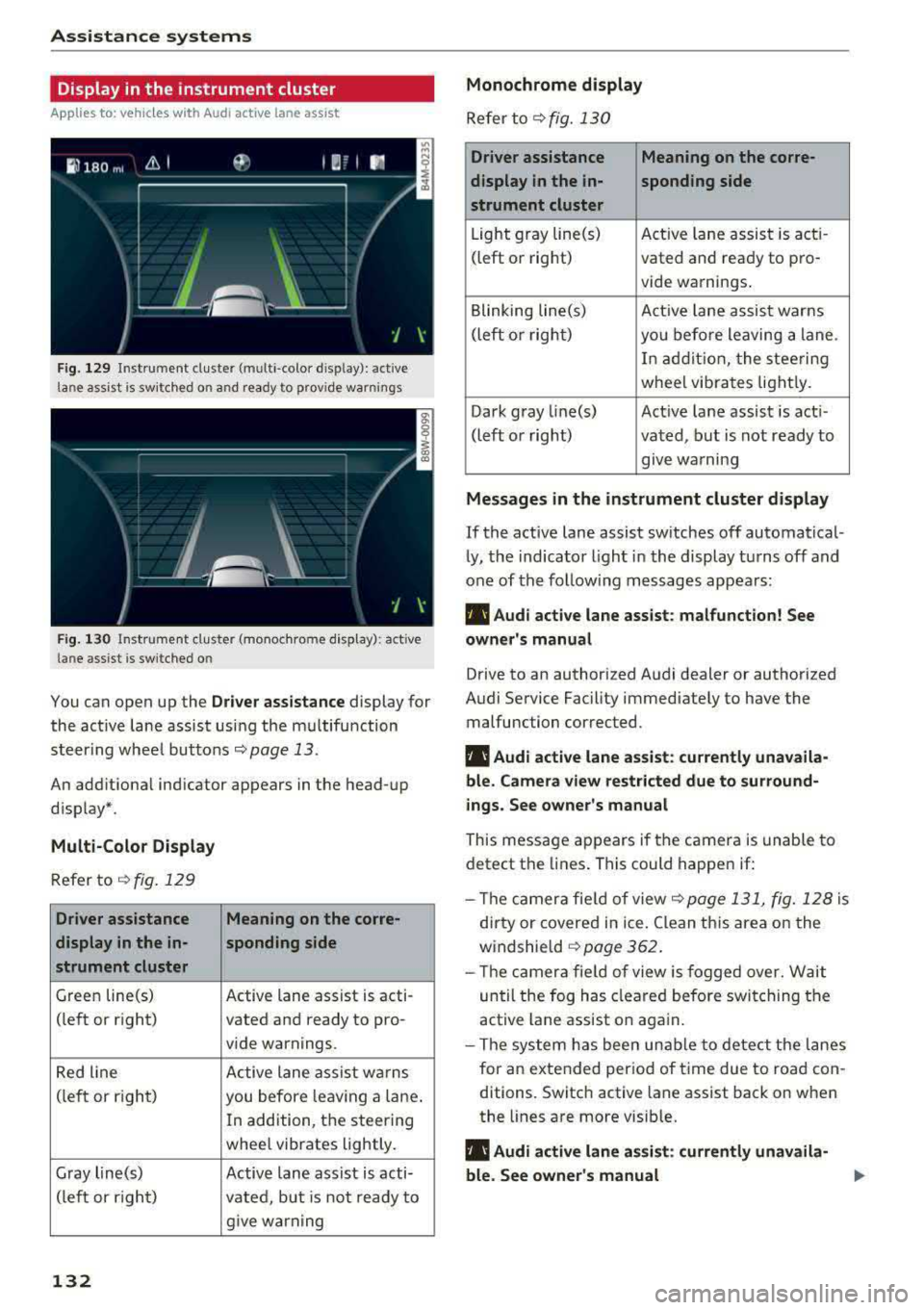
You can open up the Driver assistance display for
the act ive lane assist usi ng the m ultifunction
steer ing whee l buttons
r::;, page 13.
An add itional ind icator appears in the head-up
d isplay* .
Multi-Color Display
Refer tor::;, fig. 129
Driver assistance Meaning on the corre-
display in the in- sponding side
strument cluster
Green line(s) Active lane assist is acti-
(left or right) vated and ready to pro-
vide warnings.
Red line Active lane assist w arns
(left or r ight)
you before leav ing a lane.
In addition, the steering
wheel vibrates lightly.
Gray line(s) Active lane assist is acti-
(left or right) vated, but is not ready to
give warning
132
Monochrome display
Refer to r;;;, fig. 130
Driver assistance Meaning on the corre-
display in the in-
sponding side
strument cluster
Light gray line(s) Act ive lane assist is acti-
(left or right) vated and ready to pro-
vide warnings .
Blinking line(s) Active lane assist warns
(left or right)
you before leaving a lane.
I n addition, the steering
wheel vibrates lightly.
Dark gray line(s) Active lane assist is acti-
(left or right) vated, but is not ready to
. . give warning
Messages in the instrument cluster display
If the active lane assist sw itches off automatical
ly, the indicator light in the display turns off and
one of the follo wing messages appears:
rl1 Audi active lane assist: malfunction! See
owner's manual
Drive to an authorized Audi dealer or authorized
Audi Service Facility immed iately to have the
malfunction corrected.
rl1 Audi active lane assist: currently unavaila
ble. Camera view restricted due to surround
ings. See owner's manual
This message appears if the camera is unable to
detect the lines. This could happen if:
- Th e camera fie ld of view
c;;;,page 131, fig. 128 is
dirty or covered in ice . Clean th is area on the
windshield
c;;;, page 362.
-Th e camera fie ld of view is fogged over. Wait
until the fog has cleared before switching the
active lane assist on again.
- The system has been unable to detect the lanes
for an extended period of time due to road con
ditions. Switch active lane assist back on when
the lines are more visib le.
rl1 Audi active lane assist: currently unavaila
ble. See owner 's manual
Page 160 of 409
Multi Media Interface
Multi Media Interface
Traffic safety information
Audi recommends performing certain Infotain
ment system functions, such as entering a desti
nation, only when the vehicle is stationary . Al
ways be prepared to stop operat ing the Infotain
ment system in the interest of your safety and
the safety of other road users.
_& WARNING
Only use the Infotainment system when traf
fic cond itions permit and always in a way that
allows you to maintain complete control over
your vehicle.
@ Tips
Certain funct ions are not available wh ile driv
ing .
Introduction
The Multi Media Interface, or MMI for short,
combines various
systems for communication,
navigation* and entertainment in your Audi . You
can operate the MMI using the MMI control pan
el, the multifunction steering wheel or the voice
recognition system* .
Applies to: vehicles with automatic transmission:
F ig. 160 MMI contro l panel· integ rated shortc ut keys
158
Applies to: ve hicles with manual transmission:
Fig. 161 MMI control pane l
-separate shortcut keys on
the ce nter conso le
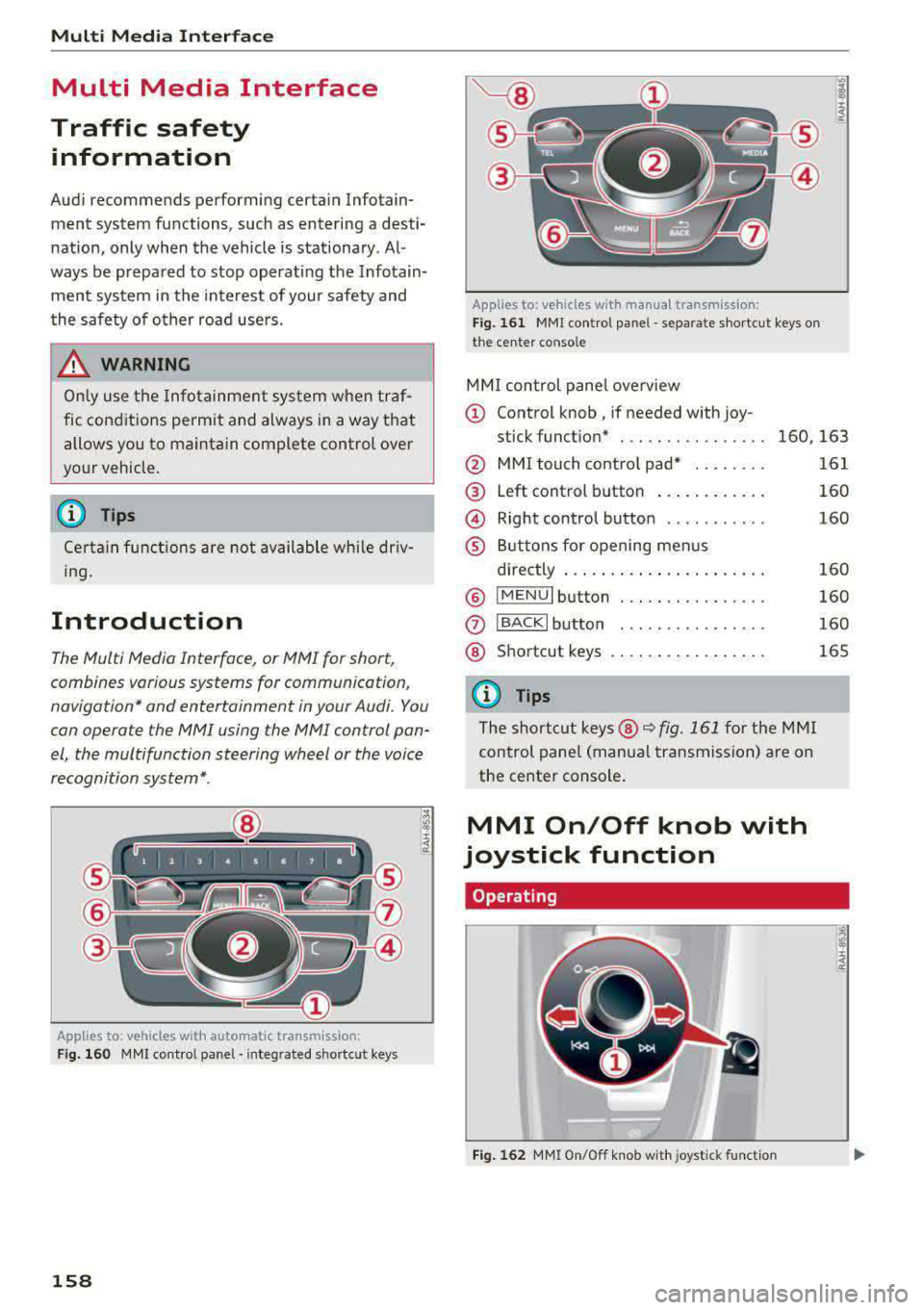
MM I control panel overview
(D Control knob , if needed with joy-
stick function* . . . . . . . . . . . . . . . . 160, 163
@ MMI touch contro l pad* ....... .
@ Left control button ........... .
@ Right control button .......... .
® Buttons for opening menus
directly ..................... .
® IMENUI button ..... .... ...... .
0
®
IBACK I button
Shortcut keys
(0 Tips
The shortcut keys @¢ fig. 161 for the MMI
control panel (manua l transmission) are on
the center conso le .
MMI On/Off knob with
joystick function
Operating
•
Fig. 162 MMI On/Off knob w ith joystick function
161
160
160
160
160
160
165
Page 161 of 409
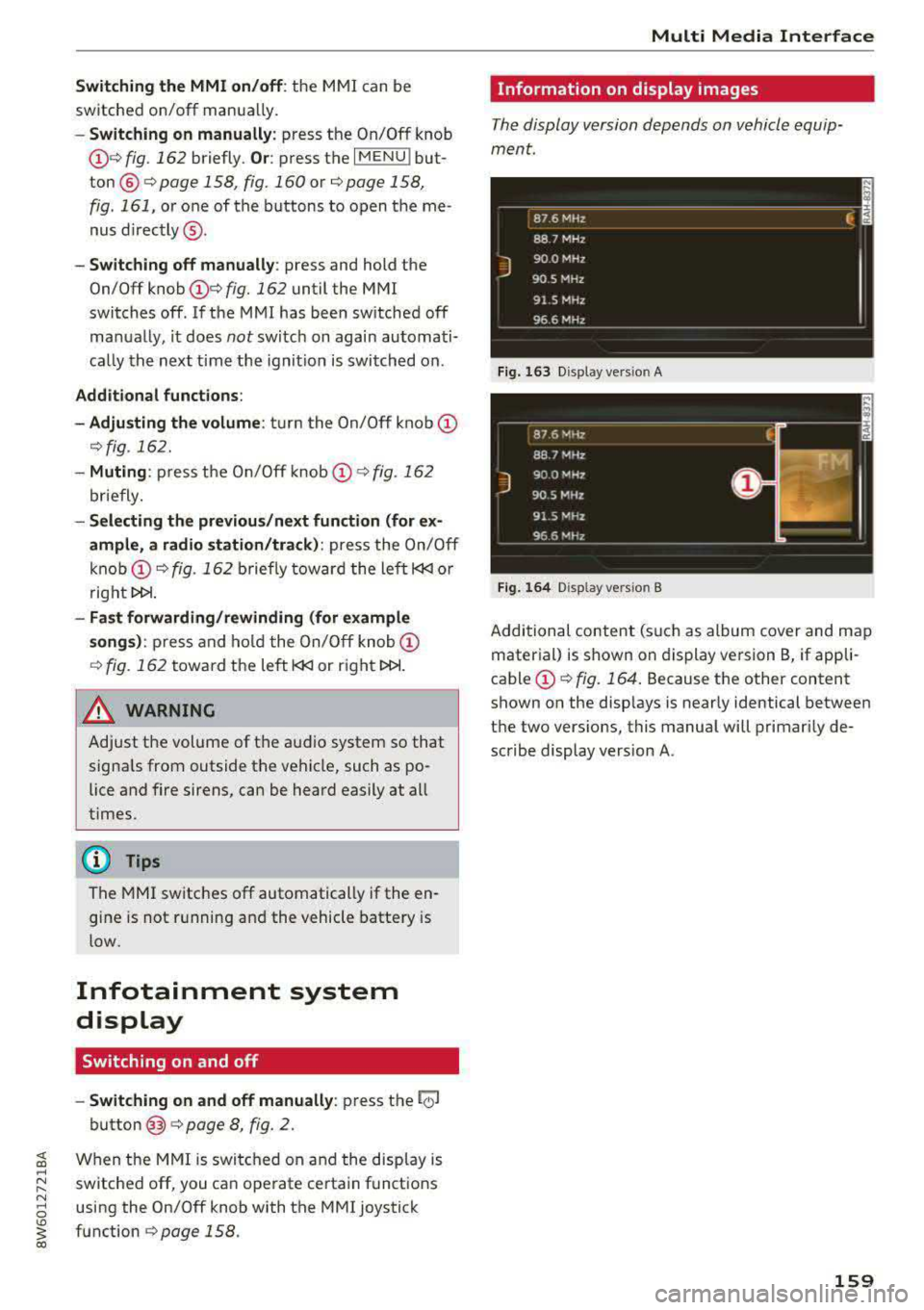
Switching the MMI on/off: the MMI can be
switched on/off manua lly.
-Switching on manually : press the On/Off knob
(f)c:> fig . 162 briefly . Or: press the I MENU I but
ton @
c:>page 158, fig. 160 or c:>page 158,
fig. 161,
or one of the buttons to open the me
nus
directly @.
-Switching off manually : press and hold the
On/Off knob
(f) c::> fig. 162 until the MMI
switches off . If the MMI has been switched off
ma nually, it does
not sw itch on again automati
ca lly the next time the ignit ion is switched on .
Additional functions:
- Adjusting the volume:
turn the On/Off knob (f)
c::>fig. 162.
- Muting : press the On/Off knob (f) c:> fig. 162
briefly.
-Selecting the previous /next function (for ex
ample, a radio station/track) :
press the On/Off
knob
(f) c::> fig . 162 briefly toward the left l<3
t>l>I.
-Fast forwarding /rewinding (for example
songs):
press and hold the On/Off knob (f)
c::> fig. 162 toward the left l<3
A WARNING
Adjust the volume of the audio system so that
signa ls from outside the vehicle, such as po
lice and fire sirens, can be heard easily at all
times.
@ Tips
The M MI switches off automatically if the en
gine is not running and the vehicle battery is
low.
Infotainment system
display
Switching on and off
- Switching on and off manually :
press the l('.)J
button @ c> page 8, fig. 2.
When the MMI is switched on and the display is
switched off, you can operate certain functions
using the On/Off knob with the MMI joystick
function
c> page 158 .
Multi Media Interface
Information on display images
The display version depends on vehicle equip
ment.
Fig . 163 D isp lay ve rs io n A
Fig. 164 Disp lay ve rs io n B
Additional content (such as album cover and map
material) is shown on display version B, if appli
cable
(f) ~ fig. 164. Because the other content
shown on the disp lays is nearly identical between
the two vers ions, this manual will primarily de
scribe display version A .
159
Page 162 of 409
Multi Media Interface
MMI operation
Selecting and confirming a function
F ig . 16 5 Ope rat ing the cont ro l knob
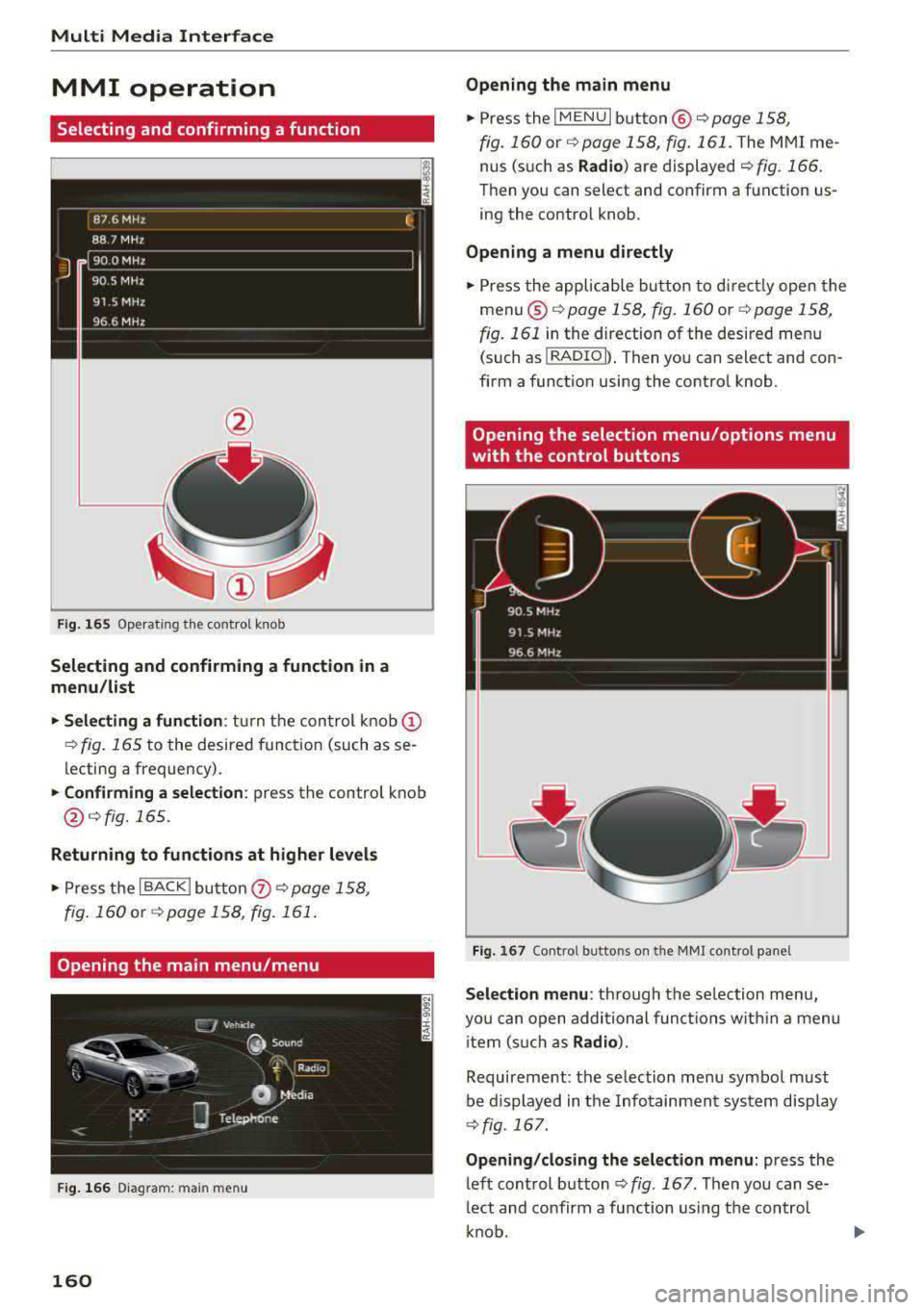
Selecting and confirming a function in a
menu /li st
• Selecting a fun ction : turn t he con trol knob (D
¢ fig. 165 t o the desired functio n (such as se
lecting a frequency).
• Confi rming a selection : press the control knob
@¢fig.165 .
Returning to functions at higher levels
• Press the I BACK j butto n 0 ¢ page 158,
fig . 160
o r ¢ page 158 , fig. 161 .
Opening the main menu/menu
Fig. 1 66 Diagram : main menu
160
Opening the main menu
• Press the I MENU I bu tton @~ page 158,
fig. 160
or ~ page 158 , fig . 161 . The MMI me
nus (s uch as
Radio ) are displayed ~ fig. 166 .
Then you can s elect and confirm a function us
i ng the control knob .
Opening a menu directly
• Press the applicable bu tton to di rec tly open the
menu ®
~pag e 158, fig. 160 or ¢page 158,
fig. 161
in the direction of the desired menu
(such as
I RADIO l l. T hen you can s ele ct and con
firm a function using the control knob .
Opening the selection menu/options menu
with the control buttons
Fig. 167 Co n trol b utto ns on t he MM I co ntro l pa ne l
Sele ction menu : through the se lection menu,
yo u can open additional funct io ns w it hi n a menu
i tem (s uch as
Radio ).
Requireme nt: the se lection menu symbol must
be d isplayed in the Infotainment system disp lay
~ fig . 167.
Opening /clos ing the selection menu : press the
left cont rol
button ¢ fig. 167 . Then you can se
l ect and confirm a function using the control
k nob.
Page 230 of 409
Radio
Radio te xt
is availab le for the selected stat ion.
See
¢ page 226.
@ FM HD Radio technology
The station is received through FM HD Radio
technology .
@ Screen view
Display Cover art or Station logo. See
¢ page 229, Preferred picture view*.
Displaying the station list:
Turn the control knob. Or : press the !BACK ! but
ton .
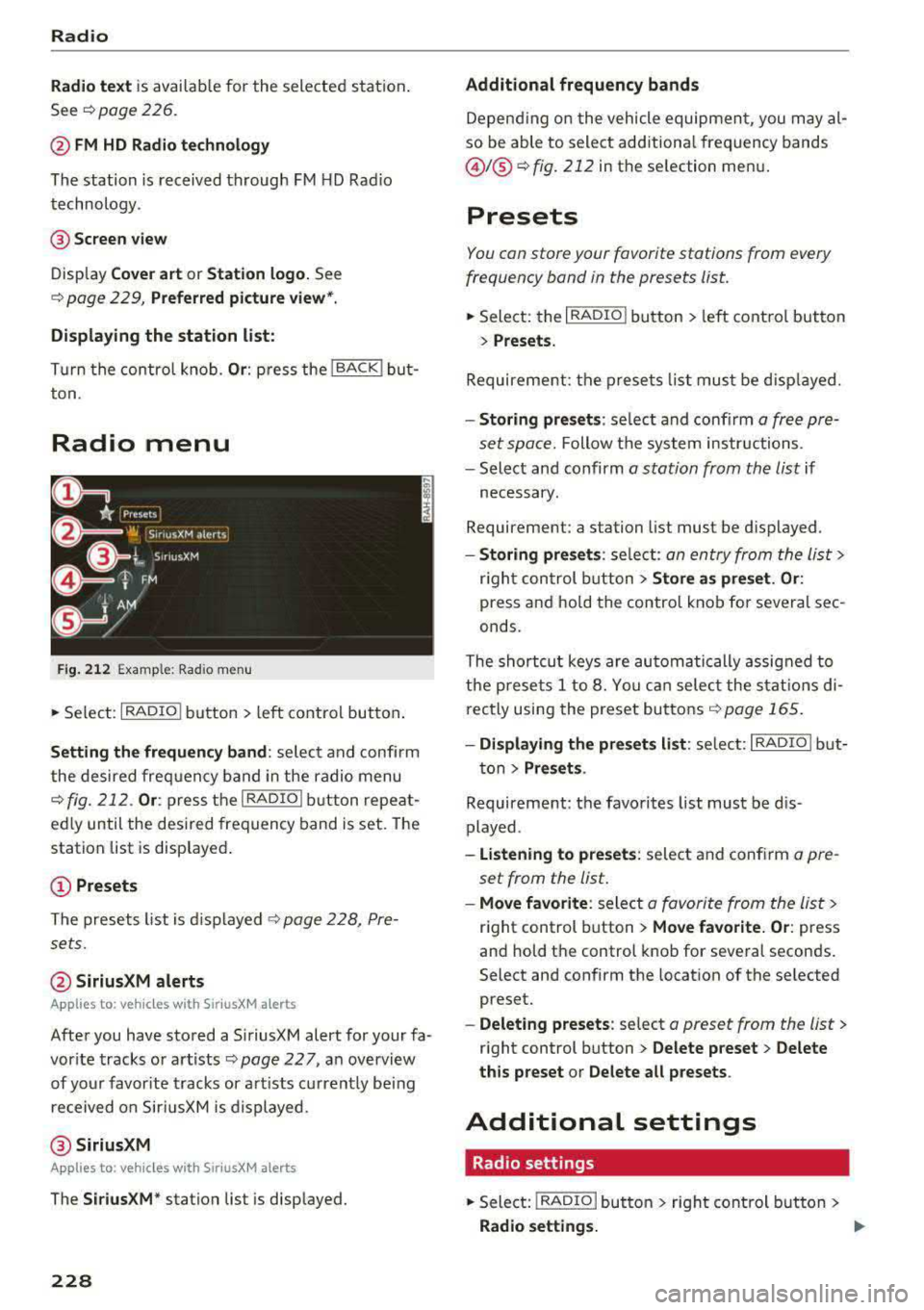
Radio menu
Fig. 212 Example : Rad io menu
.,. Se lect: I RADIO I button > left cont rol button .
Setting the frequency band : select and confirm
the desired freq uency band in the radio menu
¢ fig. 212 . Or: press the I RADIO ! button repeat
ed ly until the desired frequency band is set. The
station list is displayed .
© Presets
The presets list is displayed c!) page 228, Pre
sets.
@ SiriusXM alerts
Appl ies to: ve hicles w ith SiriusXM alerts
After you have stored a S iriusXM alert for your fa
vor ite tracks or artists
¢page 227 , an overview
of your favorite tracks or artists current ly being
received on SiriusXM is displayed.
@ SiriusXM
Appl ies to: ve hicles w ith SiriusXM alerts
The SiriusXM* station list is displayed.
228
Additional frequency bands
Depending on the vehicle equipment, you may al
so be able to select additiona l frequency bands
@ f® c!) fig. 212 in the selection menu.
Presets
You can store your favorite stations from every
frequency band in the presets list.
.. Select: the I RADIO I button > left control button
> Presets.
Requirement: the presets list must be displayed.
-Storing presets : select and confirm a free pre
set space.
Follow the system instructions.
- Select and confirm
a station from the list if
necessary.
Requirement: a station list must be d isplayed .
-Storing presets: select: an entry from the list>
rig ht con trol button > Store as preset. Or :
press and hold the control knob for severa l sec
onds .
The shortcut keys are automatically assigned to
the p rese ts 1 to 8. You can select the stations di
rectly using the preset buttons <=)
page 165 .
-Displaying the presets list : select: I RADIO! but-
ton
> Presets .
Requirement: the favorites list must be d is
played .
-Listening to presets: select and confirm a pre
set from the list.
- Move favorite : select a favorite from the list>
rig ht control button > Move favorite. Or: press
and hold the control knob for several seconds .
Select and confirm the location of the selected
preset.
- Deleting presets : select a preset from the list >
right control button > Delete preset > Delete
this preset or Delete all presets .
Additional settings
Radio settings
.. Select: I RADIO I button > rig ht control button >
Radio settings. Ill>
Page 395 of 409
Index
Audi p re sense . . . . . . . . . . . . . . . . . . . . . . . 125
M essages . . . . . . . . . . . . . . . . . . . . . . . . . . 129
Sett ings . . . . . . . . . . . . . . . . . . . . . . . . . . . 129
Aud i Serv ice Repair Ma nuals and Lite rature 389
Aud i side assist . . . . . . . . . . . . . . . . . . . . . . . 133
Aud i smartphone interface . . . . . . . . . 249, 253
Aud i virt ua l coc kp it
refer to Instr ume nt cl uster . . . . . . . . . . . . . 10
AUTO Automatic headlights . . . . . . . . . . . . . . . . . 61
Auto Lock (centra l loc kin g system) . . . . . . . . 37
Automatic belt ret ractor . . . . . . . . . . . . . . . 27 2
Automatic climate control . . . . . . . . . . . . . . . 81
Aud i drive select. . . . . . . . . . . . . . . . . . . . . 139
Operation . . . . . . . . . . . . . . . . . . . . . . . . . . . 82
Automatic climate control system Setup . . . . . . . . . . . . . . . . . . . . . . . . . . . . . . 85
Automatic power top
refer to Power top . . . . . . . . . . . . . . . . . . . . 5 4
Automatic transm ission . . . . . . . . . . . . . . . . . 96
E me rgency prog ram . . . . . . . . . . . . . . . . . 10 1
H ill descent contro l . . . . . . . . . . . . . . . . . . . 99
Kick-down . . . . . . . . . . . . . . . . . . . . . . . . . . 100
La unch cont ro l prog ram . . . . . . . . . . . . . . 1 00
M anual s hifting . . . . . . . . . . . . . . . . . . . . . . 99
Parking lock emergency release . . . . . . . . 102
Selector lever pos itions . . . . . . . . . . . . . . . . 96
Autom atic wipe/wash system . . . . . . . . . . . . 67
Auto Safety Hotline . . . . . . . . . . . . . . . . . . . 266
AUTO (button) Automatic c limate control system . . . . . . . 83
Auxiliary heater (a utomat ic cl ima te control) 85
AUX input . . . . . . . . . . . . . . . . . . . . . . . . . . . 237
Ave rage cons umption . . . . . . . . . . . . . . . . . . . 1 7
Average speed . . . . . . . . . . . . . . . . . . . . . . . . 17
B
BACK button 158
Balance (sound) . . . . . . . . . . . . . . . . . . . . . . 255
B ass (sound) . . . . . . . . . . . . . . . . . . . . . . . . . 255
Battery Jump starting . . . . . . . . . . . . . . . . . . . . . . . 381
also refer to Veh icle battery . . . . . . . . . . . 338
Before driving . . . . . . . . . . . . . . . . . . . . . . . . 258
B el t positioners . . . . . . . . . . . . . . . . . . . . . . 27 2
Belt tensioners . . . . . . . . . . . . . . . . . . . . . . . 27S
394
Blended gasoline . . . . . . . . . . . . . . . . . . . . . 322
B lowe r (automat ic cl imate contro l system) . 83
B luetooth
Audio player . . . . . . . . . . . . . . . . . . . . . . . . 233
Connect ing a cell phone . . . . . . . . . . . . . . 178
Settings . . . . . . . . . . . . . . . . . . . . . . . . . . . 254
Boost . . . . . . . . . . . . . . . . . . . . . . . . . . . . . . . . 11
Boos te r seats . . . . . . . . . . . . . . . . . . . . . . . . 312
Boost pressure ind icator . . . . . . . . . . . . . . . . 11
B rake fl uid
Checking the brake fluid level . . . . . . . . . . 337
B rakes . . . . . . . . . . . . . . . . . . . . . . . . . . . . . . 153
B rake ass ist . . . . . . . . . . . . . . . . . . . . . . . . 151
B rake flu id . . . . . . . . . . . . . . . . . . . . . . . . . 33 7
E lectromechanical parking brake . . . . . . . . 94
Emergency braking function . . . . . . . . . . . . 94
New brake pads . . . . . . . . . . . . . . . . . . . . . 153
Worn brake pads . . . . . . . . . . . . . . . . . . . . . 33
B re aking in
New brake pads . . . . . . . . . . . . . . . . . . . . . 153
New engine . . . . . . . . . . . . . . . . . . . . . . . . . 86
New tires . . . . . . . . . . . . . . . . . . . . . . . . . . 348
B rowser
refer to M edi a cente r . . . . . . . . . . . . . . . . . 2 40
Bu lbs . . . . . . . . . . . . . . . . . . . . . . . . . . . . . . . 380
Buttons Contro l panel (MMI) . . . . . . . . . . . . . . . . . 158
Mult ifunct ion steer ing whee l . . . . . . . . 13, 16
Programming (multifunction steering
whee l) . . . . . . . . . . . . . . . . . . . . . . . . . . . . . . 15
C
Cable (USB adapter/AUX connector cable) 236
Cali forn ia Propos ition 65 W arning . . . . . . . 331
Battery specific . . . . . . . . . . . . . . . . . . . . . 338
Call list . . . . . . . . . . . . . . . . . . . . . . . . . . . . . 181
Call options . . . . . . . . . . . . . . . . . . . . . . . . . . 188
C apaci ties
AdB lue . . . . . . . . . . . . . . . . . . . . . . . . . . . . 326
Fuel tank. . . . . . . . . . . . . . . . . . . . . . . . . . . 388
Washer fluid reservoir . . . . . . . . . . . . . . . . 388
Care . . . . . . . . . . . . . . . . . . . . . . . . . . . . . . . . 362
Cargo area
refer to Loading the luggage compart -
ment ........ ... ... ............. ... 263
Catalytic converter . . . . . . . . . . . . . . . . . . . . 329
Page 396 of 409
<( a, .... N ,....
N .... 0 \0
3 a,
CD drive (media drives) . . . . . . . . . . . . . . . . 232
Cell phone
refer to Te lephone . . . . . . . . . . . . . . . . . . . 178
Cente r armrest . . . . . . . . . . . . . . . . . . . . . . . . 73
Cent ral locking . . . . . . . . . . . . . . . . . . . . . . . . 3 7
Cent ral locking switch . . . . . . . . . . . . . . . . .
4 1
Convenience key . . . . . . . . . . . . . . . . . . . . . . 4 0
Emergency locking . . . . . . . . . . . . . . . . . . . . 42
Power windows . . . . . . . . . . . . . . . . . . . . . . 49
Remote control key . . . . . . . . . . . . . . . . . . . 40
Sett ing . . . . . . . . . . . . . . . . . . . . . . . . . . . . . 41
Ce rtification . . . . . . . . . . . . . . . . . . . . . . . . . 392
Changing e ng ine o il . . . . . . . . . . . . . . . . . . . 335
Changing the scale . . . . . . . . . . . . . . . . . . . . . 13
C ha rg ing the battery (mobile dev ices) . . . . 237
Chi ld restraints
D anger of us in g c hild rest raints in the front
se at. .. .. .. .. .. ............. .. .. .. .
278
Where can I ge t addi tio nal info rmat io n
about child res traints and their use? ....
321
Chi ld rest raint system ancho rs . . . . . . . . . . 3 16
Ch ild safety . . . . . . . . . . . . . . . . . . . . . . . . . . 302
Important safety instructions for using child
safety seats . . . . . . . . . . . . . . . . . . . . . . . . 306
Instal ling a chi ld restraint using the LATCH
sys tem . . . . . . . . . . . . . . . . . . . . . . . . . . . .
3 18
M ount ing and releasing the anchorage
hook . . . . . . . . . . . . . . . . . . . . . . . . . . . . . .
3 18
Tether anchors . . . . . . . . . . . . . . . . . . . . . . 3 19
Te ther straps . . . . . . . . . . . . . . . . . . . . . . . 319
C hil d safety lock
Power w indows . . . . . . . . . . . . . . . . . . . . . .
48
Rea r doo rs . . . . . . . . . . . . . . . . . . . . . . . . . . 4 8
Ch ild safety seats . . . . . . . . . . . . . . . . . . . . . 308
Booster seats . . . . . . . . . . . . . . . . . . . . . . . 312
Convertible c hild seats ........... ... . 3 10
Da nger of using c hild rest raints in the front
seat . . . . . . . . . . . . . . . . . . . . . . . . . . . . . . .
278
H ow do I properly i nstall a child safety seat
. h' l 7 306 in my ve 1 c e . .... .. ..... ... .. .. .... .
I nfant seats . . . . . . . . . . . . . . . . . . . . . . . .
308
LATCH system . .. .. ..... ... .. .. .... . 318
Safety instructions . . . . . . . . . . . . . . . . . . . 306
Secur ing . .. .. ............... .. .. .. . 313
Unused safety belts on the rear seat 308
Child seats
L owe r ancho rages . . . . . . . . . . . . . . . . . . .
317
Index
Class ic view . . . . . . . . . . . . . . . . . . . . . . . . . . . 15
Cleaning . . . . . . . . . . . . . . . . . . . . . . . . . . . . 362
Cleaning Alcantara . . . . . . . . . . . . . . . . . . . . 365
Cleani ng art ific ial le ather . . . . . . . . . . . . . . . 3 65
Cleaning carbon pa rts . . . . . . . . . . . . . 364, 365
Cleaning decorative parts/trim . . . . . . . . . . 364
Cleani ng exhaust tail pipes . . . . . . . . . . . . . 36 4
Cleaning plastic parts . . . . . . . . . . . . . . . . . . 365
C leaning textiles . . . . . . . . . . . . . . . . . . . . . . 365
Climate contro l system
refer to Automatic cl imate control . . . . . . . 81
Clock ............................ 17,251
Closing
Power top . . . . . . . . . . . . . . . . . . . . . . . . . . .
54
Cockp it (overview) . . . . . . . . . . . . . . . . . . . . . . 8
Command (vo ice recogn it ion system) . . . . .
171
Comp act spa re tire . . . . . . . . . . . . . . . . . . . . 3 75
Compartments . . . . . . . . . . . . . . . . . . . . . . . . 76
Compass in the mirror . . . . . . . . . . . . . . . . . . 69
Compliance . . . . . . . . . . . . . . . . . . . . . . . . . . 3 9 2
Connect ion manager . . . . . . . . . . . . . . . . . . 252
Connect ions
refer to M edia . . . . . . . . . . . . . . . . . . 230, 239
Cons umer Information . . . . . . . . . . . . . 266, 389
Cons umption ( fuel) . . . . . . . . . . . . . . . . . . . . 17
Contac ting NHTSA . . . . . . . . . . . . . . . . . . . . 2 66
Contacts . . . . . . . . . . . . . . . . . . . . . . . . . . . . 186
Additional directory . . . . . . . . . . . . . . . . . . 253
Im po rting/expo rt ing . . . . . . . . . . . . . . . . . 188
Memo ry c apaci ty . . . . . . . . . . . . . . . . . . . . 189
Stor ing as destin ation . . . . . . . . . . . . . . . . 2 15
Control buttons (opera ting the MMI) . . . . . 160
Control knob with joystick function ( MMI op
eration) . . . . . . . . . . . . . . . . . . . . . . . . . . . . .
163
Convenie nce key
Swi tch ing the igni tion on . . . . . . . . . . . . . .
8 9
U nlocking/locking . . . . . . . . . . . . . . . . . . . . 40
Convenience open ing/closing . . . . . . . . . . . . 49
Convertible child sa fety seats . . . . . . . . . . . 310
C onvertib le locki ng retr ac to r
Activating . . . . . . . . . . . . . . . . . . . . . . . . . .
315
Deact ivating . . . . . . . . . . . . . . . . . . . . . . . . 316
U si ng to secure a chi ld safety seat . . . . . . 315
Coo led g love compartmen t . . . . . . . . . . . . . . 76
Cooling mode (automatic climate control sys-
tem) . . . . . . . . . . . . . . . . . . . . . . . . . . . . .
82 , 83
395
Page 400 of 409
<( a, .... N ,....
N .... 0 \0
3 a,
Knee airbags . . . . . . . . . . . . . . . . . . . . . . . . . 293
Description . . . . . . . . . . . . . . . . . . . . . . . . . 293
How they work . . . . . . . . . . . . . . . . . . . . . . 294
Important safety instructions . . . . . . . . . . 295
L
Lane assist
refer to Audi act ive lane assist
130
Laptim er .. .. .. .. ........... .. .. .... . 111
E valua ting . . . . . . . . . . . . . . . . . . . . . . . . . 111
Starting . . . . . . . . . . . . . . . . . . . . . . . . . . . 111
LA TCH . . . . . . . . . . . . . . . . . . . . . . . . . . . . . .
3 16
D escr iption ... ............... .. .. .. . 317
Installin g a chi ld restraint.... .. .. ..... 318
Locat ion . . . . . . . . . . . . . . . . . . . . . . . . . . . 317
M ounting and releasing the anchorage
hook .. .... ... .. .......... .. .. .... .
318
Launch control program . . . . . . . . . . . . . . . . 100
Leather care/clean ing . . . . . . . . . . . . . . . . . 365
Left control button . . . . . . . . . . . . . . . . . . . . . 14
License agreeme nt (MMI) . . . . . . . . . . . . . . 256
Lifting points (vehicle jack) . . . . . . . . . . . . . 372
Light/rain sensor
Head lights . . . . . . . . . . . . . . . . . . . . . . . . . .
61
Interva l mode (wipers) . . . . . . . . . . . . . . . . 67
Light functions . . . . . . . . . . . . . . . . . . . . . . . . 61
H igh beam assistant . . . . . . . . . . . . . . . . . . 62
Instrument illumination . . . . . . . . . . . . . . . 65
Int erio r lighting . . . . . . . . . . . . . . . . . . . . . . 64
Lighting
Exterio r . . . . . . . . . . . . . . . . . . . . . . . . . . . . .
61
Int erior . . . . . . . . . . . . . . . . . . . . . . . . . . . . . 64
Lights
Headlig ht ra nge control system . . . . . . . . .
61
Listening to music
refer to Media . . . . . . . . . . . . . . . . . . 230, 239
Load ing the lug gage compartment . . . . . . . 263
Locking/unlocking
By remote control . . . . . . . . . . . . . . . . . . . .
40
With the central locking switch . . . . . . . . . 41
With the convenience key . . . . . . . . . . . . . . 40
With the lock cylinder . . . . . . . . . . . . . . . . . 42
Low beam headlights . . . . . . . . . . . . . . . . . . . 61
Luggage compartment. . . . . . . . . . . . . . . . . . 77
Cover.... .. .. .. ........... .. .. .... .. 77
Pass-through . . . . . . . . . . . . . . . . . . . . . . . .
79
Index
Socket.... .. .. .. ... .. .......... .. .. . 75
Storing cargo correctly . . . . . . . . . . . . . . . 263
Tie-downs . . . . . . . . . . . . . . . . . . . . . . . . . . . 79
Valet parking function . . . . . . . . . . . . . . . . . 51
also refer to Loading the luggage compart-
ment ........ ... .. .................
263
Luggage compartment lid . . . . . . . . . . . . . . . 43
Emergency release . . . . . . . . . . . . . . . . . . . . 47
Lumba r support . . . . . . . . . . . . . . . . . . . . . . . 71
M
Maintenance . . . . . . . . . . . . . . . . . . . . . . . . . 389
Maintenance intervals . . . . . . . . . . . . . . . . . 340
Making an emergency call . . . . . . . . . . . . . . 183
Malfunction indicator lamp (MIL) . . . . . . . . . 24
Map
Display . . . . . . . . . . . . . . . . . . . . . . . . . . . .
222
Operat ing . . . . . . . . . . . . . . . . . . . . . . . . . . 217
Settings . . . . . . . . . . . . . . . . . . . . . . . . . . . 218
Update ....... .. .. .......... ....... 207
Map update . . . . . . . . . . . . . . . . . . . . . . . . . . 220
Mechanical key . . . . . . . . . . . . . . . . . . . . . 38, 39
Media . . . . . . . . . . . . . . . . . . . . . . . . . . 230, 239
Drives . . . . . . . . . . . . . . . . . . . . . . . . . . . . .
231
Supported formats . . . . . . . . . . . . . . . . . . 245
Media center . . . . . . . . . . . . . . . . . . . . . . . . . 240
Memory buttons
refer to Shortcut keys . . . . . . . . . . . . 158, 165
Memory capacity
Directory . . . . . . . . . . . . . . . . . . . . . . . . . . .
188
Jukebox . . . . . . . . . . . . . . . . . . . . . . . . . . . . 232
Memory card
SD card reader (MMI)............. .. ..
231
S up ported types/formats . . . . . . . . . . . . . 245
Memory func tion . . . . . . . . . . . . . . . . . . . . . . 7 4
MENU button . . . . . . . . . . . . . . . . . . . . . . . .
158
Menu language
refer to Setting the language . . . . . . . . . . 251
Menus/symbols . . . . . . . . . . . . . . . . . . . . . . 168
Messages . . . . . . . . . . . . . . . . . . . . . . . . . . . 183
Mirrors
Adjusting exterior mirrors . . . . . . . . . . . . . .
65
Compass .. .. .. .. .. ... ... ... .... .. .. . 69
D imming ........ .. .................. 66
Vanity mirror . . . . . . . . . . . . . . . . . . . . . . . . 67
399