engine AUDI A5 COUPE 2018 User Guide
[x] Cancel search | Manufacturer: AUDI, Model Year: 2018, Model line: A5 COUPE, Model: AUDI A5 COUPE 2018Pages: 409, PDF Size: 67.63 MB
Page 32 of 409
Cockpit over view
There is not enough braking force to hold the ve
hicle in place . The brakes have overheated. The
veh icle cou ld ro ll away even on a small incline .
Ill (U SA mod els)/ lC@j (C an ad a model s) Parking
brake : applied
If th is message appears, press the brake pedal
fi rst a nd the n release the pa rk ing bra ke if neces
sary.
II ( U SA model s)/ l(@j (Canada mo dels) Parking
brak e: emerg ency braking
The emergency braking function was triggered .
Please rele ase park ing b rake
Release the par king brake if t his message ap
pears.
Plea se pr ess brak e pedal to rel ease parking
brak e
To release the park ing brake, press the brake
pedal and press
the ~ button at the same time,
or start driv ing with hill start ass ist
9 page 95,
Starting to drive.
(D Tips
For add it ional information on the park ing
brake, see
9 page 94.
-L Cooling system
• Turn off engin e and che ck co ola nt level. See
o w ner 's manual
The coolant leve l is too low.
Do not cont inue driving and switch the engine
off . Check the coolant level
9 page 336.
- If the coolant level is too low, add coolant
9 page 336. On ly cont inue driving once the in
dicator light turns off .
• Coolant t emper atu re: too high. Let e ngi ne
run with vehicle st ationar y
Let the eng ine run at id le for a few minutes to
coo l off, until the indicator light turns off .
- If the indicato r ligh t does not turn off, do not
contin ue driving the vehicle. See an au thorized
30
Audi dea ler or authorized Audi Service Facility
for assistance.
A WARNING
- Never open the hood if you can see or hear
steam or coolant escaping from the engine
compartment. This increases the risk of burns. Wait until you no longer see or hear
steam or coolant escaping .
- The engine compartment in any vehicle can
be a dange rous area . Stop the engine and
allow it to cool befo re working in the engine
compa rtment. Always follow the informa
tion fo und in
9 page 330, Working in the
engine compartment .
(D Note
Do not continue driv ing if the . indicator
li ght turns on as this increases the risk of en
gine damage.
~ Safety belt
The . indicator light stays on until the dr iver's
and front passenger's safety belts are fastened.
Above a certain speed, there will a lso be a warn
i ng tone.
(D Tips
For additional informat ion on safety belts,
see
Q page 268.
0 Generator/Vehicle battery
If the . or(•) indicator light turns on, there is a
malfunction in the generator or the vehicle e lec
trical system .
• Electrical sy stem: malfunction! Saf ely stop
v ehicle
Do not continue dr iving and switch the engine
off. See an authorized Audi dealer or autho rized
Audi Service Facility for assistance.
(•j Ele ctri cal system: m alfunc tion! Re sta rt not
po ssible. Plea se cont act Ser vice
The vehicle battery was disconnected from the
vehicle e lectr ica l system and will no longer
Page 33 of 409
<( a, .... N ,....
N .... 0 \0
3 a,
charge. Drive to an authorized Audi dealer or au
thorized Audi Service Facility immediate ly.
Do not stop the eng ine, or you will not be able to
start it aga in. If yo u can no longer sta rt the en
gine, see an authorized A udi dealer or authorized
Audi Service Facility for assistance .
(•) Elec trical system : malfunction! Plea se c on
tact Se rvic e
Drive to an authorized Aud i dea le r or authorized
Aud i Service Faci lity immediately . Because the ve
h icle battery is discharg ing , turn off all unneces
sary e lectr ica l equipment s uch as the radio . See
an authorized Audi dealer or authorized A udi
Service Facility if the battery charge level is too
l ow .
(•) Ele ctrical system : low battery charge . B at
tery w ill be charg ed while driv ing
The start ing ability may be impaired .
If th is message turns off after a little while, the
vehicle battery charged enough wh ile driving .
If the message does not turn off and stay off
when dr iving, have an authori zed Aud i dea ler or
author ized Audi Service Facility repair the mal
function.
~ Engine oil pressure
• T u rn off engine . O il pr essure too low
Stop the eng ine and do no t continue driving.
Check the engine oil
level ¢ page 334.
-If the engine oil level is too low, add engine oil
¢ page 334. Only cont inue driv ing once the in
dica tor light turns off.
- If the engine oil level is correct and the indica
tor light sti ll turns on, turn the engine off and
do not continue driving. See an authori zed Audi
dealer or au thor ized Audi Service Facility for as
s istance.
@ Tips
The oil pressure warning is not an o il level in
dicator. Always check the oil level regularly.
Coc kpit o ve rv iew
~ Engine oil level (MIN)
• Plea se add oil imm ediatel y.
Add engine oil immediately ¢ page 334.
Ill Please add ma x. x qt (l) oil. You can contin ·
ue d riv ing
Add the maximum amount o f oi l indicated in the
display as soon as possible
¢ page 334 .
@-Steering lock
• Steering: m alfunction! Ple ase stop vehicle
T he re is a ma lfunction in the e lectronic steering
l ock. You cannot turn the ignition on.
Do
not tow your vehicle because it cannot be
stee red. See an authorized Audi dea ler or author
ized Audi Se rvice Facili ty for assistance.
Em Ste ering lo ck : malfunct ion! Pl eas e contact
Ser vic e
There is a malfunction in the electron ic steering
lock.
Drive to an au thori zed Audi dealer or authori zed
Audi Service Facility immed iately to have the
malfunction corrected .
_& WARNING ,-
Do not tow your vehicle when there is a mal-
f u nction in the electro nic steer ing lock· t his
i n cr eases the risk of an a cc ident.
~ Engine start system
• Engine s tart sy stem: malfun ction! Ple ase
cont act S erv ice
Do not switch the ignition off because you may
not be able to switch it on again.
Drive to an authorized Audi dealer or authorized
Audi Se rvice Facility immed iately to have the
malfu nction corrected .
= Engine sta rt system: mal function! Ple ase
cont act S erv ice
-
There is a ma lf u nction in the engine starting sys-
tem.
~
31
Page 34 of 409
Cockpit over view
Drive to an autho rized Audi dea ler or a uthorized
Audi Service Facility immediately to have the
malfunct ion corrected.
c::=:,Hood
• Warning! Hood is not locked. Stop vehicle
and check the lo ck
If the indicator light turns on and the m essage
appears, the hood locking mechanism is not en
gaged correctly.
Stop immediate ly and close the hood
<::> page 331.
0 Clutch
Appl ies to: ve hicles w ith manu al transmiss ion
• C lutch: malfun ction! Safely stop vehicle
There is an ongoing ma lfunction in t he clutch .
Stop the vehicle safely. See an authorized Audi
dea ler or a uthori zed Audi Serv ice Facility for as
sistance .
[Pl Clut <:h: malf un<:ti on! Adapt dri ving style .
Please contact Ser vice
There is an ongo ing malfu nction in the clutc h.
The engine torque tha t can be transferred is re
duced . You may continue d riving . Avoid using the
clutch in any way that will p lace a heavy load on
it . For example, do not let the clutch r ub when
starting on hills, when towing a trailer or when
maneuvering the vehicle. Drive to an authori zed
Aud i dealer or authorized Aud i Serv ice Facility im
mediately to have the malfunc tion corrected .
5] Clutch: malfun ction! You ma y continue d riv
ing
There is a malfunction in the clutch. The engine
torque that can be transferred is reduced. Yo u
may continue driving. Avoid using the clutch in
the future in any way that will p lace a heavy load
on it. For examp le, do not let the clutch rub when
starting on hills, when tow ing a trailer or when
maneuvering the vehicle . The indicato r light
tur ns off once the clutc h is fully operable again.
32
!;.J [/; Electronic Stabilization Control (ESC)
If the bJ indicator light blinks while driving , the
E SC o r ASR (A nti-Sl ip Regulation) is act ively regu
l ating .
If the
bJ ind icator light turns on, the system has
switched the ESC off. In t his case, you can switch
t h e ign it io n off and then on to swi tch the ESC on
again. The indicator light t urns off when the sys
tem is functioning fu lly.
If
the . indicator light turns on, ESC was
swi tched off using the
l.a00I button<::> page 151.
Stabi liz ation contro l (ESC /ABS ): malfunction !
See owner's manual
If the G1 ind icator light and the ~ (USA mod
els),11J (Canada models) ABS indicator light turn
o n and the message appears, there is a malfunc
tion in the ABS o r the e lectronic diffe rentia l lock .
This also causes the ESC to malfunction. The
br akes st ill func tion wi th the ir normal power, bu t
ABS is not active .
D rive to an authorized A udi dealer or authorized
Audi Se rvice Fa cil ity immed iate ly to have the
malfunction cor rec ted .
(D Tips
For addi tional informat ion on ESC and ABS,
see
<::> page 1 S 1 .
!I..' Safety systems
The fll indicator lig ht mon itors the safe ty sys
tems.
If the
fll ind icator light turns on or blinks, the re
i s a ma lfunction in a safety system.
Drive to an author ized Audi dealer or authorized
Audi Se rvice Fac ility immed iate ly to have the
malfunction cor rected .
_&, WARNING
Have the safety sys tems inspec ted immedi
a tely . O therwise, the re is a ris k t hat the sys
tems may not activate during a collision,
which increases the risk of serious injury or
death .
Page 35 of 409

<( a, .... N ,....
N .... 0 \0
3 a,
C© ) Brake system
rm Brakes overheating . Please shift to D
rm Brakes overheating. Please select a gear and
follow gear recommendation
There was a heavy load on the brakes. Engage a
suitable gear (manual transm ission) or place the
selector lever in the D/S position (automat ic
transmission) to use the eng ine braking effect
and reduce the load on the brakes.
~·
:t:J /(0 : Brake pads
II (USA models)/£i1 (Canada models) Brake
pads: wear limit reached. You can continue driv
ing. Please contact Service
The brake pads are worn.
Drive to an authorized Aud i dealer or authorized
Aud i Service Facility as soon as possible to have
the malfunct ion corrected .
c:l:::, Engine control
II Drive system: malfunction! Please contact
Service
There is an engine control malfunction .
Drive slow ly to an author iz ed Audi dealer or au
thor ized Audi Service Facility to have the eng ine
checked .
W Engine control (diesel engine )
Applies to: vehicles with diesel engines
The engine is preheating if the II indicato r light
turns on when the ignition is switched o n.
I f the indicator light does not turn on or b links
while driving , there is an eng ine control malfunc
tion .
Immediately drive slowly to an authori zed Aud i
dealer or authorized Aud i Serv ice Facility to have
the malfunction co rrected .
o Malfunction indicator lamp (MIL)
The malfunction indicato r lamp (MIL) is part of
the On -Board Diagnostic System (OBD II). The Cockpit overview
('4 ,;ymbol turns on when the
ignition is switched
on and turns off again once the engine is started
and running at a steady idle speed. This indicates
that the MIL is function ing correctly.
T he indicator light turns on if there is a malfunc
tion in the engine electronics. See an authorized
Audi dealer or authorized Audi Service Fac ility to
have the malfunction corrected . For additional
information, see
c:::> page 24.
The indicator light can a lso turn on if the fuel fill
er cap is not closed correctly
c:::> page 324.
,m,, Diesel particulate filter
Applies to : vehicles wit h diesel eng ine a nd diesel particulate
filter
II Particulate filter : malfunction! See owner's
manual
T he diese l particulate filter requires regenera
tion . To support the filter 's self-cleaning func
tion:
Drive for approximately 15 minutes at a mini
mum of 37 mph (60 km/h) in 4th or 5th gear
(manua l transmission) or in the S selector lever
position (automatic transmission). Keep the en
gine speed at approximately 2,000 RPM . The
temperature increase that will result from th is
can burn off the soot in the filter . The ind icator
light will turn off when the cleaning has complet
ed successfully .
If the indicator light does not turn off, drive im
med iate ly to an authori zed Audi dealer or author
ized Audi Service Facility to have the malfunct ion
corrected .
A WARNING "---
Always adapt your speed to the current
weather, road and traffic conditions. You
should never disobey traffic laws in order to
follow driving recommendations .
@ Tips
For additional informat ion on the diesel par
ticulate filter, see
c:::> page 329 .
33
Page 36 of 409
Cockpit overview
!?i Engine speed limitation
(ill Maximum engine speed: XXXX rpm
The engine speed is automatically limited to the
speed displayed in the instrument cluster. This
protects the engine from overheating.
The engine speed limitation deactivates once the
engine is no longer in the critical temperature
range and you have released the accelerator ped
al once.
If the engine speed limitation was activated by
an engine control malfunction, the
II indicator
light also turns on. Make sure the engine speed
does not go above the speed displayed, for exam
ple when downshifting. Drive to an authorized
Audi dealer or authorized Audi Service Facility im
mediately to have the malfunction corrected.
~ ;,,. Engine oil sensor
• Oil level system: malfunction! Please con
tact Service
The sensor to check the engine oil level has
failed. Drive to an authorized Audi dealer or au
thorized Audi Service Facility immediately to have
the malfunction corrected.
• Oil level sensor: oil change necessary. Please
contact Service
Fuel has entered the engine oil as a result of fre
quent short drives. Avoid high engine speeds, full
acceleration and heavy engine loads. Drive to an
authorized Audi dealer or authorized Audi Service
Facility immediately to have the oil changed .
• Oil pressure sensor: malfunction! Please
contact Service
There is a malfunction in the oil pressure sensor.
Drive to an authorized Audi dealer or authorized
Audi Service Facility immediately to have the
malfunction corrected.
f Engine warm-up request
0 Please warm up engine
Fuel has entered the engine oil, either from low
outside temperatures or frequent short drives.
34
Drive until the engine is warm so that the fuel in
the engine oil will evaporate. Avoid high engine speeds, full accelerating and heavy engine loads
when doing this.
Eli) Tank system
ID Please refuel
If the indicator light turns on for the first time
and the message appears, there are about 2.1
gallons (8 liters) of fuel left in the tank.
(jg Please refuel immediately
If the indicator light turns on the message ap
pears, the fuel tank is almost empty. Refuel the
vehicle immediately.
ID Tank system: malfunction! Please contact
Service
Th ere is a malfunction in the fuel tank system.
Drive to an authorized Audi dealer or authorized
Audi Service Facility immediately to have the
malfunction corrected.
{!) Tips
For more information on fueling, see
c>page324 .
,_ Washer fluid level
m Please add washer fluid
Fill the washer fluid for the windshield washer
system and the headlight washer system* when
the ignition is switched off
c> page 339.
·
II Windshield wipers: malfunction! Please con
tact Service
There is a malfunction with the windshield wip
ers.
Drive to an authorized Audi dealer or authorized
Audi Service Facility immediately to have the malfunction corrected.
Page 40 of 409
Opening and closing
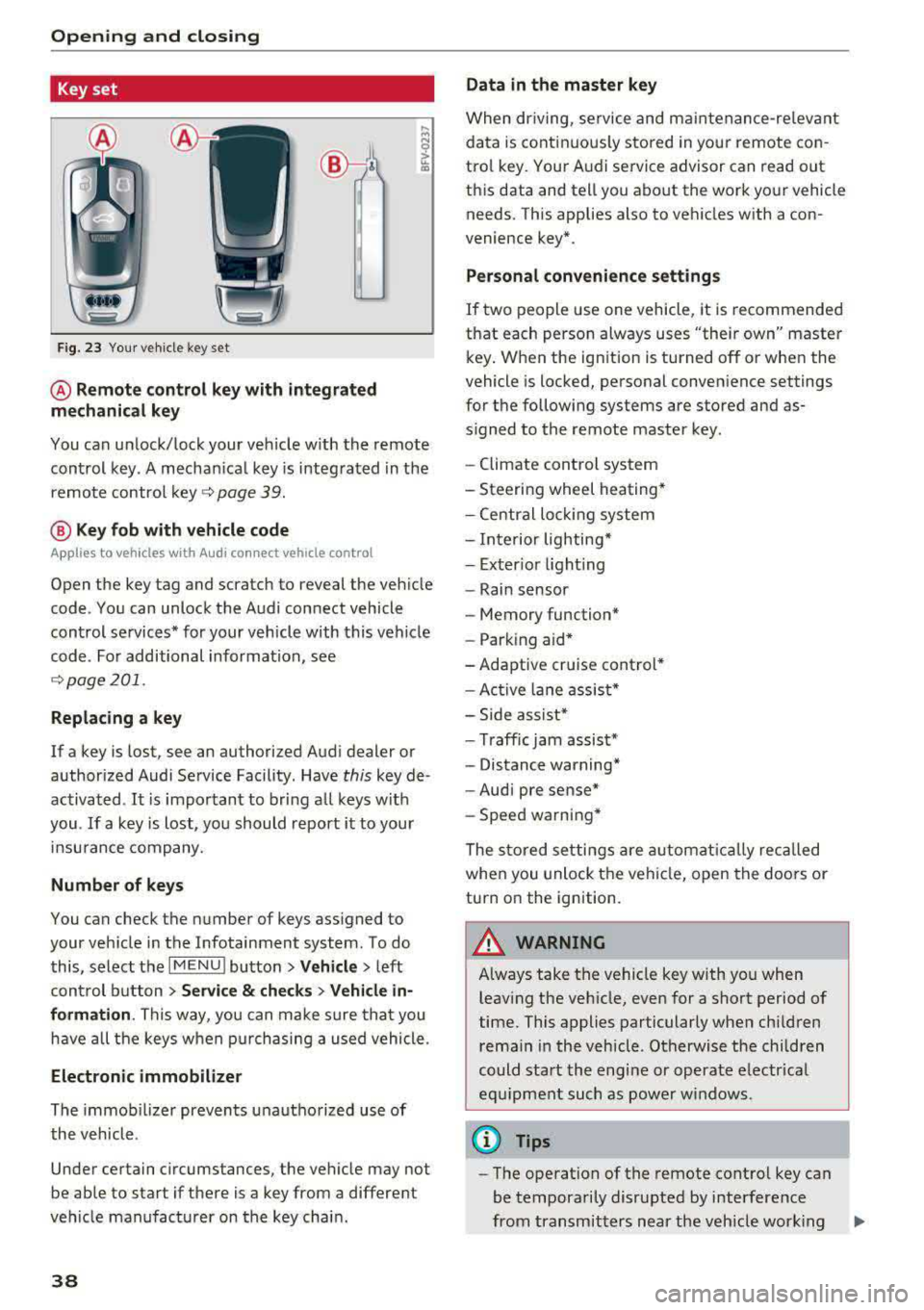
Key set
Fig. 23 Your veh icle key set
@ Remote control key with integrated
mechanical key
You can unlock/lock your veh icle w ith the remote
control key . A mechan ical key is integrated in the
remote control
key ~ page 39.
@ Key fob with vehicle code
Appl ies to veh icles with A udi co nnect vehicle con trol
Open the key tag and scratch to reveal the veh icle
code . You can unlock the Audi connect vehicle
control se rvices* for your vehicle with this vehicle
code . For additional information, see
~ page 201 .
Replacing a key
If a key is lost, see an authorized Audi dealer or
authorized Audi Service Facility. Have
this key de
activated .
It is important to bring all keys with
you .
If a key is lost, you should report it to your
insu rance company.
Number of keys
You can check the number of keys assigned to
your vehicle in the Infotainment system . To do
this, select the
IM ENU I button > Vehicle > left
control button
> Service & checks> Vehicle in·
formation .
This way, you can make sure that you
have all the keys when purchasing a used vehicle.
Electronic immobilizer
The immob ilizer prevents unauthorized use of
the vehicle .
Under certain circumstances, the vehicle may not
be able to start if there is a key from a different
veh icle manufacturer on the key chain.
38
Data in the master key
When dr iving, service and maintenance-re levant
data is continuously stored in your remote con
trol key. Your A udi service advisor can read out
this data and tell you about the work your vehicle needs . This applies also to vehicles with a con
venience key*.
Personal convenience settings
If two people use one vehicle, it is recommended
that each person always uses "their own" master
key . When the ign ition is turned off or when the
vehicle is locked, personal convenience settings
for the following systems are stored and as
s igned to the remote master key.
- Climate control system
-Steering wheel heating*
-Central lockin g system
-Interior lighting*
-Exter ior lighting
- Rain sensor
- Memory function*
- Park ing a id *
-Adaptive cr uise control *
-Active lane assist*
-Side assist*
-Traff ic jam assist*
- Distance warning*
-Audi pre sense*
- Speed warning *
The stored settings are automatically recalled
when you unlock the vehicle, open the doors or
turn on the ignition .
~ WARNING
Always take the vehicle key with you when
leaving the vehicle, even for a short period of
time. This applies particularly when children
rema in in the vehicle . Otherwise the children
could start the engine or operate electrical
equipment such as power windows .
(© Tips
-
-The operation of the remote control key can
be temporarily disrupted by interference
from transmitters near the veh icle work ing
1J11,
Page 50 of 409
Opening and closing
Child safety lock
Applies to: ve hicles w ith c hild safety locks
The child safety lock prevents the rear doors
from being opened from the inside and the rear
power windows from be operated.
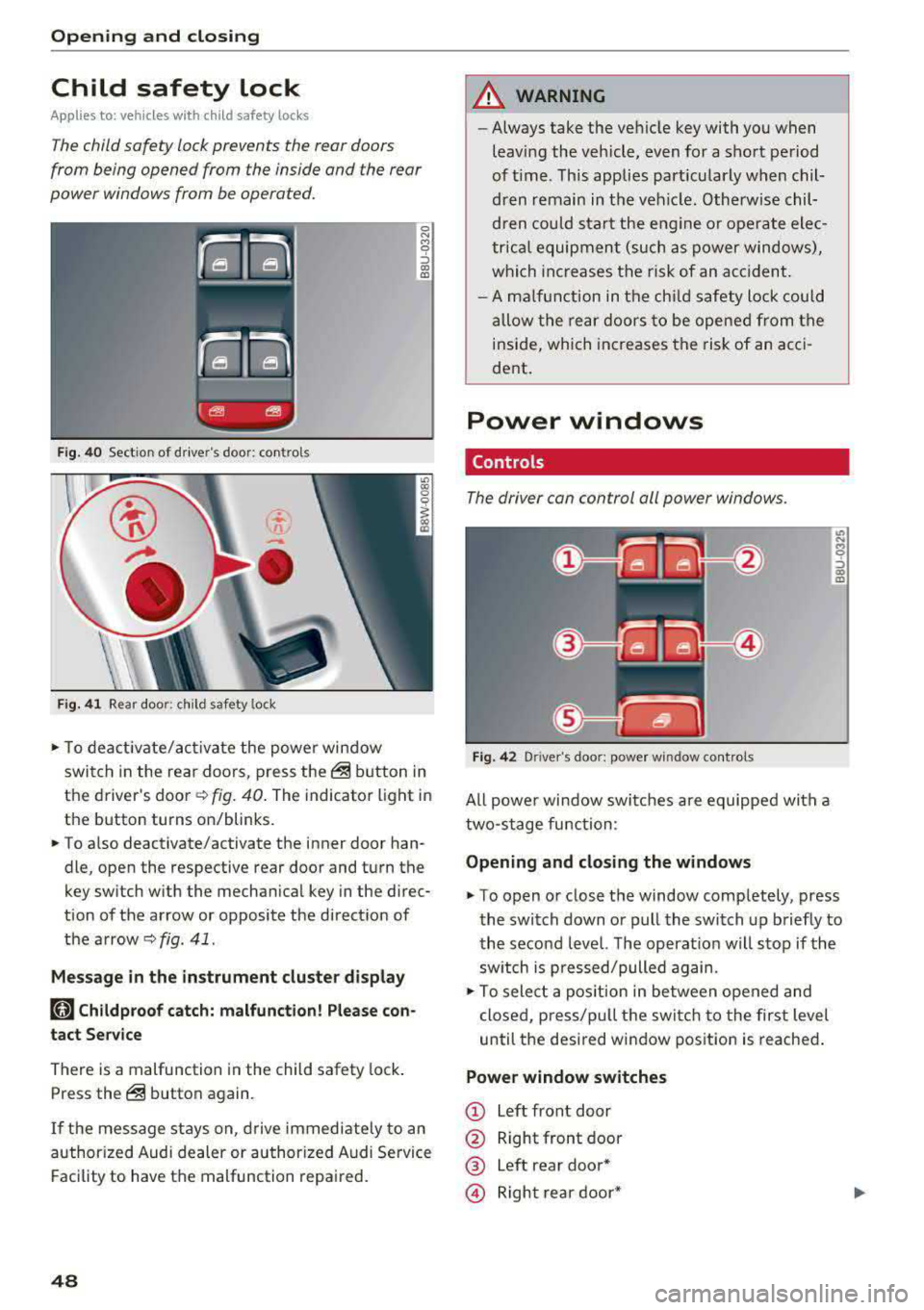
Fig. 40 Section of driver's door: controls
Ci
-
-
Fig. 41 Rear door: chil d safety lock
0 N M 0 ::,
"' "'
• To deactivate/activate the power window
switch in the rear doors, press
the@ button in
the driver's
door ~ fig. 40. The indicator light in
the button turns on/blinks.
• To also deactivate/activate the inner door han
dle, open the respective rear door and turn the
key switch w ith the mechanical key in the direc
tion of the arrow or opposite the direction of
the
arrow~ fig . 41.
Message in the instrument cluster display
(tll Childproof catch: malfunction! Please con
tact Service
There is a malfunction in the child safety lock .
Press
the@ button again.
If the message stays on , drive immediately to an
authorized Audi dealer or authorized Audi Service
Facility to have the malfunction repaired.
48
A WARNING
-Always take the vehicle key with you when
leav ing the vehicle, even for a short period
of time . This applies particularly when chil
dren remain in the vehicle . Otherwise chil
dren could start the engine or operate elec
trical equipment (such as power windows),
which increases the risk of an accident.
- A malfunction in the child safety lock could
allow the rear doors to be opened from the
inside, which increases the risk of an acci
dent.
Power windows
Controls '
The driver can control all power windows .
Fig. 42 Driver's door: power win dow controls
All powe r window switches are equipped with a
two-stage function:
Opening and closing the windows
M 0 ::,
"' "'
• To open or close the window completely, press
the switch down or pull the switch up briefly to
the second level. The operat ion will stop if the
sw itch is p ressed/pulled again.
• To select a position in between opened and
closed, press/pu ll the switch to the first level
until the desired window position is reached.
Power window switches
CD Left front door
@ Right front door
® Left rear door*
© Right rear door*
Page 51 of 409
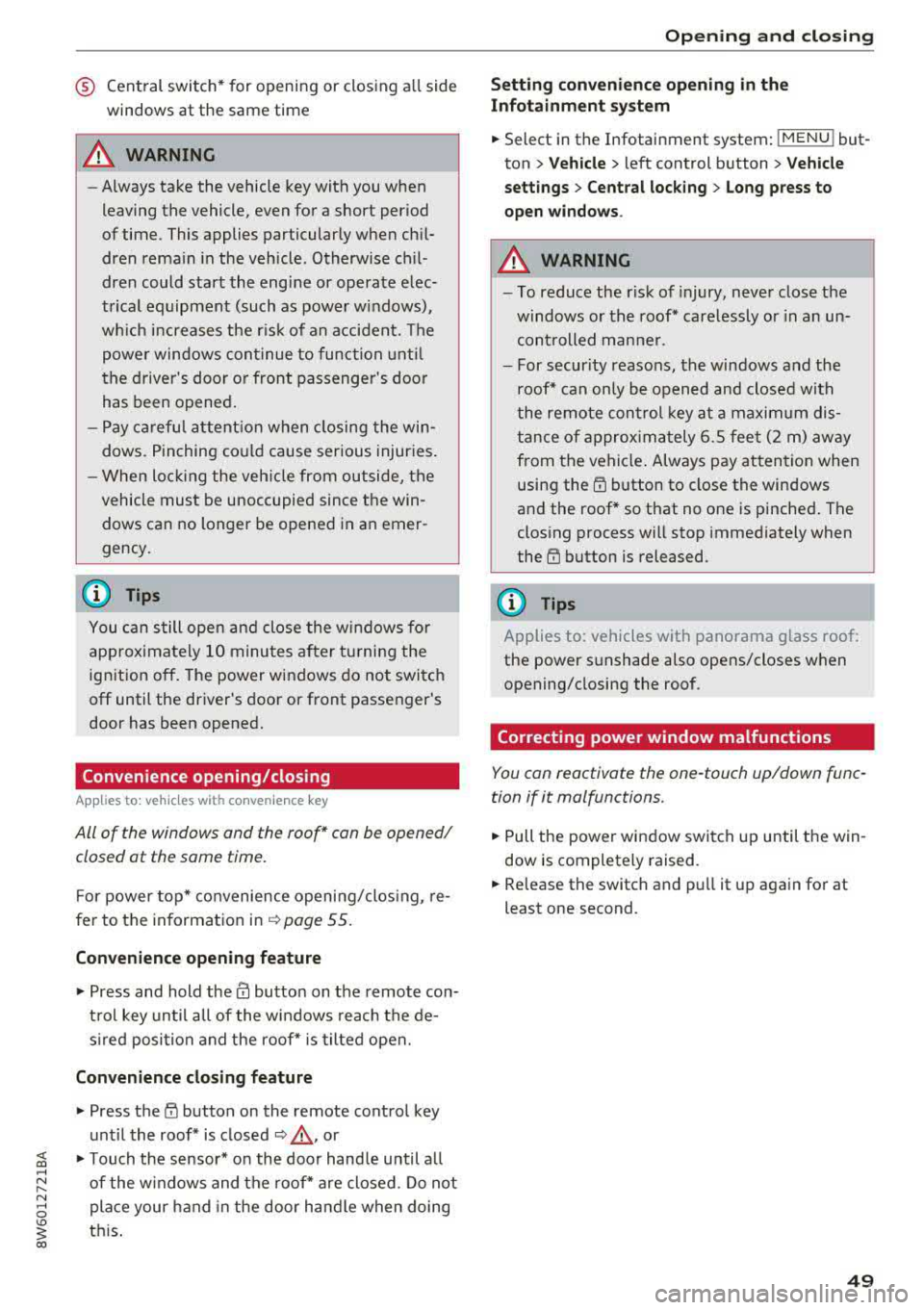
® Central switch* for opening or closing all side
windows at the same time
A WARNING
- Always take the vehicle key with you when
leaving the vehicle, even for a short period
of time. This applies particularly when chi l
dren rema in in the vehicle. Otherwise ch il
dren could start the engine or operate elec
trical equipment (such as power windows),
wh ich increases the r isk of an accident. The
powe r windows con tinue to function unt il
the driver 's door or front passenger 's door
has been opened .
- Pay ca reful attent ion when closing the win
dows. P inching co uld cause serious injuries .
- When loc king the veh icle from outside, the
vehicle must be unoccupied since the win
dows can no longer be opened in an emer
gency.
(D Tips
You ca n still open and close the w indows fo r
approxima tely 10 minutes after turning the
ign it ion off. T he power windows do no t switch
off until the driver's door or front passe nger's
door has been opened.
Convenience opening/closing
App lies to: vehicles with convenience key
All of the windows and the roof* con be opened/
closed ot the same time.
F or power top* convenience opening/clos ing, re
fer to the in formation
in ~ page 55.
Convenience opening feature
.,. Press and hold the IT! button on the remote con
t rol key until all of the windows reach the de
s ir ed position and the roof* is tilted open.
Con venience closing feature
.,. Press the ('.D button on the remote control key
until the roof* is closed
~ .&. , or
;;§ .,. Touch the sensor* on the doo r hand le until a ll
;::; of the windows and the roof* are closed. Do not ,....
8 place your hand in the door handle when doing
3 th is .
Sett ing conven ienc e op ening in the
Infota inm ent sy stem
.,. Select in the Infotainment system: I MENU ! but
ton
> Vehicle > left control b utton > V ehicle
setti ng s> C entral lock ing > Long p ress to
o pen windo ws.
A WARNING
= -- To reduce the r isk of injury, never close the
windows or the roof* carelessly or in a n un
con trolled man ner .
- For secur ity reaso ns, the windows and the
roof* can on ly be opened and closed with
the remote con trol key a t a maximum dis
tance of approx imately 6.S fee t (2 m) aw ay
from the vehicle . Always pay atten tion when
using the
tfJ button to close the windows
and the roof* so that no one is pinched . The
clos ing process will stop immediately when
the
tfl button is released.
(D Tips
Applies to: vehicles with panorama glass roof:
the power sunshade also opens/closes when
opening/closing the roof.
Correcting power window malfunctions
You can reactivate the one -touch up/down func
tion if it malfunctions.
.,. Pull the powe r window switch up until the win
dow is completely raised.
.,. Release the switch and pu ll it up again fo r at
least one second .
49
Page 57 of 409
_& WARNING
-When operating the power top, make sure
the funct ion is not affected by wind or other
factors and that it does not interfere with other dr ivers .
- Visibility to the rear is limited when operat ing the power top . Avoid operating the top
wh ile driving in reverse .
- Never drive with the power top unlocked .
The wind from driving could cause the pow
er top to open. This can result in injur ies and
damage to the vehicle.
- Make sure no one will be injured by the pow
er top suppo rts or other moving compo
nents when open ing and closing the top.
- T he headroom in the rear is reduced when
opening a nd clos ing the power top. Make
sure the rear passengers keep enough d is
tance from the power top to reduce the risk
of injury.
(D Note
To prevent damage to the power top:
- do not store any objects in the power top storage compartment.
- make sure there is enough space above the
vehicle when opening or clos ing the power
top.
@ Tips
- To prevent the vehicle battery from draining unnecessari ly, do not open or close the pow
er top repea tedly whe n the engine is switch
ed off.
- The power top can also be operated manual
l y temporari ly if there is a malfunc tion
c::, page 58, Power top emergency opera·
tion . An author ized A udi dealer or author
ized Audi Service Facility should diagnose
and correct the cause of the ma lfunction as
soon as possib le.
- If the vehicle is parked with the power top
open, the vehicle inter ior is not protected
from damaging weather or unauthorized ac
cess. Lock any items you leave behind in the
luggage compartment . C lose the power top
before leaving the vehicle .
Powe r top
-The side windows automatically lower
slightly when opening or closing the power
top .
Power top convenience opening/closing
App lies to : vehicles wit h powe r top
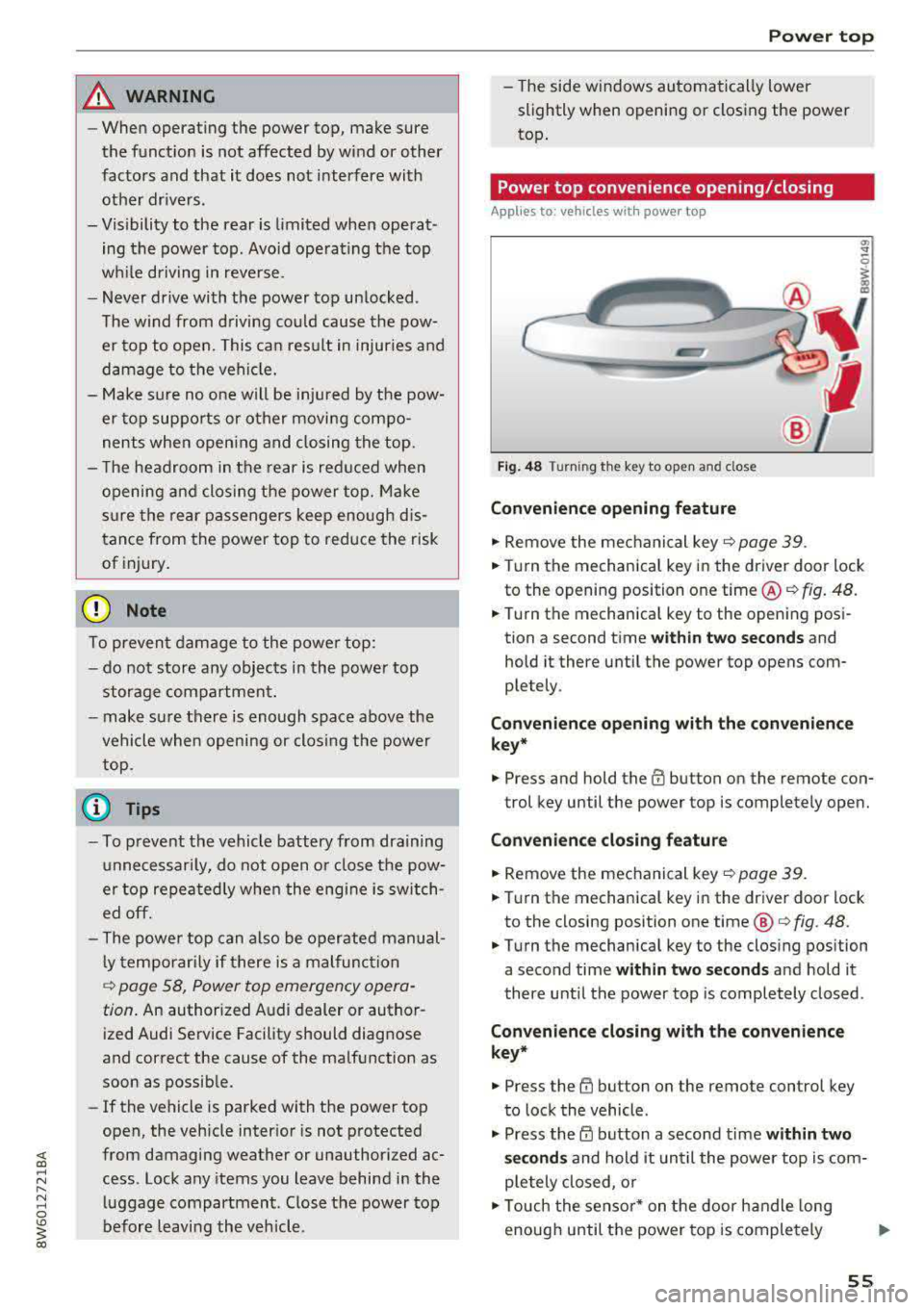
Fi g. 48 Turni ng th e key to open a nd close
Convenien ce opening feature
.,. Remove the mec hanical key c::> page 39 .
.,. Turn the mechanica l key in the driver door lock
to the opening position one time @
c::, fig. 48.
.,. Turn the mechanica l key to the opening posi
tion a second time
wi th in tw o se cond s and
hold it there until the power top opens com
ple tely .
Co nven ien ce opening with th e co nv eni enc e
key*
.,. Press and hold the m button on the remote con-
trol key until the power top is completely open.
Conv enience clo sing featur e
.,. Remove the mechanical key c::, page 39.
.,. Turn the mechanical key in the dr iver door lock
to the closing posit ion one time @
c:> fig. 48.
.,. Turn the mechanical key to the clos ing position
a second time
within two seconds and hold it
there until the power top is completely closed .
Convenienc e closing with th e con ven ience
key*
.,. Press the tfJ button on the remote control key
to lock the vehicle .
.,. Press the CD button a second time within two
s e cond s
and hold it until the powe r top is com
ple tely closed, o r
.,. Touch the sensor * on the door handle long
enough until the power top is completely
Ill>
55
Page 58 of 409
Power top
closed. Do not place your hand in the door han
dle when do ing this.
The opening or closing p rocess w ill stop
immedi
ately
if you release the key or stop to uch ing t he
button. Opening a nd clos ing with t he conven
ie nce k ey* is possible from up to 13 ft (4 m)
away .
A WARNING
Read and follow t he important safety p recau
tions
i:> & in Opening/closing the power top
on page
55 .
Power top storage compartment
Applies to: veh icles with power top
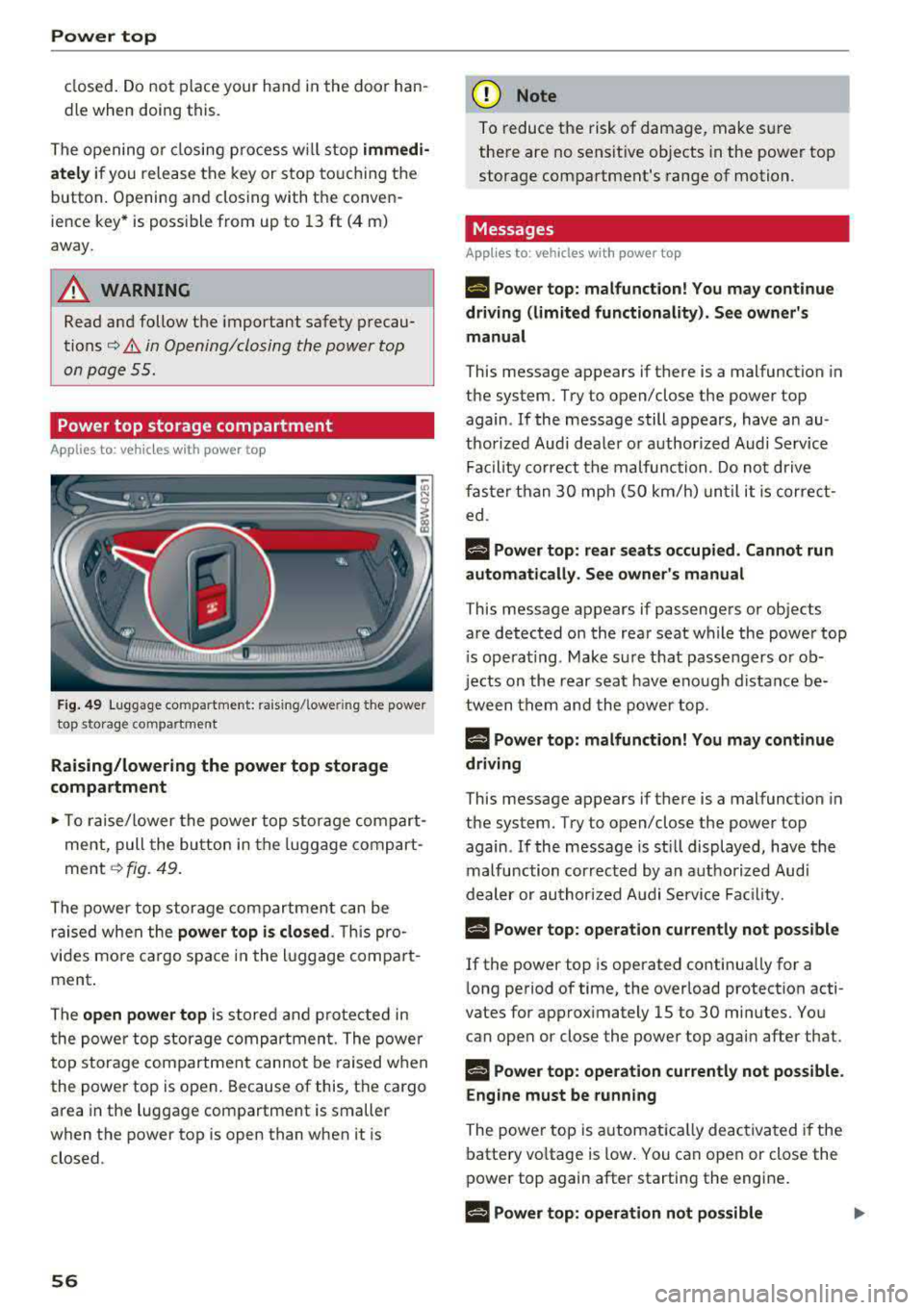
Fig. 49 Luggage co mpartme nt: ra isi ng/ lowe ring the powe r
top s to rage co m partment
Raising/lowering the power top storage
compartment
.- To ra ise/lower the power top storage compart
ment, pull the bu tton in the luggage comp art
ment
i:> fig. 49.
The power top st orage compartment c an be
raised when t he
power top is closed . This pro
vides mo re ca rgo s pace in the l uggage compa rt
ment .
T he
open power top is stored and p rotected in
the powe r top storage compartmen t. T he power
top storage compartment canno t be raised w hen
the power top is open . Because of this, the cargo
area in the luggage compartment is smaller
when the power top is open than when it is
closed .
56
(D Note
To reduce t he risk of damage, make s ure
the re are no sensit ive objects in the power top
storage compartment's range of motion.
Messages
Applies to: vehicles with power top
II Power top: malfunction! You may continue
driving (limited functionality). See owner's
manual
This message appears if there is a malfunction in
the system. Try to open/close the power top
again . If the message still appears, have an au
thorized Aud i dea le r or authori zed Audi Service
Fa cility co rrect the malfunction . D o not d riv e
fas ter than
30 mph (SO km/h) un til it is cor rec t
ed .
f-j "ower top: rear seats occupied . Cannot run
automatically. See owner 's manual
This message appears if passengers or objects
are detected o n the rea r seat while the powe r top
i s ope ra ti ng . Make s ure t hat passe ngers o r ob
je cts on the rear sea t have eno ugh distance be
tween them and the power top .
f¥-j "ower top: malfunction! You may continue
driving
This message appears if there is a malfunction in
the system. Try to open/close the power top
again . If the message is st ill displayed, have the
malfunction correc ted by an a uthorized Aud i
dealer or author ized A udi Service Fac ility.
H "ower top: operation currently not possible
If the power top is operated continua lly for a
l ong period of time, the overload protection acti
vates for app rox imately 15 to
30 minutes. Yo u
can ope n or close the power top agai n after that .
§-j "ower top: operation cu rrently not possible .
Engine must be running
The powe r top is a utomat ica lly deac tiva ted if the
batte ry vo ltage is low . You can open or close the
power top aga in after start ing the engine .
§-j "ower top: operation not possible