parking brake AUDI A5 COUPE 2018 User Guide
[x] Cancel search | Manufacturer: AUDI, Model Year: 2018, Model line: A5 COUPE, Model: AUDI A5 COUPE 2018Pages: 409, PDF Size: 67.63 MB
Page 97 of 409
<( a, .... N ,....
N .... 0 \0
3 a,
sounds when the C®> switch is pulled . Emergency
braking stops as soon as
the(®) switch is released
or the accelerator peda l is pressed.
Parking
.,. Press t he b rake peda l to stop the vehicle .
.,. Pull the(®) switc h to set the parking brake .
.,. Applies to: automatic transmission: Select the
P selector lever position .
.,. Turn the eng ine off c> & .
.,. Applies to: manual transmission: Engage 1st
gear .
.,. Turn the steer ing wheel when parking on in
clines so that the wheels will roll into the curb
i f the veh icle starts moving.
_& WARNING
- Never ac celer ate o r release the clutch pedal
carelessly when a gear or a selector lever
posit ion (automatic transm ission) is engag
ed wh ile the vehicle is stationary and the
en
gine is runn ing. Otherwise, the vehicle will
start to move immediately and this cou ld
re
sult in an accident.
- Emergency braking should only be used in an emergency, when the normal brake peda l
has failed or the brake pedal is obstructed.
During emergency braking, your veh icle will
bra ke sim ila r to heavy brak ing . ESC and the
associated components (ABS, ASR, EDL)
c annot overcome the laws of physics.
Around curves and when road or weather conditions are bad, a fu ll brake application
can cause the vehicle to skid or the rear end
to swerve, which increases the risk of an
ac
c ident.
- If the power supply fails, you cannot set the
park ing brake if it is released. If th is is the
case, stop the veh icle on leve l ground and
secure it by engaging 1st gear (manual
transmiss ion) or select ing the P selector lev
er position (automatic t ransm iss ion). See an
authorized Aud i dealer o r autho rized Aud i
Service Facility for assistance.
- Always take the vehicle key with you when
leaving your vehicle, even if for a short pe ri
od of time. Th is app lies p articu larly when
children rema in in the vehicle. Otherwise,
D riv ing
children could start the engine, release the
parking brake or operate e lectrical equip
ment such as power w indows, which
in
creases the risk of an accident.
- No one, especially children, should remain
in the vehicle when it is locked. Locked
doors make it more difficu lt for emergency
wo rkers to get into the vehicle, which puts
lives at risk .
(D Tips
Applies to: vehicles with automatic transmissions
When stopp ing at a t raff ic signa l or stopp ing
i n city traffic, yo u can set the park ing bra ke
manually. The vehicle does not have to be
held with the brake pedal. The park ing brake
eliminates the tendency to creep when a
se
l ector lever position is engaged. As soon as
you press the accelerator peda l, the parking
brake re leases automatically and your vehicle
starts to move
c>page 95.
(D Tips
- Occasional noises when the parking brake is
set and released are normal and are not a
cause for concern.
- The parking brake goes through a self-test cycle at regu lar intervals when the vehicle is
stopped. Any no ises assoc iated with th is are
normal.
- If there is a power failure, the parking brake
w ill not set if it is released, and it will not
release if it is set
c> A . See an a uthorized
Audi dealer or author ized Audi Service
Fa
cility for assis tance.
Starting to drive
Various convenience and safety funct ions may be
available when the vehicle begins driving,
de
pend ing on vehicle equipment.
Starting on hills w ith the pa rking brake set
Requirement: the driver's door must be closed .
.,. To start driving comfortably when on a hi ll, set
the parking brake and begin driving as usual.
The braking force of the parking brake does not
..,.
95
Page 99 of 409
<( a, .... N ,....
N .... 0 \0
3 a,
~ To engage the nearest selector lever position,
move the selector lever forward/back until you
feel the first pressure point. The selector lever
will return to its original position.
~ To skip over one selector lever position, move
the selector lever past the pressure point into
the desired position. The selector lever will re
turn to its original position.
For example, you can skip over the N position if
you would like to go directly from D into R .
Selector lever lock
The selector lever lock prevents you from select
ing a position unintentionally, causing the vehicle
to roll. When engaging some selector lever posi
tions, you must press the locking button
@on
the selector lever and/or press the brake pedal
¢fig. 102 .
You must press the brake pedal to engage a se
lector lever position when the engine is running
and the vehicle is stationary.
You do not have to press the brake pedal if you
shift from D to R within one second . This allows
you to "rock" the vehicle to free it when it is
stuck .
P - Park
This selector lever position prevents the vehicle
from rolling. Only shift into park when the vehi
cle is
stationary ¢.&, . To select the P selector lev
er position, press the P button @on the selector
lever ¢ fig. 102 . P appears next to the selector
lever .
Applies to vehicles w ith S tronic transmission:
the parking lock can only be released when the
ignition is switched on and the brake pedal is
pressed . To release the parking lock, press the
brake pedal, press the locking button
(Don the
selector lever and select the desired position
¢fig. 102. The engine must also be started to
engage the D or R selector lever position.
Ap plies to vehi cles w ith tiptron ic tra nsmiss io n:
the parking lock can only be released when the
engine is running and the brake pedal is pressed .
To release the parking lock, press the brake ped-
Driving
al, press the locking button (Don the selector
lever and select the desired position¢
fig. 102.
P engages automatically if you switch the engine
off while the selector lever is in D, E, S, R or man
ual mode.
If you switch the engine off when the N selector
lever position is selected, the transmission re
mains in N for approximately 30 minutes and
then Pis engaged. The vehicle is not secured
from rolling in the N selector lever position, so
you need to set the parking
brake© ¢ page 94.
You must use the parking lock emergency release
before towing the vehicle
¢page 102.
R- Reverse
The reverse gear is engaged in this position . Only
select reverse gear when the vehicle is stationary
and the engine is running at idle
speed¢ .&,. To
engage the R selector lever position, press the
brake pedal, press the locking button
(D on the
selector lever and select the R position
¢ fig . 102.
A confirmation tone will sound when the reverse
gear is engaged.
N - Neutral (idle)
The transmission is in idle in this position. To en
gage the N selector lever position, press the lock
ing button
(Don the selector lever and shift into
the N position
¢fig. 102.
If you switch the engine off when the N selector
lever position is selected, the transmission re
mains in N for approximately 30 minutes and
then Pis engaged.
You cannot select the N position when the igni
tion is switched off. When driving through an au
tomatic car wash, first select the N position and
then turn the engine off.
For safety reasons, the vehicle cannot be locked
when the transmission is in the N position.
DIS -Driving forward
When the transmission is in the D/S position, it
can be operated either in the normal D mode or
in the S sport mode. Move the selector lever back
.,.
97
Page 100 of 409
Driving
to engage the S sport mode. You can only select
the S selector lever position when the D or E posi
tion is selected. To select the Dor
E position
again when S is engaged, move the selector lever
back ¢,& . To shift from N to D when traveling at
speeds below
1 mph (2 km/h), press the brake
pedal and shift into the D
position ¢,& .
In the normal mode D, the transmission auto
matically selects the suitable gear ratio. It de
pends on engine load, vehicle speed and driving
style .
Select the
sport mode S for sporty driving. The
vehicle makes full use of the engine's power.
Shifting may become noticeable when accelerat
ing.
The S selector lever position engages automati cally when you select the
dynamic mode in drive
select* .
A WARNING
Read and follow all WARNINGS.
- The vehicle can roll even if the ignition is
switched off .
- Power is still transmitted to the wheels
when the engine is running at idle. To pre
vent the vehicle from "creeping", you must keep your foot on the brake in all selector
lever positions (except P and N) when the
engine is running.
- Before opening the hood, select the P selec
tor lever position and set the parking brake.
This reduces the risk of an accident. Always
read and follow the applicable warnings
¢ page 330, Working in the engine com
partment.
(D Tips
If
you accidentally select N while driving, take
your foot off the accelerator pedal and wait
for the engine to slow down to idle before se
lecting Dor S.
98
· Driving tips
App lies to: vehicles with automatic transmissions
Starting the engine
.,. The P or N position must be selected .
Starting from a stop
.,. Press and hold the brake pedal.
.,. Start the engine¢ page 89.
.,. Press the locking button (Don the selector lev
er and select the
D, E, Sor R position
¢ page 96 .
.,. Wait a moment until the transmission shifts.
You will notice a slight movement when the
gear engages .
.,. Release the brake pedal and press the accelera-
tor
pedal ¢ _A.
Various convenience functions are available for
starting on hills
¢ page 95.
Stopping temporarily
.,. Press the brake pedal to stop the vehicle, for
example at a traffic light . Do not press the ac
celerator pedal when doing this.
.,. To prevent the vehicle from rolling when you
start driving, set the parking brake when stop
ping on steep
hills ¢ _A.
.,. The parking brake will release automatically
and the vehicle will start moving once you press
the accelerator pedal.
Stopping/parking
If the selector lever is not in the P position when
you open the driver's door, the vehicle could roll.
.,. Press and hold the brake pedal ¢_& .
.,. Set the parking brake .
.,. To select the P selector lever position, press the
P button
@ on the selector lever ¢ page 96,
fig. 102.
Under certain conditions, such as driving in the
mountains or when towing a trailer, it may be
helpful to switch to manual mode temporarily
and shift
manually to adapt to the driving condi
tions
¢ page 99.
On hills, activate the parking brake first and then
shift into the P
position ¢ page 94. This prevents ..,.
Page 101 of 409
too much stress from being placed on the locking
mechanism .
A WARNING
-The vehicle can roll even when the engine is
switched off.
-U nintended vehicle movement can lead to
serious injuries.
-To reduce the risk of an accident, do not press the acce lerator pedal when changing
the selector lever position while the vehicle
is stationary and the engine is running.
-To reduce the risk of an accident, never se
lect the R or P posit ions while driving.
-Do not inadvertent ly press the acce le rator
peda l when the veh icle is stationary. Other
wise the risk of an accident increases be
cause the vehicle will start to move immed i
ately, eve n if the par king brake is set.
@ Tips
For safety reasons , the parking b rake on ly re
leases automatically when the driver's door is
closed.
Hill descent control
A ppl ies to: ve hicles with a utomat ic t ra nsmi ssio ns
The hill descent control system assists the driver
when driving down hills.
Hill descent control act ivates when the transmis
sion is in the Dor S posit ion and you press the
brake pedal. The t ransmission automat ically se
lects a gear that is suitab le for the hill . H ill de
scent contro l tries to ma inta in the speed ach
i eved at the time of braking, withi n phys ica l and
techn ica l limita tions. If may st ill be necessary to
a dj ust the speed wi th t he b rake pedal.
H ill descent control switches off once the hill lev
e ls out o r yo u press the accelerator pedal.
W hen operating the c ruise contro l system*
¢ page 10 7, hill descent contro l is also act ivated
when the speed is set .
Drivi ng
A WARNING
-Hill descent control cannot overcome physical
limitat io ns, so it may not be able to ma intain
a constant speed under all conditions. Always
b e ready to app ly the brakes.
Shifting manually (tiptronic mode)
A pp lies to : vehicles wi th automatic transmiss ions
The tiptronic mode allows the driver to shift the
gears manually .
Fig. 103 Center console: s hiftin g man ually w it h th e se lec
to r lever
Fig. 1 04 Stee ring w hee l: sh ift ing man ually
Shifting with the selector lever
9 ~ ... CD
You can shift into tip tronic mode wh ile stat iona ry
and wh ile driving.
.,. To shift into tiptronic mode, push the selector
lever from the D/S position to the right . As
soon as the transm ission switches over, the M
tra nsmission setting w ill appear in the instr u
men t cluste r display .
.,. To shift up a gea r, t ap the sele ctor leve r fo r
ward
0 ¢ fig . 103 .
.,. To shift down a gear, tap the se lector lever back
0 -~
99
Page 104 of 409
Driving
There is a system malfun ction in the t ransmis
s ion. The transm ission is switching to emergency
mode. This mode on ly shifts into certain gears or
will no longer shift at all. The engine may stall.
Drive to an authorized Audi dea ler or authori zed
Audi Serv ice Facility immediately to have the
malfunct io n corrected.
~ Transmissio n: malfunct ion! You may contin
ue driv ing . No reverse gear
There is a system malfunction in the transmis
sion. The transmission is switching to emergency
mode. This mode only shifts into certain gears or
will no longer shift at all. The engine may stall.
You cannot engage the reverse gear . Drive to an
author ized Audi dealer or author ized Audi Service
Facility immediately to have the malfunction cor
rected.
~ Danger of rolling away! P not possible .
Please apply parking brake
-The park ing lock was released using the emer
gency release
¢ page 102. Or
-The parking lock can no longer be engaged.
Drive to an authori zed A udi dealer or author
i z ed Audi Service Facility immed iately to have
the malfunc tion corrected .
~ Move selector leve r to automati c position
There is a mal func tion in the tip tronic mode. End
tiptronic mode by pushi ng the selector lever to
the left i nto t he 0/5 position.
102
Parking lock emergency release
Applies to: vehicles with automatic transmissions
The parking lock must be released with the
emergency releas e when driving through moun
tains/maneuvering.
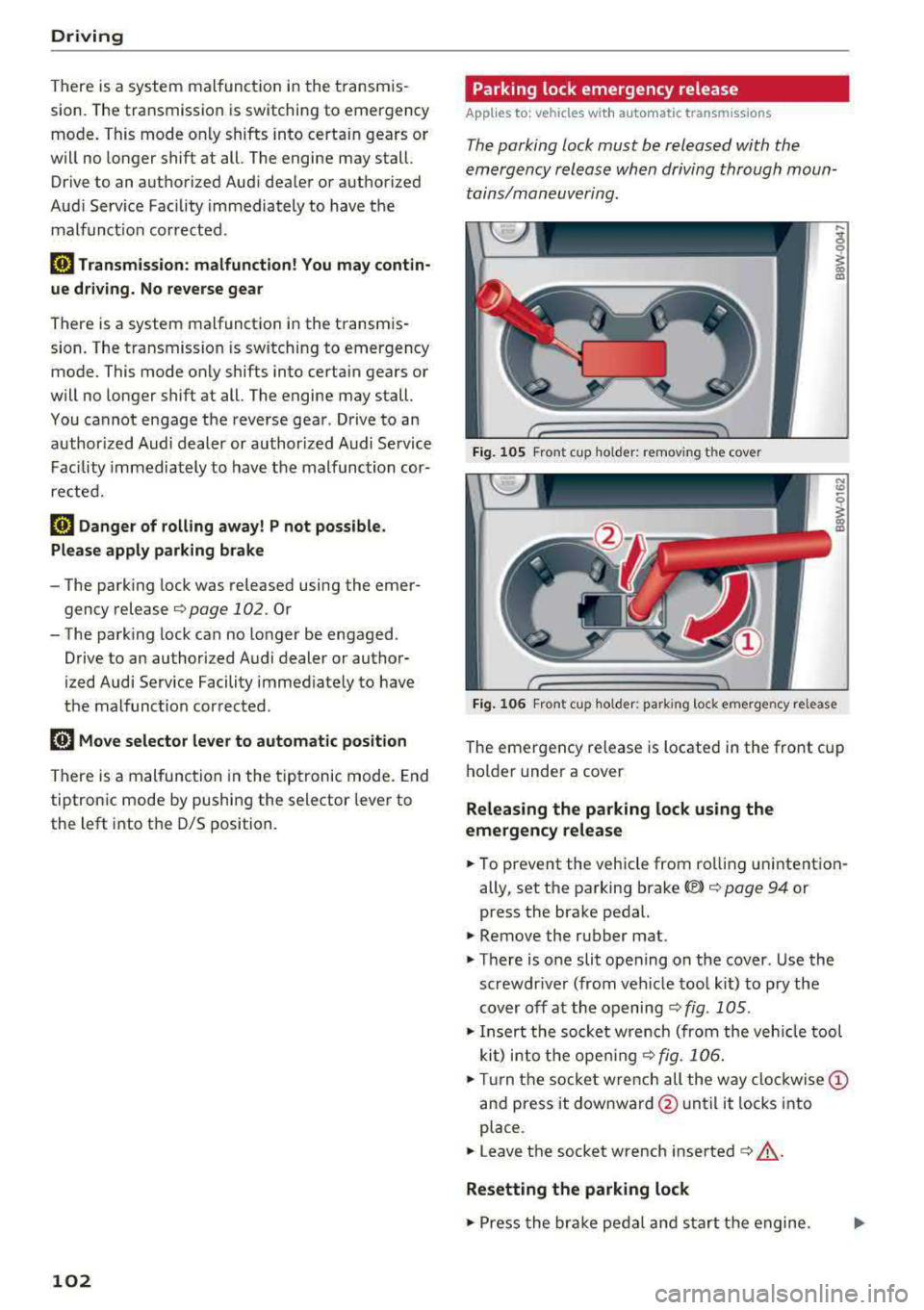
Fig. 105 Front c up ho lder: remov ing the cove r
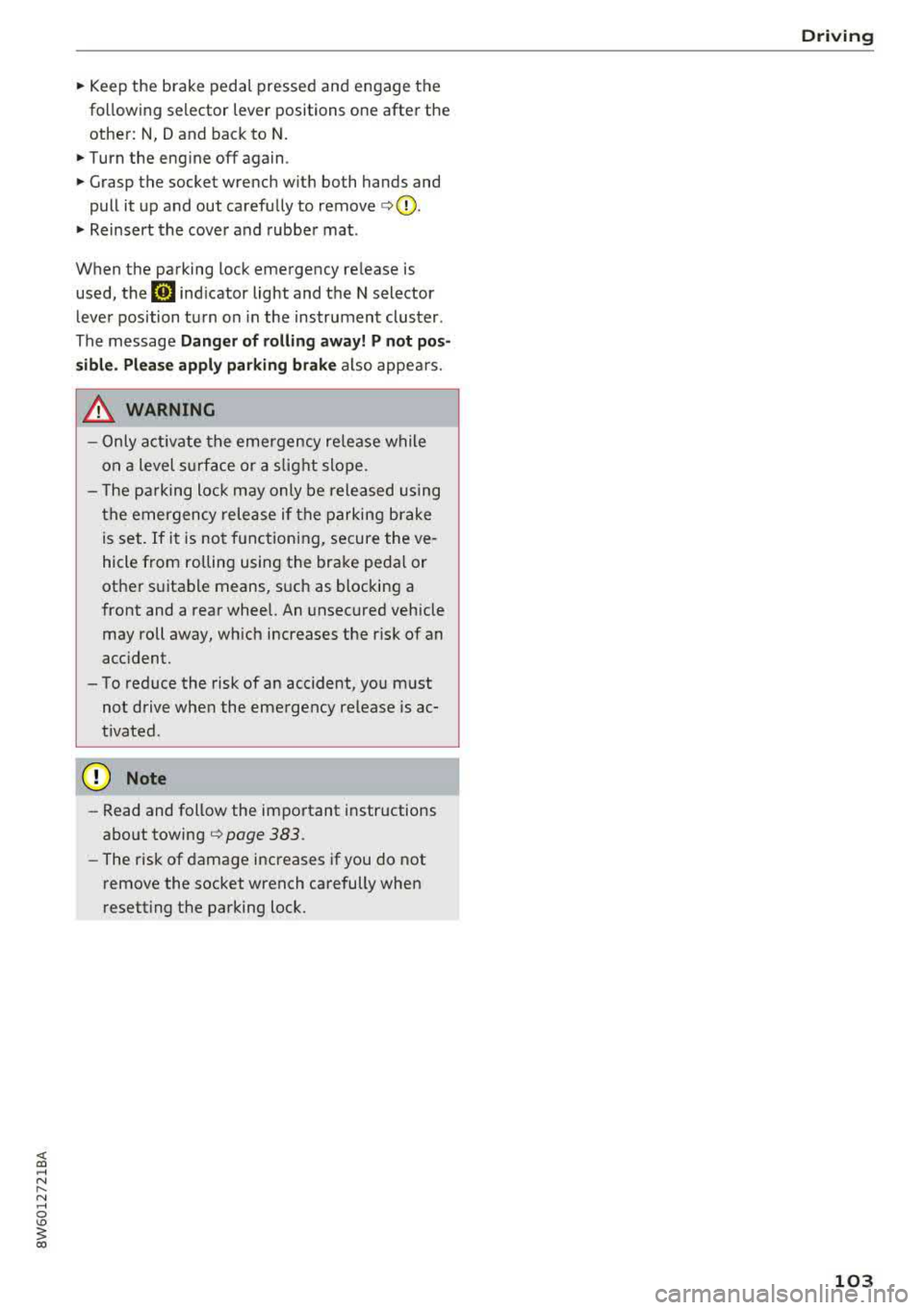
Fig. 10 6 Front cu p ho lder: park ing lock emerge ncy re lease
The emergency release is located in the front cup
ho lder under a
cover
Releasing the parking lock using the
emergency relea se
.,. To prevent the veh icle from ro lling un intent ion
ally, set t he parking
brake© ¢ page 94 or
press the brake pedal.
.,. Remove the rubber mat .
.,. T here is one slit opening on the cover . Use the
screwdr iver (from vehicle too l ki t) to p ry the
cover off at the opening ¢ fig. 10 5 .
.,. Insert the socket w re n ch (from the veh icle tool
ki t) i nto the ope ning
¢ fig. 106 .
.,. Tur n the socke t wre nch all the way clo ckwise @
and press it downward @until it locks into
place .
.,. Leave the socket wrench inserted c:> .&_ .
Resetting the parking lock
.,. Press the bra ke peda l and s tart the engine.
Page 105 of 409
<( a, .... N ,....
N .... 0 \0
3 a,
~ Keep the brake pedal pressed and engage the
fo llowing se lector lever positions one after the
othe r:
N, D and back to N.
~ Turn the eng ine off again .
~ Grasp the socket wrench w it h both hands and
pull it up and out carefu lly to remove
<=> (D .
~ Reinsert the cove r and rubbe r mat .
When t he parking lock emergency re lease is
used , the
mJ ind icator light and t he N selector
l eve r pos ition tu rn on in the instrument cluster .
The message
Danger of rolling away! P not pos
s ible . Please apply parking brake
a lso appea rs .
.&, WARNING
- O nly a ctiva te the e mergency re le as e w hile
o n a level s urfa ce o r a s lig ht slo pe.
- T he pa rking lock may only be released using
the e mergency rele ase i f th e parking br ake
is set. If i t i s no t fu nctioning, secure the ve
hicle from rolling using the brake peda l or
ot he r su ita ble means, such as blocking a
front and a rear wheel. An unsec ured veh icle
may roll away, w hich increases the r isk of an
acc ident.
- To red uce the risk of an accident, you must
not drive when the eme rgency release is ac
t ivated.
- Read and follow the impo rtant instructions
abo ut towing
<=> page 3 83.
- The risk of dama ge i ncreases if you do not
r emove the socket wrench carefully when
r esett ing t he pa rking loc k.
D riving
-
103
Page 108 of 409
Trailer towing
Backing up is difficult and requires practice .
Backing up with a trailer generally requires steer
ing action oppos ite to that when backing up your
veh icle w ithout a trailer.
Maintain a greater distance between your vehicle
and the one in front of you. You w ill need more
room to stop. To compensate for the tra iler, you
will need a larger than normal turn ing radius.
When passing, remember that you cannot accel
erate as fast as you norma lly would because of
the added load. Make sure you have enough room
to pass. After passing, allow plenty of room for
your tra iler before chang ing lanes again.
Avoid jerky starts, sharp turns or rapid lane
changes .
@ Tips
- Do not tow a trailer during the break -in per i
od of your vehicle.
- If you tow a trailer, your Audi may require
more frequent maintenance d ue to the ex
tra load
~ page 389.
Parking on a slope
Do not pork on a slope with a trailer. If it cannot
be avoided, do so only
o~er doing the following:
When parking:
.,. Apply t he foo t brake .
.,. Have someone place chocks under both t he ve
hicle and the tra ile r whee ls .
.. With chocks in p lace, slowly release t he brakes
u ntil the whee l chocks absorb the load .
.. Turn the wheels towards the curb .
.. Apply the parking brake .
.. Move the selector lever to P (automat ic trans
mission) respectively select first gear (manual
transm iss ion).
When restarting after parking:
.. Apply the foot brake .
.. Start the engine .
.. Applies to: vehicles with automatic transmis
sion: Move the selector lever to D/S .
.,. Release the parking brake a nd slowly pull out
and away from the wheel chocks.
106
.. Stop and have someone retrieve the whee l
chocks.
Page 126 of 409
Assistance systems
reach the pe rm it t ed eng ine s peed . The ad aptive
cr uise cont ro l switc hes off automatically an d ca n
not be switc hed back on.
Ill ACC with traffic jam assist: currently un
available. Parking brake applied
Th e systems sw it c h o ff if yo u set the p arking
b rak e. The sy st em s ar e av a ila ble ag a in a fter you
release the p arking brak e.
m'J ACC with traffic jam assist: currently un
available . Stabilization control (ESC) input
This message appea rs if the electronic stab iliza
tion co ntrol (E SC) is taki ng action to stab ilize t he
ve hicle . Th e sys tems sw itch off in th is scenar io .
m'J ACC with traffic jam assist: manual control!
This message appea rs if the veh icle rolls bac k
when sta rting on a slight incl ine, even thoug h the
systems are active. P ress the b rake pedal to pre
ve nt the vehicle fr om rolling o r sta rt ing to move.
II ACC with traffic jam assist: currently un
available . Downhill assist activated
Y o u can not a cti va te the sys tem whe n hill hold as·
sis t is ac tive .
Ill ACC with traffic jam assist: manual control!
This message appea rs if the dr iver does not take
over steer ing af ter mu ltiple dr iver in terve ntio n
reques ts a nd the sys tem switches off. The vehicle
b ra kes until it i s sta tiona ry.
I! Traffic jam assist: unavailable. See owner's
manual
The system can no longe r ensure that t he ve hicle
will stay in the lane and switches off. Have yo ur
ve hicle checked by an a uth orized Audi dea ler or
author ized Audi Se rvice Facility if the ma lfu nc
t io n is con tinuous.
I! Traffic jam assist: Please take over steering!
This message appears as soon as the system
sto ps detecting steer ing activity whe n the system
lim its are reached. Always keep yo ur hands on
the stee rin g wheel so yo u ca n be ready to stee r at
a ny time.
II Traffic jam assist: currently unavailable .
Please fasten seat belt
124
T he sys tem swi tches off when t he dr ive r's safety
b elt is unfastened .
m'J ACC: efficiency assist not available in this
country
The ada ptati on to spee d lim its an d rou tes ahead
i s no t a vailable in this coun try.
ti.I ACC: predictive control currently unavaila
ble . See owner's manual
The adaptation to speed lim its and routes a head
switc hes off at speed limits under 20 mph
(30 km/ h).
The messa ge ca n also appear if the adaptation to
s p eed limits and ro utes ahead has a temporary
failu re. Have your ve hicle checked by an a uth o r
i zed Audi dealer or author ized A udi Se rvice Facili
ty if t he malfunc tion is con tinuo us.
Distance warning: malfunction! Please contact
Serv ice
The system ca nnot gua rantee t hat it will detect
vehicles correct ly and it has sw itched off . T he ra
dar sensors have shifted or are fa ulty. D rive to an
aut horize d Aud i dea le r o r authorized Aud i Serv ice
Fac ility i mmed iate ly to have the ma lfu nction cor
r ec ted .
Distance warning: currently unavailable. Sensor
view restricted due to surroundings. See own
er's manual
This message ap pears if t he radar se nsor v iew is
o bstr ucte d, for examp le by leaves, s now, heavy
spray or dirt. Clean t he
se nsors¢ page 114,
fig. 112 .
Distance warning: currently unavailable. See
owner's manual
T his mess age app ears i f th e system h as a temp o
r ary fai lure.
If this occurs m ultip le t imes, drive to
an a uthorized Audi dea le r or a uthorized Audi
Se rvice Facility immed iate ly to have the ma lfunc
tion co rrecte d.
ACC: Please fasten seat belt
The sy stem is not com plete ly availabl e if the d riv
e r's se at belt is unfa stene d.
Stationary object ahead
Page 139 of 409
-The display brightness for the exit warning
system cannot be adjusted.
-The system is not available when towing a
trailer.
Rear cross-traffic assist
A ppl ies to: ve hicles with rear c ross-tra ffic ass ist
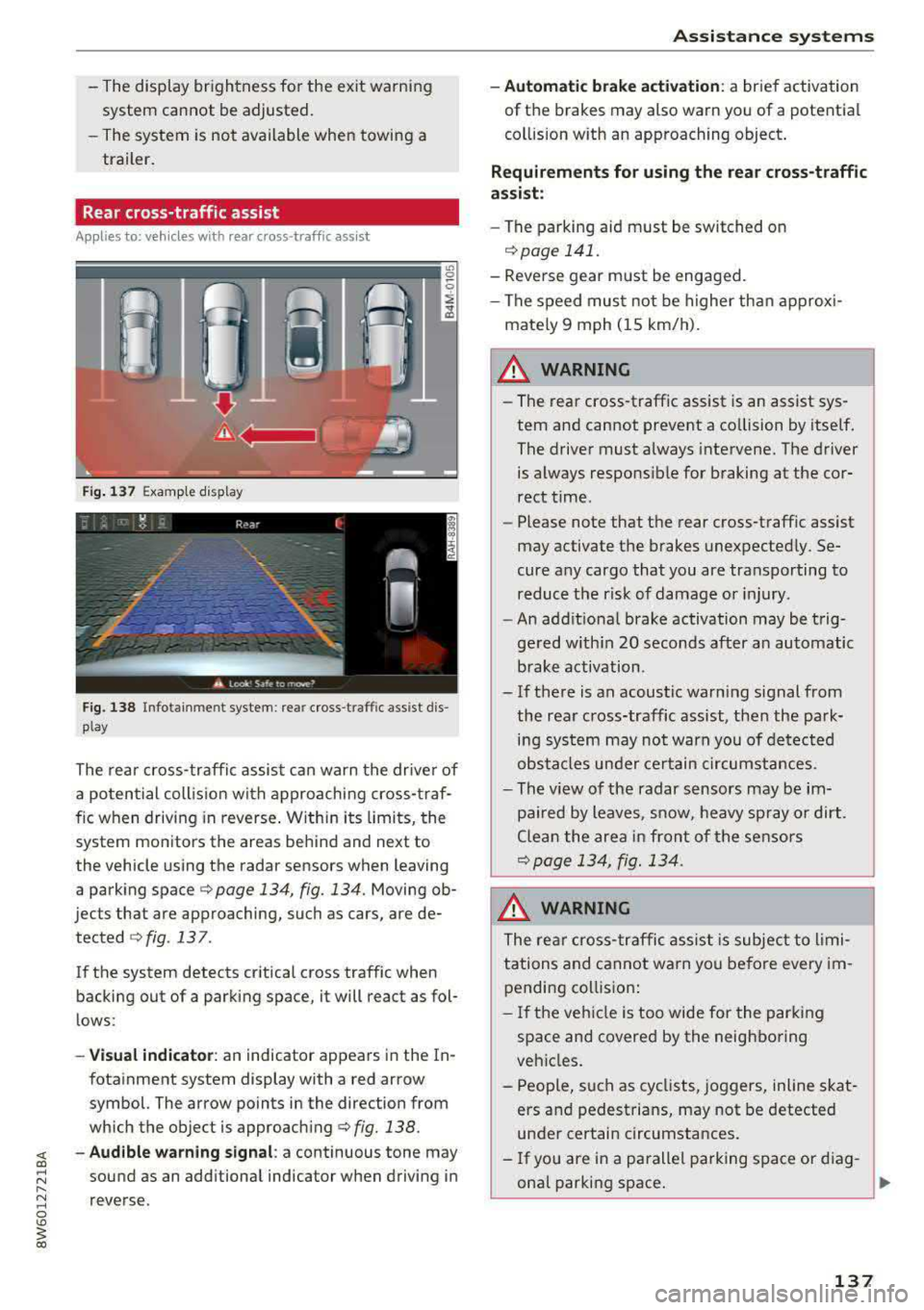
F ig. 137 Example display
Fig. 138 Infotai nme nt system : rea r cross-t raffic ass ist dis
p lay
The rear cross-traffic assist can warn the driver of
a po tential collis ion with approaching cross-traf
fic when driving in reverse . Within its limits, the
system monitors the areas behind and next to
the vehicle using the radar sensors when leaving
a parking space
c:;, page 134, fig. 134. Moving ob
jects that are approaching, such as cars, are de· tected
c:;, fig . 137 .
If the system detects critical cross traffic when
backing out of a parking space, it will react as fol
l ows:
-Vi su al indicator : an indicator appears in the In·
fotainment system display with a red arrow
symbol. The arrow points in the direction from
which the object is approach ing
c:;, fig. 138.
~ - Aud ibl e w arning signal : a continuous tone may
sound as an add itional indicator when driving in
reverse.
A ss is ta nce syst ems
-Automat ic brak e acti vation : a brief activation
of the brakes may also warn you of a potential
col lision with an approaching object .
Requirements for using the rear cross -traffic
a ssi st :
-The parking aid m ust be switched on
r=;, page 141.
-Reve rse gear must be engaged.
-The speed must not be h igher than approx i-
mately 9 mph (15 km/h).
_& WARNING
-The rear cross -traffic assist is an assist sys
tem and cannot prevent a co llision by itself .
The driver must always intervene. The driver is always respons ible for braking at the cor·
rect time.
-Please note that the rear cross-traff ic assist
may activate the brakes unexpected ly. Se
cure any cargo that you are transporting to reduce the risk of damage or injury .
-An addit iona l brake activation may be trig
gered w ith in 20 seconds after an automatic
brake activation .
-If there is an acoustic warn ing signal from
the rear c ross-traffic assist, then the park
ing system may not warn you of detected
obstacles under certain circumstances.
-The v iew of the radar sensors may be im
pa ired by leaves, snow, heavy sp ray o r dirt .
Clea n the area i n front of the sensors
¢page 134, fig. 134.
.8_ WARNING
The rear cross -traffi c assist is subjec t to limi
tations and cannot warn yo u before every im
pending coll ision:
-If the ve hicle is too wide for the par king
space and covered by the neighboring
vehicles.
-P eop le, such as cycl ists, joggers, inline skat
ers and pedestrians, may not be detected
under certain circumstances.
-I f you are in a parallel parking space or d iag
onal parking space .
137
Page 140 of 409
Assistance systems
CJ) Note
Also read the informat ion in c:> (D in General
information on page 135 .
@ Tips
-You can can cel the automa tic brake activa
tion w ith increasing braking fo rce if you ap
pl y the bra kes yourself or accelerate cons id
e rab ly.
-In some s ituations, rea r cross -traffic assist
may warn you even if there is no cross t raffic
i n a critical a rea, for example w hen back ing
in to a parking space or ma neuver ing.
-The rea r cross-traffic assist also switches off
whe n yo u switc h off the ESC.
-The rea r cross traffic assist switches on and
off thro ugh the pa rking aid
<=:>page 141.
-T he system is not available whe n towin g a
trailer.
Messages
A ppl ies to : ve hicles w ith Audi side assis t
A message appears in the inst rument cl uster dis
p lay if the s ide assist swi tches off automatically .
iii Audi side assist: malfunction! Please contact
Service
@i Audi side assist and exit warning: malfunc
tion! Please contact Service
T he sys tem c an not guar antee th at it w ill detec t
ve hicl es co rrectly and it h as swit ched off. The
sensors h ave bee n moved o r are faul ty . H ave t he
system checked by an a uthorized Audi dea ler or
author ized Audi Se rvice Facility soon.
@i Audi side assist: currently unavailable. Sen
sor vision restricted due to surroundings. See
owner 's manual
@i Audi side a ssist and exit warning : currently
unavailable. Sensor vision restricted due to sur roundings
T he radar senso r vis io n is i mp air ed . Th e ar ea in
fr on t of t he senso rs m ust n ot be covered by bik e
ra ck s, st ickers, leaves, snow or any othe r o bj ects.
Clea n the area in front of the sensors, if necessa
ry
c:> page 134, fig . 134 .
138
@i Audi side assist: currently unavailable. See
owne r's manual
@i Audi side assist and exit warning: currently
unavailable . See owner's manual
S ide assis t ca nnot be switched on at this ti me be
ca use there is a ma lfu nction (fo r exa mple, the
b att ery ch arge level m ay be to o l ow).
@i Audi side assist: unavailable in tow ing mode
iii Audi side assist and exit warning: currently
unavailable. Towing mode
Si de assist switches off automatically when the
e lectrica l connecto r in the factory-installed trail
er hitch is connected. There is no guarantee the
system will sw itch off when using a retrofitted
trailer hitch . Do not use side assist and the ex it
warning w hen tow ing a tra ile r.
Iii Rear parking aid : obstacle detection restrict
ed
The rear c ross-traffic ass ist is not available . E i
ther t he ESC is sw itche d off, or the rada r senso rs
may be cove red by a bike rack, stic ke rs, leaves,
snow or other objects. Switch the ESC on, or clean the area in fron t of the se nso rs if necessa ry
c:> page 134, fig . 134 . If th is message con tinues
to be displayed, dr ive immedia tely to a n author
iz ed Audi dealer or author ized A udi Se rvi ce Facili
ty to h ave the m alfunc tion re paire d.
Audi drive select
Introduction
App lies to : vehicles wi th Audi drive se lect
D rive select makes it possib le to exper ience dif
ferent types of veh icle sett ings in one veh icle.
The dr iver can select
Comfort , Auto and Dynamic
modes in t he In fo tainment system to sw itch b e
t ween, for exa mple , a s porty an d a comfor table
d riv ing mode . In the
Individual mode, t he set
ti ngs c an be adjus ted to yo ur persona l prefe ren
ces . Thi s makes it possib le to comb ine settings
s uc h as a sporty e ngine setting wit h lig ht steer
i ng .