ECO mode AUDI A5 COUPE 2018 Owner's Manual
[x] Cancel search | Manufacturer: AUDI, Model Year: 2018, Model line: A5 COUPE, Model: AUDI A5 COUPE 2018Pages: 409, PDF Size: 67.63 MB
Page 114 of 409
Assistance systems
Resetting lap statistics
.,. On the multif unction steering whee l, select:
the right control button
> Reset statistics.
@ Tips
The lap stat istics l ist the lap times for the last
30 laps. The fastest and slowest lap time out
o f up to 99 measured laps are also displayed .
Predictive efficiency
assist
Description
Applies to: vehicles with predictive efficiency assist
General information
The predictive efficiency assist helps the driver to
d rive with anticipation and therefore helps to
save fuel. The system accesses predict ive trip da
ta (including speed limits, inclines and the radius
of curves) from the navigation system*. Informa
tion from the camera-based traffic sign recogni
tion* is also applied to recogni ze traffic signs
r::;i page 109 .
The messages displayed depend on the naviga
tion data * being up-to-date and the correct iden
tification by the traffic sign recognition*.
When adaptive cruise contro l* is switched off,
the predict ive efficiency assist only provides noti
fications without controlled interventions. When
adaptive cruise control* is switched on, the sys
tem responds to upcoming situations automati
cally .
Vehicles with adaptive cruise control*
Refer to predictive control c> page 120.
Indicator in the instrument cluster display
Predictive messages appear in the instrument
cluster display to show the driver the appropriate
time to coast when a situation ahead requires
you to drive at a lower speed.
The messages are only shown if the cr uise control
system* or adaptive cruise control* is switched
off.
112
An additional indicator appears in the head-up
display* .
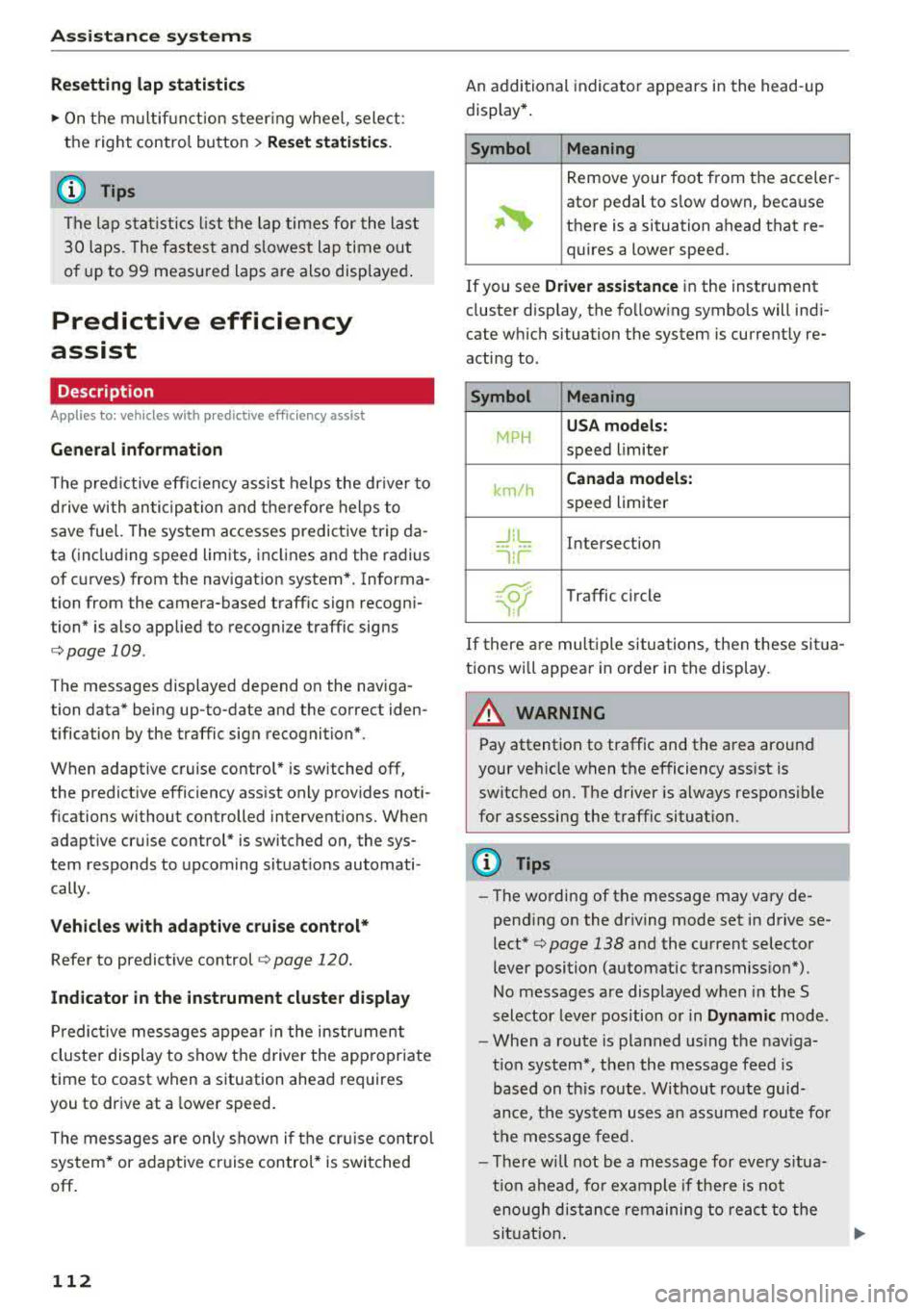
Symbol Meaning
Remove your foot from the acceler-
~
ator pedal to slow down, because
there is a situation ahead that re- quires a lower speed.
If you see
Driver assistance in the instrument
cluster display, the following symbols will indi
cate which situation the system is currently re
acting to .
Symbol Meaning
MPH
USA models:
speed limiter
km/h
Canada models:
speed limiter
_J!L Intersection
'"l i r
w
Traffic c ircle
If there are mult iple situations, then these situa
tions wi ll appear in order in the display.
_&. WARNING
Pay attention to traffic and the area around
your vehicle when the efficiency assist is
switched on. The driver is always respons ible
for assessing the traffic situation.
(D Tips
- The wording of the message may vary de
pending on the dr iving mode set in drive se
lect* c> page 138 and the current selector
lever position (automatic transmiss ion*) .
No messages are displayed when in the S
selector lever position or in
Dynamic mode.
- When a route is planned using the nav iga
t ion system*, then the message feed is
based on this route . Without route guid
ance, the system uses an assumed route fo r
the message feed.
- There will not be a message for every situa
tion ahead, fo r example if there is not
enough distance remaining to react to the
situation.
Page 115 of 409
-No messages are displayed when at speeds
under
20 mph (30 km/h) .
Settings in the Infotainment system
Applies to: veh icles with predictive efficiency assist
~ In the Infotainment system, select: IMENU !
button > Vehicle > left control button > Driver
assistance
> Efficiency assist .
Predictive messages are shown when this f unc
tion is sw itched on.
(D Tips
No predictive messages are shown on vehicles
w ithout a navigation system .
Audi adaptive cruise
control
Description
Applies to: veh icles with Audi adaptive cruise contro l
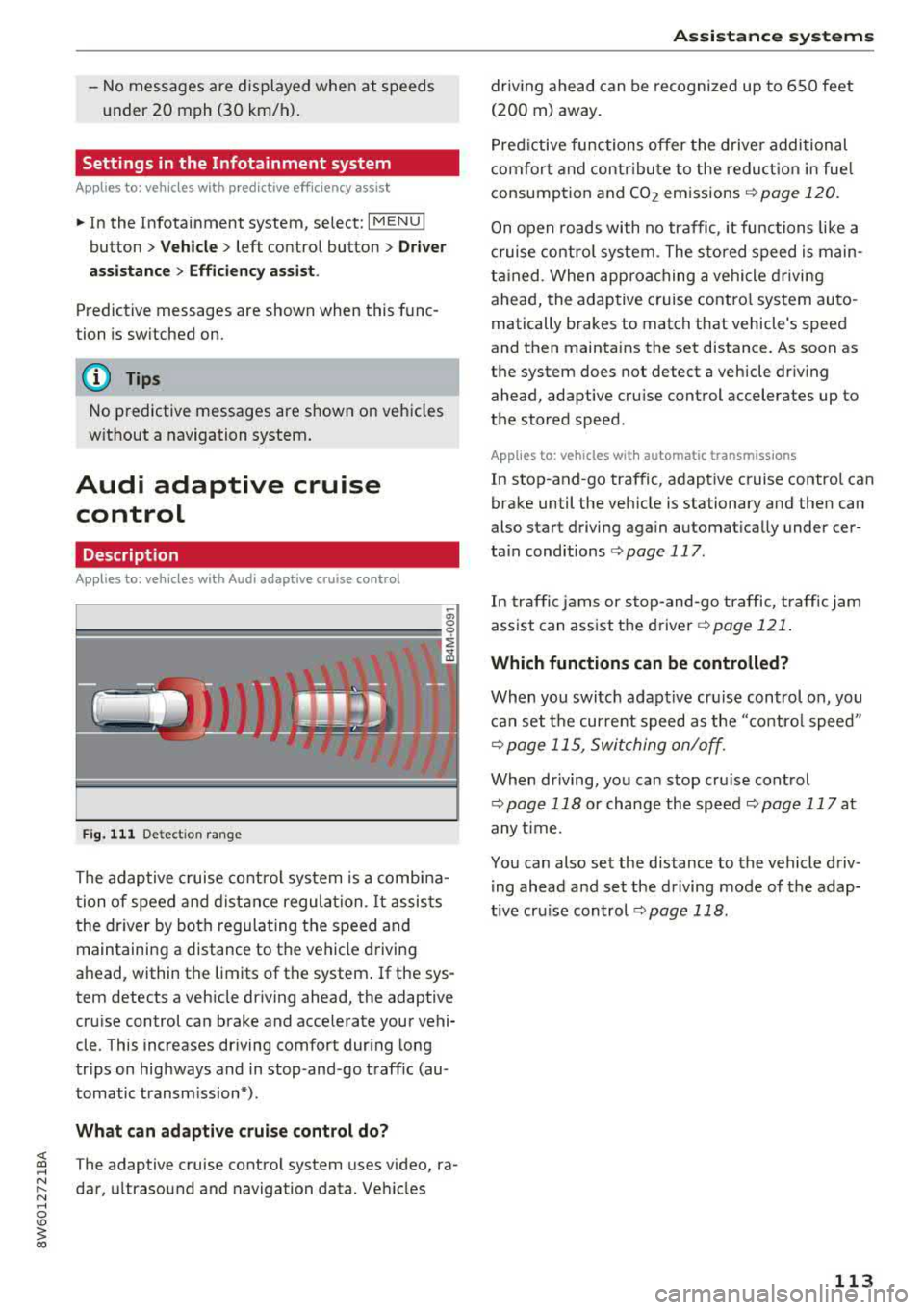
Fig. 111 De tect ion range
The adaptive cruise control system is a combina
t ion of speed and distance regulation.
It assists
the driver by both regulating the speed and
maintaining a distance to the vehicle driving
ahead, within the limits of the system . If the sys
tem detects a veh icle driving ahead, the adaptive
cru ise control can brake and acce lerate your vehi
cle . This increases driving comfort dur ing long
tr ips on highways and in stop-and -go traff ic (au
tomatic transm iss ion*) .
What can adaptive cruise control do?
<( ~ The adaptive cruise contro l system uses video, ra-
"' ~ dar, ultrasound and navigation data. Veh icles
.... 0 \0
3
driving ahead can be recognized up to 650 feet
(200 m) away.
Predictive functions offer the driver additional
comfort and contr ibute to the reduction in fue l
consumption and CO2 emissions
¢ page 120.
On open roads with no traffic , it functions like a
cruise control system. The stored speed is main
tained . When approaching a vehicle driving
ahead, the adaptive cruise contro l system auto
matically brakes to match that vehicle's speed
and then mainta ins the set distance. As soon as
the system does not detect a vehicle dr iv ing
ahead, adaptive cru ise control accelerates up to
the stored speed .
Applies to: vehicles with automatic transmissions
In stop-and-go traffic, adaptive cruise control can
brake until the veh icle is stationary and then can
also start driving again automat ically under cer
ta in cond itions
¢ page 117.
In traffic jams or stop-and -go traffic, traffic jam
ass ist can assist the
driver ¢ page 121.
Which functions can be controlled?
When you switc h adapt ive cruise control on, you
can set the current speed as the "contro l speed"
¢ page 115, Switching on/off.
When driving, you can stop cru ise control
¢ page 118 or change the speed ¢ page 117 at
any time.
You can also set the distance to the vehicle driv ing ahead and set the driving mode of the adap
t ive cru ise control
¢ page 118.
113
Page 121 of 409
That is equal to the general recommendation of
"half the speed shown on the speedometer".
The distances provided are specified val ues. De
pending on the d riving situation and how the ve
hicle ahead is driving, the actual distance may be
more or less than these target distances.
If you change the time gaps, the newly se t value
appears briefly in the instrument cluster display,
for example
II for Distance 3. This only occurs if
the
Driver assistance disp lay is not currently
shown in the display
~ page 115, fig. 116.
Distance 1 : this setting corresponds to a distance
of 92 feet (28 meters) when traveling at 62 mph
(100 km/h), or a time distance of 1 second.
Distance 2 : this setting corresponds to a distance
of 118 feet (36 meters) when traveling at 62
mph (100 km/h), or a time distance of 1.3 sec
onds.
Distance 3: this setting corresponds to a distance
of 164 feet (SO meters) when traveling at 62
mph (100 km/h), or a time distance of 1.8 sec
onds.
Distance 4: this setting corresponds to a distance
of 219 feet (67 meters) when traveling a t 62
mph (100 km/h), or a time distance of 2.4 sec
onds.
Distance 5: this setting corresponds to a distance
of 328 feet (100 meters) when traveling at 62
mph (100 km/h), or a time distance of 3.6 sec
onds.
A WARNING
When setting the distance, the driver is re
sponsible for adhering to any applicab le legal
regulations.
@ Tips
- Depending on the selected driving mode in
drive select* and the set distance, the driv
ing behavior will vary from dynamic to com
fortable when accelerating
c::;, page 139.
- Distance 3 is set automatically each time
you switch the ignition on. If you would like
to set another d istance as the default set
ting, you can have the
adaptive cruise con-
Assistance systems
trol menu enabled by an authorized Audi
dealer or authorized Audi Service Facility.
- Your settings are automatica lly stored and
assigned to the remote control key being
used.
Setting the driving program
Applies to : vehicles wit h Audi ada ptive c ruise control
Depending on the selected driving program and
distance, driving behavior when accelerating will
vary from dynamic to comfortable .
Setting the driving program on vehicles
without drive select*
.,. Select in the Infotainment system: I MENU! but
ton
> Vehicle > left control button > Driver as
sistance> Audi adaptive cruise control > Driv
ing program
> Comfort, Standard or Dynamic.
Setting the driving mode on vehicles with
drive select*
See c::;, page 139.
¢j) Tips
Your settings are automatically stored and as
s igned to the remote control key being used .
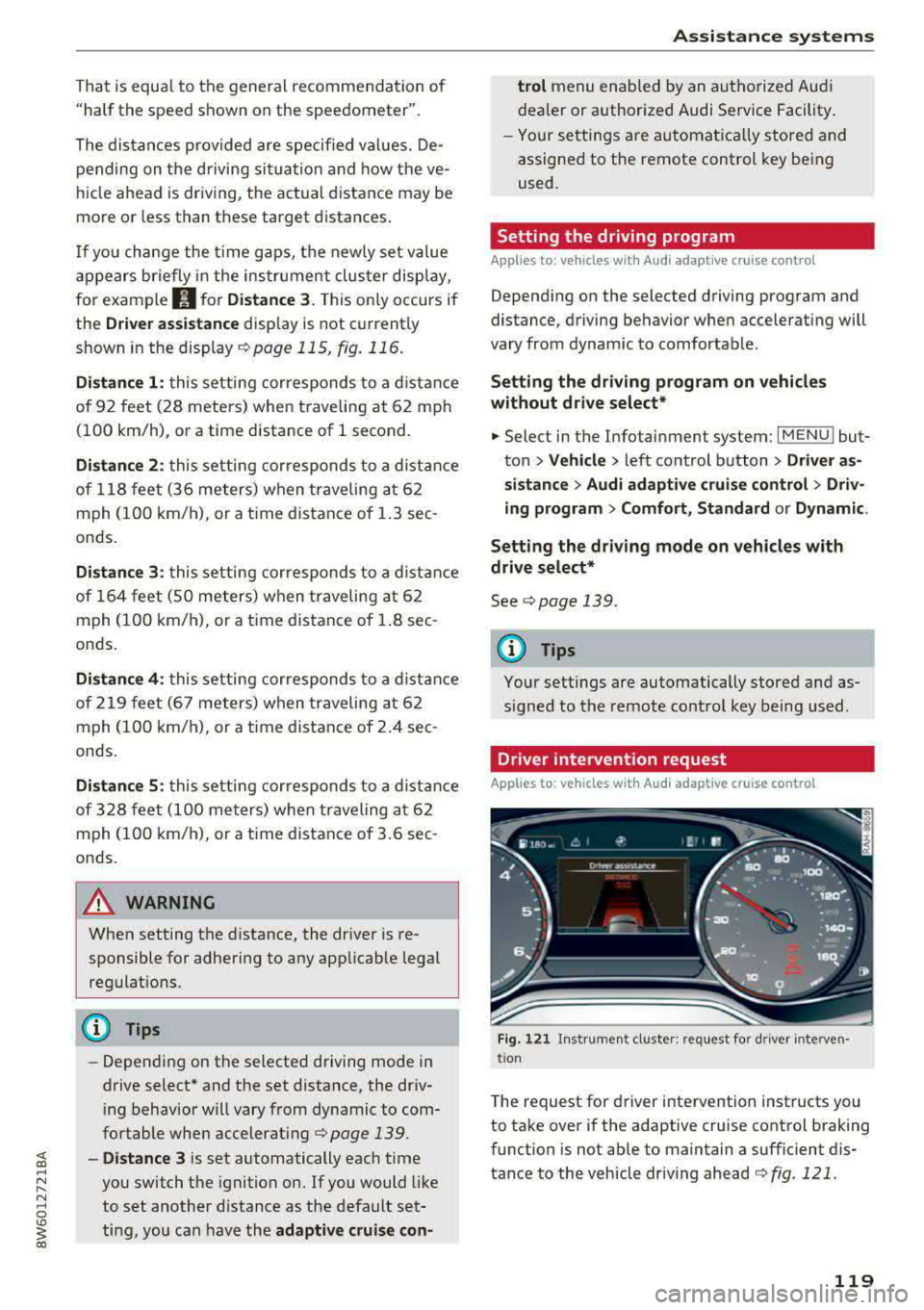
Driver intervention request
Applies to: vehicles wit h Audi ada ptive cr uise contro l
Fig. 121 Instrument cluster : request for driver interven·
t ion
T he request for driver intervention instructs you
to take over if the adaptive cruise control braking
function is not able to maintain a sufficient dis
tance to the vehicle driving ahead
c::;, fig. 121 .
119
Page 122 of 409
Assistance systems
Predictive control
(efficiency assist)
Description
Applies to: vehicles with Audi adaptive cruise control and pre·
dict ive efficiency assist
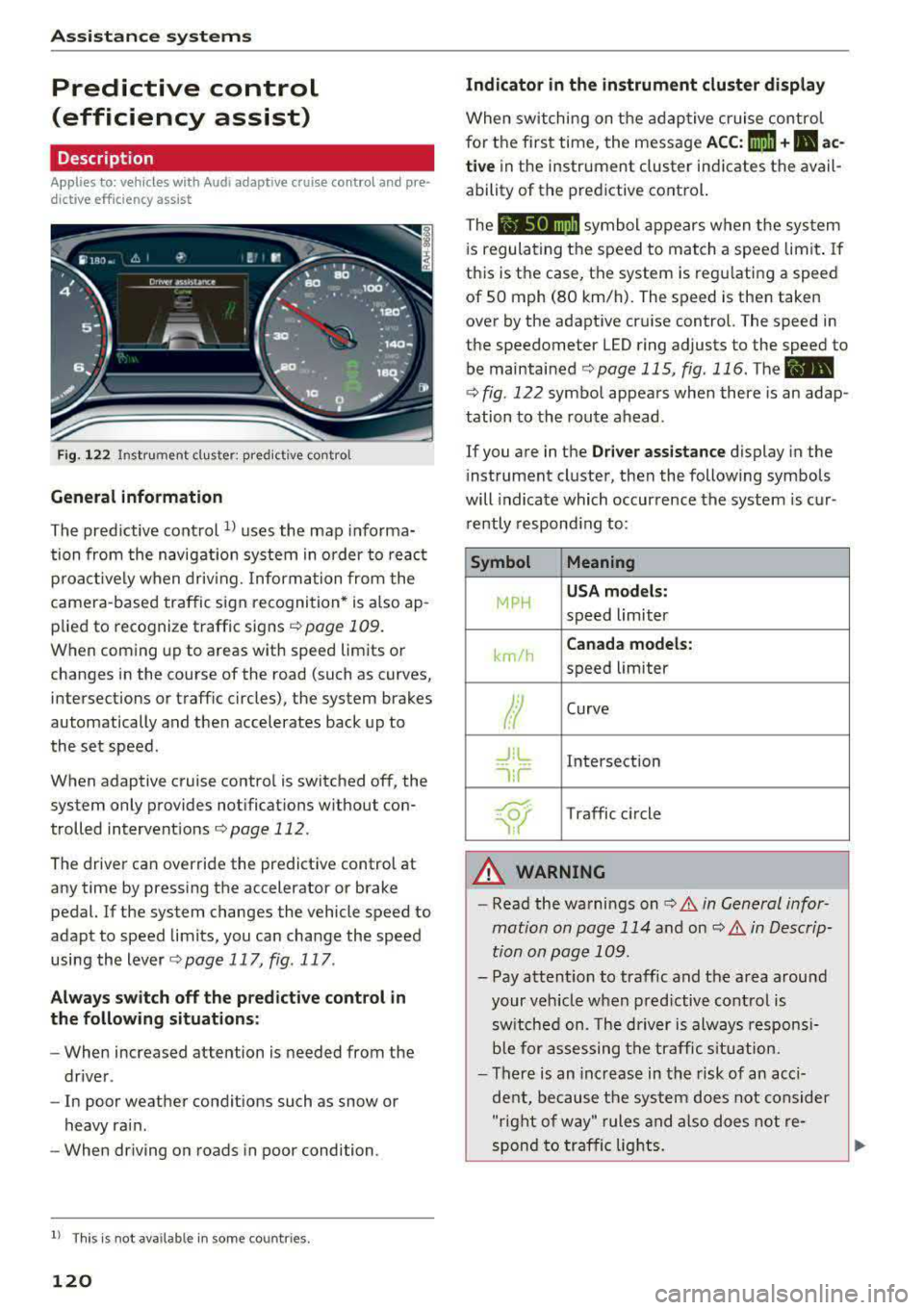
Fig. 122 Instrument cluster: predictive control
General information
The predictive control 1l uses the map informa·
tion from the navigation system in order to react
proactively when driving. Information from the
camera -based traffic sign recognition* is also ap·
plied to recognize traffic signs
r::!> page 109.
When coming up to areas with speed limits or
changes in the course of the road (such as curves,
inte rsections or traffic circles), the system brakes
automatically and then accelerates back up to
the set speed.
When adaptive cruise cont rol is switched off, the
system only provides notificat ions without con
trolled intervent ions
r::!> page 112 .
The driver can override the predictive control at
any time by pressing the accelerator or brake
pedal. If the system changes the vehicle speed to
adapt to speed limits, you can ch ange the speed
using the lever
<:!> page 117 , fig . 117 .
Always switch off the predictive control in
the following situations:
- When increased attention is needed from the
driver .
- In poor we ather condit ions such as snow or
heavy rain .
- When driving on roads in poor condition.
l) This is no t a vail able in som e coun trie s.
120
Indicator in the instrument cluster display
When switching on the adaptive cruise control
for the first time, the message
ACC: 1111 + B ac
tive
in the instr ument cluster indicates the avail
ability of the predictive control.
The symbol appears when the system
i s regulating the speed to match a speed limit .
If
this is the case, the system is regulating a speed
of 50 mph (80 km/h). The speed is then taken
over by the adaptive cruise control. The speed in
the speedometer LED ring adjusts to the speed to
be maintained
r::!> page 115, fig. 116 . The ..
r::!> fig. 122 symbol appears when there is an adap
tation to the route ahead .
If you are in the
Driver assistance display in the
i nstrument cluster, then the following symbols
will indicate which occurrence the system is cur
rently responding to:
Symbol Meaning
MPH
USA models:
speed limiter
km/h
Canada models:
speed limiter
Ir
Curve
_J!L
,ir
Intersection
~ Traffic circle ·· Of );
A WARNING
- Read the warnings on c> .& in General infor
mation on page 114
and on r::!> .& in Descrip
tion an page 109 .
-Pay attention to traffic and the area around
your vehicle when predictive control is
sw itched on. The driver is always responsi
ble for assessing the traffic situation.
-There is an increase in the risk of an acci
dent, because the system does not consider
"right of way" rules and also does not re-
spond to traffic lights.
._
Page 123 of 409
-The system only considers traffic signs that
give a speed limit.
- The permitted speed can be exceeded if the
adaptation to a speed limit is incorrect. The dr iver is responsible for adhering to the per
mitted speed.
- The speed at which a curve is driven through
does not necessarily match your own driving
style . Brake the vehicle yourself when need
ed to reduce the r isk of a n accident .
(D Tips
-If a speed limit is detected, the stored
speed is also adjusted in the speedometer
L ED line when the adaptive cruise control is
not active .
- The adaptation by the system depends on
the driving mode set in drive select* .
- Switch ing off pred ictive control, for exam
ple when dr iving in low traffic zones, does
not cause the adaptive cru ise control to
switch off.
-After switching on the ignit ion, the system
i nit ially adjusts to a speed of 80 mph
(130 km/h) when driv ing onto h ighways
wi thou t a speed limit . Then the system ad
ju sts to the last speed stored by the driver.
- There is no adaptation to speed limits when
driv ing thro ugh highway interchanges and
when driving on o r off the expressway.
- There is no predictive cont rol at speed limits
u nder 20 mph (30 km/h).
- If a speed limit is only detected by the cam
era and the actual speed is s ignificantly
h igher, then the speed limit will blink i n the
display unti l you have reached the requ ired
speed
~ page 110 .
-Incorrect values from the camera-based
traffic sign recognition* or outdated naviga
tion system map data can lead to incorrect
or implausible control.
- When route guidance is switched on, the
system adapts to the route provided by the navigation system. Driving w ithout route
guidance or leaving a route can resu lt in im
plaus ible control.
A ss is ta nce syst ems
-The system switches off when outside of a
road system that is recorded in the naviga
tion system map data .
Setting predictive control
Applies to: vehicles with Aud i adapt ive cru ise control and pre
dic tive efficiency assist
.,. Select in th e Infotainment system: I MENU ! but
ton
> V ehicle > left control b utton > D riv er as
s istance
> Audi adapti ve cruise cont ro l > Pr e
dictive co ntrol.
Set speed limit -
when this function is switched
on, the system adjusts to the speed limits. This
can also be done w ith at to lerance, if desired. In
th is scenario , you may fall below or exceed the
set speed in favor of increased efficiency .
Adaptation to route ahe ad -when this function
is sw itched on, the system adapts to the route
ahead (su ch as reducing the speed in curve s).
Traffic jam assist
Description
Appl ies to: vehicles with traffic jam assist
Traffic jam assist supports the driver when driv
ing in traffi c jams or in heavy traffic.
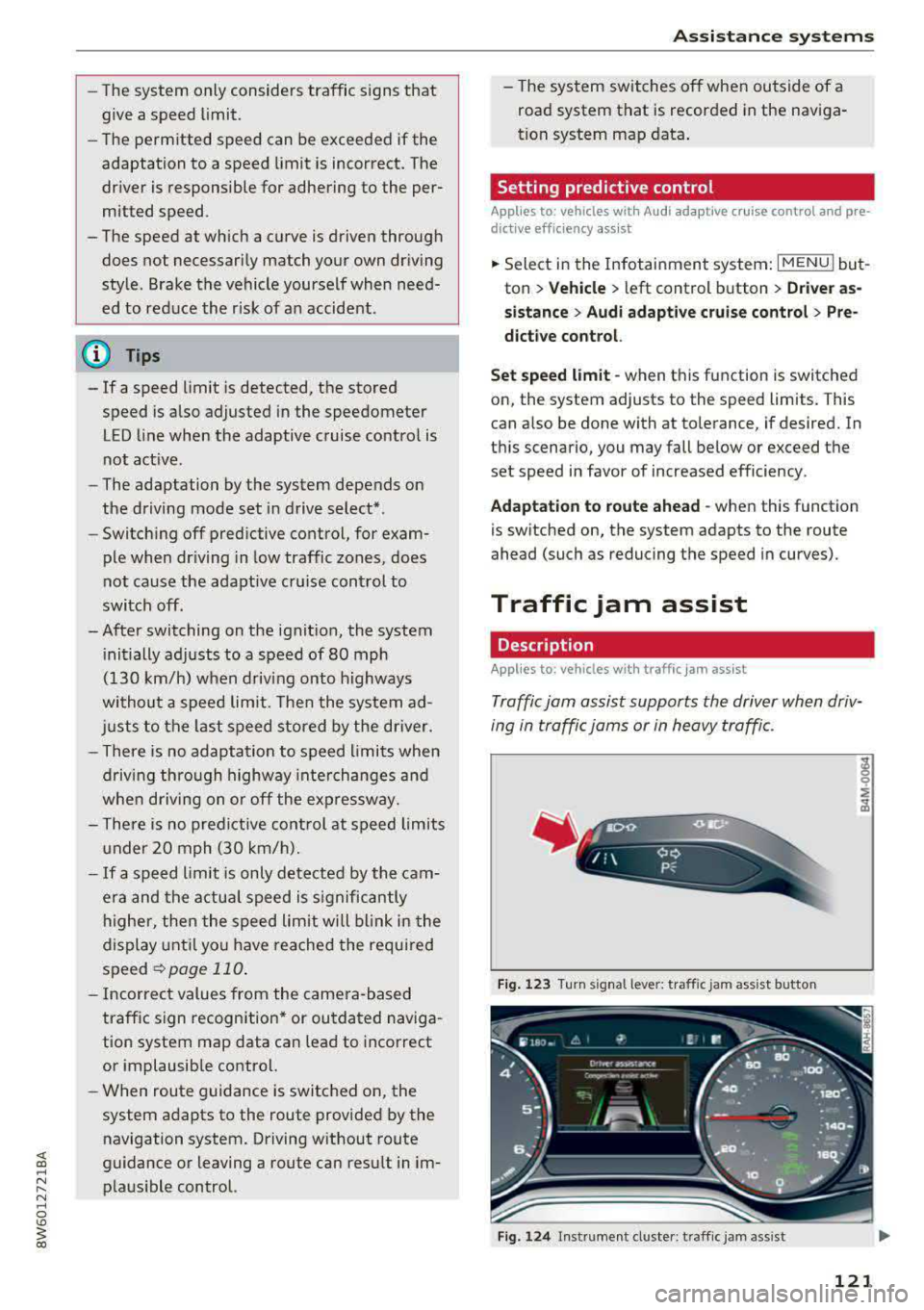
F ig . 1 23 Turn signa l leve r: tra ffic jam assist butto n
Fig. 124 Instrumen t cl uster: traff ic jam ass is t
121
Page 128 of 409
Assistance systems
-Activating the emergency flashers l) .
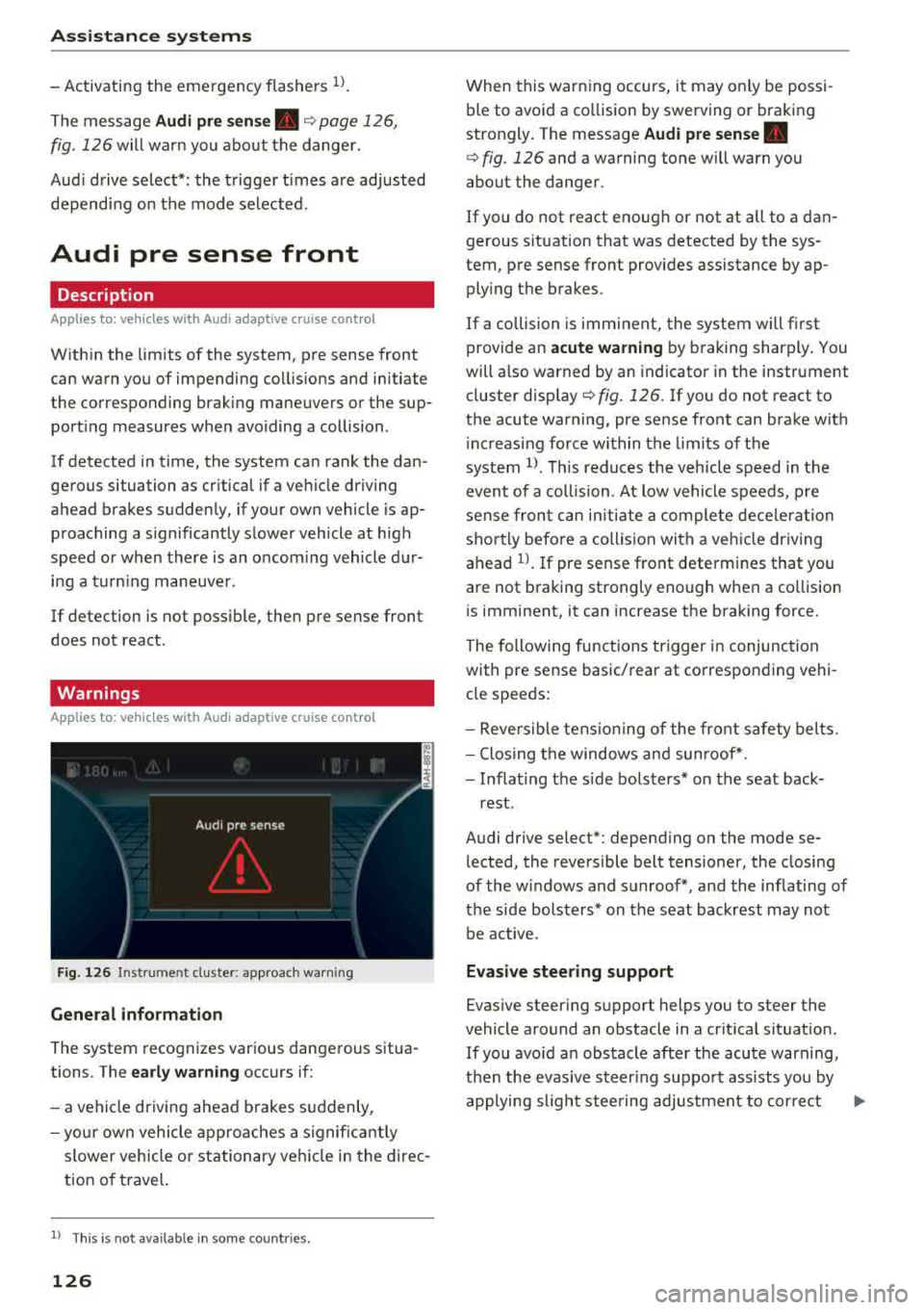
The message Audi pre sense. ¢ page 126,
fig. 12 6 will wa rn you abo ut the danger.
Aud i d rive select *: the t rigger t imes are adjusted
dependi ng on the mode selected.
Audi pre sense front
Description
A ppl ies to: ve hicles w ith Audi a daptive cruise co ntrol
W ith in the limits of the system, pre sense front
can warn you of impending coll is ions and initiate
t he corresponding brak ing maneuvers or the sup
port ing measures when avo iding a collision .
I f detected in time, the system can rank the dan
ge rous situation as cr itical if a ve hicle driving
a head brakes s udden ly, if your own vehicle is ap
p roaching a s ignificantly s lower vehicle at high
speed or when there is an oncom ing vehicle d ur
i n g a t urning maneuve r.
If detection is not poss ible , the n pre sense front
does not react .
Warnings
App lies to: ve hicles w ith Audi a daptive cruise co ntro l
F ig . 126 In strum ent cl uste r: appro ach warn ing
General information
The system recognizes var ious dangerous situa
tions. The
early warning occurs if:
-a veh icle d riving ahead brakes s uddenly,
- yo ur own vehicle ap pro aches a signific antly
s lower vehicle o r stationary ve hicle in the direc
tion o f travel.
l) Thi s is not a va ilab le in some co untri es .
126
When this warn ing occurs, i t may o nly be pos si
ble to avo id a co llision by swerving o r braking
strongly . T he message
Audi pre sense.
¢ fig. 126 and a wa rning tone will warn you
about the danger .
If you do not react enough or not at all to a dan
gerous s ituat ion that was detected by the sys
tem, pre sense front provides assistance by ap plying the b rakes.
If a collision is imminent, the system will fi rst
provide an
acute warning by b raking sharply . You
will a lso warned by an indicato r in the instrument
cluster
disp lay¢ fig. 126. If yo u do not react to
the acute warning, pre se nse front can bra ke w it h
i nc reas ing force wi thin the lim its o f th e
system
1> . Thi s reduc es the v ehicl e spe ed in t he
even t of a collision . At low vehicle s peeds , pre
s ense fr on t can initi ate a com plete dece le rat ion
sho rtly befo re a collision with a veh icle dr iv ing
ahead
l ) . If pre sense front determines that you
a re not b raking st rongly enough when a co llision
i s imminent, it can increase t he b raking force.
The followi ng func tions trigge r in conjunc tion
with pre sense basic/ rear at corresponding vehi
cl e speeds :
-Reversible tens io nin g of the front s afety bel ts.
-Clos ing t he windows and sun roof* .
-Infla ting t he side bols ters* on the seat back-
rest .
Audi drive select* : depending on the mode se
l ected , the reversible belt tensioner, the closing
of the windows and s unroof*, and the inflating of
t h e side bolste rs* on the seat backrest may not
be active.
Evasive steering support
Evas ive steering s upport helps you to steer the
vehicle around an obstacle in a crit ica l sit uat io n.
If you avo id a n obs tacle afte r the acu te warning,
t he n th e evasive ste ering suppo rt assists you by
applying slight stee ring adjus tment to corre ct
.,..
Page 130 of 409
Assistance systems
CJ) Note
The radar sensors can be displaced by impacts
or damage to the bumper, wheel housing and
underbody. Pre sense rear can be impaired by
this. Have an authorized Audi dealer or au
thorized Audi Service Fac ility check their func
tion.
(D Tips
- The pre sense rear functions switch off
when towing a trailer.
- The pre sense rear functions may also
switch off if there is a malfunction in the
side assist* system.
Audi pre sense city
Description
A ppl ie s to: ve hicles w ith Aud i p re se nse c ity
Within the limits of the system, pre sense city
can warn you of impending collisions with
vehicles and pedestrians and initiate the applica
ble braking maneuver if needed. Pre sense city is
active at speeds of approximately 6 mph (10 km/ h) and higher .
A pedestrian warning can occur at speeds up to
SO mph (85 km/h), and vehicle warnings can oc
cur at speeds up to 155 mph (250 km/h). A pre
sense city braking maneuver is poss ible at speeds
up to SO mph (85 km/h).
Warnings
A ppl ies to: ve hicles w ith Aud i p re sense c ity
The system recognizes various dangerous situa
tions. The
early warning occurs if:
- a veh icle driving ahead brakes suddenly,
- your own vehicle approaches a significantly
slower vehicle or stationary vehicle in the direc
tion of travel.
- a pedestrian is standing in the lane or is moving
into the lane .
When this warning occurs, it may only be possi
ble to avoid a collision by swerving or braking
strongly . The message
Audi pre sense.
128
¢ page 126, fig. 126 and a warning tone will
warn you about the danger.
Additionally, a jerk on the brakes may occur as an
acute warning when there is an impending colli
sion . If you do not react to the acute warning, pre
sense city can brake to the point of complete de
ce leration within the limits of the system . This
reduces the vehicle speed in the event of a colli
sion. The message
Audi pre sense. also ap
pears.
The following functions are triggered in conjunc
tion with pre sense basic/rear :
- Reversible tensioning of the front safety belts.
- Closing the windows and sunroof* .
- Inflating the s ide bolsters* on the seat back-
rest.
Audi drive select*: the function is not active de
pending on the mode selected .
&_ WARNING
- Pre sense city cannot overcome the laws of
phys ics.
It is a system designed to assist and
it cannot prevent a collision in every circum
stance. The driver must always intervene.
The driver is always responsible for braking
at the correct time. Do not let the increased
safety provided tempt you into taking risks .
This could increase your risk of a collision.
-The system can dep loy incorrectly due to
system-specific limits.
-To reduce the risk of an accident, please
note that the camera does not always detect
every object.
-Pre sense city does not react to animals,
crossing or oncoming vehicles, objects such
as bars, railings or railcars, and objects that
are difficult to detect
c:> &. in General infor
mation on page 114.
-In trailer mode, the braking behavior of the
trailer can be d ifferent than usual during au
tomatic braking.
&_ WARNING
Pre sense city may be restr icted or not ava ila
b le in the following example situations:
- in heavy fog, rain, spray or snow
Page 131 of 409
<( a, .... N ,....
N .... 0 \0
3 a,
-when there are visual obstructions, such as glare, reflections or var iations in light
-when it is dark
-if the camera window or the windshie ld is
dirty, iced over, damaged or covered
-when driving on snow, ice or loose ground
-in curves
-if the ESC was restricted or switched off
-when towing a trailer
-when the driver's seat belt is unfastened
-up to ten seconds after switching on the ig-
nition
(D Note
Impacts or damage to the camera mount on
the windshield can displace the sensor. Pre
sense city can be impaired by this. Have an au
thorized Audi dealer or authorized Audi Serv
ice Facility check the ir function.
-You can cancel the system braking interven
tion if you accelerate considerably or swerve
away.
-Keep in mind that pre sense city can brake
unexpectedly. Always secure any cargo or
objects that you are transport ing to reduce
the risk of damage or injury.
-Certain pre sense city funct ions are switch
ed off when the ESC is limited or switched
off¢ page 152.
-When there is a malfunction in the camera,
the pre sense city functions also switch off.
Settings in the
Infotainment system
A ppl ies to: ve hicles with Audi pre sense
~ Se lect in the Infotainment system: !MENUI but
ton
> Vehicle > left contro l button > Driver as
sistance> Audi pre sense.
Turn on /off Audi pre sense -
the pre sense func
tions can be turned on and off.
If the system is switched off, it switches o n again
automatically once the ignition is sw itched on
again.
Assistance systems
Prewarning -the early warning can be switched
off or the pre sense city/front warning point can
be set
(Ea rly/Medium /Late ).
Set the warning t ime for the early warning to
Early at first. If this causes undesired ear ly warn
ings to appear, then set the warning time to
Me
dium .
The Late warning time should on ly be set
in special circumstances, for example, when driv
ing with a very dynamic style.
(D Tips
Your settings are automatically stored and as
signed to the remote control key being used.
Messages
Applies to : v ehicles wi th Audi pre sense
IIJ Audi pre sense: malfunction! Please contact
Service
T his message appears when the pre sense func
tion is affected. For example, this could be
ca used by a faulty sensor. Drive to an authorized
Audi dealer or authorized Audi Service Facility im
mediately to have the malfunction corrected.
II Audi pre sense currently restricted. Restrict
ed sensor vision due to surroundings. See own
er's manual
This message appears if the radar sensor and
camera view is obstructed, for example by leaves,
snow, heavy spray or dirt. If necessary, clean the
sensors and the area around the camera
¢ page 114, fig . 112 or ¢page 134, fig. 134 .
II Audi pre sense: currently restricted. Towing
mode
For vehicles with a trailer hitch installed at the
factory, the pre sense rear functions switch off
when the electrical connector at the socket is
plugged in. There is no guarantee the functions
will switch off when using a retrofitted trailer
hitch.
II Audi pre sense: currently restricted
This message appears if the ESC is restricted or
switched off, for example.
IJl,,
129
Page 141 of 409
<( a, .... N ,....
N .... 0 \0
3 a,
Description
Applies to: vehicles with Audi drive select
The following systems, among other things, are
influenced by drive select:
Engine and automatic transmission*
Depending on the mode, the engine and auto
mat ic transmission* respond more quickly or in a
more balanced manner to accelerator pedal
movements. In the sporty
Dynamic mode, the
transmission shifts at highe r speed ranges.
Suspension control*
The suspension control* uses sensors to record
information regarding steering movements,
braking and acceleration operations by the driv
e r, road sur face, dr iv ing speed, and load. This
makes it possible to adapt damping to the driv
ing situation nearly in rea l time. With drive se
lect, you can adjust the suspension control to be
sporty
( Dynamic ), comfortab le ( Comfort ) or bal
anced
( Auto ).
Steering
The power steering adapts. Indirect steer ing that
moves easi ly as in
Comfort mode is especia lly
suited to long drives on highways. The
Dynamic
mode provides sporty, direct steering.
The following applies to vehicles with dynamic
steering*: the steering ratio changes based on
vehicle speed in order to maintain optimum
steering effort for the driver at all times. This
sets the steer ing to be less sensitive at higher
speeds in order to provide improved vehicle con
trol. At reduced speeds, steering is more direct in
order to keep the steering effort as min imal as
possible w hen the driver is maneuvering the vehi
cle . At low and average speeds, dynam ic steer
in g* add itionally provides more responsive steer
ing performance.
Sport differential*
As a component of the all wheel drive system
(quattro)
~ page 154, the sport differential dis
tr ibu tes the dr iv in g power to the rear ax le de
pending on the situation. The distribution of
power varies depending on the selected mode
Assistance systems
from moderate (Comfort ) to sporty (Dynamic ).
The goal is a high level of agility and ability to ac
ce lerate on curves . T he vehicle is very responsive
to steering.
Adaptive cruise control (ACC)*
The behavior when accelerating can be adjusted
from comfortable to sporty, depending on the
drive select mode. Adaptive cruise control also
responds to the driving behavior of the vehicle
ahead in a more conservative or sporty manner.
Engine sound*
The engine sound adapts to the current mode
and can be subtle to sporty.
(D Tips
The S selecto r lever position automatically en
gages when the
Dynamic mode is selected .
Selecting the driving mode
Applies to: vehicles with Aud i drive select
Fig . 139 Cen ter co nsole: con trols for d rive se lect
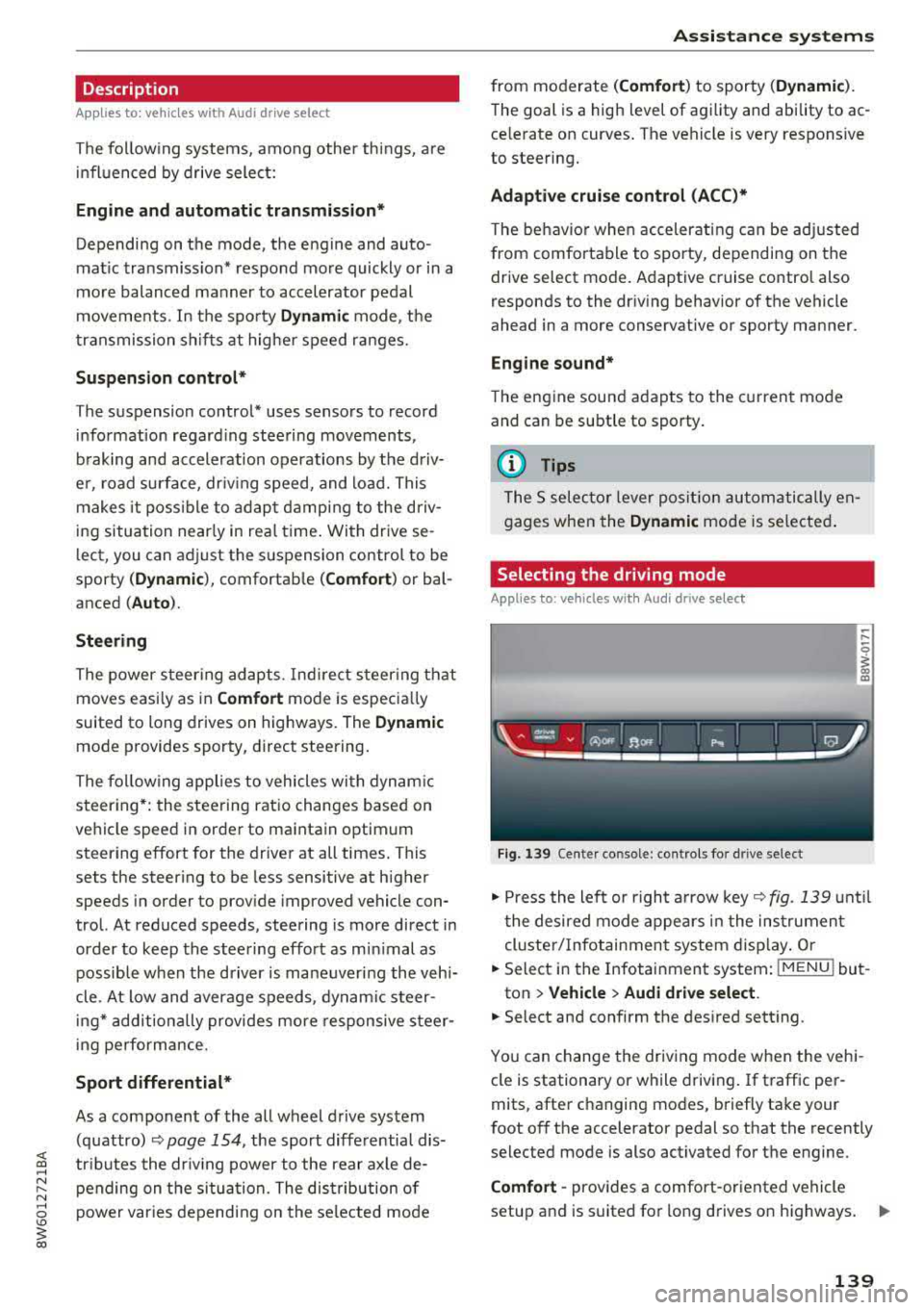
.. Press the left or right a rrow key ~fig. 139 until
t he desired mode appears in the instrumen t
cluster/ Infotainment system display. Or
.. Select in the Infotainment system: I MENU ! but-
ton
> Vehicle > Audi drive select.
.. Select and confirm the desired setting .
You can change the driving mode when the vehi-
cle is stationary or while driving. If traffic per-
mits, after changing modes, briefly take your
foot
off the accelerator pedal so that the recently
selected mode is also activated for the engine.
Comfort -provides a comfort-oriented vehicle
setup and is suit ed for long drives on highways.
..,.
139
Page 155 of 409
<( a, .... N ,....
N .... 0 \0
3 a,
A WARNING
You should only switch sport mode on or switch ESC/ASR off if your driving abilities
and road conditions permit .
- The stabilization function is limited when
sport mode is sw itched on . T he driving
wheels co uld spin and the vehicle cou ld
swerve, espec ially on s lick o r sli ppery roa d
surf aces.
- T here is no vehicle stabilization when ESC/
ASR a re swi tched off .
Brakes
New brake pads
New brake pads do not ac hieve the ir full b raking
effect during the first 250 mi (400 km) . They
must be "broken
in " fi rst . However, you can com
pensate for the slightly reduced bra king fo rce by
pr ess ing firmly o n the bra ke pe dal. Avoid heavy
b ra king dur ing t he b reak -in per io d .
Wear
Brake pad wear depends largely o n the way the
ve hicl e is driven and on operat ing cond it ions .
This is especially t rue if you are d riving freque ntly
in t he c ity and on curves o r wi th a sporty driving
s tyle.
Operating noise
Noises may occur when braking depend ing o n the
speed , braking force and ou ts ide cond it ions such
as te m pe ra ture and humi dity .
Wet conditions or road salt
In certain situations, for example after driving
through water, in heavy ra in or after washing
your car, the braking ef fect may be reduced due
to mo isture or ice on the b rake roto rs and b rake
pads. The b rakes mus t be
"dried" firs t wi th a few
care ful bra ke app lic at ions.
At higher speeds and with t he windsh ie ld wipers
turned o n, the brake pads press against the bra ke
rotors for a s ho rt amoun t of time. This ac tion,
whi ch is not felt by the driver , happens at regul ar
i nte rvals an d ens ures a better reac tion time fo r
the brakes in wet weat her.
Intellig ent Technology
The brak ing effec t can a lso be reduced if yo u are
driving on salted roads and yo u do not app ly the
bra kes for long per iods o f time. The layer of sa lt
on the brake rotors and pads m ust be worn off
first whe n the brakes are applied .
Corrosion
Leaving t he vehi cle pa rked for long periods o f
time, low mileage and avoiding heavy b raking
can contrib ute to corros ion on the b rake roto rs
and to dirty brake pads.
If you usu a lly avoid heavy bra king or if there is
cor rosion prese nt, occasiona l heavy braking at
high speeds is recommended to clean the brake
roto rs and pads
c> ,& .
Brake system malfunction
If you notice that the bra ke pedal trave l has sud
denly in crease d, then a brake circuit in the dua l
circuit b rake system may have malfunctioned.
Drive to an authorized A udi dealer or authorized
Audi Se rvice Facility immed iate ly to have the
problem corrected. On the way there, d rive w ith
reduced speed and keep in mind that you will
need a longer distance to stop and you will need
to press the bra ke ped al ha rder.
Low brake fluid level
When the bra ke fluid level is low, malfu nctions in
the b rake system may occur . T h e brake fluid level
is e lec tron ically moni tored.
Brake booster
The brake booster ampli fies t he p ressure you ap
ply to the brake pedal.
A WARNING
- On ly app ly the brakes for the purpose of
cleaning the brake system when road and
traffic cond itions permi t. You must not en
da nger other road users. This inc reases the
ris k of an a ccid en t.
- Never let the vehicle roll while the engine is
sto pped bec ause t his increases the risk of an
a ccident.
153