ECO mode AUDI A5 COUPE 2018 User Guide
[x] Cancel search | Manufacturer: AUDI, Model Year: 2018, Model line: A5 COUPE, Model: AUDI A5 COUPE 2018Pages: 409, PDF Size: 67.63 MB
Page 86 of 409
Warm and cold
3fx Defr os ting
The windshield and s ide windows are defrosted
or cleared of condensation as quickly as possible.
The maximum amount of air flows mainly from
the vents below the windshield. Recirculation mode switches off. The temperature shou ld be
set at
+72°F (+22°() or higher. The temperature
is controlled automatically.
You can switch the defroster on or off using the
~button.You can switch the function off by
pressing a
knob @.
Applies to vehicles with windshield defogger: the
windshield defogger switches on automatically
when outside temperatures are low. If you would
like to switch the windshield defogger on man
ually, press
the~ button. The LED in the button
blinks.
QID REAR Rear windo w def ogg er
You can switch the rear window defogger on by
pressing
the ~ button . It on ly operates when the
engine is running. It switches off automatically
after 10 to 20 minutes, depending on the outside
temperature.
To prevent the rear w indow defogger from
sw itching off automatically, press and hold the
CliP REAR button for more than three seconds.
This is stored until the ignition is switched off .
SYNC Synchroni zat ion
Use the rocker switch ® to select the function.
When synchronization is switched on, the set
tings for the driver's side are appl ied to the front
passenger's side and the rear (except for seat
heating/vent ilation*). When the sett ings on the
front passenger's side or in the rear are changed,
the synchron izat io n is automatically sw itched off
and
3 -zone appears in the d isplay.
SET REAR function
Use the rocker switch ® to select the funct ion .
When the function is switched on, you can adjust
all settings for the rea r us ing the climate cont rol
sys tem cont rols in the cockpit. The rear climate
con trol system cont rols cannot be operated at
the same time . This function switches off auto-
84
matically after a certain period of time or after
l eaving the menu.
Vents
You can open o r close the center and rear vents in
the cockpit and the vents in the rear center con
so le using the ridged thumbwheels . The levers
adjust the direction o f the airflow from the vents.
The wide vent is opened and closed using the rocker switch ®·
Residual heat
You can act ivate the residual he at function when
the ignition is switched off by pressing the knob
(D . The residual heat from the coolant is used to
heat the vehicle interior . The residual heat func
tion switches off automat ica lly after about 15
minutes.
A WARNING
- You shou ld not use the recirculation mode
for an extended period of time, because no
fresh air is drawn in and the windows can
fog when cooling mode is switched off. This
increases the r is k of an accident.
- I ndividuals w ith reduced sensit iv ity to pa in
or temperature co uld develop bu rns when
using the sea t heating* or neck heat ing*
functions. To reduce the risk of injury, these ind ividuals must not use the seat or neck
heating *.
- If the ai r vents in the seats are covered by
clothing or similar objects when the neck heating * is switched on, the output from
the neck heat ing may become very hot tem
porarily. This can cause burns on unprotect
ed skin exposed direct ly to the vents.
(D Note
To avoid damaging the seat heating* ele
ments, do not knee l on the seats or place
heavy pressure on one area of the seat.
(D Tips
- When the powe r top* is closed, the neck
heating* switches automatically from set
t ing 3 to setting 2 after approx imately six
mi nutes.
Page 88 of 409
Driving
Driving
General information
Breaking in
A new vehicle must be broken in for the first 1,000 mi les (1,500 km). Do not drive at speeds
that will exceed 2/3 of the maximum perm itted
engine speed (RPM) for the first 600 miles
(1,000 km), and avoid full acceleration during
this period . You may gradually start increasing
the RPM and the speed between 600 miles (1,000 km) and 1,000 miles (1,500 km) .
During the first hours of use, the engine has a
h igher internal friction than later on when all
moving parts have settled into place with each
other.
How the vehicle is driven during the first 1,000
miles (1,500 km) also affects the engine quality.
Drive at moderate engine speeds after the initial
break-in period, particularly when running a cold
engine. This will reduce engine wear and improve
the mileage .
Do not drive at too low of an engine speed (RPM) .
Shift down if the engine stops running "smooth ly". Extremely high engine speeds are automati
cally reduced .
Reducing the risk of vehicle damage
(D Note
When driving on poor roads, by curbs and on
steep ramps, make su re that low-hang ing
components such as the spoi ler and exhaust
system do not come into contact with these
or they could be damaged. This especially ap
plies to vehicles with low ground clearance
and vehicles that are heavily loaded.
Driving through water on roads
Note the following to reduce the risk of vehicle
damage when driv ing through water, for example
on flooded roads:
-The water must not be any higher than the bot
tom of the vehicle body .
86
-Do not drive faster than walking speed .
A WARNING
After driving through water or mud, the effec
tiveness of the brakes may be reduced due to
moisture on the brake rotors and brake pads.
A few careful brake applications should dry
off the brakes and restore the full braking ef
fect .
{CT) Note
-Vehicle components such as the engine,
transmission, suspension or electrical sys-
tem can be severely damaged by driving
through water .
-Always switch the Start/Stop system* off
when driving through water <=:>page
91.
@ Tips
-Determine the depth before driving through
water.
-Do not stop the vehicle, drive in reverse or
switch the engine off when driving through
water .
'
-Keep in mind that oncoming vehicles may
create waves that raise the water level and
make it too deep for your vehicle to drive
through safe ly .
-Avoid driving through salt water, because
this can cause corrosion .
Economical and environmentally -friendly
dr iving
The amount of fuel consumption, the environ
mental impact and the wear to the engine,
brakes and tires depends mostly on your driving
style. With an anticipatory and economic driving
style, fuel consumption can be reduced by ap proximately 10-15%. The following tips will help
you conserve the environment and your money at the same time .
Anticipatory driving
A vehicle uses the most fuel when accelerating.
When you drive with anticipation, you do not need to brake as often and so you accelerate less.
When possible, let your vehicle coast with a gear
..,.
Page 93 of 409
you stop it. You also cannot lock the vehicle from
the outside .
Applies to: vehicles with au tomatic transm issions
Shift to P , otherwise vehicle can roll away.
Doors do not lock if gearshift is not in P
This message appears for safety reasons if the
selector lever is in the N position when you
sw itch the ignition off. Move the selector leve r to
the P position. Otherwise the vehicle is not pro
tected from ro lling and it cannot be locked .
DJ Remote control key: hold back of key
against the designated area . See owner 's man
ual
If the indicator light turns on and th is message
appears, there is a malfunction
c> page 91 .
Applies to: vehicles with automatic transmissions
Shift to P before leaving car, otherwise vehicle
can roll away
This message appears if the driver's door is
opened while the ignition is switched on and the
transmission has not been shifted to the P posi
tion . Sh ift the transmiss ion into the P position
and turn off the ignition if you are leaving the ve
hicle . Otherwise the vehicle could roll. Also see
c::> page93 .
Starting the engine when there is a
malfunction
It may not be possible to start the engine under
certain circumstances, for example if the battery
in the vehicle key is drained, if interference is af
fected the key or if there is a system malfunc
tion .
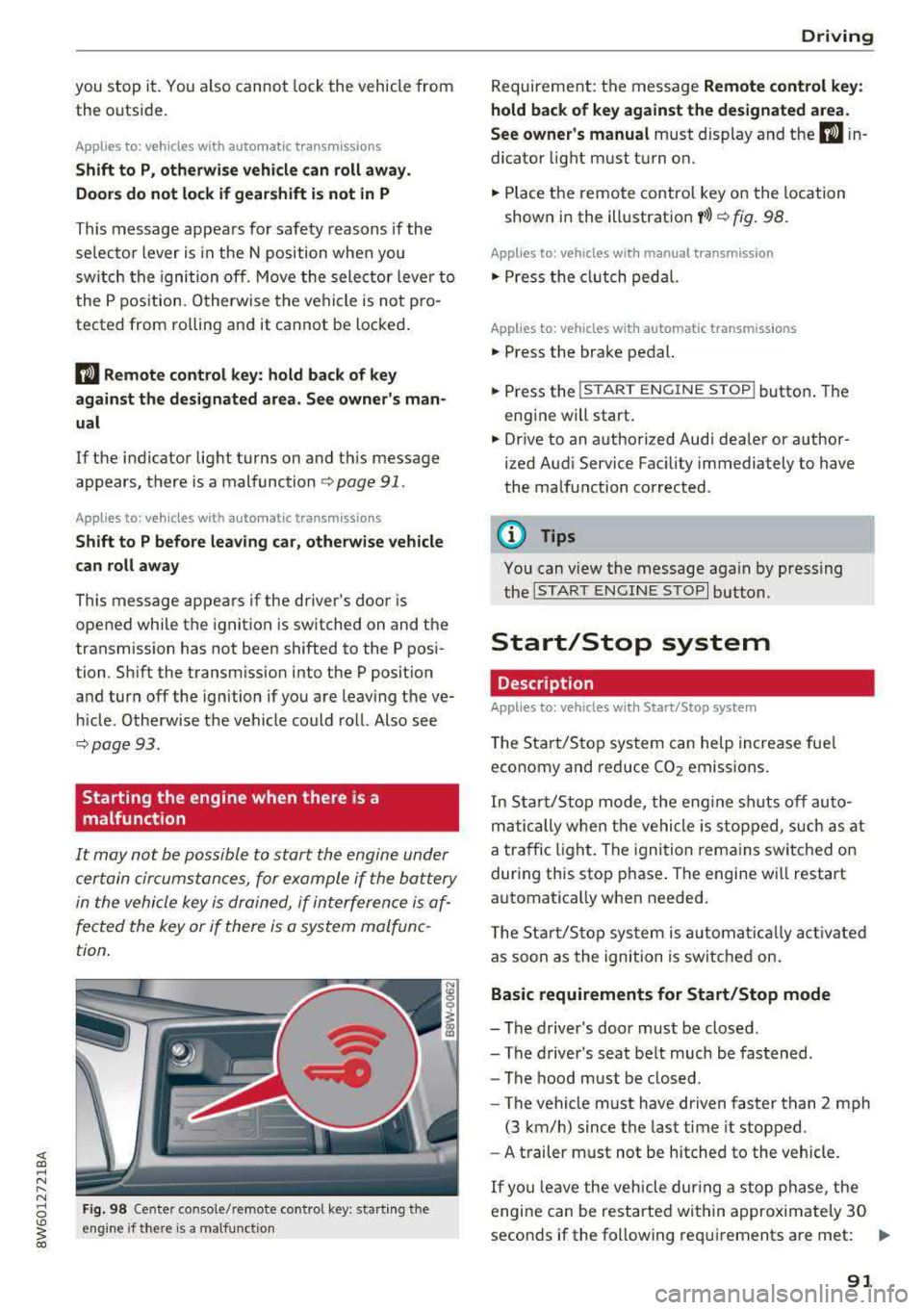
Fig. 98 Cente r console/ remote contro l key: starting t he
eng ine if there is a malfunc tion
Driving
Requirement: the message Remote control key:
hold back of key against the designated area .
See owner's manual
must display and the DJ i n
dicator light must turn on.
.,. Place the remote control key on the location
shown in the illustration
y >l) c::> fig . 98.
Applies to: vehicles with manual transmission
.,. Press the clutch pedal.
Applies to: vehicles with automatic transmissions
• Press the brake pedal.
.. Press the !START ENGINE STOP ! button. The
engine will start.
.,. Drive to an authorized Audi dea ler or author
ized Aud i Service Facility immediately to have
the malfunction corrected.
@ Tips
You can view the message again by pressing
the
I S TART ENGINE STOP I button.
Start/Stop system
Description
Applies to: vehicles with Start/Stop system
The Start/Stop system can help increase fue l
economy and reduce CO2 emissions.
In Sta rt/Stop mode, the engine shuts off auto
matically when the vehicle is stopped, such as at
a traffic light. The ignition remains switched on
during this stop phase . The engine wi ll restart
automatica lly when needed .
Th e Start/Stop system is a utomaticall y activated
as soon as the ignition is switched on.
Basic requirements for Start/Stop mode
-The driver's door must be closed .
-The driver's seat belt much be fastened.
- The hood must be closed.
- The vehicle must have driven faster than
2 mph
(3 km/h) since the last time it stopped .
- A trailer must not be hitched to the vehicle.
If you leave the vehicle during a stop phase, the
engine can be restarted within approximately 30
seconds if the following requi rements are met:
IJ>
91
Page 95 of 409
@j indicator light appears in the instrument clus
ter disp lay, the engine will not be stopped, for
examp le in the following situations:
- T he eng ine has not reached the minimum re
quired temperature for Start/Stop mode.
- T he interior temperature selected by the cli-
mate contro l system has not been reached .
- T he outs ide temperature is ext remely h igh/low.
- The windshield is being defrosted.
- The neck heating* is turned on .
- The vehicle battery charge level is too low.
- The steering wheel is turned at a sharp angle or is moving .
- After engaging the reverse gear.
- On sharp inclines.
- At high altitudes .
Engine automatically restarts
The standard Start/Stop mode will be canceled
during a stop phase in the follow ing s ituations .
The engine resta rts without any action by the
driver.
- The vehicle rolls , for example while on a slope.
- The interior temperature differs from the tem-
perature selected in the A/C system .
- The windshield is being defrosted.
- The brake pedal is pressed several times in a
row.
- The vehicle battery charge level is too low .
- Power consumption is high.
The engine can turn off again when the condi
tions for Start/Stop mode are met.
Ignition is switched off automatically
To prevent the vehicle battery from draining, the
ignition will switch off automat ically under the
following conditions :
- The Start/Stop system has stopped the engine .
- The vehicle is stationary.
- You left the ve hicle and the engine was not re-
started within approximate ly 30 seconds .
If th is happens, you w ill see the message
Igni
<( ~ tion turns off automatically in the instrument
~ cluster and the activated low beams are replaced N
8 by the parking light. The parking lights will \0
3
switch off after approximately 30 minutes or
when you lock the vehicle .
T he ign ition also switches off when you lock the
vehicle from the outside during a stop phase.
If the Start/Stop system has not turned off the
engine or if you have switched the Start/Stop sys
tem off manually, the ignition w ill no t be auto
matically sw itched off and the eng ine will contin
ue to
run ¢& .
A WARNING
To reduce the risk of poisoning, never allow
the engine to run in confined spaces.
(D Tips
Applies to: vehicles with automatic transmissions
- If you leave the vehicle with the 0/5 or R se
lector lever position engaged, the parking
brake is automatically set.
- If you select the D or N selector lever posi
tion after shifting into reverse, the vehicle
must be driven faster than 6 mph (10 km/h)
in order for the engine to switch off again .
Manually switching the Start/Stop system
off/on
Applies to: veh icles w ith Start/Stop system
If you do not wish to use the system, you can
switch it off manually.
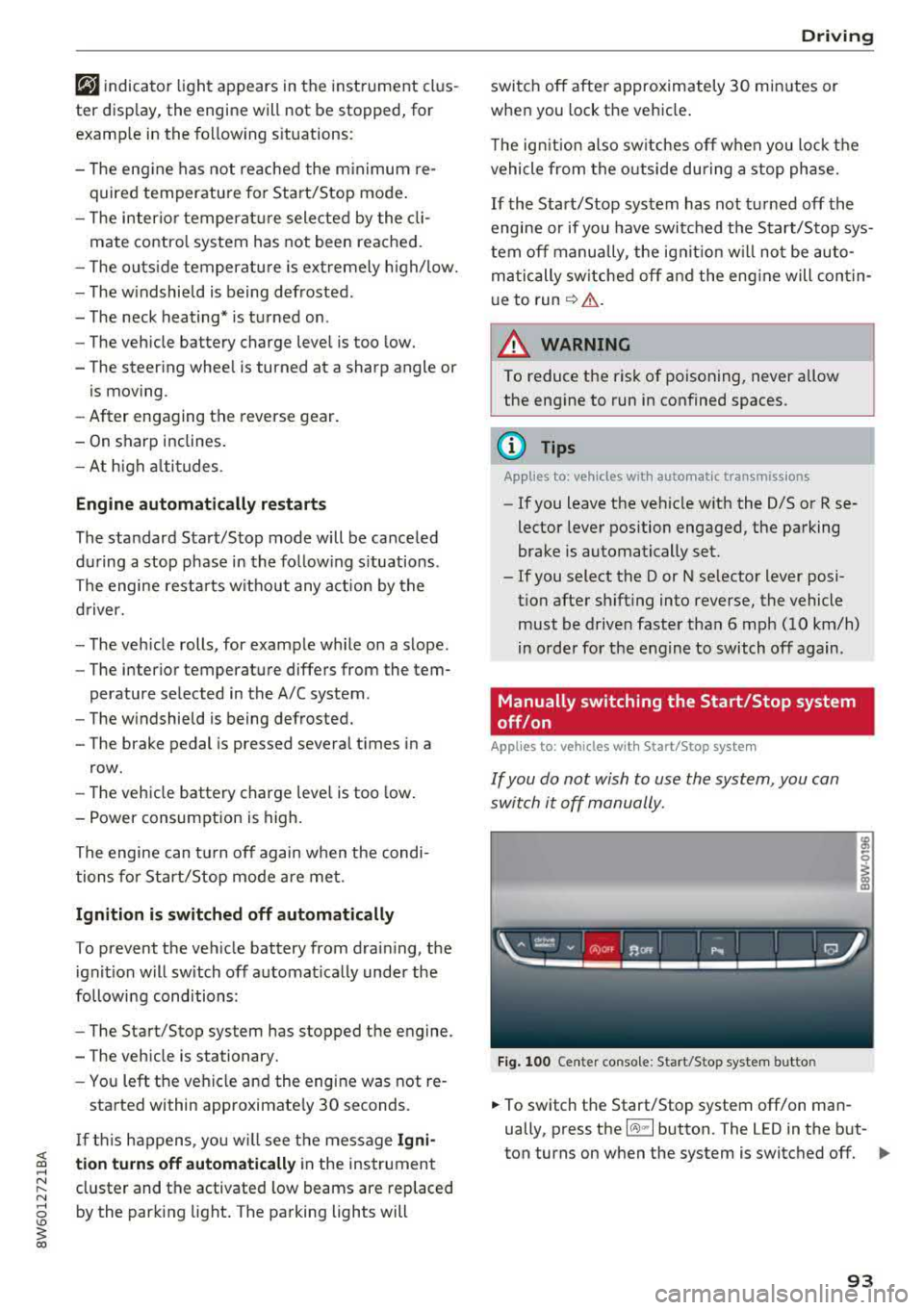
Fig. 100 Center co nsole: Start/Stop system butto n
-
.,. To switch the Start/Stop system off/on man
ually, press the
l (A) ml button. The LED in the but
ton turns on when the system is switched off.
Ill-
93
Page 98 of 409
Driving
release automatically until the wheels build up
enough driving force .
Starting on hills with hill hold assist
Hill hold ass ist makes it eas ier to start on hills.
Requirement: the driver 's door must be closed
and the eng ine must be running .
.,. To activate hill hold assist, press and hold the
brake pedal for several seconds. The vehicle
must be in an uph ill direction of travel.
After releasing the brake pedal, the braking pow
er is maintained for a brief moment
c;, .&. to pre
vent the vehicle from rolling back when starting. During this time, you can eas ily begin to move
your veh icle .
.&_ WARNING
-If you do not begin driving immediately or
the engine stalls after releas ing the b rake
pedal, your vehicle may begin to roll back
ward. Press the brake pedal or set the park
ing brake immediate ly.
- The intelligent technology of hill hold assist
cannot overcome the limitations imposed by
natural physical laws. The increased comfort
offered by hill hold assist should not cause
you to take safety risks.
-Hill hold assist cannot hold the vehicle in
place on all h ills (for example, if the ground
is slippery or icy).
-To reduce the risk of an accident, always make sure the vehicle is situated safely
wh ile stat ionary.
Automatic transmission
Introduction
Applies to: vehicles with automatic transmissions
.
The aut omat ic transmission is controlled elec
tronica lly. The transmission shifts up or down au
tomatically depending on which drive prog ram is
selected.
When a
moderate driving style is used, the
transmission se lects the most economical driving
mode. The transmission upshifts at a lower RPM
96
and downshifts at a higher RPM to improve fue l
effic iency.
The transmission switches to a sporty mode after
a kick-down or when the driver uses a
sporty
driving style
characterized by quick accelerator
pedal movements, heavy acceleration, frequent
changes in speed and traveling at the maximum
speed .
If desired, the driver can also select the gears
manually (tiptronic mode) c:;, page 99.
S tronic transmission
The S tron ic is a dual-clutch transmission. Power
i s transferred using two clutches that work inde
pendently from one another. They replace the
torque converter used in conventional automatic
transmissions and allow the vehicle to accelerate
without a noticeable interruption in traction .
tiptronic transmission
In the tiptronic transmission, power is transfer
red by a torque converter.
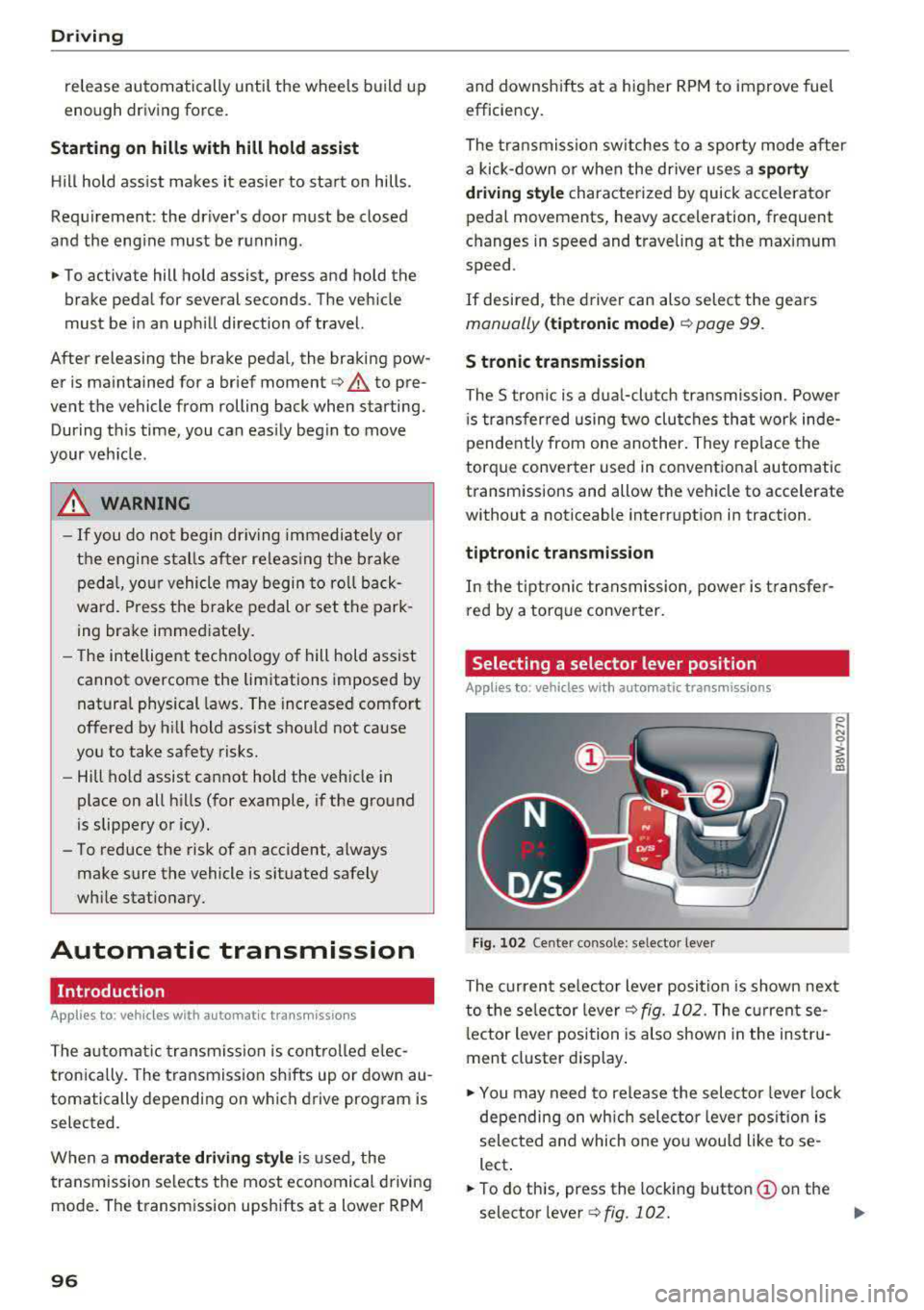
Selecting a selector lever position
Applies to: vehicles with auto matic transmissions
Fig. 102 Cente r console: se lector lever
The current se lecto r lever position is shown next
to the selector lever
c:;, fig. 102 . The current se
l ector lever position is also shown in the instru
ment cluster display .
.,. You may need to release the selector lever lock
depending on wh ich selector lever position is
selected and which one you would like to se
lect .
.,. To do this, press the locking button (!) on the
selector
l ever ¢fig .102. ..,_
Page 99 of 409
<( a, .... N ,....
N .... 0 \0
3 a,
~ To engage the nearest selector lever position,
move the selector lever forward/back until you
feel the first pressure point. The selector lever
will return to its original position.
~ To skip over one selector lever position, move
the selector lever past the pressure point into
the desired position. The selector lever will re
turn to its original position.
For example, you can skip over the N position if
you would like to go directly from D into R .
Selector lever lock
The selector lever lock prevents you from select
ing a position unintentionally, causing the vehicle
to roll. When engaging some selector lever posi
tions, you must press the locking button
@on
the selector lever and/or press the brake pedal
¢fig. 102 .
You must press the brake pedal to engage a se
lector lever position when the engine is running
and the vehicle is stationary.
You do not have to press the brake pedal if you
shift from D to R within one second . This allows
you to "rock" the vehicle to free it when it is
stuck .
P - Park
This selector lever position prevents the vehicle
from rolling. Only shift into park when the vehi
cle is
stationary ¢.&, . To select the P selector lev
er position, press the P button @on the selector
lever ¢ fig. 102 . P appears next to the selector
lever .
Applies to vehicles w ith S tronic transmission:
the parking lock can only be released when the
ignition is switched on and the brake pedal is
pressed . To release the parking lock, press the
brake pedal, press the locking button
(Don the
selector lever and select the desired position
¢fig. 102. The engine must also be started to
engage the D or R selector lever position.
Ap plies to vehi cles w ith tiptron ic tra nsmiss io n:
the parking lock can only be released when the
engine is running and the brake pedal is pressed .
To release the parking lock, press the brake ped-
Driving
al, press the locking button (Don the selector
lever and select the desired position¢
fig. 102.
P engages automatically if you switch the engine
off while the selector lever is in D, E, S, R or man
ual mode.
If you switch the engine off when the N selector
lever position is selected, the transmission re
mains in N for approximately 30 minutes and
then Pis engaged. The vehicle is not secured
from rolling in the N selector lever position, so
you need to set the parking
brake© ¢ page 94.
You must use the parking lock emergency release
before towing the vehicle
¢page 102.
R- Reverse
The reverse gear is engaged in this position . Only
select reverse gear when the vehicle is stationary
and the engine is running at idle
speed¢ .&,. To
engage the R selector lever position, press the
brake pedal, press the locking button
(D on the
selector lever and select the R position
¢ fig . 102.
A confirmation tone will sound when the reverse
gear is engaged.
N - Neutral (idle)
The transmission is in idle in this position. To en
gage the N selector lever position, press the lock
ing button
(Don the selector lever and shift into
the N position
¢fig. 102.
If you switch the engine off when the N selector
lever position is selected, the transmission re
mains in N for approximately 30 minutes and
then Pis engaged.
You cannot select the N position when the igni
tion is switched off. When driving through an au
tomatic car wash, first select the N position and
then turn the engine off.
For safety reasons, the vehicle cannot be locked
when the transmission is in the N position.
DIS -Driving forward
When the transmission is in the D/S position, it
can be operated either in the normal D mode or
in the S sport mode. Move the selector lever back
.,.
97
Page 100 of 409
Driving
to engage the S sport mode. You can only select
the S selector lever position when the D or E posi
tion is selected. To select the Dor
E position
again when S is engaged, move the selector lever
back ¢,& . To shift from N to D when traveling at
speeds below
1 mph (2 km/h), press the brake
pedal and shift into the D
position ¢,& .
In the normal mode D, the transmission auto
matically selects the suitable gear ratio. It de
pends on engine load, vehicle speed and driving
style .
Select the
sport mode S for sporty driving. The
vehicle makes full use of the engine's power.
Shifting may become noticeable when accelerat
ing.
The S selector lever position engages automati cally when you select the
dynamic mode in drive
select* .
A WARNING
Read and follow all WARNINGS.
- The vehicle can roll even if the ignition is
switched off .
- Power is still transmitted to the wheels
when the engine is running at idle. To pre
vent the vehicle from "creeping", you must keep your foot on the brake in all selector
lever positions (except P and N) when the
engine is running.
- Before opening the hood, select the P selec
tor lever position and set the parking brake.
This reduces the risk of an accident. Always
read and follow the applicable warnings
¢ page 330, Working in the engine com
partment.
(D Tips
If
you accidentally select N while driving, take
your foot off the accelerator pedal and wait
for the engine to slow down to idle before se
lecting Dor S.
98
· Driving tips
App lies to: vehicles with automatic transmissions
Starting the engine
.,. The P or N position must be selected .
Starting from a stop
.,. Press and hold the brake pedal.
.,. Start the engine¢ page 89.
.,. Press the locking button (Don the selector lev
er and select the
D, E, Sor R position
¢ page 96 .
.,. Wait a moment until the transmission shifts.
You will notice a slight movement when the
gear engages .
.,. Release the brake pedal and press the accelera-
tor
pedal ¢ _A.
Various convenience functions are available for
starting on hills
¢ page 95.
Stopping temporarily
.,. Press the brake pedal to stop the vehicle, for
example at a traffic light . Do not press the ac
celerator pedal when doing this.
.,. To prevent the vehicle from rolling when you
start driving, set the parking brake when stop
ping on steep
hills ¢ _A.
.,. The parking brake will release automatically
and the vehicle will start moving once you press
the accelerator pedal.
Stopping/parking
If the selector lever is not in the P position when
you open the driver's door, the vehicle could roll.
.,. Press and hold the brake pedal ¢_& .
.,. Set the parking brake .
.,. To select the P selector lever position, press the
P button
@ on the selector lever ¢ page 96,
fig. 102.
Under certain conditions, such as driving in the
mountains or when towing a trailer, it may be
helpful to switch to manual mode temporarily
and shift
manually to adapt to the driving condi
tions
¢ page 99.
On hills, activate the parking brake first and then
shift into the P
position ¢ page 94. This prevents ..,.
Page 102 of 409
Driving
"'T o switch tiptronic mode off, push the se lector
lever back into the D/S position.
Shifting with th e shift paddle s
You can operate the shift padd les in the D/S or M
selector lever posit ions.
"' To sh ift up a gear, tap the sh ift paddle 0
~ fig . 104.
"'T o shift down a gea r, tap the 0 sh ift paddle.
"'T o engage the lowest gear, ho ld the 0 shift
padd le.
"' If you do not press a shift button within a short
time whi le in the D/S position, the transmission
will return to automatic mode. To keep shifting
us ing the shift paddles, move the selector lever
to the right out of the D/S position.
"' When you want to shift out of tiptronic mode,
press and hold the
0 shift paddle for a longer
per iod of t i me or move the se lector lever back
and release it.
The transm ission automatically shifts up or down
before critical engine speed is reached .
The transm ission only allows manual shifting
when the engine speed is within the permitted
range.
@ Tips
- If you shift to the next lowest gear, the
transmission will only shift if the engine w ill
not be over-rewed .
- With kick-down, the transmission shifts to a
lower gear, depending on vehicle speed and
engine speed.
- tiptronic does not work if the transmiss ion
i s running in emergency mode.
Kick-down
A pp lies to: ve hicles w ith a utomat ic tra nsmi ssio ns
Kick-down enables maximum acceleration.
When you press the accele rator peda l down be
yond the resistance point, the automatic trans
miss ion downshifts into a lower gear and the en
g ine utilizes its full power, depending on vehicle
speed and engine RPM. It shifts up into the next
100
higher gear once the maximum specified engine
RPM is reached.
A WARNING
P lease note that the whee ls cou ld spin on
slick or slippery roads when kick-down is ac
tive.
Launch control program
App lies to : vehicles wi th S tron ic transmiss ion
-
The launch control program provides the best
possible acceleration when starting from a stop .
Requirement: the engine must be at operating
temperature and the steering wheel must not be
turned.
"' Deactivate the Star t/Stop system* ~ page 93.
T he LED in the l(A) "'I button turns on .
"'With the engine running, press the ,...
I .I' -
, O ..,...,,. F=F I but
ton
brief ly ~ page 152. The . indicator light
turns on and the message
Stabil ization cont rol
( E SC) : sport. Warning ! Re st ri ct ed stab ility
ap
pears in the instrument cluster display .
"' Pull the selector lever back out of the D/S pos i
tion briefly to select the S position or se lect the
D ynamic driving mode i n drive se lect*
~ page 139 .
"'Press the brake pedal firm ly with yo ur left foot
and hold it all the way down for at least one
second.
"' At the same time, press the gas peda l all the
way down with your right foot until the eng ine
reaches and stays at a high RPM level.
"' Remove your foot from the brake pedal w ith in
five
seconds ~,& .
A WARNING
-Always adapt your driving to the t raff ic flow.
- Only use the Launch cont rol program when
road and traffic condit ions allow it and oth
er d rivers will not be endange red or both
ered by your driving and the veh icle's accel
erat ion .
- Please note that the d rive wheels can spin
and the vehicle can b reak away when spo rt
mode is switched on, especially when the
road is slippery .
Page 109 of 409
Assistance systems Electronic speed limiter
Your vehicle may be factory equipped with t ires
that are rated for a maximum speed of 130 mph (210 km/h). This is less than the maximum speed
of your vehicle. To reduce the risk of sudden tire
failure and loss of control if the vehicle is operat
ed at excessive speeds, your vehicle also has an
electronic speed limiter . The electronic speed
limiter prevents your vehicle from going faster
than the t ire speed rating. For mo re information
~page 341.
If the engine control unit receives faulty vehicle
road speed s ignals, the Malfunction Indicator
L amp
(MIL) ¢..ij will illuminate. If this occurs,
contact the nearest autho rized Audi dealer for
assistance.
_& WARNING
Always observe the posted speed limits and
adjust your speed to suit prevailing road, traf
fic and weather conditions. Never drive your
vehicle faster than the max imum speed rating
of the tires installed.
Speed warning system
Introduction
Applies to: vehicles with speed warning system
The speed warning system helps you to stay be
low a specified maximum speed that can be set,
changed or deleted in the Infotainment system.
-
The speed warning system warns you if you are
exceeding the maximum speed that you have set .
A wa rning tone will sound as soo n as yo ur speed
exceeds the s tored value sligh tly. The
[01 (USA
models)/
[01 (Canada models) indicator light
and a message appear in the instrument cluster
display at the same time. The
HI] / [0] indicator
light and the message turn off if the speed falls
back below the stored maximum speed.
Setting a threshold is recommended if you would l ike to be reminded when yo u reach a certain
maximum speed. Situations where you may want
to do so include driving in a country with a gen er-
Ass is ta nce syst ems
al speed limit or if there is a specified maximum
speed for winter tires.
Setting the warning threshold
Se lect in the Infotainment system: !MENU I b ut
ton
> Vehi cle > left contro l button > Driver a ss is
tance > S peed w arning > Manual.
(j) Tips
Regardless of t he speed warning system, you
shou ld always mon itor your speed using the
speedometer and make s ure yo u are fo llow ing
the lega l speed limit .
Cruise control system
Switching on
Applies to: vehicles with cruise control system
The cruise control system makes it possible to
drive at a constant speed starting at
15 mph
(20 km/h) .
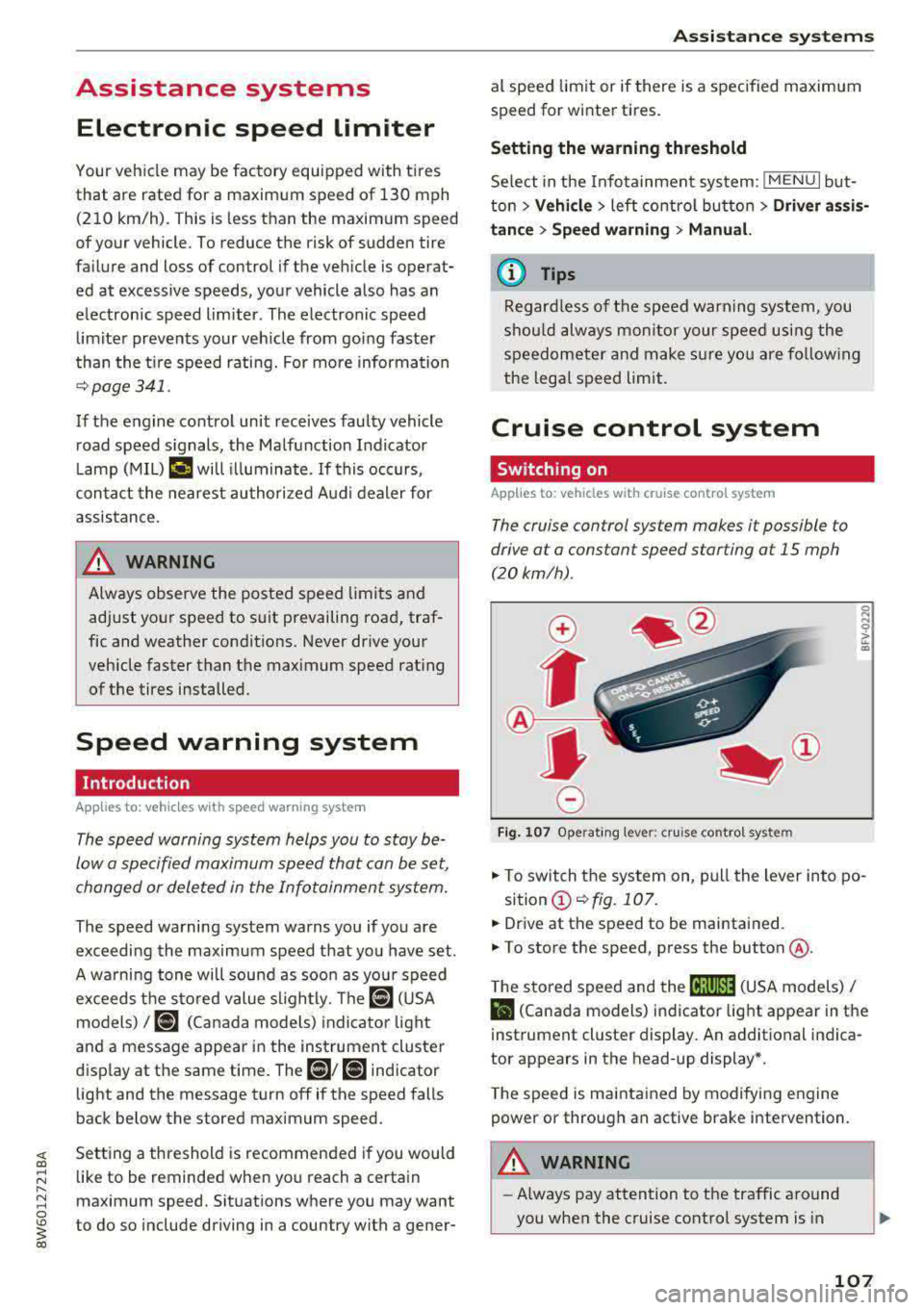
0
f
~
0
Fig . 1 07 Operat ing lever: cruise control system
~
"' 0 > u. m
.. To switch the system on, pull the lever into po-
sition
(D ~ fig. 107 .
.. Dr ive at the speed to be maintained.
.. To store the speed, press the button @.
T he stored speed and the
cij;jl)~14 (USA models) /
Bl (Canada models) indicator light appear in the
instrument cluster display . An additional ind ica
tor appears in the head-up display *.
T he speed is maintained by modifying engine
power or through an active brake intervention.
A WARNING
-~
- Always pay attention to the traffic around
you when the cruise control system is in
107
Page 110 of 409
Ass is tan ce sys tems
operation. You are always responsible for
your speed and the distance between your
vehicle and other vehicles.
- For safety reasons, cruise control should not
be used in the city, in stop-and-go traffic, on
winding roads and when road condit ions are
poor (such as ice, fog, gravel, heavy rain and
hydroplaning), because th is increases the
risk of an accide nt.
- Switch the cru ise control off temporar ily
when driving in turn ing lanes, h ighway exits
o r in construction zones.
- Please note that u nconsciously "resting"
your foot on the accelerator pedal prevents
the cruise control from braking. This is be
ca use p ressing the acce le rato r pedal
over
rides the cruise contro l system.
- If a brake system ma lf u nction such as over
heating occu rs when the c ruise control sys
tem is switched on, the braking function in
the system may be switched off . The rest of
the cruise control system functions remain
act ive as long as the
tij;jl)~i# (USA models) /
ii (Canada models) indicator light is on.
(D Note
Before driving downhill a long distance on a
steep hill, decrease your speed and select a
lower gear. Th is makes use of the eng ine
braking effect and relieves the brakes.
(D Tips
- Applies to: vehicles with manual transmis
sion: The set speed can on ly be reached if
the engaged gear permits it so that the en
gine is not over-rewed and will run smooth ly. Therefore, sh ift into the higher or lower
gear in a timely manner .
- The brake lights turn on when the brakes are applied automatically.
Changing the speed
Applies to: vehicle s with cruise control system
.. To inc rease/decrease the speed in 1 mph (1
km/ h) increments, br iefly
t ap the leve r toward
0 10 q page 107, fig. 107 t o the first level.
108
.. To increase/decrease the speed in 5 mph (10
km/h) increments, briefly
tap the lever toward
0 10 to the second level.
.. To increase or decrease the speed qu ickly, hold
the lever toward 0 10 to the first or second
level unt il the desired speed is reached .
· Overriding the speed
Applies to: vehicles with cruise control system
You can press the acce lerator pedal to increase
you r speed, fo r example if you want to pass
someone . The speed you set earl ie r will resume
as soon as you release the acce lerato r pedal.
However, if you are exceeding the stored speed
by a considerable amount fo r a long time, the
cruise contro l system will tempo rar ily switch off.
The
(ij;ji)~i# (USA mode ls) !ill (Canada mode ls) in
dicator light in the inst rument cluste r turns
off
and the stored speed is maintained.
Preselecting a speed
Applies to: vehicles with cruise control system
You can pre-select your desired speed when the
vehicle is stationary.
.. Switch the ignit io n on.
.. Pull the lever i nto pos ition @ q page 10 7,
fig. 107 .
.. To increase or decrease the speed, tap the lever
toward
0 10 .
This function makes it possible, fo r example, to
save the speed you want before driving on the
highway. Once you are on the expressway, acti
vate the cruise contro l system by pulling the lev
er into
position @.
Switching off
Applies to: vehicles with cruise control system
Deactiva ting temporarily
.. Press the brake pedal, or
.. Press the lever toward @ (not locked into
place)
q page 107, fig . 107 .