bluetooth AUDI A5 COUPE 2018 Owner's Manual
[x] Cancel search | Manufacturer: AUDI, Model Year: 2018, Model line: A5 COUPE, Model: AUDI A5 COUPE 2018Pages: 409, PDF Size: 67.63 MB
Page 253 of 409
System settings
Short dialog : when this function is switched on
~ ' a shorter form of the prompts is used.
Command during voice output*1>: this function
is switched on at the factory. When this function
is switched
on~' you can say new commands
during announcements . You do not need to wait
for the signal tone (beep) during an announce
ment. When the function is switched off
0, you
need to wait for the signal tone (beep) to say a
new command.
Volume: you can adjust the volume of the
prompts by turning the control knob.
Individual speech training (on ly when the vehi
cle is stationary): you can adapt the voice recog
n ition system to yo ur voice or pronunciat ion in
order to improve the system's ability to recognize
your speech. Individual train ing is comprised of
20 speech entries that consist of commands and
sequences of numbers . You can delete the pro
grammed voice tra ining w ith the
Reset individu·
al speech training
function.
Display brightness
You can adjust the brightness of the Infotain
ment system display by turning the control knob .
Factory settings
The following functions can be reset to the facto
ry default settings:
-Sound settings
- Radio
- Media settings
- Jukebox*
- Directory
- Telephone
- Bluetooth and Wi-Fi *
- Navigation settings*
- Navigation and online memory*
- Voice recognition system *
- Shortcut keys
- Message settings*
- Apps*
- Tool tips
1
> Please note that this func tion is not available in Cab rio
lets.
252
- Audi connect*
- Audi smartphone interface*
You can select the desired functions individually
or a ll at once with the option
Select all entries .
Select and confirm Restore factory settings.
(D Tips
Make sure that not only the settings were de
leted but also the stored data, if applicable.
Connection manager
Introduction
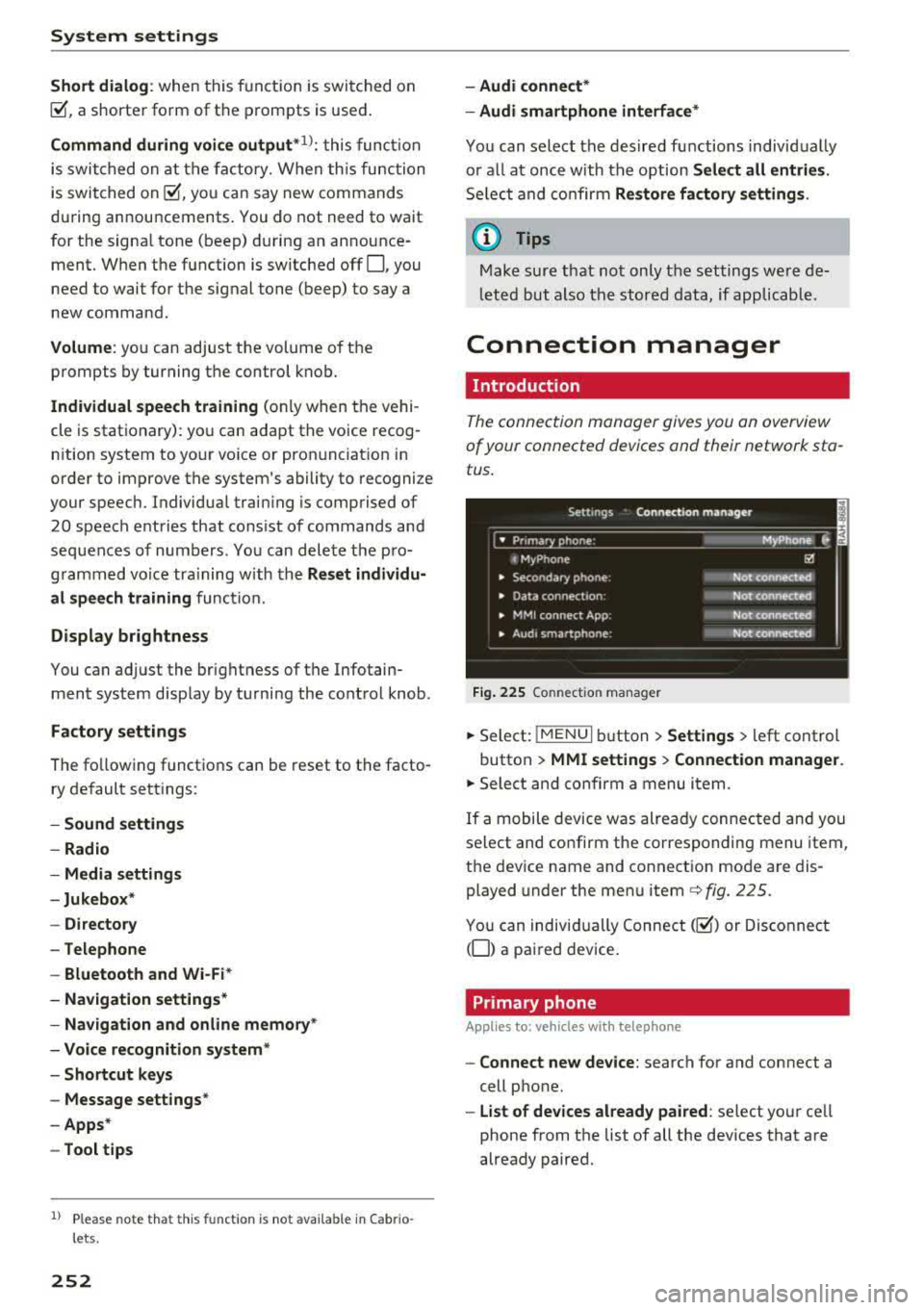
The connection manager gives you an overview
of your connected devices and their network sta
tus .
Fig. 225 Connection manager
.,. Select: !MENUI button> Settings > left control
button >
MMI settings > Connection manager.
.,. Select and confirm a menu item.
If a mobile device was already connected and you
select and confirm the corresponding menu item,
the device name and connection mode are dis
played under the menu
item¢ fig. 225.
You can individually Connect(~) or Disconnect
(0) a paired device.
Primary phone
App lies to: vehicles wi th telepho ne
- Connect new device: search for and connect a
cell phone.
- List of devices already paired : select your cell
phone from the list of all the dev ices that are
already paired.
Page 254 of 409
<( a, ..... N ,....
N ..... 0 \0
3 a,
Secondary phone
Applies to: vehicles with telephone
-Connect new device: search for and connect a
cell phone.
- List of devices already paired: select your cell
phone from the list of all the devices that are
already paired.
Data connection
Applies to vehicles with Audi connect (Infotainment)
- The data connection is made using the embed
ded SIM card
ll ¢ page 191. You do not need to
adjust any additional settings.
Always follow the information found in
¢(D in
Wi-Fi hotspot on page 197.
MMI connect app
Applies to vehicles with Aud i connect (Infotainment)
Requirement: the Audi MMI connect app must
be installed and open on your mobile device.
- Connect new device: search for and connect a
mobile device (such as a smartphone).
- List of devices already paired: select your mo
bile device from the list of all the devices that
are already paired.
Audio player
Applies to vehicles with Bluetoot h or Wi-F i a udio player
Bluetooth player*
Requirement : the Bluetooth function and visibili
ty must be switched on in the MMI
¢ page 254
and on the cell phone.
-Connect new device: press the control knob.
Select
Bluetooth audio player . Search for and
connect a mobile device.
- List of devices already paired: select a Blue
tooth device from the list of all the devices that
are already paired.
l) S IM card inst alle d in the v ehicle at th e fac to ry .
System settings
Wi-Fi audio player*
Requirement: the Wi-Fi hotspot on the MMI
¢
page 197 and on your cell phone must be
switched on.
- Connect new device: press the control knob.
Search for and connect a Wi-Fi capable device.
-Disconnect Wi-Fi audio player: deactivate the
Wi-Fi on your Wi-Fi capable device. The device
will be automatically removed from the list.
(Q) Note
Always follow the information found in ¢Q) in
Wi-Fi hotspot on page 197.
Directory
Applies to: vehicles with telephone
Display contacts from a cell phone (or an addi
tional cell phone).
Requirement: no cell phones can be connected to
the MMI using the
Handsfree profile.
-Connect new device: search for and connect a
new cell phone .
-List of devices already paired : select your cell
phone from the list of all the cell phones that
are already paired .
Audi smartphone
Applies to: vehicles with Aud i smartphone interface
-Connect your cell phone to the Audi music in
terface¢ page 23 7 using a USB adapter
¢page 236, fig. 217 .
-Select your cell phone from the list of cell
phones that have already been connected.
Additional options
Depending on the selected function, you can use
the right control button to access the available
additional options in the connection manager.
.,.
253
Page 255 of 409
System settings
Delete Bluetooth device*
The selected cell phone/mobile device is discon
nected from the MMI and is removed from the
list of all devices that are already paired .
Show Bluetooth profiles*
You can Connect or Disconnect the Handsfree ,
Messages *, Dire ctory/contacts
and Bluetooth
audio player
profiles separately.
Bluetooth settings*
- Bluetooth :
select and confirm a setting for the
B luetooth connection v is ibility. Select
Visible
for the MMI to be visible to other dev ices. Se
lect
Invisible for the MMI to not be vis ible to
other devices. Howeve r, it is still possib le to es
tablish a Bluetooth connection with paired de
vic es when the visibility is switched off. Select
Off to turn visibility off. Then a B luetooth con
nection is not possible .
-Bluetooth audio player: when this function is
switched
on~' the Bluetooth audio player is
available as a source in the
Media menu .
-Bluetooth name : the MMI Bluetooth name (for
example ,,AUDI MM I
2016") is displayed and
can be changed .
Online settings*
- Data usage counter :
the amount of data pack
ets that are sent and received through the MMI
is disp layed. You can reset the data usage infor
mation to zero using the
Reset data counter
option.
-Network status : the mobile network provider
for data service as well as the network status
are displayed .
Wi-Fi settings*
See <=> page 19 7, Wi-Fi hotspot.
Storing as a default telephone
Applies to: veh icles with telephone
Requirement: a cell phone must be connected to
the MMI
<=> page 178.
As soon as the cell phone is in range and the
Bluetooth function on the cell phone and in the
MMI is swit ched on, this cell phone is given pr ior
ity ove r the other Bluetooth devices and is con-
254
nected directly to the MMI. The connected ce ll
phone is displayed first in the device list .
Network settings*
- Login :
you can chose an automatic log in to
your cell phone service provider's network, or
you can choose a
manual login from the list of
avai lab le networks .
-Network selection: available networks in the
present location can be selected under network
selection . This function is on ly availab le for the
Manual l ogin setting.
Apple CarPlay sound settings/ Android Auto
sound settings
Applies to: vehicles with Audi sma rtphone interface
See ~page255.
About Apple CarPlay/ About Android Auto
Applies to: vehicles with Audi smartphone interface
Here you wi ll find legal information regarding
the use of Apple CarPlay or Andro id Auto and in
formation about device-specific data exchange.
Delete CarPlay device/Delete Android Auto
device
Applies to: vehicles with Audi smartphone interface
Requirement: your cell phone must not be con
nected to the Audi music interface with a USB
adapter .
Se lect:
Audi smartphone > a device from the list
> r ight control button.
T o remove your cell phone from the list, select
and confirm
Delete CarPlay device or Delete An
droid Auto device .
System update
"Select: !M ENUI button> Settings > left control
button >
System maintenance .
- System update:
slide the storage device with
the update data into the appropriate drive
<=> page 231 . Select and confirm the dr ive>
Start update . The length of the process de
pends on the size of the update .
-Reset driver installation: the selected media
dr iver package is reset to the settings at the
time of delivery.
Page 394 of 409
<( a, .... N ,....
N .... 0 \0
3 a,
A
A/C MAX (button) . . . . . . . . . . . . . . . . . . . . . . 83
A/C (button) . . . . . . . . . . . . . . . . . . . . . . . . . . 82
ABS . . . . . . . . . . . . . . . . . . . . . . . . . . . . . . . . 151
Accessories 75,391
Active lane assist Cleaning the camera area ......... ... .
also refer to Audi active lane assist .. .. .
Active rollover protection system ... .... .
Adapt ive cr uise control ............ .... .
Cleaning the sensors ................ .
Distance indicator and distance warning .
Messages .. .. ................ ..... .
Predictive control .
.......... .. .. .... .
Traffic jam assist ............. .. .... .
Ad Blue
. . .. .. .. ................ ..... .
Messages
Additional accessories 363
130
265
113
363
123 123
120 121
326
326
391
Adjusting air distribution (automatic climate
control) . . . . . . . . . . . . . . . . . . . . . . . . . . . . . . 83
Adjusting the sound 255
Adjusting the temperature (automatic climate
control) . . . . . . . . . . . . . . . . . . . . . . . . . . . . . . 83
Advanced key
refer to Convenience key . . . . . . . . . . . . . . . 89
Airbag . ... .. .. ................ ..... . 277
Airbag system .. ..... ....... ...... 277,297
Advanced Airbag System components . . . 284
Care .. .. .. .. .. ............. .. .. .. . 292
Ch ildren . . . . . . . . . . . . . . . . . . . . . . . . . . . 304
Child restraints
Components (front airbags) ..... ..... .
Danger of fitting a child safety seat on the
front passenger seat .......... .. .... .
Disposal . .. .. .. ............. .. .. .. .
Front airbags ......... ..... ... . .
How do the front airbags work? ....... .
H ow many airbags does my vehicle have?
H ow the Advanced Airbag System compo-
nents work together .......... .. .. .. .
Important safety instructions on the knee
airbag system ................. ..... .
Indicator light ..................... .
K . b nee air ags .. ............... .. .... .
Monitoring . .. ............... .. .... .
PASSENGER AIR BAG light ....... .. .. .
Repairs .. .. .. ........ ..... ... ... .. . 304
284
278 292
282
287 284
286
295 289
293
289
289
292
Index
Safety instructions . . . . . . . . . . . . . . . . . . . 291
When must the system be inspected? . . . 289
Air pressure Tires · · · · · · · · · · · · · · · · ·
· · ....... .. .. 351
Alignment pin (changing the wheel) . . . . . . 368
All season tires . ... .. ................ . 357
All weather lights . . . . . . . . . . . . . . . . . . . . . . 61
All wheel drive Indicator light . . . . . . . . . . . . . . . . . . . . . . . 35
also refer to quattro . . . . . . . . . . . . . . . . . 154
AMI
refer to Audi music interface . . . . . . . 236, 237
Android Auto
refer to Aud i smartphone interface . . . . . 249
Anti -freeze
Windshield washer system . . . . . . . . . . . . 339
Anti- lock braking system
refer to ABS . . . . . . . . . . . . . . . . . . . . . . . . 151
Anti-Slip Regu lation
refer to ASR ... .. .................. .
Apple CarP lay
refer to Aud i smartphone interface ... ..
Arrow view
ASR
Audi active lane assist Messages
Audi connect emergency call and service ..
Online roadside assistance
.......... ..
Audi connect vehicle contro l ............
Parking location .. .................. .
Remote locking and unlocking ..... .. . .
Vehicle status report ............... . . 151
249 23
151
130
132
205
206
201
202
202
202
Audi connect (Infotainment) . . . . . . . . 191, 198
Data protection . . . . . . . . . . . . . . . . . . . . . 199
Services overview
' . . ................ .
Starting ...... .. .. ................ .
Audi drive select
. .. .. ............. .. ..
Audi Entertainment mobile ...... ... .. ..
Audi music interface . ................. .
Audi music stream
refer to Wi-F i .. .. .. ............... . .
Audio files
.. .... .. .. ............... ..
Audio player
Bluetooth audio player .............. .
Wi-Fi audio player . ................. .
Audio track 192
192
138
238
236
234
239
233
234
242
393